Syncing Controlled Inputs with External State in React (Without useEffect or setState-in-render)

Syncing Controlled Inputs with External State in React (Without useEffect or setState-in-render)

If you’ve ever built a numeric input in React that syncs with an external source (a database, a parent prop, a WebSocket), you’ve probably fought this battle:

  • User types → local state updates
  • External update arrives → you need to reflect it without blowing away what the user is mid-typing
  • useEffect to sync state feels hacky and fires at the wrong time
  • setState during render is a React warning waiting to happen

Here’s a pattern that solves all of this cleanly.

The Problem

Consider a time-editing input where the value comes from a prop (synced from a database), but the user can also type freely:

// ❌ The naive approach — breaks when prop updates mid-edit
function TimeInput({ value, onChange }: { value: number; onChange: (v: number) => void }) {
  const [display, setDisplay] = useState(value.toFixed(1));

  // This runs AFTER every render — causes flicker and double-render
  useEffect(() => {
    setDisplay(value.toFixed(1));
  }, [value]);

  return (
    <input
      value={display}
      onChange={(e) => setDisplay(e.target.value)}
      onBlur={(e) => onChange(parseFloat(e.target.value))}
    />
  );
}

Problems:

  • useEffect runs after render, causing a visible flicker when the prop changes
  • If the user is mid-edit, the effect stomps on their input
  • It’s two renders for every external update

Some people reach for refs to detect changes and call setState during render:

// ❌ setState during render — React warns about this
const prevRef = useRef(value);
if (prevRef.current !== value) {
  prevRef.current = value;
  setDisplay(value.toFixed(1)); // ⚠️ Setting state during render
}

This avoids the flicker, but React considers calling setState during render a side effect and it can cause subtle bugs in concurrent mode.

The Fix: Focus-Tracked Edit State

The key insight: you only need local state while the field is focused. When the user isn’t editing, just derive the display value directly from the prop.

// ✅ Clean pattern — no effects, no setState-in-render
function TimeInput({ value, onChange }: { value: number; onChange: (v: number) => void }) {
  // null = not editing; string = user is currently typing
  const [editValue, setEditValue] = useState<string | null>(null);

  // While focused: show what the user typed. Otherwise: show the prop.
  const display = editValue ?? value.toFixed(1);

  function handleBlur(raw: string) {
    setEditValue(null); // Exit edit mode → display reverts to prop
    const v = parseFloat(raw);
    if (!isNaN(v) && v !== value) {
      onChange(v);
    }
  }

  return (
    <input
      value={display}
      onChange={(e) => setEditValue(e.target.value)}
      onBlur={(e) => handleBlur(e.target.value)}
    />
  );
}

What this gives you:

Scenario Behavior
User types editValue holds the in-progress string
External prop updates (DB round-trip) display updates immediately if not focused
External prop updates while user is editing User’s input is preserved
User blurs with invalid input editValue clears, display reverts to prop

Real-World Example

Here’s how this looks for a clip timing editor that syncs with a backend:

export function ClipTimingEditor({ clip, videoRef, onClipAction }: ClipTimingEditorProps) {
  const [startEdit, setStartEdit] = useState<string | null>(null);
  const [endEdit, setEndEdit] = useState<string | null>(null);

  // When not editing: display is derived from the live prop (no stale state)
  const startDisplay = startEdit ?? clip.start_sec.toFixed(1);
  const endDisplay = endEdit ?? clip.end_sec.toFixed(1);

  function commitStart(raw: string) {
    setStartEdit(null); // Exit edit mode first
    const v = parseFloat(raw);
    if (isNaN(v)) return; // Revert gracefully — display falls back to prop
    const clamped = Math.max(0, Math.min(v, clip.end_sec - 0.5));
    if (clamped !== clip.start_sec) onClipAction(clip.id, { start_sec: clamped });
  }

  function commitEnd(raw: string) {
    setEndEdit(null);
    const v = parseFloat(raw);
    if (isNaN(v)) return;
    let clamped = Math.max(clip.start_sec + 0.5, v);
    if (videoRef.current?.duration) clamped = Math.min(clamped, videoRef.current.duration);
    if (clamped !== clip.end_sec) onClipAction(clip.id, { end_sec: clamped });
  }

  return (
    <div className="flex gap-2">
      <input
        type="number"
        value={startDisplay}
        onChange={(e) => setStartEdit(e.target.value)}
        onFocus={(e) => setStartEdit(e.target.value)}
        onBlur={(e) => commitStart(e.target.value)}
      />
      <input
        type="number"
        value={endDisplay}
        onChange={(e) => setEndEdit(e.target.value)}
        onFocus={(e) => setEndEdit(e.target.value)}
        onBlur={(e) => commitEnd(e.target.value)}
      />
    </div>
  );
}

When the backend confirms the update and sends back the new clip prop, the display updates instantly — unless the user is still editing, in which case their in-progress value is preserved.

Why Not Just Uncontrolled Inputs?

You could use defaultValue + a ref, but then you lose the ability to programmatically update the input when the prop changes (e.g., another user edits the same clip, or you undo). The focus-tracked pattern gives you controlled input behavior with zero extra effects.

Summary

  • null = derived mode: display comes from the prop directly
  • string = edit mode: display comes from local state while user types
  • onFocus → enter edit mode (seed with current display value)
  • onBlur → commit + exit edit mode
  • External prop changes reflect immediately when not focused — no effects needed

This pattern works anywhere you have controlled inputs that need to stay in sync with an external truth source without fighting the user while they’re mid-edit.

Have a different approach? Drop it in the comments — curious how others handle this.
Building a QR Code Scanner in Next.js with html5-qrcode (Camera + Image Upload)

Building a QR code scanner for the browser sounds straightforward. Then you try it and hit three problems fast:

  1. Camera access requires specific permissions handling
  2. The scanning library manipulates the DOM directly — React doesn’t like that
  3. Stopping the scanner at the wrong moment throws uncatchable errors

I built a QR Code Scanner with camera feed and image upload support using html5-qrcode. Here’s what I ran into and how I fixed each issue.

Choosing html5-qrcode

There are a few options for browser QR scanning:

  • jsQR — pure JS, manual camera loop, no built-in UI
  • ZXing — Java port, heavier bundle
  • html5-qrcode — handles camera, file scanning, and UI scaffolding out of the box

html5-qrcode won because it abstracts the camera permission flow and getUserMedia loop. Less code to own.

npm install html5-qrcode

Basic Architecture

Two scan modes: image upload and live camera. Both use the same Html5Qrcode instance but different methods.

import { Html5Qrcode } from "html5-qrcode";

// Image scanning
const scanner = new Html5Qrcode("container-id");
const result = await scanner.scanFile(file, true);

// Camera scanning
await scanner.start(
  { facingMode: "environment" },
  { fps: 10, qrbox: { width: 250, height: 250 } },
  (decoded) => { /* success */ },
  () => {}  // frame failure — ignore
);

Straightforward on paper. The DOM conflicts make it interesting.

Problem 1: React Can’t Remove DOM Nodes Owned by html5-qrcode

The first error: Node.removeChild: The node to be removed is not a child of this node.

Here’s what happens. You render the camera container conditionally:

{cameraActive && (
  <div id="qr-camera-feed" />
)}

html5-qrcode starts injecting <video>, <canvas>, and <div> elements inside #qr-camera-feed. Then when cameraActive becomes false, React tries to remove its version of #qr-camera-feed from the DOM — but the DOM no longer matches React’s virtual DOM because the library modified it.

The fix: never conditionally unmount the container. Give the library exclusive DOM ownership by keeping the element mounted and using CSS to hide it instead:

{/* Camera prompt — separate element, not inside the feed div */}
{!cameraActive && (
  <div onClick={startCamera} className="...prompt UI...">
    Click to start camera
  </div>
)}

{/* html5-qrcode owns this div entirely — no React children inside */}
<div
  id="qr-camera-feed"
  className={cameraActive ? "block" : "hidden"}
/>

Two key changes:

  1. The “Click to start camera” UI is a separate element — not a child of #qr-camera-feed
  2. The camera container is always mounted, just hidden with display: none when inactive

React never tries to remove nodes from inside the container, so no conflict.

Problem 2: “Cannot stop, scanner is not running”

The second error appeared when a QR code was detected. The success callback fired, which called stopCamera(), which called scanner.stop() — but the scanner was still in the middle of processing the frame.

The solution is a ref-based running flag:

const scannerRef = useRef<Html5Qrcode | null>(null);
const scannerRunningRef = useRef(false);

In startCamera, set the flag after scanner.start() resolves:

await scanner.start(
  { facingMode: "environment" },
  { fps: 10, qrbox: { width: 250, height: 250 } },
  (decoded) => {
    const parsed = parseQrContent(decoded);
    // Guard against double-stop
    if (scannerRunningRef.current) {
      scannerRunningRef.current = false;
      scanner.stop().then(() => {
        scanner.clear();
        scannerRef.current = null;
        setCameraActive(false);
        setResult(parsed);
      }).catch(() => {
        scannerRef.current = null;
        setCameraActive(false);
        setResult(parsed);
      });
    }
  },
  () => {}
);
scannerRunningRef.current = true;

And in stopCamera:

const stopCamera = useCallback(async () => {
  if (scannerRef.current && scannerRunningRef.current) {
    scannerRunningRef.current = false;
    try {
      await scannerRef.current.stop();
      scannerRef.current.clear();
    } catch {
      // Already stopped
    }
    scannerRef.current = null;
  }
  setCameraActive(false);
}, []);

The flag prevents double-stop from both the success callback and any manual “Stop Camera” click. Setting it to false before calling stop() means subsequent calls are no-ops.

Problem 3: Cleanup on Unmount

If the user navigates away while the camera is active, the scanner keeps running. The cleanup effect handles this:

useEffect(() => {
  return () => {
    if (scannerRef.current && scannerRunningRef.current) {
      scannerRunningRef.current = false;
      scannerRef.current.stop().then(() => {
        scannerRef.current?.clear();
        scannerRef.current = null;
      }).catch(() => {
        scannerRef.current = null;
      });
    }
  };
}, []);

The empty dependency array means this only runs on mount/unmount. Always async — stop() returns a Promise and we shouldn’t block cleanup.

SSR: html5-qrcode Is Browser-Only

html5-qrcode references navigator, window, and the DOM at import time. It crashes on the server.

// QrCodeScannerLoader.tsx
const QrCodeScanner = dynamic(
  () => import("./QrCodeScanner").then((mod) => mod.QrCodeScanner),
  { ssr: false }
);

ssr: false ensures the component only hydrates in the browser. The page wrapper (SEO content, schema markup) still renders server-side.

Image Upload Scanning

For the image upload mode, html5-qrcode provides scanFile():

const handleImageFile = useCallback(async (file: File) => {
  setScanning(true);
  try {
    const scanner = new Html5Qrcode("qr-scanner-hidden");
    const decoded = await scanner.scanFile(file, true);
    setResult(parseQrContent(decoded));
    scanner.clear();
  } catch {
    setError("No QR code found. Try a clearer image.");
  } finally {
    setScanning(false);
  }
}, []);

Note "qr-scanner-hidden" — a separate hidden div from the camera container. scanFile() also manipulates the DOM temporarily, so it gets its own isolated element:

<div id="qr-scanner-hidden" className="hidden" />

The true parameter in scanFile(file, true) enables verbose mode for better detection on low-quality images.

Parsing QR Content Types

Raw QR code strings follow format conventions. A WiFi QR code looks like:

WIFI:T:WPA;S:NetworkName;P:Password;;

A geo coordinate looks like:

geo:37.7749,-122.4194

Rather than showing users the raw string, parse it into structured data:

function parseQrContent(text: string): ParsedResult {
  const t = text.trim();

  if (/^https?:///i.test(t))
    return { type: "url", raw: t, data: { url: t } };

  const wifiMatch = t.match(
    /^WIFI:(?:T:(.*?);)?(?:S:(.*?);)?(?:P:(.*?);)?(?:H:(.*?);)?;?$/i
  );
  if (wifiMatch)
    return { type: "wifi", raw: t, data: {
      encryption: wifiMatch[1] || "",
      ssid: wifiMatch[2] || "",
      password: wifiMatch[3] || "",
    }};

  if (/^tel:/i.test(t))
    return { type: "phone", raw: t, data: { phone: t.replace(/^tel:/i, "") } };

  if (/^mailto:/i.test(t)) {
    const url = new URL(t);
    return { type: "email", raw: t, data: {
      email: url.pathname,
      subject: url.searchParams.get("subject") || "",
    }};
  }

  if (/^geo:/i.test(t)) {
    const [lat, lng] = t.replace(/^geo:/i, "").split(",");
    return { type: "geo", raw: t, data: { lat, lng } };
  }

  if (/^BEGIN:VCARD/i.test(t)) {
    return { type: "vcard", raw: t, data: {
      name: t.match(/FN:(.*)/i)?.[1] || "",
      phone: t.match(/TEL.*?:(.*)/i)?.[1] || "",
      email: t.match(/EMAIL.*?:(.*)/i)?.[1] || "",
    }};
  }

  return { type: "text", raw: t, data: { text: t } };
}

This lets you show WiFi credentials in a readable grid, render URLs as clickable links, and add a “Open in Google Maps” button for geo coordinates — instead of dumping a raw string at the user.

The Final Component Structure

QrCodeScannerLoader.tsx     — dynamic import wrapper (ssr: false)
QrCodeScanner.tsx           — main component
  ├── #qr-scanner-hidden    — isolated div for scanFile()
  ├── Mode toggle           — Image Upload / Camera Scan
  ├── Image upload zone     — drag & drop
  ├── Camera prompt         — shown when !cameraActive
  ├── #qr-camera-feed       — always mounted, hidden/shown via CSS
  └── Result display        — parsed content with type badge

Key Takeaways

  1. Never conditionally unmount a container that a DOM-manipulating library owns — use CSS hide/show instead
  2. Track scanner state with a ref — prevents double-stop race conditions
  3. Give image scanning its own isolated container — separate from the camera feed
  4. Parse QR formats — users shouldn’t have to decode WIFI:T:WPA;S:... themselves
  5. Always clean up on unmount — camera streams keep running after navigation without explicit stop()

The tool is live at ultimatetools.io/tools/misc-tools/qr-code-scanner/ if you want to see it in action.

Part of Ultimate Tools — free, privacy-first browser tools built with Next.js and TypeScript.

How I Built an AI That Generates README Files and API Docs from Any GitHub Repo

Every developer has been there: you’ve built something great, but writing the documentation feels like a second project. README files go stale, API references never get written, and onboarding new contributors is painful.

I built Code Documentation Generator to solve this — a single POST request that returns production-ready Markdown documentation for any public GitHub repo.

What it does

Send a GitHub repo URL, get back structured Markdown documentation. That’s it.

Three output formats:

  • Full documentation — README + API reference + usage examples, all in one
  • README only — project overview, installation, usage, contributing guide
  • API reference — every function/class/method documented with parameters and return types

It uses Claude AI under the hood to actually understand your code, not just parse it. So the output reads like a human wrote it.

The API (one request)

curl -X POST https://code-docs-api.peakline-ops.workers.dev/v1/generate 
  -H "Content-Type: application/json" 
  -d '{
    "repo_url": "https://github.com/your-org/your-repo",
    "ref": "main"
  }'

Response:

{
  "ok": true,
  "format": "full",
  "repo": "your-org/your-repo",
  "ref": "main",
  "documentation": "# Your Projectnn..."
}

That’s the entire integration. Pipe the documentation field wherever you need it — your wiki, your CMS, a GitHub Action that commits docs on every push.

How it works under the hood

  1. Fetches the repo tree from GitHub’s API
  2. Reads source files (filtering out node_modules, build artifacts, etc.)
  3. Sends code + structure to Claude Sonnet with a format-specific prompt
  4. Returns structured Markdown

Everything runs on Cloudflare Workers — globally distributed, sub-100ms cold starts, no servers to maintain.

Results are cached in D1 (Cloudflare’s edge SQLite) for 24 hours, so repeated requests for the same repo/ref are instant.

Use cases I’ve seen

Keep docs in sync with code — run it in CI on every merge to main, commit the output to your repo. No more stale READMEs.

Onboard contributors faster — new devs can generate up-to-date docs for any unfamiliar module before diving in.

Document OSS dependencies — sometimes a library you depend on has terrible docs. Generate your own.

API documentation for internal tools — your company’s internal utilities deserve docs too.

Available on RapidAPI

The API is now listed on RapidAPI: Code Documentation Generator

Free tier: 5 requests/month to try it out
Pro ($9/mo): for regular use
Ultra ($29/mo): for teams and CI pipelines

Direct link: https://rapidapi.com/peaklineops/api/code-documentation-generator

Or hit the endpoint directly — no account needed for the free tier (IP-based, 5 requests/month).

What’s next

  • GitHub Action wrapper (document your repo on every push with zero config)
  • Support for private repos via GitHub token
  • Webhook trigger (push to a branch → docs auto-update)

Would love feedback from anyone who tries it. What formats are most useful? What’s missing?

Built with Cloudflare Workers + D1 + Claude API. Stack is ~300 lines of TypeScript.

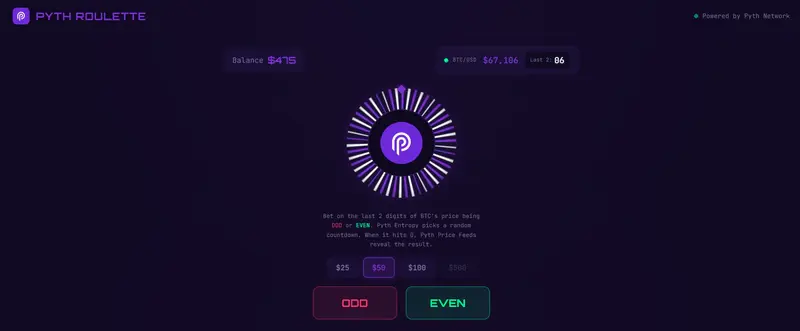
Pyth Roulette: Building a BTC Price Betting Game with Pyth Entropy and Price Feeds

What is Pyth Roulette?

Imagine a roulette wheel, but instead of a ball landing on a number, the “spin” is a live countdown powered by on-chain verifiable randomness, and the result is determined by the real-time price of Bitcoin.

Pyth Roulette is a browser-based game where you:

  1. Pick ODD or EVEN
  2. Place a bet (play money — no real funds)
  3. Watch as Pyth Entropy generates a random countdown between 3 and 30 seconds
  4. When the timer hits zero, the app grabs the live BTC/USD price from Pyth Hermes
  5. The last two digits of the whole-dollar price decide your fate

If BTC is at $65,953, the last two digits are 53 – that’s odd. Bet odd? You win. Bet even? Better luck next time.

The key insight: the randomness comes from timing. Nobody can predict what BTC’s price will be 17 seconds from now at the per-dollar level. Entropy decides when to look, and Price Feeds decide what we see.

How Pyth Network Powers the Game

Pyth Roulette is built on two Pyth products working in concert, each playing a distinct role.

Pyth Price Feeds (Hermes SSE)

The game maintains a live Server-Sent Events connection to Hermes, streaming real-time BTC/USD prices into the UI. Players see the price ticking while the roulette wheel spins. When the countdown reaches zero, the app fetches the latest price to determine the outcome

Pyth Entropy (On-Chain on OP Sepolia)

Entropy is the reason the game is fair. It generates verifiable randomness on-chain through a commit-reveal protocol between the user and a Pyth provider. The random number gets mapped to a wait time

This is the entire fairness mechanism. The countdown duration is not chosen by the frontend, not chosen by a server, and not predictable by the player. It comes from the Entropy contract on Optimism Sepolia, verified on-chain.
Pyth Roulette was built to explore a simple question: what happens when you combine verifiable randomness with real-time price data? You get a game where the house doesn’t control the timing, the player doesn’t control the outcome, and the result is determined by the actual Bitcoin market at a moment nobody could predict.

The two Pyth products complement each other perfectly here:

  • Entropy provides the when – a provably random moment in time
  • Price Feeds provide the what – the real-world data at that moment

The entire frontend is a single React app with no backend. Hermes SSE handles the price stream, the Entropy contract on OP Sepolia handles the randomness, and Fortuna handles the provider reveals. All verifiable, all transparent.

Stack: React 19 / Vite / Tailwind CSS v4 / framer-motion / viem / TypeScript

Give it a spin: github.com/dender10/Pyth-roulette-

Liquidity Fragmentation Is More Expensive Than It Looks

Go to any DEX on Arbitrum and search for USDC. You’ll find at least two: USDC and USDC.e. Same dollar. Same peg. Different contracts.

Now try to swap USDC.e for something. You might get a worse price than if you had native USDC, because the liquidity pool for USDC.e is thinner. Or the router sends you through an extra hop (USDC.e → USDC → your target token) and you eat the slippage twice.

This is liquidity fragmentation. And it costs more than most people realize.

The Problem: One Dollar, Five Tokens

When multiple bridges connect the same token to a chain, each bridge creates its own wrapped version. On Arbitrum alone, you’ve had USDC.e (Arbitrum’s canonical bridge), and native USDC (issued by Circle). On other chains, you might see bridged versions from Wormhole, Multichain (before it collapsed), Synapse, and others, each with a different contract address.

They’re all supposed to be worth $1. But DeFi doesn’t care about your intentions. It cares about contract addresses.

Each version needs its own liquidity pool. Each pool competes for the same TVL. The result:

  • Thinner pools everywhere. Instead of $100M in one USDC pool, you get $60M in USDC and $40M split across USDC.e, USDC.wh, and others.
  • Worse prices for users. Thinner pools mean more slippage on larger trades.
  • More complex routing. DEX aggregators have to route through multiple hops, each one adding gas costs and slippage.
  • Arbitrage overhead. Someone has to keep these versions at parity. That’s capital being deployed just to maintain a peg between tokens that represent the same thing.

What This Looks Like in Practice

Say you’re building a lending protocol on an L2. You need to decide which USDC to accept as collateral. Native USDC? USDC.e? Both?

If you accept both, your collateral pool has two tokens and you need oracle prices for each. If you only accept one, users holding the other version have to swap first. Friction, gas, maybe slippage.

Now multiply this by every protocol on the chain. Every DEX, lending market, yield vault, and payment app makes the same decision. The ecosystem ends up with a patchwork of liquidity that doesn’t compose cleanly.

I’ve seen this firsthand. Integrating with protocols that only accept native USDC means users bridging through the canonical bridge have an extra step. Some don’t realize USDC.e isn’t “the” USDC. Support tickets follow.

How Burn & Mint Fixes This

The fundamental fix is simple: if there’s only one version of the token on each chain, fragmentation disappears.

That’s exactly what CCTP does for USDC. When you transfer USDC from Ethereum to Arbitrum via CCTP, you get native USDC on Arbitrum. The same contract that Circle deployed. Not a wrapped version.

Lock & Mint world:
  Ethereum USDC ──bridge A──► Chain X: USDC.e
  Ethereum USDC ──bridge B──► Chain X: USDC.b
  Ethereum USDC ──bridge C──► Chain X: USDC.c
  Result: 3 pools, fragmented liquidity

Burn & Mint world:
  Ethereum USDC ──CCTP──► Chain X: USDC (native)
  Result: 1 pool, unified liquidity

Every protocol on Chain X integrates with one USDC contract. One liquidity pool. One oracle feed. Users don’t have to think about which version they’re holding.

USDT0 does the same thing for USDT through the OFT model. Wherever USDT0 is deployed, it’s the canonical version. There’s no USDT.e competing for liquidity. Just USDT0. If you bridge from Arbitrum to Optimism, you burn USDT0 on Arbitrum and mint USDT0 on Optimism. Same token, same contract standard, unified liquidity on every chain.

The Costs You Don’t See

Fragmentation has costs that don’t show up on a balance sheet but erode the system:

Capital inefficiency. Liquidity providers have to spread capital across multiple versions of the same token. This means each pool is shallower, which means worse execution for traders, which means LPs earn less. A negative feedback loop.

Integration burden. Every protocol team has to decide which token versions to support. Every version they add is another contract to audit, another oracle to configure, another edge case to handle. This is real engineering time spent on a problem that shouldn’t exist.

User confusion. Most users don’t understand why their USDC.e can’t be deposited into a vault that says “USDC.” They see the dollar sign, they see the peg, and they expect it to work. When it doesn’t, the experience feels broken.

Arbitrage as a tax. Keeping wrapped versions at peg requires arbitrageurs. Their profit comes from price discrepancies, which means someone else is getting a worse price. The tighter the peg needs to be, the more capital is tied up in this unproductive work.

It’s Not Fully Solved

Burn & mint models reduce fragmentation significantly, but they don’t eliminate all the complexity.

CCTP only works for USDC. If you need to move ETH, WBTC, or any other token, you’re still using lock & mint bridges and dealing with wrapped versions. The fragmentation problem is solved for one token, not the ecosystem.

USDT0 solves it for USDT but requires chains to adopt the OFT-based version. Chains that already have USDT through other bridges may end up with both USDT and USDT0 coexisting, which is its own kind of fragmentation.

And both models introduce different centralization trade-offs. CCTP centralizes control with Circle. USDT0 centralizes with Tether and depends on LayerZero’s infrastructure. Whether that’s better or worse than fragmentation depends on what you value.

My Take

Fragmentation is a hidden tax on the entire cross-chain ecosystem. It makes everything slightly worse (prices, UX, developer experience, capital efficiency) in ways that are easy to overlook because no single instance looks catastrophic.

Burn & mint models are a real improvement. Having one canonical token per chain is strictly better than having five wrapped versions competing for liquidity. But it comes with centralization costs, and it only works when the issuer is willing and able to operate the burn & mint infrastructure.

For now, the practical advice is: if you’re building on a chain where both USDC.e and native USDC exist, default to native USDC. Encourage users to bridge via CCTP. Minimize your exposure to wrapped versions when you can. The fewer token versions in your system, the simpler everything becomes.

Next post: Where Is the Real Risk in Cross-Chain Bridges?

Where Is the Real Risk in Cross-Chain Bridges?

Every bridge has risk. The question is where.

When people talk about bridge security, the conversation usually jumps to “bridges got hacked.” And that’s true, some did, spectacularly. But treating all bridges as equally dangerous misses the point. The risk profile depends entirely on the model: what’s being trusted, who controls it, and what happens when something breaks.

I’ve spent enough time working with cross-chain stablecoins to develop a mental model for this. Here’s how I think about it.

Risk in Lock & Mint

Canonical bridges (the lock & mint model) concentrate risk in one place: the bridge contract.

When you lock 100 USDC in a bridge contract on Ethereum to mint 100 USDC.e on Arbitrum, that contract is now holding your USDC. Scale that up across thousands of users and you get a contract sitting on hundreds of millions of dollars. That’s a honeypot.

The attack surface is straightforward:

Smart contract bugs. The bridge contract itself might have vulnerabilities. The Wormhole exploit ($320M, Feb 2022) happened because an attacker bypassed signature verification and minted tokens without an actual deposit. The Ronin bridge ($625M, March 2022) was compromised through validator key theft. Five out of nine validators were controlled by the attacker.

Admin key compromise. Most bridge contracts have upgrade mechanisms or admin functions. If those keys are compromised (phishing, operational security failures, insider action), the attacker can drain the locked funds or modify the contract logic. Multi-sig setups reduce this risk but don’t eliminate it. The number of signers and their operational security matter enormously.

Upgrade risks. Upgradeable contracts mean the code you audited yesterday might not be the code running today. A malicious or compromised upgrade can change the rules silently.

The core issue with lock & mint is structural: all value is concentrated in one contract. The more successful the bridge, the bigger the target. And the wrapped tokens on the other side are only worth anything as long as that contract is intact and solvent.

Risk in CCTP

CCTP shifts the trust model. Instead of trusting a contract holding pooled funds, you’re trusting Circle’s attestation infrastructure.

Here’s the flow: USDC is burned on the source chain, Circle’s attestation service (Iris) observes the burn and signs a message, and that signed message authorizes minting on the destination chain. There’s no pool of locked tokens to steal.

The risk profile is different:

Attestation service availability. If Iris goes down, transfers stop. No attestation, no mint. This is a liveness risk, not a safety risk. Your funds aren’t lost, they’re just stuck until the service recovers. But for applications that depend on timely transfers, downtime is a real problem.

Circle’s authority. Circle can pause the protocol. They can blacklist addresses. They can refuse to attest. This is by design. It’s how they comply with regulations and prevent illicit use. But it means your ability to move USDC cross-chain depends on Circle’s continued willingness to process your transfer.

Centralization trade-off. CCTP is operationally centralized. Circle runs Iris. There’s no decentralized fallback if Circle decides to stop, gets shut down by a regulator, or changes their terms. For USDC specifically, this isn’t a new trust assumption. You’re already trusting Circle to honor the reserves. But it’s worth being explicit about it.

No honeypot, but single point of failure. The good news: there’s no giant pool of locked funds to hack. The bad news: the entire system depends on one company’s infrastructure.

Risk in LayerZero / USDT0

USDT0 uses LayerZero’s messaging layer, which introduces a different security architecture.

On Ethereum, USDT is locked in the OFT Adapter. That’s a lock & mint step, and the adapter contract carries the same honeypot risk as any canonical bridge. Between other chains, USDT0 uses burn & mint, so there’s no pooled fund risk there.

The cross-chain messaging security comes from DVNs (Decentralized Verifier Networks). Here’s how the trust model works:

Configurable security. The token deployer (in this case, Tether) chooses which DVNs must verify each cross-chain message. This could be a single verifier, a required set of multiple verifiers, or a threshold (e.g., 2 out of 3). The security depends on this configuration.

DVN collusion. If the required DVNs collude or are compromised, they could forge a message and authorize a mint on the destination chain without a corresponding burn on the source. Think of it like validator collusion in a proof-of-stake system. The more independent DVNs required, the harder this attack becomes.

Relayer independence. Messages in LayerZero are delivered by relayers, which are separate from verifiers. The security doesn’t depend on the relayer being honest (anyone can relay a message). But the relayer being operational matters for liveness.

Issuer control. Tether retains control over the OFT contracts. They can pause, upgrade, or blacklist. Similar to Circle with CCTP, the issuer has ultimate authority over their token. The difference is the transport layer: LayerZero’s DVN model vs Circle’s proprietary Iris service.

What Can Actually Break

Across all three models, the failure modes fall into a few categories:

Source chain reorgs. If the source chain reorganizes after a bridge transaction is processed, you can end up with minted tokens on the destination chain without a valid burn or lock on the source. This is why bridges wait for block confirmations before processing, but the wait time is always a trade-off between speed and safety.

Message delivery failures. In CCTP, if Iris doesn’t produce an attestation. In LayerZero, if DVNs don’t verify or relayers don’t deliver. These are liveness failures. Funds aren’t lost, but they’re stuck. Applications need to handle this gracefully.

Contract upgrades gone wrong. All three models involve upgradeable contracts. A bug in an upgrade, a compromised deployer key, or a malicious governance proposal can change the rules. Timelocks and multi-sig controls help, but they shift the question to “who holds those keys and how secure are they?”

Regulatory action. Both CCTP and USDT0 have centralized issuers. A regulatory order to freeze assets, pause operations, or delist a chain is a real possibility. Lock & mint bridges with decentralized governance are more resistant to this, but they carry the other risks mentioned above.

How I Think About It

I don’t rank these models from safe to unsafe. I think about them in terms of where the risk sits.

Pooled fund risk Centralization risk Messaging risk
Lock & Mint High (bridge contract) Varies (depends on governance) Low (usually direct L1 verification)
CCTP None (no locked pool) High (Circle controls everything) Medium (depends on Iris uptime)
USDT0/OFT Ethereum adapter only High (Tether controls token) Medium (depends on DVN config)

Lock & mint puts risk in the contract. CCTP puts risk in Circle. LayerZero puts risk in the DVN configuration and the Ethereum adapter.

None of these are zero-risk. The question is which risks you’re comfortable with for your use case. If you’re building a protocol that processes millions in stablecoin transfers, you need to understand these trade-offs at a mechanical level, not just “bridges are risky.”

There’s no perfect model, only trade-offs. The best you can do is understand exactly what you’re trusting and make that decision consciously.

This is the final post in a 3-part series on cross-chain stablecoins. See also: Post 1: Lock & Mint vs Burn & Mint and Post 2: Liquidity Fragmentation.

5 DevOps Errors That Cost Developers the Most Time (And How to Fix Each)

5 DevOps Errors That Cost Developers the Most Time (And How to Fix Each)

After diagnosing 1,800+ errors through ARIA, I’ve noticed patterns. The same five categories of errors cost developers the most debugging time — not because they’re complex, but because developers look in the wrong place.

Here’s each one and the fastest path to a fix.

1. Disk Full (Silent App Killer)

Time lost on average: 45-90 minutes

Why it’s hard: Apps crash without disk-related errors. You see a generic crash, a failed write, or a database refusing connections — not “disk full.”

The fix:

df -h                              # Check disk usage
du -sh /var/log/* | sort -rh | head -10  # Find what's using space
sudo journalctl --vacuum-time=14d  # Clear old system logs
docker system prune -f             # Clear unused Docker data
find /tmp -mtime +7 -delete        # Clear old temp files

Prevention: Add a daily cron that alerts you when disk > 80%.

2. Environment Variable Missing in Production

Time lost on average: 30-60 minutes

Why it’s hard: The error is usually not “env var missing.” It’s a downstream failure — database connection refused, API call failing with auth error, app crashing on startup.

The fix:

# Compare what your app expects vs what's in production
cat .env.example | grep -v '^#' | grep '=' | cut -d= -f1 | sort > /tmp/expected.txt
printenv | cut -d= -f1 | sort > /tmp/actual.txt
diff /tmp/expected.txt /tmp/actual.txt

Prevention: Use .env.example as your source of truth. Run the diff above before every production deploy.

3. Database Connection Refused After Config Change

Time lost on average: 60-120 minutes

Why it’s hard: A server update, a package upgrade, or a misconfigured connection pool can break database connectivity without changing your app code.

The fix:

# Is the DB service running?
sudo systemctl status postgresql
ss -tlnp | grep 5432

# Can you connect directly?
psql -h localhost -U youruser -d yourdb

# Check pg_hba.conf for auth issues
sudo tail -20 /etc/postgresql/*/main/pg_hba.conf
sudo tail -50 /var/log/postgresql/*.log

4. Memory Leak Causing Gradual Slowdown

Time lost on average: 2-4 hours

Why it’s hard: It’s not a crash. It’s a slow degradation over hours or days. By the time you investigate, the process has been running for hours and the memory usage graph requires context to interpret.

The fix:

# Track memory usage over time
while true; do
  ps -o pid,vsz,rss,comm -p $(pgrep node) >> /tmp/memory_log.txt
  sleep 60
done

# For Node.js — generate a heap snapshot
kill -USR2 <PID>  # Generates heapdump if using --inspect

# Or use clinic.js
npx clinic doctor -- node server.js

5. CI/CD Passes But Production Fails

Time lost on average: 45-90 minutes

Why it’s hard: Your tests pass. Your staging looks fine. Production breaks. The cause is almost always an environment difference.

The fix:

# Compare env vars between staging and production
# On staging:
printenv | sort > /tmp/staging_env.txt

# On production:
printenv | sort > /tmp/prod_env.txt

# Compare
diff /tmp/staging_env.txt /tmp/prod_env.txt

# Check if production has different Node/Python version
node --version
python3 --version

Common causes: different Node versions, missing production secrets, different database connection limits, missing system packages.

The pattern across all five: the error message points to a symptom, not the cause. The fix requires knowing where to look.

I built ARIA to solve exactly this.
Try it free at step2dev.com — no credit card needed.

Lock & Mint vs Burn & Mint: What I Learned About Cross-Chain Stablecoins

Very recently at LootRush where I work as Senior Software Engineer, I had to implement a bridge tool to help our users to transfer stablecoins to different networks, what we call a bridge and I used to think all bridges worked the same way. You send tokens on one chain, they show up on another. Done.

Then, after working with stablecoins across multiple chains and realized the mechanics underneath are very different. Those differences have real consequences for liquidity, risk, and what token you actually end up holding.

Here’s what I’ve learned.

Canonical Bridges: Lock & Mint

This is the oldest model. Most L2 bridges work this way.

You deposit USDC into a bridge contract on Ethereum. The contract locks your tokens. On the destination chain (say, Arbitrum), the bridge mints a wrapped version: USDC.e.

Ethereum                          Arbitrum
┌──────────────┐                  ┌──────────────┐
│  User sends  │                  │  Bridge mints│
│  100 USDC    │───────────────►  │  100 USDC.e  │
│              │   lock & mint    │              │
└──────────────┘                  └──────────────┘
       │                                 │
       ▼                                 ▼
  Bridge contract                  Wrapped token
  holds 100 USDC                   (not the real thing)

The USDC.e you receive isn’t USDC. It’s an IOU. It’s backed by the USDC sitting in the bridge contract on Ethereum, but it’s a different token with a different contract address. DEXs need separate pools for it. Protocols may or may not accept it.

To go back, you burn the USDC.e on Arbitrum and the bridge releases the original USDC on Ethereum.

This model works, but it has a structural problem: the bridge contract becomes a giant pool of locked funds. That’s a honeypot. And the token you hold on the destination chain is only as good as the bridge that issued it.

CCTP: Burn & Mint

Circle’s Cross-Chain Transfer Protocol takes a different approach. Instead of locking tokens on one side and minting a wrapped version on the other, CCTP burns USDC on the source chain and mints native USDC on the destination.

Ethereum                          Arbitrum
┌──────────────┐                  ┌──────────────┐
│  100 USDC    │                  │  100 USDC    │
│  burned      │───────────────►  │  minted      │
│              │   burn & mint    │  (native)    │
└──────────────┘                  └──────────────┘
       │                                 │
       ▼                                 ▼
  Supply decreases                 Supply increases
  on Ethereum                      on Arbitrum

Here’s the flow:

  1. Your app calls depositForBurn on the source chain. USDC is burned.
  2. Circle’s attestation service (called Iris) observes the burn event and signs an attestation.
  3. The attestation is submitted on the destination chain, and receiveMessage mints new USDC.

No wrapped tokens. No liquidity pools. The USDC you receive on Arbitrum is the same native USDC that Circle issues on that chain. One contract address, one token, full composability with every protocol on that chain.

The trade-off is clear: you’re trusting Circle. Iris is the bottleneck. Circle can pause the protocol, blacklist addresses, or delay attestations. But for USDC specifically, you’re already trusting Circle with the reserves, so this isn’t a new trust assumption. It’s the same one.

USDT0: The OFT Model

Tether went a different route with USDT0, built on LayerZero’s Omnichain Fungible Token (OFT) standard.

It’s a hybrid. On Ethereum, USDT is locked in an OFT Adapter contract, similar to a canonical bridge. But on every other chain, USDT0 is the token, and transfers between non-Ethereum chains use burn & mint.

Ethereum (source of truth)
┌──────────────────────┐
│  USDT locked in      │
│  OFT Adapter         │
└──────────┬───────────┘
           │ lock
           ▼
    ┌──────────────┐         ┌──────────────┐
    │  Arbitrum    │◄───────►│  Optimism    │
    │  USDT0       │  burn   │  USDT0       │
    │  (minted)    │  & mint │  (minted)    │
    └──────────────┘         └──────────────┘

So Ethereum → Arbitrum is lock & mint. But Arbitrum → Optimism is burn & mint. No need to go back through Ethereum.

The cross-chain messaging goes through LayerZero’s network, which uses Decentralized Verifier Networks (DVNs) to validate messages. Unlike CCTP’s single attestation service, it’s a configurable security stack where the token deployer chooses which verifiers to require.

USDT0 gives Tether a single canonical token across all chains where it’s deployed. No USDT.e, no USDT.arb. Just USDT0 everywhere. The supply is always backed 1:1 by USDT locked in the Ethereum adapter.

How They Compare

Lock & Mint (Canonical Bridges)

  • Creates wrapped tokens (USDC.e, WETH, etc.)
  • Bridge contract holds all locked funds
  • Each bridge creates its own version of the token
  • Risk is concentrated in the bridge contract

Burn & Mint (CCTP)

  • No wrapped tokens, native USDC on every chain
  • Supply is managed globally by Circle
  • Trust is in Circle’s attestation service
  • Only works for USDC (Circle-controlled tokens)

OFT / USDT0 (LayerZero)

  • Lock on Ethereum, burn & mint everywhere else
  • Single canonical token across all chains
  • Cross-chain security depends on DVN configuration
  • Issuer (Tether) retains full control

Why This Matters

If you’re building anything that touches stablecoins across chains, the bridge model determines:

  • What token your users actually hold. Native vs wrapped.
  • How deep the liquidity is. One pool vs fragmented across versions.
  • Where the risk sits. Bridge contract, attestation service, or messaging layer.
  • Whether protocols on the destination chain accept it. Not every protocol lists USDC.e.

I used to think the bridge was just plumbing. It’s not. It’s architecture. The model you use shapes the token economics, the risk profile, and the user experience on the other side.

Next post: Liquidity Fragmentation Is More Expensive Than It Looks

Looking for contributors for an AI learning platform (open source)

🚀 Looking for Builders – Join Yantra AI

We’re building Yantra — an AI-powered learning system that teaches students like a real teacher (interactive labs, AI guidance, real skill-building)

We need:
• Code maintainers
• Code reviewers
• Testers
• Frontend devs
• Backend (Supabase) devs
• AI/ML engineers

⚠️ This is a volunteer project (no pay) — but we’re aiming to build something big in education.

If you want to build something meaningful → DM / join 🚀
Discord = krish_77847
instagram = krishverma_vibe

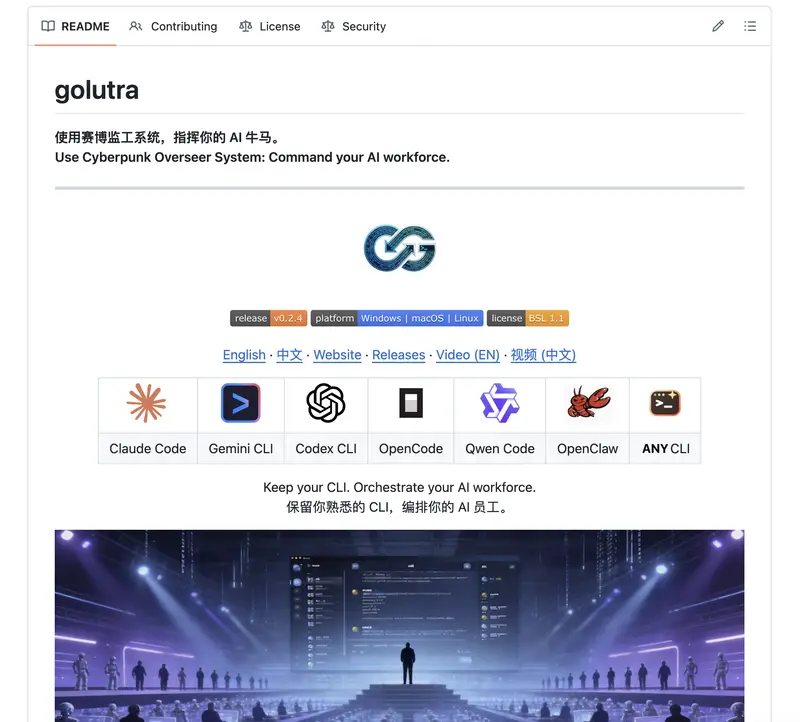
💥 I think dev jobs are about to change (this github repo is why)

I just found this:

👉 https://github.com/golutra/golutra

And honestly… this might be one of those “wait, this changes things” moments.

🧠 Imagine this:

You open your terminal…

But instead of you working,
a team of AI agents starts working for you.

one writes code
one debugs
one runs tests
one deploys

All at the same time. No tab switching. No context switching.

You just say what you want.

⚡ This isn’t Copilot

Copilot = autocomplete
This = parallel execution system

👉 It turns your CLI into an AI command center
👉 Multiple agents running simultaneously
👉 Tasks get orchestrated automatically
👉 You can literally inject instructions into running processes

🔥 The craziest part?

You don’t migrate anything.

no new framework
no new workflow
no relearning

It just wraps around what you already use.

🤯 So here’s the uncomfortable question:

If one person can run 5–10 agents in parallel…
how many engineers does a team actually need?

🧨 This could go two ways:

Best case:

massive productivity boost
solo builders shipping like startups
“one-person companies” become normal

Worst case:

debugging turns into chaos
agents fighting each other
you become a “manager of hallucinations”
👀 Either way, this feels like a shift:

From:

writing code

To:

orchestrating intelligence

❓ Real question:

Are we still “developers” in this model…

or are we becoming
AI team managers?

Curious what people think:

hype or real shift?
would you actually trust multiple agents running your workflow?
is this the future… or just complexity with good marketing?