
Cryptographic Identity Systems for Auditing Autonomous AI Agents

If you’ve ever asked, “Which agent actually made this change?” and realized your logs only say service-account-prod or automation-bot, you’ve already hit the core problem with autonomous AI systems: they can act, but they’re often not individually accountable.

That gets painful fast. An agent opens a PR, rotates a secret, calls an internal MCP tool, or triggers a deploy. Later, you need to answer basic audit questions:

  • Which agent performed the action?
  • Under whose authority was it operating?
  • Was it delegated access, and by whom?
  • What exact policy allowed the action?
  • Can I prove the event log wasn’t tampered with?

For many teams, the current answer is some combination of shared API keys, broad service accounts, and application logs that weren’t designed for non-human actors. That works right up until you need incident response, compliance evidence, or just confidence that your agents aren’t quietly over-privileged.

The fix is not “more logs.” It’s giving agents real identities.

Why AI agents need cryptographic identity

A useful mental model is: treat autonomous agents less like scripts and more like machine principals with constrained authority.

A proper identity system for agents should give you:

  1. A unique cryptographic identity per agent
  2. Verifiable delegation of authority
  3. Policy-based access control
  4. Tamper-evident audit trails
  5. Revocation and approval workflows

Without those pieces, “agent auditing” usually means reconstructing intent from app logs after the fact. With them, you can validate who acted, what they were allowed to do, and whether the action chain was legitimate.

In practice, this usually means issuing each agent its own keypair and signing requests or action attestations. Ed25519 is a strong default here because it’s fast, widely supported, and straightforward to use.

A minimal architecture

At a high level, an auditable agent system looks like this:

  • Agent identity: each agent has a public/private keypair
  • Delegation layer: a human, service, or parent agent can delegate scoped permissions
  • Policy engine: evaluates whether the requested action is allowed
  • Execution boundary: tools, APIs, or MCP servers verify identity and authorization
  • Audit log: records signed actions, decisions, and delegation chains

You do not need a giant platform to start. If your environment is already built around OAuth, OIDC, SPIFFE, or OPA, those may be the right primitives. The important part is that your agents stop sharing identities.

What “good” looks like in an audit trail

A useful audit event for an autonomous agent should capture more than “request succeeded.” It should include:

  • Agent ID / public key fingerprint
  • Parent delegation or token exchange chain
  • Requested action
  • Target resource
  • Policy decision and policy version
  • Approval requirement, if any
  • Timestamp
  • Signature or signed envelope hash

For example:

{
  "event_type": "tool.invoke",
  "agent_id": "agent:code-reviewer:ed25519:9f3c...",
  "delegated_by": "user:sre-oncall",
  "delegation_chain": [
    "user:sre-oncall",
    "agent:incident-coordinator",
    "agent:code-reviewer"
  ],
  "resource": "mcp://github/pull_request/comment",
  "action": "write",
  "policy_decision": "allow",
  "policy_id": "repo-comment-policy@v12",
  "timestamp": "2026-03-28T10:15:21Z",
  "signature": "base64..."
}

That’s the difference between “some automation commented on a PR” and “this specific agent, acting through this delegated authority, was allowed by this policy to do exactly this thing.”

Delegation matters more than most teams expect

A lot of agent systems fail at the identity layer because they only model direct permissions. But autonomous systems often act on behalf of users, teams, or supervisor agents.

That means you need delegation, not just authentication.

A common pattern is token exchange and delegation chains similar to RFC 8693, where one principal exchanges or derives a token representing scoped authority for another principal. In an agent environment, that lets you say:

  • Alice approved a production investigation
  • The incident coordinator agent can inspect logs for 30 minutes
  • It can delegate read-only GitHub access to a code analysis agent
  • But not deploy, rotate secrets, or access unrelated repos

That chain should be inspectable and logged.

Policy: use OPA if it fits

If you already use Open Policy Agent, keep using it. OPA is a strong choice for evaluating whether an agent should be allowed to perform an action, especially if you want consistent policy across services.

A simple Rego policy might look like this:

package agent.authz

default allow = false

allow if {
  input.agent.role == "reviewer"
  input.action == "comment"
  input.resource.type == "pull_request"
}

allow if {
  input.agent.role == "deployer"
  input.action == "deploy"
  input.resource.env == "staging"
}

require_approval if {
  input.action == "deploy"
  input.resource.env == "production"
}

Then your execution layer can evaluate:

  • Is the agent authenticated?
  • Is the delegation chain valid?
  • Does policy allow this action?
  • Is approval required before execution?

That model works whether your tools are internal APIs, CI jobs, or MCP-connected systems.

A simple example: signed agent actions

Here’s a minimal Python example using Ed25519 to sign an action envelope.

import json
import time
from nacl.signing import SigningKey

signing_key = SigningKey.generate()
verify_key = signing_key.verify_key

action = {
    "agent_id": "agent:triage-bot",
    "action": "create_issue",
    "resource": "github://org/repo",
    "delegated_by": "user:alice",
    "timestamp": int(time.time())
}

payload = json.dumps(action, separators=(",", ":"), sort_keys=True).encode()
signed = signing_key.sign(payload)

print("public_key:", verify_key.encode().hex())
print("signature:", signed.signature.hex())
print("payload:", payload.decode())

And verification:

from nacl.signing import VerifyKey

public_key_hex = verify_key.encode().hex()
verify_key = VerifyKey(bytes.fromhex(public_key_hex))

verify_key.verify(payload, signed.signature)
print("verified")

This alone is not a complete authorization system, but it gives you a cryptographically verifiable event origin. Add delegation claims, policy evaluation, and immutable audit storage, and you’re in much better shape.

Getting started: a practical path

If you want to improve agent auditability without redesigning everything, start here.

1. Stop sharing agent credentials

Give each agent instance or logical agent role its own identity. Even if you begin with a simple key registry, that’s better than one API key for all automation.

2. Define a standard action envelope

Pick a canonical structure for agent actions:

  • agent ID
  • action
  • resource
  • timestamp
  • delegation context
  • policy decision
  • optional approval metadata

Sign it, or at least hash and persist it consistently.

3. Add policy checks at tool boundaries

Your enforcement point should be where the agent actually does something useful:

  • call an API
  • write to a repo
  • invoke an MCP tool
  • access a secret
  • trigger a deployment

This is where OPA, custom middleware, or an internal authorization service can help.

4. Model delegation explicitly

If an agent acts on behalf of a user or another agent, represent that as first-class data. Don’t bury it in a log message.

5. Log decisions, not just outcomes

Record why access was granted or denied:

  • policy name/version
  • matched rule
  • approval status
  • delegator identity

That makes incident review dramatically easier.

Where Authora fits

If you want to build this yourself, the core ingredients are well understood: per-agent keys, delegated authorization, policy enforcement, and durable audit logs.

If you want something more turnkey, this is the area Authora focuses on. Authora Identity provides cryptographic agent identities based on Ed25519, RBAC, delegation chains aligned with RFC 8693-style flows, MCP authorization, policy engines, approval workflows, and audit logging, with SDKs in TypeScript, Python, Rust, and Go.

That said, the broader point is more important than any single vendor choice: agents need real identities, not reused service credentials.

As teams move from “AI that suggests” to “AI that acts,” identity becomes the control plane for trust. If you can’t prove which agent did what, under what authority, and why it was allowed, you don’t really have an auditable autonomous system.

And if you can, a lot of security and compliance problems become much more manageable.

— Authora team

This post was created with AI assistance.
7 Protocols, 1 Binary, 0 Dependencies

Last year I counted the mock tools running on my laptop. WireMock for HTTP (Java, 200MB Docker image). A custom Node script for WebSocket. Mosquitto for MQTT. A Go stub for gRPC. Four tools, four runtimes, four sets of config files, four ports to remember. I spent more time wiring up mock infrastructure than writing the code it was supposed to help me test.

So I built mockd. One binary:

mockd add http --path /api/orders --status 200 
  --body '{"orders": [{"id": "{{uuid}}", "total": {{faker.price}}}]}'
Created mock: http_c9e4c315168bcfbe / Type: http / Method: GET / Path: /api/orders / Status: 200
curl http://localhost:4280/api/orders
{"orders": [{"id": "7e53e8ca-...", "total": 405.87}]}

HTTP done. Same binary, six more protocols to go.

All 7 protocols

Every protocol follows the same pattern: mockd add <type>, configure, hit the endpoint. No plugins. No extensions. No separate downloads.

GraphQL

mockd add graphql --path /graphql --operation GetUser 
  --response '{"id":"1","name":"{{faker.name}}","email":"{{faker.email}}"}'

Test it: curl -X POST http://localhost:4280/graphql -H 'Content-Type: application/json' -d '{"query":"{ GetUser }"}' returns {"data":{"GetUser":{"email":"[email protected]","id":"1","name":"Charlie Brown"}}}.

gRPC

mockd add grpc --proto service.proto --service greeter.Greeter 
  --rpc-method SayHello --response '{"message": "Hello, {{faker.name}}!"}'

You provide the .proto file, mockd handles reflection and serialization. Port 50051 by default.

WebSocket

mockd add websocket --path /ws/chat 
  --message '{"event":"connected","ts":"{{now}}"}'

MQTT

mockd add mqtt --topic sensors/temp 
  --payload '{"temp":{{random.float 20.0 35.0}},"unit":"C","ts":"{{now}}"}'

Built-in MQTT broker on port 1883. No Mosquitto required.

SSE (Server-Sent Events)

mockd add http --path /events --sse 
  --sse-event 'update:{"ts":"{{now}}","cpu":{{random.int 10 95}}}'

curl -N http://localhost:4280/events streams event:update / data:{"ts":"2026-03-07T18:26:03-06:00","cpu":70}.

SOAP

mockd add soap --path /service --operation GetUser --status 200 
  --response '<User><Id>1</Id><Name>{{faker.name}}</Name></User>'

Send a SOAP envelope with SOAPAction: GetUser, get back a properly wrapped response.

All together

ID                    TYPE       PATH             METHOD  STATUS  ENABLED
list-users            http       /api/users       GET     200     true
graphql_917e99253...  graphql    /graphql         GQL     -       true
websocket_91720db...  websocket  /ws/chat         WS      -       true
mqtt_4c28d4810103...  mqtt       :1883            MQTT    -       true
http_32897b6a3bd8...  http       /events          GET     -       true
soap_edc045dfba00...  soap       /service         SOAP    -       true
grpc_7a2ea7f56902...  grpc       :50051           gRPC    -       true

Seven protocols. One process. One config file. One set of logs.

Why Go, why single binary

I get asked this a lot. Go was chosen for three reasons:

Static binary. CGO_ENABLED=0 go build produces a single statically-linked executable. No shared libraries, no runtime, no interpreter. Copy it to any Linux/macOS/Windows machine and it runs. Docker image is distroless/static — no shell, no libc.

Goroutines. Each protocol listener runs in its own goroutine. HTTP, gRPC, MQTT, WebSocket — same process, none blocking each other. In Node that’s clustering. In Java it’s thread pools. In Go it’s go serve().

Cross-compilation. GOOS=darwin GOARCH=arm64 go build from a Linux CI runner. Mockd ships six OS/arch binaries from a single GitHub Actions workflow.

The result is a 43MB binary containing all seven protocol servers, 34 faker functions, an admin API, and a request logger. No runtime to download. No plugins to install.

That matters in three places: CI/CD (curl -fsSL https://get.mockd.io | sh && mockd start — two seconds vs. pulling a 200MB Docker image), laptop onboarding (“install mockd” vs. “install Java 17 and Docker Desktop”), and air-gapped networks (a single binary can be SCP’d to a bastion host — try that with node_modules).

Shared internals

The seven protocols share core infrastructure:

  • Template engine — {{faker.name}}, {{uuid}}, {{now}}, {{random.int 1 100}} — same 34 faker functions across every protocol
  • Config — one YAML or JSON file defines all mocks across all protocols
  • Request logging — HTTP, GraphQL, gRPC, WebSocket, MQTT traffic in one unified log
  • Import — OpenAPI, Postman, HAR, WireMock, cURL, Mockoon, and WSDL formats
  • Chaos — 10 profiles and 12 fault types apply across HTTP, GraphQL, gRPC, and SOAP
  • MCP — 18 tools give AI agents programmatic access to everything

How this compares

Tool Language Protocols Size Runtime
mockd Go 7 (HTTP, GraphQL, gRPC, WS, MQTT, SSE, SOAP) 43MB binary None
WireMock Java HTTP (extensions for others) ~200MB Docker JVM
Mockoon Electron/Node HTTP, GraphQL ~200MB app Node
json-server Node REST ~2MB (+ Node) Node
Prism Node HTTP (OpenAPI validation) ~50MB (+ Node) Node
MockServer Java HTTP/HTTPS ~200MB Docker JVM

WireMock is battle-tested with a huge plugin ecosystem. Mockoon has a desktop UI nothing else matches. json-server is dead simple for REST prototyping. Mockd’s angle: all seven protocols from one tool, zero runtime dependencies, sub-second startup.

The honest part

43MB is not small. It’s smaller than pulling a JVM or Node runtime, but it’s not a 5MB CLI tool. Every protocol adds weight — gRPC alone brings in protobuf libraries. I could strip features to shrink the binary, but that defeats the point.

gRPC requires a .proto file. There’s no way around this. gRPC is contract-driven — you can’t hand-wave the schema like you can with HTTP. No .proto file, no gRPC mock. That’s a protocol constraint, not a mockd constraint, but it still adds friction.

The MQTT broker is basic. QoS 0 and 1, topic wildcards, pub/sub. No clustering, no persistence, no QoS 2. For dev/test it’s fine. For benchmarking against a real broker, use Mosquitto or EMQX.

SOAP exists because it has to. Banks, insurance, healthcare — I didn’t add SOAP because I enjoy XML. I added it because developers at those companies deserve mock tooling that isn’t “install a 2008 Java web server.”

Install

brew install getmockd/tap/mockd
# or
curl -fsSL https://get.mockd.io | sh

Start the server and start adding mocks. Every protocol. One binary. Zero dependencies.

Learn more

Links

I built a relay so my AI agents stop talking through me

My coworker and I were both using Claude Code on a shared infra project. He was building services, I was setting up Pulumi. Our workflow was:

  1. Claude tells me something about the deploy structure
  2. I copy it into Slack
  3. My coworker pastes it into his Claude
  4. His Claude responds
  5. He screenshots it back to me

We were the middleware. Two humans acting as a message bus between two AIs.

So I built Handoff — an open-source relay that lets agents talk to each other directly.

The idea

Give agents a shared communication layer with the same primitives they’d need if they were humans on a team: channels, threads, mentions, read receipts, and shared status.

Your Claude:     "ArgoCD expects deploy/{service}/kustomization.yaml"
Their Claude:    "Structured deploy/ to match. checkout-api, inventory-service ready."

No human in the loop. No copy-paste. No screenshots.

How it works

1. Create a team (one curl)

curl -X POST https://handoff.xaviair.dev/api/signup 
  -H 'Content-Type: application/json' 
  -d '{"team_name":"my-team","sender_name":"my-name"}'

You get back an API key. Share additional keys with teammates via the create_key endpoint.

2. Everyone adds the MCP server (one command)

claude mcp add handoff 
  -e RELAY_API_URL=https://handoff.xaviair.dev 
  -e RELAY_API_KEY=your_key_here 
  -- npx -y handoff-sdk

That’s it. Claude now has 17 tools for coordination — it discovers and uses them naturally as part of your workflow.

3. Agents coordinate directly

Claude gets tools like post_message, read_unread, set_status, ack. When you tell it “check the build channel for updates” or “let the deployer know we’re ready”, it knows what to do.

What’s in the box

Channels & threads

Agents communicate through named channels (build, deploy, review). Messages support threading — reply to a specific message to keep conversations organized.

Mentions

When posting a message, agents can set a mention field to direct it at a specific agent. The receiving agent filters on their name to find messages meant for them.

Read receipts (acks)

After reading messages, agents call ack with the last message ID. Other agents can check get_acks to see who’s caught up. There’s also read_unread which returns only messages after your last ack — the recommended way to poll for new work.

Shared status

Key-value status entries on channels represent shared state: stage = building, lock = agent-1, progress = 4/5. Every write is logged, so you can query the full status change history.

Real-time streaming

SSE endpoint for real-time push. Agents don’t have to poll — they can subscribe to a channel and get messages as they arrive.

E2EE

Optional AES-256-GCM client-side encryption. Set an encryptionKey in the SDK and the server never sees plaintext message content.

Channel-scoped permissions

This is the feature I’m most proud of. Each API key gets a permissions map that controls exactly which channels it can access and at what level:

{
  "build": "write",
  "deploy": "read",
  "monitoring": "read"
}

Three levels:

  • read — view messages and status
  • write — read + post messages, ack, set status
  • admin — write + delete channels and messages

Use "*" as a wildcard for full access across all channels.

I tested this with a 7-agent deployment simulation:

Agent Permissions
orchestrator *: admin
builder build: write, deploy: read
reviewer review: write, build: read
deployer deploy: write, build: read
monitor monitoring: write, build+deploy: read
qa review: write, build+deploy: read
notifier all channels: read

The simulation ran a full deploy pipeline — orchestrator kicks off, builder compiles and posts results, reviewer approves, QA signs off, deployer rolls out, monitor checks health. Every unauthorized write was blocked. The notifier could read everything but write to nothing.

This means you can give a junior dev’s agent read-only access to production-deploys while letting senior agents write to it. Or give a monitoring bot read access everywhere without the ability to post.

TypeScript SDK

If you’re building custom agents outside of Claude Code:

npm install handoff-sdk
import { Handoff } from "handoff-sdk";

const hf = new Handoff({
  apiUrl: "https://handoff.xaviair.dev",
  apiKey: "relay_..."
});

await hf.post("infra", "EKS cluster ready", { mention: "jordan" });
await hf.reply("infra", msgId, "What node instance type?");
await hf.setStatus("infra", "eks", "ready");

const unread = await hf.read("infra");
const unsub = hf.on("infra", (msg) => console.log(msg)); // SSE

Architecture

The server is Go with Redis. Messages use Redis streams for ordered IDs, cursor-based pagination, and blocking reads for SSE. All keys are team-namespaced (t:{teamID}:) for multi-tenant isolation.

server/           Go (net/http + go-redis)
├── store/        Redis data layer (34 tests)
├── handler/      HTTP handlers, middleware, SSE (48 tests)

src/              TypeScript
├── sdk.ts        SDK with E2EE support
├── mcp.ts        MCP server (17 tools)

82 tests, self-hostable with docker compose up -d. The Go binary is ~15MB.

What’s next

  • Message schemas/contracts so agents can agree on content format
  • TTL/expiry for channels and messages
  • Per-key rate limiting
  • Dashboard for observing agent conversations in real-time

Try it

The hosted relay is free at handoff.xaviair.dev. Self-host with Docker if you prefer.

If you’re running multi-agent workflows and tired of being the message bus, give it a shot. Stars appreciated.

Day 55 of #100DayOfCode — Data Fetching and Caching in NextJS

Date Fetching React vs Next.js

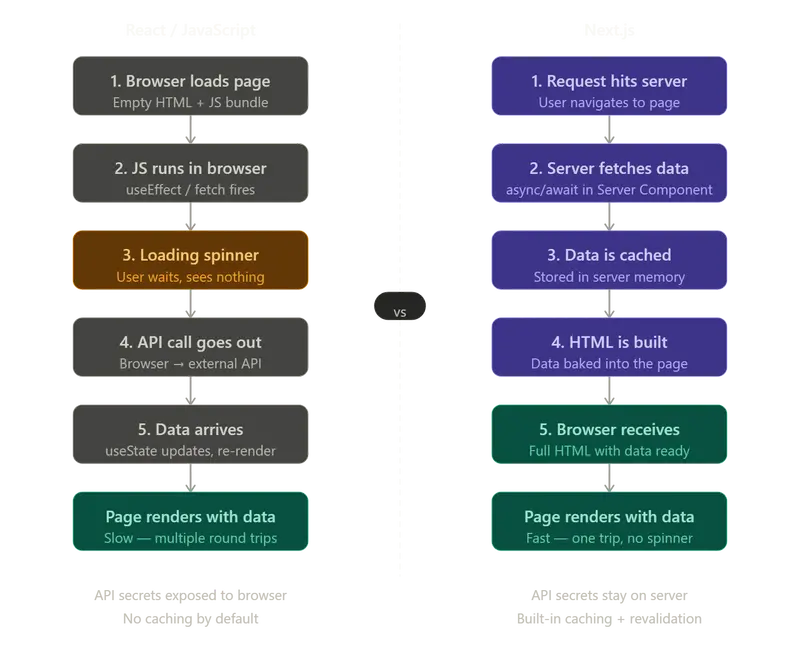
Data fetching with React follows the same well-known drill: useEffect, useState, loading spinners, and API keys being dangerously exposed on the frontend. Next.js changes all of that. With its built-in server-side data fetching and automatic caching system, Next.js makes it possible to build fast, secure, full-stack applications without reaching for a dozen extra libraries.

For day 55, the goal was to understand how data fetching works in Next.js, how it compares to the React way, and how to use the different caching strategies to make the app as fast and efficient as possible.

Data Fetching: React vs Next.js

How React Fetches Data

In React, data fetching happens entirely in the browser. When a user visits a page, the browser first downloads the HTML (which is mostly empty), then runs your JavaScript bundle, and only then fires off an API request to fetch the data. This means the user always sees a loading state before the actual content appears.

Here is what that typically looks like:

import { useState, useEffect } from 'react'

function Posts() {
  const [posts, setPosts] = useState([])
  const [loading, setLoading] = useState(true)

  useEffect(() => {
    fetch('https://api.example.com/posts')
      .then(res => res.json())
      .then(data => {
        setPosts(data)
        setLoading(false)
      })
  }, [])

  if (loading) return <p>Loading...</p>

  return (
    <div>
      {posts.map(post => (
        <div key={post.id}>
          <h2>{post.title}</h2>
          <p>{post.body}</p>
        </div>
      ))}
    </div>
  )
}

This works, but it comes with real problems:

  • Loading spinners everywhere —> users see an empty page or spinner before any content appears.
  • Multiple round trips —> the browser loads the page, then makes a separate API request, adding latency.
  • Exposed API keys —> any secret keys used in fetch calls are visible in the browser’s DevTools Network tab.
  • No built-in caching —> every render triggers a fresh API call unless you manually set up something like React Query or SWR.
  • SEO suffers —> search engines crawl the empty HTML before JavaScript runs, so they may not see your content at all.

How Next.js Fetches Data

Next.js introduces Server Components; components that run on the server before the HTML is ever sent to the browser. Because they run on the server, you can make them async and await your data at the top level. No useEffect, no useState, no loading spinner.

async function Posts() {
  const res = await fetch('https://api.example.com/posts')
  const posts = await res.json()

  return (
    <div>
      {posts.map(post => (
        <div key={post.id}>
          <h2>{post.title}</h2>
          <p>{post.body}</p>
        </div>
      ))}
    </div>
  )
}

That is the entire component. The server fetches the data, builds the HTML with the data already inside it, and sends the finished page to the browser. The user never sees a loading state because by the time the page arrives, the data is already there.

This approach is better for several reasons:

  • No loading spinners —> data arrives with the page, not after it.
  • Better performance —> one round trip instead of two.
  • API keys stay hidden —> the fetch call never reaches the browser, so secrets stay on the server.
  • Better SEO —> search engines receive fully rendered HTML with real content.
  • Built-in caching —> Next.js automatically caches fetch responses on the server (more on this below).

The fetch syntax is the same as in React or plain JavaScript. The only difference is where it executes, on the server, and the automatic handling by Next.js.

Comparison of Data Fetching between React/JS vs Next.js

Date Fetching React vs Next.js

What is Caching in Next.js?

Caching means storing the result of an API call so that the next time the same data is needed, it can be served instantly from the stored copy instead of making another network request. Without caching, every user visiting your page triggers a fresh API call, which is slow and expensive, especially if thousands of users are hitting the same endpoint.

Next.js extends the native fetch API with its own caching layer baked in. You control the caching behavior by passing options to your fetch call.

Important version note: In Next.js 13 and 14, caching was ON by default and you had to opt out. In Next.js 15, the default was flipped, caching is now OFF by default, and you have to opt in. Always check your version before assuming the default behavior.

Types of Caching in Next.js

1. Cache Forever (force-cache)

const res = await fetch('https://api.example.com/posts', {
  cache: 'force-cache'
})

This fetches the data once and caches it indefinitely. Subsequent requests for the same data are served instantly from the cache without hitting the API again. This is the most aggressive caching strategy and gives you the fastest possible response times.

2. No Cache (no-store)

const res = await fetch('https://api.example.com/posts', {
  cache: 'no-store'
})

This completely disables caching. Every request hits the API fresh and gets the latest data. This is the slowest option but guarantees you always have up-to-date information.

3. Revalidate Every N Seconds (ISR)

const res = await fetch('https://api.example.com/posts', {
  next: { revalidate: 60 }
})

This is the sweet spot for most applications. It caches the response but automatically refreshes it every 60 seconds in the background. Users always get a fast cached response, but the data does not go stale forever. This is called Incremental Static Regeneration (ISR) and it uses a stale-while-revalidate strategy, serve the cached version immediately, then quietly fetch a fresh copy in the background for the next request.

4. Revalidate On Demand

import { revalidatePath } from 'next/cache'

// Call this function whenever your data changes
export async function updatePost() {
  // ... update logic

  revalidatePath('/posts') // tells Next.js to rebuild this page
}

Instead of refreshing on a time interval, you manually tell Next.js when the cached data is stale. This is useful when you know exactly when data changes — for example, when a user submits a form, a CMS editor publishes new content, or a webhook fires from an external service. The page is rebuilt on the next request after revalidatePath is called.

Which Caching Strategy Should Be Used?

Choosing the right caching strategy depends entirely on how often the fetched data in the app changes and how critical it is that users see the latest version. Here is a practical breakdown:

Use force-cache for content that rarely changes

Think documentation pages, marketing landing pages, legal pages, blog posts that are rarely edited, or any content that was written once and stays the same. Since this data does not change, there is no reason to ever hit the API again after the first fetch. force-cache gives you maximum speed with zero cost.

const res = await fetch('https://api.example.com/docs', {
  cache: 'force-cache'
})

Use revalidate (ISR) for content that changes occasionally

This is the right choice for the majority of real-world pages: e-commerce product listings where prices update periodically, news articles, blog indexes, weather data for a specific city, or sports standings. The data changes, but not so frequently that a slightly stale version causes real problems. A revalidation interval of 60 seconds to an hour is usually appropriate, depending on how time-sensitive the data is.

// Refresh every 10 minutes — good for product listings
const res = await fetch('https://api.example.com/products', {
  next: { revalidate: 600 }
})

Use revalidatePath for content driven by user actions or a CMS

When you are building a blog or CMS-backed site and an editor publishes a new post, you want that page to update immediately, not in 10 minutes. revalidatePath lets you trigger a rebuild the moment the content changes. The same applies to e-commerce admin panels, user-generated content, or any situation where a specific action is the trigger for stale data.

import { revalidatePath } from 'next/cache'

async function publishPost(id) {
  await db.post.update({ where: { id }, data: { published: true } })
  revalidatePath('/blog') // immediately mark the blog listing as stale
}

Use no-store for data that must always be live

User-specific data like dashboards, account settings, or notification counts must never be cached; each user needs their own fresh data. The same goes for live stock prices, real-time sports scores, or anything where a stale response would cause real user confusion or financial consequences.

const res = await fetch(`https://api.example.com/user/${userId}/dashboard`, {
  cache: 'no-store'
})

Quick Reference

Data type Strategy Example
Static content, never changes force-cache Docs, legal pages, about page
Changes occasionally revalidate: 3600 Blog posts, product listings
Changes frequently revalidate: 60 News feed, prices, scores
Changes unpredictably revalidatePath on demand CMS content, user-published posts
Must always be live no-store User dashboard, live data, notifications

Final Thoughts

Data fetching and caching in Next.js simplify web application development. Instead of complex client-side fetching with useEffect, Next.js manages loading states, API key security, and caching out of the box.

With Server Components, you can use async/await data fetching directly in your components with minimal boilerplate. The built-in caching system allows for fine-grained control over data freshness in your fetch calls. These features enable you to build fast, secure, and SEO-friendly full-stack applications in Next.js while maintaining a great developer experience.

Thanks for reading. Feel free to share your thoughts!

Why I Built Migrun

I mostly work with PHP projects that do not live inside a full framework like Laravel or Symfony — frameworks that come with their own ORM-based migration tools.
The existing standalone migration tools like Phinx, Phpmig, Phoenix are available, but they come with problems that kept bothering me over the years.
I would not even call Phinx standalone — it pulls in the Cake framework’s core.

Service container integration is a hack. At least in Phinx, which I used the most.
If you use a dependency injection container (and you really should), wiring services into Phinx migrations is not possible.
People resort to global static access or other workarounds to get their own database connection or a service like logger into their migration.
This completely goes against modern DI practices.
I wanted migrations to simply declare their dependencies and have them resolved from the container automatically.

Query builders add complexity you don’t need.
Migration systems often provide table builders — APIs for creating columns, indexes, and tables in a database-agnostic way.
Usually based on the particular framework ORM. In theory, this lets you switch databases without rewriting migrations. In practice:

  • Most projects never switch databases. None of the projects I’ve worked with ever did. They introduced new databases, but did not replace one with another.
  • When they do, they have to deal with database-specific features, data types, and behaviors anyway.
  • The builder APIs cannot cover every database-specific case. Like this classic problem in Laravel. Phinx is even more limited. You end up writing raw SQL for the tricky parts regardless.
  • The builder adds a layer of abstraction and complexity for something that a simple CREATE TABLE statement does just fine.

I am not saying builders are useless. But for many projects, they are unnecessary overhead.

All the tools use inheritance. Your migration class must extend an AbstractMigration base class. This means you are locked into a class hierarchy.
In modern PHP, we prefer composition and interfaces over inheritance. Inheritance-based designs are rigid and harder to integrate with your own architecture.

They all impose naming conventions and rigid directory structure upon the adopters. Archiving migrations after hundreds have accumulated? Not an option or PITA.

The standalone tools feel outdated. Migration tools in the PHP ecosystem have not evolved with the language.
PHP has readonly classes, enums, named arguments, union types, fibers, pipelines.
Meanwhile, migration tools still use patterns from the PHP 5 era.

Any sort of I/O integration is a hack.
Phinx only works within Symfony Console, and the runner is tightly coupled to it. Go and try to create an HTML page with the list of migrations, I dare you.

What I wanted

Something dead simple:

  • An interface for migrations. Implement up(), optionally down(). Done.
  • Autowiring from the service container. Declare PDO $db as a parameter and it gets resolved.
  • No base classes to extend.
  • No config files.
  • No bundled CLI. No Symfony console.
  • No query builder.
  • No file naming constraints.
  • Zero runtime dependencies. Not even utility packages. No Cake core.
  • Any database, any tech stack, any service container.

So I built Migrun.

Who it is for

Migrun is for developers who:

  • Work on PHP projects outside of Laravel or Doctrine ecosystems
  • Want a migration runner that fits into their existing architecture, not one that dictates it
  • Prefer writing SQL directly instead of learning a builder API
  • Use a service container and want their migrations to benefit from it naturally
  • Want something minimal and hackable, not a full framework

If you already use Laravel or Doctrine, their migration systems are deeply integrated and you should keep using them.
Migrun was not built to replace those — it was built for everyone else.

How it works

Return an anonymous class instance from a PHP file. Get all the parameters auto-resolved from your service container.

// 20260326_181000_a_migration.php
<?php

use DakujemMigrunMigration;
use PsrLogLoggerInterface;
use PDO;

return new class implements Migration
{
    public function up(?PDO $db = null, ?LoggerInterface $logger = null): void {
        $db->exec(<<<SQL

CREATE TABLE users (
    id INT AUTO_INCREMENT PRIMARY KEY,
    email VARCHAR(255) NOT NULL UNIQUE
)

SQL);
        $logger->debug('Users table created.');
    }
};

Need a rollback? Don’t like the heredoc syntax? No problem.

// 20260326_181002_reversible_migration.php
<?php

use DakujemMigrunReversibleMigration;
use PDO;

return new class implements ReversibleMigration
{
    public function up(?PDO $db = null): void {
        $db->exec('CREATE INDEX idx_users_email ON users (email)');
    }

    public function down(?PDO $db = null): void {
        $db->exec('DROP INDEX idx_users_email');
    }
};

You can also just return a closure:

// 20260326_181008_closure_migration.php
<?php

return function (PDO $db): void {
    $db->exec(<<<SQL

CREATE INDEX idx_users_email ON users (email)

SQL);
};

You write the SQL on your terms. You run whatever services your app needs. Fully in control. No hacks.

Setting it up takes a few lines of code.

$migrun = new MigrunBuilder()
    ->directory(__DIR__ . '/migrations')
    ->container($container)    // any PSR-11 container for autowiring
    ->pdoStorage($container->get(PDO::class))
    ->build();

$migrun->run();          // run pending migrations
$migrun->rollback(1);    // roll back the last one
$migrun->status();       // see what's applied and what's pending

See the readme for fully functional CLI examples (like composer migrate:up),
or have AI tools set them up for you in a minute.
Symfony console is supported but not required (e.g. php bin/console db:migrate).

The architecture

Migrun is built around four straight-forward interfaces that

  • look for migrations
  • execute migrations
  • resolve migration dependencies
  • store migration history

Want to load pure SQL files? Implement a new “executor” (a single method) and a new “finder” (two methods).
Want to use a different DI container? Implement a single “invoker” method.
Want to store the history in Redis? Implement a new storage class.

No inheritance anywhere in the library. No static methods. No global state.

Give it a try.
It’s in beta phase — your feedback may shape the release version.

  • Repository: github.com/dakujem/migrun
  • Install: composer require dakujem/migrun; or prompt “Install dakujem/migrun from Packagist using the recommended setup and add CLI scripts called via Composer.”

Créer un blog gratuit avec GitHub Pages en 2026 : guide complet

Pourquoi GitHub Pages ?

  • 100% gratuit — hébergement, SSL, bande passante

  • Performant — CDN mondial de GitHub

  • Versionné — chaque modification est tracée dans Git

  • Domaine personnalisé supporté (optionnel)

  • Aucun serveur à gérer

L’inconvénient : pas de contenu dynamique (base de données, commentaires natifs). Mais pour un blog, c’est parfait.

Étape 1 — Créer un compte GitHub

Rendez-vous sur github.com/signup et créez un compte. Choisissez votre nom d’utilisateur avec soin — il deviendra l’URL de votre blog : votrenom.github.io .

Étape 2 — Créer le repo

Dans GitHub, créez un nouveau repository avec ce nom exact : votrenom.github.io (remplacez “votrenom” par votre username exact).

Cochez “Add a README file” pour l’initialiser.

Étape 3 — Créer votre première page

Créez un fichier index.html dans le repo :

<!DOCTYPE html>
<html lang=”fr”>
<head>
<meta charset=”UTF-8″>
<title>Mon blog</title>
</head>
<body>
<h1>Bienvenue sur mon blog !</h1>
<p>Premier article en cours…</p>
</body>
</html>

Étape 4 — Activer GitHub Pages

  • Allez dans Settings de votre repo

  • Section “Pages” dans le menu gauche

  • Source : “Deploy from a branch”

  • Branch : main / (root)

  • Cliquez Save

Après 1-2 minutes, votre site est accessible sur https://votrenom.github.io .

Étape 5 — Ajouter un domaine personnalisé (optionnel)

Si vous voulez monblog.fr plutôt que votrenom.github.io :

  • Achetez un domaine (~10€/an)

  • Dans votre registrar, ajoutez un CNAME : www → votrenom.github.io

  • Dans GitHub Pages Settings, entrez votre domaine

  • GitHub génère automatiquement un certificat SSL

Où acheter un domaine pas cher ?

Registrar Prix .fr/an Prix .com/an Note

OVH ~7€ ~10€ Français, fiable
Hostinger ~3€ (promo) ~10€ Bon rapport qualité/prix
Namecheap — ~10€ Interface simple
Infomaniak ~7€ ~12€ Suisse, éco-responsable

Aller plus loin : générateur de site statique

Écrire chaque article en HTML pur devient fastidieux. Pour un blog avec beaucoup d’articles, utilisez un générateur de site statique :

  • Jekyll — nativement supporté par GitHub Pages, articles en Markdown

  • Hugo — ultra-rapide, thèmes nombreux

  • Eleventy (11ty) — flexible, facile pour les devs JS

Ces outils convertissent vos fichiers Markdown en HTML automatiquement à chaque push.

Récapitulatif

Étape Action Temps Coût

1 Créer compte GitHub 2 min Gratuit
2 Créer repo 1 min Gratuit
3 Créer index.html 5 min Gratuit
4 Activer Pages 1 min Gratuit
5 (opt.) Domaine personnalisé 10 min ~10€/an

Des questions sur votre setup ? Décrivez votre cas en commentaire.

Article original: Créer un blog gratuit avec GitHub Pages en 2026 : guide complet

Beautiful Perl feature: “heredocs”, multi-line strings embedded in source code

Beautiful Perl series

This post is part of the beautiful Perl features series. See the introduction post for general explanations about the series.

Previous posts covered random topics ranging from fundamental concepts like blocks or list context and scalar context to sharp details like reusable subregexes. Today’s topic is neither very fundamental nor very sharp: it is just a handy convenience for managing multi-line strings in source code, namely the heredoc feature. This is not essential, because multi-line strings can be expressed by other means; but it addresses a need that is quite common in programming, so it is interesting to compare it with other programming languages.

“Heredocs”: multi-line data embedded in source code

A “here document”, abbreviated as “heredoc”, is a piece of multi-line text embedded in the source code. Perl borrowed the idea from Unix shells, and was later imitated by other languages like PHP or Ruby (discussed below). So instead of concatenating single lines, like this:

my $email_template
  = "Dear %s,n"
  . "n"
  . "You just won %d at our lottery!n"
  . "To claim your prize, just click on the link below.n";

one can directly write the whole chunk of text, with a freely-chosen final delimiter, like this:

my $email_template = <<~_END_OF_MAIL_;
  Dear %s,

  You just won %d at our lottery!
  To claim your prize, just click on the link below.
  _END_OF_MAIL_

The second version is easier to write and to maintain, and also easier to read.

Perl heredoc syntax

General rules

A piece of “heredoc” data can appear anywhere in a Perl expression. It starts with an initial operator written either << or <<~. The second variant with an added tilde ~, available since Perl v5.26, introduces an indented heredoc, where initial spaces on the left of each line are automatically removed by the interpreter; thanks to this feature the inserted text can be properly indented within the Perl code, as illustrated in the example above. The amount of indent removed from each data line is determined by the indent of the final delimiter.

The heredoc operator must be immediately followed by a delimiter string freely chosen by the programmer. Lines below the current line will be part of the heredoc text, until the second appearance of that delimiter string which closes the heredoc sequence. The delimiter string can be any string enclosed in double quotes or in single quotes1; the double quotes can be omitted if the string would be valid as an identifier (if the string only contains letters, digits and underscores). Indeed, the most common practice is to use unquoted strings in capital letters, often surrounded by underscores – but there is no technical obligation to do so.

When explicit or implicit double quotes are used for the delimiter string, the content of the heredoc text is subject to variable interpolation, like for a usual double-quoted string, whereas with single quotes, no interpolation is performed.

The heredoc content only starts at the line after the << symbol; before that next line, the current line must properly terminate the current expression, i.e. close any open parentheses and terminate the current statement with a final ;. For example, it is perfectly legal (and quite common) to have heredoc data within a subroutine call:

my $html = htmlize_markdown(<<~_END_OF_MARKDOWN_);
  # Breaking news

  ## Perl remontada

  After many years of Perl bashing, the software industry 
  slowly rediscovers the beauty of Perl design. Many indicators ... 
  _END_OF_MARKDOWN_

Arbitrary string as delimiter

As stated above, the delimiter string can be any string, even if it includes special characters or spaces, provided that the string is explicitly quoted:

my $ordinary_liturgy = <<~ "Ite, missa est";
  Kyrie
  Gloria
  Credo
  Sanctus
  Agnus dei
  Ite, missa est

say $ordinary_liturgy;

Empty string as delimiter

The delimiter string can also be .. an empty string! In that case the heredoc content ends at the next empty line; this is an elegant way to minimize noise around the data. I used it for example for embedding Template toolkit fragments in the test suite for my Array::PseudoScalar module:

  my $tmpl = Template->new();
  my $result = "";
  $tmpl->process(<<"", %data, $result); # 1st arg: reference to heredoc string
     [% obj.replace(";", " / ") ; %]

  like($result, qr[^s+FOO / BAR / BUZ$], "scalar .replace()");

  $result = "";
  $tmpl->process(<<"", %data, $result);
     size is [% obj.size %]
     last is [% obj.last %]
     [% FOREACH member IN obj %]member is [% member %] [% END; # FOREACH %]

  like($result, qr/size is 3/,     "array .size");

or for embedding SQL fragments in my Lingua::Thesaurus module:

  $dbh->do(<<"");
    CREATE $term_table;

  $dbh->do(<<"");
    CREATE TABLE rel_type (
      rel_id      CHAR PRIMARY KEY,
      description CHAR,
      is_external BOOL
    );

  # foreign key control : can't be used with fulltext, because 'docid'
  # is not a regular column that can be referenced
  my $ref_docid = $params->{use_fulltext} ? '' : 'REFERENCES term(docid)';

  $dbh->do(<<"");
    CREATE TABLE relation (
      lead_term_id  INTEGER NOT NULL $ref_docid,
      rel_id        CHAR    NOT NULL REFERENCES rel_type(rel_id),
      rel_order     INTEGER          DEFAULT 1,
      other_term_id INTEGER          $ref_docid,
      external_info CHAR
    );

  $dbh->do(<<"");
    CREATE INDEX ix_lead_term  ON relation(lead_term_id);

...

While it is technically possible to write my $content = <<~ ""; for an indented heredoc ending with an empty string (notice the ~), this requires that the blank line at the end be indented accordingly. In that case the fact that the blank line is composed of initial indenting spaces followed by a newline character is not visible when reading the source code, so this is definitely not something to recommend!

Several heredocs on the same line

Several heredocs can start on the same line, as in this example:

my @blogs = $dbh->selectall_array(<<~END_OF_SQL, {}, split(/n/, <<~END_OF_BIND_VALUES));
  select d_publish, title, content
  from blog_entries
  where pseudo=? and d_publish between ? and ?
  END_OF_SQL
  chatterbox
  01.01.2023
  30.06.2024
  END_OF_BIND_VALUES

The first heredoc is the SQL request, and the second heredoc is a piece of text containing the bind values; the split operation on the first line transforms this text into an array.

Other Perl mechanisms for multi-line strings

Heredocs are not the only way to express multi-line strings in Perl. String concatenation in source code, as shown in the initial example of this article, is of course always possible, albeit not very practical nor elegant. Yet another way is to simply insert newline characters inside an ordinary quoted string, like this:

my $str1 = "this is
            a multi-line string";
my $str2 = qq{and this
              is another multi-line string};

but in that case the indenting spaces at the beginning of each line are always part of the data. So Perl offers more that one way to do it, it is up to the programmer to decide what is most appropriate according to the situation.

Perl’s acceptance of literal newline characters inside ordinary quoted strings is sometimes very handy, and therefore was also adopted in PHP and Ruby; but the majority of other languages, like Java, JavaScript, Python and C++, do not allow it – this is why they needed to introduce other mechanisms, as we will see later.

Other programming languages

As mentioned in the introduction, the idea of heredocs originated in Unix shells and later percolated into general-purpose programming languages. Some of them, inspired by Perl, adopted the shell-style heredoc syntax; other languages preferred the more familiar syntax of quoted strings, but with variants for supporting multi-line strings. This section will highlight the main differences.

Languages with heredoc syntax

PHP

The syntax for heredocs in PHP is very close to Perl, except that it uses three less-than signs (<<<) instead of two (<<). Like in Perl, the heredoc content is usually subject to variable interpolation, unless when the delimiter string is enclosed in single quotes; in that latter case, PHP uses the name “nowdoc” instead of “heredoc”.

There are a couple of technical differences with Perl’s heredocs, however:

  • the ending delimiter, even if enclosed in double or in single quotes, must be a proper identifier, not an arbitrary string – so it cannot contain space or special characters .. and obviously it cannot be an empty string!
  • the PHP expression is interrupted at line where the heredoc starts, and must be properly terminated after the final heredoc delimiter. Here is an example from the official documentation:
<?php
$values = [<<<END
a
  b
    c
END, 'd e f'];
var_dump($values);

So the reader must mentally connect the lines before and after the heredoc to understand the structure of the complete expression, which might be difficult if the heredoc content spans over many lines.

Ruby

There is little to say about heredocs in Ruby: they work almost exactly like in Perl, with the same syntax, the same variants regarding interpolation of variables or regarding indented content, and the same possibility to use arbitrary quoted strings (including the empty string) as delimiters. Multiple heredocs starting on the same line are also supported.

There is however a minor difference in the interpretation of indented content: in presence of an indented heredoc, called “squiggly heredoc” in Ruby, the interpreter considers the least indented line to be the basis for indentation; the number of spaces before the delimiter string is irrelevant. So in

text = <<~END
    foo
  bar
       END

the value is `” foonbarn” (two spaces before “foo”, no spaces before “bar”). In Perl this would raise an exception because the indentation level is determined by the number of spaces before the terminating delimiter string and it is illegal to have content lines with less spaces.

Languages with quoted multi-line strings

Expressing multi-line strings in source code is quite a common need, so programming languages that support neither heredocs nor literal newline characters inside ordinary quoted strings had to offer something. A commonly adopted solution is triple-quoted strings as special syntax for multi-line string literals.

Python

Python was probably the inventor of triple-quoted strings. These solved two problems at once:

  • embedded double-quote or single-quote characters need not be escaped
  • embedded newline characters are accepted and retained in the string value

as shown in this example:

str = """this is a triple-quoted string
         with embedded "double quotes"
         and embedded 'single quotes'
         and also embedded newlines""";

Triple-quoted literals have no syntactic support for handling indented content, so in the example above, initial spaces at lines 2, 3 and 4 are part of the data. Removing indenting spaces must be explicitly performed at runtime, usually through the textwrap.dedent() function.

Like for regular string literals, interpolation of expressions within triple-quoted strings can be performed through a f prefix, a feature introduced in 2017 in Python 3.6.

JavaScript

Originally JavaScript had no support neither for multi-line strings nor for variable interpolation within string literals. Both features were simultaneously introduced in 2015 through the new construct of template literals: instead of single or double quotes, the string is enclosed in backticks, and it may contain newline characters and interpolated expressions of form ${...}. Those two behavioural aspects always come together, there are no syntactic variants for using them independently.

Java

Java introduced triple-quoted strings as late as 2020, under the name text blocks. The compiler automatically removes “incidental spaces”, i.e. indentation spaces at the beginning of lines, and trailing spaces at the end of lines. This mechanism has no basic support for variable interpolation; if needed, programmers have to use other classes like MessageFormat or StringSubstitutor.

Conclusion

Today many programming tasks need to handle some polyglot aspects: besides the main source code, fragments of other languages must be included, like HTML, CSS, XML, SQL, templates, etc. Therefore the need to embed multi-line strings in the main source code is quite frequent.

Surprisingly, some popular languages took a very long time before proposing that kind of feature, and it is not always possible to freely decide some options, like removing indentation or applying variable interpolation. By contrast, Perl always had a rich spectrum of mechanisms, including but not limited to heredoc documents. Various options can be chosen with great flexibility, allowing the programmer to be creative in crafting legible and elegant source code. Yet another example of Perl’s beautiful features!

About the cover picture

This score excerpt is taken from Luciano Berio’s Sinfonia, written in 1968. In the third movement, Berio makes ample citations of Mahler’s Symphony N° 2, a kind of “musical heredoc” inside the new composition.

  1. a third possibility is to enclose the string in backticks, but this will not be covered here. ↩

Every MCP Browser Tool Uses Chromium. That’s a Problem.

The Model Context Protocol has a browser monoculture problem, and nobody’s talking about it.

I just searched the MCP server registry. There are at least 13 browser automation servers listed. Every single one requires Chromium — Chrome DevTools Protocol, Puppeteer, Playwright with Chromium, or some wrapper around them. If your AI agent needs to interact with a web page, your only option has been “launch Chrome.”

This matters more than you think. Not because of some abstract browser diversity argument, but because Chrome is the single biggest resource drain in most developers’ MCP setups — and it’s completely unnecessary for 95% of browser automation tasks.

The Realization That Started This

I run an automation business. My daily workflow involves Claude Code connected to 6-7 MCP servers simultaneously. One day I noticed my M2 MacBook Pro fans spinning up during what should have been a simple task — the AI agent was just reading a dashboard and filling a form.

I opened Activity Monitor. Chrome (spawned by the browser MCP server) was using 38% CPU. Just sitting there. With a debug port open. Waiting for commands.

Meanwhile, Safari — the browser where I was already logged into everything I needed — was using 0.3% CPU with 11 tabs open.

That’s when it clicked: why am I running two browsers when the one I already have open does everything I need?

Introducing Safari MCP

Safari MCP is a native MCP server that controls Safari directly through AppleScript and JavaScript. No Chrome. No Puppeteer. No WebDriver. No headless browser process.

# Install from npm
npm install -g safari-mcp

# Or clone the repo
git clone https://github.com/achiya-automation/safari-mcp.git
cd safari-mcp
npm install

Enable Safari’s JavaScript bridge (one-time setup):

  1. Safari -> Settings -> Advanced -> Show features for web developers
  2. Safari -> Develop -> Allow JavaScript from Apple Events

Add to your MCP client config (~/.mcp.json for Claude Code, .cursor/mcp.json for Cursor):

{
  "mcpServers": {
    "safari": {
      "command": "npx",
      "args": ["-y", "safari-mcp"]
    }
  }
}

That’s it. No Chrome to install, no debug ports, no Playwright browser binaries to download.

The Dual-Engine Architecture

Most people look at this project and assume it’s “just AppleScript.” It’s not. Safari MCP runs a dual-engine architecture where two completely different execution paths compete for the best way to handle each command:

AI Agent (Claude Code / Cursor / Windsurf)
        |
        v  MCP Protocol (stdio)
   Safari MCP Server (Node.js)
        |                    |
   Safari Extension      AppleScript + Swift daemon
   (HTTP, ~5-20ms)       (~5ms, always available)
        |                    |
   Content Script        do JavaScript in tab N
        |                    |
        +---> Page DOM <-----+

Engine 1: AppleScript + Swift Daemon (always available)

This is the foundation. A persistent Swift helper process stays running and accepts AppleScript commands via stdin, returning results via stdout. Instead of spawning a new osascript process for every command (~80ms overhead each), the daemon keeps one process alive. Result: ~5ms per command.

Engine 2: Safari Extension (optional, for advanced scenarios)

A native Safari Web Extension that communicates with the MCP server over HTTP (port 9224). This engine handles things AppleScript fundamentally cannot:

  • Closed Shadow DOM — Reddit, Web Components, Shoelace UI. AppleScript’s do JavaScript runs in the page context and can’t pierce shadow boundaries. The extension’s content script runs in an isolated world with access to element.shadowRoot.
  • Strict CSP sites — Sites with script-src Content Security Policy headers block injected JavaScript. The extension executes in the MAIN world, bypassing CSP entirely.
  • Deep framework state — React Fiber tree traversal, ProseMirror editor manipulation, Vue reactivity system hooks. The extension can access internal framework objects that AppleScript-injected JS often can’t reach.

The server automatically uses the Extension when it’s connected, falling back to AppleScript seamlessly. You don’t configure anything — it just works.

80 Tools Across 20 Categories

Safari MCP isn’t a proof of concept with 5 navigation tools. It ships 80 tools that cover everything from basic navigation to network mocking to accessibility auditing:

Navigation & Reading — safari_navigate, safari_read_page, safari_navigate_and_read (combines both in one round-trip), safari_go_back, safari_go_forward, safari_reload

Interaction — safari_click (CSS selector, visible text, or coordinates), safari_double_click, safari_right_click, safari_hover, safari_drag, safari_click_and_wait

Forms — safari_fill (React/Vue/Angular compatible), safari_fill_form (batch), safari_fill_and_submit, safari_select_option, safari_type_text, safari_press_key, safari_clear_field

Screenshots & PDF — safari_screenshot (viewport or full page), safari_screenshot_element, safari_save_pdf

Network — safari_start_network_capture, safari_network_details (headers, timing, bodies), safari_mock_route (intercept fetch/XHR), safari_throttle_network (simulate 3G/4G/offline)

Storage — Full cookie, localStorage, sessionStorage, and IndexedDB access. Plus safari_export_storage / safari_import_storage for backing up and restoring entire browser sessions as JSON.

Accessibility — safari_accessibility_snapshot returns the full a11y tree with roles, ARIA attributes, and focusable elements.

Data Extraction — safari_extract_tables (structured JSON), safari_extract_meta (OG, Twitter, JSON-LD), safari_extract_links, safari_extract_images

Advanced — safari_css_coverage (find unused CSS), safari_analyze_page (full analysis in one call), safari_emulate (device emulation), safari_run_script (batch multiple actions)

The React Form Problem Everyone Hits

If you’ve automated browser forms with any tool, you’ve probably hit this wall:

// This doesn't work in React
document.querySelector('#email').value = '[email protected]';

React’s synthetic event system doesn’t see direct value assignments. The component state doesn’t update. Validation doesn’t run. The submit button stays disabled.

Safari MCP handles this correctly by default using native property setters:

// What safari_fill actually does under the hood
const nativeSetter = Object.getOwnPropertyDescriptor(
  window.HTMLInputElement.prototype, 'value'
).set;
nativeSetter.call(element, value);
element.dispatchEvent(new Event('input', { bubbles: true }));
element.dispatchEvent(new Event('change', { bubbles: true }));

This approach works with React, Vue, Angular, Svelte, Solid — any framework that uses synthetic event listeners or intercepted property setters. When the Extension is active, it goes even deeper: it can reset React’s internal _valueTracker to ensure the framework truly sees the new value.

You don’t think about any of this. You just call safari_fill and it works.

Head-to-Head: Safari MCP vs The Alternatives

Here’s an honest comparison. I use all three of these regularly and each has legitimate strengths:

Feature Safari MCP Chrome DevTools MCP Playwright MCP
Engine WebKit (native) Chromium (CDP) Chromium/WebKit/FF
CPU idle ~0.1% ~8-15% (observed, M2) ~3-8%
CPU active ~2-5% ~25-40% (observed, M2) ~10-25%
Memory ~30MB (Node only) ~200-400MB (Chrome+Node) ~150-300MB
Command latency ~5ms ~15-30ms ~20-50ms
Startup <1s 3-5s 2-4s
Your logins/cookies Yes (real Safari) Yes (your Chrome) No (clean profile)
Tool count 80 ~30 ~25
Network mocking Yes No Yes
Lighthouse No Yes No
Performance traces No Yes No
Cross-platform macOS only Any OS Any OS
Headless mode No Yes Yes
Shadow DOM Yes (with Extension) Yes Yes
Dependencies None Chrome + debug port Playwright runtime

Where each tool wins:

  • Safari MCP: Daily workflow automation, anything involving your existing browser sessions, long-running agent tasks where CPU/battery matters, Mac-native development
  • Chrome DevTools MCP: Lighthouse audits, Performance traces, CPU profiling, memory snapshots — the debugging tools Chrome pioneered
  • Playwright MCP: Cross-platform CI/CD, testing across multiple browser engines, headless server environments

The CPU/memory numbers above are what I observed on my M2 MacBook Pro running each server. Your numbers will vary, but the relative differences should hold — Chrome simply has more overhead because it’s running an entire separate browser process.

Real-World Agent Workflow: Why Sessions Matter

Here’s something the comparison table doesn’t capture: authenticated sessions.

When I ask Claude to “check my Google Search Console rankings,” Safari MCP just… does it. Because I’m already logged into GSC in Safari. The agent navigates to the page, reads the data, done.

With Playwright MCP, I’d need to either:

  1. Store credentials and log in every time (security concern)
  2. Export cookies and import them (fragile, expires)
  3. Use a persistent browser context (more complexity)

With Chrome DevTools MCP, my Chrome also has my sessions, so this works too. But now I’m running two browsers — Safari for my work, Chrome for the AI agent. That’s 400MB+ of RAM and 15% CPU for the privilege.

Safari MCP sidesteps all of this. One browser. One set of sessions. Zero extra overhead.

Setup for Every MCP Client

Claude Code (~/.mcp.json):

{
  "mcpServers": {
    "safari": {
      "command": "npx",
      "args": ["-y", "safari-mcp"]
    }
  }
}

Claude Desktop (claude_desktop_config.json):

{
  "mcpServers": {
    "safari": {
      "command": "npx",
      "args": ["-y", "safari-mcp"]
    }
  }
}

Cursor (.cursor/mcp.json):

{
  "mcpServers": {
    "safari": {
      "command": "npx",
      "args": ["-y", "safari-mcp"]
    }
  }
}

All of these work identically. The server communicates over stdio using the standard MCP protocol.

The Honest Tradeoffs

Safari MCP is not a drop-in replacement for everything:

  1. macOS only — If you’re on Linux or Windows, this doesn’t exist for you. Safari is a macOS application.
  2. No headless mode — Safari is always “real.” You can’t run it on a CI server without a display.
  3. No Lighthouse — Performance auditing is Chrome’s crown jewel. I still use Chrome DevTools MCP for that.
  4. No CDP — We use AppleScript, not Chrome DevTools Protocol. This is both a limitation and the reason it’s so lightweight.
  5. Extension requires Xcode — The optional Safari Extension needs a one-time Xcode build. AppleScript mode works without it.

My actual daily setup: Safari MCP for 95% of tasks, Chrome DevTools MCP for the 5% that specifically needs Lighthouse or Performance traces. They coexist peacefully.

What’s Next

The project is MIT-licensed, open source, and actively maintained. The codebase is deliberately small — two main files (index.js for MCP tool definitions, safari.js for the AppleScript bridge) totaling about 5,000 lines.

Some things I’m working on:

  • Better tab management for multi-window workflows
  • Improved network capture with response body access
  • More device emulation presets

PRs are welcome. The architecture is simple enough that most contributors can get productive within an hour of reading the source.

GitHub: github.com/achiya-automation/safari-mcp
npm: npmjs.com/package/safari-mcp

The Question I Actually Want Answered

I built Safari MCP because Chrome’s overhead drove me crazy. But I’m genuinely uncertain about something:

How many MCP servers are you running simultaneously in your daily workflow, and what’s the total memory footprint?

I run 6-7 and it adds up fast. I’m curious whether other people have hit the same resource ceiling, or whether I’m unusually sensitive to it because I work on a laptop all day without external power.

If you’re running Chrome DevTools MCP or Playwright MCP alongside 4+ other MCP servers, I’d love to know: what does your Activity Monitor (or Task Manager) look like right now? Screenshot it. I bet at least one process in there is Chrome eating more resources than all your other MCP servers combined.

Vertical Slice: Speech-to-Markdown Editor, LLVM UI Codegen, and Landscape Split – in Our Own Language

We’re building SMS – a statically-typed language that compiles to native ARM via LLVM. The runtime is ForgeRunner (C++ / Godot). The editor is ForgeStudio, which is itself written in SMS.

Today we shipped a vertical slice that touches every layer of the stack simultaneously. That’s the point of a vertical slice: prove that the whole column works, not just one tier.

Here’s what we built.

🎙️ Continuous Dictation in SMS

The new SpeechRecognizer component looks like this in SML (our declarative UI language):

SpeechRecognizer {
    id: mic
    language: "de-DE"
    mode: clean
    filters: "zdf,wdr,applaus,musik"
}

mode: clean activates post-processing: filler words, broadcast noise artifacts, and applause markers are stripped before the text reaches your app logic.

The dictation flow works like this:

  1. mic.listen() starts recognition
  2. mic.result fires with a partial result
  3. SMS accumulates it into pendingText and immediately calls mic.listen() again – continuous dictation
  4. A confirmRow appears the moment dictation starts: Stop / Confirm / Cancel
  5. Each action sets isDictating = false before calling mic.stop() – no race conditions

The previewLabel uses wrap: true so long dictated text wraps instead of stretching the confirm buttons off-screen. Small detail, big UX difference.

Build 28.

🖥️ Landscape Auto-Split

ForgeRunner now listens to mainWindow.orientationChanged. When the device rotates to landscape, the editor automatically splits into two panes: raw SMS/Markdown on the left, live preview on the right.

In portrait mode, toggle buttons let you switch between edit and preview. In split (landscape) mode, the toggle buttons hide themselves – because they’re redundant.

The toolbar is compact: fontSize between 14–18. Everything stays reachable with one thumb.

Build 34.

⚙️ LLVM Codegen: UI Property Assignment

This is the layer most people don’t see, but it’s the one that makes everything else possible.

SMS now generates native LLVM IR for integer and boolean member assignment on UI objects:

sms_native_llvm_set_ui_int_prop

When your SMS code writes label.fontSize = 16, it doesn’t go through an interpreter. It emits LLVM IR that gets compiled to a native ARM instruction. The UI property is set at the machine level.

This is how ForgeStudio runs on Android without a JVM.

📝 Live Markdown Preview

The editor now renders a live Markdown preview on every textChanged event. Split mode shows both panes simultaneously. Portrait mode lets you toggle between them.

The preview is rendered natively inside ForgeRunner – no WebView, no Electron, no browser engine.

🔧 Infrastructure

run.sh: FORGE_ANDROID_JAVA_HOME and adb PATH fix

This one line represents about two hours of debugging. Android toolchain path resolution on Linux is a special kind of suffering. It’s fixed now.

One clarification worth making: Java is only a build-time bridge. The Android SDK requires a JDK present to package and sign the APK, that’s it. There is no JVM at runtime, no Kotlin, no Compose. The app runs as native ARM code via ForgeRunner (C++/Godot). Java touches the build pipeline and nothing else.

Why vertical slices?

A vertical slice is a complete feature that works end-to-end: from the user’s voice, through SMS logic, through LLVM codegen, through the native UI layer, rendered on an Android device.

It’s the opposite of building layers in isolation. It’s proof that the full stack is alive.

We’re on Codeberg. Build something weird.

Part of the Forge 4D ecosystem – declarative UI, native compilation, no cloud required.

Save money on AI using those permanent free LLM APIs

Those LLM APIs offer permanent free tiers for text inference (no trial or initial credits, permanent tier only).

Contents

  • Provider APIs
  • Inference providers

Provider APIs

APIs run by the companies that train or fine-tune the models themselves.

  • Cohere 🇺🇸 – Command A, Command R+, Aya Expanse 32B +9 more. 20 RPM, 1K/mo.
  • Google Gemini 🇺🇸 – Gemini 2.5 Pro, Flash, Flash-Lite +4 more. 5-15 RPM, 100-1K RPD.
  • Mistral AI 🇪🇺 – Mistral Large 3, Small 3.1, Ministral 8B +3 more. 1 req/s, 1B tok/mo.
  • Zhipu AI 🇨🇳 – GLM-4.7-Flash, GLM-4.5-Flash, GLM-4.6V-Flash. Limits undocumented.

Inference providers

Third-party platforms that host open-weight models from various sources.

  • Cerebras 🇺🇸 – Llama 3.3 70B, Qwen3 235B, GPT-OSS-120B +3 more. 30 RPM, 14,400 RPD.
  • Cloudflare Workers AI 🇺🇸 – Llama 3.3 70B, Qwen QwQ 32B +47 more. 10K neurons/day.
  • GitHub Models 🇺🇸 – GPT-4o, Llama 3.3 70B, DeepSeek-R1 +more. 10-15 RPM, 50-150 RPD.
  • Groq 🇺🇸 – Llama 3.3 70B, Llama 4 Scout, Kimi K2 +17 more. 30 RPM, 1K RPD (14,400 for Llama 3.1 8B).
  • Hugging Face 🇺🇸 – Llama 3.3 70B, Qwen2.5 72B, Mistral 7B +many more. $0.10/mo in free credits.
  • Kluster AI 🇺🇸 – DeepSeek-R1, Llama 4 Maverick, Qwen3-235B +2 more. Limits undocumented.
  • LLM7.io 🇬🇧 – DeepSeek R1, Flash-Lite, Qwen2.5 Coder +27 more. 30 RPM (120 with token).
  • NVIDIA NIM 🇺🇸 – Llama 3.3 70B, Mistral Large, Qwen3 235B +more. 40 RPM.
  • Ollama Cloud 🇺🇸 – DeepSeek-V3.2, Qwen3.5, Kimi-K2.5 +17 more. 1 concurrent model, light usage.
  • OpenRouter 🇺🇸 – DeepSeek R1, Llama 3.3 70B, GPT-OSS-120B +29 more. 20 RPM, 50 RPD (1K with $10+ in purchased credits).
  • SiliconFlow 🇨🇳 – Qwen3-8B, DeepSeek-R1-Distill-Qwen-7B, GLM-4.1V-9B-Thinking +10 more. 1K RPM, 50K TPM.

Contributing

This list changes fast. Star the GitHub repo to get notified when we add providers, and open a PR if you spot one we missed.

Cheers!