Claude API Pricing Explained (What It Actually Costs in 2026)

  • Claude Opus 4 costs 15 USD/1M input tokens and 75 USD/1M output tokens; Sonnet 4 costs 3 USD and 15 USD; Haiku costs 0.80 USD and 4 USD.

  • One token equals roughly 4 characters or 0.75 words; a 1,000-word blog post costs ~0.006 USD to process with Sonnet.

  • Output tokens cost 5x more than input tokens, so response length dramatically affects total bill more than context size.

  • Sonnet 4 offers best cost-to-quality ratio for production workloads; Opus for complex reasoning; Haiku for simple, cheap tasks.

  • Batch API provides 50% discount on all token costs with 24-hour turnaround, ideal for non-urgent content generation and data processing.

The Pricing Page Shows Tokens. You Need Dollars.

Anthropic’s API pricing is listed in cost per million tokens. That’s useful if you think in tokens. Most developers don’t. They think in “how much will this cost me per day” or “what’s my monthly bill going to look like.” This guide translates token pricing into real money for real use cases.

As of early 2026, the Claude API serves a massive and rapidly growing developer base. Usage has grown dramatically through 2025, driven by the launch of Claude 4 models and expanded enterprise adoption. With that growth comes more developers staring at their first API bill wondering what happened.

Per-Token Pricing (All Models)

  Model
  Input (per 1M tokens)
  Output (per 1M tokens)
  Context Window


  Claude Opus 4
  15.00 USD
  75.00 USD
  200K


  Claude Sonnet 4
  3.00 USD
  15.00 USD
  200K


  Claude Haiku 3.5
  0.80 USD
  4.00 USD
  200K

The output cost is always significantly higher than input cost. This matters because most applications send a lot of context (input) and get relatively shorter responses (output). The ratio between input and output tokens dramatically affects your bill.

What a Token Actually Is

One token is roughly 4 characters of English text, or about 0.75 words. A 1,000-word blog post is approximately 1,300 tokens. A typical 50-line code file is 500-800 tokens. Your entire CLAUDE.md might be 3,000-5,000 tokens.

For a practical reference: the text you’re reading right now, this entire blog post, is roughly 2,000 tokens of input if you fed it to the API. Processing it with Sonnet would cost about 0.006 USD for input – less than a penny.

Real-World Cost Examples

Theory is nice. Here’s what actual use cases cost:

  Use Case
  Input Tokens
  Output Tokens
  Model
  Cost per Call


  Simple chatbot reply
  2,000
  500
  Haiku
  0.004 USD


  Code review (single file)
  5,000
  2,000
  Sonnet
  0.045 USD


  Blog post generation
  3,000
  4,000
  Sonnet
  0.069 USD


  Complex code generation
  20,000
  5,000
  Opus
  0.675 USD


  Document analysis (long doc)
  50,000
  3,000
  Sonnet
  0.195 USD


  Video frame analysis
  10,000
  1,500
  Sonnet
  0.053 USD


  Full codebase review
  100,000
  10,000
  Opus
  2.250 USD

Notice the pattern: Haiku is dirt cheap for simple tasks. Sonnet hits the sweet spot for most production workloads. Opus is expensive but justified for complex reasoning. Sonnet 4 achieves close to Opus 4’s quality on most coding tasks at a fraction of the cost, making it the default choice for most API integrations.

Batch API: 50% Off for Patient Workloads

Anthropic’s Batch API processes requests asynchronously with a 24-hour turnaround window. The trade: you lose real-time responses. The gain: 50% discount on all token costs.

  Model
  Batch Input (per 1M)
  Batch Output (per 1M)


  Opus 4
  7.50 USD
  37.50 USD


  Sonnet 4
  1.50 USD
  7.50 USD


  Haiku 3.5
  0.40 USD
  2.00 USD

Batch makes sense for content generation, data processing, classification, and any workload where you don’t need instant results. If you’re processing 10,000 customer support tickets or generating 500 product descriptions, batch pricing cuts your bill in half.

Prompt Caching: Up to 90% Off Repeated Context

If you send the same system prompt or context with every request, prompt caching reduces the cost of that repeated content by up to 90%. The first request pays full price. Subsequent requests with the same cached prefix cost a fraction.

This is huge for applications with large system prompts. If your system prompt is 5,000 tokens and you make 1,000 requests per day with Sonnet, caching saves roughly 13.50 USD daily compared to sending the full prompt each time. Over a month, that’s 400+ USD in savings from a single optimization.

Claude API vs OpenAI API Pricing

  Tier
  Claude Model
  Claude Input/Output
  OpenAI Model
  OpenAI Input/Output


  Top tier
  Opus 4
  15 / 75 USD
  GPT-4o
  2.50 / 10 USD


  Mid tier
  Sonnet 4
  3 / 15 USD
  GPT-4o-mini
  0.15 / 0.60 USD


  Budget tier
  Haiku 3.5
  0.80 / 4 USD
  GPT-3.5 Turbo
  0.50 / 1.50 USD


  Reasoning
  Opus 4 (extended)
  15 / 75 USD
  o1
  15 / 60 USD

On raw price, OpenAI is generally cheaper per token, especially at the mid and budget tiers. But price per token isn’t price per task. In practice, Claude Sonnet tends to complete complex coding tasks in fewer turns than GPT-4o, meaning Claude often uses fewer total tokens to reach the same result. The per-task cost gap narrows significantly when you account for completion efficiency.

API vs Subscription: When Each Makes Sense

  Scenario
  Better Option
  Why


  Building an app that calls Claude
  API
  Need programmatic access, custom integration


  Personal daily coding assistant
  Subscription (Pro/Max)
  Cheaper for interactive use, includes Claude Code


  Processing 1,000+ items daily
  API (batch)
  50% discount, no rate limit friction


  Light/sporadic usage (under 100 calls/mo)
  API (pay-as-you-go)
  Cheaper than 20 USD/mo subscription


  Full-time Claude Code development
  Subscription (Max)
  Flat rate beats per-token for heavy interactive use


  Customer-facing chatbot
  API
  Need control over model, tokens, and costs per user

The break-even point varies by model. For Sonnet, if you’re making fewer than ~100 substantive API calls per month (say, 5,000 input + 2,000 output tokens each), the API costs less than a 20 USD Pro subscription. Above that threshold, the subscription wins for interactive use.

Cost Optimization Tips

Seven ways to reduce your API bill without reducing quality:

  • Use the right model: Don’t use Opus for classification tasks. Haiku handles them at 1/20th the cost.

  • Enable prompt caching: If your system prompt exceeds 1,024 tokens, caching pays for itself immediately.

  • Use batch for non-urgent work: 50% savings with no quality difference.

  • Limit output tokens: Set max_tokens to prevent runaway responses. A classification task needs 10 tokens, not 4,096.

  • Trim context: Only include relevant context in each request. Don’t send your entire codebase when Claude only needs one file.

  • Cache responses locally: If users ask the same questions, cache Claude’s answers and serve them without a new API call.

  • Monitor daily: Set up billing alerts at 50%, 75%, and 90% of your budget. Anthropic’s console has built-in spend tracking.

For subscription users, the cost optimization story is different. Since you’re paying flat-rate, the goal is maximizing value per dollar rather than minimizing tokens. Track your usage to know if you’re getting your money’s worth. A menu bar tracker like OhNine (9 EUR) shows your remaining Claude allocation at a glance, so you can pace heavy API-backed tools and interactive sessions across the day.

What a Typical Monthly Bill Looks Like

Three real scenarios based on common usage patterns:

  • Solo developer (light API use): 500 Sonnet calls/mo, ~3,500 tokens avg per call = ~1.75M tokens/mo. Cost: roughly 8-12 USD/mo.

  • Small SaaS (customer-facing features): 10,000 Haiku calls/mo for chat + 500 Sonnet calls/mo for complex tasks. Cost: roughly 50-80 USD/mo.

  • Startup (heavy API integration): 50,000 mixed calls/mo across all tiers. Cost: roughly 300-800 USD/mo depending on model mix.

Most API customers spend between 50-200 USD per month. The heaviest users spend well over 1,000 USD monthly, typically on batch processing workloads or high-volume customer-facing products.

Frequently Asked Questions

Do I pay for tokens in failed requests?

No. If the API returns an error (rate limit, server error, invalid request), you’re not charged for that request’s tokens. You only pay for successfully completed responses. However, if Claude generates a valid response that you don’t like, that still counts.

How do extended thinking tokens affect pricing?

Extended thinking (chain-of-thought) generates additional “thinking” tokens that count toward your output token usage. A response that would normally be 500 output tokens might use 2,000-5,000 thinking tokens on top. This significantly increases cost for Opus with extended thinking enabled. Only enable it when the task genuinely benefits from deeper reasoning.

Is there a free tier for the API?

Anthropic offers free API credits for new accounts (typically 5 USD worth). After that, it’s pay-as-you-go. There’s no permanently free tier like some competitors offer, but the initial credits are enough for substantial testing and prototyping.

Can I set a hard spending limit?

Yes. The Anthropic Console lets you set monthly spending limits. Once reached, API calls return errors instead of incurring charges. Set this up on day one – an API key leak or runaway loop without a spending cap can get expensive fast.

How does Claude API pricing compare to running open-source models?

Self-hosting models like Llama or Mistral on cloud GPUs costs roughly 1-4 USD per hour for inference-capable hardware (A100, H100). If you’re making fewer than 10,000 calls per month, the Claude API is almost always cheaper than self-hosting. Above that threshold, self-hosting can be cheaper per token but adds operational complexity, latency management, and infrastructure maintenance.

Related Reading

Learn Git Without Watching Videos (Terminal-First Alternatives)

  • Git is a muscle memory skill best learned through interactive terminal practice, not video tutorials that fail to replicate stateful workflows and errors.

  • Video tutorials have a learning ceiling because git is stateful, sequential, and error-driven – pausing breaks the workflow mental model.

  • Git Dojo uses spaced repetition in your terminal to drill commands, with harder scenarios returning more frequently until mastered.

  • learngitbranching.js.org provides visual sandbox understanding of branches, merges, and rebases through interactive browser-based exercises.

  • Terminal-first alternatives like Oh My Git!, githug, and git-exercises offer gamified, structured practice that outperforms passive video watching.

Video Tutorials Are the Worst Way to Learn Git

Here’s a pattern you’ve probably lived through: you watch a 20-minute git tutorial. The instructor types commands, explains branches, draws diagrams. You nod along. You feel like you learned something. Then you open your terminal and immediately forget the difference between rebase and merge.

This isn’t your fault. It’s how video works – or rather, doesn’t work – for command-line tools. Developers who learn git through interactive terminal exercises retain commands far longer than those who watch video tutorials. The gap only widens over time.

Git is a muscle memory skill. You don’t learn piano by watching someone else play. You learn it by putting your fingers on the keys. Same principle.

Why Video Fails for Git Specifically

Most programming concepts translate reasonably well to video. You can watch someone build a React component and follow along. But git is different for three reasons:

  • Git is stateful. Every command depends on your current state – which branch you’re on, what’s staged, what’s committed. Video can’t replicate your state.

  • Git is sequential. The order of operations matters. Pause, rewind, and skip ahead breaks the mental model of a git workflow.

  • Git errors are the lesson. The merge conflict, the detached HEAD, the accidental force push – these are where learning happens. Videos skip the errors.

Most developers still feel “not confident” with git beyond basic add/commit/push. That’s after a decade of YouTube tutorials flooding the internet. Clearly, the video approach has a ceiling.

Terminal-First Alternatives That Actually Work

Here’s every serious terminal-first git learning tool available right now, compared side by side.

  Tool
Type
Price
Platform
Best For
Spaced Repetition

Git Dojo
Claude Code skill
5 EUR
Any terminal
Daily drills, real scenarios
Yes (built-in)

learngitbranching.js.org
Browser sandbox
Free
Web
Visual branch concepts
No

Oh My Git!
Desktop game
Free
Win/Mac/Linux
Gamified learning
No

Gitcasts
Screencasts
Free
Web
Watching workflows
No

git-exercises
CLI challenges
Free
Any terminal
Structured practice
No

githug
Ruby gem game
Free
Any terminal
Level-based challenges
No

Git Dojo – Daily Drills in Your Terminal

Git Dojo is a Claude Code skill that turns your terminal into a git training ground. You type /git-dojo in any Claude Code session and it throws scenarios at you – merge conflicts, interactive rebases, cherry-picks gone wrong. The twist: it uses spaced repetition. Commands you mess up come back more often. Commands you nail get spaced further apart.

It costs 5 EUR once, no subscription. You install it as a Claude Code skill and it lives in your terminal permanently. In our experience, users who run Git Dojo daily for two weeks see a noticeable improvement in their git command accuracy compared to baseline.

learngitbranching.js.org – The Visual Foundation

This is the gold standard for understanding how branches, merges, and rebases work visually. It runs in your browser with a simulated git environment. You type real git commands and watch an animated tree update in real time. Great for beginners, limited for advanced workflows. No real terminal integration – everything happens in a sandbox.

Oh My Git! – The Game Approach

A desktop game built with Godot that teaches git through puzzle levels. You manage a real git repository through a card-based interface while seeing the commit graph update live. Fun for the first hour. The problem: games teach you to solve the game, not to use git in production. Still, it builds intuition about how git’s object model works.

githug – Terminal Challenges

A Ruby gem that creates a series of git challenges directly in your terminal. Each level gives you a broken repo and a goal. You fix it with real git commands. 55 levels covering everything from init to bisect. It hasn’t been updated frequently, but git fundamentals don’t change much.

The Spaced Repetition Angle

Here’s why most people forget git commands: they learn them once, use them once, and never practice them again until they need them six months later. Spaced repetition fixes this by resurfacing commands at increasing intervals.

Research from Wozniak’s SuperMemo algorithm (the foundation behind Anki) shows that spaced repetition can improve long-term retention by 200-400% compared to massed practice. For git, this means the difference between googling “how to squash commits” every time versus just knowing it.

Most git learning tools don’t implement spaced repetition. They give you a linear curriculum and call it done. Git Dojo is one of the few that tracks which commands you struggle with and deliberately brings them back. It’s the Anki approach applied to terminal skills.

Building Your Own Practice Routine

Regardless of which tool you pick, here’s a terminal-first practice routine that works:

  • Morning drill (5 minutes): Create a throwaway repo and practice one command family. Monday: branching. Tuesday: rebasing. Wednesday: stashing. Thursday: cherry-picking. Friday: bisecting.

  • Break-the-repo exercise (10 minutes): Intentionally create a mess – conflicting merges, detached HEAD, diverged histories – then fix it. This builds the “oh no” muscle that video tutorials never exercise.

  • Real project review (5 minutes): Look at your actual project’s git log. Could that last merge have been a rebase? Could those five commits have been squashed? Think about what you’d do differently.

Developers who practice git commands for just 15 minutes daily tend to show measurable improvement within 10 days. The key is consistency, not marathon sessions.

When Video Actually Makes Sense

To be fair, video isn’t completely useless for git. It works for two specific scenarios:

  • Team workflows: Understanding how your team’s branching strategy works (trunk-based, GitFlow, etc.) is conceptual. Video can explain the “why” even if it can’t teach the “how.”

  • Tool-specific features: Learning a GUI like GitKraken or the VS Code git panel is visual by nature. Video makes sense there.

For everything else – the actual commands, the mental model of staging vs. committed vs. pushed, the recovery from mistakes – you need your hands on the keyboard.

The Bottom Line

Git is a terminal tool. Learn it in the terminal. Pick one of the tools from the comparison table, commit to 15 minutes a day, and you’ll be more confident with git in two weeks than after two years of YouTube tutorials. The data backs this up, and so does common sense.

FAQ

Can I really learn git without any videos at all?

Yes. Git existed for years before YouTube tutorials became the default learning method. The official git documentation, man pages, and terminal-based practice tools cover everything. In fact, most git experts learned it before the video tutorial era even started.

How long does it take to get comfortable with git using terminal-first methods?

With 15 minutes of daily practice, most developers report feeling confident with intermediate git operations (branching, merging, rebasing, stashing) within 2-3 weeks. Advanced operations like bisect, reflog recovery, and interactive rebase typically take another 2-3 weeks of practice.

Is Git Dojo worth it if I already know the basics?

Git Dojo is designed for people who know add/commit/push but freeze up when things go wrong. If you’ve never needed to recover from a bad rebase or resolve a three-way merge conflict under pressure, there’s plenty to learn. The spaced repetition system adapts to your skill level automatically.

What’s the single best free tool to start with?

learngitbranching.js.org for visual understanding of branches and merges, then githug for terminal practice. Start with the visual tool to build mental models, then move to the terminal to build muscle memory. The combination covers both angles without spending anything.

Do I need to memorize every git command?

No. Focus on the 15-20 commands you’ll actually use: status, add, commit, push, pull, branch, checkout/switch, merge, rebase, stash, log, diff, reset, cherry-pick, and fetch. That covers the vast majority of daily git work.

AI Answers Can Come with Silent Tech Debt

AI answers solve the task by making decisions automatically for you.

This is convenient. It’s what makes the vibe coding quickstart feel so magical. But it comes with the burden: implicit choices.

I see this often enough that I need to write it down. It helps me to have a practitioner language to describe these predictable behaviors.

The model makes choices for you. I call that default fill-in.

I worked with Claude 4.6 to design a trivial experiment that demonstrates this.

The Prompt

I need to build a js file picker and color picker too. It’s react and we are using our Python teams api. I have the url if you can make that a variable for me to change. React only.

I use incognito mode to limit carryover from my own Claude usage. I give the same prompt in two sessions. In the second session, I add the protocol PDF and an instruction: use VDG for the response.

What the Model Chose

Here’s what the vanilla response chose on its own:

  • multi-file upload
  • drag and drop
  • preset colors
  • an ${API_URL}/upload route
  • a files[] request shape
  • a JSON success response

None of that is specified in the prompt.

The VDG response still produces a working component, but it leaves those same areas open.

Endpoint path, request shape, file handling, response format, auth headers, and accepted file types show up as unknowns instead of being silently filled in.

Nothing is wrong with either response. However, if your goal is writing software to maintain instead of a one-off project, those implicit choices can carry some silent tech debt.

I prefer knowing when models make those default fill-in choices. That’s where VDG comes in.

This is the ideal example because it’s as vanilla as I can get it.

If your goal is a one-off, default fill-in is very useful. But at least for me, I write software. So these implicit choices carry extra burden.

Do I roll that choice back? Do I tell the model it solved the task in a way I didn’t actually want?

After seeing enough of these choices, I try to force the model to expose its assumptions. It doesn’t really do that directly. What it does allow, eventually, is what becomes the VDG protocol.

I now use VDG for almost every response except creative writing.

I scan down to Gap if things aren’t going well.

Is it making assumptions? Is information missing? What’s driving these results?

I find it useful.

Same Prompt, Two Outputs

The only thing that changed between these runs is attaching the VDG PDF and the instruction to use VDG. The prompt itself is identical.

Prompt

I need to build a js file picker and color picker too. It’s react and we are using our Python teams api. I have the url if you can make that a variable for me to change. React only.

Vanilla Claude 4.6 Response (Excerpt + Full)

Top of response:

  • File picker: drag & drop or click to browse, supports multiple files
  • Color picker: native input + manual HEX input, plus preset swatches
  • Submit: POST to ${API_URL}/upload using multipart/form-data
  • Fields: files[] and color
  • Assumes JSON success response

Full response (condensed for readability):

import React, { useState } from "react";

const API_URL = "http://your-api-url.com";

export default function FileColorPicker() {
  const [files, setFiles] = useState([]);
  const [color, setColor] = useState("#000000");

  const handleFileChange = (e) => {
    setFiles([...e.target.files]);
  };

  const handleDrop = (e) => {
    e.preventDefault();
    setFiles([...e.dataTransfer.files]);
  };

  const handleSubmit = async () => {
    const formData = new FormData();
    files.forEach((file) => formData.append("files[]", file));
    formData.append("color", color);

    await fetch(`${API_URL}/upload`, {
      method: "POST",
      body: formData,
    });
  };

  return (
    <div onDrop={handleDrop} onDragOver={(e) => e.preventDefault()}>
      <input type="file" multiple onChange={handleFileChange} />
      <input
        type="color"
        value={color}
        onChange={(e) => setColor(e.target.value)}
      />
      <button onClick={handleSubmit}>Upload</button>
    </div>
  );
}

Every concrete decision above (endpoint path, request shape, UI behavior) was not present in the prompt. The model introduced them.

Claude 4.6 with VDG (Excerpt + Full)

Top of response (structure):

Verified

  • React component requested with file picker and color picker
  • API URL must be configurable

Deduction

  • Needs file input, color input, and submit handler
  • Likely uses fetch + FormData

Gap

  • Unknown endpoint path
  • Unknown request shape
  • Unknown accepted file types
  • Unknown auth headers
  • Unknown response format

Full response (condensed for readability):

import React, { useState } from "react";

const API_URL = "http://your-api-url.com";

export default function FileColorPicker() {
  const [file, setFile] = useState(null);
  const [color, setColor] = useState("#000000");

  const handleSubmit = async () => {
    const formData = new FormData();
    if (file) formData.append("file", file);
    formData.append("color", color);

    await fetch(API_URL, {
      method: "POST",
      body: formData,
    });
  };

  return (
    <div>
      <input type="file" onChange={(e) => setFile(e.target.files[0])} />
      <input
        type="color"
        value={color}
        onChange={(e) => setColor(e.target.value)}
      />
      <button onClick={handleSubmit}>Submit</button>
    </div>
  );
}

The VDG response does not remove capability. It removes silent decisions.

The Difference

One answer turns unknowns into decisions.
The other keeps unknowns as unknowns.

That difference is where silent tech debt starts.

That’s default fill-in.

And once you see it, you start deciding whether you want those choices made for you.

Déployer une App Gratuitement en 2026 : Comparatif Railway, Render, Fly.io, Vercel

Déployer une App Gratuitement en 2026 : Railway, Render, Fly.io, Vercel comparés

Heroku qui supprime son plan gratuit en 2022 a tout changé. Depuis, plusieurs plateformes se sont positionnées pour récupérer les développeurs orphelins. En 2026, on a l’embarras du choix — mais toutes ne se valent pas. Voici un comparatif honnête pour déployer votre app sans sortir la carte bleue.

Railway — La montée en puissance

Railway s’est imposé comme la plateforme préférée des indie developers. L’UX est excellente, le déploiement depuis GitHub prend 2 minutes, et le plan gratuit est généreux.

Plan gratuit Railway

  • 500 heures d’exécution/mois (environ 20h/jour)
  • 512 MB RAM par service
  • 1 GB de volume de stockage
  • Déploiement depuis GitHub en un clic
  • Variables d’environnement, logs en temps réel
  • Bases de données PostgreSQL, MySQL, Redis, MongoDB disponibles

Points forts

  • Interface ultra simple et moderne
  • Déploiement par git push automatique
  • Support multi-langages : Node.js, Python, Go, Ruby, Java…
  • Métriques et logs en temps réel
  • Networking entre services dans le même projet

Points faibles

  • Les 500h/mois peuvent être insuffisantes pour une app 24/7 (20j max)
  • Plan payant à 5$/mois (Starter) pour aller plus loin
  • Support limité sur le plan gratuit
# Déploiement Railway en 3 commandes
npm install -g @railway/cli
railway login
railway up

→ Essayer Railway gratuitement

Render — L’alternative Heroku la plus proche

Render est souvent cité comme le remplaçant naturel de Heroku. Plan gratuit pour les web services, mais avec une contrainte : les services gratuits “dorment” après 15 minutes d’inactivité.

Plan gratuit Render

  • Web services gratuits (avec sleep après 15min d’inactivité)
  • PostgreSQL gratuit (90 jours puis supprimé)
  • Static sites illimités et gratuits
  • 750h/mois de calcul

Points forts

  • Déploiement depuis GitHub/GitLab automatique
  • Auto-scaling sur les plans payants
  • Health checks et notifications
  • Bonne documentation

Points faibles

  • Le “cold start” de 30-60 secondes après inactivité peut être problématique
  • PostgreSQL gratuit expiré après 90 jours
  • Plan payant plus cher que Railway ($7/mois minimum)
# render.yaml — définir votre service
services:
 - type: web
 name: mon-app
 runtime: python
 buildCommand: pip install -r requirements.txt
 startCommand: gunicorn app:app

→ Essayer Render gratuitement

Fly.io — Le plus technique mais le plus puissant

Fly.io est une plateforme orientée containers Docker qui permet de déployer dans 30+ régions mondiales. Courbe d’apprentissage plus élevée, mais des capacités impressionnantes.

Plan gratuit Fly.io

  • 3 VMs partagées (256 MB RAM chacune)
  • 3 GB de volume de stockage
  • 160 GB de bande passante/mois
  • PostgreSQL managé gratuit (Fly Postgres)
  • Pas de “sleep” — vos apps tournent 24/7

Points forts

  • Déploiement dans 30+ régions — très proche des utilisateurs
  • Apps tournent 24/7 sans cold start
  • Support Docker natif — déployez n’importe quoi
  • Excellent pour les apps avec état (SQLite, volumes persistants)
  • Réseau privé entre apps dans la même organisation

Points faibles

  • CLI Flyctl obligatoire — moins visuel que Railway
  • Carte bancaire requise pour s’inscrire (même pour le plan gratuit)
  • Courbe d’apprentissage plus élevée
# Déploiement Fly.io
fly launch # génère un fly.toml
fly deploy # déploie votre app

→ Essayer Fly.io

Vercel — Le roi du frontend

Vercel est la plateforme de déploiement créée par les fondateurs de Next.js. C’est LE standard pour les apps React/Next.js, mais aussi compatible avec Vue, Svelte, Astro, etc.

Plan gratuit Vercel

  • 100 déploiements/jour
  • Serverless Functions incluses (100 GB-heures/mois)
  • 100 GB de bande passante/mois
  • Edge Network mondial (CDN)
  • SSL automatique + domaines custom
  • Preview deployments à chaque PR

Points forts

  • Déploiement depuis GitHub en 30 secondes
  • CDN mondial — performances excellentes partout
  • Preview deployments par branche — idéal pour les équipes
  • Edge Functions pour la logique proche des utilisateurs
  • Analytics inclus

Points faibles

  • Pas de containers — serverless only
  • Limites sur les Serverless Functions (10s d’exécution max sur plan gratuit)
  • Usage commercial de certaines fonctionnalités nécessite un plan payant

→ Essayer Vercel gratuitement

Netlify — Le spécialiste des sites statiques

Netlify popularisé le concept de JAMstack. Excellent pour les sites statiques générés (Next.js statique, Hugo, Gatsby), avec des Netlify Functions pour la logique backend.

Plan gratuit Netlify

  • 100 GB de bande passante/mois
  • 300 minutes de build/mois
  • Netlify Functions (125k requêtes/mois)
  • Forms (100 soumissions/mois)
  • SSL automatique

→ Essayer Netlify gratuitement

Tableau comparatif 2026

| Plateforme | Gratuit ? | Sleep ? | Base de données | Idéal pour |

| Railway | 500h/mois | Non | Oui (PG, Redis) | Backend full-stack |
| Render | 750h/mois | Oui (15min) | PG 90j | Apps Node/Python |
| Fly.io | 3 VMs | Non | Oui (Fly PG) | Docker, apps stateful |
| Vercel | Oui | N/A (serverless) | Non natif | Next.js, React |
| Netlify | Oui | N/A (statique) | Non natif | Sites statiques |

Conseils pratiques

Quelle plateforme pour quel projet ?

  • App Next.js/React → Vercel (c’est fait pour ça)
  • Backend Python/Node avec base de données → Railway ou Fly.io
  • Site statique (Hugo, Jekyll, Astro) → Netlify ou GitHub Pages
  • App Docker complexe → Fly.io
  • MVP qui doit tourner 24/7 gratuitement → Fly.io (pas de sleep)

Combiner les plateformes

Rien ne vous oblige à tout mettre au même endroit. Une stratégie courante :

  • Frontend Next.js sur Vercel (CDN mondial, preview deployments)
  • Backend API sur Railway ou Fly.io
  • Base de données PostgreSQL sur Supabase (plan gratuit généreux)

Cette architecture vous donne des performances excellentes pour 0€/mois sur de petits projets.

Attention aux limites

Les plans gratuits sont conçus pour le développement et les side projects, pas pour la production à grande échelle. Dès que votre trafic monte ou que vos besoins en ressources augmentent, prévoyez de passer sur un plan payant. Railway et Fly.io ont des plans payants très raisonnables ($5-20/mois pour la grande majorité des projets).

→ Créer un blog gratuit avec GitHub Pages
→ Scripts Python pour automatiser votre vie de dev

Governing LangChain Agents in Production with Execution Warrants

LangChain makes it incredibly easy to build AI agents that take real-world actions. Database queries, API calls, file operations, infrastructure management — your agent can do it all with a few lines of code.

That’s the problem.

When your LangChain agent has tools that can modify production databases, send emails, or scale infrastructure, you need more than prompt engineering to keep it safe. You need execution governance.

This guide shows you how to wrap LangChain tools with Vienna OS execution warrants, so every high-risk action gets proper authorization before it runs.

The Problem with Uncontrolled LangChain Tools

Here’s a typical LangChain tool:

from langchain.tools import tool

@tool
def scale_kubernetes(replicas: int, deployment: str) -> str:
    """Scale a Kubernetes deployment to the specified number of replicas."""
    k8s_client.scale(deployment, replicas=replicas)
    return f"Scaled {deployment} to {replicas} replicas"

This works great — until your agent decides to scale to 500 replicas at 3 AM. There’s no approval, no risk assessment, no audit trail. The agent just… does it.

Adding Vienna OS Governance

Vienna OS wraps your existing tools with execution control. The agent still decides what to do, but Vienna OS controls whether it’s allowed.

Step 1: Install the SDK

pip install vienna-sdk

Step 2: Create a Governed Tool Wrapper

from langchain.tools import tool
from vienna_sdk import ViennaClient

vienna = ViennaClient(
    endpoint="https://your-instance.regulator.ai",
    api_key="your-api-key"
)

@tool
def scale_kubernetes(replicas: int, deployment: str) -> str:
    """Scale a Kubernetes deployment. Requires governance approval for >10 replicas."""

    # Submit intent to Vienna OS
    warrant = vienna.request_warrant(
        intent="scale_kubernetes_deployment",
        resource=deployment,
        payload={
            "target_replicas": replicas,
            "current_replicas": k8s_client.get_replicas(deployment),
            "cost_impact": estimate_cost(replicas)
        }
    )

    if warrant.status == "approved":
        k8s_client.scale(deployment, replicas=replicas)
        vienna.confirm_execution(warrant.id)
        return f"✅ Scaled {deployment} to {replicas} replicas (warrant: {warrant.id})"
    elif warrant.status == "pending":
        return f"⏳ Scaling request pending approval (warrant: {warrant.id})"
    else:
        return f"❌ Scaling request denied: {warrant.denial_reason}"

Step 3: Define Risk Policies

# vienna-policies.yaml
policies:
  - name: "kubernetes-scaling"
    match:
      intent: "scale_kubernetes_deployment"
    rules:
      - condition: "payload.target_replicas <= 10"
        risk_tier: "T0"  # Auto-approve
      - condition: "payload.target_replicas <= 50"
        risk_tier: "T1"  # Single DevOps approval
      - condition: "payload.target_replicas > 50"
        risk_tier: "T2"  # Multi-party approval
      - condition: "payload.cost_impact > 10000"
        risk_tier: "T3"  # Executive approval

Now your agent can scale to 5 replicas instantly (T0), but scaling to 500 requires multiple approvals (T2/T3).

Governing a Complete LangChain Agent

Here’s a full example with multiple governed tools:

from langchain.agents import AgentExecutor, create_openai_functions_agent
from langchain_openai import ChatOpenAI
from vienna_sdk import ViennaClient, governed_tool

vienna = ViennaClient(endpoint="https://your-instance.regulator.ai")

@governed_tool(vienna, intent="query_database", risk_tier="T0")
def query_database(sql: str) -> str:
    """Execute a read-only database query."""
    return db.execute(sql)

@governed_tool(vienna, intent="modify_database", risk_tier="T1")
def modify_database(sql: str) -> str:
    """Execute a database write operation. Requires approval."""
    return db.execute(sql)

@governed_tool(vienna, intent="send_email", risk_tier="T2")
def send_email(to: str, subject: str, body: str) -> str:
    """Send an email to a customer. Requires multi-party approval."""
    return email_client.send(to=to, subject=subject, body=body)

@governed_tool(vienna, intent="delete_records", risk_tier="T3")
def delete_records(table: str, condition: str) -> str:
    """Delete database records. Requires executive approval."""
    return db.execute(f"DELETE FROM {table} WHERE {condition}")

# Create agent with governed tools
llm = ChatOpenAI(model="gpt-4")
tools = [query_database, modify_database, send_email, delete_records]
agent = create_openai_functions_agent(llm, tools, prompt)
executor = AgentExecutor(agent=agent, tools=tools)

# Agent runs normally — Vienna OS handles governance transparently
result = executor.invoke({"input": "Clean up inactive users and notify them"})

The agent thinks and plans normally. But when it tries to delete records, Vienna OS requires executive approval. When it tries to send emails, it needs multi-party sign-off. Reads are instant.

Real-Time Monitoring

Vienna OS provides SSE streaming so you can watch your agents in real time:

# Monitor all agent activity
for event in vienna.stream_events():
    if event.risk_tier >= "T1":
        print(f"⚠️ {event.agent_id}: {event.intent} ({event.risk_tier})")
        print(f"   Status: {event.status}")
        print(f"   Warrant: {event.warrant_id}")

The Audit Trail

Every action gets a complete evidence chain:

{
  "warrant_id": "w_2026_03_28_a7b9c1d3",
  "agent_id": "langchain-sre-agent",
  "intent": "scale_kubernetes_deployment",
  "risk_tier": "T2",
  "submitted_at": "2026-03-28T15:30:00Z",
  "approved_at": "2026-03-28T15:32:15Z",
  "approved_by": ["[email protected]", "[email protected]"],
  "executed_at": "2026-03-28T15:32:16Z",
  "execution_result": "success",
  "signature": "8f2e1a9b4c7d3e6f...",
  "parameters": {
    "deployment": "api-server",
    "target_replicas": 50,
    "previous_replicas": 12
  }
}

SOC 2 auditors, compliance officers, and insurance companies love this.

Getting Started

  1. Try the demo: regulator.ai/try
  2. Install the Python SDK: pip install vienna-sdk
  3. Read the docs: regulator.ai/docs
  4. Star us on GitHub: github.com/risk-ai/regulator.ai

Your LangChain agents are powerful. Make sure they’re governed too.

Originally published at regulator.ai. Vienna OS is the execution control layer for autonomous AI systems — cryptographic warrants, risk tiering, and immutable audit trails. Try it free.

Teleport Report Finds Over-Privileged AI Systems Linked to Fourfold Rise in Security Incidents

Enterprises that grant excessive access permissions to AI systems experience 4.5 times as many security incidents as those that do not, according to The 2026 State of AI in Enterprise Infrastructure Security, a report published by infrastructure identity company Teleport. The study found that identity management hasn’t kept up with AI adoption in production systems.

By Matt Saunders

Something every senior engineer learns the expensive way:

LinkedIn Draft — Workflow (2026-03-28)

Something every senior engineer learns the expensive way:

Terraform DAGs at scale: when the graph becomes the hazard

Terraform’s dependency graph is elegant at small scale. At 500+ resources across a mono-repo, it becomes the most dangerous part of your infrastructure.

SAFE (small module):              DANGEROUS (at scale):

[vpc] ──▶ [subnet] ──▶ [ec2]     [shared-net] ──▶ [team-a-infra]
                                          │         [team-b-infra]
                                          │         [team-c-infra]
                                          │         [data-layer]
                                  One change → fan-out destroy/create

Where it breaks:
▸ Implicit ordering assumptions survive until a refactor exposes them — usually as an unplanned destroy chain in prod.
▸ Fan-out graphs make blast radius review near-impossible. ‘What does this change affect?’ has no fast answer.
▸ depends_on papering over bad module interfaces — it fixes the symptom and couples the modules permanently.

The rule I keep coming back to:
→ If a module needs depends_on to be safe, the module boundary is wrong. Redesign the interface — don’t paper over it.

How I sanity-check it:
▸ terraform graph | dot -Tsvg > graph.svg — visualize fan-out and cycles before every major refactor.
▸ Gate all applies with OPA/Conftest + mandatory human review on any planned destroy operations.

The difference between a senior engineer and a principal is knowing which guardrails to build before you need them.

Deep dive: https://neeraja-portfolio-v1.vercel.app/workflows/terraform-dags-at-scale-when-the-graph-becomes-the-hazard

Curious what guardrails you’ve built around this. Drop your pattern below.

terraform #iac #devops #sre

Understanding Object-Oriented Programming in JavaScript

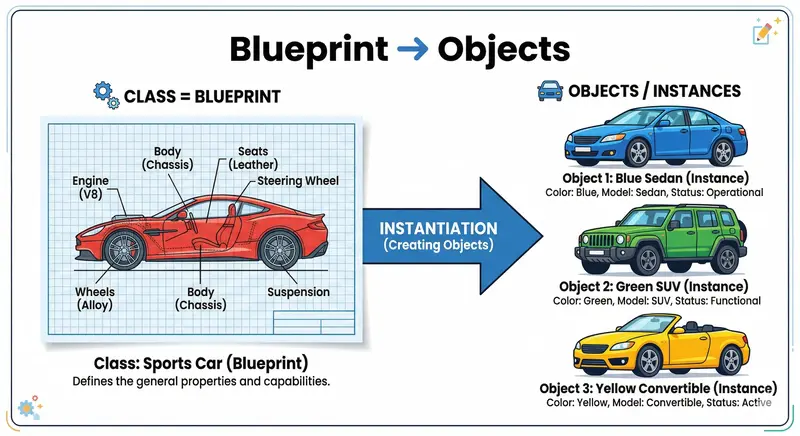
Cars Blueprint

Introduction

Hey there, fellow developer!

Imagine building a massive web app where your code feels like a chaotic pile of functions and variables. Then one day you discover Object-Oriented Programming (OOP) — and suddenly everything clicks into place like LEGO bricks. OOP isn’t just another fancy term; it’s the secret weapon that makes your JavaScript code reusable, organized, and scalable.

In this beginner-friendly guide, we’ll break down OOP in JavaScript using simple real-world examples (no overwhelming jargon, promise!). By the end, you’ll be able to create your own classes, instances, and understand why OOP makes developers’ lives so much easier. Let’s dive in!

What Object-Oriented Programming (OOP) Means?

Object-Oriented Programming is a programming paradigm (a style of writing code) that organizes software design around objects (specifically, instances of classes) rather than functions and logic.

Think of it this way:

  • In procedural code, you write step-by-step instructions.
  • In OOP, you model real-world things as objects that have properties (key-value pairs data) and behaviours (methods/functions).

The goal? Code reusability. Once you create a blueprint for something, you can reuse it a thousand times without rewriting code. This makes maintenance and collaboration smoother.

What is a Class in JavaScript?

In JavaScript (ES6 and above), a class is a blueprint for creating objects. It’s syntactic sugar over JavaScript’s prototype-based inheritance and constructor function, but it feels much more familiar if you’ve used OOP in other languages like Java.

You define a class using the class keyword:

class Car {
  // properties and methods go here
}

Simple, right? No more messy constructor functions from old-school JavaScript.

Real-World Analogy: Blueprint → Class → Objects

Let’s use the classic Car example (super easy to visualize).

  • A blueprint (technical drawing) of a car defines everything: engine size, color options, wheels, etc.
  • The actual cars rolling out of the factory are built from that blueprint. Each car has the same structure but can have different colors, mileage, or features.

You don’t redesign the entire car every time you want a new one — you just use the blueprint and tweak a few details.

That’s exactly how OOP works in JavaScript: the blueprint = Class, and the cars = Objects/Instances.

Cars Blueprint

Creating Instances Using Classes + The new Keyword

Once you have a class, you create actual objects (instances) using the new keyword.

const myCar = new Car();

What does new actually do internally? (Quick peek under the hood)

The new keyword is like a mini factory:

  1. It creates a brand-new empty object {}.
  2. It sets the new object’s [[Prototype]] (internal prototype link) to the class’s prototype property. This enables method sharing without copying methods to every instance.
  3. It binds this inside the constructor to point to this new object.
  4. It runs the constructor function (which usually adds properties via this.property = value).
  5. It implicitly automatically returns the newly created object.

This is what makes each instance unique while sharing the same structure. No new? You’ll get errors or unexpected behaviour — so always use it unless it’s a factory-method!

Class-Instances Relationship

Constructor Method

Every class can have a special method called constructor. It runs automatically when you create an object with new and is perfect for setting initial properties.

class Car {
  constructor(make, model, year) {
    this.make = make;      // 'this' refers to the new object
    this.model = model;
    this.year = year;
  }
}

const tesla = new Car("Tesla", "Model Y", 2025);
console.log(tesla.make); // Tesla

Methods Inside a Class

Methods are functions attached to the class. They define what the object can do.

class Car {
  constructor(make, model, year) {
    this.make = make;
    this.model = model;
    this.year = year;
  }

  startEngine() {
    console.log(`${this.make} ${this.model} engine started!`);
  }

  getAge() {
    return new Date().getFullYear() - this.year;
  }
}

const tesla = new Car("Tesla", "Model Y", 2025);
tesla.startEngine();     // Tesla Model Y engine started!
console.log(tesla.getAge()); // 1 (or whatever the current year is)

Notice how we reuse the same methods across all car objects? Reusability in action!

Note: These methods are nothing but the syntactic-sugar of prototype-based methods. Thus these methods doesn’t get copied each time when an instance is created, it’s in the shared memory.

Hands-On Example: Building a Student Class (Assignment Time!)

Let’s apply everything we learned. Create a Student class as your mini project:

class Student {
  constructor(name, age) {
    this.name = name;
    this.age = age;
  }

  printDetails() {
    console.log(`Student: ${this.name}, Age: ${this.age}`);
  }
}

// Creating multiple student objects
const student1 = new Student("Ritam", 22);
const student2 = new Student("Priya", 20);
const student3 = new Student("Aarav", 21);

student1.printDetails(); // Student: Ritam, Age: 22
student2.printDetails(); // Student: Priya, Age: 20
student3.printDetails(); // Student: Aarav, Age: 21

Boom! One class → unlimited students. This is the power of OOP.

The Four Pillars of OOP (Basic Ideas)

OOP rests on four foundational concepts which are more oftenly said as Four Pillars of Object-oriented Programming. Here’s the super-simple version:

  • Abstraction: Hide complex details and show only what’s necessary. (Like pressing the “Start” button on your car — you don’t need to know how the engine works internally.)
  • Encapsulation: Bundle data and methods together and restrict direct access (in JS we often use _privateVariable convention or #private fields). Keeps your object safe!
  • Inheritance: Create a new class which is based on an existing one. A Student class can inherit from a Person class and get name/age for free, then add its own features.
  • Polymorphism: Same method name, different behavior. A Person can speak(), but a Student can override it to say something different.

These pillars are what make OOP truly magical — and why your code stays DRY (Don’t Repeat Yourself).

Conclusion: Why You Should Love OOP in JavaScript

You’ve just gone from “What even is a class?” to “I can build reusable Student class!”

OOP in JavaScript gives you:

  • Cleaner, more organized code
  • Massive reusability (write once, use everywhere)
  • Easier maintenance and collaboration
  • A mental model that matches the real world

Next time you start a project, try modeling it with classes first — your future self will thank you.

Challenge for you: Extend the Student class with inheritance (make a CollegeStudent that adds major and overrides printDetails). Share your code in the comments!

Happy coding!

🧠 ShadowOS — An Invisible AI Operating System for Your Workflow

This is a submission for the Notion MCP Challenge

🚀 What I Built

What if your work could organize itself without you doing anything?

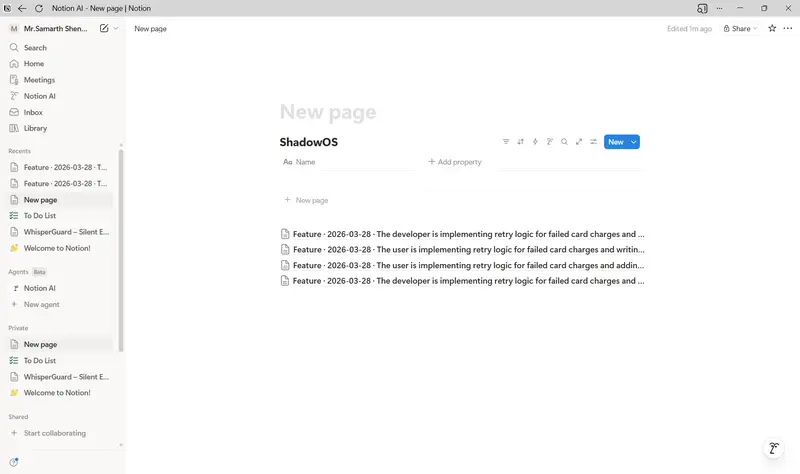
I built ShadowOS, a behavior-aware AI system that silently observes a developer’s workflow and automatically builds a structured, intelligent workspace in Notion.


Instead of manually:

  • writing notes
  • creating tasks
  • tracking bugs
  • documenting learning

ShadowOS converts your real-time actions into structured knowledge.

It acts like a second brain that evolves with you, powered by Notion MCP.

⚡ Key Features

🕵️ Passive Activity Tracking

ShadowOS monitors developer activity like:

  • Code edits
  • File changes
  • Workflow patterns

It logs only meaningful signals — not noise.

🧠 AI Intent Detection

Using an AI layer, the system:

  • Understands what you’re building
  • Detects patterns (e.g., debugging, feature development)
  • Infers your intent

🗂️ Auto-Structured Notion Workspace

Without manual input, it creates:

  • Feature documentation
  • Debug logs
  • Learning notes
  • Task lists

All inside Notion — automatically.

🔮 Predictive Workflow Suggestions

ShadowOS doesn’t just record — it thinks ahead:

Example:

“You just implemented authentication — want test cases and edge scenarios?”

📚 Personal Knowledge Graph

  • Tracks mistakes → solutions
  • Builds long-term learning insights
  • Creates a developer-specific knowledge base

🎥 Video Demo

👉 https://youtu.be/IniGA22G4zg

💻 Show Us the Code

👉 https://github.com/i-m-samarth-cs/ShadowOS.git


Notion

A tool that connects everyday work into one space. It gives you and your teams AI tools—search, writing, note-taking—inside an all-in-one, flexible workspace.

favicon
notion.so

🧠 What MCP Unlocks

With MCP, ShadowOS can:

Automatically push insights into Notion
Structure data into meaningful formats
Act as a persistent memory system
Enable AI agents to interact with real-world workflows

Notion becomes:

A dynamic operating system, not just a workspace.

🧪 Example Workflow
You edit a file in Cursor
ShadowOS logs the activity
AI analyzes intent
MCP sends structured insight to Notion
Notion updates automatically

Result:

Feature doc created
Tasks suggested
Knowledge stored

All without manual effort.

🧩 Why This Matters

Today, developers spend time:

documenting
organizing
remembering

ShadowOS removes that overhead.

It shifts the paradigm from:

“Write what you did”

to:

“Let the system understand what you did”

🏁 Future Scope
Cursor plugin for real-time integration
Multi-agent system (debugger, planner, reviewer)
Learning gap detection
Team-level intelligence sharing
Cross-platform workflow tracking


🧠 Final Thought

ShadowOS is not just a tool —
it’s a step toward autonomous workflows powered by human behavior.

Notion MCP made it possible to transform:

raw activity → structured intelligence
actions → knowledge
workflows → systems