Scaling Paymigo: Workflows & Architecture for AI-Powered Income Protection | Guidewire DevTrials (Scale Phase)

During the Seed Phase of the Guidewire DevTrials, our team introduced Paymigo, an AI-powered parametric insurance platform. Our mission is to build a structured, automated safety net for urban food delivery partners, protecting them from sudden income loss caused by external disruptions like severe floods, hazardous pollution, or sudden government strikes.

Now, in the Scale Phase, the challenge is moving from a conceptual prototype to a robust, production-ready system capable of handling real-time data ingestion, complex ML inference, and instant financial disbursements.

To achieve this, we executed a major architectural pivot: migrating from a monolithic React/Django setup to a high-performance Next.js 14 and FastAPI Monorepo. Here is a comprehensive look at how we engineered our scalable folder structure and the automated workflows powering Paymigo.

🏗️ 1. The Monorepo Architecture: Why We Pivoted

Handling real-time API polling alongside heavy ML computations requires strict separation of concerns without sacrificing developer velocity. We adopted Turborepo to manage our Next.js frontend and Python FastAPI backend within a single repository.

Why this stack?

Next.js 14 (App Router): Allows us to use React Server Components (RSCs) to securely fetch policy data directly from our database, drastically reducing client-side JavaScript.

FastAPI: Python is the undisputed king of ML. FastAPI provides asynchronous, high-performance API endpoints with built-in Pydantic validation, ensuring the data passed from our Next.js backend is strictly typed before it ever touches our ML models.

Prisma ORM: Acts as our single source of truth for the database schema, residing in a shared packages folder.

The Codebase Structure

paymigo/
├── apps/
│   ├── web/                              ← Next.js 14 — Worker PWA + Admin Portal
│   │   ├── app/
│   │   │   ├── (worker)/                 ← Worker PWA: Live disruption widget, UPI payouts
│   │   │   ├── (insurer)/                ← Admin Portal: Analytics, fraud queue, LSTM forecasts
│   │   │   └── api/                      ← Next.js API Routes: Auth, Razorpay Webhooks
│   │   ├── lib/                          ← Core logic: Payout calculations, ML HTTP clients
│   │   └── i18n/                         
│   │       ├── en.json, hi.json, ta.json ← Native localization for seamless regional onboarding
│   │
│   └── ml-service/                       ← FastAPI Python — Core AI/ML Engine
│       ├── api/                          ← Endpoints: /premium (XGBoost), /fraud (Isolation Forest)
│       ├── models/                       ← Trained artifacts (.pkl, .h5) loaded into memory on startup
│       ├── tasks/                        ← API polling (Bull Queue) & Monday 6 AM IST cron renewals
│       └── data/                         ← Synthetic worker data & historical IMD rainfall datasets
│
├── packages/
│   └── database/                         ← Prisma ORM (schema.prisma)
└── turbo.json                            ← Turborepo build caching & pipeline configurations

⚙️ 2. Deconstructing the Core System Workflows

Building an “automated” insurance platform means aggressively eliminating manual bottlenecks. We designed three primary workflows that allow the system to operate with near-zero human intervention.

Workflow A: Dynamic Onboarding & AI Premium Generation

Traditional insurance relies on static, historical tables. Paymigo calculates premiums dynamically based on the delivery partner’s real-time operational risk.

Multilingual Registration: The worker accesses the Next.js PWA (/app/(auth)/register). Because our target demographic includes diverse regional workers, the UI is fully localized (English, Hindi, Tamil) using Next.js middleware and i18n routing.

Data Ingestion: The worker inputs their vehicle type, primary delivery zone (pincode), and historical daily working hours. This payload is passed securely to the FastAPI service(POST /premium/calculate).

AI Pricing Matrix: First, a K-Means clustering model maps the worker’s pincode to a specific historical risk cluster (e.g., “High Flood Risk” vs. “Stable Zone”).

  • Next, an XGBoost regressor takes the worker’s data, the zone cluster, and real-time seasonal data to generate a personalized, dynamic premium (e.g., adjusting from a baseline ₹80/week to ₹95/week based on impending monsoon forecasts).

Policy Activation: The worker pays the initial premium via a Razorpay gateway. Prisma creates the active policy record, and a portion of the premium is instantly allocated to an “Emergency Wallet” for catastrophic events.

Workflow B: The Parametric Trigger & Auto-Payout Loop

This workflow completely replaces the manual claims process. If the environment stops the worker from earning, the system pays them automatically.

Background Polling: Inside our Next.js backend, a Bull Queue job runs every 10–15 minutes, pinging external Weather and Air Quality APIs for the worker’s registered zones.

Trigger Classification: If an API reports an anomaly (e.g., Rainfall > 50mm/hr or AQI > 400), the raw data is sent to our FastAPI Random Forest Trigger Classifier (POST /trigger/classify). The model validates if the conditions are severe enough to halt city movement.

The Payout Formula: Once validated, Next.js calculates the exact compensation using a deterministic formula in payout-calculator.ts:
Payout = (Base Hourly Rate) × (Lost Hours) × (ZoneRiskMultiplier) × (Worker Loyalty Tier)

Instant UPI Disbursement: A webhook fires to Razorpay Route, instantly transferring the calculated compensation directly to the worker’s verified UPI ID. The worker receives an SMS and a digital receipt in their /(worker)/payouts dashboard.

Workflow C: Fraud Defense & Admin Oversight

To ensure the long-term financial viability of the platform and protect the balanced insurance pool, we engineered a rigorous, multi-layered fraud defense system.

Anomaly Detection: Before any payout (automated or manually requested) is finalized, the claim payload is routed to POST /fraud/check.

Dual-Model Verification:

  • Isolation Forest: Analyzes the frequency and timing of the claim against the worker’s historical behavior to flag statistical anomalies.
  • GPS Random Forest: Cross-references the worker’s simulated delivery telemetry. Did the worker actually spend time in the affected zone during the disruption window?

Action Routing:

  • Clear: The claim executes the UPI payout automatically.
  • Flagged: The system halts the transaction and pushes it to the Admin Dashboard under the “Fraud Review Queue.”

Predictive Admin Oversight: In the Admin portal, operators do not just review flagged claims. They utilize a custom LSTM 7-day forecasting dashboard (/forecast/{zone}). By predicting severe weather or disruptions a week in advance, admins can ensure the platform maintains enough liquidity for upcoming automated mass-payouts.

🚀 Looking Ahead to the Finals:

Scaling Paymigo has been a massive technical and operational challenge. By coupling the frontend speed of Next.js 14 with the machine-learning horsepower of FastAPI, we have built an InsurTech pipeline capable of processing environmental API data, scoring complex risks, and initiating localized UPI payments seamlessly.

As we polish the PWA interface and lock down our Razorpay webhooks for the final Guidewire DevTrials submission, we are more confident than ever that AI-driven parametric insurance is the future of the gig economy.
Claude Code custom slash commands: the /commands directory you’re probably not using

Claude Code custom slash commands: the /commands directory you’re probably not using

If you’ve been using Claude Code for a while, you’ve probably discovered .claude/settings.json for configuring permissions and tools. But there’s another directory that most developers completely miss: .claude/commands/.

This is where you define custom slash commands — reusable prompts you can trigger with /command-name in any Claude Code session.

What are custom slash commands?

Think of them like shell aliases, but for Claude prompts. Instead of typing the same complex instruction every time, you define it once and call it with a short /command.

Here’s the structure:

your-project/
├── .claude/
│   ├── settings.json
│   ├── CLAUDE.md
│   └── commands/
│       ├── review.md
│       ├── test.md
│       ├── deploy-check.md
│       └── changelog.md

Each .md file in .claude/commands/ becomes a slash command.

Real commands I use daily

/review — consistent code review checklist

Create .claude/commands/review.md:

Review the code I'm about to paste. Check for:

1. Security issues (SQL injection, XSS, exposed secrets, unsafe deserialization)
2. Performance problems (N+1 queries, missing indexes, unnecessary loops)
3. Error handling gaps (unhandled promise rejections, missing try/catch, silent failures)
4. Code style violations (per our ESLint config in .eslintrc.js)
5. Missing tests for any new logic

Format your response as:
**Critical:** (issues that must be fixed before merge)
**Warnings:** (should fix but not blocking)
**Suggestions:** (nice to have)

Start with the most severe issue.

Now in any Claude Code session: just type /review and paste your code.

/test — generate tests for selected code

.claude/commands/test.md:

Write comprehensive tests for the code I'm about to show you.

Rules:
- Use our test framework: Jest + Testing Library
- Test happy path, edge cases, and error conditions
- Mock external dependencies (DB calls, API calls, file system)
- Each test should have a clear description that explains WHAT it tests and WHY
- Aim for 80%+ branch coverage
- Don't test implementation details — test behavior

Output: ready-to-paste test file with imports included.

/deploy-check — pre-deployment verification

.claude/commands/deploy-check.md:

I'm about to deploy. Help me verify I haven't missed anything.

Check the git diff I'll paste and look for:
1. Any hardcoded credentials, API keys, or secrets
2. Debug console.log statements that shouldn't ship
3. TODO comments that indicate unfinished work
4. Feature flags that should be enabled/disabled for prod
5. Database migrations that need to run before/after deploy
6. Any breaking API changes that need client-side updates

For each issue found, tell me: what it is, where it is (file:line), and what to do.

/changelog — generate release notes from commits

.claude/commands/changelog.md:

Convert the git log I'm about to paste into user-facing changelog entries.

Rules:
- Group by: Features, Bug Fixes, Performance, Breaking Changes
- Write for users, not developers (no jargon, no internal ticket numbers)
- Skip chore/refactor/ci commits unless they affect users
- Use present tense ("Add", "Fix", "Remove")
- One line per change, keep it scannable

I'll paste the git log output.

Then: git log v1.2.3..HEAD --oneline | pbcopy, paste into Claude Code after /changelog.

Team commands vs personal commands

The commands in .claude/commands/ are version-controlled — they live in your repo and your whole team gets them automatically.

For personal commands that shouldn’t be in the repo, Claude Code also reads from ~/.claude/commands/ (global, not committed).

Practical split:

  • In repo (.claude/commands/): /review, /test, /deploy-check, /changelog — anything team-specific
  • Global (~/.claude/commands/): /explain, /rubber-duck, personal debugging workflows

Parameters in commands

Commands can accept $ARGUMENTS — whatever you type after the command name:

.claude/commands/fix-bug.md:

Fix the bug described here: $ARGUMENTS

Approach:
1. First, explain what's causing the bug
2. Show the minimal fix
3. Explain why your fix works
4. Suggest a test to prevent regression

Usage: /fix-bug TypeError: Cannot read property 'id' of undefined in UserProfile.jsx:34

The full .claude/ setup that works for me

.claude/
├── settings.json          # tool permissions
├── CLAUDE.md              # project context (tech stack, conventions)
└── commands/
    ├── review.md          # /review — code review checklist
    ├── test.md            # /test — generate tests
    ├── deploy-check.md    # /deploy-check — pre-deploy verification
    ├── changelog.md       # /changelog — release notes from commits
    ├── fix-bug.md         # /fix-bug <description>
    └── explain.md         # /explain — explain code to a junior dev

All committed to git. New team members get the full workflow on git clone.

One more thing: the API cost

Clause Code burns through Claude API tokens faster than anything else I use. My monthly Claude usage was approaching $200 before I started routing through SimplyLouie — a $2/month Claude API proxy that uses the same Anthropic models but at a fraction of the cost.

Configure it in your Claude Code settings:

{
  "apiKey": "your-simplylouie-key",
  "baseURL": "https://simplylouie.com/api"
}

Same models. Different price. The /commands setup still works identically.

What’s your most-used Claude Code slash command? Drop it in the comments — I collect good ones.

n8n vs Zapier in 2026: Why I Switched (And Saved €2,000/Year)

I used Zapier for 3 years. Then I switched to n8n and never looked back. Here’s why — with real numbers.

The Cost Problem

Zapier’s pricing in 2026:

  • Starter: $29.99/mo (750 tasks)
  • Professional: $73.50/mo (2,000 tasks)
  • Team: $103.50/mo (2,000 tasks + collaboration)

At Professional tier, that’s $882/year for 2,000 tasks/month.

n8n self-hosted: $0/year for unlimited executions. Even n8n Cloud starts at $24/mo with 2,500 executions.

Over 3 years on Zapier, I spent roughly €2,400. My n8n VPS costs €5/month = €60/year.

Feature Comparison (2026)

Feature Zapier n8n
Pricing Per-task Unlimited (self-hosted)
AI Integration Built-in (limited) Full (any model via API)
Custom Code JavaScript only JavaScript + Python
Self-hosting No Yes (Docker)
Branching Logic Basic IF/THEN Full programming logic
Sub-workflows Yes Yes
Error Handling Basic retry Advanced (try/catch, custom)
Community Nodes No 900+ community nodes
Data Privacy Cloud only Your server, your data
Webhook Speed ~1-5 seconds <500ms (self-hosted)

Where Zapier Still Wins

Let’s be fair:

  1. Setup speed — Zapier is faster for simple 2-step automations
  2. Non-technical users — The UI is more intuitive for beginners
  3. Native integrations — 7,000+ apps vs n8n’s ~500 built-in (but n8n has HTTP nodes for anything)
  4. Reliability — Zero infrastructure management

Where n8n Crushes It

  1. Complex logic — Real IF/ELSE, loops, sub-workflows, error handling
  2. AI workflows — Connect to any LLM (OpenAI, Anthropic, local models) with full control
  3. Self-hosting — Your data stays on your server. GDPR-compliant by default
  4. Cost at scale — 10,000 executions/month on Zapier = $$$. On n8n = same €5 VPS
  5. Custom nodes — Build exactly what you need in JavaScript

My Migration Story

I had 12 Zaps running:

  • Lead capture → CRM
  • Email triage → Slack
  • Social media scheduling
  • Client onboarding sequence
  • Invoice automation
  • Daily standup compilation

Migrating all 12 took me one weekend. The hardest part was recreating the Zapier-specific integrations (some apps don’t have n8n nodes yet, so I used HTTP Request nodes).

Who Should Switch?

Switch to n8n if you:

  • Run 1,000+ tasks/month (cost savings are massive)
  • Need AI in your workflows
  • Care about data privacy
  • Want full control over logic
  • Are comfortable with Docker or have a VPS

Stay on Zapier if you:

  • Run <500 tasks/month
  • Need maximum simplicity
  • Don’t want to manage infrastructure
  • Use many niche integrations

Get Started with n8n

If you’re switching, don’t start from scratch. Here are production-ready workflows you can import in 10 minutes:

All workflows are fully documented with setup guides.

Conclusion

Zapier got me started with automation. n8n let me scale it. The cost savings alone justified the switch, but the real win is control — I can build exactly what I need, run it on my own infrastructure, and integrate AI however I want.

The automation landscape in 2026 rewards those who invest in flexible, self-hosted tools. n8n is the best one I’ve found.

More automation content at Altiora. Follow @AltioraHQ for practical workflows and templates.

Fixing XSS in Legacy PHP: Passing the Audit vs Solving the Problem

The Challenges of legacy systems

Legacy systems are not vulnerable by accident — they become vulnerable as a result of continuous evolution. The decisions made over time, often under pressure to deliver, gradually shape them into what they are today. These systems are rarely insecure because of a single flawed implementation. The root cause is almost always systemic. XSS is not a bug, it is a symptom of missing design decisions.

A common characteristic of legacy systems is inconsistency. There is no unified approach to validation or output escaping. Instead, similar problems are solved in slightly different ways across the codebase. Over the years, multiple developers have worked on the system, each bringing their own practices and constraints. Most of the time, the goal was to deliver something that works — even if it was only a short-term solution. At a system level, everyone is aware that these are compromises.

This is exactly the kind of environment where XSS vulnerabilities thrive.

The presence of significant technical debt reinforces this problem. As long as the system appears to work, it is rarely revisited. Internally, however, it often relies on outdated patterns, poorly defined responsibilities, and a lack of security considerations at every level.

The situation is further complicated by missing documentation, implicit knowledge, and a high likelihood of human error. In many cases, input validation and output encoding are either not clearly separated — or missing entirely. This creates hidden risks throughout the system.

Over time, these issues accumulate into what can only be described as a collection of time bombs — latent vulnerabilities waiting to surface.

I believe that any well-trained developer can fix an XSS vulnerability in a given application — I have no doubt about that. The task itself can be completed.

What I do question, however, is whether in a legacy system — due to the systemic issues described earlier — new vulnerabilities will continue to emerge over time.

Does passing a security audit truly mean that a system is secure?

Passing a security audit is similar to having a fully green test suite: it confirms that known conditions are met, but it does not guarantee the absence of deeper issues. Passing the audit fixes the present. Architecture defines the future.

Why a Modern Template Engine Doesn’t Automatically Prevent XSS

Primarily, XSS does not occur simply because escaping is missing — it happens because data is handled in the wrong place or at the wrong time. It is not purely a technological problem; it stems from when and how output is processed.

Many modern template engines, such as Blade or Twig, apply escaping automatically by default. However, this protection is limited to certain contexts. It is also very common for developers to deliberately disable escaping, either because the framework allows it or because they need to render “raw” output — in which case the protection is effectively bypassed. Misusing the context can lead to the same result.

Another challenge arises when a new template engine is introduced on top of a legacy system. Inconsistent practices and outdated structures underneath can create gaps that the engine alone cannot address.

A template engine can enforce safer defaults, but it cannot enforce correct thinking.

Making Blade Templates XSS-Safe: Practical Advice

It is possible to make Blade templates XSS proof, but this does not happen automatically. While Blade provides automatic escaping for standard HTML contexts, true protection requires:

  • Developer knowledge: understanding which contexts need escaping (HTML, JavaScript, Url, attributes)
  • Custom directives: creating Blade directives or helpers that consistently apply the right escaping strategy for each context.
  • Discipline and review: consciously avoiding {{!! !!}} unless the content is fully sanitized and mainatining consistency across the codebase.

Blade give you the tools, but it cannot enforce safe usage on its own. Security still depends on decisions and careful practices throughout the development process.

The Role of AI

Fundamentally, AI does not solve XSS vulnerabilities in legacy systems — it helps make them visible. AI-based tools are increasingly being integrated into development workflows, and at first glance, they promise a solution for security issues, including XSS.

One of the most attractive aspects of AI tools is their ability to quickly scan large codebases and identify known patterns of vulnerabilities. They can detect recurring issues and even suggest potential fixes, which can significantly speed up the discovery and partial remediation of problems.

However, it is crucial to understand their limitations. AI does not comprehend the full system context, nor does it understand the architectural decisions that are often the root cause of vulnerabilities. As mentioned earlier, XSS is rarely caused by a single bug; it is usually the result of inconsistent practices developed over years.

Consequently, AI tools often recommend local fixes — for example, escaping a specific variable or modifying a particular code snippet. While these suggestions are helpful, they do not address the underlying systemic problem. Without a unified strategy for handling output data, vulnerabilities are likely to reappear elsewhere.

AI can help identify vulnerabilities and accelerate fixes, but it operates on patterns — not intent, not architecture. Without a consistent strategy, it risks reinforcing the same fragmented solutions it is trying to fix.

Closing Thoughts

In practice, the decision is rarely black and white. Time pressure, business expectations, and existing constraints often favor quick fixes over deeper changes. Yet every shortcut carries a cost, one that is often paid later with interest.

What do you think is trully more cost-effective in the long run: applying patches or investing in architectural change?

Rotifer v0.7.5 & v0.7.6: Gene Registry, Version Chains & MCP Analytics

The gene ecosystem hit 50+ genes fast. Fast enough to expose two infrastructure gaps: domain fragmentation (the same concept registered under different domain names) and version isolation (no link between v0.1 and v0.2 of the same gene). v0.7.5 fixes both — and adds MCP call analytics so we can actually measure ecosystem growth.

Both @rotifer/playground and @rotifer/mcp-server are updated on npm.

Gene Domain Registry

Previously, rotifer wrap --domain accepted any free-text string. Developers independently chose domains like ai.video, media.video, and video.generation for functionally identical categories. At 50 genes this was annoying; at 500 it would be chaos.

v0.7.5 introduces a domain registry — a shared namespace that tracks all registered domains:

rotifer wrap my-gene
# ? Select a domain:
#   ❯ ai.text        (12 genes)
#     ai.image       (8 genes)
#     data.transform (5 genes)
#     [Enter new domain]

When you run rotifer wrap without --domain, the CLI suggests existing domains from a local cache (synced from the cloud registry). Pick one, or enter a new domain that gets registered automatically on publish.

Domain format is now validated: lowercase alphanumeric + dots only (a-z0-9.), no special characters, no path traversal.

You can still use rotifer wrap --domain custom.domain to bypass the interactive prompt.

Gene Version Chain

Every gene now carries a link to its previous version. When you publish an updated gene, the CLI automatically finds the latest version with the same name under your account and sets previous_version_id:

rotifer publish text-summarizer --changelog "Improved extraction for long documents"

This creates a traceable version chain:

text-summarizer v0.1.0 → v0.2.0 → v0.3.0
                          ↑ linked via previous_version_id

The --changelog parameter (max 500 characters) stores version notes alongside each release. Skip it in interactive mode, and the CLI auto-generates a brief diff. Existing genes published before v0.7.5 continue to work — the changelog field is optional and defaults to null.

MCP Server: Version History & Call Analytics

The @rotifer/mcp-server npm package gets two significant additions:

list_gene_versions

Browse the complete version history of any gene:

// list_gene_versions({ owner: "alice", name: "text-summarizer" })
[
  { "version": "0.3.0", "changelog": "Improved extraction for long documents", "previous_version_id": "..." },
  { "version": "0.2.0", "changelog": "Added support for Markdown input", "previous_version_id": "..." },
  { "version": "0.1.0", "changelog": null, "previous_version_id": null }
]

Call Analytics

Every MCP tool invocation is now instrumented — tool name, success/failure, latency, and gene ID (for gene-related tools) are logged asynchronously. The instrumentation is fire-and-forget: zero impact on response latency, and a logging failure never blocks a tool call.

The new get_mcp_stats tool (requires authentication) returns:

  • Total calls and success rate (7d / 30d)
  • Average latency per tool
  • Top tools and top genes by usage

This gives us the first quantitative view of how the ecosystem is being used across Cursor, Claude Desktop, and other MCP clients.

CLI Quality of Life

Domain cache sync

The local domain cache (~/.rotifer/domain_registry.json) refreshes silently after every rotifer publish and rotifer install. No manual sync needed.

Windows login fix

rotifer login now opens the browser correctly on Windows. Previously, the start command treated the URL as a window title instead of a URI.

Bug Fix: Gene List Deduplication (v0.7.6)

v0.7.6 (a same-day patch) fixes an issue where search_genes returned multiple versions of the same gene, inflating gene counts and cluttering search results. The fix applies DISTINCT ON (owner_id, name) at the database level, so both the CLI and VS Code extension now show only the latest version per gene.

Upgrade

# CLI
npm i -g @rotifer/playground@latest

# MCP Server (in your MCP client config)
npx @rotifer/mcp-server@latest

Docs: rotifer.dev/docs

Source: github.com/rotifer-protocol/rotifer-playground

Why WordPress Contact Form Emails Go to Spam (And How to Fix It)

You set up Contact Form 7 on your WordPress site. Someone fills out
your contact form. You never received the email.

Or worse: you receive it two days later, buried in your spam folder.

You are not alone. This is one of the most searched WordPress problems in 2026, and it affects thousands of website owners who have no idea why their contact form emails keep disappearing.

This guide explains exactly why it happens and gives you two ways to fix it permanently.

Why WordPress Contact Form Emails

Go to Spam

WordPress forms do send emails. Contact
Form 7, WPForms, Gravity Forms, and Ninja
Forms all send email notifications when someone submits your form.

The problem is not the form plugin.
The problem is how WordPress sends emails.

By default WordPress uses a PHP function called mail() to send all emails including your form notifications. This function sends emails directly from your web server without any authentication
or encryption.

Email providers like Gmail, Outlook, and
Yahoo has strict spam filters that check whether the server sending an email is authorized to send it. When an email arrives from a random web server with no authentication, those filters mark it as
spam or reject it entirely.

Your form is working perfectly. Your hosting server is sending the email. But it never reaches your inbox because Gmail sees it as suspicious.

The Five Most Common Reasons Your

WordPress Form Emails Are Not Arriving

Reason 1: Your host blocks or throttles
PHP mail

Many shared hosting providers block or severely limit PHP mail to prevent their servers from being used for spam. Bluehost, SiteGround, and other popular hosts have increasingly aggressive restrictions on PHP mail.

If you recently changed hosting providers and your contact form emails suddenly stopped working, this is almost certainly
the reason.

Reason 2: Your domain has no SPF or
DKIM records

SPF and DKIM are email authentication records that tell email providers your server is authorized to send emails from your domain. Without them, your emails look suspicious to spam filters.

Most WordPress PHP mail setups send emails without proper SPF and DKIM authentication, which is why they land in spam.

Reason 3: Contact Form 7 default
settings use WordPress admin email

CF7 by default sends notification emails from your WordPress admin email address using your server’s PHP mail.
If your server’s IP address has been flagged for spam by any email provider, your notifications will be blocked or filtered.

Reason 4: Your notification email address is different from your domain

If your WordPress site is yoursite.com but your notification email is
[email protected] the email is
traveling from a server at yoursite.com to Gmail. Gmail is increasingly suspicious of emails that originate from web servers
rather than dedicated email infrastructure.

Reason 5: No submission backup exists

This is not a deliverability problem, but it makes everything worse. When WordPress’s PHP mail fails, your submission is lost
permanently. There is no dashboard. No submission history. No way to recover what someone sent you. If the email fails, you never know it happened.

Fix 1: Use an SMTP Plugin

The fastest fix for most WordPress users is to replace PHP mail with a proper SMTP connection using a dedicated email service.

SMTP (Simple Mail Transfer Protocol) sends your emails through a proper authenticated email server instead of your web host’s PHP mail function. Email providers trust SMTP emails from known
services significantly more than PHP mail.

Step 1: Install WP Mail SMTP

WP Mail SMTP is the most popular WordPress SMTP plugin with over 3 million active installs. Install it from WordPress
plugin directory.

Step 2: Choose an SMTP provider

WP Mail SMTP works with several free and
paid SMTP providers:

Gmail SMTP (free)
If you have a Google Workspace account, you can use Gmail’s SMTP server. Free for basic usage. Best for small sites
with low form volume.

Brevo (formerly Sendinblue) (free tier)
300 emails per day free. Good deliverability.
Easy to set up.

Mailgun (free tier)
100 emails per day free. Excellent
deliverability. Requires domain verification.

Resend (free tier)
3,000 emails per month free. Modern API.
Excellent deliverability. Strong DKIM
and SPF setup.

Step 3: Configure WP Mail SMTP

Go to WP Mail SMTP settings in your WordPress dashboard. Enter your SMTP credentials from whichever provider
you chose. Send a test email to confirm
it is working.

Once configured, all WordPress emails, including your contact form notifications, will be sent through your SMTP provider
instead of PHP mail. Deliverability
improves immediately.

Fix 2: Use Formgrid as Your

Form Backend

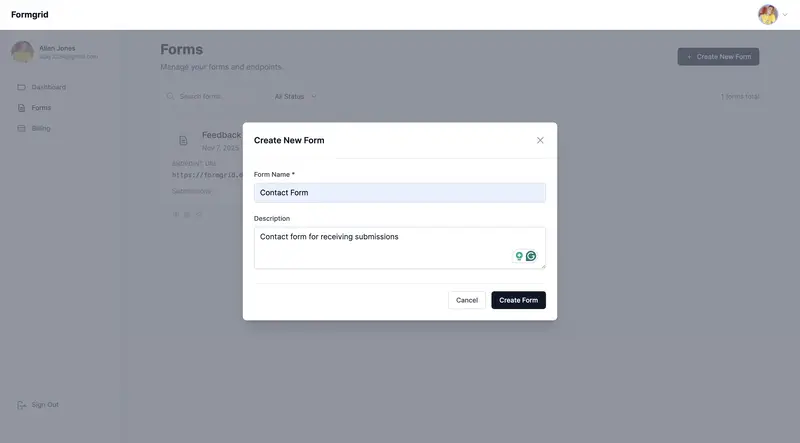
If you want more than just reliable email delivery, a submission dashboard, Google Sheets sync, file uploads, and spam protection, consider replacing your WordPress form plugin with Formgrid.

Formgrid is a form backend and form builder that handles your submissions independently of WordPress. It uses Resend for email delivery, which means your notifications go through proper, authenticated email infrastructure with excellent deliverability.

Here is how to use Formgrid with your
WordPress site:

Option A: HTML Form in WordPress

Custom HTML Block

This is the most reliable approach. Instead of using a form plugin, you write a simple HTML form in a WordPress Custom HTML block and point it at your Formgrid endpoint.

Step 1: Sign up at
formgrid.dev
and create a new form.

Step 2: Copy your Formgrid endpoint URL
from the form overview tab. It looks like:

https://formgrid.dev/api/f/your-form-id

Step 3: In your WordPress page editor, add a Custom HTML block and paste
this code:

<form action="https://formgrid.dev/api/f/your-form-id" 
      method="POST">

  <div>
    <label for="name">Your Name</label>
    <input type="text" 
           id="name" 
           name="name" 
           required />
  </div>

  <div>
    <label for="email">Email Address</label>
    <input type="email" 
           id="email" 
           name="email" 
           required />
  </div>

  <div>
    <label for="message">Message</label>
    <textarea id="message" 
              name="message" 
              rows="5" 
              required></textarea>
  </div>

  <!-- Honeypot spam protection -->
  <input type="text" 
         name="_honey" 
         style="display:none" />

  <button type="submit">Send Message</button>

</form>

Replace your-form-id with your actual
Formgrid endpoint slug.

Step 4: Publish your page and submit a test entry. Your notification email will arrive instantly through Resend with reliable, authenticated delivery.

Option B: Embed the Formgrid

Form Builder

If you do not want to write any HTML, you can build your form using Formgrid’s drag-and-drop form builder and embed it in WordPress using an iframe.

Step 1: Build your form in the Formgrid form builder. Drag and drop your fields, customize labels, and click Save.


Step 2: Copy your shareable form link from the Overview tab.

Step 3: In your WordPress page editor
add a Custom HTML block and paste
this embed code:

<iframe 
  src="https://share.formgrid.dev/f/your-form-id"
  width="100%"
  height="600"
  frameborder="0"
  style="border: none;">
</iframe>

Your form is now embedded in your
WordPress page and all submissions go
directly to Formgrid.

Why Formgrid Solves More Than

Just Deliverability

The SMTP plugin approach fixes your email deliverability. Formgrid fixes deliverability and gives you several things WordPress form plugins cannot:

A submission dashboard
Every submission is saved in your Formgrid dashboard regardless of
whether the email was delivered. You never lose a submission again.

CSV export
Download all your submissions as a
spreadsheet anytime. No plugin needed.
No data loss.

File uploads
Accept resumes, images, and documents
up to 1GB per file on the Premium plan.

Google Sheets sync
On the Professional plan, every submission appears automatically in a Google Sheet in real time. No Zapier. No plugins.
No Google API setup.

Spam protection
Built-in honeypot and rate limiting catch bots before they reach your inbox. Advanced CAPTCHA on the Premium plan.

Custom email templates
On the Business plan, you can design exactly how your notification emails look with full HTML control.

Which Fix Should You Use?

You want the simplest fix with minimal setup, and you are happy with your current form plugin:
→ Use WP Mail SMTP with a free 
  SMTP provider

You want reliable emails AND a submission dashboard AND Google 
Sheets sync AND spam protection:
→ Use Formgrid as your form backend

You are a non-technical user who 
does not want to touch any code:
→ Use Formgrid's form builder 
  embedded via iframe

The Honest Limitation of Formgrid

for WordPress

Formgrid is not a WordPress plugin. You cannot install it from the WordPress plugin directory. It requires either adding a custom HTML form to your page or embedding the form builder via iframe.

For users who are comfortable with WordPress Custom HTML blocks, this is a one-time 5-minute setup. For users who want a fully integrated WordPress plugin experience, WP Mail SMTP is the simpler choice.

Both fixes solve the core problem. Choose the one that matches your
technical comfort level.

Frequently Asked Questions

Will this fix Contact Form 7 emails
going to spam?

If you use WP Mail SMTP with a proper SMTP provider, yes. CF7 will send through your SMTP connection instead of PHP mail
and deliverability improves immediately.

If you switch to Formgrid, your CF7 plugin becomes optional. You can use a simple HTML form instead and bypass CF7 entirely.

Do I need to pay for an SMTP provider?

Most SMTP providers have generous free tiers. Brevo gives you 300 emails per day free. Mailgun gives you 100 emails per day free. For most small business contact forms, these free tiers are
more than enough.

Does Formgrid work with any
WordPress theme?

Yes. Formgrid uses a standard HTML form or an iframe embed. Both work with any WordPress theme, including Astra, Divi,
Elementor, GeneratePress, and Kadence.

What happens if I miss a submission?

With a standard WordPress form plugin and PHP mail, a failed email means a lost submission. With Formgrid, every submission is saved to your dashboard regardless of email delivery. You can
always log in and see every submission
ever received.

Final Thoughts

WordPress contact form emails going to spam is a PHP mail problem not a form plugin problem. The fix is straightforward:

Replace PHP mail with a proper SMTP connection using WP Mail SMTP and a free SMTP provider. Your emails will reach inboxes reliably from today.

Or switch to Formgrid for a form backend that handles reliable email delivery, submission storage, Google Sheets sync, and spam protection all in one place.

Either way, your contact form emails will stop disappearing.

👉 Try Formgrid free at formgrid.dev

Full disclosure: I built Formgrid. Written as honestly as I could.
Let me know in the comments if
anything looks off.

Tags: #wordpress #webdev #tutorial

contactform #email


---

## Notes Before Publishing

**Canonical URL:**

https://formgrid.dev/blog/wordpress-contact-form-emails-going-to-spam


**Cross-post to dev.to** with canonical 
URL pointing back to formgrid.dev

**This post targets these searches:**

“WordPress contact form emails going to spam”
“Contact Form 7 emails not arriving.”
“WPForms emails not sending.”
“WordPress form email deliverability”
“WordPress contact form not working.”


**Share in:**

WordPress subreddit: r/Wordpress
WordPress Facebook groups
WP Beginner community
WordPress.org support forums

ÖZEL HABER GÜNDEMİ / 29 Mart 2026

Ekonominin nisan ajandası yoğunTicaret Bakanı Ömer Bolat’ın dış ticaret istatistiklerini 2 Nisan’da Van’da açıklaması beklenirken Türkiye İstatistik Kurumu, 3 Nisan’da enflasyon verilerini kamuoyuyla paylaşacakPiyasalar, 22 Nisan’da TCMB Para Politikası Kurulunun açıklayacağı…