How I built a browser-based n8n workflow generator using Gemini AI

I kept hitting the same friction point while working
with n8n — every time I had a quick workflow idea,
I had to open my n8n instance, hunt for the right
nodes, wire them up manually, just to prototype
something that might not even work.

So I built a small tool to fix that.

What it does

A single HTML file that runs entirely in your browser.
You paste your free Gemini API key, describe your
workflow in plain English, and it generates n8n-
compatible workflow JSON you can import directly.

No server. No backend. No n8n instance needed to
generate the workflow.

How it works

The tool sends your plain English prompt to the
Gemini API with a system prompt engineered to output
valid n8n workflow JSON — correct node types,
parameters structure, and connections format.

The key challenge was getting Gemini to output JSON
that n8n actually accepts on import. n8n’s workflow
JSON has a specific structure — nodes need correct
typeVersion, position arrays, and the connections
object needs to map node names exactly.

After several iterations the output imports cleanly
with nodes and connections intact. Credentials are
intentionally excluded — n8n never stores credentials
in workflow JSON anyway, so users connect their own
after import as usual.

What’s included

  • The HTML generator tool (BYOK Gemini API)
  • 5 ready-to-import workflow JSON files:
    • Slack → Google Sheets logging
    • Gmail → Drive attachment backup
    • RSS → Twitter/X auto-post
    • Typeform webhook router
    • Notion → email digest

Try it

If you’re an n8n user who wants a faster prototyping
experience outside your instance, the pack is
available here: https://gum.new/gum/cmnbl4rwm000a04jicqkiatrf

This post was written with AI assistance.

I got tired of Googling Docker commands, so I built an interactive cheatsheet

Let me paint you a picture.

It’s late. You’re writing a Dockerfile. You’re in the zone — the kind of focus where you’re actually moving fast and everything is clicking. You type HEALTHCHECK and your fingers pause.

Is it --interval or --period? And what’s the timeout default again? Is there a --start-period flag or did you make that up?

You open a new tab.

You type “dockerfile healthcheck options” into Google.

The first result is a Stack Overflow answer from 2017. The accepted answer is wrong. The second answer is right but references a flag that was renamed. You scroll past three more answers, open the official Docker docs, find the right section, get your answer, close five tabs, and try to remember where the hell you were.

Three minutes gone. Flow state: destroyed.

I’ve been doing this for years. And I finally got annoyed enough to do something about it.

What I built

Docker Hub is a free, open-source interactive cheatsheet for all 18 Dockerfile instructions. It lives in your browser, works offline, needs no login, and exists for one reason: so you never have to leave your editor to look up a Docker command again.

Here’s the layout — three panels, all visible at once:

┌──────────────┬──────────────────────────┬──────────────┐
│  Cheatsheet  │   Interactive Dockerfile  │  Deep Dive   │
│   + search   │    (hover any keyword)    │  Reference   │
└──────────────┴──────────────────────────┴──────────────┘

Left panel — the cheatsheet

All 18 instructions, grouped by category, with a real-time search bar and category filter pills. Hover any instruction card and you get an instant tooltip summary. Click it and the right panel updates.

Center panel — the interesting part

This is what I actually wanted to exist. It’s a realistic, multi-stage Node.js production Dockerfile rendered with token-level syntax highlighting. Every instruction keyword — FROM, RUN, COPY, HEALTHCHECK, all of them — is a hoverable, clickable span.

Hover HEALTHCHECK and you get a popover right there:

  • What it does
  • All its options (--interval, --timeout, --start-period, --retries)
  • A live code example
  • A link to the full reference

No new tab. No context switch.

Right panel — the full reference

Click any keyword and the right panel shows you everything:

  • Full description in readable prose
  • All syntax variants
  • A parameter table (type, required, default, and a BuildKit badge for flags that need it)
  • Multiple copy-ready code examples
  • A layer info strip (creates a layer? persists in image? runtime override flag?)
  • Related instructions you can jump to directly

The tech (keeping it boring on purpose)

This is a Next.js app with Tailwind CSS. That’s basically it.

There’s no backend. No database. No external API calls. The entire knowledge base is a single well-structured DATA.json file that gets imported at build time.

// lib/data.ts
import data from '../DATA.json'

export function getInstructionById(id: string): Instruction | undefined {
  return data.instructions.find(i => i.id === id)
}

export function searchInstructions(query: string): Instruction[] {
  const q = query.toLowerCase()
  return data.instructions.filter(i =>
    i.name.toLowerCase().includes(q) ||
    i.summary.toLowerCase().includes(q) ||
    i.tags.some(t => t.includes(q))
  )
}

The center panel’s syntax highlighting is a custom tokenizer — not Prism, not Shiki, not any heavy library. Just a function that splits each Dockerfile line into typed tokens:

type TokenType = 'keyword' | 'flag' | 'string' | 'comment' | 'path' | 'plain'

interface Token {
  type: TokenType
  value: string
  instructionId?: string  // links keywords to DATA.json
}

function tokenizeLine(line: string): Token[] {
  if (line.trim().startsWith('#')) {
    return [{ type: 'comment', value: line }]
  }
  // first word = keyword if it matches a known instruction
  // --word = flag
  // /word or ./word = path
  // "word" = string
  // everything else = plain
}

Simple, fast, zero dependencies. Perfect for what we need.

The DATA.json schema — the real project

I want to talk about this because it’s where most of the work actually went.

Each instruction in the JSON has a full semantic schema:

{
  "id": "healthcheck",
  "name": "HEALTHCHECK",
  "summary": "Defines a command to test container health",
  "description": "Full prose description...",
  "deprecated": false,
  "syntax": [
    "HEALTHCHECK [OPTIONS] CMD <command>",
    "HEALTHCHECK NONE"
  ],
  "layer": {
    "createsLayer": false,
    "persistsInImage": true,
    "overridableAtRuntime": true,
    "runtimeFlag": "--health-cmd, --health-interval"
  },
  "parameters": [
    {
      "name": "--interval",
      "type": "duration",
      "required": false,
      "default": "30s",
      "buildkitOnly": false,
      "description": "Time between health checks"
    }
  ],
  "examples": [
    {
      "id": "healthcheck-http",
      "title": "HTTP endpoint check",
      "description": "Check a health endpoint with curl",
      "code": "HEALTHCHECK --interval=30s --timeout=10s --start-period=5s --retries=3 \n    CMD curl -f http://localhost:8080/health || exit 1"
    }
  ],
  "relatedInstructions": ["CMD", "ENTRYPOINT", "EXPOSE"],
  "tags": ["health", "monitoring", "check", "liveness"],
  "category": "runtime"
}

This schema is the reason the whole app is easy to contribute to. If you find a wrong example, a missing parameter, or a flag I forgot — you literally just edit the JSON and open a PR. You don’t need to understand Next.js, React, or anything about the app. Just find the instruction, fix the data, ship it.

That was an intentional design decision. I wanted the knowledge base to be community-maintained without requiring any contributors to touch application code.

Things I learned building this

1. Token-level interactivity is a surprisingly underused pattern.

Most syntax highlighters treat code as display-only. Making each token interactive — hoverable, clickable, state-driving — forced me to think about the rendering differently. Instead of a <pre> tag, each line is an array of <span> elements with event handlers. Feels obvious in retrospect.

2. A JSON schema is a product decision, not a technical one.

I spent more time thinking about the shape of DATA.json than I did writing component code. Getting the schema right — deciding what fields an Example needs, how parameters should be typed, how to represent the CMD+ENTRYPOINT interaction matrix — was the hard part. The React components were almost mechanical after that.

3. Tooltip positioning is an unsolved problem and I respect Floating UI more now.

My first tooltip implementation overflowed the viewport constantly. The second one flickered. The third one used getBoundingClientRect() + a viewport-edge detection check and finally worked. I should’ve just used Floating UI from the start.

4. “No backend” is a feature, not a constraint.

Every time I was tempted to add a server route (“for search”, “for analytics”, “for saving custom Dockerfiles”), I asked myself: can this be done in the client with the static data? The answer was always yes. Keeping it fully static means it deploys anywhere, works offline, and has zero ongoing infrastructure cost.

What’s next

A few things I want to add:

  • Custom Dockerfile input — paste your own Dockerfile and get it syntax-highlighted interactively with the same hover system
  • Docker Compose reference — same format, for docker-compose.yml keys
  • BuildKit toggle — hide/show BuildKit-only parameters to reduce noise for people on older Docker versions
  • Print export — a single-page PDF cheatsheet you can pin above your monitor

If any of those sound interesting to you, contributions are very welcome.

Try it / contribute

🐳 Live site: dockerhub
📦 GitHub: github.com/iakashpattnaik/docker_hub

The fastest way to contribute is to open DATA.json, find an instruction you know well, and improve its description, examples, or tags. That alone is enormously valuable.

If you find a bug, spot a wrong parameter, or think an instruction needs a better example — please open an issue or just send a PR directly. The bar is intentionally low.

And if this saves you even one “dockerfile COPY –chown syntax” Google search — that’s the whole point.

Happy shipping. 🚀

CA 31 – Select Queries from DVD Rental database

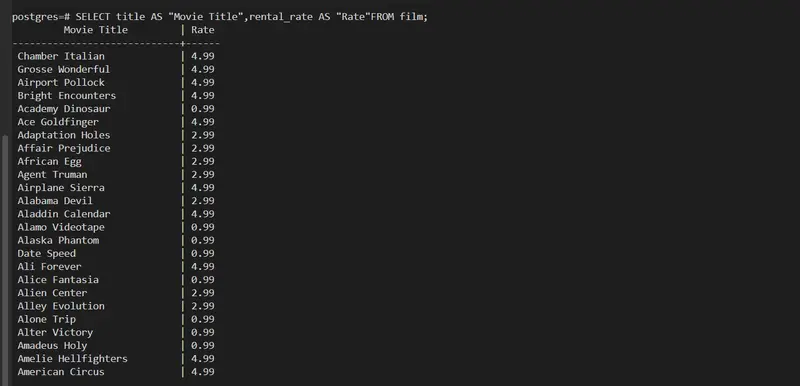
Retrieve film titles and their rental rates. Use column aliases to rename title as “Movie Title” and rental_rate as “Rate”.

SELECT title AS “Movie Title”,rental_rate AS “Rate”FROM film;

Here,title is renamed into Movie Title amd rental_rate is renamed into Rate from film table and to show the output.

List customer names and their email addresses. Alias first_name and last_name as “First Name” and “Last Name”.

SELECT first_name AS “First Name”,last_name AS “Last Name”,email FROM customer;

Here, first_name is ranamed into First Name and last_name as Last Name and fetch the email from the customer table.

Get a list of films sorted by rental rate in descending order. If two films have the same rental rate, sort them alphabetically by title.

SELECT title,rental_rate FROM film ORDER BY rental_rate DESC,title ASC;

Here, title and rental_rate to be fetch from film table and to order the rental_rate to descending order and title as ascending order.

Retrieve actor names sorted by last name, then first name.

SELECT first_name,last_nameFROM actor ORDER BY last_name ASC,first_name ASC;

Here, the first_name and last_name to be fetch from actor table and to order the last name and first name in asccending order.

List all unique replacement costs from the film table.

SELECT DISTINCT replacement_cost FROM film;

Here, the we need to fetch the unique replacement_cost from the film table so we used DISTINCT in the query.

List all films’ title and length in minutes. Alias length as “Duration (min)”.

SELECT title,length AS “Duration (min)”FROM film;

Here, from film table the title and the length data to be fetch and to rename the length as Duration(min) so we use length AS “Duration (min)”.

Retrieve customer first and last names along with their active status. Alias active as “Is Active”.

SELECT first_name,last_name,active AS “Is Active” FROM customer;

Here,the first_name, last_name and active from customer table and to rename the active to Is Active so we use active AS “Is Active”.

Retrieve the list of film categories sorted alphabetically.

SELECT name from category order by name ASC;

Here, to take the list of film name from caregory and to sort the film name in ascending order.

List films by length, sorted in descending order. Include only the title and length.

SELECT title lenght FROM film ORDER BY title DESC,length DESC;

Here, list all the title and length from film and to order the title and lenght by descending order.

Retrieve all actor names, sorted by their first name in descending order.

SELECT first_name FROM actor ORDER BY first_name DESC;

Here,from actor table the first_name to be fetch and to order it by descending order.

List all unique ratings available in the film table.

SELECT DISTINCT rating FROM film;

Here,for the unique rating we are using DISTINCT to get unique rating from film table.

Find all unique rental durations from the film table.

SELECT DISTINCT rental_duration FROM film;

Here,for the unique rental_duation we are using DISTINCT to get unique rental_duration from film table.

Retrieve the first unique customer ID based on active status. Include the customer_id and active columns, and order by customer_id.

SELECT DISTINCT ON (active)customer_id,active FROM customer ORDER BY active,customer_id;

Here,we are fetching the data from customer which must give unique customer_id which must be active that means this query gives the customer_id which are in active.

List the earliest rental date for each customer. Include customer_id and rental_date, and order by customer_id.

SELECT customer_id,MIN(rental_date) AS rental_date FROM rental GROUP BY customer_id ORDER BY customer_id;

Here, we need to fetch the earliest rental data so we are using MIN(rental_date) and also including the customer_id and rental_date which must be in the order of customer_id from rental table.

List the 10 shortest films by length. Include the title and length.

SELECT title,length FROM film LIMIT 10;

Here, we need to fetch the title, length from the film table and it should be shortest of 10 films so using LIMIt 10.

Retrieve all unique values of store_id from the inventory table.

SELECT DISTINCT store_id FROM inventory;

Here, we need to fetch unique store_id from inventory table so we are using DISTINCT store_id.

Find all unique replacement_cost values in the film table. Sort the results in ascending order.

SELECT DISTINCT replacement_cost FROM film ORDER BY replacement_cost ASC;

Here, we need to select unique replacement_cost from film table and that cost should be in ascending order, for unique replacement_cost we are usihg DISTINCT replacement_cost in the query.

colorlip: A JavaScript library for extracting perceptually representative colors from illustrations and photos

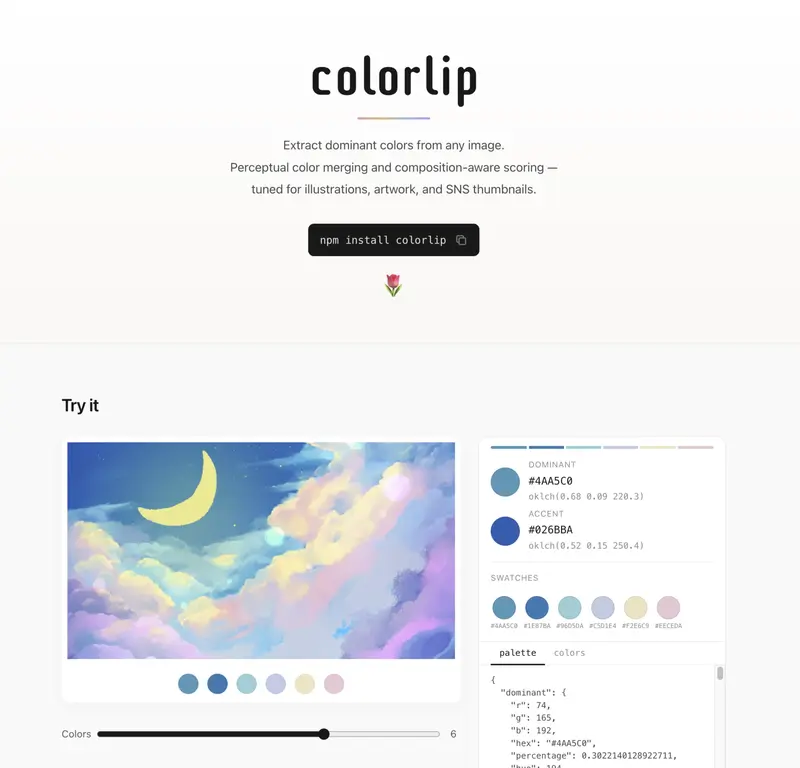
try colorlip

Hey everyone, I’m nazunya!

A while ago, I was building a local service for collecting illustrations and reference images. At that time, I created a color extraction feature to obtain colors that represent those illustrations and photos. It turned out surprisingly well, so I decided to extract it into a library.

I have released v1.0.0 as an npm package called colorlip, and I’d like to share it with you!

Quick Overview!

  • A lightweight library available for browsers and Node.js that extracts representative colors and palettes based on human perception.

  • Tuned for illustrations and product photos, making it ideal for creator-focused services, social media, and e-commerce sites.

  • In addition to Hex and RGB, it outputs HSL, Lab, oklch, and more, which is convenient for post-processing and browser-based usage.

Try it out right now:
https://na-zu-nya.github.io/colorlip/

GitHub:
https://github.com/na-zu-nya/colorlip

try colorlip

Motivation

While building a service to organize illustrations and other media, I was developing a mechanism to extract representative colors so that users could collect images with similar color schemes.

I tried using the average color and existing well-known libraries like Color Thief and node-vibrant, but I ran into the following issues:

  • The background color had too much influence.
  • It would pick up unexpected colors.
  • The results did not match the perceived atmosphere of the colors.

Since existing solutions are designed to be general-purpose, they felt a bit lacking when applied to illustrations and artwork.

I decided to create a library that is tailored to anime and manga-style illustrations, one that can accurately output the colors that perceptually define an illustration, while also being reasonably fast.

How color extraction works

If you’re curious about the nitty-gritty, here’s a breakdown!

In short, it works by downsampling the image to get a feel for its features first. Then, it quantizes the pixels into RGB and groups them in Lab color space. After that, it scores the colors based on things like whether they’re toward the center, the edges, or spread out, to build a palette. Finally, it picks the representative and accent colors from that palette.

How color extraction works (click to expand)

  • Resize the image to 150×150.
    • If using core, raw pixels can be used directly.
  • Perform stride sampling to estimate the median and spread of overall saturation, and whether edges are concentrated in the center or distributed throughout the image.
    • We infer that images with distributed edges are likely photographs or motifs extending to the periphery, while those with edges concentrated in the center likely have the subject in the middle.
    • This information is used in subsequent steps to adjust the weighting of central versus peripheral colors.
  • Filter by truncating alpha values below 0.5, and by applying lower bounds for saturation and a specific range of lightness.
    • This removes noise and white background colors.
  • Quantize pixels and apply weights that incorporate centrality, edge intensity, saturation, and alpha.
  • Merge similar colors in Lab space to create clusters.
    • We use Lab space, which is closer to human perception, because grouping in RGB space tends to merge colors that are perceptually distant.
    • Also, since converting all pixels to Lab space is computationally expensive, we perform quantization in RGB first.
  • Score these clusters based on the weights.
    • Using only occurrence frequency tends to favor colors spread across the entire image, so we utilize the weights calculated in the previous steps.
    • We determine the score by building on those previous weights and applying factors for centrality ratio, peripheral ratio, center of gravity, variance, and accent suitability.
  • Merge similar colors by checking color differences.
    • This prevents the palette from consisting only of similar shades of a specific color.
  • Finally, pick dominant and accent colors to create a palette.
    • For dominant colors, we reference the scores and re-evaluate the top candidates based on their original scores, weights, and whether they stand out in the OKLCH color space.
    • For accent colors, we select candidates that are sufficiently distant from the dominant colors and likely to be visually appealing.

How’s this different from other libraries?

Most existing libraries rely on standard quantization algorithms to pick representative colors based on their frequency. A lot of them use MMCQ, which reduces color counts to find a palette. At its core, MMCQ is a straightforward compression and summarization tool—it gathers colors, chunks them into boxes in RGB space, and picks the winners.

colorlip takes a more practical, hands-on approach:

  • It analyzes the image’s composition and edge distribution.
  • It figures out which parts of the image are focal points versus the background.
  • It clears out colors that look like noise.
  • It groups together colors that actually look similar to the human eye.
  • It rates colors based on which ones dominate the scene and which ones act as accents.

Instead of just summarizing data, it’s more like it’s “curating” the colors. It’s a bit more heuristic and goes a step beyond typical image processing. While that makes it a little less “one-size-fits-all” than generic libraries, I think it’s reached a point where it’s genuinely useful for real-world tasks.

It should work great for things like:

  • Character art and illustrations
  • Product thumbnails
  • Extracting UI themes
  • Images where the subject is clearly distinct from the background

If you’re working with these kinds of images, colorlip should be a solid choice.

Comparison

I’ve compared the speed and color extraction results of this library in comparison to other well-known ones.
Please note that each library has different uses and purposes, so take this as a rough comparison rather than a definitive benchmark.
I hope this will serve as a reference for your library selection.

First, here are the comparison results for photos.

Comparison of landscape photos

Comparison of snapshots

While there isn’t a massive difference, by picking up dominant and accent colors, I believe it captures the general impression quite well.

Next are the illustrations. I’m using my own artwork here since I couldn’t find freely available sample illustrations. I have tested it with various illustrations for verification, and the results have been generally positive.

Comparison of illustrations

There are also benefits in terms of speed; if semantic colors are not required, colorlip shows almost no difference in execution time compared to other lightweight libraries, and I believe it provides better results.
It can be used for batch processing on the server side as well as for quickly picking colors in the browser, which means smoother UX in the browser.

Summary

Please give it a try! I hope you like the library. 🌷

I’m also working on a web app called paletty.cc — it’s a palette manager built on colorlip, currently in beta.

https://paletty.cc

Thanks for reading!

Web Scraping for Beginners: Sell Data as a Service

Web Scraping for Beginners: Sell Data as a Service

As a developer, you’re likely aware of the power of web scraping in extracting valuable data from websites. But have you ever considered selling this data as a service? In this article, we’ll walk you through the steps of web scraping for beginners and explore the monetization opportunities that come with it.

Step 1: Choose Your Target Website

The first step in web scraping is to identify the website you want to scrape. This could be a website that provides valuable data such as stock prices, weather forecasts, or social media metrics. For this example, let’s use the website https://www.example.com.

Step 2: Inspect the Website’s HTML Structure

To scrape a website, you need to understand its HTML structure. Use your browser’s developer tools to inspect the website’s HTML elements. Identify the elements that contain the data you want to scrape. For example, if you want to scrape the website’s headings, you would look for <h1>, <h2>, etc. elements.

Step 3: Write Your Web Scraping Code

Now it’s time to write your web scraping code. You can use a programming language like Python or JavaScript to write your scraper. For this example, we’ll use Python with the requests and BeautifulSoup libraries.

import requests
from bs4 import BeautifulSoup

# Send a GET request to the website
url = "https://www.example.com"
response = requests.get(url)

# If the GET request is successful, the status code will be 200
if response.status_code == 200:
    # Get the content of the response
    page_content = response.content

    # Create a BeautifulSoup object and specify the parser
    soup = BeautifulSoup(page_content, 'html.parser')

    # Find all the headings on the webpage
    headings = soup.find_all(['h1', 'h2', 'h3', 'h4', 'h5', 'h6'])

    # Print out the headings
    for heading in headings:
        print(heading.text)

Step 4: Handle Anti-Scraping Measures

Some websites have anti-scraping measures in place to prevent bots from scraping their data. These measures can include CAPTCHAs, rate limiting, and IP blocking. To handle these measures, you can use techniques such as:

  • Rotating user agents to make your scraper look like a real browser
  • Adding delays between requests to avoid rate limiting
  • Using a proxy service to rotate IP addresses

python
import requests
from bs4 import BeautifulSoup
import random
import time

# List of user agents
user_agents = [
    'Mozilla/5.0 (Windows NT 10.0; Win64; x64) AppleWebKit/537.36 (KHTML, like Gecko) Chrome/58.0.3029.110 Safari/537.3',
    'Mozilla/5.0 (Windows NT 6.1; WOW64) AppleWebKit/537.36 (KHTML, like Gecko) Chrome/51.0.2704.103 Safari/537.36',
    'Mozilla/5.0 (Windows NT 10.0; Win64; x64; rv:53.0) Gecko/20100101 Firefox/53.0'
]

# Choose a random user agent
user_agent = random.choice(user_agents)

# Send a GET request to the website
url = "https://www.example.com"
headers = {'User-Agent': user_agent}
response = requests.get(url, headers=headers)

# If the GET request is successful, the status code will be 200
if response.status_code == 200:
    # Get the content of the response
    page_content = response.content

    # Create a BeautifulSoup object and specify the

Stop Using Cosine for Everything: 5 Distance Metrics That Unlock Hidden Powers in Your Vector Database

Everyone uses cosine similarity. Tutorials use it. Frameworks default to it. If you ask “which distance metric should I use?”, the answer is always “cosine, probably.”

But here is the thing: your vector database supports other metrics. And those metrics unlock use cases that cosine literally cannot handle.

This is not a math lecture. This is a practical guide. Five metrics, five real-world problems, working code you can run in two minutes. By the end, you will look at your vector database differently.

A quick mental model (no math degree required)

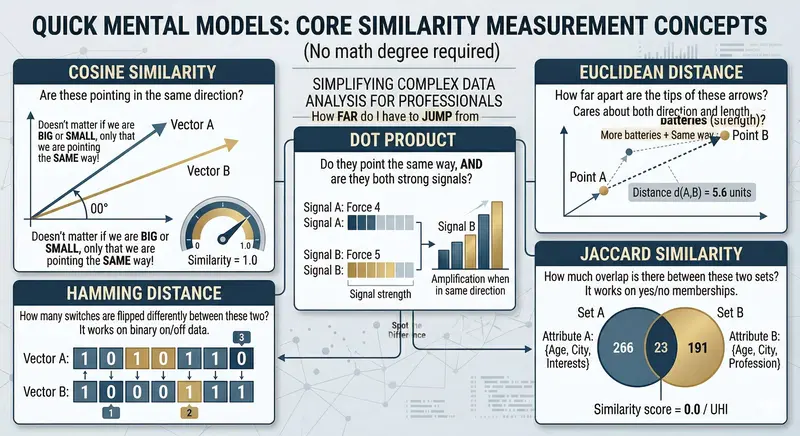
Before we dive in, let’s build some intuition. Imagine you have two arrows on a piece of paper:

Cosine asks: “Do these arrows point in the same direction?” It does not care how long they are.

Euclidean asks: “How far apart are the tips of these arrows?” It cares about both direction and length.

Dot Product asks: “Do they point the same way, AND are they both strong signals?” Direction plus intensity.

Hamming asks: “How many switches are flipped differently between these two?” It works on binary on/off data.

Jaccard asks: “How much overlap is there between these two sets?” It works on yes/no memberships.

That is it. Five different questions, five different superpowers. Let’s see them in action.

Setup

pip install velesdb

One line. No Docker. No API keys. VelesDB is an embedded database written in Rust (~6MB binary). It runs in your process.

import velesdb

db = velesdb.Database("./my_data")

1. Cosine: the one you already know (but maybe not why)

The question it answers: “Are these two things about the same topic?”

Cosine measures the angle between two vectors. If two documents are about machine learning, their embedding vectors will point in roughly the same direction, regardless of document length. A 280-character tweet and a 10-page paper about the same topic will score high.

collection = db.create_collection("articles", dimension=4, metric="cosine")

# Simulated embeddings: [tech, science, cooking, sports]
collection.upsert([
    {"id": 1, "vector": [0.9, 0.8, 0.0, 0.0], "payload": {"title": "Introduction to Machine Learning"}},
    {"id": 2, "vector": [0.8, 0.9, 0.0, 0.0], "payload": {"title": "Neural Networks Explained"}},
    {"id": 3, "vector": [0.0, 0.1, 0.9, 0.8], "payload": {"title": "Best Pasta Recipes"}},
    {"id": 4, "vector": [0.1, 0.0, 0.0, 0.9], "payload": {"title": "World Cup 2026 Preview"}},
    {"id": 5, "vector": [0.7, 0.6, 0.0, 0.1], "payload": {"title": "Deep Learning for Beginners"}},
])

results = collection.search(vector=[0.85, 0.75, 0.0, 0.0], top_k=3)
score=1.000  Introduction to Machine Learning
score=0.994  Deep Learning for Beginners
score=0.993  Neural Networks Explained

All three AI articles cluster together. Pasta and football? Nowhere close. This is cosine’s sweet spot: semantic similarity where you care about topic, not intensity.

When to use cosine: semantic search, document similarity, FAQ matching, any text embedding comparison.

2. Euclidean: the anomaly hunter

The question it answers: “How far is this point from what’s normal?”

Here is where it gets interesting. Imagine IoT sensors on a factory floor, each sending readings every minute: temperature, pressure, humidity, vibration. Normal readings cluster in a tight neighborhood. An anomaly is a point that is physically far from the cluster.

Cosine would miss this. Why? Because a reading of [78C, 985hPa, 12%, 4.8g] could point in a similar direction to [22C, 1013hPa, 45%, 0.3g]. Same general “shape” of data, vastly different magnitudes. Cosine says “similar.” Euclidean says “these are 70 units apart, something is on fire.”

collection = db.create_collection("sensors", dimension=4, metric="euclidean")

# Sensor: [temperature_C, pressure_hPa, humidity_%, vibration_g]
collection.upsert([
    {"id": 1, "vector": [22.0, 1013.0, 45.0, 0.3], "payload": {"status": "normal", "time": "08:00"}},
    {"id": 2, "vector": [22.5, 1012.5, 47.0, 0.3], "payload": {"status": "normal", "time": "09:00"}},
    {"id": 3, "vector": [21.8, 1013.5, 44.0, 0.4], "payload": {"status": "normal", "time": "10:00"}},
    {"id": 4, "vector": [23.0, 1012.0, 46.0, 0.3], "payload": {"status": "normal", "time": "11:00"}},
    {"id": 5, "vector": [78.0, 985.0, 12.0, 4.8],  "payload": {"status": "ANOMALY", "time": "11:15"}},
])

results = collection.search(vector=[22.0, 1013.0, 45.0, 0.3], top_k=5)
distance=  0.00  08:00 - normal
distance=  1.14  10:00 - normal
distance=  1.73  11:00 - normal
distance=  2.12  09:00 - normal
distance= 70.92  11:15 - ANOMALY  *** ALERT ***

Normal readings are all within distance 0-2 of each other. The anomaly is at distance 70. That is not a subtle difference. That is a fire alarm.

When to use euclidean: anomaly detection, IoT monitoring, fraud detection, anything where the absolute values matter, not just the direction.

3. Dot Product: the smart recommender

The question it answers: “Is this relevant to me, and how confident are you?”

Dot product is cosine’s bigger sibling. Cosine only looks at direction. Dot product looks at direction AND magnitude. Think of it this way: two movies can both be sci-fi (same direction), but a critically acclaimed blockbuster has a “louder” embedding signal than a forgettable B-movie.

With cosine, they would score equally. With dot product, quality rises to the top.

collection = db.create_collection("movies", dimension=4, metric="dotproduct")

# Dimensions: [sci_fi, action, drama, comedy]
# Higher magnitude = stronger signal / higher quality
collection.upsert([
    {"id": 1, "vector": [0.95, 0.80, 0.30, 0.05], "payload": {"title": "Interstellar", "rating": 8.7}},
    {"id": 2, "vector": [0.40, 0.35, 0.10, 0.02], "payload": {"title": "Low-Budget Sci-Fi B-Movie", "rating": 3.2}},
    {"id": 3, "vector": [0.85, 0.90, 0.20, 0.10], "payload": {"title": "The Matrix", "rating": 8.7}},
    {"id": 4, "vector": [0.05, 0.05, 0.10, 0.95], "payload": {"title": "Comedy Special", "rating": 7.0}},
    {"id": 5, "vector": [0.70, 0.60, 0.50, 0.05], "payload": {"title": "Blade Runner 2049", "rating": 8.0}},
])

results = collection.search(vector=[0.9, 0.8, 0.1, 0.0], top_k=5)
score=1.525  Interstellar (rating: 8.7)
score=1.505  The Matrix (rating: 8.7)
score=1.160  Blade Runner 2049 (rating: 8.0)
score=0.650  Low-Budget Sci-Fi B-Movie (rating: 3.2)
score=0.095  Comedy Special (rating: 7.0)

Notice: the B-movie is sci-fi (same direction as Interstellar), but it ranks way below because its embedding magnitude is weaker. Dot product naturally surfaces quality. This is why recommendation systems at scale often prefer it over cosine.

When to use dot product: recommendation engines, search ranking where content quality matters, any case where you want relevance weighted by confidence.

4. Hamming: the duplicate detective

The question it answers: “How many bits are different between these two?”

This one is completely different from the previous three. Hamming works on binary vectors (0s and 1s) and simply counts how many positions differ. It is lightning fast and perfect for one thing: comparing hashes.

Real-world scenario: you run a content platform. Users upload images. You want to detect reposts, even if someone cropped the image, added a filter, or recompressed it. The approach: compute a perceptual hash (pHash) of each image, which produces a binary fingerprint. Near-duplicate images have fingerprints that differ by just a few bits.

collection = db.create_collection("image_hashes", dimension=16, metric="hamming")

# Simulated 16-bit perceptual hashes
collection.upsert([
    {"id": 1, "vector": [1,0,1,1,0,0,1,0,1,1,0,1,0,0,1,1],
     "payload": {"file": "sunset_original.jpg", "source": "photographer"}},
    {"id": 2, "vector": [1,0,1,1,0,0,1,0,1,1,0,1,0,0,1,0],
     "payload": {"file": "sunset_cropped.jpg", "source": "instagram repost"}},
    {"id": 3, "vector": [1,0,1,1,0,0,1,0,1,1,0,1,0,1,1,1],
     "payload": {"file": "sunset_filtered.jpg", "source": "pinterest"}},
    {"id": 4, "vector": [0,1,0,0,1,1,0,1,0,0,1,0,1,1,0,0],
     "payload": {"file": "cat_photo.jpg", "source": "original"}},
    {"id": 5, "vector": [1,0,1,1,0,0,1,0,1,1,0,1,0,0,0,1],
     "payload": {"file": "sunset_watermarked.jpg", "source": "stock site"}},
])

new_upload = [1,0,1,1,0,0,1,0,1,1,0,1,0,0,1,1]  # same as original
results = collection.search(vector=new_upload, top_k=5)
hamming= 0 bits  [DUPLICATE      ]  sunset_original.jpg (photographer)
hamming= 1 bits  [NEAR-DUPLICATE ]  sunset_cropped.jpg (instagram repost)
hamming= 1 bits  [NEAR-DUPLICATE ]  sunset_filtered.jpg (pinterest)
hamming= 1 bits  [NEAR-DUPLICATE ]  sunset_watermarked.jpg (stock site)
hamming=16 bits  [different image]  cat_photo.jpg (original)

Zero to two bits difference? That is the same image with minor modifications. A content moderation bot can flag these in real-time. No ML model needed. No GPU. Just binary comparison at database speed.

When to use hamming: image deduplication, audio fingerprinting, DNA sequence comparison, binary feature matching, plagiarism detection with locality-sensitive hashing.

5. Jaccard: the taste matcher

The question it answers: “How much overlap is there between these two sets?”

Jaccard is beautifully simple: take two sets, divide the size of their intersection by the size of their union. If you and I both like 3 of the same genres out of 4 total unique genres between us, that is 75% Jaccard similarity.

No embeddings. No ML model. No neural network. Just set math.

collection = db.create_collection("user_profiles", dimension=10, metric="jaccard")

# Genres: [action, comedy, sci-fi, horror, drama, romance, thriller, documentary, anime, musical]
collection.upsert([
    {"id": 1, "vector": [1,0,1,0,1,0,1,0,0,0],
     "payload": {"user": "Alice", "likes": "action, sci-fi, drama, thriller"}},
    {"id": 2, "vector": [0,1,0,0,0,1,0,0,0,1],
     "payload": {"user": "Bob", "likes": "comedy, romance, musical"}},
    {"id": 3, "vector": [1,0,1,1,0,0,1,0,1,0],
     "payload": {"user": "Charlie", "likes": "action, sci-fi, horror, thriller, anime"}},
    {"id": 4, "vector": [1,1,1,1,1,1,1,1,1,1],
     "payload": {"user": "Dave", "likes": "literally everything"}},
    {"id": 5, "vector": [1,0,1,0,0,0,0,1,0,0],
     "payload": {"user": "Eve", "likes": "action, sci-fi, documentary"}},
])

results = collection.search(vector=[1,0,1,0,1,0,0,0,0,0], top_k=5)
75.0% match  Alice (action, sci-fi, drama, thriller)
50.0% match  Eve (action, sci-fi, documentary)
33.3% match  Charlie (action, sci-fi, horror, thriller, anime)
30.0% match  Dave (literally everything)
 0.0% match  Bob (comedy, romance, musical)

Alice shares 3 out of 4 unique genres with you. Dave likes everything, but his union is 10 genres while the overlap is only 3, so Jaccard penalizes him. Bob has zero overlap. The math is transparent, explainable, and instant.

When to use jaccard: user matching, product tagging, skill matching in recruiting, collaborative filtering, any comparison of categorical membership.

The cheat sheet

Metric Best for Score meaning Think of it as
Cosine Semantic search 1.0 = same topic “Same direction?”
Euclidean Anomaly detection Lower = closer “How far apart?”
Dot Product Recommendations Higher = better match “Same direction + strong signal?”
Hamming Hash comparison Lower = more similar “How many bits differ?”
Jaccard Set overlap 1.0 = identical sets “How much in common?”

The full picture

Choosing the right distance metric is like choosing the right tool. You can hammer a screw into wood, but a screwdriver works better.

Most developers never think about this because most tutorials only show cosine. But the moment you realize that euclidean catches anomalies that cosine misses, or that Jaccard gives you a recommendation engine without any ML, your vector database becomes something much more versatile than a “semantic search box.”

All the code in this article runs as-is. You can grab the complete script from GitHub and try it yourself.

pip install velesdb
python distance_metrics_demo.py

VelesDB is a source-available embedded database (Elastic License 2.0) written in Rust. ~6MB binary, no Docker, no server process, no API keys. Just pip install and go.

Full docs: velesdb.com/en
GitHub: github.com/cyberlife-coder/VelesDB
Python SDK: pypi.org/project/velesdb

What distance metric surprised you the most? Have you used Hamming or Jaccard in a real project? I’d love to hear about it in the comments.

Qdrant Has a Free Vector Database API for AI and Semantic Search

Qdrant is a vector database built for AI applications — semantic search, recommendation systems, and RAG pipelines. REST and gRPC APIs with filtering and payload storage.

Setup

docker run -p 6333:6333 qdrant/qdrant

Create Collection

const response = await fetch('http://localhost:6333/collections/products', {
  method: 'PUT',
  headers: { 'Content-Type': 'application/json' },
  body: JSON.stringify({
    vectors: { size: 384, distance: 'Cosine' }
  })
});

Index Documents with Embeddings

import { QdrantClient } from '@qdrant/js-client-rest';

const client = new QdrantClient({ url: 'http://localhost:6333' });

// Upsert points with vectors and payload
await client.upsert('products', {
  points: [
    {
      id: 1,
      vector: await getEmbedding('Wireless bluetooth headphones with noise cancellation'),
      payload: { name: 'Headphones', price: 89.99, category: 'audio' }
    },
    {
      id: 2,
      vector: await getEmbedding('Mechanical keyboard with Cherry MX switches'),
      payload: { name: 'Keyboard', price: 129.99, category: 'peripherals' }
    }
  ]
});

Semantic Search

const queryVector = await getEmbedding('good headphones for music');

const results = await client.search('products', {
  vector: queryVector,
  limit: 5,
  filter: {
    must: [{ key: 'price', range: { lte: 100 } }]
  },
  with_payload: true
});
// Returns headphones (semantically similar) under $100

Recommendation API

const recommendations = await client.recommend('products', {
  positive: [1, 5],   // IDs user liked
  negative: [3],       // IDs user disliked
  limit: 10,
  filter: { must: [{ key: 'category', match: { value: 'audio' } }] }
});

REST API

# Search
curl -X POST http://localhost:6333/collections/products/points/search 
  -d '{"vector":[0.1,0.2,...],"limit":5,"filter":{"must":[{"key":"category","match":{"value":"audio"}}]}}'

# Get collection info
curl http://localhost:6333/collections/products

# Scroll through points
curl -X POST http://localhost:6333/collections/products/points/scroll 
  -d '{"limit":10,"with_payload":true}'

Why This Matters

  • Built for AI: First-class support for embeddings and RAG
  • Filtering: Combine vector search with exact filters
  • Payload storage: Store metadata alongside vectors
  • Fast: Written in Rust, optimized for billion-scale

Need custom AI search or vector database tools? I build developer tools. Check out my web scraping actors on Apify or reach out at [email protected] for custom solutions.

CA 34 – Atomicity – Design a Reliable Wallet Transfer System with ACID Guarantees

Today I worked on a wallet system like GPay or PhonePe, where users can send money to each other. The main focus was Atomicity from ACID properties.

Atomicity means “all or nothing”.
If a transaction fails in between, everything should go back to the original state.

Transaction
I wrote a transaction like this

BEGIN;
UPDATE accounts
SET balance = balance - 200
WHERE name = 'Alice';
UPDATE accounts
SET balance = balance + 200
WHERE name = 'Bob';
COMMIT;

Now Testing Failure

I intentionally broke the second query (credit to Bob).

BEGIN;

UPDATE accounts
SET balance = balance - 200
WHERE name = 'Alice';
UPDATE accounts
SET balancee = balance + 200
WHERE name = 'Bob';
COMMIT;

BEGIN – start transaction
Do all operations
If success – COMMIT
If error – ROLLBACK

Atomicity ensures no partial transactions, which is very important in payment systems.