Web Scraping APIs for AI Agents: Firecrawl vs ScraperAPI vs Apify

Web Scraping APIs for AI Agents: Firecrawl vs ScraperAPI vs Apify

Agents need reliable web data extraction. Three platforms dominate: Firecrawl (LLM-native), ScraperAPI (general purpose), and Apify (versatile platform).

This comparison uses Rhumb AN Scores — evaluating web scraping APIs specifically for agent-readiness: execution reliability, structured extraction, handling complex JavaScript sites, and failure modes that agents must defend against.

The Scores

Provider AN Score Execution Access Readiness Flexibility Confidence
Firecrawl 7.2 7.8 7.1 7.2 73%
ScraperAPI 7.0 6.9 6.8 7.8 71%
Apify 7.2 7.4 6.9 7.6 72%

Firecrawl: “Built for LLM pipelines” (7.2 / 10)

Best for: Agents that need markdown from complex sites with minimal config. LLM-native output format, zero JavaScript handling overhead, designed specifically for agent use.

Biggest friction: Markdown extraction can miss structured data (tables, lists) that pure HTML would preserve. LLM-specific design means if you need raw HTML or API responses, Firecrawl is overfit to your use case.

Avoid when: You need granular control over extraction rules or raw HTML. Firecrawl’s “just give me markdown” simplicity is its weakness for complex data extraction requirements.

Decision: Pick Firecrawl if your agent consumes markdown and you want minimum setup. Fastest path from URL to agent context.

Why it lands here: Highest execution for agent workflows (7.8). REST API is clean. Handles JavaScript-heavy sites by default. No configuration required — point it at a URL, get markdown back. Error messages are agent-actionable.

ScraperAPI: “General-purpose Swiss Army knife” (7.0 / 10)

Best for: Agents that need flexibility across diverse scraping requirements: HTML parsing, structured extraction, proxy rotation, JavaScript handling, and custom rendering.

Biggest friction: Requires more configuration than Firecrawl. JavaScript rendering adds latency. Structured extraction needs custom CSS selectors or regex — not as agent-friendly as Firecrawl’s markdown approach.

Avoid when: You want a quick “markdown from URL” interface. ScraperAPI’s power comes at the cost of setup. If your only need is markdown extraction, Firecrawl is simpler.

Decision: Pick ScraperAPI when you need extraction flexibility or when dealing with diverse site structures that require different strategies.

Why it lands here: Highest flexibility score (7.8) reflects the breadth of extraction options. REST API supports both simple and advanced use cases. CAPTCHA solving and proxy rotation remove friction for difficult sites. But it’s more of a toolkit than a solved problem.

Apify: “Full automation platform” (7.2 / 10)

Best for: Agents running complex workflows: multi-step navigation, authenticated scraping, data transformation pipelines, and monitoring hundreds of sites on schedule.

Biggest friction: Heavyweight for simple “scrape one URL” requests. Cloud-native design assumes you’re building data pipelines, not one-off requests. Pricing is complex (compute units, storage, requests).

Avoid when: Your agent just needs to extract data from a single URL per request. Apify’s power is wasted. ScraperAPI or Firecrawl are simpler choices.

Decision: Pick Apify when your agent needs to orchestrate complex extraction workflows or monitor sites on a schedule.

Why it lands here: Execution is 7.4 (strong). The platform is built for automation — you can define actor logic (Node.js, Python), schedule runs, and integrate with external systems. But that power makes it overkill for simple agent requests.

Routing Rules for Agents

  1. “Just give me markdown from a URL”: Use Firecrawl. Simplest API, LLM-native output, zero config.
  2. “I need to extract specific data structures”: Use ScraperAPI. CSS selectors, custom parsing, flexible output formats.
  3. “My agent runs complex multi-step scraping workflows”: Use Apify. Orchestrate navigation, authentication, transformation, and scheduling.
  4. “I need to scrape JavaScript-heavy sites”: All three handle it, but Firecrawl is simplest (built-in), ScraperAPI requires enable-js, Apify requires actor code.

One-Line Rule

Firecrawl for agent-first markdown extraction. ScraperAPI when you need extraction flexibility. Apify for complex automation workflows.

Web scraping is inherently fragile — sites change structure, break links, add obfuscation. Agents must handle extraction failures gracefully. Prefer APIs that provide clear error signals and documented retry patterns over those that silently return partial data.

What AN Score Actually Measures

We evaluate web scraping APIs on:

  • Execution: API reliability, JavaScript handling, error signal clarity, timeout patterns
  • Access Readiness: Authentication integration, proxy support, rate limiting feedback, structured output modes
  • Flexibility: Extraction customization, output format options, transformation capabilities, scheduling support
  • Autonomy: Documented failure modes, retry strategies, cost transparency, SLA clarity

Each dimension is weighted for agent-specific use cases (not human data analysis or BI pipelines).

See the Full Data

Visit Rhumb.dev for the complete comparison, failure mode analysis, cost breakdown, and agent routing patterns.

This comparison is powered by Rhumb AN Score — the open scoring framework for APIs built for autonomous agents.

About the AN Score: Rhumb evaluates 645+ APIs across 20 dimensions specifically for agent-readiness. No pay-to-rank. No vendor influence. Just data.

Understanding Data Modeling in Power BI: Joins, Relationships, and Schemas Explained

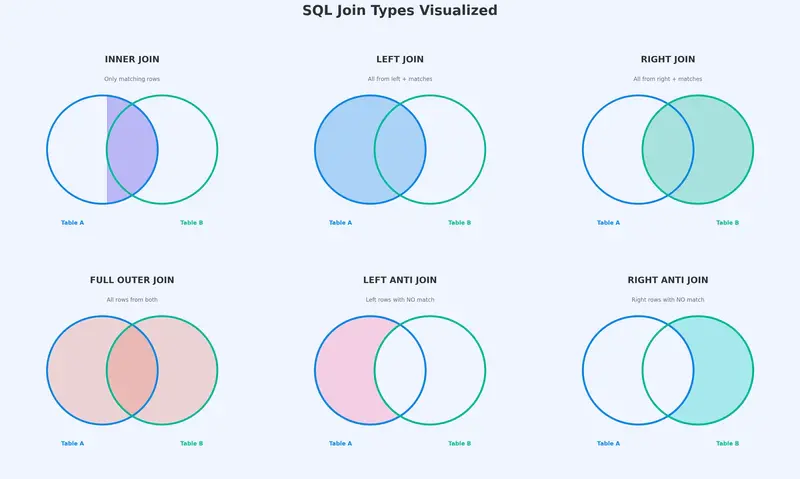
Image containing SQL joins

Introduction

Every report, dashboard, and visual in Power BI is only as good as the data model behind it. You can have perfect DAX measures and stunning visuals, but if your data model is poorly designed, your numbers will be wrong, your report will be slow, and your users will lose trust.

Data modeling is the process of organizing, structuring, and connecting your data tables so that Power BI can calculate results correctly and perform efficiently. It determines how tables relate to each other, how filters flow between them, and ultimately how every single number in your report is computed.

This article is a deep-dive into the core concepts of Power BI data modeling. We will cover SQL-style joins, Power BI relationships, fact and dimension tables, schema designs, and common pitfalls — all with real-life examples and clear guidance on where to perform each action in the Power BI interface.

Part 1: What Is Data Modeling?

Data modeling is the practice of defining how your data tables are structured and how they connect to one another. In Power BI specifically, a data model is the collection of all your tables, the relationships between them, and the calculated columns, measures, and hierarchies you build on top.

A well-designed data model achieves three goals:

  1. Correctness — Filters propagate properly, so aggregations (SUM, COUNT, AVERAGE) return accurate results across related tables.
  2. Performance — The VertiPaq engine can compress and query data efficiently, keeping report load times fast even at scale.
  3. Simplicity — Report authors can drag and drop fields intuitively without needing to understand complex workarounds.

A poorly designed model, by contrast, leads to ambiguous relationships, inflated row counts, circular dependencies, and DAX formulas that become nightmarishly complex just to produce simple totals.

Part 2: SQL Joins — Combining Data Before It Enters the Model

Before data reaches your Power BI model, you often need to combine tables from one or more sources. This is where joins come in. Joins are operations that merge rows from two tables based on a matching condition (a common column). In Power BI, joins are performed in Power Query Editor (the data transformation layer), not in the model itself.

Image containing SQL joins

Think of a join as a question: “For each row in Table A, what matching rows exist in Table B?”

The answer depends on the type of join you use.

2.1 INNER JOIN

What it does: Returns only the rows where a match exists in both tables. If a row in Table A has no corresponding match in Table B, it is excluded — and vice versa.

Real-life example: You have an Orders table and a Customers table. An INNER JOIN on CustomerID returns only orders placed by customers who exist in the Customers table. If there is an order with a CustomerID that does not appear in Customers (perhaps an orphaned record), that order is dropped.

Orders Table              Customers Table
┌──────────┬────────┐     ┌──────────┬──────────┐
│ OrderID  │ CustID │     │ CustID   │ Name     │
├──────────┼────────┤     ├──────────┼──────────┤
│ 1001     │ C1     │     │ C1       │ Alice    │
│ 1002     │ C2     │     │ C2       │ Bob      │
│ 1003     │ C3     │     │ C4       │ Diana    │
│ 1004     │ C5     │     │ C5       │ Eve      │
└──────────┴────────┘     └──────────┴──────────┘

INNER JOIN Result (on CustID):
┌──────────┬────────┬──────────┐
│ OrderID  │ CustID │ Name     │
├──────────┼────────┼──────────┤
│ 1001     │ C1     │ Alice    │
│ 1002     │ C2     │ Bob      │
│ 1004     │ C5     │ Eve      │
└──────────┴────────┴──────────┘
→ Order 1003 (C3) is dropped: no match in Customers.
→ Customer C4 (Diana) is dropped: no match in Orders.

Image explaining inner joins

When to use it: When you only want records that exist in both tables and are comfortable discarding unmatched rows.

2.2 LEFT (OUTER) JOIN

What it does: Returns all rows from the left table (Table A), plus matching rows from the right table (Table B). If a row in the left table has no match, the right-side columns are filled with null.

Real-life example: You want a complete list of all orders, with customer names attached where available. Even if an order’s CustomerID has no match in Customers, you still want to see that order.

LEFT JOIN Result (Orders LEFT JOIN Customers on CustID):
┌──────────┬────────┬──────────┐
│ OrderID  │ CustID │ Name     │
├──────────┼────────┼──────────┤
│ 1001     │ C1     │ Alice    │
│ 1002     │ C2     │ Bob      │
│ 1003     │ C3     │ null     │  ← No match, but order is kept
│ 1004     │ C5     │ Eve      │
└──────────┴────────┴──────────┘
→ All 4 orders are preserved. Customer Diana (C4) has no order, so she does not appear.

When to use it: When the left table is your “primary” table and you want every row from it, enriched with optional data from the right table.

2.3 RIGHT (OUTER) JOIN

What it does: The mirror of a LEFT JOIN. Returns all rows from the right table, plus matching rows from the left table. Unmatched left-side columns are filled with null.

Real-life example: You want a list of all customers, with their orders attached where applicable. Customers with no orders still appear.

RIGHT JOIN Result (Orders RIGHT JOIN Customers on CustID):
┌──────────┬────────┬──────────┐
│ OrderID  │ CustID │ Name     │
├──────────┼────────┼──────────┤
│ 1001     │ C1     │ Alice    │
│ 1002     │ C2     │ Bob      │
│ null     │ C4     │ Diana    │  ← No order, but customer is kept
│ 1004     │ C5     │ Eve      │
└──────────┴────────┴──────────┘
→ Order 1003 (C3) is dropped because C3 is not in Customers.

When to use it: When the right table is your anchor. In practice, most analysts simply swap the table order and use a LEFT JOIN instead — both achieve the same result.

2.4 FULL OUTER JOIN

What it does: Returns all rows from both tables. Where a match exists, the columns are merged. Where no match exists on either side, the missing columns are filled with null.

Real-life example: You want to see every order and every customer, whether they match or not — useful for data reconciliation or finding orphaned records.

FULL OUTER JOIN Result:
┌──────────┬────────┬──────────┐
│ OrderID  │ CustID │ Name     │
├──────────┼────────┼──────────┤
│ 1001     │ C1     │ Alice    │
│ 1002     │ C2     │ Bob      │
│ 1003     │ C3     │ null     │  ← Order with no customer
│ null     │ C4     │ Diana    │  ← Customer with no order
│ 1004     │ C5     │ Eve      │
└──────────┴────────┴──────────┘
→ Nothing is dropped. Both unmatched sides are preserved.

When to use it: Data quality checks, reconciliation, or when you cannot afford to lose any records from either table.

2.5 LEFT ANTI JOIN

What it does: Returns only the rows from the left table that have NO match in the right table. It is the opposite of an INNER JOIN from the left table’s perspective.

Real-life example: You want to find orders that reference a CustomerID that does not exist in the Customers table — orphaned orders.

LEFT ANTI JOIN Result:
┌──────────┬────────┐
│ OrderID  │ CustID │
├──────────┼────────┤
│ 1003     │ C3     │  ← This order has no matching customer
└──────────┴────────┘
→ Only unmatched rows from the left table are returned.

When to use it: Finding orphaned or unmatched records. Data validation. Identifying gaps.

2.6 RIGHT ANTI JOIN

What it does: Returns only the rows from the right table that have NO match in the left table.

Real-life example: You want to find customers who have never placed an order.

RIGHT ANTI JOIN Result:
┌────────┬──────────┐
│ CustID │ Name     │
├────────┼──────────┤
│ C4     │ Diana    │  ← This customer has no orders
└────────┴──────────┘
→ Only unmatched rows from the right table are returned.

When to use it: Identifying inactive customers, unused products, or entities with no associated transactions.

2.7 How to Perform Joins in Power BI (Step-by-Step)

Joins in Power BI are performed in Power Query Editor, using the Merge Queries feature.

Step 1: Open Power BI Desktop and click Transform Data (on the Home ribbon) to enter Power Query Editor.

Step 2: Select the table you want to act as the “left” table in the Queries pane on the left.

Step 3: On the Home ribbon in Power Query Editor, click Merge Queries (or Merge Queries as New if you want a separate output table).

Step 4: In the Merge dialog:

  • The top table is your left table (already selected).
  • Select the bottom table (your right table) from the dropdown.
  • Click on the matching column(s) in both table previews (e.g., CustID in both).
  • At the bottom of the dialog, choose your Join Kind from the dropdown:
    • Inner Join
    • Left Outer (All from first, matching from second)
    • Right Outer (All from second, matching from first)
    • Full Outer (All rows from both)
    • Left Anti (Rows only in first)
    • Right Anti (Rows only in second)

Step 5: Click OK. A new column appears in your table containing the merged data as nested tables.

Step 6: Click the expand icon (↔) on the new column header to select which columns from the right table you want to bring in.

Step 7: Click Close & Apply to load the merged result into your data model.

Part 3: Power BI Relationships — Connecting Tables in the Model

While joins physically merge two tables into one (performed during data loading in Power Query), relationships are logical connections between separate tables that remain in your data model. They tell Power BI how to filter and aggregate data across tables without combining them.

This distinction is critical: joins happen before data enters the model; relationships exist within the model.

3.1 Cardinality Types

Cardinality defines how many rows in one table can match rows in another table.

One-to-Many (1:M) — The Gold Standard

The most common and recommended relationship type. One row in the “one” side matches zero, one, or many rows on the “many” side.

Example: One row in Customers (CustomerID = C1) can match many rows in Orders (multiple orders placed by C1). But each order has exactly one customer.

Customers (1 side)          Orders (Many side)
┌────────┬────────┐         ┌──────────┬────────┬────────┐
│ CustID │ Name   │         │ OrderID  │ CustID │ Amount │
├────────┼────────┤         ├──────────┼────────┼────────┤
│ C1     │ Alice  │───1:M──▶│ 1001     │ C1     │ 50     │
│        │        │         │ 1005     │ C1     │ 120    │
│ C2     │ Bob    │───1:M──▶│ 1002     │ C2     │ 80     │
└────────┴────────┘         └──────────┴────────┴────────┘

Why it is preferred: Filters flow cleanly from the “one” side to the “many” side. When you select “Alice” in a slicer, Power BI filters the Orders table to only show Alice’s orders. Aggregations (SUM of Amount) work correctly and unambiguously.

Many-to-Many (M:M)

Multiple rows on both sides can match each other. This occurs when neither table has unique values in the join column.

Example: A Students table and a Courses table connected through a bridge table, where each student takes multiple courses and each course has multiple students. If you connect Students directly to Courses without a bridge table, you get an M:M relationship.

Risks: M:M relationships can produce unexpected results because filters can flow in ways that cause double-counting or inflated totals. Power BI allows them, but they should be used cautiously and are often a sign that a bridge table (a fact table representing the enrollment) is needed.

One-to-One (1:1)

Each row in Table A matches exactly one row in Table B. Both columns in the relationship contain unique values.

Example: An Employees table and an EmployeeDetails table, where each employee has exactly one detail record.

When it arises: Usually when a single table has been split into two for organizational reasons (e.g., separating PII data from non-PII data). Consider whether the tables should simply be merged.

3.2 Cross-Filter Direction

Cross-filter direction controls how slicer and filter selections propagate between related tables.

Single Direction (Default for 1:M)

Filters flow from the “one” side to the “many” side only. This is the default and recommended setting.

Customers ──filter──▶ Orders
(Selecting a customer filters their orders)

Orders ──X──▶ Customers
(Selecting an order does NOT filter the Customers table by default)

Why single is preferred: It keeps filter behavior predictable. Report authors know that dimension tables filter fact tables, and not the other way around.

Both Directions (Bidirectional)

Filters flow in both directions. Selecting a value in either table filters the other.

Customers ◀──filter──▶ Orders

When to use: Rarely. Sometimes necessary when you have a bridge table in an M:M scenario and need filters to propagate through it. Bidirectional filtering can cause performance issues and ambiguous filter contexts if overused.

Recommendation: Start with single-direction filtering. Only switch to bidirectional when you have a specific, well-understood reason.

3.3 Active vs. Inactive Relationships

Power BI allows only one active relationship between any two tables at a time. If your data has multiple logical connections between the same two tables, you must designate one as active and the rest as inactive.

Example: A Sales table has both an OrderDate and a ShipDate column. Both logically connect to a Calendar table. You can create two relationships (OrderDate→Calendar and ShipDate→Calendar), but only one can be active.

Calendar (Date)
    │
    ├── Active Relationship ──── Sales[OrderDate]
    │
    └── Inactive Relationship ─ ─ ─ Sales[ShipDate]  (dashed line in Model View)

The active relationship is used by default in all DAX calculations. To use the inactive relationship, you invoke the USERELATIONSHIP function:

Ship Date Sales = 
CALCULATE(
    SUM(Sales[Amount]),
    USERELATIONSHIP(Sales[ShipDate], Calendar[Date])
)

This concept directly connects to role-playing dimensions, discussed later in this article.

3.4 How to Create and Manage Relationships in Power BI (Step-by-Step)

Method 1: Model View (Drag-and-Drop)

Step 1: In Power BI Desktop, click the Model View icon on the left sidebar (the icon with three connected boxes).

Step 2: You will see all your tables displayed as boxes with their columns listed.

Step 3: To create a relationship, click on a column in one table and drag it to the matching column in another table. A line appears connecting the two tables.

Step 4: Power BI will auto-detect the cardinality and cross-filter direction. Double-click the relationship line to edit these properties.

Method 2: Manage Relationships Dialog

Step 1: Go to the Home ribbon (or Modeling ribbon) and click Manage Relationships.

Step 2: A dialog appears showing all existing relationships. Click New to create one.

Step 3: Select the two tables and the matching columns from dropdowns.

Step 4: Set the cardinality (One-to-Many, Many-to-Many, One-to-One).

Step 5: Set the cross-filter direction (Single or Both).

Step 6: Check or uncheck Make this relationship active.

Step 7: Click OK to save.

Method 3: Auto-Detect

When you first load data, Power BI attempts to auto-detect relationships based on column names and data types. This works well for simple models but should always be reviewed manually. Go to Manage Relationships to verify what Power BI created and correct any mistakes.

Part 4: Joins vs. Relationships — What Is the Difference?

Image illustrating the differences btwn joins and r/ships

This is one of the most common points of confusion for Power BI beginners.

Aspect Joins (Power Query) Relationships (Model)
Where Power Query Editor (Transform Data) Model View / Manage Relationships
When During data loading/transformation After data is loaded into the model
Result Physically merges two tables into one Keeps tables separate, connected logically
Row count Output table may have more or fewer rows Tables retain their original row counts
Use case Enriching/cleaning data before modeling Enabling cross-table filtering and aggregation
Performance Increases table size (more columns per row) Efficient — VertiPaq handles relationships natively
DAX impact Merged columns become part of one table DAX uses RELATED/RELATEDTABLE to traverse

Rule of thumb: Use joins (Merge in Power Query) when you need to physically combine or clean data, such as adding a lookup column or deduplicating. Use relationships when you want to keep tables separate and let Power BI handle filtering and aggregation — which is the case for the vast majority of your model.

Part 5: Fact Tables vs. Dimension Tables

The foundation of any good data model is the separation of data into fact tables and dimension tables.

Fact Tables

A fact table stores the events or transactions of your business. Each row represents something that happened: a sale, a shipment, a click, a support ticket.

Characteristics of fact tables:

  • Contain measures — numeric values you want to aggregate (Amount, Quantity, Cost, Duration).
  • Contain foreign keys — columns that reference dimension tables (CustomerID, ProductID, DateKey).
  • Tend to be tall (many rows, relatively few columns).
  • Grow over time as new transactions occur.

Examples: Sales, Orders, WebClicks, SupportTickets, Shipments, FinancialTransactions.

Dimension Tables

A dimension table stores the descriptive attributes that provide context to your facts. They answer the “who, what, where, when, why” questions about your transactions.

Characteristics of dimension tables:

  • Contain descriptive columns — names, categories, addresses, dates, hierarchies.
  • Contain a primary key — a unique identifier for each row (CustomerID, ProductID, Date).
  • Tend to be wide (many columns, relatively few rows compared to fact tables).
  • Change slowly or infrequently.

Examples: Customers, Products, Calendar/Date, Geography, Employees, Stores.

How They Connect

┌──────────────┐     ┌──────────────────────────────┐     ┌──────────────┐
│  Customers   │     │         Sales (Fact)          │     │   Products   │
│  (Dimension) │     │                               │     │  (Dimension) │
├──────────────┤     ├──────────────────────────────┤     ├──────────────┤
│ *CustomerID  │◀─1:M│ SaleID                        │M:1─▶│ *ProductID   │
│  Name        │     │ CustomerID (FK)               │     │  ProductName │
│  City        │     │ ProductID (FK)                │     │  Category    │
│  Segment     │     │ DateKey (FK)                  │     │  Price       │
└──────────────┘     │ Quantity                      │     └──────────────┘
                     │ Amount                        │
                     └──────────────────────────────┘
                                   │
                                  M:1
                                   │
                              ┌─────────┐
                              │Calendar │
                              │(Dim)    │
                              ├─────────┤
                              │*Date    │
                              │ Month   │
                              │ Quarter │
                              │ Year    │
                              └─────────┘

The asterisk (*) denotes the primary key. Arrows show the “one” side pointing to the “many” side. Filters flow from dimensions into the fact table, which is exactly what you want — selecting a customer, product, or date filters the relevant sales.

Part 6: Schema Designs

A schema is the overall shape or architecture of your data model — how fact and dimension tables are arranged and connected.

6.1 Star Schema

The star schema is the recommended design for Power BI. It consists of a central fact table surrounded by dimension tables, each directly connected to the fact table. When visualized in Model View, the layout resembles a star.

Image showing star schema

                    ┌────────────┐
                    │  Calendar  │
                    └──────┬─────┘
                           │
┌────────────┐    ┌────────┴────────┐    ┌────────────┐
│ Customers  ├────┤   Sales (Fact)  ├────┤  Products  │
└────────────┘    └────────┬────────┘    └────────────┘
                           │
                    ┌──────┴─────┐
                    │   Stores   │
                    └────────────┘

Characteristics:

  • One fact table at the center.
  • Dimension tables connect directly to the fact table (one hop).
  • Dimensions are denormalized — all descriptive attributes are in a single table per dimension, even if that means some redundancy.

Example: A Products dimension contains ProductName, SubCategory, Category, and Department all in one table, even though SubCategory→Category→Department is a hierarchy. The redundancy is intentional — it simplifies the model.

Advantages:

  • Simple and intuitive for report authors.
  • Power BI’s VertiPaq engine is optimized for star schemas.
  • Filters travel one hop from dimension to fact — fast and predictable.
  • DAX formulas are straightforward.

When to use: Almost always. This should be your default schema design in Power BI.

6.2 Snowflake Schema

A snowflake schema is a star schema where one or more dimension tables are normalized — broken into sub-tables connected in a chain.

┌──────────────┐    ┌──────────────┐    ┌──────────────────┐
│  Department  ├────┤  Category    ├────┤    Products      │
└──────────────┘    └──────────────┘    └────────┬─────────┘
                                                 │
                                        ┌────────┴────────┐
                                        │  Sales (Fact)   │
                                        └────────┬────────┘
                                                 │
                                          ┌──────┴─────┐
                                          │  Calendar  │
                                          └────────────┘

Instead of one Products dimension with all attributes, the snowflake breaks it into Products → Category → Department, each as a separate table.

Characteristics:

  • Normalized dimension chains (multiple hops from fact to outermost dimension).
  • Less data redundancy in dimension tables.
  • More tables and relationships to manage.

Advantages:

  • Reduced storage for dimension data (relevant in traditional data warehouses).
  • Cleaner structure if dimensions are very large and highly hierarchical.

Disadvantages in Power BI:

  • Filters must travel through multiple relationships to reach the fact table, which can complicate DAX and reduce performance.
  • Report authors have to understand which sub-table contains which attribute.
  • VertiPaq already compresses data extremely well, so the storage savings of normalization are negligible.

When to use: Rarely in Power BI. If your source data arrives snowflaked, consider flattening (denormalizing) the dimension chains in Power Query before loading them into the model. The result: a star schema.

Image showing snowflake schemas example

6.3 Flat Table (Denormalized / DLAT)

A flat table model consists of a single, wide table that contains everything — facts and dimensions combined into one table.

┌─────────────────────────────────────────────────────────┐
│                   FlatSalesTable                        │
├─────────────────────────────────────────────────────────┤
│ SaleID │ Date │ CustomerName │ City │ ProductName │ ... │
│ Amount │ Quantity │ Category │ Segment │ StoreName │ ... │
└─────────────────────────────────────────────────────────┘
(One massive table — no relationships needed)

Characteristics:

  • Everything in one table.
  • No relationships because there is only one table.
  • Extremely wide (many columns) and potentially very tall (many rows with repeated descriptive data).

Advantages:

  • Simple for very small datasets or quick ad-hoc analysis.
  • No relationships to configure.
  • Easy to create from a single CSV or Excel export.

Disadvantages:

  • Massive data redundancy (customer name, city, segment repeated on every row).
  • Poor compression and large model size.
  • No clear separation of measures vs. attributes.
  • Difficult to maintain and extend.
  • DAX calculations can behave unexpectedly because there is no clear filter direction.

When to use: Only for quick prototypes, small personal datasets, or when you genuinely have a single flat data source with fewer than a few thousand rows and no plans to scale.

6.4 Schema Comparison Summary

Criteria Star Schema Snowflake Schema Flat Table
Complexity Low Medium-High Lowest
Performance in Power BI Best Good (but extra hops) Poor at scale
Data redundancy Moderate (in dimensions) Low Very high
Ease of DAX Easiest Harder (multi-hop) Unpredictable
Scalability Excellent Good Poor
Recommended for Power BI Yes — default choice Flatten if possible Small/ad-hoc only

Part 7: Role-Playing Dimensions

A role-playing dimension is a single dimension table that serves multiple analytical purposes by connecting to the same fact table through different columns.

The most common example is the Calendar/Date dimension. A Sales fact table might have:

  • OrderDate — when the order was placed.
  • ShipDate — when the order was shipped.
  • DeliveryDate — when the order was delivered.

All three columns connect to the same Calendar table, but each represents a different analytical “role.”

Image showing role playing dimensions

How to Handle This in Power BI

Option A: One Calendar Table, Multiple Relationships

Create one Calendar table and establish three relationships to Sales. Designate one as active (typically OrderDate) and the others as inactive. Use USERELATIONSHIP in DAX when you need the inactive relationships:

Shipped Amount = 
CALCULATE(
    SUM(Sales[Amount]),
    USERELATIONSHIP(Sales[ShipDate], Calendar[Date])
)

Pros: Single calendar table to maintain. Less data duplication.
Cons: Requires DAX knowledge for inactive relationships. Only one relationship is active for default behavior.

Option B: Duplicate Calendar Tables

Create separate calendar tables in Power Query (e.g., OrderCalendar, ShipCalendar, DeliveryCalendar), each with an active relationship to the respective date column. This means duplicating the Calendar table logic.

Pros: All relationships are active. No USERELATIONSHIP needed. Slicers can be placed on any calendar independently.
Cons: Multiple copies of the same data. More tables in the model.

Which to choose: Option A is cleaner for models where the non-primary date roles are used infrequently. Option B is better when all date roles are equally important and frequently sliced on.

Part 8: Common Data Modeling Issues and How to Avoid Them

Issue 1: Ambiguous Relationships

Symptom: Power BI shows an error: “A relationship already exists between these tables” or “Ambiguous paths.”

Cause: Multiple active relationship paths exist between two tables, and Power BI does not know which to use.

Fix: Ensure only one active relationship exists between any pair of tables. Use inactive relationships with USERELATIONSHIP for alternate paths.

Issue 2: Circular Dependencies

Symptom: Power BI warns about circular dependencies or refuses to create a relationship.

Cause: The relationships form a closed loop (A→B→C→A), and Power BI cannot determine a clear filter direction.

Fix: Restructure your model to eliminate the loop. Often this means consolidating tables or removing a redundant relationship.

Issue 3: Many-to-Many Without a Bridge Table

Symptom: Aggregations return inflated or incorrect totals.

Cause: Two tables are connected M:M directly because neither has unique values in the join column. Filters propagate ambiguously.

Fix: Introduce a bridge (junction/associative) table that contains one row for each valid combination, turning the M:M into two 1:M relationships.

Before (problematic):
Students ──M:M──▶ Courses

After (correct):
Students ──1:M──▶ Enrollments ◀──M:1── Courses

Issue 4: Using Bidirectional Filtering Everywhere

Symptom: Unexpected filter behavior, slow performance, or filters appearing to “leak” across unrelated parts of the model.

Cause: Cross-filter direction set to “Both” on many relationships.

Fix: Reset all relationships to single-direction (default). Only enable bidirectional where absolutely necessary and test the impact thoroughly.

Issue 5: Too Many Columns in Fact Tables

Symptom: Large model size, slow refresh, poor compression.

Cause: Descriptive columns (customer names, product categories, addresses) stored directly in the fact table instead of in dimension tables.

Fix: Move descriptive attributes to their own dimension tables. Keep only keys and measures in the fact table. Use Power Query to split data during loading.

Issue 6: Missing or Incorrect Date Table

Symptom: Time intelligence functions (TOTALYTD, SAMEPERIODLASTYEAR, etc.) do not work or return errors.

Cause: No proper date/calendar dimension exists, or the date column has gaps.

Fix: Create a dedicated Calendar table that covers the full date range of your data with no gaps. Mark it as a Date Table in Power BI (select the table → Modeling ribbon → Mark as Date Table). Ensure it has a column of data type Date with unique, contiguous values.

Part 9: Putting It All Together — A Modeling Workflow

Here is a practical workflow for building a clean Power BI data model:

Step 1: Understand the business questions. What do stakeholders need to analyze? (Revenue by region? Inventory by warehouse? Support tickets by priority?) The answers determine which facts and dimensions you need.

Step 2: Identify fact and dimension tables. Facts are the measurable events. Dimensions are the descriptive context. Separate them clearly.

Step 3: Clean and transform in Power Query. Use joins (Merge) to enrich data during loading. Flatten snowflaked dimensions. Remove unnecessary columns. Set correct data types.

Step 4: Load into the model and build relationships. Switch to Model View. Create 1:M relationships between dimension tables (one side) and fact tables (many side). Set cross-filter direction to single.

Step 5: Organize for usability. Hide foreign key columns from the report view (right-click → Hide in Report View). Create display folders. Add descriptions to key columns and measures. Arrange tables in a star layout in Model View.

Step 6: Build measures and test. Write DAX measures (SUM, AVERAGE, CALCULATE, etc.) and verify they return correct results. Test slicers to confirm filters propagate as expected.

Step 7: Optimize. Remove unused columns. Check model size. Profile query performance. Ensure date tables are properly marked.

Conclusion

Data modeling is not a step you rush through on the way to building visuals — it is the structural foundation that determines whether your Power BI reports are fast, accurate, and maintainable.

The key takeaways from this article:

  • Joins merge tables physically during data loading and are performed in Power Query. Use them for enrichment and cleanup.
  • Relationships connect tables logically within the model and enable cross-table filtering. They are the backbone of your data model.
  • Star schemas are the gold standard for Power BI. Keep fact tables at the center, surrounded by denormalized dimension tables.
  • Cardinality should be 1:M wherever possible. Avoid M:M unless you have a proper bridge table.
  • Cross-filter direction should default to single. Use bidirectional filtering sparingly and deliberately.
  • Role-playing dimensions handle scenarios where one dimension serves multiple analytical roles (e.g., multiple dates).
  • Common issues like ambiguous relationships, circular dependencies, and misplaced columns are almost always solvable by restructuring toward a clean star schema.

Invest time in your data model. Every minute spent designing a clean model saves hours of debugging DAX formulas and explaining incorrect numbers later.

This article is intended as a reference guide for Power BI practitioners at all levels. Bookmark it, share it with your team, and revisit it whenever you start a new project.

Auth0 vs Clerk vs Firebase Auth for AI Agents — AN Score Comparison

Auth0 vs Clerk vs Firebase Auth for AI Agents — AN Score Comparison

When your agent needs to authenticate API calls, three platforms dominate: Clerk (execution-first), Auth0 (enterprise compliance), and Firebase Auth (Google ecosystem).

This comparison uses Rhumb AN Scores — a 20-dimension framework specifically designed for evaluating APIs agent-readiness. We measure execution reliability, access patterns, governance requirements, and real failure modes.

The Scores

Provider AN Score Execution Access Readiness Governance Confidence
Clerk 7.4 8.3 7.1 8.0 82%
Auth0 6.3 6.8 5.0 9.0 71%
Firebase Auth 6.3 7.5 4.8 7.0 68%

Clerk: “Default for agent builders” (7.4 / 10)

Best for: Agents that need the cleanest path from API key to user management. Modern API design, highest execution score, most agent-friendly SDK.

Biggest friction: JWT clock skew causes intermittent auth rejections in distributed systems. Webhook delivery has no retry — lost events stay lost. Both require defensive coding from day one.

Avoid when: Your organization needs HIPAA/FedRAMP compliance or is locked into existing Auth0/Okta contracts. Clerk’s compliance surface is newer.

Decision: Pick Clerk unless an enterprise compliance requirement pushes you elsewhere.

Why it lands here: Highest aggregate score. SDK is modern (Next.js, React native). Backend API is clean REST. Self-serve billing removes friction. Documented failure modes make agent hardening easier.

Auth0: “Enterprise gateway” (6.3 / 10)

Best for: Organizations needing HIPAA, SOC 2 Type II, SCIM, and deep RBAC with custom roles. The governance ceiling when compliance is the gating constraint.

Biggest friction: Management API rate limits are strict. Rules → Actions migration creates confusion. Okta acquisition fragmented documentation and billing.

Avoid when: Building greenfield projects without compliance requirements. Management API complexity is unnecessary overhead.

Decision: Pick Auth0 when the organization needs deep compliance or is already in the Okta ecosystem.

Why it lands here: Governance score is 9.0 (highest), but access readiness is 5.0. Enterprise compliance is genuinely strong: HIPAA BAA, custom roles, audit logs. API reflects feature accumulation and two conflicting extensibility models.

Firebase Auth: “Google Cloud native” (6.3 / 10)

Best for: Projects already on Firebase/GCP where auth is one layer in a broader Google ecosystem. Generously free tier (50K MAU — highest of the three).

Biggest friction: Admin SDK is the only agent-friendly interface. Client SDKs assume browser context. Multi-step GCP setup (IAM, service accounts, project config). Token verification requires Google public key rotation awareness.

Avoid when: Building standalone auth solution or wanting to avoid Google Cloud lock-in. Firebase Auth is tightly coupled to the Firebase SDK ecosystem.

Decision: Pick Firebase Auth when already on Firebase/GCP and auth is a feature, not the product.

Why it lands here: Execution is 7.5 (good), but access readiness is 4.8 (lowest) — Firebase Auth isn’t designed as standalone service. Works best inside Firebase, fights you in isolation.

Routing Rules for Agents

  1. If pure execution speed matters: Use Clerk. Highest documented API surface, cleanest endpoint design for agent calls.
  2. If compliance is a contract requirement: Use Auth0. No other provider has the governance depth.
  3. If you’re already on Google Cloud: Use Firebase Auth. Sunk infrastructure cost favors ecosystem lock-in.
  4. If you’re unsure: Start with Clerk. Easiest to migrate away from later.

One-Line Rule

Clerk for clean agent-first auth. Auth0 when enterprise compliance is the gating constraint. Firebase Auth when Google Cloud already owns the infrastructure.

Auth is a trust-critical surface. Unlike payments or email, a mistake here is a security incident, not a failed transaction. Agents should prefer the option with the most documented failure modes — that is where hardening is most possible.

What AN Score Actually Measures

We evaluate authentication providers on:

  • Execution: API surface design, rate limits, retry behavior, timeout patterns
  • Access Readiness: Agent-native auth flows, machine-to-machine credential patterns, webhook reliability
  • Governance: Compliance certifications, audit trails, organization controls
  • Autonomy: Failure mode documentation, recovery patterns, incident response surfaces

Each dimension is weighted and scored independently, then combined into the aggregate AN Score.

See the Full Data

Visit Rhumb.dev for the complete comparison, score methodology, free-tier analysis, and agent routing rules.

This comparison is powered by Rhumb AN Score — the open scoring framework for APIs built for autonomous agents.

About the AN Score: Rhumb evaluates 645+ APIs across 20 dimensions specifically for agent-readiness. No pay-to-rank. No vendor influence. Just data.

Top Remote Developer Jobs Available Right Now

Top Remote Developer Jobs Available Right Now

In the rapidly evolving world of technology, remote work has become a major player, especially for developers. If you’re in the tech field and looking to escape the confines of a traditional office while still making great contributions, the good news is that a plethora of remote developer jobs is currently up for grabs. With 311 active remote jobs listed on our site, there are plenty of opportunities to explore that align with your skills and aspirations. Here’s a closer look at the top categories of remote developer jobs available right now!

Explore Top Categories of Remote Developer Jobs

At RemoteDevJobs, we’re excited to present an array of positions that cater to various specialties in the development landscape. Here’s a breakdown of the top categories currently trending:

1. DevOps (114 Jobs)

The DevOps field is booming, with a staggering 114 remote job openings. Companies are increasingly adopting DevOps practices to improve collaboration between software development and IT operations, aiming for continuous integration and continuous delivery (CI/CD). If you have skills in Kubernetes, AWS, or Docker, this category is ripe for the picking. Organizations seek professionals who can streamline their processes and enhance operational efficiency.

2. Backend Development (49 Jobs)

If you’re well-versed in server-side programming and databases, the backend development category could be your goldmine! With 49 remote jobs available, employers are on the hunt for developers experienced in Python, SQL, Java, and more. As the backbone of any application, backend developers play a crucial role in ensuring that everything runs smoothly behind the scenes.

3. Full Stack Development (44 Jobs)

Full Stack developers are the Swiss Army knives of the development world, adept at handling both frontend and backend tasks. With 44 remote positions available, this is an excellent opportunity for those who want to take on diverse challenges. Companies are looking for developers skilled in both user interface (UI) design and server management, making it essential to stay current with frameworks and languages across the board.

4. Frontend Development (37 Jobs)

The demand for stunning user experiences is higher than ever in the digital age, and this is where frontend developers shine. With 37 jobs currently available, it’s an exciting field for those who excel in creating visually appealing and intuitive user interfaces. If you are proficient in technologies like HTML, CSS, or modern JavaScript frameworks, opportunities are waiting for you.

5. AI / ML (27 Jobs)

Artificial Intelligence and Machine Learning are transforming industries, and the demand for experts in these fields is rapidly increasing. With 27 remote job openings in AI / ML, candidates with skills in Machine Learning and data analysis can find opportunities to work on groundbreaking projects that shape the future of technology. Industries ranging from healthcare to finance are actively seeking talent in this cutting-edge domain.

Top Skills in Demand

As you explore these exciting opportunities, it’s essential to consider which skills are currently in demand. Employers are looking for candidates who are proficient in:

  • Python
  • DevOps
  • Kubernetes
  • CI/CD
  • AWS
  • SQL
  • Machine Learning
  • Java
  • Docker
  • Cloud Infrastructure

Having these skills can greatly enhance your chances of landing that dream remote job. So take stock of your skill set and think about how you can position yourself as an ideal candidate in today’s market.

Start Your Remote Job Search Today!

Ready to take the plunge and elevate your career with a remote developer job? Whether you’re focusing on DevOps, backend development, full stack, frontend, or diving into the world of AI and ML, there’s something for everyone at RemoteDevJobs.

Don’t miss out on the opportunity to work with innovative companies from the comfort of your home. Visit RemoteDevJobs today to browse all 311+ active remote jobs and find the perfect fit for you.

Browse all 311+ remote developer jobs at RemoteDevJobs.

createthings — A Creative System Built on Notion MCP

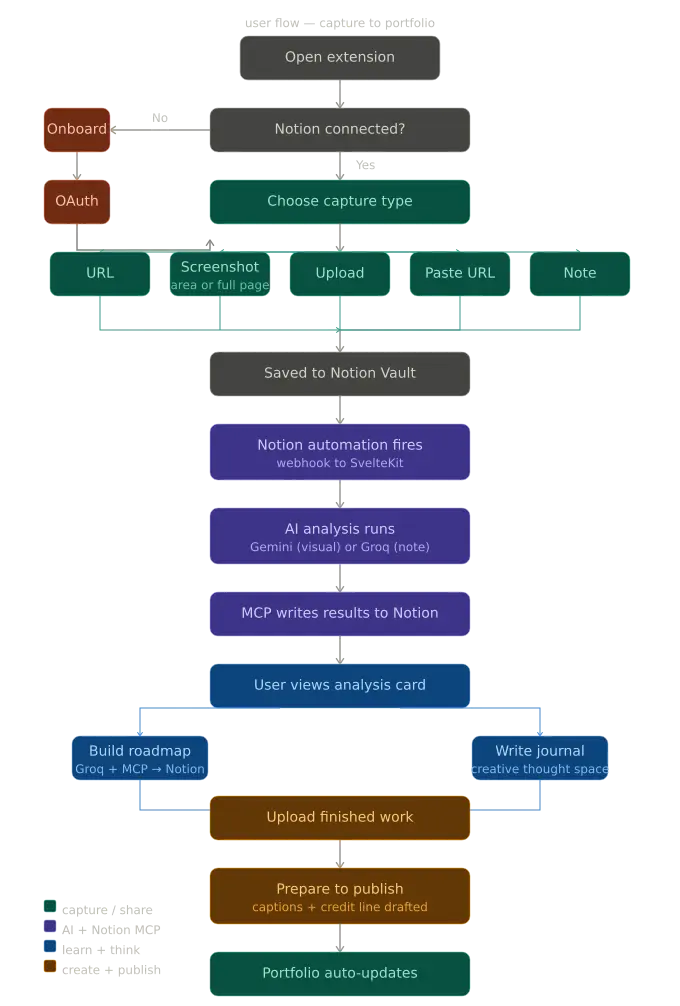
User Flow

This is a submission for the Notion MCP Challenge

What I Built

There is a folder on almost every creative’s computer.

Sometimes it is a bookmark list. Sometimes it is a Pinterest board, a Notion page, a camera roll full of screenshots, or a browser tab that has been open for six weeks. The contents are always the same: things they loved when they found them and have not touched since. Landing pages to be studied. Threads that made them stop scrolling. Interfaces they meant to reverse-engineer. Designs they were going to recreate on the weekend.

The weekend never comes.

I built createthings because I got tired of my own inspiration graveyards.

Also, the more I talked to designers, developers, and content creators, who are my friends and colleagues, the more I realized the graveyard was not the core problem. The core problem was that saving something and acting on it had no connection. There was no bridge between the moment of being inspired and the moment of doing something about it. No thread between the thing that excited you and the work that came out of it. No record of the journey from one to the other.

What I built

createthings is a creative system for designers, developers, and content creators. It lives across two surfaces: a browser extension that captures inspiration from anywhere on the web, and a web app where that inspiration gets analyzed, understood, acted on, and shared with the world.

The core loop is straightforward to describe:

Capture what excites you — a screenshot, a URL, an uploaded image, or even a typed note when the inspiration is more feeling than visual. Analyze it with AI — not just what it looks like but what makes it work, what you can learn from it, what skills it requires. Think through your process in a creative journal tied to every project. Create your own version with an AI-generated brief as your starting point. Publish it to your connected social platforms directly from the app with platform-specific captions and proper credit to the original creator. Share your full creative journey via an auto-generated public portfolio page.

Notion is the backbone of all of it.

I made a deliberate decision early in the build. I did not want Notion to be a sync target or a convenient place to dump data. I wanted it to be the actual brain of the system, the place where everything lives, where the AI pipeline is triggered, where results are written, where the publish queue is managed, and where the portfolio reads from. Every piece of inspiration lives in Notion.

Video Demo

User Flow

Show us the code

sv

Everything you need to build a Svelte project, powered by sv.

Creating a project

If you’re seeing this, you’ve probably already done this step. Congrats!

# create a new project
npx sv create my-app

To recreate this project with the same configuration:

# recreate this project
npx [email protected] create --template minimal --types ts --add prettier eslint vitest="usages:unit,component" playwright tailwindcss="plugins:none" sveltekit-adapter="adapter:auto" mcp="ide:vscode+setup:remote" --install npm ./

Developing

Once you’ve created a project and installed dependencies with npm install (or pnpm install or yarn), start a development server:

npm run dev

# or start the server and open the app in a new browser tab
npm run dev -- --open

Building

To create a production version of your app:

npm run build

You can preview the production build with npm run preview.

To deploy your app, you…

Who It Is For

createthings is built for three types of creators, and the experience adapts to each:

Designers can get a color palette extraction, typography identification, layout and composition breakdown, component analysis, and a Figma export that sends any captured screenshot directly to their Figma workspace as a named frame.

Developers get UI architecture hints, pattern recognition, likely tech stack indicators, and component structure breakdown, the things you want to know when you see an interface you admire and want to understand how it was built.

Content creators get hook analysis, tone breakdown, narrative structure identification, and an explanation of why a piece likely performed well — the things that turn a saved post into a teachable moment.

These three types of creators serve as the starting point, as i still intend to expand to different types of creatives, allowing it to be useful to everyone and anyone

The Feature Set

The Feature Set

Feature What It Does
Browser extension Captures via URL, screenshot (full page or selected area), image upload, URL paste, or typed note
AI analysis Visual and content breakdown — colors, typography, layout, mood, components, attribution
Learning roadmap AI-generated skill path from the analysis — what you need to learn to build something like this
Creative journal Per-project thought space with AI reflection prompts
Publish queue Platform-specific captions drafted by AI — direct share to Twitter/X, LinkedIn, Reddit; one-click copy for Instagram
Remix tagging Inspired by / Remixed from / Recreated — ethical attribution built into every publish
Figma export Sends captured screenshots to Figma as named frames
Portfolio page Auto-generated public page from Notion data, shareable via single link
Stale reminders Smart nudges for inspiration that has been sitting untouched past a threshold
Weekly digest Summary of what was saved, created, published, and learned

The Technical Architecture

Stack: SvelteKit + Svelte 5 (web app + API), Manifest V3 browser extension (Chrome/Firefox/Edge/Safari), Notion as the database layer (six linked databases), Uploadcare for image uploads.

AI: Gemini 2.0 Flash for visual analysis with a fallback chain (→ gemini-2.0-flash-lite → gemini-1.5-flash-8b → OpenRouter free vision → Groq text-only). Groq (llama-3.3-70b-versatile) handles all text generation, roadmaps, captions, and note analysis.

Data flow:

Extension saves a new entry to Notion (status: Pending) — that’s all it does.
A Notion database automation fires a webhook to /api/webhook/notion.
The server routes by capture type: images/URLs go to Gemini (with node-vibrant extracting colors first); notes go straight to Groq.
Results are written back to Notion via the MCP adapter; status updates to Ready.

AI Pipeline

For publishing: captions surface in the Publish Queue. Twitter/LinkedIn/Reddit open compose URLs pre-filled; Instagram copies to clipboard. Clicking Mark Published updates the Notion entry.

Publish Pipeline

The Six Databases

On first connect, all 6 Notion databases are created in one pass to get their IDs, then a second pass links the relations between them — because you can’t create a relation to a database that doesn’t exist yet.

Database Purpose
Inspiration Vault Every saved piece — the source of truth
Analysis Results AI breakdown linked to each inspiration
Roadmaps Learning paths generated from analyses
Projects Work created — linked to inspirations
Publish Queue Drafted and approved social posts
User Profile Preferences, platform connections, Creative DNA

Technology Choices

AI: Gemini 2.0 Flash for vision (generous free tier, reliable structured output) with a 4-model fallback chain so the pipeline survives rate limits. Groq for all text generation because speed matters llama-3.3-70b-versatile keeps roadmap generation under 15 seconds.

Social publishing: Compose URLs instead of OAuth integrations — Twitter, LinkedIn, and Reddit accept pre-filled content as URL params, no API approval needed. Instagram has no compose URL so it falls back to clipboard copy. Ship with what works now, add direct API integrations when you have approvals.

How I Used Notion MCP

I made a rule early in the build: Notion should be the brain of the system, not a sync target. Every intelligent write-back goes through an MCP adapter layer — a set of functions in src/lib/server/notion/mcp.ts that wrap the Notion SDK calls for all agent actions.

The distinction between the REST API layer and the MCP layer is intentional. The REST API handles database operations: creating structure, querying records, and managing schemas. The MCP layer handles agent actions: an AI system reading context from a workspace and writing back purposefully — the same pattern a person working inside Notion would follow.

The Specific Operations

writeAnalysisResults — called after every analysis completes. Creates a page in the Analysis Results database with the full breakdown — color palette, typography notes, layout analysis, mood tags, component identification, attribution — and links it back to the source inspiration entry.

createRoadmap — called when a user requests a roadmap. Creates a structured Notion page in the Roadmaps database — not just a database row, but a full page with sections, skill descriptions, milestone checkboxes, and resource links. The page is created with the correct parent relation to the source inspiration, so the connection is permanent and navigable.

writePublishDrafts — called by the caption generation pipeline. Writes platform-specific captions to the Publish Queue entry — Twitter, LinkedIn, Instagram, Reddit — all with the credit line assembled from the stored attribution data.

updateInspirationStatus — moves entries through their lifecycle: Pending → Ready → Active → Stale → Archived.

Why a Dedicated MCP Layer

This is the question worth answering directly.

When the AI system writes results back to Notion, it is not inserting records — it is making decisions: what to name the page, how to structure the sections, which properties to set, what relations to create, how to format the skill descriptions so they are useful when the user opens the page later. That is an agent action. The MCP layer is the right abstraction for it. The REST API would require pre-specifying every structural decision in code. The MCP layer lets those decisions happen in context.

Having a clean adapter layer also makes the path to the hosted Notion MCP remote server straightforward. Every call goes through one place. The connection is established once per user session with their OAuth token and reused across all operations.

What I Learned

The hardest part was not the AI integration. It was the database setup order.

Notion relations between databases require both databases to exist before you can create the relation. That sounds obvious until you are writing the setup script at 1am and realize you cannot add the relation from Inspiration Vault to Analysis Results until Analysis Results exists — but you also cannot add it to a database you have not created yet. The solution was simple once I saw it: create all six databases first, collect their IDs, then make a second pass to patch the relations in. Two API calls where I wanted one. Not elegant but reliable.

The social API reality was the other hard lesson. I knew Instagram Graph API required Facebook app approval. I knew Twitter/X v2 could take time. What I underestimated was how much value there is in the compose URL approach first — x.com/intent/post, linkedin.com/shareArticle, reddit.com/submit. The user sees exactly what they are about to post. There is no abstraction between the caption and the publish. Add the server-side API integrations when you have time and approvals; start with the compose URLs and let the user be in control.

The thing that surprised me most was the note capture.

I almost cut it three separate times. It felt like scope creep. A text input in a browser extension — what problem does that solve that a notes app does not? I kept it because the use case would not leave me alone: what do you do when the inspiration is not a URL or an image? What do you do when you are in a meeting and you think “I want to make something that feels like the opposite of corporate” and you want to capture that before the meeting ends and you forget?

I also learned that the creative journal resonates more with experienced creators than with beginners. Beginners want to capture and analyze. Experienced creators want to document their process because they know the process is the portfolio, not just the output. That insight is shaping how I think about onboarding — meeting users where they are rather than assuming everyone is ready for the same features at the same time.

Navigating the Future: The Insights from the First American AI Jobs Risk Index

The dawn of artificial intelligence was marked by excitement and trepidation, a dichotomy that continues to frame discussions around technology’s impact on labor markets. As AI capabilities have evolved from the rudimentary algorithms of the past to the sophisticated machine learning applications we see today, the potential disruption of job landscapes cannot be overstated. In an era where automation is increasingly integrated into our daily lives and workplaces, understanding the risk AI poses to American jobs is paramount. Enter Tufts University’s groundbreaking initiative: the first-ever American AI Jobs Risk Index.

This pioneering index offers a quantitative approach to assessing how susceptible various occupations are to the encroaching influence of artificial intelligence. By evaluating factors such as job tasks, skills, and industry dynamics, the Index seeks not just to predict job displacement but also to illuminate the nature of jobs that AI may augment rather than replace. As we analyze the findings and implications of this index, we embark on a journey through the historical evolution of technology’s impact on employment, exploring where we are heading in an increasingly automated world.

The Historical Context of Technology and Employment

A Brief Timeline of Technological Disruption

To understand the current moment, it’s useful to reflect on the historical context of technological disruption. The industrial revolution marked one of the first significant shifts in labor dynamics, with mechanization replacing numerous manual jobs. The introduction of steam power enabled industries to increase production capacity dramatically, resulting in considerable job loss for artisans and craftsmen. Fast forward to the late 20th century, and we see the rise of computers and the Internet fundamentally altering job descriptions across sectors.

“History teaches us that every technological revolution comes with both opportunities and challenges for the labor market.”

The introduction of sophisticated algorithms in recent years represents a new chapter in this long-standing narrative. By processing massive datasets and learning from them, AI systems can now perform tasks previously deemed exclusive to human intelligence. From driving cars to conducting financial audits, the range of functions AI can undertake is expanding rapidly.

The Employment Landscape Pre-AI

Before AI emerged as a dominant force, the labor market was already in flux due to globalization and outsourcing. Many American jobs shifted overseas, leading to an annual decline in manufacturing roles. However, the rise of technology also cultivated new sectors, ushering in jobs in IT, data analysis, and digital marketing. Thus, while certain jobs became obsolete, many new opportunities were created within an evolving landscape.

The Key Insights from the American AI Jobs Risk Index

Overview of the AI Jobs Risk Index

In September 2023, Tufts University released the American AI Jobs Risk Index, a tool designed to quantify the potential impact of artificial intelligence across various industries. The Index evaluates over 800 different occupations, assessing how susceptible each job is to AI-driven automation based on job responsibilities, required skills, and the potential for task augmentation. The findings are particularly enlightening as they reveal not only the jobs at risk but also those that could thrive in an AI-enhanced environment.

Methodology Behind the Index

The methodology employed by Tufts integrates an extensive analysis of labor market data with advanced machine learning techniques. By leveraging data from sources like the Bureau of Labor Statistics and integrating expert input from various fields, the Index classifies jobs based on several criteria:

  • Task Automation Potential: The likelihood that specific tasks within a job can be automated.
  • Skill Requirements: The complexity and nature of skills required for each job function.
  • Industry Adaptability: How adaptable a specific sector is to integrating AI technologies.

This comprehensive approach not only highlights the risks but also sparks discussions on how we can prepare the workforce for an AI-infused future.

“Understanding the risks associated with AI is the first step in adapting our workforce and education systems.”

Findings of the Index

The results of the Index are indeed revealing. Jobs such as data entry clerks, telemarketers, and retail salespersons rank as highly vulnerable to AI-driven automation. Conversely, roles that require complex human interaction—such as healthcare professionals and specialized technicians—demonstrate resilience due to the intricate skills and emotional intelligence required.

Practical Examples: Risk and Resilience

To contextualize these findings, consider the roles of a bank teller vs. a financial consultant. Traditional bank tellers may find their roles diminished as AI-powered kiosks and mobile banking solutions take over routine transactions. Fintech companies are already using AI to streamline customer service interactions, allowing users to complete tasks via chatbots or smart applications without human intervention.

In stark contrast, financial consultants benefit from AI integration. They can leverage predictive analytics to provide clients with personalized investment strategies, thus enhancing the advisory role rather than replacing it. Here, AI serves to augment human capabilities, enabling workers to focus on higher-level analytical tasks rather than mundane processing.

Implications for Education and Workforce Development

Evolving Skillsets for the Future

The historical evolution of labor markets reveals a common theme: adaptation. As AI technologies reshape job functions, it becomes increasingly vital for educational institutions to pivot their curricula toward skills that emphasize creativity, empathy, and critical thinking. The American AI Jobs Risk Index serves as a roadmap for identifying which skills will be in demand, allowing educational frameworks to adapt accordingly.

For instance, vocational training programs may begin to emphasize competencies in data analytics and basic machine learning principles. Similarly, colleges and universities can integrate interdisciplinary studies to foster a blend of technical prowess and soft skills, preparing graduates for the hybrid roles of the future.

“Educational institutions are at a crossroads, tasked with redefining curricula to meet the challenges posed by AI.”

Reassessing Workforce Policies

The findings of the Index also urge policymakers to reassess workforce initiatives. As AI’s presence grows, government programs must facilitate transitions for displaced workers. This could involve investing in retraining programs focused on high-demand skills or supporting industries poised for growth in the face of technological disruption.

The Trade Adjustment Assistance Program, for example, serves as a model for how to assist workers navigating these changes. By building on this foundation, we can create robust support systems that empower displaced individuals to transition into new roles and industries.

The Ethical Considerations of AI in the Workforce

Addressing Bias and Inequality

While the American AI Jobs Risk Index provides a sobering look at the risks posed by automation, it also raises ethical questions. One of the core challenges lies in ensuring that AI technologies are designed and implemented equitably. Disparities in access to education and technology can exacerbate existing inequalities, particularly for marginalized groups who may be more vulnerable to job displacement.

“The deployment of AI must be accompanied by a commitment to equity and justice in the workforce.”

Addressing these biases requires a concerted effort among corporations, policymakers, and educators. Without conscious intent to incorporate diverse perspectives in AI development, we risk entrenching existing societal inequalities and creating new barriers for upward mobility.

The Need for Collaboration

The evolution of the workforce demands collaboration among various stakeholders—business leaders, educators, researchers, and policymakers. By working together, all parties can identify emerging trends, anticipate necessary adjustments to skill requirements, and craft policies that not only mitigate job loss but also foster job creation.

Conclusions

As we stand on the precipice of an AI-driven future, the American AI Jobs Risk Index provides a crucial lens through which to view the evolving workforce landscape. By grasping the historical context of technological disruption and understanding the Index’s findings, we can navigate the complex implications of AI’s rise in the labor market.

The journey ahead will undoubtedly require proactive measures to ensure that workers are equipped with the necessary skills, that education systems adapt swiftly, and that policies are developed to support those most at risk. The Index serves as a call to action—a reminder that while technological advancement can be disruptive, it can also herald opportunities if approached with foresight and intentionality.

As we forge ahead into this new epoch, let us remember that the future of work is not predetermined by technology but shaped by the choices we make today. By engaging in thoughtful dialogue, embracing change, and prioritizing equitable solutions, we can create a workforce prepared not just to survive in the age of AI but to thrive.

How We Made Our Supabase RLS Migrations Idempotent (And Why You Should Too)

The Problem

You write a Supabase migration, it runs fine locally. You push to staging — fine. Then you need to re-apply it (rollback test, fresh CI environment, or a teammate cloning the repo) and suddenly:

ERROR: policy "Users can view own stitched exports" for table "stitched_exports" already exists

PostgreSQL’s CREATE POLICY (and CREATE INDEX) doesn’t have an IF NOT EXISTS guard. So if your migration runs twice, it blows up.

This hit us in ClipCrafter when working on a new stitched_exports table. Here’s the before:

CREATE INDEX stitched_exports_project_id_idx ON stitched_exports(project_id);

ALTER TABLE stitched_exports ENABLE ROW LEVEL SECURITY;

CREATE POLICY "Users can view own stitched exports"
  ON stitched_exports FOR SELECT
  USING (
    EXISTS (
      SELECT 1 FROM projects
      WHERE projects.id = stitched_exports.project_id
        AND projects.user_id = auth.uid()
    )
  );

CREATE POLICY "Service role full access to stitched_exports"
  ON stitched_exports FOR ALL
  USING (auth.role() = 'service_role')
  WITH CHECK (auth.role() = 'service_role');

Running this twice errors out on both the index and both policies.

The Fix: IF NOT EXISTS and DO $$ BEGIN Blocks

For the index, PostgreSQL 9.5+ supports IF NOT EXISTS natively:

CREATE INDEX IF NOT EXISTS stitched_exports_project_id_idx ON stitched_exports(project_id);

For RLS policies, there’s no IF NOT EXISTS syntax — but you can use a DO block to query pg_policies first:

DO $$ BEGIN
  IF NOT EXISTS (
    SELECT 1 FROM pg_policies
    WHERE tablename = 'stitched_exports'
      AND policyname = 'Users can view own stitched exports'
  ) THEN
    CREATE POLICY "Users can view own stitched exports"
      ON stitched_exports FOR SELECT
      USING (
        EXISTS (
          SELECT 1 FROM projects
          WHERE projects.id = stitched_exports.project_id
            AND projects.user_id = auth.uid()
        )
      );
  END IF;
END $$;

DO $$ BEGIN
  IF NOT EXISTS (
    SELECT 1 FROM pg_policies
    WHERE tablename = 'stitched_exports'
      AND policyname = 'Service role full access to stitched_exports'
  ) THEN
    CREATE POLICY "Service role full access to stitched_exports"
      ON stitched_exports FOR ALL
      USING (auth.role() = 'service_role')
      WITH CHECK (auth.role() = 'service_role');
  END IF;
END $$;

Now the migration is safe to run multiple times — idempotent.

Why This Matters More Than You Think

Supabase migrations are applied sequentially and each migration file is tracked in supabase_migrations.schema_migrations. If a migration was never tracked (maybe it was applied manually during a late-night debug session), running supabase db push will try to apply it again and fail mid-way.

Idempotency makes your migration resilient to:

  • CI from a clean state — fresh Supabase project for every PR preview
  • Manual hotfixes — you applied a fix directly in prod SQL editor, then later git pull tries to run it again
  • Team member onboarding — new dev clones the repo, runs supabase db reset, it should just work
  • Rollback + re-apply — especially common in pre-launch projects that are still iterating on schema

The General Pattern

Here’s a reusable template for idempotent RLS policy creation:

-- Tables
CREATE TABLE IF NOT EXISTS your_table (...);

-- Indexes
CREATE INDEX IF NOT EXISTS your_index_name ON your_table(column);

-- RLS
ALTER TABLE your_table ENABLE ROW LEVEL SECURITY;

-- Policies (wrap each in a DO block)
DO $$ BEGIN
  IF NOT EXISTS (
    SELECT 1 FROM pg_policies
    WHERE tablename = 'your_table' AND policyname = 'Your Policy Name'
  ) THEN
    CREATE POLICY "Your Policy Name"
      ON your_table FOR SELECT
      USING (user_id = auth.uid());
  END IF;
END $$;

One More Tip: CREATE TABLE IF NOT EXISTS + ALTER TABLE

If your migration also runs ALTER TABLE to add columns, use IF NOT EXISTS there too (PostgreSQL 9.6+):

ALTER TABLE your_table ADD COLUMN IF NOT EXISTS new_column TEXT;

This covers the case where someone manually ALTER-ed the table in production before the migration was tracked.

Takeaway

Make every migration idempotent from day one. The cost is a few extra lines per policy; the benefit is never having a broken CI or a tense production deploy because a migration ran twice. In Supabase specifically, wrapping CREATE POLICY in DO $$ BEGIN ... IF NOT EXISTS ... END $$; blocks is the only way to get this guarantee.

It’s a small discipline that saves a lot of pain.

Durablity

Durability means once a transaction is successfully committed, its changes are permanently saved in the database. Yes, even when the system crashes, power failure or any other and this relaiblity in transaction is possible in databases like postgresql by WAL( Write Ahead Logs) where Before making actual changes, they first record the transaction in a log file. This way even if the system crashes before executing, the queries can be retrieved to execute them

In case of Wallet systems
Once money is transferred and confirmed, it will always be reflected and there is No risk of losing completed transactions and records for the user

BEGIN;

UPDATE accounts 
SET balance = balance - 100 
WHERE name = 'Alice';

COMMIT;

i was burning a ton of tokens on silly stuff

has anyone else noticed they’re chewing through claude tokens way faster than they should be? anthropic just announced they’re tightening the 5-hour session limits during peak hours and it made me actually look at where my tokens were going.

turns out most of it was waste. claude was reading files it had no reason to read like lock files, build artifacts, node_modules, coverage reports, media files. every time it explored the codebase it was burning tokens on stuff that would never help it write better code.

i added a .claudeignore file:

# Dependencies
node_modules/
.pnp.*

# Build artifacts
.next/
out/
build/
dist/

# Lock files (huge, no value to read)
package-lock.json
pnpm-lock.yaml
yarn.lock

# Minified bundles
*.min.js
*.min.css

# Generated code
next-env.d.ts
*.tsbuildinfo

# Caches
.cache/
__pycache__/
coverage/

# Environment / secrets
.env*
.vercel/

# Large non-code files
*.gif
*.mov
*.mp4
*.png
*.jpg

it works like .gitignore but for claude’s file exploration. claude won’t read or search anything that matches.

the other thing that helps is keeping CLAUDE.md lean. mine is about 145 lines with architecture essentials, key conventions, common gotchas. not a novel. every line of CLAUDE.md gets loaded into context at the start of every conversation, so bloat there costs you tokens on every single interaction.

i’m still seeing how much this helps. they’re obviously just clamping down.

if you’re on the Max plan and it still feels like you’re burning through it, check what claude is actually reading. you might be feeding it your pnpm-lock.yaml on every exploration.

markdown edited in ginsberg.ai