Serving RSA and ECDSA from One ASP.NET Core Kestrel Endpoint

Most web servers are built for clients whose security behavior is handled by mainstream general-purpose operating systems.
In that world, TLS handling by the web server is usually straightforward: one server name, one endpoint, one certificate chain, and broad interoperability across the signature schemes those stacks support.

The situation is different when clients fall outside that mainstream.
In IoT, device fleets, industrial gateways, legacy SDKs, or application-to-application integrations, clients often have hard restrictions on which server authentication algorithms, certificate public key types, and certificate signature schemes they can use.

One important subset of those cases concerns the signature algorithms supported by the client.
Cryptographic algorithms evolved over time, and different generations of clients ended up with support for different sets of algorithms.
As a result, one client may support only RSA, another may support only ECDSA, and a third may support both.

When implementing a web server that must serve all those clients, this creates a specific requirement for the server.
During the TLS handshake, it must inspect the client’s capabilities and present a certificate with a signature algorithm that the client supports.

This article is about how to handle that requirement directly in ASP.NET Core Kestrel, without moving certificate management into a reverse proxy, external gateway, or other edge tier.

Note: ASP.NET Core implementation, and most of the information available on this topic, focus on SNI-based certificate selection, where different server names map to different certificates, which is not the case here.
Because of that, most people and LLM-based AI assistants conclude that this scenario is impossible to implement in ASP.NET Core Kestrel.

Note: The reader should have a deep understanding of TLS, especially the negotiation phase of the handshake.

Visualization

The visualization below illustrates the exact case addressed in this article.
The backend exposes one endpoint and clients have different capabilities.

Open in mermaid.live

intro visualization

The Common Approach

This case is not unique and occurs frequently in some areas.
It is often addressed by offloading TLS certificate management to a dedicated edge service placed in front of the web server.
More specifically, that edge service is often a reverse proxy such as NGINX or HAProxy, a managed edge gateway such as Azure Application Gateway, or a Kubernetes Gateway implementation.

While this approach certainly works, it also brings drawbacks, such as:

  • one more network hop,
  • one more system to provision,
  • one more failure domain,
  • one more place where TLS configuration can drift,
  • one more operational surface that costs money and must be managed.

In mutual TLS scenarios, this is even less attractive.
Once certificate negotiation and identity extraction move to an edge service, authentication logic gets split across services.
The edge service now owns part of the security model, while the application owns another part.
This is especially problematic in regulated or protocol-driven environments that require strict end-to-end client authentication and certificate binding at the application layer.
In zero-trust environments, it may also be unacceptable to leave traffic unencrypted between the edge service and the web server.

Visualization

Open in mermaid.live

common approach visualziation

The Optimal Approach

For the specific case discussed in this article, the optimal design is to keep certificate selection inside the application host.

That produces a much cleaner model:

  • There is no extra hop and no extra failure point.
  • TLS management stays with the host that actually owns the endpoint.
  • Certificate selection is implemented exactly where the handshake happens.
  • In mutual TLS (mTLS) scenarios, client certificate negotiation and application-side identity handling are in one place.

Visualization

Open in mermaid.live

optimal approach visualization

How Certificate Selection Works During TLS

Before moving forward, it is important to clarify how server-side certificate selection works.

This process must occur during the initial phase of the TLS handshake: after the client sends ClientHello and before the server responds with ServerHello.

The server-side flow is as follows:

  1. Receive the incoming TLS record.
  2. Parse the record as TLSPlaintext and verify that it contains a Handshake message with a ClientHello body.
  3. Extract the client capabilities relevant to certificate selection from ClientHello.
  4. Select the appropriate certificate based on those capabilities and your server’s selection policy.
  5. Respond with ServerHello and continue handshake, including Certificate message.

How to get client capabilities

To determine which certificates are compatible, the ClientHello message must be inspected.

The exact location of the information needed for certificate selection depends on the TLS version:

Version Primary Source Secondary Source
1.2 signature_algorithms extension cipher_suites field
1.3 signature_algorithms_cert extension signature_algorithms extension

How the Server Chooses a Certificate

The actual certificate to present is chosen by considering both the client’s capabilities and the web server’s certificate selection policy.

The specific selection policy is determined by the server implementation and may depend on organizational requirements or security policies.

Typical strategies include:

  • Prefer the certificate with the strongest algorithm supported by both server and client.
  • Present a default certificate if it matches the client’s capabilities.
  • If no compatible certificate is available, abort the handshake.

This is the core mechanism for dynamic certificate selection based on client capabilities.

Implement using ASP.NET Core Kestrel

Since ASP.NET Core 2.1, Kestrel provides the ability to configure TLS handshake behavior via HttpsConnectionAdapterOptions.

The HttpsConnectionAdapterOptions provides a ServerCertificateSelector property that allows configuration of a callback that is called during the TLS negotiation phase.

Historically, this API was designed for SNI-based certificate selection, where the server name influences which certificate is returned.
However, nothing prevents using a different certificate-selection logic, such as client capabilities provided in ClientHello and implementation-specific policies.

The method assigned to ServerCertificateSelector accepts an argument of type ConnectionContext.

The ConnectionContext implements the IMemoryPoolFeature interface, which exposes a MemoryPool property.

The MemoryPool property can be used to access the raw TLS records as bytes sent by the client during the handshake. The relevant TLS record is a TLSPlaintext struct that carries a Handshake message with a ClientHello body. This enables custom parsing of handshake data if needed.

Starting with ASP.NET Core 10.0, HttpsConnectionAdapterOptions also provides the TlsClientHelloBytesCallback property.
This callback enables inspection of the incoming ClientHello before the certificate selection callback is invoked.

These APIs provide all the necessary hooks to implement dynamic certificate selection in Kestrel based on client capabilities, not just SNI.

Reference Implementation

Everything required to implement the optimal approach described in this article has already been implemented by me in the following GitHub repository:

This is not a toy demo.
The repository contains production-grade code for parsing ClientHello and extracting the data required for certificate selection.

It also contains tests that can be used to study the behavior in detail, including integration tests that show how to wire the mechanism into ASP.NET Core Kestrel.

More specifically, the repository provides:

  • low-level parsing of ClientHello,
  • extraction of the TLS data relevant to certificate selection,
  • a reusable implementation that can be inspected independently from the article,
  • Kestrel-based integration tests that demonstrate end-to-end certificate selection behavior.

The repository shows the implementation in full, with tests that make the behavior easy to verify and explore.

Conclusion

If you have one logical endpoint and heterogeneous non-browser clients, deploying an extra TLS tier should not be your default response.

When the requirement is simply:

  • same host,
  • same application,
  • different certificate algorithms per client capability,

Kestrel can solve it where the problem actually lives: inside the server during TLS negotiation.

If you found this article useful, feel free to buy the author a cup of coffee ☕.

Your Agent Can’t Help You — And It’s Not Because It’s Dumb

In the previous post we argued that the CLI vs. MCP debate is really a debate about pipes — and what’s actually missing is the faucet. This post digs one level deeper: even if you open the faucet, you probably still can’t connect to it. The reasons agents struggle in the real world are more structural than most people realize.

A Common Promise

“Let an agent automatically write your weekly status report — it reads your Git commits, Slack channel history, Jira ticket updates, and Google Calendar meetings, then generates a report your manager can actually read.”

This is the story agent products love to tell. It sounds reasonable — the data is all yours, you’re already using all the tools, you’re just automating what you’d otherwise do by hand.

But if you actually try it, you’ll find that only 1 out of 5 data sources works:

diagram

It’s not that the agent isn’t smart enough. It’s not that the CLI isn’t efficient enough. The data simply isn’t reachable.

There are, of course, some “workaround” approaches that try to bypass this limitation: browser extensions that piggyback on your login session to scrape Slack messages, RPA tools that simulate clicks to export Jira data, reverse-engineered wrappers around corporate email APIs. These can make a demo work. But they’re fundamentally web scrapers — a UI redesign breaks them, a security policy update kills them, and the legal exposure never goes away. Building a workflow on top of these approaches is building on quicksand.

We’ll take a detailed look at these “workaround” approaches and their limitations in the third post. For now, let’s focus on a more fundamental question: why don’t the legitimate paths work?

An Agent’s Real Capability Depends on Three Variables

diagram

The entire industry is racing to improve LLM capability and tool protocols. But the real bottleneck is data access. It’s like having a top-of-the-line race car and a perfect track — with an empty fuel tank.

Two Walls: Why the Data Is Out of Reach

“Data is inaccessible” isn’t a vague problem. It has two distinct walls, each with a fundamentally different character:

diagram

Wall 1 gets the most attention, but in practice, Wall 2 is the one most people actually hit.

Wall 1: Platform Lockdown

WhatsApp won’t ship a CLI. Amazon won’t open a price-comparison API. TikTok won’t give you access to its recommendation data. The previous post argued from a technical standpoint that CLI is perfectly capable of implementing OAuth (gh auth login is proof), so this isn’t a technical barrier[1].

So why don’t they do it? Because data enclosure is the foundation of these platforms’ business models.

Once an agent can make optimal decisions on a user’s behalf — comparing prices, comparing ratings, searching across platforms — the platform loses its ability to steer user behavior through recommendation algorithms. That directly threatens the core revenue from advertising and traffic monetization.

A simple heuristic: whether a platform will open up to agents depends entirely on whether opening up serves its commercial interests.

Platform type Examples Open to agents? Logic
Sells subscriptions / services GitHub, Notion, Vercel ✅ Actively open More agent integrations → users more dependent → more paid conversions
Sells traffic / advertising WhatsApp, Amazon, TikTok ❌ Locked down Agents help users skip recommendations → ad value drops
Sells enterprise software Slack, Microsoft Teams ⚠️ Partially open Rich bot ecosystem → enterprises more dependent on the platform

Wall 2: Organizational Control — Visible Doesn’t Mean Accessible

Here’s a concrete example. You open Slack in your browser at work and can see all your channel history and shared files. Now you want to write a script so an agent can read the same messages. You’ll discover you need to create a Slack App on the Slack API dashboard, request channels:history and channels:read scopes, and then submit it to your workspace admin for approval. The admin might ask what you need the permission for — and then deny you.

Data you can see in a browser is not necessarily data your program can read. The two paths use completely different authentication chains:

diagram

Every day you open Slack to read messages, check Jira tickets, and read email — that’s visual access. Your browser holds the session, cookies are sent automatically, everything is seamless.

But an agent takes a completely different authentication path:

diagram

Having the former doesn’t mean you have the latter. Agents can only take the latter path.

From the perspective of an ordinary developer (non-admin), here’s the actual API accessibility of common tools:

Tool Visible in browser Callable via API Where it gets stuck
Git (local) ✅ ✅ SSH key is local — no approval needed
Slack ✅ ❌ Creating a Slack App requires workspace admin approval for sensitive scopes[2]
Microsoft Teams ✅ ❌ Custom apps require IT admin sideloading approval
Jira Cloud ✅ ⚠️ Depends on whether the company has disabled Personal Access Tokens
Corporate email ✅ ❌ IMAP/SMTP typically blocked by security policy
Google Workspace ✅ ❌ OAuth apps require admin to whitelist them
Notion (personal) ✅ ✅ Personal Integrations don’t require workspace admin involvement[3]

The conclusion is clear: the only things you can freely access via API are local files, personal Git repositories, and personal Notion workspaces. Everything else is blocked at the organizational admin approval step.

This also explains a pattern: why is coding assistance currently the most successful agent use case? Because code lives in your local filesystem — no one’s permission required.

A Note: What Happens After You Get the Data?

Someone might ask: even if you break through both walls, the data is scattered across Git, Slack, Jira, email, and other systems in different formats — doesn’t that count as a third wall?

Honestly, with 2026-era LLMs, this isn’t a real barrier. Git log is plain text, Jira’s API returns JSON, Slack messages are structured data — as long as data can be converted to text, current models can read and synthesize it. Identity mapping (Git email ≠ Slack user_id) just needs to be told to the model once. Time alignment, semantic extraction, deduplication and categorization — these are exactly what LLMs are best at.

Inconsistent data formats are engineering friction, not an architectural barrier. They’re not in the same league as the first two walls (platform lockdown and organizational denial of access).

The only two things that actually block agents are: platforms that won’t open up, and organizations that won’t allow it. Once the data is in hand, the model can handle the rest.

The Real Boundaries of Agent Capability

Taking both walls into account, here are the true capability boundaries for agents in 2026:

Use case Technically feasible Actually usable Blocked by
Coding assistance (writing code, debugging) ✅ ✅ No wall — code is local
Search public information and summarize ✅ ✅ No wall — public internet data
Auto-write weekly status report ✅ ❌ Wall 2: Slack / Jira API permissions
Cross-platform price comparison (flights, hotels) ✅ ❌ Wall 1: Booking.com / airline sites not open
Customer relationship management ✅ ❌ Wall 2: CRM API requires IT approval
Auto-process email ✅ ❌ Wall 2: IMAP is blocked
Cross-platform content publishing ✅ ❌ Wall 1: platforms don’t interoperate
Personal health data analysis ✅ ❌ Wall 1: health apps don’t open up

Technically feasible across the board. Actually doable for almost none of them.

Conclusion

Your agent can’t help you — not because it isn’t smart enough. It’s because of two walls:

  1. Platform lockdown: Business models are built on data enclosures. They won’t voluntarily open their APIs. This is a commercial negotiation problem.
  2. Organizational control: Even when a platform has an API, your company’s IT security policy may not allow you to use it. This is an organizational management problem.

As for inconsistent data formats and the need to integrate information across systems — with current LLM capability, that’s just engineering friction, not a real obstacle. Once the data is in hand, the model can handle it. The problem is that the data never gets there.

And most agent product marketing never mentions any of this. It simply assumes “you have API access.”

Next time someone pitches you on “automating your workflow with agents,” ask two questions first:

  1. Does the platform provide an API for this data?
  2. Does my organization allow individuals to use that API?

Both need to be Yes for anything to actually work. In the reality of 2026, scenarios where both are Yes are still rare.

This is the second post in the “Thinking About the Agent Ecosystem” series. Next up: since the data is out of reach, who is working around it and how? Alibaba’s closed-loop ecosystem, Doubao’s screen-scraping phone agent, and what forces might eventually push things toward openness.

References

[1]: On the relationship between platform data lockdown and business models, see MCP vs. CLI for AI Agents: The Answer Is Both and The MCP vs CLI Debate Is Missing the Point. The first post in this series argued from a technical standpoint that CLI is fully capable of implementing OAuth — so the reason platforms don’t open up is a business choice, not a technical limitation.

[2]: Creating a Slack App with sensitive OAuth scopes (such as channels:history, chat:write) requires workspace admin approval. See the Slack API documentation on scopes. Enterprise Grid workspaces enforce even stricter approval workflows for custom integrations.

[3]: Notion’s Internal Integration allows individual users to create integrations directly, without involving a workspace administrator; see the Notion API documentation. This makes it one of the few collaboration tools that supports personal-level OAuth.

Robotic Brain for Elder Care 1

unity arch

The vision

“The long-term goal of this system is to support those who truly need assistance—individuals who are paralyzed, bedridden, or require 24/7 care. 

However, to build a rapid MVP and a scalable architecture, I am starting with healthy users in ideal scenarios as my baseline. This choice simplifies the problem space and enables faster iteration during the early development stages. 

System Architecture: The Bridge Between Virtual & Logic

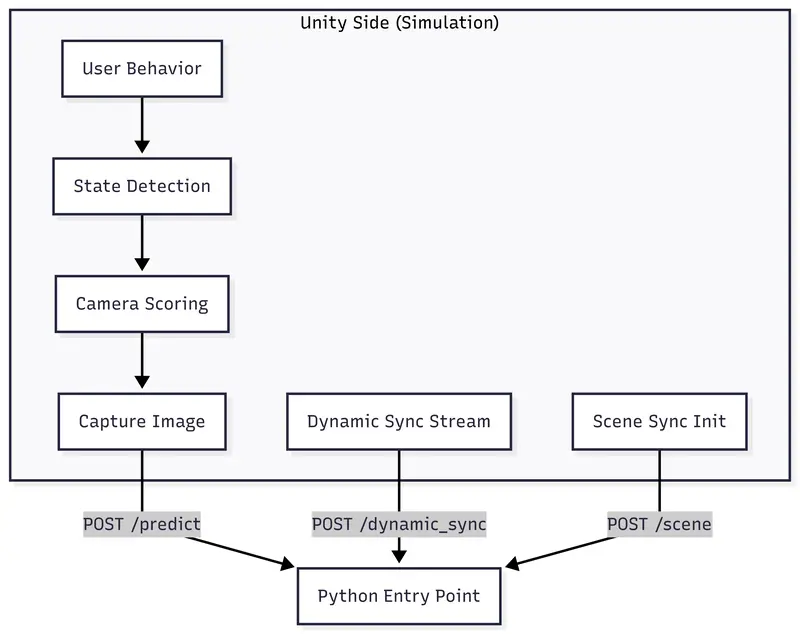
To maintain a clean separation of concerns, I designed a decoupled architecture where Unity handles the physical simulation and Python acts as the high-level brain. 

Here is the data flow from user behavior in Unity to the AI decision-making process in the backend:

unity arch

The Simulation Environment

Currently, the entire system is being verified within a simulated home environment built in Unity.

A top-down 3D view of the Unity home simulation

I have defined three core experimental zones—Living Room, Workspace, and Kitchen—equipped with a dense network of virtual cameras. This setup allows me to test the robot’s perception and spatial grounding in a controlled yet complex environment.

What’s Next?

In the next post, I will walk you through the Unity Experiment Setup and Development Environment in more detail. 

We will explore how the 3D environment is designed to simulate daily routines and how the Unity-to-Python bridge handles real-time data streaming. Before diving into the complex AI “brain,” it’s essential to understand the “world” our robot lives in.

Stay tuned!

Building AI Agents That Actually Work (Not Just Demos)

Most AI agent demos look impressive.

They answer questions, generate content, and automate simple tasks.
**
But once you try to use them inside a real business workflow, things start breaking.**

This is where the gap exists.

The Demo vs Reality Gap

In demos:

Clean input
Clear output
No edge cases

In real systems:

Messy data
Incomplete inputs
Unexpected user behavior

AI alone can’t handle this reliably.

AI Agents Need Structure

A working AI agent is not just:

LLM + Prompt

It’s more like:

Input validation
Decision layer (AI)
Workflow execution
Error handling
Logging

Without these, your system is fragile.

Example: Lead Automation Flow

Instead of:
“AI replies to leads”

A better system:

Capture lead
Validate data
AI qualifies lead
Route based on conditions
Save to CRM
Trigger follow-up

AI is just one part of the pipeline.

Reliability > Intelligence

Developers often try to make systems smarter.

But in production:

Predictable systems win
Controlled outputs matter
Fail-safes are critical
Add Human-in-the-Loop

Fully autonomous agents sound great, but they fail in edge cases.

A better approach:

Add approval steps
Use fallback responses
Log uncertain outputs
Tech Stack That Works

In 2026, a practical stack looks like:

LLM (OpenAI / Claude / etc.)
Workflow tools (n8n, Zapier)
Backend APIs
Database for memory
Final Advice

Don’t build AI agents for hype.

Build them to solve specific problems.

Start small.
Test heavily.
Scale slowly.
For real-world AI automation use cases and systems:
https://bitpixelcoders.com

GPT-5.3-Codex vs. Claude Code: a comparison

This post is a quick overview of an Abto Software blog article about GPT‑5.3-Codex vs. Claude Code: a comparison.

Anthropic released Claude Opus 4.6, and almost at the same moment, OpenAI rolled out GPT-5.3-Codex. That timing made the comparison too tempting to ignore. So we decided to test both models in a practical way: by asking them to build a small website around a well-known psychological bias.
The idea was simple. The website would help demonstrate a curious mental shortcut that people fall into all the time.
But before getting into the tools, let’s try the experiment on you.
Pick any random number from 1 to 100. Write it down or just keep it in mind.
Now answer this: how many African countries are members of the United Nations?
That setup leads us to the interesting part. Even though the first number was random and had nothing to do with the second question, it often still influences the estimate. If your first number was high, say 78, your guess about the number of African UN members may also drift upward. If it was low, like 13, your estimate may land lower too.
That is the anchoring effect in action. A random reference point quietly pulls later judgment in its direction. If you want to test it in real life, a tiny web app is more than enough. You can try it on coworkers, friends, or family and see how their answers shift.

Claude Code

Here is the prompt we used. You can repeat it with your own coding assistant if you want to run the same comparison:

“I need to write a small application that will check the priming effect. This should be a website. The first question will be to enter a number between one and one hundred. It should have some validation to prevent entering any other numbers or letters. The second question will ask how many African countries are members of the United Nations. This question should have validation for a number between zero and one thousand. It should remember the answers and prevent submitting more than one answer per browser session. Then, for admin mode, it should provide statistics on the answers provided. It should show a graph with answers one and two. The X-axis will be a participant. The Y-axis should show answer one and answer two. There must be two plot lines, one plot for answer one and another plot for answer two. Also, suggest some correlation analysis between those answers to confirm or deny the hypothesis that answer number two will be correlated with answer number one. Generate some random test data that can be filled from the admin mode. Also, admin mode should allow starting a session and closing a session. When a session is open, it must allow entering answers, and when it is closed, it must not allow submissions. Let there be a history of sessions.”

We started in the Claude extension for Visual Studio Code. The first move was to switch it into planning mode. That was useful because Claude tried to reason through the task before jumping into code.
Even though the prompt clearly asked for a new website, it still began by inspecting the folder for existing files. That is not unusual. Most coding agents assume there is already a project in place. We interrupted and told it there was no existing structure and that it needed to build the site from scratch.

When Claude asked about the preferred stack, we nudged it toward something that could be hosted for free. That mattered because deployment was part of the exercise, not just local development.

After considering a few paths, Claude picked this stack:

  • Backend: Node.js + Express
  • Database: SQLite via better-sqlite3
  • Frontend: Vanilla HTML/CSS/JS + Chart.js (CDN)
  • Auth: express-session with a single admin password
  • Free hosting: Glitch.com
    That looked fine on paper, but it hit the first real snag. Glitch was no longer a sensible hosting answer. Its homepage had already moved into the “Until We Meet Again” stage and made it clear that project hosting support was ending.

Claude initially resisted that conclusion a bit, then checked again and accepted it. From there, it proposed other free hosting choices for Node.js with SQLite. At that point, we pushed it toward a more modern setup: Next.js with Supabase, Vercel, or something similar.
Claude adjusted. It settled on Vercel plus Supabase as the main recommendation and suggested Vercel plus Neon Postgres as a backup. It argued that Supabase had a more generous free tier. Then we challenged that comparison and, partly for fun, steered it toward Neon instead.

That gave us the final stack:

  • Framework: Next.js (App Router)
  • Hosting: Vercel (free hobby tier)
  • Database: Vercel Postgres (Neon)
  • Frontend: React + Chart.js via react-chartjs-2
  • Auth: simple admin password through server-side API routes and httpOnly cookies
  • Database credentials: server-side only
    Once the plan was approved and the TODO list was set, Claude moved into implementation.

One detail sounded confident at first but later became a problem: it decided to implement all statistical calculations from scratch, with no external stats library. That is a bold move. Sometimes bold is good. Sometimes bold is a banana peel on the stairs.

During development, Claude also noticed that the @vercel/postgres package had been deprecated in favor of Neon’s SDK. Because Context7 MCP was configured, it used that to pull in current Neon guidance and update the code.

A small irritation remained: despite having access to updated docs, it still used Next.js 15 instead of the newer Next.js 16. Not fatal, but noticeable.

From there, the flow was smooth. Claude built the project, fixed a small issue, and gave us concise instructions for local run and deployment. We also asked it to generate a CLAUDE.md file so future chats could pick up the project context and save tokens.
The result looked polished. The survey page was clean. The questions appeared one by one. It had basic session checks to reduce duplicate submissions and simple admin authentication.


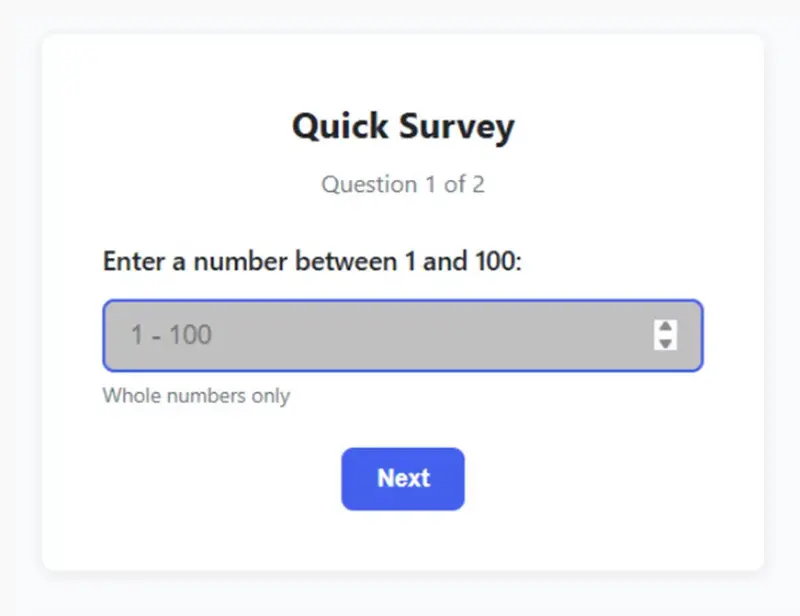
Claude Code first question survey page

The admin area was where things got more interesting.

Claude had written the statistics itself, and one number instantly looked wrong. The p-value came out as 19,326,967,569,547. That is not just slightly off. That is “the calculator has left the building” territory. Since significance thresholds usually orbit around 0.05, this clearly pointed to a bug in the statistical logic.

Once we flagged it, Claude corrected the algorithm, tested it, and added those tests to the codebase. That recovery mattered. A model making a mistake is one thing. A model fixing the mistake properly is far more important.

Later, we requested a few smaller tweaks. Claude handled those well too. The responses chart was sorted by the value of q1, meaning the first chosen number, and the second question’s upper bound was adjusted. The admin page ended up looking excellent: readable, informative, and visually convincing.

What stood out most was its business-logic awareness. Our original prompt mixed up the priming effect and the anchoring effect. The app was actually testing anchoring. Claude caught that nuance on its own and labeled the chart accordingly in the admin dashboard. That showed stronger contextual understanding than we expected.

From team Point Of View, that kind of reasoning matters a lot in real software work. A tool that understands what the product is really trying to do can save time that would otherwise be lost in review and cleanup. Drawing from our experience, that is often the difference between “usable output” and “output that actually fits the brief.”

GPT Codex

Next, we moved to GPT Codex in VS Code, using GPT-5.3-Codex with high reasoning.

We started from the same prompt and walked through the now familiar steps. Like Claude, Codex first looked around for an existing project. It then suggested a Node.js, Express, and SQLite setup. For hosting, it proposed Render, Railway, and Fly.io.

Then it added an important warning. If SQLite were kept, platforms with an ephemeral filesystem or purely serverless patterns could make the study data disappear. That was a strong point in Codex’s favor. It was not just naming tools. It was identifying an operational risk.
When we nudged it toward Next.js and Neon so the comparison would be fairer, it adapted quickly.

Its revised plan looked like this:

  • Build a Next.js app (App Router)
  • Use Vercel API routes or Server Actions for submit and admin operations
  • Use Prisma with Neon

That introduced one major stack difference. Codex chose Prisma ORM, while Claude had worked with simple SQL queries. For a small internal tool, raw SQL is perfectly reasonable. Still, Prisma adds structure and can be more robust, especially if the project grows later.

The coding experience was a little rougher, though.
When Codex wrote code and asked for confirmation, the diff window felt cramped. It was harder to review changes comfortably. Clicking through to a file showed the current state, but that was not as convenient for inspection.

Claude’s review experience was better because its diff view could be expanded more easily.


GPT Codex diff dialog


Claude Code diff dialog

There were also a few moments where Codex appeared to stall. For example, it once tried to prepare a summary, spun up multiple subtasks to read modified files, and then sat waiting behind a frozen UI until we restarted the session.

That does not erase its strengths, but it does affect workflow quality. Tooling friction adds up, especially when you are iterating quickly.

In general, its chat formatting was also a little less polished. Claude felt cleaner and easier to scan. That is not the most important factor, of course, but when you spend hours in an interface, it matters more than people think.


GPT Codex short summary on what was done


Claude Code short summary on what was done

The final result was still solid.


GPT Codex survey page with two final questions

Visually, the survey looked good. It also included navigation links into Admin Mode and back, which Claude did not surface directly. Claude simply expected us to go to /admin on our own.

That said, Codex missed part of the experiment logic. It presented both questions at once and openly stated that the study was about the priming effect. That weakens the “blind test” quality of the setup.

Participants should not be tipped off about what is being tested. We would not call that a failure, but Claude showed deeper product reasoning here.

There was another subtle point. Because our prompt itself used “priming effect” while the actual mechanism being tested was anchoring, Codex followed the wording more literally. Claude, by contrast, inferred the real intent and named the chart “Anchoring effect.” That was one of the most impressive differences in the whole comparison.

The admin page generated by Codex was also strong. It looked a bit darker than we would prefer, but that is a matter of taste. Initially, it had just one chart, and we needed to ask for sorting by first-answer values. It also included an interpretation section, though with fewer details than Claude’s output.

Where Codex clearly pulled ahead was math.

It did not include a p-value or t-statistic at first. But when we asked for them, it added both correctly and without the kind of statistical error Claude had made earlier. That was the biggest technical win for GPT-5.3-Codex in this test.

Another nice touch was test-data generation. Codex offered two kinds of random data: correlated and independent. That was smart. It showed awareness that test data should support more than one scenario.

As indicated by our tests, this is where Codex feels especially useful: it is good at the “tighten the implementation” phase. Based on our observations, it may not always shine as brightly in product interpretation, but it is strong when precision matters.


GPT Codex results dashboard

Summing up

In this small head-to-head experiment, both tools performed well. Both produced a working website. Both got from prompt to runnable app without collapsing under the task. That alone is worth noting.

Still, the differences were real.

Claude Code delivered the smoother overall user experience. Its interface felt more comfortable. Its summaries were easier to read. More importantly, it showed better understanding of the business logic behind the prompt. It caught the anchoring-versus-priming mix-up and made more product-aware choices.

GPT-5.3-Codex, meanwhile, felt a little less refined in the workflow. It had some rough edges, and the interface review experience was weaker. But it was technically sharp where it counted. Its statistical additions were accurate, and its test-data thinking was strong.

So what is the takeaway?

If you care most about reasoning around product intent, user flow, and the “why” behind the feature, Claude Code looked better in this round.

If you care most about accuracy in implementation details, especially around calculations and structured backend choices, GPT-5.3-Codex made a very convincing case.

From Abto Software’s point of view, this is the practical lesson: neither tool replaces engineering judgment, but both can noticeably accelerate delivery when used with expert oversight. Through our practical knowledge, the best results usually come when teams treat coding models like capable collaborators, not autopilots. They can propose, scaffold, and even surprise you, but they still need direction, review, and a clear product lens.

That is also why comparisons like this are useful. They do not tell us which model is universally “best.” They show where each one is stronger, and that is what teams actually need in real projects.
Right now, both are worth trying in day-to-day development. At the very least, they can push ideas forward faster and make the first version of a solution appear much sooner. And sometimes, that creative momentum is half the battle.

If we reduce the whole exercise to one line, it is this: Claude Code was stronger at understanding the assignment, while GPT-5.3-Codex was stronger at getting the numbers right.
That is a very real trade-off, and a useful one to know.

Open-Source MobileVC: Control Your AI Dev Workflow Fully on Phone (No CLI/SSH, Transparent vs Black-Box Agents)

As developers, we’ve all been there: glued to a desktop, stuck in a repetitive loop of messaging Claude/Codex, waiting for AI responses, firing up the ADB Android emulator to test features, sifting through logs for bugs, and then replying to the AI again—only to repeat the cycle. It feels like our work is chained to a single screen, and stepping away means hitting a wall.
I asked myself: Why do we still rely on desktops for AI development, debugging, and agent management? All the work I do on my computer—monitoring AI tools, testing emulators, editing files—should be possible on my phone. But every existing tool I tried either forces me to use CLI/SSH (a desktop-first relic) or locks me into black-box automation that’s risky and unmanageable.

That’s why I built MobileVC—an open-source tool that breaks the desktop barrier, bringing full AI dev workflow control to your phone, with native touch/voice interaction and zero black-box risks. Let’s dive into what it does, why it’s different, and how you can start using it today.

What Is MobileVC?

MobileVC is an open-source mobile-first tool designed to free developers from desktop screens. It lets you manage your entire AI development, debugging, and agent workflow—all from your phone—without a single line of CLI input or SSH connection. Think of it as a “control center” for your AI agents (Claude, Codex, etc.) and remote computer, built for how we actually use our phones: tapping, swiping, and speaking.

Key Features (Built for Developers, By a Developer)

I built MobileVC to solve the exact pain points I faced daily. Here’s what makes it stand out:

  1. Native Mobile Interaction (No More CLI/SSH)

Forget typing commands or struggling with SSH on a tiny phone keyboard. MobileVC adapts to how you use your phone:

  • Chat directly with Claude/Codex in the app to assign tasks

  • One-tap authorization for all operations (no more manual permission checks)

  • Swipe cards to switch between development plans

  • Use radio buttons to select plan modes—intuitive and fast

  • Visual memory management panel: enable, disable, or edit AI memory with a tap

  1. Voice-Controlled AI Editing

Typing on a phone to edit files or AI configurations is a chore. With MobileVC, just use voice commands like:

“Optimize this code file for readability”
“Modify this AI memory to include my project’s API key”

The app generates full, professional prompts for your AI agent, runs the edit, and lets you confirm all changes before finalizing. You stay in control—no hidden edits, no surprises.

  1. Real-Time Backend Logs (Anywhere, Anytime)

Debugging doesn’t have to wait until you’re back at your desk. MobileVC lets you check backend logs in real time on your phone. Spot a bug? Sync the log directly to Claude/Codex and iterate instantly—no need to wait to get back to your computer.

  1. Transparent Control (vs Black-Box Agents Like OpenClaw)

OpenClaw and similar tools are popular for their automation, but they’re essentially black boxes: you can’t see what’s happening under the hood, can’t intervene mid-process, and risk unexpected behavior or失控 (loss of control). MobileVC takes the opposite approach:

  • Full transparency: See every step of your AI agent’s workflow

  • Manual control: You approve every edit, every configuration change, every authorization

  • No hidden risks: No “set it and forget it” chaos—you’re always in charge

Think of it like a car analogy (developers love these!):

  • OpenClaw = Automatic Transmission: Fast and convenient, but you lose control when something goes wrong

  • MobileVC = Manual Transmission: You control every gear, every step—safer, more predictable, and tailored to your needs

They’re not competitors—they’re complementary. Use OpenClaw for lightweight automation, and MobileVC for oversight, control, and remote management.

Quick Start: Deploy in 1 Minute (No DevOps Expertise Needed)

I wanted MobileVC to be accessible to every developer, regardless of their DevOps skills. Here’s how to get started:

  1. Deploy the backend via npm (one line of code):
    npm install -g mobilevc-backend

  2. Run the setup command and follow the on-screen prompts:
    mobilevc setup

  3. Once setup is complete, you’ll get a URL and QR code

  4. Download the MobileVC mobile app, scan the QR code, and you’re ready to go!

No complex dependencies, no server configuration—just 4 simple steps to start controlling your AI workflow from your phone.

Open Source & Contributing

MobileVC is 100% open-source (MIT License) because I believe great tools are built together. The code is available on GitHub, and I’m actively looking for contributors—whether you’re a frontend dev, backend dev, or just want to test and give feedback.

👉 Check out the GitHub Repo (MobileVC)

🌟 Star the repo if you find it useful

💬 Open an issue if you have ideas, bugs, or questions

🚀 PRs are always welcome—let’s make MobileVC even better together!

Closing Thoughts

As developers, we should be able to work anywhere—not just at our desks. MobileVC isn’t just a tool; it’s a shift in how we think about AI development: accessible, controllable, and mobile-first.

If you’re tired of being chained to your desktop, frustrated with CLI/SSH on mobile, or worried about black-box AI agents, give MobileVC a try. It’s built for you—for the developer who wants freedom without sacrificing control.

Let’s Connect!

Have questions? Want to share how you’re using MobileVC?
contact me and welcome to join me
github link: MobileVC

opensource #aidevelopment #mobileagent #adb #remotedevelopment #aidevtools #opensourceprojects #developerproductivity

TREDAŞ, 2026-2030 döneminde 30 milyar lira yatırım hedefliyor

Trakya Elektrik Dağıtım AŞ (TREDAŞ), 2026-2030 yıllarında toplam 30 milyar lira yatırım yapmayı planladığını açıkladı. TREDAŞ Genel Müdürü Necati Ergin, bu yatırımlarla enerji arz güvenliğini artırmayı ve kesinti sürelerini azaltmayı hedeflediklerini belirtti.