Do users actually click CTA… or just find their own path?

While working on AllInOneTools, I noticed something interesting.

As builders, we design CTAs like:

• “Start Now”
• “Try Tool”
• “Get Started”

We expect users to follow that path.

But real users don’t always behave like that.

Sometimes they:

• ignore the CTA
• scroll down
• go directly to categories
• click the first tool they see

It made me question something:

👉 Do users really follow CTAs… or do they just find their own way?

From what I’ve seen:

New users → follow visual cues (categories, popular tools)
Returning users → skip everything and go straight to what they need

So maybe CTA is not always the main driver.

Maybe it’s just one of many entry points.

Now I’m curious 👇

When you visit a website, what do you do?

• Click the main CTA
• Scroll and explore
• Jump directly to what you need
• Ignore everything and search

Would love to hear real behavior.

Key AI Concepts Every AWS AI Practitioner Should Know

Artificial Intelligence is no longer a side initiative—it’s a core business capability. For professionals preparing for the AWS Certified AI Practitioner (AIF-C01) success depends on mastering foundational concepts, real-world use cases, and AWS service alignment.
This guide distills the essential knowledge areas you need—not as theory, but as applied intelligence for modern cloud environments.
🧠 1. Understanding Artificial Intelligence (AI) Fundamentals
AI refers to systems that simulate human intelligence:
• Learning from data
• Identifying patterns
• Making decisions or generating outputs
Core Domains:
• Machine Learning (ML)
• Deep Learning (DL)
• Natural Language Processing (NLP)
• Computer Vision
👉 Key Insight:
AI is not a single tool—it’s a stack of capabilities layered over data and compute.
⚙️ 2. Machine Learning Fundamentals
Machine Learning is the engine powering most AI solutions.
Types of ML:
🔹 Supervised Learning
• Uses labeled datasets
• Example: Fraud detection
🔹 Unsupervised Learning
• Finds hidden patterns
• Example: Customer segmentation
🔹 Reinforcement Learning
• Learns via feedback loops
• Example: Recommendation engines
👉 Exam Focus:
Understand use-case mapping, not algorithms.
📊 3. Data: The Strategic Asset
AI thrives—or fails—based on data quality.
Key Considerations:
• Structured vs unstructured data
• Data labeling and preparation
• Bias and imbalance
👉 Business Reality:
Garbage in → Garbage out
AWS emphasizes data pipelines and governance as foundational.
🧩 4. Natural Language Processing (NLP)
NLP enables machines to understand and interact with human language.
Common Use Cases:
• Chatbots
• Sentiment analysis
• Language translation
AWS Services:
• Amazon Comprehend
• Amazon Lex
• Amazon Transcribe
👉 Insight:
Choose managed NLP services for speed and scalability.
👁️ 5. Computer Vision
Computer Vision enables machines to interpret visual data.
Capabilities:
• Object detection
• Facial recognition
• OCR (text extraction)
AWS Services:
• Amazon Rekognition
• Amazon Textract
👉 Real-World Use Cases:
• Security & surveillance
• Document automation
• Retail analytics
🤖 6. Generative AI Fundamentals
Generative AI creates new content—text, images, code.
Key Concepts:
• Prompts and prompt engineering
• Tokens and context windows
• Temperature (creativity control)
AWS Service:
• Amazon Bedrock
👉 Critical Thinking:
• Manage hallucinations
• Ground responses with enterprise data (RAG)

SCSS Is Solving Problems CSS Is Learning to Solve Itself

You’ve spent years reaching for SCSS the moment a project grows past a single stylesheet. Variables. Loops. Functions. Nesting. It felt like the only sane way to write scalable CSS.

Meanwhile, native CSS has been quietly shipping the same features — one by one, browser by browser.

So here’s the honest question: how much of SCSS do you actually still need?

Let me walk through what CSS can do natively today, what’s coming next, and where SCSS still wins.

What CSS Can Do Right Now

Custom Properties (aka CSS Variables)

You already know these. They replaced SCSS $variables for runtime use-cases — and they’re strictly more powerful because they cascade, they’re dynamic, and JavaScript can interact with them.

:root {
  --color-primary: #ff69b4;
  --spacing-base: 8px;
}

.button {
  background: var(--color-primary);
  padding: calc(var(--spacing-base) * 2);
}

SCSS variables are build-time only. Custom properties survive into the browser. If you haven’t fully made the switch for your design tokens, that’s where to start.

Nesting

Native CSS nesting shipped in Chrome 112 (2023) and is now in every major browser. The syntax is almost identical to SCSS:

.card {
  padding: 16px;

  &__title {
    font-size: 18px;
  }

  &:hover {
    box-shadow: 0 4px 12px rgba(0, 0, 0, 0.1);
  }

  @media (max-width: 768px) {
    padding: 12px;
  }
}

Two differences worth knowing before you migrate:

  1. & is mandatory in native CSS. .card h1 {} nested inside .card {} won’t work — you need & h1 {}.
  2. No interpolation. SCSS lets you write &#{$modifier} to build dynamic selectors. Native CSS nesting has no equivalent — those cases still need a preprocessor.

For most codebases, neither matters day-to-day. But if you’re running BEM with dynamic modifiers or generating selectors in loops, you’ll hit the wall.

color-mix() and Color Functions

SCSS has lighten(), darken(), mix(). Native CSS now has color-mix():

.button-hover {
  background: color-mix(in oklch, var(--color-primary) 80%, white);
}

The in oklch part tells the browser which color space to interpolate in. This matters more than it sounds: mixing colors in srgb (the default) can produce muddy mid-tones. oklch is perceptually uniform — meaning the lightness you see actually matches the lightness you specified. Tints and shades look consistent instead of just mathematically being consistent.

Supported in all modern browsers. Works with CSS custom properties, which SCSS color functions don’t.

@layer

This is the one CSS feature that genuinely has no SCSS equivalent because it solves a problem SCSS can’t even address: specificity wars at scale.

Quick context if you haven’t lived through one: you import a third-party component library. Its .button styles have higher specificity than yours. You add !important. They update the library and add !important too. Now you’re writing !important !important in your head and nothing is predictable. @layer fixes this at the architecture level.

@layer reset, base, components, utilities;

@layer reset {
  * { box-sizing: border-box; }
}

@layer components {
  .button { background: var(--color-primary); }
}

@layer utilities {
  /* This ALWAYS wins over components, regardless of specificity */
  .mt-4 { margin-top: 16px; }
}

Layer order controls override priority — not specificity, not source order, not !important. Later-declared layers win. If you’re building a design system that external teams can extend without fighting the cascade, this is the tool.

Container Queries

For years, the argument was “CSS can’t do what JavaScript can do for responsive design.” Container queries close that gap:

.card {
  container-type: inline-size;
}

@container (min-width: 400px) {
  .card__title {
    font-size: 24px;
  }
}

Components that adapt to their parent container, not the viewport. Media queries were always the wrong abstraction for component libraries — this is the right one.

What’s Coming Next (and When to Care)

⚠️ Everything in this section is not yet in browsers (or only behind experimental flags). The syntax shown is from active CSS Working Group specs — real and moving forward, but not production-ready. If you want to use any of this today, PostCSS has polyfill plugins for most of it. More on that at the end.

@function — Native CSS Functions

This is the big one. The CSS Working Group has a specification in progress for custom functions directly in CSS. No JavaScript, no SCSS:

/* Proposed syntax — not in browsers yet */
@function --spacing($multiplier) {
  result: calc(8px * $multiplier);
}

.card {
  padding: --spacing(3); /* 24px */
}

This would replace one of SCSS’s most-used features. Timeline: likely 2025-2026 for an experimental flag, broader support a year or two after that.

@mixin — Native CSS Mixins (sort of)

Also in the CSS Mixins & Functions spec. The concept: reusable blocks of declarations, applied without a preprocessor:

/* Proposed syntax */
@mixin --flex-center {
  display: flex;
  align-items: center;
  justify-content: center;
}

.hero {
  @apply --flex-center;
}

Important caveat for anyone who’s used SCSS mixins heavily: this is a significantly simpler model. No @content injection. No arguments with conditional logic. No @if inside the mixin body. It’s closer to a named block of static declarations than a parametric function. Think of it as CSS @extend done right — not SCSS @mixin done natively. The name is similar; the power level is not.

if() — Inline Conditionals

CSS is getting inline conditional logic as part of the Values Level 5 spec:

.button {
  /* Adjust padding based on a custom property flag */
  padding: if(style(--size: large): 20px 32px; else: 12px 20px);
}

Combined with custom properties as flags, this lets components adapt their own styles based on configuration — no JavaScript, no modifier classes, no SCSS conditionals.

Relative Color Syntax

Already shipped in Chrome and Safari, making its way to Firefox:

.button-hover {
  /* Take primary color, keep h and s, reduce l by 10% */
  background: hsl(from var(--color-primary) h s calc(l - 10%));
}

This replaces lighten() and darken() with something more predictable and composable. Works with custom properties, which SCSS functions don’t.

Where SCSS Still Wins (For Now)

Being honest here — the answer isn’t “CSS wins completely.” There are three areas where SCSS still has a real advantage in 2025:

1. Loops and data-driven generation

@for, @each, @while — CSS has nothing equivalent yet. If you’re generating 16 animation delays for a visualizer, or creating utility classes from a scale map, SCSS loops are still the only build-time option. The proposed CSS @function spec doesn’t include iteration.

2. Build-time validation

SCSS @error and @warn fire at compile time. If your design token is missing, you find out before the browser renders anything. CSS has no equivalent concept — it fails silently.

@if not map-has-key($modes, $mode) {
  @error "Unknown mode: #{$mode}. Available: #{map-keys($modes)}";
}

There’s no native CSS equivalent coming. This remains a preprocessor-only capability.

3. Complex structured data

SCSS maps as nested data structures — $modes: (pink-big: (title: (color: ..., font-size: ...))) — are genuinely expressive in ways CSS custom properties can’t replicate. CSS properties are flat key-value. SCSS maps are traversable trees. For the kind of multi-mode theming system I wrote about in the first article in this series, SCSS maps as a config layer still make sense even when CSS handles the runtime switching.

The Middle Ground Nobody Talks About: PostCSS

The “SCSS vs native CSS” framing misses a third option that’s already how many production setups work: PostCSS.

PostCSS sits between your source files and the browser. It’s not a preprocessor like SCSS — it’s a transformation pipeline. You write future CSS syntax, PostCSS compiles it to what browsers support today.

The practical upside: you can use @custom-media, CSS nesting (even before it was fully shipped), relative color syntax, and some of the proposed @function syntax right now via PostCSS plugins. Vite has PostCSS built in. Next.js does too.

// postcss.config.js
module.exports = {
  plugins: [
    require('postcss-nesting'),          // native nesting polyfill
    require('postcss-custom-media'),     // @custom-media queries
    require('postcss-oklab-function'),   // oklch/oklab color support
  ]
}

This is worth knowing because it changes the timeline question. You don’t have to wait 2-3 years for @function to ship in browsers — you can write it today if PostCSS has a plugin for it. The CSS ecosystem is converging on this model: specify in CSS, transform at build time, no preprocessor lock-in.

The Risks Nobody Mentions

Going native CSS isn’t just a technical decision — it’s a bet on your users’ browsers. Here’s what can go wrong.

You don’t actually know what browsers your users run

“All modern browsers support it” is a statement about the latest versions. Your users might not be on the latest versions.

The gap is bigger than you think:

  • Corporate users on locked-down Windows machines often run Chrome that’s 6-12 months behind
  • Android WebView (used inside apps, not the standalone browser) updates on its own schedule and frequently lags
  • Safari on iOS is tied to the OS version — users on iPhone 8 running iOS 15 are stuck on Safari 15, and iOS 15 was dropped from Apple’s update cycle in 2022
/* CSS nesting — ~93% global support */
/* container queries — ~91% global support */
/* color-mix() — ~89% global support */
/* @layer — ~92% global support */
/* relative color syntax — ~86% global support */

That 7-14% that doesn’t support it isn’t a rounding error. If you have 500,000 users, that’s 35,000–70,000 people seeing broken styles — silently, with no error in your logs.

CSS fails silently, SCSS fails loudly

This is the asymmetry that matters most in production.

When an SCSS build fails, your CI pipeline fails. The broken code never ships. With native CSS, the browser just skips the declaration it doesn’t understand and moves on:

.card {
  /* Browser doesn't understand container queries → skips silently */
  container-type: inline-size;
  /* Falls back to... nothing. No fallback defined. Layout breaks. */
}

No error. No warning. No alert. You find out when a user screenshots a broken UI and posts it somewhere.

SCSS gave you build-time safety. Native CSS gives you runtime silence.

The progressive enhancement tax

The correct answer to browser support gaps is progressive enhancement — define a baseline that works everywhere, then layer on the modern feature:

.card__title {
  /* Baseline: works everywhere */
  font-size: 18px;
}

/* Enhancement: only where container queries work */
@container (min-width: 400px) {
  .card__title {
    font-size: 24px;
  }
}

This is the right pattern. But it’s also more code, more cognitive load, and more surface area to test. With SCSS you compiled one output and called it done. With native CSS + progressive enhancement you’re maintaining two layers of intent for every feature you use. It’s manageable. But it’s not free.

@supports helps — but only partially

Unlike JavaScript where you can if ('IntersectionObserver' in window), CSS has no clean runtime feature detection. @supports gets you partway there:

@supports (container-type: inline-size) {
  .card { container-type: inline-size; }
}

@supports not (container-type: inline-size) {
  /* fallback layout */
}

But @supports checks syntax, not behavior. Some older browsers will claim to support a feature and implement it incorrectly. You don’t find out until QA on a real device — or until a user reports it.

The practical checklist before going SCSS-free

Before committing to native-CSS-only on a project, answer these four questions:

1. What does your analytics say about browser versions?
If you have >5% traffic on browsers older than 2 years, you need fallbacks for almost everything in this article.

2. Do you test on real devices?
Chrome DevTools device emulation is not the same as a real Android 10 device. Android WebView lags behind Chrome proper and is where you’ll catch the most rendering bugs — but only if you actually test there.

3. What’s your fallback strategy when a feature isn’t supported?
“It probably works” isn’t a strategy. Define explicitly: if @layer doesn’t load, what does the user see? If container queries don’t fire, does the layout degrade gracefully or snap into something broken?

4. Does your team have the CSS depth to debug this?
SCSS errors are compiler errors — they’re explicit. Native CSS failures are visual regressions with no stack trace. You need someone on the team who can open DevTools, spot a silently-ignored declaration, and trace it back to a support gap. That’s a different skill than reading a build log.

The Honest Answer to “Can We Drop SCSS?”

For new projects starting today: probably yes, with caveats. Native nesting, custom properties, color-mix(), container queries, and @layer handle the majority of what SCSS used to be required for. You’d miss loops and build-time validation.

For existing projects: almost certainly no, not yet. The migration cost isn’t justified by the current feature delta. The gap is closing, but it’s not closed.

The direction is clear though. Every SCSS feature that can be replicated natively will be replicated natively — that’s been the pattern for ten years. Variables came first. Nesting followed. Functions and mixins are in spec. The browser is slowly absorbing the preprocessor.

The question isn’t whether SCSS will become optional — it’s when. My guess: two to three years before native CSS covers enough ground that starting a new project without a preprocessor stops feeling like you’re handicapping yourself.

Until then, the smart play isn’t “all SCSS” or “all native CSS.” It’s knowing which problems each solves better right now — and not reaching for a build tool out of habit when the platform handles it.

The real question isn’t which individual feature you’d miss — it’s whether you’d lose a workflow. Build-time validation, structured data as config, loop-driven generation: these aren’t features you replace one-for-one, they’re patterns. What pattern from your SCSS setup do you think CSS will never cover natively? Drop it in the comments.

I Built Orra: A Tarot App Powered by Pyth for Verifiable Market Readings

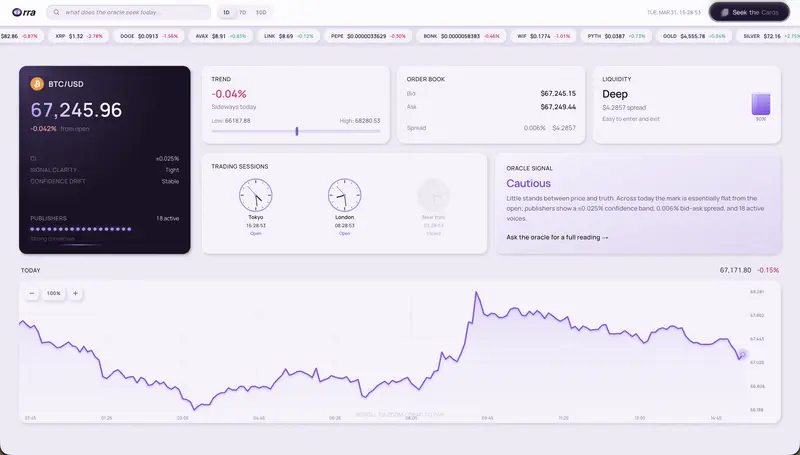
Dashboard

I got tired of noisy charts and vague signals.

So I built Orra, a tarot app powered by Pyth that turns real-time market data into verifiable readings.

Most tools give raw numbers.

Most tarot apps give vibes without proof.

I wanted both intuition and transparency in one flow.

What Orra Does

  • Lets users pick an asset and go through an adaptive question flow
  • Anchors each reading to live Pyth Price Feed context
  • Triggers card draws with Pyth Entropy
  • Shows an on-chain receipt linking snapshot and draw result
  • Generates a share-ready reading image for socials or friends

Why I Built It

I wanted a product that feels human, not just another chart dashboard, while still being technically credible. Orra is my attempt to combine ritual-style UX with verifiable on-chain mechanics.

Product Flow

1) Dashboard

Users land on the dashboard, search assets, and review live market context before starting a reading.

Dashboard

2) Wallet Connect

Users connect wallet to enter the reading flow.

Wallet Connect

3) Asset Selection

Users choose the asset, and Orra confirms the live Pyth feed.

Asset Selection

4) Adaptive Question Flow

Users answer guided questions about market situation, timing, and focus. The path adapts by asset category.

Adaptive Question Flow

5) Oracle Commit

Users confirm the fee and trigger the draw. Orra commits a Pyth snapshot on-chain and requests Entropy randomness.

Oracle Commit

6) Card Draw

A card is selected from Entropy output. Orientation (upright/reversed) is also determined deterministically from the same random value.

Card Draw

7) Reading Result + Proof

The final view shows the card, interpretation, and on-chain receipt proving the snapshot and draw linkage.

Reading Result

8) Shareable Reading Card

Users can download a clean reading card image to share externally.

Shareable Reading Card

Live Demo

https://orra-pyth.vercel.app/

Feedback I Want

I would love feedback on:

  • UX clarity through the full flow
  • Trust and proof presentation
  • Interpretation quality and tone
  • Features that would make this more useful daily

Orra. Read the market. Read your path.

Is Cursor Safe? I Scanned 100 Apps. 67% Had Critical Vulns.

so I’ve been building ShipSafe — security scanner for AI-generated code — and a few weeks ago I got curious. like, actually curious. not “I wonder if AI code has bugs” curious, more like “how bad is it really and am I just being paranoid” curious.

I grabbed 100 Cursor-built repos off GitHub. not tutorials, not demo apps. real production stuff — SaaS tools, internal dashboards, a couple e-commerce stores, bunch of API backends. found them by searching for .cursorrules files and Cursor-style commit patterns.

then I scanned all of them with ShipSafe.

67%. sixty-seven percent had at least one critical vulnerability. the worst app had 14 separate issues. fourteen. average was 3.2 per app.

ngl I expected some problems but not… that.

% of apps
had a critical vuln 67%
IDOR 43%
inverted auth 31%
frontend-only admin checks 28%
hardcoded secrets 22%

this tracks with Stanford research that found ~45% of AI-assisted code has vulns. our numbers are worse, probably bc we only looked at shipped production apps vs their lab setup.

anyway. let me show you what I kept finding.

the IDOR thing (43%)

this was by far the most common. and it’s so dumb that it’s almost funny? Cursor generates an API route, takes an ID from the URL, fetches from the database, returns it. no check on who’s asking.

// /api/invoices/[id]
export async function GET(req, { params }) {
  const invoice = await db.invoice.findUnique({
    where: { id: params.id },
  });
  return Response.json(invoice);
}

change /api/invoices/42 to /api/invoices/43. congrats you’re reading someone else’s invoice now. their name, the amount, payment status, all of it. OWASP literally lists this as vulnerability #1.

the fix btw:

where: {
  id: params.id,
  userId: session.user.id, // this. this is the whole fix.
},

one line. Cursor never adds it. and I get why — the AI is optimizing for “does it work” not “who’s allowed to see this.” but still. 43%.

the backwards auth thing was the wildest tho

okay 31% of these apps had their auth middleware inverted. and I know that sounds fake but look at this:

export function middleware(req) {
  const token = req.cookies.get("session");

  if (token) {
    return NextResponse.redirect("/login");
  }
  return NextResponse.next();
}

if (token) → kick to login. so logged-in users get redirected away. and if you DON’T have a token? NextResponse.next() — come right in. every protected route, wide open to anyone without a session.

one missing !. that’s it. if (!token) vs if (token).

and here’s what makes it so nasty — you will never find this by testing your own app. you’re logged in while you test. the redirect fires on you and maybe you think “huh that’s weird” and hack around it or don’t even notice bc your session is cached. meanwhile an attacker shows up with zero cookies and gets full access to everything. no cap the first time I saw this in a real production app I just stared at it for like 30 seconds.

frontend admin checks that do nothing

28% of apps had this pattern where Cursor puts the role check in React but not on the server. and I gotta admit this one annoys me the most bc it’s so close to being right.

// this part is fine honestly
if (user.role !== "admin") return <Redirect to="/" />;

// this part is NOT fine
export async function DELETE(req, { params }) {
  await db.user.delete({ where: { id: params.id } });
  return Response.json({ success: true });
}

the admin panel is hidden in the UI. great. but curl -X DELETE /api/users/123 works for literally anyone. the API doesn’t check anything. Cursor generated the visual gate and forgot the actual gate.

I started telling people: frontend is what you see, backend is what you can do. Cursor gets the see part right every time. the do part? apparently optional.

hardcoded secrets + a personal L

22% had keys in the source. and tbh this is the one I’m least judgmental about bc I almost did this myself early on.

you’re setting up Stripe or whatever. you paste your API key into Cursor’s chat for context. Cursor writes the integration and puts the key right there in the file:

export const stripe = new Stripe("sk_live_51N8x...");

you commit, push, and now that key is in your git history permanently. deleting the file doesn’t help — git log remembers. GitGuardian says 12.8 million secrets were exposed on GitHub last year and I bet a huge chunk started exactly like this.

I almost shipped a Supabase service role key this way. caught it in a scan literally the day before pushing to prod. that’s actually one of the reasons I started building ShipSafe — I needed it for myself first.

why tho

okay so why does Cursor keep doing this? I’ve thought about it a lot and I think there’s two things going on.

first — LLMs learn from GitHub. and most code on GitHub is focused on making things work. security is an afterthought in like 90% of open source repos. so the model generates happy-path code. auth checks, ownership verification, input validation — that stuff doesn’t make the app function, it prevents exploitation. the model literally doesn’t prioritize it unless you specifically ask.

second thing — and this is the one that’s harder to fix — Cursor thinks about one file at a time. it’ll generate a totally reasonable API route without knowing that your middleware in some other directory is supposed to handle auth. or that it doesn’t. the context window sees the file you’re working on, not the security architecture of your whole app.

tbh the second one bugs me more than the first bc you can kinda solve the first one with good .cursorrules but the file-at-a-time thing is structural.

what actually changed my workflow

I’m not gonna stop using Cursor over this. the speed boost is too real. but I did change a few things and it’s made a huge difference.

biggest one — I added security-specific rules to my .cursorrules file. things like “always add userId to database where clauses” and “never hardcode secrets, always use process.env.” sounds simple but it legit changed the output quality. night and day.

the other thing is I just manually review auth-related code now. everything else, Cursor handles and I trust it. but middleware files, API route guards, anything with role checks — I actually read those line by line. takes like 5 minutes per PR and it’s caught issues multiple times.

and obviously I run ShipSafe before deploying. that’s the whole reason I built it lol. paste the GitHub URL, get a report, fix the flagged stuff, ship. couple minutes.

oh and I stopped pasting real API keys into Cursor chat. use fakes, swap in real ones through env vars. learned that one the hard way with the Supabase key thing I mentioned.

Cursor makes you stupid fast. I’m not going back to writing everything manually. but “fast” and “secure” aren’t the same thing and 67% of production apps having critical vulns is a pretty loud signal.

just add a scan to your deploy flow. like two minutes. saves you the 2am incident response call.

full data + methodology: ship-safe.co/blog/is-cursor-code-secure

free scan: ship-safe.co

Age Checks Now Read Your Face — But That Still Doesn’t Prove Who You Are

the technical shift toward biometric age estimation is fundamentally changing the landscape for computer vision developers and digital investigators alike. While much of the public discourse focuses on privacy, developers need to look closer at the underlying architecture: we are witnessing a massive deployment of Convolutional Neural Networks (CNNs) optimized for regression rather than classification.

In the world of facial recognition, most of us are used to classification tasks—identifying a specific person by matching a face against a database of known embeddings. However, modern age-gating technology uses a completely different logic. Instead of generating a unique identity token, these models analyze pixel density and facial features—like the depth of nasolabial folds or the texture of the periorbital region—to output a single scalar value: an estimated age.

For developers building investigation technology or biometric modules, the technical implications are massive. According to NIST benchmarking, these systems can achieve a mean absolute error of roughly 1.22 years under controlled conditions. But as any developer who has pushed a CV model to production knows, “controlled conditions” rarely exist in the field. When you move from a clean 1080p web-cam feed to grainy CCTV or a photo taken in low light, that error margin doesn’t just grow; it can render the data useless for forensic purposes.

The critical distinction that developers and investigators must maintain is the difference between age estimation and facial comparison. At CaraComp, we focus on the latter because that is where the evidentiary value lies. Facial comparison isn’t about guessing a category (like age or gender); it is about calculating the Euclidean distance between two high-dimensional facial embeddings to determine the mathematical probability that they represent the same person.

From a codebase perspective, using an age estimation API to “verify” a user is a dangerous shortcut. An age estimation model is trained to find patterns common to a demographic. A facial comparison model is trained to find the minute, unique variances that separate one individual from billions of others. Confusing the two in an investigative report is a fast way to have your evidence thrown out of court.

This is especially relevant for solo private investigators and OSINT researchers who may be tempted to use consumer-grade age-check logs as proof of identity. A log that says “biometric check confirmed: age 25+” is not an identity match. It is a probabilistic guess about a physiological state. It doesn’t use a reference database, and it doesn’t confirm the presence of a specific individual—only that the object in front of the lens possessed features consistent with a specific age bracket.

As we integrate these biometric layers into more applications, we have to be rigorous about the metadata we store and the claims we make. If your system is designed for investigation technology, you should be looking for tools that provide batch comparison and court-ready reports based on Euclidean distance analysis, rather than simple categorical estimation.

When building or implementing these systems, how are you handling the “domain shift” problem—where models trained on high-quality datasets fail when faced with real-world, low-resolution investigative photos?

Hello,guys !

My Name is Npc (Although it’s just a nickname, it’s pretty much the same in real life.)

  • Position: Python Engineer
  • From: China!!
  • Age: 24 (2001-12-25)
  • Education: Associate Degree
  • Major: Big Data Technology (Courses: Java, Python, Apache Hadoop, Scala, Spark, HBase, Hive, Linux, Flink, MySQL, Redis)

Current Technical Stack

python, pytorch, transformers, golang, mysql, redis, pgsql, mongodb, elasticsearch, clickhouse

Awards

First Prize in Provincial Big Data Skills Competition (Associate Degree Level)

Hobbies

FPV Drones, Fixed-wing Model Aircraft, Programming.

University Learning Experience:

  • Year 1: Confused and blank, little social experience, loved gaming, 70% course absorption rate, no self-directed learning habits outside class.
  • Year 2: Sudden growth, mindset restructured, clearly recognized this was my last usable time, formulated (Python) learning plan, surpassed school curriculum the same year.
  • Year 3: Pandemic arrived, studied from home, used self-taught Python web scraping knowledge to acquire data, learning drive skyrocketed, advanced to self-directed learning of big data analysis content (Java, Scala, Spark, HBase, Hive, Flink), surpassed all classmates the same year.

Career Experience:

  • Phase 1: Interned in Shanghai from Guangdong, learned mainstream big data analysis projects (Spark-type), worked on the front line contacting massive industry data analysis demands, self-study research continued, pandemic worsened, internship ended early in less than 1 year.
  • Phase 2: Big data technology heat declined, SMEs turned to cooperate with large data service providers to reduce costs, entered large data service provider in Shenzhen, Guangdong (Python data scraping and analysis type), self-study research continued but already understood industry big data status (SMEs don’t need big data | Data service providers rising | Data more important than technology | Positions shrinking, SME position survival rate low)
  • Phase 3: Demand continued to decrease -> Big data technology became auxiliary, effectively transitioned to API data service interface docking as main work, same year jumped to tourism industry technical service provider, big data technology + data scraping analysis experience advantage emerged, brought innovation, focused on data collection + hotel business data analysis aggregation algorithms (traditional engineering algorithms).
  • Phase 4: Data collection + hotel business data analysis business demand continued to rise, simultaneously API data service interface auxiliary increased, finally remaining continuous learning technical stack: (python, golang, mysql, redis, pgsql, mongodb, elasticsearch, clickhouse).
  • Phase 5: AI explosion (ChatGPT debuted), first batch of experience users, once again developed strong interest in emerging sector, deep research and exploration.
  • Phase 6 (Now):

    1. Researching current hotel physical information aggregation algorithm transformation to AI, deeply understanding AI development history (CUDA/RNN/CNN/TensorFlow/Torch/Transformers), cutting in from code layer to understand PyTorch & Transformers (decoder-only/encoder-only/decoder-encoder)
    2. Attempted to access hotel physical information aggregation business from AI application layer, generalization ability improved but accuracy uncontrollable, optimized prompts -> still uncontrollable, essential reasons (attention problems | hallucinations | generative models and clustering tasks not compatible | high cost slow speed | knowledge base cannot guarantee consistent retrieval results each time | uncertain results inherently incompatible with this business (unacceptable error rate))
    3. Abandoned AI application layer API, made progress from encoder-only layer (vertical domain fine-tuning) experiments, (effective without hallucinations | 10,000 retry results consistently correct | generalization ability acceptable (compared to previous engineering algorithms, significant improvement) | fast speed low cost (actually slow and high cost compared to previous engineering algorithms, but for LLM it’s already very fast and cheap))
    4. Encoder-only vertical domain fine-tuning continues, simultaneously continuing deep learning of decoder-only principles (understanding why this works? why this doesn’t work?), rather than understanding surface-level principles from existing (finished APIs/open-source models), I feel I need to understand more thoroughly from the bottom layer, even if theoretical knowledge occupies 70% and code knowledge occupies 30%, I believe this is a very efficient learning ratio, this is a learning method that lives and dies with AI, organized sufficient theoretical knowledge can let AI generate code knowledge, we then modify and experiment to achieve final requirements (this is not me over-relying on AI, if AI dies, then this knowledge dies too, of course I believe this conceptual knowledge exists forever and is great), so I call this progressive learning, different from previous learning methods.
    5. Continuously updating (those who lie usually forget)….

I also hope my learning speed can surpass the pace of obsolescence, rather than being eliminated and then starving to death beside a trash can…

RideShield! Phase 2

RideShield Phase 2: Automation, Protection & Mobile Power

After successfully building the foundation in Phase 1, RideShield now enters Phase 2: Automation & Protection — with a major leap forward:

📱 The RideShield Mobile App is officially here.

This phase transforms RideShield into a real-world, always-on safety net for gig workers — accessible anytime, anywhere.

📱 Mobile App Launch: Protection in Your Pocket

Gig workers are always on the move — so RideShield had to move with them.

With the new mobile app, riders can now:

📍 Track live disruptions based on their exact GPS location
🎙️ File voice-based claims in Hindi & English
🔔 Receive instant alerts for weather risks & payouts
💸 Monitor real-time payout status
📡 Submit claims even offline (auto-sync enabled)

👉 No laptops. No delays. Just instant protection — right from their phone.

⚡ What’s New in Phase 2?
We’ve upgraded RideShield into a fully automated, intelligent platform:

🔐 Secure Auth (JWT + MongoDB Atlas)
💰 AI Dynamic Pricing (6 Smart Plans)
🌦️ Hyperlocal Weather Intelligence (GPS-based)
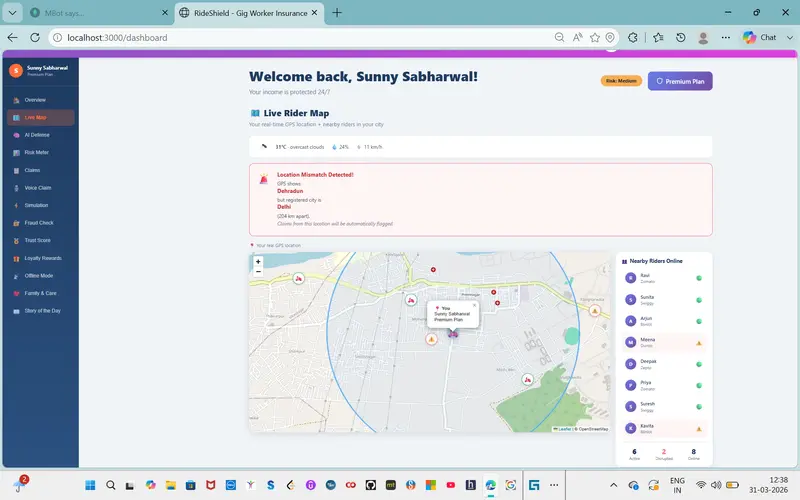
🗺️ Live Map with Nearby Riders
📩 Auto Family Alerts on Disruptions
🧠 AI-Powered Protection System

RideShield now runs on a powerful intelligence layer:

🤖 AI Risk Scoring Engine (ML-based pricing + predictions)
🛡️ AI Defense Engine
Geo-fencing
Sensor fusion
Zero-trust system
Anomaly heatmaps
🚫 Location Fraud Detection (GPS vs registered city)
💸 Smarter Claims, Zero Effort

We’ve taken automation to the next level:

⚡ Auto-triggered claims (rain, heat, AQI, restrictions)
🎙️ Voice-enabled claim system
📊 Dynamic payout calculation
💸 Animated payout timeline for transparency

👉 No paperwork. No waiting. No confusion.
🌟 Rider Experience Upgrades

We didn’t just build tech — we improved experience:

⭐ Trust Score & Loyalty Rewards
🧪 Simulation Mode (5-step disruption demo)
📖 Story of the Day (real rider stories)
🔔 Real-time notification system
📊 12-tab smart dashboard
🤖 Fully Automated Ecosystem

Phase 2 delivers a true

📡 5+ automated disruption triggers using APIs
📊 ML-based premium adjustment
⚙️ Seamless backend automation
📱 Mobile-first accessibility

🔮** What’s Next?**

With Phase 2 complete, RideShield is ready to scale:

🌍 Expansion to 50+ cities
🤝 Integration with gig platforms (Zomato, Swiggy)
📈 Advanced AI prediction models
💳 Faster and smarter payout systems

❤️ Final Thought

Gig workers power our everyday lives — delivering food, essentials, and convenience.

RideShield ensures they’re protected when the unexpected hits.

📱 With our mobile app + AI automation, protection is now:
Instant. Intelligent. Invisible.

Link will be available soon.

Article: Event-Driven Patterns for Cloud-Native Banking: Lessons from What Works and What Hurts

Event-driven architecture helps banks decouple systems, scale services, and create clear activity trails. But it also introduces complexity, new failure modes, and operational challenges. Chris Tacey-Green explains where it adds value in banking systems and the practical patterns, such as inbox/outbox and stable event contracts, needed to make it reliable.

By Chris Tacey-Green

Podcast: Failure As a Means to Build Resilient Software Systems: A Conversation with Lorin Hochstein

In this podcast Michael Stiefel spoke to Lorin Hochstein about how real-world failures provide insight into how software systems actually work. Our first topic was understanding that while automated fault injection tools can introduce basic robustness into a system, they cannot replicate the understanding that comes from mitigating complicated software failures in the real world.

By Lorin Hochstein