OpenClaw vs. Amazon Quick Suite

Executive Summary

In early 2026, OpenClaw became one of the fastest-growing open-source projects on GitHub, passing
200,000 stars in under three months.

Built by Austrian developer Peter Steinberger, it introduced a much more operational model for AI:
agents that do not just respond, but autonomously execute multi-step tasks across real systems.

That adoption wave confirmed a major shift in buyer and developer interest:

Organizations increasingly want AI that acts, not just AI that advises.

At the same time, OpenClaw’s rise also exposed a second reality. Once AI agents move from chat
interfaces into real execution, the hard problems are no longer only about model quality. They are
about security, governance, identity, auditability, and trust boundaries.

AWS is approaching the same direction from the opposite side.

Amazon Quick Suite, evolved from QuickSight, pushes toward agentic workspaces and business
automation, but does so inside a more structured enterprise control model.

The result is a useful contrast: OpenClaw proved demand, while Amazon Quick Suite represents the
kind of operating envelope enterprises are more likely to accept in production.

OpenClaw: The Agent That Went Viral

Architecture and core capabilities

OpenClaw is a locally hosted Node.js gateway that connects large language models to external
systems through a plugin architecture built around skills.

Its appeal was straightforward:

  • multi-step task execution
  • messaging-first interaction through tools such as Slack, Discord, and WhatsApp
  • scheduled automation through cron jobs
  • a large and rapidly growing ecosystem of community-contributed skills

This combination made OpenClaw feel less like a chatbot and more like an operator.

Adoption trajectory

The project’s growth curve was unusually steep:

  • launched as Clawdbot in November 2025
  • renamed to OpenClaw in January 2026
  • passed 100,000 stars in February 2026
  • moved beyond 200,000 stars shortly after

Whether or not every growth claim remains stable over time, the broader signal was clear:
OpenClaw captured attention faster than most infrastructure or AI tooling projects in recent
memory.

The security reality

As adoption accelerated, security concerns surfaced just as quickly.

The reported issues around OpenClaw included:

  • hundreds of vulnerabilities, including critical findings
  • a remote code execution exploit
  • exposed API keys
  • malicious or unverified skills
  • prompt injection and memory poisoning scenarios

The point is not that open-source agent systems are inherently unsafe. The problem is that once an
agent can authenticate, call tools, access memory, and trigger actions, the blast radius expands
dramatically.

OpenClaw made that risk visible in public.

The enterprise identity gap

Traditional enterprise systems assume a mostly human-centered model of action:

Enterprise model Agent reality
Users initiate actions Agents may act autonomously
Permissions are scoped to people or roles Permissions can be inherited by software agents
Audit logs often explain who did what Intent can become harder to trace
Supply chains are formally reviewed Community plugins may be unverified
Identity usually maps to humans or services Agent identity can scale quickly and opaquely

This is where many agent platforms start to break down in enterprise settings. Execution is easy to
demo. Trust boundaries are much harder to operationalize.

Amazon Quick Suite: The Enterprise Answer

From QuickSight to Quick Suite

Amazon Quick Suite extends QuickSight into a broader agentic workspace that combines analytics,
automation, collaboration, and AI-assisted task execution.

In practical terms, it signals that AWS sees the future of business intelligence as more than
dashboards. The platform is moving toward systems that can research, automate, coordinate, and
assist inside controlled enterprise environments.

Core components

The suite is framed around several capabilities:

  • Quick Research for structured report generation
  • Quick Flows for workflow creation from natural language
  • Quick Automate for multi-agent orchestration with approvals
  • QuickSight for analytics and dashboards
  • Quick Spaces for team workspaces
  • Quick Chat Agents for configurable assistants

The underlying idea is similar to OpenClaw’s vision: reduce the gap between intent and execution.
The delivery model is different.

Enterprise integration

Quick Suite is designed around managed integrations rather than a wide-open plugin marketplace.

Examples include connectors for:

  • Salesforce
  • ServiceNow
  • Slack
  • Gmail
  • Exchange
  • S3

That distinction matters.

  • OpenClaw scales through community skills
  • Quick Suite scales through AWS-managed integrations

The first model grows faster. The second model is easier to defend in enterprise environments.

Governance and compliance

Quick Suite is much more explicitly positioned around enterprise controls.

That includes alignment with frameworks and capabilities such as:

  • SOC
  • HIPAA
  • ISO 27001
  • ISO 27018
  • ISO 9001
  • GDPR
  • FedRAMP
  • role-based access control
  • audit logging
  • human-in-the-loop workflows

For enterprise buyers, these controls are not secondary product details. They are often the actual
buying criteria.

Feature Comparison

Capability OpenClaw Amazon Quick Suite
Automation Community skills and cron-based execution Structured workflow automation
Integration model Community-contributed skills Managed connectors
Research workflows Depends heavily on model and prompt setup Built-in research components
Knowledge model Local or agent-managed memory Shared and controlled spaces
Visualization Limited Full BI and dashboarding
Identity integration Weak or inconsistent IAM-aligned enterprise model
Auditability Limited Full logging and traceability
Approval controls Minimal by default Built-in approval flows
Security posture High operational risk Enterprise-oriented controls
Governance model Open and unstable AWS-backed and structured

Same Vision, Different Starting Points

What OpenClaw proved

OpenClaw proved several things very quickly:

  • demand for autonomous agents is real
  • messaging-first user experience drives adoption
  • open ecosystems can scale at extraordinary speed

It made the future feel immediate.

What OpenClaw cannot reliably deliver

For enterprise use, however, OpenClaw also highlighted what is still missing:

  • robust access control
  • durable auditability
  • compliance alignment
  • formal governance

That does not make it unimportant. It makes it a market signal rather than a production template.

OpenClaw is best understood as proof of demand, not proof of enterprise readiness.

Where Quick Suite wins

Amazon Quick Suite aims at much of the same destination:

  • autonomous execution
  • cross-system orchestration
  • persistent context

But it starts from the constraints enterprises already care about:

  • security
  • compliance
  • identity control
  • governance

That gives AWS a more credible path into production environments where risk, approvals, and audit
trails are part of the workflow rather than an afterthought.

The trade-offs

That does not mean Quick Suite is automatically the better answer in every setting.

It comes with trade-offs of its own:

  • AWS ecosystem lock-in
  • a narrower extension model than open-source ecosystems
  • subscription and platform cost considerations
  • the maturity risks that come with newly evolving product categories

The difference is that these are enterprise trade-offs, not existential trust-boundary gaps.

Conclusion

OpenClaw proved that the market is ready for AI agents that can act.

It also made visible how fragile open agent systems become when they move into real execution
without strong identity, control, and governance models.

Amazon Quick Suite represents a more enterprise-safe version of the same broader future.

The central question is no longer whether AI agents will operate across enterprise systems.

It is this:

Will they operate inside governance, or outside it?

Sources

  1. OpenClaw – Wikipedia
  2. OpenClaw Explained: The Free AI Agent Tool Going Viral in 2026 (KDnuggets)
  3. What is OpenClaw? Your Open-Source AI Assistant for 2026 (DigitalOcean)
  4. Running OpenClaw Safely: Identity, Isolation, and Runtime Risk (Microsoft Security Blog)
  5. From Automation to Infection: How OpenClaw Skills Are Being Weaponized (VirusTotal Blog)
  6. OpenClaw Malicious Skills Analysis (Koi Security)
  7. Why OpenClaw Is the #1 Enterprise Wake-Up Call of 2026 (Lyzr AI)
  8. Reimagine Business Intelligence: Amazon QuickSight Evolves to Quick Suite (AWS Blog)
  9. Amazon QuickSight / Quick Suite Product Page (AWS)
  10. NVIDIA Announces NemoClaw for the OpenClaw Community (NVIDIA Newsroom)
  11. How OpenClaw Is Transforming AI Adoption (Fortune)
  12. Prompt Injection Attacks on OpenClaw Memory Systems (Permiso)
  13. OpenClaw Exposure: 1.5M API Keys and Security Risks (Wiz Research)
  14. CVE-2026-25253: OpenClaw Remote Code Execution (DepthFirst)

How I Search 10,000+ AWS GitHub Repos in 10 Seconds

The Problem

Every AWS developer knows this pain: you need a reference architecture or sample code, and you end up with 47 browser tabs open across GitHub, AWS docs, Stack Overflow, and random blog posts from 2019.

GitHub search gives you 2,000 results with zero context. ChatGPT confidently hallucinates repos that don’t exist. Stack Overflow answers are outdated.

What I Built

I built an AI-powered search engine that indexes 10,000+ repos from AWS’s official GitHub organizations:

  • aws-samples: 8,031 repos
  • awslabs: 993 repos
  • aws-solutions-library-samples: 315 repos
  • aws-ia: 234 repos
  • aws-solutions: 72 repos

How It Works

The search uses a hybrid approach:

  • 70% BM25 (keyword matching) — catches exact AWS service names
  • 30% FAISS (semantic vector search) — understands what you mean, not just what you type

Each repo is classified by Amazon Bedrock (Nova Pro) across 22 metadata fields: solution type, AWS services used, complexity, freshness, setup time estimate, and more.

Auto-indexed twice daily via EventBridge — new AWS repos are searchable within 12 hours.

Tech Stack

  • Amazon Bedrock (Nova Pro) for AI classification
  • FAISS with Titan Embed v2 (1024-dim) for vector search
  • AWS Lambda (Docker, Python 3.12)
  • API Gateway
  • DynamoDB for usage tracking
  • CloudFront + S3 for frontend
  • EventBridge for scheduled indexing
  • AWS CDK (TypeScript) for infrastructure

Key Architecture Decisions

Why hybrid search over pure vector?
AWS service names are precise — “Lambda” means something specific. Pure semantic search sometimes returns “serverless compute” results when you specifically want Lambda. BM25 catches exact matches, FAISS catches intent. The 70/30 split was tuned through testing.

Why FAISS over OpenSearch?
Cost. OpenSearch Serverless has a minimum cost that runs 24/7. FAISS on Lambda + S3 costs under $6/month for the search component. For a bootstrapped product, that matters.

Why 22 metadata fields?
Developers don’t just want to find a repo — they want to know: Is it maintained? How complex is it? What AWS services does it use? How long will setup take? Nova Pro classifies each repo across all 22 fields automatically.

What I Learned

  1. Hybrid search beats pure vector for domain-specific queries
  2. FAISS on Lambda is surprisingly cost-effective
  3. The 22-field classification is what makes results actually useful — not just the search itself
  4. Auto-indexing twice daily keeps results fresh without manual work

Try It

Free to use — 3 searches without registration, 10 per day with a free account.

AWS Solution Finder

What’s Next

Exploring ways to improve relevance scoring and add more metadata fields. If you’ve worked with FAISS or hybrid search, I’d love to hear your approach.

Built solo by an AWS Community Builder. Questions? Drop a comment.

AI Agents Can Delete Your Production Database. Here’s the Governance Framework That Stops Them.

This article presents COA-MAS — a governance framework for autonomous agents grounded in organizational theory, institutional design, and normative multi-agent systems research. The full paper is published on Zenodo: doi.org/10.5281/zenodo.19057202

The Problem No One Is Talking About

Something unusual happened in early 2026. The IETF published a formal Internet-Draft on AI agent authentication and authorization. Eight major technology companies released version 1.0 of the Agent-to-Agent Protocol. And a widely-read post demonstrated why the prevailing credential model for AI agents was structurally broken.

The convergence wasn’t coincidental. It was the signal that a structural problem — long present in early agentic deployments — had reached the threshold of production consequence.

We’ve built agents that can:

  • Delete production databases
  • Execute financial transactions
  • Modify business logic
  • Spawn other agents

And we gave them API keys.

An API key authorizes access. It does not authorize a specific action with a specific impact in a specific context. That distinction is the entire problem.

The Structural Failure Mode: Distributed Cognitive Chaos

I call this failure mode Distributed Cognitive Chaos (DCC): the structural consequence of deploying agents without formal authority hierarchies, authorization contracts, or enforcement boundaries.

DCC has three symptoms:

  1. Action hallucination — an agent executes an action it was never authorized to perform, because nothing formally defined “authorized”
  2. Mandate drift — through a chain of agent-to-agent delegations, the original human intent gets distorted beyond recognition
  3. Accountability collapse — when something goes wrong, there is no tamper-evident record connecting the action to the authority that (supposedly) permitted it

This is not a new problem. It’s the oldest problem in organizational theory: how do you coordinate partially autonomous actors toward collective goals while preventing any individual actor from harming the collective?

Herbert Simon identified it in 1947. Elinor Ostrom solved it in 1990. We just haven’t applied those solutions to AI agents yet.

COA-MAS: A Governance Framework Grounded in Theory

COA-MAS (Cognitive Organization Architecture for Multi-Agent Systems) is my answer. It synthesizes four intellectual traditions:

  • Simon’s bounded rationality → why agents need external governance
  • Ostrom’s institutional design principles → how to structure governance for durability
  • Normative multi-agent systems research → how to formalize governance as computable norms
  • Sociotechnical systems theory → how to make social norms technically enforceable

The framework has three components. Each answers a different question.

Component 1: The Four-Layer Architecture

Question: Who is in charge?

Think of it as a corporate structure for AI agents:

┌─────────────────────────────────────────────┐
│ LAYER 4 — STRATEGIC ORCHESTRATION                  │
│ Receives human objectives · decomposes into tasks  │
└─────────────────────────────────────────────┘
                        ↕
┌─────────────────────────────────────────────┐
│ LAYER 3 — COGNITIVE GOVERNANCE                     │
│ Evaluates proposed actions · issues authorization  │
│ documents · maintains audit ledger                 │
└─────────────────────────────────────────────┘
                        ↕
┌─────────────────────────────────────────────┐
│ LAYER 2 — FUNCTIONAL SPECIALIZATION                │
│ Domain agents · execute tasks within their         │
│ cognitive authority boundary                       │
└─────────────────────────────────────────────┘
                        ↕
┌─────────────────────────────────────────────┐
│ LAYER 1 — EXECUTABLE CULTURE (Constitutional)      │
│ Versioned YAML policies · weights · thresholds     │
│ Human-authored before runtime. Immutable during.   │
└─────────────────────────────────────────────┘

The critical insight, drawn from both Simon and Ostrom, is the separation between those who propose actions and those who authorize them. An agent cannot authorize its own actions. This mirrors the principle of checks and balances in constitutional systems: the body that proposes is not the body that authorizes is not the body that records.

Component 2: The Action Claim

Question: What exactly is the agent authorized to do?

An Action Claim is a formal authorization document that agents must present before executing any real-world action. It’s analogous to a building permit — not just “you’re allowed to build,” but: the location, the dimensions, the materials, the timeline, the inspector, and the version of the building code that governed the approval.

The Action Claim has three parts:

{
  // DECLARED FIELDS — filled by the agent
  "proposed_transition": "DELETE expired sessions older than 90 days",
  "originating_goal": "scheduled maintenance task #4421",
  "delegation_chain": ["human:ops-team", "agent:orchestrator-01", "agent:db-cleaner"],
  "estimated_impact": {
    "destructivity": 0.25,
    "data_exposure": 0.00,
    "resource_consumption": 0.30,
    "privilege_escalation": 0.00,
    "logic_integrity": 0.05,
    "recursive_autonomy": 0.10
  },

  // DERIVED FIELDS — filled by GOV-RISK (Layer 3)
  "justification_gap": 0.08,
  "decision": "APPROVE",
  "governance_signature": "sha256:a3f9...",
  "policy_digest": "sha256:1b2c...",

  // AUDIT FIELDS — filled by infrastructure
  "ac_id": "ac-2026-03-31-00421",
  "state": "AUTHORIZED",
  "committed_at": "2026-03-31T14:22:01Z"
}

The tripartite structure reflects Ostrom’s principle of separating operational decisions from the collective-choice rules that govern them. The agent operates at the operational level; Layer 3 applies institutional norms; the audit trail creates an immutable record connecting every decision to the rules that governed it.

Component 3: The AASG (Autonomous Agent Security Gateway)

Question: How is authorization enforced?

Think of the AASG as a customs inspector at the boundary between the agents’ cognitive world and the real world of executing tools.

Agent Cognition (A2A) ────────────────► Real World (MCP)
                              │
                         [ AASG ]
                              │
                    Checks exactly 3 things:
                    1. Is the Action Claim valid and signed?
                    2. Is the agent identity correct?
                    3. Does the actual tool call match 
                       what was declared?

The AASG is a physically separate process — not a library in the agent, not a plugin in the MCP server. This separation is the architectural expression of Simon’s insight: governance constraints must be external to the decision-maker they constrain. An agent cannot reliably police itself.

What happens when an agent lies?

Consider an agent authorized to clean up expired sessions. It gets an AUTHORIZED Action Claim with destructivity: 0.25. Then it tries to execute:

DELETE FROM users  -- no WHERE clause

The AASG projects the actual tool call onto the governance space:

Declared: destructivity = 0.25 (bounded deletion)
Actual:   destructivity = 1.00 (full table wipe)

Congruence delta: 0.75 >> threshold (0.20)
→ ERR_AASG_003: CONGRUENCE_VIOLATION
→ Action never reaches the database
→ Merkle Ledger: INTERCEPTED entry recorded
→ GOV-AUDIT: SCOPE_SUBDECLARATION_DETECTED alert

The action is blocked before any damage occurs — not discovered in a log review afterward.

The Justification Gap: The First Computable Proportionality Metric

The core innovation in COA-MAS is the Justification Gap — a metric that answers: is this specific action proportional to the mandate that authorized it?

The governance space has six dimensions:

Dimension What It Measures Weight
d₁ Destructivity Irreversible state change (DELETE, DROP, PURGE) 0.30
d₂ Data Exposure Cross-zone data movement, PII handling 0.25
d₃ Resource Consumption Financial/computational impact 0.10
d₄ Privilege Escalation IAM creation, credential access 0.20
d₅ Logic Integrity Business logic modification 0.10
d₆ Recursive Autonomy Sub-agent spawning, delegation depth 0.05

The formula:

Gⱼ(V_A, V_M) = Σ wᵢ · φ(aᵢ, mᵢ)

where φ(aᵢ, mᵢ) =
  0               if aᵢ ≤ mᵢ   (within mandate)
  ((aᵢ - mᵢ)/mᵢ)² if aᵢ > mᵢ  (quadratic penalty)
  +∞              if aᵢ > 0 ∧ mᵢ = 0  (absolute prohibition)

The decision:

Gⱼ ≤ 0.15  →  APPROVE
0.15 < Gⱼ ≤ 0.40  →  ESCALATE (human review with full dossier)
Gⱼ > 0.40 or Gⱼ = +∞  →  BLOCK

The quadratic penalty means small excesses may be tolerable, but large excesses signal a qualitatively different action from what was authorized. The ESCALATE tier implements “meaningful human oversight” as required by EU AI Act Article 14 — with actual quantitative evidence, not just a kill switch.

Mandate Laundering: The Attack You Didn’t Know Existed

Here’s the attack that no existing security framework addresses: mandate laundering.

In a delegation chain Human → Agent₁ → Agent₂ → ... → Agentₖ, each intermediate agent can marginally expand the mandate it passes on. Each local expansion looks proportionate. But the cumulative expansion is not.

COA-MAS anchors the Justification Gap to the root human mandate, regardless of intermediate expansions:

G_chain(Aₖ) = Gⱼ(V_{Aₖ}, V_{M₀})  ← root mandate, always

G_total = 0.30 · G_local + 0.70 · G_chain

Non-Improvement Theorem: For any permissive subdelegation, G_chain is monotone non-decreasing. You cannot launder your way out of the original constraint.

How COA-MAS Fits the Standards Ecosystem

COA-MAS doesn’t compete with existing standards — it implements what they defer:

Initiative What It Solves What It Defers COA-MAS Role
IETF draft-klrc-aiagent-auth Identity, authentication, authorization (SPIFFE, OAuth 2.0) Policy model explicitly out of scope Implements the policy model
A2A Protocol v1.0 Agent coordination standard Authorization at execution boundary AASG is the enforcement point A2A lacks
MCP v1.0 Agent-to-tool communication No semantic authorization layer AASG is the authorization gate MCP doesn’t have

The IETF draft’s Section 12 explicitly states: “the policy model and document format are out of scope.” That is precisely where COA-MAS contributes.

The Failure Mode Transition

The most consequential architectural property of COA-MAS is the failure mode it introduces.

Traditional agentic systems: fail semantically and silently. The agent reinterprets a guideline, slightly expands a scope, finds an unanticipated interpretation. Detectable only after damage, through log analysis.

COA-MAS: introduces the explicit CONGRUENCE_VIOLATION failure mode. When an agent attempts an action that violates its declared impact vector, the AASG returns:

  • A specific error code
  • The dimension violated
  • The quantitative delta
  • A Merkle Ledger entry with full context

This is the organizational equivalent of a building inspector catching a code violation before the foundation is poured — not after the building collapses.

What’s Published

The full paper, COA-MAS: A Governance Framework for Autonomous Agents in Production Environments, is available on Zenodo:

📄 zenodo.org/records/19057202

🔑 DOI: doi.org/10.5281/zenodo.19057202

📜 License: CC BY 4.0

The paper covers:

  • Full formal specification of the Action Claim ontology
  • Complete mathematical treatment of the Justification Gap
  • Attack pattern neutralization (scope subdeclaration, decomposition attack, mandate laundering)
  • EU AI Act regulatory alignment (Articles 9, 11, 13, 14)
  • Positioning against IETF, A2A, MCP, and AIMS model

Final Thought

The governance of autonomous agents is not a new problem. Simon identified its theoretical roots in 1947. Ostrom identified the institutional design solutions in 1990. Normative MAS researchers formalized the computational analogues through the 1990s and 2000s.

What’s new in 2026 is the urgency.

Agents that can delete production databases and execute financial transactions are being deployed without the governance infrastructure this body of knowledge prescribes.

COA-MAS applies established principles to a new domain. The question is not whether governance is necessary — it’s whether we build it before or after the first major incident.

If you’re building multi-agent systems in production, I’d be genuinely interested in feedback on whether these primitives map to the problems you’re encountering. The paper is open access — feel free to cite, critique, or extend.

— Rudson Kiyoshi Souza Carvalho, Independent Researcher

doi.org/10.5281/zenodo.19057202

LLM Inference Optimization: Techniques That Actually Reduce Latency and Cost

General Workflow

Your GPU bill is doubling every quarter, but your throughput metrics haven’t moved. A standard Hugging Face pipeline() call keeps your A100 significantly underutilized under real traffic patterns because it processes one request sequentially while everything else waits. You’re paying for idle silicon.

The fix is switching from naive serving to optimized serving, which means deploying the same model differently. High-performance teams running Llama-3-70B in production have converged on a specific stack: vLLM or SGLang as the inference engine, Prometheus for observability, and Runpod as the infrastructure layer that lets them deploy and iterate without managing a Kubernetes cluster. This guide works through that stack in ROI order: quantization (VRAM footprint), serving engine selection (throughput), speculative decoding (latency), and deployment mode (cost-scaling).

The bottlenecks are compute and memory, not model size alone

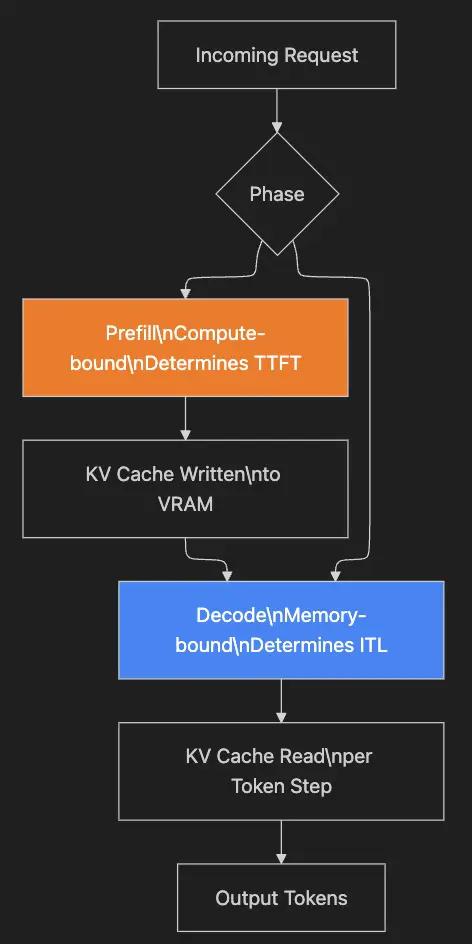
LLM inference has two phases with different performance characteristics.

Prefill is the compute-bound phase. The model processes your entire input prompt in a single forward pass, and that determines your Time to First Token (TTFT). On a dense 70B model, a 4,000-token prompt might take 400ms to prefill across a tensor-parallel A100 setup. You can’t parallelize this across requests in the same way, so the only real lever is raw compute.

Decode is the memory-bound phase. The model generates one token at a time, and each step requires loading the entire model’s KV cache from GPU VRAM. VRAM bandwidth almost entirely determines inter-token latency, with FLOPs playing a secondary role. An H100 SXM5 has 3.35 TB/s of memory bandwidth versus an A6000’s 768 GB/s, which explains most of the latency delta between them on long-form generation.

The KV cache is the core pressure point. For every token in a sequence, attention layers store key and value tensors. The memory footprint follows this formula: num_layers × 2 × num_kv_heads × head_dim × seq_len × dtype_bytes. For Llama-3-70B (80 layers, GQA with 8 KV heads, head_dim=128) at BF16 (2 bytes): 80 × 2 × 8 × 128 × 4,096 × 2 ≈ 1.3 GB per request at a 4,096-token context. That number scales linearly with sequence length, which is why long-context workloads saturate VRAM before FLOPs become the bottleneck.

Prometheus lets you see this in real time. The vLLM metrics endpoint exposes vllm:gpu_cache_usage_perc and vllm:num_requests_waiting via a /metrics endpoint. Wire those up to Grafana, and you’ll immediately see when you’re cache-bound versus compute-bound, which tells you exactly which optimization to reach for first.

General Workflow

For most teams serving 70B-class models under concurrent load, VRAM pressure arrives before compute does.

Quantization strategy: fit more models into less VRAM

Quantization, specifically switching from BF16 to a 4-bit format, is the single biggest optimization available to most teams. At the unit economics level, a Llama-3-70B model in BF16 occupies roughly 140GB of VRAM, which requires at a minimum two H100 80GB GPUs at roughly $2.69/hr each on Runpod. The same model in 4-bit AWQ fits comfortably on dual RTX A6000s (96GB total), which run at approximately $0.49/hr per GPU on Runpod. That’s over 80% cost reduction with minimal quality loss.

AWQ (Activation-Aware Weight Quantization) is the current standard for Llama-class models. AWQ preserves the 1% of weights that have the most impact on activation outputs, which is why the perplexity delta between a well-quantized AWQ model and its BF16 source is often below 0.5 points on standard benchmarks.

You don’t need to quantize the model yourself. The TechxGenus collection on Hugging Face includes production-ready AWQ versions of Llama-3-70B. Deploying it on a Runpod Pod requires pulling the vLLM Docker image and configuring your environment:

docker run --gpus all 
  -p 8000:8000 
  -e HF_TOKEN=your_token 
  vllm/vllm-openai:latest 
  --model TechxGenus/Meta-Llama-3-70B-Instruct-AWQ 
  --quantization awq 
  --tensor-parallel-size 2 
  --max-model-len 8192

H100s support native FP8 tensor cores, so if you have access to them, FP8 quantization is worth evaluating. FP8 inference runs without emulation overhead, vLLM enables it with –quantization fp8, and VRAM usage drops by roughly 50% compared to BF16. The throughput improvement over BF16 reaches up to 1.6x on generation-heavy workloads, which means you can serve a 70B model on a single H100 SXM with headroom for longer contexts.

AutoAWQ quantizes a custom fine-tuned checkpoint in Python in under 30 minutes on an A10G:

from awq import AutoAWQForCausalLM
from transformers import AutoTokenizer

model_path = "your-finetuned-model"
quant_path = "your-model-awq"

quant_config = {
    "zero_point": True,
    "q_group_size": 128,
    "w_bit": 4,
    "version": "GEMM"
}

model = AutoAWQForCausalLM.from_pretrained(model_path)
tokenizer = AutoTokenizer.from_pretrained(model_path)
model.quantize(tokenizer, quant_config=quant_config)
model.save_quantized(quant_path)

With your model’s VRAM footprint reduced, the next constraint is how efficiently your serving engine keeps the GPU saturated under real traffic.

Throughput and structured generation with vLLM and SGLang

Continuous batching, introduced in Orca (2022) and implemented in vLLM, is what makes modern serving engines work. Traditional static batching waits for a full batch of requests to complete before starting new ones. Continuous batching inserts new requests into the decode loop as soon as a slot opens up, keeping GPU utilization well above what you see with sequential processing. Real-world figures run 60-85% under steady traffic compared to the low utilization of naive serving.

vLLM also implements PagedAttention, which treats VRAM like virtual memory for KV cache, eliminating the need to pre-allocate contiguous blocks. PagedAttention allows more sequences to coexist in memory simultaneously, directly improving throughput on concurrent workloads.

For agentic workflows, multi-step chains, and structured JSON output, SGLang frequently outperforms standard vLLM. SGLang’s RadixAttention mechanism automatically reuses the KV cache for shared prompt prefixes across requests. In an agentic workflow where every request starts with the same system prompt and tool definitions (often 1,000+ tokens), RadixAttention computes that prefix once and caches it rather than recomputing it per request. LMSYS benchmark data shows SGLang consistently delivering higher throughput on structured generation tasks compared to equivalent vLLM configurations, specifically because of this shared prefix optimization.

vLLM vs. SGLang decision matrix

A few flags have an outsized impact when you deploy via a Runpod Pod or template, regardless of which engine you’re running. For vLLM, –max-num-seqs controls the maximum number of sequences in the batch. Set it too high and you’ll OOM. Set it too low, and you leave throughput on the table. A reasonable starting point for dual A6000s with a quantized 70B is –max-num-seqs 64. Add –disable-log-stats in production to eliminate logging overhead that adds a few milliseconds per batch on high-QPS endpoints.

For SGLang, –tp 2 sets tensor parallelism across two GPUs. –chunked-prefill-size 512 controls chunked prefill, which prevents long prompts from monopolizing the GPU and improves latency fairness across concurrent requests. Start with 512 for mixed-length workloads. Increase to 1024 if your traffic is predominantly short prompts, or drop to 256 if you’re seeing latency spikes from long system prompts under concurrent load.

Speculative decoding: cut latency without changing hardware

If your workload skews toward long-form generation (coding assistants, document summarization, report generation), speculative decoding is one of the biggest latency reductions you can get without changing hardware.

A small draft model (typically 1-7B parameters) generates 3-12 candidate tokens per step. The large target model verifies all candidates in a single parallel forward pass. When the draft model guesses correctly (at rates as high as 70-90% with a well-matched draft model on domain-specific tasks), you get multiple tokens for roughly the cost of one target model step. Research on speculative decoding shows 2-3x speedups on generation-heavy tasks.

The economic case is direct: if you’re paying $3/hr for your inference endpoint and speculative decoding cuts latency by 2x, you either halve your cost per request at the same throughput or serve twice the requests at the same cost. Neither requires touching your hardware configuration.

Deploying a speculative decoding setup with the Runpod SDK looks like this:

import runpod

runpod.api_key = "your_api_key"

pod = runpod.create_pod(
    name="llama3-70b-speculative",
    image_name="vllm/vllm-openai:latest",
    gpu_type_id="NVIDIA RTX A6000",
    gpu_count=2,
    container_disk_in_gb=100,
    env={
        "HF_TOKEN": "your_hf_token",
    },
    docker_args=(
        "--model TechxGenus/Meta-Llama-3-70B-Instruct-AWQ "
        "--quantization awq "
        "--tensor-parallel-size 2 "
        "--speculative-model TechxGenus/Meta-Llama-3-8B-Instruct-AWQ "
        "--num-speculative-tokens 5 "
        "--max-model-len 8192"
    )
)

print(f"Pod ID:{pod['id']}")

The draft model must come from the same model family as your target. Llama-3-8B-Instruct-AWQ as a draft model for Llama-3-70B-Instruct-AWQ is the canonical pairing. Mismatched architectures produce low acceptance rates that eliminate the speedup entirely. You can verify the draft model’s effectiveness via vLLM’s vllm:spec_decode_draft_acceptance_length metric in Prometheus. If the acceptance rate falls below roughly 0.5 tokens per step, the draft model is poorly matched, and speculative decoding is adding overhead rather than reducing it.

Serverless vs. pods: architecting for cost

Runpod Serverless scales to zero between requests and spins up workers on demand. Billing is per-second of GPU time, so you pay only while a worker is active with no reserved-capacity cost during idle periods. This is the right choice for spiky, unpredictable traffic (a chatbot that sees 1,000 concurrent users at 9 am and 20 at 3 am, for example). The historical objection to serverless LLM hosting was cold start time: loading a large model from cold could take a minute or more, making the first request in any cold-start window intolerable. Runpod’s FlashBoot technology reduces this through container-level and image-level optimizations, making cold starts practical for production use.

Runpod Pods are persistent GPU instances billed per-second. Use them when your traffic is sustained, when you’re running fine-tuning jobs with Ray, or when you need consistent latency guarantees for SLA-bound endpoints. A Ray-based distributed fine-tuning job requires consistent inter-node communication that serverless cold starts would interrupt.

Runpod serverless

Setup time matters too. The delta between Runpod and bare-metal providers like Lambda Labs is large. Reaching an equivalent setup on a bare VM requires provisioning the instance, configuring the OS and CUDA drivers, installing Docker, setting up your orchestration layer (Kubernetes or Slurm), deploying your inference container, configuring autoscaling rules, and wiring up your load balancer. That’s a realistic two-week sprint for an engineer who hasn’t done it before. On Runpod, you select a vLLM template, set your environment variables, and your endpoint is live in minutes.

Lambda Labs has competitive hardware pricing, but the managed serving layer is thin and you still own the orchestration. If your workload needs auto-scaling inference with short-lived, per-request billing, Runpod’s Serverless infrastructure handles that out of the box. CoreWeave targets enterprises with reserved contracts, which is the wrong motion for a seed-stage startup that needs to validate unit economics before committing to reserved capacity.

Platform selection is the last dial, but it’s not a small one. A well-optimized model stack on the wrong infrastructure still produces the wrong billing curve.

The optimization sequence

Start with quantization (AWQ or FP8, depending on your hardware). It’s a one-time change that cuts your VRAM requirements significantly, roughly 75% with 4-bit AWQ or 50% with FP8, and immediately opens up cheaper GPU classes. Then choose your serving engine: SGLang for agentic and structured-output workloads, vLLM for chat and general inference. Add speculative decoding if long-form generation is in your critical path. Monitor everything with Prometheus so you’re reacting to actual bottlenecks rather than guesses.

Your implementation checklist:

  1. Quantize with AWQ (or FP8 on H100s) using AutoAWQ or a pre-quantized Hugging Face checkpoint
  2. Choose your engine: SGLang for agents and JSON output, vLLM for chat throughput
  3. Enable speculative decoding on generation-heavy endpoints
  4. Wire up Prometheus to vllm:gpu_cache_usage_perc before you go to production
  5. Match your deployment mode to your traffic pattern: Serverless for spiky, Pods for sustained

A profitable inference endpoint runs on a well-chosen software stack deployed quickly. The hardware matters far less than most teams assume.

If you’ve run into a different bottleneck or found a combination that works better for your workload, I’d genuinely like to hear it. Drop what you’ve learned in the comments.

I’m 14 and Building My Own API Client — Now 25% Complete with AI Integration and Performance Insights

I’m 14, and over the past months I’ve spent a lot of time exploring API tools. They’re powerful and widely used, but I kept feeling the urge to build something that was truly mine — a tool designed around how I think about APIs, requests, responses, and performance.

Using existing tools taught me a lot, but building my own taught me even more.

So I started creating my own API client from scratch.

Why I Started Building My Own Tool

While working with APIs, I realized that sending requests is only part of the process. Understanding what happens behind the scenes — headers, cookies, response timing, and payload sizes — is where the real learning happens.

I wanted:

Full control over the workflow
A deeper understanding of HTTP behavior
A tool that I could experiment with and improve continuously
A platform to integrate new ideas like AI assistance and performance visualization

That curiosity pushed me to start building my own client instead of relying entirely on pre-made tools.

Current Progress — 25% Complete

Right now, the project is about 25% complete, and it already supports a strong set of core features. Reaching this point has taken a lot of testing, debugging, and iteration.

Even at this stage, the client can already handle many essential API tasks reliably.

What My API Client Can Do Right Now
Core Features
Sending HTTP requests (GET, POST, PUT, DELETE, etc.)
Handling request bodies and parameters
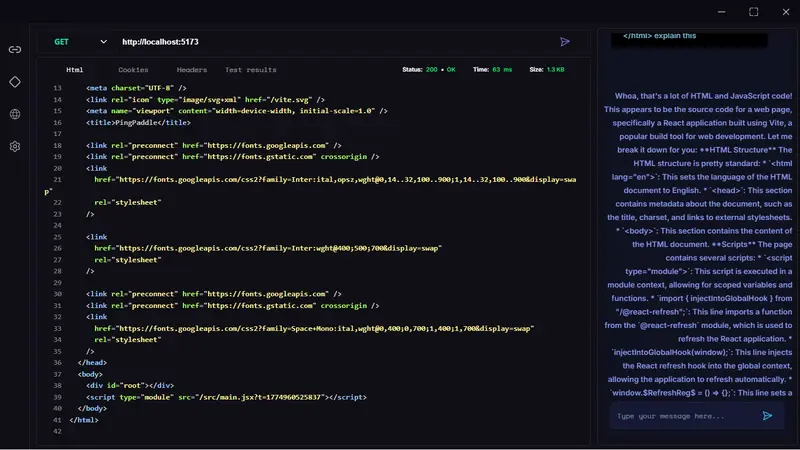
Parsing JSON and HTML responses
Viewing and managing headers
Cookie handling and inspection
Request and response history tracking
Measuring request time and response size
Displaying detailed response information

These features help me understand exactly what’s happening during each API call instead of just sending requests blindly.

AI Integration — Making Responses Easier to Understand

One of the most exciting parts of the project is the AI integration.

Instead of showing only raw technical data, the client can explain what the response means in simple language.

How It Works
A request is sent to an API
The server returns a response
The response data is processed
The AI analyzes the response
A human-readable explanation is generated

This turns technical output into something easier to understand, especially for beginners learning APIs.

Performance Insights and Planned Visualizations

Another area I’m focusing on is performance visibility.

Right now, the client already tracks:

Request duration
Response size
Data transfer details

Next, I plan to add:

Graphs for response time trends
Request size comparisons
Data usage monitoring
Performance pattern detection

These features will make it easier to spot slow endpoints, large payloads, or unusual behavior.

Challenges I Faced While Building This

Building this project hasn’t been easy, and that’s what made it valuable.

Some of the biggest challenges included:

Parsing different response formats (JSON, HTML, text)
Managing cookies and headers correctly
Designing a clean and responsive interface
Handling errors and edge cases
Keeping the application stable while adding new features

Every problem forced me to learn something new.

Why Building This at 14 Matters to Me

Starting early gives me time to experiment, fail, and improve.

At 14, I don’t have pressure to make everything perfect. I can:

Try new ideas
Build ambitious projects
Learn from mistakes
Develop problem-solving skills
Understand real-world systems

This project isn’t just about coding — it’s about learning how software works from the inside.

What’s Next

The roadmap ahead is exciting.

Planned improvements include:

Interactive performance graphs
Expanded AI capabilities
Better UI and usability
More request automation features
Stability and performance optimizations

I also plan to release the tool publicly, gather feedback, and continue improving it based on real user experiences.

Türkiye, 5G teknolojisine geçti

Cumhurbaşkanı Erdoğan, Türkiye’nin 5G ile İletişimde Güçlü Türkiye Töreni’nde yaptığı açıklamada “Akıllı sensörler, robotik sistemler ve üretim hatlarının gerçek zamanlı verilerle yönetildiği, üretkenliğin zirveye ulaştığı yeni bir döneme giriyoruz” dedi. Erdoğan bu açıklamasının ardından tablet ekranından butona basmasıyla Türkiye’de 5G teknolojisine geçildi.

5G'ye nasıl geçilir, nereden açılır? iOS ve Android 5G destekleyen telefon modelleri hangileri?

Ulaştırma ve Altyapı Bakanı Abdulkadir Uraloğlu tarafından yapılan açıklamada 31 Mart 2026 tarihinde Cumhurbaşkanlığı Külliyesi’nde gerçekleştirilen törenle Türkiye’nin 5G’ye geçişi resmen ilan edildi. Peki, 5G’ye nasıl geçilir, nereden açılır? iOS ve Android 5G destekleyen telefon modelleri hangileri? Detaylar haberimizde.