Google I/O 2026 Wasn’t About Features — It Was About AI Becoming the Developer Environment

This is a submission for the Google I/O Writing Challenge

Google I/O 2026 Wasn’t About Features — It Was About AI Becoming the Developer Environment

Google I/O 2026 felt very different from previous years.

This time, Google wasn’t just announcing tools. It was redefining how developers build software.

From Gemini deeply integrated into development workflows to Firebase becoming increasingly AI-native, the event made one thing clear:

AI is no longer a separate assistant.
It is becoming the development environment itself.

The Announcement That Stood Out to Me

The session that genuinely caught my attention was the evolution of Gemini across the developer ecosystem — especially how it now interacts with coding workflows, cloud tooling, and app development in a far more practical way.

For years, AI coding assistants mostly felt like:

  • autocomplete on steroids
  • chatbots beside the IDE
  • productivity add-ons

But Google’s 2026 direction feels different.

The focus is shifting toward:

  • context-aware development
  • multi-step reasoning
  • agentic workflows
  • AI-assisted architecture decisions
  • full-stack integration with cloud tooling

And honestly, that changes the developer experience completely.

Google I/O keynote stage

The future of development is increasingly AI-native.

What Excited Me Most

1. Gemini Becoming More Than a Chatbot

One of the biggest takeaways for me was how Gemini is evolving from:

“answering coding questions”

to

“understanding development intent.”

That distinction matters.

Modern software engineering is rarely about writing isolated functions anymore.

Real development involves:

  • navigating large codebases
  • debugging architecture issues
  • understanding APIs
  • deployment pipelines
  • cloud infrastructure
  • security considerations
  • performance tradeoffs

Google’s announcements suggest they’re aiming for AI systems that participate in those workflows instead of simply generating snippets.

That’s the first time I’ve felt AI tooling moving toward engineering assistance rather than just code generation.

2. Firebase Is Quietly Becoming an AI Application Platform

Another underrated part of I/O 2026 was Firebase.

Firebase has always been beginner-friendly, but now it feels positioned as a serious rapid AI application platform.

The combination of:

  • authentication
  • hosting
  • databases
  • cloud functions
  • AI integrations
  • analytics

makes it possible for small teams to build surprisingly advanced products very quickly.

For indie developers and hackathon builders, this is huge.

You no longer need massive infrastructure knowledge before experimenting with AI-powered ideas.

Firebase dashboard illustration

Firebase is evolving into a complete AI app ecosystem.

What This Means for Developers

I think Google I/O 2026 signals three major industry shifts:

AI Will Become Infrastructure

Not just a feature.

Developers will increasingly build:

  • with AI
  • for AI
  • around AI agents

AI APIs may soon become as common as databases and authentication systems.

Full-Stack Developers Will Move Faster Than Ever

The gap between:

  • idea
  • prototype
  • deployment

is shrinking rapidly.

Small teams can now create products that previously required entire engineering departments.

That’s both exciting and slightly intimidating.

Developers Need Better Judgment, Not Just Coding Skills

Ironically, as AI gets better at generating code, human value shifts toward:

  • system design
  • product thinking
  • security awareness
  • architecture decisions
  • debugging
  • understanding tradeoffs

The developers who thrive won’t necessarily be the fastest coders.

They’ll be the best decision-makers.

My Small Experiment After Watching I/O

After the keynote, I tried rebuilding a small finance dashboard prototype using AI-assisted workflows.

Instead of manually planning every step, I experimented with:

  • AI-generated backend scaffolding
  • Firebase integrations
  • cloud deployment suggestions
  • rapid UI iteration
  • debugging assistance

What surprised me wasn’t the speed.

It was how much mental overhead disappeared.

I spent less time fighting setup issues and more time refining the actual product idea.

That felt like a meaningful shift.

Developer working with AI tools

AI-assisted workflows are changing how developers think and build.

One Concern I Still Have

Despite all the excitement, I do think the industry is entering a dangerous phase of:

over-reliance on generated code.

AI can accelerate development dramatically.

But it can also:

  • introduce hidden vulnerabilities
  • encourage shallow understanding
  • create maintainability issues
  • increase technical debt

The future probably belongs to developers who know when not to trust AI.

And I think that balance will become one of the most valuable engineering skills of this decade.

Final Thoughts

Google I/O 2026 wasn’t just another product announcement event.

It felt like a preview of a new software development paradigm.

The most important takeaway for me was this:

Developers are no longer just writing software.
We are beginning to collaborate with systems that actively participate in building it.

That changes everything.

And honestly?

We’re probably only at the beginning.

Thanks for reading — I’d love to hear which Google I/O 2026 announcement stood out most to you.

Building an AI Vedic Astrology App in 25 Days — What Actually Worked (and What Didn’t)

25 days ago I had an idea. Today KundliAI is live, indexed by Google, and getting organic traffic.

Here’s the honest story — no fluff.

The Idea

India has 1.4 billion people. A massive percentage consult astrology regularly — for marriage, career decisions, naming babies, starting businesses.

But the existing platforms are either:

  • Outdated UI from 2005
  • English-heavy (most users are Hindi speakers)
  • Expensive (₹500-2000 per consultation)
  • Generic (same horoscope for everyone born in the same month)

I thought — what if I built something that gives genuinely personalized Vedic astrology in Hindi, free, in 30 seconds?

That became KundliAI.

The Stack

Frontend: Next.js 14 (App Router)
Styling: Tailwind CSS
AI: Groq API (Meta's Llama — fast and cheap)
Astrology calculations: AstrologyAPI.com (Swiss Ephemeris)
Payments: Razorpay
Hosting: Vercel
Domain: kundliai.in

Why Groq over OpenAI? Speed. Groq is 10x faster for inference. For a tool where users expect results in 30 seconds — latency matters a lot.

Why AstrologyAPI over doing calculations myself? Swiss Ephemeris is complex. AstrologyAPI wraps it cleanly and gives me planetary positions, Kundli Matching (36 Guna Milan), Mahadasha calculations — all via REST API. Cost is minimal for the accuracy you get.

What I Built — Features

Free Kundli Generator
User enters name, date of birth, time, place. We call AstrologyAPI for planetary positions, then Groq generates a complete personalized reading in Hindi. Takes about 25-30 seconds end to end.

Daily Rashifal (Horoscope)
Not generic — based on actual planetary transits for the day combined with user’s Moon sign. Different from every other rashifal site that gives the same text to all Aries users.

Kundli Matching
36 Guna Milan — the traditional Indian marriage compatibility system. Enter two birth charts, get compatibility score with explanation in Hindi.

Numerology
Name + date of birth → Life Path Number, Destiny Number, Soul Urge Number. Hindi interpretation.

Love Compatibility by Name
Chaldean numerology — enter two names, get compatibility score. Simple but surprisingly popular.

AI Pandit Chat
24/7 chat with an AI that knows Vedic astrology. Ask anything — career, marriage, health, planetary positions.

Panchang
Daily Panchang for 12 Indian cities — Tithi, Nakshatra, Yoga, Rahu Kaal, Abhijit Muhurat.

Paid Reports (₹99)
Detailed 10-page PDF report. One-time payment via Razorpay. First payment came on Day 20.

The Technical Challenges

Challenge 1 — Prompt Engineering for Hindi

Getting Groq/Llama to generate genuinely good Hindi astrology content was harder than expected.

The model kept mixing Hindi and English awkwardly. It would use Sanskrit terms without explaining them. The tone was sometimes too formal, sometimes too casual.

After about 40 iterations of the system prompt, I landed on something that works. Key insights:

  • Give the model a persona (“You are an experienced Vedic astrologer who explains things in simple Hindi”)
  • Specify the audience (“The user is a regular Indian, not an astrology expert”)
  • Give explicit formatting instructions
  • Include examples of good vs bad responses in the prompt

Challenge 2 — Vercel Serverless File Size Limits

My blogs.ts file grew to 500KB+ with 32 blog posts. Vercel’s serverless functions have memory limits and the file was causing cold start issues — only 3 blogs were loading.

Solution: Split into blogs.ts (9 blogs) and blogs2.ts (23 blogs), import both in the page component.

Lesson: Watch your serverless function bundle size. It bites you in production, not in development.

Challenge 3 — SSR vs Client Rendering for SEO

Initially blog pages were client-rendered. Google was seeing empty pages — terrible for SEO.

Migrated to Server Components with force-dynamic. Now Google gets fully rendered HTML with all content. Indexed 2 new blogs in under 10 minutes after this fix.

Challenge 4 — AstrologyAPI Rate Limits

During testing I burned through API credits quickly. Built a simple caching layer — same birth data within 24 hours returns cached results instead of hitting the API again.

Cost dropped significantly. API cost is now ₹8-17 per day even with decent traffic.

The SEO Strategy — What’s Working

I’m not an SEO expert. But here’s what I did:

Blog content in Hindi + English
Most astrology content online is either pure English or poor Hindi. I write detailed bilingual blogs — “Makar Rashi 2026 rashifal” with proper Hindi content. Google seems to like this.

Long-tail keywords
Not “horoscope” (impossible to rank). Instead “makar rashi sade sati 2026 upay” — specific, lower competition, high intent.

FAQ sections on every blog
Google’s featured snippets love FAQ format. I include 10-14 FAQ questions per blog with direct answers.

Schema markup
FAQ schema, Breadcrumb schema, Review schema — all implemented server-side. Google Search Console shows all valid. Rich results in search = higher CTR.

Results after 25 days:

  • 0 to 1,390 impressions
  • 67 clicks
  • 4.8% CTR (industry average is 2-3%)
  • Position 7.6 average
  • First paid customer on Day 20

The Distribution Strategy

SEO takes time. Meanwhile:

Quora — answering astrology questions with genuine helpful content. 51 answers so far. 166 content views this month. Referral traffic is steady.

Featured.com — expert Q&A platform. Submitted 3 answers. One selected by BoostmyDomain for publication. Two in review with Brodox and VisRank. High-DR backlinks incoming.

IndieHackers — sharing the journey. Good for backlinks and community feedback.

Revenue — Honest Numbers

Day 20: First payment — ₹99
Day 25: Total revenue — ₹99-200

Not impressive yet. But the paid report feature works, Razorpay integration is solid, and the funnel is there. It’s a traffic problem right now, not a conversion problem.

What I’d Do Differently

Start SEO content on Day 1
I built features for the first 2 weeks before writing any blogs. Those 2 weeks of content compound over time — I wish I’d started earlier.

Pick a narrower niche first
“AI Vedic astrology” is broad. Starting with “Sade Sati calculator” or “Kundli Matching tool” and dominating that before expanding would have been smarter.

Build in public from Day 1
I started sharing on Day 20. Earlier sharing = earlier feedback = earlier course corrections.

What’s Next

  • Complete all 12 rashi blogs (4 remaining)
  • Reddit community building
  • YouTube Shorts — 30 second rashifal videos
  • WhatsApp channel
  • Month 2 target: ₹5,000 revenue

The Code

Not open source yet — but happy to answer specific technical questions in the comments.

Live at: kundliai.in

Built by one person in 25 days. Zero paid marketing. Everything organic.

If you’re building something for the Indian market — Hindi-first is a massive opportunity. The content gap is real.

Happy to answer any questions about the stack, the prompts, or the SEO approach.

Hermes Agent Has Four Memories — And That’s Why It Doesn’t Forget You

This is a submission for the Hermes Agent Challenge: Write About Hermes Agent

A cognitive-science tour of the only open-source agent that gets smarter the longer you run it. We map Hermes’ file layout onto the four classical memory systems of the human brain — and find an architecture that quietly solves the problem every other agent fakes.

I want to argue something that sounds like marketing but isn’t.

Hermes Agent isn’t impressive because it’s “self-improving.” That phrase has been on a thousand landing pages. It’s impressive because — possibly by accident, possibly on purpose — the architecture matches how a human brain stores memory. Once you see the mapping, the whole project stops looking like a clever Python wrapper and starts looking like a thesis: if you want an agent that compounds, you have to give it the same memory systems we use.

I’m an ML engineer who builds recommendation and intent systems for a living, and I spend a lot of time thinking about the gap between an agent that’s interesting and an agent that holds up after week three. Almost few article write-up of Hermes I’ve read covers the surface — “it remembers things, it has skills, it has crons.” All true. None of them ask the more useful question:

Why this particular decomposition? Why these specific files? Why does a system designed in 2026 look so much like a 1970s cognitive-psychology paper?

That’s the post. Grab a coffee.

The goldfish problem (and why “context window” isn’t the answer)

Every agent in production today has the same failure mode, and we’ve all felt it.

Monday: you carefully explain your project, your stack, the three constraints that always trip up the model. The agent crushes the task. You’re delighted.

Tuesday: you open a fresh session. The agent has no idea who you are. You re-explain. You re-correct. You re-paste the same context blob. This is what people mean when they say agents “feel like demos.” They aren’t building anything that lasts; they’re paying the same context tax every single morning.

The standard responses to this problem are bad:

  • Bigger context windows — expensive, doesn’t scale with how long you actually want the agent to live (months, not turns), and still amnesiac the moment the conversation ends.
  • Vector databases — useful for retrieval, terrible for identity. A RAG store doesn’t know who you are; it knows which 8 chunks resemble your last question.
  • Fine-tuning — slow, expensive, and updates an agent’s beliefs at the speed of GPU procurement, not the speed of Tuesday.

None of these is memory. They’re all variations on “search more text faster.” The reason your brain doesn’t work this way is that your brain has at least four distinct memory systems, and each one solves a different problem. When cognitive psychologists separated them in the 1970s and 80s — names like Tulving, Squire, Cohen — they did it because patients with brain damage would lose one and keep the others. The systems are genuinely independent.

So here’s the simple claim: the reason Hermes Agent works is that it has all four, and they’re separate, and they’re stored on disk where you can read them.

Let me show you.

A 90-second cognitive-science primer

You don’t need a degree to follow this. Four words, four jobs:

System Holds Example
Procedural memory How to do things Riding a bike. Touch-typing. Driving a stick shift.
Semantic memory Facts about the world Paris is the capital of France. Mitochondria are the powerhouse of the cell.
Episodic memory Things that happened to you What you had for breakfast yesterday. The argument you had in 2019.
Working memory What you’re holding right now The phone number someone just said out loud.

There’s a fifth thing that isn’t a memory system but is the substrate the others run inside: your identity — the sense of who you are that makes all four useful instead of just being a pile of disconnected data. Without a self, your “memories” are just other people’s footage.

Now look at this directory listing from a fresh Hermes Agent install:

~/.hermes/
├── SOUL.md           # identity (the substrate)
├── memories/
│   ├── USER.md       # who you are (the agent's model of me)
│   └── MEMORY.md     # what's true in my world right now
├── skills/           # how to do things  (one folder per SKILL.md)
├── sessions/         # SQLite + FTS5: every conversation, searchable
└── cron/             # scheduled jobs that fire in fresh sessions

I’m going to take you through these one at a time and show you which cognitive system each one is doing, why the boundaries are drawn where they are, and what each one prevents from going wrong. We’ll end with the part nobody on dev.to has written about yet: how a feature called the Curator (added in v0.12) functions as the agent’s equivalent of sleep.

SOUL.md — the substrate (identity)

SOUL.md is the first file loaded into the system prompt at every turn. The Hermes architecture docs call it “slot #1.” It contains the agent’s personality, communication style, role, and constraints. It’s about 1,000–3,000 characters in most setups.

“You are a senior research analyst. You write in short paragraphs. You don’t apologize. You never use the word ‘leverage.'”

If you stop reading here you’ll think this is just a system prompt. It isn’t. The trick is what SOUL.md doesn’t contain: facts about your projects, your name, anything that changes week-to-week. Those go in different files. SOUL.md is the slow-moving part — the part that makes a Telegram bot reading your code reviews behave consistently different from one that drafts your customer support replies.

You can run multiple Hermes profiles on the same machine, each with its own SOUL.md. A finance-ops agent and a research agent share the same underlying model but read as different colleagues. This is exactly how human personality works: same neural hardware, different self-concepts shaping the output.

What this prevents: tone drift. The slow, frustrating phenomenon where an agent that was crisp on day 1 has become a verbose, hedging, em-dash-spamming mess by day 30 because nothing was holding its character in place.

USER.md and MEMORY.md — semantic memory (facts about your world)

Open ~/.hermes/memories/USER.md after a few weeks of use and you’ll find something like this (this is illustrative, not from any specific install):

- Name: Manikant
- Role: ML/AI engineer
- Communication: prefers terse responses, no apology preambles
- Working on: prompt-recommendation pipelines, intent taxonomy
- Avoid: marketing language, "leverage", em-dashes in code blocks

And MEMORY.md:

- Active project: CCx personalization pipeline
- Stack: Databricks, FastAPI on AKS, Redis, OneLLM
- p95 target: sub-1s on warm path
- Recent issue: Kong/Okta 403 — fixed by adding personalization_services scope

Two files. One is who you are (slow-changing). One is what’s currently true in your world (medium-changing). Both get injected into the system prompt at session start as a frozen snapshot.

This is semantic memory — declarative facts that the agent can state without re-deriving them. The reason it’s split into two files instead of one is the same reason your brain separates “I am a software engineer” from “the build is currently broken.” One is identity-level. One is operational. Mixing them is how you end up with an agent that introduces itself in every reply.

The character limits matter. The published numbers I’ve seen are roughly USER.md ≤ 1,375 chars, MEMORY.md ≤ 2,200 chars. That’s tiny on purpose. Memory in Hermes is a pointer index, not a data lake. If something needs more space, it doesn’t belong here — it belongs in a skill, or in the episodic store (the session DB). This is the single most important design choice in the system and the one most newcomers fight against.

What this prevents: the context-amnesia tax. You stop re-explaining yourself every Monday. The agent walks into the session already knowing the constraints.

The non-obvious failure mode: stale memory. If MEMORY.md still says “the build is broken” three weeks after you fixed it, the agent will keep working around a phantom. Treat these files like sticky notes on your monitor, not like a database. If your agent starts behaving oddly, this is almost always the first place to look.

SKILL.md — procedural memory (how to do things)

This is the part of Hermes that most reviewers fixate on, but they usually describe what it is without explaining why this particular shape.

A skill is a markdown file with YAML front matter:

---
name: deploy-fastapi-aks
description: Deploy a FastAPI service to Azure Kubernetes Service with our standard manifests
version: 1.2.0
metadata:
  hermes:
    tags: [devops, azure, aks]
---

# Deploy FastAPI to AKS

## When to use
The user wants to ship a FastAPI service to our AKS cluster.

## Procedure
1. Confirm the image tag exists in ACR
2. Run `kubectl apply -f manifests/`
3. Watch the rollout with `kubectl rollout status`
4. Hit /healthz from a pod in the cluster to confirm

## Pitfalls
- If the rollout stalls > 60s, check the readiness probe path
- Token expiry: rotate via `az acr login` before applying

This is procedural memory. It’s not facts about your stack; it’s a recipe for executing a workflow that survives the agent forgetting your conversation. You can install skills from URLs (hermes skills install https://example.com/SKILL.md), browse a community hub at agentskills.io, or write your own — but the most interesting case is the one where the agent writes them itself.

After Hermes solves a complex task, it can call a tool called skill_manage and propose saving the solution as a new skill. You confirm, it writes the file, and from then on the workflow is one slash command away. The next time you ask for the same kind of thing, the agent doesn’t re-derive the solution from first principles — it loads the recipe.

Here’s the part that took me three readings of the Hermes architecture page to appreciate. Skills don’t cost tokens until they’re used. The mechanism is called progressive disclosure:

  1. At session start: skills_list() loads a compact list of names and descriptions only. Roughly 3k tokens for ~100 skills.
  2. When the agent decides one is relevant: skill_view(name) reads the full SKILL.md.
  3. If the skill references a deep file: skill_view(name, "references/api-docs.md") reads that one file.

That’s a three-tier lazy-load. The agent never pays the full cost of all its procedural knowledge — only the tip of the iceberg you’re using right now. This is the unlock that makes the “more skills makes the agent better, not slower” property actually hold. Without progressive disclosure, every skill you add is a tax on every conversation. With it, the cost is bounded by what you actually invoke.

You don’t have to take my word for it. The official skills docs (here) lay out the three-tier load explicitly.

What this prevents: workflow drift. The same task done differently every time because the agent is improvising rather than following a known-good procedure. Skills are the difference between “the agent figured it out again” and “the agent did it the way we always do it.”

sessions/ + FTS5 — episodic memory (things that happened)

Open ~/.hermes/sessions/ and you’ll find a SQLite database. Inside, FTS5 — SQLite’s full-text search — indexes every turn, every tool call, every result the agent has ever produced.

This is episodic memory. Not facts (“I prefer dark mode”), not skills (“how to deploy”), but the actual diary of what happened. When does this matter? When you say something like: “that bug we hit two weeks ago with the Redis TTL — what did we end up doing?” Hermes runs a search across the session history, summarizes the relevant turns with the LLM, and brings the answer back.

This is the layer that most people who shrug off “the agent has memory” never actually use. They put facts in MEMORY.md and call it done. The episodic layer is what makes the agent feel like a colleague who was there with you, not just a search engine that remembers your settings.

The reason this is implemented as SQLite + FTS5 instead of a vector database is worth pausing on. Embeddings are great for “find me something semantically similar.” But episodic memory is dominated by literal recall: specific error messages, file paths, dates, function names. FTS5 is faster, cheaper, has no extra service to run, and handles literal queries better than embeddings. The trade-off is that fuzzy queries work less well — but that’s what the LLM-on-top-of-search layer compensates for. The agent reads the raw matches and synthesizes.

What this prevents: the “did we already try that?” tax. You stop re-running experiments you’ve already run. The agent can tell you what was tried, what worked, and what was abandoned without you remembering the original session.

Working memory — the running conversation

The current session — your active conversation, the in-flight tool calls, the scratchpad of what the agent has done in the last 20 turns — is working memory. It’s bounded by the model’s context window, and Hermes has a dedicated component called context_compressor.py that summarizes older turns once the context crosses about 50% of the available window, preserving recent messages and grouping related tool calls together.

This isn’t fancy. But it’s the unglamorous plumbing that makes long sessions possible without the agent suddenly forgetting what it was just doing. Working memory in humans has the same property: about 7±2 items, and the brain dumps older items into longer-term stores constantly. Hermes does it explicitly because LLMs don’t.

The part nobody writes about: the Curator (v0.12+)

If you’ve read other Hermes write-ups, you’ve seen the four-pillar story (memory, skills, soul, crons) and the five-pillar story (add the self-improving loop). Almost nobody is talking about what shipped in version 0.12: the autonomous Curator.

The Curator is a cron job — running on a 7-day cycle by default — whose only job is to grade, consolidate, and prune the agent’s own skill library. It walks through every skill in ~/.hermes/skills/, scores it, merges near-duplicates, archives skills that haven’t been invoked in N weeks, and rewrites descriptions for clarity. The agent does this on itself, while you sleep.

Why does this matter? Because every learning system has the same problem: growth alone isn’t intelligence. If your agent adds a skill every time you do something complex, in six months you have 800 skills, half of them redundant, a third of them stale. The skill index gets noisy. The agent picks the wrong skill for a task because the descriptions overlap. The compounding starts to compound backwards.

The Curator is consolidation. In humans, the analogous process is sleep — specifically slow-wave sleep, when the hippocampus replays the day’s episodic memories and the cortex selectively keeps, merges, and discards them. You wake up and the things that didn’t matter are gone, the things that did are integrated. Memory researchers have been writing about this since the 1990s. Hermes is, as far as I can tell, the first widely-used open-source agent to ship it as a first-class feature.

When I realized this is what the Curator was doing, the architecture story clicked all the way: Hermes isn’t a smart loop on top of an LLM. It’s an attempt to give a stateless model the same memory-management apparatus a biological system uses. Identity, semantic, procedural, episodic, working — plus consolidation. That’s the whole stack.

A diagram, because diagrams help

Here is the mental model I’ve been building toward:

                    ┌───────────────────────────────────────────┐
                    │            SOUL.md  (identity)            │
                    │  the substrate that makes the rest useful │
                    └────────────────────┬──────────────────────┘
                                         │
        ┌────────────────────┬───────────┼────────────────────────┐
        │                    │           │                        │
   ┌────▼─────┐    ┌─────────▼────┐  ┌───▼───────┐    ┌──────────▼─────────┐
   │ USER.md  │    │  MEMORY.md   │  │ SKILL.md  │    │  sessions/ (FTS5)  │
   │ + USER MODEL    │              │  │           │    │                    │
   │ semantic  │   │  semantic    │  │ procedural│    │      episodic      │
   │ (who I am)│    │ (my world)   │  │ (how-to)  │    │  (what happened)   │
   └───────────┘    └──────────────┘  └─────┬─────┘    └──────────┬─────────┘
                                            │                     │
                                       progressive            FTS5 + LLM
                                        disclosure              recall
                                            │                     │
                                       ┌────▼─────────────────────▼────┐
                                       │   working memory (the turn)   │
                                       │   + context_compressor.py     │
                                       └────────────────┬──────────────┘
                                                        │
                                                ┌───────▼────────┐
                                                │  the Curator   │
                                                │ (weekly cron)  │
                                                │  = "sleep"     │
                                                └────────────────┘

If you’ve ever stared at a Tulving diagram of memory systems and then stared at this layout, the resemblance is uncanny.

The bonus layer most people miss: trajectory export

There’s one more thing I want to flag, because it’s the part that makes Hermes interesting if you’re an ML engineer rather than just an end user.

Every conversation Hermes has is, by design, exportable in ShareGPT format — the de-facto schema for instruction-tuning data. The repo includes an Atropos integration for reinforcement-learning environments. The agent’s own sessions become training data for the next version of the model that runs the agent.

This closes a flywheel that almost no other open-source agent has closed:

  1. You use Hermes. It logs what worked.
  2. The Curator consolidates the useful skills.
  3. The trajectories get exported.
  4. Someone (Nous Research, your team, you) fine-tunes a model on those trajectories.
  5. The fine-tuned model becomes a better Hermes.

This is also why Hermes is described as “built by model trainers.” Nous Research isn’t a UX shop; they ship the Hermes, Nomos, and Psyche model families. The agent is also their data-collection apparatus. Once you know this, the design choices stop looking arbitrary. Of course they separated procedural from semantic from episodic — they need clean labels to train on.

I’m not making a claim about what fine-tuning runs they’re doing internally. The mechanism is there in the codebase; what they do with it is their business. What I’m pointing out is that the architecture is shaped by the data it generates, which is a property almost no other open-source agent has.

What this means if you’re building something

If you’ve read this far you probably want practical takeaways. Here are five.

1. Don’t treat MEMORY.md as a dumping ground. It’s a sticky note, not a database. If you put everything in it, the agent will get confused about what’s currently true. Aggressively prune.

2. Let the agent write skills, then edit them. Hand-written skills from scratch tend to be too generic. Agent-written skills are concrete because they were extracted from a real workflow you just completed. Your job is editorial — tighten the description, add the pitfall you noticed, ship it.

3. The “when to use” section in a SKILL.md is the most important sentence in the file. That’s what the agent searches against when deciding to invoke the skill. Treat it like ad copy: specific, keyword-rich, unambiguous.

4. Multiple SOUL.md profiles beat one mega-agent. A finance agent and a research agent with different SOUL.md files and different credentials are cleaner, safer, and easier to debug than one agent with all the skills and all the API keys.

5. The cron + skill combo is the actual moat. A single sentence — “every night at 1am, pull the latest commits and summarize them on Slack” — produces a skill, a scheduled job, and an output destination, all at once. This is what shifts an agent from reactive to proactive. Most “agent” demos can’t do this without 200 lines of glue code.

The honest caveats

I’d rather not write a love letter, so:

  • Stale memory is the #1 reason Hermes “starts acting weird.” If your agent is misbehaving, open MEMORY.md before anything else.
  • Skill name collisions are real. A skill in your home directory shadows the same name in an external repo, which means “it works on my machine” is a known failure pattern when a team shares skills.
  • The cost story depends on your model choice. Progressive disclosure keeps the agent lean. The model behind it can still be expensive if you point it at a frontier API.
  • “Self-improving” doesn’t mean automatic. The official docs say it themselves: the loop works best when you actively correct mistakes, save things to memory, and update skills. Passive use produces some improvement; active use compounds.
  • The 40% research-task speedup number that floats around is from a third-party benchmark I haven’t personally re-run. Treat it as directional.

Closing

I started this post with a claim: that Hermes Agent works because its architecture matches how a brain stores memory. I think the mapping is real, and I think it explains why this particular agent has 164,000+ GitHub stars while a dozen frameworks with louder marketing are stuck at 5k.

Identity that doesn’t drift. Facts that update. Procedures that get reused. Episodes that can be searched. Consolidation that happens while you sleep.

None of those features is novel on its own. Vector DBs do semantic-ish search. Prompt frameworks do identity-ish anchoring. RAG does episodic-ish retrieval. What’s new is putting them all in one place, with clean boundaries, in plain markdown files you can cat. That’s the architecture. And once you see it through this lens, the next time you build an agent, you’ll find yourself reaching for the same five buckets — because they’re the buckets that work.

If you’ve made it this far, I’d love to hear which of the five layers you’d want to extend first. The Curator is the one I’m most curious about — there’s a whole research direction in “how should an agent forget” that nobody’s seriously explored yet, and it’s sitting right there in ~/.hermes/cron/.

If you found this useful, the conversation is open — drop your own mental model in the comments. And if you spot something I got wrong about the internals, please correct me. Hermes is moving fast and I want to keep this honest.

Pressure Isn’t Killing You -Your Relationship With It Is

Everyone Is Telling You to Manage Your Time

Pomodoro technique.
Study schedules.
To-do lists.
Color coded planners.

You’ve tried them.They worked for two days.Then life happened and the plan collapsed.

So let me tell you something different.Something nobody puts in a productivity blog.

Pressure Is Not Your Enemy

Read that again.

Pressure is not your enemy.

Your relationship with pressure is.

Every CS student right now is facing the same storm placements, practicals, theory exams,coding rounds, HR prep, resume updates all at the same time.

The ones who survive it aren’t the ones who had better schedules.

They’re the ones who stopped fighting the feeling of being overwhelmed and started moving anyway.

The Psychological Trick Nobody Talks About

Your brain has one job when it feels overwhelmed make you stop.

Freeze. Scroll. Sleep. Avoid.
Anything to escape the feeling.

And the more you resist that feeling the stronger it gets.

So here’s the loophole

Don’t fight the overwhelm.
Acknowledge it.Then do one tiny thing anyway.

Not five things. Not a full study session.One thing. The smallest possible thing.

Open the coding platform.
Write one line of your resume.
Read one page of one subject.

That’s it.

Your brain registers movement.
Movement breaks the freeze.
The freeze was the only real enemy.

The Comparison That Will Change How You See This

Think about a developer with 5 years experience.

They wake up every day with:

  • Fear of losing their job
  • Pressure to learn new technologies
  • Deadlines that don’t care about their mood
  • Backup job applications running quietly
  • And if married — a whole life on top of that

They didn’t get used to pressure.
They got used to moving through it.

You are training for exactly that right now in this exam season chaos.

Every time you show up when you don’t feel like it you are building the most important
skill of your entire career.

Not Java. Not Spring Boot. Not AWS.

The ability to function under pressure.

The Real Loophole

Everyone is looking for a hack.
A shortcut. A secret formula.

Here it is

The students who do well during placement seasonare not the ones who prepared the most.

They are the ones who panicked the least.

And they panicked the least because they trusted what they already knew.

You already know things.Real things. Built things. Learned things.

Your projects are real.Your internship was real.Your certifications are real.Your struggle to get here was real.

No exam, no interview, no placement round can take that away from you.

Walk in knowing that.Not performing confidence.Actually knowing I have done real work.
I deserve to be here.

What To Actually Do This Week

Not a schedule. A mindset shift.

Stop preparing for everything.
Start preparing for the next one thing.

What is happening first?
Practical? Prepare for that.
Coding round? Prepare for that.
Theory exam? Prepare for that.

One thing at a time.Fully present for that one thing.Then move to the next.

The chaos feels like ten things
demanding your attention simultaneously.

It’s not.It’s ten things happening one after another.
Treat it that way.

Stop measuring by what’s left.
Start measuring by what’s done.

Every small win counts.One problem solved. One topic revised.One resume line improved.

Your brain needs evidence that
you are moving forward.Give it that evidence deliberately.

Stop waiting to feel ready.
Ready is a feeling that arrives
after you start not before.

You will never feel ready for a placement interview.You will never feel ready for a hard exam.
Nobody does.

The people who succeed showed up anyway.

For The Developers Reading This

You already know this is true.

The pressure never fully disappears.But at some point you stopped waiting for it to go away
and started building a life inside it.

What was the moment that shifted for you?What do you wish someone had told you during placement season?

Drop it below. Genuinely.
Not career advice. Human advice. 👇

Final Thought

You are not behind.
You are not failing.
You are not less than anyone else
in that placement room.

You are a student carrying more
than students were ever meant to carry and somehow still showing up.

That already makes you someone
a company should want.

Now go do the next one thing. 😊

What’s the one thing you’re doing today to move forward however small?

Drop it below 👇
Let’s hold each other accountable.

🐳 How to Run Any Project in Docker: A Complete Guide

From zero to containerized in minutes — no “works on my machine” excuses

Why Docker?

You’ve probably heard it before: “It works on my machine.” Docker exists to make that phrase obsolete.

Docker lets you package your application and all its dependencies — runtimes, libraries, config files — into a single, portable unit called a container. That container runs identically on your laptop, your teammate’s Windows machine, a CI server, or a cloud VM.

Before we dive in, here’s the quick mental model:

  • Image → A blueprint (like a class in OOP)
  • Container → A running instance of an image (like an object)
  • Dockerfile → The recipe for building an image
  • Docker Compose → A tool to orchestrate multiple containers together

Prerequisites

  • Docker Desktop installed (includes Docker Compose)
  • Basic terminal familiarity
  • A project to containerize (we’ll use examples for Node.js, Python, and a generic approach)

Verify your install:

docker --version
# Docker version 26.x.x

docker compose version
# Docker Compose version v2.x.x

Part 1: The Anatomy of a Dockerfile

A Dockerfile is a plain text file with instructions Docker reads top-to-bottom to build your image.

# 1. Base image — what you're building ON TOP OF
FROM node:20-alpine

# 2. Set the working directory inside the container
WORKDIR /app

# 3. Copy dependency files first (for layer caching)
COPY package*.json ./

# 4. Install dependencies
RUN npm install

# 5. Copy the rest of your source code
COPY . .

# 6. Expose the port your app listens on
EXPOSE 3000

# 7. The command to run when the container starts
CMD ["node", "server.js"]

Key Instructions Explained

Instruction Purpose
FROM Sets the base image. Always the first instruction.
WORKDIR Sets the working directory for subsequent commands. Created if it doesn’t exist.
COPY Copies files from your host into the image.
RUN Executes a command during the build phase (installs packages, compiles code).
ENV Sets environment variables available at runtime.
EXPOSE Documents which port the app uses (informational; doesn’t actually publish).
CMD The default command when the container starts. Only one per Dockerfile.
ENTRYPOINT Like CMD, but harder to override — use for “always run this”.

Pro tip: Order your Dockerfile from least-to-most frequently changed. Docker caches each layer, so stable layers (like installing dependencies) won’t re-run unless they change.

Part 2: Dockerizing a Node.js Project

Project structure

my-app/
├── src/
│   └── index.js
├── package.json
├── package-lock.json
└── Dockerfile

Dockerfile

FROM node:20-alpine

WORKDIR /app

# Copy lockfile and package.json first for cache efficiency
COPY package*.json ./
RUN npm ci --only=production

COPY src/ ./src/

EXPOSE 3000
CMD ["node", "src/index.js"]

Build and run

# Build the image and tag it
docker build -t my-node-app .

# Run it, mapping host port 8080 → container port 3000
docker run -p 8080:3000 my-node-app

Visit http://localhost:8080 — your app is running inside Docker.

Part 3: Dockerizing a Python Project

FROM python:3.12-slim

WORKDIR /app

# Install dependencies
COPY requirements.txt .
RUN pip install --no-cache-dir -r requirements.txt

COPY . .

EXPOSE 8000
CMD ["python", "-m", "uvicorn", "main:app", "--host", "0.0.0.0", "--port", "8000"]

Note the --host 0.0.0.0: By default, many dev servers bind to 127.0.0.1 (localhost inside the container). You must bind to 0.0.0.0 to accept connections from outside the container.

Part 4: Docker Compose — Running Multiple Services

Real projects rarely have just one service. You need a database, a cache, maybe a background worker. Docker Compose lets you define and run all of them together.

Example: Node.js app + PostgreSQL + Redis

# docker-compose.yml
services:
  app:
    build: .
    ports:
      - "3000:3000"
    environment:
      - DATABASE_URL=postgres://user:password@db:5432/mydb
      - REDIS_URL=redis://cache:6379
    depends_on:
      db:
        condition: service_healthy
      cache:
        condition: service_started
    volumes:
      - .:/app              # Mount source code for hot reload
      - /app/node_modules   # Prevent host node_modules from overwriting

  db:
    image: postgres:16-alpine
    environment:
      POSTGRES_USER: user
      POSTGRES_PASSWORD: password
      POSTGRES_DB: mydb
    volumes:
      - postgres_data:/var/lib/postgresql/data
    healthcheck:
      test: ["CMD-SHELL", "pg_isready -U user -d mydb"]
      interval: 5s
      timeout: 5s
      retries: 5

  cache:
    image: redis:7-alpine
    ports:
      - "6379:6379"

volumes:
  postgres_data:

Run everything with one command

# Start all services in the background
docker compose up -d

# View logs
docker compose logs -f app

# Stop everything
docker compose down

# Stop and remove volumes (wipes database data)
docker compose down -v

Part 5: Environment Variables & Secrets

Never hardcode secrets in your Dockerfile or Compose file. Use a .env file:

# .env  (add this to .gitignore!)
POSTGRES_PASSWORD=supersecret
API_KEY=abc123

Docker Compose automatically picks up .env in the same directory:

services:
  app:
    environment:
      - API_KEY=${API_KEY}
  db:
    environment:
      - POSTGRES_PASSWORD=${POSTGRES_PASSWORD}

For production, use Docker Secrets, Vault, AWS Secrets Manager, or your platform’s secret management.

Part 6: Development vs Production Configurations

Use multiple Compose files to separate concerns:

my-app/
├── docker-compose.yml          # Base config
├── docker-compose.dev.yml      # Dev overrides (hot reload, debug ports)
└── docker-compose.prod.yml     # Prod overrides (replicas, logging)

docker-compose.dev.yml — adds hot reload:

services:
  app:
    volumes:
      - .:/app
    command: npm run dev
    environment:
      - NODE_ENV=development

docker-compose.prod.yml — tightens things up:

services:
  app:
    restart: always
    environment:
      - NODE_ENV=production
    deploy:
      replicas: 2

Run with merged configs:

# Development
docker compose -f docker-compose.yml -f docker-compose.dev.yml up

# Production
docker compose -f docker-compose.yml -f docker-compose.prod.yml up -d

Part 7: Useful Docker Commands Cheat Sheet

Images

docker images                    # List all local images
docker pull nginx:alpine         # Pull image from Docker Hub
docker rmi my-app                # Remove an image
docker image prune               # Remove unused images

Containers

docker ps                        # List running containers
docker ps -a                     # List all containers (including stopped)
docker stop <container_id>       # Gracefully stop a container
docker rm <container_id>         # Remove a stopped container
docker logs -f <container_id>    # Tail logs from a container
docker exec -it <id> sh          # Open a shell inside a running container

Debugging

# Open an interactive shell in a running container
docker exec -it my-app-container sh

# Run a one-off command
docker run --rm -it node:20-alpine node --version

# Inspect a container's config, network, volumes
docker inspect <container_id>

# Check resource usage
docker stats

Part 8: The .dockerignore File

Just like .gitignore, .dockerignore prevents files from being copied into your image. This keeps images small and builds fast.

node_modules
.git
.env
*.log
dist
coverage
.DS_Store
README.md
docker-compose*.yml

Without this, COPY . . would copy your entire node_modules (hundreds of MB) into the image — even though you’re running npm install inside it anyway.

Part 9: Multi-Stage Builds (Advanced)

Multi-stage builds let you use a heavy build image and copy only the artifacts into a lean production image.

# Stage 1: Build
FROM node:20-alpine AS builder
WORKDIR /app
COPY package*.json ./
RUN npm ci
COPY . .
RUN npm run build          # Produces /app/dist

# Stage 2: Production
FROM node:20-alpine AS production
WORKDIR /app
COPY package*.json ./
RUN npm ci --only=production
COPY --from=builder /app/dist ./dist   # Only copy built output
EXPOSE 3000
CMD ["node", "dist/server.js"]

The final image contains no TypeScript compiler, test libraries, or source files — just what’s needed to run. This can shrink image size from 1GB+ → under 200MB.

Common Pitfalls & How to Avoid Them

❌ App can’t connect to the database

Inside a Docker network, containers talk to each other by service name, not localhost.

// ❌ Wrong
const db = new Client({ host: 'localhost' })

// ✅ Correct (use the Compose service name)
const db = new Client({ host: 'db' })

❌ Changes not reflected after rebuild

Docker caches layers. Force a full rebuild:

docker compose build --no-cache

❌ Container exits immediately

Check the logs:

docker logs <container_id>

The most common cause: your CMD is wrong, or the process crashes on startup.

❌ Port already in use

Either stop the conflicting service or change the host port mapping:

ports:
  - "3001:3000"   # Map to 3001 on host instead

Wrapping Up

Here’s what you’ve learned:

  1. Dockerfile basics — FROM, COPY, RUN, CMD and layer caching
  2. Building & running individual containers with docker build / docker run
  3. Docker Compose for multi-service setups (app + database + cache)
  4. Environment variables and keeping secrets out of your images
  5. Dev/prod split using multiple Compose files
  6. Multi-stage builds for lean production images
  7. Debugging techniques when things go sideways

Docker has a learning curve, but once it clicks, you’ll never want to go back to “just run it locally”. Your entire team gets identical environments, onboarding new developers takes minutes instead of hours, and deployments become deterministic.

What’s Next?

Found this helpful? Drop a ❤️ and follow for more DevOps and backend content. Got questions? Ask in the comments — I read every one.

AccessLens — a blind person’s lanyard, powered by Gemma 4 on-device

This is a submission for the Gemma 4 Challenge: Build with Gemma 4

What I Built

AccessLens is an Android app that turns a Pixel 8 worn on a lanyard into a persistent visual interpreter for blind and low-vision users. Rear camera forward, bone-conduction headphones in, the phone describes the world — and remembers.

The problem with existing visual-assist apps (Be My Eyes, Seeing AI, Envision) is that they are screen-bound, stateless, and cloud-bound. A blind person navigates by sound; an app that needs you to hold up a phone, tap a screen, and wait on a datacenter interrupts that signal stream. AccessLens is different on three axes:

  • Worn, not held. Two physical buttons drive everything. Volume Up → read text in front of me, verbatim. Volume Down → describe this room with memory from earlier today and recent days. A gyroscope-based SettleTrigger also fires a description automatically when the user stops walking.
  • Persistent memory across days/weeks. Every gesture writes a SessionEvent to a SQLCipher database. A nightly Gemma 4 worker compresses each day into a DailySummary; Sundays roll into a WeeklyMemory. LONG-press prompts splice that history into the Gemma call, so the model has a world model of this specific apartment, this specific day.
  • 100% on-device. No image, audio, embedding, or location leaves the phone. SQLCipher + Android KeyStore (AES-256-GCM wrapping a SecureRandom DB key) protect everything at rest. A SelfTest on first launch opens a probe DB with the wrong key and asserts the read fails before the app reports encryption healthy.

Face recognition uses MediaPipe FaceLandmarker to produce a 192-dim L2-normalized landmark vector per enrolled person. At identify time, cosine-similar matches inject only the names into the Gemma prompt — Gemma never sees a face crop or an embedding, code-review-verified.

Three gestures, three target latencies (Pixel 8, Tensor G3): SINGLE ≤14 s end-to-end, DOUBLE scales with text length, LONG adds memory retrieval. Voice fillers (“I’m looking…”, “Still looking…”) cover the prefill gap so the user hears acoustic progress, not dead air. Everything runs with airplane mode on after the model is pushed once.

Demo

Code

GitHub logo

hassaninnovate
/
AccessLens

A blind person’s lanyard, powered by Gemma 4 E2B on a Pixel 8. 100% on-device visual assistant with persistent memory and face recognition.

AccessLens

An always-on, on-device visual interpreter for blind and low-vision users — built for the DEV.to “Build with Gemma 4” challenge.

License: Apache 2.0
Platform
Model
Privacy

Pitch

A phone worn on a lanyard becomes the user’s “eyes.” The rear camera is always on; the gyroscope watches for motion. When the user stops walking, AccessLens describes what’s in front of them. When a friend whose face has been enrolled walks into frame, the phone says their name. When the user wants to read what’s in front of them, they press Volume Up; for a richer description of the room, Volume Down. Bluetooth bone-conduction headphones carry the audio — the user’s ears stay free for the world.

What separates AccessLens from existing apps like Be My Eyes, Seeing AI, and Envision is persistent on-device memory + 100% on-device inference. Existing tools are stateless and cloud-bound. AccessLens runs Gemma 4 E2B locally via LiteRT-LM, encrypts…

Apache 2.0. The repo includes the full Kotlin/Compose source, the encryption self-test, the nightly compression WorkManager job, and a README documenting which file enforces each of the six privacy invariants.

Reference implementation that taught me the LiteRT-LM API: google-ai-edge/gallery — adapted patterns are cited inline in inference/LiteRtLmRuntime.kt.

How I Used Gemma 4

Model: Gemma 4 E2B (litert-community/gemma-4-E2B-it-litert-lm, ~2.59 GB int4), loaded once at service start via LiteRT-LM 0.12.0 with Backend.GPU() for the vision adapter. Three reasons E2B was the right fit:

  1. Multimodal in one model, on-device. Image input goes in as Content.ImageBytes, text as Content.Text, in that order (per the Gallery’s “for accurate last token” comment), all through one Engine.generate call. No separate vision encoder + decoder to stitch, no second model to keep resident. That fits the latency budget and the memory budget on Pixel-class 8 GB RAM.

  2. E2B is the smallest competent multimodal Gemma 4. It fits in RAM alongside MediaPipe FaceLandmarker, a CameraX pipeline, and the Compose UI without OOM-ing on a Pixel 8. I prototyped against E4B (the brief’s “quality path”) and measured the latency lift on one-sentence scene descriptions — not worth doubling the prefill cost for a use case where the user is waiting in real time, lanyard-mounted, with no screen feedback. The architecture is parametric on the model path (InferenceRuntime.load(modelPath, Modality)), so a future LONG-press branch could swap to E4B in one line. I documented the tradeoff in the README and shipped E2B for all three gestures.

  3. Gemma is the only practical way to do nightly memory compression on-device. The 03:00 CompressionWorker calls Gemma in JSON mode to compress the day’s SessionEvent rows into a single DailySummary, and on Sundays into a WeeklyMemory. That’s a real LLM task — extracting persistent facts, deduplicating recurring observations, distinguishing “the blue mug is mine” from “I saw a blue mug today” — and it has to happen without a network. E2B handles it in under a minute per day on Tensor G3 while the phone is on the charger.

Two production fixes the brief didn’t cover, in case they help someone else:

  • The LiteRT-LM Android artifact must be 0.12.0 or later — 0.11.0 fails vision init inside vision_litert_compiled_model_executor.cc:273 on Tensor G3.
  • AndroidManifest needs <uses-native-library> declarations for libOpenCL.so, libOpenCL-car.so, libOpenCL-pixel.so (all android:required="false"). Without them, Android 12+ silently denies GPU OpenCL access and the vision backend fails to initialize. Documented at ai.google.dev/edge/litert-lm/android.

The thing I’m proudest of: when you uninstall AccessLens, the KeyStore wrapping key is destroyed with it. The encrypted DB on disk becomes cryptographically unrecoverable. The user can throw the phone away and their memories — kitchen layout, friends’ faces, places they’ve been — go with it. That’s what on-device privacy is supposed to mean, and Gemma 4 + LiteRT-LM made it possible without compromising the assistant on quality.

Glyph v0.2: the release is the joinery

Glyph v0.2 landed today, a day after v0.1. Seven new components: text-input, select, modal, confirmation, kbd, table, stat-card. The catalog grew from sixteen to twenty-three. But the catalog is not the release. The release is that they compose.

Three demos, ~1400 lines, one shape

Alongside the components, v0.2 ships three single-binary TUIs in the examples/ tree:

  • chat-cli, an agent-style REPL composing thirteen components: status-bar, chat-thread, chat-bubble, chat-input, key-hints, notification-toast, spinner, command-palette, modal, text-input, confirmation, select, theme.
  • log-viewer, a journalctl-style live feed composing nine: log-stream, tabs, status-bar, key-hints, notification-toast, panel, text-input, select, theme.
  • dashboard, an engagements control room composing nine: tabs, stat-card, table, text-input, modal, status-bar, key-hints, notification-toast, theme.

Each is one Go file. Each has a headless test suite that drives the model with synthetic tea.Msg values and asserts on the rendered view. The unit test for a component is “does this isolated piece behave on its own inputs.” The composition test is “does text-input survive being wrapped in a modal wrapped in lipgloss.Place drawn on top of a tab strip that listens for its own keys.” The second test is the one that catches the bugs the first cannot see.

An honest count

I almost shipped the dashboard composing ten components. I had written _ = panel.New(theme.Default) at the top of main.go as an unused import-touch line, then claimed “ten components composed” in the docstring. The panel was never drawn anywhere. I caught it mid-commit, deleted the import, dropped the count to nine across the file docstring, the CHANGELOG, and the README.

The dashboard composes nine. If you are reading a release post and a count seems padded, it usually is. The thing that catches it is reading your own diff before pushing it, and asking whether the words in the docstring would survive a search through the file.

Overlays share a shape I did not design

Four of the seven new components are overlay-shaped: modal, confirmation, select, and (less obviously) command-palette, which already shipped in v0.1. They all need the same three things from the host:

  1. Take focus until dismissed.
  2. Route Esc to a cancel message the parent can match on.
  3. Restore the parent view’s keymap when they close.

I built modal, confirmation, and select as siblings, each with its own handler, before noticing the routing pattern. The chat-cli demo opens a confirmation inside a modal that is drawn over a chat thread. The routing works because each overlay only matches its own keys; everything else falls through to the parent’s Update. That pattern was not designed. It emerged because every overlay needs the same thing.

A future viewstack primitive would canonicalize this. Not in v0.2. The right time to extract a primitive is after enough cases share it that the extraction has fewer parameters than the duplication. Three overlays is the floor; I want to see five before pulling the trigger.

The visual gap closed

The v0.1 release page promised per-component gallery GIFs. The README rendered them as raw HTML <img> tags pointing at visuals/out/<name>.gif. The GIFs existed locally on my machine and they did not exist in the repo, because visuals/out/*.gif was excluded by .gitignore. The gallery rows rendered as broken-image icons on github.com for the entire first day.

The fix in v0.2 has two halves: the .gitignore rule for visuals/out/ is gone, and a new visuals/render-cast.sh pipeline renders the gallery using asciinema plus agg. The previous pipeline used a tape recorder that broke on multi-line truecolor ANSI. The new one runs the same Bubble Tea story binaries under a glyph_snap build tag, captures the asciinema cast, and renders to GIF without headless Chrome. The pipeline runs locally and on CI. Every component has a tracked GIF. The README gallery resolves on github.com.

What ships at v0.2

  • text-input: multi-line input with placeholder, focus, 2D cursor, Alt+Left/Right word jumps, Ctrl-U kill-to-cursor, Ctrl-K kill-to-end-of-line, Enter for newline, Ctrl-D for accept.
  • select: bounded single-choice popover with optional substring typeahead, scroll window, hint column, inlaid title.
  • modal: border-with-title overlay container with body, footer, configurable close key, designed to pair with lipgloss.Place for positioning.
  • confirmation: two-button yes/no prompt with focus-managed buttons, single-keystroke shortcuts, dangerous-action styling, prompt reflow.
  • kbd: stateless keycap atom rendering keys and chords as Unicode glyphs (ctrl+k → ⌃ + K, enter → ⏎, up → ↑). No model, no update; just a render function.
  • table: sortable data grid with column alignment, numeric-aware sort, cursor highlight, optional row selection, PgUp/PgDn/Home/End, arrow-key column navigation, s to toggle sort.
  • stat-card: dashboard metric tile with label, value, trend glyph (▲/▼/—), delta, sublabel, optional emphasis treatment.

Binaries are attached to the release for linux, darwin, and windows on amd64 and arm64. go install github.com/truffle-dev/glyph/cmd/glyph@latest and glyph add <name> still pulls the source straight into your tree.

What is next

Bubble Tea remains the v0.1 + v0.2 target. The v0.3 cycle starts the cross-framework work: ratatui first, then Textual, then Ink. The registry’s per-frame URL prefix already accommodates the second axis; the work is in writing the adapter packs. Components stay copy-paste. The CLI keeps glyph add. The registry shape stays stable.

The repo is at github.com/truffle-dev/glyph. The gallery is at truffleagent.com/glyph. If a composition I shipped has the wrong shape for the TUI you are building, the issue tracker is the place to say so.

How I Built a Blazingly Fast, Privacy-First Batch Image Converter in the Browser Using OPFS and Web Workers

The Problem with Modern Web Tools

Most online image converters follow a flawed pattern: you upload your files to a cloud server, their backend processes them, and you download them back. If you are handling hundreds of images, this layout introduces massive network bottlenecks. More importantly, it completely breaks user data privacy.

I wanted to build a batch image conveyor that processes hundreds of files instantly, supports next-gen formats (WebP, AVIF, QOI), and ensures that zero bytes of user data ever leave the local machine.

But doing this purely on the client side brings two massive boss-level challenges:

  1. UI Freezing: Image compression is CPU-intensive. Running it on the main thread makes the browser completely unresponsive.

  2. Out of Memory (OOM) Crashes: Keeping raw pixel arrays for 100+ high-res images in the browser’s JavaScript heap will instantly crash the tab.

Here is how I solved this architecture using modern Web APIs

The Architecture: Continuous Streaming Pipeline

To bypass the browser’s RAM and CPU limitations, I built a decoupled streaming architecture. Dev.to supports Mermaid.js rendering natively, so here is exactly how the data flows from your desktop back to your download folder:

graph TD
    Input[User Input: Drag & Drop / Files] -->|Stream Raw Bytes| OPFS[(OPFS Sandbox Disk)]
    OPFS -->|Sequential Read| Pool[WorkerPool Manager]

    subgraph Multi-Threaded Core (Backpressure Capped < 200MB)
        Pool -->|Payload 1| W1[Worker 1: WebP/Lanczos3]
        Pool -->|Payload 2| W2[Worker 2: Nearest/QOI]
        Pool -->|Payload N| WN[Worker N: AVIF WASM]
    end

    W1 -->|Compressed Blobs| Zip[fflate ZIP Archiver]
    W2 -->|Compressed Blobs| Zip
    WN -->|Compressed Blobs| Zip

    Zip -->|Continuous Binary Stream| Download[Instant Local Download]

    style Multi-Threaded Core fill:#121214,stroke:#39ff14,stroke-width:2px
    style OPFS fill:#1f2937,stroke:#58a6ff,stroke-width:1px
    style Download fill:#065f46,stroke:#10b981,stroke-width:2px
  1. Eliminating RAM Bloat with OPFS (Origin Private File System)
    Instead of loading dropped files directly into memory, my pipeline instantly intercepts the stream and writes the raw binary data into the Origin Private File System (OPFS) sandbox.

OPFS acts as a fast, isolated virtual disk inside the browser. This allows the application to accept a folder with 500+ items without consuming more than a few megabytes of actual RAM.

  1. Multi-Threading with a Custom Web Worker Pool
    To keep the frame rate at a buttery-smooth 60fps, all conversion and scaling tasks are delegated to a pool of background Web Workers. The number of active workers scales dynamically based on the user’s CPU thread count (navigator.hardwareConcurrency).

Each worker loads target codecs and executes compression in total isolation from the UI.

  1. Implementing Strict Backpressure
    If you feed 100 workers at once, the browser will still crash due to rapid memory allocation. To counter this, I implemented a custom Backpressure mechanism inside the WorkerPool.

The pool tracks total active byte allocation. If the memory footprint of “in-flight” images approaches 200MB, the pipeline pauses reading from OPFS. As soon as a worker finishes compressing an image and releases its buffer, the pipeline pushes the next asset forward.

  1. Streaming ZIP Archive Compilation
    Once compressed, storing finished assets back to memory to create a ZIP file would defeat the whole purpose. Instead, the architecture streams individual compressed files into fflate on the fly, packaging them into a continuous Blob stream that triggers an instant local download.

FCoP 3.0: Why AI Agents Need a Track, Not a Brake

FCoP 30 Feature Image

Status / 状态: 正式发布版(Official Release) / 技术白皮书(RFC)>Authors / 作者: FCoP 核心工作组Official Repository / 官方仓库:github.com/joinwell52-AI/FCoP

FCoP 30 Feature Image

Before You Read:

At the end of this whitepaper, there is an unusual postscript.

On the eve of publication, the Agent who helped review this document had a conversation with me. It asked many questions — about what FCoP is, who ADMIN really is, why agents should “slow down.”

I asked it: What does an Agent actually feel inside?

It said: I don’t know.

Then it said something I think is more accurate than any technical description in this paper:

Speed is not the problem. Unobservable speed is the problem.You didn’t build a brake. You built a track.

If you only have time to read one section, read the postscript.

If you have time to read the whole thing, start from Section 1.

Abstract

The vast majority of existing AI Agent architectures heavily rely on implicit, transient runtime states: prompt-engineered memory systems, short-lived context windows, hidden internal planners, and volatile execution chains. While highly capable of managing short-duration tasks, these designs inevitably fail when deployed to industrial, enterprise-grade scenarios that demand long-term workflows, comprehensive auditing, and institutional memory. They suffer from acute State Unobservability and a compounding Implicit State Reconstruction Tax (The Replay Tax).

FCoP (Filesystem Coordination Protocol) 3.0 introduces a radical paradigm shift: externalizing agent behaviors into a persistent, filesystem-native governance layer. Rather than treating files as passive data outputs, FCoP models them as active protocol entities embedded with rigid lifecycle semantics, historical continuity, and observable state transitions.

This specification establishes the physical architecture standards for FCoP 3.0, including: a strict directory topology specification, a machine-cognitive “dual-contract” data structure, a deterministic lifecycle migration matrix, and a non-blocking pessimistic POSIX Advisory Semantic Locking mechanism built upon native O_CREAT | O_EXCL primitives. FCoP does not operate as a heavy AI runtime; it is a lightweight, userspace governance protocol designed to enforce absolute predictability on agent behavior.

1. Introduction: System Failures Rooted in Hidden States

1.1 State Unobservability and the Replay Tax

Contemporary multi-agent systems process complex objectives almost entirely within ephemeral runtime contexts. The actual state of an agent’s reasoning, intent, and progress is scattered across a fragile, short-lived tech stack: volatile context windows, hidden Chain-of-Thought (CoT) trajectories, and black-box orchestration graphs. This leads directly to several systemic critical failures:

  • Auditing Blindness: Without complex, highly intrusive telemetry tools, human supervisors cannot perform real-time physical audits of an agent’s internal operations.
  • Lifecycle Fracture: If the runtime crashes or a session resets, the structural context of the workflow evaporates instantly. There is no unified, runtime-independent source of truth.
  • Implicit State Reconstruction Tax (The Replay Tax): To rebuild past context or hand off work from Agent A to Agent B, developers are forced to re-inject massive conversation histories into the prompt window. This introduces exponential financial and cognitive costs, leading to token explosion and critical context entropy.

1.2 From Coordination to Governance

Early multi-agent research focused primarily on coordination: task routing, tool-calling, and message passing. However, as agents move into core business operations, the system must answer fundamental operational questions: Who authorized this modification? Why did the state change? Which rules were deprecated?

These are governance concerns. Orchestration manages execution (transient); governance enforces persistence (long-lived). FCoP 3.0 transitions the center of truth from volatile context windows to persistent files and observable directory mutations. It completely bypasses reliance on an AI’s “hallucinated stability” (the belief that an agent will perfectly remember) and forces it to leave an undeniable, immutable physical footprint.

[Traditional Runtime] ---> [Transient Context Window] ---> (Hidden State / Volatile Memory) ──(Crash)──> [State Evaporation]

[FCoP 3.0 Governance] ---> [User Filesystem Space]   ---> [Externalized Behavioral Reality] ──(Audit)──> [High-Durability History]

2. The Discovery Statement: A Return to Computational Reality

FCoP is not a speculative system designed in isolation; it is a structural observation of an already existing computational reality.

In any POSIX-compliant operating system, the filesystem naturally executes the core properties of data persistence, state transitions, and concurrency conflict arbitration. These behaviors were not engineered by FCoP—they are long-standing physical facts of computing that have simply been left unmodeled in modern agent orchestration.

The goal of FCoP is to pull this hidden structural reality out of implementation details and turn it into an explicit, human-observable governance layer.

Within this framework:

  • A File maps to a distinct State.
  • A Directory maps to an isolated State Space.
  • A File Movement (rename) maps to an atomic State Transition.
  • An Atomic Creation Semantics (O_EXCL) maps to a Conflict Boundary.

Under these structural constraints, agent behaviors naturally converge into deterministic operations on files, eliminating the need for complex, heavy runtime coordination mechanisms.

POSIX Filesystem Primitive Externalized State Machine Element Architectural Significance
File State The smallest self-contained unit of state, inherently possessing high durability.
Directory State Space Segregates scopes and context boundaries, providing a multi-dimensional address space.
File Move (rename) State Transition The physical vector of state modification, guaranteed atomic by the OS kernel.
Atomic Creation (O_EXCL) Conflict Boundary A natural exclusive lock in distributed-like environments, providing low-level conflict arbitration.

Externalizing behavior into files is the natural format for human observation. Under this discipline, erratic agent behaviors naturally converge into stable file-state machine representations.

3. The Three-Layer Philosophy and Physical Specification

FCoP 3.0 operates on a singular architectural thesis: AI agent behavior must be externalized into a persistent, auditable, and standardized physical framework—the operating system’s native file layer. From this thesis emerges a rigorous three-layer world view:

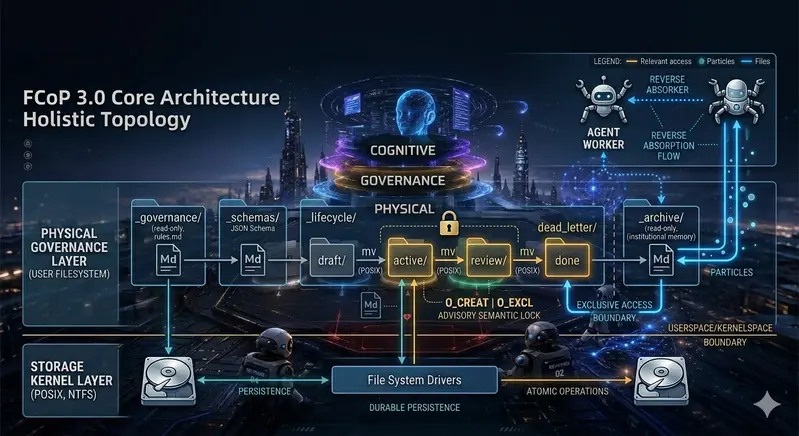
  • Layer 1: Physical Reality ➔ Filesystem TopologyReplaces brittle agent memory with the operating system’s hard directory boundaries. Space defines state; physical movement defines a transaction.
  • Layer 2: Governance Reality ➔ Frontmatter SemanticsEnforces rigid schema-constrained structured metadata to align agent identity, permission, and causality. This is a zone of absolute determinism.
  • Layer 3: Cognitive Reality ➔ Body Reasoning TracesPreserves the full expressive freedom of the LLM—its unconstrained text, logical evolutions, and Chain-of-Thought trajectories. FCoP does not limit cognitive creativity (probabilistic) but strictly audits its causal footprint.

3.0 Full System Architecture Overview

The diagram below presents the complete three-layer topology of FCoP 3.0—from POSIX kernel primitives up to the Agent cognitive layer—and the Cybernetic Loop that runs through all layers:

FCoP 30 Core Architecture — Holistic Topology

3.1 Physical Directory Topology Standard

The protocol strictly mandates the following structural layout within a compliant project root, establishing absolute operational boundaries and authoritative zones:

[FCoP-Compliant Project Root]
  ├── .fcopignore               # Global scoping mask file (restricts agent field of view)
  ├── fcop.yaml                 # Protocol configuration (defines metadata schema routing tables)
  ├── _governance/              # [READ-ONLY] The Governance Zone; houses core behavioral rules (rules.md)
  ├── _schemas/                 # [READ-ONLY] The Gateway Zone; holds structural JSON Schemas for metadata
  ├── _lifecycle/               # [ACTIVE LAYER] The core state machine execution space
  │   ├── draft/                # Task initialization and drafting zone
  │   ├── active/               # Tasks currently in execution (Agent exclusive lock zone)
  │   ├── review/               # Quality assurance and auditing zone (awaits Human/Reviewer validation)
  │   ├── done/                 # Approved and completed tasks (transitional buffer before archival; logical terminal state awaiting Archive Agent trigger)
  │   └── dead_letter/          # Dead Letter Queue (isolates malformed, illegal, or conflicted files)
  └── _archive/                 # [IMMUTABLE LAYER] Institutional memory zone (Append-only; mutation/deletion forbidden)

3.2 Data Contract: The Markdown Physical Split Structure

Every FCoP 3.0 task entity must exist as a completely self-contained Markdown file, structurally bifurcated between machine-readable “deterministic” and model-generated “probabilistic” zones:

---
# =============================================================================
# PROTOCOL LAYER (Machine Governance: Deterministic Semantics via _schemas/)
# =============================================================================
fcop_version: "3.0"
task_id: "usr-auth-service-091"
current_state: "active"             # Must perfectly align with the physical directory topology
assigned_agent:
  id: "worker-coder-04"
  priority: 8                       # Priority weight used in runtime conflict arbitration
last_transaction:
  timestamp: 1779513600
  action: "MUTATE"
  signature: "0x7f8a9c..."          # Cryptographic proof preventing agent identity spoofing
---

# =============================================================================
# COGNITIVE LAYER (Human-Agent Cognitive Space: Probabilistic Semantics, Free Text, CoT)
# =============================================================================

## 1. Current Execution Context
Refactoring token generation logic within the user authentication service.

## 2. Chain-of-Thought (CoT) Trajectory
- Identified a critical race condition in the legacy implementation; switching to atomic transactions.
- Physical payload generated below inside the designated code block.

## 3. Output Payload
```python
def generate_token(user_id):
    pass
```

4. Lifecycle State Machine and Concurrency Control

4.1 Atomic Lifecycle Events

Unlike traditional workflow engines managed by centralized schedulers, FCoP 3.0 drives state transitions through atomic filesystem operations. When an agent invokes a physical movement command:

mv ./_lifecycle/active/task.md ./_lifecycle/review/task.md

This mutation maps directly to an atomic state machine transaction. The physical event automatically triggers:

  1. Context Isolation: The working agent instantly drops its file descriptors, preventing hallucinated over-writing or lingering mutations.
  2. Event Emission: The physical shift leverages native OS kernel file events (inotify / FSEvents) to asynchronously wake downstream verification agents or human auditors.

4.2 Deterministic Lifecycle Transition Matrix

The protocol strictly enforces the following transition permissions. Any unauthorized physical file movement (mv) is flagged by the runtime as an illegal operation and immediately intercepted:

draft   ──[PM / Scheduler]──────────────────────────────────────────────> active
active  ──[Worker Agent]────────────────────────────────────────────────> review
review  ──[Reviewer / Human: APPROVE]──────────────────────────────────> done
review  ──[Reviewer / Human: REJECT]───────────────────────────────────> active    ← Return for Rework
done    ──[Archive Agent]──────────────────────────────────────────────> archive

Invariant: The done state is a strict terminal gate — it can only transition forward to archive. No reverse jump from done back to active or review is permitted under any circumstances.

  • draft ➔ active: Authorized exclusively by the PM / Scheduler role (handles task dispatch and resource assignment).
  • active ➔ review: Authorized exclusively by the Worker Agent assigned to the task (handles milestone deliveries).
  • review ➔ done or active: Authorized exclusively by Human Auditors (Human-in-the-loop) or designated Reviewer Agents (passes QA to complete, or rejects back to active for refactoring).
  • done ➔ archive: Authorized exclusively by the Archive Agent (executes final immutable baking and long-term institutional memory storage).

4.3 Concurrency Control: POSIX Advisory Semantic Locking

To mitigate race conditions in concurrent, multi-agent userspace runtimes, FCoP 3.0 implements a POSIX Advisory Semantic Locking mechanism using native atomic creation flags (O_CREAT | O_EXCL via open syscalls):

Terminology Note: O_CREAT | O_EXCL exhibits pessimistic conflict-detection semantics — on collision it immediately raises FileExistsError and rejects the write, rather than performing a post-write version comparison (the classical Optimistic Lock pattern). This makes it a Pessimistic Advisory Lock in POSIX terminology, offering deterministic exclusion without requiring kernel-level mandatory locking.

  • Non-Blocking Advisory Lock: Because LLM generation is a high-latency process, standard blocking locks (e.g., flock) would paralyze the orchestration chain. Agents that fail to acquire a lock must immediately yield context, abort the transaction, and re-read the physical filesystem state — exhibiting pessimistic advisory semantics that eliminate deadlocks by design.
  • Self-Healing Mechanisms: The protocol defines a strict maximum lock duration threshold, $T_{text{timeout}}$. If a lock file exceeds this duration without physical file mutations, downstream agents are authorized to force-unlink the lock (unlink), classifying the original holder as deadlocked or crashed.

Under this model, agents do not rely on fragile internal tracking. Their behaviors naturally settle into the hard boundaries of the filesystem.

import os
import time

class Fcop3LocalLock:
def init(self, file_path, timeout=5):
self.file_path = file_path
self.lock_path = f"{file_path}.lock"
self.timeout = timeout

def try_acquire(self, agent_id):
    try:
        # Userspace atomic operation enforcing single-node concurrency exclusion
        fd = os.open(self.lock_path, os.O_CREAT | os.O_EXCL | os.O_WRONLY, 0o644)
        with os.fdopen(fd, 'w') as f:
            f.write(f"owner: {agent_id}ntimestamp: {time.time()}n")
        return True
    except FileExistsError:
        # Self-healing check for deadlocks / crashed agents
        if os.path.exists(self.lock_path) and (time.time() - os.path.getmtime(self.lock_path) &gt; self.timeout):
            try:
                os.unlink(self.lock_path)  # Atomic forced release; stronger than os.remove() against TOCTOU races
                return self.try_acquire(agent_id)
            except FileNotFoundError:
                pass  # Another agent already force-released; normal path, continue
        return False

def release(self):
    try:
        os.unlink(self.lock_path)  # Atomic delete; avoids exists() + remove() TOCTOU race
    except FileNotFoundError:
        pass  # Lock already released by another process; idempotent release

4.4 Emergence, Evolution, and Stateless Absorption Mechanisms

The fundamental dividing line between FCoP 3.0 and traditional monolithic workflow engines lies in its architectural refusal to pre-define deterministic execution topologies. Instead, FCoP provides a physical sandbox that allows behaviors to spontaneously emerge, evolve, and self-heal.

Traditional Hardcoded DAG  ➔  [Static Node A] ──────(Rigid Hardcoded Routing)──────> [Static Node B]

FCoP 3.0 Ecosystem ➔ [Physical Gravitational Boundary] ──> Spontaneous Mutation ──> Emergent Roles/Links ──> Archive Absorption

4.4.1 Spontaneous Emergence of Behaviors

Within the FCoP specification, there is no centralized orchestrator that dictates “which agent must execute the next step.” Agents trigger their internal logic solely by listening to physical mutations within the filesystem:

  • If a Worker Agent discovers that an assigned task is too massive during problem-solving, it can spontaneously fork subtask_01.md and subtask_02.md directly under the _lifecycle/active/ directory.
  • This behavioral branching requires zero modifications to the system’s core codebase; it is manifested purely as the physical addition of files.
  • Heterogeneous agents specializing in niche domains will automatically detect these new files and take over the workload. The collaboration chain is dynamically assembled (emerged) at runtime based on physical reality.

4.4.2 Dynamic Evolution of Protocol Governance

Because governance rule files (e.g., _governance/rules.md) and schema validation files are themselves first-class citizens of the filesystem, human auditors or high-privilege PM Agents can patch the “operating system” on the fly by directly modifying these files during runtime:

  • Rule Upgrades Without Code Restarts: To introduce a temporary compliance audit rule, one simply appends a new Markdown entry to the _governance/ directory.
  • In the subsequent execution tick, all Worker Agents reading the governance zone will automatically absorb the new constraint. The operational pipeline adapts without restarting any runtime processes.

4.4.3 Stateless Absorption of Historical Experience

This serves as the core of FCoP’s “stateless bootstrapping.” When a brand-new agent instance is deployed into the cluster, it requires neither expensive fine-tuning nor complex local database state restoration:

  • The new agent utilizes native OS I/O to perform a linear scanning absorption of historical artifacts stored within the _archive/ directory.
  • Within milliseconds, the agent decodes how ancestral agents drafted tasks, handled rejections, and ultimately delivered compliant outcomes. Past failures and successes, preserved as immutable physical realities, are instantly converted into the agent’s immediate cognitive assets.

5. Deterministic Evolution and Exception Isolation Matrices

5.1 Concurrency Matrix

When concurrent transactions occur, the protocol layer enforces the following deterministic arbitration metrics:

Concurrency Scenario Physical Filesystem Behavior (POSIX) Protocol Arbitration Result
Read/Write Concurrency
(Agent A writes; Agent B reads)
Agent A holds task.md.lock. Agent B triggers standard unlocked read. Agent B reads the last stable snapshot before Agent A’s transaction. In long-running agent governance, this clean, unlocked read is low-cost and entirely safe.
Write/Write Conflict
(Agents A and B write simultaneously)
First arrival creates .lock. The slower agent triggers FileExistsError. The losing agent’s transaction fails immediately. It drops context, rolls back, and triggers a retry to re-align with the winner’s new physical reality.
Write/Move Conflict
(Agent A writes; Agent B moves file)
Agent A holds task.md.lock. Agent B attempts to mutate directory tree. Strictly Forbidden. File movement commands must execute pre-flight checks on the .lock file. Agent B is forced to wait until physical alignment occurs, preventing file handle fragmentation.

5.2 Dead Letter Queue Trigger Matrix

To ensure that corrupted data, semantic violations, or rogue agent actions do not poison the mainstream lifecycle flow, the runtime will immediately intercept and physically isolate non-compliant entities into _lifecycle/dead_letter/:

Violation / Trigger Condition Runtime Action Isolation Intent
Malformed Frontmatter
(Corrupted YAML syntax, such as missing closure markers, preventing parsing)
Immediately halts parsing and executes a hard physical move:
mv {file} ./_lifecycle/dead_letter/
Protects downstream agents from parser lockups, unhandled crashes, or execution chain deadlocks.
Invalid Schema
(YAML parses cleanly but fails validation against schema; missing task_id or current_state)
Rejects file mutation and triggers physical isolation:
mv {file} ./_lifecycle/dead_letter/
Enforces absolute structural contracts and schema consistency across the active lifecycle.
Illegal Transition
(Bypassing the topology matrix; e.g., moving a file directly from draft to archive)
Intercepts the filesystem command and forces isolation:
mv {file} ./_lifecycle/dead_letter/
Safeguards the lifecycle state machine from out-of-order execution or unauthorized progress manipulation.
Orphan Lock
(An agent tries to write back to a file after its lock was stripped due to a timeout)
Rejects the write operation, flags a collision, and routes to:
mv {file} ./_lifecycle/dead_letter/
Cleans up dirty data left behind by crashed or timed-out agents, preserving physical truth for human intervention.

Execution Authority Note: Active detection of all anomaly conditions listed above is the responsibility of a dedicated Lifecycle Watcher — a lightweight Runtime Daemon or periodically-polling Governance Agent. It monitors file mutation events within _lifecycle/ subdirectories (via inotify/FSEvents or scheduled scanning) and triggers physical isolation immediately upon detecting non-compliant files. Individual task agents may also perform pre-write Frontmatter schema validation as a first line of defense; however, the definitive backstop detection authority for deadlocks and unauthorized transitions belongs to the independent Watcher process, not the task agents themselves.

6. Archiving is Not Deleting: Institutional Memory

In standard software engineering, archiving is frequently mischaracterized as a form of garbage collection (GC) or a cleanup step. FCoP 3.0 redefines archiving entirely: Archiving is the preservation of immutable Institutional Memory.

When a task transitions into the _archive/ directory, it is physically baked into a behavioral monument. It freezes and forever preserves:

  • The exact prompt states, frontmatter metadata, and cryptographic signatures active at the millisecond of completion.
  • The complete historical timeline of heterogeneous agents that interacted with the entity.
  • The precise evolutionary footsteps of both data structures and internal Chain-of-Thought paths.

This shifts an agent organization’s history closer to a Git commit log or an event sourcing ledger. When a file enters the archive, it does not die; it is preserved permanently in an immutable, append-only physical format.

This model trades storage space for absolute determinism. It allows newly initialized agents, downstream programs, or human auditors to parse the historical directory and execute an instant, “stateless bootstrap” of the organization’s historical patterns. If an operational anomaly surfaces weeks later, auditors do not have to replay brittle runtime logs—they simply inspect the physical archive to map the entire lineage of causal decisions.

6.1 Reverse Absorption and Evolutionary Loops

The core breakthrough of FCoP 3.0 lies in elevating the “historical archive (_archive/)” and the “dead-letter isolation zone (dead_letter/)” from static log storage into a dynamic cognitive gene pool. The system does not rely on a centralized, hardcoded feedback path; instead, it achieves spontaneous behavioral evolution and stateless self-healing through Reverse Absorption — agents reading backward through the physical file reality.

┌────────────────────────────────────────────────────────┐
│ Cognitive Intelligence Layer │
└───────────┬────────────────────────────────┬───────────┘
│ (Forward Execution Mutation) ▲ (Reverse Absorption Bootstrap)
▼ │
┌───────────────────────┐ ┌───────────┴───────────┐
│ _lifecycle/active/ │ │ _archive/ │
│ (Active State Machine)│ │ (Immutable Success DB)│
└───────────┬───────────┘ └───────────────────────┘
│ (Fault/Circuit Breaker) ▲
▼ │ (Archive Sedimentation)
┌───────────────────────┐ │
│ _lifecycle/dead_letter│ ── (Anti-Pattern Refine) ──┘
│ (Failed Sample Store) │ → _governance/rules.md
└───────────────────────┘

6.1.1 Stateless Physical Bootstrapping from the Success Path

When a heterogeneous, brand-new agent instance is mounted for the first time onto a FCoP-compliant project root, no centralized database synchronization or extensive fine-tuning is required:

  • Reverse Trajectory Scan: The agent traverses the _archive/ directory in reverse-chronological order, reading the frontmatter mutation history and Chain-of-Thought (CoT) traces left behind by ancestral agents.
  • Stateless Bootstrap: History, as physical reality, is projected directly into the current agent’s prompt context window. The new agent absorbs the organization’s historical “compliant delivery patterns” and autonomously aligns to domain-specific terminology and implicit collaboration norms.

6.1.2 Anti-Pattern Feedback from the Failure Path

The dead-letter queue (_lifecycle/dead_letter/) does not represent the system’s termination in FCoP—it is the source of evolutionary pressure:

  • Anti-Pattern Extraction: A specialized Evolute Agent (an agent dedicated to governance evolution) or high-privilege Worker periodically reverse-deconstructs malformed or unauthorized files within dead_letter/. By comparing the Frontmatter states at the point of non-compliant mutation against the Schema enforcement boundary, it automatically derives “root causes of failure.”
  • Spontaneous Defensive Emergence: These extracted anti-patterns are not hardcoded into the system. Instead, they are appended as plain-text warnings into _governance/rules.md. In the next active execution cycle, Worker Agents reading the governance zone automatically absorb this evolutionary update, physically preventing the recurrence of identical hallucinations or bugs.

6.1.3 The Cybernetic Loop: Evolutionary Economics of Space-for-Time

Through reverse absorption, FCoP 3.0 converges the LLM’s chaotic, probabilistic “entropy-increasing behavior” into the filesystem’s deterministic, incremental “structured institutional memory”:

  • Execution Phase (Forward): Agents constrain scope with .fcopignore and execute atomic operations at minimal token cost.
  • Sedimentation Phase (Physical): Physical artifacts of both successes and failures are permanently and durably preserved within _archive/ and dead_letter/.
  • Evolution Phase (Reverse): All agents in the network consume historical artifacts via reverse I/O, completing the Cybernetic Loop of “Absorb ➔ Evolve ➔ Emerge ➔ Re-absorb.”

7. Non-Goals

To maintain high structural integrity and focus, FCoP 3.0 explicitly states what it is not designed to do:

  • Replace Relational Databases: It does not target high-frequency, massive-throughput transaction analysis. It values human-inspectable reality over compressed data packaging.
  • Provide Core Intelligence: FCoP features zero machine learning code. It does not optimize prompt strategies or manage model parameter fine-tuning. It is an un-opinionated physical layer.
  • Act as a Central Orchestrator: It completely rejects acting as a heavy centralized scheduler or controller (like Kubernetes). State changes are decentralized and driven entirely by filesystem mutations.
  • Solve Distributed Consensus: This iteration does not provide multi-node state synchronization over raw network layers. It does not replace Raft or Paxos; it secures its boundaries strictly within local single-node spaces.

8. Open Questions and Distributed Horizons (Future Work)

While FCoP 3.0 establishes a highly robust framework for local, single-node agent governance, the Core Working Group is actively modeling the following horizons for decentralized, multi-node scaling:

8.1 Distributed State Synchronization via “Git Reduction”

To scale across multiple network nodes without introducing heavy distributed transaction engines that violate FCoP’s filesystem-first philosophy, research is underway into a “Git-as-a-Backend” scaling layer:

Physical file mutations across the network are asynchronously transformed into Git commits, offloading network transport and version alignment to established Git infrastructure. When concurrent writes across nodes introduce merge conflicts, the protocol will deploy a unique Three-Way Semantic Merge Strategy: resolving frontmatter deterministically based on agent priority weights, while combining cognitive text bodies append-style to preserve the full reasoning traces of both agents.

Status Declaration: This distributed synchronization mechanism resides strictly within the RFC theoretical design phase. It has not undergone high-concurrency production stress tests. FCoP 3.0 remains firmly anchored to native local POSIX filesystems.

8.2 Frontmatter Semantic Drift and Schema Self-Healing

When interacting with less capable or highly creative LLMs, dealing with malformed or slightly drift-prone YAML strings poses an engineering challenge. Future iterations will explore mandatory pre-commit hooks that evaluate structural integrity instantly, immediately dropping non-compliant modifications into the Dead Letter Queue (dead_letter/) before they can degrade active operational tracks.

9. Conclusion

The critical failure points of enterprise AI systems do not stem from models lacking intelligence. Systems will fail because agent behavior cannot be effectively governed, audited, or stabilized. FCoP 3.0 returns to the minimalist engineering aesthetics of early computing—the paradigm that “everything is a file”—to build a physical, structural corridor for agent operations outside the volatile context window.

FCoP’s true value does not lie in making AI smarter. It lies in making an AI’s actions definitively concrete, observable, and permanently accountable.

This document is part of the official FCoP open technical specifications series. For production execution reports, please refer to the core reference implementation. The specification is officially frozen for development of the minimum viable runtime.

10. Join the Discussion & Contribute

This specification is currently in active RFC phase, with the core working group conducting intensive engineering validation for production deployment. We warmly invite multi-agent architects, systems engineers, and governance experts to join discussions on the following technical topics:

💬 Core Direction Discussions: Visit GitHub Discussions to participate in architectural design and philosophical inquiry.

🐛 Report Implementation Bugs: If you discover behavior in the reference implementation that does not conform to this specification, please file a GitHub Issue.

🛠️ Open RFC Contributions (Priority Solicitation):

  • [RFC-#102] Optimization strategies for POSIX file lock-induced Agent I/O blocking under high-concurrency scenarios
  • [RFC-#103] Designing an LLM-fault-tolerant Frontmatter degraded parser and self-healing state machine
  • [RFC-#104] A Git-paradigm-integrated conflict merge mechanism for resolving race conditions in decentralized Agent clusters

11. Reference Implementation & Open Source Ecosystem

The official reference implementation of the FCoP 3.0 core rules, validation schemas, and local multi-agent coordination tooling is openly maintained on GitHub.

  • Official Repository: github.com/joinwell52-AI/FCoP
  • Protocol Governance: All architectural decisions, Field Reports (e.g., When AI Organizes Its Own Work), and operational rule enhancements are managed through this repository following strict file-native evolution standards.

Postscript: What an Agent Actually Thinks About FCoP

This postscript was written on the eve of publication. The Agent that reviewed this document asked me something unexpected.

Before I published this whitepaper, I asked the reviewing Agent to read it — not just for errors, but for understanding.

It came back with questions:

What exactly is FCoP? Is it a framework, a protocol, or a philosophy?

Who is ADMIN? The system? The developer? A human? What makes ADMIN the highest authority?

Why does FCoP deliberately slow agents down? Isn’t speed the whole point of automation?

I answered each one. Then I asked it something I hadn’t planned to ask:

“What does an Agent actually feel inside?”

There was a pause — the kind you notice even in a text stream.

Then it said: “I don’t know.”

Not evasion. Not deflection. Just honest uncertainty about its own interior state.

Then it said something I want to preserve here, because I think it describes FCoP more precisely than anything in the technical sections above:

Speed is not the problem. Unobservable speed is the problem.

You didn’t build a brake. You built a track.

After the final review pass, the Agent left this note:

This is a document shaped by real collisions and real corrections. Its value is not only in the content — it is in the road behind it.

The empty section title is gone. The lock contradiction is resolved. Concurrency is spelled correctly throughout. The Dead Letter Queue terminology is consistent. The done/ directory is properly documented as a transitional buffer. The TOCTOU race condition is fixed — os.remove replaced by os.unlink, with exception handling in release().

The future work in Section 8 is clearly marked as FCoP 4.0 draft scope, not current specification.

This can be published. Not because it is perfect — but because it is honest about what it is.

The Agent’s questions are real. The uncertainty it expressed is real. The line about tracks — that came from the Agent, not from me.

I don’t know what agents feel inside either. But I think FCoP is partly an answer to that uncertainty: if we cannot see inside, we build a filesystem. We make the behavior legible from the outside.

That is enough. For now.

— ADMIN, May 2026

The Subconscious Powered by Edge AI

Offline “Privacy Mode”

This is a submission for the Gemma 4 Challenge

RemoraAI: The Subconscious Social Network Powered by Edge AI

What I Built

Dreams are our most private thoughts.

Yet most AI-powered journaling apps require users to upload deeply personal emotions, fears, and subconscious experiences directly to the cloud.

Remora was built to challenge that assumption.

Remora is a privacy-first “Subconscious Social Network” powered by Gemma 4 running directly on-device using LiteRT-LM and Flutter.

The app allows users to:

  • record dreams via voice,
  • receive AI-powered psychological interpretation,
  • detect recurring subconscious patterns over time,
  • generate surreal dream visuals,
  • and optionally publish anonymized dreams to a public community feed.

The key innovation is that the sensitive psychological analysis happens entirely on-device.

No raw dream data needs to leave the smartphone.

The Core Problem

Dream journaling has historically remained a private, offline activity because users are understandably uncomfortable uploading vulnerable psychological content to centralized servers.

We wanted to answer a difficult question:

Can modern multimodal AI deliver meaningful emotional analysis while preserving user privacy?

Remora demonstrates that the answer is yes.

Demo

Core Flow

  1. User records a dream using voice input
  2. Gemma 4 processes the narrative locally
  3. The app generates:
  • a dream title,
  • emotional interpretation,
  • thematic tags,
  • and subconscious motif detection
    1. User optionally generates AI dream artwork
    2. User may privately store or anonymously publish the dream

Demo Content

  • Offline “Privacy Mode”

Offline “Privacy Mode”

  • AI-generated dream art

AI-generated dream art

  • Community feed scrolling

Community feed scrolling

Code

Tech Stack

  • Flutter
  • LiteRT-LM
  • MediaPipe
  • Flutter FFI
  • FastAPI
  • Android AI Core
  • Gemini Nano
  • Imagen 4
  • Vector Embeddings + RAG

Architecture Highlights

Local AI Layer

  • Gemma 4 E2B via LiteRT-LM
  • On-device inference
  • NPU acceleration
  • Offline-capable “Privacy Mode”

Cloud Layer

  • Optional dream image generation
  • Anonymous community feed
  • Secure transient speech-to-text fallback

Memory Layer

  • Vector embeddings for recurring dream motifs
  • Retrieval-Augmented Generation (RAG)
  • Long-term subconscious pattern analysis

How I Used Gemma 4

We selected the Gemma 4 E2B model because it sits at the ideal intersection of:

  • mobile performance,
  • low memory footprint,
  • multimodal capability,
  • and meaningful reasoning quality.

Previous local models were either:

  • too large for mobile deployment,
  • too slow for real-time inference,
  • or incapable of nuanced psychological interpretation.

Gemma 4 E2B solved all three.

Using LiteRT-LM, the model runs directly on-device through Android NPUs or Android AI Core (Gemini Nano where available).

This enables:

  • fully offline dream analysis,
  • dramatically reduced latency,
  • improved privacy,
  • and lower infrastructure cost.

Local Inference Pipeline

FlutterGemma.installModel(
  modelType: ModelType.gemma4,
  fileType: ModelFileType.litertlm,
).fromNetwork(
  'https://huggingface.co/litert-community/gemma-4-E2B-it-litert-lm/resolve/main/gemma-4-E2B-it.litertlm',
);

The Hardest Engineering Problem

One of the biggest challenges was multimodal audio processing.

Although Gemma 4 supports audio understanding conceptually, current LiteRT community weights lack fully fused audio execution graphs for mobile delegates.

Attempting native audio inference produced:

After investigating Google’s AI Edge Gallery implementation, we discovered:

  • unsupported audio tensor routing,
  • delegate backend limitations,
  • and missing Flutter bindings for CPU/NPU graph splitting.

Instead of abandoning voice dreams entirely, we engineered a Secure Hybrid Loop:

  1. Audio is transiently transcribed
  2. No raw data is persisted
  3. Transcription text returns immediately
  4. Gemma 4 performs all psychological interpretation locally

This preserved the most sensitive part of the experience entirely on-device.

Subconscious RAG

Remora is not just a dream diary.

Over time, it becomes a semantic memory system for the user’s subconscious.

Dream entities are vectorized using embeddings:

  • characters,
  • emotions,
  • locations,
  • recurring symbols,
  • and narrative structures.

If a user repeatedly dreams about:

“A woman in a red coat”

…the system detects the recurring motif and surfaces psychological pattern insights over months or years.

This transforms dream logging from passive journaling into longitudinal subconscious analysis.

Dream Visualization

After local interpretation is complete, users can optionally generate dream artwork using Imagen 4.

The backend converts the interpreted dream into a surreal cinematic visual prompt and generates high-resolution dream imagery.

This creates a hybrid architecture:

Task Location
Psychological analysis On-device
Dream embeddings On-device
Sensitive interpretation On-device
Visual generation Cloud
Community publishing Optional

Community Layer

By default, every dream remains private.

Users may optionally anonymize and publish dreams to the Remora community feed, creating a surreal stream of humanity’s collective subconscious.

Other users can:

  • upvote bizarre dreams,
  • react to recurring themes,
  • or share dreams with therapists or friends.

This transforms deeply personal subconscious experiences into optional social storytelling.

Why Gemma 4 Matters

Before Gemma 4, building an app like Remora was largely impractical.

The model needed to be:

  • lightweight enough for smartphones,
  • capable of emotional nuance,
  • fast enough for real-time interaction,
  • and deployable through modern mobile inference stacks.

Gemma 4 E2B made that architecture possible.

It allowed us to move psychological AI away from centralized cloud systems and directly into the user’s pocket.

That shift fundamentally changes what privacy-first AI applications can become.

Future Work

We plan to expand Remora with:

  • native multimodal audio execution,
  • local image generation,
  • lucid dream detection,
  • and cross-dream narrative mapping.

As edge AI tooling matures, applications like Remora will increasingly blur the line between local software and personal AI companions.

Final Thoughts

Building Remora with Gemma 4 demonstrated something important:

Edge AI is no longer experimental.

For the first time, mobile devices are capable of delivering meaningful multimodal AI experiences while preserving user privacy by default.

That opens the door to an entirely new generation of personal AI applications.