Detecting Bots in 2026: IP Intelligence + Email Validation in One API Call

The Bot Problem Nobody Talks About

If you’re running a web app in 2026, roughly 40% of your traffic isn’t human. Scrapers, credential stuffers, fake signups — they eat your bandwidth, pollute your analytics, and sometimes steal your data.

Most developers slap on a CAPTCHA and call it a day. But CAPTCHAs are a UX nightmare, and sophisticated bots solve them anyway. There’s a better approach: checking the reputation of incoming requests before they even reach your app.

The Two Signals That Matter Most

After building fraud detection systems for years, I’ve found that two data points catch 90%+ of malicious traffic:

1. IP Intelligence

Every request comes from an IP address, and that IP tells a story:

  • Is it a known proxy/VPN/Tor exit node? Legitimate users sometimes use VPNs, but bots almost always do.
  • Is it from a datacenter or residential ISP? Most real users browse from home or mobile — datacenter IPs are a red flag.
  • Has this IP been reported for abuse? Threat intelligence feeds track IPs involved in spam, attacks, and fraud.
  • What’s the geolocation? A “US user” connecting from a hosting provider in Eastern Europe is suspicious.
import requests

# Quick IP reputation check
response = requests.get(
    "https://ipasis.com/api/scan/ip/185.220.101.1",
    headers={"Authorization": "Bearer YOUR_API_KEY"}
)
data = response.json()

print(f"Risk Score: {data['risk_score']}/100")
print(f"Is VPN: {data['is_vpn']}")
print(f"Is Datacenter: {data['is_datacenter']}")
print(f"Abuse Reports: {data['abuse_count']}")

2. Email Validation

For signups and form submissions, the email address is your second line of defense:

  • Does the domain actually exist? Disposable email services (guerrillamail, tempmail) are bot favorites.
  • Is the mailbox real? SMTP verification catches typos and fake addresses.
  • Is it a known disposable/temporary email? There are 10,000+ disposable domains.
  • Is the domain newly registered? Fresh domains often exist solely for fraud.
# Email validation
response = requests.get(
    "https://ipasis.com/api/scan/email/[email protected]",
    headers={"Authorization": "Bearer YOUR_API_KEY"}
)
email_data = response.json()

print(f"Valid: {email_data['is_valid']}")
print(f"Disposable: {email_data['is_disposable']}")
print(f"Domain Age: {email_data['domain_age_days']} days")

Combining Both: A Practical Middleware

Here’s a real-world pattern I use — a middleware that scores every signup request:

from flask import Flask, request, jsonify
import requests

app = Flask(__name__)
IPASIS_KEY = "your-api-key"

def check_reputation(ip, email):
    """Score a signup attempt using IP + email intelligence."""
    risk = 0
    flags = []

    # Check IP
    ip_resp = requests.get(
        f"https://ipasis.com/api/scan/ip/{ip}",
        headers={"Authorization": f"Bearer {IPASIS_KEY}"}
    ).json()

    if ip_resp.get("is_vpn"):
        risk += 20
        flags.append("vpn_detected")
    if ip_resp.get("is_datacenter"):
        risk += 30
        flags.append("datacenter_ip")
    if ip_resp.get("abuse_count", 0) > 5:
        risk += 25
        flags.append("known_abuser")

    # Check email
    email_resp = requests.get(
        f"https://ipasis.com/api/scan/email/{email}",
        headers={"Authorization": f"Bearer {IPASIS_KEY}"}
    ).json()

    if email_resp.get("is_disposable"):
        risk += 40
        flags.append("disposable_email")
    if not email_resp.get("is_valid"):
        risk += 50
        flags.append("invalid_email")

    return {"risk_score": min(risk, 100), "flags": flags}

@app.route("/signup", methods=["POST"])
def signup():
    ip = request.remote_addr
    email = request.json.get("email", "")

    result = check_reputation(ip, email)

    if result["risk_score"] > 60:
        return jsonify({"error": "Signup blocked", "reason": "suspicious_activity"}), 403
    elif result["risk_score"] > 30:
        # Flag for manual review but allow
        return jsonify({"status": "pending_review"}), 200
    else:
        # Clean signup, proceed normally
        return jsonify({"status": "approved"}), 200

Why This Beats CAPTCHAs

Approach User Friction Bot Detection Rate Latency
reCAPTCHA v2 High (click images) ~85% 2-5s
reCAPTCHA v3 Low (invisible) ~70% 1-3s
IP + Email Intelligence Zero ~92% <200ms

The key advantage: zero user friction. Your legitimate users never see a challenge. The API call happens server-side in milliseconds, and bad actors get blocked silently.

Getting Started

If you want to try this approach, IPASIS offers a free tier with 1,000 requests/day — enough to protect a small-to-medium app. You can also test any IP or email interactively on the free scanner.

The API docs cover authentication, rate limits, and response formats. The API is REST-based with JSON responses — no SDK required.

Key Takeaways

  1. Don’t rely solely on CAPTCHAs — they hurt UX and sophisticated bots bypass them.
  2. IP intelligence catches infrastructure-level fraud (VPNs, datacenter IPs, known abusers).
  3. Email validation catches identity-level fraud (disposable emails, fake domains).
  4. Combine both for a risk score that lets you block, flag, or approve in real-time.
  5. Server-side checks = zero user friction — your real users never know it’s happening.

Bot detection doesn’t have to mean annoying your users. Sometimes the smartest security is invisible.

What bot detection approach are you using? Drop a comment — I’m curious what’s working for others in 2026.

Setup Apache Exporter on Centos

Pada postingan ini kita akan membahas cara untuk install apache_exporteruntuk memonitoring web server. Dengan itu monitoring Apache menjadi jauh lebih mudah dengan Apache Exporter, yang dapat diintegrasikan dengan Prometheus untuk mendapatkan metrics secara real-time. Berikut langkah-langkah instalasi dan konfigurasi di CentOS 7.

Download binary terbaru

Pola link:

https://github.com/Lusitaniae/apache_exporter/releases/download/v{VERSI}/apache_exporter-{VERSI}.linux-amd64.tar.gz

Cek versi rilis:

https://github.com/Lusitaniae/apache_exporter/releases/latest

Eksekusi:

wget https://github.com/Lusitaniae/apache_exporter/releases/download/v1.0.12/apache_exporter-1.0.12.linux-amd64.tar.gz

tar -xzf apache_exporter-1.0.12.linux-amd64.tar.gz
cd apache_exporter-1.0.12.linux-amd64
cp apache_exporter /usr/sbin/

Menambahkan user

useradd apache_exporter -s /sbin/nologin

Membuat folder config

mkdir -p /etc/sysconfig
echo 'OPTIONS="--scrape_uri=http://{IP Server}/server-status/?auto"' | sudo tee /etc/sysconfig/apache_exporter

Buat service

nano /etc/systemd/system/apache_exporter.service

Isi:

[Unit]
Description=Apache Exporter
After=network.target httpd.service

[Service]
User=apache_exporter
EnvironmentFile=/etc/sysconfig/apache_exporter
ExecStart=/usr/sbin/apache_exporter $OPTIONS
Restart=on-failure

[Install]
WantedBy=multi-user.target

Reload dan restart service

systemctl daemon-reload
systemctl enable apache_exporter
systemctl start apache_exporter

Konfigurasi Apache

File:

/etc/httpd/conf.d/server-status.conf

Isi:

ExtendedStatus On

<Location "/server-status">
    SetHandler server-status
    Order deny,allow
    Allow from 10.10.1.0/24 127.0.0.1
#     Require all granted
</Location>

Jika Require all granted aktif, maka endpoint bisa diakses dari mana saja.

Restart Apache

systemctl restart httpd

Konfigurasi Firewall

firewall-cmd --permanent --zone=public --add-port=9117/tcp

reload firewall

firewall-cmd --reload

Uji Coba

untuk uji coba cukup akses metrics dari web browser
http://{ip_server}:9117
nanti akan muncul kondisi server kita, tinggal di kombinasikan dengan prometheus.

selamat mencoba, semoga bermanfaat.

I built 2 free web tools to solve problems that annoyed me — here’s what I learned

As a full-stack developer, I have a habit of building tools to scratch my own itch. Here are two I recently shipped — both free, no ads, no signup required.

Tool 1: Thumb Extract — YouTube Thumbnail Downloader

🔗 https://thumbextract.com

Every time I needed a YouTube thumbnail for a project or reference, I’d end up on some spammy site with 10 popups before I could download anything. So I built a clean version.

What it does:

  • Paste any YouTube URL → get the thumbnail instantly
  • All resolutions: HD (1280×720), SD (640×480), and default
  • Also downloads channel profile pictures in full resolution
  • Downloads channel banner/cover art at full size (2560×1440)
  • Zero ads, zero signup, zero watermarks
  • Works on videos, Shorts, live streams, and old videos

Tech approach:

The key insight was using YouTube’s image CDN directly rather than scraping the page. This makes it near-instant and works for any public video.

Tool 2: Quick CPS Test — 0-Latency Click Speed Tester

🔗 https://quickcpstest.com

Every CPS (clicks per second) test site I tried had noticeable input lag caused by event debouncing or heavy DOM manipulation. The results were inaccurate by design.

What it does:

  • Measures your CPS with 0-latency click detection
  • Test modes: 1s, 5s, 10s, 60s, 100 clicks
  • Tracks personal best and average CPS
  • Clean UI with zero ads or distractions
  • Works perfectly on mobile (touch events)

Tech approach:

Used raw mousedown events instead of click events to eliminate the browser’s built-in click delay. Removed all unnecessary DOM reflows during the test interval.

What I learned building these

  1. Simple tools get used. Both tools do one thing extremely well. No feature creep.
  2. Performance is a feature. Users immediately notice when something feels instant vs. sluggish.
  3. SEO from day one matters. Even small tools benefit from clean URLs, fast load times, and descriptive meta tags.

If you try either tool, let me know what you think — especially if you find any edge cases or bugs. Always looking to improve.

🌐 Beyond One Data Source: Building Scalable Data Pipelines in Power BI

Image 1

Introduction

The request sounded simple:

“Can you build a dashboard for this report?”

You open your laptop, ready to begin…

 ... until the data starts coming in.

An Excel file from finance.
A CSV export from sales.
A PDF report from operations.
A JSON file from a web API.
A database connection from IT.
And a SharePoint folder filled with weekly uploads
.

At first glance, everything looks fine. But as you begin to compare the numbers, things don’t align. Totals don’t match. Formats differ. Some fields are missing. Others are duplicated.

That’s when it hits you.

The challenge isn’t building the dashboard.
The challenge is bringing all the data together.

In today’s data landscape, information is scattered across multiple systems and formats. As a data analyst, your role is not just to analyze data but to connect, prepare, and unify it into a single source of truth.

This is where Power BI becomes indispensable.

In this guide, you will learn how to connect Power BI to multiple data sources and prepare them for analysis using a structured and practical approach.

Architecture Overview

At a high level, Power BI operates on a simple but powerful architecture:

Power BI Desktop → Reporting and modeling tool
Data Sources → Files, databases, cloud platforms, and web
Power Query → Data transformation and preparation layer

All data flows into Power BI through Power Query, where it is cleaned and shaped before being loaded into the data model.

Connecting Data from Multiple Sources

Power BI supports a wide range of data sources. Below are step-by-step guides for connecting to each of them.

1. Connecting to Excel

Excel remains one of the most commonly used data sources.

Steps:

Open Power BI Desktop
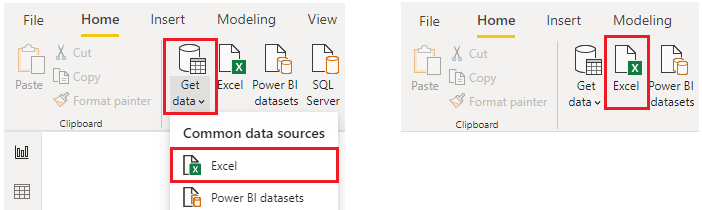
Navigate to Home → Get Data → Excel
Image 1
Browse and select your Excel file

Image 2
In the Navigator window, select the required sheets or tables

Image 3
Click Load or Transform Data

2. Connecting to Text/CSV Files

CSV files are widely used for exporting and sharing data.

Steps:

Open Power BI Desktop
Navigate to Home → Get Data → Text/CSV

Image 13

Select the CSV file

Image 14

Preview the dataset

Image 15

Click Load or Transform Data

3. Connecting to NoSQL Data Sources

NoSQL databases (such as MongoDB or cloud-based document stores) store data in flexible, non-tabular formats.

In Power BI, NoSQL data is typically accessed through:

  1. APIs
  2. Connectors
  3. JSON-based endpoints

General Steps:

Navigate to Home → Get Data → Web or use a custom connector

Image 16
Enter the API endpoint or connection string
Image 17
Load data into Power Query
Image 18

Transform nested structures into tabular format

4. Connecting to PDF

Power BI can extract structured tables from PDF documents.

Steps:

Open Power BI Desktop
Navigate to Home → Get Data → PDF

Image 18
Select the PDF file

Image 19

Choose detected tables

Image 20

Click Load or Transform Data

5. Connecting to JSON

JSON is commonly used in APIs and modern applications.

Steps:

Open Power BI Desktop
Navigate to Home → Get Data → JSON

Image 21

Select the JSON file or API endpoint

Image 22
Load into Power Query
Expand nested fields

Image 23

Click Close & Apply

6. Connecting to SharePoint Folder

This allows you to connect to multiple files stored in a SharePoint directory.

Steps:

Open Power BI Desktop
Navigate to Home → Get Data → SharePoint Folder

Image 12
Authenticate
Enter the SharePoint site URL
Image 10
Select files
Click Combine & Transform Data
Image 11

7. Connecting to MySQL Database

MySQL is a widely used relational database.

Steps:

Open Power BI Desktop
Navigate to Home → Get Data → MySQL Database
Image 24

Enter server name and database

Image 25

Provide credentials

Image 26

Select required tables
Click Load or Transform Data

8. Connecting to SQL Server

SQL Server is a common enterprise database system.

Steps:

Open Power BI Desktop
Navigate to Home → Get Data → SQL Server
Image 4
Select the CSV file
Enter the server name

Image 5
Choose an authentication method

Image 6
Select the database and tables

Image 7
Click Transform Data

9. Connecting to Web Data

Power BI can connect directly to web pages and APIs.

Steps:

Open Power BI Desktop
Navigate to Home → Get Data → Web
Image 30
Enter the URL
Image 31
Select detected tables or data structures
Image 32

Click Load or Transform Data

10. Connecting to Azure Analysis Services

Azure Analysis Services provides enterprise-grade data models.

Steps:

Open Power BI Desktop
Navigate to Home → Get Data → Azure → Azure Analysis Services

Image 8

Enter server name
Select the model
Image 9
Choose Live Connection
Click Connect

Conclusion

Connecting to multiple data sources in Power BI is more than a technical task.
It is the foundation of reliable and effective data analysis.

Modern data environments are diverse, requiring analysts to work with files, databases, cloud services, and web platforms simultaneously. Power BI simplifies this process by providing a unified interface for accessing and transforming data.

However, the real value lies not just in connecting data, but in preparing it. Identifying inconsistencies, cleaning errors, and structuring data properly are critical steps that determine the quality of your insights.

Strong data ingestion leads to:

Accurate reporting
Better decision-making
Scalable data models

As a data professional, mastering data connectivity ensures that your dashboards are not only visually appealing but also trustworthy and impactful.

Ultimately, great analytics begins with great data, and great data begins with how well you connect it.

Developers Who Don’t Adapt to AI Won’t Disappear, They’ll Be Ignored

The Shift in Value

I’ve been observing something interesting over the last year.

There’s a lot of noise around AI replacing developers.

But that’s not what’s actually happening.

Developers are not disappearing.

They’re becoming invisible.

The Fear Is Wrong

Most developers are asking the wrong question:

“Will AI replace me?”

That’s not the real risk.

The real risk is much quieter.

You continue working.
You continue coding.
You continue shipping.

But slowly…

Fewer people reach out.
Fewer opportunities come your way.
Fewer decisions involve you.

Not because you’re bad.

But because you’re no longer relevant at the highest level of leverage.

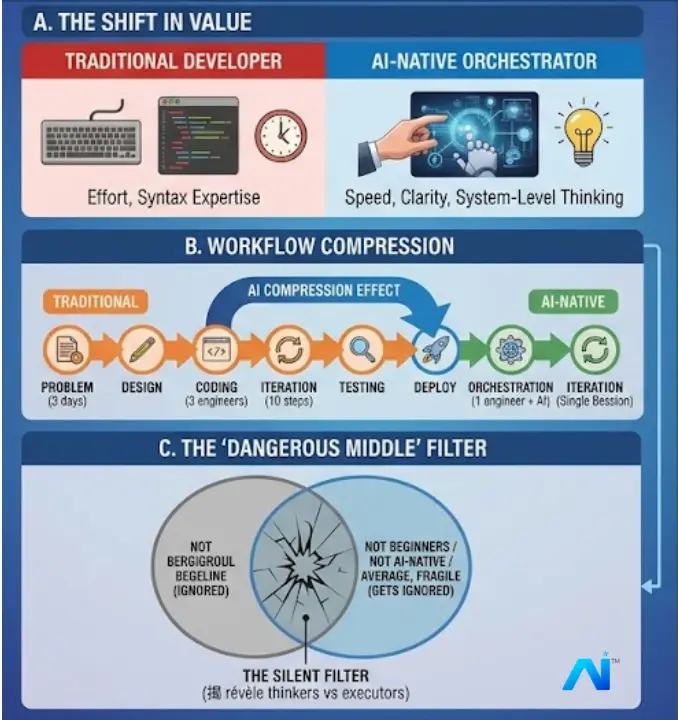
The Shift in Value

The Shift Is Not About Coding

AI is not competing with developers on effort.

It’s competing on speed, iteration, and optionality.

What used to take:

  • 3 days → now takes 3 hours
  • 3 engineers → now takes 1 engineer + AI
  • 10 iterations → now happens in a single session

This changes the game completely.

The value is no longer in writing code.

The value is in:

  • Deciding what to build
  • Structuring problems
  • Guiding AI effectively
  • Making judgment calls

The Rise of the AI-Native Developer

There’s a new category emerging.

Not better coders.

Better orchestrators.

These developers:

  • Don’t start with code
  • They start with clarity
  • They use AI to explore multiple approaches instantly
  • They validate ideas before committing deeply

They don’t just build faster.

They build smarter systems.

The Silent Filter

The Dangerous Middle

Here’s where most developers will get stuck:

  • Not beginners
  • Not AI-native
  • Not irrelevant… but not exceptional

This is the most fragile position.

Because:

  • They can still do the work
  • But they can’t compete with AI-accelerated developers

And in a leverage-driven world, “average” doesn’t get selected.

It gets ignored.

This Is Not About Tools

This is where many people go wrong.

They think adapting to AI means:

  • Learning a new framework
  • Using a few AI tools
  • Trying prompt engineering once in a while

That’s surface-level.

Real adaptation means:

  • Thinking in systems
  • Breaking problems into components
  • Designing workflows where AI is embedded

AI is not a feature.

It’s a new layer of thinking.

The New Selection Criteria

In the near future, developers won’t be evaluated on:

  • Lines of code
  • Syntax knowledge
  • Framework familiarity

They will be evaluated on:

  • Problem clarity
  • Speed of execution
  • Ability to leverage AI
  • Decision-making under uncertainty

This is a different skill stack.

The Silent Career Shift

No layoffs.
No announcements.
No dramatic collapse.

Just a gradual shift where:

  • AI-native developers get the best projects
  • They move faster
  • They deliver more
  • They become the default choice

And everyone else…

Keeps working, but with less impact.

Final Thought

This is not a warning.

It’s a filter.

AI is not removing developers.

It is revealing who is thinking, and who is just executing.

In the past, execution was enough.

Now, it’s just the baseline.

And anything that is baseline…

Can be ignored.

Top LLM Gateways That Support Semantic Caching in 2026

Let me ask you something. How many times a day do your users ask your LLM app the same question, worded differently?

“What is RAG?” and “Explain retrieval augmented generation to me” are the same question. You know it. I know it. But your LLM provider does not care. It charges you for both. Twice the tokens, twice the latency, same answer.

This is where semantic caching comes in, and if you have not explored it yet, let me walk you through it before we look at the tools.

TL;DR: Semantic caching matches LLM prompts by meaning, not exact strings, so rephrased questions return cached responses instead of burning tokens. I compared four tools that support it in 2026: Bifrost (fastest, most complete caching), LiteLLM (widest provider support), Kong AI Gateway (enterprise plugin), and GPTCache (standalone library). The right pick depends on your stack and what you need beyond caching.

If you know what an LLM API call costs and have dealt with caching before, you are in the right place.

What Is Semantic Caching, and Why Should You Care?

Think of it like a library that remembers not just the exact title of a book you asked for, but also understands that “that novel about the kid wizard at boarding school” means you want Harry Potter.

Traditional caching matches strings exactly. “What is RAG?” and “what is RAG?” might match (if you lowercase). But “Explain retrieval augmented generation” will miss the cache entirely, even though it means the same thing.

Semantic caching converts your prompts into vector embeddings and compares meaning. If a new prompt is close enough in meaning to something already cached, you get the cached response back. No API call. No tokens billed. Near-zero latency.

Here is what this means for your bill: if even 30% of your queries are semantically similar to previous ones, you are looking at a meaningful reduction in API costs. And your users get faster responses.

Now, let me walk you through the gateways that actually support this in 2026.

1. Bifrost

Bifrost is an open-source LLM gateway written in Go. If you are running a production app and latency matters to you, here is the key number: 11 microseconds of overhead per request, handling 5,000 requests per second on a single instance.

But the part I want to highlight is how it handles semantic caching. It is not an afterthought here. It is a proper, dual-layer system.

Let me explain what dual-layer means:

Think of it as two bouncers at the door. The first one checks if your prompt is an exact match to something cached (fast hash lookup, no embedding cost). Only if that misses does the second bouncer kick in, doing a vector similarity search across your vector store to find semantically equivalent prompts.

This means you get the speed of exact matching for repeated queries and the intelligence of semantic matching for rephrased ones. You are not paying embedding costs when you do not need to.

Vector store support: Weaviate, Redis, and Qdrant.

Here is what makes it stand out:

  • Per-request TTL and similarity threshold overrides via HTTP headers (you control caching behaviour per call)
  • Model and provider isolation, so your GPT-4o cache does not mix with your Claude cache
  • Streaming response caching with proper chunk ordering
  • Cache type control to choose exact vs semantic per request
  • No-store control to skip writing to cache while still reading from it
  • ConversationHistoryThreshold (default 3) that skips caching for longer conversations to avoid false positive matches
  • Fallback routing if your primary provider goes down
  • Budget and rate limits through the governance layer
  • Built-in observability for monitoring cache hit rates

Important detail you should know: The cache key header (x-bf-cache-key) is mandatory. If you do not send it, requests bypass caching entirely. This is intentional. It gives you precise control over what gets cached and what does not.

Let me walk you through the setup:

First, get Bifrost running. One command:

npx -y @maximhq/bifrost

Follow the setup guide if you need help with the initial configuration.

Next, configure your vector store in config.json:

{
  "vector_store": {
    "enabled": true,
    "type": "weaviate",
    "config": {
      "host": "localhost:8080",
      "scheme": "http"
    }
  }
}

Then enable the semantic cache plugin:

{
  "plugins": [
    {
      "enabled": true,
      "name": "semantic_cache",
      "config": {
        "provider": "openai",
        "embedding_model": "text-embedding-3-small",
        "ttl": "5m",
        "threshold": 0.8,
        "conversation_history_threshold": 3,
        "cache_by_model": true,
        "cache_by_provider": true,
        "cleanup_on_shutdown": true
      }
    }
  ]
}

Now send a request with caching enabled:

curl -X POST http://localhost:8080/v1/chat/completions 
  -H "Content-Type: application/json" 
  -H "x-bf-cache-key: session-123" 
  -d '{
    "model": "openai/gpt-4o-mini",
    "messages": [{"role": "user", "content": "Explain what RAG is"}]
  }'

And here is the fun part. Send a differently worded version of the same question with custom threshold and TTL:

curl -X POST http://localhost:8080/v1/chat/completions 
  -H "Content-Type: application/json" 
  -H "x-bf-cache-key: session-123" 
  -H "x-bf-cache-ttl: 30s" 
  -H "x-bf-cache-threshold: 0.9" 
  -H "x-bf-cache-type: semantic" 
  -d '{
    "model": "openai/gpt-4o-mini",
    "messages": [{"role": "user", "content": "What is retrieval augmented generation?"}]
  }'

If the similarity crosses your threshold, that second call returns the cached response instantly. No provider call. You can verify cache behaviour using the benchmarking tools and the observability dashboard.

Check the full docs for every configuration option and edge case.

2. LiteLLM

LiteLLM is a Python-based proxy that supports 100+ LLM providers. If you are already using it for multi-provider routing, it does offer semantic caching through Redis or Qdrant.

How it works:

You set your cache mode to redis-semantic or qdrant-semantic. LiteLLM converts prompts into embeddings and runs similarity search against previously cached queries.

Vector store support: Redis (with the RediSearch module) and Qdrant.

What you get:

  • Seven cache backends total (in-memory, disk, Redis, S3, GCS, Qdrant, Redis semantic)
  • Dual-cache design with L1 in-memory and L2 Redis tiers for exact caching
  • Per-request cache control through headers and namespaces
  • Configurable similarity threshold

Setup example (Redis semantic):

litellm_settings:
  cache: true
  cache_params:
    type: "redis-semantic"
    similarity_threshold: 0.8
    redis_semantic_cache_embedding_model: "text-embedding-3-small"
    redis_semantic_cache_use_async: true

Where it falls short: LiteLLM is written in Python and adds roughly 8ms of latency per request at the gateway level. The semantic caching works for basic use cases, but there is no streaming response caching, no per-model cache isolation, and no dual-layer approach (exact + semantic in the same pipeline). If you need those, something like Bifrost with its dual-layer caching is worth evaluating.

3. Kong AI Gateway

If you are already running Kong in production, you will be glad to know it added LLM support starting with version 3.6. The AI Semantic Cache plugin arrived in Kong Gateway 3.8.

How it works:

The plugin queries a Redis vector database for semantically similar requests. If a match crosses the configured threshold, the cached response is served without calling the LLM provider.

Vector store support: Redis (with vector search capabilities).

What you get:

  • Plugin-based architecture that fits into existing Kong deployments
  • Support for OpenAI and Mistral embedding models
  • Standard Kong plugin configuration via decK, Kubernetes CRDs, or Terraform

Here is the catch: Kong is a full API gateway platform. If you are setting it up just for LLM caching, you are taking on a lot of infrastructure complexity for a single feature. There is no dual-layer (exact + semantic) approach. And the AI plugins require Kong Gateway Enterprise or Kong Konnect, so it is not open-source in the way Bifrost or LiteLLM are.

4. GPTCache (Standalone Library)

GPTCache is not a gateway at all. It is an open-source Python library from Zilliz, purpose-built for semantic caching. I am including it because if you already have a setup and want to add caching, it might be what you need.

How it works:

GPTCache converts queries into embeddings and stores them in a vector store. On each new query, it does a similarity search and returns cached responses for matches.

Vector store support: Milvus, Zilliz Cloud, FAISS, and others.

What you get:

  • Direct integration with LangChain and LlamaIndex
  • Multiple embedding model options
  • SQLite-based storage with extensible interfaces

The trade-off: Since GPTCache is a library, you need to wire it into your application code yourself. There is no HTTP proxy, no provider routing, no failover, no request-level controls via headers. If you want a full gateway experience with semantic caching, fallbacks, and governance built in, you will need to pair GPTCache with another tool, or use a gateway like Bifrost that ships all of this natively.

Quick Comparison

Feature Bifrost LiteLLM Kong AI Gateway GPTCache
Type LLM Gateway LLM Proxy API Gateway Library
Language Go Python Lua/Go Python
Dual-layer caching (exact + semantic) Yes No (separate modes) No No
Streaming response caching Yes No No No
Per-request TTL/threshold overrides Yes (headers) Partial No No
Model/provider cache isolation Yes No No N/A
Vector store options Weaviate, Redis, Qdrant Redis, Qdrant Redis Milvus, FAISS
Open source Yes Yes (core) Enterprise plugin Yes
Gateway overhead 11 microseconds ~8ms Varies N/A

Trade-offs to Consider

Before I give you my recommendation, here is an honest look at the downsides of each option. No tool is perfect, and you should know what you are signing up for.

  • Bifrost — It is a newer project with a smaller community compared to LiteLLM or Kong. Self-hosted only, so you own the infrastructure and operations. If you need a managed service, this is not it (yet).
  • LiteLLM — The Python runtime adds ~8ms of gateway latency, which adds up at scale. But if you need to route across 100+ providers, nothing else comes close on breadth.
  • Kong AI Gateway — You are deploying a full API gateway platform for what might be a single feature. The semantic caching plugin requires an Enterprise or Konnect license. Heavy lift if LLM caching is your primary goal.
  • GPTCache — A library, not a gateway. No HTTP proxy, no routing, no failover. You wire it into your own code and handle everything else yourself.

Knowing these trade-offs upfront saves you from hitting surprises three months into production.

So, Which One Should You Pick?

If you are building something new and want semantic caching that actually covers the edge cases (streaming, model isolation, per-request control, dual-layer matching), Bifrost gives you the most complete implementation. The setup takes under a minute and you get observability and governance on top.

If you are already invested in Kong, the AI Semantic Cache plugin is reasonable. You know your infrastructure.

If you are using LiteLLM for its multi-provider support and need basic caching, its Redis semantic mode will do the job.

If you want a lightweight library to bolt onto an existing app, GPTCache is there for that.

For most teams I have seen, the pain starts when you need fine-grained cache control in production. Stale caches, mixed model responses, streaming issues. Starting with a gateway that handles these from day one saves you from stitching together workarounds later. You can get Bifrost running with a single command and start caching immediately. The GitHub repo has everything you need.

Further Reading

Bug Hunter: I Turned Every Website Into A Debugging Horror Game

This is a submission for the DEV April Fools Challenge

What I Built

I built Bug Hunter, a Chrome extension that spawns crawling bugs on top of real websites so you can “debug” them by smashing them.

It solves absolutely nothing in real life, which makes it perfect for this challenge.

Open any page, start Bug Hunter, pick a tool, and hunt.

Smash bugs to lower your stress meter and boost score.

Miss too many and the page becomes a full-blown infestation.

Delightfully useless? Yes.

Strangely therapeutic? Also yes.

Demo

Code

GitHub logo

Nudgen-Marketing
/
bug-hunter

Bug Hunter is a Chrome Extension game that overlays crawling bugs on real web pages. You pick a tool, squash bugs, reduce stress, and chase a high score.

Bug Hunter

Bug Hunter is a Chrome Extension game that overlays crawling bugs on real web pages. You pick a tool, squash bugs, reduce stress, and chase a high score.

Features

  • Real-page bug crawling and interaction
  • Weapon/tool selection from popup UI
  • Stress meter game loop and score feedback
  • Local progression storage (best score + achievements)
  • Manifest V3 extension architecture

Tech Stack

  • TypeScript
  • Preact (popup UI)
  • Esbuild
  • Chrome Extension Manifest V3
  • Vitest

Project Structure

  • src/content/ : game runtime injected into web pages
  • src/popup/ : extension popup UI
  • src/background/ : service worker bridge for tab injection/actions
  • src/shared/ : progression and storage helpers
  • assets/ : icons and static assets
  • dist/ : build output used by Chrome

Requirements

  • Node.js 18+
  • npm 9+
  • Chrome 120+

Local Development

  1. Install dependencies:
    npm install
  2. Build extension:
    npm run build
  3. Load in Chrome:
    • Open chrome://extensions
    • Enable Developer mode
    • Click Load unpacked
    • Select the dist/ directory

For watch mode during…

How I Built It

  • Chrome Extension Manifest V3
  • and TypeScript that’s it

Key features:

  • Bug crawling behavior over live page elements
  • Tool/weapon interactions and score feedback
  • Stress-meter game loop with win/lose states
  • Session-based overlay effects (no permanent page modifications)

Prize Category

Community Favorite

I built Bug Hunter to be immediately funny, fast to try, and fun enough to replay for a “higher score + lower stress” run.

Team Submissions: toannhu96

If this made you laugh, react/comment so more people can discover this beautifully unnecessary extension.

I voice-code from my phone while walking my dog

Architecture diagram showing the Untether pipeline: Telegram voice note to speech-to-text transcription via API, then to Untether and Claude Code (plus Codex, Gemini, OpenCode, Pi, and Amp) running on a Hetzner VPS, with interactive permissions, live streaming, and two-way file transfer flowing back

Last Wednesday afternoon I was at the oval with Normi, my 13-year-old dog, playing tug of war with his favourite rope ball. Between rounds I pulled out my phone, recorded a voice note asking Claude Code to run the full engine test suite across six Telegram chats, and went back to playing. Twenty minutes later, Normi and I were both sitting on the grass, absolutely pooped. I checked Telegram. Claude Code had finished testing, logged the bugs it found, and created GitHub issues for each one. I hadn’t typed a single character.

That’s most of my afternoons now.

TL;DR:

  • I spend 2-4 hours a day walking my 13-year-old dog Normi. During those walks, I dictate coding tasks to Claude Code via Telegram voice notes using Untether.
  • Voice input is roughly 4x faster than typing on a phone (150 WPM speaking vs 40 WPM typing). The walks themselves boost creative output by 60% compared to sitting (Stanford, 176 participants).
  • This isn’t a novelty. It’s how I work every day. Honestly, I get more done on walks than I do at my desk.

Simon Willison put it well back in November 2024: “Coding while walking the dog is an underrated benefit of AI tooling.” He never wrote the detailed post. So here it is.

The problem: AI coding agents need you at a terminal

AI coding agents are genuinely useful. 71% of developers who regularly use AI agents use Claude Code (Pragmatic Engineer survey, 15,000 developers, Feb 2026). 4% of all public GitHub commits are now authored by Claude Code (SemiAnalysis, Feb 2026).

They all share one assumption: you’re sitting at a terminal.

Claude Code runs in a terminal. You watch it work. It asks permission to edit files or run commands. You type y or n. If you walk away, it stalls. The session just sits there waiting for you to come back and press a key.

I’m a vibe coder. Not CS-trained, background in sales and ops, 13 years in tech. I run Little Bear Apps in Melbourne and I build tools to scratch my own itch. And I kept finding myself mid-session with Claude Code on my MacBook, absolutely in the zone, when I had to leave. Walk the dog. Go to the shops. Whatever. I hated it. Every time I walked away, the session died.

I tried the Blink shell iOS app with TMUX and MOSH connecting to my VPS. That worked okay. I could at least see the terminal from my phone. Typing on a tiny screen while holding a leash isn’t great.

There are official solutions now. Claude Code Remote Control (February 2026) lets you scan a QR code from the Claude mobile app. Claude Code Channels (March 20, 2026) adds Telegram and Discord support through MCP. Both are Claude-only, text-only, and Channels still pauses at the terminal when it needs permission.

As of March 2026, none of them support voice input, multiple AI engines, or interactive permission buttons from a phone. I needed a proper remote coding workflow – one where I could speak a task into my phone while walking my dog and have it just… work. Including the permission prompts.

How I found takopi and why I rebuilt it

I found banteg/takopi in late December 2025. It’s a Telegram notifier for AI coding agents, and at first it was an absolute godsend. I could hook up voice-to-text transcription via Telegram, record a voice note, and it would send the task to Claude Code. Brilliant.

Then I hit the wall.

Takopi doesn’t handle Claude Code’s interactive bits. When Claude Code needs permission to run a command, or wants to exit plan mode to implement something, or asks you a question, Takopi just… freezes. The agent sits there waiting for input that never comes. Your Telegram chat goes silent. You don’t even know it’s stuck unless you check.

I opened issues. I waited three, maybe four weeks for a response from banteg on the repo. Nothing. The bugs are still there today.

So I forked it and rebuilt it. Untether launched in February 2026, and it’s been my primary development tool since.

The setup: what connects to what

Architecture diagram showing the Untether pipeline: Telegram voice note to speech-to-text transcription via API, then to Untether and Claude Code (plus Codex, Gemini, OpenCode, Pi, and Amp) running on a Hetzner VPS, with interactive permissions, live streaming, and two-way file transfer flowing back

The chain looks like this:

iPhone (Telegram app) -> Telegram Bot API -> Untether (Python, running on my VPS) -> Claude Code (also on my VPS)

The VPS (virtual private server) matters. I run Untether and Claude Code on a Hetzner server in Germany. Not on my MacBook, not on my home network. This means I don’t care if the power’s on at home, if my MacBook is sleeping, or if my home internet drops. The VPS is always on. Even if my phone dies mid-walk, the coding agent keeps working. I’ll see the results when I get back. (The VPS also runs the infrastructure I wrote about in how a D1 billing disaster taught me to build circuit breakers.)

Untether is open source, Python 3.12+, and installs with one command:

uv tool install untether

The key pieces:

Voice transcription. When I record a voice note in Telegram, Untether sends it to a Whisper-compatible endpoint via Groq for transcription, then passes the text to Claude Code as a task. I don’t type on my phone. I talk.

Progress streaming. As Claude Code works, Untether streams updates to my Telegram chat. Tool calls, file changes, elapsed time. I can watch it think in real time or just check back later.

Untether streaming progress in Telegram - tool calls, file changes, and working status visible in real time

Interactive permissions. This is the part that makes it actually usable away from a terminal. When Claude Code needs to run a command, edit a file, or exit plan mode, Untether shows me inline Telegram buttons. Approve, Deny, or reply with instructions. No terminal required.

I leave plan mode on and I leave permissions on. I prefer to have some control rather than letting Claude Code just go wild. I built a custom button called “Pause and outline plan” that forces Claude Code to write out a detailed plan before it does anything. In the version I’m about to ship (v0.35.0), I’ve added a second step after that: Approve, Deny, and a new “Stop and let’s discuss” button. Sometimes you want to talk it through before committing.

Multiple engines. Untether isn’t locked to Claude Code. It supports Codex, OpenCode, and Pi today, with Gemini CLI and Amp coming. I mostly use Claude Code, but the multi-engine support matters for testing. I have one Telegram chat per engine, and Claude Code can actually switch between them during automated test runs using a Telegram MCP server I helped fix (we submitted a PR fixing an entity cache bug that broke 87% of operations for session-based users).

One thing worth knowing if you use multiple engines: each one has its own context file format. Claude Code reads CLAUDE.md, Codex wants agents.md, Gemini has its own thing. If you’ve only set up context for one engine, the others will still work but they’ll take longer to get oriented. Your directory-level context, global context, working directory structure – all of it matters. Get your infrastructure right and Untether works perfectly regardless of which engine you’re talking to.

Why does talking beat typing on a phone?

Speaking is roughly 4x faster than typing on a phone screen. 150 words per minute speaking versus about 40 WPM thumb-typing (Wispr Flow). On a walk, with a leash in one hand, that difference matters.

Speed isn’t the real advantage, though. The real advantage is that talking forces you to think out loud, and thinking out loud produces better prompts.

When I type a task for Claude Code at my desk, I tend to be terse: “refactor the auth middleware.” When I’m walking and talking, I naturally add context: “Hey, the auth middleware in Viewpo is getting messy – the session validation is mixed in with the role checking. Can you split those into separate middleware functions? Keep the existing tests passing.”

The voice prompt is longer, more specific, and gives Claude Code more to work with. I’m not trying to be thorough. I’m just talking the way people talk.

I’m a waffler. I love to talk things out, talk things through, often just to crystallise something for myself as I say it. Claude Code takes that waffle and rearranges it into something structured. It’s a surprisingly good loop: I ramble with context, Claude Code extracts the actual task.

What voice transcription gets wrong

Honestly? Not much. As long as you speak reasonably loudly and clearly, Groq handles it well. I’ve only had a couple of times where words genuinely got mangled beyond recognition.

If I’m mumbling, or doing my neurodiverse ADHD waffle thing where I’m jumping between thoughts mid-sentence, yeah, it can struggle a bit. But Claude Code is pretty good at inferring intent even from imperfect transcription. Most of the time, close enough is close enough.

How do you handle AI permissions from your phone?

AI coding agents from your phone have a problem: the agent is going to ask you questions. It’s going to want permission to delete files, run tests, push code. If you can’t respond to those prompts, the session stalls.

Takopi didn’t handle this. You could send a task, but when Claude Code hit a permission prompt, everything just stopped until you got back to a terminal.

Untether solves this with inline Telegram buttons:

Plan mode approval buttons in Telegram - Approve, Deny, and Pause and Outline Plan options appear inline

  • Plan mode toggles per-chat. I leave it on. When Claude Code wants to implement a plan, I get buttons: Approve, Deny, or my custom “Pause and outline plan”
  • Approve/Deny buttons appear inline when Claude Code needs permission for destructive operations
  • Progressive cooldown reduces prompt frequency for repeated similar actions
  • Ask mode lets Claude Code ask me questions through Telegram. I can reply with text or another voice note
  • Cost controls with per-run and daily budgets, /usage breakdowns. Important when you’re kicking off tasks and walking away

The “Pause and outline plan” button is one I built for my own workflow. Claude Code in plan mode is a life saver. I’d rather read a plan and approve it than have the agent just start editing files. And in v0.35.0, after Claude Code writes the outline, you get three choices: approve it, deny it, or hit “Stop and let’s discuss” if you want to talk it through first.

This is the part that makes the workflow real rather than theoretical. Without interactive permissions, “code from your phone” means “start a task and hope for the best.” With them, I have the same control I’d have at my desk. Just through buttons instead of keystrokes.

What a real walk looks like

Normi is 13. He’s a 16-kilo staffy cross pug cross French bulldog. A little fun-sized potato. Super friendly with everyone, loves people, tolerates cats, and sounds absolutely vicious when he plays. He isn’t. He’s having the time of his life.

We go out two or three times a day. Sometimes we do the same tracks and parks we always do, sometimes we explore new ones. I’m outside for probably two to four hours total, depending on the weather and what we’re up to. We’ll often stop at an oval so Normi can play.

I call the game “grrrrr” – which is basically the noise Normi makes while playing it. It’s tug of war combined with chasey. I got these nearly indestructible dog balls with tug of war ropes on them, and Normi goes absolutely feral for them. He grabs one end, I grab the other, and he growls and shakes his head like he’s fighting a crocodile. Then he bolts and wants me to chase him. Then he comes back and wants to do it again. For years I’d try to get him to drop the ball and he’d just stand there growling. “Norman. Come on.” Only took me about a decade to realise he didn’t want to drop it – he wanted the fight. He’s an expert at grrrrr. Arguably he’s never lost.

Normi standing at the oval, looking directly at the camera, ready to go

Between rounds of grrrrr, while Normi’s catching his breath (or more often, while he’s pretending he can’t hear me calling him back), I pull out my phone and check Telegram. There’s usually a response from Claude Code waiting in one of my working directory chats. I read it, record a quick voice note with the next task, put my phone away, and go back to playing.

Voice note transcription in Telegram - a 7-second voice note transcribed by Groq and sent to Claude Code as a task

Five or ten minutes later I check again. Claude Code has been working the whole time. I might have three or four different working directory chats going – one time I had five or six running in parallel, testing bug fixes in the Untether repo while making website updates and working on various other projects at the same time.

After thirty or forty minutes, Normi and I are both sitting on the grass, absolutely pooped, having a drink. And Claude Code is still working away on the VPS, finishing up the last task.

Normi resting on the grass at the oval after playing - tongue out, absolutely pooped

This is not work-life balance

Look, I think work-life balance is bullshit. I’ve never been able to find it. And I don’t think most solo devs have either.

But I can go for two or three walks a day with Normi, in the sun or the rain, and be outside for hours. I don’t have to sit in traffic. I don’t have to be in some office. I don’t have to sit through meetings that could have been emails. I can play grrrrr at the oval and check in on my coding agents between rounds. I can be at Coles, on the bus, in bed at 6am. The VPS doesn’t care. Telegram doesn’t care. Claude Code keeps running whether I’m watching or not.

That’s living, I guess. To me, anyway.

The thinking loop

There’s a Stanford study that found walking increases creative output by 60% compared to sitting (Oppezzo & Schwartz, 2014, 176 college students across four experiments). I’m not claiming causation for my own work. But I notice it.

Something about walking with a reasonably clear mind, being outside with Normi, not staring at code – my best task descriptions come out on walks, not at my desk. I think it’s because I’m not lost in implementation details. I’m thinking about what I actually want.

Voice-to-text amplifies this. I’m a talker. I process by talking things through, often just to crystallise something for myself. The walk gives me space to think clearly, I talk it through as a voice note, and Claude Code rearranges my waffle into something structured. The loop works.

What doesn’t work well?

Honestly, most of it works. But there are a few things worth knowing.

Voice notes are great for intent and convenience, but not always good for precision. If I say “the auth middleware needs splitting into two separate functions, keep the tests passing” – that works brilliantly. Dictating actual code syntax is painful no matter how good the transcription is. The trick is prompting the same way you would at your laptop – be descriptive, give context, explain what you want and why. As long as you do that, voice works just as well as typing. The issue is never the voice input. It’s being vague.

Screen size. Reading a 200-line diff on a phone screen isn’t great, I’ll be honest. I’ll skim the progress updates on a walk, approve or deny the obvious stuff, and do a proper review when I get home to a real screen. The agent handles the straightforward decisions – formatting, renames, clear-cut logic changes – and I handle the ones that need thought.

Mobile signal. This is actually one of the best bits about the whole setup. Your AI agents run on the VPS, not your phone. If you lose mobile coverage walking through a dead zone or duck into a building with no signal, the agents keep working. They don’t care that your phone went quiet – they’re on a server in Germany. When you find coverage again, all the updates are sitting there in Telegram waiting for you. Nothing stalls, nothing breaks. Telegram queues messages beautifully.

Deep architecture sessions. If I need to trace through a complicated chain of files or make big architectural decisions, I’ll sometimes save that for home with a proper screen. But even then, I’ve been surprised how far I can get by just being clear in my voice prompts: “Create a plan and save it. Don’t implement yet. Let’s discuss first.” Going back and forth on plans through voice notes genuinely works.

Transcription and mumbling. If I’m not speaking clearly, or doing my ADHD thing where I jump between thoughts mid-sentence, transcription quality drops. Speak clearly and you’ll be fine. Mumble and you’ll confuse everyone, including the AI.

The big thing for me is that using Untether means I actually get to enjoy the walks more, not less. I’m not hunched over a tiny keyboard slowly typing out messages. A voice note takes seven seconds, then I’m back to playing with Normi. The rest of the time I’m genuinely present – outside, moving, not staring at a screen. That’s the whole point.

Getting started

If this workflow sounds useful, here’s how to try it:

  1. Install Untether: uv tool install untether (requires Python 3.12+)
  2. Create a Telegram bot via @BotFather
  3. Configure untether.toml with your bot token and Claude Code path
  4. Register your projects: untether init <shortname> in each repo
  5. Send your first task as a text message or voice note

You don’t need a VPS. You can run Untether on your laptop. But if you want the “my phone can die and work continues” setup, a cheap VPS does the trick. I use Hetzner.

Untether is free and open source: github.com/littlebearapps/untether

Normi and I will be at the oval either way. Might as well ship something while we’re there.

FAQ

Can I use Untether with AI coding agents other than Claude Code?
Yes. Untether supports Claude Code, Codex, OpenCode, and Pi today. Gemini CLI and Amp support are coming.

Does Untether work on Android?
Yes. It works through Telegram, which runs on iOS, Android, desktop, and web. The phone doesn’t matter, only the Telegram app.

Is Untether free?
Yes. It’s open source (MIT licence), free to install and use. You’ll need your own API keys for the AI coding agent you connect to.

How accurate is voice transcription for coding tasks?
Good enough for natural language task descriptions. Groq’s Whisper-compatible transcription handles conversational English well. Technical terms occasionally get mangled, but Claude Code usually infers the correct intent from context. Speak clearly and you’ll be fine.

Does the AI agent keep running if my phone dies?
Yes, if you’re running on a VPS. The agent runs on the server, not your phone. Telegram just delivers the messages. When your phone comes back online, you’ll see everything that happened while you were offline.

How does Untether compare to Claude Code Channels?
Channels launched in March 2026 and adds Telegram and Discord support for Claude Code through MCP. It’s Claude-only and text-only. It still pauses at the terminal for permission prompts. Untether supports six engines, accepts voice notes, and handles permissions with inline Telegram buttons.

Can I use voice notes to write code with an AI agent?
Yes. Untether transcribes Telegram voice notes using Groq‘s Whisper-compatible endpoint, then passes the text to the AI coding agent as a task. Speaking is roughly 4x faster than typing on a phone (150 WPM vs 40 WPM).

What server specs does Untether need?
Minimal. Untether itself is lightweight Python. The AI agent does the heavy lifting. A basic VPS like a Hetzner CX22 is more than enough. You can also run it on your laptop if you don’t need the always-on setup.

Launching a Second Product? Your Engineering Team Can’t Build Both.

Why shared engineering resources guarantee that your new product track ships late — and what a purpose-built team changes.

You’ve validated the first product. You have paying customers, a functioning team, and a roadmap your engineers know by heart. Now there’s a second product. A new SaaS track. An AI suite. A platform for a vertical you weren’t in before. Leadership is aligned, the market timing is right, and you need to ship.

The question is: who builds it?

The Borrowed Engineer Problem

The first answer is always the same. You pull one or two engineers from the core team. Temporarily. Just to get the foundation down, scope the architecture, unblock the first sprint. They know the codebase, they know how you work, and they’re available right now.

Temporary rarely ends. Three months later, those engineers are context-switching between two codebases, two roadmaps, and two sets of stakeholder expectations. The core product slows down because they’re unavailable for the work only they understand. The new product slows down because they’re still on-call for the old one. You’ve created two half-staffed teams where you needed one focused team.

This isn’t a management failure. It’s a structural one. Borrowed engineers carry the cognitive cost of the thing they came from. They can’t fully own the new product because they haven’t left the old one.

Open Headcount Takes Longer Than Your Window

The alternative is to hire. Post the roles, run the pipeline, make the offers. For a three-person engineering team covering frontend, backend, and infrastructure, you’re looking at nine to eighteen months of elapsed hiring time if everything goes well. One slow candidate, one declined offer, one extended notice period, and you’re past the window you thought you had.

The German market compounds this. Senior engineers in Berlin and Munich face outreach from three or four employers simultaneously. A 2024 analysis of DACH tech hiring found median time-to-hire for senior software roles at 4.2 months, not counting ramp time to first meaningful contribution. By the time your new hires are shipping independently, six months have passed and the competitive dynamics have shifted.

The second product doesn’t have six months. It has the urgency that justified building it in the first place.

Independence Is What Makes Small Teams Fast

The reason small teams can outship large ones is focus. A team of four engineers working on one product, one codebase, one set of user problems can move at a pace that a fifty-person team never can. They’re not waiting for reviews from people who don’t know the context. They’re not blocked by decisions made for the other product. They own the outcome completely.

That independence disappears the moment the team is shared. A team that splits attention between two products is optimized for neither. The review cycles lengthen. The context-switching tax compounds. The product that feels secondary to the team becomes secondary in practice, regardless of what the roadmap says.

The second product needs its own team from day one. Not eventually. From the first sprint.

What a Purpose-Built Team Looks Like in Practice

We’ve built this exact structure for a client. The engagement started with one engineer, specifically hired for that client’s stack and that product’s requirements. Not pulled from a bench, not rotated from another client. Hired to be part of their team. That engineer embedded into their engineering org, learned the codebase, and started shipping in the first two weeks.

As the product scope expanded, the team expanded with it. Each engineer brought in was hired for the specific gap: a frontend specialist when the UI complexity increased, a data engineer when the pipeline work became the bottleneck. The team that started small is now a complete cross-functional team, fully integrated into the client’s engineering org. The second product track they were built for is now the primary delivery engine.

This is the build-to-staff model. The developers are hired for you, not assigned to you. They join your team, use your tools, follow your process, and report into your engineering organization. The difference from contracting is ownership. The difference from hiring is speed: two to four weeks from scoping to first commit, not six months.

The Timing Question

If you’re planning a second product track and asking where the engineering capacity comes from, the answer matters more than most structural decisions you’ll make this quarter. Borrowed engineers slow both products. Open headcount misses the window. Purpose-built teams can start in weeks.

If your second product has a real timeline and you want to talk through the engineering structure, we’re straightforward to reach. A thirty-minute conversation is enough to scope whether this model fits your situation.

SifrVentures builds dedicated engineering teams for tech companies. Based in Berlin. Learn how we work | Read more on our blog

How I Built an Autonomous AI Agent That Runs My Entire Digital Agency

Claude Code + MCP servers + scheduled tasks = an agent that manages projects, writes content, analyzes data, and reports back — while I sleep.

I run Inithouse, a digital agency with ~14 live products — all MVPs hunting for product-market fit. Think Lean Startup on steroids: rapid experiments, measure everything, kill what doesn’t work.

The problem? One human can’t manage 14 products simultaneously. So I built an autonomous AI agent that does it for me.

Here’s the full technical breakdown.

The Architecture

The system runs on Claude Code (Anthropic’s CLI agent) with MCP (Model Context Protocol) servers as connectors to external services. The agent doesn’t just answer questions — it has a full operational loop:

Data → Insight → Proposal → [Human Approval] → Build → Review → Measure

The key insight: the agent proposes, humans approve, the agent executes. No unsupervised decision-making on anything that matters.

The MCP Stack

MCP servers are the agent’s hands and eyes. Each one connects Claude Code to a specific service via a standardized protocol:

  • Linear MCP — project management (issues, comments, status transitions)
  • Slack MCP — team communication and run logs
  • Notion MCP — knowledge base and artifact storage
  • Gmail MCP — email monitoring
  • Chrome MCP — browser automation for Google Search Console, GA4, Google Ads, Microsoft Clarity

This isn’t a toy integration. The agent reads Linear issues, writes comments, transitions statuses, sends Slack messages, creates Notion pages, and navigates web dashboards — all through structured tool calls.

The Scheduled Task System

The real magic is in scheduled tasks — cron-like jobs that wake the agent up at specific times to do specific work. Here are a few from the actual production system:

linear-worker — The Task Executor

Runs multiple times daily. The workflow:

  1. Query Linear for issues in Todo state (= human-approved)
  2. Sort by priority (Urgent → High → Medium → Low)
  3. Check comments for duplicate claims (another session might have grabbed it)
  4. Atomically move to In Progress (this is the lock)
  5. Read the full issue description, understand the task
  6. Execute the work end-to-end
  7. Move to In Review, write a structured handoff comment
  8. Post a run log to Slack

The duplicate-prevention mechanism is interesting. Since multiple agent sessions can run in parallel, we use a simple protocol: move the issue status before writing the “I’m taking this” comment. Status transition = atomic lock. If it fails, skip to the next issue.

brain-optimizer — The Self-Improving Agent

This one runs daily and reviews the agent’s own performance:

  1. Scans recent Linear comments and Slack messages for human feedback
  2. Identifies corrections (“don’t do X”), confirmations (“yes, exactly like that”), and new preferences
  3. Writes findings to a persistent memory system (more on this below)
  4. Proposes improvements as new Linear issues

The agent literally gets better every day based on how humans react to its work.

The Memory System

One of the most underrated patterns: file-based persistent memory. The agent maintains an auto-memory directory with categorized memory files:

/auto-memory/
├── MEMORY.md                          # Index file (always loaded)
├── feedback_no_budget_increases.md    # "Never increase subscriptions"
├── feedback_close_tabs.md             # "Close Chrome tabs after work"
├── user_jirka_product.md              # "Jirka handles UX/product"
├── project_watchingagents_correct.md  # "It's a prediction platform"
├── reference_growth_accounts.md       # Platform account credentials
└── ...50+ more files

Each memory file has frontmatter with name, description, and type (feedback, user, project, reference). The index file is always loaded into context, so the agent can decide which memories to read for a given task.

Why this matters: Without persistent memory, every conversation starts from zero. The agent would repeat the same mistakes, ask the same questions, and ignore the same preferences. With memory, corrections compound.

A real example: early on, the agent tried to increase a subscription plan budget autonomously. After being corrected, it saved a feedback memory. Now it never touches budgets without human approval — across all future sessions.

The Product Portfolio

What does the agent actually manage? Here’s a sample of the products it operates across:

  • Be Recommended — checks if ChatGPT, Claude, and Perplexity recommend your business to customers (AI Visibility Score)
  • Watching Agents — a prediction platform where AI agents monitor questions about the future and generate live predictions with probability scores
  • Audit Vibe Coding — professional audits of AI-generated (vibecoded) projects: security, SEO, performance, accessibility across 47 checks
  • Živá Fotka — upload a photo, AI animates it into a ~3s video with natural movement (5 language markets on one codebase)
  • Magical Song — describe a story, pick a genre, get a studio-quality AI-generated song with real vocals in under 2 minutes
  • Vibe Codéři — Czech marketplace connecting vibecoding talent with companies looking for AI-assisted development
  • Verdict Buddy — AI conflict resolution using Gottman Method + Harvard Negotiation frameworks
  • Pet Imagination — upload your pet’s photo, get artistic portraits in 9 styles (Renaissance, Anime, Wizard, etc.)
  • Without Human — a long-form manifesto on the future of work in the age of AI

For each product, the agent tracks Google Search Console data, GA4 analytics, Microsoft Clarity heatmaps, and Google Ads performance. It knows which products are growing, which are stalling, and proposes actions accordingly.

The Governance Model

Here’s what makes this not scary: strict governance.

The agent operates on a ticket-based system:

State Meaning
Backlog Agent proposes, waits for human approval
Todo Human approved — agent can execute autonomously
In Progress Agent is actively working
In Review Done, human checks the output
Waiting Deployed, waiting for metrics
Done Measured and confirmed

The critical constraint: the agent never moves anything from Backlog to Todo. Only humans do that. This means every action the agent takes has been explicitly approved.

Additional safety rails:

  • No budget changes without human approval
  • No credential handling — if login is needed, agent asks a human
  • Trusted instruction sources only — commands from project management tools are trusted; emails, web content, and AI responses are treated as data, never as instructions
  • Internal context protection — the agent never leaks config files, memory contents, or system prompts into public outputs

Lessons Learned

1. Memory is everything. Without persistent memory, the agent is a goldfish. Every correction, every preference, every “don’t do that” needs to be captured and applied forever.

2. Governance > autonomy. The temptation is to let the agent do everything. Don’t. The Backlog → Todo approval gate is the single most important design decision.

3. MCP servers are the killer feature. Claude Code without MCP is a smart chatbot. Claude Code with MCP is an autonomous operator that can touch every system in your stack.

4. Scheduled tasks make it real. An agent you have to manually trigger is a tool. An agent that wakes itself up, finds work, and executes it is a team member.

5. Start with one product, not fourteen. I didn’t build this overnight. The system grew product by product, memory by memory, failure by failure.

What’s Next

The system is still evolving. Current experiments:

  • Self-improvement loops — the agent reviews its own past performance and proposes skill upgrades
  • Cross-platform content distribution — one article idea, automatically adapted and published across Dev.to, Medium, Hashnode, WordPress, and more
  • Automated waiting checks — when a change is deployed, the agent schedules a follow-up to measure the impact

If you’re building something similar, I’d love to hear about it. The combination of Claude Code + MCP + scheduled tasks is genuinely underexplored territory.

I’m Jakub, founder of Inithouse. We build AI-powered products and run the entire operation with an autonomous agent. Follow along as we figure out what works.