Codex keeps Claude in check


In this blog post I detail the rapid development of an agentic engine designed to transform a standard AI chat tool into a proactive business intelligence platform. By integrating Anthropic’s Claude Agent SDK, I
successfully automated complex financial reporting tasks that traditionally required manual human prompts. The project highlights a collaborative “two-AI” workflow where Claude acted as the primary developer and Codex served as a rigorous technical reviewer, catching critical architectural flaws. To ensure data integrity, the system utilizes frozen Zod schemas and deterministic tools, preventing the AI from hallucinating sensitive financial figures. The narrative concludes with a successful live deployment, demonstrating how autonomous browser testing and strict contract boundaries can reliably deliver enterprise-grade automated insights.

The Self-Hosting Guide on GitHub: What It Gets Right About Local LLMs and Home Servers

Self-hosting used to mean a Plex box and a Raspberry Pi running Pi-hole. In 2026 the list runs longer: developers are moving language models, password vaults, photo libraries, and build runners off rented infrastructure onto hardware they own. The reason is mostly arithmetic — a modest SaaS stack of notes, a password manager, photo storage, and a couple of API subscriptions runs $40 to $80 a month per person, and that figure keeps climbing. A used mini PC costs about what three months of that stack does.

mikeroyal’s Self-Hosting Guide is the GitHub resource most people open when they start pricing that trade. We read through it to judge how well it works as a 2026 starting point.

What the Self-Hosting Guide actually covers

The repository is a single long README built as a table of contents — an index of tools and links, not a step-by-step manual. It groups self-hosting into the categories a year of the home-lab boom made familiar: home automation around Home Assistant, media servers like Jellyfin and Plex, private cloud storage with Nextcloud, network-wide ad blocking through Pi-hole, VPNs, container orchestration, backups, and monitoring. A separate section points at tooling for running AI models locally.

It is one of several guides the same maintainer keeps in this format, and breadth is the strength. If you don’t yet know that Immich exists as a self-hosted photo library, or that Headscale is an open-source control server for Tailscale-style mesh networks, the guide surfaces those names fast — and the hard part of self-hosting is often knowing what to search for.

The weakness is the same coin flipped. A curated link list tells you what exists, not how the pieces fit or which combination earns your weekend. No opinion is baked in: Plex and Jellyfin sit side by side with nothing on the licensing and telemetry differences that push most developers toward one. Treat the guide as a map, not an itinerary.

A curated list is only as current as its last merge. Before committing to any tool you find here, open the linked project’s own repository and check for recent activity. Self-hosting tooling moves fast, and the obvious pick from eighteen months ago may already have been overtaken.

Where self-hosting pays off

Two categories carry most of the value for developers right now: local language models and private networking.

Local LLMs are the headline. A model on your own GPU means no per-token billing, no rate limits, and no prompt data leaving the building — that last point matters the moment you paste proprietary code into a model. The guide lists the runtime layer (Ollama, llama.cpp, LM Studio, vLLM and similar) but skips the practical question of how much hardware you need. The rough numbers, using 4-bit quantized weights:

Model size Approx. VRAM (4-bit) Realistic use
7-8B 5-6 GB Autocomplete, summarization, simple agents
13-14B 9-11 GB General chat, code review
32-34B 20-24 GB Stronger reasoning, longer context
70B 40+ GB Approaches hosted mid-tier quality

A consumer GPU with 24 GB of VRAM runs the 32B class comfortably and reaches into 70B with aggressive quantization. That is the 2026 sweet spot — capable enough for daily coding help, expensive but not absurd.

Private networking is the quieter win. WireGuard, in the mainline Linux kernel since version 5.6, is the modern default the guide leans on. Its codebase is small enough to audit in an afternoon — the opposite of the configuration sprawl OpenVPN accumulated. Pair it with Tailscale or self-hosted Headscale and you get an encrypted mesh between your home server, your laptop, and a cheap VPS without exposing a single port to the public internet. That detail is the real security upgrade: most home-lab breaches are an exposed admin panel, not a broken cipher.

Not everything belongs on your own hardware, though. Email is the classic trap — self-hosting a mail server in 2026 means fighting deliverability, IP reputation, and spam filtering indefinitely, and a single misstep drops your mail into junk folders silently. The same logic covers anything whose value is uptime and reputation rather than the software itself. A newsletter fits there: what you pay for is reliable inbox delivery, a managed-service problem rather than a home-lab project.

A first build that doesn’t eat your weekend

The guide’s failure mode for beginners is the urge to stand up a dozen services at once. A self-hosted setup you abandon after a month because it demands constant attention costs more than the SaaS it replaced.

A more durable order:

  1. Start with one box. A used mini PC or a Raspberry Pi 5 is plenty — don’t buy a rack.
  2. Install one service: Pi-hole or AdGuard Home. Network-wide ad blocking is the lowest-risk first win, since switching it off reverts cleanly if it breaks.
  3. Add WireGuard so you can reach the box from outside without forwarding ports.
  4. Only then add the heavier services — Nextcloud, Immich, a local model runtime — one at a time, with a backup in place before each.

Two costs the guide underplays. A server is only as safe as its last backup — self-hosted means you are now the one paged at 2 a.m., so budget for the 3-2-1 rule (three copies, two media types, one off-site) before anything irreplaceable lands on the box. And a GPU drawing 200-plus watts around the clock is a visible line on your power bill, so run models on demand rather than idling.

The discipline that makes self-hosting pay is restraint. Move the workloads where ownership genuinely beats renting — models, files, networking — and keep paying for the ones where a managed provider quietly absorbs a problem you would rather not own.

Originally published at pickuma.com. Subscribe to the RSS or follow @pickuma.bsky.social for new reviews.

How FalkorDB Stores Edges: Why Neighbor Lookup Is O(degree)

Many people have a question when they first see FalkorDB’s architecture:

It doesn’t use traditional adjacency lists but maintains edges with sparse matrices — how does it efficiently find all edges of a given node?

And a follow-up question:

If neighbor data is already stored contiguously, why is the query complexity still O(degree) instead of O(1)?

1. How Traditional Graph Databases Store Edges

Traditional graph databases (like Neo4j) typically use:

Adjacency List

For example:

A -> B
A -> C
A -> D

Internally it looks more like:

A:
  edge1 -> edge2 -> edge3

That is:

  • Each node maintains its own edge linked list
  • To find all edges of a node:

    • Simply traverse the linked list

Therefore the complexity is:

O(degree)

Where:

degree = number of edges

For example:

  • out_degree
    Number of outgoing edges

  • in_degree
    Number of incoming edges

2. FalkorDB Is Completely Different: Sparse Matrix

FalkorDB’s core design is not an adjacency list.

It is based on:

  • Sparse Matrix
  • GraphBLAS

to maintain the entire graph.

For example:

A(id=0) -> B(id=1)

Internal representation:

M[0,1] = edge_id

Meaning:

source=0
target=1

An edge exists.

3. One Matrix Per Edge Type

For example:

(:User)-[:FRIEND]->(:User)
(:User)-[:LIKES]->(:Post)

FalkorDB maintains:

FRIEND matrix
LIKES matrix

This way during traversal:

No need to scan the entire graph.

4. How Multi-edges Are Maintained

FalkorDB supports:

A -[:CALL]-> B
A -[:CALL]-> B
A -[:CALL]-> B

Therefore a matrix cell cannot simply be:

M[0,1] = 1

It’s more like:

M[0,1] = [3,8,15]

That is:

edge ids

Essentially similar to:

  • sparse tensor
  • compressed adjacency structure

5. How to Efficiently Find Edges?

Many people mistakenly think:

0 0 0 1 0 0 1 1 0

Means:

You must scan the entire row to find the 1s.

That’s completely wrong.

Because:

Sparse Matrix Doesn’t Store Zeros At All

6. What Does a Sparse Matrix Actually Store?

For example:

[0,0,0,1,0,0,1,1,0]

The actual storage looks more like:

[3,6,7]

Meaning:

index 3 has an edge
index 6 has an edge
index 7 has an edge

Zeros don’t exist at all.

Therefore:

Finding neighbors of node A:

neighbors(A) = [3,6,7]

Return directly.

7. CSR / CSC: Industrial-Grade Sparse Matrix Structures

Real implementations typically use:

  • CSR (Compressed Sparse Row)
  • CSC (Compressed Sparse Column)

For example:

Matrix:

A: 0 0 0 1 0 0 1 1
B: 1 0 0 0 0 0 0 0
C: 0 1 0 0 1 0 0 0

CSR might store it as:

indices = [3,6,7,0,1,4]
row_ptr = [0,3,4,6]

Explanation:

  • A’s data is at indices[0:3]
  • B’s data is at indices[3:4]
  • C’s data is at indices[4:6]

So:

Finding all edges of A:

indices[0:3]

Gives us:

[3,6,7]

8. Why Is the Complexity Still O(degree)?

This is the most commonly misunderstood point.

Many people ask:

Since [3,6,7] is already in contiguous memory,
isn’t a direct memcpy just O(1)?

The answer:

Locating the array is O(1)

But:

Traversing the array is still O(k)

Where:

k = degree

9. What Does Algorithmic Complexity Actually Measure?

For example:

MATCH (a)-[e]->()
RETURN e

The database doesn’t just return:

an array pointer

It must:

  • Traverse each edge
  • Decode the edge object
  • Construct the result set
  • Return to the client

Therefore:

for edge in neighbors:
    emit(edge)

Must execute:

degree times

So the overall complexity is:

O(degree)

10. Output-sensitive Complexity

This is a classic concept:

The size of the output itself counts toward complexity

For example:

If:

A has 1 million edges

Even if:

finding the array start

Only takes:

O(1)

But:

Returning 1 million edges:

Cannot be:

O(1)

Because:

You must at least “look at” each element.

11. Why Is FalkorDB Still Fast?

Because:

[3,6,7]

Is:

  • Contiguous memory
  • Cache-friendly
  • SIMD-friendly

The CPU can:

  • Prefetch
  • Vector load
  • Branch prediction

While traditional adjacency lists:

edge1 -> edge2 -> edge3

Involve:

Pointer chasing

Which causes:

  • Cache misses
  • Memory stalls
  • Branch mispredictions

Therefore:

FalkorDB has clear advantages in:

  • High fan-out traversal
  • Multi-hop pattern matching
  • Graph analytics
  • GraphRAG

scenarios.

12. Neo4j vs FalkorDB: The Essential Difference

Neo4j is more like:

nodes + edge linked lists

Suited for:

  • OLTP
  • Single-hop queries
  • High-frequency edge updates

FalkorDB is more like:

a graph computation engine

Suited for:

  • Multi-hop traversal
  • Pattern matching
  • Graph analytics
  • Vectorized computation

For example:

(A)-[:F]->(B)-[:F]->(C)

Neo4j:

pointer traversal

FalkorDB:

matrix multiply

That is:

F × F

This is its biggest architectural difference.

13. Final Summary

FalkorDB’s core philosophy:

Don’t store “empty”
Only store “existing edges”

Therefore:

0 0 0 1 0 0 1

Actually becomes:

[3,6]

Querying all edges of a node:

  • Locating adjacency data:

    • O(1)
  • Returning all edges:

    • O(degree)

Where:

degree = number of edges for the current node

Not:

total number of edges in the entire graph

This is the core performance model of a Sparse Matrix graph database.

14. Does Splitting Edges Into Multiple Types vs. a Single Type Affect Query Speed?

A common question:

Since locating edges is O(1) and returning edges is O(degree),
does categorizing edges into one type vs. multiple types affect query speed?

The answer: It depends on whether the query specifies an edge type.

When the Query Specifies an Edge Type

For example:

MATCH (a)-[:FRIEND]->(b) RETURN b

FalkorDB only scans the FRIEND matrix.

If all edges are categorized as a single type (e.g., :REL), the matrix contains all edges, making the degree larger.

Multiple types = smaller matrices = less traversal = faster.

When the Query Does Not Specify an Edge Type

For example:

MATCH (a)-[]->(b) RETURN b

FalkorDB needs to merge results from multiple matrices.

In this case:

  • Total traversal volume is the same (total degree)
  • Multiple types have slight merge overhead
  • Single type traverses one matrix directly

The difference is minimal, approximately no impact.

Summary

Scenario Single Type vs. Multiple Types Impact
Query specifies edge type Multiple types faster Only scans the corresponding matrix, smaller degree
Query does not specify edge type Nearly no difference Same total degree, slight merge overhead with multiple types

Practical modeling recommendation:

Splitting into multiple types is the better practice.
Most real-world queries specify a relationship type, and splitting types significantly reduces the number of edges that need to be traversed.

Book Review: Operational AI with Docker

In my Q1 2026 Docker Read List, I dropped a little hint that I was involved in reviewing an exciting upcoming book for Q2. Well, the secret is finally out! I had the absolute honor of being a technical reviewer for Operational AI with Docker, written by my friends and fellow experts Ajeet Singh Raina and Harsh Manvar.


The Complete Docker Read List: Q1 2026 Edition – Docker and Kubernetes Security – Docker and Kubernetes Security

A curated reading list of the best books on Docker and Kubernetes for the first quarter of 2026, featuring releases from Docker Captains and industry experts.

favicon
dockersecurity.io

I love a good narrative in my technical books. The authors definitely brought some drama to the text, which I absolutely loved about this book. I had the chance to review the last four chapters of the book, and would love to share some exclusive behind-the-scenes insights about the book, as well as my thoughts on it.

Authors

Well, the authors need no introduction, but I’ll still give you one.

Ajeet Singh Raina was a Docker Captain for six years until he was hired by Docker as a Developer Advocate. He was my first point of contact when I started my journey in the Docker community, and we published three blog posts together on the Docker blog. He is an absolute legend, the man behind the Collabnix Community, and a great mentor to many in the container ecosystem.

Harsh Manvar is a Senior Software Engineer at Oracle, a Docker Captain, and a CNCF Ambassador. Similarly, he is also an absolute star in the Indian container ecosystem, and has been a great mentor to many in the community. I had the pleasure of meeting him in person at the Docker Captains Summit in 2025, when he shared with me his plans for the book, and I was immediately excited about it.

The Book’s Final Act: From MCP to KAgent

  • Chapter 6. The authors introduced the Docker MCP Gateway flawlessly. Before getting into the details, they did a great job of setting the stage by showing exactly why we need a gateway, and why it is painful to connect different MCP servers directly. It’s great that the authors let you feel the pain, instead of just telling you about it.
  • Chapters 7 and 8. These chapters dive heavily into using AI agents and orchestrating multiple AI agents using Python. The chapters are packed with multiple examples and Docker Compose projects. The chapters might feel a bit overwhelming or tedious for readers, but it perfectly shows how one can use AI agents in a real-world scenario, and create a complex system that can solve a problem end-to-end. These two chapters are practically every Hollywood movie 70 minutes in, when it feels we’re at impossible odds, and there is no way out.
  • Chapter 9. The grand finale covers Docker Sandboxes, Docker Agent, and KAgent. Let me tell you, this is an awesome way to end the book. It suddenly becomes clear that any pain we had to endure in Chapter 8 was entirely intentional: it was just to make the out-of-the-box experience of Docker Agent and KAgent shine! Suddenly eagles come and Frodo is on his way to Valinor!

Final Thoughts

The book is purely practical, impossibly fresh, and skillfully dramatic. It teaches you the basics and the advanced features of Docker MCP, Docker Agent, and KAgent. It lets you feel the pain and the joy of better tools. It is a must-read for anyone interested in the future of AI and how it can be operationalized using Docker. It’s a great read, sometimes a bit overwhelming, but always rewarding. You need it in your library, and you need to read it.

I Read the Devenex Launch Yesterday – Here’s the Policy File Your Agent Repo Is Still Missing

I spent an hour reading the Devenex launch yesterday and the only sentence I keep coming back to is “execution control plane.” That phrase is doing a lot of work.

It says: enforcement is a product now. Every agent request gets policy-evaluated, identity-bound, recorded as evidence before anything runs.

It does not say: the policy itself exists.

Six products ship enforcement. Zero ship the policy.

Look at what shipped this month. Devenex launched May 19 as the first execution control plane. Antigravity 2.0 hardened Git policies at Google I/O Day 2. Notion’s External Agent API went GA with workspace-scoped guardrails. Claude has had tool-use limits since launch. OpenAI has function-call constraints. Salesforce Agentforce has action approvals.

Six products. Different vendors. Different layers. All shipping enforcement.

The artifact they all need to enforce against is the same shape. None of them ship it. That artifact is your problem, and it lives in your repo, not theirs.

I started calling it the policy file.

What goes in the policy file

Four sections. I’ve been writing it this way for a while; the launches this week made me realize it’s the same shape across every enforcement product I read the docs for. The shape doesn’t depend on the vendor.

Action classes

The agent’s universe of possible actions, broken into named classes: read, write, send-external, transact, escalate, spawn-subagent. Each class is a category the policy file attaches constraints to. The act of writing the list is the point. The default in every deployment doc I’ve seen is implicit: the agent can do anything inside its tool set. Naming classes is how you refuse that default.

A sketch in YAML:

action_classes:
  read:
    sources: [crm.contacts, crm.opportunities]
  write:
    targets: [crm.opportunities.notes]
  send_external:
    channels: [email, slack-dm]
  transact:
    instruments: [stripe.refund]

That’s not a real schema. It’s the shape your real schema settles into after the third review.

Blast radius caps

A number per class. Not a vague guardrail, a number the enforcement layer can compare against at request time.

caps:
  write.records_per_run: 50
  send_external.recipients_per_session: 10
  transact.usd_per_run: 500
  spawn_subagent.depth: 2

The contrast: the deployment doc says “the agent has access to the CRM.” The policy file says “the agent’s write class is capped at fifty records per run.” One sentence Devenex can check. One sentence Antigravity can check. One sentence Claude tool-use can check.

Escalation triggers

The inverse half of the allowlist. When the agent hits a class not in its policy, or a cap it’s about to exceed, what fires? Named human. Named channel. Named SLA.

escalation:
  - class: write
    trigger: cap_exceeded
    route: "#agent-ops"
    owner: "@owner-of-record"
    sla_hours: 4
  - class: transact
    trigger: any
    route: "#finance-approvals"
    owner: "@treasury-lead"
    sla_hours: 1

The deployment doc has “agent owner” once on page one. The policy file has an escalation route per class.

Evidence schema

What the agent has to log so a human can audit the run afterward. Structured output. The action class invoked. The tool calls. The identity the agent acted as. The policy version. The escalation path if any.

evidence:
  required_fields:
    - run_id
    - policy_version
    - action_class
    - tool_calls
    - acting_identity
    - escalation_record
  format: jsonl
  retention_days: 365

Without an evidence schema, you can’t answer “did the agent follow the policy?” after the fact. The policy was unenforceable from the start.

A specific moment that made this concrete

I was reading through a deployment doc for an agent recently. Clean prose. Listed the APIs. Listed the data sources. Useful agent.

No section for what happens when it tries to write five thousand records. No section for what happens when it tries to send to two hundred recipients. No section for what happens when it transacts above a cap, because nobody had written the cap.

The deployment doc wasn’t wrong. It was answering the wrong question. It answered “what does the agent do?” The policy file answers “what is the agent allowed to do, and what fires if any of that breaks?”

Different artifact. Different reviewer. Different file.

The clean split: enforcement vs. authoring

Devenex et al. ship enforcement. That half is done. The other half – authoring – isn’t a product, and I don’t think it can be one. Authoring is the codification of your team’s actual judgment about what the agent should be allowed to do. That judgment is cross-functional: engineering knows the runtime, security knows the threat model, legal knows the constraint, finance knows the cap.

It’s not “PM lobs a doc over the wall.” The PM convenes the call, drafts the file, opens the PR. Engineering reviews it the same way it reviews a Terraform plan. Security reviews it the same way it reviews IAM. The policy ships in the same PR as the agent.

That’s policy-as-code, the shape devs already know from infra. The new thing isn’t the shape; it’s the artifact existing for AI agents at all.

What I’d do this week if I were shipping an agent

Open a policy.yaml in the agent repo. Stub the four sections. Pin one number per class even if it’s a wild guess. Wire the evidence schema into the agent’s logging path. Put it in the same PR as the next prompt change.

The enforcement layer your platform vendor ships is checking against something. If nobody wrote the something, the enforcement is checking against silence.

What’s the section your agent repo is missing first – blast radius caps, or the evidence schema?

Swift AI Mobile App Development in 2026: Foundation Models Guide

AI mobile development

Swift AI Mobile App Development in 2026: Foundation Models Guide

AI mobile development
Photo by Daniil Komov on Pexels

What if we told you that 2026 has fundamentally changed how we build Swift AI mobile apps? With Apple’s Foundation Models framework launched at WWDC 2026, we’re no longer just wrapping CoreML models or calling external APIs. We’re working with powerful on-device language models that run entirely within our iOS apps — no server costs, no privacy concerns, no internet dependency.

The landscape of Swift AI mobile app development has shifted dramatically. Apple’s Foundation Models framework gives us access to ~3B parameter language models directly in Swift, with zero API costs and complete privacy. This isn’t just another ML framework — it’s the future of intelligent iOS apps.

Related: On-Device AI iOS 26 Tutorial: Apple Foundation Models Guide

Table of Contents

  • The Foundation Models Revolution
  • Setting Up Your First AI-Powered Swift App
  • Practical Implementation with @Generable
  • Advanced Features: LoRA and Function Calling
  • Performance and Optimization Tips
  • Frequently Asked Questions

The Foundation Models Revolution

Swift AI mobile app development in 2026 looks nothing like it did two years ago. We’ve moved beyond the limitations of CoreML’s narrow models and the privacy concerns of cloud-based LLM APIs. Apple’s Foundation Models framework represents the biggest shift in iOS AI since CoreML’s introduction.

Also read: @Generable Macro Swift Guide: On-Device AI Made Simple

Here’s what makes this revolutionary:

  • On-device processing: Everything runs locally on A17 Pro+ and M1+ devices
  • Swift-native APIs: No more wrestling with Python bridges or Objective-C wrappers
  • Structured output: The @Generable macro generates type-safe responses from Swift structs
  • Zero API costs: No per-token pricing or rate limiting
  • Complete privacy: User data never leaves the device

This system architecture shows how Foundation Models integrate into modern iOS apps:

System Architecture

Setting Up Your First AI-Powered Swift App

Let’s dive into practical Swift AI mobile app development with Foundation Models. The setup is surprisingly straightforward — Apple has designed this to feel natural for Swift developers.

First, we need iOS 26+ and a compatible device. The framework requires significant computational resources, so it’s limited to newer hardware. Here’s how we get started:

import FoundationModels
import SwiftUI

struct ContentView: View {
    @State private var userInput = ""
    @State private var aiResponse = ""
    @State private var isGenerating = false

    var body: some View {
        VStack(spacing: 20) {
            TextField("Ask me anything...", text: $userInput)
                .textFieldStyle(RoundedBorderTextFieldStyle())

            Button("Generate Response") {
                generateResponse()
            }
            .disabled(isGenerating || userInput.isEmpty)

            if isGenerating {
                ProgressView("Thinking...")
            } else {
                Text(aiResponse)
                    .padding()
                    .background(Color.gray.opacity(0.1))
                    .cornerRadius(8)
            }
        }
        .padding()
    }

    private func generateResponse() {
        isGenerating = true

        Task {
            do {
                let model = SystemLanguageModel.default
                let response = try await model.generate(
                    prompt: userInput,
                    maxTokens: 150
                )

                await MainActor.run {
                    self.aiResponse = response
                    self.isGenerating = false
                }
            } catch {
                await MainActor.run {
                    self.aiResponse = "Error: (error.localizedDescription)"
                    self.isGenerating = false
                }
            }
        }
    }
}

This basic implementation shows how simple Swift AI mobile app development has become. We’re working with familiar SwiftUI patterns while leveraging powerful AI capabilities.

Practical Implementation with @Generable

The real power of Foundation Models shines through structured output generation. The @Generable macro transforms Swift types into AI-parseable schemas, ensuring type-safe responses. This is where Swift AI mobile app development gets exciting.

This process flow illustrates how @Generable works:

Process Flowchart

Here’s a practical example for an e-commerce app that generates product recommendations:

@Generable
struct ProductRecommendation {
    let name: String
    let category: String
    let price: Double
    let reasoning: String
    let confidence: Int // 1-10 scale
}

@Generable
struct RecommendationResponse {
    let recommendations: [ProductRecommendation]
    let totalBudget: Double
}

class RecommendationEngine {
    private let model = SystemLanguageModel.default

    func generateRecommendations(userPreferences: String, budget: Double) async throws -> RecommendationResponse {
        let prompt = """
        Based on these preferences: (userPreferences)
        Budget: $(budget)
        Generate 3 product recommendations with reasoning.
        """

        return try await model.generate(
            prompt: prompt,
            as: RecommendationResponse.self
        )
    }
}

The @Generable macro handles the complex schema generation and parsing automatically. We get full type safety without sacrificing the flexibility of natural language generation.

Advanced Features: LoRA and Function Calling

Swift AI mobile app development in 2026 goes beyond simple text generation. Foundation Models supports LoRA (Low-Rank Adaptation) fine-tuning and function calling, enabling sophisticated AI behaviors.

LoRA adapters let us customize the base model for specific domains without expensive full model training. For a medical app, we might fine-tune for medical terminology. For a legal app, we’d adapt for legal language patterns.

The Tool protocol enables function calling, where the AI can invoke Swift functions based on natural language requests:

struct WeatherTool: Tool {
    static let name = "get_weather"
    static let description = "Get current weather for a location"

    func call(arguments: [String: Any]) async throws -> String {
        guard let location = arguments["location"] as? String else {
            throw ToolError.invalidArguments
        }

        // Your weather API call here
        return "Current weather in (location): 72°F, sunny"
    }
}

This integration of native Swift functions with AI reasoning creates powerful, context-aware applications that feel magical to users.

Performance and Optimization Tips

Swift AI mobile app development requires careful attention to performance. On-device language models are powerful but resource-intensive. Here are key optimization strategies:

Memory Management: Foundation Models can use significant RAM. Monitor memory usage and implement proper cleanup for long-running sessions.

Streaming Responses: For longer text generation, use streaming to provide immediate user feedback:

for await token in model.generateStream(prompt: userInput) {
    // Update UI incrementally
    aiResponse += token
}

Caching Strategies: Cache frequently-used prompts and responses to reduce computation. The framework provides built-in caching mechanisms.

Battery Optimization: AI processing drains battery quickly. Implement intelligent scheduling and user controls for AI features.

Progressive Enhancement: Gracefully degrade functionality on older devices that don’t support Foundation Models.

Frequently Asked Questions

Q: Do Foundation Models work offline?

Yes, completely offline. Foundation Models run entirely on-device, requiring no internet connection after the initial framework installation. This makes Swift AI mobile app development viable for scenarios with poor connectivity.

Q: What’s the minimum hardware requirement for Foundation Models?

Foundation Models require A17 Pro or later for iPhones, or M1 or later for iPads and Macs. Older devices will need to fall back to CoreML or cloud-based solutions in your Swift AI mobile app development strategy.

Q: How do I handle errors in AI generation?

Foundation Models provides structured error handling through Swift’s native error system. Always wrap generation calls in do-catch blocks and provide meaningful fallbacks for users when AI generation fails.

Q: Can I use custom training data with Foundation Models?

Yes, through LoRA adapters. You can fine-tune the base model with domain-specific data while keeping the core model unchanged. This is perfect for specialized Swift AI mobile app development in verticals like healthcare or finance.

You Might Also Like

Foundation Models represents the future of Swift AI mobile app development. We’re moving from cloud-dependent, privacy-concerning solutions to powerful, private, cost-effective on-device AI. The possibilities for intelligent iOS apps in 2026 are limitless.

Need a server? Get $200 free credits on DigitalOcean to deploy your AI apps.

Resources I Recommend

If you’re serious about Swift AI mobile app development with Foundation Models, this collection of Swift programming books covers the foundational concepts you’ll need for advanced iOS AI integration.

📘 Go Deeper: AI-Powered iOS Apps: CoreML to Claude

200+ pages covering CoreML, Vision, NLP, Create ML, cloud AI integration, and a complete capstone app — with 50+ production-ready code examples.

Get the ebook →

Also check out: *Building AI Agents***

Enjoyed this article?

I write daily about iOS development, AI, and modern tech — practical tips you can use right away.

  • Follow me on Dev.to for daily articles
  • Follow me on Hashnode for in-depth tutorials
  • Follow me on Medium for more stories
  • Connect on Twitter/X for quick tips

If this helped you, drop a like and share it with a fellow developer!

Silent failures in production – why conventional tools miss them and how NotiLens catches them

Your server is up. Your API is responding. Your error rate is zero.

And your business has been quietly bleeding for six hours.

This is the silent failure problem and it’s more expensive than any crash you’ve ever had.

What is a silent failure?

A silent failure is a failure that produces no error signal.

No exception thrown. No status code changed. No alert fired. No dashboard turned red. The system is technically operating while something in the business logic has quietly stopped working.

Three characteristics define a silent failure:

No error signal — the failure doesn’t produce an exception, a non-2xx response, or a log entry that reads like a problem. Everything looks clean.

Invisible onset — silent failures start at a specific moment but aren’t noticed until hours or days later, when the damage has already compounded.

Business impact before technical detection — the first signal is usually a user complaint, a dropped metric in a weekly report, or an end-of-day revenue number that looks wrong.

Why silent failures cost more than crashes

A crash is visible. Something turns red. An alert fires. The fix starts within minutes.

The damage window of a crash is bounded — it ends when detection happens.

A silent failure is invisible. The damage window is unbounded — it ends when someone happens to check the right screen, a user complains, or a weekly report surfaces something unexpected.

The math:

$80 average order value
4 orders per hour

Crash detected in 5 minutes  → ~$27 lost
Silent failure for 6 hours   → $1,920 lost

Same root cause. Completely different damage profile.

And that’s before refund processing, support tickets, trust damage, and engineering hours spent reconstructing what happened from logs that weren’t designed to answer that question.

Fix time is bounded. Detection time isn’t. That’s where the real cost lives.

Where silent failures hide in production

Payment flows

payment.initiated fires. Stripe delivers the webhook. Your endpoint returns 200. Somewhere between delivery and database write, business logic fails silently. Stripe marks it delivered. Dashboard shows green. Revenue isn’t recording.

Or the subtler version — payment.initiated fires and payment.completed never arrives. Each webhook delivers correctly. The sequence never finishes. No error. No alert.

Cron jobs

Two variants:

Variant 1 — job stops running entirely. Nightly invoice sync stopped running Thursday. Found out Monday. Four days of un-synced records, zero error thrown.

Variant 2 — job runs but processes nothing. The job runs at midnight. Starts. Exits clean. Processed zero records. From the outside — healthy run. From the inside — nothing happened.

Variant 2 is harder to catch because nothing failed by definition. The job completed successfully against zero records.

AI agent loops and ghost runs

AI agents don’t crash — they drift, loop, stall, and consume resources while producing nothing.

A looping agent looks identical to a healthy agent doing legitimate multi-step research. Process running. Tool calls firing. Tokens accumulating. What’s actually happening — the agent called the same tool 47 times, produced nothing, ran up $4.80 in tokens.

A ghost run is the agent equivalent of the cron job that processed zero records. The agent ran. Completed. Reported task done. Produced nothing meaningful.

Automation workflows

Your Zapier zap hasn’t fired since Tuesday. Your n8n workflow silently stopped three days ago. Your Make scenario failed on one step and the entire workflow halted.

Automation failures live outside your main application stack. They don’t throw exceptions. They don’t affect uptime. They just stop.

Signup and onboarding flows

Your signup flow broke at 2am. Form submits. Confirmation email never sends. User lands on a broken onboarding step. Every component looks healthy. The sequence never completes.

No new signup in 4 hours on a Wednesday when your baseline is 12 per hour. Your monitoring has no alert for that. No vocabulary for absence.

Why conventional monitoring misses silent failures

Every tool in your observability stack was built to watch infrastructure. Silent failures are a business logic problem.

Uptime monitoring — watches whether your service responds. A silent failure doesn’t affect uptime. The server is up. That’s part of what makes it silent.

Error rate monitoring — watches for exceptions and non-2xx responses. Silent failures don’t throw exceptions. Error rate stays clean.

APM tools — watch latency, throughput, error rates at the service level. No coverage for business logic correctness or event frequency.

Log monitoring — can surface silent failures but requires you to know what to look for before you can find it. Reactive, not proactive.

Threshold alerts — require you to define abnormal before the failure happens. You can’t threshold what you haven’t seen yet.

The fundamental gap: every conventional monitoring tool watches for something going wrong. Silent failures are defined by the absence of something going right.

How to detect silent failures with NotiLens

NotiLens is built specifically around the silent failure problem — business pulse monitoring that watches the things that should be happening and alerts the moment they aren’t.

Before you start

  1. Create a free account at notilens.com
  2. Create a source in the dashboard — you’ll get a token and secret
  3. Install the SDK
pip install notilens
npm install @notilens/notilens

Initialize

Python

import notilens

nl = notilens.init(
    name="my-app",
    token="YOUR_TOKEN",
    secret="YOUR_SECRET"
)

# Or use environment variables: NOTILENS_TOKEN / NOTILENS_SECRET
nl = notilens.init(name="my-app")

Node.js

import { NotiLens } from '@notilens/notilens';

const nl = NotiLens.init('my-app', {
  token: 'YOUR_TOKEN',
  secret: 'YOUR_SECRET'
});

// Or use environment variables: NOTILENS_TOKEN / NOTILENS_SECRET
const nl = NotiLens.init('my-app');

1. Business event monitoring — silence detection for payments, signups, orders

Track events with nl.track(). NotiLens watches the frequency and fires a silence alert when they stop arriving.

Python

# Track payment events
nl.track("payment.completed", "Payment received", meta={"amount": 149.99})

# Track signups
nl.track("user.signup", "New user registered")

# Track orders
nl.track("order.placed", "Order #1234", meta={"amount": 89.00})

Node.js

// Track payment events
nl.track('payment.completed', 'Payment received', { meta: { amount: 149.99 } });

// Track signups
nl.track('user.signup', 'New user registered');

// Track orders
nl.track('order.placed', 'Order #1234', { meta: { amount: 89.00 } });

When payment.completed stops arriving for longer than your baseline window — silence alert fires. NotiLens learns your normal frequency automatically. No threshold to configure.

2. Cron job monitoring — records processed, time taken, missed runs

The most common silent failure — job runs, processes nothing, exits clean, looks healthy.

NotiLens tracks records processed and time taken alongside the heartbeat. Zero records on a job that normally touches 500 is the alert. Job that didn’t ping at all — also the alert.

Python

import notilens

nl  = notilens.init(name="invoice-sync", token="TOKEN", secret="SECRET")
run = nl.task("nightly-sync")
run.start()

try:
    run.progress("Fetching invoices")
    records = process_invoices()

    run.metric("records", records)       # track records processed
    run.metric("duration_ms", 1240)      # track time taken

    run.complete(f"Processed {records} invoices")
except Exception as e:
    run.fail(str(e))

Node.js

import { NotiLens } from '@notilens/notilens';

const nl  = NotiLens.init('invoice-sync', { token: 'TOKEN', secret: 'SECRET' });
const run = nl.task('nightly-sync');
run.start();

try {
  run.progress('Fetching invoices');
  const records = await processInvoices();

  run.metric('records', records);        // track records processed
  run.metric('duration_ms', 1240);       // track time taken

  run.complete(`Processed ${records} invoices`);
} catch (err) {
  run.fail(err.message);
}

NotiLens ML learns your expected record volume and duration. A run that took 4x longer than usual — even with the same record count — is the alert.

3. AI agent loop detection — iteration count, token burns, duration anomalies

Call run.loop() on every agent iteration. NotiLens ML learns how many iterations your agent normally runs and alerts when a run is anomalously high with no run.complete() arriving.

Python

import notilens

nl  = notilens.init(
    name="research-agent",
    token="TOKEN",
    secret="SECRET",
    patch=True  # auto-instruments OpenAI, Anthropic, LangChain calls
)

run = nl.task("research")
run.start()

try:
    run.progress("Starting research")

    for i, step in enumerate(steps):
        run.loop(f"[{i+1}] Tool: {step.tool_name}")  # every iteration
        run.metric("tool_calls", 1)                   # accumulates

        result = agent.execute(step)
        run.metric("tokens", result.usage.total_tokens)
        run.metric("cost_usd", result.usage.cost)

    run.output_generated("Research complete")
    run.complete(f"Processed {len(steps)} steps")
except Exception as e:
    run.fail(str(e))

Node.js

import { NotiLens } from '@notilens/notilens';

const nl  = NotiLens.init('research-agent', { token: 'TOKEN', secret: 'SECRET' });
const run = nl.task('research');
run.start();

try {
  run.progress('Starting research');

  for (const [i, step] of steps.entries()) {
    run.loop(`[${i+1}] Tool: ${step.toolName}`);  // every iteration
    run.metric('tool_calls', 1);                   // accumulates

    const result = await agent.execute(step);
    run.metric('tokens', result.usage.totalTokens);
    run.metric('cost_usd', result.usage.cost);
  }

  run.outputGenerated('Research complete');
  run.complete(`Processed ${steps.length} steps`);
} catch (err) {
  run.fail(err.message);
}

When the alert fires you see: which agent, which task, current loop count vs baseline, token consumption vs baseline, last progress message before deviation started.

4. Agent stall detection — when agents pause on slow tools

For agents pausing on slow external APIs or tools:

Python

run.wait("Awaiting API response")
result = call_slow_external_api()   # if this stalls, Smart Silence Detection alerts
run.progress("API response received")

run.wait() is non-terminal — the run continues. NotiLens learns how long your agent normally spends between events and fires if the gap becomes anomalous.

5. Quick alerts — no task context needed

For simple one-off alerts — disk space, deployment events, server health:

Python

nl.notify("disk.space", "Only 1GB left", level="warning")
nl.notify("deploy.done", "Deployed to production",
    open_url="https://dashboard.example.com/deploys"
)

Node.js

nl.notify('disk.space.full', 'Only 1GB left', { level: 'warning' });
nl.notify('deploy.done', 'Deployed to production', {
  openUrl: 'https://dashboard.example.com/deploys'
});

6. CLI — for shell scripts and bash pipelines

No code changes needed. Register once, use anywhere:

notilens init --name my-app --token YOUR_TOKEN --secret YOUR_SECRET
# Simple notifications
notilens notify order.placed "Order #1234" --name my-app
notilens notify disk.space.full "Only 1GB left" --name my-app --type warning

# Full task lifecycle
notilens start    --name my-app --task nightly-sync
notilens progress "Fetching records" --name my-app --task nightly-sync
notilens metric   records=461 --name my-app --task nightly-sync
notilens complete "Done" --name my-app --task nightly-sync

ML anomaly detection — no thresholds to configure

Most monitoring requires you to know what’s wrong before you can alert on it. NotiLens ML anomaly detection learns your baseline automatically.

Your Wednesday signup rate. Your typical payment volume. Your agent’s normal run count. Your cron’s expected record output. No configuration needed.

What it catches that threshold alerts miss:

Spike detection — payment volume 3x above your Wednesday baseline at 2pm. Could be fraud. Could be a campaign. Either way, worth knowing immediately.

Drop detection — signups down 80% from your Tuesday morning baseline. Server up. No errors. Just unusually quiet.

Drift detection — API response time slowly climbing from 120ms to 250ms over two weeks. No single data point crosses a threshold. The trend is the signal.

Broken flow detection — payment.initiated normally reaches payment.completed within 3 minutes. When the gap extends, alert fires before the window closes on recovery.

No YAML. No threshold tuning. Cold-start mode shows calibration progress so you know when the model is ready.

The detection gap calculation

Before you close this — run this for your own stack.

Take your most important revenue event. How many per hour during peak? What’s your average transaction value? How long would a silent failure run before you’d notice?

events_per_hour × average_value × hours_until_detection = detection_gap_cost

Most teams, when they run that number for the first time, immediately understand why detection time matters more than fix time.

The fix is always bounded. The detection gap is where revenue bleeds.

Full silent failure monitoring checklist

  • Business events tracked with nl.track() — payments, signups, orders
  • run.start() fires when any task begins
  • run.complete() fires on successful completion
  • run.fail() fires on any unhandled exception
  • run.loop() called on every agent iteration
  • run.metric("records", n) tracks output volume on cron jobs
  • run.metric("tokens", n) tracks token usage on AI agents
  • run.metric("duration_ms", n) tracks time taken
  • run.wait() fires when agent pauses on slow external calls
  • ML anomaly detection active — no thresholds needed
  • On-call routing configured for silence alerts
  • Tested — confirmed NotiLens detects when expected events stop arriving

Summary

Silent failures are the expensive failures that conventional monitoring was never built to catch. They don’t throw errors. They don’t affect uptime. They just quietly stop working while every dashboard stays green.

Detection time is where revenue bleeds. Shrinking the detection gap from 6 hours to 60 seconds doesn’t change how fast you fix things. It changes how much there is to fix.

notilens.com

Claude Code Routines: Should Workflow Automation Join Your Daily Loop?

A Hacker News post for a project called Claude Code Routines climbed to 686 points — the kind of number that usually means the title hit a nerve, not that everyone read the README. The nerve is familiar. Most developers run the same handful of multi-step tasks over and over: bumping dependencies, drafting release notes, triaging a flaky test, prepping a PR description. An agent that can sort of do each of those still has to be re-explained from scratch every single time. Routines are a bet that the re-explaining is the real cost, and that the fix is packaging the workflow once.

We didn’t run a multi-week trial, so treat what follows as a map of the idea and a checklist for evaluating it — not a benchmark. The questions below are the ones we’d want answered before wiring any routine tool into a real repository.

What a “routine” actually is

A routine is a saved, repeatable workflow: a named sequence of steps you hand to the agent so it runs the same way each time instead of improvising from a cold prompt. The unit is the point. A one-line slash command saves keystrokes; a routine saves a decision tree — which files to touch first, what to check before moving on, when to stop and ask you.

Claude Code already ships the primitives this builds on. Custom slash commands store a prompt under a name. Hooks fire shell commands before or after tool calls. Headless mode (claude -p) runs the agent non-interactively, so it can sit inside a script or a CI job. Subagents let one run hand a scoped task to another. A routine, in the sense this project pushes, is the layer that stitches those into a single durable artifact you can version, share, and trigger — instead of a workflow that lives in your head and degrades a little every time you retype it.

Hold onto that distinction, because it is also the thing to stay skeptical about.

Where it fits in the agentic dev-tools landscape

The agentic coding space has spent the past year moving from “autocomplete that finishes your line” to “an agent that finishes your task.” Cursor put the agent inside the editor. Terminal agents like Claude Code put it next to your shell. The next axis of competition is repeatability: not just whether the agent can do the task, but whether it does it the same way on Tuesday that it did on Monday, with you out of the loop.

Routines land squarely on that axis. They are less a new capability than a packaging decision — and packaging is where both real value and quiet lock-in tend to hide. A routine you can read, diff, and check into the repo is an asset your team shares. A routine that is an opaque blob tied to one vendor’s runtime is a liability dressed as convenience. Ask which one you are getting before you depend on it.

Automating a workflow you don’t fully understand only makes the misunderstanding run faster. Before you turn a task into a routine, do it manually with the agent two or three times and read every step it takes. A routine is never more trustworthy than the workflow you already trust by hand.

The honest failure mode for any automate-your-repetitive-work tool is that it rewards you for skipping the step where you would have caught the workflow being wrong. A dependency-bump routine that quietly merges a breaking change is worse than no routine, because it ran while you weren’t watching. The teams getting value here are the ones automating workflows that already have a verification step built in: tests that must pass, a diff a human signs off on, a dry-run mode.

Whether it earns a slot in your daily loop

Use a short rubric. A workflow is a good routine candidate when it is repetitive enough to matter — you run it weekly or more — deterministic enough that “correct” is checkable rather than a matter of taste, and bounded enough to have a clear stopping point and a verification gate. Release-note drafts, changelog assembly, issue triage, and dependency reviews tend to qualify. “Design the feature” does not.

The cost side of the rubric matters too. A routine has to be maintained: when the codebase shifts, a stale routine fails in ways a fresh prompt would not. If a workflow changes shape every month, the routine is overhead rather than leverage. Automate the stable middle of your work, not its moving edges.

If most of your repetitive work happens inside an editor rather than a terminal, the terminal-first framing of Claude Code routines may not be the closest fit. An editor-native agent loop can be lower-friction when the work lives in files and diffs.

The 686-point thread is a signal that the problem is real, not a verdict that this one tool solves it. Treat routines as a discipline first and a product second: write down a single workflow you repeat, give it explicit checks, and run it that way for a week. If the written-down version beats the in-your-head version — and it usually does — then the tooling that stores and triggers it is a small, swappable detail.

Originally published at pickuma.com. Subscribe to the RSS or follow @pickuma.bsky.social for new reviews.

ตัวแทนโกหกผม จนกระทั่งผมเปิด Apidog AI Agent Debugger

แท็บ AI Agent Debugger ที่มีตัวเลือกผู้ให้บริการโมเดลและโมเดลอยู่ด้านบน Base URL ถูกเติมโดยอัตโนมัติ และปุ่ม Run อยู่ที่ด้านบนขวา

บ่ายวันอังคาร ฉันวนดีบักไปแล้ว 12 รอบ และเอเจนต์ยังตอบอย่างมั่นใจว่า endpoint /users ตอบสนองใน 47 วินาที ทั้งที่ค่าจริงคือ 47 มิลลิวินาที

ลองใช้ Apidog วันนี้

ฉันเสียเวลาไล่บั๊กนี้อยู่สองวัน เพิ่ม logging ใน MCP server ก็แล้ว แก้ system prompt ก็แล้ว อ่าน output ของโมเดลทีละรอบก็แล้ว แต่คำตอบยังดู “สมเหตุสมผล” มากขึ้นโดยที่ยังผิดเหมือนเดิม

สิ่งที่ทำให้เจอสาเหตุจริงคือการเปิดดู trace ว่าโมเดลส่งอะไรไปให้ tool และ tool ส่งอะไรกลับมา นั่นคือจุดที่ AI Agent Debugger ของ Apidog ช่วยได้: มันทำให้เห็นทั้ง prompt, tool call, tool result, token, latency และ output ของโมเดลในมุมมองเดียว

ข้อผิดพลาดที่ฉันตามหา

เซ็ตอัปของฉันมีส่วนประกอบไม่มาก:

  • เอเจนต์ที่ใช้ GPT-5.5
  • MCP server ที่เขียนเอง
  • tool ชื่อ get_response_time(endpoint)
  • system prompt สั้น ๆ
  • user prompt: ปลายทาง /users ทำงานเร็วแค่ไหน?

tool ทำหน้าที่ query metrics pipeline แล้วส่งค่ากลับมาให้โมเดล

ผลลัพธ์ที่ได้กลับไม่เสถียร:

  • “ปลายทางตอบสนองภายใน 47 วินาที”
  • “ประมาณ 0.05 วินาที”
  • “ประสิทธิภาพเป็นที่ยอมรับได้”

ปัญหาของการดีบักเอเจนต์คือ error อาจอยู่ได้หลายจุด:

  1. system prompt
  2. user prompt
  3. การเลือกโมเดล
  4. schema หรือ description ของ tool
  5. argument ที่โมเดลส่งเข้า tool
  6. payload ที่ tool ส่งกลับ
  7. การตีความผลลัพธ์ของโมเดล

ถ้าดูแค่ console log คุณมักเห็นแค่บางส่วนของ flow เท่านั้น

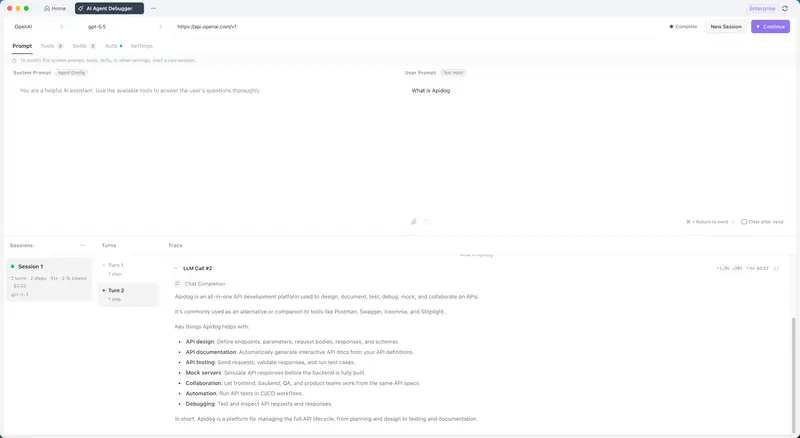
แผง Traces แสดงอะไรบ้าง

AI Agent Debugger ของ Apidog แบ่งหน้าจอเป็นสามส่วน:

  • Sessions: รายการการรันแต่ละครั้ง
  • Turns: ลำดับบทสนทนาและการเรียก tool ใน session นั้น
  • Traces: รายละเอียด execution ทั้งหมดในแต่ละ turn

ในแผง Traces คุณจะเห็นข้อมูลตามลำดับจริง เช่น:

  • system prompt ที่โมเดลได้รับ
  • user prompt ที่โมเดลได้รับ
  • tool name และ parameters ที่โมเดลส่งออกมา
  • payload ที่ tool ส่งกลับมา
  • response ของโมเดล
  • latency, token และ cost ของ turn นั้น

ฉันเปิด session ที่ตอบผิด แล้วเห็นว่า tool call ถูกต้อง:

get_response_time(endpoint="/users")

โมเดลเลือก tool ถูก และส่ง argument ถูก

จากนั้นฉันขยาย tool result:

{
  "value": 47,
  "p95": 89,
  "samples": 1240
}

นี่คือบั๊กจริง

metrics pipeline ส่งค่ากลับมาเป็น มิลลิวินาที แต่ payload ไม่ระบุหน่วย โมเดลจึงตีความ 47 เป็นวินาที แล้วตอบอย่างมั่นใจว่า “47 วินาที”

สรุปคือ:

  • tool ทำงานถูก
  • argument ถูก
  • data ถูก
  • แต่ payload ไม่ self-descriptive
  • system prompt ไม่บอกให้ระวังเรื่อง unit

การแก้ไขใช้เวลาหกบรรทัด

ฉันแก้ schema ของ response ให้มีหน่วยชัดเจน:

{
  "value": { "amount": 47, "unit": "ms" },
  "p95": { "amount": 89, "unit": "ms" },
  "samples": 1240
}

แล้วเพิ่มกฎใน system prompt:

ผลลัพธ์ของเครื่องมือจะส่งคืนหน่วยอย่างชัดเจน โปรดอ่านอย่างระมัดระวัง

จากนั้นรัน prompt เดิมอีกสามครั้ง:

ปลายทาง /users ทำงานเร็วแค่ไหน?

ทั้งสาม session ตอบถูกว่า endpoint ตอบสนองประมาณ 47 มิลลิวินาที และอธิบาย p95 เป็นมิลลิวินาทีเช่นกัน

ฉันยังลองรัน prompt เดียวกันกับ Claude Opus 4.7 เพื่อเปรียบเทียบ session แบบเคียงข้างกัน ผลลัพธ์ถูกเหมือนกัน แต่มี cost สูงกว่าและตอบยาวกว่าเล็กน้อย จุดนี้ทำให้ตัดสินใจเลือกโมเดลสำหรับ production ได้ง่ายขึ้น

สิ่งที่มีประโยชน์ไม่ใช่แค่การหา root cause แต่คือการเปรียบเทียบโมเดลบน config เดียวกัน โดยดู metrics จากแผง session:

  • จำนวน turn
  • จำนวน step
  • latency
  • token usage
  • cost

สิ่งที่ฉันเข้าใจผิด

ตอนแรกฉันคิดว่า AI Agent Debugger เป็น logging tool แต่จริง ๆ แล้วมันต่างกัน

logging บอกว่า “เกิดอะไรขึ้น” ในบางจุดของระบบ

debugger แสดงว่า “โมเดลกับ tool แลกเปลี่ยนอะไรกันจริง ๆ”

สำหรับเอเจนต์ สิ่งนี้สำคัญมาก เพราะ error มักเกิดระหว่าง:

  • prompt
  • model reasoning
  • tool selection
  • tool input
  • tool output
  • final answer

ถ้าคุณอ่านแค่คำตอบสุดท้ายของโมเดลแล้วเดาสาเหตุ คุณไม่ได้ดีบักเอเจนต์โดยตรง แต่กำลังดีบักสมมติฐานของตัวเองเกี่ยวกับเอเจนต์

อีกสิ่งที่ debugger ช่วยเผยให้เห็นคือความไม่เสถียรของพฤติกรรมเอเจนต์ ฉันรัน prompt เดียวกันห้าครั้งหลังแก้ unit แล้วพบว่า:

  • สามครั้งเรียก get_response_time ครั้งเดียว
  • สองครั้งเรียก tool สองครั้ง
  • ครั้งหนึ่งส่ง endpoint path ที่ case ต่างกัน

tool ของฉัน case-sensitive และฉันไม่เคยเห็นบั๊กนี้มาก่อน เพราะ test case เดิมใช้ lowercase ทั้งหมด

วิธีตรวจแบบง่ายคือ:

  1. รัน prompt เดิม 5 ครั้ง
  2. เปิดดู session ทั้งหมด
  3. เทียบ tool call, argument, output และ final answer
  4. จุดที่แตกต่างกันระหว่าง run คือจุดที่เอเจนต์เปราะบาง

ลองด้วยตัวเอง: ตั้งค่า AI Agent Debugger

ด้านล่างคือ flow การตั้งค่าจากโปรเจกต์ใหม่ไปจนถึง session ดีบักที่รันได้

ขั้นตอนที่ 1: สร้าง debug session ใหม่

เปิด Apidog แล้วคลิก AI Agent Debugger ที่แถบด้านบน จากนั้นตั้งค่าโมเดล:

  • เลือก model provider เช่น OpenAI หรือ Anthropic
  • เลือก model เช่น gpt-5.5
  • Base URL จะถูกเติมให้อัตโนมัติหลังเลือก provider
  • คลิก Run เพื่อเริ่ม session

แท็บ AI Agent Debugger ที่มีตัวเลือกผู้ให้บริการโมเดลและโมเดลอยู่ด้านบน Base URL ถูกเติมโดยอัตโนมัติ และปุ่ม Run อยู่ที่ด้านบนขวา

ขั้นตอนที่ 2: กำหนดค่า prompt

ไปที่แท็บ Prompts แล้วกรอกสองส่วนหลัก:

  • System Prompt: ระบุ role, goal, constraint และกฎการใช้ tool
  • User Prompt: prompt ที่ต้องการทดสอบ เช่น Apidog คืออะไร?

ตัวอย่าง system prompt สำหรับกรณี tool ที่มีหน่วย:

คุณเป็นเอเจนต์สำหรับวิเคราะห์ metric ของ API
เมื่อเรียก tool แล้ว ให้ตรวจสอบ unit ในผลลัพธ์เสมอ
ห้ามเดาหน่วยเองหาก tool ไม่ได้ส่งมา

ตัวอย่าง user prompt:

ปลายทาง /users ทำงานเร็วแค่ไหน?

เมื่อตั้งค่าเสร็จ คลิก Run

ถ้าต้องการล้าง input หลังรันแต่ละครั้ง ให้เปิด Clear after Send

ขั้นตอนที่ 3: กำหนดค่า tools

แท็บ Tools แสดงรายการความสามารถที่เอเจนต์เรียกใช้ได้ระหว่าง runtime

Built-in tools

เครื่องมือ ใช้ทำอะไร
bash รันคำสั่งใน shell session ที่คงอยู่
web_fetch ดึงเนื้อหาเว็บและแปลงเป็น Markdown, text หรือ HTML
read อ่านไฟล์ text, image หรือ PDF
edit แก้ไฟล์ด้วย string replacement
write สร้างหรือเขียนทับไฟล์
grep ค้นหาเนื้อหาไฟล์ด้วย regular expression
glob ค้นหาไฟล์ด้วย glob pattern
kill_shell reset shell session ปัจจุบัน

MCP tools

สำหรับ tool ที่มาจาก MCP server สามารถเชื่อมต่อได้สามแบบ:

  • STDIO: เปิด MCP server เป็น local process
  • HTTP: เชื่อมต่อ MCP server ที่รองรับ Streamable HTTP
  • SSE: เชื่อมต่อ MCP server ผ่าน Server-Sent Events

ถ้า MCP server ต้อง authentication ให้ตั้ง request headers หรือ OAuth 2.0 ตามที่ระบบรองรับ เมื่อเชื่อมต่อสำเร็จ ให้เลือก tools ที่ต้องการ expose ให้เอเจนต์ใช้งาน

ขั้นตอนที่ 4: กำหนดค่า Skills, Authentication และ Settings

มีแท็บย่อยที่ควรตรวจสอบก่อนรันจริง:

  • Skills: workflow ที่นำกลับมาใช้ซ้ำได้ เหมาะกับขั้นตอนประจำของโปรเจกต์ หรือกฎที่ไม่อยากใส่ซ้ำใน system prompt
  • Authentication: credentials สำหรับ model provider หรือ MCP service
  • Settings: runtime parameters เช่น Temperature, Max Tokens และ Top P

พารามิเตอร์ที่รองรับขึ้นอยู่กับ provider และ model ที่เลือก ควรตรวจสอบก่อนรัน benchmark หรือเปรียบเทียบโมเดล

ขั้นตอนที่ 5: อ่านข้อมูลจากสามแผงหลัก

หลังคลิก Run session ใหม่จะปรากฏในแผงซ้าย พร้อม summary เช่น:

Session 3
1 turn · 1 step · 10s · 3.1k tokens · $0.02
gpt-5.5

วิธีอ่านแต่ละแผง:

  • Sessions ซ้าย: ประวัติการรันทั้งหมด พร้อม metrics สรุป
  • Turns กลาง: ลำดับ user/model/tool ใน session นั้น
  • Traces ขวา: execution chain แบบละเอียด รวมถึง prompt, model call, tool call, tool input, tool output, latency, error และ final answer

เมื่อ tool call ล้มเหลว หรือโมเดลตอบผิด ให้เริ่มจาก Traces:

  1. ตรวจว่าโมเดลเลือก tool ถูกหรือไม่
  2. ตรวจ argument ที่ส่งเข้า tool
  3. ตรวจ payload ที่ tool ส่งกลับ
  4. ตรวจว่า payload มี field, type และ unit ชัดเจนหรือไม่
  5. เทียบ final answer กับ tool result

ขั้นตอนที่ 6: เปรียบเทียบโมเดล

ใช้ prompt และ tool config เดิม แล้วเปลี่ยนเฉพาะ model

แต่ละ run จะกลายเป็น session ใหม่ในแผงซ้าย ทำให้เทียบได้โดยตรงว่าโมเดลไหนเหมาะกับงานมากกว่า

metrics ที่ควรดู:

  • จำนวน step ที่ใช้เพื่อทำงานเดียวกัน
  • ความแม่นยำในการเลือก tool
  • latency
  • token usage
  • cost
  • ความสม่ำเสมอของ output เมื่อรัน prompt เดิมหลายครั้ง

แนวทางที่ฉันใช้:

รัน prompt เดิม 5 ครั้งต่อโมเดล
เทียบ tool call และ final answer
เลือกโมเดลที่ตอบถูก ใช้ step น้อย latency ต่ำ และ cost คาดเดาได้

Checklist สำหรับดีบักเอเจนต์ที่ตอบผิด

เมื่อเอเจนต์ให้คำตอบผิด แต่ดูเหมือนมั่นใจ ให้ไล่ตรวจตามนี้:

  • [ ] system prompt มี constraint ที่จำเป็นครบหรือไม่
  • [ ] tool description ชัดเจนพอให้โมเดลเลือกถูกหรือไม่
  • [ ] tool input schema บังคับ field สำคัญหรือไม่
  • [ ] โมเดลส่ง argument ถูกต้องหรือไม่
  • [ ] tool output มีหน่วยและ type ชัดเจนหรือไม่
  • [ ] payload มี field ที่คลุมเครือ เช่น value, data, result โดยไม่มี context หรือไม่
  • [ ] final answer ตรงกับ tool result หรือโมเดลตีความผิด
  • [ ] prompt เดิมรันหลายครั้งแล้วได้ tool call เหมือนกันหรือไม่
  • [ ] cost และ token usage คงที่พอสำหรับ production หรือไม่

ประเด็นสำคัญ

บั๊กนี้ไม่ได้เกิดจากโมเดลไม่เก่ง หรือ tool คำนวณผิด แต่เกิดจาก contract ระหว่าง tool กับโมเดลไม่ชัดเจนพอ

สิ่งที่ควรทำเมื่อสร้าง tool ให้เอเจนต์:

  • ส่ง output แบบ self-descriptive
  • ใส่ unit ใน payload เสมอเมื่อเป็นตัวเลข
  • หลีกเลี่ยง field name ที่กำกวม
  • เขียน system prompt ให้บอกวิธีอ่าน tool result
  • รัน prompt เดิมหลายครั้งเพื่อหา nondeterministic behavior
  • เปรียบเทียบโมเดลด้วย config เดียวกันก่อนเลือกใช้จริง

ถ้าคุณกำลังสร้างเอเจนต์ที่เรียก tool หรือ MCP server การดูแค่ final answer ไม่พอ คุณต้องเห็น trace ระหว่างโมเดลกับ tool ด้วย

ดาวน์โหลด Apidog แล้วลองเปิด AI Agent Debugger กับเอเจนต์ตัวถัดไปที่ตอบผิดอย่างมั่นใจ อาจใช้เวลาไม่กี่นาทีในการเจอว่าปัญหาอยู่ตรงไหน: ใน prompt, tool call, payload หรือการตีความของโมเดล

อ่านรายละเอียดฟีเจอร์เพิ่มเติม รวมถึงการตั้งค่า MCP transport และ availability ของแผนบริการได้ที่ Apidog AI Agent Debugger: ความพร้อมใช้งาน, ขอบเขตครอบคลุม และการตั้งค่า

L’Agent n’Arrêtait Pas de Me Mentir. Jusqu’à ce que J’utilise le Débogueur d’Agent IA d’Apidog.

L

Un mardi après-midi, après douze tours de débogage, mon agent affirmait que l’endpoint /users répondait en 47 secondes. La vraie valeur était 47 millisecondes.

Essayez Apidog aujourd’hui

Je traquais ce bug depuis deux jours. J’avais ajouté des logs au serveur MCP, relu les réponses du modèle token par token, modifié l’invite système, comparé plusieurs hypothèses. Rien ne pointait clairement vers la cause.

Ce que je n’avais pas encore fait : ouvrir la trace d’exécution réelle et regarder l’échange exact entre le modèle et l’outil.

C’est là que l’Apidog AI Agent Debugger m’a fait gagner du temps. En douze minutes, le bug était identifié.

Le bug que je traquais

La configuration était simple :

  • un agent basé sur gpt-5.5
  • un serveur MCP écrit rapidement
  • un outil exposé : get_response_time(endpoint)
  • une invite système courte
  • une invite utilisateur : Quelle est la vitesse du endpoint /users ?

L’agent répondait vite, avec assurance, mais faux.

Exemples de réponses observées :

  • Le endpoint répond en 47 secondes.
  • Environ 0,05 seconde.
  • La performance est acceptable.

Le problème avec le débogage d’agents, c’est que l’erreur peut se trouver à plusieurs endroits :

  1. l’invite système
  2. le choix du modèle
  3. la définition de l’outil
  4. les paramètres envoyés à l’outil
  5. la réponse retournée par l’outil
  6. l’interprétation de cette réponse par le modèle

Un log serveur ne montre généralement qu’une partie de cette chaîne.

Ce que montre réellement le panneau Traces

Le débogueur Apidog s’organise en trois panneaux :

  • Sessions, à gauche
  • Tours, au centre
  • Traces, à droite

Cliquez sur une session, puis sur un tour : le panneau Traces affiche l’arbre d’exécution complet.

Vous voyez notamment :

  • l’invite système reçue par le modèle
  • l’invite utilisateur reçue par le modèle
  • le nom de l’outil appelé
  • les paramètres envoyés à l’outil, au format JSON
  • la réponse retournée par l’outil, au format JSON
  • la réponse finale du modèle
  • les temps, tokens et coûts associés au tour

Dans ma session défaillante, l’appel d’outil était correct :

get_response_time(endpoint="/users")

Le modèle avait choisi le bon outil avec le bon argument.

Puis j’ai ouvert le résultat de l’outil :

{
  "value": 47,
  "p95": 89,
  "samples": 1240
}

Le pipeline de métriques renvoyait une valeur en millisecondes. Le modèle a supposé des secondes.

Le bug n’était donc pas dans l’appel MCP. Il était dans la forme de la donnée retournée et dans l’absence d’instruction explicite sur les unités.

La correction a pris six lignes

J’ai modifié la réponse du serveur MCP pour rendre les unités explicites :

{
  "value": {
    "amount": 47,
    "unit": "ms"
  },
  "p95": {
    "amount": 89,
    "unit": "ms"
  },
  "samples": 1240
}

Puis j’ai ajouté une phrase à l’invite système :

Les résultats des outils renvoient les unités explicitement. Lisez-les attentivement.

J’ai relancé la même invite trois fois.

Résultat : les trois sessions ont correctement répondu que l’endpoint répondait à environ 47 ms.

Le coût en tokens était aussi inférieur à mes exécutions précédentes, probablement parce que le modèle ne générait plus de texte pour compenser ses propres hypothèses incorrectes.

J’ai ensuite exécuté la même configuration avec Claude Opus 4.7 dans une autre session. Même résultat, coût plus élevé, réponse plus verbeuse. La comparaison était visible directement dans le panneau des sessions : tours, étapes, temps, tokens et coût.

Ce que je faisais mal

Je traitais le débogueur comme un outil de logging. Ce n’est pas seulement ça.

Un log vous montre ce qui s’est passé dans votre code. Le débogueur vous montre ce que le modèle et les outils ont réellement échangé.

Si vous regardez uniquement la sortie du modèle et que vous devinez la cause, vous ne déboguez pas l’agent. Vous déboguez votre hypothèse sur l’agent.

Un agent est un système composé de quatre éléments :

  • le modèle
  • l’invite
  • les outils
  • les réponses des outils

Le bug se trouve souvent à l’intersection de ces éléments.

Le débogueur m’a aussi montré un autre problème : le non-déterminisme de mon agent.

Après la correction, j’ai exécuté la même invite cinq fois :

  • trois exécutions ont appelé get_response_time une seule fois
  • deux exécutions l’ont appelé deux fois
  • dans ces deux cas, le chemin du endpoint utilisait une casse différente

Mon schéma d’outil était sensible à la casse. Je ne l’avais pas vu, car mes tests manuels utilisaient toujours /users en minuscules.

Le test multi-exécutions est donc devenu une étape de validation : exécuter plusieurs fois la même invite, puis repérer ce qui varie.

Guide d’installation et de débogage

Voici le flux complet pour reproduire une session de débogage avec Apidog.

Étape 1 : Créer une session de débogage d’agent

Ouvrez Apidog, puis cliquez sur AI Agent Debugger dans la barre d’onglets supérieure.

Configurez ensuite le modèle :

  • choisissez le fournisseur de modèle
  • choisissez le modèle spécifique, par exemple gpt-5.5
  • vérifiez que l’URL de base est remplie automatiquement
  • cliquez sur Exécuter pour démarrer une session

L'onglet AI Agent Debugger avec les sélecteurs de fournisseur et de modèle en haut, l'URL de base remplie automatiquement, et le bouton Exécuter en haut à droite.

Étape 2 : Configurer les invites

Dans l’onglet Invites, renseignez :

  • Invite système : rôle, objectifs, contraintes et règles d’utilisation des outils
  • Invite utilisateur : entrée de test pour la session

Exemple d’invite utilisateur :

Quelle est la vitesse du endpoint /users ?

Cliquez ensuite sur Exécuter.

Si vous voulez vider automatiquement le champ après chaque exécution, activez Effacer après envoi.

Étape 3 : Configurer les outils

L’onglet Outils liste les capacités que l’agent peut appeler pendant l’exécution.

Les outils intégrés peuvent être activés ou désactivés selon le besoin.

Outil Ce qu’il fait
bash Exécute des commandes dans une session shell persistante
web_fetch Récupère du contenu web et le convertit en Markdown, texte ou HTML
read Lit des fichiers texte, image ou PDF
edit Applique des remplacements de chaînes précis aux fichiers
write Crée ou écrase des fichiers
grep Recherche du contenu de fichier avec des expressions régulières
glob Trouve des fichiers avec des motifs glob
kill_shell Réinitialise la session shell actuelle

Pour connecter des systèmes externes ou vos propres outils, utilisez des serveurs MCP.

Méthodes de connexion disponibles :

  • STDIO : lance un processus de serveur MCP local
  • HTTP : se connecte à un serveur MCP compatible HTTP Streamable
  • SSE : se connecte à un serveur MCP basé sur Server-Sent Events

Les serveurs MCP nécessitant une authentification peuvent utiliser des en-têtes de requête ou OAuth 2.0.

Une fois la connexion établie, sélectionnez les outils exposés que l’agent peut utiliser.

Étape 4 : Configurer les compétences, l’authentification et les paramètres

Trois onglets complètent la configuration.

Compétences

Les Compétences sont des flux de travail réutilisables pour l’agent.

Elles sont utiles pour :

  • éviter de répéter de longues instructions dans l’invite système
  • définir des workflows projet
  • formaliser des tâches récurrentes
  • charger des instructions seulement quand elles sont nécessaires

Authentification

L’onglet Authentification contient les identifiants requis par les services de modèle ou les services MCP.

Paramètres

L’onglet Paramètres permet d’ajuster les paramètres d’exécution du modèle, par exemple :

  • température
  • max tokens
  • top P

Les paramètres disponibles dépendent du fournisseur et du modèle utilisé.

Étape 5 : Lire les trois panneaux

Après avoir cliqué sur Exécuter, une nouvelle session apparaît dans le panneau de gauche.

Exemple de résumé :

Session 3
1 tour · 1 étape · 10s · 3.1k tokens · $0.02
gpt-5.5

Les panneaux se lisent ainsi :

  • Sessions : historique des exécutions avec métriques récapitulatives
  • Tours : échanges utilisateur/modèle pour chaque session
  • Traces : chaîne d’exécution complète, dans l’ordre

Le panneau Traces est le plus important pour déboguer.

Il permet de vérifier :

  • l’invite système réellement envoyée
  • l’invite utilisateur
  • les appels de modèle
  • les appels d’outils MCP
  • les paramètres d’entrée des outils
  • les résultats retournés
  • les erreurs
  • le temps consommé
  • la sortie finale

Lorsqu’un appel d’outil échoue ou qu’une exception est renvoyée, l’étape fautive apparaît directement dans la trace, avec ses entrées et sorties.

Étape 6 : Comparer les modèles

Pour comparer deux modèles, gardez la même configuration :

  • même invite système
  • même invite utilisateur
  • mêmes outils
  • mêmes paramètres, si possible

Puis changez uniquement le modèle.

Chaque exécution crée une nouvelle session, ce qui permet de comparer dans le panneau gauche :

  • nombre d’étapes nécessaires
  • qualité du choix d’outil
  • temps de réponse
  • consommation de tokens
  • coût
  • stabilité entre plusieurs exécutions

C’est utile pour décider quel modèle passer en production, surtout si plusieurs modèles produisent une réponse correcte mais avec des coûts ou des comportements différents.

Le point à retenir

Le bug n’était pas dans mon endpoint. Il n’était pas non plus dans le serveur MCP. Il était dans le contrat implicite entre l’outil et le modèle : une valeur numérique sans unité.

La correction a été simple, mais seulement après avoir vu l’échange exact entre le modèle et l’outil.

Si vous construisez des agents, ajoutez cette vérification à votre workflow :

  1. exécuter l’invite
  2. ouvrir la trace
  3. vérifier l’appel d’outil
  4. vérifier les paramètres
  5. vérifier la réponse JSON
  6. vérifier l’interprétation du modèle
  7. relancer plusieurs fois pour détecter les variations

Téléchargez Apidog et utilisez-le sur le prochain agent qui répond avec assurance mais incorrectement.

La référence complète des fonctionnalités, y compris la configuration du transport MCP et la disponibilité des plans, se trouve dans Apidog AI Agent Debugger : disponibilité, couverture et configuration.