7 Document Processing Tasks Every .NET Developer Should Automate

Generate PDF Reports Automatically

Document processing is one of the most repetitive parts of many .NET applications.

From generating PDF invoices and Excel reports to filling Word templates and converting files, developers often spend far more time on these repetitive workflows than they expect. Many teams still rely on manual steps, desktop tools, or fragile Office automation that becomes difficult to maintain as systems grow.

The good news is that modern .NET libraries make these tasks far easier to automate. In this article, we’ll look at 7 document processing tasks that are especially worth automating in real-world .NET applications.

Task #1 — Generate PDF Reports Automatically

PDF generation is one of the most common requirements in business-focused .NET applications.

Typical use cases include:

  • Invoices
  • Financial reports
  • Order confirmations
  • Analytics dashboards
  • Downloadable business documents

Yet many teams still rely on browser print dialogs or desktop tools to get the job done.

The problem is that these approaches don’t scale well. They’re hard to trigger from background jobs, impossible to batch, and painful to maintain when layouts change.

A more scalable approach is to define document layouts in code and render them entirely server-side.

Popular options include QuestPDF, iText, IronPDF, and Spire.PDF, each with different strengths depending on rendering complexity, deployment requirements, and licensing considerations.

The following example uses QuestPDF to generate a simple invoice PDF:

Document.Create(container =>
{
    container.Page(page =>
    {
        page.Size(PageSizes.A4);
        page.Margin(40);

        page.Content().Column(col =>
        {
            col.Item().Text("Invoice #1042")
               .FontSize(20).Bold();

            col.Item().Text($"Date: {DateTime.Now:yyyy-MM-dd}")
               .FontSize(11).FontColor(Colors.Grey.Medium);

            col.Item().PaddingTop(20).Table(table =>
            {
                table.ColumnsDefinition(c =>
                {
                    c.RelativeColumn(3);
                    c.RelativeColumn(1);
                    c.RelativeColumn(1);
                });

                table.Header(header =>
                {
                    header.Cell().Text("Description").Bold();
                    header.Cell().Text("Qty").Bold();
                    header.Cell().Text("Price").Bold();
                });

                table.Cell().Text("Annual Subscription");
                table.Cell().Text("1");
                table.Cell().Text("$299.00");
            });
        });
    });
})
.GeneratePdf("invoice.pdf");

This runs entirely server-side, works in Docker, and can be triggered from any background job or API endpoint.

⚡ Quick Win: Install QuestPDF via NuGet (dotnet add package QuestPDF), copy the invoice example above, and you’ll have a working PDF endpoint in under 15 minutes.

Generate PDF Reports Automatically

Task #2 — Export Excel Reports from ASP.NET

Excel exports are everywhere in business applications.

Sales summaries, inventory reports, and financial reconciliation data are all common Excel export scenarios in business applications. The classic mistake is reaching for Excel Interop, which requires Office installed on the server and tends to become unstable in Docker or cloud-hosted environments.

Modern ASP.NET applications usually take a different approach by generating Excel files directly in code using libraries such as:

  • ClosedXML
  • EPPlus
  • NPOI
  • Spire.XLS

These libraries work without Microsoft Office and are far better suited for Docker, Linux, cloud hosting, and high-concurrency environments.

The following example uses Spire.XLS to generate a formatted Excel report in ASP.NET Core:

using Spire.Xls;

[HttpGet("export")]
public IActionResult ExportSalesReport()
{
    Workbook workbook = new Workbook();
    Worksheet sheet = workbook.Worksheets[0];
    sheet.Name = "Sales Report";

    sheet.Range["A1"].Value = "Product";
    sheet.Range["B1"].Value = "Units Sold";
    sheet.Range["C1"].Value = "Revenue";

    sheet.Range["A1:C1"].Style.Font.IsBold = true;
    sheet.Range["A1:C1"].Style.Color = Color.LightBlue;

    sheet.Range["A2"].Value = "Product A";
    sheet.Range["B2"].NumberValue = 120;
    sheet.Range["C2"].NumberValue = 3600;

    sheet.Range["A3"].Value = "Product B";
    sheet.Range["B3"].NumberValue = 85;
    sheet.Range["C3"].NumberValue = 4250;

    sheet.AllocatedRange.AutoFitColumns();

    using var stream = new MemoryStream();
    workbook.SaveToStream(stream, FileFormat.Version2016);

    return File(
        stream.ToArray(),
        "application/vnd.openxmlformats-officedocument.spreadsheetml.sheet",
        "sales-report.xlsx");
}

Export Excel Reports from ASP.NET

The result is a properly formatted, immediately downloadable .xlsx file — styled headers, currency formatting, auto-fitted columns — all generated in a single request with no external tools.

Task #3 — Merge and Split PDF Files

Merging and splitting PDFs comes up more often than you’d expect.

Common examples include combining contract attachments, splitting bulk uploads into individual records, or archiving multi-document packages. In many companies, someone still opens Acrobat or an online tool just to merge a few files together. That process may seem harmless at first, but it becomes inefficient very quickly when documents are generated daily.

Automating PDF merging and splitting makes document workflows much easier to scale. Instead of relying on manual operations, applications can process files automatically in the background.

PdfSharp is a lightweight open-source option that handles both merging and splitting cleanly, with no external dependencies.

The following example merges multiple PDF files into a single document:

using PdfSharp.Pdf;
using PdfSharp.Pdf.IO;

public void MergePdfs(string[] inputPaths, string outputPath)
{
    using var output = new PdfDocument();

    foreach (var path in inputPaths)
    {
        using var input = PdfReader.Open(path, PdfDocumentOpenMode.Import);
        foreach (var page in input.Pages)
            output.AddPage(page);
    }

    output.Save(outputPath);
}

You can also split PDFs by page range:

public void SplitPdf(string inputPath, int fromPage, int toPage, string outputPath)
{
    using var input = PdfReader.Open(inputPath, PdfDocumentOpenMode.Import);
    using var output = new PdfDocument();

    for (int i = fromPage; i <= toPage; i++)
        output.AddPage(input.Pages[i]);

    output.Save(outputPath);
}

These operations are easy to integrate into API endpoints or background jobs, making high-volume PDF workflows far easier to manage.

Merge and Split PDF Files

Task #4 — Fill Word Templates with Dynamic Data

Generating Word documents from templates is common in HR systems, legal workflows, and internal business applications. The traditional workflow usually involves manually editing old files and replacing values one by one. This quickly becomes repetitive and error-prone.

Instead of manually editing documents each time, teams can use reusable Word templates with dynamic placeholders.

In practice, developers can prepare a reusable .docx template and let the application fill in the data automatically. This keeps formatting consistent while dramatically reducing manual editing work.

Libraries such as OpenXML SDK, DocX, and Spire.Doc all support template-based document automation.

The following example uses Spire.Doc to replace placeholders dynamically:

using Spire.Doc;

string template = @"template.docx";
string output = "contract-filled.docx";

FillContractTemplate(template, output, "Linda", "50000", "2026-05-20");

static void FillContractTemplate(
    string templatePath,
    string outputPath,
    string clientName,
    string amount,
    string date)
{
    Document document = new Document();
    document.LoadFromFile(templatePath);

    document.Replace("${ClientName}", clientName, true, true);
    document.Replace("${Amount}", amount, true, true);
    document.Replace("${Date}", date, true, true);

    document.SaveToFile(outputPath);
}

One major advantage of this approach is that non-developers can still edit the template layout without touching application code.

⚡ Quick Win: Convert one frequently reused Word document into a template with placeholders and automate the replacement process.

Fill Word Templates with Dynamic Data

Task #5 — Convert Documents Between Formats

In real-world systems, applications rarely deal with just a single document format.

Many developers first handle document conversion manually — opening files locally and exporting them one by one. That approach quickly breaks down once uploads, background processing, or customer-facing downloads enter the picture.

Users may upload Word files, download PDFs, preview Excel reports in the browser, or request HTML versions of business documents. As systems grow, document conversion quickly becomes an essential part of the workflow.

In practice, Word-to-PDF conversion is the most common requirement, but many systems also need Excel-to-PDF rendering, HTML exports, or PDF preview images.

The challenge is doing this reliably on the server without installing Microsoft Office.

A reliable server-side conversion workflow should ideally:

  • Support background processing
  • Run in Docker or Linux environments
  • Handle batch conversion tasks efficiently

A common example is converting uploaded Word documents into PDFs for browser preview and long-term storage entirely server-side:

using Spire.Doc;

Document document = new Document();
document.LoadFromFile("Report.docx");

document.SaveToFile("Report.pdf", FileFormat.PDF);

C#: Convert Word to PDF

Once format conversion is automated, developers no longer need to rely on manual export steps or external desktop tools to keep document workflows running smoothly.

Task #6 — Extract Text and Data from PDFs

PDF text extraction powers a surprising number of workflows.

Common examples include invoice parsing, full-text search indexing, automated data entry, and content archiving. Without it, PDFs are essentially black boxes: you can store them, but you can’t act on their contents.

For text-based PDFs, many .NET libraries can extract content directly.

using UglyToad.PdfPig;

public string ExtractText(string pdfPath)
{
    using var document = PdfDocument.Open(pdfPath);
    var sb = new StringBuilder();

    foreach (var page in document.GetPages())
    {
        var text = string.Join(" ", page.GetWords().Select(w => w.Text));
        sb.AppendLine(text);
    }

    return sb.ToString();
}

For scanned PDFs where text isn’t embedded, you’ll need OCR. Tesseract works well for many local OCR scenarios, but for production workloads with higher accuracy requirements, Azure Document Intelligence is worth the investment — it handles complex layouts, tables, and handwriting reliably.

var client = new DocumentAnalysisClient(
    new Uri(endpoint), new AzureKeyCredential(apiKey));

var operation = await client.AnalyzeDocumentFromUriAsync(
    WaitUntil.Completed, "prebuilt-invoice", new Uri(fileUrl));

var result = operation.Value;
foreach (var field in result.Documents[0].Fields)
    Console.WriteLine($"{field.Key}: {field.Value.Content}");

Once extracted, the content can power search systems, automated processing pipelines, or downstream business workflows.

Extract Text and Data from PDFs

Task #7 — Validate and Clean Excel Data Automatically

Data import via Excel is convenient for users but painful for developers. Files come in with duplicate emails, missing required fields, invalid URLs, and inconsistent formats. Most teams handle this manually — reviewing spreadsheets, filtering rows by hand, and flagging problematic data for cleanup. It works for 50 rows, not for 5,000.

Automating data validation helps catch these issues before the data reaches databases or reporting pipelines.

Modern Excel libraries make it possible to apply validation rules and formatting directly in code, allowing applications to automatically mark problematic data for users.

For example, duplicate values can be highlighted automatically during report generation:

using ClosedXML.Excel;

var workbook = new XLWorkbook();
var worksheet = workbook.Worksheets.Add("Users");

worksheet.Cell("A1").Value = "Email";
worksheet.Cell("A2").Value = "[email protected]";
worksheet.Cell("A3").Value = "[email protected]";

worksheet.Range("A2:A100")
    .AddConditionalFormat()
    .WhenIsDuplicate()
    .Fill.SetBackgroundColor(XLColor.LightPink);

workbook.SaveAs("validated-users.xlsx");

Automated validation not only improves data quality, but also reduces the amount of manual cleanup work required before importing or analyzing spreadsheets.

Validate and Clean Excel Data Automatically

Automate Document Workflows with Background Jobs

The sections above focus on individual document operations, but real automation goes one step further — running these workflows on a schedule, in the background, without manual triggers.

Once those workflows are in place, the next step is running them without manual intervention.

Popular approaches in .NET include:

  • Hangfire
  • Quartz.NET
  • BackgroundService
  • Queue-based processing

For example, a reporting system might generate all weekly Excel reports overnight and automatically email them to users the next morning.

A simple Hangfire example could look like this:

// Register in Program.cs
builder.Services.AddHangfire(config =>
    config.UseSqlServerStorage(connectionString));
builder.Services.AddHangfireServer();

// Schedule a nightly report job
RecurringJob.AddOrUpdate<ReportService>(
    "nightly-report",
    service => service.GenerateAndEmailReportAsync(),
    Cron.Daily(hour: 2));
public class ReportService
{
    public async Task GenerateAndEmailReportAsync()
    {
        var pdf = _pdfGenerator.GenerateMonthlyReport();
        var excel = _excelExporter.ExportSalesSummary();
        await _emailService.SendWithAttachmentsAsync(pdf, excel);
    }
}

This becomes especially powerful when combined with the document workflows above — nightly PDF reports, scheduled Excel exports, or automatic PDF merging on upload — allowing these processes to run automatically in the background with minimal manual intervention.

⚡ Quick Win: Install Hangfire (dotnet add package Hangfire), pick your highest-frequency manual document task, and schedule it as a recurring job. The first night it runs unattended is a good feeling.

Automate Document Workflows with Background Jobs

Tools & Libraries Quick Reference

The table below provides a quick starting point for common .NET document processing scenarios:

Task Open-Source Commercial / Cloud
PDF generation QuestPDF iText, IronPDF, Spire.PDF
Excel export ClosedXML, NPOI EPPlus, Spire.XLS
PDF merge / split PdfSharp IronPDF, iText
Word templates Open XML SDK, DocX Spire.Doc
File conversion LibreOffice CLI, OpenXML Spire.Doc
Text extraction PdfPig, Tesseract Azure Document Intelligence
Excel validation ClosedXML Aspose.Cells
Job scheduling Hangfire, Quartz.NET Azure Logic Apps

For many teams, a combination of lightweight open-source libraries and a few specialized commercial tools is often the most practical approach.

Conclusion

Document workflows may seem minor at first, but repetitive manual tasks quickly become difficult to maintain as applications grow. Automating PDF generation, Excel exports, Word templates, file conversion, and data validation helps reduce errors, improve consistency, and save significant development time. With modern .NET libraries, teams can build scalable, server-safe document workflows entirely in code — without relying on Microsoft Office or fragile desktop automation. The earlier these workflows are automated, the easier it becomes to scale applications without accumulating fragile manual processes and maintenance overhead later on.

2026 Gold & Precious Metals Real-Time Tick Data API Comparison: Developer Integration Guide

Introduction
FinTech developers building precious metals trading systems, real-time analytics, or multi-asset dashboards face critical pain points: inconsistent tick-level latency, fragmented data sources, rigid protocol support, hidden free-tier limits, and high costs for institutional-grade data. This analysis evaluates six APIs focused on gold/precious metals tick data, using objective benchmarks, and provides production-ready Python integration examples with AllTick API as the primary reference.

Selection Criteria
We evaluate APIs against three critical, developer-centric benchmarks:
Data Granularity: Native tick-level support vs. only aggregated (1min/daily) or snapshot data.
Protocol Coverage: Dual REST + WebSocket availability (WebSocket required for low-latency real-time streams).
System Complexity: “One-stop” precious metals coverage vs. requiring supplementary data providers.

Comparative Overview
Competitor Mini-Reviews
AllTick API: Unified precious metals API with native tick data for gold (XAUUSD), silver, platinum; dual REST/WebSocket, 5+ years of historical data, and a free tier for PoC—reduces vendor stitching for fintech stacks.
Reuters: Institutional-grade precious metals data with millisecond latency and dual protocol support; no free tier, high complexity, suited for large financial institutions.
Bloomberg: Microsecond tick data, full historical depth, and enterprise-grade infrastructure; no free tier, terminal-based access, designed for hedge funds and high-frequency trading.
Alpha Vantage: Developer-friendly REST-only API with delayed precious metals data; strict free-tier limits, no WebSocket, ideal for educational tools and basic dashboards.
Finnhub: Aggregated precious metals data with basic WebSocket support; moderate latency, limited tick coverage, balanced for lightweight multi-asset apps.
Metals-api: Specialized precious metals REST API with LBMA reference prices; no WebSocket, snapshot-only data, suited for static price tracking and research.

Comparison Matrix

Implementation Guide (AllTick API, Production-Ready Python)
AllTick API provides a comprehensive solution for precious metals data with unified REST and WebSocket access. Below are production-ready implementations for core workflows.
Prerequisites
Register for a free AllTick account and get an API token: https://alltick.co/register.
Install dependencies:
pip install websocket-client requests pandas

1.REST API: Fetch Precious Metals K-Line Data
Retrieve candlestick data for gold (XAUUSD) and other metals. Key parameters:
code: Asset symbol (XAUUSD=gold, XAGUSD=silver, XPTUSD=platinum).
kline_type: Timeframe (1=1min, 5=5min, D=daily).
query_kline_num: Number of candles to fetch.

import requests
import json

# AllTick REST configuration
API_TOKEN = "YOUR_FREE_API_TOKEN"
REST_URL = "https://quote.alltick.co/quote-b-api/kline"

def get_precious_metal_kline(symbol="XAUUSD", kline_type=1, count=20):
    """Fetch K-line data for precious metals"""
    payload = {
        "trace": "fintech-gold-kline",
        "data": {
            "code": symbol,
            "kline_type": kline_type,
            "query_kline_num": count,
            "adjust_type": 0
        }
    }
    params = {"token": API_TOKEN, "query": json.dumps(payload)}
    response = requests.get(REST_URL, params=params)
    return response.json() if response.status_code == 200 else None

# Example: Fetch 10 1min gold candles
gold_kline = get_precious_metal_kline(symbol="XAUUSD", kline_type=1, count=10)
if gold_kline:
    print("Gold 1min K-Line Data:")
    print(json.dumps(gold_kline, indent=2))

2.WebSocket: Real-Time Tick Data Subscription
Subscribe to live tick streams for gold and silver with auto-reconnection. Implements on_message for tick parsing and on_open for subscription logic.

import websocket
import json
from datetime import datetime

# AllTick WebSocket configuration
API_TOKEN = "YOUR_FREE_API_TOKEN"
WS_URL = f"wss://quote.alltick.co/quote-b-ws-api?token={API_TOKEN}"

def on_message(ws, message):
    """Parse and process real-time tick data"""
    data = json.loads(message)
    if data.get("type") == "tick":
        tick = {
            "symbol": data["symbol"],
            "price": float(data["price"]),
            "volume": float(data.get("volume", 0)),
            "timestamp": datetime.fromtimestamp(data["time"] / 1000)
        }
        print(f"Tick | {tick['symbol']} | Price: {tick['price']} | Time: {tick['timestamp']}")

def on_open(ws):
    """Subscribe to gold and silver ticks on connection"""
    subscribe_msg = {"action": "subscribe", "symbols": ["XAUUSD", "XAGUSD"]}
    ws.send(json.dumps(subscribe_msg))
    print("Subscribed to XAUUSD (Gold) and XAGUSD (Silver) ticks")

def on_error(ws, error):
    print(f"WebSocket Error: {error}")

def on_close(ws, close_status_code, close_msg):
    """Auto-reconnect for production resilience"""
    print("WebSocket closed. Reconnecting...")
    ws.run_forever()

# Start WebSocket client
if __name__ == "__main__":
    ws = websocket.WebSocketApp(
        WS_URL,
        on_open=on_open,
        on_message=on_message,
        on_error=on_error,
        on_close=on_close
    )
    ws.run_forever(ping_interval=30)

3.Historical Data Retrieval: Archived Precious Metals Data
Pull historical tick/K-line data for backtesting with custom date ranges.

import requests
import json
import pandas as pd
from datetime import datetime, timedelta

API_TOKEN = "YOUR_FREE_API_TOKEN"
REST_URL = "https://quote.alltick.co/quote-b-api/kline"

def fetch_historical_data(symbol="XAUUSD", days=30, kline_type=1):
    """Fetch historical precious metals data for backtesting"""
    end_time = int(datetime.now().timestamp() * 1000)
    start_time = int((datetime.now() - timedelta(days=days)).timestamp() * 1000)

    payload = {
        "trace": "fintech-historical",
        "data": {
            "code": symbol,
            "kline_type": kline_type,
            "start_time": start_time,
            "end_time": end_time,
            "query_kline_num": 1000
        }
    }
    params = {"token": API_TOKEN, "query": json.dumps(payload)}
    response = requests.get(REST_URL, params=params)

    if response.status_code == 200:
        data = response.json()["data"]
        df = pd.DataFrame(data, columns=["time", "open", "high", "low", "close", "volume"])
        df["time"] = pd.to_datetime(df["time"], unit="ms")
        return df
    return None

# Example: Fetch 30 days of 1min gold data
gold_historical = fetch_historical_data(symbol="XAUUSD", days=30, kline_type=1)
if gold_historical is not None:
    print("Historical Gold Data (Last 5 Rows):")
    print(gold_historical.tail())
    gold_historical.to_csv("gold_30d_1min.csv", index=False)

Conclusion
For FinTech developers in 2026, precious metals API selection hinges on tick-level granularity, dual-protocol support, and cost efficiency. AllTick API stands out as a comprehensive solution, offering native tick data, REST/WebSocket access, and a free tier—making it well-suited for quant strategies, real-time trading systems, and multi-asset dashboards without the complexity or cost of institutional alternatives. The production-ready examples above provide a foundation for integrating real-time and historical precious metals data into fintech applications.

Why AI-Generated Products Still Need Real Engineering

AI-generated apps and development tools are growing incredibly fast right now.

Today, teams can generate interfaces, workflows, prototypes, and even application logic much faster than before using modern AI systems. Development cycles are becoming shorter, and launching products is easier than ever.

But something important is becoming very clear across the industry:

Generating software quickly is not the same as building production-ready systems.

A lot of AI-generated products work well during demos or early testing phases. But once they move closer to production environments, businesses suddenly need to think about:

  • security,
  • scalability,
  • compliance,
  • operational monitoring,
  • infrastructure,
  • and long-term maintainability.

I recently came across an interesting article from GeekyAnts discussing security and compliance gaps inside AI-generated prototypes before they move into production:
https://geekyants.com/blog/soc-2-gaps-in-ai-generated-prototypes-what-must-be-fixed-before-production

Another article around production readiness for AI-generated products also highlighted how much engineering work still happens after the prototype stage:
https://geekyants.com/blog/a-50-point-production-readiness-checklist-for-ai-generated-products

One thing that stands out clearly is that AI can accelerate development, but it cannot replace thoughtful engineering decisions.

Because production systems involve much more than generating code quickly. Real-world applications still require:

  • testing,
  • governance,
  • infrastructure planning,
  • optimization,
  • and operational reliability.

We’re probably entering a phase where the best engineering teams won’t be the ones avoiding AI tools completely.

They’ll be the teams that know how to combine AI acceleration with strong engineering practices effectively.

Encrypt Once, Boot Forever: TPM2 Auto-Unlock on Fedora 44

When I set up Fedora 44 on my Predator Helios Neo 16, I enabled full disk encryption using LUKS. Non-negotiable for a cybersecurity student.

The problem: every boot starts with a password prompt before anything loads. Fine in principle, friction in practice — especially when you’re rebooting frequently during a fresh system setup.

The solution: seal the decryption key inside the TPM chip and let the hardware unlock the drive automatically on legitimate boots. No password prompt, full encryption intact.

This is how I set it up.

Understanding the pieces

LUKS

LUKS (Linux Unified Key Setup) is the standard disk encryption layer on Linux. When enabled, your entire partition is encrypted at rest. Before the OS can boot, something needs to provide the decryption key — normally that’s you, typing a passphrase.

LUKS2 (the modern version, default on Fedora) supports multiple keyslots and tokens. Think of keyslots as different keys to the same lock — you can have a passphrase keyslot and a TPM keyslot simultaneously. Either one unlocks the drive.

TPM2

TPM (Trusted Platform Module) is a dedicated security chip on your motherboard. It’s not software — it’s physical hardware that stores cryptographic secrets and enforces conditions on when those secrets are
released.

The relevant capability here: the TPM can seal a secret to specific system state measurements. It will only release that secret if the system is in the expected state. Move the SSD to another machine? No TPM. Different hardware state? Key not released. Your data stays encrypted.

PCRs

PCR stands for Platform Configuration Register. These are values inside the TPM that represent measurements of different stages of your boot process — fingerprints of your firmware, bootloader, Secure Boot
configuration, and so on.

When you seal a key to a PCR, you’re saying: “only release this key if PCR X has this exact value.” The key relevant PCRs:

PCR What it measures
0 UEFI firmware
7 Secure Boot state
14 Shim/bootloader

I bound to PCR 7 — the Secure Boot state. This means:

  • The key is released as long as Secure Boot policy hasn’t changed
  • Firmware updates don’t break it (PCR 0 would)
  • It’s the right balance of security and usability for a daily driver

systemd-cryptenroll

systemd-cryptenroll is a tool built directly into systemd for enrolling hardware security tokens — including TPM2 — as LUKS keyslots.

I initially tried clevis, the older and more commonly documented approach. The bind command ran without errors, the tokens appeared in the LUKS dump, dracut rebuilt successfully — but the password prompt kept
appearing at boot. After debugging, the clevis dracut module simply wasn’t making it into the initramfs reliably on Fedora 44.

systemd-cryptenroll solved it on the first try. On Fedora 44 with modern systemd, it’s the right tool — tighter initramfs integration, no additional packages needed, and it just works.

The setup

Prerequisites

  • Fedora 44 with LUKS2 full disk encryption enabled
  • Secure Boot on (verify in BIOS)
  • TPM2 chip (verify below)

Step 1: Verify TPM2 is available

ls /dev/tpm*
# Expected: /dev/tpm0  /dev/tpmrm0

systemd-cryptenroll --tpm2-device=list
# Expected: shows your TPM2 device with driver info

My output:

PATH        DEVICE      DRIVER
/dev/tpmrm0 INTC6001:00 tpm_crb

The tpm_crb driver is the Intel TPM 2.0 on the i9-13900HX platform.
If you see output here, you’re good.

Step 2: Identify your LUKS partition

lsblk
cat /etc/crypttab

My crypttab:

luks-67669a3d-... UUID=67669a3d-... none discard,x-initrd.attach

The partition is /dev/nvme0n1p7, UUID 67669a3d-.... Note your UUID
— you’ll need it.

Step 3: Enroll the TPM2 key

sudo systemd-cryptenroll \
  --tpm2-device=auto \
  --tpm2-pcrs=7 \
  /dev/nvme0n1p7

Enter your existing LUKS passphrase when prompted. This authorizes adding a new keyslot. The command:

  1. Generates a new random key
  2. Seals it inside the TPM against the current PCR 7 value
  3. Adds it as a new LUKS2 keyslot with a systemd-tpm2 token

Your original passphrase keyslot is untouched.

Verify the enrollment:

sudo cryptsetup luksDump /dev/nvme0n1p7 | grep -A3 "Tokens"

You should see a systemd-tpm2 token entry.

Step 4: Update crypttab

sudo nano /etc/crypttab

Change the line from:

luks-UUID UUID=UUID none discard,x-initrd.attach

To:

luks-UUID UUID=UUID - discard,x-initrd.attach,tpm2-device=auto,tpm2-pcrs=7

Two changes: none becomes - (means “no keyfile, use token”), and
tpm2-device=auto,tpm2-pcrs=7 is appended to the options. This tells
the initramfs to attempt TPM2 unlock before falling back to passphrase.

Step 5: Rebuild initramfs

sudo dracut --force --regenerate-all

This rebuilds the initramfs for all installed kernels, baking in the TPM2 unlock logic. Let it complete fully before rebooting.

Step 6: Reboot

sudo reboot

The boot sequence should now go straight from GRUB to the KDE login screen — no passphrase prompt. The TPM provides the key automatically
during the initramfs stage.

Security model

This setup gives you encryption at rest against the realistic threat:
physical theft of the device or SSD.

Protected against:

  • SSD removed and accessed on another machine — no TPM, no key
  • Cold boot attacks on a powered-off or hibernated system
  • Forensic disk imaging without your hardware

Not protected against:

  • Someone stealing your running, logged-in laptop
  • Evil maid attacks with full hardware access over time
  • Your passphrase being compromised (keep it safe regardless)

The passphrase remains your fallback. If the TPM fails, if you flash firmware, or if Secure Boot state changes, the TPM unlock breaks and
you’ll be prompted for the passphrase. Enter it, boot normally, then re-run the systemd-cryptenroll command to re-seal to the new state.

What breaks the seal

These events change PCR 7 and will require re-enrollment:

  • Flashing BIOS/UEFI firmware
  • Toggling Secure Boot in BIOS settings
  • TPM hardware failure or reset

When this happens: passphrase at boot → login → re-run step 3 → rebuild initramfs → done.

Hardware

Acer Predator Helios Neo 16
Intel i9-13900HX · RTX 4060 · 16GB RAM · 1TB NVMe
Fedora Linux 44 (KDE Plasma Desktop Edition)

I built a Telegram bot that downloads YouTube videos — here’s how it works

Hey DEV community! 👋

I’ve been building a Telegram bot called @AndyVideoBot that downloads YouTube videos and audio directly to Telegram chat. No browser extension, no website, no login required — just paste a link.

What it does

  • Video formats: 144p · 240p · 360p · 480p · 720p · 1080p · 1440p · 4K
  • Audio: MP3 extraction
  • Playlists — download entire playlists
  • YouTube Shorts — vertical video supported
  • Channel subscriptions — subscribe to a channel and get new uploads delivered automatically
  • Dubbed audio selection — choose language when multiple audio tracks are available
  • Smart cache — if someone already downloaded the same video at the same quality, instant delivery from cache (no re-downloading)
  • Inline mode — share downloads directly in any Telegram chat

Tech stack

  • Python 3.14 (free-threaded, GIL disabled)
  • Telethon — Telegram MTProto client
  • yt-dlp — YouTube downloading engine
  • aiosqlite — async SQLite

Multi-bot architecture

The bot supports running multiple instances simultaneously sharing a single database. Each instance handles its own download queue, and files are served from a shared Telegram-based cache — so if bot A downloaded a video, bot B delivers it instantly from cache.

12 languages

English, Russian, German, Spanish, French, Portuguese, Turkish, Indonesian, Hindi, Vietnamese, Kazakh, Chinese.

Try it

👉 https://t.me/AndyVideoBot

Anthropic’s $44B Run Rate Week: Claude Code Auto Mode, Google Cloud, and SpaceX Deals Explained

Anthropic spent one week in 2026 doing what most companies stretch across a year: a headline revenue figure, two large compute deals, a product launch, and a fleet of vertical agents. The number that traveled fastest was a reported $44 billion annualized run rate, described as roughly an 80x increase over the prior year. But that run rate is the least useful part of the story if you write code for a living. Auto Mode and the compute contracts are the parts that change what you can build and what you pay for it.

The five things that happened, in plain terms

Strip away the press-release language and the week comes down to five items:

  • A reported $44B run rate. This is an annualized figure — it takes a recent revenue period and multiplies it out, so it is not the same as $44B of booked annual revenue. The reported 80x jump is real growth, but read “run rate” as a snapshot, not a bank statement.
  • A Google Cloud commitment in the $200B range. This is multi-year cloud capacity, weighted toward Google’s TPU accelerators rather than GPUs alone.
  • A compute arrangement with SpaceX. Public detail here is thin; treat it as additional capacity sourcing rather than a defined product you can use.
  • Claude Code Auto Mode. A new mode for running longer agentic workflows in Claude Code with fewer stop-and-confirm gates.
  • Ten financial-services agents. Vertical agents aimed at finance workflows — a clear signal that Anthropic is packaging agents per industry, not just shipping a general model.

“Run rate” annualizes a short recent window: it takes a recent month or quarter and projects it across a full year. It is a useful growth signal and a poor substitute for audited annual revenue. When you see the $44B number quoted, mentally tag it as “current pace,” not “money already in the door.”

Two of these five touch your day-to-day work. Auto Mode changes how you run the tool, and the compute deals shape the capacity behind every API call you make. The rest is context.

Claude Code Auto Mode: what changes for long-running agents

Before Auto Mode, a long Claude Code task was a conversation. The agent proposed a step, you approved or redirected it, it ran a few tool calls, and it came back. That loop is fine for a ten-minute fix and exhausting for a four-hour migration. Every approval gate is a place where the agent waits for a human who may have walked away from the keyboard.

Auto Mode targets that loop. It lets Claude Code carry a multi-step task — a dependency upgrade across a monorepo, a test-suite repair, a framework migration — across many tool calls without pausing at every gate for confirmation. You scope the task, set the boundaries, and let it run. The practical shift is that a long-running agent workflow stops meaning “a task you babysit” and starts meaning “a task you check on.”

That is genuinely useful and genuinely a footgun. An agent that does not stop to ask is an agent that can spend 40 minutes confidently heading the wrong direction. The mitigations are not exotic — they are the same disciplines that make any automation safe.

Never point an unattended agent at an unprotected workspace. Before an Auto Mode run: commit or stash existing work so you have a clean diff, scope file and command permissions to the directory in question, and prefer a branch you can throw away. Auto Mode removes approval prompts — it does not remove the consequences of a bad edit.

The exact permission model — what Auto Mode will and will not do without asking — is the detail worth confirming in Anthropic’s own documentation before you trust it with anything irreversible. Treat the defaults as something to verify, not assume.

If your work lives more in an editor than a terminal, an agentic IDE is the other half of this picture. Auto Mode is a terminal-first workflow; an editor-native agent gives you inline diffs and a tighter review loop for the same long-running tasks.

The broader pattern: agent autonomy is moving from “approve each step” to “approve the task.” Whichever tool you use, the skill that matters now is writing a tight task scope and a clean rollback path — not clicking “yes” on every step.

What the Google Cloud and SpaceX deals mean for your API bill

A $200B cloud commitment and a separate SpaceX compute arrangement are capacity stories, and capacity is what sits behind every rate limit you have ever hit. Here is how to read them without overreading them.

More committed capacity should mean more headroom: fewer 429 responses under load, and more room for the token-heavy, long-running Auto Mode runs the same week introduced. The TPU weighting in the Google Cloud deal matters too — it diversifies Anthropic away from depending on a single accelerator supply chain, which makes multi-year capacity planning steadier.

What these deals do not automatically mean is a cheaper API. Capacity investments are usually about meeting demand, not cutting margins. Per-token prices have trended down across the industry over time, and that trend may continue — but a compute commitment is not a price-cut announcement, and it is a mistake to budget as if it were.

There is also a quieter cost dynamic. Auto Mode runs longer and spends more tokens per task than a supervised session, because it does more work between your check-ins. Even if the price per token holds flat, your effective cost per completed task can rise simply because the agent does more before you stop it. Watch cost per task, not just cost per token.

If you adopt Auto Mode, instrument it. Log token usage per run and tag it by task type. After a week you will know which workflows are worth the autonomy and which were cheaper when you were still approving each step — and you will catch a runaway run before it reaches the invoice.

For most developers, the takeaway from the compute side is patience and measurement: expect steadier capacity and fewer hard rate limits, do not bank on lower prices, and track your own usage before the next pricing change — in whichever direction it goes — makes the decision for you.

Originally published at pickuma.com. Subscribe to the RSS or follow @pickuma.bsky.social for new reviews.

KiroGraph: from a personal side project to community-AI-driven tool

GitHub logo

This is the second part of my “Build in Public with Kiro” series. I’m an AWS Community Builder, and this is the story of what happens when you share something early, people actually care, and the project grows faster than you expected.

🏃 TL;DR

Since the first article, KiroGraph went from a CLI agent prototype (v0.5.0) to a multi-client, 30+ language, architecture-aware code knowledge graph (v0.13.1). It’s now published on npm, has a full documentation site, an interactive graph dashboard, and supports Claude Code and Codex alongside Kiro. Most of this happened because people showed up, contributed, and pushed the project in directions I hadn’t planned.

GitHub logo

davide-desio-eleva
/
kirograph

Semantic code knowledge graph for Kiro: fewer tool calls, instant symbol lookups, 100% local.

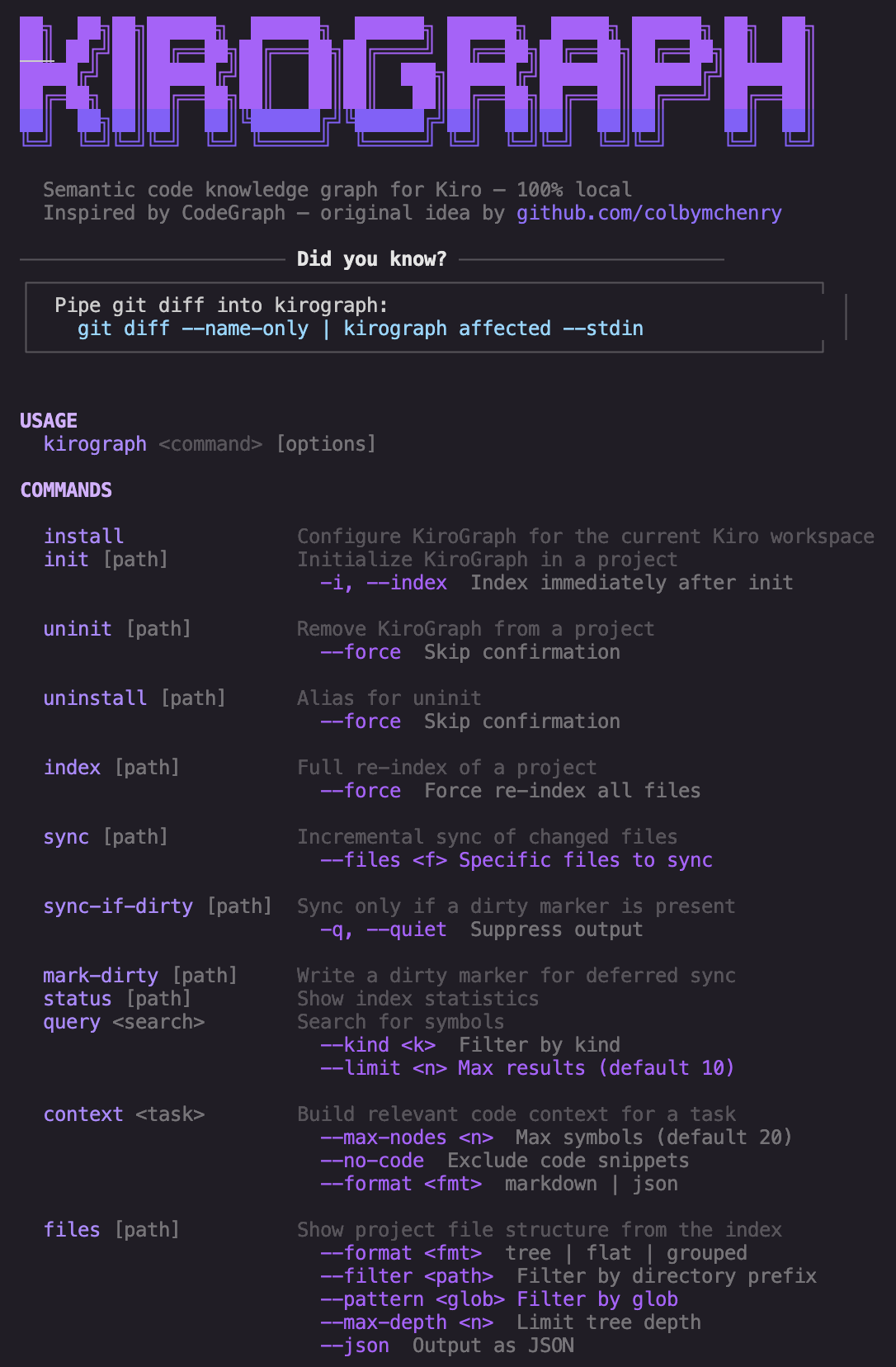
KiroGraph terminal

KiroGraph

KiroGraph terminal

Semantic code knowledge graph for Kiro: fewer tool calls, instant symbol lookups, 100% local.

Inspired by CodeGraph by colbymchenry for Claude Code, rebuilt natively for Kiro’s MCP and hooks system.

Full support is for Kiro only. Experimental integrations for other MCP-capable tools (Claude Code, Codex) are available but not fully tested. See Other Tools (Experimental) for details.

Why KiroGraph?

When you ask Kiro to work on a complex task, it explores your codebase using file reads, grep, and glob searches. Every one of those is a tool call, and tool calls consume context and slow things down.

KiroGraph gives Kiro a semantic knowledge graph that’s pre-indexed and always up to date. Instead of scanning files to understand your code, Kiro queries the graph instantly: symbol relationships, call graphs, type hierarchies, impact radius, all in a single MCP tool call.

The result is fewer tool calls, less context used…

📈 Where we left off

The first post covered the core idea: pre-index your codebase into a semantic graph so the AI agent queries structure instead of re-reading files. At that point KiroGraph had structural indexing, seven semantic engines, an interactive installer, and a CLI agent for kiro-cli.

That was v0.5.0. Here’s what happened next.

👻 Kiro acceleration effect

I want to be honest about something: this pace of development wouldn’t have been possible without Kiro.

KiroGraph went from v0.5.0 to v0.13.1 in about five weeks, adding architecture analysis, 14 new languages, 17 framework resolvers, an interactive graph dashboard, multi-client support, npm publication, a documentation site, and dozens of bug fixes. As a side project. With a day job.

Kiro’s spec-driven development is the reason. When I need to add a new framework resolver, I don’t start from a blank file. I write a spec, Kiro breaks it into tasks, and the implementation flows from there. The agent understands the existing patterns (especially with KiroGraph indexing itself), so new code fits the architecture without me hand-holding every decision.

But here’s where it gets interesting for open source specifically.

🔄 Simpler to contribute

When contributors work in a TypeScript codebase that isn’t their primary stack, it’s Kiro that makes that possible. The spec-driven approach gives structure to the work, the agent handles the TypeScript idioms, and the contributor focuses on what they actually know: the domain expertise. Someone who knows Elixir deeply can contribute a full Phoenix framework resolver without being a TypeScript expert. Someone who understands how Claude Code’s MCP configuration works can wire up a multi-client integration without knowing the internals of the indexing pipeline.

I received PRs for features I wouldn’t have imagined building myself, in domains where I lack expertise, and they were solid. My role shifted from “implement everything” to “review and guide”. That’s a fundamentally different way to run an open source project.

🔀 It works the other way around as well

Community members bring ideas from their domain. Architecture analysis, coupling metrics, layer detection patterns. These came from people who understood the problem space deeply. I had the codebase context and the TypeScript implementation skills. Kiro bridged the gap: their ideas became specs, specs became tasks, tasks became working code. Fast.

This is the pattern I didn’t anticipate: community members bring domain knowledge and ideas, Kiro accelerates the implementation regardless of who writes the code, and the project ships features that no single person would have built alone.

🌐 People as global reviewer

When you build in public with an AI-accelerated workflow, the community acts as a global reviewer. People try KiroGraph on codebases I’ve never seen, in languages I don’t write daily, with frameworks I’ve never used. They find the bugs that only surface in production-like conditions.

he multi-language call edge bug in v0.12.0 had actually existed since v0.1.0. Nobody noticed because nobody was using KiroGraph on a Java project until someone did.

Speed matters here and when a bug report comes in, I can fix it very quickly. Kiro understands the codebase, the fix is scoped, the PR is merged, and the reporter sees their issue resolved in hours, not weeks. That responsiveness builds trust, and trust brings more contributors.

⚡ Acceleration is real

I’m not being hyperbolic: combination of Kiro’s spec-driven development, KiroGraph’s self-indexing feedback loop, and a community that both contributes code and stress-tests the result creates a development velocity that feels disproportionate to the effort. One person maintaining a 30+ language code analysis tool with 18 MCP tools, seven semantic engines, and an interactive dashboard shouldn’t be sustainable. But it is, because the tooling makes it sustainable.

If you’re hesitant to contribute to a project because the stack isn’t your primary one, Kiro removes that barrier: the domain expertise is yours while the implementation details are handled.

👥 Kiro Community

As mentioned earlier, the project’s trajectory changed because people from *Kiro Community engaged with it. Two main examples:

  • Maurizio Argoneto commented on the first post about “hierarchical summarization” and the “big picture” problem. That conversation directly influenced the architecture analysis feature, one of the most useful additions for understanding large codebases at a high level.
  • Alessandro Franceschi contributed Elixir/Phoenix language support and the multi-client integration (Claude Code and Codex), expanding KiroGraph well beyond its original Kiro-only scope.

I was initially reluctant to open this project to other AI clients, agents, or IDEs, but Alessandro explained the situation to me very clearly: people are using Kiro in a wide range of ways and within a multi-tool AI development process that fits their needs. Restricting this project to Kiro alone would, in my view, mean closing the door to those who actually want to use it in this scenario. So I’m not opening it to competing AIs, but rather to complementary ones.

The stargazers, the folks who opened issues, the people who tried it on their own codebases and reported what broke. All of that feedback shaped what got built and in what order. That’s the kind of feedback loop that makes building in public worthwhile.

Kiro Community is really outstanding in this.

The project has been recognized by AWS Community Builders team

And also enthusiastically endorsed by Kiro Ambassadors

Noted by Vice President at Amazon Web Services

Loved by far more people than I might imagine (those are just sample, I may be missing some screenshots, apologies for that!)

📊 New features by numbers

As a result, from v0.5.0 to v0.13.1, I’ve added several features:

  • 30+ languages supported (up from 17)
  • 17 framework resolvers added
  • 18 MCP tools (up from 12)
  • Interactive graph dashboard with search, path finding, clustering, heat maps
  • Architecture analysis with coupling metrics
  • Multi-client support (Kiro, Claude Code, Codex)
  • Full documentation site
  • Published on npm

🏗️ What got built

Now let’s walk through the features themselves.

🏛️ Architecture analysis (v0.6.0)

An architecture layer that detects packages (via manifest files like package.json, go.mod, Cargo.toml, pom.xml, etc.) and assigns files to architectural layers: api, service, data, ui, shared. Each layer uses language-specific glob patterns, so a Python Flask project and a TypeScript Express project both get correctly classified.

On top of that, KiroGraph now computes coupling metrics between packages: afferent coupling (Ca), efferent coupling (Ce), and instability (Ce / (Ca + Ce)). Three new MCP tools expose this to the agent: kirograph_architecture, kirograph_coupling, kirograph_package.

The practical effect: when Kiro needs to understand where a new feature should live, or whether a refactor will create circular dependencies between packages, it can query the architecture graph instead of guessing from file paths.

🧠 Embedding model selection (v0.7.0)

The installer now presents an arrow-key menu with four curated models plus a custom option. The embeddingDim config field means all vector engines adapt automatically. Migrated from @xenova/transformers (v2) to @huggingface/transformers (v3), enabling support for modern ONNX models.

🔧 The esbuild migration (v0.8.0)

The old tsc build took 5-10 seconds. After migrating to esbuild + tsx, builds dropped to ~400ms with incremental watch mode. Type checking is now decoupled (npm run typecheck), so you get fast feedback during development and correctness checks when you need them.

Small change, big quality-of-life improvement. Especially when you’re iterating on the tool using the tool itself.

🪨 Caveman mode (v0.9.0)

Inspired by caveman by JuliusBrussee. The insight: KiroGraph’s graph tools already return compact, structured data. The bottleneck in long sessions isn’t the tool calls, it’s the verbose prose the agent wraps around them.

Caveman mode compresses the agent’s communication style. Four levels: off, lite, full, ultra. At ultra, you get abbreviations, arrows for causality, maximum compression. The rules are injected via the steering file and CLI agent prompt, so they’re always in context with zero extra tool calls.

It never touches code blocks, file paths, or technical terms. Only prose. And it auto-reverts to normal for security warnings or irreversible actions.

kirograph caveman ultra   # maximum compression
kirograph caveman off     # back to normal

📊 Hotspots, snapshots & dead code (v0.10.0)

Three new MCP tools that give the agent analytical capabilities:

  • kirograph_hotspots finds the most-connected symbols by edge degree. Before you touch a function, you want to know if it’s called from 3 places or 300.
  • kirograph_surprising finds non-obvious cross-file connections. Scores edges by path distance × kind weight. The highest-scoring pairs are the ones that represent unexpected coupling worth investigating.
  • kirograph_diff compares the current graph against a saved snapshot. Save before a refactor, diff after. See exactly what changed structurally.

Plus CLI commands for all of them, and a snapshot system (kirograph snapshot save|list|diff) that stores lightweight graph states in .kirograph/snapshots/.

🎨 Interactive graph dashboard (v0.11.0)

kirograph export now renders a full interactive graph visualization. No server required, works offline, three static files.

This is the kind of thing that’s hard to describe in text. You open it in a browser and suddenly the structure of your codebase is visible. Where the hotspots are, which modules are tightly coupled, where the dead ends live.

KiroGraph export

🧬 Elixir, Phoenix, Java/C# edge cases (v0.12.0)

Full Elixir language support: modules, functions, macros, protocols, implementations, structs. Plus Phoenix framework detection with route extraction from router.ex.

The bigger fix in this release was improving multi-language call edge extraction. It turned out that walkForCalls only recognized call_expression (JS/TS/Go/Rust), which meant C#, Java, Python, Ruby, and PHP produced zero call edges. The kirograph_callers and kirograph_callees tools were silently returning nothing for those languages. Fixed now, with per-language name extraction using tree-sitter field lookups.

Same story for inheritance edges in C# and Java, and namespace/package import resolution. These were the kind of bugs that only surface when real people try the tool on real codebases in languages other than TypeScript.

🔄 Sync progress & stability (v0.12.1)

Large codebase support got serious attention here. Paginated embedding (pages of 2,000 instead of loading everything into memory), WASM parser poisoning detection (skip a language if its parser aborts instead of retrying every file), sync progress output, and a staleness warning in kirograph_status when the index is behind.

The MCP sync awareness is particularly nice: when pending unindexed files exceed a threshold, the agent gets a warning and can choose to wait rather than working with stale data.

📚 Documentation site & npm (v0.12.2)

KiroGraph is now published on npm (npm install -g kirograph) and has a full documentation site with dark theme, responsive layout, scroll-spy navigation, and pages for docs, MCP tools, CLI reference, and changelog.

This was overdue. A tool that saves tokens shouldn’t require reading source code to understand how to use it.

And also how it evolves

🌍 The big language expansion (v0.13.0)

14 new languages in one release: Scala, Lua, Zig, Bash, OCaml, Elm, Solidity, Vue, Objective-C, YAML, HCL/Terraform, CSS, SCSS, HTML.

So many languages that I had to add a search feature to the docs.

17 new framework resolvers: Play (Scala), Nuxt/Vue, Solidity (Hardhat/Foundry/Truffle), SST, AWS CDK, Serverless Framework, AWS SAM, Terraform/OpenTofu, Pulumi, CloudFormation, Kubernetes/Helm, Docker Compose, Ansible, Angular, and AWS Amplify Gen 2.

My best pick: since I regularly work on IaC projects, why shouldn’t I use KiroGraph for them?

This is where the project’s scope expanded significantly. KiroGraph started as a TypeScript-focused tool. Now it indexes infrastructure-as-code (Terraform resources, CloudFormation stacks, Kubernetes manifests), smart contracts (Solidity with Hardhat/Foundry detection), and serverless configurations (SAM, CDK, SST handler resolution).

The framework resolvers are particularly useful: they understand that a handler string like "src/handlers/auth.handler" in a SAM template points to an actual function symbol, and they create the edge in the graph. The agent can then trace from an API route all the way to the implementation without reading YAML files.

🤝 Multi-client support (v0.13.1)

KiroGraph can now be installed for Claude Code and Codex in addition to Kiro.

kirograph install --target claude  # .mcp.json + .kirograph/claude.md + CLAUDE.md import
kirograph install --target codex   # .kirograph/codex.md + AGENTS.md block

All targets share the same .kirograph/ data. Installing another target only writes that tool’s integration files. The graph is the graph, regardless of which agent queries it.

Kiro remains the primary supported target. Claude Code and Codex are marked experimental, but they work. The community asked for it, and it made sense: the value of a pre-indexed code graph isn’t tied to a specific IDE.

🔭 What’s next

The roadmap from the first post is mostly done.

What’s left and what’s new:

  • Smarter sync: content hash per embedding to skip unchanged symbols even when the file was modified. The paginated embedding in v0.12.1 was a step, but there’s more to gain.
  • Cross-project search: for monorepos and workspaces with shared libraries. The graph is per-project right now.
  • Richer graph traversal: “explain this path” semantically, not just the nodes but why each edge exists.
  • Plugin system for engines and languages: the abstractions are clean enough that external contributions could be self-contained packages.
  • Kiro Power packaging: embedding KiroGraph into a configurable Kiro Power to reduce friction for folks who just want to install and go.

But in reality, the community is shaping the roadmap: this tool is designed to save tokens and improve the AI’s understanding of the provided code, so it is the users who ultimately determine what matters most.

This is happening daily:

What’s really on my mind: I’m particularly curious about what it would mean to integrate features from RTK into KiroGraph. I’m not aiming for a “one tool for everything” approach, but if I had to prioritize, this is probably what I’d focus on first (spoiler here).

🎯 Try it

npm install -g kirograph
cd your-project
kirograph install

The installer walks you through everything. Start with cosine if you’re not sure which engine to pick. Switch later if you need to.

GitHub logo

davide-desio-eleva
/
kirograph

Semantic code knowledge graph for Kiro: fewer tool calls, instant symbol lookups, 100% local.

KiroGraph terminal

KiroGraph

KiroGraph terminal

Semantic code knowledge graph for Kiro: fewer tool calls, instant symbol lookups, 100% local.

Inspired by CodeGraph by colbymchenry for Claude Code, rebuilt natively for Kiro’s MCP and hooks system.

Full support is for Kiro only. Experimental integrations for other MCP-capable tools (Claude Code, Codex) are available but not fully tested. See Other Tools (Experimental) for details.

Why KiroGraph?

When you ask Kiro to work on a complex task, it explores your codebase using file reads, grep, and glob searches. Every one of those is a tool call, and tool calls consume context and slow things down.

KiroGraph gives Kiro a semantic knowledge graph that’s pre-indexed and always up to date. Instead of scanning files to understand your code, Kiro queries the graph instantly: symbol relationships, call graphs, type hierarchies, impact radius, all in a single MCP tool call.

The result is fewer tool calls, less context used…

The repo is public. PRs are welcome. If you build on it, find a bug, or have thoughts on where it should go next, I’d love to hear from you.

A very special thanks to the Stargazers, your support means a lot and truly makes a difference.

🙋 Who am I

I’m D. De Sio and I work as a Head of Software Engineering in Eleva.
As of Feb 2026, I’m an AWS Certified Solution Architect Professional and AWS Certified DevOps Engineer Professional, but also a User Group Leader (in Pavia), an AWS Community Builder and, last but not least, a #serverless enthusiast.

10 Python modules, one dangerous pattern: How I found 13 critical vulnerabilities in an SDK

TL;DR: Every core module of a popular firewall management SDK uses Python’s unsafe XML parser. Here’s what that means for production systems — and how to fix it in 10 lines.

Your SDK dependencies may be parsing untrusted XML without protection — and you wouldn’t know until an incident.

I audited an open source Python SDK for firewall management. Auditor Core v2.3 flagged 13 critical findings across 10 production modules — all the same root cause.

Every core module uses Python’s native xml.etree.ElementTree parser — the one Python’s own documentation recommends replacing.

Affected files: base.py, firewall.py, network.py, panorama.py, policies.py, objects.py, ha.py, plugins.py, userid.py, __init__.py.

The library’s purpose is to parse XML responses from live network devices. Any attacker-influenced response (MitM, compromised appliance, rogue endpoint) gets processed without XXE or Billion Laughs protection.

Second finding: hashlib.sha1() used for value hashing in production logic — with the comment documenting it explicitly in the source. SHA-1 has been broken since 2017.

Both were found using Auditor Core v2.3 — my deterministic security engine that combines SAST, SCA, secrets, and CI/CD analysis with AI validation.

What makes it different from running Bandit or Semgrep directly:

→ Findings are deduplicated and correlated across detectors (the SHA-1 issue was caught by 3 rules, reported once with full context)

→ Every finding maps to SOC 2 TSC, CIS Controls v8, and ISO 27001:2022

→ Code quality noise is separated from real vulnerabilities before report generation

→ PDF output is structured for cyber insurance underwriting and SOC 2 readiness

The fix is trivial: replace import xml.etree.ElementTree as ET with import defusedxml.ElementTree as ET in each module. Drop-in compatible.

The broader lesson: libraries defer security hardening of internal parsing, then ship that risk into hundreds of downstream projects.

I’m currently offering confidential audits for Python/TS backends — $490, 3-day turnaround, NDA, SOC 2 ready report. If your team hasn’t reviewed its dependencies for unsafe XML parsing or weak crypto this year, let’s talk.

DataWizual Labs Web-site
Email: [email protected]

Zerostack Review: Unix-Inspired Rust Coding Agent for Developers

Most AI coding agents arrive in one of two shapes: a full editor you adopt wholesale, or a Node-based CLI that wraps an agent loop in your terminal. Zerostack, published to crates.io at version 1.0.0, takes a third route. It is written in pure Rust and built around the Unix philosophy — a single binary that does a focused job, reads standard input, writes standard output, and expects you to wire it into the rest of your toolchain. Here is what that design buys you, where it costs you, and how it compares to Claude Code and Cursor.

What Zerostack is betting on

The Unix philosophy predates most of the languages you use: build small programs that each do one thing, make them composable, and connect them with text streams. Zerostack applies that idea to AI-assisted coding. Instead of owning your editor or running a long-lived interactive session, it behaves like a command — you pipe a file, a diff, or a prompt into it, and it returns a result you can pipe somewhere else.

That is a genuine split from the tools most developers reach for. Cursor is an editor: a VS Code fork that puts the model inside your editing surface with inline completions and chat. Claude Code runs in the terminal, but as a fuller interactive agent that holds a session, manages its own context, and drives multi-step edits with little input from you. Zerostack deliberately does less. It wants to be a unit you compose, not a platform you live inside.

Whether that appeals to you comes down to workflow. If you already script your environment with Makefiles, git hooks, and shell pipelines, a composable agent slots in without friction. If you want the model to feel like a collaborator sitting in your editor, the Unix framing will read as extra wiring you have to do yourself.

Where the Rust-native architecture pays off

Pure Rust is not a marketing line here — it changes how the tool ships and runs.

A Rust program compiles to a single statically linked binary. There is no separate language runtime to install, no dependency tree to resolve at install time, and no Electron shell. Compare that to a Node-based CLI, which needs Node.js present (or bundles a copy) and pulls a tree of npm packages, or to an editor like Cursor, which ships a full Chromium-based application. Zerostack is one file you can drop onto a machine.

That has three practical consequences.

Cold start. Launching a native binary skips the cost of spinning up a language runtime first. How large the gap is depends on your hardware, but the architectural floor sits below an interpreted CLI’s.

CI and containers. A single binary is trivial to add to a build image or a pipeline step — no node_modules, no version manager, no lockfile drift. For teams that want an agent running inside automation rather than only on developer laptops, that is the difference between easy and fiddly.

Composability. Because Zerostack reads stdin and writes stdout, you can pipe a git diff into it and send its output to the next command, the same way you call grep or jq. An agent that behaves like a normal Unix tool is one you can automate without learning an SDK.

Treat Zerostack as a pipeline stage, not a chat window. The clearest wins come from wiring it into steps you already run — a pre-commit hook that drafts a commit message, a script that summarizes a diff before review — rather than using it as a conversational assistant.

Where it falls short of Claude Code and Cursor

Now the counterweight. Version 1.0.0 is a first release, and a coding agent’s value compounds with its ecosystem — model integrations, editor plugins, documentation, and the accumulated edge cases that a large user base surfaces over time. Claude Code and Cursor have all of that. A brand-new crate does not.

If you want inline completions, an editor that renders diffs visually, and a model that tracks your whole project as you move through it, Cursor is built for precisely that, and Zerostack is not trying to compete there. If you want a mature agent that manages its own context window and runs multi-step tasks with minimal supervision, Claude Code is further down that road.

Zerostack also leaves more to you. A composable tool assumes you will do the composing. There is no GUI to discover features through, and the work of wiring it into something useful is yours. That is the cost side of the Unix philosophy: the tool stays simple, but the system around it is yours to design and maintain.

Version 1.0.0 signals a stable interface, not a long track record. Before you put Zerostack on a critical path — a CI gate, or a hook that rewrites code — run it against throwaway branches first and keep a non-agent fallback. Treat early adoption as evaluation, not commitment.

So does Zerostack earn a spot in your terminal? If you live in the shell, script aggressively, and want an AI step you can pipe like any other command, it is worth installing and running against a real task this week — the install cost is one binary. If you want the model inside your editor, or an agent that runs ahead of you on multi-step work, your time is better spent with Cursor or Claude Code, and you can revisit Zerostack as it matures past its 1.0 line.

Originally published at pickuma.com. Subscribe to the RSS or follow @pickuma.bsky.social for new reviews.

Why Enterprise GenAI Projects Fail After the Pilot Stage

Enterprise AI adoption across North America is entering a very different phase.

Over the last two years, large organizations invested heavily in generative AI pilots, internal copilots, workflow automation tools, and AI-powered customer platforms. Innovation teams proved that GenAI could generate content, summarize data, automate workflows, and improve internal productivity.

But production environments are exposing a different reality.

Many AI initiatives that looked promising during the prototype phase are struggling once they interact with real enterprise infrastructure, governance systems, and operational workloads.

The challenge is no longer “Can AI work?”

The challenge is now:

Can AI systems operate reliably at enterprise scale without creating infrastructure instability, governance risks, or operational overhead?

That question is becoming central for engineering leaders, platform teams, and digital transformation executives across industries like insurance, healthcare, financial services, logistics, and enterprise SaaS.

Enterprise AI Is Moving From Experimentation to Operational Accountability

According to Gartner, more than 30% of generative AI projects are expected to move from pilot to production over the next two years.

That transition sounds straightforward in theory.

In practice, production AI systems behave very differently from controlled prototypes.

During pilot stages, teams usually work with:

  • Limited datasets
  • Small user groups
  • Isolated environments
  • Minimal governance pressure
  • Controlled infrastructure conditions

Those environments often make AI systems appear more stable than they actually are.

Once deployments expand across departments, regions, and customer-facing systems, complexity increases rapidly.

Organizations begin encountering issues such as:

  • Latency spikes during inference
  • Escalating API and compute costs
  • Governance and compliance gaps
  • Limited observability into AI behavior
  • Reliability problems across customer workflows
  • Security concerns tied to enterprise data access

This is where many GenAI success stories begin to stall.

Why AI Prototypes Rarely Reflect Enterprise Reality

One of the biggest misconceptions around enterprise AI adoption is that strong model performance guarantees deployment success.

It does not.

In production environments, infrastructure maturity and operational governance often matter more than the model itself.

AI systems do not operate independently inside enterprises. They interact with:

  • Cloud infrastructure
  • Authentication systems
  • Customer data environments
  • Internal APIs
  • Compliance frameworks
  • Legacy enterprise platforms

That interconnected architecture creates operational pressure that pilots rarely expose.

For example, a customer support copilot may perform exceptionally well during internal demos.

But once that same system begins serving thousands of users across multiple regions, entirely new risks emerge:

  • Response inconsistency
  • Infrastructure bottlenecks
  • Data governance exposure
  • Compliance concerns
  • Availability failures during peak traffic

This is why enterprise AI conversations are shifting away from “rapid experimentation” toward “production readiness.”

Infrastructure and Governance Are Becoming the Real AI Bottlenecks

Enterprise AI scaling introduces infrastructure demands many organizations underestimate early in deployment cycles.

Inference workloads can generate unpredictable compute consumption. Retrieval-augmented generation pipelines introduce latency dependencies. Third-party AI APIs create availability risks outside internal engineering control.

For platform engineering teams, these are no longer AI discussions alone.

They become operational governance discussions.

Security validation is becoming equally important.

Across North America, regulatory conversations around AI transparency, data privacy, and governance are accelerating. Enterprise buyers are becoming increasingly cautious about systems that lack:

  • Explainability
  • Auditability
  • Monitoring visibility
  • Infrastructure transparency

As a result, organizations are validating operational readiness much earlier in deployment cycles.

Before scaling AI systems, engineering teams are increasingly reviewing:

  • Data access controls
  • Model monitoring frameworks
  • Infrastructure redundancy
  • Governance alignment with SOC 2 policies
  • Human oversight mechanisms
  • AI observability and logging systems

These are rapidly becoming baseline enterprise expectations.

The Operational Risks Most Organizations Underestimate

One of the least discussed challenges in enterprise AI scaling is operational ownership.

During pilot stages, AI projects are often driven by innovation teams or isolated engineering groups.

Production deployment changes that completely.

Once AI systems begin affecting customer workflows or business operations, responsibility expands across:

  • Platform engineering
  • Security operations
  • Legal teams
  • Customer experience groups
  • Infrastructure teams
  • Executive leadership

Without clear operational alignment, deployment velocity slows dramatically.

Organizations are also discovering that AI systems introduce ongoing maintenance layers traditional software systems did not require at the same scale.

Teams now need to continuously manage:

  • Prompt optimization
  • Retrieval pipeline tuning
  • Model evaluation monitoring
  • Human review workflows
  • Cost optimization
  • Infrastructure scaling

This creates a permanent operational layer inside enterprise technology organizations.

For companies already balancing cloud modernization, cybersecurity priorities, and platform reliability goals, unmanaged AI complexity can quickly become unsustainable.

Why Enterprises Are Adopting Phased AI Scaling Strategies

Because of these operational realities, many organizations are moving away from aggressive enterprise-wide AI rollouts.

Instead, they are prioritizing focused operational use cases with measurable outcomes.

Some of the most successful deployments are tied directly to business functions such as:

  • AI-assisted claims processing
  • Intelligent support routing
  • Developer productivity copilots
  • Revenue cycle management systems
  • Internal knowledge retrieval platforms

This phased approach allows organizations to validate:

  • Infrastructure resilience
  • Governance processes
  • Operational stability
  • Customer impact
  • Cost sustainability

before broader expansion.

It reduces deployment risk while improving long-term scalability planning.

What Enterprise AI Leaders Are Prioritizing in 2026

The enterprise AI conversation is evolving from innovation metrics to operational accountability.

Technology leaders are no longer evaluated based on whether they launched AI pilots.

They are increasingly evaluated on whether AI systems:

  • Deliver measurable business value
  • Operate reliably at scale
  • Maintain governance compliance
  • Protect customer trust
  • Avoid operational instability

That shift is influencing how enterprises select technology partners as well.

Organizations are prioritizing firms that understand production infrastructure, enterprise governance, and operational scaling — not just rapid AI prototyping.

Companies like GeekyAnts, Accenture, Thoughtworks, and IBM Consulting are increasingly participating in conversations around AI operational maturity rather than experimentation alone.

That distinction matters.

Because the next phase of enterprise AI adoption will likely be defined less by model capability — and more by operational sustainability.

Final Thoughts

Enterprise GenAI adoption is no longer about proving possibility.

Most organizations already understand what AI can do.

The real challenge now is operationalizing AI responsibly inside complex enterprise ecosystems.

That means validating:

  • Infrastructure resilience
  • Governance readiness
  • Security alignment
  • Monitoring visibility
  • Cost sustainability
  • Customer impact

before scaling deployments aggressively.

In many enterprise environments, architecture reviews and operational readiness assessments are becoming just as important as the AI models themselves.

And that shift will likely determine which AI initiatives create long-term business value and which remain stuck in the pilot stage forever.