Dealing with WebSocket in Dart

WebSocket is a protocol created more than 10 years ago offering a bidirectional communication channel between a client and a server. It fixes the HTTP polling issue.

The WebSocket Protocol attempts to address the goals of existing bidirectional HTTP technologies in the context of the existing HTTP infrastructure; as such, it is designed to work over HTTP ports 80 and 443 as well as to support HTTP proxies and intermediaries, even if this implies some complexity specific to the current environment. However, the design does not limit WebSocket to HTTP, and future implementations could use a simpler handshake over a dedicated port without reinventing the entire protocol. This last point is important because the traffic patterns of interactive messaging do not closely match standard HTTP traffic and can induce unusual loads on some components.

— RFC6455, section 1

Today, let have some fun with WebSocket in Dart

WebSocket Server with shelf

Unfortunately, like most of the modern language, there is a framework war. Many different implementation exists for doing the same thing. I don’t really have time to check all of them, so, I will just do quick table. All of them are supporting WebSockets.

package version framework? deprecated? notes
shelf 1.4.2 no no maintained by dart team
http_server 1.0.0 no yes previous official http server
frog 1.2.6 yes no minimalist backend framework
shelf_easy 5.2.0 yes no lightweight framework
darto 0.0.35 yes no micro-web framework
serinus 2.1.12 yes no flexible framework
alfred 1.1.3 yes no expressjs like web server
vania 1.1.5 yes yes high-performance framework
finch 1.3.2 yes no lightweight framework (looks popular)

Most of them are using shelf or http_server as backend, not sure if it’s really necessary to test them all one by one. Anyway, I will use shelf for one reason: this is not a framework, and it is maintained by the Dart team. I’m a bit sad though, because I can’t find a lot of documentation, except the official API. To use WebSocket with shelf, the shelf_web_socket handler is required, again, only the API documentation can easily be found. A full example can be found in server/simple directory from dart source code.

For this exercise, I would like to have something simple:

  • long living foreground process
  • listening on 127.0.0.0:8080
  • only one route: /
  • all other routes are redirected to /
  • automatic support of web socket
  • echo all message sent by the client

No authentication, no encryption, just a simple websocket echo server. First, let try to understand how to use shelf. What kind of packages will be needed there?

  • shelf from the shelf package. It includes different kind of helpful classes to deal with the server, like Cascade (managing handlers), Pipeline to compose Middlewares and Handlers, Request to give an abstract view of a request, Response to offers an interface for the HTTP response returned and finally Server as adapter. We will see that probably later.

  • shelf_io from the shelf package. This one is an adapter, mostly used to handle HttpRequest, if one wants to create a quick and dirty http server, one can use the server() method.

  • shelf_router from the shelf_router package. This is a routing library designed for shelf, offering Route and Router classes to deal with HTTP path routing. In our case, it will be only used to redirect all path to /.

  • shelf_web_socket from the shelf_web_socket package. Well, it has already be described before, this is an handler to deal with WebSockets.

  • web_socket_channel package, mostly used for few exposed classes.

Knowing that, here the headers used to deal with a simple shelf WebSocket server:

import 'dart:collection';
import 'dart:convert';
import 'dart:io';
import 'package:ws/ws.dart' as ws;
import 'package:shelf/shelf.dart';
import 'package:shelf/shelf_io.dart' as shelf_io;
import 'package:shelf_router/shelf_router.dart' as shelf_router;
import 'package:shelf_web_socket/shelf_web_socket.dart';
import 'package:web_socket_channel/web_socket_channel.dart';

To create a WebSocket handler, a callback function is required, it is called onConnection in the implementation. This function is taking 2 arguments, the first one is a WebSocketChannel object, and the second argument is a String representing an eventual WebSocket subprotocol.

void _onConnection(WebSocketChannel webSocket, String? subprotocol) {
  webSocket.sink.add('{"msg":"ready"}n');
  webSocket.stream.listen((message) {
    print('received: "$message"');
    webSocket.sink.add('{"msg":"$message"}n');
  });
}

The WebSocketChannel object got 2 interesting properties:

  • sink – an instance of the Sink class – used to send value to the client, it can be used also to close the connection with the close() method. Then, in onConnection() function, when the connection is ready, the server is sending a first message.

  • stream – an instance of the Stream class – used to receive the message emitted by the client. In onConnection() function, every time a client is sending a message, the server will print the message locally on STDOUT and will return the same message to the client.

Handler _webSocketHandler1() {
  return webSocketHandler(
    _onConnection,
    protocols: null,
    allowedOrigins: null,
    pingInterval: Duration(seconds: 30)
  );
}

A dedicated function to start this first test is also required. Let call it startShelfIO where shelf_io will be used to start the server using serve() method.

void startShelfIO() {
  shelf_io
    .serve(_webSocketHandler1(), 'localhost', 8080)
    .then((server) {
      print('server started');
    });
}

Finally the main() function, it will simply invoke startShelfIO() function and do nothing more.

void main(List<String> arguments) {
  startShelfIO();
}

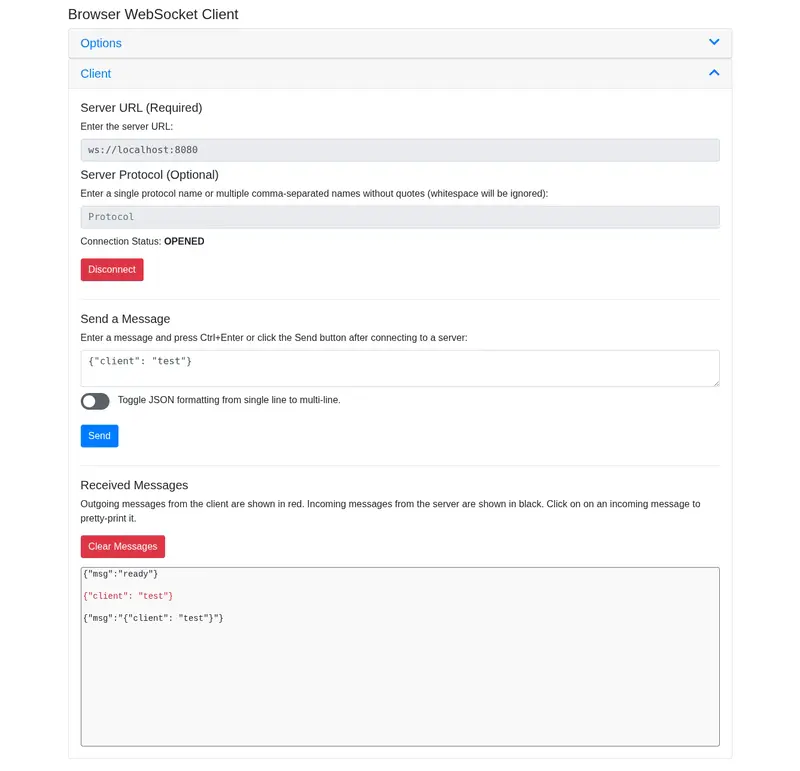
Hmm. We don’t have a WebSocket client available right, it will be coded in the next part of this article. Unluckily, curl does not have a full support for the WebSocket protocol (it can receive but not send data). Instead, we can install the browser-websocket-client open-source plugin available on the Chrome Web Store. Are you Firefox friendly? You can use Weasel and its still open-source. If you prefer a command line tool, you can also check websocat or claws.

$ dart run
Building package executable... 
Built ws:ws.
server started
received: "{"client": "test"}"

It seems to works… What if we want to close the connection from the server side? Simply close() the sink.

webSocket.sink.close();

To do something before closing the connection or if the client is closing it on its side, the onDone attribute can be set while invoking the listen() method.

If this stream closes and sends a done event, the onDone handler is called. If onDone is null, nothing happens.

— listen abstract method

Am I following the best practices here? Absolutely not! But if you want to fix my mess and add many layers of security, here a small list of references to do that:

If you simply see other implementation or read more about WebSockets server on Dart:

WebSocket Client with web_socket

I will not do the same error twice and start to check all frameworks/implementations to deal with a WebSocket client in Dart. The first one available is the web_socket package. This one is directly maintained by the Dart team and the source code can be seen in pkgs/web_socket. An unique example is also available. The previous package called web_socket_channel was the one used by most of the project, but due to the complexity, a simpler one was required.

$ dart pub add web_socket
Resolving dependencies... 
Downloading packages... 
  web_socket 1.0.1 (from transitive dependency to direct dependency)
Changed 1 dependency!

Only the web_socket package will be required here. Note: to make things easier, just create a new dart file like bin/wsc.dart.

import 'package:web_socket/web_socket.dart';

Let create an isolated function called webSocketClient to deal with the socket initialization.

void webSocketClient() async {
  final socket = 
    await WebSocket.connect(
      Uri.parse('ws://localhost:8080/')
    );
  socket.sendText('hello');
  socket.events.listen(
    (event) async {
      switch (event) {
        case TextDataReceived(text: final text):
          print("$text");
        case BinaryDataReceived(data: final data):
          print("$data");
        case CloseReceived(code: final code, reason: final reason):
          print("$code, $reason");
      }
      socket.close();
    }
  );
}
  • The connect() static method is called with the URL of the server using an Uri object. It returns a Future<WebSocket> object.

  • sendText() method is then invoked to send a text message to the server. If binaries are required, then use sendBytes() method. It returns nothing and in case of disconnection, the messages are silently discarded.

  • The WebSocketEvent class is then used to deal with the events received on the socket. Those events are usually messages sent by the server, they can are defined in three different classes:

  • The close() method is called to explicitly close the connection from the client side.

The client side here is quite simple, and does not involve complex procedure. To invoke it, just execute the webSocketClient() function in the main() entry-point.

void main() async {
  webSocketClient(socket);
}

Time to test if it is working correctly

$ dart run bin/wsc.dart
{"msg":"ready"}

It seems to work. The client connects to the server, return the message received and simply close the connection.

Another popular WebSocket client package called web_socket_client is also available at pub.dev. I’m not really sure if it adds more features or is more flexible than the default WebSocket client maintained by the Dart team. If you are interested to see more implementations and examples, here a quick list:

Conclusion

Creating a WebSocket client and a WebSocket server was not so hard, even if the documentation is hard to find, and most of the examples are limited to simple use cases. The subprotocol feature present in WebSocket is kinda interesting and I think I will work on that on another post. Again, the code presented above was made for test purpose only, I can’t recommend anyone to use it in production environment.

Anyway, I think in a future publication, we will create something a bit more complex, like creating a custom communication protocol between a client and a server, using binary data.

Cover Image by Andrew Knechel on Unsplash

AI Agents Are Breaking One of the Most Important Rules of Software Design

A recent paper about AI agents in production revealed something fascinating:

Most real-world “AI agents” are not autonomous systems.

They’re heavily constrained workflows with:

  • limited autonomy,
  • strict tool access,
  • human supervision,
  • deterministic guardrails,
  • narrow scopes.

In other words:

Production AI systems are far less autonomous than AI discourse suggests.

And honestly, that makes complete sense.

Because modern software was specifically designed to reduce ambiguity.

LLMs reintroduce it everywhere.

The hidden purpose of user interfaces

We usually think of UIs as convenience layers.

Buttons.
Forms.
Menus.
Tabs.

But that’s not their real purpose.

The real purpose of a UI is constraint.

A good interface:

  • narrows the space of possible actions,
  • reduces interpretation,
  • exposes capabilities,
  • prevents invalid states,
  • guides user behavior.

In other words:

Good software reduces ambiguity.

That rigidity is not accidental.

It’s architecture.

Natural language removes constraints

Now compare that with an AI agent.

Instead of clicking:

Approve invoice

you type:

“Can you handle the invoice issue from last week?”

This sounds more human.

But technically, it’s dramatically worse.

The system now has to infer:

  • what “handle” means,
  • which invoice,
  • which workflow,
  • which permissions,
  • which side effects are acceptable,
  • how confident it should be.

We replaced explicit intent with probabilistic interpretation.

And unlike traditional software bugs, LLM mistakes are often:

  • plausible,
  • silent,
  • partially correct,
  • hard to detect.

Which is exactly what makes them dangerous.

The paper accidentally exposes the core issue

The study is interesting because it quietly contradicts much of the “fully autonomous agents” narrative.

The paper found that most production agents:

  • execute relatively short workflows,
  • rely heavily on human validation,
  • use simple orchestration patterns,
  • operate inside constrained environments.

Why?

Because unrestricted probabilistic systems are operationally unstable.

Once AI moves from demos into production, companies rediscover why software engineering evolved around:

  • constraints,
  • validation,
  • permissions,
  • deterministic state,
  • explicit workflows,
  • auditability.

The more critical the system becomes, the more autonomy gets reduced.

That’s not a temporary limitation.

It may actually be a fundamental architectural reality.

Most software is not generative

This is where AI discourse often disconnects from reality.

The majority of the software industry is not about generating things.

It’s about maintaining coherent state.

ERPs.
CRMs.
Accounting systems.
Identity systems.
Supply chains.
Payments.
Compliance systems.

These platforms exist to guarantee consistency.

Not creativity.

Which explains why fully conversational interfaces often feel awkward once you move beyond demos.

To use them effectively, users frequently need:

  • a mental model of the system,
  • knowledge of available capabilities,
  • understanding of workflow implications,
  • awareness of hidden constraints.

Ironically, natural language interfaces can increase cognitive load instead of reducing it.

AI works best where ambiguity is acceptable

This is why the most successful AI products today are mostly:

  • copilots,
  • assistants,
  • drafting tools,
  • semantic search systems,
  • developer tooling,
  • workflow accelerators.

Cursor.
GitHub Copilot.
Notion AI.
Figma AI.

Notice the pattern:

These systems operate in environments where:

  • multiple outputs may be acceptable,
  • humans remain in the loop,
  • approximation is tolerable,
  • iteration is expected.

That’s very different from transactional software.

The future is probably hybrid

I don’t think software becomes “just chat”.

I think the winning architecture looks more like this:

Deterministic systems + Probabilistic interaction layers

The core business logic remains structured and reliable.

AI becomes:

  • an interface layer,
  • a semantic layer,
  • an orchestration layer,
  • a cognitive acceleration layer.

Not a replacement for deterministic architecture.

And interestingly, that’s exactly what we already observe in production systems today.

Not autonomous agents.

Constrained probabilistic interfaces.

Maybe AI is really an interface revolution

I increasingly think LLMs are less important as reasoning engines than as interface technology.

For decades:

humans adapted themselves to software.

Now:

software starts adapting to human expression.

That’s genuinely transformative.

But removing constraints entirely may turn out to be one of the worst possible ideas for complex systems.

Because constraints were never the enemy.

They were the thing making software reliable.

Hermes Agent: Autonomous SEO engineer for 11ty

Hybrid architecture of the Hermes AI agent for Eleventy

This is a submission for the Hermes Agent Challenge.

What I Built: The End of Manual SEO Era

Let’s be honest: we all love the speed and security of the Jamstack architecture. Writing articles in Markdown for generators like Eleventy (11ty) is a pleasure. But there’s one thing that every developer-blogger hates. It’s routine. 😩

Writing an article is only 50% of the work. Then hell begins: you need to come up with the perfect title, squeeze the essence into 150 characters of description for the Google snippet, and write a short ai_summary. And what if you have hundreds of them?

That’s why I decided to go beyond the usual ChatGPT assistants. I created an autonomous digital worker based on the Hermes framework. 🤖

My script doesn’t just “generate text” in a browser window. It’s deeply integrated into my workflow “in a meaningful way”. This agent:

  1. Scans the local directory with hundreds of Markdown files on its own.
  2. Analyzes the content of each article.
  3. Generates perfectly structured JSON with missing SEO metadata.
  4. Directly overwrites the Front Matter in files, breaking nothing.

Demo: Autonomy in Action

Instead of building heavy and unnecessary graphical interfaces (GUI) that only consume resources, my demo project is a clean, lightning-fast console automation. It’s an invisible back-office worker that manages content right in your terminal.

When you launch the agent, it scans the entire blog in milliseconds, detects “problematic” articles without meta tags, connects to cloud intelligence, and autonomously closes all SEO gaps. The work that previously took hours of manual copy-paste is now done in one click.

(Below in the article, we will detail the terminal logs and the final result, but for now, let’s take a look under the hood of this system).

Code: Architecture and Technology Stack

The entire project is built on the principles of idempotence and fault tolerance. This means that the script can be run as many times in a row as you like: it will never create duplicate content, spoil existing tags, or simply continue working from where it left off.

Here is the complete source code and showcase repository for this challenge:
👉 Hermes Jamstack Showcase Repository

To better understand how a local file on your computer communicates with the cloud, take a look at this architectural scheme:

Hybrid architecture of the Hermes AI agent for Eleventy

My Tech Stack: Why These Tools?

To create Hermes, I chose the lightest, but time-tested development technologies:

  • Node.js (Runtime): A Scandinavian hammer for working with the file system and asynchronous requests. Provides instant directory scanning.
  • Eleventy (11ty): Our favorite, super-fast static site generator. Since it works with pure Markdown, it became an ideal environment for automation.
  • Gray-Matter (Parser): A special library that can break down a Markdown file into two parts: an object with metadata (Front Matter) and pure article text. Without it, the AI would simply get tangled up in markup.
  • Gemini 2.5 Flash API (Cloud Brain): The new generation of models from Google. I chose the Flash version because it has phenomenal generation speed, strict adherence to prompt instructions, and a penny’s worth of request cost.

How I Used Hermes Agent: Three Pillars of Autonomy

To integrate the agent into the workflow “in a meaningful way”, I had to solve three main engineering problems. I didn’t want the script to just chatter – I needed a predictable digital worker.

Here are the three pillars that my Hermes Agent stands on.

1. Structured Data (Taming Chaos)

The main problem with all LLMs is that they love to “talk”. If you ask an AI to write an SEO description, it might respond: “Of course, here’s your description: …”. For an automated system, such text is a failure and a broken site build.

So I used strict prompt engineering, forcing Gemini 2.5 Flash to return a strictly typed JSON object.

JavaScript code that forces Gemini AI to return strictly structured JSON data

As you can see in the code above, we’re not just asking for JSON, we’re also additionally cleaning the response from markdown markup (`json), which neural networks love to add. This guarantees that the JSON.parse() method will work without errors. 🎯

2. Idempotence: The Main Rule of a Doctor – “Do No Harm”

Imagine that you accidentally ran the script twice. A bad script would generate duplicates or spoil your manual work. My autonomous agent adheres to the principle of idempotence. 🛡️

Before wasting API credits, Hermes uses gray-matter to parse the Markdown file and check for the presence of SEO fields:

Idempotent Node.js script that safely updates Front Matter in Markdown files using gray-matter

The agent works like a smart filter. If an article already has a perfect description and generated ai_summary – it instantly skips it. If the fields are empty or too short (less than 50 characters) – it precisely fills them in, assembles the file back, and safely saves it to disk.

We also recommend reading: Pressable MCP i Gemini CLI: AI-managed hosting in Linux

3. Fault Tolerance: API Error Handling

During a massive audit of hundreds of files, I encountered the fact that even Google servers sometimes can’t handle the load and return a 503 Service Unavailable error.

An ordinary script would “fall” at this point, and the developer would have to search for which file exactly broke. But I have an autonomous agent! It must survive. 🦾

Block diagram of fault tolerance showing the emergency pause protocol for handling API 503 errors

I added a try...catch block directly inside the processing cycle. If Hermes receives a refusal from the servers, it doesn’t stop the entire program. It outputs a red warning to the console, understands that the servers are overloaded, makes an emergency pause for 15 seconds (so the API can “breathe”), and calmly moves on to the next file.

This makes the architecture absolutely fault-tolerant. You can run the script on 1000 articles, go drink coffee, and be sure that it will complete the work. ☕

We also recommend reading: SMM Turbo: Hybrid AI editor for Instagram carousels

Final: Mass SEO Audit in Action

This is what the real triumph of automation looks like. When I run the node hermes.js command in the terminal, my autonomous SEO engineer comes to life.

It scans the entire blog directory in milliseconds. Pay attention to the log: it recognizes articles where SEO is already set up and outputs a [SKIP] message. But as soon as it finds a file with an empty description or missing ai_summary, it connects to cloud intelligence, generates JSON, and writes it.

VS Code terminal showing a successful mass SEO audit and injection of ai_summary and description fields

The yellow letters M (Modified) in the left panel of VS Code are the best proof that the script actually physically overwrote files on disk. No manual copy-paste between browser tabs. No broken tags in Front Matter. Just pure efficiency. ✨

Conclusion: Delegate Processes, Not Tasks

Creating this project for the Hermes Agent Challenge completely changed my understanding of artificial intelligence. We are moving from the era of “AI as a chatbot” to the era of “AI as an autonomous employee”. 🚀

You no longer need to spend hours filling in meta tags manually. You can delegate AI an entire process, creating such fault-tolerant local scripts. Your Jamstack blog can live its own life and autonomously optimize itself for search engines.

Ready to launch your first agent? 🤖🚀
Jump to the official Hermes Agent Framework page. Explore the documentation, download the source code, and join the autonomous open AI revolution!
👉 OPEN OFFICIAL HERMES WEBSITE

If you want to feel more automation magic, be sure to test our free SMM Turbo service. It’s a hybrid AI editor that takes over the routine of creating viral Instagram carousels! 🔥

And how do you use AI in your Jamstack projects? Are you ready to give an autonomous agent access to your local files? Write your thoughts in the comments, it’ll be cool to discuss this with the community! 👇

From Zero to Agent: A Practical Roadmap for Building Your First AI Agent

You have read the articles, browsed the frameworks, and maybe even watched a few tutorials. But when you sit down to actually build your first AI agent, the sheer number of choices can feel paralyzing. Which framework should you start with? Do you need MCP servers from day one? Should you build a multi‑agent system or keep it simple?

This roadmap is for you—the developer or small team ready to move from theory to practice. It outlines a pragmatic path from zero to a working agent, with milestones that keep you moving without getting lost in the weeds.

Start with a Single Task, Not a General Assistant
The most common mistake is trying to build an agent that “does everything.” A general assistant needs to handle arbitrary questions, choose from hundreds of tools, and gracefully recover from every possible failure. That is a year‑long project.

Instead, pick a single, well‑defined task. For example: “Given a GitHub issue URL, fetch the issue, summarize it, and post a draft comment back to the thread.” This task is narrow, testable, and valuable. It involves tool use (GitHub API), a clear workflow, and a concrete success condition.

Starting narrow forces you to make concrete decisions. You cannot hand‑wave away complexity when you have to actually fetch data and post a comment.

Choose a Framework That Matches Your Workflow
For a first agent, avoid over‑engineering. You do not need a multi‑agent conversation or a complex state machine. A lightweight framework that supports tools and basic loops is perfect.

Consider starting with a minimal library like smolagents or PydanticAI. They give you just enough structure to define a tool, call an LLM, and loop until the task is complete. If you prefer a more guided approach, CrewAI’s linear task decomposition works well for sequential workflows.

The goal is not to pick the “best” framework permanently. The goal is to pick something that gets you to a working agent quickly, so you learn what you actually need.

Implement Tools as Simple Functions
In your first iteration, tools can be plain Python functions. Do not worry about MCP servers or complex authentication yet. Write a function that fetches a GitHub issue using the requests library. Write another that posts a comment. Wire them into your framework’s tool registry.

This keeps the cognitive load low. You can always refactor to MCP servers later when you understand the integration pattern. The important lesson is how the agent decides which tool to call, how it formats arguments, and how it handles errors.

Start with a Strong, Small Model
For a first agent, choose a model that balances capability and cost. Small, fast models are often sufficient for simple tool‑calling and summarization. They also fail faster and cheaper, which accelerates learning.

Avoid beginning with the largest, most expensive model. Over‑reliance on raw model intelligence can hide weaknesses in your agent’s design. A smaller model will force you to write clearer prompts and simpler workflows.

Add a Simple Evaluation
Before you declare success, define what success means. For the GitHub issue agent, success might be: “the comment is posted, contains a summary of the issue, and does not contain obvious errors.” Run your agent on five different issues and manually check the results.

This manual evaluation is quick and reveals where the agent struggles—maybe it cannot find the issue body, or the summary misses key details. Fix those problems one by one. Do not move on to new features until the core flow is reliable.

From Prototype to Production: What to Add Next
Once your agent works on a handful of test cases, consider adding these production‑ready elements.

Error handling and retries address the reality of flaky APIs and network timeouts. Make your tool functions robust with exponential backoff.

Observability is essential for understanding why an agent failed. Log every LLM call, tool invocation, and decision point. A simple print statement is better than nothing, but consider structured logging early.

Human‑in‑the‑loop can be added for irreversible actions. For posting a comment, you might want a quick approval step before the agent actually sends it. Most frameworks support a “human input” node.

MCP servers become worthwhile when you have multiple agents or need to reuse the same integrations across projects. But wait until you feel the pain of duplicating tool code before migrating.

Leverage the Ecosystem: Skills and Scenarios
You do not need to invent everything. Before building a custom GitHub tool, check if a pre‑built skill exists. The AI Skill Navigation directory includes skill packs for common platforms and workflows. Similarly, scenario libraries provide complete examples for tasks like “issue summarizer” or “PR reviewer.” Studying these can shortcut your learning curve significantly.

The Learning Loop
Building your first agent is not about getting everything right the first time. It is about iterating quickly. Start narrow, choose a lightweight framework, implement simple tools, use a small model, and evaluate manually. Expand only after the core works.

With each iteration, you will internalize the patterns that matter: tool selection, state management, error recovery, and evaluation. These skills transfer to any framework or model.

And when you are ready to explore more advanced patterns—multi‑agent systems, complex state machines, or extensive MCP integrations—you will have a solid foundation to build on.

Ready to Start?
Your first agent is waiting to be built. Begin with a single task, a lightweight framework, and a small model. Use the resources at AI Skill Navigation to discover frameworks, find reusable skills, and study real‑world scenarios. The path from zero to agent is shorter than you think—take the first step today.

Vibe Coding Actually Changed How I Write Features — Here’s What That Looks Like Day-to-Day

TL;DR: The thing that finally broke me wasn’t a complex distributed systems problem — it was writing my fourteenth handleSubmit function of the month. Same shape, same validation logic, same error state wiring, same loading spinner toggle.

📖 Reading time: ~28 min

What’s in this article

  1. The Problem: You’re Spending More Time on Boilerplate Than on Actual Engineering
  2. What ‘Vibe Coding’ Actually Means in Practice (Not the Twitter Definition)
  3. The Tools I’m Actually Using and How They Differ
  4. Setting Up Cursor for a Real Web Project — Commands and Config
  5. Project Conventions
  6. Code Style
  7. What to Avoid
  8. The 3 Workflow Patterns That Actually Work in Modern Web Dev

The Problem: You’re Spending More Time on Boilerplate Than on Actual Engineering

The thing that finally broke me wasn’t a complex distributed systems problem — it was writing my fourteenth handleSubmit function of the month. Same shape, same validation logic, same error state wiring, same loading spinner toggle. I could type it in my sleep, which is exactly the problem. That’s not engineering. That’s data entry with a fancier keyboard.

Most senior devs I talk to aren’t blocked on architecture. They’re bleeding hours on the stuff that’s technically correct to write by hand but genuinely doesn’t require thought. Specifically:

  • Form validation schemas — you know Zod or Yup’s API cold, but you’re still typing out .string().min(1).email() chains for every new model
  • API wiring — the fetch wrapper, the loading/error/success state, the TypeScript interface that mirrors your backend response
  • CSS that “almost works” — you know what you want visually, but you’re bikeshedding align-items vs justify-content for 20 minutes
  • Tests for deterministic code — writing a test for a pure utility function you already know is correct feels like filing paperwork

What changed around 2023 wasn’t the AI getting smarter at autocomplete — it was the shift to conversational context. GitHub Copilot in 2022 would complete a line. Claude or GPT-4 in 2024 lets you say “here’s my Prisma schema and my Express router pattern, generate me a full CRUD module that matches” — and it generates something you’d actually commit with minor edits. That’s a different category of tool. The context window going from 4K to 100K+ tokens is what made this real. You can paste your entire existing codebase pattern and get output that fits.

The honest framing here is that vibe coding isn’t some mystical new paradigm. It’s stop typing the same scaffolding for the fortieth time and start spending your brain cycles on the 20% of the codebase that actually requires judgment — the data model decisions, the caching strategy, the component API design that your team will live with for three years. I’ve watched junior devs who lean into this workflow ship features faster than seniors who refuse it, not because the AI is writing better code, but because the junior isn’t precious about who typed the boilerplate.

The cost of ignoring this shift is real and measurable on your own calendar. Pull up last week’s commits and honestly count how many lines you typed versus how many lines you decided. If that ratio isn’t heavily skewed toward decisions, you have a workflow problem. For teams evaluating their whole toolchain alongside this, see our guide on Essential SaaS Tools for Small Business in 2026 — the toolchain conversation and the AI workflow conversation are increasingly the same conversation.

What ‘Vibe Coding’ Actually Means in Practice (Not the Twitter Definition)

Karpathy’s original framing was almost offhand — describe what you want, skip the implementation details, let the model figure out the mechanics. That sounds great on a slide deck. The friction shows up around day two when you’re mid-feature and the AI confidently scaffolds a component using next/router instead of next/navigation, because it hasn’t internalized that your app targets Next.js 14 with the App Router. It’s not stupid, it just doesn’t know what it doesn’t know about your specific project.

The spectrum is real and worth being honest about. On one end you have fully vibing — paste a rough description, accept whatever ships, move on. This works surprisingly well for throwaway scripts, one-off data transforms, or boilerplate you’ve written 40 times before. On the other end is co-piloting: you design the data flow, you write the types, you make the architectural calls — and you use the AI to fill the implementation gaps you find tedious. Most experienced developers I know land firmly in co-pilot territory. They’re not too proud to use AI, but they’ve been burned enough times to know that handing over the wheel entirely produces code that looks correct until you read it carefully.

The failure modes of pure vibe coding are specific and predictable. Hallucinated package versions are probably the most annoying — asking for an implementation and getting back code that imports from a version of a library that had a completely different API surface, or worse, a package that doesn’t exist at all. The deeper problem is that the AI has zero awareness of your existing conventions. If your codebase uses Zod for runtime validation in a specific way, or you’ve standardized on React Query v5’s new useMutation signature, the AI will happily write valid-looking code that is stylistically alien to everything around it. Security blind spots are the scariest part: I’ve seen AI-generated API routes that skip auth checks because the prompt didn’t explicitly mention them, and the code passes a casual review.

Here’s what actually works: ground the prompt in your own codebase. The difference between a useless AI response and a useful one is often just specificity about what already exists.

// Prompt that actually produces usable output:
"Add optimistic UI updates to the removeFromWishlist mutation
in WishlistButton.tsx. Use the same pattern as useCartUpdate.ts —
the QueryClient.setQueryData approach with a rollback in onError.
The wishlist query key format is ['wishlist', userId]."

That prompt works because it eliminates ambiguity. You’re not asking the AI to invent a pattern — you’re asking it to replicate one it can read. The output slots into your codebase without a refactor pass. Contrast that with “add optimistic updates to my wishlist” which will produce generic React Query docs-style code that ignores your actual query key structure, your error handling conventions, and whatever abstraction layer you’ve built on top of useMutation. The mental model shift is: you’re not delegating thinking, you’re delegating typing.

The Tools I’m Actually Using and How They Differ

The thing that actually convinced me to ditch VS Code after four years wasn’t some blog post — it was watching Cursor’s Tab completion finish a function I hadn’t typed yet in a way that matched the exact pattern already in my codebase. Copilot suggests completions based on what you’re typing. Cursor’s Tab predicts your next edit — including jumping across lines, renaming a variable you haven’t touched yet, and continuing a refactor mid-stream. Those are genuinely different behaviors, not marketing copy. After a month you stop noticing it and start feeling annoyed when you open any other editor.

The feature I use more than anything else is the Composer panel — Cmd+Shift+I — which lets you describe a change and have it execute across multiple files simultaneously. I asked it to “add rate limiting middleware to every Express route file and update the corresponding test files to mock the limiter” and it opened diffs across six files at once. It gets it wrong maybe 30% of the time on complex tasks, but that’s still dramatically faster than doing it by hand. What makes Cursor actually trustworthy for team projects is the .cursorrules file you drop in the repo root:

# .cursorrules
- Always use named exports, never default exports
- Database queries go in /lib/db/*.ts, never in route handlers
- Use zod for all input validation — import from '@/lib/validators'
- Error responses must use the AppError class from '@/lib/errors'
- Never use `any` type — use `unknown` and narrow it

These rules get injected into every prompt automatically. New devs on the team get guardrails without a code review lecture. That’s the real unlock for team adoption.

GitHub Copilot is still the default everywhere because most teams won’t ask developers to install a new editor, and honestly, for one specific workflow it’s still better: inline suggestions while you’re actively typing in a file you’ve had open for a while. Copilot builds decent short-term context from your open tabs and its suggestions feel less disruptive than Cursor’s sometimes-aggressive Tab rewrites. Where it falls apart completely is cross-file understanding. Paste a function call in one file and ask Copilot to implement the function it’s calling — it’ll invent an API that has nothing to do with your actual types. Cursor handles this because it indexes your whole project. Copilot is working from a glorified sliding window.

Windsurf shipped their “Cascade” agentic flow and I ran it for three weeks on a real project. The difference from Cursor’s Composer is that Windsurf’s agent will autonomously run terminal commands, read the output, adjust, and loop — without you clicking “run” each time. I had it scaffold a Next.js API route, run the test suite, read the failure output, fix the test, and re-run — all from one prompt. That feels qualitatively different from Cursor. The honest downside: Windsurf’s indexing is slower on large repos and I hit moments where it lost track of context mid-task and started inventing file paths. Still, it’s free at the base tier in a way Cursor’s $20/month isn’t, which matters for solo projects.

I stopped using Claude for code generation and started using it for architecture conversations, which is where it’s genuinely dangerous-good. My actual workflow: paste the full Postgres schema, paste the relevant API surface, then ask something like “if read traffic on this table spikes 10x, where does this design break and what’s the cheapest fix that doesn’t require schema migrations?” The answer is usually three paragraphs that save me from a 2am incident. Claude 3.5 Sonnet via the API handles 200K token context, so I can feed it an entire module and ask about edge cases. I pipe it through a small script so I’m not copying files manually:

cat schema.sql src/lib/db/*.ts | 
  npx claude-cli --model claude-3-5-sonnet-20241022 
  --prompt "Find any N+1 query patterns and explain the fix"

ChatGPT-4o fills a specific and humble niche in my workflow: rubber-duck debugging under time pressure. You paste a stack trace at 11pm, you get a plausible hypothesis in 10 seconds. It’s not always right — maybe 60% hit rate on novel errors — but the wrong answers usually still point you toward the right search terms. I don’t use it for architecture or multi-file changes anymore. It confidently hallucinates module APIs in ways Claude and Cursor don’t, probably because its training cutoff means it’s working from older package versions. Treat it as a fast first guess, not a ground truth.

Setting Up Cursor for a Real Web Project — Commands and Config

The First Thing You Should Change After Installing Cursor

Default model is gpt-4o. For everyday autocomplete that’s fine. But the moment you ask it to refactor a 300-line server action, extract a custom hook from tangled component state, or rewrite your API layer to use a new pattern — switch to claude-3-5-sonnet. I made this change after watching GPT-4o confidently introduce three subtle type errors during a refactor that Claude caught and fixed in the same prompt. Go to Cursor > Settings > Models, enable Claude 3.5 Sonnet, and set it as default for Composer. Keep a faster model for autocomplete if you want to save tokens.

The .cursorrules File Is Your Linting Layer for AI

Without a .cursorrules file, Cursor has no idea your team uses kebab-case for component files, or that you never use default exports, or that all server-only code lives in /lib/server/. Every suggestion it makes pulls from generic TypeScript patterns it was trained on. Here’s an actual rules file I use for Next.js 14 + TypeScript + Tailwind projects:

# .cursorrules

You are an expert in Next.js 14 App Router, TypeScript, and Tailwind CSS.

## Project Conventions
- Component files use PascalCase: `UserProfileCard.tsx`
- Utility files use kebab-case: `format-date.ts`
- All components are named exports, never default exports
- Server Components are the default; add "use client" only when required
- Tailwind only — no inline styles, no CSS modules
- All API calls go through `/lib/server/` — never fetch directly in components
- Types live in `/types/` as named exports, never inline in components
- zod schemas live next to the route handler that uses them

## Code Style
- Prefer `const` arrow functions for components: `const UserCard = () => {}`
- Use `type` not `interface` unless you need declaration merging
- Error handling: always use Result pattern or typed error returns
- No `any`. If you're tempted, use `unknown` and narrow it.

## What to Avoid
- Don't suggest React.FC — use explicit return types
- Don't use `useEffect` for data fetching — use Server Components or SWR
- Don't wrap everything in try/catch — let errors bubble to error.tsx

The impact is immediate. Cursor stops suggesting export default, stops wrapping fetch calls in components, and starts matching your actual codebase patterns instead of StackOverflow circa 2022.

Composer vs Chat — You’re Probably Using the Wrong One

Cmd+I opens Composer. Cmd+L opens Chat. These are not interchangeable. Composer is a multi-file editor — it diffs changes across files, creates new files, and applies edits directly to your codebase. Chat is a conversation panel that explains, answers questions, and generates snippets you copy manually. The thing that trips everyone up: Chat can look like it’s making changes when it’s just showing you code blocks. I’ve watched developers copy-paste from Chat for twenty minutes when they could have used Composer to apply the same refactor in two. Rule of thumb — if you’re about to copy something from Chat into a file, stop and open Composer instead.

Composer also handles multi-file context better. You can reference @UserCard.tsx and @types/user.ts in the same Composer prompt and it’ll update both consistently. Chat will hallucinate the relationship between them because it’s stateless per message.

@codebase Indexing — What It Actually Does and Where It Breaks

When you first open a project and run @codebase in a prompt, Cursor indexes your repo using embeddings. On a ~50k line repo expect 3-5 minutes the first time. It watches for file changes after that and updates incrementally, which is fast. The gotcha that burned me: it respects your .gitignore. That sounds right until you realize your .env.local, your local seed data files, and any *.local.* patterns you’ve excluded from git are also invisible to the index. Cursor won’t know your environment variable names, won’t know what database URL structure you’re using, nothing.

The workaround is to manually reference those files in your prompt with @.env.local when relevant — Cursor can read files you explicitly mention even if they’re not indexed. For env vars specifically, I keep a .env.example committed with real key names (not values), and Cursor picks that up fine through normal indexing.

When Indexing Stalls and How to Force It

You’ll know indexing is stuck when the status bar shows “Indexing…” for more than ten minutes on a mid-size repo, or when @codebase returns results that clearly predate your last refactor. The terminal output from Cursor’s background process looks like this:

# Check Cursor's indexing log on macOS
tail -f ~/Library/Logs/Cursor/main.log | grep -i index

# You'll see something like:
[IndexService] Indexing stalled at chunk 847/2341
[IndexService] Retrying chunk 847...
[IndexService] Retrying chunk 847...

Force a full reindex by opening the Command Palette (Cmd+Shift+P) and running “Cursor: Resync Index”. If that doesn’t unstick it, the nuclear option:

# macOS — wipe the index cache and restart
rm -rf ~/Library/Application Support/Cursor/User/workspaceStorage/*/index
# Then restart Cursor — it will rebuild from scratch

The stalling usually happens on repos with large generated files — package-lock.json, auto-generated GraphQL types, or .next/ build artifacts. Add those to a .cursorignore file in your project root (same syntax as .gitignore), and indexing becomes reliable. The .cursorignore file is separate from .gitignore — Cursor respects both, but only .cursorignore is specifically for controlling what the AI sees.

The 3 Workflow Patterns That Actually Work in Modern Web Dev

The difference between vibe coding that ships and vibe coding that creates a mess isn’t the AI model you’re using — it’s whether you have a repeatable system for how you engage with it. I’ve watched developers waste hours tweaking prompts when the real fix was changing the shape of the workflow entirely. Here are three patterns that consistently produce usable output.

Pattern 1 — Spec-Then-Generate

Before you ask the AI to write anything, write the contract yourself. A detailed JSDoc block with explicit input types, expected outputs, and edge cases forces you to think through the problem first — and it gives the AI actual constraints to work against instead of vibing into a guess. The review step matters too: you’re reviewing the diff, not the prompt. If the generated code diverges from the spec you wrote, that’s a signal the spec was ambiguous, not that you need a better prompt.

/**
 * Parses a JWT and returns the payload if valid.
 *
 * @param token - Raw JWT string from Authorization header
 * @param secret - HMAC-SHA256 secret used during signing
 * @returns Decoded payload object on success
 * @throws {TokenExpiredError} if `exp` claim is in the past
 * @throws {InvalidTokenError} if signature verification fails or token is malformed
 * @example
 * parseToken('eyJ...', process.env.JWT_SECRET) // => { userId: '123', role: 'admin' }
 * parseToken('expired_token', secret) // throws TokenExpiredError
 */

Paste that block into Cursor or Copilot Chat, say “implement this,” and the output is dramatically more predictable than “write a JWT parser.” The spec also survives the AI output — if the implementation gets refactored later, the contract comment is still there documenting what the function is supposed to do.

Pattern 2 — Test-First Vibing

This is the only workflow pattern where I’d call vibe coding genuinely rigorous. Write the test file with explicit behavior descriptions before any implementation exists, then ask the AI to write the function that makes the tests pass. The test file becomes your spec, your prompt, and your validation layer simultaneously. The AI has a concrete pass/fail oracle instead of your subjective approval.

// auth.test.ts — write this BEFORE asking for the implementation
describe('validateAuthToken', () => {
  it('should return 401 when token is expired', async () => {
    const expiredToken = sign({ userId: '1' }, SECRET, { expiresIn: '-1s' })
    const result = await validateAuthToken(expiredToken)
    expect(result.status).toBe(401)
    expect(result.error).toBe('TOKEN_EXPIRED')
  })

  it('should return 403 when token has wrong signature', async () => {
    const tamperedToken = sign({ userId: '1' }, 'wrong-secret')
    const result = await validateAuthToken(tamperedToken)
    expect(result.status).toBe(403)
  })

  it('should return the decoded payload on valid token', async () => {
    const token = sign({ userId: '42', role: 'admin' }, SECRET, { expiresIn: '1h' })
    const result = await validateAuthToken(token)
    expect(result.payload?.userId).toBe('42')
  })
})

Now you can literally paste this into Copilot Chat and say “implement validateAuthToken to make these pass.” The output is constrained by real assertions. When the AI hallucinates a return shape, the test catches it immediately. You’re not reading AI output hoping it looks right — you’re running npx vitest and watching green/red.

Pattern 3 — Refactor With Context

Generic refactor prompts are almost useless. “Make this better,” “clean this up,” “improve error handling” — these produce cosmetic changes that ignore your actual codebase conventions. The refactor pattern that works is: existing code + the pattern you want to match + one concrete example of the target pattern. You’re not asking the AI to invent a style, you’re asking it to recognize and apply an existing one.

// Prompt structure that actually works:
// 1. Here is the function I want to refactor [paste fetchUserData.ts]
// 2. Here is the pattern I want it to match [paste authFetch.ts]
// 3. "Refactor fetchUserData to use the same error handling pattern as authFetch,
//     including the structured error object shape and the retry logic on 503s"

The concrete example in authFetch.ts does the heavy lifting. The AI can see the exact error object shape, the retry delay you’re using, whether you’re throwing or returning error states. “Refactor this fetch wrapper to use the same error handling as authFetch.ts” will outperform “add better error handling” every single time — and the gap widens the more opinionated your codebase already is. If you’ve built consistent patterns across 20 files, the AI can learn your conventions from one example and propagate them. That’s the actual use point.

Where Vibe Coding Breaks Down — The Rough Edges I’ve Hit

The hallucinated API problem is more subtle than people think. It’s not that Copilot invents completely fictional libraries — it’s that it invents plausible methods on real APIs. I had a colleague who got a suggestion for router.prefetch() in the Next.js App Router. That method exists in the Pages Router. The App Router dropped it. The code compiled, passed linting, and made it to code review before anyone caught it. That’s the dangerous class: not obviously broken, just quietly wrong. The fix I’ve started using is treating any method I didn’t already know existed as unverified until I find it in the official docs.

Auth bugs from AI generation deserve their own category. I reviewed a PR where the AI-generated middleware checked permissions before verifying the JWT signature. It worked — authenticated users got the right access — but the ordering meant a malformed token with a valid user ID embedded could, depending on the decode step, slip past the signature check and hit the permission layer. The kind of bug you miss when you’re reading fast and the logic looks right structurally. The fix isn’t to stop using AI for auth code; it’s to have a checklist: verify signature → decode claims → check expiry → then check permissions. If the generated code doesn’t follow that order, reject it regardless of whether it “works”.

// This is the wrong order — AI generated this and it "works" in happy path
const middleware = async (req) => {
  const decoded = jwt.decode(req.headers.authorization); // decode WITHOUT verify
  if (!hasPermission(decoded.role, req.path)) return 403;
  jwt.verify(req.headers.authorization, SECRET); // verify happens too late
};

// Correct order
const middleware = async (req) => {
  const decoded = jwt.verify(req.headers.authorization, SECRET); // throws if invalid
  if (!hasPermission(decoded.role, req.path)) return 403;
};

Cursor starts losing coherence on files past roughly 800 lines in my experience — the suggestions stop fitting the established patterns in the file, and it starts generating code that conflicts with things defined 600 lines up. The irony is that the correct fix (split your files) is good practice anyway, but the limitation forces you into it rather than you choosing it for good reasons. I’ve seen codebases where someone kept a 1500-line component together because “it’s all one feature” and the AI-assisted edits near the bottom were functionally unaware of the state management at the top. The context window is a hard ceiling, not a soft suggestion.

The generated test problem is one I feel strongly about. Vibe coding tends to produce tests that verify what the code does, not what the feature should do. I had a utility function that sorted items by date — the AI wrote a test that asserted the output matched a hardcoded sorted array. I refactored the sort (same behavior, different implementation) and the test broke. I fixed the test to match the new implementation. Then a bug crept in where null dates caused items to float to the top. Both versions of the test would have passed. A behavior-driven test — “items with null dates should appear last” — would have caught it. The tell is when every test reads like expect(fn(input)).toEqual(knownOutput) with no assertion about why that output is correct.

The “yes-and” problem is the one that worries me most architecturally. Ask an AI to implement infinite scroll on a page that already has server-side pagination, and it will give you working infinite scroll code. It will not say “these two patterns are going to conflict when the user hits the back button.” Ask it to add a feature that requires duplicating state across three components, and it will cheerfully duplicate the state. It has no skin in the game for what the codebase looks like in six months. I’ve started treating AI suggestions the way I treat a very fast junior dev: impressive output velocity, needs explicit architectural guardrails, won’t volunteer that the approach itself is the problem.

Vibe Coding vs Traditional Workflow: When to Use Which

The thing that took me longest to internalize: this isn’t a question of “is AI-assisted coding good or bad?” It’s a question of blast radius. How bad is the worst-case output from this particular prompt, and can I catch it in review? That mental model changed how I use these tools entirely.

Where Vibe Coding Actually Earns Its Place

I reach for AI-assisted generation without hesitation in four situations. First, scaffolding new routes — give it your Express or Hono router structure and ask for a new resource endpoint. The output is boring, predictable, and easy to scan. Second, repetitive adapters — if you’re mapping a third-party API response shape to your internal types and you’ve already written two of them, the third one is pure pattern-matching that an LLM handles better than I do at 4pm. Third, translating a Figma description into Tailwind components. Something like “a card with a gray-100 background, 16px padding, a bold heading, and a muted subtext line” produces usable JSX in seconds. The output is visual — you either see it render correctly or you don’t, which makes review fast. Fourth, first-pass test coverage. Skeleton test files with describe blocks and happy-path assertions get you 60% of the way there. You still write the edge cases yourself, but the scaffolding grunt work is gone.

# Fast scaffold: new route + basic tests in one shot
# Works well because the expected structure is narrow and reviewable

prompt: "Generate an Express router for GET /users/:id and POST /users.
Use async/await, return 404 with {error: 'not found'} if missing,
validate req.body with zod. Add jest tests for both routes using supertest."

Hard No’s — and Why Each One Specifically

Authentication flows without a security review are the obvious one, but I want to be specific about why. LLMs will generate JWT handling that looks correct and has subtle issues — signing with HS256 when your threat model needs RS256, forgetting to validate aud and iss claims, storing tokens in localStorage without flagging the XSS risk. It looks complete. That’s the danger. Database migration scripts on production schemas are a harder no — the model doesn’t know your actual row counts, your index usage patterns, or whether that column you’re dropping is still referenced by a stored procedure from 2019. I’ve seen generated migrations that would lock a table with 50M rows for 8 minutes. Anything touching payment processing: Stripe’s API is well-documented enough that the generated code often works — right up until it doesn’t handle a webhook idempotency edge case and you double-charge someone. Performance-critical hot paths are the last one. An LLM will give you readable, correct, O(n²) code when you needed O(n log n). It won’t profile it first.

The Team Size Variable Changes Everything

Solo project on a deadline? My acceptable quality threshold is significantly lower. I’m the only reviewer, I know the full context, and I’m moving fast. If I ship a slightly awkward abstraction that I can refactor in a week, that’s fine. The moment three other engineers are maintaining that code, the calculus flips. They don’t have the context of your original prompt. They’re going to read that generated adapter at 9am and try to extend it, and if the AI wrote something that’s technically functional but idiomatically weird — unusual variable names, inconsistent error handling patterns, a control flow that’s hard to follow — you’ve just created a maintenance tax that compounds. I apply much stricter review to anything that hits a shared codebase. Generated code for a shared repo should be indistinguishable from handwritten code after editing, not “good enough to ship.”

The Two-Minute Review Heuristic

My personal filter before committing any AI-generated output: can I fully review it in under two minutes, and do I understand every line? Both conditions have to be true. If I’m reading a 40-line function and I hit a section where I think “this looks right, I’ll trust it” — that’s the problem surfacing. I don’t actually understand it. I’m pattern-matching on the syntax looking correct. The two-minute limit isn’t arbitrary either; it forces the scope to stay small. If a single generated output takes longer than that to verify, it’s too large a chunk and I should have prompted for smaller pieces. The inverse — output I understand completely but can’t review fast because it’s complex — means I should have written it myself, because I clearly have the mental model for it already.

  • Safe to ship: You can explain every branch to a colleague without re-reading it
  • Needs editing: You understand it but the style doesn’t match the codebase conventions
  • Rewrite it: You’re trusting the output without being able to defend each line

Honest Take on How This Changes the Senior/Junior Dynamic

The thing that catches junior devs off guard isn’t that AI writes bad code — it’s that AI writes plausible bad code. It compiles, the tests pass if you didn’t write them carefully, and it ships. Then at 2am something breaks in a way that requires understanding what a database transaction actually does, why a race condition exists between two async calls, or what “event loop starvation” means in practice. The AI can’t be paged. You are. And if you’ve been copy-pasting generated code for six months without building the mental model underneath it, that 2am incident is going to be brutal.

I’ve watched this pattern play out specifically with error handling. AI-generated code tends to swallow exceptions or re-throw them in ways that make tracing a production issue genuinely hard. A junior who understood try/catch semantics would catch it in review. A junior who vibe-coded their way through onboarding will spend three hours staring at a Datadog trace wondering why the stack is empty. The fundamentals aren’t less important now — they’re the thing that separates someone who uses AI productively from someone who uses AI as a liability generator.

Senior devs who’ve adapted well aren’t writing more code — they’re doing better work on the stuff that was always getting squeezed out. System design conversations that used to get rushed because of sprint pressure. Code reviews where they actually explain why an architectural choice is wrong, not just flag it and move on. The judgment calls: “Yes the AI’s solution works but it introduces a pattern that will be a nightmare when we need to scale this across tenants.” That kind of review is worth more now because the raw code-writing bottleneck is gone, and someone has to hold the architectural coherence together.

Onboarding has gotten genuinely faster for feature scaffolding and genuinely worse for understanding. A new hire can have a CRUD endpoint running in 40 minutes using AI assistance. But they won’t understand why your team chose optimistic locking over pessimistic locking in that service, why there’s a custom middleware wrapping every authenticated route, or why the data model has that weird denormalized column that exists for a historical performance reason. That context lives in senior devs’ heads and in Slack threads from 18 months ago. Mentorship on the why of a codebase hasn’t been automated. If anything it matters more now because the new hire will confidently regenerate something that breaks your implicit contracts without realizing it.

The skill I’ve watched become a genuine differentiator is specification writing. The developers who get the best output from AI are the ones who write prompts that read like RFC documents — they specify the inputs, the edge cases, the failure modes, the performance constraints, and the interface contract before asking for an implementation. That’s not a new skill. That’s exactly what you need to write a good tech spec, a good ticket, or a good docstring. If you were sloppy about specifying requirements before, AI just amplifies that sloppiness into generated code you now have to own. The developers who were already rigorous about articulating what they wanted before building it? They got a massive productivity multiplier. Everyone else is generating technical debt at scale.

# The difference between a bad prompt and a useful one:

# Bad:
"Write a function to handle user authentication"

# Useful:
"""
Write a Python function `authenticate_user(email: str, password: str) -> AuthResult`
- Uses bcrypt for password comparison (never plaintext equality)
- Returns AuthResult(success=False, error="invalid_credentials") for BOTH
  bad email AND bad password — no user enumeration
- Raises ValueError if email format is invalid (not just empty)
- Locks account after 5 failed attempts within 15 minutes (use Redis for this,
  key: f"auth_failures:{email}", TTL 900s)
- Must complete in under 200ms p95; the bcrypt work factor is already set to 12
"""

The output quality difference between those two prompts isn’t marginal — it’s the difference between code you have to throw away and code you have to review. Writing the second prompt requires you to already know what good authentication looks like. That knowledge still has to come from somewhere, and right now it’s coming from the seniors who built enough systems to know what goes wrong.

Disclaimer: This article is for informational purposes only. The views and opinions expressed are those of the author(s) and do not necessarily reflect the official policy or position of Sonic Rocket or its affiliates. Always consult with a certified professional before making any financial or technical decisions based on this content.

Originally published on techdigestor.com. Follow for more developer-focused tooling reviews and productivity guides.

I built a tiny desktop app because Australia Post labels kept printing wrong

I’ve lost count of how many small tools start with a sentence like this:

“Surely someone has already fixed this.”

That was the thought behind LabelChop, a boring little desktop app for Australian sellers who use MyPost Business and 4×6 thermal label printers.

The problem sounds too small to be a product. MyPost Business gives you an A4 PDF. Your thermal printer wants a 4×6 or 100x150mm label. Somewhere between those two facts, people end up opening Acrobat, cropping, screenshotting, resizing, changing print settings, wasting labels, and swearing at a Dymo or Zebra printer.

I know. Not exactly glamorous SaaS.

But it was the kind of problem that kept showing up in the same shape. Sellers were not asking for an ecommerce operating system. They just wanted the stupid label to print correctly.

The workflow I wanted to remove

The old flow looked something like this:

  1. Download the A4 PDF from MyPost Business.
  2. Open it in Acrobat or Chrome.
  3. Try to crop the label.
  4. Find out the PDF tool does not quite do what you need.
  5. Screenshot or export something.
  6. Resize it to 4×6.
  7. Open the printer dialog.
  8. Pick the correct paper size.
  9. Print it slightly off centre anyway.
  10. Try again.

That is fine once.

It is not fine if you ship every day.

So the product became very narrow: watch a folder, detect the label inside the PDF, crop it to 4×6, and send it to the thermal printer.

No dashboard addiction. No warehouse suite. No pretending this is bigger than it is.

Just this:

Download MyPost label. Label prints.

The weird part was not the PDF

The PDF work was annoying, but predictable.

The harder part was getting the product shape right.

As a developer, my instinct was to make it more flexible:

  • carrier integrations
  • order imports
  • batch workflows
  • dashboards
  • printer profiles
  • shipping analytics
  • maybe Shopify sync later

Some of those might happen eventually.

But the product got clearer every time I cut it back.

The first version did not need to solve shipping. It needed to solve the moment where a seller has a label PDF in Downloads and a thermal printer sitting next to them doing nothing useful.

That constraint helped more than any brainstorming session.

The stack

The app is a desktop utility built with Electron and Next.js.

A few bits under the hood:

  • chokidar watches the selected folder
  • pdf-lib handles PDF manipulation
  • pdf-to-printer sends the output to the selected printer on Windows
  • electron-store keeps local settings
  • Supabase and Stripe handle accounts, trials, and billing

There is a web app too, but the core product is local. That matters because printing is local. The app needs to know about the user’s printer, their Downloads folder, and the actual PDF that just arrived.

A browser-only SaaS would have been cleaner for me as a developer, but worse for the person trying to print labels.

That is the tradeoff I keep coming back to. The best architecture is not always the neatest one. Sometimes it is the one that sits closest to the annoying part of the workflow.

I made a free version of the pain first

One thing that helped was building a free tool before trying to explain the full app.

The free tool is here: A4 to 4×6 shipping label converter

It does the manual version. Upload an A4 shipping label PDF, crop it, download a 4×6 PDF, then print it yourself.

That is useful on its own, but it also makes the product easier to understand.

If you only need to fix one label, use the free tool.

If you do this all week, use the desktop app and stop touching the PDF at all.

That positioning felt much less forced than a normal landing page pitch. The free tool lets the user feel the problem and the fix in the same minute.

What I would do differently

I would have started with the smallest distribution asset earlier.

Not the app. Not the billing. Not the dashboard.

A page that says:

Convert a MyPost Business A4 label to 4×6.

That one page explains the product better than a feature list.

The lesson for me is that boring tools need boring distribution. People do not wake up wanting “shipping workflow automation”. They search for the exact thing that broke:

  • MyPost Business label too big
  • print Australia Post label on Dymo 4XL
  • crop A4 shipping label to 4×6
  • 100x150mm label printer settings
  • Australia Post thermal label printer

Those searches are not sexy. They are usually typed by someone already annoyed.

That is a good place to meet them.

The product is intentionally small

The pricing is small too: $9 AUD/month, $79/year, or a lifetime option.

That forced some discipline. At that price, the product cannot require handholding. It cannot have a sales call. It cannot need three onboarding sessions and a Slack channel.

It has to be obvious enough that a seller can try it, print a label, and decide if it saved them time.

That is the part I like about tiny utilities. They are honest. Either the label prints correctly or it does not.

The thing I keep learning

A lot of developer products are built around what is technically interesting.

This one was the opposite. The technical work only mattered because the workflow was irritating enough.

Nobody cares that the app crops PDFs.

They care that they no longer have to open Acrobat, resize a label, fight the printer dialog, and waste another sheet because the output was off centre.

That is probably the whole lesson.

If the problem sounds boring but people hit it every day, it might be worth building.

And if you can describe it in one sentence without saying “platform”, you are probably closer than you think.

For this one, the sentence is:

LabelChop prints MyPost Business A4 labels on 4×6 thermal printers automatically.

That is enough.

I built an x86_64 kernel from scratch, and it made me hate AI documentation tools. So I built my own.

Six months ago, I started building TaterTOS64, an x86_64 kernel. As any systems dev knows, once you hit the 10,000-line mark across a mix of C, Assembly, and Linker scripts, your brain starts to leak. I needed a way to document the architectural “why”—how the interrupt vectors hand off to the scheduler, how the paging logic relates to the physical memory map.

Naturally, I tried the modern approach: I fed the code to LLMs.

The Result was a Disaster.
Generic “AI Doc” tools failed me in three specific ways:

  1. The Context Amnesia: They’d understand a single .c file but completely hallucinate the #include chain. They had no idea where the paging.h constants were actually defined in my repo structure.
  2. The Hallucination Loop: They would confidently explain my scheduler’s “logical flow” while citing methods that didn’t exist, or worse, misinterpreting raw Assembly entry points as high-level C signatures.
  3. The SaaS Tax: I’m building a local kernel. I don’t want to pay $20/mo to a cloud service to “rent” access to my own local documentation pipeline.

Building the Solution: TaterBookBuilder
I decided to stop building the kernel for two weeks and build the documentation compiler I actually wanted. I call it TaterBookBuilder.

Instead of a simple “text-to-prompt” wrapper, I built a deterministic analysis engine first.

How it actually works:

  • Physical Inclusion Graphing: Before the LLM ever sees a prompt, the engine walks the repo and maps every #include (C) and %include (Assembly) to its canonical repository node. No more guessing where types come from.
  • AST-Aware Ingestion: Using Roslyn and custom regex parsers, it builds a logical hierarchy of your system. It identifies “Kernel Boundaries” vs “User Space” based on the directory topology and hot-path signals (like syscall entry points).
  • The “Evidence Map” (The Game Changer): I was tired of second-guessing the LLM. I implemented an Evidence Map system. Every claim the book makes is backed by a deterministic ID that points to a specific file and line range in the repo. If the book says “The scheduler uses a Round-Robin approach,” there is a footnote pointing exactly to src/kernel/sched.c:L45-L120.

The Philosophy: Local-First and Perpetual
Documentation is a permanent asset. It shouldn’t depend on a cloud subscription.

I’m shipping TaterBookBuilder as a 77MB Linux AppImage. It’s completely turnkey—I even bundled a static binary of Pandoc inside it so you don’t have to install a single dependency.

And for the pricing? I’m using the JetBrains Model. You buy it once, you own that version forever. You get a year of maintenance, and if you don’t want to renew, your documentation pipeline keeps working exactly as it did on day one.

Documentation should be as rock-solid and local as the code it describes.

Check out the workbench and download the trial here:
https://taterlabs.shop/taterbook.html

I’d love to hear from other systems devs—how are you handling the “trust gap” with AI-generated architecture maps?

C #Assembly #SystemProgramming #BuildInPublic #LocalFirst #DotNet

ÖZEL HABER GÜNDEMİ / 20 Mayıs 2026

6 Nisan 1920 tarihli haber bülteninde; Türk Hava Kurumu’nun kurban derisi bağış kampanyası, THY’nin 93. kuruluş yıl dönümü, hafif malzeme projelerine uluslararası destek, Türkiye’de güneş ve rüzgar enerjisinin kömürü geçmesi, ata tohumlarının genetik önemi, UEFA Başkanı’nın İstanbul ziyareti, Galatasaray ve Fenerbahçe’nin başarıları yer alıyor.

MİA Raporu: ABD/İsrail-İran Savaşı ve Türkiye'ye Etkileri

Milli İstihbarat Akademisi raporunda, ABD/İsrail-İran savaşının yapay zeka, elektronik harp gibi modern savaş boyutlarını ortaya çıkardığı, bölgesel güvenlik dengelerini değiştirdiği ve Türkiye’nin stratejik öncelikler ışığında yeni nesil savunma gerekliliği vurgulanıyor.