🙋
I’m Luhui Dev, a developer who has been breaking down Agent engineering and exploring how AI can be applied in education.
I focus on Agent Harness, LLM application engineering, AI for Math, and the productization of education SaaS.
Intro
Agent demos are easy to get excited about. A model, a few tools, a prompt, wrap it in a loop, and suddenly you have something that searches, writes files, and calls APIs.
But between a demo and a production system, there’s a long gulf. I call it the Runtime gap — and what crosses it isn’t a smarter model. It’s a runtime that can hold up complex, unstable, interruptible, recoverable workloads in a real environment.
Once you actually deploy into a business context, an Agent might run for minutes or tens of minutes. It calls multiple external systems, may need user approval, may hit network failures, tool timeouts, drifting model output, missing permissions, mid-flight user interruptions, process restarts, and version upgrades. Worse, it carries state: where the task is up to, what’s already been queried, which intermediate files were written, which conclusions are still unconfirmed, whether this user can access a given dataset.
At that point, optimizing prompts alone won’t fix the underlying problem. What an Agent needs is a runtime that holds the execution process together — complex, unstable, interruptible, and recoverable.
LangChain’s recent writing on production deep agents and their Runtime is worth sharing for anyone building Agent products. It’s a useful reminder: the moat for business-grade Agents isn’t just a prettier agent loop. It’s whether you can make state, permissions, recovery, observability, and human collaboration into a stable foundation.

1. Business-grade Agent failures don’t only happen when the model is wrong
When people think about Agent reliability, the first thing that comes to mind is usually hallucinations. That matters, but in a business system, the failure surface is much larger.
The process might crash on step 8 of a long task. Re-running wastes cost and may double-call external APIs, leaving dirty data behind.
A tool might fail. An API timeout, a page that won’t load, a database query that throws — without retries, fallbacks, and state persistence, the whole task becomes a one-shot gamble.
It might lose context while waiting for human approval. The user comes back half an hour later to click “Confirm,” and the system can’t remember which step they were confirming.
It might lose control at the interaction layer. The Agent is still running, and the user types “wait, that direction is wrong — switch to plan B.” Should the system queue, interrupt, restart, or reject? Without a clear policy, the experience falls apart.
So reliability for a production Agent is at least six things: execution reliability, state reliability, interaction reliability, permission reliability, observability, and operational reliability. The value of a Runtime is to productize and frameworkify these problems — instead of leaving every team to hand-roll them from scratch.

2. Separate Harness from Runtime
In my current view, one critical distinction is this: Harness and Runtime are not the same thing.
The Harness is the behavioral shell of an Agent. It governs how the task is planned, how the prompt is written, which tools can be called, whether sub-tasks are spawned, whether there’s a filesystem, whether sub-Agents are used, how context is compressed. This layer directly affects how smart the Agent looks.
The Runtime is the lower layer. It governs how Agents get executed, persisted, recovered, interrupted, observed, scheduled, isolated across users, and how concurrent requests are handled. This layer directly affects whether the Agent can actually support a business system.
In many open-source Agents, everything gets stuffed into the harness: rules in the prompt, try-catch inside tool calls, ad-hoc state in the database, a loading spinner on the frontend. It runs in the short term. Over time it becomes a tangle of logic no one wants to maintain.
LangChain’s Runtime approach is to lift the cross-cutting capabilities out of the agent-loop context.
3. Durable Execution: the first foundation of reliability

If I could only learn one design from LangChain Runtime, I’d start with durable execution.
A normal web request is short-lived: request in, do some work, respond, done. Agents are different. A business Agent might run many steps: understand the task, break it down, retrieve material, call tools, write intermediate files, wait for approval, continue, generate a report. The process naturally spans multiple model calls, tool calls, and user interactions.
Once tasks get long, the system has to answer one question: what if it crashes in the middle?
LangChain/LangGraph’s answer is checkpointing. Key states during execution are continuously persisted. On recovery, you don’t start from scratch — you resume from the most recent reasonable state. For a business system, this isn’t just a cost saver. It’s how you avoid duplicating side effects.
How does it actually work? LangGraph models Agent execution as a state graph. Each node is a step — a model call, a tool call, a conditional. State flows between nodes, and after each step, the current snapshot of the whole graph is serialized to the checkpointer. There are several design choices worth unpacking here.
First, the unit of checkpointing is the node boundary, not the function-call boundary. If a streaming model call dies mid-output, recovery re-runs the entire call.
Second, state is structured, not a black-box pickle. LangGraph requires you to split state into named channels (messages, plan, scratchpad), each paired with a reducer (append for messages, overwrite for plan). That makes checkpoints structured diffs — traceable, replayable, and time-travelable to any step.
Third, checkpoints form a tree, not a line. Every checkpoint carries a parent reference. You can branch off any historical node and re-run — tweak the user’s question, skip an approval, try a different tool — all of which grow new branches off the same tree.
Fourth, interrupt and checkpoint share the same mechanism. An interrupt before or after a node is essentially a checkpoint written at that point followed by a pause. Human approval, user edits, external wake-up signals — all reuse the same persistence layer. That’s why HITL can be a Runtime capability rather than UI logic.
Fifth, the backend is pluggable. In dev, use in-memory or SQLite; in production, Postgres or Redis. Your Agent’s reliability tier can scale with the business — you don’t need heavyweight infrastructure on day one.
Picture an Agent generating a research report for an enterprise customer. It has finished gathering material, summarizing competitors, drafting the report, and is now waiting for the user to confirm whether to pull internal CRM data. If the service restarts at this point, the ideal outcome isn’t making the Agent search again from scratch, nor making the user re-describe their requirements. It’s resuming at “waiting for confirmation.”
That’s the point of durable execution: turning Agent execution from a one-shot function call into a savable, recoverable, resumable task that has a real lifecycle.
There are still specific questions worth answering, like: what exactly counts as a recoverable boundary in each Agent step? Can writes to the business system be safely repeated?
4. Layer your state: short-term state, long-term memory, and business data shouldn’t be mixed

Complex Agent tasks produce state. But state shouldn’t be one big stew.
Short-term state is the current task’s context: what the plan is, where execution has reached, intermediate results, which tool calls completed, what’s pending confirmation. This kind of state belongs bound to threads, runs, and checkpoints.
Long-term memory is cross-session context: user preferences, organizational rules, common workflows, recurring constraints, reusable knowledge. This should live in a long-term store, namespaced by user, organization, application, assistant, and so on.
Business data is yet another layer: orders, problems, lessons, customer records, organizational assets, permission models. This data generally shouldn’t be casually swallowed by an Agent Runtime. It should stay owned by the business system, with the Agent accessing it through controlled tools.
LangChain’s design is instructive here: it separates thread checkpoints from the long-term store, while still letting deep agents access different layers of state through something like a virtual filesystem. For the Agent on top, reading and writing files and memory feels natural; for the system underneath, state still has clear boundaries.
This matters a lot in real business systems. Many early Agent products pile chat history, tool results, user preferences, and business data into a single conversation memory. It’s simple to implement, but later it blows up at once in permissions, cost, retrieval quality, data cleanup, and compliance audit.
A more robust pattern: short-term state serves task recovery, long-term memory serves experience continuity, and business data stays inside the business system — the Agent only reaches it through permission-controlled tools.
5. Human-in-the-loop isn’t decoration — it’s a reliability mechanism

Production-grade Agents are hard to fully automate. Especially anything that touches writes, external system calls, important decisions, paid resources, or user privacy — human collaboration is a necessary safety valve.
The key isn’t popping up a confirmation dialog. The real engineering question is: how does the Agent pause? What state is saved while it pauses? Can the user come back any time later and continue? Can the user edit the plan the Agent produced? After editing, where does it resume? Are approval records auditable?
LangChain Runtime makes interrupt/resume a runtime capability rather than something the application layer judges ad-hoc. Because if HITL only lives in the frontend interaction layer, it quickly becomes UI logic — and once tasks span processes, workers, and time, the frontend can’t hold it.
Plenty of scenarios in business Agents need this:
- A finance Agent about to submit an expense report needs human confirmation.
- An education Agent generating lesson plans in bulk needs a teacher to pick the teaching style.
- A customer service Agent issuing a refund needs supervisor approval.
- A data analysis Agent wanting to access sensitive fields needs a one-time user authorization.
These aren’t ordinary chat experiences — they’re business workflows. If the Runtime natively supports pausing, resuming, approval, and state persistence, Agent reliability jumps a clear notch.
6. Permissions and multi-tenancy: an Agent shouldn’t roam with the master key
One of the biggest risks for a production Agent is permissions.
In a normal app, the user clicks a button, calls an API, the server checks permissions — the chain is relatively clear. Once an Agent gets involved, it gets complicated: the model decides which tool to call, the tool may access external systems, those external systems may require user authorization, and the Agent may also write intermediate results into long-term memory.
LangChain’s approach is to split identity and permissions into layers: who the end user is, which threads and resources that user can access, which external systems the Agent can access on the user’s behalf, and what team members can do on the platform itself.
In this design, the Agent isn’t a backend super-admin. It’s more like a delegated executor, allowed to act only within the scope of the current user, current organization, and current task.
If you’re designing a Runtime for your own production Agent, you should at least think about these boundaries:
- User identity enters the run context. Every Agent execution should know whom it is currently acting on behalf of.
- Resource access should be isolated by thread, file, project, and organization. You can’t rely on a prompt to tell the model not to touch someone else’s data.
- External tool authorization should be managed separately. GitHub, Slack, CRM, object storage, databases — long-term keys shouldn’t be handed directly to the Agent’s execution environment.
- Long-term memory needs namespaces. Otherwise the user preferences an Agent remembers can easily become data pollution in a multi-tenant setting.
- High-risk tools need approval or policy interception. Deletes, sends, payments, publishes, bulk writes — these can’t rely on the model’s self-discipline.
The more human-like the Agent feels, the easier it is for a system to assume it inherits a human’s full permissions. From an engineering view, the Agent should hold task-scoped, time-bounded, minimum-privilege permissions.
7. Middleware: put protective capabilities into the runtime lifecycle
Many teams write guardrails into the prompt: “don’t leak private information,” “don’t perform dangerous operations,” “ask the user when uncertain.” Useful, but not enough.
Models forget, prompts get overridden, tool-call paths can route around the rules, and streaming output and background tasks may behave differently. A business system needs a harder line of defense.
The middleware design inserts control points around the Agent lifecycle: before the model call, during the model call, during a tool call, and after the model call — all can host policy.
That means many reliability capabilities can sink down into the Runtime:
- Before a model call: trim context, inject permission info, check token budgets.
- During a model call: model fallback, timeout control, retry policy, cost accounting.
- During a tool call: permission checks, parameter validation, sensitive-action interception, human approval.
- After model output: PII detection, format validation, result archiving, trace tagging.
This is more stable than scattering logic across every tool, and far easier to govern uniformly.
For a business-grade Agent, middleware isn’t just a security filter — it’s the entry point for Runtime governability.
8. Streaming and double-texting: interaction reliability also belongs in the Runtime

A lot of people treat streaming as a UX optimization. For Agents, streaming is also a reliability concern.
If a long task has no real-time feedback, the user has no idea whether the system is still alive or where it’s up to. Especially for research, coding, data analysis, and lesson-plan generation, users need to see the intermediate state: retrieving, calling a tool, drafting, waiting for confirmation.
The trickier piece is mid-flight user input. The Agent is still running and the user sends a new instruction — what LangChain calls a double-texting problem. It’s not a small UX detail. It’s an interaction protocol problem.
The system has to decide: is the new input queued, or does it interrupt the current task? Is it merged into the current context, or does the task roll back and re-run? Can the user change goals mid-task, or must they wait until the current task finishes?
In business systems, the right answer varies.
A writing Agent can let the user adjust direction mid-task.
A payments Agent cannot get casually interrupted and then continue with dangerous operations.
A lesson-plan Agent might be a good fit for queueing new input onto a task list.
A coding Agent might need to pause the current command and wait for the user to confirm a plan change.
This is why chat experience is actually part of Runtime design.
9. Observability: you can’t debug a business Agent with logs alone

For traditional applications, logs, metrics, and distributed tracing usually get the job done. For Agents, plain logs are often not enough.
That’s because Agent errors are frequently process errors: step 1 misunderstood the task, step 3 used the wrong tool, step 5 accepted low-quality retrieval, step 7 promoted an intermediate assumption into a conclusion. The final answer is wrong, but the actual cause is buried in the execution path.
LangChain/LangSmith emphasize trace, time travel, and debug. A business-grade Agent needs more than call success rate — it needs to know:
- Which nodes did this task pass through?
- What context did each step’s model call actually see?
- Which tools were called? With what parameters? Returning what?
- How did intermediate state change?
- At which step did a branch occur?
- Were middleware, approvals, retries, or fallbacks triggered?
- If you change the state of a particular checkpoint, do the downstream results change?
These capabilities decide whether the Agent can be continuously improved. Otherwise the team is just tweaking prompts by feel — and that isn’t an engineering loop.
Going further: observability also feeds eval. Traces aren’t just for triage — they become evaluation samples, regression tests, cost analyses, and product insight.
10. An Agent Runtime should scale horizontally and control cost
Once a business Agent goes live and starts serving users, operational concerns kick in.
Some tasks are short, some are long. Some only read data; some call slow tools. Some users send messages back-to-back; some tasks fire on a schedule. Model calls are expensive; tool calls can be expensive too. Once long tasks pile up, the API server, queue workers, Redis, Postgres, and external tools all become bottlenecks.
Several things in LangChain Agent Server are worth learning from:
Separate the API server from queue workers. The former accepts requests; the latter executes long-running tasks. This stops long tasks from dragging down the entry service.
Layer ephemeral state and durable state. Transient runtime state can live in something like Redis; threads, runs, checkpoints, and memory go into durable storage.
Concurrency is configurable. Different Agents have different task shapes — I/O-heavy and CPU-heavy workers need different concurrency policies.
Avoid frontend polling. For long tasks, join/stream beats blunt polling — both for UX and for system resource cost.
Support cron. Plenty of business Agents don’t fire because a user clicked something; they need to run periodic checks, periodic summaries, periodic syncs, periodic content generation.
A reliable business Agent Runtime has to care about both task semantics and infrastructure cost at the same time.
11. A Runtime design checklist
If you’re not copying LangChain wholesale but designing a runtime for your own business Agent, here’s a checklist to break the capability surface into.
One: task lifecycle. Do you have basic abstractions like thread, run, and step? Can a single Agent execution be tracked, canceled, paused, resumed, retried?
Two: durable execution. Is the key state at each step checkpointed? Where are the recovery boundaries? Which operations are replayable, which must be idempotent, which can only resume after human confirmation?
Three: layered state. Are short-term task state, long-term memory, and business data separated? Are there namespaces? Are cleanup, migration, and audit supported?
Four: permission model. Who is the Agent acting on behalf of? Which resources can it touch? Which tools can it call? How are external system authorizations managed? Do high-risk operations require approval?
Five: tool governance. Do tools have schemas, permissions, timeouts, retries, rate limits, audit logs? On failure, do you retry, fall back, skip, or interrupt?
Six: human-in-the-loop. Can a run be interrupted mid-flight? Can it resume after user confirmation? Are approval content, approver identity, and approval time auditable?
Seven: interaction protocol. How is streaming designed? How is mid-flight user input handled? When is queueing, rejecting, interrupting, or restarting the right answer?
Eight: observability and debugging. Is there structured tracing? Can you see model calls, tool calls, state changes, and middleware triggers? Can bad cases be turned into evals?
Nine: operational scaling. Are the entry service and execution workers separated? How is the queue designed? Where are the storage bottlenecks? How do you rate-limit when long tasks pile up? How is cost attributed?
Ten: deployment boundaries. What do you self-host, and what do you delegate to a managed platform? Can data stay inside your system? Are you locking yourself too deeply into one runtime?
12. Closing thoughts
Agent products aren’t only chasing smarter behavior. Once they enter a business system, what matters as much is being more reliable: recoverable, isolable, approvable, traceable, scalable, cost-controllable.
That’s why Agent Harness and Runtime are worth seeing as separate. The Harness sets the ceiling on what an Agent can do. The Runtime sets the floor under which it can’t safely go live. Without the former, the Agent isn’t smart enough; without the latter, the Agent can’t be launched.
If we’re going to build our own production-grade Agents, the Runtime should enter the architecture from day one. Even if v1 isn’t a full system, the boundaries should be defined first: how is task state saved, how is user identity passed, how are tool permissions controlled, how does human approval recover, how do traces settle into evaluation data.
The future of Agents isn’t only stronger models — it’s a more mature Runtime. Whoever can make a complex Agent’s execution stable, controllable, and auditable will get closer to real business deployment.
That’s what I find most worth learning from LangChain’s Runtime piece.
References



 Discord, sesli ve görüntülü görüşmelerde uçtan uca şifrelemeyi tüm kullanıcılar için varsayılan hale getirdi. Artık görüşmelere şirket dahil kimse erişemeyecek.
 Turkcell’in 5G altyapısı kullanılarak 5G ile uzaktan böbrek ameliyatı yapıldı. Bu operasyon Türkiye’nin ilk uzaktan ameliyatı olurken dünyada da türünün ilk örneği oldu.
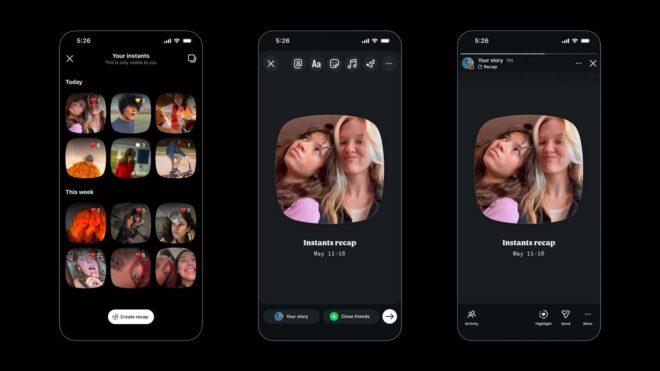
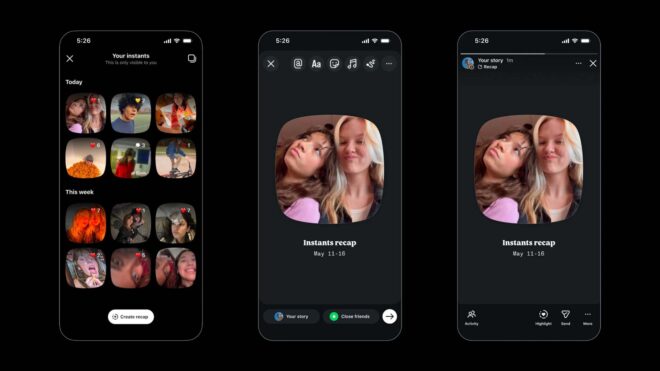 Instagram, “Şipşak (Instants)” özelliğini bugün itibarıyla aralarında Türkiye’nin de olduğu çok sayıda ülkede kullanıma sundu. Türkiye’ye henüz tam olarak açılmayan ayrı bir uygulaması da bulunan özellik, kişilerin arkadaşlarıyla ya da aile bireyleriyle 24 saat sonra kaybolan/silinen fotoğraflar paylaşmasına imkan tanıyor. Play Store’da “Arkadaşlarınızla kaybolan fotoğraflar paylaşın. Hayatın küçük anları üzerinden en sevdiğiniz insanlarla bağlantı kurun. Arkadaşlarınızla hızlıca paylaşmak için doğrudan kameraya geçin. Düzenleme yok, anında paylaşın. Anlık fotoğraflar kaybolduktan sonra tekrar görüntülenemez ve 24 saat sonra silinir.” açıklamasıyla tanıtılan altyapı, istenirse Instagram’ın ayarlarında yer alan “içerik tercihleri” bölümünden kapatılabiliyor.