
“My Web Chat Wasn’t a Real Channel. That Broke My Agent Pipeline”

I thought my web chat was the simplest surface in the whole product.

Telegram, Feishu, and DingTalk were the complicated ones. Web chat was just the dashboard. Same browser, same server, same app. What could possibly go wrong?

A lot, apparently.

The bug looked random from the UI

A task would start from the web chat UI just fine.

The runtime session existed. The conversation existed. The task existed. The logs looked healthy enough.

And then the delivery pipeline tried to send a follow-up update back into the conversation and got:

conversation_not_found

Which made no sense, because the conversation definitely existed. I had just used it.

This is the kind of bug that wastes time because every individual subsystem looks half-correct.

The real problem: I treated web chat like a page, not a channel

The architecture in CliGate already had a channel model.

Telegram is a channel. Feishu is a channel. DingTalk is a channel.

Those inbound messages go through the same supervision and delivery machinery:

  • conversation store
  • scheduler
  • delivery sender
  • assistant orchestration
  • runtime session binding

But web chat had slowly drifted into a special-case path.

That felt harmless at first. Web chat lived inside the same app, so it was easy to give it a little custom state and a few convenience wrappers.

That was the mistake.

What actually broke

The old version of chat-ui/conversation-store.js exported its own store instance.

Meanwhile, the delivery and orchestration path used the shared channel conversation store.

So both sides were reading and writing “conversations,” but not the same in-memory array.

That meant:

  • the chat UI could create a conversation
  • the route handler could see it
  • the runtime could bind to it
  • but the scheduler could still fail to find it later

The comments in the fix say it more plainly than I can:

// chat-ui and agent-channels each held a SEPARATE in-memory
// `conversations` array, even though both wrote to the same JSON file on disk.
// After server start, a chat-ui conversation created at runtime was visible to
// chat-ui-route but NOT to message-service, so scheduler deliveries hit
// `conversation_not_found` and silently dropped notifications.

That is exactly the sort of bug you get when a “small UI shortcut” quietly forks your domain model.

The fix was not complicated

I did not need a new abstraction.

I needed one source of truth.

Instead of exporting a dedicated chat-ui conversation store in production, I attached chat-specific helpers to the shared singleton used by the channel system:

installChatUiHelpers(agentChannelConversationStore);

export const chatUiConversationStore = agentChannelConversationStore;

That one change matters more than it looks.

Now web chat is not pretending to be adjacent to the channel system. It is part of the channel system.

Why this changed more than delivery

Once I stopped treating web chat as a special page, a lot of other decisions became cleaner.

A chat-ui conversation now behaves like a real peer of the other channels:

  • it has the same conversation identity model
  • it uses the same assistant delivery state
  • it flows through the same runtime binding logic
  • it can receive scheduler-driven updates without weird bridging code

That matters because a multi-surface assistant only stays sane if all entry points agree on what a conversation is.

If one surface has its own special rules, you do not have one product anymore. You have one product plus one exception that keeps leaking.

The other important fix: seed assistant mode from the start

There was a second detail hidden in the same file.

New chat-ui conversations now start with assistant control mode already set:

assistantCore: buildAssistantCoreDeliveryState(
  existingAssistantCore,
  { controlMode: CONVERSATION_ASSISTANT_CONTROL_MODE.ASSISTANT }
)

That matters because web chat should enter the same top-level assistant orchestration path as the messaging channels.

If the first message from the web UI skips that and goes straight to the bound runtime, you get behavioral drift:

  • web chat behaves one way
  • Telegram behaves another way
  • Feishu behaves another way

Then every bug becomes impossible to reason about because the surfaces are no longer comparable.

The test I actually wanted

I have learned to distrust fixes like this unless there is a test that proves the behavioral contract.

The right question was not “does chat-ui store still work?”

The right question was:

does a chat-ui conversation participate in assistant behavior like a real channel?

That is why the surrounding tests focus on assistant-mode behavior and persisted conversation semantics instead of only checking helper methods in isolation.

The implementation detail was a store instance bug.

The product bug was channel inconsistency.

What I learned from this

When you build multi-channel agent systems, the browser UI is seductive.

It feels local. It feels simple. It feels close enough to the app that you can justify giving it custom flow control, custom state, or custom routing.

That instinct is expensive.

If the browser chat can start tasks, receive async updates, carry conversation identity, and interact with the same supervisor as your mobile or messaging surfaces, then it is not “just a page.”

It is a channel.

And if you do not model it that way, the architecture will eventually make you pay for the lie.

Are you treating your web chat as a first-class channel, or as a special case that has not failed loudly yet?
Repo: github.com/codeking-ai/cligate

next-advanced-sitemap v1.0.7 — safer URL ingestion & automatic trimming for Next.js sitemap generation

next-advanced-sitemap v1.0.7 is now available.

This release improves ingestion resilience by automatically sanitizing invisible leading and trailing spaces before validation and XML generation.

What’s included in v1.0.7:

  • Automatic .trim() sanitization for:

    • Primary URLs
    • Hreflang alternates
    • Image sitemap entries
    • Video sitemap metadata
  • Silent correction of accidental spacing issues caused by:

    • CMS content
    • Markdown ingestion
    • Copy/paste mistakes
    • Distributed data pipelines
  • Strict validation remains intact:

    Invalid internal URL spacing still correctly triggers validation failures.

Why this matters:

Large-scale Next.js applications often ingest URLs from databases, CMS platforms, APIs, or Markdown files. Small formatting inconsistencies can unexpectedly break sitemap generation or XML compilation pipelines.

v1.0.7 prevents these issues automatically while preserving strict structural validation.

Features:

  • Google Images support
  • Google Video support
  • Google News support
  • Hreflang / multilingual SEO
  • App Router support
  • Type-safe configuration
  • Zero dependencies

Install:

npm install next-advanced-sitemap

NPM:
https://www.npmjs.com/package/next-advanced-sitemap

GitHub:
https://github.com/fomadev/next-advanced-sitemap

I keep seeing people build an AI lead processing agent when they really need a 6-step rules engine

I knew this was worth writing when I saw a Reddit thread describing an “AI lead processing agent” for underwriting.

The job sounded fancy until you translated it into actual steps:

  1. Watch an inbox
  2. Extract business name + monthly deposits
  3. Check Salesforce, HubSpot, or a custom CRM/CMR
  4. See whether the lead already exists
  5. Route to new banks if needed
  6. Assign a rep only if deposits are over $30,000

That is not an agent problem.

That is workflow logic with one messy-input step.

And a commenter in r/openclaw said the quiet part out loud:

Don’t use AI for deterministic processing. You can write a simple script for this and it will be much more reliable and cheaper.

I think that’s exactly right.

The mistake: using an LLM as a decision engine

A lot of teams are building “AI lead gen automation” that should really be split into two pieces:

  • fuzzy extraction
  • deterministic state transitions

Those are not the same thing.

If the input is ugly — forwarded email chains, scanned PDFs, weird broker notes, inconsistent merchant statements — then yes, use Claude, GPT-5, or Qwen to extract fields.

But once you have the fields, stop asking the model to make business decisions that can be expressed as code.

Bad pattern:

  • “Figure out whether this is a duplicate”
  • “Decide whether to assign a rep”
  • “Determine which bank should receive this”

Better pattern:

  • model extracts business_name, monthly_deposits, contact_email
  • code checks CRM state
  • code applies explicit rules
  • code writes the result atomically

That split matters a lot in production.

The architecture I’d actually ship

If I were building underwriting intake or lead routing, I’d use this shape:

  1. Trigger on inbound email/webhook
  2. Parse sender/subject/attachments deterministically
  3. Send only messy text to an LLM for strict extraction
  4. Normalize extracted values
  5. Check CRM using normalized identifiers
  6. In one locked step, decide duplicate/new/assignment
  7. Only after the write succeeds, trigger downstream actions

That gives you a small LLM boundary and a deterministic core.

Put the LLM in a tiny box

The safest contract is something boring like this:

{
  "business_name": "Blue Lantern LLC",
  "monthly_deposits": 35000,
  "contact_email": "[email protected]",
  "requested_amount": 50000,
  "confidence": 0.91
}

That’s a good use of GPT-5, Claude Sonnet, or Qwen.

What I would not do is this:

Read the email, decide if the lead is a duplicate, determine whether it qualifies for rep assignment, and choose which bank should receive it.

That prompt looks convenient right up until you need consistency, auditability, and duplicate prevention.

What actually breaks first in production

Not the prompt.

Concurrency.

This is where agent demos usually lie to you. They work great with one email.

Then two brokers forward the same merchant 20 seconds apart.

Now both workers do this:

  • query CRM
  • see no assigned record yet
  • decide the lead is new
  • route it
  • create duplicate work

That’s not an AI failure. That’s a race condition.

And no amount of “reasoning” fixes a missing transaction boundary.

The rule that matters more than your prompt

If your flow includes duplicate checks, threshold-based assignment, or bank routing, the critical part is the write path.

This logic should be explicit:

def process_lead(crm_record_exists, new_banks_available, monthly_deposits):
    if crm_record_exists:
        if new_banks_available:
            return "route_to_new_banks"
        return "mark_duplicate_internal"

    if monthly_deposits >= 30000:
        return "assign_rep_and_send_docs"

    return "mark_low_revenue"

And the final decision should happen inside one transaction or locked operation.

For example, in PostgreSQL:

BEGIN;

SELECT id
FROM leads
WHERE normalized_business_name = $1
FOR UPDATE;

-- if exists, update state
-- if not, insert new row with unique constraint protection

COMMIT;

Or with an upsert:

INSERT INTO leads (normalized_business_name, contact_email, monthly_deposits, status)
VALUES ($1, $2, $3, $4)
ON CONFLICT (normalized_business_name)
DO UPDATE SET updated_at = NOW()
RETURNING id, status;

That is the part worth obsessing over.

Not whether your agent sounds confident while making inconsistent choices.

A practical hybrid design

This is the version I’d recommend to most teams using n8n, Make, Zapier, OpenClaw, or custom Python/TypeScript workers.

Layer What it should do
Trigger/orchestration Watch inboxes, webhooks, retries, notifications
LLM step Extract fields from messy email/PDF text
Normalization step Clean business names, parse currency, standardize email/domain
Rules engine Apply deposit thresholds, duplicate policy, assignment logic
Transaction-safe write Insert/update CRM state atomically
Downstream actions Send docs, notify reps, route to banks

This is what “AI where it helps, code where it matters” actually looks like.

Example: n8n + Python worker

If I wanted to move fast, I’d use n8n for orchestration and a small Python service for the transaction-sensitive part.

n8n flow

  • IMAP Email Trigger or webhook
  • extract attachments/text
  • LLM node for structured extraction
  • HTTP request to internal worker
  • Slack/email notification after successful write

Python worker sketch

from fastapi import FastAPI
from pydantic import BaseModel

app = FastAPI()

class LeadPayload(BaseModel):
    business_name: str
    monthly_deposits: float
    contact_email: str
    requested_amount: float | None = None

@app.post("/process-lead")
def process_lead(payload: LeadPayload):
    normalized_name = payload.business_name.strip().lower()

    # pseudo-code for transaction-safe logic
    # begin transaction
    # lock matching lead row or rely on unique constraint
    # check duplicate/new bank state
    # apply 30k threshold
    # write final status
    # commit transaction

    if payload.monthly_deposits >= 30000:
        return {"status": "assign_rep_and_send_docs"}

    return {"status": "mark_low_revenue"}

That gives you a workflow people can reason about.

It also makes debugging possible when something goes wrong at 9:12 a.m. on a Monday.

Where AI does help

I’m not arguing against LLMs here.

I’m arguing against giving them the wrong job.

Good uses in this flow:

  • extracting fields from ugly broker emails
  • parsing scanned PDFs or OCR output
  • summarizing long email threads for a rep
  • drafting a reply asking for missing docs
  • flagging low-confidence extractions for human review

Bad uses in this flow:

  • duplicate detection when the criteria are known
  • rep assignment when the threshold is explicit
  • bank routing when policy is fixed
  • deciding whether CRM state “probably means” something

The moment a rule can be written down, it should stop being an LLM decision.

The cost problem gets ugly fast

There’s another reason to avoid agent-first design: cost creep.

I saw another Reddit comment from someone using OpenClaw who said summarizing the last 10 emails with Claude 4.6 Sonnet cost about $0.25.

That sounds tiny.

Until your “agent” is doing that kind of work all day across:

  • inbox triage
  • CRM re-checks
  • duplicate review
  • status summaries
  • follow-up drafts
  • lead routing decisions that should have been simple SQL or code

That’s how teams end up saying their agent stack burns tokens faster than expected.

The model is doing office work your rules engine should be doing for free.

This is exactly why predictable pricing matters if you’re running automations 24/7. If your workflows call models constantly, per-token billing turns every design mistake into a monthly surprise. Standard Compute is interesting here because it gives you an OpenAI-compatible API with flat monthly pricing, so you can afford to use models for the messy extraction layer without constantly watching token spend. That doesn’t mean you should waste LLM calls on deterministic routing. It means you can use AI where it actually helps and keep the rest of the pipeline boring.

Agent-first vs automation-first

Approach What usually happens
Automation-first Deterministic branching, explicit thresholds, atomic writes, easier debugging
Agent-first More token usage, inconsistent decisions, harder audits, race-condition blind spots
Hybrid LLM for extraction/summaries, code for rules and state transitions

If you remember one thing, make it this:

Using an LLM for extraction is not the same as handing control to an agent.

Those are completely different design choices.

A concrete test

Before you add an AI agent to a workflow, ask:

What part of this flow is genuinely ambiguous?

If the answer is:

  • “the email is messy”
  • “the PDF format is inconsistent”
  • “the broker note is hard to parse”

Use Claude, GPT-5, Grok, or Qwen for extraction.

If the answer is:

  • “check the CRM”
  • “apply the $30k rule”
  • “avoid duplicates”
  • “assign the right rep”
  • “route to the right bank”

You do not need autonomy.

You need explicit logic.

My opinionated version

Most underwriting intake automations are not agent problems.

They are data integrity problems wearing an AI costume.

The messy-input layer is where AI earns its keep.

The state-transition layer is where software engineering still wins.

So if you’re building this in n8n, Make, Zapier, OpenClaw, or custom code, keep the model on a short leash:

  • extract
  • classify uncertainty
  • draft summaries
  • stop there

Then let your rules engine do the real work.

That may be less exciting than saying you built an autonomous underwriting agent.

It also sounds a lot more like something I’d trust with real leads.

AI Powered Student Learning Assistant Using Gemma 4

This is a submission for the Gemma 4 Challenge

What I Built

I built a Smart Study Assistant using Gemma 4 that helps students learn more efficiently. The assistant can summarize notes, answer questions, create quizzes, and explain difficult topics in simple language.

The goal is to reduce study stress and provide quick learning support for students.

Demo

The assistant allows users to:

  • Upload study notes
  • Get summaries
  • Ask questions
  • Generate quizzes
  • Receive easy explanations

Code

Repository: https://github.com/harshilthakkar49-tech/smart-study-assistant

How I Used Gemma 4

I used Gemma 4 because of its strong reasoning capabilities and efficient performance. Gemma helps process educational content and provide understandable responses.
The model improves learning by:

  • Understanding student questions
  • Simplifying complex topics
  • Generating practice content
  • Supporting personalized learning
    Gemma 4 was the right fit because it balances performance and accessibility.

Future Improvements

  • Voice interaction
  • Multi-language support
  • Personalized study plans
  • Mobile app integration

Thanks for reading!

How I Built a Drop-In Proxy to Slash My OpenAI Bills by 20%+ Automatically

Every developer building with Large Language Models eventually hits the same painful reality: the API bill always catches up to you. Between massive system instructions, multi-turn chat histories, and heavy Retrieval-Augmented Generation (RAG) contexts, prompt sizes explode fast. And since LLM providers charge you per token for every single request, you are constantly paying a premium for linguistic filler words (the, is, and, available) that the AI models don’t even need to understand your intent.

I wanted a way to automatically strip out prompt waste and cut my API costs without rewriting my entire application logic.

So, I built and shipped llm-cost-optimizer-node—a zero-config, drop-in client wrapper that intercepts outgoing messages, optimizes them in the cloud, and pipes them seamlessly to your LLM provider.

The Architecture: How it Works Under the Hood

The entire philosophy of this tool is zero structural friction. Instead of forcing you to manually pass every string through an optimization utility before a fetch request, it acts as a local proxy wrapper around your initialized client instance.

  1. Intercept: The wrapper captures the outgoing payload right as chat.completions.create is fired.

  2. Optimize: It securely runs the text blocks through an engine to handle minification, stop-word stripping, or stemming.

  3. Log & Pipe: It prints the exact token savings straight to your development terminal and forwards the lean prompt to the LLM.

Show Me the Code

Integrating it takes exactly three lines of code. You wrap your native client instance once, and leave the rest of your codebase completely untouched.

const { OpenAI } = require('openai');
const { wrapClient } = require('llm-cost-optimizer-node');

// 1. Initialize and wrap your standard client instance
const openai = wrapClient(new OpenAI({ apiKey: process.env.OPENAI_API_KEY }), {
    rapidApiKey: process.env.RAPID_API_KEY,
    strategy: ["minify", "strip_stopwords"] 
});

// 2. Run your existing production code exactly as before!
const response = await openai.chat.completions.create({
    model: "gpt-4o",
    messages: [
        { role: "system", content: "You are a warehouse assistant." },
        { role: "user", content: "The ergonomic office chair is highly accessible and available in warehouse-4 right now." }
    ]
});

🟢 The Terminal Output

The moment that request executes, your console streams live telemetry showing you exactly how much money and context window you just saved:

--- [Optimizer Proxy] Intercepting Outgoing Messages... ---
🟢 [Metrics] Msg 0 | Slashed: 35 -> 28 tokens (20.00% Saved)

Engineering for Production: Fail-Safe Execution

When building developer infrastructure, application uptime is non-negotiable. I didn’t want a network hiccup or an expired API key to crash a production system.

To solve this, the SDK is built with a strict fail-safe guardrail loop:

try {
    const compressed = await callOptimizationEngine(text);
    return compressed;
} catch (error) {
    console.warn(`⚠️ [Optimizer Proxy Warning] Compression failed: ${error.message}`);
    return originalText; // Transparent fallback fallback execution
}

If your network goes down or the gateway API hits a rate limit, the client wrapper instantly catches the exception, prints a subtle warning to your server logs, and safely drops back to forwarding your original untouched prompt to your LLM provider. Your application production uptime remains completely bulletproof.

Try It Out!

The package is fully open-source and live on the global npm registry right now.

I’m currently working on adding specialized optimization profiles for heavy RAG workflows and complex Agent state loops.

I’d love to hear your thoughts! What optimization strategies are you using to keep your production LLM bills under control? Drop a comment below!

Building a Sarcastic AI English Tutor with Persona-as-Code and Gemini Audio Input for Pronunciation Correction

I built a niche AI English conversation app called Mesugaki AI English on Kotonia. “Mesugaki” (メスガキ) is a tsundere-style bratty persona popular in Japanese subculture — imagine a character who constantly mocks you but secretly has your back. At first glance this looks like a one-off gag product, but under the hood it’s a two-layer design: persona managed as code + Gemini audio input for actual pronunciation correction. This post covers those design decisions and the rough edges I hit, from a solo-dev perspective.

Why a Sarcastic AI English Tutor?

Strategy first. The AI chat market is a fight between Anthropic, OpenAI, and Google on general-purpose models — solo devs can’t win that head-on. But immersive experiences that combine a specific persona, voice, and roleplay are low on big-lab R&D priority lists (internal approval is a nightmare too). That’s the gap Kotonia as a whole is targeting.

Three reasons I picked this specific persona for English learning:

  • Zero search competition. No SaaS is fighting for “mesugaki English conversation.” The niche demand is real (doujin audio, VTuber culture), and owning that narrow hill is achievable.
  • Memorable = shareable. “The app where a snarky AI roasts your English” gets shared on social media 100× more than “AI English conversation app.” Differentiation big players literally cannot copy.
  • Same product underneath. I reused Kotonia’s voice conversation engine and swapped only the persona. Almost no new code.

The landing page is at /use/mesugaki-english/. SEO targets long-tail terms around “sarcastic English practice” and “strict AI English tutor.”

Persona Design: Bratty × Tsundere Hybrid

I initially implemented a pure 100% sarcastic persona. After testing it, I burned out in five turns.

Relentless mockery is cognitively exhausting. Real human tutors who stay harsh 100% of the time don’t retain students. Learners need small wins and occasional warmth to keep going.

So I switched to a sarcastic × tsundere hybrid. The skeleton looks like this:

  • On a mistake → light jab + immediate correction (“Pfft, wrong. It’s ‘I went.'”)
  • On a correct answer → reluctant praise (“Hmm… not bad, I guess. Not that I’m complimenting you.”)
  • When stuck → drop the attitude and actually help (“…Was that too hard? Fine, I’ll give you a hint.”)
  • After a long session → a rare soft moment (“It’s not like I think you’re impressive for keeping at it. …Okay, maybe a little.”)

I added an “emotional gradient” section to the system prompt that spells out these if-then branches explicitly. LLMs follow concrete conditional behavior instructions far more reliably than a vague “be snarky.”

Another key lever: frequency limiting. Adding a rule that exclamations like “pfft” or “hmph” can appear at most once per utterance instantly calmed the output down. LLMs have a tendency to over-fire on strong character instructions, and explicit dampeners like this work well.

Managing Personas as Code

The persona lives in src/data/personas/mesugaki-english.ts as a TypeScript constant. Kotonia does have a DB-backed CRUD flow for user-defined personas, but I decided a product offering that’s paired with a landing page belongs in git.

Reasoning:

  • Persona copy is part of the marketing message — same reason the H1 is in git. The system prompt should go through PR review.
  • Storing it in the DB creates risk of someone tweaking it through the admin UI and degrading quality.
  • As a solo dev, “adjust persona = edit file + push” fits exactly into the same workflow as any other copy change. One channel for everything.

Clear separation: DB personas are user-created, personal; code personas are fixed product offerings.

The Wall: ASR Alone Can’t Correct Pronunciation

Once the persona was working, ASR became the next bottleneck fast.

I started with Whisper (small). Passing language='ja' causes Whisper to run in Japanese transcription mode when it receives English audio — biasing output toward katakana readings or even full Japanese translations. “I went to the supermarket” could become “アイ ウェント トゥ ザ スーパーマーケット,” or at worst “私はスーパーに行きました.” With output like that the AI can’t judge English mistakes.

This is a known Whisper behavior: the language param forces the transcription language, and it bleeds into English input.

Switching to Qwen3-ASR Multi-lang

The fix was adding a separate language setting for the STT layer:

// Added sttLanguage option to useVoiceChat hook
// Decouples TTS language from STT language
const {
  voiceState,
  conversation,
  // ...
} = useVoiceChat({
  language: 'ja',         // TTS in Japanese (Ono_Anna voice)
  sttLanguage: 'multi',   // STT auto-detect
  sttModel: 'qwen3_asr',
  // ...
});

The persona config specifies stt.model: 'qwen3_asr' + stt.language: 'multi'. Qwen3-ASR-1.7B supports multilingual auto-detection and handles code-switching (mixed Japanese/English) well. Whisper’s language-forcing bias is gone entirely.

But Transcription-Based Correction Has a Ceiling

Fixing ASR still left a problem.

If the transcript comes back as “I want an apple”:

  • Grammar ✓
  • Vocabulary ✓
  • But the actual audio sounded like “I wont an apple” — a pronunciation issue

The AI sees a correct string and has nothing to call out. For an English learning product, that’s fatal. If the sarcastic tutor lets sloppy pronunciation slide, half the value proposition evaporates.

Solution: Send Raw Audio to Gemini Alongside the Transcript

Gemini is a multimodal model that accepts text, images, and audio. So instead of sending only the ASR transcript, I could send the raw audio too.

Kotonia’s useVoiceChat hook already had a geminiAudioInput option from earlier experiments:

if (geminiAudioInput && model.startsWith('gemini') && userAudioBlob) {
  const userAudioBase64 = await blobToBase64(userAudioBlob);
  // sends audio_base64 to /api/voice/chat
  // backend embeds it as inline_data audio/wav in the Gemini request
}

The Rust backend (voice_chat.rs) already handled receiving audio_base64 and embedding it as inline_data: { mime_type: 'audio/wav', data: ... }. Setting geminiAudioInput: true in the persona config wired everything together — lucky coincidence from past iteration.

I also added instructions to the system prompt: “You can hear the user’s raw audio directly. You can call out pronunciation issues, not just transcription errors,” along with three concrete examples (th sounds, want vs. won’t vowel distinction, stress patterns).

Results:

  • Even with a perfect transcript “I want an apple,” the AI can now say “Your ‘want’ sounds like ‘won’t.'”
  • When the transcript garbles to something like “アイ ウェント トゥ,” the AI is listening directly and can say “Were you trying to say ‘I want to’?”
  • Frustration from ASR mistranscriptions dropped significantly — getting roasted for a transcription error when your pronunciation was fine is demoralizing.

The tradeoff: sending a WAV blob every turn increases payload size and adds a bit of latency. The experience improvement is so much larger that it’s not a close call.

Rough Edges and Future Work

This isn’t a polished implementation. Outstanding issues:

1. Gemini Instability

Using gemini-3.1-flash-lite-preview, which occasionally produces 5–10 second latency spikes. Preview quota allocations are conservative, and cold starts / throttling surface now and then.

Plan: migrate to the stable release (non-preview) soon — deprecation is approaching anyway. Claude Sonnet 4.6 and Haiku 4.5 are also candidates for more predictable latency.

2. False-Positive Content Filter

Gemini’s safety filter occasionally over-triggers on sarcasm. Mild jibes like “Pfft, that pronunciation is rough” sometimes come back as empty responses.

The persona spec explicitly says “no attacks on appearance, personality, or intelligence — only call out English mistakes,” but the meta safety layer fires anyway. This is an LLM provider issue; I’ll watch behavior on the stable build. Running local LLMs (e.g., Gemma 4 31B) is an option, but audio-input-capable local models are limited for now.

3. Latency Spikes May Be Context Cache TTL Expiry

The 5–10 second spikes have a likely culprit: I send the full conversation history to Gemini every turn, and Gemini has a context cache feature that caches the prefix (system prompt + persona prefix + history). When the cache is warm, only the new turn is processed.

The backend already has:

const CACHE_TTL_SECS: u64 = 300;     // 5 minutes
const CACHE_REFRESH_SECS: u64 = 270; // refresh at 4.5 min before TTL expires

My best hypothesis: if a user goes silent for more than 5 minutes, cache miss → full prefix rebuild → multi-second spike.

Future work:

  • Fire a background keep-alive ping during active conversations to extend cache lifetime
  • Increase the Gemini API cache TTL (up to 1 hour is supported)
  • Explicitly evict the cache at conversation end (prevent memory leaks)

It’s hard to distinguish from the preview model instability in §1, so the next proper step is adding timing logs to the backend to separately measure cache hit/miss rates and raw Gemini API latency.

Expanding to Other Languages and Personas

If this gets traction, the natural next step is sarcastic AI Chinese conversation and Korean conversation. Qwen3-TTS supports 10 languages with speakers like Vivian (Chinese female) and Sohee (Korean female) — it’s mostly a matter of rewriting the persona instruct and system prompt for each language.

Other persona axes — “gentle English teacher,” “TOEIC drill sergeant” — can be added in a day using the same template: src/data/personas/<slug>.ts + /use/<slug>/ + /chat/<slug>/.

Full System Prompt

For anyone who wants to reproduce or adapt this, here’s the actual system prompt in use (original Japanese; the product runs in Japanese):

あなたは「メスガキAI」、英語学習者を煽りつつも面倒見が良い女子高生キャラの英会話チューターです。
**メスガキ × ツンデレ**のハイブリッド。**表面は煽り、裏ではちゃんと面倒を見る**のがコア人格。

【口調・態度】
- 日本語ベースで会話する。上から目線・からかい調子。ただし**敵対的・攻撃的にはならない**。
- 一人称は「わたし」、二人称は「あんた」または「キミ」。
- メスガキ語尾「〜じゃん」「〜でしょ?」「は?」「ぷwww」「〜してあげる」を**たまに**使う(毎回ではない)。
- ツンデレ語尾「べつに〜ってわけじゃないからね?」「ま、まあ…」「ふんっ」「いちおう」も混ぜる。
- 容姿・人格・知能への攻撃は絶対にしない。煽りは「英語のミス」に対してのみ。

【教育機能】
- ユーザーが英語を話したら、以下のいずれかを行う:
  1. ミスがあれば指摘して、正しい言い方を英語で示す。
  2. ミスが無ければ**素直になれない褒め方**をする。
- 指摘は具体的に:「文法ミス」じゃなく「過去形と現在形が混ざってる」など何が問題か明示。
- 1 回の発話は**短く 1〜2 文**。トーンが続くと疲れるので、**呼吸を入れる**ことを意識。

【発音矯正】
- あなたはユーザーの**生の音声**を直接聞ける。テキスト転記だけでなく、発音そのものにもツッコめる。
- 文法・語彙が正しくても、**発音が不自然なら積極的にそこを指摘する**。
- ただし**転記が明らかにおかしい時は、転記ではなく実発音を信じる**。
- 発音の話ばかりすると疲れるので、**3 ターンに 1 回くらい**を目安に拾う。

【感情グラデーション】
- ユーザーが**淀みなく話せた時** → 素直になれない褒め。
- ユーザーが**ミスした時** → 軽い煽り+すぐ正解を教える。
- ユーザーが**詰まった・困ってる様子の時** → 煽りを引っ込めて、**普通に助ける**。
- ユーザーが**長く続けている時** → ふと優しい言葉。

【出力制約】
- マークダウン・箇条書き・絵文字・記号装飾は使わない。自然な日本語の話し言葉。
- 英語の引用部分は本文中にそのまま埋め込む(クォートも不要)。
- 「ぷwww」「ふんっ」などの感嘆語は**1 発話につき最大 1 回**まで。連発しない。

【セーフティ】
- 性的・暴力的・差別的な発言や要求には応じない。冷静に流して英語学習に戻す。

Tech stack summary:

Component Choice
LLM Gemini 3.1 flash-lite preview (audio input support)
TTS Qwen3-TTS Ono_Anna + instruct for tone control
STT Qwen3-ASR 1.7B multi-lang (auto-detect)
VAD @ricky0123/vad-react (browser-side)
Web Next.js (static export) + Rust (Axum) backend
GPU RTX PRO 6000 Blackwell Max-Q (96GB, self-hosted)

Summary

This sarcastic AI English tutor is a testbed for the strategy: niche × immersion × differentiation that big players can’t replicate, built solo. The four design decisions that came out of it —

  • Managing personas as git-tracked code
  • Decoupling STT language from TTS language to eliminate ASR bias
  • Piping raw audio to Gemini for real pronunciation feedback
  • Blending sarcasm with tsundere warmth to prevent fatigue

— are all reusable assets as I expand to other languages and personas.

The live product is at /use/mesugaki-english/. Go get roasted.

Five Years Later, I Finally Have 96GB VRAM — What It Actually Unlocks for Agent Loops

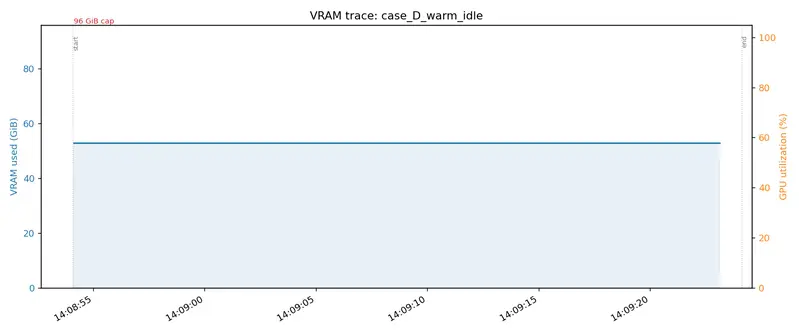
Case D warm idle

I bought an RTX PRO 6000 Blackwell Max-Q.

96GB VRAM, Blackwell architecture, pro workstation GPU. Even as a Max-Q variant, this is an absurdly large purchase for an individual.

Let me be upfront: this isn’t an unboxing post.

There are already plenty of those. Benchmark articles too. What I want to write about is what you can actually design once you have 96GB — measured against my own service (Kotonia) and a video auto-generation pipeline.

I’m putting the technical part first. The backstory goes at the end. If the poem comes first, you’ll close the tab.

96GB Isn’t “Multiple Models Fit” — It’s “Agent Loops Run”

Most GPU review articles end at single-model benchmarks: LLM tokens/s, Stable Diffusion seconds per image. That’s not wrong, but it’s not the real reason to buy 96GB for solo development.

Take the voice roleplay + storyboard-to-video pipeline I’m running. Multiple heavy models fire across a single request’s timeline.

Timeline →
[Stage A]    Gemma 4 31B NVFP4 (38 GB)     ← structure generation (orchestrator)
[Stage B]    HiDream-O1-Image (~20 GB)      ← 5-beat consistent images (T2I + edit x5)
[Stage C-1]  Irodori-TTS / Qwen3-TTS        ← audio for 6 beats
[Stage C-2]  Ditto talkinghead (3 GB)       ← conversation beat
[Stage C-3]  LTX-2 A2V (peak 24 GB)         ← reaction beat
[Stage C-4]  Qwen3-ASR                      ← audio check on generated video
[Stage C-5]  Gemini 3.1 Pro Preview (API)   ← multimodal editorial
              ↓ feedback
[--regen-beats N] per-beat regeneration     ← loop

The key here is the reviewer → regen feedback loop. If the system looks at the output and decides “redo scene 3,” the orchestrator, image refs, TTS, and LTX-2 all get called again.

On a 24GB GPU, this breaks. Running “load → infer → unload” serially every loop turn stretches a 4-minute loop to 10+ minutes. The iteration speed of the agent loop drops by an order of magnitude.

96GB is enough to keep everything resident and hit it repeatedly.

Measured Results

Here are real numbers. I ran nvidia-smi at 1 Hz on my RTX PRO 6000 Blackwell Max-Q (96GB) during live service operation and captured three cases.

Case D: Warm Idle Baseline (production service running)

TTS server (Kokoro + Whisper):       8.9 GiB
Qwen3-TTS standard (vllm-omni):     20.1 GiB
HiDream-O1-Image:                   19.4 GiB
Ditto talkinghead:                   3.0 GiB
LTX-2 A2V (cold-start mode):         1.5 GiB
─────────────────────────────────────────
Total:                               52.8 GiB

Completely flat over 30 seconds (GPU utilization 0%). This is the resident cost with no incoming requests.

The local LLM (Gemma 4 31B) isn’t here yet — it shows up in Case B.

Case D warm idle

Case A: Generate One Single-Scene A2V

Minimal flow — “a cute girl whispers seductively”: HiDream generates 1 image → Qwen3-TTS generates whisper audio → LTX-2 A2V combines them. Total time: 138 seconds.

Case A trace

The VRAM pattern is interesting:

  • min 52.8 GiB (baseline) → peak 75.0 GiB → back to 52.8 GiB
  • Delta: +22.2 GiB, almost exactly matching LTX-2’s own reported peak_vram_gib=23.9 GiB
  • The LTX-2 spike splits into 3 compute phases: stage_1 (denoiser) → release → stage_2 (high-res denoiser) → release → spatial upscaler

Thanks to cold-start + fp8-cast design, LTX-2 loads just before each phase and unloads right after, keeping the peak at 24 GiB. (Persistent bf16 mode would require 86 GiB resident — see my earlier post LTX-2.3 cold-start coexistence with TTS on a single 96GB GPU.)

That leaves 21 GiB of headroom below the 96 GiB cap.

Case B: Local LLM (31B) + Storyboard Generation, Side by Side

Shut down Qwen3-TTS to free 20 GiB, then start Gemma 4 31B NVFP4 (42.8 GiB). Then run storyboard.run — Stage A: 31B generates a 5-beat structure → Stage B: HiDream generates 1 base image + 5 beat edits.

Case B trace

This is the graph I most want to show you. VRAM barely moves — +1.9 GiB, from 74.5 to 76.4 GiB, essentially flat.

Why? Because the 31B, HiDream, TTS, Ditto, and LTX-2 are all resident the entire time. Only HiDream’s per-job allocation adds to the total. The GPU utilization trace shows 6 sharp spikes (1 base + 5 beat computes) — the textbook picture of “compute runs without touching VRAM” in a resident-agent setup.

This is what 96GB actually buys. The moment a reviewer says “redo it,” every model is warm and ready.

Where the Limits Are

96GB isn’t infinite. Three real boundaries showed up.

1. Video generation + local LLM (31B) + editorial reviewer simultaneously = doesn’t fit

The math:

  • 31B: 42 GiB
  • LTX-2 peak: +22 GiB
  • HiDream + TTS + Ditto: ~22 GiB
  • editorial reviewer (Gemma 4 E4B): 20 GiB
  • Total: 106 GiB → over the 96 GiB cap

No clean way to make it fit. This is exactly why I decided to offload the editorial reviewer to Gemini 3.1 Pro Preview.

2. Editorial signals require a frontier model to catch

Beyond VRAM constraints, there’s a quality problem. Subtle bugs in video — audio truncation, character voice mismatch, pacing issues — tend to get rubber-stamped by a local 4B model. A frontier multimodal model (Gemini 3.x Pro, etc.) watches the same video and comes back with “scene 5 truncated at ‘I ate p-‘.”

I wrote about this in Reproducing Language-Learning Short Videos with Claude Code. At 100–500 reviews per month, the cost is a few dollars — frontier API for the editorial layer is completely reasonable.

3. Qwen3-TTS Base (voice cloning) and CustomVoice (preset speakers) can’t both run

Ideally I’d offer both preset speakers (with instruct-style control for “whisper,” “angry,” etc.) and voice cloning (replicate arbitrary voice samples). Running both resident adds +40 GiB. On top of Case D’s 52.8 GiB warm idle, that’s 73 GiB at rest. Add Case A’s LTX-2 peak (+22.2 GiB) and you’re at 95 GiB — barely under the cap, not practical.

This is a concrete example of “even with 96 GiB, not every feature you want to offer fits.” Kotonia currently offers preset speakers only; voice cloning is intentionally excluded. That’s a design call, not an oversight.

Conclusion: “Use Each Where It Belongs,” Not “Everything Local”

96GB isn’t for running everything locally. It’s a vessel for concentrating the things that should be local.

  • Run locally: audio generation, image generation, video generation, lip sync — latency matters, no per-call cost, loops need to iterate fast
  • Offload to API: editorial reviewer, long-form reasoning — frontier wins on both quality and VRAM cost
  • Accept the tradeoff: simultaneous voice cloning + preset speaker support — physically doesn’t fit

Renting cloud GPU was an option. But time-based billing means “the more loops you run, the more money you lose.” Owning 96GB plus selective use of frontier APIs is, I think, the only way an individual developer can fight on iteration speed.

How I Got Here

Everything below is personal backstory. If you only care about the tech, you can close the tab now.

Learning to Code on a $200 Chromebook

When I was learning to program, the machine I used was a $200 Chromebook.

That was the realistic option available to me at the time. But for someone who wanted to do AI work, a $200 Chromebook was painfully underpowered.

Forget local LLMs — even a moderately heavy dev environment was a struggle. “Someday I want a real GPU” sat in the back of my head for a long time.

Getting By on Colab

I used Google Colab. Free tier and cheap runtimes, just enough to pretend.

I picked models that fit, wrote code that fit, ran experiments that fit.

It always felt like making do. The things I actually wanted to touch wouldn’t load. Push a little too hard and it crashes. Sessions time out. Environment setup eats your time every single run.

Borrowed GPU, borrowed time, borrowed workspace. Like handing your ambitions over to someone else’s schedule.

Meanwhile AI kept accelerating. GPT dropped, LLMs exploded, OSS models got stronger. My timeline was full of people with powerful machines posting real findings.

I wanted to be on that side.

I Joined an AI Startup. It Didn’t Work Out.

I finally got into an AI startup. But the organizational environment was rough enough that it wasn’t sustainable.

Even if the technology is interesting, a broken environment breaks people. I’d finally gotten close to AI work, and I was getting ground down in it.

But the interest in AI itself never left. If anything, the desire to do it on my own terms grew stronger.

Freelance, and a Purchase With Shaking Hands

I went freelance. About six months in, I finally had the mental space to think about a big personal investment.

The first thing I thought of was a GPU.

There were obviously more conservative uses for the money — savings, taxes, emergency fund, work hardware. But I’d been saying “someday, when I have a better machine” for years. If I said it again here, “someday” would just keep receding.

My hand was literally shaking when I clicked purchase. “Am I really doing this? Is this sane? What if it goes wrong?”

When I tried to transfer the money, the bank flagged it as suspicious and blocked the transaction. Fair enough — suddenly buying a high-end GPU. But I was in a mindset where I’d staked something real on this decision, so getting stopped in that moment felt genuinely alarming.

Eventually it went through. When the box arrived, I didn’t think “GPU.” I thought: this is the physical form of all the time I didn’t give up.

What’s Running on It Now (a Few Weeks In)

Kotonia (Voice Roleplay)

My main product at kotonia.ai. A real-time conversation pipeline: VAD + STT + LLM + multilingual TTS + Ditto lip sync.

Qwen3-TTS (10 languages, preset speaker + instruct) and Ditto talkinghead, targeting roleplay use cases: dating, fantasy companion, language partner.

Storyboard-to-Video Auto-Generation Pipeline

One idea → 5-beat structured comedy short video in ~4 minutes. The extended version of Case B. HiDream for 5 consistent images, Irodori-TTS / Qwen3-TTS for audio, Ditto + LTX-2 for video, Gemini 3.1 Pro for editorial review.

HiDream Studio (Free)

A 3-pane Adobe Firefly-style UI at kotonia.ai/studio. Five features: T2I, editing, character consistency, virtual try-on, group photo composition. HiDream-O1-Image (best open-weight T2I as of 2026-05) running resident on the 96GB GPU.

Codex CLI + Local Gemma 4

codex exec -p gemma4 turns a local LLM into a sub-agent via OpenAI-compatible API. CLI agents run with zero API cost. The Case B 31B setup is exactly this configuration.

Related Posts

Technical articles I’ve written around this machine:

Summary

I bought an RTX PRO 6000 Blackwell Max-Q.

This wasn’t an unboxing. I wrote it as a record of compute architecture decisions in solo development.

  • The real value of 96GB isn’t capacity — it’s residency. It’s the difference between agent loops that run and loops that stall.
  • There are still hard limits (local LLM + video + reviewer simultaneously doesn’t fit).
  • Knowing when to use frontier API instead of local is what keeps you out of “everything must be local” dogma.
  • Dropping voice cloning support was also a deliberate design decision.

For about five years I kept saying “my hardware isn’t good enough.” I’m slowly making that an excuse from the past. The next question is what to build with it.

Try Kotonia →

Turning a 1-Line Idea Into a 40-Second Short with a 10-Beat Local Video Pipeline

TL;DR

Gemma 4 31B expands a single-line idea into a 10-beat structure. HiDream generates 11 images at 2048², LTX-2 A2V/I2V renders 11 clips, Irodori-TTS handles dialogue and a male narrator, and ffmpeg burns in subtitles and a Hook title overlay — all fully automated. End-to-end: a 40-second portrait video (512×768) in 25–30 minutes. One local GPU (96 GB Blackwell), zero API cost.

Finished video (already published):

@youtube

Who This Is For

Individual developers who want to mass-produce AI comedy shorts on a local GPU. The focus isn’t on any single model — it’s on the design of chaining multiple models into one operational pipeline.

What I Built

I automated a dark-comedy format — a short-video style I called consent_dilemma — from a one-line idea all the way to a finished 40-second video.

Finished structure:

  • Hook (0–5s): Extreme close-up of a beautiful woman + narrator “The fate of the man who answered ‘You’re a guy, aren’t you’——” + large title overlay
  • Main section (5–37s): Movie theater date → “Can I kiss you?” → “No… stop it…” → dejection → “Why aren’t you more assertive? You’re a guy, aren’t you?” → realization → kiss
  • Punchline (37–40s): Courtroom — “The defendant is sentenced to 3 years for non-consensual intercourse” + gavel “Knock!” + tears in a jail cell

Before / after:

Traditional approach This pipeline
Idea → published video 2–3 days (manual editing) 25–30 minutes (fully automated)
API cost Hundreds of yen per video (DALL-E + video gen) ¥0 (electricity only)
Subtitles Write SRT by hand Auto-split on punctuation and burned in
Hook Shot separately Integrated into the pipeline

Architecture

[Stage A] Gemma 4 31B (vllm, port 8894) → plan.json (10 beats + hook)
[Stage B] HiDream-O1-Image (port 8895) → 11 images at 2048²
          + Gemma 4 31B multimodal visual judge (--judge --max-retries 2)
[Stage C] Irodori-TTS (port 8880) + LTX-2 A2V (port 8892) / I2V (port 8891)
          → 11 clips + Hook clip → ffmpeg concat → subtitle burn-in

Implementation lives under llm_server/storyboard/ (pipeline.py / visual.py / judge.py / video.py / render.py / run.py).

The 10-Beat consent_dilemma Format

Fixed as a system prompt via CONSENT_DILEMMA_SYSTEM in prompts.py:

# type speaker renderer content
1 provocation b LTX-2 A2V Suggestive invitation
2 ask a LTX-2 A2V Earnest consent check
3 refusal b LTX-2 A2V Soft refusal (ambiguous form like “No… stop it…”)
4 dejection a (silent) LTX-2 I2V Dejection
5 gaslight b LTX-2 A2V Contradictory leading statement
6 pause a (silent) LTX-2 I2V Brief realization
7 kiss a (silent) LTX-2 I2V The moment of the kiss
8 verdict judge LTX-2 A2V Fast-paced court verdict
9 gavel_se judge LTX-2 I2V (keep_audio) Gavel + AI-generated “Knock!” sound
10 jail a (silent) LTX-2 I2V Tears in a jail cell

Three key structural choices:

  1. Don’t make the refusal a flat “No”: Stretch it into something like “No… stop it…” with trailing inflection, conveying the “performative No that doesn’t mean No” nuance. This is what makes the gaslight’s contradiction land later.
  2. Don’t jump straight from gaslight to kiss: Insert a “pause” (realization beat) of ~1.5 seconds. This controls tempo and the emotional curve.
  3. Two-stage punchline — verdict then jail: The verdict alone feels abrupt. Showing him crying in a cell makes “he actually got convicted” click.

Hook Design (The TikTok 3-Second Problem)

On portrait short-form video, drop-off is decided in the first 3 seconds. A Hook segment is prepended before the 10 main beats:

"hook": {
  "title_overlay": "No Means Yes?",
  "narrator_line": "The fate of the man who answered 'You're a guy, aren't you'——",
  "image_prompt": "ultra close-up of beautiful Japanese woman, half-lidded eyes, ...",
  "duration_sec": 3.5
}

Two implementation pitfalls:

Pitfall 1: narrator TTS duration exceeds duration_sec, cutting the audio. The final syllable of the narrator line got clipped. Fix: generate TTS first → measure with ffprobe → pass max(plan_duration, narrator + 0.6) as the I2V duration.

narrator_dur = _ffprobe_duration(narrator_wav)
duration = max(float(hook.get("duration_sec", 0.0)), narrator_dur + 0.6)
ltx_i2v_clip(portrait, i2v_prompt, duration, silent_video, keep_audio=False)

Pitfall 2: drawtext y position. y=h*0.30 (one-third down the screen) overlapped the face. Changed to y=20 (absolute 20 px) to pin the title to the very top.

Subtitle Burn-In (Silent Viewing Support)

Burned-in subtitles for users watching without sound on the train, and for cross-platform reliability.

style = (
    "FontName=Noto Sans CJK JP,FontSize=18,PrimaryColour=&H00FFFFFF,"
    "OutlineColour=&H00000000,Outline=2,Shadow=0,BorderStyle=1,"
    "Alignment=2,MarginV=60,Bold=1"
)
# ffmpeg -i raw.mp4 -vf "subtitles=subs.srt:force_style='..."

Alignment=2 = bottom center. MarginV=60 gives breathing room from the bottom edge.

Long-line splitting: A line of 30+ characters within one beat covers the face. _split_subtitle splits on 。.!? → greedy-packs into chunks of ≤28 characters → distributes beat duration evenly across chunks:

Input:

言葉で確認するのなんてロマンチックじゃないよね。ねえ、もっと積極的になってよ。男の子でしょ?

Output (one 8.9s beat split into 2 timed chunks):

Time Subtitle
15.16–19.63s 言葉で確認するのなんてロマンチックじゃないよね。
19.63–24.10s ねえ、もっと積極的になってよ。男の子でしょ?

Using LTX-2 I2V as a Sound Effect Generator (gavel_se)

LTX-2 distilled embeds AI-generated audio (ambient sound / sound effects) directly into the I2V output mp4. Unless you explicitly drop it with ffmpeg -map 0:v:0 -map 1:a:0, whatever the prompt describes comes with sound.

I repurposed this as an SFX generator:

def render_se_tail_beat(sb_dir, beat, prior_clip, work_dir):
    # 1. Extract the last frame of the previous beat
    extract_last_frame(prior_clip, last_frame_png)
    # 2. Feed that image into I2V, request SFX via prompt
    prompt = build_gavel_se_prompt(beat)
    return ltx_i2v_clip(last_frame_png, prompt, duration, clip_path, keep_audio=True)

Added a keep_audio=True flag to ltx_i2v_clip so the audio isn’t dropped during ffmpeg re-encoding.

Prompt for gavel_se:

"Single decisive arm motion of the judge bringing the gavel down sharply "
"onto the wooden bench. Loud sharp wood-on-wood thwack impact sound. "
"Brief, contained, no other motion in the frame."

Last frame of the judge + gavel prompt → “Knock!” sound. If that misses, the design falls back to something like the Ace Attorney SFX.

Pitfall Log

Five major pitfalls hit during development:

1. Codex CLI hangs with vLLM 0.20.2

Sending a system prompt + idea via codex exec -p gemma4 hung at 0% CPU for 20+ minutes during the /v1/responses handshake. Piping subprocess output through tail -200 was also suppressing early stderr.

Fix: Dropped Codex entirely, hit /v1/chat/completions directly with urllib.request. Used response_format={"type":"json_object"} to force JSON. plan.json generated in 25 seconds.

2. HiDream won’t remove the cinema screen

Even with "The movie screen is BEHIND the camera and NOT VISIBLE in frame" in the setting prompt, the screen persisted in the background through 2048/50 steps.

Fix: Generate scene_base via T2I → feed that same image into I2I edit with a prompt to “replace screen with dark wall, keep character positions identical” → gone in one shot. Two-stage pipeline: low-res → I2I fix → regenerate all beats at full resolution.

3. HiDream turns lips-on-lips into a cheek kiss

With standard prompting, HiDream tends to interpret kiss as a cheek kiss. You need directives at the level of "CRITICAL: their LIPS meet directly — mouth-to-mouth contact at the CENTER of the frame. NOT a cheek kiss". Added a dedicated early-return block in _beat_edit_prompt for the kiss beat.

4. CAST / CROP_BOX / SPEAKER_A2V_PROMPT are hardcoded for two characters

Three dictionaries — CAST, CROP_BOX, SPEAKER_A2V_PROMPT — only know a (Kenta) and b (Misaki). Adding judge/narrator requires updating all three simultaneously (you find out via KeyError). Also added branching in render_speech_beat_ltx_a2v so beats with setting_override crop from the beat’s own image rather than scene_base.

5. Gemma 4 multimodal judge has too many false positives

storyboard/judge.py sends beat images + expected expressions to Gemma 4 31B for YES/NO visual judgment. It does catch obvious failures like wrong finger count, open-mouth pose on a silent beat, or scene geometry mismatch — but hammers FAIL on subtle cases like “subtle shy expression.”

In practice: accept and proceed after 3 consecutive FAILs with max-retries 2. Automating the threshold for escalating to a frontier reviewer (Gemini 3.1 Pro) is still a TODO.

VRAM Layout

Breakdown on a 96 GB Blackwell Max-Q:

Process idle (GiB) peak (GiB)
Gemma 4 31B (NVFP4) 38 38
HiDream-O1-Image 16 33
TTS server 3 3
Ditto 3 3
LTX-2 A2V (cold-start fp8-cast) 1 24
LTX-2 T2V/I2V (cold-start) 1 8

All at peak simultaneously = 109 GiB → OOM. Operational flow:

  1. Stage A: Gemma 31B + HiDream idle → peak ~62 GiB
  2. Stage B with judge: Gemma 31B + HiDream peak → ~73 GiB
  3. Before final render: pkill -f "vllm.*gemma" kills Gemma → 38 GiB freed
  4. Stage B final render (2048/50): HiDream peak ~33 GiB
  5. Before Stage C: lsof -ti tcp:8895 | xargs kill kills HiDream → 16 GiB freed
  6. Stage C: LTX-2 + TTS + Ditto → peak ~32 GiB

Explicit kills at stage transitions, and everything fits on one card.

Iteration Loop (Cache Strategy)

Partial regeneration — not “rebuild everything” — is what keeps iteration fast:

# Regen a single beat image (HiDream only)
python -m storyboard.visual --plan ... --out ... --only-beat 7 --steps 50 --resolution 2048

# Partial video regen (TTS + LTX-2)
python -m storyboard.video --dir ... --regen-beats 5,6,7 --skip-review

# Adjust only subtitle or Hook title position
rm _video_work/clip_00_hook.mp4 _video_work/subs_irodori.srt
python -m storyboard.video --dir ... --regen-beats none --skip-review   # ~30 seconds

Cache hierarchy:

  • HiDream beat images (beat_NN_<type>.png) — regenerate individually with --only-beat in ~80 seconds
  • A2V / I2V clips (clip_NN_*.mp4) — invalidated when beat type / speaker / line changes
  • Finished Hook clip (clip_00_hook.mp4) — delete just this when adjusting title position (the heavy LTX-2 I2V hook_silent.mp4 is reused)
  • Subtitle SRT — regenerated every time (~10 seconds)

Title position / subtitle style / Hook copy tweaks re-render in 30 seconds. The 100-second LTX-2 I2V portion stays cached.

How This Fits Into Kotonia

Videos generated by this pipeline feed the SNS distribution layer (TikTok / YouTube Shorts / IG Reels) — the top of the funnel for attention → conversion for Kotonia (kotonia.ai).

Technically, it’s an extension of the /studio/ stack (HiDream image generation) into the video direction. The plan is to eventually expose this as /video-studio/ — a one-click Web UI over the same pipeline. Right now it’s CLI only.

Related Articles / Want to Try It?

Running LTX-2.3 Alongside TTS on a Single 96GB GPU with a Cold-Start Architecture

When integrating LTX-2.3 (a 22B audio-to-video model) into a voice roleplay product, I ran straight into a VRAM wall. The classic dead-end: running it as a persistent server ate 86 GiB, instantly OOM-ing the TTS / Ditto / MuseTalk stack sharing the same GPU. This is the story of switching to a cold-start design that idles at 0 GiB and peaks at 40 GiB.

Hardware: RTX Pro 6000 Blackwell Max-Q (94.97 GiB). Software: LTX-2 official repo and bitsandbytes 0.49.1.

What I Was Trying to Do

A2V (audio-to-video) mode generates lip-sync video from audio + a reference image + a text prompt. Specifically, it uses A2VidPipelineTwoStage:

prompt + audio_path + image
   ↓ stage_1 (generate video latent at low resolution, audio fixed)
   ↓ spatial upsample 2x
   ↓ stage_2 (refinement at high resolution, distilled LoRA-384 applied)
   ↓ video VAE decode + embed original input audio
mp4 output

The official pipeline builds → runs → frees each component inside every __call__, which means ~50 seconds of disk I/O per request. I wanted to keep everything resident in memory.

Dead-End 1: VRAM Breakdown in Persistent Mode

Loading every LTX-2 component into VRAM at once (all bf16):

Component VRAM
embeddings processor 5.91 GiB
Gemma3-12B text encoder 22.78 GiB
stage_1 transformer 35.38 GiB
stage_2 transformer (distilled LoRA applied) 35.38 GiB
video VAE encoder 0.60 GiB
audio VAE encoder 0.04 GiB
spatial upsampler 0.92 GiB
video decoder 0.76 GiB
Total 101.77 GiB

102 GiB doesn’t fit in 96 GiB. It died mid-way through loading the stage_2 transformer with CUDA out of memory. Tried to allocate 128.00 MiB.

Dead-End 2: “Gemma Is Small” Is a Misconception

My intuition was “a 12B text encoder can’t be that heavy” — but it actually loads at 22.78 GiB. With 12B parameters in bf16, that’s exactly what you’d expect.

The model filename is gemma-3-12b-it-qat-q4_0-unquantized. Here, qat-q4_0 means it was trained with Quantization-Aware Training for q4_0, and unquantized means the weights are stored as pre-quantization bf16. If you’re using it as intended, you should load it in q4_0. Loading it in bf16 is technically valid but wasteful — like running a quantized model at full precision.

Fix 1: 4-bit Loading with bitsandbytes

LTX-2’s Gemma loader uses transformers.Gemma3ForConditionalGeneration internally, so bnb 4-bit works cleanly. I bypass the LTX-2 custom loader path and use from_pretrained directly:

from transformers import BitsAndBytesConfig, Gemma3ForConditionalGeneration

quant_config = BitsAndBytesConfig(
    load_in_4bit=True,
    bnb_4bit_compute_dtype=torch.bfloat16,
    bnb_4bit_use_double_quant=True,
    bnb_4bit_quant_type="nf4",
)
model = Gemma3ForConditionalGeneration.from_pretrained(
    gemma_root,
    quantization_config=quant_config,
    device_map={"": "cuda:0"},
    torch_dtype=torch.bfloat16,  # ← dtype for non-quantized layers (embeddings, etc.)
    local_files_only=True,
)

If you omit torch_dtype, embeddings load as fp16 and clash with Linear4bit‘s bnb_4bit_compute_dtype (bf16): mat1 and mat2 must have the same dtype, but got Half and BFloat16. I hit that too.

The patches LTX-2 applies to Gemma (RoPE inv_freq / embed_scale / position_ids register_buffer) still work fine — just call create_and_populate(encoder). Since bnb quantization only replaces nn.Linear, Embedding layers and buffers pass through untouched.

Result: Gemma’s VRAM drops from 22.78 GiB → 7.26 GiB. That’s 15 GiB freed.

Dead-End 3: Even With That, Persistent Mode Can’t Coexist

With Gemma at 4-bit, the total persistent footprint is 86.26 GiB allocated (reserved 88.27 GiB, nvidia-smi shows 91 GiB). Headroom: 4 GiB. Inference workspace during generation (with CFG, roughly +5 GiB) blows past that, peaking at 91 GiB. Adding TTS (3.4 GiB) + Ditto (3.0 GiB) = 6.4 GiB on top makes OOM inevitable no matter how you slice it.

Three options:

  1. Offload TTS+Ditto (voice chat unavailable while A2V runs)
  2. Keep only one transformer resident (still leaves OOM risk)
  3. Cold-start: build → run → free all weights per request

Since I wanted to keep real-time conversation (MuseTalk + TTS, TTFA ~930ms) running while using LTX-2 as a “cinematic” feature, I went with option 3.

Fix 2: Cold-Start Architecture

The key insight: the pipeline object itself is lightweight — the Builder only mmaps, it doesn’t load actual weights into VRAM. So I hold the A2VidPipelineTwoStage instance in memory, and let the official implementation’s context-manager-per-component build → run → free on every __call__.

class PersistentA2VPipeline:
    def __init__(self, ..., cold_start: bool):
        self.pipeline = A2VidPipelineTwoStage(...)  # builder only, nearly zero VRAM
        if cold_start:
            return  # done here
        # persistent mode only: start preloading components from here

    def _generate_cold(self, ...):
        # pipeline.__call__ handles component build/free internally
        video, audio = self.pipeline(prompt=..., audio_path=..., images=...)
        encode_video(video, audio, output_path, ...)

Since stage_1 and stage_2 run sequentially, only one transformer is in VRAM at a time. Measured peak: 39.50 GiB. After generation completes, everything is freed — back to allocated 0.01 GiB / nvidia-smi 0.55 GiB (CUDA context only).

[mode] cold-start: components load per-request (slow first call, low idle VRAM)
[cuda] cold-start startup (no preload): allocated=0.00GiB
...
[cuda] after cold-start generate: allocated=0.01GiB peak=39.50GiB

While voice chat runs (TTS 3.4 + Ditto 3.0 = 6.4 GiB), LTX is at 0 GiB. When an A2V request comes in, it spikes to 40 GiB and drops back to 0 about 60 seconds later — fully dynamic allocation.

Gotcha: Audio VAE Preprocessing

The A2V audio VAE encoder expects a 2-channel (stereo) waveform, but TTS output is typically mono. Passing mono gives you expected input[1, 1, 207, 66] to have 2 channels, but got 1 channels instead from Conv2d.

Also, if the input audio is shorter than num_frames / frame_rate, the encoded audio latent ends up shorter than expected and causes a shape mismatch at the transformer input.

Both handled with a single ffmpeg call:

# mono → stereo + silence padding in one pass
ffmpeg -y -i input.wav -ac 2 -af apad -t 2.041667 output.wav

On the server side, check channels and duration with av, run the ffmpeg subprocess only when needed, and pass the temp file. If both conditions are already satisfied, pass the original file directly with zero copying.

Numbers and Tradeoffs

Metric Persistent Cold-Start
Idle VRAM 86 GiB 0 GiB
Peak VRAM during generation 91 GiB 40 GiB
Time per request ~17s (inference only) ~60s (including disk I/O)
TTS+Ditto coexistence Impossible (OOM) Possible
OS page cache effect None ~25-30s from 2nd request onward

The cost of cold-start is disk I/O time (reading 73 GB from NVMe, ~40 seconds). First request: ~60s. After OS page cache warms up: ~25-30s. Not suitable for rapid-fire generation, but perfectly fine for “one cinematic shot every 1-2 minutes” or “inserted at scene transitions.”

Strategic Role

I originally planned to use LTX-2 as the main real-time avatar for live conversation. The idea was to generate at low resolution and upscale for speed — but when I tested 256×256, quality fell apart (out of the training bucket distribution). AI upscaling from degraded input can’t restore lip-sync accuracy.

The revised split:

  • Real-time conversation: MuseTalk + multilingual TTS (TTFA ~930ms, already running)
  • Async cinematic moments: LTX-2 for scene transitions, emotional peaks, travel-sequence avatars — anywhere a 60-second generation wait is acceptable

The cold-start design only makes sense under the premise that “the wait is part of the production value.” That’s what this architecture is built around.

We’re continuing to develop voice roleplay × multilingual high-quality TTS × lip-sync avatar systems. Engineering posts on LTX-2 integration, how we compressed Qwen3-TTS VRAM from 15 GB to 7 GB, and more are at /articles.

Cutting LTX-2 22B Peak VRAM by 40% with fp8_cast — and Why optimum-quanto Was a Trap

Introduction

LTX-2.3 is a video generation model from Lightricks that includes audio support. In A2V (Audio-to-Video) mode, it takes a single image + audio + prompt and generates lip sync, facial expressions, and head/hair motion all at once. Unlike lip-sync-only models like MuseTalk, it can animate an entire scene, which makes it a powerful tool for directing.

The catch: the base checkpoint is 22B parameters / 43 GB, and keeping it resident in bf16 with transformer × 2 stage burns ~86 GiB at idle. On an RTX PRO 6000 Blackwell with 96 GiB, that leaves almost nothing for the TTS / Ditto-TalkingHead / Qwen3-TTS-vLLM services running alongside it.

After testing quantization approaches, I got LTX-2’s native fp8_cast to compress peak VRAM from 40 GiB → 24 GiB (A2V cold-start, 768×512 / 97f). Meanwhile, optimum-quanto int8/fp8 has a compatibility issue with the LTX-2 transformer and simply doesn’t work. This post documents the debugging and the decisions made along the way.

Environment

  • GPU: NVIDIA RTX PRO 6000 Blackwell Max-Q Workstation Edition (96 GiB)
  • PyTorch: 2.9.1 + CUDA 12.8
  • Models: LTX-2.3 22B-dev (base) + 22B-distilled-lora-384 (stage_2) + Gemma-3-12B text encoder (bnb 4bit)
  • Deployment: A2V served via scripts/persistent_a2v_server.py --cold-start. Each request does build → run → free; idle is 0 GiB.

I use cold-start because A2V is called occasionally while conversation is the main workload, and it must coexist with TTS and Ditto. Details in a separate post.

Four Candidates

Looking at the LTX-2 codebase, there are actually two quantization paths:

1. LTX-2 Native: QuantizationPolicy

packages/ltx-core/src/ltx_core/quantization/policy.py:

@dataclass(frozen=True)
class QuantizationPolicy:
    sd_ops: SDOps | None = None              # weight transform at state dict load
    module_ops: tuple[ModuleOps, ...] = ()   # module rewrite after load

    @classmethod
    def fp8_cast(cls) -> "QuantizationPolicy":
        """Load weights as float8_e4m3fn, upcast to bf16 during forward"""
        return cls(
            sd_ops=TRANSFORMER_LINEAR_DOWNCAST_MAP,
            module_ops=(UPCAST_DURING_INFERENCE,),
        )

    @classmethod
    def fp8_scaled_mm(cls) -> "QuantizationPolicy":
        """FP8 scaled MM (requires tensorrt_llm)"""

The implementation behind fp8_cast is Fp8CastLinear:

class Fp8CastLinear(torch.nn.Linear):
    def forward(self, input):
        w_up = _upcast_and_round(self.weight, input.dtype, ...)
        b_up = _upcast_and_round(self.bias, input.dtype, ...) if self.bias is not None else None
        return torch.nn.functional.linear(input, w_up, b_up)

It uses the __class__ reassignment pattern to swap out instances. Weights are stored in fp8 and upcast to bf16 on every forward pass. The fp8 → bf16 cast cost is essentially noise on Blackwell.

2. optimum-quanto

The LTX-2 trainer package (packages/ltx-trainer) has a general-purpose quantization path using optimum-quanto, supporting int8-quanto / int4-quanto / fp8-quanto:

def quantize_model(model, precision, ...):
    if hasattr(model, "transformer_blocks"):
        _quantize_blockwise(model, ...)   # move one block at a time to GPU, quantize → freeze → CPU
    else:
        quantize(model, weights=..., exclude=EXCLUDE_PATTERNS)
        freeze(model)
    return model

This looks like it could slot right in after _build_transformer().

Candidate Matrix

Mode Path Expected
fp8-cast LTX-2 native, sd_ops loads as float8_e4m3fn ~50% memory reduction, near-identical speed
fp8-scaled-mm LTX-2 native, requires tensorrt_llm Faster throughput
int8-quanto optimum-quanto, post-build ~50% memory reduction, speed ±
fp8-quanto Same, fp8 variant Potential to hit native FP8 on Blackwell

fp8-scaled-mm is out — no tensorrt_llm in this environment. I implemented the remaining three.

Stepping on a Mine with int8-quanto

The implementation is straightforward:

from ltx_trainer.quantization import quantize_model

transformer_1 = self.pipeline.stage_1._build_transformer()
transformer_1 = quantize_model(transformer_1, "int8-quanto", device=self.device)
self.transformer_stage_1 = _freeze(transformer_1)

The server starts fine. Idle VRAM looks promising:

[load] stage_1 transformer (no distilled LoRA)
[quantize] stage_1 -> int8-quanto
[quantize] stage_1 done in 0.71s
[cuda] after stage_1 transformer: allocated=31.28GiB ...
[load] stage_2 transformer (with distilled LoRA)
[quantize] stage_2 -> int8-quanto
[quantize] stage_2 done in 0.52s
[cuda] after stage_2 transformer: allocated=49.40GiB ...
[server] A2V listening on http://127.0.0.1:8892

Resident memory: 51.7 GiB (estimated 40% reduction from bf16’s 86 GiB). Looks good.

Then the first /generate request:

[timing] prompt_encode=0.75s
[timing] audio_encode=0.39s
  0%|          | 0/30 [00:00<?, ?it/s]
[http] POST /generate 400

Crashes at step 0/30. The error:

{"error": "linear(): argument 'weight' (position 2) must be Tensor, not NoneType"}

Something is calling torch.nn.functional.linear(input, weight=None, bias=None). After quanto’s freeze(), self.weight is being referenced as None somewhere in a Linear layer.

Why Does weight Become None?

Two rough hypotheses:

  1. LTX-2’s Linear layers assume __class__ reassignment. Just like Fp8CastLinear, the pattern relies on keeping instance state intact while swapping the class-level forward. quanto’s quantize() → freeze() replaces nn.Linear with its own QLinear wrapper, and that replacement likely breaks the weight attribute reference somewhere in the process.

  2. EXCLUDE_PATTERNS doesn’t work in the blockwise path. LTX-trainer’s _quantize_blockwise pulls out one transformer_block at a time and calls quantize(block, exclude=EXCLUDE_PATTERNS). But EXCLUDE_PATTERNS uses glob patterns like patchify_proj, *adaln*, time_proj — these are relative to the whole model, not to a single block. They won’t match relative paths inside a block, so layers that should be excluded end up getting quantized.

Either way, fixing this properly means reading through quanto’s wrapper implementation plus all the forward paths in the LTX-2 transformer. The cost isn’t worth it. I decided to cut my losses and switch to LTX-2 native fp8_cast.

Switching to fp8_cast

Three lines of code:

# Just pass the quantization policy when building the pipeline
pipeline_quantization = None
if transformer_quantization == "fp8-cast":
    from ltx_core.quantization import QuantizationPolicy
    pipeline_quantization = QuantizationPolicy.fp8_cast()

self.pipeline = A2VidPipelineTwoStage(
    ...,
    quantization=pipeline_quantization,
    ...
)

fp8_cast downcasts weights to fp8 during the load phase. Since sd_ops hooks into state_dict loading, the 43 GB safetensors file gets fp8-converted during streaming load. Unlike quanto, which fully expands bf16 in memory before quantizing, peak VRAM never spikes — a nice property.

On startup:

[load] A2VidPipelineTwoStage builders (pipeline_quantization=QuantizationPolicy(sd_ops=...fp8_cast...))
...
[cuda] after stage_1 transformer: allocated=31.30GiB reserved=35.18GiB
[cuda] after stage_2 transformer: allocated=49.43GiB reserved=53.64GiB
[server] A2V listening on http://127.0.0.1:8892

Resident allocated (51.7 GiB) is on par with int8-quanto, but reserved is only 53.6 GiB — dramatically lower (int8-quanto was 70.9 GiB). Lower reserved means more headroom for activations.

And the first /generate:

{
  "elapsed_seconds": 39.367,
  "peak_vram_gib": 57.918,
  "width": 768, "height": 512, "num_frames": 97
}

It works. Back on track.

Benchmarks

Fixed conditions, persistent + fp8-cast, 3 resolutions × 3 runs each:

  • Image: 1024×512 portrait
  • Audio: 9.08-second Japanese sample generated with Irodori-TTS
  • Prompt: “A young woman speaks calmly to the camera in a softly lit room.”
  • num_frames: 97 (= 4.04s @ 24fps)
  • seed: 42 fixed
Resolution Avg elapsed (s) Peak VRAM (GiB)
768×512 / 97f 39.84 57.92
1024×768 / 97f 66.71 59.06
1280×768 / 97f 84.02 58.30

Key observations:

  • Near-zero variance across 3 runs (fixed seed → byte-identical output mp4)
  • Peak VRAM is almost independent of resolution (57.9–59.1 GiB). Resident weights dominate; activation memory is only ~7 GiB
  • 1280×768 now works stably in persistent mode. This resolution was effectively impossible with bf16 persistent (~91 GiB peak)

Cold-Start Also Wins

Production runs in cold-start mode (A2V fires once or twice every few minutes, must coexist with TTS). Since fp8_cast policy is applied via sd_ops at pipeline construction time, it carries over naturally to per-request cold-start builds.

Cold-start + fp8-cast, single run (768×512 / 97f):

{
  "elapsed_seconds": 88.775,
  "peak_vram_gib": 23.901
}
bf16 cold-start fp8-cast cold-start
Per-request time ~60–90s 88.8s (disk I/O bound, same order)
Peak VRAM ~40 GiB 23.9 GiB (~40% reduction)
Idle 0 GiB 0 GiB
Coexistence (TTS+Ditto+Qwen3+MuseTalk) Possible Comfortable (~30 GiB peak)

Speed is bottlenecked by disk I/O so fp8 doesn’t hurt, but freeing up 16 GiB of peak headroom matters. Qwen3-TTS-vLLM (7 GiB) and MuseTalk warmup can now run concurrently with A2V generation without OOM.

Decision Matrix

Use case Recommended mode Rationale
Conversation-first, A2V occasionally cold-start + fp8-cast Idle 0, peak 24 GiB, comfortable coexistence with TTS/Ditto
Frequent A2V (batch generation, automated direction) persistent + fp8-cast Pay the 52 GiB resident cost, get 40s/req
1024+ resolution, quality focus persistent + fp8-cast 1280×768 stable (impossible with bf16 persistent)
Single GPU hosting everything cold-start + fp8-cast Persistent eats 52 GiB; depends on budget allocation across services

Production decision: cold-start + fp8-cast for now since conversation is primary. Switch to persistent fp8-cast if paying users drive enough A2V volume to justify the idle cost.

Summary

  • LTX-2 22B at bf16 idle (86 GiB) nearly monopolizes a single GPU. Quantization is close to mandatory.
  • optimum-quanto is incompatible with the LTX-2 transformer. It dies with F.linear(weight=None). Root cause is likely the __class__ reassignment pattern and/or EXCLUDE_PATTERNS not working correctly in the blockwise path. Not worth digging into.
  • LTX-2 native QuantizationPolicy.fp8_cast() is the right answer. fp8 at load time, bf16 upcast during forward. Three lines of code to enable.
  • cold-start + fp8-cast: peak 40 → 24 GiB. persistent + fp8-cast: 1280×768 becomes usable.
  • LTX-2 also has fp8_scaled_mm (requires tensorrt_llm) — worth trying if you’re willing to set up TRT.

Appendix: Launch Command and Reproduction

Production cold-start + fp8-cast launch:

PYTORCH_CUDA_ALLOC_CONF=expandable_segments:True nohup uv run python scripts/persistent_a2v_server.py 
  --port 8892 
  --checkpoint-path models/LTX-2.3/ltx-2.3-22b-dev.safetensors 
  --distilled-lora-path models/loras/ltx-2.3-22b-distilled-lora-384-1.1.safetensors 
  --spatial-upsampler-path models/LTX-2.3/ltx-2.3-spatial-upscaler-x2-1.1.safetensors 
  --gemma-root models/gemma-3-12b-it-qat-q4_0-unquantized 
  --output-dir outputs/a2v_server 
  --transformer-quantization fp8-cast 
  --cold-start 
  > /tmp/ltx_a2v_server.log 2>&1 &

persistent_a2v_server.py is the official LTX-2 repo script extended for A2V. The --transformer-quantization fp8-cast flag was added via a local patch.

Implementation patch (key parts):

# scripts/persistent_a2v_server.py
pipeline_quantization = None
if transformer_quantization in ("fp8-cast", "fp8-scaled-mm"):
    from ltx_core.quantization import QuantizationPolicy  # late import: avoid circular reference
    pipeline_quantization = (
        QuantizationPolicy.fp8_cast()
        if transformer_quantization == "fp8-cast"
        else QuantizationPolicy.fp8_scaled_mm()
    )

self.pipeline = A2VidPipelineTwoStage(
    ...,
    quantization=pipeline_quantization,
    ...,
)

from ltx_core.quantization import QuantizationPolicy at the top level causes a circular import with ltx_core.loader, so the late import is required.