
27/03/2026
Suryaprakash S – Author
Developer
Today we will see about using of Docker for Github project deployment

-
Install required tools
sudo apt update && sudo apt upgrade -y -
Install Git
sudo apt install git -y -
Install Node.js (IMPORTANT → Node 20+)
sudo apt remove nodejs npm -y
curl -fsSL https://deb.nodesource.com/setup_20.x | sudo -E bash –
sudo apt install -y nodejs
-
Verify
node -v
npm -v -
Clone your GitHub project
git clone https://github.com/yourusername/your-repo.git
cd your-repo

-
Install dependencies
rm -rf node_modules package-lock.json
npm install -
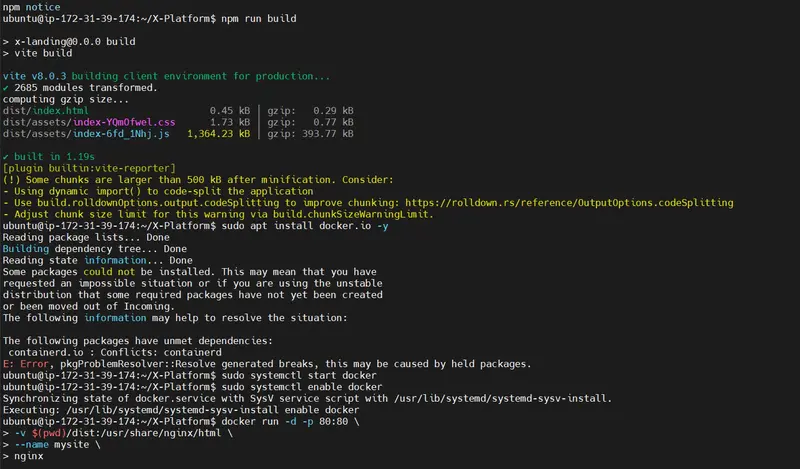
Build project (IMPORTANT)
npm run build
-
Install Docker
sudo apt install docker.io -y
sudo systemctl start docker
sudo systemctl enable docker -
Run website using Docker
docker run -d -p 80:80
-v $(pwd)/dist:/usr/share/nginx/html
–name mysite
nginx


-
Verify container
docker ps -
Open website
http:your-ec2-public-ip
If you find any conflicts , check here
- Docker install conflict
sudo apt remove containerd containerd.io -y
sudo apt install docker.io -y
-
Docker permission denied
sudo usermod -aG docker ubuntu
newgrp docker -
Container not running / site not opening
docker ps
Test Locally – curl localhost
Chekc logs – docker logs mysite -
Website not opening in browser
Fix: Security Group
Allow:
Type Port Source
HTTP 80 0.0.0.0/0
-
FINAL DEPLOYMENT COMMAND
sudo docker run -d -p 80:80
-v $(pwd)/dist:/usr/share/nginx/html
–name mysite
nginx