Nvidia uyardı: GeForce sürücülerinde yeni açık keşfedildi

 Nvidia, GeForce RTX ve GTX kullanıcılarını ilgilendiren yeni bir güvenlik bülteni yayınladı. Şirket, yüksek riskli açıkların yeni sürücülerle kapatıldığını doğruladı.
 Nvidia, GeForce RTX ve GTX kullanıcılarını ilgilendiren yeni bir güvenlik bülteni yayınladı. Şirket, yüksek riskli açıkların yeni sürücülerle kapatıldığını doğruladı.

 Xiaomi bugün düzenlediği lansmanda, yeni amital gemisi modeli Xiaomi 17 Max’i tanıttı. Xiaomi’nin bugüne kadarki en büyük bataryalı telefonu olan 17 Max neler sunuyor?

Authored by Conall Heffernan
In this post, I’ll walk through how to integrate Anthropic’s Claude Code monitoring with Bronto so you can get a clear, unified view of your AI tool usage — all in one place.
This project came out of our recent company AI sprint — a chance for me, as a technical support manager, to jump into an engineering sprint and brush up on my Python and Bash skills. After years of helping customers set up and troubleshoot their environments, it was exciting to get hands-on and demo my findings to the wider team over pizza and beers.
What You Can Send from Claude Code to Bronto
Claude Code has a built-in monitoring feature that provides a detailed view into how your teams use AI-assisted coding — from productivity metrics to cost visibility. When paired with Bronto, this data becomes even more useful.
Here’s what you can do with the exported data:


Why Bronto specifically:
Two Ways to Connect Claude Code to Bronto
Option 1: Direct (Simplest)
Claude Code has built-in OTel support, so it can send telemetry straight to Bronto. Just set these environment variables (full details in Claude Code’s docs):
export CLAUDE_CODE_ENABLE_TELEMETRY=1
export OTEL_LOGS_EXPORTER=otlp
export OTEL_EXPORTER_OTLP_PROTOCOL=http/protobuf
export OTEL_EXPORTER_OTLP_ENDPOINT=https://ingestion.eu.bronto.io
export OTEL_EXPORTER_OTLP_HEADERS="x-bronto-api-key=<api_key_here>,x-bronto-collection=AISprint,x-bronto-dataset=claude-code"
export OTEL_LOGS_EXPORT_INTERVAL=2000
export OTEL_LOG_USER_PROMPTS=1
With this setup, Claude Code sends structured logs directly to Bronto — no additional infrastructure to run or maintain.
Best for:
Option 2: Via an Existing OTel Collector
If your organisation already runs an OTel Collector, route Claude Code’s logs through that same pipeline before forwarding to Bronto. This is the approach I used — I spun up a small AWS EC2 instance running the OTel collector, configured Claude Code to send logs to it, and had the collector forward those logs to Bronto.
Point Claude Code at your local collector:
export CLAUDE_CODE_ENABLE_TELEMETRY=1
export OTEL_LOGS_EXPORTER=otlp
export OTEL_EXPORTER_OTLP_PROTOCOL=grpc
export OTEL_EXPORTER_OTLP_ENDPOINT=http://localhost:4317
export OTEL_LOG_USER_PROMPTS=1
Pro tip: Persist these environment variables — otherwise starting a new terminal session will clear them and you’ll wonder why nothing is flowing. Ask me how I know.
Collector receiver config:
receivers:
  otlp:
    protocols:
      grpc:
        endpoint: 0.0.0.0:4317  # Default OTLP gRPC port
      http:
        endpoint: 0.0.0.0:4318  # Default OTLP HTTP port
        cors:
          allowed_origins:
            - "*"
Best for:
Generating Some Log Data
To verify everything was working, I fired up Claude Code and asked it to create a simple Python script, then made a few tweaks — spin up a basic GUI, take an input value, save it locally. While I was doing this, Claude Code was generating log events in the background, flowing through my OTel collector and straight into Bronto.

Searching Claude Logs in Bronto
During testing, Claude was hitting errors because I’d been using an old revoked API key from a previous project. While the UI showed an error, I could also see the API errors flowing into Bronto. A simple error query surfaced the logs directly.

I also created a tree map to instantly visualize which models were used across the project — making it easy to see usage patterns and identify which models were most heavily used.

Token usage analysis — a multi group-by on $input_tokens and $output_tokens helps identify outliers and inefficient prompts, control API spend, and uncover latency trends tied to model size or context length.

Session duration — tracking how long each session stayed active helps identify inefficient workflows, idle connections, or hanging requests that inflate costs. It’s also a signal for user engagement: shorter sessions suggest quick completions, longer ones can point to complex prompts or slow model responses.

Prompt auditing — prompts are redacted by default. To enable them, set OTEL_LOG_USER_PROMPTS=1 (already included in the config above).

Conclusion
From Claude Code to Bronto, all connected through OpenTelemetry — a few environment variables, an open source agent, and you have logs and insights flowing in. Once it’s set up, you get full visibility into how your AI tooling is being used, cost metrics, and what’s actually happening under the hood.
Appendix: Full OTel Collector Config
Receivers:
receivers:
  otlp:
    protocols:
      grpc:
        endpoint: 0.0.0.0:4317
      http:
        endpoint: 0.0.0.0:4318
        cors:
          allowed_origins:
            - "*"
Exporters:
exporters:
  otlphttp/brontobytes:
    logs_endpoint: "https://ingestion.eu.bronto.io/v1/logs"
    compression: gzip
    headers:
      x-bronto-api-key: "INGESTION_API_KEY_GOES_HERE"
    timeout: 30s
    retry_on_failure:
      enabled: true
      initial_interval: 5s
      max_interval: 30s
      max_elapsed_time: 120s
    sending_queue:
      enabled: true
      num_consumers: 10
      queue_size: 5000
Pipelines:
service:
  pipelines:
    logs:
      receivers: [otlp]
      processors: [memory_limiter, resource, batch, transform]
      exporters: [otlphttp/brontobytes]
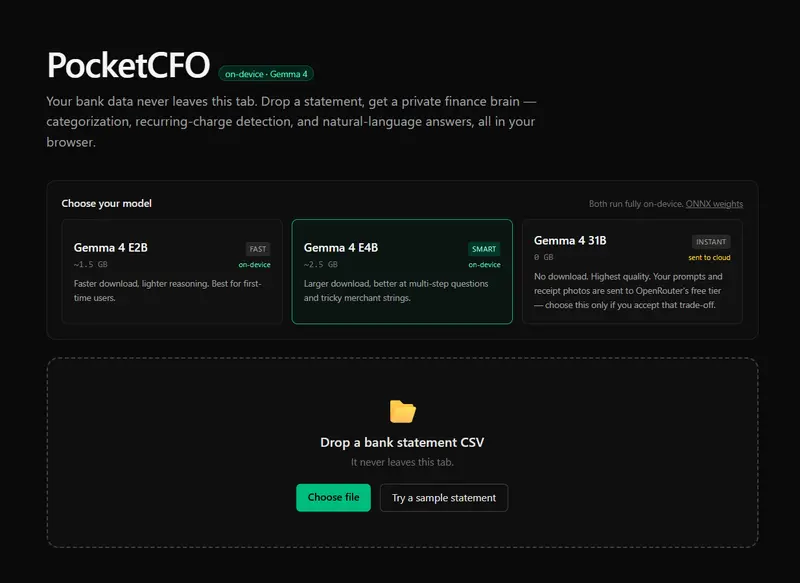
PocketCFO: a private personal-finance brain that runs entirely in your browser
Snap a paper receipt, drop a bank statement, or just ask a question. Gemma 4 does the rest — without a single byte ever leaving your tab.
Live demo: [your-vercel-url]
Code: https://github.com/chintanonweb/gemma-challenge
The problem
Personal-finance apps are a usability disaster for privacy-minded people.
To get useful insights from your bank statement — categorizing spend, spotting forgotten subscriptions, asking “how much did I spend on coffee?” — you have to upload your full transaction history to a third party. Often more: bank credentials via Plaid, receipts via your phone gallery, voice memos via some cloud transcription API.
Most people don’t. Most people shouldn’t. So the insight never gets generated, and the forgotten subscription keeps charging.
I wanted to know if there was now a way to fix this — a personal finance tool that does real work but where every byte stays on the user’s machine. Until 2026 the answer was “almost, but not quite.” With Gemma 4 E2B the answer is finally yes, in a browser tab.
What I built
PocketCFO is a single-page web app where you:
Everything runs in the browser. The only thing the server does is host static files. Open your devtools network tab during use; after the initial ~1.5GB model download (cached), nothing leaves your machine.


Why a three-way model picker — and why E2B is the default
Instead of hardcoding a single model, PocketCFO ships a picker covering three deployment tiers of the same model family. The “intentional model selection” judging criterion isn’t just a justification I write into the post — it’s a user feature that exposes the actual trade-off:
| Option | Where it runs | Cold-load | Quality | Privacy |
|---|---|---|---|---|
| Gemma 4 E2B (default) | Your browser via WebGPU | ~1.5 GB once | Good | On-device |
| Gemma 4 E4B | Your browser via WebGPU | ~2.5 GB once | Better | On-device |
| Gemma 4 31B | OpenRouter cloud (free tier) | 0 | Best | Sent to OpenRouter |
The default is E2B because most users meet PocketCFO for the first time on a normal connection and don’t want to wait through a 2.5 GB download before seeing anything. The big win is that every option uses the same Gemma 4 family with the same 128K context, so the product behaves the same; what changes is the user’s chosen balance between privacy, latency, and quality.
PocketCFO has four non-negotiable constraints, and E2B is the smallest Gemma 4 variant that meets all four:
The 31B Dense and 26B MoE Gemma 4 variants are too large for browser inference today. The E4B variant is more capable but ~2.5GB to download — painfully slow for a first-time user trying the demo. E2B hits the sweet spot: same multimodality, same 128K context, roughly half the cold-load time. Respecting the user’s bandwidth turned out to matter more for product feel than the marginal reasoning gain of the bigger model.
Crucially, the multimodality is what makes the model choice non-trivial. Without the vision encoder, the receipt-snap flow doesn’t work and the project collapses to a text-only tool that Gemma 3 could have done. With it, every receipt scan and statement question runs through the same ~1.5GB of weights — downloaded once, never uploaded.
Architecture: the boring rule that prevents the demo from lying
The single most important architectural decision in PocketCFO is this:
The LLM categorizes and reasons. A boring
analytics/module does all the math.
When a finance tool says “you spent $487 on subscriptions this year,” that number had better be right. LLMs hallucinate sums constantly — even good ones, even with explicit chain-of-thought — and they do it most often in exactly the situations where you’d put one in front of a user (long contexts, lots of numbers, “summarize this for me”). I would not ship a demo that adds $14 + $9.99 and shows $24.
So the split is:
engine/ (Gemma 4) outputs labels: a category word, a merchant name, a free-form answer.analytics/ (pure functions, 100% test coverage) outputs numbers: totals, percentages, recurring-payment detection, month-over-month deltas.The recurring-charge detection in particular is purely deterministic: group by merchant, compute gap distribution, snap to weekly/monthly/quarterly/yearly. Three unit tests cover the cadence math, two cover the edge cases (single-month input, income exclusion). The LLM never enters that code path. The number on the dashboard is correct by construction.
Three things I learned shipping Gemma 4 to the browser in three days
1. Transformers.js needs to be on v4.0.1+ for Gemma 4. I started on v3.5 and got Unsupported model type: gemma4 the first time the model tried to load. Gemma 4 support didn’t land in @huggingface/transformers until v4.0.1. Easy fix once you know — but a reminder that ^ semver ranges on bleeding-edge libraries can silently leave you behind. The TypeScript types for pipeline() are still too complex to resolve cleanly, so I wrapped the call in a narrow cast; runtime behavior is fine.
2. Cross-Origin-Isolation is a Vercel-deploy footgun. Multi-threaded WebAssembly inside Transformers.js needs SharedArrayBuffer, which needs Cross-Origin-Opener-Policy: same-origin and Cross-Origin-Embedder-Policy: require-corp headers. These are easy to add in next.config.ts but easy to forget — the build will pass, the deploy will succeed, the demo will silently fall back to slow single-threaded WASM. Test in incognito after deploying.
3. Streaming Q&A makes the demo feel real; per-token categorization doesn’t. The Q&A panel uses TextStreamer so the answer types out character by character — feels alive. For categorization (60 transactions × short outputs), sequential non-streamed calls + UI pills lighting up one at a time also feels alive. Both feel like the model is working; neither needs the same engineering. Pick the streaming hill you actually want to die on.
Try it
If you build something on Gemma 4 too, I’d love to see it.
— Chintan
I’ve been writing Go for a while now, and somewhere along the way something shifted.
My code started feeling less like “code that happens to be in Go” and more like… Go code. Hard to explain, but you notice it when it happens.
Go has patterns. Not rules exactly, but ways of doing things that show up everywhere across the language and the ecosystem. Error handling. Naming. Control flow. The way you structure types. You start picking them up gradually, and when you finally start using them yourself, your code starts to feel right in a way that’s difficult to articulate.
This article is just me sharing the ones that clicked for me. Some are well-known idioms. Some are just habits I picked up from reading enough Go code written by people who clearly knew what they were doing.
This isn’t the official take though. For that, go read Effective Go. It’s from the Go team and it’s genuinely good. Think of this as the stuff I wish I’d come across earlier.
Okay. Let’s get into it.
1. Go Makes You Deal With Uncertainty Explicitly
One of the first things that hits you when you start writing Go is that its error handling is very explicit.
Two patterns show up everywhere, and once you understand what they’re actually doing, a huge chunk of Go code starts making sense.
err != nil : the error check you’ll write a thousand times
In most languages, errors get thrown and caught somewhere up the chain. Go doesn’t do that. Functions that can fail return the error directly, and you check it right there.
user, err := getUserByID(id)
if err != nil {
    return err
}
At first this feels repetitive. You write if err != nil so many times you start doing it in your sleep. But that’s kind of the point. There’s no hidden control flow. No wondering where an exception might surface. The error is right there, and you deal with it or you pass it up. It’s your call.
What makes it even nicer is redeclaration. If you’re chaining multiple calls, you don’t need a new err variable each time. Go lets you reuse the one err variable with := as long as at least one variable on the left is new:
user, err := getUserByID(id)
if err != nil {
    return err
}

profile, err := getProfile(user.ID)
if err != nil {
    return err
}
Same err, reassigned each time. You just keep going down the chain, handling as you go.
The comma-ok idiom: “does this even exist?”
The other pattern is comma-ok. You see it when reading from a map, doing a type assertion, or receiving from a channel:
value, ok := someMap[key]
if !ok {
    // key doesn't exist
}
The second value, ok , is just a boolean. It’s Go’s way of saying: this operation might not give you anything useful, here’s how you check.
It’s really the same idea as err != nil. Go doesn’t like silent failures. It hands you the result and the signal that tells you whether it’s safe to use.
This has been pretty good for me, cause before Go I tended to skip error checks and just sort of assume things exist.
2. Naming Things the Go Way
Go is pretty opinionated about names. Not in a loud way, just in a “this is how we do it here” way. Two things tripped me up early on.
Package-scoped names
When I started out I was writing things like jobs.JobsService and companies.CompaniesService. Felt thorough. Felt descriptive. Also felt redundant the moment someone pointed it out to me.
The package name is already doing half the work. jobs.Service says exactly the same thing as jobs.JobsService, just without the stutter. Go leans on this everywhere. You’re not writing the type in isolation, you’re writing it in context. Let the package carry its weight.
Once I internalized this, I started catching myself doing it with other things too. jobs.JobFilter becoming jobs.Filter. users.UserStore becoming users.Store. Much cleaner, much simpler… don’t you think?
Interface names: Reader, Writer, and friends
This one confused me for longer than I’d like to admit.
Go’s convention is to name interfaces after what they do, usually as a single word with an -er suffix. Reader. Writer. Stringer. Handler. It sounds simple but it’s actually a really clean system once it clicks. If your type has a Read method, it’s a Reader. That’s it.
The practical payoff is standard library function signatures become much easier to read and understand. When you see a function that accepts an io.Writer, you immediately know: anything with a Write method works here. os.File, bytes.Buffer, http.ResponseWriter. They all qualify.
3. Writing Clean Control Flow
This section is about the stuff that makes Go code easy to read top to bottom. The patterns here are some of my favorite, even though they’re much more convenience type patterns than patterns that have a lot to do with whether your program runs correctly.
Early returns instead of if-else chains
I used to write a lot of this:
if condition {
    // do thing
} else if other condition {
    // do other thing
} else {
    // fallback
}
Go developers tend to flip that around. Handle the bad cases first, return early, and let the happy path sit at the bottom with no indentation:
if !condition {
    return err
}

if !otherCondition {
    return err
}

// happy path here
It’s a small shift, but one that I think makes a big difference. With this pattern, you don’t need to mentally track multiple branches. You just read down.
Chaining calls with redeclaration
This one I use constantly. We already mentioned it a little. When you’re making multiple calls that can fail, you don’t need a fresh err variable each time. Go lets you reuse it with := as long as at least one variable on the left side is new:
user, err := getUserByID(id)
if err != nil {
    return err
}

profile, err := getProfile(user.ID)
if err != nil {
    return err
}

posts, err := getPostsByUser(user.ID)
if err != nil {
    return err
}
Same err the whole way down. It keeps things clean and you’re never managing a bunch of err1, err2, err3
Only take what you need from a range loop
If you’re ranging over a slice and you only need the index, you don’t have to assign the value at all:
for i := range someSlice {
    // just the index
}
No need for the _ placeholder.
4. Working With Types Intentionally
Go’s type system is one of the things I’ve come to genuinely appreciate. It nudges you toward writing code that’s flexible but safe.
Interfaces for swappability
An interface in Go is just a contract. If your type has these methods, it satisfies the interface. That’s it.
The reason this matters practically is swappability. Say you have a service that depends on a repository. If that repository is a concrete type, you’re locked in. If you want to, for example, swap it out in tests, you can’t easily do that. Not without a refactor. But if you depend on an interface instead:
type UserRepository interface {
    GetByID(id int) (User, error)
    Create(u User) error
}
Now anything that implements those methods works. Your real database repository. A mock for tests. Whatever.
I use this pattern constantly in my projects now. It keeps things separate in a way that actually helps when things get complicated.
Small pure functions, orchestrated by bigger ones
Not exclusively a Go thing. More a general organizational pattern, but I’ve been doing it a lot in Go.
The idea is simple. Write small functions that do one thing and don’t touch anything outside themselves. Then write a bigger function whose only job is calling those smaller ones in the right order.
func processJob(job Job) error {
    if err := validateJob(job); err != nil {
        return err
    }

    normalized := normalizeJob(job)

    if err := saveJob(normalized); err != nil {
        return err
    }

    return nil
}
validateJob, normalizeJob, saveJob , each one does its thing. processJob just calls and organizes them. When something breaks, you know exactly where to look.
make for slices when you know the size
If you know upfront how many elements a slice will have, initialize it with make:
results := make([]Job, len(input))

for i, item := range input {
    results[i] = process(item)
}
Without make, you’d have to append each element, and you lose the ability to assign by index directly.
Embedding
Honestly, I don’t use this one that often. But when I do come across the need, it’s very useful.
Embedding lets one struct inherit the fields and methods of another by simply listing it in the inheriting struct:
type Animal struct {
    Name string
}

func (a Animal) Speak() string {
    return a.Name + " makes a sound"
}

type Dog struct {
    Animal
    Breed string
}
Dog gets Speak() for free
5. Concurrency: Getting a Response Back
Go’s concurrency model is one of its best features. Goroutines are cheap, channels are elegant, and the whole thing just makes sense once it clicks. Most of the time when you spin up a goroutine you’re firing something off and not waiting for a response. But sometimes you need one.
The pattern I’ve used for this is adding a result channel directly to the struct:
type Client struct {
    conn    net.Conn
    msgCh   chan string
    resultCh chan error
}
When the goroutine finishes its work, it sends the result down resultCh. The caller is sitting on the other end waiting for it:
go client.handleMessage(msg)

if err := <-client.resultCh; err != nil {
    log.Println("something went wrong:", err)
}
I ran into this pattern building a netcat group chat app. Multiple clients, concurrent connections, and I needed to know when something failed. Passing the result channel on the struct kept everything organized without having to thread channels through every function signature.
Wrapping Up
Here’s the thing about idiomatic Go. Nobody sits down and studies it all at once. You pick it up gradually. You read someone else’s code and think “oh, that’s a cleaner way to do that.” You get a review comment. You break something and figure out why. Slowly your code starts looking more like the language it’s written in.
The patterns in this article are just the ones that stuck for me. Error handling that forces you to be explicit. Naming that lets the package do the talking. Control flow that reads like a straight line. Types that stay flexible without getting complicated.
None of it is revolutionary. That’s kind of the point. Go is not a revolutionary language. It’s a deliberate one. And the more you write it, the more you realize that the “boring” choices are usually the right ones.
If you want the proper, structured breakdown of idiomatic Go, go read Effective Go. It’s from the people who built the language. This was just me passing on the stuff I wish I’d had earlier.
Now go write some Go. You’ll figure the rest out.
This is a submission for the Google I/O Writing Challenge
I went into Google I/O 2026 as someone still finding her footing in app development. I came out the other side genuinely excited — and a little overwhelmed — about how fast everything is moving.
I am an SDET with 9 years in software testing. A few months ago I started learning AI fundamentals and building my first real app: a family super-app that combines grocery tracking, shopping budgets, family calendar planning, and weekend activity planning all in one place. I am building it in Google AI Studio using Gemini 3 Flash Preview.
So when I watched Google I/O this week, I wasn’t watching as a passive observer. I was watching as someone actively building — and almost every announcement had me pausing the stream thinking “wait, that changes what I’m building.”
Here are the moments that hit hardest.
1. Antigravity Built a Full OS in 12 Hours for Under $1,000
This was the jaw-drop moment of the entire keynote for me.
Google unveiled Antigravity 2.0, their agent-first development platform with a new Antigravity CLI for orchestrating and building agents. But the live demo went further than any announcement slide could capture — an AI agent was given a single prompt and built a functioning operating system in approximately 12 hours at a cost of under $1,000.
Let that sink in. A full OS. Twelve hours. Less than a thousand dollars.
As someone coming from a quality engineering background with limited development experience, this felt like the ground shifting. The barrier to building software just got dramatically lower. I have been spending weeks learning how to wire up a Node.js backend. Antigravity is showing a future where you describe what you want and the agent scaffolds it, writes it, and tests it.
What this means for my app:
I am building a family app with multiple moving parts — grocery lists, budget tracking, a family calendar, a weekend planner. Normally that scope would take a solo developer months. With agentic coding tools like Antigravity, I can see a future where I describe a feature in plain English, the agent writes the code, and I use my QE skills to review and test what it produced.
That is a workflow I genuinely understand. I have been testing other people’s code for 9 years. Now the “other developer” is an AI agent, and my job is the same: find the gaps, validate the output, ship with confidence.
2. Agentic Coding in Search — Robby Stein’s Demo
The Search keynote by Robby Stein was the section I rewatched twice.
Google Search introduced an AI-powered experience that generates contextual answers, images, and short videos, making it more assistant-like in function. Generative UI was also unveiled, dynamically adjusting how results appear based on user intent.
What struck me was how Search is no longer just a lookup tool. It is starting to reason. It doesn’t just find — it understands what you are trying to accomplish and adapts the results to help you get there.
As someone building a family app, this matters because families don’t search like developers do. A parent doesn’t type “quinoa recipe low sodium 4 servings.” They type “something healthy for dinner the kids won’t complain about.” The new Search understands that intent. It adapts.
What this means for my app:
I want to build a search experience inside my family app that works the same way. Not a filter. Not a dropdown. A natural language input where a family member types “we have chicken and we’re on a budget this week” and the app understands the whole context — the ingredients they have, their budget remaining, what’s already on the grocery list — and surfaces a meal plan that fits.
That’s the bar Google just set. And it’s the bar I’m now designing toward.
3. Gemini Spark — The 24/7 Background Agent
Gemini Spark is a new AI agent that lives in the cloud and works proactively on tasks in the background, continuing to work even when you’re not actively using it.
This one I am still processing. An agent that doesn’t wait for you to ask. It monitors, plans, and acts — all while you go about your day.
For a family app, the implications are significant. Most family planning apps are reactive — you open the app, you add something, you check a list. Gemini Spark represents a shift to proactive. The agent notices that your grocery budget is running low mid-week, checks the family calendar and sees there’s a dinner party on Saturday, and quietly starts building a shopping list without you having to ask.
What this means for my app:
The Weekend Planner feature I’ve been designing fits perfectly here. Right now I was planning it as a manual feature — family members add activities, the app shows a view. But after watching Spark, I’m rethinking it as a proactive agent:
That’s not a feature. That’s a family assistant. And Google just showed us it’s possible.
4. Universal Cart — The Feature I Am Most Excited to Integrate
Universal Cart uses AI to proactively check your cart and understands context — like knowing which parts you’re buying for a PC build — across multiple retailers.
This was the announcement I immediately started sketching integration ideas for.
Families don’t shop at one store. We go to Costco for bulk, Metro for fresh produce, Shoppers for pharmacy items. Every week we’re mentally tracking prices across multiple places. Universal Cart is Google saying: you shouldn’t have to do that.
What this means for my app — in detail:
Here is exactly how I see Universal Cart fitting into the family app I am building:
Smart grocery sourcing:
A family member adds “Greek yogurt” to the shared grocery list. Universal Cart checks across nearby stores, finds the best price per unit, and flags it. The app shows: “Metro has this $1.20 cheaper this week.”
Budget-aware shopping:
The family sets a $200 weekly grocery budget. As items get added to the list, the app estimates the Universal Cart total in real time. When you hit $180, the app flags it: “You’re close to your budget — here are 3 items with cheaper alternatives.”
Weekend planner tie-in:
Planning a family BBQ this weekend? The weekend planner generates a suggested menu. Universal Cart sources every ingredient across nearby stores, finds the best combination of stores to hit, and estimates the total cost before anyone leaves the house.
Receipt reconciliation with ReceiptMind:
After shopping, you photograph the receipt in ReceiptMind. The app compares what Universal Cart estimated vs what you actually spent. Over time, this builds a real picture of where estimates were off and which stores are consistently cheaper for your family’s actual buying habits.
This integration is my north star for the next phase of this app.
5. Intelligent Eyewear — I Already Live in This World (Sort Of)
Google’s collaboration with Samsung brought working demos of intelligent eyewear designed by Warby Parker and Gentle Monster, with deep Gemini integration to perform tasks through voice commands.
Here’s my personal take on this one: I own a pair of Meta Ray-Bans.
I love them. I use them for calls. I take photos with them. But that is essentially it. The AI assistant on them feels like a novelty — it can answer general questions but it doesn’t know anything about me, my context, or what I’m actually trying to do.
What Google showed at I/O is a fundamentally different vision. Gemini embedded in glasses that actually understand your context — what you’re looking at, where you are, what you’re trying to accomplish — and assists without you having to pull out your phone.
What this means for families:
I walked into a grocery store last Saturday with a list on my phone. I kept having to unlock it, find the list, check off items, put it back. It’s friction. Small friction, but friction.
Intelligent eyewear with Gemini could eliminate that entirely. Walk into Metro, say “what do we still need?” — the glasses check the family list, see what’s already in the cart via camera, and tell you what’s missing. No phone. No unlocking. No friction.
For my family app, this is a future integration worth designing toward today — even if the hardware isn’t available yet. Building the API layer to support a glasses interface means we’re ready when the hardware ships this fall.
The Bigger Picture — What Google I/O Meant to Me Personally
I came into this as an SDET who made a decision a few months ago to stop watching AI from the sidelines and start building.
Google I/O showed me how fast the gap between “idea” and “working software” is closing. Antigravity is compressing development time. Search is raising the bar for what users expect from interfaces. Spark is redefining what “proactive” means in software. Universal Cart is eliminating friction that users didn’t even know they were tolerating.
As a quality engineer, my job has always been to ask: does this actually work for the person using it? That question doesn’t change with AI. If anything, it gets more important — because when AI agents are doing the building and the reasoning and the planning, the human who validates the output becomes more valuable, not less.
That’s the role I’m stepping into. And Google I/O 2026 gave me a much clearer picture of what I’m stepping into it for.
What I’m Building Next
Immediately after I/O, I added three things to my roadmap for the family app:
The deadline for this writing challenge is May 24. My app has no deadline. But Google I/O just gave it a much clearer direction.
Hemalatha — SDET and app builder patiently waiting for the Gemini upgrade
Building a family super-app with Google AI Studio + Gemini 3 Flash Preview
I still remember the night before my first day — tabs open, notes ready, convinced I was going to ship features on day one. Spoiler: I didn’t. But what I did get was something better — a crash course in what real software development actually looks like. Here’s the honest truth about my first month.
Reading Code Is a Skill Nobody Talks About
Every tutorial I ever followed started with a blank file. Real work doesn’t. On my first task, I was dropped into a codebase with hundreds of files, and I had no idea where to even begin. I kept waiting for it to “click” like tutorials did.
What actually helped was slowing down — not trying to understand everything at once, but tracing one feature from the UI all the way to the database. Like following a thread. Once I did that a few times, the codebase started feeling less like a maze and more like a map.
Takeaway: before you write a single line, spend time just reading. Good developers read code like others read books.
Googling Is Not Cheating — It’s the Job
I used to feel embarrassed opening Stack Overflow in front of my teammates. I thought it meant I didn’t know enough. Then I watched my senior dev — someone with years of experience — Google a CSS property without blinking.
Nobody memorizes everything. The real skill is knowing what to search, how to read documentation quickly, and how to tell a good answer from a bad one. That takes practice, not shame.
Takeaway: your browser history full of “how to do X in React” doesn’t make you a bad developer. It makes you a working one.
Git Will Save You — Once You Stop Fearing It
My first week I was committing everything to main and praying nothing broke. Then I accidentally overwrote two hours of work and nearly had a panic attack.
After that I finally sat down and learned branching properly. Feature branches, descriptive commit messages, pulling before pushing — it sounds boring until the day it saves your entire afternoon. Git isn’t just version control, it’s your safety net.
Takeaway: learn git branch, git stash, and git log early. Future you will be grateful.
Asking for Help Is Part of the Job Description
I spent an entire afternoon stuck on a bug, too nervous to ask anyone. When I finally did, my teammate spotted the issue in under two minutes. Two minutes vs four hours — that’s the cost of silence.
Good teams want you to ask questions. It’s not a sign of weakness, it’s a sign that you respect everyone’s time including your own. The rule I now follow: if I’m stuck for more than 30 minutes, I ask.
Takeaway: being stuck quietly is not the same as being productive. Speak up.
At the end,
Internships aren’t about being perfect — they’re about learning faster than you ever have before. If you’re just starting out, embrace the confusion. It means you’re in the right place.
What’s the first real thing you learned on the job? Drop it in the comments — I’d love to know.
The Sovereign Model Is Not Enough
The European AI debate keeps getting pulled toward the model race. Who has the frontier model? Who has the compute? Who is behind the US labs?
That race matters, but it is not the whole AI economy. Most companies do not experience AI as a leaderboard. They experience it as a workflow: invoices arrive, contracts need review, documents become structured fields, images need processing, reports get generated, and uncertain outputs need a human decision before anything reaches a customer.
That is where European AI can matter most. Not by copying the model-layer strategy of better-funded players, but by making business-critical AI workflows easier to build, run, audit, and trust under European constraints.
The first answer to sovereignty is usually model-centric. Pick a European model provider. Choose an EU region. Avoid sending prompts to a US endpoint. Those choices matter, but they do not solve the harder problem: most business workflows are not one model call. They need OCR, extraction, document conversion, image processing, generated PDFs, spreadsheets, review steps, retries, logs, and delivery. For many of those steps, there are still few sovereign providers that are both production-grade and easy to compose. And even when good providers exist, the team still has to stitch them into one workflow with consistent auth, pricing, retention, error handling, and audit behavior.
For agencies and technical consultancies, that gap is not theoretical. It shows up during client delivery. The demo extracts fields from contracts, generates a report, and creates a spreadsheet. Then the approval process starts: procurement asks for sub-processors, legal asks where personal data was processed, and security asks whether failed webhook payloads contain document text. The model answer is suddenly too narrow.
If sovereignty only lives at the model layer, the architecture will fail the first serious workflow review.
The Workflow Is Where Business Risk Lives
Most useful AI work is not a model call. It is a chain of steps around a business process.
A German fleet operator receives traffic-fine notices from municipalities across Europe. The workflow has to ingest PDFs, extract plate numbers and dates, route uncertain fields for review, generate a summary for the operations team, and export a clean register. A logistics company receives CMR waybills, delivery notes, and customs documents from carriers. The workflow has to extract shipment data, normalize dates and addresses, generate exception reports, and update the transport desk. A finance team receives supplier invoices from several EU countries. The workflow has to extract supplier details, VAT context, totals, and IBANs, check confidence, generate an approval packet, and export clean rows.
The model may help with interpretation. The workflow owns the promises:
That is the layer where trust is won or lost. A model can be European and still sit inside an uncontrolled workflow. A workflow can be auditable and sovereign only if every content-processing handoff is designed that way.
This is also where GDPR document-processing requirements and the EU AI Act become engineering concerns instead of legal footnotes. GDPR asks where personal data goes, how much is processed, and how long it is retained. The AI Act asks what the AI system does, what risk category it falls into, and where human oversight belongs. Those questions cannot be answered by a model endpoint. They have to be answered by the workflow.
Why Agencies Feel This First
Agencies are the early warning system for this problem because they repeat workflows across clients.
A SaaS team may build one document pipeline and operate it for years. An agency builds variants of the same pattern again and again: intake, extraction, review, generation, delivery, reporting. Each project has different document types, templates, approval rules, and client expectations, but the underlying processing shape repeats.
That repetition creates pressure in both directions.
On the delivery side, custom vendor stacks eat margin. One client uses AWS Textract, another uses a PDF parsing library, a third needs an image processing service, and a fourth wants generated reports. Every new vendor adds credentials, billing units, retry behavior, and failure modes. Fixed-fee projects get harder to quote because the hidden work is not the API call. It is the glue code and the review explanation around it.
On the trust side, sovereignty-conscious clients do not only ask whether a model is hosted in Europe. They ask whether the agency can explain the full path. If the answer changes per project, the agency cannot reuse its compliance story. Every client review becomes a fresh reconstruction of vendor boundaries, retention policies, and generated artifacts.
The agency needs a repeatable workflow architecture, not a new tool collage for every engagement.
For many client projects, that repeatable architecture starts in n8n. The visual workflow should describe the business process: intake, extraction, review, generation, delivery, and reporting. The processing nodes should not become a pile of unrelated HTTP calls, credentials, and format mappers. The verified Iteration Layer n8n node exists for that reason: agencies can wire document and image workflows visually while keeping the processing surface consistent.
The Runtime View
A workflow runtime is the controlled layer where content-processing steps become one repeatable system.
It does not mean a visual builder has to own the whole business process. It does not mean every client workflow should move into a heavyweight enterprise platform. For many agency projects, the useful runtime is simpler: one processing surface for the parts that touch documents, images, spreadsheets, websites, and generated files.
The runtime view asks different questions than a model evaluation:
| Question | Model-layer framing | Workflow-layer framing |
|---|---|---|
| Where is data processed? | Which model endpoint receives the prompt? | Which processors see source files, extracted fields, generated outputs, and logs? |
| What happens when output is uncertain? | Did the model answer confidently? | Which fields stop, which continue, and which need human review? |
| What changes between client projects? | Which prompt should be adjusted? | Which schema, template, policy, and project credentials apply? |
| What does the client approve? | A demo result | A data flow, review policy, vendor chain, and output record |
This is why the workflow layer is more defensible than the model layer for many business processes. Models improve and change. The client still needs the same contract: files enter through a known path, content is processed under known boundaries, uncertainty is visible, and outputs are created from data the workflow is allowed to use.
What Sovereign Workflows Need in Practice
For EU agencies, a credible sovereign workflow has a few concrete properties.
EU-hosted processing has to apply to the content-processing chain, not only one AI call. If extraction runs in Europe but generated PDFs are created by a US service, the workflow still has a cross-border output step. If the automation platform stores full execution payloads outside the EU, the workflow still has a data-flow problem.
Composability matters because every extra vendor is another processor review, credential set, billing model, and error surface. Extracting fields from a contract and generating a PDF summary should not require two unrelated integrations and a custom mapper between them. The fewer seams in the processing chain, the easier the workflow is to explain.
Structured uncertainty matters because AI output is not equally trustworthy across fields. A low-confidence IBAN, an ambiguous termination date, and a high-confidence invoice number should not follow the same path. Confidence scores, citations, and review rules turn vague “human in the loop” language into an actual operating model.
Predictable pricing matters because agencies quote projects before the final document mix is known. A workflow that extracts documents, transforms images, and generates reports should not require separate cost models for every operation. A shared credit pool is not just a billing feature; it is a way to quote client work without modeling several vendor invoices.
Agent-native access matters during discovery. MCP lets an agency explore documents, try schemas, generate draft outputs, and find edge cases quickly. But recurring delivery should still have a controlled handoff into REST, SDKs, n8n, or backend code that owns credentials, retries, review, and audit state.
None of this removes the need for legal review, contracts, access controls, or client-specific retention decisions. It gives the technical architecture a cleaner starting point.
The European Workflow Runtime We Are Building
This is the company we are building: Iteration Layer as the European AI workflow runtime for business-critical content processing.
The first surface is practical. The APIs share one auth model, one credit pool, one API style, and one EU-hosted processing layer. An agency can extract structured fields from a document, convert a document to Markdown for review, transform images, generate client-ready PDFs or spreadsheets, and expose those operations through MCP during exploration or REST, SDKs, and n8n during production delivery.
That does not make every client workflow compliant by itself. The agency still owns client contracts, lawful-basis analysis, access control, storage, delivery, and review policy. But the processing layer becomes easier to reason about: fewer vendors, fewer retention policies, fewer billing systems, and fewer places where client data can unexpectedly persist.
This is the practical meaning of a European AI workflow runtime. Not a claim that one product replaces every part of the stack. Not a promise that sovereignty can be bought as a badge. A narrower, more useful idea: the content-processing steps inside AI workflows should be composable, EU-hosted, predictable, and audit-ready by default.
For agencies serving European clients, that changes the sales conversation. Instead of saying “we can connect a model to your documents,” you can say: the workflow has a known data path, a known review policy, a known processing surface, and generated outputs that come from approved data.
That is the difference between a demo and infrastructure.
Build the Workflow Map First
Before choosing the next model or tool, draw one client workflow end to end.
Start with the file entering the system. Follow it through extraction, review, generation, delivery, logs, retries, and reporting. Mark every processor, every retained artifact, every human handoff, and every generated output. Then ask where the workflow is harder to explain than it needs to be.
If the answer is too many vendors, too many payload copies, too much glue code, or too little visibility into uncertainty, the problem is not only the model. It is the runtime around the model.
Read the EU-hosted AI workflow data-flow guide for the detailed checklist, or start with Iteration Layer’s document and image workflow APIs if you want the processing surface to be smaller before the next client review.
Current AI coding systems are becoming extremely capable at:
But there is still a major missing layer:
Business Understanding
Most AI coding agents can understand:
But they often fail to understand:
This creates a gap between:
The Problem With Current AI Coding Workflows
Most systems operate like this:
User Prompt
↓
Repository Scan
↓
Code Understanding
↓
Planning
↓
Implementation
This approach works technically.
But it forces the AI to repeatedly:
This increases:
The Missing Layer: Business Blueprint Context
I started exploring the idea of introducing a structured semantic context layer before implementation orchestration begins.
Instead of relying only on repository understanding, AI agents first read:
before implementation planning starts.
I call this:
Business Blueprint Layer
Proposed Workflow
Jira Ticket / User Request
↓
Business Blueprint Understanding
↓
Domain Semantic Interpretation
↓
Technical Understanding
↓
Planning Agent
↓
Execution Agents
↓
Validation Agents
↓
Implementation
Example Repository Structure
/ai-context
    business-model.yml
    domain-language.yml
    architecture-intent.yml
    monetization-rules.yml
    feature-priorities.yml
Why This Could Matter
Code understanding alone is not enough for reliable AI-native software engineering.
Human engineering teams also rely on:
AI systems may eventually require similar semantic operating context.
Potential advantages:
Future Direction
This could evolve into:
Final Thought
The future of AI software engineering may not depend only on larger context windows.
It may depend on whether AI systems can understand:
GitHub Repository
https://github.com/uttesh/business-blueprint-aware-ai-agent-framework
Author
Uttesh Kumar T.H.