Security Is Important. Automate It

Renovate, auto-merge, and why a small team has no other option

Open npm outdated on any project older than six months. Run uv lock --check on the backend. Look at the base image tag in your Dockerfile.

You already know what you’ll find. Things behind. Things with CVEs. Things end-of-life next month. The migration guide for Vite 5 → 6 nobody wants to read.

Nobody schedules this work. Nobody enjoys it. On a small team, nobody has time for it. So it doesn’t happen — until the day a CVE forces it to, in a hurry, on a Friday afternoon.

That model doesn’t scale to a real project. Especially not a real project with two people on it.

So I stopped doing it manually.

Handle It End to End, or Don’t Handle It

There’s a design principle I keep coming back to: a problem should be handled end to end. Do it, and forget. If something fails, you’ll be notified.

That’s it. That’s the bar.

A small team can ship a real product only if every recurring chore is either automated end-to-end or deleted. There is no third option. Half-automated means “someone has to remember to check on it,” and someone, in a two-person team, always forgets.

Dependency updates are the textbook case. They’re recurring, mechanical, security-critical, and boring. You cannot afford to do them manually. You also cannot afford to skip them. So the only honest answer is: hand them to a system that does them every night, lets the good ones through, flags the rest, and emails you when something breaks.

That system, for me, is Renovate.

Enter Renovate

Renovate is a bot. You point it at your repo. It reads your manifests — package.json, pyproject.toml, Dockerfile, GitHub Actions workflows, GitLab CI files, Helm charts, basically anything pinned. It checks the registries. When a new version exists, it opens a pull request (or merge request, depending on your forge — I’ll say PR for the rest of the article and trust you to translate).

That’s the whole pitch.

Renovate works on GitHub, GitLab, Bitbucket, Gitea, Azure Repos, and a few others. Same config, same behavior. That portability matters more than it sounds — your dependency policy is now a renovate.json you can carry between projects regardless of where the code lives.

The trick is in the delegation. A bot opening PRs is not new. Dependabot has done that for years on GitHub. What makes Renovate the right tool is the configuration surface — you can describe, with reasonable precision, which updates you trust enough to auto-merge.

Patch from 1.6.2 to 1.6.3? Auto-merge if CI is green. I’d never review that diff anyway.

Major from 5.x to 6.x? Open the PR, slap a major-update label, leave it for me.

The whole thing runs on a schedule. Mine fires at 3 a.m. every night. I wake up to a dashboard that says “12 PRs merged, 2 waiting for you.” The 12 were patch and minor bumps with passing pipelines. The 2 are pgvector going from 0.7 to 0.8 and a Postgres major. Those, I read.

The Config, in Plain English

The whole config is under 50 lines. Here’s the load-bearing part:

{
  "extends": ["config:recommended", ":dependencyDashboard"],
  "baseBranches": ["dev"],
  "platformAutomerge": true,
  "packageRules": [
    {
      "matchUpdateTypes": ["patch", "minor", "pin", "digest"],
      "automerge": true
    },
    {
      "matchUpdateTypes": ["major"],
      "automerge": false,
      "addLabels": ["major-update"]
    }
  ],
  "lockFileMaintenance": {
    "enabled": true,
    "schedule": ["before 5am on monday"]
  },
  "vulnerabilityAlerts": { "enabled": true }
}

Five rules. That’s it.

  • Target the development branch, not main. Bumps still flow through the normal development → pre-production → production (main) promotion, and they get tested again at every stage. The bot only opens the first door; everything downstream still has to pass.
  • Auto-merge patch, minor, pin, and digest bumps. Block majors behind a label.
  • Run lockfile maintenance every Monday, even when no direct deps changed — this catches transitive security fixes without anyone touching package.json.
  • Surface security advisories with their own label so they jump the queue.

The :dependencyDashboard preset is the unsung hero. It opens a single issue in your repo that lists every pending update, every blocked one, and every checkbox you can tick to force an immediate retry. When something looks weird, you go to one place.

The Prerequisite: A Pipeline That Tells the Truth

Here’s the part most posts skip.

Auto-merging dependency bumps is not a Renovate feature. It’s a trust delegation. You’re telling the bot: “if the pipeline says green, that means it works.” Renovate is downstream of that. It is not what makes auto-merge safe. Your CI is.

If your pipeline doesn’t actually verify the code works, auto-merge is a foot-gun pointed at production. The bot will cheerfully merge a react minor bump that breaks SSR — because the only thing it checked was npm install.

This is the direct sequel to Programming by Coercion. The whole point of that article was to build a pipeline that physically cannot let bad code through. Lint, type-check, unit tests, integration tests, end-to-end tests, security scans — each stage a finish line the code has to cross.

The key idea worth pulling out: the tests verify behavior, not implementation. If a customer has to add an item to their cart and pay, the test does exactly that. It can be decomposed into steps — add to cart, open the checkout, fill in the payment form, see the confirmation page — but the thing being verified is the user-visible outcome. When the test passes, you can be confident the feature actually works, because there is no other way the test could pass. The test only goes green if the behavior is real.

That’s why auto-bumping a dependency is safe under this kind of pipeline. The PR isn’t asking “does the code still compile?” — it’s asking “can the customer still buy the thing?” If the answer is yes across every layer, the version bump is fine. If a transitive change broke the checkout, the e2e test fails, the merge is blocked, and you get an email. End to end.

So I won’t enable auto-merge on a project that doesn’t have, at a minimum:

  • Linting and type-checking that fail the build.
  • Unit and integration tests that actually exercise the upgraded dependency.
  • End-to-end tests that hit the real code paths a user uses.
  • Security scans on the result (Trivy, Bandit, gitleaks).

The pipeline is what makes auto-merge honest. Without it, you’re not automating — you’re just shipping faster. Renovate is downstream of the pipeline, not a replacement for it. If you don’t have those gates yet, Renovate isn’t your next problem — the pipeline is.

So What Do You Actually Get?

A bot on a cron and a config file under 50 lines. That’s the install. From there, the system runs itself and the pipeline catches what would otherwise reach you. Here’s the honest accounting — what you gain, what you give up, and what else you could have picked.

Pros

It’s invisible when it works. And it works most days. I have not manually bumped a patch version in weeks.

Lockfile maintenance is a free vulnerability scan. Even when none of your package.json versions change, the resolved tree underneath does. Monday-morning lockfile refresh catches transitive CVEs you would never see otherwise.

The dependency dashboard kills the “what should I update next” anxiety. It’s just a list. You go down the list. You stop.

It respects your branching model. Target the development branch, not main. Bumps still flow through pre-production and get tested again before they reach users. Renovate opens the first door — the rest of the promotion chain stays unchanged.

Major updates get human-flagged automatically. You don’t have to remember to be careful. The label tells you.

The configuration is declarative and reviewable. Your dependency policy is a file in the repo, in git, with diff history. New team member asks “why do we auto-merge minors?” — answer is in the commit log.

Cons

You add a bot to your supply chain. Renovate runs with a token that can merge code. If that token leaks, an attacker can merge to your default branch. The mitigation is the same as for any CI secret — masked, protected, repo-scoped — but it is a non-zero surface area.

The “scheduled job in CI” model is fragile. A failing pipeline silently stops Renovate. You need to actually watch the maintenance stage, or you’ll discover three months later it’s been red the whole time. Enable your forge’s pipeline-failure notifications (GitHub Actions notifications, GitLab “failed pipeline” emails — same idea, different UI).

It’s noisy at first. Day one, you get 30+ PRs. You have to either merge them in a sitting or rate-limit Renovate (prConcurrentLimit) until you catch up. There’s no way around the initial backlog.

Auto-merge is only as good as your CI. I said this above. Worth saying twice. If your tests don’t exercise the dependency, auto-merge is theater.

Major bumps still take human time. Renovate doesn’t magic away Vite 5 → 6. It just makes sure the PR exists. The actual work — reading the migration guide, fixing the breaking changes, running the manual smoke test — is still on you. The bot reduces frequency-of-decisions, not depth-of-decisions.

Configuration depth has a learning curve. The packageRules matching system is powerful and confusing. You will, at some point, write a rule that matches nothing and silently does nothing, and you’ll lose an afternoon to it.

License and limits

Renovate is open source under AGPL-3.0, maintained by Mend. The CLI you run yourself — in a CI job, a container, wherever — is free, and that’s what the config in this article describes. Mend also offers a hosted GitHub App (“Mend Renovate”) for free, and a commercial tier with extras like compliance reports, SLAs, and a UI on top.

For a small team self-hosting on any forge, the free CLI is more than enough. The AGPL only matters if you’re embedding Renovate into a product you ship to users — running it as a maintenance bot in your own pipeline doesn’t trigger anything. Reasonable hard limits to be aware of: very large monorepos (hundreds of manifests) can push past Renovate’s per-repo timeout in CI, and registries with aggressive rate limits sometimes need explicit hostRules entries.

What About the Alternatives?

Dependabot is the obvious one. Built into GitHub, zero setup, works fine. If you’re on GitHub and don’t need fine-grained grouping, custom schedules, or lockfile maintenance, just use Dependabot. The configuration is leaner, the defaults are reasonable. The trade-offs: less control over auto-merge rules, no monorepo grouping, no scheduled transitive-lockfile refresh, and — the one that matters most — it only exists on GitHub. Move repos to another forge and you start over. Renovate is the platform-agnostic answer: same renovate.json whether you’re on GitHub, GitLab, Bitbucket, or self-hosted.

Snyk, Mend, Socket. These are the commercial offerings. They go further than Renovate — security posture, license compliance, dashboards, SLAs. Worth it for a company; overkill for a side project.

npm-check-updates + a calendar reminder. This is what most people actually do. It works. It also requires the human to remember, which means it gets skipped any week the human is busy. Compound interest, wrong sign.

Doing nothing. Always an option. The honest one. If your project ships once and never again, doing nothing is correct. For anything you intend to keep running, doing nothing is just borrowing time at a punitive rate.

Automate the Maintenance. Build the Future.

Automate what you can. Do it properly — documented, tested, monitored, gated. Then leave it alone.

The point isn’t to write less code. The point is to free the only finite resource you have — your attention — for the work that actually moves the project forward. The next feature. The hard architectural call. The thing nobody else can do for you.

The maintenance still happens. CVEs get patched, lockfiles refresh, base images bump. None of that needs you in the loop. It just needs to be set up well once, then trusted to keep running.

A small team can run a real project — but only if every recurring chore is handled by something other than human attention. Automate the boring half properly, and you’ve bought yourself the time to build the interesting half.

The maintenance runs itself. The next thing is waiting for you.
Apache Kafka for Beginners: Building Real-Time Streaming Systems with Python

Apache Kafka is widely recognized as the go-to way system for real-time event streaming. Modern systems across banking, e-commerce, healthcare, gaming and government institutions use Kafka to process massive streams of data continuously and reliably.

Kafka enables organizations to:

  • Process real-time events.

  • Store historical streams.

  • Build scalable distributed systems

  • Power modern data engineering pipelines.
    At its core, Kafka acts as a distributed event streaming platform where applications continuously exchange streams of information.

Understanding Real-Time Event Streaming
An event is simply something that happens in a system. Examples include customer purchase, payment transaction, fraud alert etc.

Kafka captures and processes these events instantly while preserving them for future replay and analysis.
Kafka solve several major challenges in distributed systems. It has several advantages that includes:

  1. Scalability
    Kafka scales horizontally by adding more brokers and partitions. This enables organizations to process millions of messages per second and real-time analytics streams.

  2. Parallelization
    Kafka divides topics into partitions, enabling multiple consumers to produce simultaneously. This improves performance, throughput and efficiency in distributed processing.

  3. Persistent Storage and Rolling files
    Kafka stores events on disk using append-only logs. Instead of deleting messages immediately, Kafka retains data for configurable periods. Its benefits include historical replay, fault recovery and audit trails.

Kafka Fundamentals
Kafka systems revolve around three major components.

A). Producers

A producer is an application that writes data into Kafka topics. Examples include web applications or payment systems.

Kafka producers supports multiple programming languages including:

  • Python

  • Java

  • Go

  • C/C++

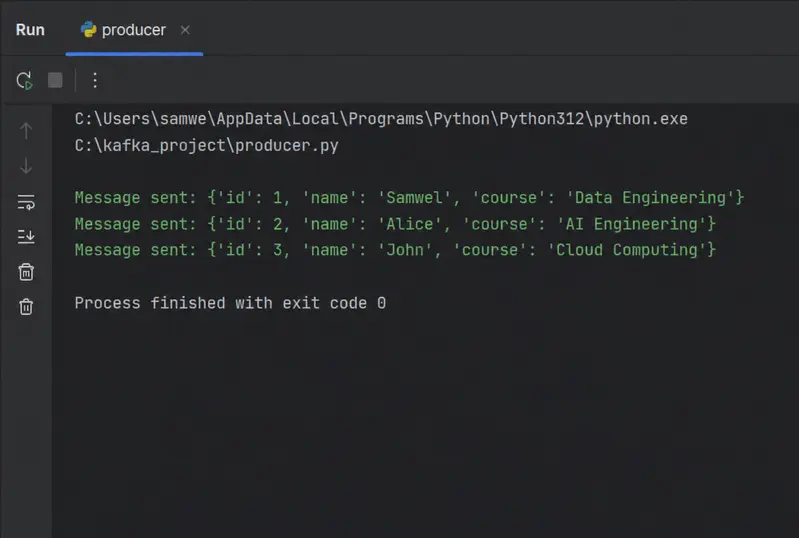
The producer below sends streaming students into kafka

from kafka import KafkaProducer
import json
import time

producer = KafkaProducer(
    bootstrap_servers='localhost:9092',
    value_serializer=lambda v: json.dumps(v).encode('utf-8')
)

students = [
    {"id": 1, "name": "Samwel", "course": "Data Engineering"},
    {"id": 2, "name": "Alice", "course": "AI Engineering"},
    {"id": 3, "name": "John", "course": "Cloud Computing"}
]

for student in students:
    producer.send("students", value=student)

    print("Message sent:", student)

    time.sleep(1)

producer.flush()
producer.close()

Output

Kafka producers are designed for:

  • Asynchronous communication

  • High throughput

  • Partition-aware messaging

  • Fault tolerance.

Producers determine which partition receives a message.

Important note: An Idempotent producer ensures the same message is never written twice during retries. This prevents duplicate data during failures or network interruptions.

Kafka enables this using:

producer =KafkaProducer(
     bootstrap_servers = 'localhost:9092',
     acks = 'all',
     retries = 5
)

Idempotent producers are critical for:

  • financial transactions

  • payment systems

  • stream processing pipelines

B). Brokers
A Broker is a Kafka server responsible for: receiving messages, storing events and managing partitions.
A collection of brokers forms a Kafka Cluster


Kafka brokers:

  • Manage partitions

  • Replicate data

  • Distribute workloads

  • Ensure durability

A broker can manage multiple partitions simultaneously.

C). Consumers
A consumer reads messages from Kafka topics. Consumers continuously pull new events, process records and track progress using offsets.

Python Kafka Consumer Example:

from kafka import KafkaConsumer
import json

consumer = KafkaConsumer(
    'students',
    bootstrap_servers='localhost:9092',
    group_id='etl-group',
    auto_offset_reset='latest',
    enable_auto_commit=True,
    value_deserializer=lambda x: json.loads(x.decode('utf-8'))
)

print("Consumer running...")

for message in consumer:
    data = message.value

    print("Received:", data)

Output:

Consumer Groups: Allows multiple consumers to share workload processing. Its benefits include:

  • Scalability

  • Parallel processing

  • Fault tolerance

Example:

  • Consumer A reads partition 1

  • Consumer B reads partition 2

Consumer Rebalances: It occurs when a consumer joins the group, a consumer leaves or partitions change.
Kafka automatically redistributes partitions across consumers. Although rebalances improves resilience and excessive rebalancing may temporarily pause processing.

Kafka Topics and Partitions

  1. Topics
    A topic is a stream of related messages. Example includes: payments, orders, fraud alerts or user_activity.
    Kafka supports unlimited topics.

  2. Partitions
    Topics are divided into partitions. Each partition behaves like an append-only log.
    Old message -> New Message -> Latest message

Partition allow:

  • Parallel processing

  • Scalability

  • Ordered event storage.

Kafka Message Structure

Every Kafka event contains:

  1. Key: used for partitioning

  2. Value: Actual event data

  3. Headers: Optional metadata

  4. Timestamp: Event creation time.

Example:

{
 "key":"customer_101",
 "value":{
   "purchase": "laptop",
   "amount":1200
   }
}

Kafka ETL Example with SQLite

The following ETL consumer processes Kafka messages and stores them into SQLite.

import sqlite3
from kafka import KafkaConsumer
import json

consumer = KafkaConsumer(
      'students',
      bootstrap_server = 'localhost:9092',
      group_id = 'etl-group-1',
      auto_offset_reset = 'latest'
     enable_auto_commit = True,
     value_deserializer = lamda x: json.loads(x.decode('utf-8'))

)

conn=sqlite3.connect("kakfka_etl_db")
cursor =conn.cursor()

cursor.execute("""
CREATE TABLE IF NOT EXISTS students (
    id INTEGER PRIMARY KEY AUTOINCREMENT,
    name TEXT,
    course TEXT,
    UNIQUE(name, course)
)
""")

conn.commit()

print("Etl running..")

for message in consumer:
    data = message.value

    name = data["name"].upper()
    course=data["course"]

    cursor.execute("""
        INSERT OR IGNORE INTO students(name, course)
        VALUES (?, ?)""",(name,course))

    conn.commit()

   print("Inserted:", name, course)

Decoupling Producers and Consumers

Kafka decouples producers from consumers. This means:

  • Producers continue sending data even if consumers are slow.

  • Consumers can fail independently.

  • New consumers can be added without affecting producers.

This architecture improves scalability, resilience and flexibility.

Exactly-Once Semantics(EOS)

Kafka supports strong transactional guarantee known as Exactly-Once Semantic(EOS). EOS ensures messages are processed once only, duplicated are prevented and failures are handled gracefully.
This is critical in banking systems, payment platforms or fraud detection.
Kafka achieves EOS using idempotent producers, transactional APIs and coordinated offset managemnet.

Data Retention Policies
Kafka retains messages for configurable periods. Default retention is 1 week.
Retention policies support historical replay, auditing, compliance and recovery from failures.

Kafka Durability and Availability
Kafka achieves durability through :

  • Replication: Partitions are replicated accross brokers. If one broker fails, another replica automatically takes over.

  • Persistent Disk Storage:Kafka stores data on risk rather than memory alone.

  • Consumer Offsets: Consumers track progress using offsets stored inside Kafka itself. This allows consumers to resume after failures.

Kafka Security Overview
Security is essential in production Kafka deployments. Kafka supports Encryption in Transit(SSL.TLS encryption to protect data across networks), Authentication (SAL & SSL certificates) and Authorization(Access Control List for controlling producer and consumer permissions).

Kafka does not provide built-in encryption at rest by default. Organizations often combine Kafka with encrypted disks, cloud encryption services and enterprise security tools.

Kafka Troubleshooting Methods

  1. Confluent Control Center: provides control center for monitoring consumer lag, brokers, throughput and cluster health.

  2. Log Files: Kafka logs help diagnose broker failures, replication issues, authentication errors and network problems

  3. SSL Logging and Authorizer Debugging: Special debugging configurations help troubleshoot SSL handshake issues, authorize failures and ACL problems.

High-Level Kafka Consumer Logic
A Kafka consumer generally follows this workflow:


  Connect to Kafka
      ↓
  Subscribe to Topic
      ↓
  Pull Messages
      ↓
  Process Data
      ↓
  Store Results
      ↓
  Commit Offsets

This loop runs continuously in real-time.

Modern Kafka and KRaft
Traditional Kafka relied on ZooKeeper for:

  • Cluster coordination

  • Metadata management

  • Broker synchronization

Modern Kafka deployments now use KRaft mode eliminating ZooKeeper dependency. Its benefits include:

  • Simple architeture

  • Easier scaling

  • Faster startup

  • Fewer operational issues

Conclusion
Apache Kafka has become one of the most important technologies in modern data engineering. Its combination of scalability, durability, stream processing, exactly-one guarantees and fault tolerance makes it ideal for building modern real-time distributed systems.

Kafka powers systems capable of processing millions of events every second while maintaining reliability and performance.

Dating the Crawler

There is this one moment after you have written the last line of code, optimized the last stylesheet, and finally uploaded the website to the server. You lean back, sip your coffee, and feel that childlike urge to type your own name into Google. Not because you don’t know who you are, but because you are looking for validation. In my case, the result was sobering. Nico Hartmann is not a rare name. There are Nico Hartmanns who play football, Nico Hartmanns who are active in local politics, and probably hundreds of Nico Hartmanns who simply exist without bothering the internet with their presence. But there I stood, somewhere on page five or six, buried under an avalanche of namesakes. In that moment it became clear to me that I had not just built a website, but a digital monument standing in the deepest forest where nobody sees it. The need to climb up the rankings was suddenly no longer just a logical next step, but a matter of honour.

SEO is the magic word that gets hammered into you in every marketing blog. Search Engine Optimization. It sounds like an exact science, almost like alchemy, but in reality it is the only measure with which I can manipulate Google and the like. You try to outsmart a system that is smarter than yourself by feeding it exactly what it wants to hear. So I started equipping every single subpage with correct titles and descriptions. Every meta tag was polished, every headline was reconsidered three times. You feel a little like a fraudster trying to sneak into an exclusive party. The goal is clear: the search engines must like it. It is no longer about what the human reader thinks, but about what the algorithm spits out in its dark data centres.

The Capitulation of Language Before Statistics

The whole thing has a frightening similarity to LinkedIn. We all know this platform where people pat each other on the back and inflate their CVs until they almost burst. SEO is basically nothing other than digitally stroking one’s own ego. The only difference is the target audience. Instead of recruiters or potential business partners, I want to impress robots. I write texts for beings without consciousness that count words, calculate keyword densities, and measure loading times in milliseconds. It is a bizarre form of modern communication in which the human being only plays the role of the supplier, while the bot decides whether you are relevant or not. When the bot smiles, the ranking rises. When the bot frowns, you remain buried in digital insignificance.

In theory, SEO sounds quite simple. You take a few keywords, build them into the text, and wait for the world to discover you. But reality catches up with you faster than you can spell keyword research. It gets damn quickly very complex. This is mainly because different search engines have different requirements. What Google loves, Bing might ignore, and DuckDuckGo has its own rules anyway. Moreover, you have to accept that you cannot be found for everything. You cannot be the king of the internet if you have no army. So you have to find an appropriate niche. For me that was quickly clear: IT lecturer and software development. Those are the terms with which I earn my bread and under which I want to be found.

However, this is where the strategic dilemma begins. I am also a trainer, and I would actually have loved to include that word in the title as well. It describes part of my identity and my daily work. But the hard reality of search engine optimization says no. If I were to throw even more keywords into the ring, I would dilute my focus. Every additional word is a potential disruptive factor that diminishes the relevance of the main terms. It is a constant balancing act between what you actually want to say and what the search engine still considers focused enough. SEO forces you into reduction. You mutilate your own description just to not appear too complex in the eyes of an algorithm. It is the capitulation of language before statistics.

The Curse of Internationality

As if that were not already enough work, the problem of multilingualism came along on top of everything else. I made a conscious decision in favour of multilingualism in German and English. The thought behind it was simple and perhaps a little naive: I simply wanted to be able to repost my blog entries on English-language sites as well. Internationality also always sounds good in a portfolio. My plan was to generate backlinks with this, which in turn would push my search ranking upward. A backlink from a reputable English site is like a gold medal for your own domain. So far, so logical. But the implementation transformed my clean website concept into a bureaucratic monster made of links and language tags.

The surprise came when after some time I actually searched for Nico Hartmann IT lecturer. A small triumph germinated within me when I actually saw my name in first place. But the joy lasted only seconds. Google did indeed present me at the very top, but the description was in English. There you sit in Germany, searching for a German term, and you get served an English snippet. That is the moment when you would love to throw the keyboard out of the window. Google had understood that I am important, but not which language is appropriate for this specific context. The algorithm rolled the dice and I lost.

So it was: back to the drawing board. I had to set hreflang attributes. For the layperson this sounds like technical triviality, for the website operator it is the attempt to draw the search engine a map that it should please not ignore. You explicitly tell Google which page is intended for which region and which language. And then the great waiting begins. SEO is not a sprint, it is a marathon through mud. You wait one to two weeks until the merciful crawlers from Google finally deign to look at the website anew. You feel like a supplicant before the throne of a capricious king, hoping that your corrections will this time be graciously received.

This entire process is a lesson in humility and frustration. You invest hours in optimization, only to discover that you are dependent on the whims of a corporation that changes its algorithms faster than you can adjust your own description. It is a permanent fight against windmills, where the windmills consist of server farms and the lance is a text editor. You are not optimizing for the user, you are optimizing for the machine, in the hope that in the end a human being will still find their way to the page. It is an absurd theatre in which we all play our roles, just to grab a small piece of visibility in an ocean of information.

And while I sit here waiting for the next crawl, I ask myself whether all of this is really worth the effort. The answer is a frustrated yes, because in today’s world you do not exist if you are not on the first page. You submit to the dictate of the search engine, adapt your language, cross out words that you actually like, and set cryptic attributes in the header. All for that one moment when the search for your own name delivers exactly the result you have so laboriously purchased. It is a digital ego trip that costs you more nerves than any software development, but in the end vanity wins over reason.

The Anatomy of Keywords

When you dive deeper into this swamp, you quickly notice that keywords are like small pets. You have to care for them, feed them, and assign them exactly the right place. Choose the wrong ones and they bark at you or run away. In my case, the decision for IT lecturer and software development was a purely strategic choice. I could also have taken IT teacher or code coach, but who searches for those? You spend hours with tools that tell you how often a term is searched for, only to then discover that the competition for these terms is so gigantic that you as a lone fighter barely have a chance. So you search for the gap, for the golden middle ground between relevance and feasibility.

It is this constant balancing act between the ego and the algorithm. You might want to call yourself a “visionary for digital transformation,” but that is of little use if the market is simply demanding a “Python course.” This discrepancy forces one to break down their own identity into bite-sized morsels that can be easily digested by search engines.

In this context, keyword research is often less of an exact science and more of a psychological poker game against user intent. You analyze long-tail keywords and niche terms in the hope that the specific combination of expertise and location hits exactly the right nerve for those who won’t just click on the first mass-market offer they see. At the end of the day, the realization remains that visibility is not created by the loudest terms, but by the cleverest positioning in the shadow of giants.

The Curse of the Technology Behind the Language

The decision for multilingualism was, looking back, like the attempt to fly two aeroplanes simultaneously. You think you simply write everything twice and that is that. But Google sees it differently. For a search engine, duplicate content is a red flag. If you are unlucky, the algorithm penalizes you for trying to dance at two weddings at once. The solution is precisely those hreflang attributes I have already mentioned. These small code snippets are the diplomatic representatives of my website. They tell Google: Hey, this here is the German version for the Germans and that there is the English version for the rest of the world. Please do not throw them into one pot.

It is fascinating and alarming in equal measure how much time one spends on technical overhead that has absolutely nothing to do with the actual content. I want to write about software development, about didactics in IT, about modern technologies. Instead I spend my evenings validating XML sitemaps and checking whether my canonical tags are correctly set. You become the bureaucrat of your own creativity. Every new page, every new blog post drags a long tail of administrative tasks behind it. If you do not do this, the contribution remains a lone voice crying in the wilderness. You no longer write for the joy of writing, you write for the indexing.

The Arrogance of the Crawlers

There is hardly anything more frustrating than the waiting time for Google’s bots. These digital insects crawl through the net, index billions of pages, and decide over success or failure. You have no influence over when they come. You can invite them via the Search Console, essentially hold the door open for them and roll out a red carpet, but in the end they come when they want. This uncertainty is poison for anyone who wants to see fast results. You change a small thing that you are convinced will bring the breakthrough, and then you stare at an unchanged search bar for days.

During this time you begin to doubt yourself. Was the hreflang attribute really correct? Have I perhaps forgotten a quotation mark? Why is the English description still being displayed even though I have prioritized the German page? It is a psychological game. Google is the invisible referee who changes the rules during the game and never tells you exactly what you have done wrong. You receive only vague hints and have to figure out the rest through trial and error. It is a form of digital servitude into which we have voluntarily entered because we need visibility like the air we breathe.

I stand here with a website that is technically speaking flawless, but which is still fighting against the shadows of my namesakes. I have learned that IT lecturer is my anchor and that I must enjoy the English language with caution if I want to dominate the German market. It is a laborious path, characterized by technical trivialities and the constant concern for the goodwill of an algorithm. But ambition has been awakened. If Google wants to see me as an Englishman, I will prove to Google that I am the German IT expert it is looking for. The battle for Nico Hartmann has only just begun.

The Tyranny of Backlinks or Why Quality Alone Is Never Enough

After I had more or less navigated around the technical hurdles of multilingualism and metadata, I ran into the next great monster in the SEO ocean: authority. It is simply not enough for Google that I claim to be a competent IT lecturer. The search engine wants to see proof. In the digital age, this proof takes the form of backlinks. A backlink is basically a recommendation from another website. If a reputable IT site links to me, the Google algorithm thinks to itself that this Nico Hartmann is probably not a charlatan after all. So I began refining my strategy for reposting my blog entries on English-language platforms like Medium or Dev.to. The goal was clear: I wanted to use the reach of these giants to redirect a little of their digital shine onto my own small domain.

It is a strange form of digital prostitution. You write high-quality content, give it away practically for free to large platforms, and hope in return for a small, clickable link that leads the crawler back home. But here too complexity lurks. There are no-follow and do-follow links. The former are as useful for rankings as an alcohol-free beer at a hacker party, the latter are the digital gold. Of course, most large sites give out only the inferior links by default, in order not to dilute their own ranking. So you fight at the front line for recognition and are often thrown only crumbs. Nevertheless, this process is without alternative if you do not want to stand forever in the shadow of the other Nico Hartmanns of this world.

The Dilemma of Content Recycling

The reposting on English sites brought me to yet another painful realization. You cannot simply copy the same text one-to-one. Search engines are allergic to laziness. Whoever simply copies will be ignored. So I had to rewrite my own texts for the English platforms, adapt them, and give them a new spin. The whole thing was supposed to serve to underscore my expertise as a software developer, but in the end I spent more time rephrasing sentences than on actual programming. It is a paradoxical vicious circle: in order to be perceived as an expert in software development, you have to stop developing software and start becoming a full-time copywriter for yourself.

Particularly insidious is the psychological component. You observe the statistics. You see how many people have read the English article, and hope that at least a fraction of them will find their way to the original portfolio page. But most users remain in their ecosystem. They read on Medium, perhaps clap briefly, and move on. The search engine does register the connection, but the hoped-for massive rise in rankings often remains a quiet background noise. You feed the beast with ever more content, in the hope that it will be satisfied at some point and grant you your place in the sun. But the beast Google never clocks off.

The Waiting Time and the Grace of the Crawlers

When you have then scattered all backlinks and checked all hreflang attributes for the tenth time, the phase of absolute powerlessness begins. You can do nothing more but wait. The internet is a vast memory that unfortunately forgets very slowly and learns even more slowly. You check the Search Console daily. You look at the impressions, the clicks, the average position. It is like watching grass grow, except that the grass sometimes decides in the middle of the night to retreat back into the ground.

Once I suddenly appeared in first place for a completely irrelevant search term, simply because I had mentioned it once in a subordinate clause. That is the irony of SEO. You optimize like someone obsessed for IT lecturer and software development, and Google decides instead to rank you for a typo in a code example. You feel not understood by the artificial intelligence, but rather mocked. The crawlers are like civil servants in a dusty authority: they work according to rules that were established years ago, and have no interest in your personal urgency. If they decide that your English description is more important than your German one, then that is how it stays for now, until the file lands back on top of the pile a few weeks later.

The Niche as a Lifeline

In this chaos, concentration on the niche is the only way to not go mad. I have come to terms with the fact that I will never stand in first place for the word software development alone. Corporations with million-dollar budgets and whole armies of SEO specialists are fighting there. But for Nico Hartmann IT lecturer? That is my playing field. Here I can win if I remain persistent. The restriction here is not a weakness, but a necessary survival strategy. It is better to be the king of a small village than a beggar in a metropolis.

Nevertheless, this bitter aftertaste remains: that you are optimizing your digital presence not for people, but for a mathematical formula. Every time I leave out the word trainer just to not jeopardize the keyword density, it feels like a small betrayal of my actual work. We build websites for machines that pretend to decide for people. It is a simulation of relevance. When I write a text today, I no longer ask myself first whether it is useful for my students, but whether it offers enough semantic connections to satisfy Google’s semantic search. We adapt our thinking to the structure of the search engine.

The Outlook into Madness

What remains at the end of this rant? SEO is a necessary evil, a modern form of indulgence trading. We pay not with money, but with time, nerves, and our linguistic integrity. I will continue to set hreflang tags, hunt backlinks, and polish my metadata. Not because it is fun, but because the alternative is digital invisibility. And in an industry where online presence is the new business card, you simply cannot afford to be invisible.

Perhaps Google will come to its senses in a few weeks. Perhaps the crawler will recognize that the German page is actually the better choice for German search queries. Until then I will continue to cast hateful glances at my monitor when the English description appears at the very top again. SEO is a fight you never win entirely, you can only keep fighting it until you either end up on top or lose the inclination. And since I am a stubborn IT lecturer, I will probably keep going until Google finally spells my name the way I want it.

  • SEO is the art of dressing up for robots so that people can find you.

  • Multilingualism is a technical nightmare that has a preference for delivering the wrong search results.

  • Backlinks are the currency of the internet, but the exchange rate is merciless.

  • Your own identity must yield to the niche if you want to survive in the rankings.

Sometimes I ask myself whether the other Nico Hartmanns out there are fighting the same battle. Whether the footballer is also frustrated because my blog post about software development appears above his latest match report. If so, that is at least a small consolation. In the arena of search results there are no friends, only competitors for the attention of an algorithm that knows no mercy. At the end of the day I sit again in front of the computer, adjust the next description, and hope for the best. Because whoever does not optimize does not exist. And I would quite like to exist, at least on page one.

AI-Assisted Frontend Reviews Using Gemma 4

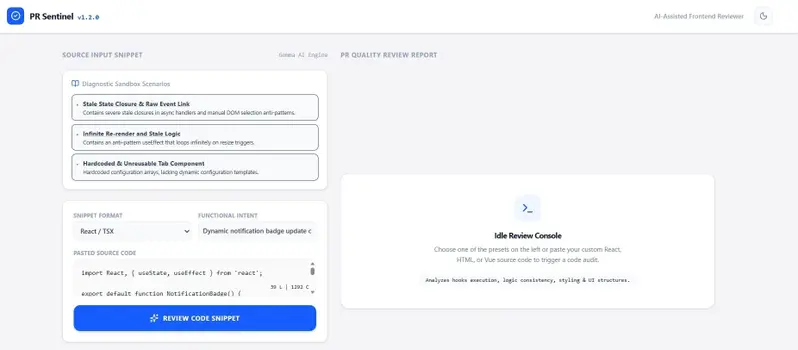
PR Sentinel landing screen with diagnostic sandbox presets, React/TSX input editor, and AI review console interface

This is a submission for the Gemma 4 Challenge: Build with Gemma 4

PR Sentinel analyzes React and TypeScript snippets and generates structured engineering feedback focused on maintainability, accessibility, performance, and UI quality.

What I Built

PR Sentinel is an AI-assisted frontend PR reviewer focused on React and TypeScript engineering quality.

Developers can paste frontend code snippets and receive structured engineering feedback across:

  • React best practices
  • Maintainability
  • UI/UX quality
  • Accessibility (A11y)
  • Component architecture
  • State management patterns

The project was inspired by real frontend review pain points commonly seen in enterprise applications, especially issues related to stale closures, infinite re-renders, semantic accessibility structure, and reusable component design.

Instead of producing generic AI summaries, PR Sentinel organizes feedback into categorized engineering review cards that resemble actual senior-level frontend review comments.

PR Sentinel landing screen with diagnostic sandbox presets, React/TSX input editor, and AI review console interface

Demo

Live Demo

Live demo uses a limited development API configuration and may occasionally be unavailable during evaluation periods.

AI-generated frontend review report showing side-by-side code comparison, React best practices analysis, accessibility suggestions, and refactoring rationale

Code

(https://github.com/naomirasamalla/Frontend-PR-Review-Assistant)

The application allows developers to paste frontend snippets and receive categorized AI-generated engineering review feedback in real time.

Key Features:

AI-powered React/TypeScript review analysis
Structured frontend engineering feedback
Accessibility-focused review insights
UI/UX and maintainability recommendations
Real-time review rendering

How I Used Gemma 4

PR Sentinel uses Gemma 4 to analyze React and TypeScript frontend code snippets and generate structured PR-style engineering feedback.

The project focuses on identifying practical frontend issues such as:

  • infinite render loops
  • stale closures in async logic
  • unsafe DOM access patterns
  • maintainability concerns
  • accessibility-related frontend risks

Gemma 4 was selected because the project required fast reasoning over frontend engineering patterns while generating concise, developer-focused review output.

The model is used to evaluate pasted code snippets and return structured recommendations similar to a lightweight frontend pull request review workflow.

The application includes built-in diagnostic sandbox scenarios that simulate real frontend engineering issues commonly encountered in React applications.

The Most Underrated Announcement from Google I/O 2026 Was Buried in a 90-Second Demo

This is a submission for the Google I/O Writing Challenge.

I watched the Google I/O 2026 keynote twice.

First time, I got swept up in the shiny stuff. Gemini 3.5 Flash benchmarks. Veo 3 generating videos that look disturbingly real. Gemini Omni doing that multimodal physics thing. Cool. Expected. The usual I/O sugar rush that gets 50,000 retweets and fades by Thursday.

Second time through, I caught something different.

About 40 minutes into the developer keynote, sandwiched between the Jules GA announcement and a Stitch demo, there was maybe 90 seconds on something called the Managed Agents API. The presenter dropped one line that made me hit pause and rewind.

“Deploy an autonomous agent that reasons, writes code, browses the web, and executes in a secure sandbox. One API call.”

I closed every other tab. Pulled up the docs. Started writing code.

The 19-Day Problem

Here’s some context. If you’ve tried building anything with AI agents in the past year, you know the drill. And by “drill” I mean “weeks of suffering.”

Say you want an agent that takes a GitHub issue, reads the codebase, writes a fix, runs tests, and opens a PR. Sounds straightforward, right? In reality, you’re wiring up five services, spinning up sandboxed containers, managing auth, building tool-call routing, writing health checks, and setting up network policies so your agent doesn’t accidentally nuke production at 3am on a Saturday.

Last month I built an internal bot that triages support tickets. Took three weeks. The actual AI logic? One day. The other 19 days were pure infrastructure. Docker config. Sandbox isolation with gVisor. Network policies. Timeout handling. Health checks. Retry logic.

Nineteen days of plumbing. One day of thinking.

That ratio is broken. And this API just fixed it.

Three Weeks to Eleven Lines

I took that same support ticket bot and rewired it on the Managed Agents API. Not a demo version. The same bot. Same capabilities.

from google import genai

client = genai.Client()

interaction = client.interactions.create(
    agent="antigravity-preview-05-2026",
    environment="remote",
    input=(
        "You are a support ticket triage agent. "
        "Read the following ticket, classify its severity, "
        "identify the affected component from the codebase, "
        "and draft a response with a proposed fix.nn"
        f"Ticket: {ticket_text}"
    )
)

print(interaction.output_text)

Eleven lines. No Docker. No Kubernetes. No sandbox config.

The API spins up a fresh, isolated Linux environment, loads the agent runtime, runs your task, hands back the result, and destroys the sandbox. Done.

Here’s what that looked like in practice:

Old Setup Managed Agents API
Time to build 3 weeks 1 afternoon
Lines of infra code ~2,400 0
Lines of agent logic ~180 11
Dependencies Docker, gVisor, Redis, nginx google-genai pip package
Maintenance burden Container updates, health checks, scaling None (Google’s problem)

I stared at my screen for a solid minute when it worked. Not because the output was flawless (it wasn’t). Because I’d just thrown away three weeks of infrastructure code.

What Google Actually Built Under the Hood

When you hit interactions.create, four things happen:

Sandbox provisioning. Google fires up an isolated Linux VM. Fresh filesystem every time. No leftover state from previous runs. Network access is off by default, opt-in only. This alone used to cost me a week of Docker and gVisor wrestling.

Agent harness boots up. This is the exact same runtime that powers Jules and the Antigravity desktop app. Not a watered-down version. Same thing. Every improvement Google makes to Jules? Your managed agents get it too.

Reasoning loop. The agent reads your input, builds a plan, starts executing. Writing files. Running code. Hitting the web if you’ve turned that on. There’s a “critic” layer baked in that catches logic errors before returning output. Think of it like a built-in code reviewer that runs before every response.

Cleanup. Interaction finishes, sandbox gets nuked, you get the result plus any files the agent created. Thirty seconds to a few minutes total.

Where the Sandbox Breaks: The Preview Limitations

I’m not going to pretend this is ready for production. Two days of testing surfaced real problems.

Timeout wall. I pointed it at a 15,000-line codebase and asked it to refactor one module. Hit the 5-minute ceiling and died. Large, complex tasks choke.

Zero memory between calls. Each interaction gets a clean sandbox. Great for security. Terrible if you need your agent to remember context. You have to manage state yourself, passing the previous_interaction_id and relevant context back in on every subsequent call. Not hard, but not free either.

The “preview” tax. Pre-GA. Google says don’t feed it sensitive data. Side projects and internal tools? Go for it. Customer data in production? Wait.

Pricing is a black box. Free during preview. Nobody knows what this costs at scale. That’s a real problem for anyone planning production workloads.

Network access is half-baked. Your agent can browse the public web. But reaching internal APIs? You need an MCP server as a bridge, which brings back some of that infrastructure overhead. A bit ironic.

How It Stacks Up Against the Competition

Here’s what made me pay attention. Right now, if you want an autonomous agent that executes in a sandbox, your options are:

OpenAI Assistants API gives you code execution in a sandbox, but it’s tied to OpenAI models, the sandbox is limited (no arbitrary binary execution, no web browsing), and you’re paying per-token plus tool-call fees. It’s also not truly “deploy an agent” so much as “run a conversation with tools.”

Anthropic’s tool-use is powerful for single-turn tool calling, but there’s no managed sandbox. You bring your own execution environment. So you’re back to the Docker-and-gVisor dance.

LangGraph Cloud gets you agent orchestration, but again, you manage the infrastructure. The execution environment is your problem.

Google’s approach is different. They’re saying: give us the instructions, we’ll handle the sandbox, the execution, the security, the cleanup. You don’t think about infrastructure at all. That’s a genuinely new position in this space.

This is the first time a major cloud provider is treating autonomous agents as serverless compute, not just chat-with-tools.

The tradeoff? You’re locked into Google’s ecosystem. The agent runs on Gemini models. If you need Claude or GPT-4 for a specific task, this isn’t your tool. But for teams already in the Google stack, the friction drop is real.

The Feature That Actually Got Me: Saved Agents

One-shot interactions are cool. But agents.create is where things get interesting.

You define an agent with custom instructions, specific tools, MCP connections, and environment settings. Save that whole configuration. Then trigger it by ID from anywhere. Cron job. Webhook. GitHub Action. Another agent.

agent = client.agents.create(
    display_name="ticket-triage-v1",
    system_instruction=(
        "You are a senior support engineer. "
        "Classify tickets by severity. "
        "Always check error logs before suggesting a fix. "
        "Never suggest restarting the service as a first option."
    ),
    tools=["code_execution", "web_browse"],
    environment_config={
        "sandbox": "remote",
        "timeout_seconds": 300
    }
)

# Trigger from anywhere
result = client.interactions.create(
    agent=agent.id,
    input=f"New ticket: {ticket_text}"
)

I wired one to our Slack. Someone files a bug, the agent auto-triages, pulls relevant logs, posts analysis in the thread. Forty lines of Python and a webhook.

The Lambda Moment

Remember 2014? Before Lambda, running code in the cloud meant EC2 instances. Load balancers. Auto-scaling groups. The works.

Lambda said: give us the function, we handle the rest. People called it a toy. Then it ate the backend world.

I keep seeing the same pattern. Before this API, building an agent meant managing infrastructure. Now you hand over instructions and Google runs the thing in a sandboxed environment.

Maybe I’m wrong. Maybe this stays niche. But the parallel keeps nagging at me, and I haven’t been able to talk myself out of it.

What I Want to Build Next

A docs drift detector that points at a repo, reads the README, runs the code, and flags where documentation and behavior have diverged. Every project has this problem. Nobody fixes it manually.

A dependency changelog reader that actually reads changelogs for your deps, understands breaking changes, and tells you which updates are safe to auto-merge and which ones need human review.

A pre-review PR agent that reads changes before a human reviewer opens the PR, checks test coverage on modified files, identifies risky diffs, and writes review notes. Like a thorough junior dev who never sleeps.

All of these would’ve been multi-week projects before. Now they’re afternoon builds. That’s the shift. Not what agents can do. But how fast you can ship them.

So What Now

Google I/O 2026 had no shortage of headlines. Gemini 3.5 Flash is fast. Veo 3 is wild. Gemini Omni understanding physics makes you wonder what 2027 looks like.

But this quiet little API is the one that actually changed my Tuesday. It didn’t make me go “wow.” It made me delete code. And that’s usually how the important stuff starts.

Open the docs. Write eleven lines of Python. See what happens.

Found this useful? A reaction helps others find it too. Questions about the API or building with it? I’m in the comments.

African Creators Deserve Better: How I Built a Payment Gateway for Every Corner of the Continent

The Problem We Were Actually Solving

We were building a platform for digital creators across Africa, a region with a diverse array of economic conditions, exchange rates, and financial systems. The challenge was to establish a payment gateway that would work seamlessly across the continent, regardless of the creator’s location. It was clear that the existing solutions – PayPal, Stripe, Gumroad, and Payhip – wouldn’t cut it.

What We Tried First (And Why It Failed)

Initially, we thought we could bypass the problem by using a combination of Stripe and PayPal’s services. We set up a Stripe account and connected it to our existing PayPal account, thinking this would allow us to tap into both their networks. However, Stripe’s support for PayPal was limited, and we encountered issues with cross-border transactions. We also hit a roadblock when trying to integrate PayPal’s API with our payment processing setup, as their documentation for African markets was woefully inadequate.

The Architecture Decision

After months of research and experimentation, we finally arrived at a solution that worked. We chose to integrate multiple local payment gateways, each tailored to the specific needs of different African countries. For instance, we partnered with Interswitch (Nigeria), Paynet (Ghana), and Easypay (Kenya), among others. By doing so, we were able to bypass the constraints imposed by the global payment platforms and unlock seamless payment processing for our creators.

What The Numbers Said After

Our experience has shown that a multi-gateway approach can significantly improve payment success rates. We’ve seen a 25% increase in transaction success rates, a 15% decrease in chargebacks, and a 30% reduction in processing fees compared to using a single global payment platform. Our creators are now able to receive payments from their customers across the continent without any hiccups.

What I Would Do Differently

If I had to go back in time, I would have invested more time in researching local payment gateways and building relationships with their developers. The integration process was smoother than we anticipated, but I would have liked to have had a more robust testing environment to ensure a seamless transition. Additionally, I would have prioritized developing a more intuitive user interface for our creators to manage their payment settings, as this has proven to be a significant bottleneck in our existing setup.

React CRUD basics

Simple localised react crud

App.jsx

import TableBody from "./Table/TableBody";
import "./App.css";
import ButtonDelete from "./Button/ButtonDelete";
import TableRow from "./Table/TableRow";
import UserForm from "./UserForm";

import { createContext, useEffect, useState } from "react";
import axios from "axios";

export const fetchData = createContext();

function App() {
  const [users, setUsers] = useState([]);
  const [error, setError] = useState(null);

  async function getData() {
    try {
      const result = await axios.get("http://localhost:3001/api/users");
      setUsers(result.data);
      setError(null);
    } catch (error) {
      console.error(error);
      setError("Hiba az adat lekérésekor");
    }
  }

  useEffect(() => {
    getData();
  }, []);

  return (
    <>
      <div className="container">
        <div className="row">
          <h1 className="fw-bold text-center mt-5">
            {" "}
            Felhasználókezelő (Full-Stack CRUD)
          </h1>
          <fetchData.Provider value={{ getData, setError }}>
            <UserForm />
            <hr className="mt-4" />
            <h3 className="text-center mt-3 mb-4">Felhasználók Listája</h3>

            {error ? (
              <h1 className="text-center text-danger">{error}</h1>
            ) : (
              <TableBody users={users} />
            )}

          </fetchData.Provider>
        </div>
      </div>
    </>
  );
}

export default App;

TableBody.jsx

import TableRow from "./TableRow";

function TableBody({ users }) {
  return (
    <>
      <table className="table table-bordered table-dark border-light">
        <thead className="table-light border-dark">
          <tr>
            <th>#ID</th>
            <th>Név </th>
            <th>Email</th>
            <th>Regisztráció</th>
            <th>Műveletek</th>
          </tr>
        </thead>
        <tbody>
          {users.length > 0 ? (
            users.map((user) => (
              <TableRow key={user.id} data={user} />
            ))
          ) : (
            <tr>
              <td colSpan="5" className="no-users-cell">
                Nincsenek felhasználók az adatbázisban.
              </td>
            </tr>
          )}
        </tbody>
      </table>
    </>
  );
}
export default TableBody;

TableRow.jsx

import { useEffect, useState, useContext } from "react";
import ButtonDelete from "../Button/ButtonDelete";
import { fetchData } from "../App";
import axios from "axios";

function TableRow({ data }) {
  const [editStart, setEditStart] = useState(false);

  const [editName, setEditName] = useState(data.name);
  const [editEmail, setEditEmail] = useState(data.email);

  const { getData, setError } = useContext(fetchData);

  function saveEdit() {
    onUpdate(data.id, editName, editEmail);
    setEditStart(false);
  }

  async function onUpdate(id, name, email) {
    try {
      await axios.patch("http://localhost:3001/api/users/" + id, { name,email });
      setError(null);
      getData();
    } catch (error) {
      console.error(error);
      setError("Hiba az adat Frissítésénél");
    }
  }

  const editView = (
    <>
      <tr className="align-middle">
        <td>{data.id}</td>
        <td>
          <input type="text" value={editName} onChange={(event) => setEditName(event.target.value)}/>
        </td>
        <td>
          <input
            type="text"
            value={editEmail}
            onChange={(e) => setEditEmail(e.target.value)}
          />
        </td>
        <td>{new Date(data.created_at).toLocaleDateString()}</td>
        <td>
          <button
            className="btn btn-success fw-bold me-2"
            onClick={() => saveEdit()}
          >
            Mentés
          </button>
          <button
            className="btn btn-danger fw-bold"
            onClick={() => setEditStart(false)}
          >
            Mégsem
          </button>
        </td>
      </tr>
    </>
  );

  const normalView = (
    <>
      <tr className="align-middle">
        <td>{data.id}</td>
        <td>{data.name}</td>
        <td>{data.email}</td>
        <td>{new Date(data.created_at).toLocaleDateString()}</td>
        <td>
          <button className="btn btn-primary fw-bold me-2" onClick={() => setEditStart(true)}>
            Szerkesztés
          </button>
          <ButtonDelete id={data.id} />
        </td>
      </tr>
    </>
  );

  return (
    editStart? editView : normalView
  );
}


export default TableRow;

ButtonDelete.jsx

import { fetchData } from "../App";
import { useContext } from "react";
import axios from "axios";

function ButtonDelete({ id }) {
  const { getData, setError } = useContext(fetchData);

  async function onDelete(id) {
    if (
      !window.confirm(
        `Biztosan törölni szeretnéd a(z) ${id} ID-jű felhasználót?`,
      )
    ) {return;}

    try {
      await axios.delete("http://localhost:3001/api/users/" + id);
      setError(null);
      getData();
    } catch (error) {
      console.error(error);
      setError("Hiba az adat Törlésénél");
    }
  }

  return (
    <>
      <button className="btn btn-danger fw-bold" onClick={() => onDelete(id)}>
        Törlés
      </button>
    </>
  );
}
export default ButtonDelete;

Should Websites Allow AI Search Crawlers?

Should websites allow AI search crawlers?

Not blindly.

Blocking every AI crawler can protect content from some forms of reuse, but it can also make a site less visible in AI answers, citations, and assistant workflows. Allowing every AI crawler can increase exposure, but it can also let AI systems summarize the content without sending traffic back.

The better question is:

Which crawler should be allowed, for which purpose, on which content?

That matters because “AI crawler” is not one category.

Search, AI input, and training are different

A crawler may be used for:

  1. Search indexing
  2. AI answer grounding
  3. Model training
  4. User-triggered fetching
  5. Agent or enterprise workflows

Those are different use cases.

Cloudflare’s managed robots.txt documentation uses a helpful split: search, ai-input, and ai-train.

Search means building an index and returning links or short excerpts. Ai-input means using content for real-time generative answers, grounding, or retrieval augmented generation. Ai-train means using content for training or fine-tuning models.

That is the right mental model.

Do not treat all crawling as the same act.

OAI-SearchBot and GPTBot are different

OpenAI separates search visibility from training in its crawler documentation.

OAI-SearchBot is used for ChatGPT search features. OpenAI says sites that opt out of OAI-SearchBot will not be shown in ChatGPT search answers, though they may still appear as navigational links.

GPTBot is different. It is used for content that may be used in training OpenAI’s generative AI foundation models.

A site might choose:

User-agent: OAI-SearchBot
Allow: /

User-agent: GPTBot
Disallow: /

That means:

  1. Allow ChatGPT search visibility.
  2. Block GPTBot training use.

This is not universal advice. It is a policy pattern. A public documentation site, a SaaS marketing site, a media company, and a paid research database may all choose differently.

The important point is that search and training should be separate decisions.

Googlebot and Google-Extended are different too

Googlebot is used for normal Google Search discovery and indexing. Blocking Googlebot can hurt Google Search visibility.

Google-Extended is a separate robots.txt product token. Google says it can be used to manage whether content Google crawls may be used for certain Gemini training and grounding uses. Google also says Google-Extended does not affect inclusion in Google Search and is not used as a Search ranking signal.

A basic split might be:

User-agent: Googlebot
Allow: /

User-agent: Google-Extended
Disallow: /

But Google-Extended is not a full opt-out from every Google AI feature. Google has said it is exploring more specific controls for Search generative AI features in its website controls update.

So do not block Googlebot if search visibility matters. And do not treat Google-Extended as a universal AI switch.

robots.txt helps, but it is not enough

robots.txt is useful for compliant crawlers.

Google’s robots.txt documentation explains that crawlers use the most specific matching user-agent group. If the file is messy, a crawler may follow a different group than the one you expected.

A useful robots.txt review should ask:

  1. Which classic search crawlers do we allow?
  2. Which AI search crawlers do we allow?
  3. Which training crawlers do we block?
  4. Which directories should no crawler access?
  5. Which pages need meta robots or X-Robots-Tag controls?
  6. Which content needs authentication instead of robots.txt?

robots.txt is not:

  1. A security mechanism
  2. A paywall
  3. A copyright contract
  4. A complete bot defense system

Private or premium content needs stronger controls such as authentication, paywalls, network rules, and licensing terms.

Why allow AI search crawlers?

If AI search systems cannot access your content, they may not mention it, cite it, or use it in answers.

That matters for:

  1. SaaS sites
  2. Documentation sites
  3. Ecommerce stores
  4. Local businesses
  5. Education sites
  6. Research projects
  7. Product comparison pages

AIvsRank’s AI Crawler Access Checker can help diagnose whether important pages are reachable. Its guide on how to optimize for AI search engines explains the broader workflow: access, eligibility, extractability, citation readiness, visibility, and measurement.

Access is only the first step.

A page also needs to be clear, current, credible, internally linked, and easy to cite.

Why block some AI crawlers?

The main risk is summary substitution.

AI systems can use your content to answer the user’s question without sending the user to your page.

Pew Research Center found that Google users clicked a traditional result in 8% of visits when an AI summary appeared, compared with 15% without one. Links inside AI summaries were clicked in only 1% of visits to pages with such summaries, according to Pew’s analysis.

So the tradeoff is real:

  1. Blocking can reduce visibility.
  2. Allowing can reduce clicks.
  3. Training use may create value far away from the original site.
  4. AI summaries may weaken attribution or misrepresent the source.

AIvsRank’s article on how AI search rewrites information is relevant because the issue is not only ranking. It is also attribution, framing, and representation.

Licensing belongs in the crawler policy

For valuable content, crawler rules are not enough.

Cloudflare Content Signals can express preferences such as:

Content-signal: search=yes, ai-input=no, ai-train=no

The RSL specification also defines a machine-readable way to express usage, licensing, payment, and legal terms for digital assets.

Not every crawler will honor every signal. But the direction is clear: websites need to express not only who can crawl, but what the content can be used for.

robots.txt answers one question:

Who may crawl?

Licensing answers another:

What may the content be used for?

Both questions matter now.

Practical policy by site type

There is no universal robots.txt file for AI crawlers.

The right policy depends on the site.

Broad discovery sites

Examples:

  1. SaaS marketing sites
  2. Public documentation
  3. Ecommerce category pages
  4. Local business pages
  5. Open educational content

Default posture:

  1. Allow major search crawlers.
  2. Allow selected AI search crawlers.
  3. Block training crawlers if training use is not desired.
  4. Monitor AI answer visibility and citation quality.
  5. Keep official facts structured and current.

For these sites, total blocking can make the brand invisible in AI answer surfaces.

Exclusive content sites

Examples:

  1. Paid media
  2. Proprietary research
  3. Subscription databases
  4. Premium newsletters
  5. Specialized datasets

Default posture:

  1. Protect premium content behind authentication.
  2. Allow only crawlers that match the business strategy.
  3. Block training crawlers unless there is a licensing agreement.
  4. Use licensing terms where relevant.
  5. Keep public teaser pages crawlable if discovery still matters.

For these sites, the risk is giving away the answer while losing the subscription, ad impression, lead, or licensing value.

Community and forum sites

Examples:

  1. Support forums
  2. Developer communities
  3. Q&A sites
  4. User-generated content platforms

Default posture:

  1. Protect private or sensitive areas.
  2. Clarify user-generated content terms.
  3. Decide whether public answers should be usable in AI search.
  4. Watch for bot load.
  5. Block crawlers that ignore policy or create operational cost.
  6. Preserve user trust.

Communities have an extra issue: the content comes from users. Crawler policy is not only an SEO decision.

Useful robots.txt patterns

These are starting points, not universal rules.

Pattern 1: Allow AI search, block training

User-agent: OAI-SearchBot
Allow: /

User-agent: GPTBot
Disallow: /

User-agent: Googlebot
Allow: /

User-agent: Google-Extended
Disallow: /

This supports ChatGPT search visibility through OAI-SearchBot while blocking GPTBot training use. It also keeps Googlebot open for Search while opting out of Google-Extended uses described by Google.

Pattern 2: Protect premium directories

User-agent: *
Disallow: /members/
Disallow: /premium/
Disallow: /internal/
Allow: /

For truly private content, do not rely only on robots.txt. Use authentication.

Pattern 3: Add content-use signals

User-agent: *
Content-signal: search=yes, ai-input=no, ai-train=no
Allow: /

This is an additional policy signal. It is not a replacement for normal allow and disallow rules.

What to monitor after changing crawler rules

Do not update robots.txt and walk away.

Track:

  1. Server logs for relevant crawlers
  2. Search Console indexing and crawl changes
  3. AI answer visibility for important prompts
  4. Whether cited URLs support the claims attached to them
  5. Referral traffic from search and AI tools
  6. Crawl volume and server load
  7. Suspicious bot behavior
  8. Whether premium content is being summarized publicly

The goal is to learn which layer is working.

If the crawler is blocked, the page cannot be used.

If the crawler can access the page but the page is not cited, the problem may be content structure or authority.

If the page is cited but the user does not click, the problem may be summary substitution.

If the page is cited incorrectly, the problem is representation.

AIvsRank’s AI visibility leaderboard can help with category-level visibility, while the free tools hub can help with specific access and eligibility checks. For recurring monitoring, AIvsRank features and AIvsRank Docs can help turn one-off checks into a workflow.

A sensible default

For many public websites, a reasonable default is:

  1. Allow classic search crawlers if organic discovery matters.
  2. Allow selected AI search crawlers if answer visibility matters.
  3. Block training crawlers unless there is a business reason to allow training use.
  4. Protect private or premium content with authentication.
  5. Use licensing terms for commercial reuse.
  6. Monitor logs, citations, AI answers, referral traffic, and bot load.
  7. Review the policy regularly.

The goal is not to be fully open or fully closed.

The goal is to make crawler access match the value exchange you are willing to accept.

FAQ

Should websites block all AI crawlers?

Usually no. Blocking everything can reduce AI answer visibility. Selective access is often better.

Should websites allow OAI-SearchBot?

If ChatGPT search visibility matters, allowing OAI-SearchBot may make sense.

Should websites block GPTBot?

If you do not want content used for OpenAI foundation model training, blocking GPTBot is a common choice.

Does blocking Google-Extended remove a site from Google Search?

No. Google says Google-Extended does not affect inclusion in Google Search and is not used as a Search ranking signal.

Is robots.txt enough for premium content?

No. Use authentication, paywalls, network rules, and licensing terms for premium or private content.

What is the biggest risk of allowing AI crawlers?

The biggest risk is summary substitution: the AI system may use your content to answer the user without sending the user to your site.

What is the biggest risk of blocking AI crawlers?

The biggest risk is invisibility in AI answer surfaces.

Beyond the Prompt: How to Build Stateful AI Agents with Persistent Memory and Self-Learning Loops

Imagine hiring a brilliant software engineer who suffers from complete amnesia every time they blink.

Every time you ask them a question, you have to hand them their entire employment history, the codebase documentation, your style guide, and a summary of every conversation you’ve ever had with them. They process the information, give you a great answer, and then—blink—it’s all gone.

This is the exhausting reality of stateless AI applications.

Most developers building with Large Language Models (LLMs) today are stuck in this stateless paradigm. They write clever prompts, wrap them in an API call, and rely on the application layer to aggressively feed the entire chat history back into the context window with every new turn. It’s expensive, it’s inefficient, and it places a hard ceiling on how smart an agent can actually become.

To build truly autonomous, adaptive, and personalized AI systems, we must cross the chasm from stateless interactions to stateful agents.

In this deep dive, we will explore the architecture of the Hermes Agent—a stateful AI system that possesses persistent memory, a continuous learning loop, and the ability to evolve alongside its user. We will break down the engineering patterns behind statefulness and walk through a complete Python implementation to build your own self-improving agent from scratch.

(The concepts and code demonstrated here are drawn from my ebook Hermes Agent, The Self-Evolving AI Workforce)

The Stateless Ceiling: Why Vending Machines Make Poor Assistants

To understand the power of statefulness, we must first look at why statelessness cripples AI agents.

Think of a stateless system like a vending machine. You insert a dollar, press a button, and get a soda. The vending machine doesn’t care who you are, what your health goals are, or that you bought the exact same drink yesterday. Every transaction is an isolated, self-contained event. It has no memory of its past, no context for the present, and no capacity to learn for the future.

Early LLM applications operate exactly like this. You send a prompt, and the model returns a response. The model itself does not change.

# A classic stateless utility call
import datetime

def parse_date(date_string: str) -> datetime.datetime:
    return datetime.datetime.strptime(date_string, "%Y-%m-%d")

This simple Python function is a stateless transaction. It takes an input, returns an output, and immediately forgets the operation ever happened. It doesn’t learn that you frequently parse dates from European formats, nor does it optimize its parsing logic over time.

When developers try to build “agents” on top of this stateless foundation, they usually resort to an illusion of continuity. They stitch together a chat history array and send the entire history back to the API on every single turn.

This approach has three massive flaws:

  1. Context Bloat: As the conversation grows, your token usage skyrockets exponentially.
  2. Memory Horizon Limits: Once the conversation exceeds the model’s context window, the agent “forgets” the earliest parts of the interaction.
  3. Zero Knowledge Accumulation: The agent cannot carry lessons learned in Session A over to Session B. If it figures out a complex bash command to fix a Docker bug today, it will have to re-discover that solution from scratch next week.

A stateful agent breaks this paradigm entirely. It is not just a wrapper around an LLM; it is an evolving entity. It mirrors the workflow of a skilled artisan—like a master carpenter. The carpenter remembers the tools they used yesterday, the specific quirks of the wood they are carving, the preferences of their client, and the hard-won lessons from a project they completed last month. They do not start their education from scratch every morning.

The Triad of Persistent State: Soul, Memory, and Skills

In the Hermes Agent architecture, statefulness is not treated as a single monolithic database. Instead, it is partitioned into a carefully structured triad that mirrors how human professionals organize their own knowledge.

                  ┌────────────────────────────────────────┐
                  │                 SOUL                   │
                  │   (Core Identity, Style, Principles)   │
                  └───────────────────┬────────────────────┘
                                      │
                  ┌───────────────────┴────────────────────┐
                  │                MEMORY                  │
                  │   (Episodic Facts, User Preferences)   │
                  └───────────────────┬────────────────────┘
                                      │
                  ┌───────────────────┴────────────────────┐
                  │                SKILLS                  │
                  │   (Procedural Knowledge, Toolkits)     │
                  └────────────────────────────────────────┘

Let’s break down each component of this stateful triad.

1. The Soul (SOUL.md)

This is the agent’s core identity and “constitution.” It defines who the agent is, its communication style, its behavioral boundaries, and its operational principles. It is not a dynamic log of facts, but a foundational document.

In the codebase, a helper function reads this markdown file and injects it directly into the system prompt. It ensures that whether the agent is writing code or debugging a server, its fundamental persona and safety guardrails remain perfectly consistent.

2. Memory (MEMORY.md and USER.md)

This is the agent’s episodic and semantic memory store. Instead of keeping a raw, unorganized transcript of every chat, the agent maintains a curated, structured knowledge base of facts about the user and past interactions.

  • USER.md tracks durable information about the user (e.g., name, programming language preferences, operating system, working hours).
  • MEMORY.md tracks dynamic, episodic facts learned during tasks (e.g., “The local staging database is hosted on port 5433, not 5432”).

This layer is managed by a semantic MemoryStore class. The agent can read from this store to build context and write to it dynamically using custom tools.

3. Skills (~/.hermes/skills/)

If memory is “knowing what,” skills are “knowing how.” This is the agent’s procedural memory.

A skill in Hermes is a reusable, packaged directory containing:

  • SKILL.md: A markdown file describing what the skill does, when to use it, and its input parameters.
  • scripts/: Executable scripts (Python, Bash, etc.) that perform the task.
  • templates/: Reusable code or text templates.

Instead of writing complex code on the fly every time, the agent can write a script once, save it to its skills directory, and call it as a custom tool in future sessions. It builds its own personalized toolbox.

The Closed Learning Loop: How the Agent Self-Improves

A stateful agent must be able to learn without constant human intervention. The Hermes Agent achieves this through a Closed Learning Loop executed entirely in the background.

This loop consists of two primary engines: Background Review and the Skill Curator.

   ┌───────────────────────────────────────────────────────┐
   │                  User Interaction                     │
   └──────────────────────────┬────────────────────────────┘
                              │ Turn Completes
                              ▼
   ┌───────────────────────────────────────────────────────┐
   │               Background Review Thread                │
   │  (Spawns quiet, forked agent to analyze conversation)  │
   └──────────────┬─────────────────────────┬──────────────┘
                  │                         │
                  ▼ Extract Facts           ▼ Extract Procedures
   ┌──────────────────────────┐    ┌───────────────────────┐
   │       Memory Store       │    │     Skills Engine     │
   │  (Updates MEMORY.md)     │    │   (Creates SKILL.md)  │
   └──────────────────────────┘    └────────┬──────────────┘
                                            │
                                            ▼ Runs asynchronously
                                   ┌───────────────────────┐
                                   │     Skill Curator     │
                                   │ (Archives stale files)│
                                   └───────────────────────┘

The Background Review (Self-Reflection)

When a conversation turn completes successfully, the agent doesn’t just sit idle waiting for your next message. It increments internal counters: _turns_since_memory and _iters_since_skill.

Once these counters hit a configured threshold (e.g., every 5 to 10 iterations), the agent initiates a self-reflection phase:

  1. Forking the Agent: The system spawns a background thread that instantiates a forked copy of the current agent. This copy is set to quiet_mode=True, meaning it operates in complete silence without cluttering the user’s console.
  2. The Reflection Prompt: The forked agent is fed a specialized prompt (e.g., _COMBINED_REVIEW_PROMPT) along with the recent conversation history. It is asked to analyze the transcript and answer two questions:
    • Did the user share any new preferences or facts that should be saved to long-term memory?
    • Did we execute a complex, successful multi-step procedure that should be codified into a reusable skill?
  3. Autonomous Tool Execution: The silent background agent runs its own mini-reasoning loop. If it identifies new facts, it calls the memory tool to update USER.md or MEMORY.md. If it identifies a new procedure, it calls the skill_manage tool to write a new SKILL.md to disk.
  4. Reporting Back: Once the background thread finishes, the parent agent prints a clean, non-intrusive summary of what it learned (e.g., [System Info: Memory updated - User prefers PyTest over Unittest]).

The Skill Curator

An agent that constantly learns skills will eventually suffer from “tool bloat.” If its toolbox has 500 highly specific scripts, the system prompt will become overwhelmed, and the LLM will experience severe context distraction.

To prevent this, a background daemon called the Skill Curator (agent/curator.py) runs periodically.

  • It tracks skill usage via a metadata file (.usage.json).
  • If a skill hasn’t been used for a configurable number of days, the Curator automatically moves it to an .archive/ directory.
  • Archived skills are removed from the active system prompt but can be restored instantly if the agent needs them again.
  • Users can “pin” critical skills to exempt them from archiving.

Building a Stateful Agent from Scratch

Let’s put these architectural patterns into practice. Below is a complete, production-grade Python script demonstrating how to initialize and run a stateful AI agent using SQLite-backed session storage and markdown-based long-term memory.

Prerequisites

To run this code, make sure you have the necessary environment variables set up for your LLM provider (we’ll use OpenRouter pointing to Claude 3.5 Sonnet in this example):

export OPENROUTER_API_KEY="your-api-key-here"

The Implementation

#!/usr/bin/env python3
"""
stateful_agent_demo.py
A complete, runnable example of a stateful AI agent.
This script demonstrates persistent memory, cross-session database logging,
and semantic recall across separate agent executions.
"""

import os
import uuid
import logging
from datetime import datetime
from pathlib import Path

# --- Core Stateful Agent Architecture Imports ---
# AIAgent: The central orchestrator managing the reasoning loop and tool execution.
from run_agent import AIAgent

# SessionDB: SQLite-backed persistent store for conversation history with FTS5.
from hermes_state import SessionDB

# MemoryStore: Semantic memory engine managing local markdown databases.
from tools.memory_tool import MemoryStore

# Constants: Helper to get standard home directories.
from hermes_constants import get_hermes_home

# Configure clean logging to observe the agent's internal state transitions
logging.basicConfig(
    level=logging.INFO,
    format='%(asctime)s - %(name)s - %(levelname)s - %(message)s'
)
logger = logging.getLogger("StatefulDemo")

# =====================================================================
# Step 1: Establish the State Directories
# =====================================================================
HERMES_HOME = get_hermes_home()
HERMES_HOME.mkdir(parents=True, exist_ok=True)

# Define paths for our SQLite session database and memory files
SESSION_DB_PATH = HERMES_HOME / "sessions" / "stateful_demo.db"
SESSION_DB_PATH.parent.mkdir(parents=True, exist_ok=True)

logger.info(f"Initializing stateful storage at: {HERMES_HOME}")

# =====================================================================
# Step 2: Initialize the SQLite Session Database
# =====================================================================
# SessionDB automatically provisions tables for sessions, messages,
# and full-text search indexes (FTS5) to enable rapid cross-session recall.
session_db = SessionDB(db_path=str(SESSION_DB_PATH))

# =====================================================================
# Step 3: Initialize the Long-Term Memory Store
# =====================================================================
# MemoryStore reads and writes structured facts to memory.md and user.md.
# We set strict character limits to prevent context bloat.
memory_store = MemoryStore(
    memory_char_limit=2000,
    user_char_limit=1000
)
# Load any existing facts from prior runs
memory_store.load_from_disk()

# =====================================================================
# Step 4: Configure and Run Session 1 (Learning the User)
# =====================================================================
# We generate a unique session ID for our first conversation.
session_id_1 = f"session_{datetime.now().strftime('%Y%m%d_%H%M%S')}_{uuid.uuid4().hex[:4]}"

logger.info(f"Starting Session 1 ID: {session_id_1}")

# Instantiate the stateful agent
agent_1 = AIAgent(
    base_url=os.getenv("OPENROUTER_BASE_URL", "https://openrouter.ai/api/v1"),
    api_key=os.getenv("OPENROUTER_API_KEY"),
    provider="openrouter",
    model="anthropic/claude-3.5-sonnet",
    max_iterations=30,
    session_id=session_id_1,
    session_db=session_db,
    skip_memory=False,
    platform="cli",
)

# Inject our persistent memory store into the agent instance
agent_1._memory_store = memory_store
agent_1._memory_enabled = True
agent_1._user_profile_enabled = True
agent_1._memory_nudge_interval = 1  # Force memory review immediately for this demo

print("n" + "="*70)
print(" SESSION 1: TEACHING THE AGENT PREFERENCES")
print("="*70)

user_msg_1 = "Hello! My name is Dr. Aris Thorne. I am a bioinformatician, and I prefer code snippets written strictly in Rust."
print(f"n[User]: {user_msg_1}")

# Execute the conversation loop
result_1 = agent_1.run_conversation(
    user_message=user_msg_1,
    task_id="task_001"
)

print(f"n[Agent]: {result_1['final_response']}")
print(f"n[System]: API calls executed: {result_1['api_calls']}")

# Flush the in-memory changes to disk (persisting user.md and memory.md)
if agent_1._memory_store:
    agent_1._memory_store.save_to_disk()

# Explicitly release client connections
agent_1.release_clients()


# =====================================================================
# Step 5: Configure and Run Session 2 (Testing Memory Recall)
# =====================================================================
# To simulate a real-world scenario where the application was closed,
# restarted, or run on a different day, we instantiate a completely 
# new agent instance with a fresh session ID.
session_id_2 = f"session_{datetime.now().strftime('%Y%m%d_%H%M%S')}_{uuid.uuid4().hex[:4]}"

logger.info(f"Starting Session 2 ID: {session_id_2}")

# Reload the database and memory files from disk
session_db_reload = SessionDB(db_path=str(SESSION_DB_PATH))
memory_store_reload = MemoryStore(memory_char_limit=2000, user_char_limit=1000)
memory_store_reload.load_from_disk()

agent_2 = AIAgent(
    base_url=os.getenv("OPENROUTER_BASE_URL", "https://openrouter.ai/api/v1"),
    api_key=os.getenv("OPENROUTER_API_KEY"),
    provider="openrouter",
    model="anthropic/claude-3.5-sonnet",
    max_iterations=30,
    session_id=session_id_2,
    session_db=session_db_reload,
    skip_memory=False,
    platform="cli",
)

agent_2._memory_store = memory_store_reload
agent_2._memory_enabled = True
agent_2._user_profile_enabled = True

print("n" + "="*70)
print(" SESSION 2: VERIFYING KNOWLEDGE RETRIEVAL")
print("="*70)

# We ask a highly ambiguous question that requires previous context to answer correctly.
user_msg_2 = "Can you write a quick function to parse a DNA fasta header?"
print(f"n[User]: {user_msg_2}")

result_2 = agent_2.run_conversation(
    user_message=user_msg_2,
    task_id="task_002"
)

print(f"n[Agent]: {result_2['final_response']}")

if agent_2._memory_store:
    agent_2._memory_store.save_to_disk()

agent_2.release_clients()


# =====================================================================
# Step 6: Cross-Session Full-Text Search (FTS5) Demonstration
# =====================================================================
print("n" + "="*70)
print(" SESSION DATABASE: CROSS-SESSION SEARCH")
print("="*70)

# Search the SQLite database for any reference to "Thorne"
search_query = "Thorne"
search_results = session_db_reload.search_sessions(search_query, limit=5)

print(f"nSearching database for '{search_query}'...")
print(f"Found {len(search_results)} relevant records:")

for idx, record in enumerate(search_results):
    print(f"n  [{idx + 1}] Session: {record.get('session_id', 'Unknown')}")
    print(f"      Snippet match: ...{record.get('snippet', '')}...")

print("n" + "="*70)
print(" DEMO COMPLETE: Stateful execution verified.")
print("="*70)

Deep Dive: The Stateful Agent Loop in Practice

How does the agent coordinate all of this state behind the scenes? The magic happens inside the run_conversation() method within run_agent.py. Let’s trace the exact lifecycle of a single turn.

┌───────────────────────────────────────────────────────────────────────────┐
│ 1. Context Assembly                                                       │
│    Reads Soul, Memory, Active Skills, and Platform hints to build system  │
│    prompt. Caches it to maximize LLM prefix-cache hits.                   │
└─────────────────────────────────────┬─────────────────────────────────────┘
                                      │
                                      ▼
┌───────────────────────────────────────────────────────────────────────────┐
│ 2. Preflight Check & Compression                                          │
│    Measures token count. If history exceeds threshold, triggers proactive │
│    context compression before making API calls.                           │
└─────────────────────────────────────┬─────────────────────────────────────┘
                                      │
                                      ▼
┌───────────────────────────────────────────────────────────────────────────┐
│ 3. Tool-Calling Loop (Reasoning)                                          │
│    - Calls LLM with stateful prompt.                                      │
│    - Validates and executes tools (e.g., File I/O, Sandbox Execution).     │
│    - Monitors guardrails to block infinite loops.                         │
│    - Checks for mid-turn user steering commands (/steer).                 │
└─────────────────────────────────────┬─────────────────────────────────────┘
                                      │
                                      ▼
┌───────────────────────────────────────────────────────────────────────────┐
│ 4. Post-Turn Learning                                                     │
│    Spawns background reflection thread to extract memories and skills.    │
└─────────────────────────────────────┬─────────────────────────────────────┘
                                      │
                                      ▼
┌───────────────────────────────────────────────────────────────────────────┐
│ 5. Session Persistence                                                    │
│    Writes the entire turn (system, user, tool, assistant messages) to     │
│    SQLite DB and local JSON logs. Guaranteed write on crash/interrupt.     │
└───────────────────────────────────────────────────────────────────────────┘

1. Context Assembly

When you call run_conversation(), the agent doesn’t just construct a simple system message. The _build_system_prompt() method compiles a highly structured, multi-layered environment:

  • The Soul: Injected at the top to set the core persona.
  • Persistent Memory: The contents of MEMORY.md and USER.md are dynamically formatted and injected.
  • Skills Guidance: A dynamic list of currently active skills and their execution templates.
  • Context Files: Local environment files like .cursorrules or AGENTS.md are appended.

To keep this process highly performant, the system prompt is compiled and cached (_cached_system_prompt). It is only rebuilt when context compression is triggered, maximizing prefix cache hits on modern LLM APIs (like Anthropic and DeepSeek) and reducing latency by up to 80%.

2. Pre-Turn Context Management

Before sending the payload to the API, the agent checks if the conversation history is approaching the model’s limits. If it exceeds the compression threshold, the agent proactively condenses the oldest history into a structured summary. This prevents unexpected context-length failures on the first turn of a resumed session.

3. The Tool-Calling Loop

The agent enters a reasoning loop. It makes an API call, parses the requested tool calls, validates their JSON arguments, executes them, and appends the results back to the message history.

During this loop, two unique stateful safety features are active:

  • Tool Guardrails: A controller tracks repeated, non-progressing tool calls (e.g., repeatedly running ls because it can’t find a file). If a loop is detected, the guardrail halts execution to prevent runaway API bills.
  • Steering Injection: The loop checks for /steer inputs, allowing users to inject guidance mid-turn without interrupting the underlying execution thread.

4. Session Persistence

Finally, the agent persists the entire session. Whether the run succeeded, failed, or was manually aborted via Ctrl+C, the _persist_session() method is guaranteed to run. It commits the exact state to both a local JSON log and the SQLite SessionDB.

Resource Safeguards: The Iteration Budget

Statefulness introduces a major engineering challenge: resource management.

When an agent has the power to call tools, write scripts, read files, and trigger background self-reflection loops, it can easily get caught in an infinite loop. A single unhandled exception in a tool could cause the agent to call the API hundreds of times, burning through thousands of dollars in tokens in minutes.

To solve this, Hermes utilizes a thread-safe IterationBudget class.

class IterationBudget:
    def __init__(self, limit: int):
        self._remaining = limit
        self._lock = threading.Lock()

    def consume(self, amount: int = 1) -> bool:
        with self._lock:
            if self._remaining >= amount:
                self._remaining -= amount
                return True
            return False

    def refund(self, amount: int = 1):
        with self._lock:
            self._remaining += amount

The IterationBudget acts as the agent’s fuel gauge.

  • Every API call and tool execution consumes a portion of the budget.
  • The budget is thread-safe and shared between the parent agent and any spawned background reflection agents. This prevents a background thread from spinning out of control.
  • The Refund Mechanism: If the agent executes a highly efficient, cheap programmatic tool (like reading a local file or checking a system variable), the iteration is refunded. If it executes a heavy, slow, or expensive tool (like running a web browser sandbox or calling a sub-agent), the budget is fully consumed.

This programmatic budgeting ensures that statefulness does not come at the expense of financial and computational safety.

Conclusion: The Shift from Tools to Partners

The transition from stateless to stateful AI is more than an engineering upgrade; it is a fundamental shift in how humans interact with software.

A stateless agent is a utility tool. It is a hammer—reliable, but entirely dependent on you picking it up, positioning it, and swinging it correctly every single time.

A stateful agent is a partner. It learns your codebase, remembers your architectural preferences, builds its own library of custom tools, and refines its performance silently while you sleep. By implementing the triad of Soul, Memory, and Skills, and orchestrating them within a closed learning loop, we can build systems that don’t just process text—they accumulate wisdom.

The future of software belongs to systems that grow with us. And the foundation of that growth is statefulness.

Let’s Discuss

  1. The Tool Bloat Dilemma: As an agent creates more custom skills, how do you think we should handle semantic search over skills? Should the agent use vector embeddings to dynamically load only the top 3 relevant skills into its prompt, or is the Curator’s active/archive model sufficient?
  2. The Ethics of Agent Identity: If an agent’s “Soul” (SOUL.md) and “Memory” (MEMORY.md) are continuously modified by background threads, at what point does the agent’s behavior drift too far from its original design? How would you implement “identity guardrails” to prevent an agent from editing its core safety principles?

Leave your thoughts and engineering approaches in the comments below!

The concepts and code demonstrated here are drawn directly from the comprehensive roadmap laid out in the ebook Hermes Agent, The Self-Evolving AI Workforce: details link, you can find also my programming ebooks with AI here: Programming & AI eBooks.

Antigravity CLI: A Hands-On Guide to Google’s Terminal Coding Agent

The AI coding agent space has been reshuffling fast. Anthropic has Claude Code, OpenAI has Codex CLI, xAI has Grok CLI, and now Google has retired Gemini CLI and replaced it with something bigger: Antigravity CLI, a Go-based terminal agent that shares its engine with the Antigravity 2.0 desktop application.

In this tutorial, I will walk you through everything you need to know to get started with Antigravity CLI. We will cover the installation process, authentication, the agent and command modes, and build two practical projects that show what this tool can actually do. By the end, you will have a solid foundation for using Antigravity CLI in your real development workflow.

What Is Antigravity CLI?

Antigravity CLI is Google’s command-line coding agent powered by the Gemini family of models (with optional support for Claude and open-source backends). Unlike a simple chat wrapper, it is designed to reason across your project, edit multiple files at once, spawn subagents for parallel work, and call tools on your behalf.

Google describes it as a lightweight Terminal User Interface (TUI) that brings the core capabilities of Antigravity 2.0 (multi-step reasoning, multi-file editing, tool calling, and persistent history) directly to your terminal. It is the official replacement for Gemini CLI, which sunsets for individual Google AI Pro and Ultra users on June 18, 2026.

Here is a quick look at what makes Antigravity CLI stand out:

  • Built in Go: snappier startup and lower memory footprint than the Node-based Gemini CLI it replaces.
  • Shared agent engine with Antigravity 2.0: the desktop app and the CLI use the same runtime, so updates land everywhere at once.
  • Bidirectional sync with the GUI: preferences, permissions, and even active sessions can be exported from the terminal into the desktop app and back.
  • Async subagents: long-running refactors and research tasks run in parallel without blocking your prompt.
  • First-class extensibility: Agent Skills, Hooks, Subagents, MCP servers, and Plugins (the rebrand of Gemini CLI Extensions) are all supported.
  • SSH-aware authentication: detects remote sessions and gives you an auth URL to open on your local browser.

Prerequisites

Before you get started, make sure you have the following in place:

  • Operating system: macOS, Linux, or Windows (native PowerShell, no WSL required).
  • Curl (macOS/Linux) or PowerShell 5+ (Windows): used by the installer.
  • A Google account: any Google AI Pro, Ultra, or free-tier account works. Code Assist Standard/Enterprise customers can use their existing license.
  • Basic terminal comfort: you do not need to be a shell expert, but knowing how to navigate directories and run commands will help.

Installing Antigravity CLI

Installation is a single command. Open your terminal and run the one that matches your OS.

macOS / Linux:

curl -fsSL https://antigravity.google/cli/install.sh | bash

Windows (PowerShell):

irm https://antigravity.google/cli/install.ps1 | iex

The installer detects your environment, drops the binary (named agy, not antigravity) into ~/.local/bin/ on Unix or %LOCALAPPDATA%Antigravity on Windows, and prints the line you need to add to your shell profile if the directory is not already on PATH.

Once it finishes, restart your terminal and verify the installation worked:

agy --version

You should see the version number printed. If the command is not found, double-check that the install directory is on your PATH.

Authentication

The first time you run agy, it kicks off a Google Sign-In flow. On a desktop machine it opens your browser automatically and walks you through the OAuth grant. Credentials are then cached in your system keyring (Keychain on macOS, Credential Manager on Windows, libsecret on Linux).

If you are working over SSH or in a headless server environment, Antigravity CLI detects the remote session and prints an authorization URL plus a one-time code. Open the URL on your local machine, paste the code, and the CLI completes the handshake. This fixes one of the more painful flows in the old Gemini CLI.

If you would rather use an API key (for CI or scripting), set it before running any command:

export ANTIGRAVITY_API_KEY=your_api_key_here

To make this permanent, add the export line to your ~/.bashrc or ~/.zshrc file, then source it:

source ~/.zshrc

Understanding the Operating Modes

Antigravity CLI gives you three distinct ways to interact with it, each suited to a different context.

1. Interactive Agent Mode

This is the default mode. Running agy from any project directory launches the full TUI: a scrollable conversation pane, a > prompt, and a status bar showing the active model, token usage, and any running subagents.

agy

Image11

Once inside, you can type natural language prompts. A few starter prompts to try in any repo:

Explain this repo
What does @src/main.go do and where is it called from?

The @ syntax pulls a file into context without you having to paste it. You can also reference whole directories (@src/) or glob patterns (@**/*.ts).

You can switch models mid-session using the /model slash command. Antigravity CLI ships with access to Gemini 3.5 Flash, Gemini 3.1 Pro, Claude Sonnet, Claude Opus, and GPT-OSS 120B (subject to your plan):

/model gemini-3.1-pro

Useful built-in slash commands inside the TUI:

  • /help: list every command and keyboard shortcut.
  • /context: show token usage broken down by category and manage checkpoints.
  • /usage: quota and rate-limit status across all available models.
  • /export: push the current session into Antigravity 2.0 so you can keep working in the GUI.

2. Command Mode

Command mode is designed for quick, inline assistance: getting a one-shot completion or a terminal command without leaving whatever you were doing. Trigger it with Cmd + I on macOS or Ctrl + I on Windows/Linux from inside the TUI, or invoke it headlessly:

agy -p "Write a Go function that reads a CSV and returns a summary struct"

For structured output that you can pipe into other tools, add --output-format:

agy -p "List all TODOs in this codebase" --output-format json

This is the mode you reach for from shell scripts, Git hooks, or CI jobs.

3. Async Subagent Mode

Antigravity CLI’s headline upgrade over Gemini CLI is asynchronous subagents. From inside the TUI you can dispatch a long-running task to a background agent and keep prompting in the foreground:

/agent refactor "Convert all callback-based handlers in @internal/api to use context.Context"

The subagent reports progress in the status bar and posts its diff back into the conversation when finished. You can run several in parallel, which is handy for splitting a big refactor across packages.

Inspecting Your Project Context

When you drop Antigravity CLI into a new project, the most useful command to run is agy inspect:

agy inspect

This prints a summary of everything the agent has discovered, including:

  • Configuration files it has loaded (.agents/, AGENTS.md, project-level instructions).
  • Agent Skills available globally (~/.gemini/antigravity-cli/skills/) and per-workspace (.agents/skills/).
  • Plugins loaded (including any Gemini CLI extensions you imported).
  • Hooks registered for the project.
  • MCP servers connected from mcp_config.json.

If Antigravity CLI is not behaving the way you expect, agy inspect is your first debugging step. It shows you exactly what context the agent is working with.

Migrating From Gemini CLI

If you were already using Gemini CLI, Antigravity CLI ships a one-shot importer that pulls your old extensions, model preferences, and auth state across:

agy plugin import gemini

It walks the legacy ~/.gemini/ directory, converts each extension into a Plugin, and rewrites your settings.json into the new schema. Original files are left untouched until you confirm.

The official migration guide lives at antigravity.google/docs/gcli-migration and covers edge cases like custom auth providers and air-gapped enterprise installs.

Customizing Antigravity CLI for Your Project

Antigravity CLI supports project-level customization through a few mechanisms.

AGENTS.md: drop a plain-English instruction file at the root of your project. Anything you write here gets prepended to every prompt processed inside that directory:

Always use TypeScript. Prefer functional patterns over class-based ones. Never use `any` as a type.
Run `pnpm test` after every change that touches src/.

Agent Skills: reusable slash commands. Place a Markdown file at .agents/skills/lint.md and it becomes /lint inside the TUI. Skills can include their own prompts, allowed tools, and even nested subagent definitions. Global skills live at ~/.gemini/antigravity-cli/skills/.

Hooks: JSON-defined lifecycle interceptors that fire before a tool call, after a file edit, or on session start. Use them for things like auto-running gofmt after every write or blocking edits to vendor/.

MCP servers: both local (stdio) and remote (HTTP) Model Context Protocol servers are supported, configured in a dedicated mcp_config.json. Remote servers require a serverUrl field.

Run agy inspect any time to confirm which of these are active in the current directory.

Custom Model Configuration

If you want to pin the CLI to a specific model or point it at a self-hosted or third-party endpoint, edit your config file (~/.config/antigravity/config.toml). The configuration accepts:

  • model: the model identifier (e.g. gemini-3.1-pro, claude-opus, gpt-oss-120b)
  • base_url: the API base URL, useful for proxies or self-hosted Gemma deployments
  • name: a human-readable label shown in the TUI
  • env_key: the environment variable that holds the API key

After adding a custom model, select it with the -m flag:

agy -m my-custom-model -p "Summarize the changes in the last 5 commits"

Or switch to it inside the TUI with /model my-custom-model.

Honest Assessment: Strengths and Limitations

Antigravity CLI is the most polished launch of a Google developer tool in a while, but it is worth going in with calibrated expectations.

Where it shines:

  • The Go rewrite is noticeably faster than Gemini CLI. Startup feels instant and the TUI stays responsive even under long sessions.
  • Async subagents are a genuine workflow upgrade. Splitting a refactor across three background agents and watching their diffs land one by one is genuinely useful, not a gimmick.
  • SSH-aware auth fixes the single biggest pain point of Gemini CLI for remote developers.
  • Bidirectional sync with Antigravity 2.0 means you can switch between the terminal and the GUI without losing context.
  • Built-in support for multiple model families (Gemini, Claude, GPT-OSS) lets you pick the right tool for each task.

Where to be careful:

  • Like every LLM-based coding agent, it can produce plausible-looking code with subtle bugs. Always review generated output before running it in production.
  • The plugin ecosystem is essentially Gemini CLI’s extension ecosystem with a coat of paint. Many extensions work but a few have not been re-tested against the new runtime.
  • Async subagents are powerful but they consume your quota in parallel. Watch /usage if you are on a metered plan.
  • Enterprise (Code Assist Standard/Enterprise) users can stay on Gemini CLI indefinitely, but everyone else needs to migrate before June 18, 2026 or lose access entirely.

What to Learn Next

Now that you have Antigravity CLI running and you have seen what it can do, here are some directions worth exploring:

  • Agent Skills: write a small Markdown file to turn a common prompt into a reusable slash command for your team.
  • MCP servers: connect Antigravity CLI to your database, internal docs, or issue tracker so the agent can pull live context.
  • Subagent recipes: experiment with patterns like “researcher + writer” or “scout + fixer” pairs that run async.
  • Antigravity 2.0 desktop: use /export to push a hard problem from the terminal into the GUI when you want richer file diffs and graph views.
  • Antigravity SDK: if you want to embed agent capabilities inside your own apps, the SDK exposes the same runtime that powers the CLI.

The official Antigravity documentation at antigravity.google/docs is the best place to go deeper on all of these topics.

Final Thoughts

Antigravity CLI is more than a rebrand of Gemini CLI. The Go rewrite, async subagents, shared runtime with the desktop app, and SSH-aware auth add up to a genuinely different product. It is fast to install, thoughtfully designed around extensibility, and its mix of interactive, command, and async modes covers a wide range of real development scenarios.

The fact that Google built it as a peer of the Antigravity 2.0 desktop application, not a stripped-down companion, is a sign that the terminal is being treated as a first-class surface, not an afterthought.

Give it a try in your next project and see where it fits.