Serverless with Mama J — Why Serverless
If you ever want to test how well you really understand something, try explaining it to your mom. That’s exactly what I got to do with serverless.

My mom has been my biggest fan and supporter my entire technical career. A few weeks ago she told me she watches every one of my YouTube videos about serverless and wanted to know — in plain English — what it actually is and why it matters. Just so you know, my mom isn’t a developer, but she’s pretty tech-savvy. I thought it would be fun to record the whole conversation, and you can watch it here.

I also turned that chat into this blog so anyone who’s new to development (or just curious) can follow along easily. So if that’s you — welcome! I hope this helps.

Oh, and everyone calls her Mama J… so you can too. Let’s dive in!

Serverless starts with servers

Yup, this is the worst-kept secret in all of serverless: it still runs on servers. So, before we talk about serverless, we need to understand what a server actually is and what it does.

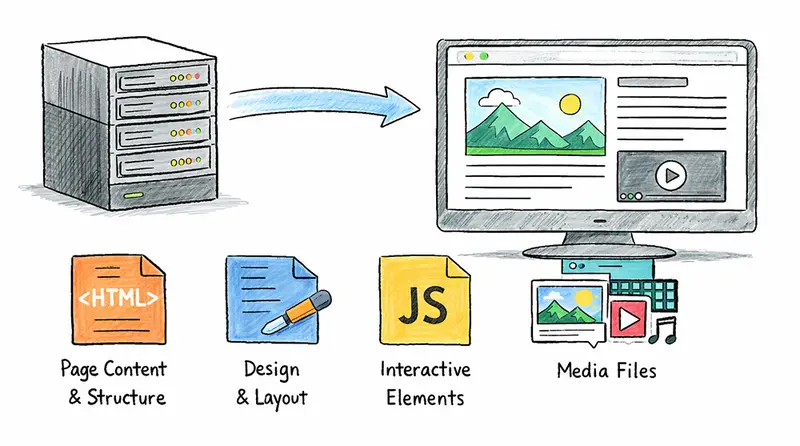
The clue is right in the name — a server serves. And what does it serve? Files. That’s it. Every website and every web app you’ve ever used is really just a bunch of different files being delivered to you. Those files are:

The client

To talk to a server, Mama J needs a client. A client is anything that can send a request to the server and then show (or use) what the server sends back.

Most of the time, that client is a web browser on her computer, tablet, or phone. But it doesn’t have to be! For example, the Amazon shopping app on her phone is also a client. So is the Alexa voice service on her Echo device — when she says “Alexa, order more Diet Dr. Pepper,” Alexa acts as the client, talks to Amazon’s servers, and gets the job done.

The client’s job is always the same: it takes the information the server returns and turns it into something Mama J can see or use.

Here’s what happens when Mama J wants to buy her son a birthday gift on Amazon.com:

  1. She opens her browser and types Amazon.com.
  2. The request gets routed to one of Amazon’s many servers.
  3. The server processes the request.
  4. The server sends back the right HTML, CSS, JavaScript, and media so her browser can build the page.

The processing

That little phrase in step 3 — “the server processes the request” — is where the magic happens. This is where the server applies what we call business logic.

Think of business logic as the “brain” or the special rules that make the website actually useful for Mama J. It’s the part that decides what to show her and how to make the experience personal.

For example, when Mama J visits Amazon, the site doesn’t just show the same boring homepage to everyone. Thanks to business logic, it remembers she was looking at birthday gifts for her son last week, so it puts a big “Recommended for you” section right at the top with more toys, wrapping paper, and even a suggestion for the perfect card. It also knows she loves Diet Dr. Pepper, so it quietly adds a “Buy it again” button for her favorite 12-pack. None of that happens by accident — the server ran its rules: “If this is Mama J, show her the stuff she actually cares about.”

The same thing happens on Facebook. When she logs in, the business logic looks at who she follows, what she’s liked before, and even how long she usually spends reading family posts. Then it builds her entire news feed so the first thing she sees is a photo of her grandkids, not some random political rant. It’s all custom-made just for her.

How does any of this work? Because she logged in, so the system knows it’s Mama J. The server then runs its business logic — basically a set of smart instructions that say, “If this is Mama J, show her her stuff, in the order she’ll like best.” That’s business logic in plain English.

The challenge of running servers

Servers are incredible — they power everything from video games to generative AI. But running them comes with some serious headaches.

Security and maintenance

Servers need constant care. New threats appear every single day. If your server is open to the internet, you have to be an expert in secure networking, operating-system patching, hardware upgrades, monitoring, and a dozen other things. You can’t just set it and forget it — it demands 24/7 attention.

Availability and scalability

Websites have to stay up 24 hours a day, 7 days a week. That means you need at least two servers so one can cover for the other if something breaks. In reality, big sites run on thousands of servers spread across different geographic areas. They also use auto-scaling to spin up more servers when traffic spikes and scale back down when it drops.

Paying for idle services

All of that means you’re paying for servers to sit there running… even when nobody’s using them. Mama J nailed it when she said, “It’s like keeping a restaurant fully staffed day and night, whether you have customers or not.”

That’s what we call idle time — and idle time is expensive.

So Mama J asked the million-dollar question: “Why don’t we just call the staff in when the customers actually show up?”

Great question, Mom. That’s exactly what serverless does.

The serverless approach

At AWS we’ve been running Amazon.com at massive global scale for over 30 years, so we know a thing or two about servers. We looked at how companies were struggling with all the work it takes to keep servers running and decided we could make it simpler.

What we set out to build

We wanted to build something that would let developers run their code at any scale without having to manage servers, security patches, scaling, or any of the other stuff that’s the same for every company. We call that “undifferentiated heavy lifting.”

We wanted developers to focus on their ideas instead of infrastructure. We wanted the system to handle huge traffic spikes automatically, and we wanted them to pay only for the time their code was actually running — basically, wake everything up only when customers show up.

AWS Lambda

AWS Lambda is a service that runs your code without you managing any servers. You write your code, deploy it to Lambda, and it takes care of the infrastructure — servers, networking, security, and scaling.

When a request comes in, here’s what happens:

  • Lambda spins up a small execution environment to run your code
  • Your business logic does its thing
  • The response goes back to the user

The first time this happens, Lambda has to set everything up from scratch — that’s called a cold start. After that, the environment hangs around for a while, ready for the next request. If another request comes in while it’s still warm, it reuses that same environment — a warm start — and it’s faster. But if things go quiet for too long, Lambda cleans it up and the next request starts fresh again.

Pricing

The pricing model is pay-per-use. You’re charged based on the number of requests and how long each one runs. No requests, no charge.

For example, a website handling 1 million requests a month — each taking half a second with 512 MB of memory — would cost about $4.37 total. A traditional server running 24/7 costs $15–$30 a month, and you’d need at least two for availability, so $30–$60 a month regardless of traffic. With Lambda, a month of zero traffic costs $0.00.

Scalability

Lambda also scales automatically. By default, your AWS account gets 1,000 concurrent Lambda executions per region — that’s 1,000 separate copies of your code running at the exact same time, shared across all your Lambda functions in that region. That’s a soft limit — if you need more, you can request an increase from AWS. But for most workloads, 1,000 is more than enough.

To put that in perspective — say Mama J’s website goes viral and 1,000 people all hit it at the same second. Lambda spins up 1,000 environments, one for each request, handles them all simultaneously, and sends back 1,000 responses. And since each request typically finishes in milliseconds, those 1,000 slots free up almost instantly and are ready for the next wave. In practice, that means Lambda can handle tens of thousands of requests per second without you configuring anything. With a traditional server, you’d be scrambling to spin up more machines before the traffic crushes you.
scale

Right tool for the job

“So, I should just use Lambda for everything?” Mama J asked.

Not quite. Lambda is a great fit for most things — web backends, APIs, data processing, scheduled jobs, chatbots, mobile backends, and event-driven architectures. For the majority of workloads, it’s where I’d start. But there are a few situations where it’s not the right tool:

  • Long-running workloads — A single Lambda invocation has a 15-minute maximum, and that applies to synchronous execution. For workloads that need to run longer — heavy video encoding, large data migrations, overnight batch jobs — you’d traditionally reach for something like Amazon ECS or AWS Batch. However, the new AWS Lambda durable functions feature changes the game by letting you build long-running asynchronous workflows that coordinate across multiple Lambda invocations, well beyond the 15-minute limit. It’s a big step forward, but you still need to plan your architecture around it.
  • Ultra-low latency at very high throughput — Some workloads need extremely predictable response times at massive scale, like high-frequency trading systems. In those cases, always-on compute can give you tighter control.
  • Big legacy monoliths — If you’ve got a large, tightly coupled application, breaking it into small Lambda functions can be painful. That’s more of an architecture challenge than a Lambda limitation, but it’s worth knowing.

The thing is, it doesn’t have to be all-or-nothing. Most real-world systems use a mix — Lambda where it fits, and other services where they’re a better match. But Lambda is still the default starting point for most new projects because it takes so much off your plate.

Wrapping up

Mama J sat back and said, “So let me make sure I’ve got this. Instead of buying servers, keeping them running, paying for them when nobody’s using them, and worrying about security, availability, scalability, and maintenance — you just write your code and Lambda handles the rest?”

Pretty much, Mom. That’s serverless in a nutshell.

This is just the beginning, though. Lambda on its own is powerful, but the real fun starts when you connect it to other AWS services and build event-driven applications — things that react automatically when something happens, with no servers to manage anywhere in the stack.

We’ll get into all of that in the next post.

Stay tuned!
Cómo solucionar el error de permisos al ejecutar `pip.exe` en un entorno virtual de Python en Windows

Cómo solucionar el error de permisos al ejecutar pip.exe en un entorno virtual de Python en Windows

Explicación técnica

El problema ocurre porque el archivo pip.exe en la carpeta Scripts/ de tu entorno virtual es un launcher empaquetado (un archivo .exe que contiene una copia embebida de python.exe y el script __main__.py de pip). Este launcher tiene una ruta fija a python.exe incrustada en su interior. Si esa ruta se vuelve inválida —por ejemplo, porque:

  • Se instaló/desinstaló Python (especialmente desde Microsoft Store),
  • Se movió o eliminó el Python original,
  • Hubo corrupción durante la creación del entorno virtual,

…entonces el launcher falla con un error de “Access is denied” o “Permission denied”, aunque los permisos del archivo sean correctos. Esto es falsamente percibido como un problema de permisos, pero en realidad es una corrupción del launcher.

El hecho de que python -m pip funcione confirma que el problema está solo en el launcher pip.exe, no en pip como paquete ni en el entorno virtual.

Pasos para solucionarlo (definitivo)

✅ Paso 1: Elimina el launcher corrupto

# En PowerShell o CMD (NO en bash, para evitar problemas de rutas con comillas)
del "C:Users<tu-usuario>rutaalproyectovenvScriptspip.exe"
del "C:Users<tu-usuario>rutaalproyectovenvScriptspip3.exe"

⚠️ Importante: No elimines python.exe, solo los archivos pip*.exe.

✅ Paso 2: Regenera los launchers correctamente

# Asegúrate de que el entorno virtual esté activado
venvScriptsactivate

# O ejecuta directamente (recomendado para evitar dependencias de PATH):
python -m pip install --upgrade pip --force-reinstall

Esto reinstala pip desde cero y regenera los launchers pip.exe y pip3.exe con la ruta correcta a python.exe del entorno.

🔍 ¿Por qué funciona?

pip install --force-reinstall detecta que los launchers faltan y los reconstruye usando la versión de python.exe que está en venvScripts, no la del sistema.

✅ Paso 3: Verifica que funcione

pip --version
# Debe mostrar algo como: pip 24.0 from ...venvlibsite-packagespip (python 3.10)

Bloque de código corregido (script de reinstalación automática)

Crea un archivo fix-venv-pip.bat en la raíz de tu proyecto y ejecútalo como administrador (solo para permisos, no por seguridad):

@echo off
setlocal

:: Configura la ruta a tu entorno virtual
set "VENV_DIR=%~dp0venv"

if not exist "%VENV_DIR%Scriptspython.exe" (
    echo [ERROR] No se encontró python.exe en el entorno virtual.
    echo Asegúrate de que el entorno exista y esté creado con 'python -m venv venv'.
    exit /b 1
)

echo [INFO] Eliminando launchers corruptos...
del /q "%VENV_DIR%Scriptspip.exe" 2>nul
del /q "%VENV_DIR%Scriptspip3.exe" 2>nul

echo [INFO] Reiniciando pip con launchers nuevos...
"%VENV_DIR%Scriptspython.exe" -m pip install --upgrade pip --force-reinstall --no-cache-dir

echo [SUCCESS] ¡Listo! Ahora puedes usar 'pip' dentro del entorno.

📌 Uso: Ejecuta fix-venv-pip.bat desde PowerShell/CMD en la carpeta del proyecto.

Pro-tip: Evita este problema en el futuro

  1. Nunca uses pip.exe directamente si puedes evitarlo

    Usa siempre python -m pip en entornos virtuales. Es más robusto y evita problemas con launchers corruptos.

  2. Evita mezclar instaladores de Python (web + Microsoft Store)

    La Microsoft Store instala Python en modo silo, con rutas aisladas (C:Users...AppDataLocalMicrosoftWindowsAppspython.exe) que parecen ser python.exe, pero son alias que fallan al ser embebidos en launchers.

  3. Si usas múltiples versiones de Python, crea entornos con la versión exacta deseada

   "C:Python310python.exe" -m venv venv
  1. Actualiza pip antes de instalar paquetes
   python -m pip install --upgrade pip

✅ Resultado esperado: pip install -e . funcionará sin errores de permisos, y el launcher se regenerará correctamente con la ruta interna a python.exe válida.

🚀 ¿Quieres más soluciones técnicas?

Si te sirvió esta ayuda, suscríbete para recibir los errores más comunes de la semana y cómo evitarlos.
👉 Suscríbete aquí

Meta’dan Facebook gruplarına yönelik yeni uygulama: “Forum”

Meta

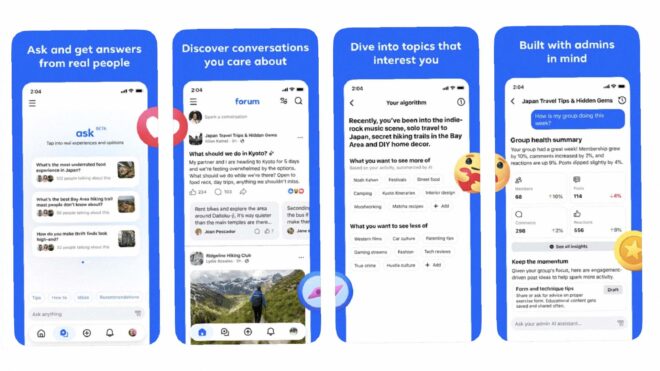
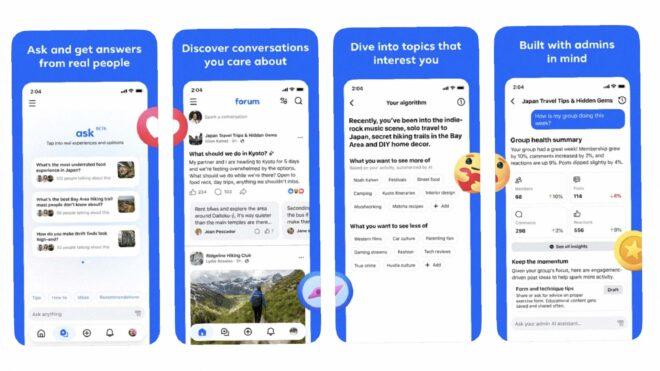
Meta'dan Facebook gruplarına yönelik yeni uygulama: "Forum"Meta, bugün doğrudan Facebook’taki gruplara odaklanan “Forum” adında yeni bir uygulama yayınladı. İlk aşamada yalnızca iOS’a çıkarılan ve Türkiye’ye açılmayan uygulamaya, direkt olarak Facebook hesaplarıyla giriş yapılıyor. Dahil olunan gruplar içerisinde gezilmesine, paylaşılan içeriklerin görüntülenmesine ve yeni paylaşımlar/yorumlar yapılmasına imkan tanıyan Forum, gruplardan toplanan verileri kullanan bir sohbet botu da barındırıyor. Bu yapay zeka sistemi sorulan sorulara gerçek kullanıcıların yanıtlarını kullanarak cevaplar veriyor. Uygulamada, moderatörlerin gruplarını yönetmelerine yardımcı olabilecek yapay zeka destekli bir yönetici asistanı da yer alıyor.

Meta’dan Facebook gruplarına yönelik yeni uygulama: “Forum” yazısı ilk olarak Teknoloji haberleri – LOG üzerinde yayınlandı.

I built a streaming app with 7,000+ downloads at ₹0/month — here’s the exact architecture

I’m Wasey, a solo developer from Varanasi, India. I built DramaHub —
a fully live OTT streaming app on Google Play Store. 7,000+ downloads,
1,000+ daily active users, sub-1% crash rate, ₹0/month infrastructure.

Here’s the exact architecture that makes it possible.

The Problem

I had zero budget for servers. A typical OTT backend needs:

  • A backend server (₹3,000–15,000/month)
  • A database (₹1,500+/month)
  • A CDN (₹500+/month)

I had ₹0. So I had to think differently.

GitHub as the Database

All drama content, episode metadata, and app config live as JSON files
in a public GitHub repository. Free. Unlimited. Versioned automatically.

Every drama looks like this in JSON:

{
“id”: “drama_001”,
“title”: “Drama Title”,
“thumbnail”: “https://cdn.jsdelivr.net/...”,
“episodes”: [
{
“ep”: 1,
“title”: “Episode 1”,
“source”: “youtube_id_here”
}
]
}

The app fetches this JSON on launch, caches it locally, and serves
content instantly on subsequent opens.

Cloudflare Workers as the CDN Proxy

Hitting GitHub raw URLs directly has rate limits. So I built a
Cloudflare Worker that sits in front of GitHub:

  • Caches all JSON responses at the edge globally
  • Handles unlimited traffic
  • Auto-invalidates when content version changes
  • Cost: ₹0

Architecture: Flutter app → Cloudflare Worker → GitHub raw JSON

The Dual Player System

DramaHub runs two video players:

Primary — YouTube WebView player
Most content is sourced from YouTube. The app uses a WebView-based
player with custom controls and a URL whitelist for security.

Secondary — Custom video player with Cloudflare R2
For self-hosted content, I use a custom player backed by
Cloudflare R2 storage.

Both players are switchable instantly from the admin panel via
remote JSON config. No APK update needed — ever.

The Admin Panel

This is the most important part of the architecture.

The admin panel is a Flutter Web app that communicates directly
with the GitHub REST API using Base64 encoding and SHA-based
conflict detection. From the admin panel I can:

  • Add/edit/delete dramas and episodes
  • Toggle ads per screen with cooldown timers
  • Switch between YouTube and custom player instantly
  • Change CDN URLs without any release
  • Force update all users
  • Control app config globally

Everything is remote. Everything is instant. No app store review cycle.

The Crash That Taught Me Everything

One day the app went completely down. Every user got a crash on launch.

The reason: my Cloudflare Worker wasn’t caching properly. Every request
was hitting GitHub directly and I burned through the API rate limit
in minutes.

I fixed the Worker caching. Then I built a full backup system:

  • Direct GitHub raw URL as fallback
  • Backup Worker as secondary fallback
  • Switchable from admin panel in under 60 seconds

No APK release needed. I built that entire system in one night.

Firebase Integration

Even with zero backend cost, I use Firebase for:

  • Anonymous Auth
  • FCM push notifications with deep links
  • Crashlytics for real-time crash monitoring
  • Analytics with 7 custom tracked events
  • Atomic view counter increments via Firestore REST API

Results After 18 Months

📦 7,000+ downloads
👥 1,000+ daily active users

💥 Sub-1% crash rate
💰 ₹0/month infrastructure cost
📱 Live on Google Play Store

Key Lesson

Build your admin panel first. Remote config is not a feature —
it’s survival. The ability to change anything without a new release
has saved me dozens of times.

GitHub as a database works at production scale if you architect
the caching layer correctly.

GitHub: github.com/waseyjamal/dramahub
Play Store: https://play.google.com/store/apps/details?id=com.dramahub.drama_hub
Twitter: @waseybuilds

Happy to answer any questions about the architecture.

I built a crowdsourced deals + map app for Vietnam in 6 months — stack, traffic, and what broke

22 days ago I shipped cheap-map.app — a crowdsourced map of cheap restaurants, shops, and gas stations across Vietnam, with a multi-merchant affiliate deals aggregator bolted on. ~50 organic users a day now,
hockey-stick just starting.

This is the build-log: real stack, real costs, three things that broke spectacularly and what I learned fixing them. If you’re shipping an indie product solo, the boring infrastructure decisions matter more than the framework choice you
spent two weeks agonizing over (guilty).

## Why this exists

Vietnam has incredible cheap food and shopping — $1 phở, $0.50 cà phê sữa đá, motorbike-repair shops that fix a flat for under a dollar. But there’s no good way to find them:

  • Google Maps optimizes for ratings, not price. The 4.7-star place is usually the tourist-priced one.
  • Deal aggregators in VN are SEO-spam sites that copy from each other. None show where a deal is.
  • Locals know the cheap spots by word of mouth. Tourists, expats, and people who just moved to a new city are stuck.

So: a map-first app where the community submits prices, with a deals tab pulling live affiliate offers from Shopee/Tiki/Traveloka/etc. Bilingual VI/EN. Cheap to run.
## The stack

I picked technologies based on “can I run this for under $30/month at 1,000 users/day.”

| Layer | Choice | Why |
|—|—|—|
| Frontend | Next.js 14 App Router + TypeScript | ISR for SEO-heavy programmatic pages |
| Styling | Tailwind + shadcn/ui | Fast, no design system to maintain |
| Map | Mapbox GL JS | More flexible than Google Maps, generous free tier |
| State | Zustand (UI) + TanStack Query (server) | Tiny bundle, good DX |
| Backend | Spring Boot 3.2 on Java 21 (virtual threads) | Boring, fast, JPA + PostGIS plays well |
| Database | Supabase (Postgres 15 + PostGIS) | Hosted PostGIS without ops |
| Cache | Upstash Redis (free tier) | Rate-limiting + slug caching |
| Images | Cloudflare R2 (free tier) | No egress fees, presigned uploads |
| Frontend host | Vercel Hobby | Free until traffic gets serious |
| Backend host | Railway | $5–10/mo for a Spring JAR |
| DNS / CDN | Cloudflare | $1/mo |

Total cost at 22 days: ~$15/month (Railway + Cloudflare + Mapbox). Vercel + Supabase + R2 + Upstash all still on free tier.

The big architectural call: monolith, not microservices. One Spring app, feature-based packages (auth/, location/, deal/, ranking/…), one database. I’ll extract a service the day traffic justifies it, not before.

The other big call: REST, not GraphQL. Simpler caching, simpler clients, simpler future mobile app.

## Three things that broke

### 1. Vercel ISR Writes blew up at 50% of the monthly free-tier cap

About day 14, I checked Vercel’s usage dashboard. ISR Writes — the number of times Next.js regenerates a statically-cached page — was at 50% of the 200k/month free-tier limit. Three weeks in. The math projected an overage by week 5.

I have 43k location pages, all ISR’d. Plus 90+ deal hub pages. Plus 360 city × category cells. With revalidate: 3600 (1 hour) on the location pages, every page got re-generated 24 times a day → 1M+ writes/month theoretical. Bots were
hitting them faster than humans.

The fix was one config change spread across six route files:

// /location/[slug]/page.tsx
export const revalidate = 604800; // was 3600 (1h) → now 7d

// /deals, /deals/category/[slug], /san-sale/[merchant], etc
export const revalidate = 21600; // was 3600 → now 6h

// /san-sale/today ← KEPT at 3600
export const revalidate = 3600;

The last line is the interesting one. /san-sale/today has a date-stamped H1 (“Săn sale hôm nay 22/05/2026”) engineered for “deals today” SEO. Bumping its revalidate would either (a) break the date-fresh signal Google uses for “today”
queries, or (b) make my hourly in sitemap.xml a false claim. So that one page eats writes; the other 43k+ don’t.

Estimated reduction: 226k writes/month → 36k. ~85% drop.

Lesson: check your platform’s metered dashboards every week, not when you hit the warning email. ISR revalidate defaults rarely match your actual content’s update cadence.

  1. Samsung’s affiliate URLs were wrapped in a Commission Junction tracker — and that broke the entire affiliate deeplinker

The deals aggregator pulls product feeds from AccessTrade Vietnam (a VN affiliate network). For most merchants, you take the product URL from their CSV feed, wrap it in AccessTrade’s redirect
(https://go.isclix.com/deep_link/?url=), and you’re done. Clicks attribute to your publisher ID, you earn commission.

Samsung’s feed broke this. Every Samsung click returned HTTP 500.

I dug in. The Samsung CSV URLs looked like this:

https://clk.omgt3.com/?AID=12345&r=samsung.com/vn/smartphones/galaxy-s24

That’s not a Samsung URL. That’s a Commission Junction tracker URL with the actual Samsung URL stuffed in the r= query param. CJ is a separate affiliate network — Samsung apparently runs through both, and AccessTrade is pulling
Samsung’s CJ-wrapped feed.

AccessTrade’s deeplinker saw the clk.omgt3.com hostname, decided “this is already a tracker,” and routed it to a special /deep_link/v2/2306/ path that’s supposed to chain trackers. That endpoint is broken — silent 500.

The fix is a 20-line static helper:

public static String unwrapCjTracker(String url) {
if (url == null || !url.contains(“clk.omgt3.com”)) return url;
try {
URI uri = URI.create(url);
String query = uri.getQuery();
if (query == null) return url;
for (String pair : query.split(“&”)) {
int eq = pair.indexOf(‘=’);
if (eq > 0 && “r”.equals(pair.substring(0, eq))) {
String inner = URLDecoder.decode(pair.substring(eq + 1), UTF_8);
return inner.startsWith(“http”) ? inner : “https://” + inner;
}
}
} catch (Exception e) { /* fall through */ }
return url;
}

Called on every URL before it goes into the affiliate wrapper. No-op for the 99% that aren’t CJ-wrapped. Samsung clicks work now.

Lesson: when an affiliate network “auto-detects” something about a URL, assume it will do the wrong thing for at least one merchant. Write the unwrap helper proactively.

  1. I thought I had an egress problem. I had a caching problem.

Supabase’s egress dashboard started looking ugly: ~8 GB/day. The free tier caps at 5 GB/month. I had a week before getting throttled.

My first instinct was “compress everything.” I turned on server.compression=true in Spring Boot. Watched the dashboard. Egress didn’t move.

This is when I realized I’d misunderstood the topology:

Browser ←–gzip– Next.js ←–no gzip– Spring API ←–no gzip– Supabase

Spring’s HTTP compression compresses outbound HTTP — Spring → Next.js or Spring → browser. It does nothing to the inbound traffic from Supabase, which is the raw JDBC protocol over a Supabase connection. That JDBC channel is what the
egress dashboard measures.

The real culprit was a single endpoint: GET /api/v1/locations/slugs — used by the Next.js sitemap to list every location URL. 16 MB uncompressed. Next.js was calling it on every sitemap request. No cache. Every Bingbot crawl, every
Ahrefs scrape, every sitemap ping = another 16 MB from Postgres → Railway.

Fix was two lines:

@Cacheable(“active-slugs”) // 6h Redis TTL
public List getActiveSlugs() { … }

// Next.js sitemap
const res = await fetch(SLUGS_URL, { next: { revalidate: 21600 } }); // 6h

8 GB/day → 200 MB/day overnight.

Lesson: before optimizing what you think the bottleneck is, instrument the actual data path. HTTP gzip is great, but it can’t help you on a wire it isn’t on.

Traffic numbers — day 22

  • ~50 organic users/day (hockey-stick juuust starting last week)
  • ~921 cumulative users across 22 days
  • ~43k indexable location pages + 90 deal hubs + 360 city×category cells + ~205 tool-hub pages
  • All on free/cheap tiers — total infra spend ~$15/mo

What worked for SEO:

  • Programmatic city × category landing pages
  • Full JSON-LD (BreadcrumbList, ItemList, FAQPage, LocalBusiness with type-narrowing — Restaurant / Bakery / GasStation etc., not generic LocalBusiness)
  • Bilingual hreflang VI/EN
  • A simple Purchasing Power calculator for the Tools Hub — converts your salary into cost-of-living-adjusted equivalent across countries. Built it as a side surface, ended up being one of the highest-engagement pages.

What didn’t work yet:

  • Backlinks. Zero outreach so far. That’s the next 30 days.
  • Affiliate conversion tracking. The data’s flowing, the GA4 event isn’t wired yet.

What I’d do differently

  1. Set up Vercel/Supabase usage alerts on day 1, not “when the first warning email arrives.” Both have webhook integrations I ignored.
  2. Write the affiliate URL unwrapper before integrating the first merchant. I would have caught Samsung in 5 minutes instead of 2 hours of “why is this one merchant returning 500.”
  3. Cache anything that returns >1 MB before pushing it to prod. Even on staging, with one user (me), the moment a bot finds the sitemap you’re cooked.

What’s next

Three things in the next 30 days, in order of leverage:

  1. Google Search Console audit — find the queries ranking position 11–30 and pull them onto page 1 with small content additions
  2. Backlinks. 3 quality ones. (This post is one of them, hi!)
  3. Wire affiliate-click tracking to GA4 so I actually know which deals convert

If you want to poke at the live site, it’s cheap-map.app — try the Purchasing Power calculator or browse today’s deals. Feedback welcome in the comments — especially the “what would you have done differently” kind.

Women Techmakers Ambassador Applications are here!

Women Techmakers Ambassador Applications are here!

This program brings together individuals who are passionate about technology, community, and creating space for others to grow.
As an Ambassador, you’ll have the opportunity to:
– Foster inclusive tech communities
– Organize and lead meaningful initiatives
– Support and uplift others in their journeys
– Contribute to a global network of builders and thinkers
We’re looking for people who care deeply about impact. Those who are not only advancing in tech, but also opening doors for others along the way.
If you’re ready to shape conversations, build community, and create lasting impact, we invite you to apply. Application deadline: June 22.

WomenTechmakers #WomenInTech #WTM2026 #WTMAmbassador

WTM website and handles
Website: https://www.technovation.org/women-techmakers/
LinkedIn: https://www.linkedin.com/company/womentechmakers
Twitter/X: https://x.com/womentechmakers
Instagram: https://www.instagram.com/womentechmakersglobal/
Facebook: https://www.facebook.com/technovationglobal

AI That Empowers Every Dream: My Vision Inspired by Google I/O 2026

Google I/O 2026 introduced a lot of exciting updates around AI, Gemini, Android, Firebase, and cloud technologies. But for me, the most inspiring part wasn’t just the technology itself — it was seeing how accessible AI development is becoming for students and independent developers.

As someone who is deeply interested in AI and innovation, this year’s Google I/O genuinely felt different.

For the first time, it feels like students can move beyond just learning AI and actually start building meaningful solutions with it.

And honestly, that’s what excited me the most.

Why Google I/O 2026 Felt Inspiring

AI is growing incredibly fast right now.

Every day there’s a new model, framework, or tool being introduced. But even with all this progress, many students still struggle with one thing:

Turning ideas into real projects.

A lot of students have creative ideas but often feel limited because of complicated setups, lack of resources, or confusing workflows.

That’s why the direction shown at Google I/O 2026 stood out to me.

The ecosystem now feels more beginner-friendly, more practical, and more focused on helping developers experiment faster.

Instead of spending too much time figuring out infrastructure, developers can focus more on solving actual problems.

And I think that shift is very important.

The Kind of AI I Want to Build

One thing I’ve realized while learning AI is that technology becomes meaningful only when it helps people in real life.

That idea inspired my vision:

“AI That Empowers Every Dream”

I don’t see AI as something that should replace humans.

I see it as a tool that can help students learn better, make everyday life easier, and create opportunities for more people.

After watching Google I/O 2026, I became even more motivated to explore projects that combine AI with real-world impact.

Ideas I Would Love to Build Using Google AI
📚 Smart Study Assistant

As a student, I know how overwhelming studies can sometimes feel.

I would love to build an AI assistant that helps students:

summarize notes,
explain difficult topics,
create quizzes,
and make learning more interactive.

I think AI can make education more personalized and accessible for everyone.

🥗 AI Health & Wellness Assistant

Another idea that excites me is using AI for healthier lifestyles.

Imagine scanning food using your phone and instantly getting:

nutrition details,
calorie estimates,
and health suggestions.

Small AI solutions like this can genuinely help people in daily life.

🚦 Smart Traffic & Safety Systems

Traffic and travel are everyday challenges in many cities.

AI-powered systems could help by:

analyzing traffic conditions,
suggesting safer routes,
and improving travel efficiency.

I find it exciting how AI can be connected with practical city problems instead of existing only inside apps and demos.

🌍 Rural Education with AI

This is probably the idea I connect with the most.

Many students still don’t have access to quality learning resources, especially in regional languages.

I would love to build AI learning systems that work in local languages and help students learn more easily, even with limited resources.

If AI becomes truly accessible, it can create opportunities for millions of students.

And I think that’s one of the most powerful things technology can do.

Why Google AI Studio Caught My Attention

One of the most exciting announcements for me was the evolution of Google AI Studio and the Gemini ecosystem.

What impressed me most was how focused the platform feels on helping developers build faster.

A few things I personally liked:

faster experimentation,
easier workflows,
beginner-friendly development,
and quicker prototyping.

For students, these things matter a lot.

Not everyone has expensive hardware or large development teams.

Platforms that reduce complexity make innovation feel more achievable for students and independent developers.

Why This Matters for Students

Students usually face challenges like:

limited budgets,
limited computing resources,
and lack of guidance.

But modern AI tools are slowly reducing those barriers.

Now students can experiment, participate in hackathons, build projects, and turn ideas into working solutions much more easily than before.

That’s what makes this moment exciting.

The future of AI development is becoming more open and accessible.

One Thing I Hope Improves

Even though the ecosystem looks exciting, beginners can still feel overwhelmed because AI is evolving so quickly.

There are now so many:

models,
APIs,
frameworks,
and tools.

I would love to see even more beginner-focused learning paths, templates, and guided project experiences integrated into platforms like Google AI Studio.

That could help many new developers start building with more confidence.

Final Thoughts

Google I/O 2026 made me feel genuinely excited about the future of AI development.

Not just because the technology is improving rapidly, but because these tools are becoming accessible to students, creators, and independent developers.

That’s what makes this moment special.

I truly believe the next generation of developers will build incredible solutions using AI — solutions that improve education, healthcare, accessibility, and everyday life.

And as a student who loves exploring technology, that future feels incredibly inspiring.

Honestly, I think we are only getting started.

googleiochallenge #devchallenge #ai #machinelearning #googleio #gemini #buildwithai

Türkiye’deki toplam elektrikli araç sayısı 427 bini geride bıraktı

Türkiye’deki toplam elektrikli araç sayısı 427 bini geride bıraktı

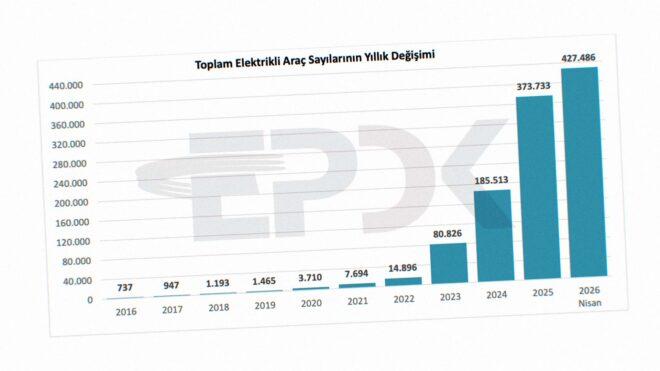
Türkiye’deki toplam elektrikli araç sayısı 427 bini geride bıraktıEnerji Piyasası Düzenleme Kurumu Enerji Dönüşüm Dairesi Başkanlığı, bugün 2026’nın nisan ayı verilerini paylaştı. Buna göre Türkiye’deki elektrikli araç sayısı 427.486’ya, toplam şarj noktası sayısı ise 43.009’a çıktı. AC şarj noktalarının 24.468’e, DC şarj noktalarının ise 18.541’e ulaştığını duyuran kurum, soket sayısında liderliğin halen ciddi bir farkla ZES’te olduğunu açıklıyor. İkinci sırada yerli otomobil girişimi Togg’un kurduğu şarj ağı Trugo, üçüncü sırada ise Voltrun yer alıyor. Türkiye’de 2024 yılında 185.513 adet, 2023 yılında 80.826 adet, 2022 yılında ise 14.896 adet elektrikli otomobilin bulunduğunu hatırlatan EPDK, 2025’in aralık ayında toplam elektrikli araç sayısını 373.733 olarak açıklamıştı.


Türkiye’deki toplam elektrikli araç sayısı 427 bini geride bıraktı yazısı ilk olarak Teknoloji haberleri – LOG üzerinde yayınlandı.

Tesla Türkiye, FSD (Full Self-Driving) paketinin aylık abonelik fiyatını açıkladı

Tesla Türkiye, Full Self-Driving (FSD) paketinin aylık abonelik fiyatını açıkladı

Tesla Türkiye, Full Self-Driving (FSD) paketinin aylık abonelik fiyatını açıkladıTesla, yurt dışında 14 Şubat itibarıyla tek seferlik FSD (Full Self-Driving) satışını durdurmaya başladı. “Geliştirilmiş Otopilot’un yanı sıra, Trafik Işığı ve Dur İşareti Kontrolü’nü içerir. Ayrıca gelecekteki güncellemelerle birlikte aracınız, neredeyse her yere minimum sürücü müdahalesiyle kendi kendine gidebilecek.” açıklamasının yapıldığı FSD sisteminin tek seferlik satışı bugün itibarıyla Türkiye’de de durduruldu. Bu konuda yaptığı açıklamada, “21 Mayıs 2026’ya kadar tek sefere mahsus olmak üzere satın alınabilir. Sonrasında abonelik olarak sunulur.” diyen şirket, Türkiye’de tam haliyle aktif olmayan paketin abonelik ücretini aylık 4.990 TL olarak açıkladı. Sistem için yapılan son paylaşımda, “Full Self-Driving (Denetimli) henüz mevcut değil ancak gelecekte sunulabilir. Kullanılabilirliği, geliştirme sürecine ve düzenleyici kuruluş onayına bağlıdır. Full Self-Driving Kabiliyeti bir dizi sürücü destek özelliği içerir: Otomatik Direksiyon, Trafiğe Duyarlı Hız Sabitleme, Şerit Değiştirme, Otomatik Direksiyonda Navigasyon, Dumb Summon, Actually Smart Summon, Otomatik Park ve Trafik Işığı ve Dur İşareti Kontrolü.” ifadelerine yer verildi.

Tesla Türkiye, FSD (Full Self-Driving) paketinin aylık abonelik fiyatını açıkladı yazısı ilk olarak Teknoloji haberleri – LOG üzerinde yayınlandı.