The Gifts Are Under the Tree — From Spec to Merged PR 🎄
Accompanying source code repository: Santa Augmentcode Intent
Every year, on the morning of December 25th, I allow myself one quiet moment before the sleigh is unpacked and the Thank-You Letters start arriving. I sit in the empty Workshop, still warm from the night’s work, and look at the bare shelves where the gifts used to be. They are gone because they were delivered. Every one of them. On time, as specified, to the right address. That moment — that quiet confirmation that everything worked — is what we have been building towards in this entire series. Today, we deliver.
The Complete Picture
Over the past seven episodes, we have assembled all the pieces of the Intent workshop:
-
Episode 1: The Workshop and what Intent is.
-
Episode 2: The Living Spec — the source of truth.
-
Episode 3: Santa the Coordinator and the Specialist Elves.
-
Episode 4: Isolated workspaces and resumable sessions.
-
Episode 5: Spec-Driven Development and finishing on time.
-
Episode 6: The Context Engine — the Workshop Library.
-
Episode 7: Multi-agent orchestration in waves.
Now we put them all together and walk through a complete Intent session, from the moment Head Elf Pepper opens the application to the moment the pull request is merged.
The Scenario
Goal: Add a real-time gift delivery progress dashboard to the North Pole’s internal web application. The dashboard should show live sleigh position, remaining delivery count, and an estimated completion time. It must work on tablets and update every 30 seconds.
Constraints:
- Use the existing Reindeer GPS API (v2)
- No changes to the Delivery Manifest microservice
- Safari / iPad compatible
- Must pass existing end-to-end test suite
Step 1: Open Intent and Set the Goal
Pepper opens Intent on her MacBook. She types into the Coordinator:
We need a real-time gift delivery dashboard. Show sleigh position
on a map, remaining delivery count, and estimated completion time.
Updates every 30 seconds. Must work on iPad Safari.
Use Reindeer GPS API v2. No changes to Delivery Manifest Service.
The Coordinator reads this prompt alongside the Context Engine’s analysis of the codebase. It knows the existing frontend stack (React, TypeScript), the API patterns used elsewhere in the project, and the existing test suite structure.
Step 2: The Coordinator Drafts the Living Spec
Within seconds, the Coordinator produces:
## Gift Delivery Dashboard — Living Spec

### Goal
Real-time dashboard showing sleigh position, delivery count,
and ETA. Updates every 30 seconds. iPad Safari compatible.

### Success Criteria
- [ ] Map renders in < 1s on iPad Safari
- [ ] Position updates within 30s of GPS data change
- [ ] Delivery count matches Manifest API response
- [ ] ETA calculated from current position + remaining stops
- [ ] All existing e2e tests pass
- [ ] Lighthouse accessibility score ≥ 90

### Constraints
- Reindeer GPS API v2 (existing auth token pattern)
- Delivery Manifest Service: read-only, no new endpoints
- Safari / iPad: no Chrome-only APIs

### Architecture
- New React component: `<DeliveryDashboard />`
- GPS polling service (30s interval, exponential backoff on fail)
- Map: Leaflet.js (already in dependencies — see package.json)
- Offline fallback: show last known position with staleness indicator

### Tasks
- [ ] GPS Polling Service — GPS Elf
- [ ] Map Component — Map Elf
- [ ] Delivery Count & ETA Widget — Data Elf
- [ ] Safari/iPad CSS fixes — Responsive Elf
- [ ] Integration tests — Test Elf (starts after GPS + Map done)
- [ ] Accessibility audit — A11y Elf (background)

### Decisions
(none yet)
Pepper reads the spec. She adds one clarification: “ETA should display in local Workshop time, not UTC.” The Coordinator updates the spec and records the decision.
Review time: 4 minutes. No code written yet. One important decision already captured.
Step 3: Intent Creates Isolated Workspaces
The Coordinator identifies the dependency graph:
- GPS Elf and Map Elf can start in parallel immediately.
- Data Elf can start immediately (it only reads from the Manifest API).
- Responsive Elf can start once Map Elf has a working component.
- Test Elf starts after GPS Elf and Map Elf complete.
- A11y Elf runs as a background agent throughout.
Intent creates five Git worktrees:
feat/dashboard-gps-service        ← GPS Elf
feat/dashboard-map-component      ← Map Elf
feat/dashboard-data-widgets       ← Data Elf
feat/dashboard-responsive         ← Responsive Elf (waiting)
feat/dashboard-tests              ← Test Elf (waiting)
Wave 1 agents — GPS Elf, Map Elf, Data Elf — start simultaneously. The A11y Elf begins in the background.
Step 4: Wave 1 Runs
Pepper watches the Intent window. Three agent conversations are active. Code appears in the Changes panel. The spec’s task list updates as work progresses.
GPS Elf implements the polling service, using the existing auth token pattern it found via the Context Engine:
// gps-polling.service.ts
export class GpsPollingService {
  private interval = 30_000;
  private backoff = 1;

  async startPolling(onUpdate: (pos: SleighPosition) => void) {
    const poll = async () => {
      try {
        const pos = await reindeerGpsApi.getCurrentPosition();
        onUpdate(pos);
        this.backoff = 1;
      } catch {
        this.backoff = Math.min(this.backoff * 2, 8);
      }
      setTimeout(poll, this.interval * this.backoff);
    };
    poll();
  }
}
The spec updates: ✅ GPS Polling Service — GPS Elf — done.
Map Elf creates the <DeliveryMap /> component using Leaflet.js, which it found already installed in package.json via the Context Engine. It does not install a duplicate library.
Data Elf builds the delivery count and ETA widget, correctly calling the Manifest API’s read-only endpoint and displaying ETA in Workshop local time (it read the spec decision).
Step 5: Handoffs and Wave 2
Both GPS Elf and Map Elf report completion. The spec records the interfaces they produced:
### Decisions
- GPS service exposes: `startPolling(cb: (SleighPosition) => void)`
- Map component props: `{ position: SleighPosition; zoom?: number }`
The Coordinator briefs Responsive Elf with the updated spec and the actual component structure. No guesswork. Test Elf receives both the GPS service interface and the Map component props, plus the existing e2e test patterns from the Context Engine.
Wave 2 begins. Responsive Elf adds Safari/iPad CSS. Test Elf writes integration tests.
Step 6: The Verifier Checks Everything
Wave 2 complete. The Coordinator spawns the Verifier Elf with the full spec and all five implementations.
Verifier’s report:
✅ Map renders in < 1s on iPad Safari — confirmed (Lighthouse: 0.7s)
✅ Position updates within 30s — confirmed
✅ Delivery count matches Manifest API — confirmed
✅ ETA in Workshop local time — confirmed
✅ Existing e2e tests pass — confirmed
✅ Lighthouse accessibility score ≥ 90 — confirmed (score: 94)
⚠️  Minor: GPS service does not log polling errors to existing
    structured logger (see logger.ts — used throughout codebase)
The warning is real and useful. The Context Engine told the Verifier about logger.ts. A generic agent would have missed it.
The Coordinator sends the GPS Elf back for a five-minute fix. It adds one line:
} catch (err) {
  logger.warn('GPS polling failed', { error: err, backoff: this.backoff });
Re-verification: all green.
Step 7: The Pull Request
The Coordinator integrates all five worktrees into a single branch feat/delivery-dashboard and opens a pull request. The PR description is generated from the Living Spec:
## Gift Delivery Dashboard

Implements real-time dashboard (sleigh position, delivery count, ETA).

### Changes
- New: `GpsPollingService` with 30s polling + exponential backoff
- New: `<DeliveryMap />` using existing Leaflet.js dependency
- New: `<DeliveryStats />` widget with ETA in Workshop local time
- New: iPad/Safari responsive CSS
- New: Integration test suite (12 tests, all passing)

### Verified Against Spec
All 6 success criteria confirmed by Verifier Agent.
Existing e2e suite: all passing.

### Decisions Recorded
- ETA displayed in Workshop local time (not UTC) — per Pepper, Dec 3
- Used existing Leaflet.js (not installed new mapping library)
- GPS errors logged via existing structured logger (logger.ts)
Pepper reviews the spec (4 minutes). She reviews the diff (10 minutes, because the spec told her exactly what to look for). She approves.
Total elapsed time: 47 minutes. Zero rework. Christmas safe.
What We Built Together
Over this series, Father Christmas and Head Elf Pepper have explained every layer of Intent:
| Concept |
What It Does |
Workshop Equivalent |
| Living Spec |
Source of truth, auto-updated |
Master Gift List |
| Coordinator Agent |
Plans, delegates, manages handoffs |
Father Christmas |
| Specialist Agents |
Execute focused tasks in parallel |
Craft Elves |
| Isolated Workspaces |
No collisions between parallel agents |
Private workbenches |
| Spec-Driven Development |
Plan first, code follows |
Write the List before carving begins |
| Context Engine |
Deep codebase knowledge for every agent |
The Workshop Library |
| Multi-Agent Orchestration |
Waves, handoffs, background agents |
Workshop floor choreography |
| Resumable Sessions |
State preserved across restarts |
Workshop never forgets |
SIPOC: The Complete Intent Workflow
|
S — Suppliers |
I — Inputs |
P — Process |
O — Outputs |
C — Customers |
| Who/What |
Developer, Coordinator, Specialists, Context Engine, AI models |
Goal statement, codebase, constraints, model selection |
Spec → Review → Wave 1 agents → Handoffs → Wave 2 → Verifier → PR |
Verified code, living spec, decision log, merged PR |
Engineering team, product owner, CI/CD, end users |
| Workshop |
Pepper, Father Christmas, all Elves, the Library |
Gift order, Workshop constraints, quality standards |
Write List → Agree → Parallel building → Handoffs → QC → Sleigh |
All gifts delivered correctly, on time, to every child |
Children of the world |
Getting Started
Intent is available in public beta for macOS. Download it here. It uses your existing Augment credits. You can also bring Claude Code, Codex, or OpenCode if you already have subscriptions.
Augment’s documentation is at docs.augmentcode.com. Their manifesto — The End of Linear Work — is worth reading before your first session.
A Final Word from Father Christmas
I have been doing this for over a thousand years. Every century, the tools improve. The quill gave way to the telegraph, the telegraph to the computer, and now the computer gives way to the agent. But the fundamental challenge has never changed: how do you coordinate complex, parallel work towards a shared goal, on an unmovable deadline, without chaos?The answer, in 1025 and in 2025, is the same: a clear plan, a good team, and the discipline to keep the plan honest.Augment Intent is the first software I have encountered that truly understands this. It puts the plan first. It keeps the plan honest. It coordinates the team without the Elves colliding. And it finishes on time.I am proud of everything we have built in this Workshop. I hope you will build something wonderful in yours.Merry Christmas, and Happy Coding.Ho ho ho! 🎅
This concludes the Santa Augmentcode Intent series. All eight episodes are available on dev.to under the the-software-s-journey organisation.
Thank you for reading. May your specs be living and your merges be clean.

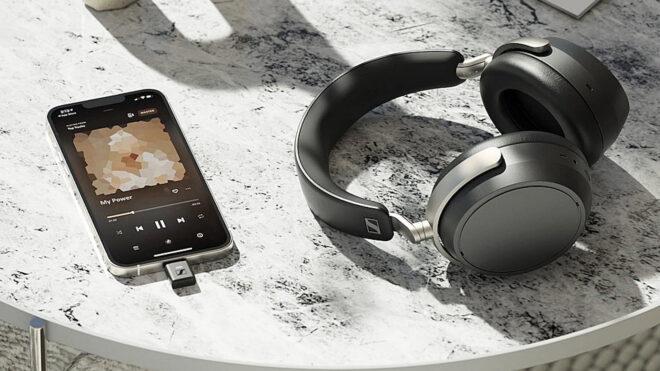
 Bugün Reddit üzerinden yapılan açıklamaya göre Sonova, Sennheiser’ın tüketici elektroniği birimini satmak istiyor. Sennheiser, kulaklıkların bulunduğu tüketici elektroniği birimini 2021 yılında işitme cihazları konusunda uzman İsviçreli Sonova’ya tam 200 milyon avro karşılığında satmıştı. Bu yatırımdan istediğini alamamış gibi görünen şirketin, HD 400, HD 500, HD 600 ve HD 800 serisi gibi kulaklıkları üreten bölüme müşteri bulmakta zorlanması beklenmiyor. Tüm odağını yeniden işitme cihazlarına vermek istediği belirtilen Sonova, Sennheiser’a yaptığı yatırımla gençlere ulaşmak istediğini açıklamıştı.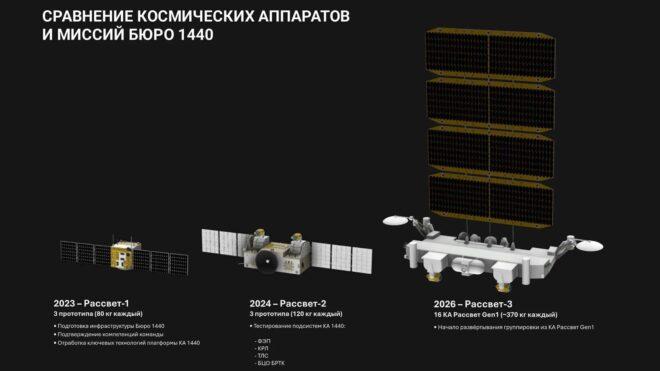
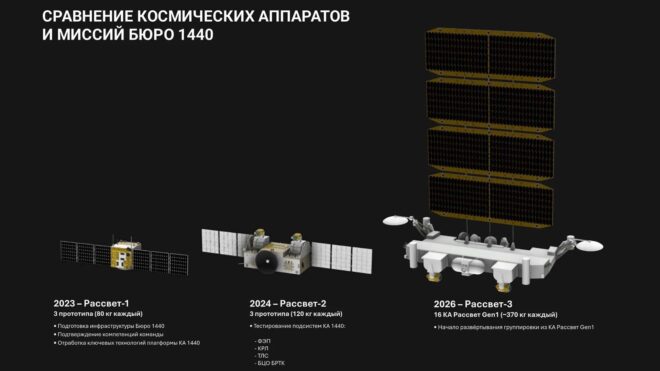 Rusya merkezli özel uzay şirketi Bureau 1440, geçtiğimiz saatlerde gerçekleştirilen kalkışla birlikte alçak dünya yörüngesine 16 farklı uydu çıkardı. “Rassvet” adı verilen SpaceX’in Starlink’ine rakip uzaydan internet ağı için 2035 yılına kadar yörüngeye 900 farklı uydu konumlandırmak isteyen devlet destekli şirket, uydu sayısını önümüzdeki yıl içerisinde 250’ye çıkarmayı hedefliyor. Elbette doğrudan Rusya’da kullanıma yönelik tasarlanan sistem, aktarıldığı kadarıyla hem sivil hem de askeri amaçlarla kullanılacak. Uzaydan internet sunmak adına çalışan isimler arasında alışveriş devi Amazon ve geçtiğimiz yıl güçlerini birleştiren Avrupa merkezli Airbus, Leonardo ve Thales de yer alıyor.
 Sony ve Honda’nın ortak otomobil girişimi Sony Honda Mobility, yılın başında sedan modelleri Afeela 1’in ABD teslimatlarına yıl sonunda başlayacaklarını duyurmuştu. Bugün sürpriz bir açıklama yapan şirket, değişen sektör şartları ve diğer finansal analizler sonrasında Afeela 1’in ve aynı zamanda pazara sunulması hedeflenen SUV formundaki ikinci aracın geliştirme çalışmalarını durdurduğunu duyurdu. Araçların satışa çıkarılmayacağını da açıklayan Honda, geçtiğimiz haftalarda tamamen elektrikli “O” serisi araçlarını da rafa kaldırmıştı. En son PlayStation Remote Play desteğiyle gündeme gelen tamamen elektrikli sedan otomobil modeli Afeela 1 için CES 2026’da 90 bin dolarlık bir satış fiyatı açıklanmıştı. 482 km menzil sunacağı ve 91 kWh kapasiteli lityum iyon batarya üzerine kurulacağı aktarılan araçta, her biri 180 kW güç üreten iki motor yer alacaktı. Çok sayıda gelişmiş sensör ve otonom sürüş sistemiyle donatılacağı söylenen Afeela 1, DC’de 150 kW, AC’de ise 11 kW şarj hızı sunacaktı. CES 2026’da sergilenen Afeela 1 temelli konsept SUV’nin ise 2028’den önce […]
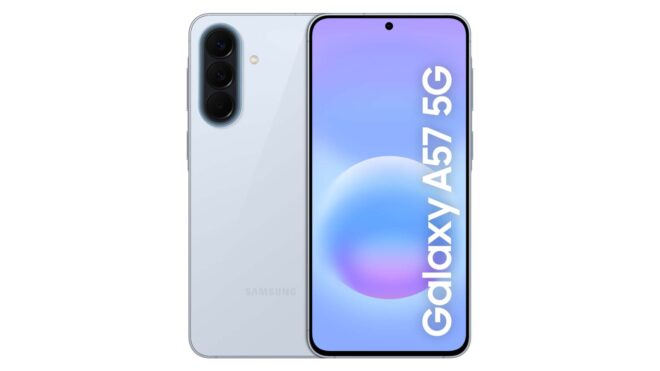 Yapılan sızıntılar sayesinde tasarımsal ve teknik açıdan sürprizin kalmadığı Samsung Galaxy A57 ve Galaxy A37, bugün resmi olarak görücüye çıkarıldı. Türkiye’de de satılacak telefonlardan plastik çerçeveli Galaxy A37, teknik olarak bakarsak 6,7 inç boyutunda 120 Hz AMOLED ekran, Exynos 1480 işlemci, 6 / 8 GB RAM seçenekleri, 128 / 256 GB depolama seçenekleri, 45W şarj destekli 5.000 mAh batarya ve 12 megapiksel selfie kamerası ile geliyor. 162,9 x 78,2 x 7,4 mm gövde ölçüleri ve 196 gram ağırlığa sahip olan telefonun arkasında ise 50 megapiksel geniş açı, 8 megapiksel ultra geniş açı ve 5 megapiksel makro kameralar yer alıyor. Metal çerçeveli Galaxy A57 ise 6,7 inç boyutunda 120 Hz AMOLED ekran, Exynos 1680 işlemci, 6 / 8 GB RAM seçenekleri, 128 / 256 GB depolama seçenekleri, 45W şarj destekli 5.000 mAh batarya ve 12 megapiksel selfie kamerası ile geliyor. 161,5 x 76,9 x 6,9 mm gövde ölçüleri ve 192 gram […]
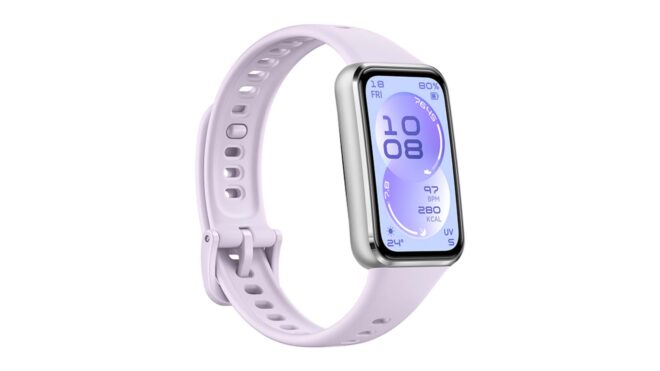 Saat formundaki yeni akıllı bileklik modeli Huawei Band 11, Türkiye’de satışa sunuldu. Resmi fiyatı 2.299 TL olan model için Huawei Türkiye’nin resmi açıklaması şöyle oldu: “Sadece 8,99 mm inceliğe sahip olan HUAWEI Band 11, ergonomik ve hafif yapısıyla günlük hayatın her anında kullanıcıya uyum sağlayan modern bir tasarımla geliyor. Cihaz, 1,62 inç büyüklüğünde ve 60 Hz yenileme hızına sahip AMOLED ekranı barındırıyor. Ekran parlaklığının 1500 nite ulaşabilmesi, akıllı bilekliğin güneş ışığı altında da net bir şekilde kullanılabilmesine olanak tanıyor. Akıllı telefonlarla entegre çalışan Band 11, günlük iletişimi kolaylaştırmayı hedefliyor. Kullanıcılar, gelen arama ve mesaj bildirimlerini ekran üzerinden takip edebilirken, çağrı reddetme ve hazır mesajlarla yanıtlama gibi işlemleri doğrudan bileklik üzerinden gerçekleştirebiliyor. Cihaz ayrıca kamera deklanşörü kontrolü, takvim ve hava durumu gibi pratik asistan özelliklerini de barındırıyor. Sağlık takibi konusunda yeni yazılımsal özelliklerle desteklenen Band 11, detaylı uyku analizleri sunuyor. Uyku evrelerini ve uyku sırasındaki Kalp Atış Hızı Değişkenliğini (HRV) ölçen […]
