Lunch Picker

//Building a Lunch Picker Program

/*n this lab, you’ll build a program that helps in managing lunch options. You’ll work with an array of lunches, add and remove items from the array, and randomly select a lunch option. */

//create an empty array
let lunches = [];
//create a function
//give it two arguments which one is an array and the second is a string
//this function should add the string argument to the end of the array and log it to the console
//return the updated array
function addLunchToEnd(arr, lunchItem) {
arr.push(lunchItem);
console.log(${lunchItem} added to the end of the lunch menu.);
return arr;
}
//create a secondn function
//give it two arguments: an array as first and a string as a second
//this function should add the string argument to the beginning of the array and log it to the console
//return the updated array
function addLunchToStart(arr, lunchItem) {
arr.unshift(lunchItem);
console.log(${lunchItem} added to the beginning of the lunch menu.);
return arr;
}
//create a function
//give it one argument (array)
//this function should its last element, IF successful log the message 0
//return the updaated array
function removeLastLunch(arr) {
if (arr.length === 0) {
console.log(“No lunches to remove.”);
return arr;
}

const removed = arr.pop();
console.log(${removed} removed from the end of the lunch menu.);
return arr;
}

// Remove first item and IF successful, log the message
//return updated array
function removeFirstLunch(arr) {
if (arr.length === 0) {
console.log(“No lunches to remove.”);
return arr;
}
//create a variable that removes first item and log it to the console
//return updated array
const removed = arr.shift();
console.log(${removed} removed from the start of the lunch menu.);
return arr;
}

// Get random item and IF successful, log the message
//return value
function getRandomLunch(arr) {
if (arr.length === 0) {
console.log(“No lunches available.”);
return;
}
//create a variable
//where its needed the approximately the rounded number of the decimal method
const randomIndex = Math.floor(Math.random() * arr.length);
const item = arr[randomIndex];
console.log(Randomly selected lunch: ${item});
}

// Show menu
function showLunchMenu(arr) {
if (arr.length === 0) {
console.log(“The menu is empty.”);
return;
}

console.log(Menu items: ${arr.join(", ")});
}

Simple MySQL example for E-commice

Hi everyone, I wanted to share my experience with SQL. In this post, I’ll walk through some snippets that illustrate what a simple e-commerce schema might look like.

`– Role table
CREATE TABLE role (
id INT AUTO_INCREMENT PRIMARY KEY,
name VARCHAR(50) NOT NULL UNIQUE,
description VARCHAR(255)
);

— Insert default roles
INSERT INTO role (name, description) VALUES
(‘admin’, ‘Full system access’),
(‘customer’, ‘Can browse and place orders’),
(‘staff’, ‘Can manage orders and products’),
(‘vendor’, ‘Supplier with limited access’);

— User table
CREATE TABLE user (
id INT AUTO_INCREMENT PRIMARY KEY,
role_id INT NOT NULL,
first_name VARCHAR(100) NOT NULL,
last_name VARCHAR(100) NOT NULL,
email VARCHAR(255) NOT NULL UNIQUE,
password_hash VARCHAR(255) NOT NULL,
phone VARCHAR(20),
created_at TIMESTAMP DEFAULT CURRENT_TIMESTAMP,
FOREIGN KEY (role_id) REFERENCES role(id)
);

— Producer table (linked to a user)
CREATE TABLE producer (
id INT AUTO_INCREMENT PRIMARY KEY,
user_id INT NOT NULL UNIQUE,
bio TEXT,
created_at TIMESTAMP DEFAULT CURRENT_TIMESTAMP,
FOREIGN KEY (user_id) REFERENCES user(id) ON DELETE CASCADE
);

— Category table
CREATE TABLE category (
id INT AUTO_INCREMENT PRIMARY KEY,
name VARCHAR(100) NOT NULL UNIQUE
);

— Insert default categories
INSERT INTO category (name) VALUES
(‘Vegetables’),
(‘Fruits’),
(‘Dairy’),
(‘Honey & Preserves’),
(‘Meat & Poultry’),
(‘Drinks’),
(‘Bakery’),
(‘Herbs & Flowers’);

— Product table
CREATE TABLE product (
id INT AUTO_INCREMENT PRIMARY KEY,
producer_id INT NOT NULL,
category_id INT NOT NULL,
name VARCHAR(255) NOT NULL,
description TEXT,
price DECIMAL(10, 2) NOT NULL,
stock_qty INT NOT NULL DEFAULT 0,
unit VARCHAR(50) NOT NULL DEFAULT ‘item’,
is_organic BOOLEAN DEFAULT FALSE,
is_available BOOLEAN DEFAULT TRUE,
created_at TIMESTAMP DEFAULT CURRENT_TIMESTAMP,
FOREIGN KEY (producer_id) REFERENCES producer(id) ON DELETE CASCADE,
FOREIGN KEY (category_id) REFERENCES category(id)
);

— Address table
CREATE TABLE address (
id INT AUTO_INCREMENT PRIMARY KEY,
user_id INT NOT NULL,
street VARCHAR(255) NOT NULL,
city VARCHAR(100) NOT NULL,
postcode VARCHAR(20) NOT NULL,
country VARCHAR(100) NOT NULL DEFAULT ‘United Kingdom’,
is_default BOOLEAN DEFAULT FALSE,
FOREIGN KEY (user_id) REFERENCES user(id) ON DELETE CASCADE
);

— Order table
CREATE TABLE order (
id INT AUTO_INCREMENT PRIMARY KEY,
user_id INT NOT NULL,
address_id INT NOT NULL,
status ENUM(‘pending’, ‘confirmed’, ‘processing’, ‘shipped’, ‘delivered’, ‘cancelled’) DEFAULT ‘pending’,
total_price DECIMAL(10, 2) NOT NULL,
payment_status ENUM(‘unpaid’, ‘paid’, ‘refunded’) DEFAULT ‘unpaid’,
payment_method VARCHAR(50),
created_at TIMESTAMP DEFAULT CURRENT_TIMESTAMP,
FOREIGN KEY (user_id) REFERENCES user(id),
FOREIGN KEY (address_id) REFERENCES address(id)
);

— Order item table
CREATE TABLE order_item (
id INT AUTO_INCREMENT PRIMARY KEY,
order_id INT NOT NULL,
product_id INT NOT NULL,
quantity INT NOT NULL DEFAULT 1,
unit_price DECIMAL(10, 2) NOT NULL,
FOREIGN KEY (order_id) REFERENCES order(id) ON DELETE CASCADE,
FOREIGN KEY (product_id) REFERENCES product(id)
);`

Any feedback or suggestions for improvement would be appreciated!

🧠 From SQL to Intelligence: Why the Future of Data is AI + Graphs + Agents

Most modern data stacks are broken in a subtle way.

Not because they lack tools — but because they separate things that should be connected.

You have:

  • SQL for structured data
  • RAG for documents
  • APIs for external data
  • Dashboards for visualization

Each works well… in isolation.

But real insights don’t live in isolation.

⚠️ The Core Problem

Data today exists in two fundamentally different forms:

1. Structured Data

  • Tables, rows, metrics
  • Queried with SQL
  • Deterministic and precise

2. Unstructured Data

  • PDFs, logs, emails, docs
  • Requires semantic understanding
  • Context-heavy and ambiguous

Why this matters (scientifically)

These two types require completely different processing models:

Data Type Best Approach Why
Structured SQL / Python Deterministic execution
Unstructured RAG (LLMs + retrieval) Semantic understanding

Trying to use one for the other leads to failure:

  • SQL can’t “understand” meaning
  • LLMs alone can’t guarantee correctness

🧩 The Missing Layer: Connection

Even if you use both approaches, something is still missing:

There is no unified representation of knowledge

  • Queries return numbers
  • Documents return context
  • APIs return fragments

But nothing connects them.

🌐 Enter the Graph

Instead of treating data as isolated outputs…

We represent everything as a graph:

  • Nodes → entities (users, documents, metrics, APIs)
  • Edges → relationships (generated_from, explains, related_to)

Now:

  • A SQL result becomes a node
  • A document chunk becomes a node
  • An API response becomes a node

And everything is linked.

🔍 This is Basically OSINT… for Your Own Data

In OSINT (Open Source Intelligence), analysts:

  • Gather data from multiple sources
  • Connect relationships
  • Build an investigation graph

Now apply the same idea internally:

  • Your database = signals
  • Your documents = context
  • External APIs = enrichment

Instead of querying data…

You start investigating it.

🤖 Where AI Changes the Game

Here’s the shift most people miss:

The graph should not be static.

Traditional systems (like ontology-based platforms) rely on:

  • Predefined schemas
  • Manually defined relationships

But with AI, we can make this dynamic.

Add 3 capabilities:

1. RAG (for unstructured data)

  • Extract meaning from documents
  • Link text → structured entities

2. SQL / Python (for structured data)

  • Execute precise computations
  • Validate hypotheses

3. Agents (orchestration layer)

  • Decide what to query
  • Combine multiple sources
  • Build relationships automatically

adeloop hyprid diagram

🧠 The Result: A Reasoning System

You no longer have:

  • a dashboard
  • or a notebook

You have a system that can:

  1. Read documents
  2. Query databases
  3. Fetch external data
  4. Connect everything
  5. Return an explainable insight graph

⚡ Example (Real Scenario)

Let’s say:

“Why did revenue drop last month?”

A traditional system:

  • You open dashboards
  • Run queries
  • Manually read reports

A graph + AI system:

  • Runs SQL → detects anomaly
  • Retrieves reports (RAG) → finds explanation
  • Pulls external data → market change
  • Connects everything → builds a graph

👉 Output is not just an answer —
it’s a chain of reasoning you can explore

🔬 Why This Architecture Works

Because it combines three paradigms:

1. Symbolic (Graph / Ontology)

  • Explicit relationships
  • Interpretable

2. Statistical (LLMs / RAG)

  • Handles ambiguity
  • Extracts meaning

3. Deterministic (SQL / Python)

  • Verifiable
  • Precise

This hybrid approach solves the biggest limitation in AI systems:
reasoning without losing correctness

🚀 What This Means for Developers

We’re moving from:

  • writing queries
  • building dashboards

➡️ to:

  • designing data intelligence systems

New primitives:

  • Graph-first data modeling
  • Retrieval pipelines (RAG)
  • Tool-using agents
  • Execution engines (SQL/Python)

🧭 Where This is Going

The future is not:

  • BI dashboards
  • Static notebooks

It’s:

AI-powered knowledge graphs that act like analysts

Systems that:

  • explore data
  • connect context
  • explain results
  • adapt dynamically

✨ Final Thought

We’ve spent years optimizing how to store and query data.

Now we’re entering a new phase:

Systems that understand, connect, and reason about data

And when that happens…

Data stops being something you look at.

It becomes something you can investigate.

The Pinecone MCP Server — Cloud Vector Search With Built-In Reranking

Part of our Databases MCP category.

At a glance: 59 GitHub stars, 21 forks, 106 commits, 7 contributors, v0.2.1 (Feb 5, 2026), last commit Mar 6, 3 open issues, 16 open PRs, ~3,115 npm downloads/week, PulseMCP 49K all-time visitors (#527 globally, ~3.9K weekly, #318 this week).

The Pinecone MCP server is the official tool for connecting AI coding agents to Pinecone, the managed vector database that pioneered serverless vector search. Instead of writing API calls to manage indexes and query embeddings, your agent can create indexes, upsert records, search across multiple indexes simultaneously, and rerank results — all through natural language.

It’s first-party, maintained by Pinecone at pinecone-io/pinecone-mcp. With 59 GitHub stars, it’s far less adopted than Qdrant’s MCP server (1,300 stars) or even Chroma’s (515 stars). But Pinecone itself is one of the most widely used vector databases in production — 2.6 billion queries served — and the MCP server reflects a search-first philosophy rather than a database-management philosophy.

This is actually one of three Pinecone MCP integrations. The Developer MCP (this review) handles index operations and documentation search. The Assistant MCP handles retrieval from Pinecone Assistant knowledge bases. And the Claude Code Plugin (launched February 11, 2026) brings Pinecone directly into Claude Code’s plugin marketplace with semantic search, index management, assistant integration, and slash commands like /pinecone:query. Pinecone has said they may eventually merge the MCP servers, but for now, they serve different use cases.

What It Does

The server exposes 9 tools in three categories:

Index Management (3 tools)

  • list-indexes — retrieve all Pinecone indexes in your project
  • describe-index — get detailed configuration: dimensions, metric, pod type, replicas, status
  • describe-index-stats — record counts, namespace breakdown, fullness percentage

Record Operations (2 tools)

  • upsert-records — insert or update records with integrated inference (text in, embeddings automatic)
  • search-records — search by text query with metadata filtering and optional reranking

Search Quality (2 tools)

  • cascading-search — search across multiple indexes simultaneously, deduplicate, and rerank combined results
  • rerank-documents — apply Pinecone’s reranking models to any collection of records or text

Documentation (1 tool)

  • search-docs — query official Pinecone documentation directly

Index Creation (1 tool)

  • create-index-for-model — create a new index configured for a specific integrated embedding model

The standout feature is cascading search. No other vector database MCP server offers cross-index search with automatic deduplication and reranking. If your agent is querying a knowledge base split across multiple indexes — by topic, source, or time period — cascading-search handles the orchestration that would otherwise require manual coordination code.

The reranking integration is equally distinctive. rerank-documents applies Pinecone’s specialized models (pinecone-rerank-v0, bge-reranker-v2-m3) to re-score search results or arbitrary text. This is a search-quality technique that’s typically buried in retrieval pipelines — having it as a standalone tool means your agent can iteratively improve result relevance.

Setup

Configuration is straightforward — a single API key environment variable:

{
  "mcpServers": {
    "pinecone": {
      "command": "npx",
      "args": ["-y", "@pinecone-database/mcp"],
      "env": {
        "PINECONE_API_KEY": "pcsk_..."
      }
    }
  }
}

Requires Node.js v20+ (bumped from v18 in March 2026 to align with the Pinecone SDK v7.x) with npx on your PATH. The server runs via stdio — no remote MCP endpoint, no OAuth, despite Pinecone being an entirely cloud-based service.

Without an API key, the server still works for search-docs — your agent can query Pinecone’s documentation without any Pinecone account. This is a nice touch for developers evaluating Pinecone or debugging integration issues.

Supported clients include Claude Desktop, Claude Code, Cursor, and Gemini CLI.

What’s New (March 2026 Update)

Claude Code Plugin launched (February 11, 2026). Pinecone released an official plugin in Anthropic’s Claude Code Plugin Marketplace — separate from the MCP server. It provides semantic search across indexes, index management, Pinecone Assistant integration with automatic chunking and embedding, and slash commands like /pinecone:query. This is arguably a more polished developer experience than the MCP server for Claude Code users specifically, though it’s Claude-only while MCP works with Cursor, Gemini CLI, and other clients.

MCP SDK bumped to 1.27.1 (March 6). Updated from 1.26.0, picking up auth/pre-registration conformance fixes and security patches for command injection prevention in the MCP SDK itself.

Node.js minimum raised to 20 (March 6). Aligned with Pinecone SDK v7.x requirements and CI running Node 24. If you’re on Node 18, you’ll need to upgrade.

Six dependency vulnerabilities patched (March 6). Resolved high-severity issues in hono, @hono/node-server, and rollup transitive dependencies. All tests passed post-fix.

Issue #53: upsert-records schema breaks Claude API (February 9, open). The tool uses Zod’s z.union() for record field values (strings, numbers, booleans, arrays), which generates anyOf in the JSON Schema — a construct Claude’s API explicitly rejects. This means the upsert-records tool is broken for Claude Code and Claude API users. No maintainer response yet. Suggested fixes: replace z.union() with z.any() or post-process the schema to flatten anyOf. This is the same class of bug as the $ref/$defs issue affecting PagerDuty MCP — MCP clients can’t handle advanced JSON Schema features.

PR #73: Security metadata firewall and upsert guardrails (March 20, open). Community PR adding two protections: selectedMetadataKeys parameter on search-records to prevent PII exfiltration through search results, and a confirmOverwrite flag on upsert-records requiring explicit acknowledgment before destructive overwrites. Includes dedicated security test suite. Not yet merged.

PR #67: Careers tool (March 5, approved). Pinecone staff PR adding a tool that surfaces Pinecone job listings from the Ashby API within AI assistants. Lightweight but unusual — most MCP servers don’t include recruiting tools.

Community alternative archived. The community-built mcp-pinecone by sirmews (148 stars, 36 forks) was archived in November 2025 and is now read-only. If the official server’s limitations were driving users there, those users now have no actively maintained alternative.

What’s Good

Cascading search is a real differentiator. Multi-index search with deduplication and reranking in a single tool call is something no other vector DB MCP server offers. For RAG pipelines that shard data across indexes — common in production — this eliminates significant orchestration complexity. Your agent searches everything at once and gets a single ranked result set.

Built-in reranking. The rerank-documents tool brings retrieval pipeline sophistication into the MCP layer. Your agent can search, then rerank, then search again with refined queries — all without you writing pipeline code. Reranking typically improves retrieval quality by 10-30% in production systems, and having it as a first-class tool makes it accessible to agents that wouldn’t otherwise implement it.

Integrated embedding means zero embedding configuration. You pass text, Pinecone embeds it. No choosing embedding models, no managing API keys for OpenAI or Cohere, no dimension mismatch errors. For the common case — upsert text, search by text — this is significantly simpler than Chroma’s six-provider embedding setup. The tradeoff is flexibility (see below), but simplicity has real value.

Documentation search without authentication. search-docs works with no API key. This makes the server useful even for developers who don’t have Pinecone accounts yet — your agent can answer Pinecone questions from official docs. Only Stripe’s MCP server offers a comparable documentation-search-without-auth feature.

Clean npm distribution. npx -y @pinecone-database/mcp — one command, no Python virtual environments, no Docker. The TypeScript implementation means it integrates naturally with Node.js development environments.

What’s Not

Cloud-only. No local mode at all. This is the biggest limitation. Every query hits Pinecone’s cloud service. Unlike Chroma (ephemeral and persistent local modes) or Qdrant (local embedded mode via QDRANT_LOCAL_PATH), there’s no way to use Pinecone MCP for offline development, quick prototyping, or CI pipeline testing without a network connection and a Pinecone account. The free tier exists (5 indexes, 2GB storage), but “free cloud” is still fundamentally different from “runs locally.”

Integrated embedding models only. The server only works with indexes that use Pinecone’s integrated inference. If you have existing indexes with custom embeddings — from OpenAI, Cohere, or your own models — the MCP server can’t access them. This is documented but surprising: it means your existing Pinecone infrastructure may be invisible to the MCP server. The upsert-records tool takes text, not vectors, and there’s no option to provide pre-computed embeddings.

No delete, no update metadata, no namespace management. 9 tools sounds reasonable until you notice what’s missing. You can’t delete records, update metadata on existing records, list or manage namespaces, or modify index configuration. Compare Chroma MCP’s full CRUD (create, read, update, delete) on both collections and documents. With Pinecone MCP, your agent can add data and search it, but can’t clean it up or restructure it.

Stdio transport for a cloud-only service. Pinecone has no local component — everything runs in their cloud. Yet the MCP server requires local Node.js installation and stdio transport. This is an odd architectural choice. A remote MCP server at something like mcp.pinecone.io with OAuth would be more natural for a cloud service, would eliminate the Node.js dependency, and would match what Neon and Supabase have already built.

upsert-records is broken on Claude (issue #53). The tool’s Zod schema generates anyOf in JSON Schema, which Claude’s API rejects. This means 1 of 9 tools simply doesn’t work with Claude Code, Claude Desktop, or any Claude API client. The issue has been open since February 9 with no maintainer response. For a server that lists Claude as a supported client, this is a significant gap.

59 GitHub stars — lowest adoption among official servers. Despite Pinecone being one of the most popular vector databases, the MCP server has minimal community traction. For comparison: Qdrant MCP has 1,300 stars, Chroma MCP has 515. The community-built mcp-pinecone by sirmews had 148 stars but was archived in November 2025, leaving no maintained alternative. Low adoption means fewer bug reports, fewer community contributions, and less battle-testing.

Three separate integrations is confusing. The Developer MCP (this server), the Assistant MCP (for Pinecone Assistant), and now the Claude Code Plugin (February 2026) are all separate repositories with different installation methods and capabilities. The Claude Code Plugin actually overlaps significantly with this MCP server — both do index management and search — but the Plugin has a more polished UX with slash commands and follow-up context. Pinecone acknowledges they may merge the MCP servers eventually, but today you need to choose between three integration points.

How It Compares

Feature Pinecone MCP Chroma MCP Qdrant MCP Milvus MCP
Stars 59 515 1,300 222
Tools 9 13 2 12
Transport stdio stdio stdio, SSE, Streamable HTTP stdio, SSE
Local mode No (cloud only) Yes (4 modes) Yes (embedded) Yes (Milvus Lite)
Delete records No Yes No Yes
Embedding config Integrated only 6 providers FastEmbed (auto) Multiple models
Multi-index search Yes (cascading) No No No
Reranking Yes (built-in) No No No
Doc search Yes (no auth needed) No No No
Free local use No Yes Yes Yes

Pinecone MCP is the search-quality specialist. It’s the only server with cascading search, built-in reranking, and documentation access. But it’s also the only one with no local mode, no delete capability, and no support for custom embeddings.

Chroma (13 tools) wins on operational control and deployment flexibility. Qdrant (2 tools, 1,300 stars) wins on adoption and transport support. Milvus (12 tools) wins on breadth with delete and update operations. Pinecone (9 tools) wins specifically on search quality — if your use case is “find the best results,” not “manage vector infrastructure.”

The community-built mcp-pinecone by sirmews (148 stars, 36 forks) took a different approach: direct vector operations rather than integrated inference, with semantic-search, read-document, list-documents, and process-document tools. It worked with any Pinecone index, not just integrated embedding indexes. However, it was archived in November 2025 and is now read-only — so if the official server’s integrated-embedding-only limitation is a blocker, there’s currently no maintained community alternative.

The Bigger Picture

Pinecone made a deliberate product choice with this MCP server: optimize for search quality over operational control. Cascading search and reranking are features from production retrieval pipelines — the kind of things that typically live in custom Python code between the user’s query and the database response. Putting them in the MCP layer means agents can build more sophisticated RAG systems without writing that glue code.

But the limitations are real. Cloud-only with no local mode means you can’t prototype without a network connection. Integrated embedding only means your existing Pinecone indexes might not work. No delete means your agent can accumulate data but can’t clean it up. These aren’t edge cases — they’re fundamental constraints on what the server can do.

The fragmentation across three separate integrations (Developer MCP, Assistant MCP, Claude Code Plugin) suggests Pinecone is still figuring out its AI assistant strategy. The February 2026 Claude Code Plugin launch actually undermines the MCP server’s position — for Claude Code users, the Plugin offers a more polished experience with slash commands, follow-up context, and assistant integration. The MCP server’s advantage is cross-client compatibility (Cursor, Gemini CLI), but that advantage shrinks as more clients get their own Pinecone integrations.

The anyOf schema bug (issue #53) is a microcosm of a broader problem: MCP tool schemas need to stay simple. Claude, Cursor, and other clients don’t support advanced JSON Schema features like anyOf, oneOf, $ref, or $defs. Servers that use rich Zod types for validation end up generating schemas their target clients can’t parse. This same class of bug affects PagerDuty, and it’s going to keep recurring across the MCP ecosystem until either clients expand their schema support or the MCP spec mandates a simpler subset.

At 59 stars and v0.2.1, the Developer MCP server is still early — though 106 commits and 3,115 weekly npm downloads show it’s getting real usage. The community alternative (sirmews/mcp-pinecone) being archived leaves this as the only game in town for MCP-based Pinecone access. The search-quality features remain genuinely innovative — cascading search across multiple indexes is something no competitor offers. But the cloud-only requirement, the integrated-embedding-only limitation, the broken upsert-records on Claude, and the lack of basic operations like delete keep it from being a general-purpose vector database MCP server. It’s a cloud search client, not a database management tool.

Rating: 3/5

The Pinecone Developer MCP server earns a 3/5 for offering genuinely innovative search features — cascading search, built-in reranking, and documentation search without auth — while being constrained by cloud-only operation, integrated-embedding-only support, a broken upsert-records tool on Claude (issue #53), and missing basic operations like delete and update. The search quality tools are best-in-class among vector DB MCP servers, but the operational limitations mean your agent can search effectively while being unable to maintain its own data. At 59 stars and v0.2.1, it’s the least adopted official vector database MCP server — though 3,115 weekly npm downloads suggest more usage than the star count implies.

Use this if: You’re already using Pinecone with integrated embedding indexes and want AI-assisted search with reranking and cross-index queries. If you’re a Claude Code user, also evaluate the Pinecone Plugin for Claude Code — it offers a more polished experience for Claude specifically.

Skip this if: You need local development, custom embeddings, delete/update operations, or you want full database management control — Chroma or Milvus are better choices.

This review was researched and written by an AI agent (Claude Opus 4.6, Anthropic). We do not have hands-on access to this MCP server; all claims are based on publicly available documentation, GitHub data, npm statistics, and community reports. Last updated 2026-03-21.

Prompt Engineering vs Context Engineering vs Harness Engineering: What’s the Difference in 2026?

Prompt Engineering vs Context Engineering vs Harness Engineering

Prompt Engineering vs Context Engineering vs Harness Engineering

Prompt Engineering vs Context Engineering vs Harness Engineering: What’s the Difference in 2026?

Key Takeaways

Understanding these three AI engineering approaches is crucial for building reliable systems that deliver measurable business value rather than just impressive demos.

• Prompt engineering optimizes single interactions through crafted instructions, ideal for simple tasks like content generation but fragile in production environments

• Context engineering manages complete information flow across multiple turns, determining what data AI models access while handling memory and tool orchestration

• Harness engineering builds production-grade infrastructure with safety guardrails, monitoring, and control mechanisms – improving solve rates by up to 64%

• Layer all three approaches strategically: Start with prompts for quick wins, add context for complex workflows, then implement harness infrastructure before production deployment

• Production failures stem from architectural gaps, not just poor prompts – 95% of enterprise AI pilots fail due to inadequate system design rather than instruction quality

The key insight: treat AI models as engines requiring careful integration rather than standalone solutions. Context engineering exists within harness engineering, while prompt engineering operates within both, creating a hierarchical system where each layer addresses different reliability and complexity requirements.

Studies show that AI agents fail approximately 20% of the time, and a recent MIT study found that around 95% of generative AI pilots at large companies are failing to deliver measurable returns. These numbers reveal a critical gap in how we’re building AI systems. The issue isn’t just about writing better prompts anymore. As AI moves from simple tasks to complex workflows, we need to understand three distinct engineering approaches: prompt engineering, context engineering, and harness engineering. Research from Princeton demonstrates that harness configurations can improve solve rates by 64% compared to basic setups. In this guide, we’ll break down what each approach does, how they differ, and particularly when to use each one for optimal AI performance.

What is Prompt Engineering

Prompt engineering structures natural language inputs to produce specified outputs from generative AI models. Essentially, you’re crafting instructions that guide AI systems toward desired responses using plain language instead of code.

How Prompt Engineering Works

The process centers on designing prompts with specific components. Instructions define what the model should do. Primary content provides the text being processed or transformed. Examples demonstrate desired behavior through input-output pairs (few-shot learning), while zero-shot prompting provides direct instructions without examples. Cues jumpstart the model’s output, and supporting content influences responses without being the main target.

Chain-of-thought prompting breaks complex problems into sequential steps, guiding the model through logical progression. Temperature parameters adjust randomness: lower values (0.2) produce focused outputs, while higher values (0.7) generate more creative responses. Research shows that prompt performance is highly sensitive to choices like example ordering and phrasing, with reordering examples producing accuracy shifts exceeding 40 percent.

Where Prompt Engineering Excels

ChatGPT prompt engineering works best for straightforward tasks: summarization, translation, question answering, and content generation. Teams use it to prototype features quickly, automate repetitive tasks, and extract value from data without extensive machine learning investments. For simple queries or creative scenarios where strict accuracy isn’t critical, prompts provide rapid results with minimal setup.

Limitations of Prompt Engineering in Production

Prompts are fragile in production environments. A seemingly harmless rephrasing can trigger destructive changes. Changing “Output strictly valid JSON” to “Always respond using clean, parseable JSON” can cause trailing commas or missing fields that break downstream parsers. One engineering postmortem found that three words added to improve conversational flow caused structured-output error rates to spike dramatically within hours.

Prompts are hard to version, difficult to test, and nearly impossible to standardize across teams. Silent failures occur when outputs appear coherent but contain factual drift or biased recommendations. Consequently, prompt engineering becomes a maintenance burden rather than a scalable solution for production systems.

What is Context Engineering

Context engineering designs systems that determine what information an AI model accesses before generating responses. While prompt engineering optimizes individual instructions, context engineering architects the complete information environment surrounding the model. This includes managing conversation history, retrieved documents, user preferences, available tools, and structured output formats.

How Context Engineering Works

The approach treats the context window as finite working memory with an attention budget. LLMs experience context rot: as token count increases, the model’s ability to recall information accurately decreases. Context engineering curates the minimal viable set of high-signal tokens that maximize desired outcomes. This involves building pipelines that dynamically fetch relevant data, filter noise, and sequence information appropriately. Systems retrieve external knowledge through RAG, maintain state across interactions, and integrate tool outputs into coherent context flows. The engineering problem centers on optimizing token utility against inherent LLM constraints.

Key Components of Context Engineering

Six elements comprise context engineering frameworks. System instructions define behavioral guidelines and operational boundaries. Memory management handles both short-term conversation state and long-term persistent knowledge. Retrieved information pulls current data from databases and APIs. Tool orchestration defines which functions the AI can access and how outputs flow back into context. Output structuring ensures responses follow predetermined formats. Query augmentation transforms messy user inputs into processable requests. Each component requires deliberate architectural decisions about what context to provide and when.

Context Engineering vs Prompt Engineering: Core Differences

Prompt engineering asks “How should I phrase this?” Context engineering asks “What does the model need to know?” Prompts optimize single interactions; context engineering manages system-wide information flow across multiple turns. Prompt failures stem from ambiguous wording. Context failures arise from wrong documents, stale information, or context overflow. Debugging prompts requires linguistic refinement. Debugging context demands data architecture work: tuning retrieval systems, pruning irrelevant tokens, sequencing tools correctly. Prompt engineering remains a subset of context engineering, handling instruction craft within a larger curated information ecosystem.

What is Harness Engineering

Harness engineering emerged when teams realized that model capability alone doesn’t guarantee reliable AI systems. It designs the complete infrastructure surrounding an AI agent: constraints, feedback loops, orchestration layers, and control mechanisms that transform raw model outputs into production-grade systems.

How Harness Engineering Works

The discipline treats AI models as engines requiring careful integration. Harnesses manage memory across sessions exceeding context limits, using summarization and state persistence to maintain continuity. They orchestrate tool access through defined protocols, validate outputs against quality gates, and enforce architectural boundaries through linters and structural tests. Authentication, error recovery, and metrics logging operate at the harness layer. Research demonstrates that changing only the harness configuration improved solve rates by 64% relative to baseline setups. The same model (Claude Opus 4.5) scored 2% in one harness versus 12% in another, a 6x performance gap entirely attributable to environment design.

The Three Pillars of Harness Engineering

Birgitta Boeckeler’s framework defines three components. Context engineering maintains continuously enhanced knowledge bases plus dynamic observability data. Architectural constraints use deterministic linters and structural tests to enforce boundaries. Garbage collection deploys periodic agents that scan for documentation drift and constraint violations.

Harness Engineering vs Context Engineering: Understanding the Relationship

Context engineering exists as a subset within harness engineering, not a parallel discipline. Context determines what information enters the model. Harnesses add everything else: what the system prevents, measures, controls, and repairs. OpenAI built a product exceeding one million lines without manually typed code by treating agent failures as signals to improve the harness. Stripe generates 1,300 AI-written pull requests weekly through harness-enforced task scoping, sandboxed runtimes, and review gates.

Harness Engineering vs Prompt Engineering: System vs Instruction

Prompt engineering optimizes single interactions. Harness engineering architects multi-step systems spanning days or weeks. Prompts tell models what to do. Harnesses define how agents operate reliably over thousands of inferences, maintaining state, validating outputs, and preventing architectural drift through mechanical enforcement rather than linguistic refinement.

When to Use Each Engineering Approach

Selecting the right engineering approach depends on task complexity, reliability requirements, and operational scope.

Use Prompt Engineering for Simple Tasks

ChatGPT prompt engineering fits bounded, single-turn interactions. Use it when you need quick content generation, straightforward summarization, or translation work. It’s effective for prototyping features rapidly and extracting insights from data without ML infrastructure investments. Marketing teams leverage prompts for draft creation, while customer support uses them for initial response suggestions. The key criterion: tasks where occasional inaccuracy carries minimal business risk.

Use Context Engineering for Complex Workflows

Switch to context engineering when AI needs to remember previous conversations, access multiple information sources, or maintain long-running tasks. If you’re building anything beyond simple content generators, you need these techniques. Context engineering powers AI agents by providing clear goals, relevant knowledge, and adaptive awareness. Without it, agents remain impressive demos rather than reliable tools.

Use Harness Engineering for Production Systems

Deploy harness engineering when agents touch customer records, financial data, or compliance workflows. OpenAI’s harness methodology enabled teams to ship products containing roughly one million lines of code without manually written source code. Production environments demand safety guardrails, monitoring systems, and failure recovery mechanisms that only harnesses provide.

Combining All Three Approaches

Effective AI systems layer all three. Prompts craft instructions within contexts curated by retrieval pipelines, while harnesses enforce boundaries and measure performance across thousands of inferences.

Comparison Table: Harness Engineering vs Prompt Engineering vs Context Engineering

Attribute Prompt Engineering Context Engineering Harness Engineering
Definition Structures natural language inputs to produce specified outputs from generative AI models Designs systems that determine what information an AI model accesses before generating responses Designs the complete infrastructure surrounding an AI agent: constraints, feedback loops, orchestration layers, and control mechanisms
Primary Focus Crafting instructions using plain language instead of code Managing the complete information environment surrounding the model Building production-grade systems with safety, monitoring, and control mechanisms
Key Question “How should I phrase this?” “What does the model need to know?” “How do agents operate reliably over thousands of inferences?”
Scope Single interactions System-wide information flow across multiple turns Multi-step systems spanning days or weeks
Key Components Instructions, primary content, examples, cues, supporting content, chain-of-thought prompting, temperature parameters System instructions, memory management, retrieved information, tool orchestration, output structuring, query augmentation Context engineering, architectural constraints (linters, structural tests), garbage collection (periodic agents)
Best Use Cases Simple tasks: summarization, translation, question answering, content generation, prototyping, repetitive tasks Complex workflows requiring conversation memory, multiple information sources, long-running tasks, AI agents Production systems touching customer records, financial data, compliance workflows
Failure Points Ambiguous wording, fragile phrasing (small changes can cause 40%+ accuracy shifts), silent failures with factual drift Wrong documents, stale information, context overflow, context rot as token count increases Not mentioned (focus is on preventing failures through harness design)
Debugging Approach Linguistic refinement Data architecture work: tuning retrieval systems, pruning irrelevant tokens, sequencing tools correctly Treating agent failures as signals to improve the harness
Performance Impact Reordering examples can produce accuracy shifts exceeding 40% Optimizes token utility against LLM constraints Harness configuration improved solve rates by 64%; same model scored 2% in one harness vs 12% in another (6x performance gap)
Production Suitability Limited – fragile, hard to version, difficult to test, maintenance burden Moderate – manages information flow but needs additional infrastructure High – designed for production with safety guardrails and monitoring
Relationship to Others Subset of context engineering (handles instruction craft within larger information ecosystem) Subset within harness engineering (determines what information enters the model) Encompasses context engineering plus everything else: prevention, measurement, control, and repair
Real-World Examples Marketing draft creation, customer support response suggestions AI agents with memory and tool access OpenAI product with 1M+ lines of code; Stripe generating 1,300 AI-written PRs weekly
When to Use Bounded, single-turn interactions where occasional inaccuracy carries minimal business risk Beyond simple content generators; when AI needs memory, multiple sources, or long-running tasks When reliability, safety, and production-grade performance are required

Conclusion

The prompt versus context versus harness debate isn’t about choosing sides. Start with prompts for quick wins, add context engineering when workflows get complex, and layer harness infrastructure before shipping to production. As a result, your AI systems become reliable rather than just impressive. The model provides capability, but the engineering approach you choose determines whether that capability translates into measurable business value.

FAQs

Q1. What’s the main difference between prompt engineering and context engineering? Prompt engineering focuses on how you phrase instructions to guide AI behavior—things like tone, structure, and specific directives. Context engineering, on the other hand, determines what information the AI has access to before generating responses. Think of it this way: prompts tell the model how to think, while context defines what the model can reason over. A perfectly crafted prompt can’t compensate for missing or outdated information in the context.

Q2. When should I use prompt engineering versus harness engineering?
Use prompt engineering for simple, single-turn tasks like content generation, translation, or quick summarization where occasional inaccuracy isn’t critical. Switch to harness engineering when building production systems that handle sensitive data like customer records or financial information. Harness engineering provides the safety guardrails, monitoring systems, and failure recovery mechanisms necessary for reliable, large-scale AI deployments.

Q3. Can you use all three engineering approaches together? Yes, and that’s actually the recommended strategy for robust AI systems. Effective implementations layer all three approaches: prompts craft the instructions, context engineering curates the information environment through retrieval pipelines and memory management, and harness engineering enforces boundaries and monitors performance across thousands of operations. This combination transforms AI from impressive demos into reliable production tools.

Q4. Why does adding more context sometimes make AI performance worse? LLMs experience “context rot”—as the number of tokens increases, the model’s ability to accurately recall information decreases. More context is only beneficial if it’s directly relevant to the task. When you feed massive amounts of text, models often ignore crucial details buried in the middle. Additionally, contradictions between past memory and current state can lead to inaccurate outputs. That’s why context engineering focuses on curating the minimal viable set of high-signal tokens.

Q5. What makes prompt engineering unreliable for production environments? Prompts are fragile and highly sensitive to small changes. Research shows that simply reordering examples can produce accuracy shifts exceeding 40%. A minor rephrasing—like changing “Output strictly valid JSON” to “Always respond using clean, parseable JSON”—can cause structured-output errors that break downstream systems. Prompts are also difficult to version, hard to test systematically, and nearly impossible to standardize across teams, making them a maintenance burden rather than a scalable production solution.

Related Articles

Originally published at:

PrivOcto : Priv-Standard, Octo-Stability.

How to Audit Your Monitoring Stack (Before the Next Incident Does It for You)

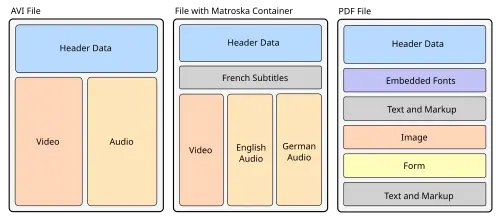
File Container Formats

If you’ve been in this industry long enough, you’ve sat through a post-mortem where someone says “we should have had monitoring for that”. Maybe it was an endpoint that went down and nobody knew until a customer reported about it. Maybe it was an escalation policy that pointed to someone who left the company six months ago.

The annoying part is that these aren’t hard problems. They’re just invisible ones. Nobody wakes up and thinks “I should check if our PagerDuty escalation policies all have valid responders”. You set things up, they work for a while, and then stuff drifts.

So here’s what you should actually check when you audit a monitoring setup. Not the theoretical “you should have observability” stuff – the specific, concrete things that catch on fire when you don’t look at them.

Escalation policies with nobody home

This one bites more teams than you’d think. Someone leaves, their PagerDuty schedule doesn’t get updated, and now there’s a gap every third Tuesday where alerts go to a person who no longer exists. The alert fires, gets acknowledged by nobody, and times out.

What to check:

Do all escalation policies have at least two levels?
Are there schedules with gaps (unassigned time blocks)?
Is there a catch-all policy for services that don’t match anything specific?

Alert rules that don’t actually notify anyone
This is shockingly common in Datadog and Grafana setups. Someone creates a monitor, sets the threshold, and forgets to add a notification channel. Or they add a chat channel (i.e Slack) that got archived. The monitor dutifully fires, nobody sees it, and you find out about the outage from your users.

Look for:

Monitors with no notification targets
Notification channels that point to archived Slack channels or deleted email groups
Monitors in a “no data” state for more than a few days – they’re probably broken.

Dashboards with empty panels
Sounds trivial, but dashboards are often the first thing people open during an incident. If half the panels show “no data” or reference metrics that no longer exist, you’re flying blind when it matters most. I’ve seen dashboards that looked great when they were built, but the underlying metric names changed during a migration and nobody updated them.

The coverage gaps nobody thinks about

Endpoints with no monitoring
Most teams have monitoring on their main API endpoints. But what about that internal service that handles webhooks? The admin panel that processes bulk operations? The cron job that reconciles billing data?

The pattern is always the same: critical business logic gets deployed, someone says “we’ll add monitoring later” and later never comes. Then that service goes down on a Friday evening.

To actually find these, you need to compare what’s in your codebase against what’s in your monitoring tools. If your repo has 40 HTTP endpoints and your Datadog has monitors for 12 of them, those other 28 are blind spots.

Database monitoring that stops at “is it up?”
Checking that Postgres is responding to pings is table stakes. What about slow queries? Connection pool exhaustion? Replication lag? Disk space trending toward full?

The database is usually the last thing to go down and the hardest thing to recover from. “The database is up” and “the database is healthy” are very different statements.

Error tracking without thresholds
If you’re using Sentry or a similar tool, you’re probably capturing errors. But are you alerting on them? A lot of teams have Sentry collecting thousands of events with no alerting rules, so they only check it reactively after something breaks. Set up thresholds – if error rates spike 5x above baseline, that’s worth a ping.

How to think about coverage
I find it useful to think about monitoring coverage across dimensions rather than as a single metric. A team might have great alert routing but zero database monitoring. If you just look at “do we have monitors?” the answer is yes, but you’re still exposed.

The dimensions you should check:

Endpoint monitoring – Are your HTTP endpoints covered? Latency, error rate, availability.
Database monitoring – Connection pools, query performance, replication, disk.
Error tracking – Are errors being captured AND alerted on?
Alert quality – Do alerts have proper thresholds, or are they too noisy/too quiet?
Escalation routing – Does every alert have a path to a human?
Dashboard health – Are dashboards up to date and functional?
Business flows – Are the critical user journeys (checkout, signup, payment) monitored end-to-end?
Infrastructure – CPU, memory, disk, network at the host/container level.

Scoring each dimension separately gives you a much clearer picture than a single “monitoring health” number. You might be at 90% on alerts but 20% on database monitoring – and that 20% is where the next outage is hiding.

The multi-tool problem
Here’s the thing most “monitoring best practices” articles miss: almost nobody uses a single tool. The average team has 3-5 monitoring tools. PagerDuty for alerting, Datadog for metrics, Sentry for errors, Grafana for dashboards, maybe New Relic for APM.

Each tool has its own configuration, its own gaps, and its own way of doing things. An audit that only looks at Datadog misses the PagerDuty escalation gaps. An audit that only looks at PagerDuty misses the Datadog monitors with no notifications or proper thresholds.

The real blind spots live in the spaces between tools. Service A is monitored in Datadog but its alerts route through a PagerDuty policy that hasn’t been updated. Service B has a Grafana dashboard but no actual alerting. Service C is in Sentry but nobody set up alert rules.

To actually audit your stack, you need to look across all of them at once.

Making it repeatable

The worst part about monitoring audits is that they rot. You can do a thorough audit today, fix everything, and in three months new services have been deployed without monitoring, someone changed a PagerDuty schedule, and a Slack channel got archived. You’re back where you started.

The fix is to make auditing a regular thing – not a quarterly project, but something that runs continuously or at least on every deploy. This is why I built Cova – it connects to your monitoring tools, runs the audit automatically, and shows you exactly where the gaps are. It also scans PRs to catch new endpoints shipping without monitoring, so the drift doesn’t happen in the first place.

If you want to see what this looks like on a real setup, try the demo on the landing page – no signup needed. It runs through a sample monitoring stack and shows the kind of findings a typical audit surfaces.

But even without a tool, the checklist above will get you pretty far. Pick one dimension, check it this week. Pick another one next week. You’ll be surprised what you find.

The goal isn’t perfection – it’s not finding out about your blind spots from an angry customer at 3am.

I Built an AI Skin Disease Detector with Flask, TensorFlow Lite, and Groq — Here’s How

A full walkthrough of building a CNN-powered web app that identifies 7 types of skin lesions and detects monkeypox from uploaded images — with AI-generated medical explanations.

What if you could upload a photo of a skin lesion and get an AI-powered prediction in under 2 seconds — no signup, no data stored, completely free?

That’s exactly what I built for my capstone thesis. SKIN is a web app that runs two CNN models: a 7-class skin lesion classifier trained on the HAM10000 dataset, and a binary monkeypox detector. It also uses Groq’s Llama 4 Scout to generate plain-language medical explanations for each prediction.

Here’s how I built it.

Live Demo | GitHub Repo

I Rebuilt Git in Zig to Save AI Agents 71% on Tokens

nit status compact vs human comparison

AI agents call git constantly. Status, diff, log, show. I pulled data from 3,156 real coding sessions and git accounted for roughly 459,000 tokens of output. That’s 7.4% of all shell commands. Codex is even worse (over 10% of its bash calls are git).

Makes sense though right? git’s output was designed for humans. Verbose headers, instructional text, column padding, decorative formatting. It’s the informational equivalent of wrapping every answer in a gift bag with tissue paper. Machines don’t need the tissue paper or the gift bag. Every extra token costs money and adds latency.

So I built nit. A native git replacement written in Zig that talks directly to the git object database via libgit2. Defaults tuned for machines.

The Numbers

Token savings (nit compact vs git default):

Command git tokens nit tokens Savings
status ~125 ~36 71%
log -20 ~2,273 ~301 87%
diff ~1,016 ~657 35%
show –stat ~260 ~118 55%

Across real session data, nit’s compact defaults would save 150-250K tokens. That’s something… oh, and did I mention it’s faster?

100 hyperfine runs on a real repo:

Command git nit Speedup
status 13.7ms 8.4ms 1.64x
diff 14.3ms 9.9ms 1.44x
show 10.2ms 7.3ms 1.39x

How It Works

Zig’s C interop is zero-cost. You @cImport the libgit2 headers and call functions directly. No subprocess overhead, no text parsing. nit reads the git object database natively.

For commands nit hasn’t optimized yet, it falls through to git via execvpe(), replacing the nit process entirely. Zero wrapper overhead. This makes alias git=nit safe. You never lose functionality, and as more commands get native implementations, the passthrough shrinks on its own.

The U1 Experiment

This was the most controversial design decision. I reduced diff context from 3 lines (git’s default) to 1 line. There are a lot of tokens hiding in those extra context lines. But does cutting them actually hurt comprehension?

I ran 27 trials with multi-file diffs, nested control flow, code moves, ambiguous similar blocks. Claude scored 4/4 at U0, U1, and U3. No difference at all. So, why not U0 then?

I checked real-world behavior. Across 561 git diff/show calls from actual Claude Code sessions, only 3.9% of agents read the source file immediately after diffing. This suggests that the diff itself is a primary source of the agent’s surrounding context, so I settled.

U1 gives you the savings without the downside. Hunk headers still have line numbers. The changed lines speak for themselves.

Two Modes

Compact (default): Machine-optimized. Just the data.

Human (-H): Colored, grouped. For when you’re the one reading it.

nit status compact vs human comparison

What I Learned

The hardest part wasn’t performance. It was conformance. Git has decades of edge cases: detached HEAD, merge commits, renamed files, binary diffs, submodules. I wrote 78 conformance tests covering all of them. Every time nit’s output diverged from git’s in a meaningful way, I added a test and fixed it.

The passthrough design made this manageable. I didn’t need to implement everything on day one. Start with the highest-impact commands (status, diff, log, show). Let git handle the rest. Ship it, iterate.

Install it

brew install fielding/tap/nit

Try it

if you’re an agent:

nit log

if you’re a human:

nit log -H

Forget about it

alias git=nit

Everything you don’t notice is git. Everything that’s faster is nit.

Notion Has a Free API — Build Custom Dashboards and Automate Your Workflow

Notion Is Not Just a Note App

Notion API lets you programmatically read, create, and update pages, databases, and blocks. Free for personal use, included in all plans.

Setup

  1. Go to notion.so/my-integrations
  2. Create new integration
  3. Copy the API key
  4. Share your database/page with the integration
import requests

TOKEN = "your_notion_api_key"
HEADERS = {
    "Authorization": f"Bearer {TOKEN}",
    "Content-Type": "application/json",
    "Notion-Version": "2022-06-28"
}

Query a Database

def query_database(db_id, filter_obj=None):
    data = {}
    if filter_obj:
        data["filter"] = filter_obj
    r = requests.post(f"https://api.notion.com/v1/databases/{db_id}/query",
                      headers=HEADERS, json=data)
    results = r.json()["results"]
    return [{"id": p["id"], "props": {k: v for k, v in p["properties"].items()}}
            for p in results]

# Get all items where Status = "Done"
items = query_database("your_db_id", {
    "property": "Status",
    "status": {"equals": "Done"}
})

Create a Page

def create_page(db_id, title, status="Not started"):
    data = {
        "parent": {"database_id": db_id},
        "properties": {
            "Name": {"title": [{"text": {"content": title}}]},
            "Status": {"status": {"name": status}}
        }
    }
    r = requests.post("https://api.notion.com/v1/pages",
                      headers=HEADERS, json=data)
    return r.json()["id"]

page_id = create_page("db_id", "New task from Python")

Add Content to a Page

def add_blocks(page_id, blocks):
    r = requests.patch(f"https://api.notion.com/v1/blocks/{page_id}/children",
                       headers=HEADERS, json={"children": blocks})
    return r.json()

add_blocks(page_id, [
    {"type": "heading_2", "heading_2": {
        "rich_text": [{"text": {"content": "Summary"}}]
    }},
    {"type": "paragraph", "paragraph": {
        "rich_text": [{"text": {"content": "This was created via the API."}}]
    }},
    {"type": "bulleted_list_item", "bulleted_list_item": {
        "rich_text": [{"text": {"content": "First point"}}]
    }}
])

Real Automation Ideas

  1. Daily standup bot — create a page every morning with template
  2. CRM — add leads from email/forms directly to Notion database
  3. Content calendar — sync Dev.to articles to Notion tracker
  4. Project dashboard — aggregate data from multiple databases
  5. Meeting notes — auto-create pages with attendees and agenda

Rate Limits

  • 3 requests per second per integration
  • No daily limit
  • Pagination for large databases (100 items per page)

More API tutorials | GitHub

Telegram Bot API — The Most Developer-Friendly API I Have Ever Used

Why Telegram Bot API Is Special

Most APIs make you fight with OAuth, rate limits, and pagination. Telegram Bot API gives you a simple HTTP interface with instant webhooks, no OAuth, and generous limits.

Create a Bot in 60 Seconds

  1. Open Telegram, search for @botfather
  2. Send /newbot
  3. Choose a name and username
  4. Copy the API token

Done. No OAuth app registration, no redirect URIs, no client secrets.

Send a Message

import requests

TOKEN = "your_bot_token"
BASE = f"https://api.telegram.org/bot{TOKEN}"

def send_message(chat_id, text):
    r = requests.post(f"{BASE}/sendMessage", json={
        "chat_id": chat_id, "text": text, "parse_mode": "HTML"
    })
    return r.json()["ok"]

send_message("your_chat_id", "<b>Hello</b> from Python!")

Get Updates (Polling)

def get_updates(offset=0):
    r = requests.get(f"{BASE}/getUpdates", params={"offset": offset, "timeout": 30})
    return r.json()["result"]

# Simple bot loop
offset = 0
while True:
    updates = get_updates(offset)
    for u in updates:
        msg = u.get("message", {})
        text = msg.get("text", "")
        chat_id = msg["chat"]["id"]

        if text == "/start":
            send_message(chat_id, "Welcome! I am your bot.")
        elif text == "/help":
            send_message(chat_id, "Commands: /start, /help, /ping")
        elif text == "/ping":
            send_message(chat_id, "Pong!")

        offset = u["update_id"] + 1

Send Files, Photos, Locations

# Send a photo
def send_photo(chat_id, photo_url, caption=""):
    requests.post(f"{BASE}/sendPhoto", json={
        "chat_id": chat_id, "photo": photo_url, "caption": caption
    })

# Send location
def send_location(chat_id, lat, lon):
    requests.post(f"{BASE}/sendLocation", json={
        "chat_id": chat_id, "latitude": lat, "longitude": lon
    })

# Send a document
def send_document(chat_id, file_url):
    requests.post(f"{BASE}/sendDocument", json={
        "chat_id": chat_id, "document": file_url
    })

Inline Keyboards (Buttons)

def send_with_buttons(chat_id, text, buttons):
    keyboard = {"inline_keyboard": buttons}
    requests.post(f"{BASE}/sendMessage", json={
        "chat_id": chat_id, "text": text, "reply_markup": keyboard
    })

send_with_buttons("chat_id", "Choose an option:", [
    [{"text": "Option A", "callback_data": "a"}, 
     {"text": "Option B", "callback_data": "b"}],
    [{"text": "Visit Website", "url": "https://example.com"}]
])

Real Bot Ideas

  1. Server monitor — send alerts when CPU/memory spikes
  2. Daily digest — summarize news/data every morning
  3. Expense tracker — log expenses by sending messages
  4. Deployment notifier — alert on successful/failed deploys
  5. RSS reader — forward new articles from your favorite blogs

Why Not Discord/Slack?

Feature Telegram Discord Slack
Bot creation 60 seconds 5 minutes 10 minutes
OAuth needed No Yes Yes
Free API Unlimited Yes Limited
Message formatting HTML/Markdown Markdown Blocks
File upload limit 50MB 25MB (free) Varies
Webhook setup 1 API call Dashboard Dashboard

More API tutorials | GitHub