
Flowfile v0.8.0 — Your Flows Can Run Themselves Now

Full disclosure: I built Flowfile. This post is about a feature I just shipped and why I think it matters.
Up until this release, Flowfile was a tool you designed pipelines in. You’d build a flow visually, maybe export the code, and then figure out how to actually run it on a schedule. That “figure out” part usually meant cron, Airflow, or a very optimistic shell script.
v0.8.0 changes that. Flowfile now has a built-in scheduler. You can set an interval, trigger flows when data updates, or just hit “Run” from the catalog. No external orchestrator needed.
I’m not going to pretend this competes with Airflow or Dagster for serious production workloads. It doesn’t. But if you’ve ever had a lightweight data platform where you just needed a few flows to run on a timer without setting up a whole orchestration layer — this is that.

The Part I’m Most Excited About: Table Triggers
Interval scheduling is useful but not interesting. “Run every 30 minutes” is solved. What I actually want to talk about is table triggers.
The idea is simple: instead of running a flow on a timer, you run it when the data it depends on changes. A Catalog Writer node overwrites a table, and any flow watching that table starts automatically.
In practice, this means you can chain flows together through data. Flow A produces a cleaned customer table. Flow B, which reads that table, runs as soon as Flow A finishes writing it. No coordination logic, no polling intervals to tune, no “let’s just run everything at 3am and hope the order works out.”
Three Types, and Why
Table trigger — a flow runs when a single table is refreshed. The obvious case. Your flow reads orders_raw, you set a trigger on orders_raw, and the flow runs every time that table gets new data.
Table set trigger — a flow runs when all tables in a set have been refreshed. This one would have saved me real time on past projects. Picture this: you have a reporting flow that joins three source tables — sales, inventory, and returns. You never want the report to run until all three are fresh. Without table set triggers, you solve this with retry logic, completion flags, or by scheduling everything sequentially and adding generous wait times. With table set triggers, you just list the three tables and the flow runs once all three have been updated. Declarative, no coordination code.
Unrestricted table trigger — a flow can also trigger on a table it doesn’t read. I debated whether to restrict triggers to only tables the flow actually depends on. Seemed cleaner. But I kept coming back to the same thought: I can’t predict every use case people will have. Maybe you want a notification flow to fire whenever a table updates. Maybe you have a cleanup job that should run after any write to a particular namespace. I don’t know. So I left it open.
How the Scheduler Works
Three modes, depending on how you run Flowfile:
If you’re on the desktop app or pip install, the scheduler runs inside the Flowfile process. Start and stop it from the Schedules tab. Simple.
If you want it running independently:
flowfile run flowfile_scheduler
That gives you a standalone background service that survives UI restarts. Only one scheduler instance runs at a time — there’s an advisory database lock with a heartbeat. If a scheduler dies, another can take over after 90 seconds.
For Docker, add one environment variable:
environment:
  - FLOWFILE_SCHEDULER_ENABLED=true
One thing I got right early: each flow can only have one active run at a time. If a flow is already running, new triggers are skipped. This prevents the cascade of overlapping runs that makes scheduling systems miserable to debug.
Running Flows Without a Schedule
Not everything needs to be automated. Sometimes you just want to run a registered flow right now and see what happens.
v0.8.0 adds a Run Flow button directly in the catalog’s flow detail panel. It spawns a subprocess, tracks the run in your history, and writes logs to ~/.flowfile/logs/. You can cancel a running flow at any time — it sends SIGTERM to the process.
When flows are running, an active runs banner appears at the top of the catalog. You can see what’s running, when it started, and cancel anything that’s taking too long.

Being Honest About Scope
This scheduler is not Airflow. It doesn’t have retries with exponential backoff. It doesn’t have DAG-level dependency management across dozens of flows. It doesn’t have a distributed executor.
What it does have: zero additional infrastructure. If you can pip install flowfile, you have a scheduler. If you can run Docker Compose, you have a scheduler. For a team that needs three flows running on an interval and two more triggered by data updates, that’s enough. For a lightweight data platform that’s still figuring out what it needs, this could be the first proof of concept before anyone decides whether Airflow is worth the setup.
And if you outgrow it — that’s fine. Flowfile still generates standalone Python code. The flows don’t lock you in, and neither does the scheduler.
Where this is heading: table triggers are a step, not the destination. The real goal is that you shouldn’t be thinking about schedules at all. You should define how fresh your data needs to be, and the system figures out the rest. The catalog already tracks what each flow reads and writes, when tables were last updated, and how flows relate to each other. The pieces are there. Schedules are the scaffolding — data freshness is the building.
Try It
pip install flowfile
If you have questions or feedback, I’d genuinely love to hear it. Especially if you have a use case for table triggers I haven’t thought of — that’s exactly why I left them unrestricted.

 Turkcell, kullanıcılar tarafından aktarıldığı kadarıyla normalde 1 Nisan itibarıyla başlayacak 5G hizmetini bazı bölgelerde erkenden kullanıma sundu. 5G destekli cihaz sahiplerine sürpriz yapan şirket, bu durum hakkında resmi bir açıklama paylaşmadı. Ulaştırma ve Altyapı Bakanı Abdulkadir Uraloğlu, Türk Telekom’un Teknoloji ve İnovasyon Merkezi’nin açılış töreninde 5G ile alakalı önemli açıklamalarda bulunmuştu. 5G yetkilendirme ihalesi neticesinde 3 milyar 534 milyon dolar gelir elde ettiklerini dile getiren Uraloğlu, açıklamasında şu ifadelere yer vermişti: “1 Nisan 2026 tarihinde ilk sinyalini alacağımız 5G hizmetlerini 2 yıl içerisinde ülkemizin her noktasına eriştirmeyi hedefliyoruz. 5G’ye geçişle birlikte mobil internet hızımız 10 kata yakın artacak; vatandaşlarımız daha hızlı, daha güvenilir ve daha kesintisiz bir haberleşme imkanına kavuşacak. 5G, yalnızca bir haberleşme teknolojisi değil, aynı zamanda üretim gücümüzü, hizmet kalitemizi ve teknolojik rekabetçiliğimizi aynı anda yükselten bir kalkınma altyapısıdır.” 5G’nin endüstriyel robotlardan otonom sürüş teknolojilerine, kritik altyapı yönetiminden akıllı şehir uygulamalarına kadar birçok alanda dönüşümü hızlandıracağını söyleyen Uraloğlu, […]
 Çin merkezli güvenilir kaynaklardan Digital Chat Station tarafından ortaya atılan son iddiaya göre Apple, önümüzdeki yıllarda karşımıza 200 megapiksel ana kameraya sahip iPhone modelleri çıkarabilir. Şu anda 1/1.12 inç boyuta sahip bir 200 megapiksel kamera üzerinde testler gerçekleştirdiği iddia edilen şirket, satıştaki 17 Pro serisinde 48 megapiksellik ana kameraya yer veriyor ve bunun eylül ayında tanıtılacak 18 Pro serisinde de değişmesi beklenmiyor. Çok sayıda Android üreticisinin uzun zamandır kullandığı 200 megapiksellik sensörler, yüksek çözünürlük sayesinde geniş düzenleme olanakları sağlıyor.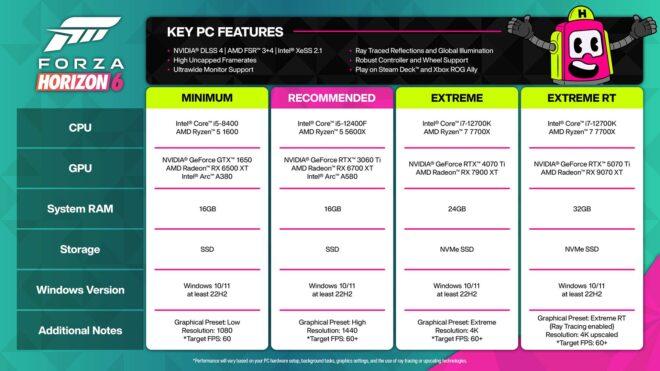
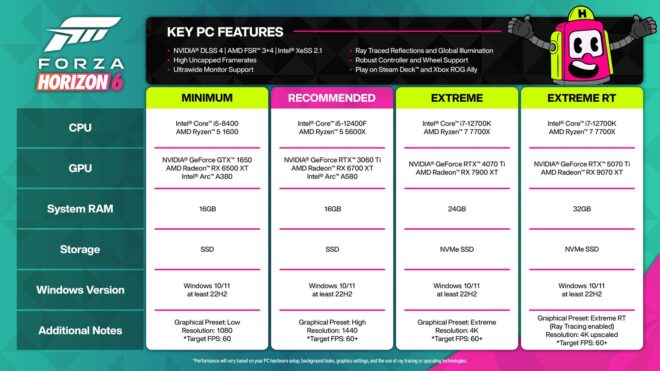 Bugün Nvidia tarafından yapılan resmi doğrulamaya göre Forza Horizon 6 çıkış gününde “çoklu kare oluşturma” özellikli DLSS 4 desteğine sahip olacak. Nvidia Reflex desteği de bulunan oyun; aynı zamanda ultra geniş ekran, sınırsız kare hızı, ray tracing yansımalar ve ray tracing global illumination aydınlatma gibi önemli özelliklerle geliyor. Bu detaylar doğrudan Nvidia ekran kartı sahiplerini ilgilendirirken, oyunda aynı zamanda AMD FSR 3, FSR 4 ve Intel XeSS 2.1 destekleri de yer alıyor. Dün oyunun resmi PC sistem gereksinimleri de paylaşılmıştı. Japonya’da geçen yapım için 1440p / High / 60 FPS özelinde tavsiye edilen işlemciler i5-12400F ile Ryzen 5 5600X, tavsiye edilen ekran kartları ise RTX 3060 Ti, RX 6700 XT ve Arc A580 oldu. En az 16 GB RAM ve SSD depolama biriminin istendiği yapım, 4K / en yüksek grafik ayarları / Ray Tracing / 60 FPS özelindeyse i7-12700K ya da Ryzen 7 770X işlemci, RTX 5070 Ti ya da […]