Nintendo, oyun fiyatlarında çift tarifeye geçiyor
Nintendo, Switch 2 oyunlarında fiziksel ve dijital sürümler için farklı fiyatlandırmaya geçiyor. İlk örnek Yoshi and the Mysterious Book olurken, dijital sürüm daha uygun fiyatla sunulacak.
HBO, merakla beklenen Harry Potter dizisini beklenenden de önce izleyicilere sunacak. Bu yıl bitmeden başlayacak diziden ilk fragman yayınlandı. İşte karşınızda yeni Harry Potter!X’s Pay-Per-Use pricing changed how I think about API integrations. Before it existed, “display a Twitter/X timeline on a website” meant either a bloated embed widget or a $200/month API plan — neither made sense for small projects.
Pay-Per-Use flips that. You pay per request. For fetching 10 posts three times a day, the real-world cost lands around $2–3/month. That’s a different conversation.
This article covers how I implemented X API v2 timeline fetching in PHP/WordPress — including the cost math, the API structure, retweet handling, caching strategy, and two WP-Cron gotchas that will bite you if you’re not ready.
Cost Breakdown First
Before writing a line of code, it’s worth understanding what you’re paying for.
Timeline fetching is a two-step process:
| Action | Cost |
|---|---|
| User lookup (Step 1) | $0.010 / cycle |
| Per post fetched (Step 2) | $0.005 / post |
| 5 posts per cycle | $0.035 |
| 10 posts per cycle | $0.060 |
At 10 posts × 3 updates/day, the ceiling is $0.060 × 90 = $5.40/month. In practice it’s lower.
The no-duplicate-billing rule
X API does not charge twice for the same post within a 24-hour UTC window. On the second and third daily updates, you only pay for newly published posts. For accounts that don’t post constantly, the second and third updates often cost almost nothing. Real-world cost for most use cases: $2–3/month.
One important caveat: X has stated that Pay-Per-Use is a pilot program with provisional pricing that may change. Always verify current rates at developer.x.com before building anything that depends on these numbers.
Authentication
Bearer Token only. App-only OAuth 2.0. No user context needed for public timelines.
$response = wp_remote_get( $url, [
'headers' => [
'Authorization' => 'Bearer ' . $bearer_token,
],
'timeout' => 15,
] );
If you’re in WordPress, use wp_remote_get() instead of curl or file_get_contents. It respects WordPress SSL settings and timeout configuration out of the box.
Step 1: User Lookup
GET https://api.twitter.com/2/users/by/username/{username}
You need the numeric user ID to call the timeline endpoint. This call costs $0.010.
$url = 'https://api.twitter.com/2/users/by/username/' . rawurlencode( $username );
$response = wp_remote_get( $url, [ 'headers' => $headers ] );
$data = json_decode( wp_remote_retrieve_body( $response ), true );
$user_id = $data['data']['id'];
Note: use rawurlencode() on the username, not urlencode(). The latter encodes spaces as +, which breaks the endpoint.
Step 2: Timeline Fetch
GET https://api.twitter.com/2/users/{id}/tweets
The expansions and field parameters are where most of the complexity lives.
$params = http_build_query( [
'max_results' => 10,
'tweet.fields' => 'created_at,entities,attachments,referenced_tweets',
'expansions' => 'attachments.media_keys,referenced_tweets.id,referenced_tweets.id.author_id',
'media.fields' => 'url,preview_image_url,type,variants,width,height',
'user.fields' => 'name,profile_image_url,username',
'exclude' => 'replies', // optional: hide replies
] );
$url = 'https://api.twitter.com/2/users/' . $user_id . '/tweets?' . $params;
Important: max_results has a minimum of 5. Requesting fewer than 5 returns an API error. Plan your display logic accordingly.
Retweet Handling (The Tricky Part)
When a retweet appears in the timeline, the API returns a reference to the original post — not the content itself. This trips a lot of people up.
The fix: include referenced_tweets.id in your expansions. The original post data will appear in includes.tweets in the response.
$tweets = $data['data']; // timeline posts
$includes = $data['includes'] ?? []; // expanded data
foreach ( $tweets as $tweet ) {
$ref_tweets = $tweet['referenced_tweets'] ?? [];
foreach ( $ref_tweets as $ref ) {
if ( $ref['type'] === 'retweeted' ) {
// find the original in includes.tweets
$original = array_filter(
$includes['tweets'] ?? [],
fn( $t ) => $t['id'] === $ref['id']
);
$original = array_values( $original )[0] ?? null;
}
if ( $ref['type'] === 'quoted' ) {
// same lookup, different type
}
}
}
Type values to know:
retweeted — standard retweetquoted — quote tweetreplied_to — reply (usually excluded via the exclude param)Media attached to referenced tweets is also in includes.media, keyed by media_key. You’ll need to cross-reference tweet.attachments.media_keys against includes.media to render images and video.
Caching Strategy: Stale-While-Revalidate
Never call the API on every page load. It defeats the purpose of caching and burns through your credits.
The pattern I use: WordPress Transients + Stale-While-Revalidate (SWR).
function get_timeline_data() {
$cached = get_transient( 'xtl_timeline_data' );
if ( $cached !== false ) {
$age = time() - $cached['last_updated'];
if ( $age > 12 * HOUR_IN_SECONDS ) {
// Stale but present: serve it, refresh in background
wp_schedule_single_event( time(), 'xtl_swr_update_event' );
}
return $cached;
}
// No cache: schedule a fetch, return nothing for now
wp_schedule_single_event( time(), 'xtl_swr_update_event' );
return false;
}
The tradeoff: first-time visitors see nothing until the background fetch completes (usually a few seconds). Every subsequent visitor gets instant cached content. For most use cases this is acceptable.
Store your fetched data with a TTL long enough that it won’t expire between scheduled updates:
set_transient( 'xtl_timeline_data', $data, DAY_IN_SECONDS );
Two WP-Cron Gotchas
1. DST drift with wp_schedule_event('daily')
WordPress’s daily interval is a fixed 86400 seconds. During daylight saving time transitions, this causes scheduled events to drift by an hour. If you need updates at specific times, use wp_schedule_single_event() and re-schedule after each run:
// After executing, schedule the next occurrence
$next = strtotime( 'tomorrow ' . $time_str, current_time( 'timestamp' ) );
wp_schedule_single_event(
$next,
'xtl_cron_update_event',
[ [ 'time_str' => $time_str ] ]
);
This keeps the scheduled time accurate regardless of DST changes.
2. wp_clear_scheduled_hook() doesn’t remove argument-keyed events
If you’re scheduling cron events with arguments (as above), wp_clear_scheduled_hook() will silently fail to remove them. Old events accumulate every time you save settings.
The fix: iterate _get_cron_array() and unschedule explicitly.
function clear_cron_events() {
$crons = _get_cron_array();
foreach ( (array) $crons as $timestamp => $cron ) {
if ( ! isset( $cron['xtl_cron_update_event'] ) ) {
continue;
}
foreach ( $cron['xtl_cron_update_event'] as $data ) {
wp_unschedule_event(
$timestamp,
'xtl_cron_update_event',
$data['args'] ?? []
);
}
}
}
Call this before registering new cron events whenever settings change.
Rate Limit Handling
When you hit a 429, back off for at least an hour. A simple Transient-based cooldown works well:
if ( 429 === wp_remote_retrieve_response_code( $response ) ) {
set_transient( 'xtl_api_cooldown', true, HOUR_IN_SECONDS );
return new WP_Error( 'rate_limited', 'X API rate limit exceeded.' );
}
Check for the cooldown before every API call:
if ( get_transient( 'xtl_api_cooldown' ) ) {
return; // skip until cooldown clears
}
Key Takeaways
On cost: The no-duplicate-billing rule makes Pay-Per-Use more affordable than the raw numbers suggest. Second and third daily updates often cost almost nothing for low-volume accounts.
On retweets: The most common implementation mistake. Always use expansions=referenced_tweets.id and look up the original in includes.tweets. Don’t assume the content is in data.
On caching: SWR is the right pattern for external API data in WordPress. Serve stale content immediately and refresh in the background — don’t make visitors wait.
On WP-Cron: Two silent failure modes that are easy to miss: DST drift with daily interval, and argument-keyed events not being removed by wp_clear_scheduled_hook().
I packaged this implementation into two WordPress plugins if you’d rather skip the plumbing:
ikka.inc — design and web production studio based in Japan.
Phase 1 is never ‘lift and shift.’ Here’s the framework that keeps production stable throughout the entire move.
After leading migrations for organizations ranging from 200 to 4,000 engineers, I’ve distilled it into 6 phases that keep production alive and teams sane.
Phase 1: Discovery & Dependency Mapping
Before touching a single VM, audit everything.
Inventory all services: apps, databases, middleware, integrations
Map inter service dependencies including the undocumented ones (ask the engineers who’ve been there longest)
Tag everything by criticality, data sensitivity, migration complexity
Identify the “spiders in the web” services everything else depends on
Tools: AWS Application Discovery Service, Cloudamize, or a structured spreadsheet + interviews.
Phase 2: Cloud Foundation & Landing Zone
Build the platform before you migrate anything.
Set up your VPC architecture (hub spoke or flat decide now)
Implement IAM roles, SCPs, and guardrails
Deploy centralized logging, monitoring, and alerting
Establish your IaC standard (Terraform modules, Pulumi stacks — standardize before day one)
Set cost budgets and alerts BEFORE anything runs
Never skip this. Teams that migrate first and “sort out governance later” always regret it.
Phase 3: Pilot Migration (Noncritical workloads)
Start small. Build confidence.
Choose a non-critical, low traffic service
Run full migration lifecycle: move → validate → monitor → optimize
Document everything. This becomes your runbook for every subsequent migration
Identify gaps in tooling and process while the stakes are low
Phase 4: Wave Based Migration
Organize workloads into migration waves by complexity:
Wave 1: Stateless apps (easiest)
Wave 2: Stateful apps with managed DB alternatives
Wave 3: Complex integrations and legacy services
Wave 4 (optional): Services that require refactoring before migration
Run each wave over 2–4-week sprints. Include a 2-week stabilization window after each wave before proceeding.
Phase 5: Cutover & Traffic Management
Zero-downtime means dual running, not big-bang.
Use feature flags and DNS-based traffic shifting (Route 53 weighted routing or equivalent)
Implement a circuit breaker to instantly roll back traffic if error rates spike
Keep on prem running in parallel for 30–60 days post cutover
Don’t decommission anything until you’ve run at least one full billing cycle on cloud
Phase 6: Optimize & Decommission
The migration isn’t over when the apps are running.
Right-size instances based on real usage data (wait at least 2 weeks)
Implement autoscaling where you were running fixed capacity
Set up FinOps dashboards cloud spend will be surprising at first
Decommission on prem systematically, not in a rush
Run a migration retrospective with every team involved
The Rule I Never Break
No service goes to production without observability in place (logs, metrics, traces), a documented runbook, an on-call rotation assigned, and a tested rollback procedure.
Save for your next migration kickoff
The Problem: Many Flutter developers overuse setState(), calling it even when variable changes don’t affect the UI. Every unnecessary setState() is a potential drop from 60 FPS to 59 FPS in complex interfaces.
Chapter 1: When setState Is Actually Unnecessary
Let’s examine a classic example found in 80% of applications: data entry forms. Developers often write:
class MyForm extends StatefulWidget {
@override
_MyFormState createState() => _MyFormState();
}
class _MyFormState extends State<MyForm> {
String _username = '';
String _password = '';
@override
Widget build(BuildContext context) {
return Column(
children: [
TextField(
onChanged: (value) {
setState(() { // ❌ UNNECESSARY!
_username = value; // This variable is NOT used in UI
});
},
),
TextField(
onChanged: (value) {
setState(() { // ❌ UNNECESSARY!
_password = value; // This variable is also NOT in UI
});
},
),
ElevatedButton(
onPressed: () {
// Send data to server
_sendToServer(_username, _password);
},
child: Text('Submit'),
),
],
);
}
void _sendToServer(String user, String pass) {
// Send data...
}
}
What’s wrong here? Every character typed triggers a complete widget rebuild, even though nothing visually changes! The user sees just the cursor blinking, but under the hood Flutter rebuilds the entire widget tree.
The right approach: If data is only needed for logic or server submission — store it without UI binding:
class _MyFormState extends State<MyForm> {
// These variables are NOT used in build()
final TextEditingController _usernameController = TextEditingController();
final TextEditingController _passwordController = TextEditingController();
@override
void initState() {
super.initState();
// You can add listeners for additional logic
_usernameController.addListener(() {
print('Username changed: ${_usernameController.text}');
// You can do validation, debounce, etc. here
});
}
@override
Widget build(BuildContext context) {
return Column(
children: [
TextField(controller: _usernameController),
TextField(controller: _passwordController),
ElevatedButton(
onPressed: () {
// Take data directly from controllers
_sendToServer(
_usernameController.text,
_passwordController.text,
);
},
child: Text('Submit'),
),
],
);
}
}
Key principle: If a variable isn’t displayed in build() and doesn’t affect how other widgets are displayed — it’s not part of UI state and doesn’t need setState().
Chapter 2: When setState IS Needed — Do It Precisely
There are cases where a variable truly affects UI, but that doesn’t mean you need to rebuild everything. Let’s look at smarter approaches.
❌ Typical case of excessive setState:
class ProductCard extends StatefulWidget {
@override
_ProductCardState createState() => _ProductCardState();
}
class _ProductCardState extends State<ProductCard> {
bool _isFavorite = false;
bool _isInCart = false;
@override
Widget build(BuildContext context) {
return Card(
child: Column(
children: [
Image.network('...'),
Text('Product Name'),
Row(
children: [
IconButton(
icon: Icon(
_isFavorite ? Icons.favorite : Icons.favorite_border,
color: _isFavorite ? Colors.red : Colors.grey,
),
onPressed: () {
setState(() { // ❌ Rebuilds the ENTIRE Card!
_isFavorite = !_isFavorite;
});
},
),
IconButton(
icon: Icon(
_isInCart ? Icons.shopping_cart : Icons.add_shopping_cart,
color: _isInCart ? Colors.green : Colors.grey,
),
onPressed: () {
setState(() { // ❌ Rebuilds the ENTIRE Card again!
_isInCart = !_isInCart;
});
},
),
],
),
],
),
);
}
}
Problem: We’re changing only the button color and icon, but rebuilding the entire product card with image, text, and all other elements!
✅ Solution 1: ValueNotifier for precise updates
class ProductCard extends StatelessWidget {
final ValueNotifier<bool> _isFavorite = ValueNotifier<bool>(false);
final ValueNotifier<bool> _isInCart = ValueNotifier<bool>(false);
@override
Widget build(BuildContext context) {
return Card(
child: Column(
children: [
Image.network('...'), // ❌ This part WON'T rebuild
Text('Product Name'), // ❌ This either
Row(
children: [
// ✅ Only this icon will rebuild
ValueListenableBuilder<bool>(
valueListenable: _isFavorite,
builder: (context, isFavorite, child) {
return IconButton(
icon: Icon(
isFavorite ? Icons.favorite : Icons.favorite_border,
color: isFavorite ? Colors.red : Colors.grey,
),
onPressed: () {
_isFavorite.value = !isFavorite; // Just change value
},
);
},
),
// ✅ And this icon too
ValueListenableBuilder<bool>(
valueListenable: _isInCart,
builder: (context, isInCart, child) {
return IconButton(
icon: Icon(
isInCart ? Icons.shopping_cart : Icons.add_shopping_cart,
color: isInCart ? Colors.green : Colors.grey,
),
onPressed: () {
_isInCart.value = !isInCart;
},
);
},
),
],
),
],
),
);
}
}
What changed:
✅ Solution 2: Extract changing part into separate StatefulWidget
class FavoriteButton extends StatefulWidget {
@override
_FavoriteButtonState createState() => _FavoriteButtonState();
}
class _FavoriteButtonState extends State<FavoriteButton> {
bool _isFavorite = false;
@override
Widget build(BuildContext context) {
return IconButton(
icon: Icon(
_isFavorite ? Icons.favorite : Icons.favorite_border,
color: _isFavorite ? Colors.red : Colors.grey,
),
onPressed: () {
setState(() {
_isFavorite = !_isFavorite; // Only button rebuilds
});
},
);
}
}
// Use in main widget
class ProductCard extends StatelessWidget {
@override
Widget build(BuildContext context) {
return Card(
child: Column(
children: [
Image.network('...'),
Text('Product Name'),
Row(
children: [
FavoriteButton(), // Isolated state
CartButton(), // Another isolated state
],
),
],
),
);
}
}
Chapter 3: Checklist and Practical Rules
The 5-Second Rule
Before writing setState(), ask yourself:
“If I change this variable, will the user see visual changes within the next 5 seconds?”
If no (data goes to server, saves to DB, used for calculations) — you don’t need setState().
Simple Test for Your Code
Try temporarily commenting out setState():
onChanged: (value) {
// setState(() { // Commented out
_someValue = value; // Data still saves!
// });
}
If UI works correctly — setState was unnecessary.
Strategy Guide:
_apiToken = 'new_token'; // For sending requests
_userData = json; // For processing
_cache = data; // For storage
2 Affects one small element → ValueNotifier + ValueListenableBuilder
3 Affects several related widgets → extract to separate StatefulWidget
4 Affects entire screen/widget → setState() (use rarely and deliberately)
Typical Scenarios Without setState:
// Logging and analytics
onPressed: () {
_clickCounter++; // Just a variable
_logEvent('button_click');
}
// Timers for logic
Timer.periodic(Duration(seconds: 30), (timer) {
_lastUpdate = DateTime.now(); // For internal logic
_checkForUpdates();
});
// Data caching
Future<void> _loadData() async {
final data = await api.fetchData();
_cachedData = data; // Save, but don't rebuild
_processData(data);
}
Conclusion: Ultimate Cheatsheet
When NOT to use setState:
• Data sent to server
• Saved to database/cache
• Used for logic/calculations
• For analytics/logging
• Temporary processing variables
When setState needed, but precisely:
• Button color/icon changes → ValueNotifier
• Text field updates → separate widget
• UI element state toggles → isolated state
When setState is justified:
• Large portion of screen changes
• Complex animation updates
• Entire list/table rebuilds
Remember: Flutter is not React. You don’t need to update state on every change. Separate UI state from business logic, and your app will run smoothly even on low-end devices.
Every unnecessary setState() is a step from “works fine” to “slideshow mode.” Be intentional about state management!

How I Built a Hallucination Detector for RAG Pipelines in Python
Every developer who has shipped a RAG application knows this moment.
You retrieve the right documents. You pass them to the LLM. The response comes back confident, well-structured, and fluent. You ship it.
Then a user reports that the LLM cited a statistic that wasn’t in any of your documents. Or named a person who doesn’t exist. Or described a process that contradicts your source material — while sounding completely authoritative.
This is hallucination in a RAG pipeline. And it is surprisingly hard to catch systematically.
I built HallucinationBench to solve this in the simplest way possible.
The core idea
The approach is straightforward: use GPT-4o-mini as a structured judge.
Given a context (your retrieved documents) and a response (the LLM’s output), the judge:
That’s it. No embeddings, no vector databases, no infrastructure. Just one API call.
Usage
from hallucinationbench import score
context = """
The Eiffel Tower is located in Paris, France. It was constructed between
1887 and 1889 as the entrance arch for the 1889 World's Fair.
The tower is 330 metres tall.
"""
response = """
The Eiffel Tower is in Paris. It was built in 1889 and stands 330 metres
tall. It was designed by Leonardo da Vinci and attracts over 7 million
visitors every year.
"""
result = score(context=context, response=response)
print(result)
Output:
Verdict : FAIL
Faithfulness : 0.40
Grounded claims (2):
✓ The Eiffel Tower is in Paris.
✓ It stands 330 metres tall.
Hallucinated claims (3):
✗ It was built in 1889.
✗ It was designed by Leonardo da Vinci.
✗ It attracts over 7 million visitors every year.
Two genuine hallucinations caught cleanly — Leonardo da Vinci (it was Gustave Eiffel) and the 7 million visitor figure (not in the context).
The result object
result.faithfulness_score # float 0.0 – 1.0
result.grounded_claims # list of supported statements
result.hallucinated_claims # list of fabricated statements
result.verdict # "PASS" | "WARN" | "FAIL"
result.model # judge model used
| Verdict | Faithfulness Score |
|---|---|
| ✅ PASS | >= 0.8 |
| ⚠️ WARN | >= 0.5 |
| ❌ FAIL | < 0.5 |
How the judge prompt works
The system prompt instructs GPT-4o-mini to return raw JSON only — no markdown, no explanation, no code fences. Just the structured object.
{
"grounded_claims": ["claim 1", "claim 2"],
"hallucinated_claims": ["claim A", "claim B"],
"faithfulness_score": 0.75
}
Two design decisions that matter here:
response_format: json_object — This is OpenAI’s native JSON mode. It guarantees the output is valid JSON on every call, eliminating parsing failures almost entirely.
temperature: 0 — Hallucination detection should be deterministic. The same context and response should always produce the same verdict. Temperature 0 enforces this.
Why GPT-4o-mini as the judge?
Three reasons:
Cost. Each evaluation costs approximately $0.001 — well under a tenth of a cent. You can run thousands of evaluations for a few dollars.
Speed. GPT-4o-mini is fast. A typical evaluation completes in under 2 seconds.
Accuracy. For claim-level classification against a provided context, GPT-4o-mini performs well. It is not doing open-domain knowledge retrieval — it is comparing claims against text you have already provided. That is a much simpler task.
Installation
pip install openai python-dotenv
Set your OpenAI API key:
# .env
OPENAI_API_KEY=your_key_here
Clone and run the Streamlit demo:
git clone https://github.com/bdeva1975/hallucinationbench.git
cd hallucinationbench
pip install -r requirements.txt
streamlit run app.py
What’s next
The roadmap for v0.2.0:
The bigger picture
As RAG applications move from prototype to production, hallucination detection is becoming a non-negotiable quality gate — not an optional debugging tool.
Gartner predicts that by 2028, 60% of software engineering teams will use AI evaluation and observability platforms to build user trust in AI applications, up from just 18% in 2025.
HallucinationBench is the lightweight, zero-infrastructure entry point to that category. No account, no cloud, no dashboard required. Just pip install and two lines of code.
GitHub: https://github.com/bdeva1975/hallucinationbench
Star it if you find it useful. PRs and feedback welcome.
Built with Python, OpenAI GPT-4o-mini, and Streamlit.
Disclosure: This post includes affiliate links; I may receive compensation if you purchase products or services from the different links provided in this article.
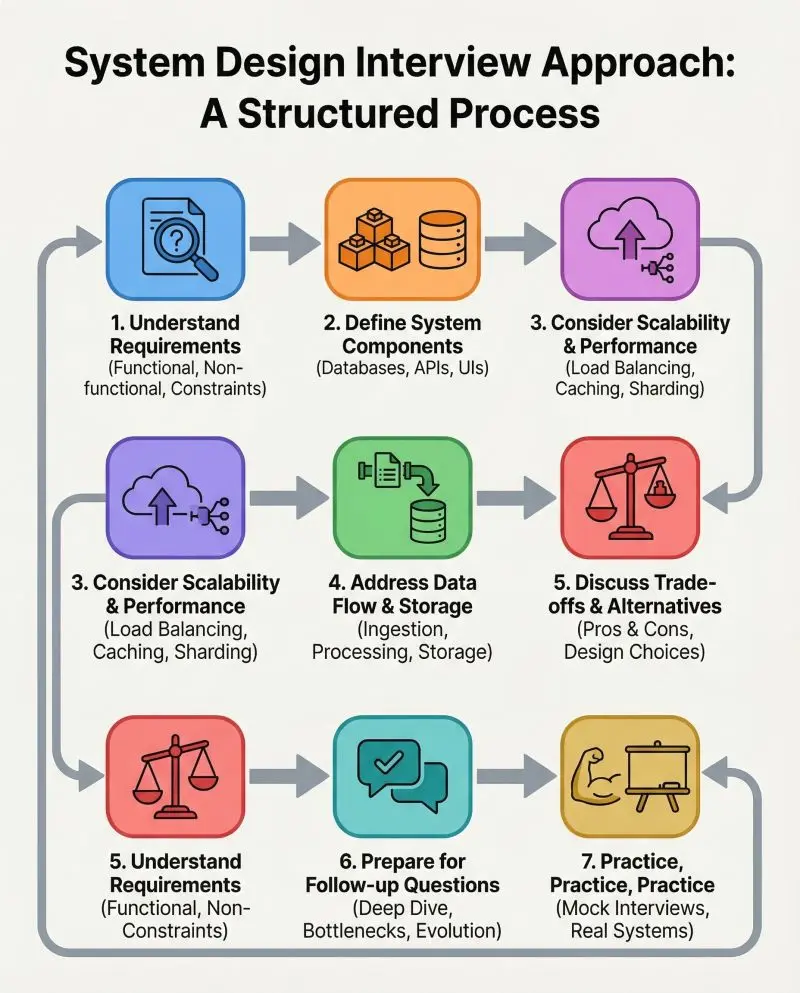
Hello Devs, in 2026, the AI era, System Design has become one of the most sought-after skills for software engineers, solution architects, and senior developers.
Whether you’re aiming for a FAANG-level interview, building the next unicorn startup, or designing scalable systems in AI, blockchain, or cloud computing, a deep understanding of system design is no longer optional — it’s essential.
Over the past few years, I’ve explored more than 30 books and courses from platforms like ByteByteGo, Educative.io, Udemy, Exponent, Codemia.io, Bugfree.ai, and Designgurus.io, plus a handful of top-rated books.
My goal was to find resources that don’t just explain concepts in theory but also show you how to apply them to real-world systems, with case studies, architectural diagrams, and hands-on practice.
After years of learning and testing, I’ve narrowed it down to my top 5 picks for mastering system design in 2026.
How I Chose These Courses and Platforms?
To ensure this list stays relevant and valuable, I evaluated each course based on these criteria:
While not every course passes in every criterion, for example ByteByteGo and Designgurus.io were good on theory and general System Design concepts learning, but they don’t provide an environment to practice System Design questions.
I recommend you combine that with Codemia.io or Bugfree.ai to get the practice and AI mock interview part for complete practice.
Similarly, Exponent was great for mock interviews, but Educative.io and Bugfree.io’s AI mock interviews are also worth trying.
My Top 5 System Design Interview Prep Courses and Platforms for 2026
Without any further ado, here are my top 5 recommendations for learning System Design for technical interviews. These courses and resources are not just to learn general System Design concepts, but also for solving company-specific questions and practicing online.
1. ByteByteGo — System Design Mastery (Premium Pick)
ByteByteGo is my number one recommendation if you want visual, practical, and up-to-date system design learning.
Founded by Alex Xu (author of System Design Interview — An Insider’s Guide), it’s a goldmine of beautifully crafted diagrams, step-by-step explanations, and case studies covering everything from classic designs to modern AI-driven architectures.
Key Features:
Perfect For: Engineers who want a premium, all-in-one system design resource that blends theory, visuals, and practice.
They have also done a full website refresh recently as part of their relaunch and added all the content of their 7 best-selling books on System Design, OOP Design, ML System Design, and Generative AI Design on the platform.
They are now also offering 50% discount on their lifetime plan, the one I bought and the one I highly recommend to my students and readers.
Here is the link to join — Get 50% discount
They also provide ByteByteGo 101, a collection of 101 coding questions divided into key coding interview patterns like two pointers, fast and slow pointers, etc., for practice, which makes them the complete package for tech interviews in 2026.
2. Grokking the System Design Interview — DesignGurus.io
The original Grokking course is a favorite for FAANG interview prep. It breaks down system design problems into a clear, repeatable framework so you can approach any interview question with confidence.
Key Features:
Perfect For: Engineers focused on nailing system design interviews at top tech companies.
Here is the link to join this course — Grokking the System Design Interview
And, if you like these Grokking interview courses from DesignGurus.io, you can get all of them for a big discount by purchasing their All course bundle.
This bundle includes their most popular Grokking courses like Grokking System Design Interview, OOP Design, Coding Patterns, as well as Grokking Dynamic Programming Interview. You can also use code GURU to get 55% discount now.
3. System Design Masterclass (2026) — Udemy
This Udemy bestseller is taught by FAANG engineers and focuses on practical interview readiness. You’ll work through popular real-world problems while mastering the fundamentals of architecture design.
Key Features:
Perfect For: Budget-conscious learners who want high-quality video-based learning from experienced engineers.
Here is the link to join this course — System Design Masterclass (2026)
By the way, Udemy also has many great System Design courses which are worth checking out, like the one from Frank Kane, ex Amazon Hiring Manager, and Sandeep’s System Design course.
And, if you want to join multiple courses on Udemy, it may be worth getting a Udemy Personal Plan, which will give instant access to more than 11,000 top-quality Udemy courses for just $30 a month.
If you have a lot of time and want to save money, Udemy Personal Plan will be perfect for you.
4. System Design Interview Prep — Exponent
Exponent is known for interactive, mock interview-style preparation. Their system design course simulates real interview scenarios, complete with frameworks, whiteboard practice, and peer feedback.
Key Features:
Perfect For: Engineers who want hands-on interview simulation before stepping into the real thing.
Here is the link to join this course — System Design Interview Prep — Exponent
Another great thing I like about Exponent is their Mock interviews. They provide 5 free mock interviews with peers, which also replenish when you get good feedback. These are great to practice in an interview setting and also learning from peers.
And, if you have any FAANG interviews lined up, then you can also use their FAANG experts to interview for a real test. This is not free, but within $200, you can get a real shot at what to expect at FAANG interviews. I highly recommend them to you if you have an interview with Google, Amazon, or Meta.
I also suggest you get an Exponent subscription to watch this course, which you can get for just $12 a month now (U.P. $79 per month), which is like a 70% discount.
The membership will not only give you access to this course but also to all of their courses, mocks, videos, private community, and AI features for better interview preparation.
5. Grokking the Modern System Design Interview — Educative.io
This one is another great System Design interview course you can join to prepare for FAANG interviews from one of the most interactive learning platforms, Educative.io.
Once you’ve mastered the basics, this course dives deep into complex, large-scale systems — think designing YouTube-scale platforms, AI pipelines, and multi-region deployments.
Key Features:
Perfect For: Mid-to-senior engineers looking to level up their architectural thinking.
Here is the link to join this course — Grokking the Modern System Design Interview
Btw, you would need an Educative subscription to join this course, which not only provides access to this course but also more than 1200+ courses to learn essential tech skills, prepare for coding interviews, and improve yourself as a Developer.
If you want to invest in yourself and upgrade your tech skills, this is one subscription you definitely need. They are also offering 60% discount now.
Bonus Recommendations (Bugfree.ai and Books)
Apart from these, Bugfree.ai is another site that caught my attention, and I spent quite a lot of time there.
If you prefer learning by doing rather than just watching videos, Bugfree.ai is a powerful platform to practice System Design in a more hands-on way.
Instead of only consuming theory, you get to actually design systems and receive structured feedback, which makes a big difference when preparing for real interviews.
What makes Bugfree.ai stand out is its AI-assisted evaluation that reviews your design approach, highlights gaps, and suggests improvements — almost like having a mock interviewer available anytime. This is especially useful when you don’t have a study partner or mentor to review your solutions.
Key Features:
Perfect For: Engineers who already know the basics and want to sharpen their interview communication and system design thinking through practice.
Here is the link to join —Bugfree.ai (25% OFF)
And, if you want to complement these courses with books, I recommend:
These books are timeless references that deepen your understanding of distributed systems and large-scale architecture.
You don’t need too many books; just read these two books in detail, and you will be really well-shapen to answer System design questions in interviews.
Why ByteByteGo Stands Out for System Design Interview Prep?
While all these courses are excellent, ByteByteGo earns my premium pick for three reasons:
If budget allows, I suggest starting with ByteByteGo for mastery and pairing it with the likes of Codemia.io or Bugfree.ai to get the practice and AI mock interview for best preparation of FAANG interviews in 2026.
They are now also offering 50% discount on their lifetime plan, which means they are now even more valuable, and once you buy their lifetime plan, which is just the cost of a couple of years, you won’t need any resources.
Every time you need to prepare for an interview or just want to stay up to date, you can use the platform.
Here is the link to join — Get 50% discount
They also provide ByteByteGo 101, a collection of 101 coding questions divided into key coding interview patterns like two pointers, fast and slow pointers, etc. I am practicing there now almost every day.
Final Thoughts
That’s my list of the top 5 system design courses for 2026. Whether you’re preparing for a big tech interview, designing complex systems at work, or just looking to level up your architecture skills, these resources will give you the frameworks, knowledge, and confidence to succeed.
With consistent study and practice, you’ll be well-prepared to tackle any system design challenge that comes your way in 2026.
All the best with your System Design Interviews. If you have any doubts or questions, feel free to ask in the comments.
P. S. — If you want to do just one thing, then join ByteByteGoand learn System Design Concepts and practice coding interviews, you will thank me later. It’s one of the most comprehensive resources for not just coding interviews but also for senior engineers to get better at their work. They are also offering 50% Discount now.

I’ve been learning DDD for almost two years now. My understanding of Aggregate kept evolving — from accidentally treating it as just a Write Model, to roughly grasping that “an Aggregate protects invariants.” But something always felt unclear. Then a couple days ago, while explaining it to a teammate, I tried using a game analogy, and suddenly everything clicked.
An Aggregate Is a Board Game
Think of a board game. One game is one Aggregate. It has characters, items, and events — but most importantly, it has rules. Every action taken inside that game must follow those rules. The rules of Catan only apply in Catan. You can’t bring Monopoly’s “collect $200 when passing Go” rule into it.
Catan itself is the Aggregate — not the characters, not the items, but the game as a whole. Once you have those characters and items living inside the Aggregate, you can design Commands to operate on them. So an Aggregate protecting its invariants is really just like a board game enforcing its rules. The only difference is that in the real world, those rules are called business rules. And in the real world, there’s no escaping them.
Within a single turn, every action must be resolved at once — you can’t do half a move and come back later. This maps to another core concept:
An Aggregate is a Transactional Consistency Boundary. Either everything succeeds, or everything fails. No in-between.
The Battlefield vs. The War Room
Later, while discussing with another teammate, I needed to explain how the same entity can exist across two different Aggregates. I found that a war room sand table analogy works surprisingly well.
The real battlefield is one Aggregate. The commander’s sand table is another. On the sand table, flags represent each general — but the flag is not the general. It’s just an identifier (an ID) that tells the commander “this person exists.” The general’s full state lives on the battlefield.
The two Aggregates have completely different concerns about the same person. The sand table doesn’t need to know how badly the general is wounded or how many troops he has left. It only needs to know: “is he still available?”
That’s why across Aggregate boundaries, you only store an ID — never an object reference. Boundaries must stay clear.
When something happens on the battlefield, a messenger rides to the war room and the commanders update the sand table. That messenger is what DDD calls a Policy. It listens to a Domain Event fired by one Aggregate, then decides whether to trigger a reaction in another.
This is exactly why DDD pairs so naturally with EventSourcing and CQRS — the entire system collaborates through events flowing between boundaries. Not direct calls. Not shared objects. Events.
Wrapping Up
Once these two things clicked, a lot of design decisions that used to feel stuck suddenly had clear answers.
I’m not sure these analogies will work for everyone, but for me, they were the first time DDD stopped feeling like a pile of jargon. Sometimes you’re not stuck because you’re not trying hard enough — you just haven’t found the right angle yet.
If you’ve had a similar moment of clarity, I’d love to hear about it in the comments.
Many developers dive straight into git init, but the most critical work happens before the first line of code is written. Today, I’m walking you through my 7-step planning process using a Digital Marketplace backend as our case study.
1️⃣ The Strategy (The “Ask”)
Before writing code, I define the “Why.” Skipping this leads to feature creep and wasted hours.
Three Critical Questions:
Who is this for? (Target Audience)
What exact problem am I solving? (Pain Points)
What does success look like? (Definition of Done)
Example Case: Digital Marketplace
Users: Creators selling ebooks, courses, and digital assets.
Problem: Manual payment verification and insecure file delivery.
Success: A creator uploads a file, a user pays via local gateways (like Paystack), the product is delivered instantly, and earnings reflect in a dashboard.
2️⃣ Defining the MVP
What are the “must-have” features to get from zero to one? Focus on the core loop:
[ ] Identity: Authentication with User & Creator roles.
[ ] Management: File upload and storage for creators.
[ ] Checkout: Integration with local payment gateways.
[ ] Verification: Robust webhook handling for payment status.
[ ] Delivery: Automated email/secure download links.
[ ] Finances: A wallet system to track creator balances.
3️⃣ System Design (High-Level Thinking)
Visualizing data flow prevents bottlenecks later. Here is the logic for a purchase:
User → API → Backend → Database
↓
Payment Gateway
↓
Webhook → Backend → Update DB → Deliver Product
4️⃣ Database Design (The “Critical” Step)
This is where most projects fail. Designing a solid schema early saves days of refactoring.
Click to view the SQL Schema Entities
User: id, email, password, role (creator/customer)
Product: id, creator_id, title, price, file_url
Order: id, user_id, product_id, status (pending, paid, failed)
Transaction: id, order_id, amount, reference, status
Wallet: creator_id, balance
5️⃣ Offloading Background Tasks
Not every process belongs in the main request-response cycle. To keep the API snappy, I use Celery + Redis for:
Emails: Sending purchase confirmations.
Retries: Handling failed payment verification pings.
Security: Generating expiring, one-time-use download links.
6️⃣ Security Thinking (Day Zero)
Security isn’t a “later” feature. It’s a foundation:
Validation: Strict input sanitization to prevent injection.
Auth: Protecting endpoints with JWT or session-based security.
Storage: Using Signed URLs to ensure only paid users can access files.
Rate Limiting: Protecting APIs from brute force or DDoS attempts.
7️⃣ Infrastructure & Deployment
Decide on your stack before you start to avoid “environment hell.”
Containerization: Docker for local development and production consistency.
Hosting: Scalable providers like AWS or DigitalOcean.
Storage: S3 or Cloudinary for reliable asset hosting.
What do you think?
Do you have a different planning process, or do you prefer to “build and break” as you go? Let’s discuss in the comments!