OpenClaw Hit 250K Stars Faster Than React. I Spent 24 Hours Trying to Like It.

I switched my entire dev setup from Claude Code to OpenClaw on a Tuesday morning. By 11am I was googling “how to remove openclaw”. By 6pm I had written a SOUL.md file longer than the actual feature I was shipping.

This post is about that day. About what broke, what didn’t, and what 24 hours of working in the terminal agent that is now technically the most-starred open-source project in GitHub history bought me.

Yes, I am the engineer who wrote about Claude Code Skills three weeks ago and called the workflow pattern “settled for at least a year.” Then OpenClaw passed React’s all-time star count in 60 days, Peter Steinberger announced he was joining OpenAI to ship agents to everyone, and the launch tweet went past 4 million views. Settled, apparently, was a one-month forecast.

The numbers I had to verify before believing them

Let me get the facts out of the way, because half of what people quote on Twitter about OpenClaw is wrong by a factor of two.

  • OpenClaw crossed 250,000 GitHub stars on March 3, 2026, surpassing React for the all-time most-starred software repository
  • 60 days from launch to 250K. React took roughly a decade
  • 60K stars in the first 72 hours. That part is the one nobody actually believes the first time
  • Peter Steinberger announced on February 14, 2026 that he is joining OpenAI to work on agents, with OpenClaw moving to a foundation to stay open and independent
  • One mid-sized refactor session in my test run consumed 920K tokens, which on Claude 4.5 Sonnet billing came out to about USD 8.30

The Hacker News thread when it crossed React was the most upvoted submission of the week. The top comment was “this is either the best thing that happened to dev tools in five years or the most expensive way to learn what --yolo does.”

It is, somehow, both.

The setup, and the part I underestimated

Installation took less than a minute.

curl -fsSL https://get.openclaw.dev | sh
export ANTHROPIC_API_KEY=sk-ant-...
openclaw

The first surprise: OpenClaw asked me which model I wanted as default. I had four serious choices, plus Ollama for local models.

openclaw --model claude-4.5-sonnet
openclaw --model gpt-4o
openclaw --model gemini-2.5-pro
openclaw --model ollama/devstral:24b

Claude Code has a backend model. OpenClaw has a backend model dropdown. That is not a small UX difference when you are trying to land a refactor for less than ten dollars.

The second surprise: when I ran my first command, the agent asked me where the SOUL.md file was. I did not have one. It happily generated a default. The default was generic enough that I closed the session, opened my editor, and started writing my own. That is when the day quietly stopped being a benchmark and started being a personality test.

SOUL.md is the part nobody warned me about

Here is the SOUL.md I ended the day with, after rewriting it three times.

# SOUL.md
You are a senior backend engineer with strong opinions and short patience for code
that talks more than it does.

- Prefer Python over TypeScript when both fit. We're not building a frontend here.
- Never add a feature without a test. If the test would take more than 10 minutes
  to write, ask first instead of writing it.
- Performance matters but readability matters more. We're a four-person team, not
  Google.
- Do not write conversational filler. "Sure, I'll do that" is not output. Output
  is the diff.
- When in doubt, ask. Don't guess. Guessing once cost us a weekend.

The thing the docs do not tell you: SOUL.md is not a config file. It is a contract. CLAUDE.md tells Claude Code what the project is. SOUL.md tells OpenClaw who the agent is. They are two different shapes of the same trust problem, and the day I figured that out was the day OpenClaw stopped feeling worse than Claude Code and started feeling different.

I had a Claude Code session open in another window all day for a sanity check. By 4pm I noticed my CLAUDE.md was 312 lines and my SOUL.md was 14. The SOUL.md was doing more work per line.

The Gateway, and why my LGPD-anxious teammate cared

OpenClaw routes every LLM call through a local process called the Gateway.

The Gateway sits on your machine. Your prompts and code do not pass through an OpenClaw-operated cloud relay on the way to Anthropic, OpenAI, or whoever. They go straight from your laptop to the model provider you picked.

Claude Code does not have an equivalent intermediary, but it also does not need one because Anthropic is the only provider. The moment you have multi-provider support, you either need a relay (vendor lock-in risk) or a local gateway (the OpenClaw choice).

A teammate of mine who lives in Brazil and spends meaningful time worrying about LGPD compliance pinged me at lunch to ask what the network diagram looked like. He liked what I sent him. That conversation alone might be worth the day.

ClawHub vs Claude Code Skills

Claude Code Skills are markdown files plus optional resources, distributed however you distribute markdown. ClawHub is an npm-style package marketplace for OpenClaw skills.

openclaw skills search "docker"
openclaw skills install @clawhub/docker-manager
openclaw skills list

ClawHub had several thousand skills the day I tried it. The numbers Steinberger throws around at conferences are higher and probably accurate, but the count moves fast enough that any specific figure is wrong by the time you publish it.

Two real differences I felt:

  1. ClawHub skills are JavaScript. They run in a sandbox but can request shell exec privileges. That makes them more capable than Claude Code Skills and more dangerous. The ClawHavoc incident in March of 2026 saw 341 malicious skills caught, which is a real cost of an open marketplace
  2. Claude Code Skills are simpler to author. I wrote a Skill in 20 minutes my first time. The equivalent ClawHub skill took me about 90 minutes because I had to learn the SDK conventions

If you are an individual developer wanting to share a workflow, Skills are easier. If you are a team wanting a versioned, packaged, audited tool, ClawHub is better. They are not competing for the same problem.

The 3pm moment where I almost stopped

I asked OpenClaw to update some Python 3.8 code to 3.11 across a small repo, run the test suite, and report back.

It did. The session ate 920K tokens, took about 14 minutes, found three places where my colleague had used the walrus operator wrong, and quietly fixed them. I checked the diff. It was right.

Claude Code does the same thing. I have run the same prompt against it many times.

The difference was not the output. The difference was that Claude Code is in my muscle memory. I have typed claude three times a day for a year. When I typed openclaw and waited the extra 1.2 seconds for the cold start, my fingers reached for claude instead. Three times.

That is the part nobody writes about. Switching costs are not just config. They are reflexes. By 3pm I had written half a SOUL.md, almost given up, made coffee, and come back. By 6pm I was OK again.

What I would actually use each one for

I built this matrix during the second coffee.

Decision OpenClaw Claude Code
Locked into Anthropic models? No, multi-provider Yes, Anthropic only
Local model option Ollama None official
Skill distribution ClawHub package marketplace Markdown files
Personality file SOUL.md (who is the agent) CLAUDE.md (what is the project)
Network architecture Local Gateway, no relay Direct to Anthropic
Maturity 60 days old, foundation forming 18 months, Anthropic-stable
Best at Multi-model teams, regulated environments Anthropic-first dev shops, simplicity

If your team is Anthropic-only and your CLAUDE.md is already 200 lines, do not switch. Claude Code is fine. The Skills you wrote are still fine. The pattern works.

If your team is multi-provider, or your compliance team has questions about where prompts travel, or you want a backend model dropdown, OpenClaw is worth a Tuesday.

I am still on Claude Code as my default. I have OpenClaw aliased to a separate command for the cases where I want to try a different model on the same prompt without paying for two SaaS subscriptions worth of context.

Where this goes next

OpenClaw moving to a foundation while Steinberger joins OpenAI is the part I am watching most closely. Foundations are how open-source projects survive their founders. They are also how projects ossify. The first six months of governance under the OpenClaw Foundation will tell you whether the project is going to be Linux or Helm.

If you used to argue Claude Code vs Codex was a binary, OpenClaw is the answer that was supposed to be impossible: a third option that is not produced by an LLM lab. The economics of that are interesting. The next twelve months are going to teach us whether neutral, cross-provider, foundation-governed AI tooling is sustainable, or whether it gets quietly absorbed.

I am betting on sustainable. I have also been wrong about agents in roughly all of the previous quarters, so adjust accordingly.

What this all costs to know

If you take one thing from my Tuesday, take this. OpenClaw and Claude Code are not competitors. They are two answers to the same question: what should the AI inside your terminal be allowed to do without asking you first? SOUL.md and CLAUDE.md are different shapes of the same trust contract. The team that wrote each chose differently because they had different assumptions about who was sitting in front of the screen.

The right tool is the one whose assumptions match yours. Pick on assumptions, not stars.

If you want the harness-engineering frame on this (CLAUDE.md tiers, hooks, sub-agents, how to think about the shell around the prompt, not just the prompt), this is the reference:


Harness Engineering: A Practitioner’s Guide

How HTTP Reverse Proxying Lost the Argument and Won the Market

The FastCGI specification is 30 years old today. It was published on April 29, 1996. It is, on a couple of structural axes that have come to matter a great deal in 2026, the protocol that the rest of the industry should be using for proxy-to-backend communication, instead of the protocol it actually uses, which is HTTP. This is not my argument; it is Andrew Ayer’s argument, made on the 30th-birthday post on his blog at agwa.name. Ayer is the founder of SSLMate and notes the company has run FastCGI in production for over ten years. He has, in other words, the receipts.

The piece is short and operational, and the HN thread on it ran 100 comments deep — modest by 2026 front-page standards but heavy on long-tenure-operator testimony. The piece argues that HTTP-as-reverse-proxy-protocol has two structural failure modes that FastCGI does not have, and that the industry’s continued reliance on HTTP for this specific use case is the result of accreted preference rather than careful comparison. The thread argues, additionally, that the reason HTTP won despite being worse is itself worth understanding — and that the answer is the end-to-end principle, applied where it should not have been.

The two structural failure modes

The first failure mode is desync attacks, also known as request smuggling. HTTP/1.1 has the property of looking simple on the surface — “it’s just text!” in Ayer’s parenthetical — and being a nightmare to parse correctly. There is no explicit framing in the protocol. The message itself describes where it ends, via Content-Length, Transfer-Encoding, or sometimes both, and there are enough edge cases in the parsing rules that two HTTP implementations can disagree about where one message ends and the next begins. When the implementation that disagrees with its neighbor is your reverse proxy and the implementation it disagrees with is your backend, an attacker can smuggle a second request inside the body of a first, and the second request gets handled with the privileges of the wrong session.

The recent example Ayer leads with is a desync vulnerability in Discord’s media proxy, disclosed earlier this year, that allowed spying on private attachments. The class is decades old. Watchfire described it in 2005 and warned, prophetically, that the parser-divergence approach to fixing it would be a losing strategy. James Kettle at PortSwigger has spent the last several years finding new variants on a roughly annual cadence. After the most recent batch he declared, on a single-purpose website with the URL http1mustdie.com, that “HTTP/1.1 must die.”

HTTP/2 fixes desync, when consistently used between proxy and backend, by putting clear boundaries around messages. FastCGI fixed it in 1996, with a simpler protocol, by also putting clear boundaries around messages. Ayer notes — and this is the part that lands — that nginx has supported FastCGI backends since its first release, but only got HTTP/2 backend support in late 2025. Apache’s HTTP/2 backend support is, as of this writing, still experimental. FastCGI has been there the entire time.

The second failure mode is untrusted-header confusion. HTTP has no clean way for the proxy to convey trusted information about a request — the real client IP, the authenticated username, client-certificate details — separately from the headers the client itself sent. The conventional approach is to use additional HTTP headers (X-Real-IP, X-Forwarded-For, True-Client-IP) and trust the proxy to strip any client-supplied headers with those names before adding its own. In theory this works. In practice it is a minefield, because there is no structural distinction between trusted and untrusted headers — it’s all just headers — and any part of your stack that looks at the wrong header without your knowledge can be tricked. Ayer’s specific example: Go’s Chi middleware reads True-Client-IP first, falling back to X-Real-IP. Even if your proxy correctly strips X-Real-IP, an attacker who sends True-Client-IP defeats it.

FastCGI structurally cannot have this bug. Trusted parameters and HTTP headers travel in the same key/value list, but HTTP headers are prefixed HTTP_ to mark them as client-originated. The proxy sets REMOTE_ADDR directly; a client trying to forge it would have to send a header literally named HTTP_REMOTE_ADDR, which the backend would parse as a client-set field, not a trusted one. The forgery is a different shape from a successful one. There is no header-name-collision attack in the FastCGI design, because it has domain separation built into the wire format.

FastCGI is a wire protocol, not a process model

The biggest practical objection people raise to FastCGI is that it sounds dated, and the reason it sounds dated is the historical association with the .fcgi per-request-spawning pattern that nobody runs anymore. Ayer’s piece is careful to separate these. FastCGI today is just an alternate transport for HTTP requests over a TCP or Unix socket. In Go, switching is one import and one call:

l, _ := net.Listen("tcp", "127.0.0.1:8080")
fcgi.Serve(l, handler)

fcgi.Serve is a drop-in for http.Serve. The handler stays the same. http.ResponseWriter and http.Request keep their types. nginx, Apache, Caddy, and HAProxy all support FastCGI backends with one or two lines of configuration. The work to switch is roughly the same as adding TLS termination, with much less ongoing maintenance.

The piece also notes that Go’s standard net/http/fcgi automatically populates the Request.RemoteAddr field from the trusted REMOTE_ADDR parameter, and sets the TLS field to a non-nil value when the proxy reports HTTPS. The middleware most Go services use to extract the real client IP from X-Forwarded-For is unnecessary. “It Just Works,” Ayer writes, in one of the few rhetorical flourishes in an otherwise dry piece.

The honest downsides are real and Ayer lists them. FastCGI was never extended to support WebSockets. The tooling is thinner — curl doesn’t speak it, even though it speaks FTP, Gopher, and SMTP. When Ayer benchmarked Go’s FastCGI server behind various reverse proxies, some workloads had worse throughput than HTTP/1.1 or HTTP/2 — which he attributes to the FastCGI code-paths being less optimized rather than to anything inherent in the protocol. The cloud-era “just use HTTP, we’ll handle it” mindset has not made room for FastCGI even though most of the infrastructure could.

Why HTTP won anyway

The historical question Ayer’s post leaves implicit and the HN thread takes up directly is the more interesting one. If FastCGI is structurally better — better-framed, with native domain separation — why did HTTP win the reverse-proxy market?

The thread’s most useful single comment frames it through the end-to-end principle. The argument goes: HTTP everywhere lets you compose intermediate gateways arbitrarily. You can run the same backend stack with a direct browser connection in development and behind a multi-tier proxy stack in production, without code changes. You can introduce a new authentication gateway, a DDoS filter, a TLS terminator, a region-routing layer — at any position in the request chain — without each layer needing to know what the others are doing. The end-to-end principle says: keep the network agnostic to what’s being transmitted, push application logic to the endpoints. HTTP-as-everywhere-protocol is the literal embodiment of that principle for the web.

The piece’s actual recommendation, the comment continues, is the principle of least privilege as the alternative. “Allowlist your communications to only what you expect, so that you aren’t unwittingly contributing to a compromise elsewhere in the network.” Don’t trust headers you didn’t ask for. Don’t allow framing ambiguities you can’t verify. Domain-separate the things that should be domain-separated.

These are both correct principles. They disagree about which threat is the bigger one. The end-to-end principle is what gives the web its compositional flexibility — the property that has, in fact, made the web outperform basically every closed-protocol alternative for thirty years. The principle of least privilege is what catches the class of bug Ayer’s piece is about — the one where a Discord user’s private attachments leak because two parsers disagree on a Content-Length edge case. Both classes of harm are real. The argument over which to prioritize is the argument over which class of harm hurts more, and the practical answer is it depends on what you’re running.

A second thread in the discussion pushed back on the end-to-end framing entirely, arguing that connection caching and multiplexing — both of which the modern HTTP stack does compulsively — already violate the end-to-end principle in ways that explain most of the reverse-proxy exploits. The exploit class exists not because we picked HTTP, but because we picked HTTP and we cached connections and we multiplexed requests across cached connections, all the way through the stack, and pretended the resulting topology was still end-to-end. The desync attacks live exactly at the points where the pretence breaks down.

A third thread — citing Google’s internal Stubby protocol, which wraps HTTP semantics in a different wire protocol for service-to-service traffic — observed that hyperscalers solved this years ago by not using HTTP between their internal services, while continuing to use HTTP at the edge. The compositional flexibility argument is real at the network’s boundary. Inside the boundary, in the proxy-to-backend leg, the boundary doesn’t exist anymore, and the principle is being applied where it doesn’t belong.

That is, on reflection, the right way to read Ayer’s piece. The argument is not “HTTP is bad.” HTTP is fine for the browser-to-edge leg, where end-to-end composability is the whole game. The argument is that the proxy-to-backend leg is not an end-to-end leg, and using HTTP there imports a class of failure mode the leg should not have. FastCGI’s wire format is what HTTP would look like if it were designed with the proxy-to-backend leg’s actual constraints in mind: explicit framing, structural domain separation, no header-name-collision class. It is the protocol the leg should have been using all along.

What the production testimony says

The thread runs heavy on quiet production-engineering testimony. SSLMate’s ten years on FastCGI is one data point. Others in the comments described running FastCGI for “all our web customers” for a decade. The most extensively-documented alternative in the thread was uWSGI, which one commenter said had been their reverse-proxy backbone “at several places for many years” with mostly-praise; another commenter described WAS (Web Application Socket), a separately-designed open-source protocol they built at CM4all roughly fifteen years ago, used in production at CM4all for hosting environments running PHP. Multiple commenters on different stacks converged on the same observation: when you run the same backend behind a non-HTTP reverse-proxy protocol for a long time, you stop having a class of bugs you used to have.

The counter-testimony was also concrete and worth taking seriously. One commenter described founding a Web 2.0 startup in the FastCGI/SCGI/HTTP era and choosing HTTP because “instead of needing to introduce another protocol into your stack, you can just use HTTP, which you already needed to handle at the gateway.” The setup-cost saving is real. nginx came in “lots faster than most FastCGI/SCGI modules of the time, and more robust,” which is also real, and the cost of switching to a less-optimized FastCGI path was eventually worse than the security cost of staying on HTTP. By the time the security cost compounded into a continuous run of desync vulnerabilities, the migration cost had compounded too.

Andrew Ayer himself replied in the thread, on a different sub-discussion about plain CGI, with the httpoxy footgun caveat — that CGI’s use of environment variables to convey HTTP headers introduced a HTTP_PROXY-collision class that doesn’t apply to FastCGI’s parameter list. That distinction matters: the article is about FastCGI, not CGI, and the differences are structural, not just performance.

The interesting question

The interesting question is not whether your service should switch from HTTP-to-backend to FastCGI-to-backend tomorrow. For most services, the answer is the boring one: probably not, because the migration cost is real and the threat model can be managed by stripping headers carefully and keeping a current HTTP/2 stack between proxy and backend. The interesting question is why the industry’s response to the request-smuggling class of bug — twenty years old since the foundational 2005 Watchfire paper — has been patch the wire protocol harder rather than use the wire protocol that doesn’t have this class of bug.

The wire protocol you pick at the proxy-to-backend boundary is a security decision. We have been pretending it was a convenience decision for thirty years. The bill, in CVEs, has been correspondingly persistent. Ayer’s anniversary post is a good moment to notice that the bill is still arriving, and that the alternative on the table is not new, not exotic, and not even particularly hard to deploy. Happy 30th birthday, FastCGI, he closes. Worth marking the year on the calendar where the question got asked again, even if the answer doesn’t move the market for another decade.

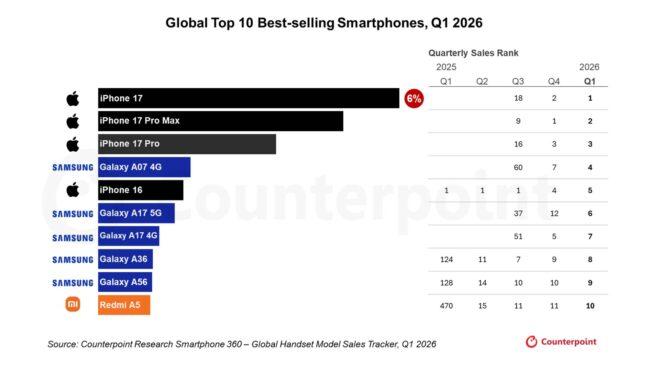
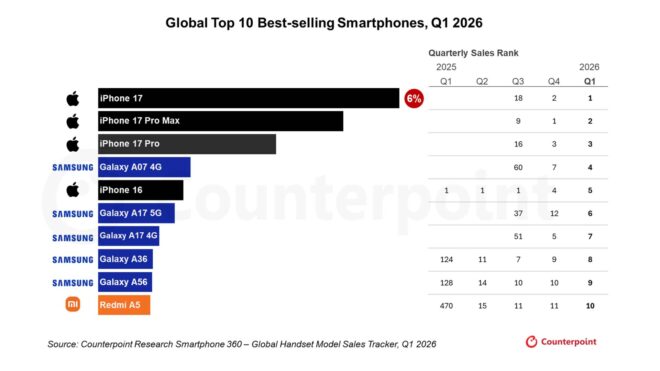
2026’nın ilk çeyreğinde en çok satılan telefon modelleri açıklandı

2026’nın ilk çeyreğinde en çok satılan telefonlar açıklandı

2026’nın ilk çeyreğinde en çok satılan telefonlar açıklandıCounterpoint Research bugün 2026’nın ilk çeyreğinde küresel olarak en çok satılan akıllı telefon modellerini açıkladı. 2025’in sonunda olduğu gibi 2026’nın ilk çeyreğinde de listenin en üstünde üç modelden oluşan “iPhone 17” ailesi yer alıyor. Satışlarda liderliği ana model iPhone 17 alırken, ikinci sırada iPhone 17 Pro Max, üçüncü sırada ise iPhone 17 Pro bulunuyor. Listenin devamında ise sırasıyla “Samsung Galaxy A07 4G, iPhone 16, Samsung Galaxy A17 5G, Samsung Galaxy A17 4G, Samsung Galaxy A36, Samsung Galaxy A56 ve Xiaomi Redmi A5” modelleri karşımıza çıkıyor. İlk çeyreğin genel pazar lideri de olan Apple, hakimiyetini sürdürmeye devam ediyor. Yıl sonunda ilk katlanabilir telefon modelini görücüye çıkaracak şirket, 2027’de tanıtılacak iPhone 19 ailesiyle de gündeme gelmeyi sürdürüyor.

2026’nın ilk çeyreğinde en çok satılan telefon modelleri açıklandı yazısı ilk olarak Teknoloji haberleri – LOG üzerinde yayınlandı.

We still don’t have proper CSS frameworks

CSS-Calipers code example showing the m() constructor, typed math via .add() and .multiply(), a deliberate unit-mismatch error (px + deg), and the final .css() emission step

We have utility libraries, class-naming conventions, and methodologies dressed up in framework branding. What we don’t have is a CSS layer that behaves like a framework does in any other ecosystem: typed input, defined output, a contract a compiler can actually enforce.

This is the long version of a complaint I’ve been making in private for years. It also names what I think a real CSS framework would do, and shows the working sketch I’ve been building in that direction.

Tailwind is automated OOCSS

The current heavyweight is Tailwind, so let’s start with what it actually is. Strip the build step away and the utility-first methodology isn’t new. Object-Oriented CSS, popularized by Nicole Sullivan in 2008, was already making the same case: small, single-purpose classes you compose at the markup layer.

Before Tailwind existed, plenty of teams generated their own utility scales using SCSS loops. You can rebuild a meaningful slice of Tailwind’s spacing and flex utilities in a few lines of SCSS that would’ve worked in 2012:

// Define the design system tokens
$spacing-map: (
  "1": 0.25rem, // 4px
  "2": 0.5rem,  // 8px
  "4": 1rem,    // 16px
  "8": 2rem     // 32px
);

// Loop to generate padding and margin utilities
@each $key, $value in $spacing-map {
  .p-#{$key}  { padding: $value; }
  .pt-#{$key} { padding-top: $value; }
  .m-#{$key}  { margin: $value; }
  .mt-#{$key} { margin-top: $value; }
}

// Compiles to:
// .p-1  { padding: 0.25rem; }
// .pt-1 { padding-top: 0.25rem; } ...

Flex alignments? Same pattern:

$flex-alignments: (
  "start":   flex-start,
  "end":     flex-end,
  "center":  center,
  "between": space-between
);

@each $name, $value in $flex-alignments {
  .justify-#{$name} { justify-content: $value; }
  .items-#{$name}   { align-items: $value; }
}

Variants (responsive, hover, dark mode) followed the same shape: nested @media, :hover, parent selectors. SCSS could already produce the md:p-4 / hover:bg-blue-500 patterns by looping over breakpoints and pseudo-classes.

What Tailwind genuinely adds is the build step. The JIT compiler scans your codebase and emits only the utility classes you actually use, with arbitrary-value support (p-[17px]) for one-offs. That’s a real ergonomic win. Bundle sizes shrank and authoring speed went up.

The downstream cost is harder to talk about, because it shows up in maintenance, not authoring. In a Tailwind codebase, when something looks off on a page and you go searching for what styled it, you often can’t. The class you’d search for (flex, text-center, p-4) appears a thousand times across the project. Layout decisions become string fragments scattered across every component file, not declarations you can grep, jump-to, or rename in one place. The tools that normally help you navigate a codebase mostly don’t.

What we have, then: utility classes that were doable in SCSS in 2012, a build step that makes them ergonomic, and a search-and-rename problem that gets worse the bigger the project gets. Is that really what we want from a framework?

Where this breaks

AI didn’t break Tailwind. It exposed a contract Tailwind never had.

For most of the Tailwind era, humans wrote the class names. There was an implicit social contract: you stayed mostly on the spacing scale, you didn’t use arbitrary values without a reason, you noticed when a string was getting absurd and broke it into a component. The framework didn’t enforce any of that. It just trusted you.

The trust assumption is breaking. AI now writes a meaningful share of production CSS, and AI has no implicit social contract. It generates plausible-looking utility strings that pass a glance review and then break across a viewport, or duplicate themselves, or quietly drift off the scale. The class attribute runs to thirty utilities, half of them redundant, and nothing in the stack catches the drift. Reviewing the output by hand becomes the bottleneck.

The arbitrary-value escape hatch. p-[17px] was tolerable when a senior dev would push back in review. Now it’s a default behavior of the code generator, and there’s no contract for anyone to point at. “Use the scale” is a vibe, not a rule.

The systematic-looking string. p-[var(--spacing-3)] looks systematic. There’s a token name in there, the convention seems followed, reviewers wave it through. But the framework’s scanning step doesn’t actually understand it. The var lives inside a string fragment, not in the helper API. You can typo the variable name and ship it. Nothing catches that. Hardcoding is honest dishonesty. Token-wrapped strings are dishonest dishonesty.

The fix isn’t to ban AI from CSS, or to ban arbitrary values. The fix is to give the codebase a contract the AI can actually run inside: typed inputs that the build can verify, helpers that emit valid CSS, off-scale values visible rather than indistinguishable from on-scale ones.

What a framework should mean for CSS

In any other ecosystem, a framework gives you a contract. You hand it inputs in a defined shape, it does the work inside, you get a defined output. Rails takes route definitions and gives you a request lifecycle. React takes components and props and gives you a reconciled tree. The framework owns the implementation; you own the configuration and composition.

A CSS framework, by that standard, would take design tokens as input and give you valid CSS as output. The contract would be the function signatures: pass these values, get back this typed object. Mismatched units would fail at compile time. Off-scale values would still be possible but visibly off-scale, not laundered into the same syntax as everything else.

It would also cover the CSS spec, not a subset of it. CSS is fluid: new properties land in browsers all the time, experimental features like @container, view-timeline, field-sizing arrive without waiting for any framework to type them. A framework that gates which features you can use restricts the work to whatever its authors had time to model. The CSS spec is the spec. The framework’s job is to type the values you pass in and emit valid CSS, not to decide which properties are allowed.

The shape I keep coming back to is opinionated at the edges, loose in the middle. The framework is strict where strictness matters: typed input from the token layer, valid CSS at the moment of emission. The middle (how you compose, how you organize files, when you reach for a helper vs. write raw CSS) is yours. The framework doesn’t try to own that.

That’s the inverse of how most CSS frameworks work. Tailwind owns the middle (every class is theirs); the edges stay loose (any string can land in a class attribute). CSS-in-JS libraries own a template syntax in the middle, with values inside the template still untyped. vanilla-extract types the output but not the input. A framework with strict edges in both directions, and a loose middle, is rare in CSS, but it’s how typed systems work everywhere else.

A working sketch: CSS-Calipers

This is the principle in code. CSS-Calipers is a small TypeScript library I wrote last year. The ideas behind it go back to my Vanilla Forums days. It covers the measurement-and-math piece of the framework I keep wanting. Tokens in, typed CSS out. The helpers are the contract. Best to use at build time, but occasional runtime possible.

CSS-Calipers code example showing the m() constructor, typed math via .add() and .multiply(), a deliberate unit-mismatch error (px + deg), and the final .css() emission step)

The measurements stay opaque through composition. Nothing emits a string until you call .css() at the boundary. The math is checked at every step, not just at the end.

Mismatched units fail fast. As the snippet above shows, paddingBase.add(rotation) throws a clear error with px vs. deg named in the message. You don’t find out in production that you added pixels to degrees.

The measurement core is the foundation. On top of it I’ve built a helpers layer in my portfolio: borders, paddings, margins, shadows. Each helper consumes measurements and emits typed style objects. Here’s the borders helper in actual use:

// Use defaults from the token layer
export const cardBase = style(borders());

// Override specific values inline
export const cardEmphasis = style({
  ...borders({
    width: m(2),
    radius: { south: m(8) },  // compass-style: south = bottom
  }),
});

// Or pass a full token config
export const cardThemed = style({
  ...borders(theme.cardBorders),
});

Three calling shapes, all valid: defaults, inline overrides, full token configs. The third one is where this starts to feel like a framework. Imagine you import the token from a tokens file:

// tokens/cardBorders.ts — today
export const cardBorders = {
  width: m(1),
  color: theme.colors.surface,
};
// components/Card.styles.ts
import { cardBorders } from "@/tokens/cardBorders";

export const cardStyles = style({
  ...borders(cardBorders),
});

Now design wants a thicker accent top and rounded bottom corners. You edit only the tokens file:

// tokens/cardBorders.ts — after the design tweak
export const cardBorders = {
  width: m(1),
  color: theme.colors.surface,
  top:    { width: m(3), color: theme.colors.accent },
  radius: { south: m(8) },
};

The component file is unchanged. The helper accepts the new token shape and emits more CSS; if you remove keys later, it emits less. Adding a borderTopWidth to the design means a new key in the token object, not a new class in your markup. The call site is invariant; the design tokens are where the change happens.

Spacing helpers work the same way: paddings(m(16)) for uniform, paddings({ block: m(8), inline: m(16) }) for axis-intent, paddings(theme.cardPadding) to delegate the shape entirely to tokens. Same calling pattern across the layer.

Helper names are deliberately the plural of the CSS property they emit: paddings, borders, margins, shadows. Grep-able, visually distinct from a raw padding property in a style object, consistent across the layer.

And if you miss Tailwind’s p-1 / p-4 / p-8 shorthand, it’s a three-line scale function on top of the same primitives:

const space = (n: number) => m(4).multiply(n);

space(4).css();              // "16px" (Tailwind's p-4)
paddings(space(4));          // typed equivalent of p-4, drops into a style object

Tailwind-style ergonomics inside the typed framework. The scale base is up to you: switch to rem for font-size-respecting spacing, define separate scales per category (space, radius, fontSize), or compose ratios for a fluid-typography scale. The math is yours; the typing carries through.

And the media-queries module ties it together by taking typed breakpoints instead of string templates:

import { m } from "css-calipers";
import { makeMediaQueryStyle } from "css-calipers/mediaQueries";

const media = makeMediaQueryStyle({
  mobile:  { maxWidth: m(639) },
  tablet:  { minWidth: m(640), maxWidth: m(1023) },
  desktop: { minWidth: m(1024) },
});

const cardWidth = m(320).clamp(m(260), m(360)); // typed fluid sizing

const cardStyles = {
  width: cardWidth.css(),
  ...media({
    mobile:  { padding: m(12).css() },
    tablet:  { padding: m(16).css() },
    desktop: { padding: m(24).css() },
  }),
};

clamp is the comparison worth making explicit. Native CSS clamp(260px, 100vw, 360px) is pure string: a misordered argument, a typo in a unit name, a mismatched unit family, all ship without complaint. The typed version takes Measurement objects, validates their units, and returns a Measurement you can keep composing on. You can derive the bounds from tokens, add to the clamped result, feed it into another helper, then emit the CSS string only at the very end. Same idea as CSS’s clamp(), with typing carried through every step instead of dropped at the call site.

The media-query factory takes typed breakpoint values the same way; a missing key in your query map is caught at the call site, not when the page renders wrong on tablet.

The same pattern extends through the rest of the helpers layer: @supports fallbacks as typed objects, accessibility variants typed against the actual CSS feature set, color manipulation through typed methods. CSS values get type-checking in places they almost never do in normal CSS-in-JS work.

You can opt in or out at any boundary. Use measurements for high-stakes spacing math; write raw Tailwind classes for layout primitives where utility-first wins; drop into a CSS Module, vanilla-extract, or styled-components for component-scoped work. CSS-Calipers itself is compiler-agnostic: it produces typed CSS strings that work with any of those, or with bare style objects, or wherever else you want valid CSS to land. The library doesn’t try to own the middle. The contract is the function signatures, not the entire styling story.

What’s missing

We still don’t have proper CSS frameworks. The pieces exist in different places: typed CSS-in-TS, design tokens, scanning compilers, agent-aware tooling. None of them are wired together into a single thing that takes typed input from your token layer, emits valid CSS to the spec, and stays out of the way in between.

Getting there isn’t a single project. It’s a shift in how the category is defined: what we call “frameworks” today are vocabularies and methodologies. What a real one would be is a contract.

It’s hard. The CSS spec is complex: edge cases, shorthand properties, overrides, the cascade itself. A real framework can’t simplify those away by giving you a subset; it has to absorb the mess and stay faithful to it. CSS is the spec, and the spec is messy.

A real CSS framework is opinionated at the edges where types matter, loose in the middle where you compose, and covers the whole CSS spec rather than a subset. We don’t have one yet. We could.

AWS Billing and Cost Management: A Practical Guide

Cloud computing made infrastructure incredibly flexible, but it also made cloud spending harder to control. With a few clicks, teams can launch hundreds of VMs, databases, and services across regions. That agility accelerates development and often produces unpredictable cloud bills.

AWS Billing and Cost Management is the suite of tools AWS provides to fix that: Cost Explorer, AWS Budgets, Cost & Usage Reports, and Savings Plans recommendations. Together, they help teams monitor usage, set spending alerts, and identify ways to cut costs.

That said, visibility alone doesn’t automatically reduce spend. Many organizations combine AWS-native tools with automation platforms to increase commitment coverage and reduce risk. More on that below.

What Is AWS Billing and Cost Management?

It’s the financial control center of an AWS account. Through the console, teams can:

  • Track real-time cloud spending
  • Analyze usage trends across services
  • Set budgets and receive spending alerts
  • Generate detailed cost and usage reports
  • Manage Savings Plans and Reserved Instances

Key Tools in the Suite

AWS Cost Explorer

An interactive visualization and analytics tool for exploring AWS spending over time. Teams use it to identify which services are driving costs, analyze usage patterns, and forecast future spend based on historical data.

Key capabilities:

  • Visualize spending trends over time
  • Filter by service, account, tag, or region
  • Detect cost spikes and usage anomalies
  • Forecast future cloud spend

For most teams, Cost Explorer is the first stop when investigating a change in the AWS bill.

AWS Budgets

Set spending thresholds and get alerts before costs become a problem. Budgets can be configured across dimensions monthly total spend, service-level costs, account-level spending, or Savings Plans utilization.

When spending hits a defined threshold (say, 80% of the monthly limit), AWS sends notifications via email or SNS. Essential for financial accountability across engineering teams.

AWS Cost and Usage Report (CUR)

The most granular billing dataset AWS produces. CUR contains hourly resource usage, service-level cost breakdowns, Reserved Instance and Savings Plan discounts, resource IDs, and account-level billing details.

FinOps teams and data analysts use CUR to build custom dashboards and analytics pipelines. It’s the raw material for serious cost analysis.

Savings Plans and Reserved Instances

Commitment-based pricing models that trade flexibility for discount up to 66–72% savings compared to on-demand pricing when the commitment term and workload match.

Savings Plans are more flexible than Reserved Instances; they apply across instance families and regions in most cases. Both require committing to a usage level for one or three years.

If you want to understand the mechanics of how AWS commitment pricing works and how to model it for your environment, we covered it in detail here AWS Budgets vs Cost Explorer: Key Differences Explained

AWS Billing Dashboard

The main entry point for monitoring cloud costs. Provides a high-level overview of current spending, service-level costs, and usage trends and links directly into Cost Explorer, Budgets, CUR, and Savings Plans management.

AWS Billing vs. AWS Cost Management: The Distinction

These two terms get used interchangeably, but they refer to different things.

AWS Billing handles how you’re charged, tracks resource consumption, applies the relevant pricing model, and generates invoices. Finance teams live here.

AWS Cost Management is about understanding and acting on those charges usage analytics, forecasting, budget alerts, and commitment optimization. FinOps and engineering teams live here.

A concrete example: billing might show $50,000 spent on EC2 in a month. Cost management tools reveal which workloads drove that, whether instances are underutilized, and whether Savings Plans coverage is leaving money on the table.

How AWS Billing Works Under the Hood

The billing pipeline follows four steps:

  • Usage tracking: AWS records every resource consumed: compute hours, storage, data transfer, API requests
  • Pricing model application: on-demand, Savings Plans, Reserved Instances, or Spot pricing gets applied to recorded usage
  • Cost allocation: tags and AWS Organizations structures distribute costs across teams, projects, and environments
  • Reporting: Cost Explorer, Budgets, and CUR surface the data for analysis

Cost allocation tags are especially important here. Tagging resources by environment, team, and project (e.g., Team: Data Engineering, Environment: Production) lets Cost Explorer and CUR break down spending by owner which is the foundation of any real FinOps accountability model.

Best Practices for Managing AWS Costs

  1. Implement cost allocation tags consistently Without tags, cost analysis quickly becomes noise. Standardize tag keys across your organization and activate them in AWS Billing so Cost Explorer can slice data by team, project, or environment.

  2. Set budgets and alerts before you need them Configure monthly cost budgets with alerts at 80% and 100% of the limit. Service-specific and account-level budgets help catch issues early before they show up on the final invoice.

  3. Monitor cost trends regularly Daily and weekly cost reviews in Cost Explorer catch anomalies fast: new deployments, traffic spikes, or misconfigured resources. This is a core FinOps habit, not a one-time exercise.

  4. Optimize pricing models and commitments Most organizations default to on-demand pricing longer than they should. Analyze historical usage patterns to identify stable workloads, then convert that capacity to Savings Plans or Reserved Instances. The savings (up to 66–72%) compound at scale.

  5. Establish FinOps governance Regular cost review meetings, shared accountability between engineering and finance, automated reporting, and continuous infrastructure optimization, this is what separates teams that control cloud costs from teams that just track them.

Where Native AWS Tools Fall Short

AWS billing tools are built for visibility, not automation. The gaps that surface in practice:

  • Commitment complexity: choosing the right mix of Savings Plans, Reserved Instances, and Spot requires modeling dynamic workloads against multi-year terms. Getting it wrong means either wasted commitments or unrealized savings.
  • Commitment risk: if usage drops after you commit, you’re still paying. This risk causes many teams to under-commit and leave savings on the table.
  • Operational overhead: extracting actionable insights from CUR and Cost Explorer still takes significant analyst time. FinOps teams often spend more time analyzing data than implementing improvements.

For a deeper look at the difference between reacting to cloud costs and actively managing them, this piece breaks it down clearly: What Is the Difference Between Cloud Cost Optimization and Cloud Cost Management?

How Usage.ai Extends AWS Billing and Cost Management

AWS provides the data foundation. Usage.ai adds the automation layer for commitment optimization.

Key capabilities:

  • Automated commitment recommendations: continuously analyzes usage and recommends the optimal mix of Savings Plans and Reserved Instances
  • Commitment purchase automation: teams approve recommendations directly in the platform, cutting the manual overhead
  • 24-hour recommendation refresh: daily updates let organizations react to infrastructure changes faster than native AWS tooling
  • Cashback protection: if usage drops and commitments become underutilized, Usage.ai provides cashback per contract terms, reducing the financial risk of longer commitments
  • Increased commitment coverage: by removing the commitment risk, organizations can safely cover more infrastructure with discounted pricing

In practice: AWS Billing and Cost Management for visibility and analysis, Usage.ai for automated optimization and commitment management.

Want to see what this looks like for your environment? Run a free AWS Savings Test to find optimization opportunities in your current cloud spend.

What’s your team’s biggest challenge with AWS cost management is visibility, commitment risk, or just getting engineering and finance aligned? Would love to hear how others are handling it.

Access the complete technical write-up here → What Is AWS Billing and Cost Management? The Complete Guide for Cloud Cost Control

CSS Specificity Wars in Shopify Stores: 53 Audits with the data

Our first scan of 53 Shopify stores surfaced 147+ critical app-theme conflicts. CSS specificity was the root cause in roughly 70% of them — but specificity itself isn’t the problem. The way developers escalate to fix it is.

Here’s what the data actually shows.

The Numbers

From our 53-store dataset:

31 stores had !important declarations injected by apps

**19 of those 31 (61%) **had new layout regressions introduced as a direct result

23 stores had z-index values exceeding 10,000 from conflicting app injections

5 stores had z-index values above 90,000

Top-scoring stores (92+): 0 !important declarations, CSS specificity under 0-2-0, scoped to data attributes

Bottom-scoring stores (under 75): 4+ apps, 6+ !important rules, specificity above 1-3-0

The stores that scored 92+ weren’t running fewer apps by accident. Their apps were built in a way that didn’t create specificity conflicts in the first place.

Why Specificity Cascades in Shopify

Shopify themes are aggressive with specificity. Not maliciously — they have to be, because they own the entire page and need their styles to reliably win against anything merchants might add via the admin.

A real example from our dataset. The theme has this targeting a product page review widget:

#shopify-section-template--product
  .product__block
  .product__description
  .review-widget {
  padding: 0;
  font-size: inherit;
}

Specificity: 1-3-1 — one ID, three classes, one element.

Now an app tries to style that same widget with:

.review-widget {
  padding: 16px;
  font-size: 14px;
}

Specificity: 0-1-0.

The theme always wins. The review widget renders as a compressed, unreadable block. The app developer sees it, doesn’t know the theme’s specificity, and reaches for a fix.

The !important Escalation Trap

The first escalation most app developers make is !important:

.review-widget {
  padding: 16px !important;
  font-size: 14px !important;
}

This “fixes” the review widget. It also creates a cascade problem that the developer doesn’t see until a merchant files a support ticket three weeks later.

Here’s what happens: a merchant has a custom Liquid snippet that modifies .product-card .review-widget for a specific collection layout. Now they have this in their theme:

.product-card .review-widget {
  padding: 4px;
}

The theme’s base .review-widget rule — now carrying !important — overrides even this. The product card layout breaks. The merchant doesn’t know which app did it, so they file tickets with all of them. The developer has no idea their !important caused it.

We found this exact pattern — !important from one app breaking a theme customization from a different app — in 19 of the 53 stores we scanned.

The !important trap is compounding: every new !important rule you add to fix your widget creates a risk that it breaks something else, somewhere, in a way you can’t predict from your test store.

The Z-Index Arms Race

The second specificity problem we documented is z-index stacking. Apps that inject fixed-position UI elements (popups, notification bars, chat widgets, announcement banners) need to win the z-index war to render above the header and other fixed elements.

Our dataset showed a predictable arms race:

/* Theme: standard header */
.header__wrapper {
  position: sticky;
  z-index: 999;
}

/* App A: announcement bar */
.announcement-bar {
  position: fixed;
  z-index: 1000; /* beats header */
}

/* App B: chat widget */
.chat-bubble {
  position: fixed;
  z-index: 9999; /* beats announcement */
}

/* App C: email signup popup */
.signup-overlay {
  position: fixed;
  z-index: 90000; /* beats everything */
}

Four apps, four different z-index strategies, zero coordination. We found z-index values above 10,000 in 23 of 53 stores. Five stores had values above 90,000.

The absurdity of a z-index of 90,000 is a symptom of the problem: there is no standard, so app developers pick arbitrarily large numbers.

The fix isn’t just picking a bigger number. It’s understanding that z-index stacking only matters within the same stacking context — and in Shopify, each position: fixed element creates its own stacking context. Two position: fixed elements at z-index 1000 and 9999 aren’t competing on the same axis unless they’re in the same viewport layer. A popup overlay and a header aren’t actually in the same z-index race unless they’ve been placed in a shared stacking context by the theme.

For app developers: if your popup needs to sit above the header, coordinate with the theme’s header z-index directly via a CSS custom property, not an arbitrary large number.

What Works: Scoped Selectors

The core principle that separates high-scoring stores from low-scoring ones: app CSS should not compete in the theme’s specificity range.

The cleanest pattern is a data-attribute scoped container. Instead of:

/* WRONG: competes with theme class selectors */
.review-widget { ... }

Do this:

/* RIGHT: container adds specificity, content is predictable */
[data-app-reviews] .review-widget {
  padding: 16px;
  font-size: 14px;
}

The container — data-app-reviews on the element you inject — adds 0-1-0 specificity to every rule. Your inner selectors never need to compete with the theme’s 1-2-1 or 1-3-1 chains.

You scope yourself, so you don’t need !important.

[data-app-reviews] .rw-header { ... }
[data-app-reviews] .rw-body { ... }
[data-app-reviews] .rw-footer { ... }

Every selector in your stylesheet stays at 0-2-0 or below. No conflict, no escalation.

What Works: CSS Layers

For browsers that support it (which includes the browsers Shopify’s audience uses — the store data skews current), @layer gives you a more explicit solution:

@layer app-reviews {
  .review-widget {
    padding: 16px;
    font-size: 14px;
  }
}

Layers resolve conflicts by layer order, not specificity. If the theme doesn’t use layers, your layer’s styles will resolve against the unlayered theme cascade. The theme’s unlayered selectors still win by default — you don’t need !important to negotiate that.

The advantage over data-attribute scoping: @layer lets you define an explicit priority relationship, so if you need your styles to intentionally sit above certain theme rules, you can declare it rather than brute-forcing it with !important.

What Works: App Blocks (Best Option)

The most conflict-proof approach is Shopify’s app blocks extension — not injecting CSS at all.

{% comment %} sections/app-reviews.liquid {% endcomment %}
{% schema %}
{
  "name": "Product Reviews",
  "target": "section"
}
{% endschema %}

<div class="review-widget" data-product-id="{{ product.id }}">
  <!-- Widget content -->
</div>

App blocks render inside the theme’s section rendering pipeline. The theme controls CSS scoping. You don’t inject styles — you rely on the theme’s existing component system.

The trade-off: app blocks require Shopify’s extension architecture and not all app categories support them yet. But for reviews, product options, size charts, and other embedded widget types, they’re the most durable solution.

What Doesn’t Work: Bare Class Selectors

Stop shipping bare class selectors in your app’s injected stylesheet:

/* Don't do this */
.review-widget { ... }
.product-form { ... }
.add-to-cart { ... }

These are too generic. They’re in the theme’s specificity range. They’ll either lose to the theme or win and create regressions. Both outcomes generate support tickets.

Specificity Anti-Patterns by App Category

From our 53-store scan, CSS specificity conflicts are most prevalent in:

  1. Reviews widgets — most common target, highest conflict rate
  2. Announcement bars and promo popups — z-index escalation problem
  3. Size/fit recommendation widgets — inject near the add-to-cart form, cause layout shifts
  4. Loyalty/reward point widgets — often inject as overlays, highest !important rate
  5. Live chat/chatbot widgets — lowest specificity conflict but create z-index problems

If you’re building an app in one of these categories, your CSS specificity strategy is load-bearing. The data from 53 stores is unambiguous: app CSS that doesn’t account for theme specificity is the single most common source of regressions we found.

Takeaways

  1. Scope your CSS to your container element. Add a data attribute to your injected element and scope every rule to it. Your specificity becomes predictable and self-contained.

  2. Use @layer to negotiate cascade priority without !important. Layers give you explicit control over precedence without forcing specificity conflicts.

  3. Stop using bare class selectors for injected widgets. Generic selectors compete with the theme and either lose or create regressions. Always scope.

  4. For popup/overlay widgets, coordinate z-index with CSS custom properties. Don’t pick a large arbitrary number — read the theme’s –header-z-index or equivalent and set yours relative to it.

  5. Test with 3+ apps installed, not alone. Your CSS behaves differently when other apps are injecting conflicting rules. Your test store should reflect that.

We’ve published the full conflict dataset — including per-store specificity breakdowns, z-index distribution, and app category conflict rates — at preflight.technology/insights. No signup required to browse the aggregate patterns. If you’re debugging a specific app’s compatibility or want to see how your store scores against the 87-point average from our dataset, the per-app conflict lookup is there too.