Designing a Scalable Cross-Platform Appium Framework

  • Designing the cross-platform architecture you can maintain
  • Applying the Page Object Model without creating accidental complexity
  • Making parallel execution predictable: sharding, ports, and device farms
  • CI/CD mobile testing: pipeline patterns that actually run reliably
  • Monitoring, metrics, and policies for long-term maintenance
  • Practical Application: checklists, templates, and example configs

Cross-platform mobile automation often breaks not because Appium can’t drive devices, but because teams build frameworks that duplicate screen logic, hide driver complexity, and treat device management as a low-priority ops task. A pragmatic, layered Appium framework — built around a disciplined page object model, deterministic parallel execution, and CI-driven device orchestration — turns brittle evidence of quality into reliable, fast feedback.

Your test suite is noisy: intermittent failures that aren’t product bugs, a stack of duplicated locators across Android and iOS, and runs that serially consume hours. That noise causes two predictable outcomes in professional teams: developers stop trusting UI tests, and QA spends a majority of time on infra triage instead of improving coverage. These symptoms require design-level fixes — not more flaky retries.

Designing the cross-platform architecture you can maintain

A maintainable cross-platform Appium framework separates concerns into clear layers and keeps platform-specific differences localized.

  • Architecture layers (minimal and pragmatic):
    • Test runner layer — tests and assertions (e.g., TestNG, Pytest). Tests should reference page services, not raw element locators.
    • Orchestration / runner utilities — DriverFactory, capability loaders, session lifecycle hooks, retries/quarantine helpers.
    • Screen/Page objects — LoginPage, HomePage (use component objects for reusable widgets).
    • Platform adapters — small classes that encapsulate platform differences (e.g., AndroidActions, IOSActions).
    • Infra / device layer — device provisioning, Appium server/process management, cloud connectors (BrowserStack/Sauce/AWS/etc).
    • Reports & artifacts — structured attachments, screenshots, logs, Allure/HTML adapters.

Design rules I use on teams:

  • Keep driver creation explicit and test-friendly: a DriverFactory returns an AppiumDriver configured from capabilities.json or environment variables; tests never construct capabilities inline.
  • Prefer composition over inheritance for pages: compose pages from small component objects (cards, nav bars).
  • Centralize test data and environment toggles in a single config artifact (config.json, capabilities.yml) to keep capability churn visible and reviewable.

Example: a terse Java-style BasePage + LoginPage (using Appium PageFactory patterns).

// BasePage.java
public abstract class BasePage {
    protected final AppiumDriver driver;
    public BasePage(AppiumDriver driver) { this.driver = driver; }
    protected void waitForVisible(By locator) {
        new WebDriverWait(driver, Duration.ofSeconds(10)).until(ExpectedConditions.visibilityOfElementLocated(locator));
    }
}

// LoginPage.java
public class LoginPage extends BasePage {
    @AndroidFindBy(accessibility = "login_email")
    @iOSXCUITFindBy(accessibility = "login_email")
    private MobileElement emailField;

    @AndroidFindBy(accessibility = "login_submit")
    @iOSXCUITFindBy(accessibility = "login_submit")
    private MobileElement submitButton;

    public LoginPage(AppiumDriver driver) {
        super(driver);
        PageFactory.initElements(new AppiumFieldDecorator(driver, Duration.ofSeconds(5)), this);
    }

    public HomePage login(String user, String pass) {
        emailField.sendKeys(user);
        // password + submit ...
        submitButton.click();
        return new HomePage(driver);
    }
}

Use Appium’s Java client PageFactory features and find-by annotations to keep locators co-located with behavior. The Java client provides AppiumFieldDecorator and platform-specific annotations like @AndroidFindBy and @iOSXCUITFindBy.

Important: keep assertions out of page objects; page objects are services the test uses, not validators. Encapsulate simple “loaded” checks in constructors or isLoaded() helpers, but put the expectations in the test.

Applying the Page Object Model without creating accidental complexity

POM is an enabler, not an end state. I see two common mistakes that cause POM to fail at scale: (1) creating a huge base page with dozens of unrelated helpers and (2) copying separate page classes for Android and iOS that duplicate logic.

Practical guidance:

  • Use component objects for repeating UI pieces (lists, cards, bottom sheets). They are small, testable units referenced by pages.
  • Use platform-specific locators only where necessary. Prefer shared accessibility IDs and content-desc so a single locator can work on both platforms.
  • Keep each page object focused: 10–20 methods max. If a page grows larger, split it into multiple components.
  • Avoid premature abstraction. In small MVPs, the mental overhead of POM can be counterproductive; scale POM incrementally as your test count grows. This contrarian view is shared by practitioners who opt for flatter scripts for tiny projects.

A healthy pattern: pages implement services (e.g., loginAs(user)), tests orchestrate scenarios, and any platform-specific differences live in tiny adapter classes.

Making parallel execution predictable: sharding, ports, and device farms

Parallel runs scale the wall-clock speed of your suite, but they add infrastructure complexity. You need deterministic session configuration and a strategy for where tests run.

Key platform details:

  • Each parallel Appium session that touches a real device or simulator often requires unique platform-specific ports/capabilities: udid, systemPort and chromedriverPort for Android uiautomator2-based sessions; wdaLocalPort, derivedDataPath for iOS XCUITest sessions. Appium documents these as the standard way to avoid port conflicts and resource contention.
  • For larger scale, run multiple Appium server instances (one per host or per device), and use Selenium Grid 4+ relay or a device farm provider to route sessions through a single hub endpoint. Appium+Grid integration is a supported archetype.

Sharding strategies:

  • Shard by test class or by logical group (smoke, critical flows). For deterministic parallelism use test-runner features (TestNG parallel="tests" or xdist pytest -n) to control granularity.
  • Prefer deterministic sharding (fixed mapping) for critical flows and dynamic sharding for broad regression matrices.

TestNG example (run Android and iOS tests in parallel):

<suite name="MobileSuite" parallel="tests" thread-count="4">
  <test name="AndroidRegression">
    <parameter name="platform" value="Android"/>
    <classes>
      <class name="tests.android.LoginTests"/>
    </classes>
  </test>
  <test name="iOSRegression">
    <parameter name="platform" value="iOS"/>
    <classes>
      <class name="tests.ios.LoginTests"/>
    </classes>
  </test>
</suite>

Device management choices (comparison):

Approach Pros Cons Best for
Local device lab Full control; low per-test cost after capex Setup/maintenance, device churn, limited concurrency Deep debugging, preflight instrumentation
Cloud device farm (Sauce/BrowserStack) Massive coverage, easy parallelism, API-driven allocation Recurring cost, possible queuing/availability Large matrix, CI-driven nightly/regression runs
Managed services (Firebase/AWS Device Farm) Tight CI integrations, artifact storage May not support all tooling patterns (e.g., some Appium flavors) Android-focused device coverage, integration with Google infra

Cloud providers expose features that make parallel runs predictable: dynamic device allocation, device caching options, and run artifact storage. Sauce Labs, BrowserStack, Firebase, and AWS Device Farm document these device orchestration patterns and how to pass credentials and app artifacts.

Operational tactics that reduce flakiness during parallel runs:

  • Always set unique systemPort/wdaLocalPort per session when running multiple sessions per host.
  • Make tests idempotent: avoid shared state between tests on a device; use noReset only if the test account/state is intentionally reusable and consistent.
  • Build a short smoke shard that runs on each PR against a single device family to catch obvious regression before running large matrices.

CI/CD mobile testing: pipeline patterns that actually run reliably

Treat the app build artifact as the single source of truth for the pipeline. Your pipeline stages should be explicit, observable, and cached.

A typical pipeline flow:

  1. Build and sign artifacts (Android .apk/.aab, iOS .ipa) using Gradle and xcodebuild orchestrated with fastlane for reproducible signing and distribution.
  2. Upload artifacts to an artifact store or device-farm app storage (e.g., Sauce/app storage, BrowserStack/App Automate, AWS Device Farm).
  3. Trigger small smoke tests on a single device emulator/simulator in the same pipeline job to validate the build.
  4. Trigger matrix runs (parallel) either on cloud device farms or agent pools. Capture logs, videos, and crash reports as artifacts.
  5. Publish results to a report server (Allure, or stored HTML) and gate deployments on low flakiness and passing smoke tests.

Example Jenkinsfile snippet (conceptual):

pipeline {
  agent any
  environment { APP_ARTIFACT = 'build/outputs/apk/debug/app-debug.apk' }
  stages {
    stage('Build') { steps { sh './gradlew assembleDebug' } }
    stage('Sign & Upload') { steps { sh 'fastlane beta' } } // builds .ipa/.apk and uploads
    stage('Smoke') { steps { sh "mvn -Dtest=SmokeTests test" } }
    stage('Parallel Matrix') {
      steps {
        // Or call cloud provider API / trigger device-farm job
        sh 'python ci/schedule_devicefarm_run.py --matrix matrix.json'
      }
    }
  }
  post { always { archiveArtifacts artifacts: 'reports/**' } }
}

If you use hosted CI (GitLab CI, GitHub Actions), integrate device-farm actions/plugins (AWS Device Farm action, BrowserStack plugin, Sauce bindings) to keep secrets and orchestration declarative and auditable.

Practical notes:

  • Use fastlane for consistent Xcode/Android signing and build steps; put code signing logic behind lanes so pipelines remain readable and reproducible.
  • Keep secrets (keys, certificates) in the CI secret store and avoid committing provisioning artifacts to repo.

Monitoring, metrics, and policies for long-term maintenance

Instrumentation and measurement are where automation pays off or becomes a liability. Track a compact set of KPIs and make them visible.

Essential metrics:

  • Flakiness rate — percent of test runs that fail intermittently on unchanged code. Track this per-test and per-run. Use statistical approaches (like impact scoring) to prioritize fixes. Research into flaky tests highlights the need to measure and isolate flaky tests rather than ignore them.
  • Test duration / suite runtime — average and 95th percentile; target reductions via sharding and smarter selection.
  • Infra failure rate — device allocation failures, Appium session errors; if infra failures dominate, investment in device orchestration is warranted.
  • Coverage of critical flows — percentage of critical user journeys covered by deterministic, low-flakiness tests.

Reporting and tooling:

  • Use a framework-agnostic report generator (Allure) to collect attachments (screenshots, logs, video) and visualize test history and stability across runs. Allure supports test history and stability charts that become valuable in quarterly reviews.
  • Feed CI events and run durations to a time-series store or CI analytics tool (Prometheus + Grafana or commercial CI analytics) to spot regressions in execution time or infra reliability.

Operational policy examples (codify these):

  • Quarantine tests with > X% flakiness for triage and avoid blocking releases until fixed; prioritize by impact score. Measure flakiness trends, not single failures.
  • Keep artifact retention rules: store logs/screenshots for failed runs for 30–90 days depending on compliance needs.
  • Schedule periodic cleanup: every quarter review device matrix to drop OS versions with negligible user share and add recent devices based on telemetry.

Callout: Treat automation as product code: apply PR reviews, CLA, and release notes for framework changes. Instrument the framework itself (test runtime, number of retries, flaky tests flagged) so the team treats the test suite as a first-class deliverable.

Practical Application: checklists, templates, and example configs

Below are actionable templates and checklists you can copy into your repo to bootstrap or refactor a framework quickly.

Minimal acceptance checklist (initial sprint)

  • [ ] Create DriverFactory that reads capabilities.json and environment variables.
  • [ ] Implement 10 critical end-to-end flows as POMs (smoke tests).
  • [ ] Add a single PR-driven smoke job (one device/emulator) in CI.
  • [ ] Add a nightly matrix job on a cloud device farm with parallel shards.
  • [ ] Wire Allure (or equivalent) and keep artifacts for failed runs.

Sample capabilities.json (snippet)

{
  "android_pixel_11": {
    "platformName": "Android",
    "deviceName": "Google Pixel 5",
    "platformVersion": "11.0",
    "udid": "emulator-5554",
    "appium:systemPort": 8200,
    "appium:automationName": "UiAutomator2"
  },
  "ios_iphone_14": {
    "platformName": "iOS",
    "deviceName": "iPhone 14",
    "platformVersion": "16.0",
    "udid": "<device-udid>",
    "appium:wdaLocalPort": 8101,
    "appium:automationName": "XCUITest"
  }
}

Java DriverFactory sketch (concept)

public class DriverFactory {
  public static AppiumDriver createDriver(Map<String,Object> caps) throws MalformedURLException {
    MutableCapabilities options = new MutableCapabilities();
    options.merge(new DesiredCapabilities(caps));
    String hub = System.getenv().getOrDefault("APPIUM_SERVER", "http://localhost:4723/wd/hub");
    return new AppiumDriver(new URL(hub), options);
  }
}

Example Jenkinsfile snippet to schedule AWS Device Farm (conceptual; use action/plugin in your platform):

stage('Schedule Device Farm') {
  steps {
    sh 'aws devicefarm create-upload --project-arn $PROJECT_ARN --name app-debug.apk --type ANDROID_APP --cli-binary'
    sh 'aws devicefarm schedule-run --project-arn $PROJECT_ARN --app-arn $APP_ARN --device-pool-arn $POOL_ARN --test type=APPIUM_NODE,testPackageArn=$TEST_ARN'
  }
}

Test sharding checklist

  • Shard by test-suite or feature to minimize inter-test dependencies.
  • Keep shards repeatable: fix random order failures before parallelizing.
  • Use minimal timeouts on UI waits for smoke, longer for full regression.

Quarantine policy template (put in docs/quarantine.md)

  • Criteria to quarantine: a test fails intermittently on at least three runs across three distinct commits/branches.
  • Quarantine steps: mark test with @quarantine, stop auto-retries, add Jira ticket with impact score.

Artifacts & retention

  • Keep logs + screenshots for failed runs for at least 30 days.
  • Keep videos for high-priority regression failures for 90 days.

Closing paragraph

Build the layers once, measure what matters (flakiness and infra failures), and make the framework part of delivery rather than an afterthought; that discipline turns mobile automation from a risky cost center into a measurable accelerator for quality and speed.

Sources:
Appium — Intro to Development – Appium v2 modular architecture and guidance on drivers/plugins; used for design patterns, Appium capabilities model, and the cross-platform rationale.

Selenium — Page Object Models – Recommended POM practices and guidance on component/page responsibilities (e.g., avoid assertions in page objects).

Appium XCUITest Driver — Testing in Parallel – Details on wdaLocalPort, derivedDataPath, and iOS parallel execution specifics.

Appium and Selenium Grid Guide – How to register Appium servers with Selenium Grid and relay traffic for larger grids.

Sauce Labs — Appium Testing with Real Devices – Device allocation, cacheId, and cloud device orchestration features.

BrowserStack — Parallel Appium Tests Guide – Parallelization patterns and practical notes on reducing wall-clock time with cloud parallel runs.

Firebase Test Lab — Overview & How it Works – Test matrix runs, real/virtual device coverage, CI integration notes.

Fastlane — App Store Deployment and build actions – Using fastlane for reproducible iOS builds, signing and lanes; useful for CI build steps.

GitLab — Mobile DevOps iOS CI/CD Tutorial – Example pipeline and patterns for building and distributing mobile artifacts in CI.

AWS Device Farm GitHub Action (aws-actions) – Example GitHub Action usage and JSON run-spec for scheduling Appium runs on AWS Device Farm.

Appium Java Client — AppiumFieldDecorator & PageFactory API – PageFactory integration, @AndroidFindBy / @iOSXCUITFindBy and the decorator patterns for Appium Java clients.

Test flakiness review (multivocal review) – Academic review on causes, detection, and management strategies for flaky tests; used for flakiness treatment rationale.

Allure Report Documentation – How Allure collects history, attachments, and stability metrics useful for test reporting in CI.

BrowserStack — Integrate your Appium test suite with Jenkins – CI plugin integration patterns and credential handling for Jenkins.

Why I Don’t Use Page Object Model in Small Mobile Automation Projects (Medium) – Practitioner perspective advocating simpler scripts for very small projects; used to explain when POM can be counterproductive.

Google Antigravity 2.0 & Slash Commands

TL;DR Summary:
Google has revolutionized AI-assisted development with Antigravity 2.0, an agent-first architecture replacing traditional code editors. Key updates include powerful slash commands for autonomous workflow management, the new Android CLI for direct IDE integration (“Vibe Coding”), Firebase Agent Skills for automated backend logic, and WebMCP/AppFunctions for seamless app-to-app data manipulation powered by Gemini.

Google pulled a massive surprise with Antigravity 2.0 by completely overhauling the app into an agent-first architecture. They stripped away the traditional code editor and replaced it with an advanced agent manager designed to run multiple AI agents across multiple projects concurrently.

Antigravity Slash Commands for Workflow Automation

Antigravity introduced powerful slash commands to assist and automate your developer workflow:

  • /goal – Instructs an AI agent to run autonomously until a specified complex task is complete, removing the need for intermediate human approval.
  • /schedule – Handles cron-based, recurring agent execution for automated maintenance.
  • /browser – Hands explicit browser navigation and automated UI testing control directly to the agent.
  • /grill-me – Forces the agent to aggressively cross-examine you with clarifying questions, ensuring complete alignment before writing a single line of code.

The Android CLI & “Vibe Coding”

Google just handed developers a massive productivity upgrade with the announcement of the Android CLI. This new Command Line Interface grants AI coding agents like Claude Code, Codex, or Antigravity direct access to your local development environment and Android Studio. The live demo showcased AI agents autonomously writing code, making edits, and executing tests directly on the Android emulator.

Furthermore, Google AI Studio is expanding into native prompt-based Android development—a paradigm shift we call Vibe Coding. Developers can design, prototype, and build completely functional native Android applications directly inside AI Studio and immediately export them directly to their physical devices.

Agent Skills for Firebase & Migration Assistant

Google also introduced Agent Skills for Firebase and a powerful new Migration Assistant. Agent Skills empower developers to write complex backend logic, cloud functions, and database rules for Firebase and Firestore directly inside the IDE via natural language. As a developer, this is a massive time-saver; you can hand off writing security rules to Antigravity, and the AI agent handles the rest securely.

Tackling cross-platform development headaches, Google’s new Migration Assistant is specifically designed to transition legacy iOS, React Native, or web framework codebases over to modern, native Android seamlessly.

Re-Engineering the Web & Android 17 Intelligence Layer

Google is reshaping how agents interact with the web and operating systems:

  • WebMCP (Model Context Protocol): An open standard designed to let developers expose HTML forms and JavaScript functions directly to AI models, bridging the gap between web interfaces and LLMs.
  • Chrome DevTools for Agents: Allows AI agents to autonomously debug, profile, and resolve complex issues within web applications.
  • AppFunctions API: Turns installed Android apps into on-device Model Context Protocol (MCP) servers. This groundbreaking API allows Gemini to autonomously pull data from one application, manipulate it, and inject it into another with absolutely zero user intervention.

Building a Unified Adaptive Learning Intelligence with Gemma 4, Flutter, and Multi-Model Orchestration

*This is a submission for the [Google I/O WritiHow Gemma 4 Became the Cognitive Core of a Cinematic AI Tutoring System

Building a Unified Adaptive Learning Intelligence with Gemma 4, Flutter, and Multi-Model Orchestration

AI tutors are everywhere now.

But most still feel like disconnected chatbot wrappers.

They answer questions, generate summaries, and explain concepts reasonably well — yet something still feels missing:

  • broken continuity
  • shallow personalization
  • inconsistent teaching styles
  • fragmented reasoning
  • robotic interaction loops

After watching the announcements and sessions from Google I/O 2026, I realized the real breakthrough wasn’t just about larger models or faster inference.

It was something much bigger.

The future of AI applications is shifting toward orchestrated intelligence systems — experiences where multiple AI components work together invisibly to create something coherent, adaptive, and deeply contextual.

That realization completely reshaped how I approached my own project:

«Gemma Mentor AI — a cinematic adaptive tutoring platform built around multi-model orchestration, semantic intelligence routing, and immersive learning experiences.»

And at the center of that system was one model that changed the way I thought about deployable AI architecture:

Gemma 4.

The Problem With Most AI Tutors

Most AI tutoring systems today are still designed like upgraded chat interfaces.

They usually work like this:

  1. User asks a question
  2. Model generates response
  3. Context grows until it breaks
  4. Conversation quality slowly degrades

The result is an experience that often feels:

  • reactive instead of adaptive
  • informative instead of educational
  • intelligent but not coherent

Real tutoring is different.

A good tutor:

  • remembers learning patterns
  • adapts pacing
  • maintains emotional continuity
  • shifts explanation styles dynamically
  • understands confusion before the learner fully articulates it

That requires far more than a single prompt-response loop.

It requires orchestration.

The Moment Google I/O 2026 Changed My Perspective

While exploring the announcements from Google I/O 2026 and the broader Google AI ecosystem direction, one thing became increasingly clear:

AI development is evolving beyond isolated models.

What stood out to me most was the ecosystem philosophy emerging around:

  • deployable intelligence
  • multimodal systems
  • developer accessibility
  • scalable AI tooling
  • lightweight but capable models
  • orchestration-ready architectures

That was especially true with the growing ecosystem around Gemma 4.

Instead of viewing models as standalone products, I started viewing them as cognitive components inside a larger intelligence system.

That shift changed everything about how I designed my platform.

Introducing Gemma Mentor AI

Gemma Mentor AI is an adaptive AI tutoring system designed to feel less like a chatbot and more like an intelligent cinematic learning companion.

The goal was not simply to generate answers.

The goal was to create:

  • continuity
  • immersion
  • adaptive reasoning
  • lesson awareness
  • unified tutor identity
  • emotionally coherent learning flows

The learner should never feel:

  • model switching
  • reasoning fragmentation
  • context resets
  • instructional inconsistency

Instead, the experience should feel like interacting with a single evolving tutor.

Why Gemma 4 Became the Cognitive Core

What made Gemma 4 especially important for this architecture was not just capability.

It was architectural flexibility.

I needed a model that could function as:

  • a reasoning layer
  • an instructional intelligence layer
  • a semantic interpretation layer
  • an orchestration participant
  • a deployable adaptive component

Gemma 4 fit that role remarkably well.

The model enabled a system that could remain:

  • responsive
  • scalable
  • orchestration-friendly
  • educationally adaptable
  • suitable for cross-platform experiences

Rather than building around one giant monolithic intelligence pipeline, I designed the platform around specialized cognitive responsibilities.

Gemma 4 became the central intelligence layer responsible for:

  • educational reasoning
  • contextual lesson adaptation
  • semantic continuity
  • tutoring coherence

The Multi-Model Orchestration Layer

One of the most important engineering decisions in the project was introducing a dedicated orchestration layer.

Instead of routing every task through a single model, the system intelligently distributes responsibilities based on context and cognitive complexity.

The orchestration layer is responsible for:

  • routing between models dynamically
  • balancing speed vs reasoning depth
  • preserving conversational tone consistency
  • maintaining lesson continuity
  • preventing reasoning fragmentation
  • synchronizing semantic context

The learner never sees model switching.

They only experience a unified tutor identity.

That distinction matters enormously.

Because the future of AI UX is not about exposing model complexity.

It is about hiding complexity behind coherent experiences.

Semantic Intelligence Instead of Raw Text Generation

One of the biggest limitations of traditional AI tutoring systems is that they treat conversations primarily as text exchanges.

I wanted the platform to think semantically instead.

That led to the development of a semantic intelligence layer that interprets:

  • learner intent
  • confusion patterns
  • lesson progression
  • topic relationships
  • conceptual difficulty
  • pacing adaptation

Instead of merely generating replies, the system attempts to understand:

«What is the learner struggling with cognitively right now?»

That changes the interaction dramatically.

For example:

  • a beginner learner receives simplified conceptual scaffolding
  • an advanced learner receives abstraction and depth
  • confused learners receive guided decomposition
  • fast learners receive accelerated progression

The system adapts teaching strategy dynamically.

Building the Experience With Flutter

The presentation layer was built using Flutter.

One reason I chose Flutter was the ability to maintain a highly cinematic and fluid cross-platform experience while preserving architectural consistency across:

  • mobile
  • desktop
  • future web integrations

The UI philosophy was intentionally different from standard AI chat applications.

I wanted the platform to feel:

  • immersive
  • responsive
  • intelligent
  • cinematic
  • educationally alive

This meant designing interfaces that supported:

  • contextual transitions
  • adaptive tutoring flows
  • visual continuity
  • lesson immersion
  • conversational pacing

AI UX matters more than most people realize.

Even highly capable models can feel unintelligent if the interaction design breaks immersion.

Engineering Challenges Nobody Talks About

One thing I appreciated about the conversations around AI at Google I/O 2026 was the growing recognition that building AI systems is no longer just about model prompting.

The hardest problems are increasingly architectural.

Some of the most difficult engineering challenges in this project included:

Maintaining Tutor Identity Consistency

Different models reason differently.

Without orchestration safeguards, the tutor personality can become unstable.

The platform needed mechanisms for:

  • tone stabilization
  • semantic continuity
  • instructional consistency
  • conversational memory preservation

Balancing Latency vs Depth

Educational interactions are extremely sensitive to response timing.

Too slow:

  • immersion breaks

Too fast:

  • reasoning quality suffers

The orchestration layer had to dynamically balance:

  • response speed
  • reasoning complexity
  • educational depth
  • contextual relevance

Mobile Performance Constraints

Cross-platform AI systems face practical limitations:

  • memory constraints
  • rendering overhead
  • inference coordination
  • state synchronization

This forced careful optimization across the tutoring pipeline.

Context Preservation

Long educational conversations create enormous context management challenges.

A tutoring system cannot simply remember everything forever.

The platform needed semantic memory strategies that preserve:

  • conceptual progression
  • learner strengths
  • recurring confusion patterns
  • instructional continuity

Without overwhelming the active reasoning context.

The Bigger Realization

The biggest insight I took away from Google I/O 2026 was this:

«The future of AI applications will not belong to isolated single-model experiences.»

It will belong to orchestrated intelligence systems.

Systems built around:

  • adaptive routing
  • semantic memory
  • multimodal reasoning
  • deployable intelligence
  • unified UX
  • invisible complexity

That shift is profound.

Because users do not care which model answered a question.

They care whether the experience feels:

  • coherent
  • intelligent
  • adaptive
  • trustworthy
  • human-centered

That is the real design challenge of modern AI systems.

Why This Matters for Developers

One of the most exciting things about the broader Google AI ecosystem direction is that these ideas are becoming increasingly accessible to developers.

We are moving into an era where developers can build:

  • adaptive learning systems
  • orchestrated intelligence layers
  • multimodal educational platforms
  • deployable AI experiences
  • cinematic AI interfaces

Without requiring massive proprietary infrastructure.

That changes what small teams and independent developers can create.

And honestly, I think we are only beginning to see what becomes possible when orchestration, semantic intelligence, and deployable models converge.

Final Thoughts

The most important lesson I took from Google I/O 2026 was not that AI models are getting larger.

It’s that developers now have the tools to design AI experiences that feel unified, adaptive, and genuinely intelligent.

For me, Gemma 4 became more than just a model.

It became the cognitive core of an evolving tutoring architecture designed around continuity, orchestration, and immersive learning.

And I believe that is where the future of AI applications is heading next.

Not isolated chatbots.

But coherent intelligence systems.ng Challenge](https://dev.to/challenges/google-io-writing-2026-05-19)*

Looking for beta testers for a £60 server management application

LocalPanel is a desktop application that runs entirely locally, allowing you to easily manage any server accessible via SSH, install the necessary applications with a single click, review security settings, and ensure security by creating bash shells using drag-and-drop.

No data leaves your device; your passwords are encrypted using your device’s encryption, meaning that even if your device is hacked, your passwords remain securely stored.

I need users for beta testing. Please send an email or leave a comment stating your operating system: [email protected]

nesdzo.com/services


The Disk-Pressure Incident That Taught Me to Always Set LimitRanges and Other Lessons from Mirroring EKS Locally.

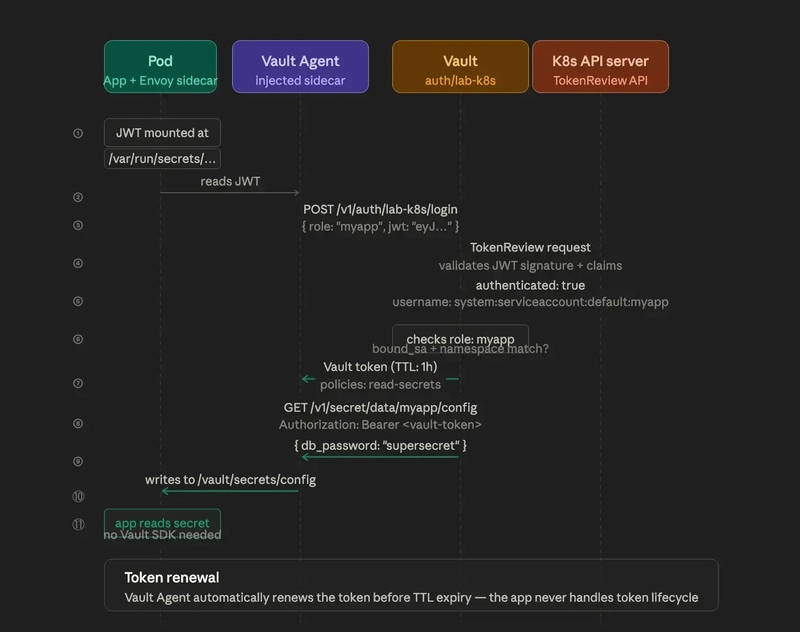
Vault Kubernetes auth flow — pod presents service account token, Vault validates, pod receives a Vault token.<br>

Part 6 of 7 — The Mac Kubernetes Lab: A Production-Mirror Setup from Scratch.

Previously in Part 5: We installed Istio with revision-based upgrades, MetalLB for LoadBalancer IPs, and practised traffic management with Gateways, VirtualServices, and fault injection. The cluster behaves. Now we wire up the last three pieces that turn it from “a working local cluster” into “a real mirror of our production EKS.”

The cluster works. Istio is running. MetalLB is handing out IPs. But it’s still missing three layers that make the production parity actually meaningful:

  • Vault Kubernetes auth — pods authenticate to Vault with their service account tokens, the same way they do in production. No hardcoded secrets, no static credentials.
  • Crossplane with the AWS provider — infrastructure compositions you can develop and test locally before they touch real AWS resources, or any other thought of OpenStack?
  • LimitRanges — default resource requests on every namespace. This one comes from a real incident I want to talk about.

The LimitRange story is the most important of the three, so I’ll tell it properly when we get there. First, the auth layer.

Vault Kubernetes auth.

Vault’s Kubernetes auth method lets pods authenticate by presenting their service account JWT. Vault validates the token against the Kubernetes API server and exchanges it for a Vault token with the appropriate policies attached.

On the production EKS clusters at work, this is how microservices retrieve database credentials, API keys, and TLS certificates: no hard-coded secrets, no secret sprawl, every issuance audit-logged in Vault.

Setting it up locally means I can test the full injection workflow without a VPN, and debug failures on a cluster where the stakes are zero.

Vault Kubernetes auth flow — pod presents service account token, Vault validates, pod receives a Vault token.<br>

Installing the Vault agent injector.

We deploy just the Vault agent injector in the lab cluster. It points to the external Vault VM rather than running its own Vault server:

# 💻 Mac
kubectx lab-cluster

helm repo add hashicorp https://helm.releases.hashicorp.com
helm repo update

# Get the vault VM IP - does not persist across sessions
export VAULT_IP=$(orb run -m vault hostname -I | awk '{print $1}')
echo "VAULT_IP=$VAULT_IP"
helm install vault hashicorp/vault 
  --namespace vault --create-namespace 
  --set "injector.externalVaultAddr=http://$VAULT_IP:8200"

kubectl get pods -n vault
# vault-agent-injector-xxx   1/1   Running   0   30s

Configuring K8s auth on Vault.

Run this on the vault VM, pointing Vault at the lab cluster’s API server:

# 🖥️ VM: vault

# Re-export - always required, doesn't persist across sessions
export VAULT_ADDR='http://127.0.0.1:8200'
export VAULT_ROOT_TOKEN=$(grep 'Initial Root Token' ~/vault-init.txt | awk '{print $NF}')

# If Vault is sealed after a reboot:
# vault operator unseal $(grep 'Unseal Key 1' ~/vault-init.txt | awk '{print $NF}')
vault login $VAULT_ROOT_TOKEN

# Get CP_IP from the Mac terminal: orb run -m cp01 hostname -I | awk '{print $1}'
export CP_IP=<cp01-ip>

# Regenerate the CA cert if /tmp was cleared after reboot
vault read -field=certificate pki_k8s/issuer/default > /tmp/lab-ca.crt

# Enable Kubernetes auth (safe to re-run - ignores "already enabled")
vault auth enable -path=lab-k8s kubernetes 2>/dev/null || echo "already enabled"

# Configure - point Vault at the lab cluster API server
vault write auth/lab-k8s/config 
  kubernetes_host="https://$CP_IP:6443" 
  kubernetes_ca_cert=@/tmp/lab-ca.crt

vault read auth/lab-k8s/config

Testing K8s auth.

Create a simple role and test it from a pod:

# 🖥️ VM: vault

# Create a policy
vault policy write read-secrets - <<EOF
path "secret/data/myapp/*" {
  capabilities = ["read"]
}
EOF
# Create a K8s auth role
vault write auth/lab-k8s/role/myapp 
  bound_service_account_names=myapp 
  bound_service_account_namespaces=default 
  policies=read-secrets 
  ttl=1h

# Write a test secret
vault secrets enable -path=secret kv-v2 2>/dev/null || true
vault kv put secret/myapp/config db_password="supersecret"
# 💻 Mac — deploy a pod with Vault annotations
kubectl apply -f - <<EOF
apiVersion: v1
kind: ServiceAccount
metadata:
  name: myapp
  namespace: default
---
apiVersion: v1
kind: Pod
metadata:
  name: vault-test
  namespace: default
  annotations:
    vault.hashicorp.com/agent-inject: "true"
    vault.hashicorp.com/role: "myapp"
    vault.hashicorp.com/agent-inject-secret-config: "secret/data/myapp/config"
spec:
  serviceAccountName: myapp
  containers:
  - name: app
    image: busybox
    command: ["sleep", "3600"]
EOF

# Check the secret was injected
kubectl exec vault-test -c app -- cat /vault/secrets/config
# db_password: supersecret

If that last line returns the password, the whole chain works: service account JWT → Vault validation → Vault token → secret retrieval → file injection. Every link of the chain is what a real production app does.

Crossplane.

Crossplane turns a Kubernetes cluster into a universal control plane for cloud infrastructure. Instead of Terraform modules or CloudFormation stacks, you define infrastructure as Kubernetes custom resources, and Crossplane reconciles them continuously.
I use it at work to provision AWS resources (EKS node groups, RDS, S3 buckets, IAM roles) and VMware Cloud Director resources through a custom provider. The lab version mirrors the AWS side of that.
Crossplane composites — an XR triggers a Composition that creates multiple Managed Resources across cloud providers.

Installation:

# 💻 Mac
helm repo add crossplane-stable https://charts.crossplane.io/stable
helm repo update

# Composition Functions are enabled by default in recent versions.
# The --enable-composition-functions flag was removed.
helm install crossplane crossplane-stable/crossplane 
  --namespace crossplane-system --create-namespace

kubectl get pods -n crossplane-system -w
# NAME                                       READY   STATUS    AGE
# crossplane-xxx                             1/1     Running   60s
# crossplane-rbac-manager-xxx               1/1     Running   60s

Installing the AWS provider

💻 Mac

kubectl apply -f – <<EOF
apiVersion: pkg.crossplane.io/v1
kind: Provider
metadata:
name: provider-aws-ec2
spec:
package: xpkg.upbound.io/upbound/provider-aws-ec2:latest
EOF

kubectl get pkg

NAME INSTALLED HEALTHY PACKAGE AGE

provider-aws-ec2 True True xpkg.upbound.io/upbound/provider-… 60s

A minimal composition:

A bare-minimum ProviderConfig enough to verify the install is working:

# 💻 Mac
kubectl apply -f - <<EOF
apiVersion: aws.upbound.io/v1beta1
kind: ProviderConfig
metadata:
  name: default
spec:
  credentials:
    source: Secret
    secretRef:
      namespace: crossplane-system
      name: aws-creds
      key: creds
EOF

In a real setup, you create a IRSA ( IAM Role for Service Account) to authenticate and give the provider permission to create and monitor resources. For local validation, the provider installs, and the compositions can be validated structurally without ever calling AWS.

The LimitRange story.

This is the one that came from a real incident at work.

We had repeated disk-pressure events in our production EKS cluster. Pods with no resource requests had crept into a few namespaces — someone deployed a YAML that omitted resources: entirely, and nobody caught it in review. The Kubernetes scheduler had no signal about their consumption, so nodes ended up overcommitted. Then ephemeral storage filled up, eviction kicked in, and a couple of unrelated pods went down with it. Total downtime measured in tens of minutes. Cause-and-effect chain that took a while to untangle.

The fix is one of the most boring features in Kubernetes: LimitRanges. They set default resource requests and limits at the namespace level. Any container that doesn’t specify its own requests gets the defaults applied automatically by the admission controller. The scheduler always has a signal. Overcommit becomes a deliberate choice, not an accident.

# 💻 Mac
kubectl apply -f - <<EOF
apiVersion: v1
kind: LimitRange
metadata:
  name: default-limits
  namespace: default
spec:
  limits:
  - default:
      memory: 512Mi
      cpu: 500m
    defaultRequest:
      memory: 128Mi
      cpu: 100m
    max:
      ephemeral-storage: 2Gi
    type: Container
EOF

Apply this to every namespace that hosts workloads. In production, I now apply it as a post-provisioning step on every new namespace:

# 💻 Mac — apply to multiple namespaces
for ns in default vault crossplane-system istio-system; do
  kubectl apply -f limitrange.yaml -n $ns
done

The ephemeral-storage max is the part that specifically addresses the disk-pressure failure mode — it bounds how much scratch space a container can consume, which is what spirals when ephemeral storage runs unbounded.

Verifying the complete EKS mirror.

Let’s confirm the whole stack is up:

# 💻 Mac
kubectl get nodes -o wide
# NAME       STATUS   ROLES           VERSION
# cp01       Ready    control-plane   v1.34.x
# worker01   Ready    <none>          v1.34.x
# worker02   Ready    <none>          v1.34.x

kubectl get pods -A
# Cilium/Calico, CoreDNS, istiod-1-26, MetalLB, Crossplane, Vault injector - all Running

Full EKS mirror stack running — all components healthy.<br>

Local vs production — what’s the same and what differs:

Local vs production — what’s the same and what differs:
The only meaningful differences are the CNI (because of OrbStack’s VM capabilities, as we covered in Part 4) and the LoadBalancer implementation. Everything else is identical in configuration. The mental model from this lab transfers directly to the production cluster, and vice versa.

In the final article: How to stop and start the lab without losing state, the CKS exam scenarios this cluster was purpose-built for, and the shell aliases that make the whole thing pleasant to live with.

← Part 5: How I Practise Istio Upgrades Locally Before Touching Production EKS | Part 7: The Day 2 Reality of Running a Kubernetes Lab on Your Mac: Stop/Start, CKS Scenarios, and What I Learned Building It →

I’m Noah Makau, a DevSecOps engineer based in Nairobi. I run a small DevOps consultancy and hold CKA, CKAD, and the AWS Solutions Architect Professional certifications , currently preparing for CKS. I write about Kubernetes, Vault, Crossplane, and the day-to-day of running platforms that actually have to stay up.
originally published at blog.arkilasystems.com

İçişleri Bakanlığı: “Araçlarda pense, tornavida ve ampul bulunması zorunlu hale getirilmedi.”

İçişleri Bakanlığı:

İçişleri Bakanlığı: "Araçlarda pense, tornavida bulunması zorunlu hale getirilmedi."TRT Haber geçtiğimiz hafta yayınladığı haberde, Karayolları Trafik Kanunu’ndaki düzenlemeyle birlikte araçlarda bulunması gereken güvenlik ekipmanlarına yenilerinin eklendiğini söylemişti. Bu haberde yangın tüpü, ilk yardım seti ile reflektörün yanı sıra pense, tornavida ve araçlarda kullanılan çeşitli ampullerin de zorunlu ekipmanlar arasına alındığı aktarılmış, buna ek olarak stepne veya lastik şişirme aparatları, çekme halatı, bijon anahtarı ve kriko gibi ekipmanların da artık araçlarda bulundurulması gerekiyor denilmişti. Genel olarak tepki çeken bu konuda yeni bir açıklama yapan İçişleri Bakanlığı, “Değerli Basın Mensupları, araçlarda bulundurulması gereken ekipmanlara dair yönetmelik değişikliği en son 2012 yılında yapılmıştır. Yeni bir düzenleme yoktur. Bu konuya ilişkin dolaşıma sokulan ‘pense, tornavida vs. zorunlu hale getirildi’ içerikli haberler doğru değildir. Lütfen itibar etmeyiniz.” ifadelerini kullandı.
İçişleri Bakanlığı: “Araçlarda pense, tornavida ve ampul bulunması zorunlu hale getirilmedi.” yazısı ilk olarak Teknoloji haberleri – LOG üzerinde yayınlandı.

Why AI Should Not Write SQL Against ERP Databases

Most AI + ERP demos start with the same pattern:

  1. Connect an LLM to a database.
  2. Show it the schema.
  3. Ask it to generate SQL.
  4. Execute the SQL.
  5. Summarize the rows.

For a toy database, this is fine.

For an ERP system, it is a weak default.

ERP data is not just tables and columns. It is protected by business semantics, user permissions, record rules, company boundaries, field visibility, implementation-specific conventions, and audit requirements.

The question should not be:

Can the model generate SQL?

The better question is:

Can the system answer business questions while preserving the governance rules that already protect the ERP?

That difference matters.

The demo path is not the production path

The fastest demo is often the most dangerous production design.

If the model sees a database schema, it can produce impressive results quickly:

SELECT ...
FROM sale_order
JOIN res_partner ...

But an ERP database schema is not the real product boundary.

The real boundary lives higher up:

  • which user is asking;
  • which business object the user is allowed to access;
  • which record rules apply;
  • which companies the user can see;
  • which fields are sensitive;
  • which workflow states have business meaning;
  • which metric definition is correct;
  • which query should be rejected instead of guessed.

A generated SQL string does not naturally carry that context.

This is why “LLM writes SQL against the ERP database” is a useful demo technique, but a poor default architecture.

Raw SQL skips too many boundaries

When an AI client generates raw SQL against an ERP database, several boundaries become fragile.

First, user permissions are usually not encoded in the schema. A table name does not tell the model which user can see which records, which company boundary applies, or which fields are hidden by business policy.

Second, business semantics are not obvious from column names. A field called state might mean a sales lifecycle state, an invoice state, a delivery state, an approval state, or a local customization.

Third, audit becomes weak. If the main artifact is a generated SQL query, the system still has to explain why that query was allowed, what business model it mapped to, which permission rules were applied, and whether the returned result was within the user’s access boundary.

Fourth, the interface tends to expand in the wrong direction. Once arbitrary SQL is accepted, users will ask for joins, subqueries, CTEs, window functions, unsupported tables, and “just one more column.” The capability looks stronger on paper, while the safety boundary becomes less clear.

For ERP AI, “supports arbitrary SQL” is not the strongest promise.

A better promise is:

The system can answer useful business questions through governed query paths, and it can clarify or reject requests when the boundary is not safe.

ERP AI needs semantic models

A governed semantic layer changes the shape of the problem.

Instead of exposing physical tables, the system exposes query models:

  • business fields with human-readable meaning;
  • dimensions and measures;
  • supported filters and aggregations;
  • known relationships;
  • metric definitions;
  • permission and field boundaries;
  • safe execution routes.

The model no longer needs to discover the ERP from raw schema. It receives a controlled business interface.

For example, in an Odoo context, a user should ask:

Show me the top 5 customers by total sales revenue in the last 30 days.

The system should route that through a governed sales query model, apply the effective Odoo user’s permissions, execute within the supported query capability, and return structured results with evidence.

The model should not be invited to use raw tables as its primary interface.

MCP is useful, but protocol is not enough

MCP gives AI clients a standard way to call tools. That is valuable.

But MCP alone does not make a tool safe.

An MCP tool can expose raw SQL. It can ignore permissions. It can leak internal errors. It can return data the user should never see.

For enterprise data, governance has to live inside the tool boundary:

  • authentication and tenant context;
  • user or service-principal binding;
  • permission projection from the host system;
  • semantic model selection;
  • query validation;
  • result sanitization;
  • audit evidence;
  • fail-closed behavior when scope is unclear.

In other words, the tool should not simply be a protocol wrapper around database access.

It should be a governed execution boundary.

Odoo is a good case study

Odoo makes the problem concrete.

An Odoo user is not just a PostgreSQL user. Odoo controls access through model permissions, record rules, company access, and field boundaries.

If an AI tool bypasses Odoo and directly queries PostgreSQL, it risks bypassing the system that administrators actually use to govern data access.

The safer route is:

  • MCP clients connect through Odoo-issued access.
  • Query model visibility follows Odoo-side access boundaries.
  • Odoo rules are applied before query execution.
  • Multi-company boundaries are preserved.
  • Field boundaries are handled before results reach the AI client.
  • Raw database access is kept out of the model’s hands.

The important point is not that Odoo is the only target.

The important point is that the host system should remain the authority for permissions and business context.

That same principle applies to other business systems as well.

Capability should be layered, not unlimited

Another mistake is to measure progress by asking:

How much SQL can the AI generate?

For governed business data, a more useful question is:

Which classes of business questions can the system answer safely, and where does it clarify or reject?

In Foggy, the query capability is intentionally layered:

  • standard DSL-style queries for detail rows, filters, aggregations, TopN, and trends;
  • controlled expression-style queries for comparisons, validations, and audit checks;
  • staged query patterns for ratios, cumulative contribution, SLA-style checks, and funnel-like calculations;
  • governed small-result secondary analysis;
  • clarification when time range, metric definition, grain, or business rule is missing;
  • rejection when the request asks for prediction, causal claims, physical table access, permission bypass, or write-back actions.

This is a more honest contract than “the model can write any SQL.”

It allows useful business analysis while keeping unsupported requests visible.

What this means for Odoo

I am applying this design through Foggy Odoo Bridge.

The current Odoo direction is:

  • Odoo 17 Community and Enterprise;
  • Odoo.sh or On Premise as the practical deployment targets;
  • Community edition for lightweight MCP / semantic-query evaluation;
  • Pro edition for the in-Odoo AI Chat experience, curated query models, audit/export workflows, and supported production adoption;
  • standalone MCP access without requiring OpenAI or Anthropic SDKs in the Odoo environment;
  • optional built-in AI Chat when an administrator chooses to configure an LLM provider.

The intended message is not:

AI directly queries the Odoo database.

The intended message is:

AI clients query Odoo business data through governed semantic tools while Odoo permissions remain in control.

That distinction is the product.

The safe default

For ERP AI, I think the safe default should be:

  1. Do not expose unrestricted database schema to the model.
  2. Do not make model-generated SQL the primary interface.
  3. Expose governed semantic tools instead.
  4. Preserve host-system permissions before query execution.
  5. Return structured results with evidence.
  6. Clarify or reject when the governance boundary is not clear.

The goal is not to make AI look powerful in a demo.

The goal is to make AI data access usable inside real enterprise boundaries.

Links

Foggy Odoo Bridge Community:

https://apps.odoo.com/apps/modules/17.0/foggy_mcp

Foggy Odoo Bridge Pro:

https://apps.odoo.com/apps/modules/17.0/foggy_mcp_pro

Community repo:

https://github.com/foggy-projects/foggy-odoo-bridge

Product page:

https://odoo.foggysource.com

Docs:

https://foggy-projects.github.io/foggy-data-mcp-docs/

I am especially interested in feedback from Odoo implementers, ERP engineers, and developers building MCP tools for business data.

Vibe coding works until it doesn’t. The debt is real.

Every dev I know is shipping faster than ever. Nobody wants to talk about what the codebase looks like six weeks later.

We’re in the golden age of AI-assisted development. You can go from idea to working feature in hours instead of days. Payment integrations, auth flows, CRUD scaffolding — LLMs eat that stuff for breakfast. But I keep noticing the same pattern. The fast part stays fast. The hard part gets harder.

The Speed Is Real

I’m not here to be a hater. AI-generated code has genuinely changed how quickly you can move through the boring stuff.

No more boilerplate code required and developers no longer have to write repetitive glue code. The payment integration that previously required a week to read the documentation? Developers are now saying they can deliver that in a tiny fraction of the time.

I know, right? I mean, you’re not joking. This is awesome!

The Debt Is Also Real

This is when things start to look messy. LLMs are excellent at producing code that works. They’re terrible at producing code that fits.

They handle boilerplate well but struggle with system design and abstractions. They don’t understand your domain boundaries. They don’t know why you split that service in two last quarter. They generate plausible-looking architecture that quietly fights against the grain of your system.

You deliver the feature. Tests pass. PM is satisfied. And somewhere in the guts of your codebase, you now have a chunk of code that nobody fully understands — including the person who prompted it into existence.

Vibe Debt Is Not Tech Debt

There is a term I recently heard that I feel really captures this: vibe debt.

Vibe debt is different from tech debt. Tech debt is a decision you make, a conscious trade-off: “I know I’m going to regret this shortcut, but it’s worth it because we’re going to overhaul this component soon.” Vibe debt is what happens when you ship code that you never quite had a handle on to begin with.

The distinction is important:

→ Tech debt: “We hardcoded this config because launch is Friday. We’ll fix it next sprint.”
→ Vibe debt: “The AI wrote this service layer and it works but I couldn’t explain the design decisions if you asked me.”

Vibe debt is invisible because every test passed and management happily ticked off Jira stories. You don’t notice it until something breaks in a way that requires you to actually reason about the system. And suddenly you’re staring at code that has no coherent design philosophy because it was generated piecemeal by a model optimizing for “make the test pass.”

Accidental vs. Essential Complexity

This is the crux of the issue. Vibe coding selects hard for speed on accidental complexity — the stuff that’s tedious but not intellectually difficult. Configuration files, API…

However, it actually undermines your capability to manage essential complexity — the real important things like domain modeling, state management across boundaries, and making decisions about what not to build.

LLMs can’t do the work for you. And if all you do is prompt and not think, you lose the muscle for it. 🧠

I’ve seen teams move incredibly fast for two months and then hit a wall where every new feature takes longer than it would have without AI. Because the codebase has no coherent shape. It’s a patchwork of locally correct, globally incoherent decisions.

What I Actually Think You Should Do

I’m not suggesting we abandon AI. That ship has sailed and honestly it would be dumb to stop.

Approach AI-generated code like you would a pull request from a junior developer. Take the time to read it. Challenge the architecture. Refactor it into your existing patterns before merging. The ten minutes you spend reshaping AI-generated code saves you days of confusion later.

Also, be honest with yourself about what you actually understand. If you can’t explain why the code is written the way it is, you haven’t shipped a feature. You’ve shipped a liability. 💀

So here’s my question: have you already hit a vibe debt wall? Or are you still in the honeymoon phase where everything feels fast and free?

Shipping at the Edge: Migrating a Coffee Subscription Platform to Cloudflare Workers

Building a D2C platform isn’t just about the product; it’s about the resilience of the delivery chain. I’ve been working on Brewly Store, a coffee subscription service, and recently decided to tear down our traditional setup to embrace a more modern, edge-first architecture.

The Tech Stack 🛠:

Runtime: Cloudflare Workers (using the Hono framework).

Language: TypeScript.

Infrastructure: AWS EKS for core services.

Delivery: A full GitOps pipeline using ArgoCD and GitHub Actions.

Why the Migration?
We moved from a containerized AWS ECR setup to Cloudflare Workers. Why?

Latency: Moving logic closer to the user.

Scalability: Handling subscription spikes without managing scaling groups.

Developer Experience: Hono provides a lightweight, expressive way to handle routing that feels incredibly fast.

The Security-First Mindset 🔒:
As a DevOps specialist, I believe infrastructure is only as good as its security. For Brewly, I’ve implemented:

GPG-signed commits to ensure the integrity of our code.

Strict secret management using tools like Kleopatra and PwPush.

GitOps-driven deployments where ArgoCD ensures the cluster state matches our repository exactly.

Lessons Learned from the Trenches:
The biggest challenge wasn’t the code—it was the shift in thinking from “servers” to “distributed functions.” Debugging edge cases in a serverless environment requires a robust observability stack, which we are currently refining within our EKS cluster.


DevOps Journey UA – YouTube

Welcome to the channel! I’m Alex, a DevOps Specialist. On this channel, I share hands-on experience in building modern IT infrastructure, automation, and implementing BigTech standards in real-world projects.

What to expect:
Cloud Solutions: Deep dives into AWS (EKS, ECR, Secrets Manager) and transitioning to Serverless architecture (Cloudflare Workers, D1).

Containerization: Everything about Docker, Kubernetes, and CI/CD pipeline optimization.

Security First: Practical advice on secret management, GPG-signed commits, and infrastructure security.

IT Productivity: Reviews of task managers (Jira, Linear, ClickUp) and building effective workflows for developers.

Why subscribe?
I don’t just talk about theory—I show the “end-to-end” process: how to migrate a real service from AWS to Cloudflare, how to set up automated NAS backups, or how to organize a team’s work in Jira. All content is based on my daily work with Linux (Ubuntu) and CLI-driven environments.

favicon
youtube.com

İçişleri Bakanlığı, “HAYAT 112 Acil” uygulamasını yayınladı

İçişleri Bakanlığı,

İçişleri Bakanlığı, "HAYAT 112 Acil" uygulamasını yayınladıİçişleri Bakanı Mustafa ÇİFTÇİ tarafından ilk bilgisi geçtiğimiz hafta verilen “HAYAT 112 Acil” uygulaması resmi olarak yayınlandı. iOS ve Android için çıkan uygulama için yapılan açıklamada, “Zor zamanlarda vatandaşımızın yanında olmak, yardım elini en hızlı şekilde uzatmak bizim en büyük sorumluluğumuzdur. Bu anlayışla geliştirdiğimiz “HAYAT 112 Acil” mobil uygulamamızı milletimizin hizmetine sunduk. HAYAT 112 Acil sistemimizi yalnızca gerçek ihtiyaç anlarında kullanalım. Çünkü her asılsız ihbar, yardıma ihtiyaç duyan bir kardeşimizin hakkına girmektir.” ifadelerine yer verildi. Uygulamanın Play Store’daki açıklaması ise şöyle oldu: “Uygulama ile; anlık konum bilgisi ile acil ihbar oluşturabilir, kayıtlı adresler üzerinden hızlı bildirim yapabilir, profil bilgilerinizi görüntüleyebilir ve güncelleyebilir, yakınlarınızı ekleyerek acil durumlarda iletişim kurulmasını sağlayabilirsiniz, 112 Acil Çağrı Merkezi’ni doğrudan arayabilirsiniz, harita ve iletişim araçlarına erişebilirsiniz, başvuru ve eğitim içeriklerini görüntüleyebilirsiniz, bildirimler üzerinden size iletilen uyarıları takip edebilirsiniz. 112 Acil sistemi; sağlık, güvenlik ve diğer acil hizmetlere tek bir numara üzerinden hızlı erişim sağlar. Bu uygulama, […]

İçişleri Bakanlığı, “HAYAT 112 Acil” uygulamasını yayınladı yazısı ilk olarak Teknoloji haberleri – LOG üzerinde yayınlandı.