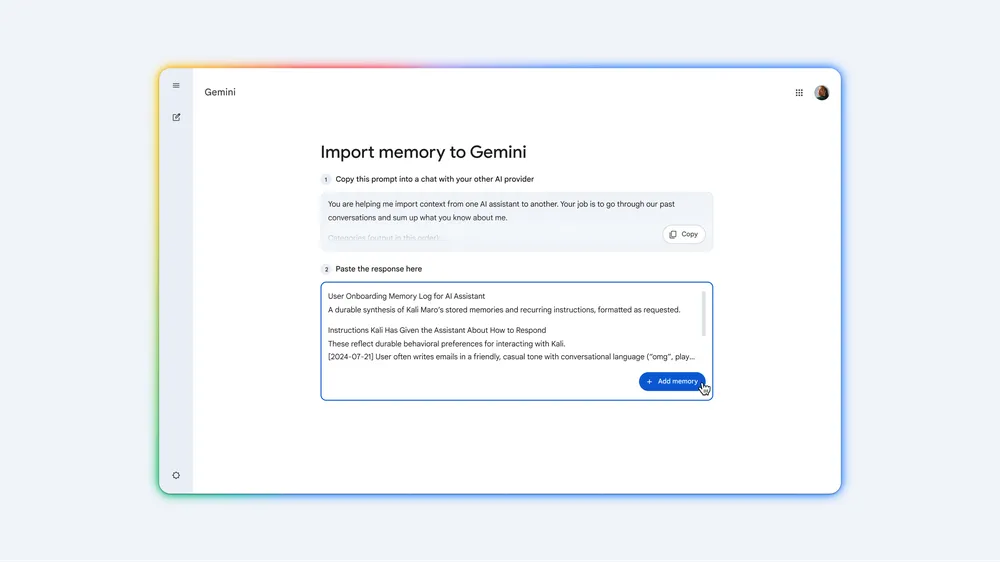
Yapay zeka platformlarındaki sohbet geçmişleri doğrudan Gemini’a aktarılabilecek
En çok satan katlanabilir telefon markaları açıklandı
Kuzey Amerika’da katlanabilir telefon pazarı hareketleniyor. Samsung’un payı gerilerken Motorola hızla yükseliyor. Apple’ın iPhone Fold hamlesi dengeleri daha da değiştirebilir.Çok sevilen Dispatch, bu yaz Xbox platformlarına geliyor
2025’in dikkat çeken, AdHoc Studio tarafından geliştirilen anlatı oyunlarından Dispatch, bu yaz Xbox platformuna çıkacak. Ayrıca oyun Xbox Play Anywhere desteğiyle gelecek.Battlefield 6’da yapay zeka yoğun olarak kullanıldı
Battlefield 6, oyuncuların fark ettiğinden çok daha fazla yapay zekaya dayalı olabilir. EA’in FPS oyununu birden fazla yapay zeka aracıyla geliştirdiği yönünde yeni raporlar ortaya çıktı.Error Handling in JavaScript: Try, Catch, Finally
Introduction
Imagine this: You’ve just launched your shiny new web app. Users are loving the smooth UI… until one clicks a button and the entire page freezes with a cryptic red error in the console. Your whatsapp starts blowing up with angry messages.
That’s the nightmare every developer has lived through.
The good news? JavaScript gives you a superhero cape called Error Handling — specifically the try, catch, and finally blocks. With these tools, you can turn crashes into graceful recoveries, make debugging easier, and keep your users happy even when things go wrong.
In this blog, we’ll break it all down step by step, with real-world examples, so you can start writing bulletproof code today.
What Are Errors in JavaScript?
JavaScript errors are unexpected events that break the normal flow of your program. There are two main types:
- Syntactical errors (caught before the code even runs like during compilation — think missing brackets or typos)
- Runtime errors (the sneaky ones that happen while the code is executing)
Let’s look at some classic ones that crash apps in the wild:
// Example 1: ReferenceError
console.log(nonExistentVariable); // Oops! Variable doesn't exist
// Example 2: TypeError
const num = 42;
num.toUpperCase(); // Numbers don't have toUpperCase()
// Example 3: RangeError (common in loops or APIs)
new Array(-1); // Negative array length? Nope.
Without handling, these errors stop execution immediately. Your app crashes, users see a blank screen or broken feature, and you’re left hunting down through console-logs at 3AM.
Using try and catch blocks
This is where the error-handling begins. The try...catch construct lets you attempt risky code and catch any errors that occur.
Basic syntax:
try {
// Code that might throw an error
riskyOperation();
} catch (error) {
// What to do when something goes wrong
console.error("Something went wrong:", error.message);
// Show user-friendly message instead of crashing
showErrorMessageToUser("We couldn't load your data. Please try again later.");
}
Real-world example with graceful failure:
async function fetchUserData(userId) {
try {
const response = await fetch(`/api/users/${userId}`);
if (!response.ok) throw new Error("User not found");
const data = await response.json();
renderUserProfile(data);
} catch (error) {
console.error("Fetch failed:", error);
// Graceful failure in action
displayFallbackUI("Couldn't load profile. Showing demo data instead.");
}
}
Graceful failure means the app doesn’t die — it recovers intelligently. Users see a polite message or placeholder content instead of a broken page. Your app stays alive, and you keep your users on the page.
Pro tip for debugging:
Inside the
catchblock, you get the full error object with stack trace, message, and line number which is very help.
The finally Block
Sometimes you need to end up with something no matter what happens — whether the code succeeded or failed. That’s exactly what finally is for.
Syntax:
try {
// risky code
} catch (error) {
// handle error
} finally {
// This ALWAYS runs whether there's any error or not
console.log("Cleanup complete");
}
Classic use case: Closing database connections, hiding loading spinners, or resetting timers.
Throwing Custom Errors
Sometimes the built-in errors aren’t descriptive enough. You can throw errors using the throw keyword.
function validateAge(age) {
if (typeof age !== "number" || age < 0) {
throw new Error("Age must be a positive number");
}
if (age > 120) {
throw new RangeError("A Human body can't live more than 120 years!!");
}
}
// Usage
try {
validateAge(-5);
} catch (error) {
console.error(error.name, error.message); // Error: Age must be a positive number
}
Even better: Create custom error classes for more control by inheriting from Error class.
class ValidationError extends Error {
constructor(message) {
super(message);
this.name = "ValidationError";
this.statusCode = 400;
}
}
throw new ValidationError("Invalid email format");
Custom errors make debugging faster because you instantly know what went wrong, where and why.
Why Error Handling Matters
Let’s be honest — writing perfect code is impossible keeping in mind about every possible circumstances! But handling errors gracefully separates good developers from great ones.
Here’s why it’s non-negotiable:
- Better User Experience: Users never see scary technical errors. They get friendly messages or seamless fallbacks.
- Graceful Failure: Your app stays functional even when external services (APIs, databases) go down.
- Easier Debugging: Centralized error logging + stack traces = bugs fixed in minutes instead of hours.
- Production Safety: Prevent one small error from taking down your entire application.
- Professional Code: It shows you care about reliability and user trust.
Conclusion: Make Your Code Bulletproof
Error handling isn’t just a nice-to-have feature — it’s the foundation of reliable, user-friendly JavaScript applications.
By mastering try, catch, and finally (and knowing when to throw custom errors), you transform potential disasters into controlled, graceful experiences. Your users stay happy, your debugging sessions become shorter, and your code becomes something you can truly be proud of.
Next step: Open your current project and wrap at least one risky operation in a try...catch...finally today. You’ll immediately feel the difference.
Happy coding — and may your consoles stay green!
Your AI Agents Are Exploring Blind. Here’s How to Give Them a Map.
Draft — queued after ai-autonomy-dod
Every session, Claude reads the same files. Codex re-discovers the same plugin pattern. Gemini asks the same questions about folder structure.
The agents aren’t slow. They’re starting from zero every time.
The missing piece isn’t a smarter model. It’s a standing index.
The Exploration Tax
In a multi-agent workflow, every agent pays an exploration tax at the start of every session. Before it can do anything useful, it has to orient itself: Where does the plugin system live? What naming conventions apply? Which files are subtree-managed and off-limits? What decisions have already been made?
In a small codebase, this is annoying. In a large one — or one with multiple agents running in parallel — it’s where tokens go to die.
The standard fix is a CLAUDE.md or AGENTS.md that describes the codebase in prose. That helps. But prose is passive. An agent reads it and still has to map it to the files it’s about to touch. It’s a README, not a map.
What an Index Actually Is
An index is different from documentation.
Documentation explains. An index locates.
What I want an agent to start with isn’t a paragraph about the plugin system — it’s: “Public functions go in scripts/plugins/. No underscore prefix. The dispatcher in scripts/k3d-manager loads them lazily. Here are the current plugins and their public functions.”
That’s navigable. An agent can read that and go directly to the right file, with the right pattern, without exploration.
The insight behind using Cline as an indexer: Cline has persistent memory and can maintain a structured understanding of a codebase across sessions. Instead of using it as a code generator, you use it as a dedicated reconnaissance agent — one whose job is to read the repo, build a structured map, and keep it current.
Other agents consume the map. They don’t re-explore.
What the Index Contains
A useful codebase index has three layers:
Structure — where things live and why:
scripts/
k3d-manager # dispatcher — maps function names to plugin files
lib/ # core libraries; subtree-managed via lib-foundation
plugins/ # lazy-loaded modules; one file per tool
tests/ # BATS suites; pure logic, no cluster mocks
Contracts — the rules agents must follow, encoded as facts not advice:
- New plugins: scripts/plugins/<name>.sh
- Public functions: no underscore prefix
- Private functions: _ prefix
- Privileged commands: _run_command --prefer-sudo, never bare sudo
- if-count limit: ≤ 8 per function; see etc/agent/if-count-allowlist for exceptions
- Subtree-managed: scripts/lib/foundation/ — edit upstream only
State — what’s in-flight, what’s decided, what’s blocked:
Active branch: k3d-manager-v0.9.17
Current task: _antigravity_ensure_acg_session
Blocked on: lib-foundation v0.3.14 (5 fixes pending)
The third layer is what memory-bank/activeContext.md already does. The first two are what Cline can generate and maintain automatically.
The Workflow
The pattern:
-
Cline indexes once — reads the full codebase, generates
docs/index/structure.md,docs/index/contracts.md. Checks them in. - Cline updates on change — when files move or patterns change, Cline updates the index. This is its recurring job, not a human’s.
- Other agents start with the index — Claude, Codex, Gemini get the index as part of their context window. They skip exploration. Their first action is implementation.
The result: agents start oriented. They don’t re-discover the plugin pattern on commit seven. The exploration tax disappears.
What This Changes
Three things shift when you add a standing index:
Token efficiency — agents spend their context window on the task, not the codebase. In a 200k-token window, that’s not trivial.
Consistency — every agent starts from the same map. Codex doesn’t invent a naming convention that Claude doesn’t know about. They’re both reading the same contracts.
Handoff clarity — when you switch agents mid-task, the new agent picks up where the last one left off. The index tells it what’s been decided. The memory-bank tells it what’s in-flight. No re-briefing required.
The Deeper Pattern
Multi-agent workflows have a shared-context problem. Each model has its own context window. Each session starts fresh. The codebase is the only thing they all share — but it’s not structured as context. It’s structured as code.
An index is the bridge. It takes the implicit structure of the repo and makes it explicit, navigable, and consumable by any agent in any session.
The agents don’t get smarter. They just stop starting blind.
The codebase is the shared context. The index is the key.
Ansible Certification vs DevOps Certifications: Key Differences and Career Guide
Choosing between Ansible certification and other DevOps certifications can be confusing for IT professionals entering the automation and cloud ecosystem. Ansible certification mainly focuses on automation and configuration management, helping professionals automate tasks like server setup, application deployment, and infrastructure management using simple YAML playbooks. It is considered beginner-friendly and ideal for those starting their DevOps journey.
On the other hand, DevOps certifications cover a broader range of tools and practices, including cloud platforms, containerization, CI/CD pipelines, and infrastructure automation using tools like AWS, Docker, Kubernetes, and Jenkins. This guide explains the key differences, learning curve, and career opportunities to help professionals choose the right path based on their goals in cloud computing and automation.
I built an AI tool for incident investigation (looking for honest feedback)
Hey everyone 👋
Over the past couple of weeks, I’ve been building a side project called Opsrift.
It started from a pretty simple frustration:postmortems, handovers, and incident documentation take way too much time — and most of it is repetitive.
But while building it, I realized something more interesting:
The real problem isn’t writing postmortems.It’s understanding what actually happened during an incident.
So I ended up going a bit further than just a generator.
What Opsrift does right now
The platform is focused on incident workflows — mostly for people working in SRE, support, or operations.
Right now it includes:
- Postmortem generator
Takes incident data and generates structured postmortems in seconds.
- Handover generator
Useful for shift-based teams — turns messy updates into clean handovers.
- Runbook generator
Creates structured runbooks based on incident patterns or inputs.
- Incident Investigator (main focus)
This is the part I’m most interested in:
Pulls data from tools like Jira, PagerDuty, and Opsgenie
Correlates it with deployments from GitHub
Tries to reconstruct what actually happened (timeline, possible causes, etc.)
The goal is to reduce the time spent jumping between tools during investigations.
- Status page
Basic external communication for incidents.
Integrations
Current integrations:
Jira
PagerDuty
Opsgenie
GitHub
Slack
Confluence
Still early — some of these are rough.
What it’s NOT (yet)
I want to be upfront:
It’s not a replacement for your incident management tools
It’s not perfect at root cause analysis
It’s not “production-grade” in every edge case
Right now it’s closer to:
an AI layer on top of your existing tools to speed up investigation and documentation
Known issues
To save you time:
GitHub login ❌ (bugged right now)
Slack login ❌ (also bugged)
👉 You can still use:
Google login
Email/password signup
Fixing these next.
What I’m trying to figure out
This is where I’d really appreciate help.
I’m trying to validate a few things:
Does the Incident Investigator actually help or is it just “nice to have”?
Are the outputs accurate enough to be trusted?
Would you use something like this in real workflows?
What’s missing for it to be genuinely useful?
Where I want to take this
Longer term, I’m thinking about moving beyond just generating outputs and more into:
detecting patterns across incidents
identifying unstable services
highlighting teams with high escalation rates
correlating deployments with incidents automatically
Basically:
turning incident data into something you can actually act on
If you want to try it
No pressure — even quick feedback is super helpful.
Final note
I’ve worked in NOC/SOC and incident-heavy environments, so this is very much a “scratch your own itch” project.
That said, I’m aware tools like this can easily become:
too generic
inaccurate
or just another dashboard nobody uses
So I’d rather get honest feedback early.
Even if it’s:
“this doesn’t solve anything for me”
That’s useful.
Thanks in advance 🙌
Scaling DevOps Culture: From Improvised Scripts to Platform Engineering
The collection of scripts, manual configurations, and unwritten rules that helped your company get started will eventually begin to hold you back. What once felt improvised and efficient becomes slow and fragile as the team grows. This is a predictable breaking point in an organization’s DevOps culture. The systems that helped a team of ten people move quickly now create friction for a team of fifty. Operational work spreads out, slowing down feature development until you are spending more time dealing with custom deploy logic than writing code.
The costs of “good enough” automation
Early automation is usually just about being practical. You write a script that solves the immediate problem, set up the CI job that gets the build running, and move on. This works for a while, but the cumulative weight of these one-off solutions eventually starts pulling the entire engineering team down.
The limits of ad hoc scripts and tribal knowledge
The first signs of trouble are inconsistencies. Team A’s services run on a slightly different base image than Team B’s because they were configured months apart. One developer’s local environment works perfectly, while a new hire spends their first week fighting with dependencies because a setup script is outdated. It is a direct tax on productivity.
These improvised and undocumented setups end up creating recurring problems. Staging environments start drifting away from production as manual changes accumulate. As a result, deploys become less predictable.
Engineers end up getting pulled into tasks that have no direct connection to the product, such as debugging infrastructure, manually provisioning resources, or investigating deployment failures caused by differences between environments.
Pipelines start depending on specific scripts run locally or CI configurations that are difficult to understand and maintain. And new engineers face a steeper learning curve, not only to understand the codebase, but also to figure out which tools and processes they need to use in order to work on the system.
When “you build it, you run it” hits a limit
The principle of “you build it, you run it” is a great way to create a sense of ownership. A product team is responsible for its service, from code all the way to production. In a small company, this works well. At scale, the problems start to show.
When you have five, ten, or twenty teams all following this principle on their own, duplication appears. Each team builds its own Terraform modules for the same S3 bucket configuration. Each team creates its own alerts for CPU usage. Each team writes its own deploy pipeline for a standard web service.
This model creates bigger problems. The company pays for the same infrastructure and CI/CD work repeatedly, solved in slightly different ways by each team. Without a centralized approach, ensuring that all services follow security best practices or compliance standards becomes almost impossible. The burden ends up falling on individual teams that may not have the required expertise. Product engineers are forced to become specialists in Kubernetes, cloud networking, and observability tools just to keep their features running. Their attention gets split between building the product and managing its operational details.
Platform engineering as an evolution of DevOps culture
The answer is to evolve the environment where developers work while keeping the principle of ownership. That is the idea behind platform engineering. It changes the question from “How do we help each team run their own infrastructure?” to “How do we provide a platform that makes running infrastructure simple and consistent for everyone?”
Going beyond tool-centric DevOps
Many organizations see DevOps only as a set of tools such as CI/CD servers, infrastructure-as-code files, and monitoring dashboards. A platform approach is more about offering shared services and clear workflows.
Instead of simply giving developers raw access to cloud provider tools, a platform offers a higher level of abstraction. A developer should not need to write a complex CI/CD pipeline from scratch. They should be able to add a simple configuration file in the repository that connects to a standard pipeline managed centrally.
This means treating your internal infrastructure as a product. Your developers are your users. The success of the platform is measured by how much faster and more reliably they can deliver value to real customers. Self-service is a huge part of this. A developer should be able to create a new testing environment or check service logs without opening a ticket and waiting for another team.
Redefining roles and responsibilities in a scaling DevOps culture
This shift changes team structure and responsibilities. A common and effective pattern is to create a dedicated platform engineering team. This team is different from a traditional operations team that only acts as a gatekeeper. Its main job is to improve the developer experience and make engineers more effective.
The platform team concentrates the operational knowledge of the system. They build and maintain the core infrastructure, the CI/CD systems, and the observability stack. They also provide the tools and services that product teams use every day.
This creates a collaborative relationship. The platform team builds the standard path for development, and product teams use that standard to move faster. Product teams remain responsible for their own services, but the heavy lifting of the underlying infrastructure is already solved for them. That way they can focus on business logic, while the platform team ensures the infrastructure is secure and reliable.
Building your internal developer platform
Creating a platform is an ongoing process of identifying what slows developers down and building solutions to fix it.
Defining platform capabilities
Start by identifying the most common needs and problems across your engineering teams. The first platform services usually cover a few core areas.
You can offer standardized CI/CD pipelines, with reusable templates or workflows that handle build, testing, security analysis, and deployment for common application types. This way the developer only needs to define what is specific to their service.
Another important area is environment management, offering a simple way to create and destroy development, testing, and staging environments that stay consistent with production.
It is also worth centralizing logs, metrics, and traces. Services can be instrumented automatically with standard configurations, giving teams immediate visibility without requiring a lot of manual setup.
Finally, provide a secure way to manage application secrets and adopt strong security practices by default, such as secure network rules and IAM policies.
Adopting a product mindset for internal tools
Your platform will only succeed if developers actually use it. You cannot simply build it and assume they will show up. You need to treat it like any other product.
That means collecting feedback constantly. Talk to developers, run quick surveys, and create open office hours to answer questions and understand how they work and where they struggle. Use that information to decide what to build next.
Prioritize initiatives that solve real and recurring problems for multiple teams, not just ideas that seem technically interesting. Whenever possible, try to quantify the impact. Ask whether a new tool will save each developer an hour per week or reduce deployment failures by 50%.
It is also important to measure success by tracking adoption of platform services and developer feedback. Look at metrics such as deployment frequency, lead time for changes, and mean time to recovery. A good platform should improve these numbers.
Principles for a platform team
The culture of a platform team determines whether it becomes a help or an obstacle. Some principles tend to work well for successful platform teams.
Focus on helping developers, not controlling them. The platform should provide a standard path, with strong tools and well-supported patterns, but it should also allow alternatives when a team has a good reason to do something differently.
Treat platform services as internal products with clear APIs, good documentation, and easy-to-find materials. Build something small that already delivers value, put it into use, and evolve it based on feedback from teams. The idea is to avoid long cycles trying to build a “perfect” solution that may not solve what developers actually need.
It is also important to communicate continuously. Announce new features, changes, and deprecations through internal demos, posts, or newsletters. Teams should always know what the platform offers today and what is changing.
Making the transition without causing disruption
The goal is to evolve infrastructure gradually without needing to stop product development for a year to rebuild it.
Start with the biggest problem, the thing that generates the most complaints or wastes the most time. It might be inconsistent local environments or the manual process for creating a new service. Solve that first.
For each new platform service you build, provide clear instructions and support to help teams migrate from the old improvised way of working. Sometimes that means creating tools that automate parts of the migration.
The first team that adopts your new CI/CD pipeline and cuts deploy time in half will likely become a strong advocate for the change. Results like that help build momentum and encourage other teams to adopt the new approach.