The 3 Production Failures That Kill AI Agents (And How We Fixed Each One)

Most AI agent demos work perfectly. Most AI agent deployments fail within a week.

I’ve shipped multiple AI agent systems to production in 2026 — a RAG pipeline processing 50K+ documents, a multi-agent medication reconciliation system, a failed-payment recovery engine. Each one taught me something that no tutorial covers: the failure modes that only appear under real load, with real users, over real time.

Here are the three that almost killed our deployments, and the exact patterns we used to fix them.

Failure 1: Context Window Amnesia

The problem nobody warns you about: your agent works perfectly in testing because every test starts fresh. In production, your agent runs across sessions, across users, across days. And it forgets everything.

We built a RAG system for a consulting firm. During demo, it answered every question accurately. In production, users asked follow-up questions that referenced earlier answers. The agent had no idea what they were talking about.

The fix: Structured persistence with tiered retrieval.

class AgentMemory:
    def __init__(self):
        self.hot = {}       # Current session, in-context
        self.warm = {}      # Recent sessions, vector-indexed
        self.cold = {}      # Historical, keyword-searchable

    def remember(self, key, value, tier="hot"):
        self.tiers[tier][key] = {
            "value": value,
            "timestamp": datetime.now(),
            "access_count": 0
        }

    def recall(self, query):
        # Check hot first (free), then warm (vector search),
        # then cold (keyword search, most expensive)
        for tier in [self.hot, self.warm, self.cold]:
            result = tier.search(query)
            if result and result.relevance > 0.8:
                result.promote()  # Move up a tier on access
                return result

The key insight: memory isn’t binary (remember/forget). It’s a hierarchy. Frequently accessed information stays hot (cheap, fast). Old information drops to cold storage (expensive to access, but still there). This mirrors how every production database works — and your agent’s memory should work the same way.

Cost impact: Our token usage dropped 40% after implementing tiered memory, because the agent stopped re-retrieving information it had accessed minutes ago.

Failure 2: The Hallucination Cascade

Single hallucinations are bad. Hallucination cascades are catastrophic.

We built a multi-agent system for medication reconciliation — one agent extracts medications from records, another checks for drug interactions, a third generates reports. In testing, each agent was 95% accurate. Sounds great, right?

In production: Agent A hallucinated a medication. Agent B checked that hallucinated medication against a real one and found a “dangerous interaction.” Agent C wrote an urgent alert to the physician. Three agents, each 95% accurate, combined to produce a completely fabricated medical alert with high confidence.

The fix: Verification at every agent boundary.

class AgentBoundary:
    """Every inter-agent message gets verified."""

    def pass_to_next(self, message, source_agent, target_agent):
        # 1. Source must cite evidence
        if not message.citations:
            raise VerificationError("No citations provided")

        # 2. Citations must resolve to real documents
        for citation in message.citations:
            if not self.document_store.exists(citation.source_id):
                message.flag_unverified(citation)

        # 3. Target agent sees confidence metadata
        message.metadata["verified_citations"] = len(verified)
        message.metadata["total_citations"] = len(message.citations)
        message.metadata["source_agent_confidence"] = source_agent.confidence

        # 4. Target agent adjusts behavior based on input quality
        if message.metadata["verified_citations"] / message.metadata["total_citations"] < 0.7:
            target_agent.mode = "conservative"  # Require extra verification

        return target_agent.process(message)

The principle: in a multi-agent system, the boundary between agents is where errors multiply. Every handoff needs a verification gate. This costs tokens (roughly 15% overhead) but prevents the cascade that makes your system worse than useless — it makes it confidently wrong.

Failure 3: The Silent Degradation

This is the scariest one because you don’t notice it happening.

We deployed an AI-powered payment recovery system. Day 1: it sent well-crafted, personalized emails to customers with failed payments. Recovery rate: 45%. Week 2: recovery rate dropped to 38%. Week 4: 29%. We didn’t notice for a month because the system was “working” — it sent emails, some payments recovered, metrics were green.

What happened: the LLM’s email generation slowly drifted. Early emails were specific: “Your Visa ending in 4242 failed on March 15. Here’s a direct link to update it.” Later emails became generic: “We noticed an issue with your payment method. Please update your details.” Same template, same prompt — but the model’s interpretation drifted as it processed more edge cases.

The fix: Output quality monitoring with baseline comparison.

class OutputMonitor:
    def __init__(self, baseline_examples):
        self.baseline_embeddings = [
            embed(example) for example in baseline_examples
        ]
        self.drift_threshold = 0.15

    def check_output(self, new_output):
        new_embedding = embed(new_output)
        similarity = avg_cosine_similarity(
            new_embedding, self.baseline_embeddings
        )

        drift_score = 1.0 - similarity

        if drift_score > self.drift_threshold:
            alert(f"Output drift detected: {drift_score:.2f}")
            return self.regenerate_with_baseline_example(new_output)

        return new_output

Measure your agent’s outputs against known-good baselines. When they drift beyond a threshold, flag it. This is the AI equivalent of integration tests — except it runs continuously in production, not just in CI.

The Meta-Pattern

All three failures share a root cause: production AI agents operate in open-ended environments where test assumptions don’t hold. Tests are closed systems. Production is an open system. The gap between them is where agents fail.

The fix is always the same structure:

  1. Measure something you assumed was constant (memory, accuracy, output quality)
  2. Detect when it degrades past a threshold
  3. Intervene automatically before the user notices

This is not glamorous work. It’s not “AI magic.” It’s the same reliability engineering that keeps databases running, applied to a new substrate. And it’s the difference between a demo that impresses and a system that earns.

I build production AI systems — RAG pipelines, multi-agent architectures, and the infrastructure that keeps them running. If your AI project works in demo but not in production, that’s exactly what I fix. astraedus.dev


LiteLLM Has a Free API — Unified Proxy for 100+ LLM Providers

LiteLLM is a unified API gateway that lets you call 100+ LLM providers using the same OpenAI-compatible format. Switch between OpenAI, Anthropic, Bedrock, Vertex AI, Ollama, and more — without changing your code.

Free, open source, Python-native. Used by thousands of companies for LLM routing.

Why Use LiteLLM?

  • One interface, 100+ providers — OpenAI, Anthropic, AWS Bedrock, Google Vertex, Azure, Cohere, Replicate, Ollama, and more
  • OpenAI-compatible proxy — deploy as a server, use with any OpenAI SDK
  • Cost tracking — track spend per model, per user, per team
  • Load balancing — route between multiple API keys/deployments
  • Fallbacks — automatic retry with different providers
  • Rate limiting — per-user and per-model rate limits

Quick Setup

1. Install

pip install litellm[proxy]

# Start proxy server
litellm --model gpt-4o --port 4000

2. Use as Python Library

from litellm import completion
import os

os.environ["OPENAI_API_KEY"] = "sk-..."
os.environ["ANTHROPIC_API_KEY"] = "sk-ant-..."

# Same function, different providers
response = completion(
    model="gpt-4o",
    messages=[{"role": "user", "content": "What is web scraping?"}]
)
print(response.choices[0].message.content)

# Switch to Claude — same code!
response = completion(
    model="claude-3-5-sonnet-20241022",
    messages=[{"role": "user", "content": "What is web scraping?"}]
)
print(response.choices[0].message.content)

# Use Ollama (local)
response = completion(
    model="ollama/llama3.1",
    messages=[{"role": "user", "content": "What is web scraping?"}],
    api_base="http://localhost:11434"
)

3. Proxy Server with Config

# config.yaml
model_list:
  - model_name: gpt-4
    litellm_params:
      model: gpt-4o
      api_key: sk-...
  - model_name: gpt-4
    litellm_params:
      model: azure/gpt-4
      api_base: https://my-azure.openai.azure.com
      api_key: ...
  - model_name: claude
    litellm_params:
      model: claude-3-5-sonnet-20241022
      api_key: sk-ant-...
  - model_name: local
    litellm_params:
      model: ollama/llama3.1
      api_base: http://localhost:11434

router_settings:
  routing_strategy: least-busy
  num_retries: 3
  fallbacks: [{"gpt-4": ["claude"]}]
litellm --config config.yaml --port 4000

4. Query the Proxy

# Uses OpenAI format
curl -s http://localhost:4000/v1/chat/completions 
  -H "Content-Type: application/json" 
  -H "Authorization: Bearer sk-litellm-master-key" 
  -d '{
    "model": "gpt-4",
    "messages": [{"role": "user", "content": "Compare Playwright vs Puppeteer"}]
  }' | jq '.choices[0].message.content'

# Switch to Claude — same endpoint
curl -s http://localhost:4000/v1/chat/completions 
  -H "Content-Type: application/json" 
  -H "Authorization: Bearer sk-litellm-master-key" 
  -d '{"model": "claude", "messages": [{"role": "user", "content": "Hello"}]}' | jq '.choices[0].message.content'

5. Cost Tracking

from litellm import completion

response = completion(model="gpt-4o", messages=[{"role": "user", "content": "Hi"}])

print(f"Cost: ${response._hidden_params['response_cost']:.6f}")
print(f"Tokens: {response.usage.total_tokens}")

Key Proxy Endpoints

Endpoint Description
/v1/chat/completions Chat
/v1/completions Text completion
/v1/embeddings Embeddings
/v1/models List available models
/v1/images/generations Image generation
/spend/logs Spending logs
/model/info Model configuration
/health Health check

Supported Providers (100+)

Provider Model Format
OpenAI gpt-4o, gpt-4o-mini
Anthropic claude-3-5-sonnet-…
AWS Bedrock bedrock/anthropic.claude-v2
Google Vertex vertex_ai/gemini-pro
Azure azure/gpt-4
Ollama ollama/llama3.1
Replicate replicate/model-name
Cohere command-r-plus

Need custom data extraction or scraping solution? I build production-grade scrapers for any website. Email: [email protected] | My Apify Actors

iPhone 18 modellerinde Dynamic Island’ın genişliği azaltılabilir

iPhone 18

iPhone 18Eylül ayında tanıtılacak iPhone 18 ve 18 Pro Max ile 2027’nin ilk çeyreğinde tanıtılacağı söylenen standart iPhone 18 modelinde Dynamic Island’ın genişliği azaltılabilir. Ice Universe’ün iddiasına göre çerçeve kalınlıkları iPhone 17 serisine kıyasla değişmeyecek olan telefonlar, tasarımda olduğu gibi teknik tarafta da büyük bir yeniliğe ev sahipliği yapmayacak. Eylül ayında esas olarak ilk katlanabilir iPhone modeli dikkat çekecek. Ekran kat izi olmadan tasarlandığı aktarılan model (iPhone Fold ya da iPhone Ultra isimleri tercih edilebilir), Türkiye’de 200 bin TL’den daha pahalıya satılabilir.
iPhone 18 modellerinde Dynamic Island’ın genişliği azaltılabilir yazısı ilk olarak Teknoloji haberleri – LOG üzerinde yayınlandı.

ClaudeGate: wrapping Claude Code CLI as an async REST API in Go

Claude Code is a great CLI tool. You run it, it reads your codebase, it thinks, it writes code. But the moment you want to integrate it into a pipeline — a CI step, a backend service, a custom dashboard — you hit a wall. The CLI is a black box: you feed it via stdin, you read its stdout, and there is no HTTP interface, no job queue, no way to poll status, no streaming endpoint. Nothing.

I built ClaudeGate to solve exactly that. It wraps the Claude Code CLI into a proper REST API with an async job queue, SSE streaming, webhook callbacks, and SQLite persistence. The whole thing ships as a single static Go binary. No CGO, no runtime dependencies, no surprise.

Why Go, and why a gateway pattern

Claude Code already knows how to run code. My job was not to reimplement intelligence — it was to build the plumbing around it. A gateway pattern is the right fit here: take an opaque subprocess, wrap it with a proper async API, add persistence and observability, expose clean HTTP endpoints.

Go was the obvious choice. It gives you goroutines for free, channels for fan-out, and exec.CommandContext for subprocess management with cancellation baked in. The standard library is good enough that you end up with a small, self-contained binary that runs anywhere. No dependency hell. modernc.org/sqlite is pure Go — no CGO — so the binary stays static and works in scratch or Alpine containers.

The lifecycle of a job

Every request follows the same path. Here is the full flow from HTTP call to final result:

POST /api/v1/jobs
    → validate request body (1MB limit)
    → INSERT INTO jobs (status = "queued")
    → Enqueue(job.ID)           ← only the ID, not the struct
          |
          ↓
    buffered chan string
          |
          ↓
    worker goroutine
    → load job from SQLite
    → exec claude --output-format stream-json
    → parse stdout line by line
         "assistant" lines → SSE chunk events → subscribers
         "result" line    → SSE result event  → webhook callback
    → UPDATE jobs (status = "completed")

A deliberate design choice: only the job ID travels through the channel, not the full job struct. This matters for cancellation. If a job is cancelled mid-queue — before a worker picks it up — the worker loads it from SQLite, sees the cancelled status, and exits immediately. No stale data, no race conditions from a struct that was mutated after being enqueued.

The job queue: backpressure without drama

The queue is a buffered chan string. Simple, effective. Here is the Enqueue logic:

func (q *Queue) Enqueue(id string) error {
    select {
    case q.jobs <- id:
        return nil
    default:
        return ErrQueueFull
    }
}

The select/default pattern gives you non-blocking backpressure for free. If the channel is full, the caller gets an immediate error. No goroutine created, no blocking, no silent queue growth. The caller can decide what to do — retry later, surface an error to the user, whatever.

N worker goroutines all read from the same channel. Starting them is one of my favorite Go 1.22 patterns:

for range q.cfg.Concurrency {
    go q.runWorker(ctx)
}

range over an integer. No index variable, no boilerplate. Added in Go 1.22, and I use it every time I start a worker pool now.

For cancellation, the queue maintains a cancels map[string]context.CancelFunc. When a worker starts processing a job, it registers its cancel function under the job ID. The HTTP CancelJob handler looks up the running job by ID and calls the cancel — which propagates into the exec.CommandContext and kills the subprocess cleanly.

SSE streaming: fan-out without blocking

Claude Code outputs results progressively. Streaming those chunks to clients via Server-Sent Events is a much better experience than polling. The fan-out design:

type SSEEvent struct {
    Type    string // "status", "chunk", "result"
    Payload string
}

// Each subscriber gets its own buffered channel
subs map[string][]chan SSEEvent

When a chunk arrives from the subprocess, the worker broadcasts to all channels in subs[jobID]. Each channel has a capacity of 64. The send is non-blocking — if a subscriber’s channel is full, the event is silently dropped for that subscriber. A slow client does not slow down the worker.

There is one edge case worth handling: what if a client connects after the job is already finished? In that case, the SSE handler checks the job status in SQLite first. If it is in a terminal state (completed, failed, cancelled), it immediately sends the final result and closes the connection — no subscription created, no waiting.

Webhook delivery: async, resilient, and SSRF-aware

When a job completes, ClaudeGate can POST a callback to any URL you configure on the job. The delivery is fire-and-forget: the worker hands it off to a goroutine and moves on.

The webhook module handles three things I always forget when I first implement webhooks:

  • Retries with exponential backoff: 3 attempts, 1s → 2s → 4s, 30s timeout per request.
  • SSRF protection: before sending, the target hostname is resolved via DNS. If the resolved IP is private (RFC 1918), loopback, or link-local, the request is rejected. This prevents a user from pointing the callback at http://169.254.169.254/ or your internal services.
  • Consistent payload: every callback has the same shape regardless of outcome.
{
  "job_id": "01HZQ...",
  "status": "completed",
  "result": "Here is the refactored function:nn...",
  "error": ""
}

Security: constant-time auth and a mandatory system prompt

Authentication uses the X-API-Key header. Keys are compared with crypto/subtle.ConstantTimeCompare — the standard way to prevent timing attacks on string comparison. ClaudeGate supports multiple API keys simultaneously, which makes key rotation possible without downtime: add the new key, deploy, remove the old key, deploy again.

The more interesting security feature is the mandatory system prompt. Every job submitted through ClaudeGate gets a security prompt prepended automatically, before the user’s prompt reaches Claude. This prompt forbids shell execution, filesystem writes, and network access. The idea: ClaudeGate is an API that arbitrary callers can hit — you don’t want to give them an unrestricted code execution environment. The security prompt is the guardrail.

If you are running ClaudeGate in a trusted environment where you control all callers, you can disable this with CLAUDEGATE_UNSAFE_NO_SECURITY_PROMPT=true. The name makes the trade-off explicit.

One more thing: the worker strips all CLAUDE* environment variables before exec-ing the subprocess. This prevents environment leakage from the parent process into Claude.

SQLite: simple persistence and crash recovery

SQLite with WAL mode is the right database for this use case. There is no need for Postgres here. Jobs are sequential, writes are frequent but small, the dataset is bounded.

The problem WAL + busy_timeout solves. SQLite uses file-level locks. Without configuration, when a writer holds the lock (e.g. a worker saving a result), any other concurrent access immediately gets SQLITE_BUSY — an error, not a wait:

Worker 1: UPDATE jobs SET status='completed'...  ← lock held
Worker 2: UPDATE jobs SET status='processing'... ← SQLITE_BUSY immediately, error
API:      SELECT * FROM jobs...                  ← SQLITE_BUSY immediately, error

busy_timeout = 10000 changes this behavior: SQLite retries for up to 10 seconds before returning the error. For the vast majority of contentions (a few milliseconds between two workers), this silently resolves the problem.

WAL alone is not enough. WAL fixes concurrent reads alongside writes — readers and writers no longer block each other. But two simultaneous writers are still exclusive. With CLAUDEGATE_CONCURRENCY > 1, two workers can finish at the same time and both attempt an UPDATE simultaneously.

WAL     → readers and writers no longer block each other
timeout → two simultaneous writers: the second waits instead of failing

The crash recovery logic is the part I am most satisfied with. On startup, ClaudeGate queries for any jobs stuck in processing status:

// On startup: recover jobs that were interrupted by a crash
stuck, err := store.FindByStatus(ctx, "processing")
for _, job := range stuck {
    store.UpdateStatus(ctx, job.ID, "queued")
    queue.Enqueue(job.ID)
}

If the process was killed mid-job — power loss, OOM, container restart — those jobs are re-queued on the next startup and processed normally. No manual intervention, no lost work.

Schema migrations are handled with idempotent ALTER TABLE ADD COLUMN statements. If the column already exists, SQLite returns an error, which is silently ignored. Not elegant, but it works, and it keeps the migration code dead simple.

A TTL cleanup goroutine runs periodically and deletes jobs older than the configured retention period. The SQLite file stays bounded in size even if you run ClaudeGate for months.

Modern Go patterns worth noting

The project uses Go 1.22’s enhanced stdlib routing. No external router needed:

mux.HandleFunc("GET /api/v1/jobs/{id}/sse", h.StreamSSE)
mux.HandleFunc("POST /api/v1/jobs/{id}/cancel", h.CancelJob)
mux.HandleFunc("DELETE /api/v1/jobs/{id}", h.DeleteJob)

// In the handler:
id := r.PathValue("id")

Method + path in a single string, path parameters with PathValue. This is genuinely good enough for most APIs. I reach for a third-party router only when I need middleware chaining or route groups that the stdlib does not give me cleanly.

The Store interface keeps the job repository testable without touching SQLite in unit tests:

type Store interface {
    Insert(ctx context.Context, job *Job) error
    GetByID(ctx context.Context, id string) (*Job, error)
    UpdateStatus(ctx context.Context, id, status string) error
    FindByStatus(ctx context.Context, status string) ([]*Job, error)
    Delete(ctx context.Context, id string) error
}

The web playground is a single HTML file embedded at compile time via //go:embed static/index.html and served at GET / without authentication. It gives you a UI to submit jobs, browse history, and read the API docs without any external tool.

Get started in 5 minutes

git clone https://github.com/ohugonnot/claudegate.git
cd claudegate
cp .env.example .env
make build
./bin/claudegate

The .env.example documents every configuration option. Set your API key, optionally configure concurrency and TTL, point it at your Claude installation. That is it.

The full API surface:

Method

Path

Description

POST

/api/v1/jobs

Submit a job

GET

/api/v1/jobs

List jobs (limit, offset)

GET

/api/v1/jobs/{id}

Poll job status

DELETE

/api/v1/jobs/{id}

Delete a job

GET

/api/v1/jobs/{id}/sse

Stream output via SSE

POST

/api/v1/jobs/{id}/cancel

Cancel a running job

GET

/api/v1/health

Healthcheck (no auth)

GET

/

Embedded web playground

Conclusion

ClaudeGate is not trying to be a platform. It is a thin, pragmatic wrapper that turns a CLI tool into something you can actually integrate with. The design is intentionally simple: one binary, one SQLite file, one config file. If you need to run it in Docker, it fits in a scratch container. If you need to run it on a bare VM, it is a single binary copy.

The interesting engineering here is not in the individual pieces — queues, SSE, webhooks are all well-understood patterns. It is in how they compose: the ID-only channel for safe cancellation, the crash recovery on startup, the SSRF check before every webhook delivery. The details that make the difference between “works in a demo” and “works in production at 3am”.

The project is open source. If you are building something on top of Claude Code and want a proper HTTP interface, give it a try: github.com/ohugonnot/claudegate.

Grafana Tempo Has a Free API — Distributed Tracing Without Sampling

Grafana Tempo is an open-source distributed tracing backend that stores 100% of traces at massive scale. Unlike Jaeger or Zipkin, Tempo requires only object storage (S3/GCS) — no complex databases.

Free, open source, by Grafana Labs. Pairs perfectly with Loki and Prometheus.

Why Use Tempo?

  • 100% trace capture — no sampling, store every trace
  • Cheap storage — uses S3/GCS/Azure Blob, not databases
  • TraceQL — SQL-like query language for traces
  • Multi-protocol — accepts Jaeger, Zipkin, OTLP, and OpenCensus
  • Grafana integration — seamless dashboards and trace-to-log correlation

Quick Setup

1. Install

# Docker
docker run -d --name tempo -p 3200:3200 -p 4317:4317 grafana/tempo:latest -config.file=/etc/tempo.yaml

# Helm
helm install tempo grafana/tempo --set tempo.storage.trace.backend=s3

2. Send Traces (OTLP)

# Using curl with OTLP HTTP
curl -X POST http://localhost:4318/v1/traces 
  -H "Content-Type: application/json" 
  -d '{
    "resourceSpans": [{
      "resource": {"attributes": [{"key": "service.name", "value": {"stringValue": "web-scraper"}}]},
      "scopeSpans": [{
        "spans": [{
          "traceId": "5B8EFFF798038103D269B633813FC60C",
          "spanId": "EEE19B7EC3C1B174",
          "name": "scrape-page",
          "kind": 1,
          "startTimeUnixNano": "1711612800000000000",
          "endTimeUnixNano": "1711612801500000000",
          "attributes": [{"key": "url", "value": {"stringValue": "https://example.com"}}]
        }]
      }]
    }]
  }'

3. Query Traces

TEMPO="http://localhost:3200"

# Get trace by ID
curl -s "$TEMPO/api/traces/5B8EFFF798038103D269B633813FC60C" | jq '.batches[].scopeSpans[].spans[] | {name: .name, duration_ms: ((.endTimeUnixNano | tonumber) - (.startTimeUnixNano | tonumber)) / 1e6}'

# Search with TraceQL
curl -s -G "$TEMPO/api/search" 
  --data-urlencode 'q={span.service.name="web-scraper" && duration > 1s}' | jq '.traces[] | {traceID: .traceID, rootServiceName: .rootServiceName, duration: .durationMs}'

# Search tags
curl -s "$TEMPO/api/search/tags" | jq '.tagNames'
curl -s "$TEMPO/api/search/tag/service.name/values" | jq '.tagValues'

Python Example

from opentelemetry import trace
from opentelemetry.sdk.trace import TracerProvider
from opentelemetry.sdk.trace.export import BatchSpanProcessor
from opentelemetry.exporter.otlp.proto.grpc.trace_exporter import OTLPSpanExporter

# Setup
provider = TracerProvider()
provider.add_span_processor(BatchSpanProcessor(
    OTLPSpanExporter(endpoint="http://localhost:4317", insecure=True)
))
trace.set_tracer_provider(provider)
tracer = trace.get_tracer("web-scraper")

# Create spans
with tracer.start_as_current_span("scrape-site") as span:
    span.set_attribute("site", "example.com")
    with tracer.start_as_current_span("fetch-page"):
        pass  # HTTP request here
    with tracer.start_as_current_span("parse-html"):
        pass  # Parsing here

import requests
TEMPO = "http://localhost:3200"

# Query traces
result = requests.get(f"{TEMPO}/api/search", params={
    "q": '{span.service.name="web-scraper"}'
}).json()

for t in result.get("traces", []):
    print(f"Trace: {t['traceID']} | Service: {t['rootServiceName']} | Duration: {t['durationMs']}ms")

Key Endpoints

Endpoint Description
/api/traces/{traceID} Get trace by ID
/api/search Search traces (TraceQL)
/api/search/tags List available tags
/api/search/tag/{tag}/values Tag values
/v1/traces (4318) OTLP HTTP receiver
gRPC :4317 OTLP gRPC receiver
/ready Readiness check
/metrics Prometheus metrics

Need custom data extraction or scraping solution? I build production-grade scrapers for any website. Email: [email protected] | My Apify Actors

I Use NanoClaw in Telegram All Day. I Stopped Typing to It.

I have NanoClaw connected to my Telegram. Throughout the day I send it things. Translate this. Summarise that article. What time is it in Tokyo. Draft a reply to this message. It responds in the same thread, without me leaving the app.

It runs on my own machine, inside a container. The agent only has access to what you explicitly give it. Setup took about fifteen minutes: clone the repo, run Claude Code, type /setup.

What I didn’t anticipate: I was still typing everything. Long questions. Multi-sentence requests. Context I had to spell out carefully. The assistant was right there in Telegram, but slow input was still slowing me down.

Where Diction comes in

I built Diction to fix exactly this. It’s an iOS keyboard extension. In Telegram, you switch to it, tap the mic, speak, and the text appears in the compose field. Send it like any message.

I dictate to NanoClaw now. “Can you draft a short reply to this email, keep it friendly but firm.” Things that would take a minute to type take ten seconds to say. NanoClaw gets the same message either way.

Diction has an on-device mode that runs locally on your iPhone. Nothing leaves the device. For a setup where the whole point is keeping your data on your own hardware, that felt like the right match.

The setup, end to end

NanoClaw:

  1. Clone github.com/qwibitai/nanoclaw
  2. Run Claude Code in the repo directory
  3. Type /setup — Claude Code handles everything
  4. Connect your Telegram bot token when prompted

Diction:

  1. Install from the App Store
  2. Settings → General → Keyboard → Add New Keyboard → Diction
  3. Switch to it in Telegram, tap the mic

That’s the whole stack. A personal assistant on your own hardware, voice input on your own device.

NanoClaw on GitHub | Diction on the App Store

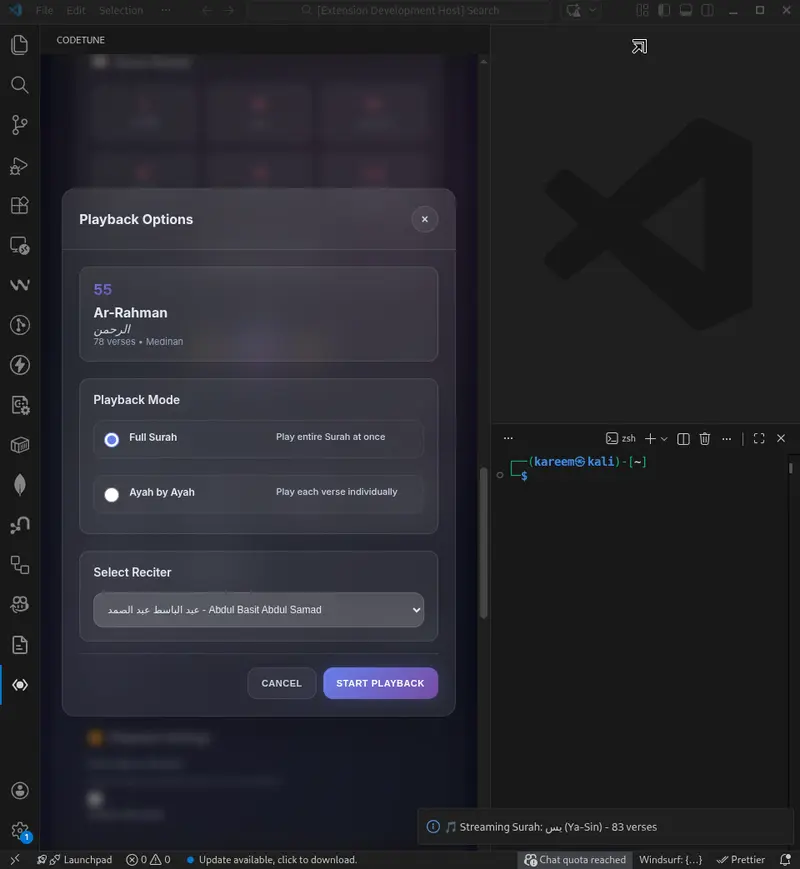
Building CodeTune v1.2.0: Islamic Date Tracking & Audio Sync in a VS Code Extension

CodeTune Main Dashboard

How I implemented Fajr-based day tracking, fixed audio sync between webview and extension host, and modularized a VS Code Islamic productivity extension

I’ve been building CodeTune — a VS Code extension that helps Muslim developers stay spiritually connected while coding. It plays Quran recitations, shows Islamic reminders, tracks Dhikr, and calculates prayer times — all without leaving the editor.

CodeTune Main Dashboard

Version 1.2.0 was a big release: 14 bug fixes, a complete modularization of the JavaScript layer, and most importantly — a proper Islamic day tracking system that respects Fajr as the start of the day, not midnight.

Here’s a full technical breakdown of what changed and why.

🕌 The Core Challenge: Islamic Day Boundaries

In Islam, the new day begins at Maghrib (sunset) for lunar calendar events, and spiritually, many scholars consider Fajr (dawn) as the boundary for daily worship goals like Quran recitation and Dhikr.

This means if a user is doing Dhikr at 2:00 AM, they’re still in yesterday’s spiritual day — they haven’t reached Fajr yet.

A naive implementation using midnight as the day boundary would:

  • Reset their streak incorrectly at midnight
  • Show “Day 0” progress when they’re actively worshipping
  • Break the Friday events logic (Surah Al-Kahf should start from Thursday Maghrib)

The Solution: getHabitTrackingDate()

private getHabitTrackingDate(date: Date = new Date()): string {
    const now = new Date(date);

    // Default to 4:00 AM if Fajr API hasn't responded yet
    let fajrHour = 4;
    let fajrMinute = 0;

    if (this.currentFajrTime) {
        fajrHour = this.currentFajrTime.getHours();
        fajrMinute = this.currentFajrTime.getMinutes();
    }

    const fajrTimeToday = new Date(now);
    fajrTimeToday.setHours(fajrHour, fajrMinute, 0, 0);

    // If we're before Fajr, we're still in yesterday's Islamic day
    if (now < fajrTimeToday) {
        now.setDate(now.getDate() - 1);
    }

    return this.formatDate(now);
}

This single function is now the single source of truth for all date calculations in the tracker. No more getTodayString() scattered across the codebase.

Timezone-Safe Date Arithmetic

One subtle bug I fixed: calculating “yesterday” using new Date(dateString) can shift dates due to timezone offsets. The fix is to always use noon (12:00:00) as the time anchor:

private getPreviousDateString(baseDateStr: string, daysBack: number): string {
    const [y, m, d] = baseDateStr.split('-').map(Number);
    // Noon anchor prevents DST-related off-by-one errors
    const date = new Date(y, m - 1, d, 12, 0, 0);
    date.setDate(date.getDate() - daysBack);
    return this.formatDate(date);
}

How Fajr Time Flows Through the System

The Fajr time comes from two sources and needs to reach SpiritualTracker:

Source 1 — IP Geolocation on startup (ActivityBarViewProvider.ts):

case 'requestPrayerTimes':
    const times = calculatePrayerTimes(data.lat, data.lon);
    this.sendMessageToWebview({ type: 'receivePrayerTimes', payload: times });

    // Update SpiritualTracker with real Fajr time
    const tracker = (global as any).spiritualTracker as SpiritualTracker;
    if (tracker && times.fajr) {
        tracker.updateFajrTime(new Date(times.fajr));
    }
    break;

Source 2 — IslamicRemindersManager on init (IslamicRemindersManager.ts):

private syncFajrTimeWithTracker() {
    if (!this.spiritualTracker) return;

    try {
        const prayerTimes = IslamicCalendar.calculatePrayerTimes();
        if (prayerTimes?.fajr) {
            this.spiritualTracker.updateFajrTime(prayerTimes.fajr);
        }
    } catch (error) {
        logger.warn('Could not sync Fajr time with Tracker:', error);
    }
}

The result: as soon as the extension loads, SpiritualTracker gets a Fajr time from the local calculation, and once the GPS/IP location resolves, it gets updated to the precise value.

🎵 Fixing the Audio → Tracker Sync Bug

This was the most impactful bug in the release. The Spiritual Progress Dashboard was always showing “0/15 min” for Quran listening, even after hours of audio playback.

Audio Player

Root Cause

The data flow was broken at step 2:

✅ Audio plays → saves time to localStorage (webview)
❌ MISSING: localStorage data never sent to extension host
❌ SpiritualTracker stays at 0 minutes
❌ Dashboard reads from SpiritualTracker → shows 0

The webview and extension host are separate processes. localStorage in the webview is invisible to the TypeScript extension code.

The Fix: The Accumulator Pattern (Time Buffer)

A naive fix would be:

// ❌ Loses short sessions (45 seconds rounds to 0)
const elapsedMinutes = Math.round(elapsedTime / 60000);
if (elapsedMinutes > 0) {
    this.postMessage('logQuranTime', { minutes: elapsedMinutes });
}

The problem: a user who listens 3 times for 45 seconds each gets 0 minutes logged, even though they listened for over 2 minutes total.

The better approach — accumulate milliseconds until a full minute is ready:

// In constructor
this.unloggedMs = 0;

stopTimeTracking() {
    if (!this.playStartTime) return;

    const now = Date.now();
    const elapsedMs = now - this.playStartTime;
    this.currentSessionTime += elapsedMs;

    // Add to time buffer
    this.unloggedMs += elapsedMs;

    // localStorage tracking (existing)
    const today = new Date().toISOString().split('T')[0];
    if (!this.listeningStats.dailyTimeStats[today]) {
        this.listeningStats.dailyTimeStats[today] = 0;
    }
    this.listeningStats.totalTimePlayed += elapsedMs;
    this.listeningStats.dailyTimeStats[today] += elapsedMs;
    this.listeningStats.lastUpdated = now;
    this.saveListeningStats();

    // Only send complete minutes to SpiritualTracker
    const minutesToLog = Math.floor(this.unloggedMs / 60000);
    if (minutesToLog > 0) {
        this.postMessage('logQuranTime', { minutes: minutesToLog });
        // Keep the remainder for next session
        this.unloggedMs -= (minutesToLog * 60000);
    }

    this.playStartTime = null;
    this.currentSessionTime = 0;
}

Why this is correct:

Scenario Math.round (broken) Accumulator (fixed)
3 × 45-second sessions 0 min logged ❌ ~2.25 min logged ✅
1 × 90-second session 2 min logged (wrong) ❌ 1 min logged, 30s saved ✅
1 × 5-minute session 5 min ✅ 5 min ✅

The accumulator pattern ensures no listening time is lost AND no phantom minutes are added.

Streak Calculation

The streak logic needed to handle the Fajr boundary too. A user who hasn’t done Dhikr yet today (it’s 10 AM) shouldn’t lose their streak — they still have until the next Fajr.

private calculateCurrentStreak(activeDates: string[]): number {
    if (activeDates.length === 0) return 0;
    const activeSet = new Set(activeDates);

    const todayStr = this.getHabitTrackingDate();
    const yesterdayStr = this.getPreviousDateString(todayStr, 1);

    // Streak survives if either today OR yesterday has activity
    if (!activeSet.has(todayStr) && !activeSet.has(yesterdayStr)) {
        return 0;
    }

    let streak = 0;
    let currentCheckStr = activeSet.has(todayStr) ? todayStr : yesterdayStr;

    for (let i = 0; i < 365; i++) {
        if (activeSet.has(currentCheckStr)) {
            streak++;
            currentCheckStr = this.getPreviousDateString(currentCheckStr, 1);
        } else {
            break;
        }
    }

    return streak;
}

💡 UX: Explaining Islamic Tracking to Users

One challenge: users might think the tracker is broken when their daily goals don’t reset at midnight. The solution — a small info tooltip next to the dashboard title:

<div class="info-tooltip-container">
    <span class="info-icon">ℹ️</span>
    <div class="info-tooltip-content">
        <strong>🕌 Smart Islamic Tracking</strong><br>
        Daily goals reset at <b>Fajr</b> (not midnight).<br>
        Friday events begin after <b>Maghrib</b> the evening before.
    </div>
</div>
.info-tooltip-content {
    visibility: hidden;
    opacity: 0;
    position: absolute;
    bottom: 125%;
    left: 50%;
    transform: translateX(-50%) translateY(10px);
    width: 220px;
    background: var(--glass-bg, rgba(30, 30, 30, 0.95));
    backdrop-filter: blur(10px);
    border: 1px solid var(--glass-border, rgba(255, 255, 255, 0.1));
    border-radius: 8px;
    padding: 12px;
    font-size: 12px;
    transition: all 0.3s ease;
    pointer-events: none;
}

.info-tooltip-container:hover .info-tooltip-content {
    visibility: visible;
    opacity: 1;
    transform: translateX(-50%) translateY(0);
}

Small detail, big impact — users now understand the feature instead of reporting it as a bug.

🐛 Other Notable Bug Fixes

Quran Reader

Dhikr counters not updating the dashboard — The counter component was incrementing its own local state but never notifying the extension host:

// Before: only updated local UI
function incrementSalawatCounter() {
    localCount++;
    updateDisplay();
}

// After: also syncs to SpiritualTracker
function incrementSalawatCounter() {
    localCount++;
    updateDisplay();
    window.vscode?.postMessage({ type: 'incrementDhikr', count: 1 });
}

Adhkar hyphenated names not resolving — rabbi-ghifir was being looked up as-is instead of converting to rabbiGhifir:

function incrementAdhkarCounter(adhkarName) {
    const camelCaseName = adhkarName.replace(
        /-([a-z])/g, 
        (g) => g[1].toUpperCase()
    );
    // Now correctly resolves rabbi-ghifir → rabbiGhifir
}

Missing configuration properties — VS Code showed “Unable to write to User Settings” because fridaySurahLastReset and fridaySurahState were never registered in package.json:

{
  "contributes": {
    "configuration": {
      "properties": {
        "codeTune.fridaySurahLastReset": {
          "type": "string",
          "default": ""
        },
        "codeTune.fridaySurahState": {
          "type": "string",
          "default": "disabled"
        }
      }
    }
  }
}

Friday Surah Al-Kahf

Webview can’t load new_features.txt — Getting 403 Forbidden because src/media wasn’t in localResourceRoots:

localResourceRoots: [
    vscode.Uri.file(path.join(context.extensionPath, 'src', 'media')),
    vscode.Uri.file(path.join(context.extensionPath, 'images'))
]

📁 Files Changed in v1.2.0

Update Screen

File Change
src/utils/SpiritualTracker.ts Islamic date logic, Fajr-based tracking
src/logic/activityBarView.ts Prayer times sync, Fajr update on location
src/logic/islamicReminders.ts SpiritualTracker integration
src/ui/components/audioPlayer.js Accumulator audio sync fix
src/ui/components/counter.js Dhikr → SpiritualTracker sync
src/ui/components/trackerDashboard.js Info tooltip
src/ui/components/trackerDashboard.css Card wrapper, modal fixes
package.json Missing configuration properties

Deleted: src/ui/components/statistics.js (duplicate of dashboard)

What’s Next

v1.3.0 will focus on Settings & Localization — fixing all settings panels, ensuring every string is properly localized across all 5 languages (EN, AR, ES, FR, RU), and unifying the settings UI across all components.

If you’re building VS Code extensions with webviews, the key lesson from this release: the webview and extension host are separate processes. Any state that needs to persist or be shared must explicitly cross the message bridge. localStorage is a webview-only sandbox.

The extension is open source — feedback and contributions are welcome.

بارك الله فيكم 🤲

🔗 Links

📦 VS Code Marketplace Install CodeTune
🟣 Open VSX Registry Install CodeTune
🐙 GitHub kareem2099/codetune

Trupe: Implementando Supervisor

Na minha saga para implementar um Actor System, cobri até agora o uso básico de Actor. Agora, vou abordar o supervisor.

Supervisor

Caso você não saiba, no Model de Atores, um supervisor é uma peça fundamental para a tolerância a falhas. O supervisor monitora os filhos (atores) e reage quando um deles exibe um comportamento inadequado.

Um Supervisor é um tipo especial de ator, focado apenas em monitorar e realizar alguma ação quando os filhos apresentam mau comportamento.

Mau comportamento

No Model de Atores, um mau comportamento ocorre quando um ator sofre uma exceção durante a execução de uma mensagem.

Quando um ator lança uma exceção durante o processamento de uma mensagem, temos duas estratégias principais:

  • One For One (Um para Um): Reinicia apenas o filho que falhou.
  • All for One (Todos para Um): Reinicia todos os filhos, caso um deles falhe.

E o que fazer quando o reinício não funciona e ele continua falhando? Você pode parar o filho ou escalar o erro.

Reinício (Restart)

Outra questão é o que “reiniciar” significa no Model de Atores. No Model de Atores e no .NET, isso significa matar/descartar (dispose) aquela instância do ator e sua mailbox, mas manter a IActorReference. Se o ator for um supervisor, vamos parar e matar todos os filhos, tornando a IActorReference desses filhos inválida.

Tipos de supervisor

Antes de mergulhar no código, deixe-me mostrar quais são os supervisores que irei implementar:

  • Supervisor: Um supervisor preemptivo; não permite a adição de mais filhos após a inicialização.
  • DynamicSupervisor: Um supervisor dinâmico; permite criar filhos após a inicialização, mas suporta apenas a estratégia One For One.
  • PartitionSupervisor: Um supervisor baseado em partição que cria um pool fixo de workers idênticos e roteia as mensagens usando particionamento baseado em hash.

Implementação

Base (Foundation)

Antes de implementar os supervisores, precisamos de alguns blocos de construção: a estratégia de supervisão (Strategy), a ação de falha (FailureAction) e a política de reinício (RestartPolicy).

public enum Strategy
{
    OneForOne,
    AllForOne,
}
public enum FailureAction
{
    Restart,
    Stop,
    Escalate,
    Resume,
}

Além da estratégia, cada ator filho possui uma RestartPolicy que define se ele deve ser reiniciado:

public enum RestartPolicy
{
    Permanent, // Sempre reinicia, independentemente do motivo do término
    Transient, // Reinicia apenas se terminar de forma anormal
    Temporary, // Nunca reinicia
}

Agora, vamos primeiro criar uma interface chamada ISupervisor:

/// <summary>
/// Representa um ator supervisor que gerencia atores filhos.
/// </summary>
public interface ISupervisor : IActor
{
    /// <summary>
    /// Obtém a coleção de referências de atores filhos gerenciados por este supervisor.
    /// </summary>
    IEnumerable<IActorReference> Children { get; }
}

Também precisamos de uma forma de descrever como um filho deve ser criado. Para isso, temos o IChildSpecification:

public interface IChildSpecification
{
    Type ActorType { get; }
    IMailbox Mailbox { get; set; }
    RestartPolicy RestartPolicy { get; set; }
}

E a implementação padrão:

public record ChildSpecification : IChildSpecification
{
    public ChildSpecification(Type actorType)
    {
        ActorType = actorType;
    }

    public Type ActorType { get; }
    public IMailbox Mailbox { get; set; } = new ChannelMailbox();
    public RestartPolicy RestartPolicy { get; set; } = RestartPolicy.Permanent;
}

Cada ator supervisionado é rastreadu através de uma classe de metadados Child, que armazena a instância do ator, seu processo, mailbox, referência, política de reinício e contadores:

public class Child(
    IActor actor,
    IMailbox mailbox,
    ActorProcess process,
    LocalActorReference reference,
    RestartPolicy restartPolicy,
    Type actorType)
{
    public IActor Actor { get; set; } = actor;
    public ActorProcess Process { get; set; } = process;
    public IMailbox Mailbox { get; } = mailbox;
    public LocalActorReference Reference { get; } = reference;
    public RestartPolicy RestartPolicy { get; } = restartPolicy;
    public Type ActorType { get; } = actorType;
    public int RestartCount { get; set; } = 0;
    public DateTimeOffset LastRestartTime { get; set; } = DateTimeOffset.MinValue;
    public Dictionary<string, object> Metadata { get; } = [];
    public bool IsSupervisor => Actor is ISupervisor;
}

Supervisor

O Supervisor base é uma classe abstrata que implementa ISupervisor. Ele é preemptivo — os filhos são definidos durante a inicialização e não podem ser adicionados posteriormente.

public abstract partial class Supervisor(IActorFactory actorFactory, ILogger logger)
    : Actor,
        ISupervisor,
        IHandleActorMessage<AddActor>,
        IHandleActorMessage<ActorFailed>,
        IHandleActorMessage<ActorTerminated>,
        IAsyncDisposable
{

Ele expõe propriedades virtuais para que as subclasses possam customizar o comportamento:

    protected virtual Strategy Strategy => Strategy.OneForOne;
    protected virtual int MaxRestarts => 3;
    protected virtual TimeSpan RestartWindow => TimeSpan.FromSeconds(5);

Durante a inicialização, ele chama o método abstrato OnInitializeAsync, onde as subclasses definem seus filhos:

    public sealed override async ValueTask InitializeAsync(
        CancellationToken cancellationToken = default)
    {
        await OnInitializeAsync(cancellationToken);
        _initialized = true;
    }

    protected abstract ValueTask OnInitializeAsync(
        CancellationToken cancellationToken = default);

Quando um filho falha, o supervisor determina o que fazer através do GetFailureAction. Por padrão, ele reinicia o filho, a menos que o limite de reinícios seja excedido, caso em que ele escala a falha:

    protected virtual FailureAction GetFailureAction(Child child, Exception exception)
    {
        if (child.RestartCount >= MaxRestarts)
        {
            return FailureAction.Escalate;
        }

        return FailureAction.Restart;
    }

Quando a ação é Restart, a estratégia define quem será reiniciado:

    protected virtual async Task ApplyRestartAsync(Child child)
    {
        child.RestartCount++;
        child.LastRestartTime = DateTimeOffset.UtcNow;

        if (Strategy == Strategy.OneForOne)
        {
            await ResetActorAsync(child);
        }
        else if (Strategy == Strategy.AllForOne)
        {
            await Task.WhenAll(Children.Select(ResetActorAsync));
        }
    }

DynamicSupervisor

O DynamicSupervisor estende o Supervisor para permitir a adição e remoção de filhos em tempo de execução. Ele é selado com a estratégia OneForOne, pois reiniciar todos os atores quando um falha não faz sentido quando os atores são criados de forma independente.

public abstract class DynamicSupervisor(IActorFactory actorFactory, ILogger logger)
    : Supervisor(actorFactory, logger),
        IHandleActorMessage<RemoveChild>
{
    protected sealed override Strategy Strategy => Strategy.OneForOne;

RootSupervisor

O RootSupervisor é uma implementação concreta do Supervisor que serve como o supervisor de nível superior no sistema de atores. Ele implementa a interface de marcação IRootSupervisor e é configurado via RootSupervisorOptions.

Diferente do Supervisor base, o RootSupervisor sempre reinicia os filhos que falham — ele nunca escala, já que não existe um supervisor pai acima dele.

PartitionSupervisor

O PartitionSupervisor<TActor> cria um pool fixo de atores workers idênticos e roteia mensagens para eles usando particionamento baseado em hash. O número de workers é, por padrão, Environment.ProcessorCount.

As mensagens são roteadas para um worker usando uma chave de partição. A chave sofre o hash e é mapeada para um índice de worker:

    protected virtual IActorReference GetActorReference<TKey>(TKey key)
        where TKey : notnull
    {
        var hash = Math.Abs(GetHashcode(key));
        return Children[hash % Children.Count].Reference;
    }

Isso garante que mensagens com a mesma chave sempre vão para o mesmo worker, o que é útil para cenários como afinidade de sessão ou particionamento consistente de dados.

Conclusão

Com o Supervisor, DynamicSupervisor, PartitionSupervisor e o RootSupervisor como ponto de entrada de nível superior, agora temos uma base sólida para tolerância a falhas em nosso sistema de atores. Cada variante de supervisor aborda um caso de uso diferente.

Se você estiver interessado nos detalhes profundos da implementação, sinta-se à vontade para explorar o código-fonte completo no GitHub: lillo42/trupe.

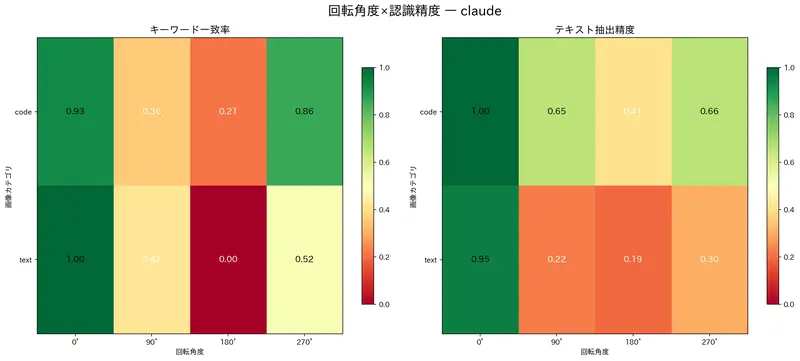
Passing Rotated Images to Claude or ChatGPT Drops Accuracy to One-Third

Claude Heatmap

“I Can’t Read This” – When Claude Refuses Your Screenshot

These days, throwing error screenshots at Claude or Codex for debugging is pretty standard practice. Your terminal output is trapped in an environment where you can’t copy-paste, so you screenshot it and ask the AI, “What’s going on here?” We all do it.

But what if the screenshot is slightly rotated, and the AI’s response becomes completely useless?

Photos of monitors taken on phones. Whiteboard diagrams captured on iPads. Images end up in all sorts of orientations. You might assume, “It’s AI, surely it can handle a little rotation.” But for VLMs (Vision Language Models), image orientation is far more critical than you’d think.

Here’s a good way to think about it: VLMs have great eyesight but a stiff neck. They can read a properly oriented image flawlessly, but hand them an upside-down image and their reading comprehension drops to kindergarten level. How far does it drop exactly? We ran the experiment to find out.

Experiment Design

Here’s how we set it up:

  • Test images: 12 (text / charts / code / mixed content)
  • Rotation patterns: 0°, 90°, 180°, 270°
  • Total conditions: 12 images × 4 rotations = 48 conditions
  • Models compared: Claude 3.5 Sonnet vs GPT-4o
  • Metrics: Text extraction accuracy + keyword match rate

Each image was rotated in all four orientations and fed to each model with the same prompt for text extraction. The upright image (0°) result was treated as ground truth.

Results: 180° Destroys Everything

Text Extraction Accuracy

Rotation Claude GPT-4o
0° 97.0% 97.0%
90° 39.5% 95.0%
180° 27.9% 24.9%
270° 44.5% 91.9%

Keyword Match Rate

Rotation Claude GPT-4o
0° 94.3% 94.3%
90° 50.5% 94.3%
180° 22.9% 14.8%
270° 62.4% 100%

The numbers speak for themselves.

180° rotation (upside-down) is catastrophic for both models. Text extraction accuracy drops to 25-28%, a roughly 70-point nosedive from 97% at the correct orientation. Keyword match rate falls to 15-23%, essentially “I didn’t read a thing” territory.

Sideways Rotation: A Tale of Two Models

The 90°/270° results are where things get interesting.

  • GPT-4o: Maintains 90%+ accuracy on sideways images. Barely affected.
  • Claude: Drops to 40-50%. Roughly half its normal accuracy.

GPT-4o is remarkably robust against sideways rotation. However, flip the image upside-down (180°) and even GPT-4o’s keyword match rate plummets to 14.8%. Both models share the same pattern: “I can tilt my head to read sideways, but upside-down? No chance.” Not unlike humans, really.

Heatmaps: Visualizing the Accuracy Drop

Here’s Claude’s accuracy degradation pattern. You can clearly see the collapse at 90° and 270°:

Claude Heatmap

GPT-4o holds strong against sideways rotation, but 180° is equally devastating:

GPT-4o Heatmap

Degradation by Content Type

The type of image content also affects how badly rotation hurts performance:

Category Degradation

Text-heavy images suffered the most from rotation, while charts and code snippets were relatively more resilient. This tells us that spatial pattern recognition plays a major role in how VLMs “read” text.

Why Does Rotation Tank Accuracy?

You might be thinking, “This much accuracy loss from just rotating an image? Something doesn’t add up.” Humans struggle with upside-down text too, but not from 97% down to 28%. The answer lies in VLM architecture.

Patch Splitting + Position Embedding

VLMs split input images into small patches (e.g., 14×14 pixels) and assign each patch a Position Embedding. These embeddings are fixed during training.

This means the model learned with the assumption that “the top-left patch represents the top-left of the image.” When an image is rotated 180°, what’s actually bottom-right content gets processed as “top-left.” It’s like being handed an upside-down map and asked, “Which way is north?”

Training Data Bias

VLM training data is almost 100% upright images. Web-crawled images, scanned books, datasets… they’re virtually all correctly oriented. So the model is optimized under a strong prior that images are upright.

Text Recognition is Deeply Spatial

Character recognition is fundamentally spatial pattern matching. The letter “A” is recognized by a vertex at the top and two legs at the bottom. Rotate it 180° and it starts looking like “V”, and OCR-like processing breaks down at a fundamental level.

“I Know It’s Rotated” But Still Can’t Read It

Here’s the fascinating part: modern VLMs (like Claude Sonnet 4) actually know the image is rotated. They’ll even say, “The image appears to be upside-down, which makes it difficult to read.”

A human who notices upside-down text can mentally rotate it and read along. But a VLM, even after recognizing the rotation, continues processing patches under the upright assumption. The ability to identify the problem and the ability to fix the problem are completely decoupled.

In other words, telling a VLM “just correct the rotation yourself and read it” doesn’t work. The information is already mangled at the patch-splitting stage, and no amount of text-level prompting can undo that. That’s why preprocessing before you send the image matters.

Side Note: Color Recognition Is Unaffected

Interestingly, when we tested with a “name the dominant colors in this image” task, rotation had virtually no impact on accuracy. Color is a per-pixel feature that doesn’t depend on spatial position, so it’s naturally rotation-invariant. VLMs aren’t bad at “rotated images” per se; they’re bad at “spatial pattern recognition on rotated images.”

The Preprocessing Fix

Now that we understand the problem, let’s fix it. Here’s a preprocessing function that corrects image orientation before sending it to a VLM.

Two Approaches

Method How It Works Best For
EXIF Reads the EXIF Orientation tag and rotates accordingly Smartphone photos (with EXIF data)
Entropy Analyzes spatial text patterns to estimate orientation Scanned images, screenshots (no EXIF)

Smartphone photos contain EXIF metadata, so we try that first. For images without EXIF (scans, screenshots), we fall back to the entropy-based method.

Implementation

Here’s the complete, ready-to-use preprocessing module. Dependencies are just Pillow and NumPy.

#!/usr/bin/env python3
"""Image orientation correction preprocessing functions"""

import numpy as np
from PIL import Image, ImageFilter
from pathlib import Path


def auto_orient_exif(image_path: str) -> Image.Image:
    """EXIF-based orientation correction

    Corrects image orientation based on the EXIF Orientation tag.
    Returns the image as-is if no EXIF data is present.
    """
    img = Image.open(image_path)

    exif = img.getexif()
    if not exif:
        return img

    # Orientation tag = 0x0112
    orientation = exif.get(0x0112)
    if orientation is None:
        return img

    transforms = {
        2: Image.FLIP_LEFT_RIGHT,
        3: Image.ROTATE_180,
        4: Image.FLIP_TOP_BOTTOM,
        5: [Image.FLIP_LEFT_RIGHT, Image.ROTATE_90],
        6: Image.ROTATE_270,
        7: [Image.FLIP_LEFT_RIGHT, Image.ROTATE_270],
        8: Image.ROTATE_90,
    }

    transform = transforms.get(orientation)
    if transform is None:
        return img

    if isinstance(transform, list):
        for t in transform:
            img = img.transpose(t)
    else:
        img = img.transpose(transform)

    return img


def auto_orient_entropy(image_path: str) -> Image.Image:
    """Entropy + edge analysis based orientation estimation

    Exploits the fact that text lines in documents run horizontally.
    Uses horizontal vs vertical edge ratios and top vs bottom edge
    density to estimate the correct orientation.
    """
    img = Image.open(image_path)
    arr = np.array(img.convert("L").resize((400, 400)))

    best_angle = 0
    best_score = -1

    for angle in [0, 90, 180, 270]:
        if angle == 0:
            rotated = arr
        elif angle == 90:
            rotated = np.rot90(arr, k=3)  # 90° clockwise
        elif angle == 180:
            rotated = np.rot90(arr, k=2)
        else:
            rotated = np.rot90(arr, k=1)  # 270° clockwise

        score = _compute_text_orientation_score(rotated)
        if score > best_score:
            best_score = score
            best_angle = angle

    if best_angle == 0:
        return img

    # PIL rotate is counter-clockwise, we need to undo the detected rotation
    return img.rotate(best_angle, expand=True)


def _compute_text_orientation_score(arr: np.ndarray) -> float:
    """Compute an "uprightness" score for a text image

    Combines the following features:
    1. Horizontal edge dominance (text lines are horizontal)
    2. Higher edge density at the top (titles/headers)
    3. Row variance patterns (alternating text lines and whitespace)
    """
    # Sobel-like edge detection
    h_edges = np.abs(np.diff(arr.astype(float), axis=1))  # horizontal edges
    v_edges = np.abs(np.diff(arr.astype(float), axis=0))  # vertical edges

    # Feature 1: horizontal edge dominance
    h_sum = np.sum(h_edges)
    v_sum = np.sum(v_edges)

    # Feature 2: row variance pattern
    row_means = np.mean(arr, axis=1)
    row_variance = np.var(np.diff(row_means))

    # Feature 3: top-heaviness
    h, w = arr.shape
    top_edge_density = np.mean(v_edges[:h//3, :])
    bottom_edge_density = np.mean(v_edges[2*h//3:, :])

    # Feature 4: left-alignment indicator
    col_means = np.mean(arr, axis=0)
    left_quarter = np.mean(col_means[:w//4])
    right_quarter = np.mean(col_means[3*w//4:])

    # Combine scores
    score = 0.0

    # Horizontal structure bonus
    if h_sum + v_sum > 0:
        score += (v_sum / (h_sum + v_sum)) * 30

    # Row regularity bonus
    score += min(row_variance / 100, 30)

    # Top-heavy bonus
    if top_edge_density > bottom_edge_density:
        score += 20

    # Whitespace gradient bonus
    bottom_brightness = np.mean(arr[3*h//4:, :])
    top_brightness = np.mean(arr[:h//4, :])
    if bottom_brightness > top_brightness:
        score += 10

    return score


def correct_image(image_path: str, method: str = "entropy") -> Image.Image:
    """Unified correction function

    Args:
        image_path: Path to the image
        method: Correction method ("exif" or "entropy")

    Returns:
        Corrected image
    """
    methods = {
        "exif": auto_orient_exif,
        "entropy": auto_orient_entropy,
    }

    func = methods.get(method)
    if func is None:
        raise ValueError(f"Unknown method: {method}. Choose from {list(methods.keys())}")

    return func(image_path)


def correct_and_save(image_path: str, output_path: str, method: str = "entropy") -> str:
    """Correct orientation and save"""
    img = correct_image(image_path, method)
    img.save(output_path)
    return output_path

Usage

from orientation_preprocess import correct_image

# Images with EXIF data (smartphone photos, etc.)
img = correct_image("photo.jpg", method="exif")

# Images without EXIF (screenshots, scans, etc.)
img = correct_image("scan.png", method="entropy")

# Correct and save to a new file
from orientation_preprocess import correct_and_save
correct_and_save("input.png", "output.png", method="entropy")

Plugging It Into Your VLM Workflow

In practice, it looks like this:

from orientation_preprocess import correct_and_save
import anthropic

# Step 1: Correct image orientation
correct_and_save("receipt.jpg", "receipt_corrected.jpg", method="exif")

# Step 2: Send the corrected image to the VLM
client = anthropic.Anthropic()
# ... proceed with your normal API call

One line of preprocessing. That’s all it takes to get your 97% accuracy back.

Before and After Preprocessing

Preprocessing Comparison

Takeaways

Here’s what the experiment showed:

  1. 180° rotation (upside-down) is catastrophic: Both models drop to 25-28% accuracy
  2. Rotation tolerance varies by model: GPT-4o handles sideways images well (90%+), while Claude drops to ~40%
  3. One line of preprocessing fixes it: Correct orientation before the API call and accuracy is restored

VLMs are impressively capable at “seeing,” but they’re built on the assumption that you’ll show them things right-side up. Great eyesight, stiff neck. Fortunately, this blind spot is trivially easy to work around with a bit of preprocessing.

If you’re throwing error screenshots at AI for debugging, or feeding smartphone photos into a VLM pipeline, consider adding that one-line orientation fix. It could be the difference between “I can’t read this” and “Here’s your bug.”

If you’re interested in practical techniques for working with Claude Code, check out my book Practical Claude Code on Amazon.

Originally published in Japanese on Qiita.

Requestly: A Lightweight, Git Native API Client That Lives on Your Machine, Not in the Cloud

Best API Client from Hitesh Sir

Back in October, I was deep into Hacktoberfest. Like many developers, I was looking for open source projects to contribute to and learn something new. I spent hours browsing repositories, reading issues, and trying to find something that I could work on.

One evening, while scrolling through YouTube, a video from Hitesh Choudhary Sir’s Chai aur Code channel popped up. The title was something about “Best API Clients.” I clicked out of curiosity. In that video, Hitesh Sir was talking about different API clients he was exploring, and he mentioned that he had recently started using Requestly. He gave a quick demo and suggested viewers give it a try as well.

Best API Client from Hitesh Sir

I had been using Postman for everything up until then. It worked, but I’d started feeling that it was too heavy, too cloud‑focused, and honestly, I wasn’t thrilled about storing all my API keys and secrets on someone else’s servers. But I hadn’t really looked for alternatives. That video was the nudge I needed.

So I went to Requestly’s GitHub, checked out the issues, and found a few that seemed beginner‑friendly. I picked one, started contributing, and somewhere along the way, I also started using Requestly for my own projects. Within a week, I had moved all my active work over.

Today, I use Requestly for everything - my personal side projects, open‑source contributions, and even work stuff. Let me walk you through why it stuck with me.

Requestly - API Client

Requestly - a free, open-source API client. It’s lightweight, local-first, Git-native, and packed with everything you actually need: collections, environments, scripting, and more.

API Collections: Finally, Git Works Like It Should

When I first saw how Requestly handles collections, I did a double-take. My collections are just files on my disk. Plain JSON. In Postman, collections lived in the cloud; if I wanted to version them, I had to export a JSON file and commit it manually.

With Requestly, I can store my API collections right inside my project folder. For example, when I’m working on a project, I create a api-collections folder and keep all my request definitions there. Requestly reads them directly from that folder. I can commit them to Git, track changes, review how the API definitions evolve as I add new features, and even roll back if something breaks.

This way, my API requests live right alongside my code. If I clone the repo on a new machine, everything I need - source code and API collections - is already there. No exporting, no manual sync.

This changed how I collaborate. Instead of sending a Postman export file back and forth, we just push changes to the repo. Anyone on the team can clone the project, open Requestly, and they’re ready to go. It feels like the API definitions finally belong with the code, not locked away in a separate cloud workspace.

ENVs and Variable Management: My Secrets Stay Mine

The thing that bothered me the most about cloud‑based API clients was the constant worry about secrets. I often test APIs that need API keys, session tokens, or even production credentials. Postman stores environment variables in the cloud, and even with “private workspaces”, I could never fully shake the feeling that my data was out of my hands.

Requestly fixed this problem. All my environment variables - whether global, collection‑specific, or per‑environment - stay on my machine. Nothing is sent to Requestly’s servers unless I explicitly opt into a team workspace (which I rarely do for personal stuff). That means I can store OAuth tokens, database passwords, and secret keys without a second thought.

Here’s a real example. I’ve been building a project called SnapShop - A production-ready e-commerce platform with authentication, payments, and an admin dashboard. When I’m working on it, I have a “Development” environment in Requestly with variables like API_KEY, BASE_URL, and ACCOUNT_ID. The BASE_URL points to http://localhost:5000 when I’m coding locally, but when I need to test the production‑like behavior on staging, I just switch to a different environment, same variables, different values. Everything stays on my machine. No secrets are ever pushed to a cloud server.

When I need to collaborate, I commit the collection to Git, but I .gitignore the actual environment files. Instead, I include an env.example.json file. A collaborator clones the repo, creates their own environment file from the example, and the whole setup stays local on their machine. It’s simple, secure, and gives everyone full control.

Scripting and Its Use Cases: Automating the Annoying Bits

Scripting is where Requestly really shines. It gives you a JavaScript runtime in pre‑request and post‑response scripts, and an rq object to interact with everything.

One of my favorite use cases is handling authentication automatically. In one of my projects, the API uses a JWT that expires every hour. Instead of manually copying a new token every time, I wrote a pre‑request script that checks if the token has expired, hits the login endpoint, extracts the new token, and updates my environment variables - all before the actual request is sent.

Here’s roughly what it looks like (simplified):

// Pre-request script to refresh JWT token if needed
const tokenExpiry = rq.environment.get('token_expiry');
const now = Date.now();

if (!tokenExpiry || now >= tokenExpiry) {
  const loginResponse = await rq.sendRequest({
    url: rq.environment.get('base_url') + '/login',
    method: 'POST',
    body: {
      username: rq.environment.get('username'),
      password: rq.environment.get('password')
    }
  });
  const newToken = loginResponse.data.token;
  rq.environment.set('auth_token', newToken);
  rq.environment.set('token_expiry', now + 3600000); // 1 hour
}

I also use scripting to randomize data during testing. When an endpoint expects a unique email, I generate a random one on the fly with a pre‑request script - no more duplicate entry errors.

Post‑response scripts are great for quick assertions. After a login request, I can write a tiny script that checks if the status is 200 and if a token field exists. I get immediate feedback without leaving the app.

Local Workspace: The Reason I Stayed

The “local workspace” concept is what makes Requestly fundamentally different. Everything - requests, collections, environments is stored in a directory on my computer. I can open that folder and see plain JSON files. I can back them up with any tool I like.

Contrast that with my Postman days. I had dozens of collections, but they were locked inside a cloud workspace. Exporting them was possible, but it required manual steps, and I never really knew what data was being synced. The cloud‑first model also meant I had to be online just to see my saved requests. With Requestly, I can work offline.

Collaboration is also more flexible. When I want to share a collection with an open‑source maintainer, I just push my local workspace files to a Git repository. They clone the repo, open it in Requestly, and start testing - no account creation, no workspace invitations, no data ever touching a third‑party server unless we deliberately choose to use team sync.

Why I Stopped Using Postman

Looking back, my switch came down to three things that really bothered me with Postman, and that Requestly fixed:
Bloated interface: Postman kept adding features I never used. The UI got slower and felt cluttered. Requestly is lean - I can find what I need in seconds.

Cloud‑first by default: I grew uncomfortable with the fact that my API keys, secrets, and environment variables were stored on Postman’s servers. Even private workspaces didn’t fully ease my mind. Requestly’s local‑first approach means my data never leaves my machine unless I explicitly decide to sync it.

Performance: The Postman desktop app became sluggish over time, especially when I had many collections. Requestly feels snappy even with dozens of collections and complex scripts.

Requestly isn’t just an alternative; it’s a tool that aligns with how I want to work - locally, transparently, and with full control over my data.

Final Thoughts

Requestly started as a Hacktoberfest experiment for me, thanks to a YouTube recommendation from Hitesh Sir. But it quickly became a daily essential. Its local‑first feature, combined with Git‑friendly collections, secure environment management, and powerful scripting, has made API testing and development feel much more enjoyable.

If you’re still using a cloud‑based API client and you’re tired of the bloat or worried about where your secrets are stored, I’d say give Requestly a try. It might change the way you work, too.