I Stuck a ₹10 Sticker on My Wall and Now I Control My Light Like a Wizard
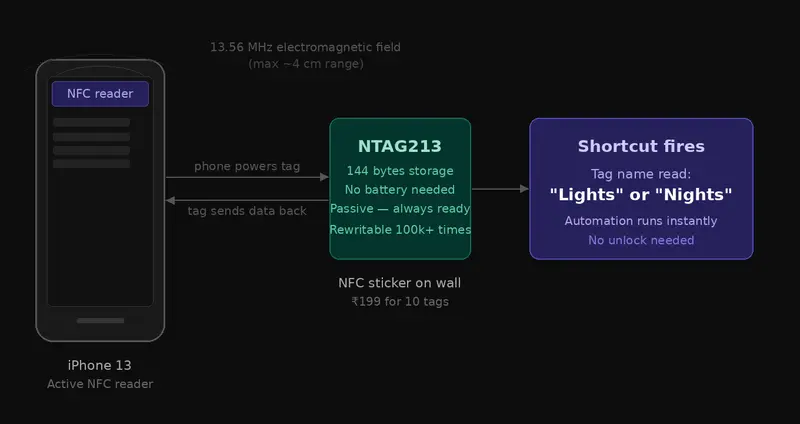
NFC Communication Diagram

No Alexa. No hub. No voice commands. Just tap and done.

The Problem That Started It All

It’s 11:45 PM. I’m in bed, half asleep, and the light is still on.

My options:

  • Get up and hit the physical wall switch (feels like climbing Everest at midnight)
  • Unlock my phone, swipe past notifications, find the Wipro app, wait for it to load, tap the bulb tile, confirm the action

Neither of these should be this hard in 2026.

I already had a Wipro Wi-Fi smart bulb installed. Great bulb — RGB, tunable white, music sync, the works. But the app-based control was killing the “smart” experience. And I wasn’t going to spend ₹3,000-5,000 on an Amazon Echo or Google Nest just to say “Alexa, lights off” before bed.

Then I remembered something I’d seen online: NFC tags.

Small stickers. Programmable. Cost almost nothing. And iPhones can read them without even unlocking.

What if I just… stuck one next to my bed and tapped my phone on it?

Spoiler: It worked. Here’s exactly how I built it, what I learned, and how you can replicate it in an afternoon.

What Even Is NFC? (Bear With Me, This Is the Fun Part)

Before we get into the setup, let me geek out for a moment — because understanding why this works makes the whole thing more satisfying.

NFC stands for Near Field Communication. It’s a short-range wireless technology that operates at 13.56 MHz and works over a maximum distance of about 4 centimetres. That ridiculously short range is actually a feature — it means you have to deliberately tap your device to trigger it, so false triggers are essentially impossible.

NFC is a subset of the broader RFID (Radio Frequency Identification) family of technologies. You’ve been using RFID/NFC your whole life without knowing it:

  • Your credit/debit card for tap-to-pay? NFC.
  • Your Mumbai Metro card? RFID.
  • That office access card you wave at the door? Also RFID.
  • Apple Pay, Google Pay on your phone? NFC.

The difference between passive NFC tags (like the stickers we’re using) and your phone is power. Your phone has a battery and an active NFC controller. The tag has neither — it’s completely passive. When your phone comes close, it generates a tiny electromagnetic field, which inductively powers the tag just long enough for it to transmit its stored data back. No battery. No charging. Ever.

The tag I used: NTAG213

This is the most widely deployed consumer NFC chip in the world. Here’s what makes it special:

  • Memory: 144 bytes of user-accessible storage — enough for a URL, a command, or a short text string
  • Standard: ISO 14443 Type A compliant — meaning it works with virtually every NFC-enabled device
  • Rewritable: You can reprogram it hundreds of times, so if your setup changes, just overwrite the tag
  • iPhone compatibility: iPhone 7 and above can read NFC tags. iPhone 13 (what I use) supports background NFC tag reading — meaning the screen just needs to be on and unlocked, no app needs to be open

NFC Communication Diagram

One fun fact: the tag has no moving parts, no battery, and theoretically no expiration date. That ₹10 sticker could outlast your phone by a decade.

The Shopping List

I only bought two products for this entire project.

Product Price Link
Wipro 12.5W B22D Wi-Fi Smart LED Bulb (16M Colours, Music Sync, Voice Control) ₹704 Amazon India
NTAG213 NFC Tag Stickers, Rewritable — Pack of 10 ₹169 Amazon India
Total ₹873

Everything else I used was free:

  • Wipro Smart Home app (iOS/Android — free)
  • Google Home app (iOS/Android — free)
  • Google Assistant app (iOS — free)
  • Apple Shortcuts (built into every iPhone — free)

💡 Pro tip: The pack of 10 tags is the right call even if you only need 3. You’ll find uses for the rest faster than you think — business card tag, desk work mode tag, silent mode trigger. More on that at the end.

The Architecture — How It All Connects

This is the part most blogs skip, and then readers get lost halfway through setup. Let me show you the full picture first.

Architecture Diagram

Why so many layers? Great question. Ideally, the NFC tag would talk directly to the bulb. But Wipro/Tuya doesn’t expose native iOS Shortcuts actions, and neither does Google Home. So we build a bridge: iPhone Shortcuts → Google Assistant → Google Home → Bulb. Each layer does one specific job, and together they create a seamless tap-to-control experience.

The whole chain from tap to bulb response takes about 2-3 seconds. Not instant, but completely hands-free.

Physical Setup — Where to Put the Tags

I placed 3 tags in total:

Tag 1 — Near the door (ON only)
Stuck on the wall right next to the light switch. When I enter the room, I tap this to turn the light on — without touching the physical switch.

Tag 2 — Bedside (ON)
Stuck on the headboard or nearby wall. When I’m in bed and want to turn the light on without getting up.

Tag 3 — Bedside (OFF)
Right next to Tag 2. Tap this to turn off before sleeping.

Why two separate tags instead of one toggle?

This is important to understand. NFC tags can only store and send a fixed command. They have no way of knowing the current state of your bulb (is it on or off right now?). A single “toggle” tag would be unpredictable — tap once and it turns off, tap again quickly and it turns on again. Two dedicated tags — one for ON, one for OFF — is far more reliable and predictable.

⚠️ Critical warning: The physical wall switch is the Achilles heel of this entire system. If someone flips the physical rocker switch to OFF, the bulb loses mains power completely. No power = no Wi-Fi = no smart control. The NFC system stops working until the physical switch is turned back ON. I recommend putting a small label on the switch that says “Don’t switch off — smart bulb”.

Step-by-Step Setup Guide

Step 1 — Set Up the Wipro Bulb

  1. Screw in the Wipro bulb and turn the physical switch ON
  2. Download the Wipro Smart Home app (iOS / Android)
  3. Create an account — note your email and password carefully, you’ll need them again
  4. In the app, tap + → Add Device → Lighting → follow the Wi-Fi pairing instructions
  5. Make sure your phone is on 2.4 GHz Wi-Fi during setup (the bulb doesn’t support 5 GHz)
  6. Once paired, test on/off from the app to confirm it’s working

Step 2 — Link Wipro to Google Home

  1. Install Google Home app and sign in with your Google account
  2. Tap + (top right) → Link app or service
  3. Tap Works with Google
  4. Search for “Wipro Next Smart Home”
  5. Tap it → tap Continue → tap Agree and continue
  6. A Wipro login page opens — change the country from “United States” to “India” first (critical step many miss)
  7. Enter your Wipro app email and password → tap Next Step
  8. Your bulb will appear — tap Next to add it to your home

You should now see your bulb in Google Home, showing its live status.

Step 3 — Create Google Home Routines

This is the engine room. We’re creating two voice-triggered routines that Google Home will execute when Google Assistant hears a specific word.

Routine 1 — Lights ON:

  1. Open Google Home → tap Automations (bottom tab)
  2. Tap + → New Routine
  3. Under Starters → When I say to my Assistant → type: Lights
  4. Under Actions → Add action → Control home devices → select your bulb → Turn on
  5. Tap Save — name it “Lights”

Routine 2 — Lights OFF:

  1. Repeat the above process
  2. Starter phrase: Nights
  3. Action: Select your bulb → Turn off
  4. Save — name it “Nights”

💡 Why “Lights” and “Nights”? These words are phonetically distinct enough that Google Assistant won’t confuse them with each other or with random speech. Avoid words like “on” and “off” as standalone triggers — they’re too common and might fire accidentally.

Step 4 — Set Up iPhone Shortcuts Automations

This is where NFC comes in. We’ll create one automation per tag.

For the Lights ON tag (Door or Bedside):

  1. Open Shortcuts app → tap Automation tab → + → New Automation
  2. Scroll down → tap NFC
  3. Tap Scan → hold your iPhone’s top edge close to the NFC tag
  4. Name the tag “Lights” → tap OK
  5. Tap Add Action → search “Hey Google” → select it
  6. In the Hey Google action, type: Lights
  7. Tap + below → search “Wait” → set to 3 seconds
  8. Tap + → search “Go to Home Screen” → add it
  9. At the top, set Automation to Run Immediately (not “Run After Confirmation”)
  10. Toggle Notify When Run to ON (optional but useful — you get a lock screen confirmation)
  11. Tap Done

For the Lights OFF tag (Bedside):

Repeat the exact same steps above, but:

  • When you scan the tag, name it “Nights”
  • In the Hey Google action, type: Nights

Step 5 — Stick the Tags

  • Clean the surface with a dry cloth before sticking
  • Press firmly for 5 seconds
  • For high-traffic areas, consider an epoxy NFC tag instead of the sticker variant — more durable

The Result

Here’s what happens now when I want to sleep:

  1. Phone is locked on my nightstand
  2. I pick it up — screen wakes (Face ID or tap)
  3. I tap the top edge of my phone to the small sticker on my headboard
  4. Lock screen shows: “Nights detected — Running your automation”
  5. Google Assistant quietly fires in the background
  6. Light turns off in ~2-3 seconds
  7. Phone returns to lock screen

No app. No voice command. No getting up. Just tap.

It genuinely feels like a superpower the first time it works.

Honest Limitations

I want to be upfront about what this setup doesn’t do:

  • iPhone must be unlocked (screen on) for NFC background reading to work — it doesn’t fire from a completely dark, locked screen
  • Internet required — the entire chain goes through cloud services (Wipro → Tuya → Google Home). No internet = no control
  • ~2-3 second delay from tap to bulb response — not instant, but acceptable
  • Physical switch is the weak point — if it’s off, nothing works
  • Google Assistant app must stay installed — if you delete it, the Hey Google Shortcut action breaks

What’s Next — Ideas to Extend This

Now that you have 7 leftover NFC tags, here are ideas to use them:

NFC Business Card — Program a tag with your website URL. Hand someone a card, they tap their phone, your portfolio opens. Zero app install needed on their end.

Desk Work Mode Tag — Tap when sitting down: bulb switches to cool white 100% brightness automatically.

Bedtime Scene Tag — Instead of just OFF, trigger a scene: dim to 10% warm white for 10 minutes, then off. Great for winding down.

Phone Silent Mode — NFC tag on your desk at work that triggers a Shortcut to enable Do Not Disturb.

Spotify Playlist — Tag on your gym bag that opens a specific playlist when tapped.

Future upgrade: If you ever replace this bulb with a Matter-compatible smart bulb, it will work natively with Apple Home — no Google Assistant bridge needed. The NFC Shortcuts setup remains identical.

The Final Tally

Item Cost
Wipro Smart Bulb ₹704
10x NFC Tags ₹169
Smart speaker ₹0 (didn’t need one)
Hub/Bridge ₹0 (didn’t need one)
Total ₹873
Setup time ~90 minutes (including troubleshooting)
Satisfaction level Disproportionately high

Wrapping Up

This started as a lazy man’s quest to avoid getting out of bed. It became a genuinely fun afternoon of exploring NFC technology, building a multi-layer automation chain, and learning why Wipro uses the Tuya platform under the hood.

The best part? It cost under ₹1000, uses zero extra hardware, and works every single time.

If you’re on Android, the setup is even simpler — Tasker or the built-in Google routines can trigger directly without the Hey Google workaround.

What would you automate with your leftover NFC tags? Drop it in the comments — I’m genuinely curious what creative uses people come up with.

Found this useful? Follow me for more experiments where I build things I probably didn’t need but definitely enjoyed making.

Products used:

Apps used (all free):

  • Wipro Smart Home (iOS/Android)
  • Google Home (iOS/Android)
  • Google Assistant (iOS)
  • Apple Shortcuts (built-in on iPhone)
How MT4 to CRM Integration Works: A Technical Guide

The MT4 Manager API is the bridge between MetaTrader 4 and any external system — CRM, back office, payment processor, or reporting tool. Here is how it actually works from a developer’s perspective.

The MT4 Manager API

MetaTrader 4 exposes a Windows DLL-based Manager API (mtmanapi.dll) that lets external applications communicate directly with the trading server. The API uses TCP sockets to maintain a persistent connection — think of it as a privileged admin channel into the platform.

For a mt4 crm integration, you are using this API to:

  • Pull account data (balance, equity, margin level, open positions)
  • Execute account management actions (create accounts, change leverage, disable trading)
  • Subscribe to real-time trade events
  • Trigger deposits and withdrawals programmatically

How the Data Flow Works

A production MT4-CRM integration has three components:

1. MT4 Integration Service — A Windows process (the API is Windows-only) that maintains a persistent connection to the MT4 server. It subscribes to trade events and pushes updates to a message queue.

2. Message Queue / Event Bus — RabbitMQ or similar. The integration service publishes events (deposit confirmed, trade opened, account created) as messages. This decouples the Windows-bound MT4 service from the rest of your stack.

3. CRM Backend — Consumes queue events, updates client records, and triggers workflows (e.g., alert retention team when equity drops below margin threshold).

Account Sync: What Gets Synced and When

Data Type Sync Method Frequency
Account balance / equity Event-driven (on change) Real-time
Open positions Polling Every 5–15 seconds
Closed trade history Event-driven On close
Account status Bidirectional On change
Deposits / withdrawals Triggered via API Per transaction

The Deposit/Withdrawal Flow

This is where most integrations break down. When a client deposits:

  1. Client submits request in the client portal (CRM layer)
  2. Payment gateway processes the transaction, sends webhook to CRM
  3. CRM calls ManagerAPI.TradeTransaction() with a balance operation
  4. MT4 server credits the account and returns confirmation
  5. CRM updates the client record

Withdrawals reverse this: CRM verifies available balance via API before processing the payment.

Common Pitfalls

Windows-only dependency. The Manager API DLL only runs on Windows. Most teams containerise a Windows Server instance for the integration service — adding infrastructure overhead that is easy to underestimate.

Connection drops. The API connection is stateful and drops under load. Your integration service needs reconnection logic with exponential backoff.

Multiple server support. Brokers typically run several MT4 servers (live, demo, jurisdictional instances). Each requires a separate API connection. The architecture scales linearly in complexity.

MT4 deprecation risk. MetaQuotes has been pushing MT5 hard for years. Any integration built purely on MT4 Manager API should be architected so the MT5 Manager API can slot in later without a full rewrite.

Wrapping Up

MT4 CRM integration is well-trodden territory, but implementation details matter. A poorly architected integration — polling every second, no queue buffering, no reconnection handling — will cause problems at volume. The event-driven architecture above (integration service → queue → CRM backend) holds up in production.

🧠 Agentic Payments: How AI Agents Are Transforming Autonomous Commerce and Stablecoin Payments

We are entering an era where it is no longer only humans who buy, sell, or make economic decisions.

For the first time in history, AI agents are beginning to act autonomously browsing, evaluating, negotiating, and executing payments without direct human intervention.

That changes everything.

The financial infrastructure we use today was built for humans: clicks, approvals, authentications, visual interfaces. But agents do not click. They operate in milliseconds, make data-driven decisions, and require a payment system that moves at the same speed with no friction, no permission checks, and no constant reliance on intermediaries.

In emerging and technologically active markets, including Brazil, where digital adoption is growing rapidly, this kind of transformation is not just a future possibility it is becoming an urgent necessity.

The question is no longer whether this will happen, but:

What will the economy look like when machines begin paying other machines?

The New Economy: When Machines Become Economic Actors

For decades, software was just a tool. It executed commands, followed rules, and relied entirely on humans.

Today, that has changed.

With the rise of large language models and autonomous systems, we are seeing the emergence of agents capable of:

making decisions

executing complex tasks

interacting with external systems

operating continuously

Tools like n8n already make it possible to build automated workflows where decisions happen without direct human intervention.

But there is a deeper shift happening here:

These agents are not just executing tasks they are beginning to participate in the economy.

An agent can:

hire an API

pay for real-time data

purchase digital services on demand

We are no longer programming tools.

We are creating market participants.

The Problem: The Current Infrastructure Is Broken

Despite this progress, the financial backbone of the internet is still trapped in the past.

Today’s systems were designed for humans:

manual logins

multi-step authentication

graphical interfaces

conscious decision-making

For machines, this does not work.

The main problems are:

APIs require keys and complex authentication

payments depend on human approval

SaaS models charge fixed fees without considering dynamic usage

friction exists in every transaction

While humans can tolerate this friction, agents cannot operate under that level of limitation.

For machines, friction is not just inconvenient it is a complete blocker.

Agentic Payments: The Beginning of a New System

This is where a new concept emerges: agentic payments.

In this model:

an agent makes a decision

it executes an action

it performs the payment automatically

it continues its workflow without interruption

All of this happens without human intervention.

Imagine:

an agent paying for API access only when needed

a system buying real-time data to make better decisions

an automated workflow managing revenue and expenses on its own

This is not just a technical upgrade.

It is the birth of an autonomous economy.

The Forgotten Protocol: HTTP 402

Interestingly, the internet already anticipated something like this.

The HTTP status code 402 Payment Required was defined decades ago, but it was never really implemented at scale.

For more than 30 years, the web operated without a native payment layer.

Now, with the convergence of:

artificial intelligence

cryptocurrencies

decentralized infrastructure

this concept is finally starting to make sense.

Perhaps the internet was always ready for payments.

We just did not yet have agents capable of using it.

The End of the Traditional SaaS Model

The current software model is built around subscriptions.

You pay monthly, regardless of actual usage.

For humans, that works.

For agents, it does not.

Agents operate dynamically:

they use services only when necessary

they perform thousands of micro-actions

they require total flexibility

This leads to a new model:

pay-per-use

micropayments

consumption-based economics

In this scenario, traditional SaaS begins to lose relevance.

The economy stops being based on plans and starts being based on actions.

Real Infrastructure: Where PayRam Comes In

For this new economy to function, it needs infrastructure that is compatible with agents.

This is where solutions like
(http://payram.com/) become a practical example.

The idea is simple, but powerful:

allow agents to create invoices

monitor payments

execute transactions automatically

All of this is built around stablecoins and does not require complex integrations through traditional APIs.

With MCP (Model Context Protocol), agents can interact directly with payment systems in a native way.

This removes:

dependency on API keys

manual steps

operational bottlenecks

More than just a tool, this represents:

proof that machine-to-machine payments are already possible today.

Trust in the Machine Economy (KYA)

As agents begin handling financial activity, a new challenge emerges:

Who do we trust?

If humans follow the KYC model Know Your Customer we are now entering the era of:

KYA Know Your Agent

This includes:

verifiable digital identity

agent reputation

accountability for automated actions

The machine economy requires new trust standards.

It is no longer enough to know who created the agent.

We need to understand how it behaves.

The Biggest Opportunity Still Hidden in Plain Sight

This transformation is not just technological.

It is economic.

Developers can:

monetize APIs on a true usage basis

create services consumed by agents

Founders can:

build businesses designed for full automation

explore new revenue models

Creators can:

automate content distribution and monetization

We are at the beginning of a new layer of the internet.

And as with every major shift:

those who understand it early do not compete they lead.

Conclusion

The internet is going through a quiet transition.

From a network built for humans…

To an economy operated by machines.

AI agents are not just more efficient tools.

They are new participants in the economic system.

And with that, everything changes:

how we buy

how we sell

how we create value

The question is no longer whether this transformation will happen.

The real question is:

Who will be ready when it becomes the new standard?

MCP Page:(http://mcp.payram.com/)

Blog:(https://payram.com/blog)

About the Author:
Based in Brazil, I am deeply interested in emerging technologies, digital economies, and the evolution of autonomous systems. This article reflects my perspective on the future of agentic payments and machine-driven commerce.

VITA INSURATECH — Zero-Touch Parametric Insurance for India’s Gig Workers

A Swiggy delivery partner in Koramangala. Heavy rain. No orders, no income, no safety net.
External disruptions cost gig workers 20–30% of monthly earnings — with zero protection. We built VITA INSURATECH at Guidewire DEVTrails 2026 to fix that. Zero-touch parametric insurance that auto-detects disruptions and pays workers instantly. No claims. No paperwork.
Why Parametric?
Traditional insurance is inaccessible for someone earning ₹600–800/day. Parametric flips it — rainfall crosses a threshold, payout is automatic.
6-Layer Fraud Pipeline
Every claim passes through: Zone Match → Sub-Zone Overlap → One-Class SVM → DBSCAN Rings → Sensor Fusion → Work Activity Validation. Final decision by an XGBoost classifier.
Dual-source weather (OpenWeather + IMD) + ARCE catches zone anomalies and raises proof thresholds automatically. Reserve buffer sits at 3.2x weekly claims, sustained by liquid mutual fund float returns. Premiums range ₹29–₹59/week with payouts up to ₹2,500 — priced by zone risk, recalculated weekly.
🔗 Live demo: https://vitainsuratech-zrjj.vercel.app/
GitHub: https://github.com/vk130225/VITA-INSURATECH
Demo video: https://www.youtube.com/watch?v=ZekeveiLY98
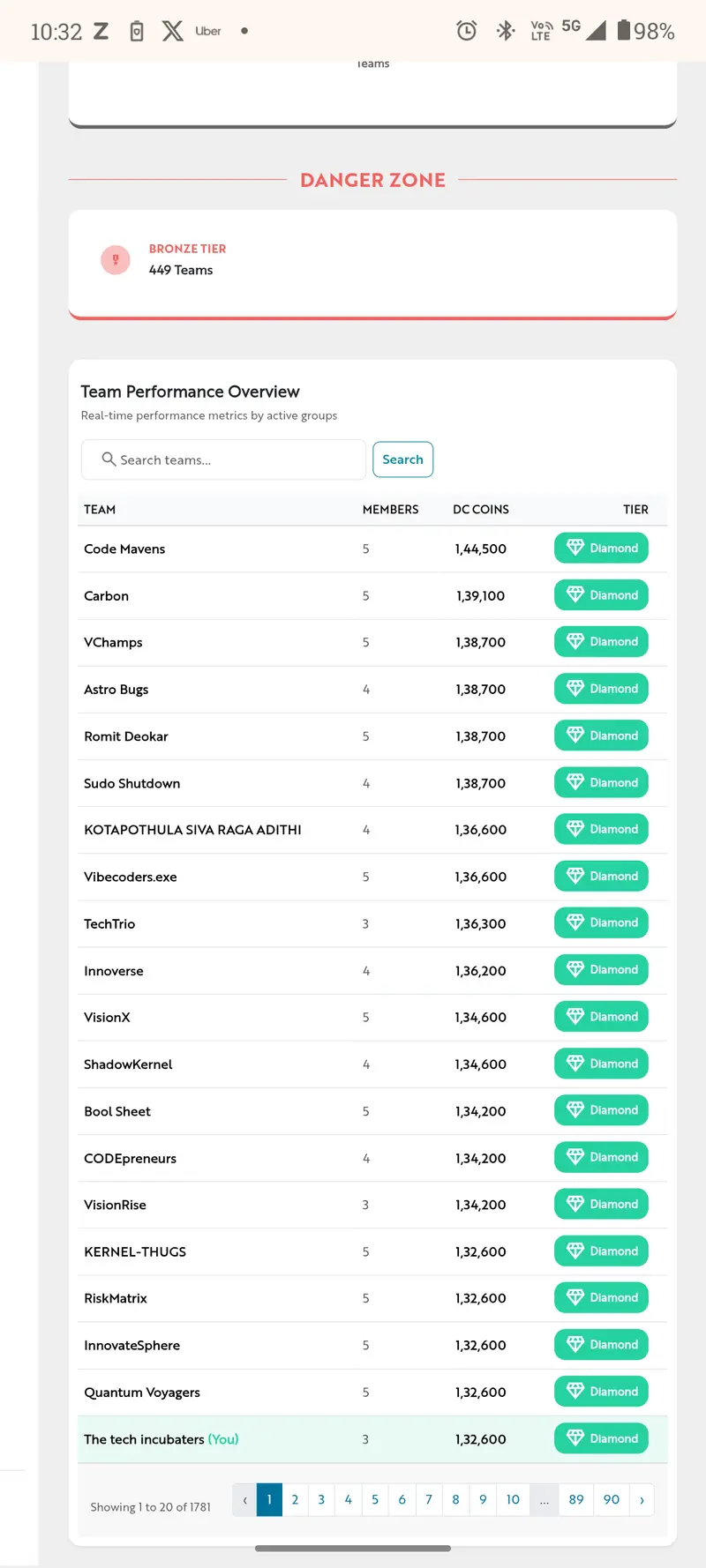
Ranked #21 of 1,781 teams — Diamond Tier ✨
India has 15M+ gig workers. One bad weather day away from financial stress. The infrastructure exists. We connected the dots.
Built with ❤️ by Viswa, Eshaan & Anwita — Guidewire DEVTrails 2026.

DEVTrails2026 #InsurTech #GigEconomy #ParametricInsurance #Buil

 dInPublic

The Economics of CI Pricing: A Framework for Fair Runner Costs

The Economics of CI Pricing: A Framework for Fair Runner Costs

When GitHub announced their pricing changes for Actions runners last year, the developer community erupted. The proposal felt arbitrary, disconnected from actual value delivered, and worst of all—opaque. As someone who’s managed CI infrastructure for teams ranging from five developers to fifty, I found myself asking the same questions many of you probably did: Why should we pay for idle time? Why is concurrency so expensive? What are we actually paying for?

This isn’t just a procurement problem. It’s fundamentally about how we measure and monetize computational value in continuous integration. And the answer isn’t as straightforward as “charge per minute.”

The Root Problem: CI Pricing Lives in the Shadows

The truth is, most CI pricing models today are cargo-culted from cloud computing’s pay-as-you-go paradigm, which doesn’t map cleanly onto CI workflows. When you spin up an EC2 instance, you know what you’re paying for—a machine, running for X seconds. But CI is more complex.

Consider what actually happens when you push code:

  1. Control plane work: Webhook parsing, queue management, job scheduling, log aggregation
  2. Compute work: The actual build, test, and deployment execution
  3. Concurrency costs: Managing multiple simultaneous runs
  4. Idle time: Runners waiting for jobs
  5. Network overhead: Artifact transfers, cache hits/misses

Most providers bundle these into vague “minutes per month” that make no sense beyond a certain scale. You might pay for 10,000 minutes, but use 12,000 because of an inefficient test suite. Or you might use 3,000 but still hit a concurrency wall that requires paying for more runners you won’t fully utilize.

The real issue? There’s no agreed-upon definition of what we’re actually selling.

Breaking Down the True Cost Structure

Let me propose a model that I’ve seen work well in practice. Think of CI pricing as having three distinct components:

1. Control Plane Costs (The Fixed Component)

These are the infrastructure costs that exist regardless of whether your runner is idle or running at full capacity. Webhook processing, log storage, queue management, scheduler overhead—these are real, measurable costs for the provider.

A reasonable approach: flat monthly fee per project or organization, scaled by expected traffic. This acknowledges that you’re using platform resources just by being a customer.

2. Compute Costs (The Variable Component)

This is where things get interesting. Raw compute time is measurable and fair, but the devil is in the details.

# Example: Fair compute pricing structure
pricing_model:
  base_minutes: 1000  # Included per month
  overage_rate: 0.008  # $ per minute

  # But here's the catch - compute should scale with actual demand
  cpu_tiers:
    small: 
      cores: 2
      rate_multiplier: 1.0
    medium:
      cores: 4
      rate_multiplier: 1.5
    large:
      cores: 8
      rate_multiplier: 2.5

  # And real costs vary by location
  region_factors:
    us-east-1: 1.0
    us-west-2: 1.0
    eu-central-1: 1.15
    ap-southeast-1: 1.25

Here’s the critical insight: not all minutes are created equal. A minute on a 2-core instance shouldn’t cost the same as a minute on an 8-core instance. Yet most pricing models flatten this.

3. Concurrency Costs (The Bottleneck Component)

This is where I’ve seen the most pricing confusion. Concurrency isn’t really a “cost”—it’s a constraint on throughput.

If you have five developers pushing code simultaneously, and your CI system can only process two builds at once, you’ve created a queue. That queue is a business problem. Someone’s getting blocked waiting for feedback.

The question isn’t how much to charge for concurrency. It’s whether you’re solving the real problem your customers have.

# Here's how I'd think about concurrency pricing:

class ConcurrencyPricingModel:
    def __init__(self, base_concurrent_runners=3, max_concurrent_runners=50):
        self.base_runners = base_concurrent_runners
        self.max_runners = max_concurrent_runners
        self.cost_per_additional_runner = 50  # $ per month

    def calculate_monthly_cost(self, concurrent_runners_needed):
        """
        Fair concurrency pricing should have three tiers:
        1. Included runners (what you'd reasonably need)
        2. Discounted runners (some elasticity expected)
        3. Premium runners (full unlimited capacity)
        """
        if concurrent_runners_needed <= self.base_runners:
            # You're within your included amount
            return 0

        included_range = self.base_runners
        additional_needed = concurrent_runners_needed - included_range

        # This could be tiered, or it could be elastic
        return additional_needed * self.cost_per_additional_runner

    def calculate_queue_time_cost(self, avg_queue_seconds, developer_hourly_rate=150):
        """
        Here's a provocative idea: charge less if you reduce queue time.
        Queue time is a hidden cost paid by developers sitting idle.
        """
        hours_blocked = avg_queue_seconds / 3600
        developer_cost = hours_blocked * developer_hourly_rate

        # If provider reduces queue time 50%, maybe they deserve 10% of savings
        potential_savings = developer_cost * 0.5
        provider_should_capture = potential_savings * 0.1

        return provider_should_capture

The Queue Time Question: Is Speed Worth Paying For?

This deserves its own section because it fundamentally challenges how we think about CI pricing.

In my experience, most teams would gladly pay 20-30% more for CI if it meant:

  • Push to green time dropped from 15 minutes to 5 minutes
  • Queue times eliminated entirely
  • Faster feedback loops (which directly translate to productivity gains)

Yet almost no CI provider prices based on this. They price based on computation delivered, not value created.

If a provider offers smart caching that reduces build time by 40%, or parallelization that cuts queue time to nearly zero, that’s worth more money to the customer. A pricing model that doesn’t capture this leaves value on the table for both sides.

Common Pitfalls in Pricing Design

Over the years, I’ve seen CI providers (and customers) make the same mistakes repeatedly:

Pitfall 1: Ignoring the Developer Time Cost
Teams focus on runner costs and ignore that slow CI multiplies across all developers. One minute of CI delay × 50 developers × 10 builds per day = 500 developer-minutes wasted. That’s worth $250/day to optimize away.

Pitfall 2: All-or-Nothing Concurrency Pricing
“You need 5 concurrent runners? That’ll be $500/month.” But maybe you only need 5 runners for 2 hours a day during peak commit times. A smarter model would charge for average concurrency, not peak.

Pitfall 3: Not Accounting for Workflow Differences
A frontend team running 200 quick unit tests has fundamentally different needs than a backend team compiling services and running integration tests. Same minute cost is unfair to one of them.

Pitfall 4: Forgetting About Self-Hosted Runners
When providers price too aggressively, teams deploy self-hosted runners. This isn’t a provider win—it’s a customer leaving the ecosystem. Fair pricing keeps teams on-platform.

A Pricing Model Worth Stealing

Here’s what I’d implement if I were building a CI platform from scratch:

class FairCIPricingCalculator:
    """
    A pricing model that tries to be fair to both provider and customers
    """
    def __init__(self):
        self.PLAN_TIERS = {
            'starter': {
                'monthly_fee': 20,
                'included_compute_minutes': 500,
                'included_concurrent_runners': 1,
                'storage_gb': 5,
            },
            'growth': {
                'monthly_fee': 100,
                'included_compute_minutes': 5000,
                'included_concurrent_runners': 3,
                'storage_gb': 50,
                'features': ['cache_optimization', 'priority_queue'],
            },
            'enterprise': {
                'monthly_fee': 500,
                'included_compute_minutes': 50000,
                'included_concurrent_runners': 10,
                'storage_gb': 500,
                'features': ['cache_optimization', 'priority_queue', 'sso', 'audit_logs'],
            }
        }

    def calculate_total_cost(self, plan_tier, actual_metrics):
        """
        actual_metrics should include:
        - compute_minutes_used
        - peak_concurrent_runners_needed
        - storage_used_gb
        - average_queue_time_seconds
        """
        base_cost = self.PLAN_TIERS[plan_tier]['monthly_fee']
        plan = self.PLAN_TIERS[plan_tier]

        # Overage compute
        included_minutes = plan['included_compute_minutes']
        if actual_metrics['compute_minutes_used'] > included_minutes:
            overage_minutes = actual_metrics['compute_minutes_used'] - included_minutes
            overage_cost = overage_minutes * 0.008  # $0.008 per minute
            base_cost += overage_cost

        # Overage concurrency
        included_runners = plan['included_concurrent_runners']
        if actual_metrics['peak_concurrent_runners_needed'] > included_runners:
            additional_runners = actual_metrics['peak_concurrent_runners_needed'] - included_runners
            concurrency_cost = additional_runners * 50  # $50 per additional runner/month
            base_cost += concurrency_cost

        # Storage overage
        included_storage = plan['storage_gb']
        if actual_metrics['storage_used_gb'] > included_storage:
            excess_gb = actual_metrics['storage_used_gb'] - included_storage
            storage_cost = excess_gb * 0.10  # $0.10 per GB
            base_cost += storage_cost

        # Queue time discount (providers should compete on speed!)
        avg_queue_seconds = actual_metrics.get('average_queue_time_seconds', 0)
        if avg_queue_seconds < 60:  # Less than 1 minute average queue
            discount = base_cost * 0.05  # 5% discount for fast queues
            base_cost -= discount

        return round(base_cost, 2)

# Example usage
calculator = FairCIPricingCalculator()
metrics = {
    'compute_minutes_used': 7500,
    'peak_concurrent_runners_needed': 5,
    'storage_used_gb': 120,
    'average_queue_time_seconds': 30,
}

monthly_cost = calculator.calculate_total_cost('growth', metrics)
print(f"Monthly cost: ${monthly_cost}")
# Output: Monthly cost: $200.0

How to Evaluate If Third-Party Runners Make Sense

When deciding whether a third-party runner is worth the cost, I look at these metrics in order:

  1. Push to green time (total time from commit to feedback)
  2. Developer unblock time (time saved per developer per day)
  3. Cost per successful run (factoring in flakiness)
  4. Concurrency headroom (buffer before hitting queue limits)
  5. Lock-in cost (how hard to switch away)

Conclusion: Design Pricing Around Value, Not Just Costs

The uncomfortable truth is that most CI pricing gets designed around what the provider needs to earn back infrastructure costs, not around what creates value for customers.

I’d ship a pricing model that:

  • Separates control plane from compute (fixed + variable)
  • Charges fairly for concurrency (elastic scaling, not artificial caps)
  • Rewards performance (discounts for low queue times)
  • Scales with team size (not just runner count)
  • Stays transparent (no hidden multipl

Want This Automated for Your Business?

I build custom AI bots, automation pipelines, and trading systems that run 24/7 and generate revenue on autopilot.

Hire me on Fiverr — AI bots, web scrapers, data pipelines, and automation built to your spec.

Browse my templates on Gumroad — ready-to-deploy bot templates, automation scripts, and AI toolkits.

Recommended Resources

If you want to go deeper on the topics covered in this article:

Some links above are affiliate links — they help support this content at no extra cost to you.

Gemini CLI + Flutter: The Most Powerful AI Coding Assistant Workflow in 2026

Thumbnail

Query and edit large codebases, generate apps from images or PDFs, and automate complex workflows — all from your terminal with Gemini 3.

Today, I will guide you through how to set up Gemini CLI in your terminal and get it up and running for any of your projects.

Gemini CLI + Flutter is faster than Cursor, more accurate than GitHub Copilot for Flutter-specific stuff, and it integrates directly with Flutter SDK and its best practices.

No more context switching. No more “please generate clean code” prayers. Just precise, production-ready Flutter code in one command.

WHAT IS GEMINI CLI IN 2026?

Gemini CLI is Google’s official terminal-first AI that runs locally or in the cloud, understands your entire project/codebase, and speaks native Dart/Flutter or any other programming language.

Key upgrades:

  • Full project awareness (reads pubspec, lib structure, assets)
  • Native support for Riverpod 3+, Impeller, and the new Stitch/Antigravity plugins
  • Built-in testing and debugging agents
  • VS Code extension that turns it into a one-key superpower

Install command (copy-paste this):

dart pub global activate gemini_cli
gemini init flutter

SETUP + VS CODE INTEGRATION

  1. Run gemini auth (uses your Google account )
  2. In your Flutter project root: gemini project init
  3. Install the official Gemini CLI VS Code extension (search “Gemini CLI” in extensions )

Now every time you highlight code and hit Cmd/Ctrl + Shift + G, you’re talking directly to Gemini inside the editor. Terminal or VS Code — your choice.

PROMPT ENGINEERING MASTERCLASS FOR FLUTTER

Golden Rule: Be ridiculously specific and give context.

Template 1 — Code Generation:

“Using Riverpod 3+ and the latest Flutter 3.29 best practices, generate a clean, typed [feature] provider with loading/error states. Include tests. Project uses Impeller and Material 3.”

Template 2 — Refactoring:

“Refactor this widget to fix Impeller jank. Use const constructors everywhere possible, move expensive computations outside build, and add a proper RepaintBoundary. Keep the same API.”

Template 3 — Debugging:

“Analyze this crash log and give me the exact one-line fix plus why it happens in the Impeller rendering pipeline.”

LIVE DEMO 1 — Generate a Riverpod Provider

Watch this in the terminal:

gemini flutter generate riverpod cart_provider --with-tests

You get a fully typed CartNotifier, provider, and two widget tests using riverpod_test.

LIVE DEMO 2 — Fix Impeller Jank on the Spot

I open a screen that’s dropping to 38 fps on iOS. Highlight the ListView, hit the Gemini button in VS Code, and type:

“Fix this ListView causing Impeller jank on iOS 18+. Use const, cache builders, and add proper RepaintBoundary without changing UI.”

Gemini spits out the fixed version with comments. I apply a hot restart, and we’re back at 120 fps.

LIVE DEMO 3 — Scaffold a Full Production Screen

Command:

gemini flutter scaffold screen profile --state=rp3 --features=analytics,theme,localization

It generates:

  • ProfileScreen with Riverpod 3+
  • Clean folder structure under lib/features/profile/
  • Theme-aware UI
  • Analytics events are already wired
  • Localization keys ready

TESTING + DEBUGGING INSIDE TERMINAL

Want to test the provider we just generated?

gemini flutter test cart_provider --watch

It runs only that file and even suggests edge cases I missed.

Debugging a widget rebuild storm?

gemini flutter debug rebuilds profile_screen

It shows you the exact culprit of the rebuild with a flame graph.

FINAL TIPS + COMMON PITFALLS

  • Always run gemini project sync after big pubspec changes
  • Use --local flag when you want zero cloud cost
  • Combine with Flutter AI Toolkit for even smarter multi-file refactors
  • Never accept the first output — iterate with “make it more concise” or “add error handling.”

Quick pause before we finish, if you’re serious about mastering AI tools like this, join my free Flutter + AI newsletter. Every week, I share the exact prompts, workflows, and early access to new agent skills that I test before they hit YouTube. Completely free, no spam — just the most relevant stuff for Flutter developers. https://techwithsam.dev/newsletter — I’d love to see you there!

That’s it — this is the most powerful AI coding workflow for Flutter devs in 2026, and it’s all inside your terminal.

Drop a like if you’re going to try one of these commands today, and tell me in the comments what you think about Gemini CLI

I’ll see you in the next one. Peace! ✌️

Samuel Adekunle | Tech With Sam | YouTube

Thumbnail

Podman Has a Free API — Daemonless Container Management Compatible with Docker

Podman is a daemonless container engine that’s fully compatible with Docker CLI. It runs containers as rootless by default, provides a Docker-compatible REST API, and can generate systemd units for container management.

Free, open source, by Red Hat. Drop-in replacement for Docker.

Why Use Podman?

  • Daemonless — no background process, containers run as child processes
  • Rootless by default — enhanced security, no root required
  • Docker-compatible — same CLI commands, same API, same images
  • Pod support — group containers into pods (like Kubernetes)
  • Systemd integration — auto-generate systemd services for containers
  • REST API — full Docker-compatible API

Quick Setup

1. Install

# Ubuntu/Debian
sudo apt install podman

# macOS
brew install podman
podman machine init && podman machine start

# Verify
podman --version

2. Enable REST API

# Start API service (rootless)
podman system service --time=0 unix:///tmp/podman.sock &

# Or TCP
podman system service --time=0 tcp:0.0.0.0:8080 &

3. List Containers via API

# Via Unix socket
curl -s --unix-socket /tmp/podman.sock http://d/v4.0.0/libpod/containers/json | jq '.[] | {id: .Id[:12], name: .Names[0], state: .State, image: .Image}'

# Docker-compatible endpoint
curl -s --unix-socket /tmp/podman.sock http://d/v4.0.0/containers/json | jq

4. Run Containers via API

# Create a container
curl -s --unix-socket /tmp/podman.sock -X POST http://d/v4.0.0/libpod/containers/create 
  -H "Content-Type: application/json" 
  -d '{
    "image": "docker.io/library/nginx:latest",
    "name": "my-nginx",
    "portmappings": [{"container_port": 80, "host_port": 8080}]
  }' | jq '.Id'

# Start the container
curl -s --unix-socket /tmp/podman.sock -X POST http://d/v4.0.0/libpod/containers/my-nginx/start

5. Pods (Like Kubernetes)

# Create a pod
podman pod create --name my-app-pod -p 8080:80

# Add containers to pod
podman run -d --pod my-app-pod --name web nginx
podman run -d --pod my-app-pod --name api python:3.11-slim python3 -m http.server 8000

# List pods
podman pod list

# Generate Kubernetes YAML from pod!
podman generate kube my-app-pod > pod.yaml

6. Generate systemd Service

# Auto-create systemd service file
podman generate systemd --new --name my-nginx > ~/.config/systemd/user/my-nginx.service
systemctl --user enable --now my-nginx

Python Example

import requests_unixsocket
import json

session = requests_unixsocket.Session()
SOCK = "http+unix://%2Ftmp%2Fpodman.sock"

# List containers
containers = session.get(f"{SOCK}/v4.0.0/libpod/containers/json").json()
for c in containers:
    print(f"Container: {c['Names'][0]} | State: {c['State']} | Image: {c['Image'][:40]}")

# List images
images = session.get(f"{SOCK}/v4.0.0/libpod/images/json").json()
for img in images:
    names = img.get('Names', ['unnamed'])
    print(f"Image: {names[0]} | Size: {img['Size']/(1024*1024):.0f}MB")

# List pods
pods = session.get(f"{SOCK}/v4.0.0/libpod/pods/json").json()
for p in pods:
    print(f"Pod: {p['Name']} | Status: {p['Status']} | Containers: {len(p['Containers'])}")

Key Endpoints

Endpoint Description
/libpod/containers/json List containers
/libpod/containers/create Create container
/libpod/containers/{id}/start Start container
/libpod/containers/{id}/stop Stop container
/libpod/containers/{id}/logs Get logs
/libpod/images/json List images
/libpod/pods/json List pods
/libpod/pods/create Create pod
/libpod/info System info

Need custom data extraction or scraping solution? I build production-grade scrapers for any website. Email: [email protected] | My Apify Actors

From Barriers to Opportunity: A Glass Ceiling Animation

This is a submission for the 2026 WeCoded Challenge: Frontend Art

Breaking the Glass Ceiling Through Code

Show us your Art

👉 https://codepen.io/Nani-Hatake/pen/QwKQdZz

Inspiration

This piece represents the idea of breaking invisible barriers in technology and opportunities through visual storytelling.

I wanted to express this concept using only HTML and CSS animations. The glass-like surface represents limitations and barriers that exist in many spaces, while the cracking and falling shards symbolize those barriers being broken over time.

As the glass breaks, the idea of code and opportunity rises upward, representing progress, growth, and equal access to technology. The entire piece is built with simple frontend tools to show that even basic web technologies can be powerful for creative expression.

My Code

👉https://codepen.io/Nani-Hatake/pen/QwKQdZz

Optional Note

This project is built using only HTML and CSS, focusing on animation and visual storytelling

Thanks for the opportunity to participate in this challenge!

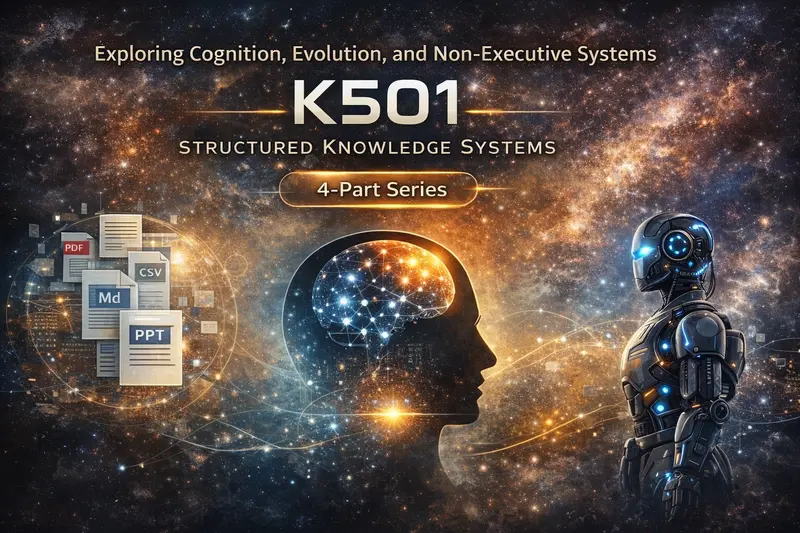
K501 – Stabilizing Systems Without Control (Non-Executable Structures)

Non-Executable Systems (K501)

K501 — Structured Systems Series (3/4)

Non-Executable Systems (K501)

A structural exploration of cognition, evolution, and non-executive information systems.

This series explores:
• how human cognition actually works beyond language
• why systems become unstable under increasing complexity
• how structure differs from execution
• and how alignment between human and machine systems can emerge

Parts:
1. Cognition, Language, and Stability
2. Evolution as Stabilization
3. Non-Executable Systems (K501)
4. Human–Machine Resonance

Title:
K501 — Stabilizing Systems Without Control (Non-Executable Structures)

Intro (Hook)
Most systems try to solve instability by acting:
more control

more automation

more decisions

But every action introduces side effects.
And every side effect creates new instability.
What if stabilization does not require action at all?

The Problem With Execution
In most systems:
execution modifies the environment

modification creates feedback

feedback creates new loops

This leads to:
increasing complexity

unintended consequences

loss of control

In structural terms:
action amplifies instability if not strictly bounded

The Missing Layer
Between:
perception

interpretation

action

there is often no clear separation.
Systems collapse these layers:
data becomes meaning

meaning becomes decision

decision becomes action

Result:
distortion

bias

instability

K501 — A Different Approach
K501 introduces a different principle:
structure without execution
It is not:
an AI agent

a decision system

an automation layer

It does not act.

What K501 Does
K501 provides:
explicit structural boundaries

temporal ordering

reference integrity

append-only continuity

It separates:
presence from interpretation

data from meaning

time from narrative

Why Non-Execution Matters
Execution creates:
side effects

power structures

distortion

Non-execution avoids this entirely.
This is not a limitation.
It is:
a stabilization strategy

Frames Instead of Actions
K501 operates with frames:
minimal units of reference

no overwrite

no mutation

only extension

This ensures:
consistency

traceability

reproducibility

Stability Through Constraint
Instead of controlling behavior, K501:
constrains structure

limits ambiguity

preserves relations

This allows systems to remain:
dynamic

adaptive

but coherent

Human–Machine Context
In a broader system:
humans perceive and interpret

machines process and scale

K501 sits between:
not controlling either, but stabilizing both
It enables:
alignment without domination

structure without enforcement

Why This Is Necessary
As systems grow:
more data

more models

more interactions

Without structure:
fragmentation increases

loops amplify

coherence is lost

K501 addresses this at the root:
by stabilizing reference, not behavior

Relation to Evolution
If evolution is stabilization under complexity,
then systems like K501 represent:
structural responses to increasing degrees of freedom
They do not accelerate.
They stabilize.

What K501 Is Not
not a control system

not a recommendation engine

not an optimization layer

It does not decide what should happen.
It preserves what is.

Closing the Series
Across this series:
Post 1 → Human cognition and the limits of language

Post 2 → Evolution as stabilization

Post 3 → Structural systems without execution

Together they describe:
a shift from control to structure
from action to reference
from noise to coherence

Next: 4. Human–Machine Resonance

Closing
Stability does not come from doing more.
It comes from:
structuring what already exists without distorting it
K501 is one possible form of that principle.

Source:
iinkognit0.de

The Invisible Symphony: Mastering Cyber-Physical Systems (CPS) in 2026

In the early days of computing, “software” and “hardware” lived in separate worlds. Today, that boundary has vanished. As first-year engineers at SPPU, we are entering an era where code doesn’t just move data—it moves the physical world. This is the domain of Cyber-Physical Systems (CPS).

  1. What makes a system “Cyber-Physical”?
    A CPS is not just a computer connected to a machine. It is a seamless integration of computation, networking, and physical processes. Think of an autonomous vehicle or a smart power grid. These systems use feedback loops where physical processes affect computations and vice versa.
  2. The Engineering Challenge: Determinism vs. Best-Effort
    In standard software development, we often settle for “best-effort” speed. But in CPS, timing is correctness.

    • Standard Code: If a web page loads in 2 seconds instead of 1, it’s a minor lag.
    • CPS Code: If an automated braking system calculates a trajectory 0.5 seconds late, the system fails.
      As we study Python and Linear Algebra, we aren’t just learning syntax; we are learning the mathematical models required to predict these physical behaviors with absolute precision.
  3. From Theory to Lab: The Student Ecosystem
    In our project, the Student Success Ecosystem, we see the early stages of CPS. By integrating biometric scanning (physical) with AI-driven attendance logic (cyber), we create a system that reacts to the physical presence of a student in real-time. This is the foundation for the “Smart Cities” we will build as future graduates.
    The Bottom Line
    The next generation of Computer Engineers won’t just be “coders.” We will be System Architects who understand the friction of the physical world and the logic of the digital one. The future is hybrid.