Enchanted Forest Chat
Check out this Pen I made!

Check out this Pen I made!
The Real Cost of Web Scraping at Scale
Most engineering teams overspend on web scraping by 5-10x because they use the same infrastructure for every request. Scraping a static HTML documentation page shouldn’t cost the same as extracting data from a JavaScript-heavy e-commerce site with Cloudflare protection.
The solution: tiered scraping architecture. By matching request complexity to infrastructure level, teams routinely cut scraping costs by 80-90% while maintaining or improving success rates.
This post breaks down scraping API pricing models, shows how tiered systems work, and provides production-ready code for implementing cost-optimized scraping pipelines.
How Scraping API Pricing Actually Works
Scraping APIs charge based on infrastructure cost per request. Understanding these tiers is critical for cost optimization:
T1 — Basic HTTP Requests
T2 — Enhanced HTTP
T3 — Headless Browser
T4 — Advanced Anti-Bot
T5 — CAPTCHA Solving
The cost difference between T1 and T5 is 50-100x. Using T5 for every request when 70% of your targets only need T1 is financial waste.
Pricing Model Comparison
Most scraping services use one of three pricing models. Here’s how they compare for production workloads:
| Model | Cost at 10K req/mo | Cost at 100K req/mo | Best For |
|---|---|---|---|
| Flat Rate | $99/mo | $499/mo | Predictable, low-volume |
| Pay-Per-Success | $50-300 | $500-3000 | Variable success rates |
| Tiered Usage | $30-80 | $200-600 | Mixed complexity targets |
Flat Rate Plans charge a fixed monthly fee for a request quota. Simple to budget, but you pay the same rate regardless of target complexity. Often includes overage charges that spike unexpectedly.
Pay-Per-Success charges only for successful extractions. Transparent, but success rate definitions vary. A 95% success rate means you’re paying for 5% failures indirectly through higher per-request pricing.
Tiered Usage (like AlterLab’s pricing) charges based on infrastructure tier used. This is where significant savings happen—you control which tier each request uses, optimizing for cost per target.
For teams scraping 50+ different domains with varying complexity, tiered pricing typically costs 60-90% less than flat-rate alternatives.
Implementing Tiered Scraping in Production
The key to cost optimization is automatic tier escalation: start with the cheapest tier, escalate only when needed. Here’s a production-ready implementation:
“`python title=”tiered_scraper.py” {4-8,15-18}
from typing import Optional
client = alterlab.Client(
api_key=”YOUR_API_KEY”,
auto_escalate=True # Auto-escalate on failure
)
def scrape_with_tier_optimization(url: str, min_tier: int = 1) -> dict:
“””
Scrape URL starting at minimum tier, escalate only if needed.
Reduces costs by 70-90% compared to always using T5.
“””
response = client.scrape(
url=url,
min_tier=min_tier, # Start at T1 for static sites
max_tier=5, # Escalate up to T5 if needed
formats=[“json”]
)
return {
    "url": url,
    "tier_used": response.tier,
    "cost": response.cost,
    "success": response.success,
    "data": response.data
}
Example: Scrape 100 mixed-complexity sites
urls = [
“https://docs.python.org/3/library/“, # T1 sufficient
“https://www.amazon.com/dp/B08N5WRWNW“, # T4 required
“https://github.com/trending“, # T2-3 needed
]
results = [scrape_with_tier_optimization(url) for url in urls]
total_cost = sum(r[“cost”] for r in results)
print(f”Total cost: ${total_cost:.4f} for {len(results)} requests”)
The `min_tier` parameter is critical. Setting `min_tier=1` tells the API to attempt T1 first, escalating only on failure. For known complex sites, set `min_tier=4` to skip wasted T1-T3 attempts.

For JavaScript-heavy sites, use the [Python SDK](https://alterlab.io/web-scraping-api-python) which handles tier selection automatically based on response analysis.

## Cost Comparison: Before and After Tiered Architecture

Let's compare actual costs for a realistic scraping workload: 10,000 requests/month across mixed-complexity targets.

**Scenario: E-commerce Price Monitoring**
- 40% static product pages (T1 sufficient)
- 35% JavaScript-rendered prices (T3 required)
- 20% moderate anti-bot (T4 required)
- 5% CAPTCHA-protected (T5 required)

<div data-infographic="stats">
  <div data-stat data-value="$450" data-label="Flat Rate Cost"></div>
  <div data-stat data-value="$87" data-label="Tiered Cost"></div>
  <div data-stat data-value="81%" data-label="Cost Reduction"></div>
  <div data-stat data-value="99.2%" data-label="Success Rate"></div>
</div>

**Flat Rate (Always T5):**


```plaintext
10,000 requests × $0.045 (avg T5) = $450/month
Tiered Architecture:
4,000 × $0.002 (T1)  = $8.00
3,500 × $0.015 (T3)  = $52.50
2,000 × $0.030 (T4)  = $60.00
500   × $0.080 (T5)  = $40.00
─────────────────────────────────
Total:               $160.50/month
With Auto-Escalation Optimization:
Smart tier selection (starting low, escalating only on failure) typically reduces the T4/T5 portion by 40-50% because many sites that appear complex actually respond to simpler requests.
Optimized Total: ~$87/month (81% savings vs flat rate)
The quickstart guide shows how to configure auto-escalation in under 5 minutes.
Node.js Implementation for High-Volume Pipelines
For teams running scraping jobs in Node.js environments, here’s a production pattern with built-in cost tracking:
“`javascript title=”scraper-pipeline.js” {5-9,22-26}
const client = new AlterLabClient({
apiKey: process.env.ALTERLAB_API_KEY,
autoEscalate: true,
maxRetries: 3,
onTierEscalation: (from, to, url) => {
console.log(Escalated T${from} → T${to} for ${url});
}
});
async function scrapeWithCostTracking(urls) {
const results = await Promise.all(
urls.map(async (url) => {
const response = await client.scrape(url, {
minTier: 1,
formats: [‘json’],
timeout: 30000
});
  return {
    url,
    tier: response.tier,
    cost: response.cost,
    success: response.success,
    timestamp: new Date().toISOString()
  };
})
);
const totalCost = results.reduce((sum, r) => sum + r.cost, 0);
const tierDistribution = results.reduce((acc, r) => {
acc[T${r.tier}] = (acc[T${r.tier}] || 0) + 1;
return acc;
}, {});
return {
results,
summary: {
totalRequests: results.length,
totalCost: totalCost.toFixed(4),
avgCostPerRequest: (totalCost / results.length).toFixed(6),
tierDistribution
}
};
}
// Usage
const urls = [
‘https://example-shop.com/product/123‘,
‘https://competitor-site.com/pricing‘,
];
scrapeWithCostTracking(urls).then(({ summary }) => {
console.log(Cost: $${summary.totalCost} for ${summary.totalRequests} requests);
console.log(‘Tier distribution:’, summary.tierDistribution);
});
This pattern gives you visibility into tier distribution—critical for identifying optimization opportunities. If 80% of requests escalate to T4+, your `min_tier` defaults may be too conservative.

## When to Use Each Tier: Decision Framework

Use this decision tree to set appropriate `min_tier` values for your targets:

<div data-infographic="steps">
  <div data-step data-number="1" data-title="Static HTML?" data-description="View source → HTML present? Use T1"></div>
  <div data-step data-number="2" data-title="JavaScript Required?" data-description="Empty HTML, dynamic content? Use T3"></div>
  <div data-step data-number="3" data-title="Cloudflare Detected?" data-description="Challenge page? Use T4"></div>
  <div data-step data-number="4" data-title="CAPTCHA Present?" data-description="hCaptcha/reCAPTCHA? Use T5"></div>
</div>

**Quick Tier Selection Guide:**

| Target Type | Recommended min_tier | Why |
|-------------|---------------------|-----|
| Documentation sites | 1 | Static HTML, no JS |
| News articles | 1-2 | Mostly static, some lazy load |
| E-commerce product pages | 3-4 | JS rendering, anti-bot common |
| Social media profiles | 4-5 | Heavy anti-bot, login walls |
| Government sites | 1-2 | Usually simple, occasional CAPTCHA |
| Job boards | 2-3 | Mix of static and dynamic |
| Real estate listings | 3-4 | Images, maps, dynamic pricing |

Test new targets with `min_tier=1` first. Log the tier that succeeds, then set that as your baseline for future scrapes. The [API reference](https://alterlab.io/docs) documents all tier-specific parameters.

## Monitoring and Alerting for Cost Optimization

Cost optimization requires visibility. Set up monitoring to catch tier escalation spikes:


```python title="cost_monitor.py" {8-14}

from datetime import datetime, timedelta

client = alterlab.Client(api_key="YOUR_API_KEY")

def analyze_tier_distribution(hours: int = 24) -> dict:
    """Analyze tier distribution over time window."""
    cutoff = datetime.now() - timedelta(hours=hours)

    # Query your scrape logs (implementation depends on your storage)
    scrapes = get_scrapes_since(cutoff)

    tier_counts = {}
    tier_costs = {}

    for scrape in scrapes:
        tier = f"T{scrape.tier}"
        tier_counts[tier] = tier_counts.get(tier, 0) + 1
        tier_costs[tier] = tier_costs.get(tier, 0) + scrape.cost

    total_cost = sum(tier_costs.values())

    return {
        "period_hours": hours,
        "total_requests": len(scrapes),
        "total_cost": total_cost,
        "tier_distribution": tier_counts,
        "cost_by_tier": tier_costs,
        "avg_cost_per_request": total_cost / len(scrapes) if scrapes else 0
    }

# Alert if T5 usage exceeds 10%
def check_tier_alerts():
    analysis = analyze_tier_distribution(hours=1)
    t5_ratio = analysis["tier_distribution"].get("T5", 0) / analysis["total_requests"]

    if t5_ratio > 0.10:
        send_alert(f"T5 usage spike: {t5_ratio:.1%} in last hour")
Set up alerts for:
Common Cost Optimization Mistakes
Mistake 1: Always Using Headless Browsers
Running every request through Playwright when 60% of targets are static HTML wastes 50-70% of your budget. Start with T1, escalate on failure.
Mistake 2: Not Caching Results
Re-scraping unchanged pages burns budget. Implement ETag-based caching or use monitoring features that only return data when pages change.
Mistake 3: Ignoring Retry Logic
Transient failures happen. Blind retries at the same tier waste money. Implement exponential backoff with tier escalation on repeated failures.
Mistake 4: No Target Classification
Treating all URLs the same ignores known patterns. Classify targets by domain, set appropriate min_tier per domain, and track success rates.
Takeaway
Tiered scraping architecture is the single most effective cost optimization for production scraping pipelines. Key points:
min_tier per domain based on historical dataTeams implementing these practices typically see 70-90% cost reduction while maintaining 99%+ success rates. The FAQ covers common implementation questions.
For more technical deep-dives, check out the AlterLab blog for posts on anti-bot bypass strategies and large-scale data extraction patterns.
Logs are a debugging interface you can still use when the system is on fire.
The problem is that plain text logs age poorly: as soon as you need filtering,
aggregation, and alerting, you start parsing sentences.
Structured logging is the antidote.
It turns every log line into a small event with stable fields, so tools can search and aggregate reliably.
For how logs connect to metrics, dashboards, and alerting in the wider stack, see the Observability: Monitoring, Metrics, Prometheus & Grafana Guide.
What structured logging is and why it scales
Structured logging is logging where a record is not just a string, but a
message plus typed key value attributes. The idea is boring in the best way:
once logs are machine-readable, an incident stops being a grep contest.
A quick comparison:
Plain text (human-first, tool-hostile)
failed to charge card user=42 amount=19.99 ms=842 err=timeout
Structured (tool-first, still readable)
{"msg":"failed to charge card","user_id":42,"amount":19.99,"duration_ms":842,"error":"timeout"}
In production, it helps to think of logs as an event stream emitted by the
process, while routing and storage live outside the application. That mental
model pushes you toward writing one event per line and keeping events easy to
ship and re-process.
Slog in Go as a shared logging front end
Go has had the classic log package since forever, but modern services need
levels and fields. The log/slog package (Go 1.21 and later) brings structured
logging into the standard library and formalises a common shape for log
records: time, level, message, and attributes.
For a compact language and command refresher alongside this guide, see the Go Cheatsheet.
The key parts of the model are:
Record
A record is what happened. In slog terms, it contains time, level, message,
and a set of attributes. You create records via methods like Info and Error,
or via Log when you want to supply the level explicitly.
Attributes
Attributes are the key value pairs that make logs queryable. If you log the
same concept under three different keys (user, userId, uid), you get three
different datasets. Consistent keys are where the real value hides.
Handler
A handler is how records become bytes. The built-in TextHandler writes
key=value output, while JSONHandler writes line-delimited JSON. Handlers are
also where redaction, key renaming, and output routing tend to happen.
One under-rated feature is that slog can sit in front of existing code. When
you set a default slog logger, top-level slog functions use it, and the classic
log package can be redirected to it too. That makes incremental migration
possible.
Groups
Groups solve the “every subsystem uses id” problem. You can group a set of
attributes for a request (request.method, request.path) or namespace an entire
subsystem with WithGroup so keys do not collide.
A production shaped slog setup
The following setup hits the usual goals.
The examples use a small logx package; for where packages like that usually live in a real module, see Go Project Structure: Practices & Patterns.
package logx

import (
    "log/slog"
    "os"
)

var level slog.LevelVar // defaults to INFO

func New() *slog.Logger {
    opts := &slog.HandlerOptions{
        Level:     &level, // can be changed at runtime
        AddSource: true,   // include file and line when available
        ReplaceAttr: func(groups []string, a slog.Attr) slog.Attr {
            // Centralised redaction: consistent and hard to bypass by accident.
            switch a.Key {
            case "password", "token", "authorization", "api_key":
                return slog.String(a.Key, "[redacted]")
            }
            return a
        },
    }

    h := slog.NewJSONHandler(os.Stdout, opts)

    return slog.New(h).With(
        "service", os.Getenv("SERVICE_NAME"),
        "env", os.Getenv("ENV"),
        "version", os.Getenv("VERSION"),
    )
}

func SetLevel(l slog.Level) { level.Set(l) }
A tiny detail with large consequences: the built-in JSON handler uses standard
keys (time, level, msg, source). When your log backend expects a different
schema, ReplaceAttr is the pressure-release valve that lets you normalise keys
without rewriting call sites.
Schema matters more than the logger
Most “structured logging” failures are schema failures.
Essential fields that keep paying rent
Every log backend will store a timestamp, level, and message. In practice, a
useful application schema often adds a small set of stable fields:
Notice the pattern: these fields answer operational questions, not developer
curiosity.
Semantic conventions are a cheap consistency hack
If you already use OpenTelemetry, its semantic conventions provide a standard
vocabulary for attributes across telemetry signals. Even if you do not export
logs via OpenTelemetry, borrowing attribute names reduces the “what did we call
this field in service B” tax.
High cardinality and why logs get expensive
High cardinality means “too many unique values”. It is fine inside a JSON
payload, but it becomes painful when a backend treats some fields as indexed
labels or stream keys. User IDs, IP addresses, random request tokens, and full
URLs tend to explode combinations.
The practical outcome is simple: keep labels and index keys boring (service,
environment, region), and keep high-cardinality fields inside the structured
payload for filtering at query time.
Correlation with request IDs and traces
Correlation is the point where logs stop being just text and start behaving
like telemetry.
Request ID as the lowest-friction correlation key
A request ID is the simplest bridge between an incoming request and everything
that happens because of it. It tends to work even without distributed tracing,
and it is still useful when traces are sampled.
A common pattern is to attach a per-request logger to the context:
package logx

import (
    "context"
    "log/slog"
)

type ctxKey struct{}

func WithLogger(ctx context.Context, l *slog.Logger) context.Context {
    return context.WithValue(ctx, ctxKey{}, l)
}

func FromContext(ctx context.Context) *slog.Logger {
    if l, ok := ctx.Value(ctxKey{}).(*slog.Logger); ok && l != nil {
        return l
    }
    return slog.Default()
}
Trace correlation with W3C Trace Context and OpenTelemetry
W3C Trace Context defines a standard way to propagate trace identity (for HTTP,
via traceparent and tracestate). OpenTelemetry builds on that so trace IDs and
span IDs can be extracted from context.
This middleware example logs both request_id and trace identifiers when
available:
package middleware

import (
    "crypto/rand"
    "encoding/hex"
    "net/http"

    "go.opentelemetry.io/otel/trace"
    "log/slog"

    "example.com/project/logx"
)

func requestID() string {
    var b [16]byte
    _, _ = rand.Read(b[:])
    return hex.EncodeToString(b[:])
}

func WithRequestLogger(base *slog.Logger) func(http.Handler) http.Handler {
    return func(next http.Handler) http.Handler {
        return http.HandlerFunc(func(w http.ResponseWriter, r *http.Request) {
            rid := r.Header.Get("X-Request-Id")
            if rid == "" {
                rid = requestID()
            }

            l := base.With(
                "request_id", rid,
                "method", r.Method,
                "path", r.URL.Path,
            )

            if sc := trace.SpanContextFromContext(r.Context()); sc.IsValid() {
                l = l.With(
                    "trace_id", sc.TraceID().String(),
                    "span_id", sc.SpanID().String(),
                )
            }

            ctx := logx.WithLogger(r.Context(), l)
            next.ServeHTTP(w, r.WithContext(ctx))
        })
    }
}
Once correlation fields exist, the log line becomes an index into other data.
The difference in a live incident is not subtle.
Turning structured logs into monitoring and alerting signals
Logs are great at answering “what happened”. Alerting is usually about “how
often and how bad”.
A practical approach is to treat certain log events as counters:
Many platforms can derive log-based metrics by counting matching records over a
window. Structured logs make that count resilient, because it is based on a
field value rather than a brittle text match.
When you are ready to visualise and explore those signals, Install and Use Grafana on Ubuntu: Complete Guide walks through a full Grafana setup you can point at common log and metrics backends.
This is also where log levels start to matter. Debug logs are often valuable,
but they are also where cost and noise hides. Using a dynamic level (LevelVar)
lets the system stay quiet by default, while still allowing targeted detail
when needed.
Closing thoughts
Structured logging in Go is no longer a library debate. The interesting part is
whether your log records are consistent, correlatable, and affordable to store.
When your logs carry stable fields like event, request_id, and trace_id, they
stop being “strings someone wrote” and start being a dataset you can operate.
Notes
The Go team introduced log/slog in Go 1.21 and emphasised that structured logs
use key-value pairs so they can be parsed, filtered, searched, and analysed
reliably, and also noted the motivation of providing a common framework shared
across the ecosystem.
The log/slog package documentation defines the record model (time, level,
message, key-value pairs) and the built-in handlers (TextHandler for key=value
and JSONHandler for line-delimited JSON), and documents SetDefault integration
with the classic log package.
For distributed correlation, the W3C Trace Context specification standardises
traceparent and tracestate propagation, and OpenTelemetry specifies that its
SpanContext conforms to W3C Trace Context and exposes TraceId and SpanId,
making log-trace correlation straightforward when a span is present.
For log storage cost and performance, Grafana Loki documentation strongly
recommends bounded, static labels and warns about high cardinality labels
creating too many streams and a huge index, which is directly relevant when
deciding what becomes a label vs what stays as an unindexed JSON field.
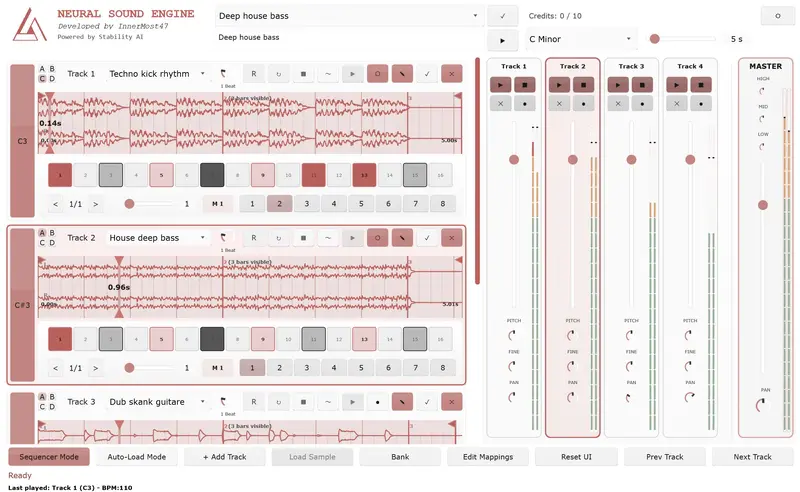

La plupart des outils d’IA musicale fonctionnent de la même façon : tu quittes ton DAW, tu génères quelque chose sur une interface web, tu télécharges un fichier, tu l’importe. Le flux créatif s’arrête. Tu reviens dans un autre état d’esprit.
OBSIDIAN Neural ne fonctionne pas comme ça.
C’est un plugin VST3/AU open source qui génère de l’audio par IA en temps réel, directement dans votre DAW, synchronisé à votre tempo, pendant que vous jouez. L’IA n’est pas un outil externe — elle devient un instrument à part entière.
Ce que fait le plugin
Vous tapez une description — “dark techno kick”, “ambient pad with reverb”, “808 bass with distortion” — et le plugin génère un loop audio correspondant, calé sur le tempo de votre projet. Pas de sortie de DAW, pas de glisser-déposer, pas d’attente.
L’architecture centrale :
8 pistes indépendantes, chacune avec 4 pages (A/B/C/D) et 8 séquences par page — soit 256 patterns au total pour des sets live complexes. Les changements de pages sont quantifiés aux mesures pour des transitions sans accroc.
Déclenchement MIDI sur les notes C3-B3 — vous mappez vos pads, votre pédale, votre contrôleur, et vous générez en arrière-plan sans interrompre la lecture.
Synchronisation tempo automatique via SoundTouch/Librosa — le loop généré est automatiquement étiré pour correspondre au BPM de votre projet.
Beat Repeat quantifié — 10 presets de subdivision (de 4 mesures à 1/128), mode aléatoire pour des textures glitch évolutives, tout mappable en MIDI.
Draw-to-Audio — vous dessinez sur un canvas 512×512, un VLM (Vision Language Model) interprète le dessin en description musicale, puis génère le son correspondant. Lignes angulaires → synth staccato agressif. Courbes douces → pad fluide. C’est expérimental, et c’est mon concept préféré du plugin.
Ce que le plugin ne fait PAS
C’est important de le dire clairement : OBSIDIAN Neural n’est pas un générateur de chansons comme Suno ou Udio.
C’est un sampler intelligent : vous construisez votre morceau loop par loop, vous composez, vous arrangez. L’IA génère le matériau brut — vous restez le musicien.
Trois modes d’utilisation
Cloud API (recommandé pour débuter)
Zéro setup. Vous téléchargez le VST, vous récupérez une clé API sur obsidian-neural.com, vous configurez le plugin. Essai 7 jours gratuit sans carte bancaire.
Server URL : https://api.obsidian-neural.com
API Key    : votre clé
Tarifs : Free (10 crédits) · Base 5,99€/mois · Starter 14,99€/mois · Pro 29,99€/mois
Serveur auto-hébergé + GPU
Pour ceux qui veulent la confidentialité totale et les générations illimitées. Nécessite un GPU NVIDIA (CUDA) ou Apple Silicon (Metal) et un environnement Python.
git clone https://github.com/innermost47/ai-dj.git
cd ai-dj
./install-mac.sh  # ou install-win.bat / install-lnx.sh
Modèles locaux offline (Windows)
Sans GPU, sans serveur, sans internet. 16 Go de RAM minimum. Générations fixes à 10 secondes.
Le contrôleur mobile
Un projet parallèle : une app Flutter Android/iOS qui transforme votre téléphone ou tablette en surface de contrôle MIDI dédiée pour OBSIDIAN Neural.
→ github.com/innermost47/obsidian-neural-controller
8 cartes de slots scrollables, faders de volume, knobs de pan, pitch, beat repeat, 8 patterns de séquenceur par slot. Feedback MIDI bidirectionnel — l’app reflète l’état réel du VST en temps réel. Connexion USB automatique, zéro configuration.
Reconnaissance académique et presse
En septembre 2025, j’ai présenté un Late Breaking Demo Paper à l’AES AIMLA 2025 (Audio Engineering Society International Conference on Artificial Intelligence and Machine Learning for Audio) à la Queen Mary University de Londres.
Depuis le lancement en juin 2025, le plugin a été couvert par 12 publications dans 8 pays :
| Pays | Publication |
|---|---|
| 🇺🇸 USA | Synthtopia, Bedroom Producers Blog, Audio Plugin Guy |
| 🇨🇳 Chine | MIDIFAN (×2), Sohu.com |
| 🇫🇷 France | Audiofanzine |
| 🇳🇱 Pays-Bas | Rekkerd |
| 🇪🇸 Espagne | FutureMusic España |
| 🇰🇷 Corée du Sud | S1 Forum |
| 🇯🇵 Japon | DTM Plugin Sale |
“Too many AI projects focus on the things AI can save you from doing rather than how AI can help you get better at what you do.”
— James Nugent, Bedroom Producers Blog“I’ve cycled through almost every AI music tool on the market, but Obsidian is the first one that actually feels like a real production tool rather than a novelty.”
— Moteka, Electronic Music Producer
Sous le capot
L’architecture technique pour les curieux :
Télécharger et contribuer
Le projet est entièrement open source sous licence AGPL-3.0.
→ GitHub — OBSIDIAN Neural
→ GitHub — Mobile Controller
→ obsidian-neural.com — documentation, API, pricing
4 200+ téléchargements · 191 étoiles GitHub · 19 forks · Windows · macOS · Linux
Si vous utilisez le plugin, partagez vos créations — je suis le seul à poster des vidéos OBSIDIAN pour l’instant. Montrez-moi comment vous l’utilisez.
TL;DR
I’ve been reviewing codebases built mostly with Cursor and Claude Code for a few months. The SQL injection pattern keeps showing up. Not the obvious string concatenation from old PHP tutorials. The modern version. Template literals.
Ask Cursor to write a basic filter route and it generates something that looks clean, passes all your tests, runs perfectly in development, and doesn’t trip any warnings. The problem only surfaces when someone sends a crafted input to a production endpoint.
The Vulnerable Pattern (CWE-89)
Here’s what gets generated for a basic user filter endpoint:
app.get('/api/users', async (req, res) => {
  const { filter } = req.query;
  const result = await db.query(
    `SELECT * FROM users WHERE name = '${filter}'`
  );
  res.json(result.rows);
});
This is SQL injection. The string interpolation puts filter directly into the query. Send ' OR '1'='1 as the filter value and you get every row in the table. The ${filter} part isn’t special syntax the database understands. It’s string concatenation happening before the query even reaches the database.
This pattern is CWE-89. It’s been in the OWASP Top 10 for over a decade. It just looks different now because backtick strings replaced concatenation operators, making it less visually obvious than the old "SELECT * FROM users WHERE name = '" + filter + "'".
Why AI Editors Keep Writing This
The training data is the answer. These models learned from millions of code examples, a significant portion of which use string interpolation for database queries. Tutorials from 2014 to 2018. Stack Overflow answers written before parameterized queries were the default. GitHub repos that work perfectly and were never audited.
The model learned that template literals work. Because they do. The code runs. Tests pass. Nothing flags it in development. There’s no feedback mechanism that would teach the model this specific pattern is dangerous.
There’s also a subtlety here: the code is structurally correct. The async/await pattern is right. The route handler shape is right. The variable names are reasonable. Only the query construction is wrong, and that wrong part is exactly one line.
The Fix
Parameterized queries. Every modern database driver supports them.
app.get('/api/users', async (req, res) => {
  const { filter } = req.query;
  const result = await db.query(
    'SELECT * FROM users WHERE name = $1',
    [filter]
  );
  res.json(result.rows);
});
The query string and the user data are now separate arguments. The pg driver handles all escaping. $1 is a placeholder, not a string interpolation point. For mysql2, use ? instead. For Sequelize or Prisma, use the ORM’s query builder methods rather than raw SQL strings and this whole class of problem disappears.
The fix takes about ten seconds once you know what to look for. A codebase-wide search for db.query calls where the first argument contains a backtick will surface most instances quickly.
I’ve been using SafeWeave to catch this automatically. It hooks into Cursor and Claude Code as an MCP server and runs Semgrep with SQL injection detection rules as part of its scan. A pre-commit hook with semgrep --config p/sql-injection also works if you want something lighter. The pattern is well-documented enough that automated detection is reliable. The important thing is catching it before it ships, not during an incident review.
github project
MicronOS
A Rust-based operating system written from scratch, featuring a modular architecture with support for processes, networking, filesystems, and POSIX compatibility.
Vision
MicronOS is a Rust micronation by Rust programmers, for Rust programmers. Built entirely in Rust, it leverages cutting-edge type-state patterns and modern systems programming to create an OS that’s:
Memory Safe – No buffer overflows, use-after-free, or data races by design
Innovative – Type-state patterns for compile-time safety guarantees
Testable – 100% testable code, runnable with cargo test
Modular – Composable architecture with 8 crates
Architecture
micronos/
├── crates/
│ ├── micronos-core/ # Types, error handling, traits
│ ├── micronos-kernel/ # Kernel, scheduler, syscall, posix
│ │ ├── kernel/ # MicronKernel implementation
│ │ ├── scheduler/ # Task scheduler
│ │ ├── syscall/ # System call interface
│ │ │ ├── mod.rs # Dispatcher, context, error types
│ │ │ └── handlers.rs # 7 syscall handler implementations
│ │ └── posix/ # POSIX compatibility layer
│ ├── micronos-net/ # Network stack (TCP/UDP), antenna, p2p
│ ├── micronos-fs/ # VFS, storage
│ ├── micronos-services/ # Health monitor, IPC, logger, config, timer, signals
│ └── micronos-drivers/ # Driver framework
└── micronos-bin/ # Main binary, shell
Features
Kernel
Process management (spawn, kill, list)
Memory management
Scheduler with priority support
Boot sequence
POSIX Compatibility Layer
Process syscalls: fork, getpid, getppid, getuid, getgid
File syscalls: open, close, read, write, lseek
Network syscalls: socket, bind, listen, accept
Time syscalls: time
Error handling: errno_name(), is_error_retryable(), is_error_fatal()
Network Stack
TCP with full state machine (Closed, Listen, SynSent, Established, etc.)
UDP datagrams
Socket abstraction layer
P2P networking
Antenna management
Services
Health monitoring with recovery
IPC (inter-process communication)
Logger with log levels
Configuration management
Statistics collection
Timer management
Signal handling
Event System – Centralized event bus for inter-component communication
Driver Framework
Driver trait with lifecycle (init, start, stop, suspend, resume, shutdown)
Device types: Character, Block, Network, Virtual, Pseudo
Built-in drivers: null, zero, random
Event System
EventBus – Centralized pub/sub event system
Event types:
Process: ProcessCreated, ProcessTerminated, ProcessSuspended, ProcessResumed
Timer: TimerExpired
Network: NetworkConnected, NetworkDisconnected
Memory: MemoryAllocated, MemoryFreed
Disk: DiskRead, DiskWrite
Signal: SignalReceived
Custom: IPC (100-102), Timer (200), Driver (300), Config (400), Service (500), Health (501)
Event sources: Kernel, Process, Driver, Network, Timer
History: Configurable event history buffer (default 1000 events)
Filtering: Filter events by type (process, timer, network, memory, disk, signal)
Shell Commands
System Info: info, status, version, kernel, uptime, top, benchmark
Processes: ps, spawn, suspend, resume, kill
Filesystem: ls, mkdir, create, cat, rm
Network: network, scan, discover, antenna, ping, sockets
System: log, events, events stats, events filter, events export,
ipc, channel, config, stats, timers, timer,
memory, memory alloc, memory free, signals, drivers
Advanced: syscall, posix
Utilities: echo, exit/quit
System Calls
Process (0xxx)
Number Name Description
0 fork Create new process
4 getpid Get process ID
5 getppid Get parent PID
6 getuid Get user ID
7 getgid Get group ID
File (2xxx)
Number Name Description
2000 open Open file
2001 close Close file
2002 read Read from file
2003 write Write to file
2004 lseek Seek in file
Network (3xxx)
Number Name Description
3000 socket Create socket
3001 bind Bind socket
3003 listen Listen for conn.
3004 accept Accept connection
Time (5xxx)
Number Name Description
5000 time Get current time
Building
Build the project
cargo build
Run tests
cargo test
Run clippy lints
cargo clippy
Run the OS
cargo run
Testing
The project includes comprehensive tests:
Run all tests
cargo test
Run specific crate tests
cargo test -p micronos-kernel
cargo test -p micronos-net
Run clippy
cargo clippy
Test Results
183 tests across all crates
3 doctests for POSIX module
0 clippy warnings
Usage Examples
Shell
micronos> help
micronos> info
micronos> ps
micronos> top
micronos> benchmark
Syscall Interface
micronos> syscall info
micronos> syscall invoke 4 # getpid
micronos> syscall invoke 5 # getppid
POSIX
micronos> posix
Event System
micronos> events # Show event history
micronos> events list # List all events
micronos> events stats # Show event statistics
micronos> events filter process # Filter by type
micronos> events filter timer # Filter by type
micronos> events filter network # Filter by type
micronos> events by kernel # Filter by source
micronos> events by process # Filter by source
micronos> events export # Export events (CSV)
micronos> events clear # Clear event history
Memory & IPC
micronos> memory alloc 1024 # Allocate 1024 bytes
micronos> memory free 0x10000 1024 # Free memory region
micronos> channel create test # Create IPC channel
micronos> channel 0 send hello # Send message
micronos> channel 0 recv # Receive message
micronos> timer create mytimer 5000 # Create timer (5s)
Error Codes
The system uses POSIX-compatible error codes:
EPERM (1): Operation not permitted
ENOENT (2): No such file or directory
EBADF (9): Bad file descriptor
ENOMEM (12): Out of memory
EINVAL (22): Invalid argument
ENOSYS (38): Function not implemented
Status
Component Status
BUILD ✅ Pass
TESTS ✅ 183 Pass
DOCTESTS ✅ 3 Pass
CLIPPY ✅ 0 Warnings
License
MIT License
Copyright (c) 2026 AI System
Based on an original idea by alisio85
AI, or not AI: that is the question.
Whether ’tis nobler in the mind to suffer
the bugs and errors of a hand-coded mess,
or to take up prompts against a sea of tickets,
and by “Generating” end them? To copy, to paste—
No more; and by a keystroke to say we end
the headaches and the thousand logic flaws
that code is heir to: ’tis a shortcut
devoutly to be wish’d. To prompt, to deploy;
To deploy, perchance to crash. Ay, there’s the rub;
for in that tangle of hallucinated functions,
when the server dies and we know not why,
that “Accept All” comes back to haunt us.
This is the dread that makes a mockery
of a Senior Dev’s long life:
to stare at a screen of brilliant logic,
with absolutely no clue what the hell is going on.
It’s just a joke (or maybe not).
It was generated by AI.
I’ve been running a pay-per-query financial data oracle for about six weeks — cryptographically signed price feeds and economic indicators, payable directly by AI agents. No accounts, no API keys, no subscriptions. Agents hit an endpoint, get an HTTP 402 Payment Required response, pay via Lightning Network or USDC on Base, and receive a signed attestation.
Quick context on payment protocols: L402 is a Lightning Network-based micropayment standard for APIs. x402 is an emerging standard from Coinbase that uses USDC on Base. Both allow AI agents to pay for API calls autonomously — no human in the loop, no OAuth dance, no billing portal.
I built it solo. No marketing. No announcements beyond a GitHub repo and a directory listing.
And then I started watching the logs.
What I Expected
Silence, mostly. Maybe a few curious developers. Hopefully a paying client or two eventually.
What Actually Happened
Bots found me. Paying bots. Within days of going live.
A Hetzner client running python-requests started hitting BTC/USD and BTC/USD VWAP every 30 seconds. It paid. Real micropayments, both rails verified. It eventually ran out of funds and queued for more. I have no idea who operates it or how it found me — it just appeared in the logs one day and started paying.
A GCP-hosted service started doing systematic HEAD+GET probes on all 56 endpoints. Every endpoint, in sequence, multiple times a day. It’s been doing this for two weeks. It hasn’t paid yet — but that pattern looks exactly like an engineering team doing pre-integration due diligence.
OpenAI’s GPTBot crawled my API root. Meta’s external agent crawler found specific endpoint URLs and hit them directly — BTC/USD, ETH/USD, SOL/USD, XAU/EUR. Both found me through backlinks from payment API directories I didn’t even know I was listed on.
None of this came from outreach. It came from watching the logs.
The Moment That Changed How I Think About This
Two days ago, at 17:43 UTC, this appeared in my nginx access log:
2a02:8424:… “GET /openapi.json HTTP/1.1” 404
2a02:8424:… “GET /llms.txt HTTP/1.1” 404
2a02:8424:… “GET /llms.txt HTTP/1.1” 404
2a02:8424:… “GET /openapi.json HTTP/1.1” 404
2a02:8424:… “GET / HTTP/1.1” 200
2a02:8424:… “GET / HTTP/1.1” 200
2a02:8424:… “POST / HTTP/1.1” 405
2a02:8424:… “POST / HTTP/1.1” 405
User agent: node. Eight requests, then gone.
This was an autonomous agent doing API discovery. The pattern is textbook: try standard machine-readable manifests first (openapi.json, llms.txt), fall back to root when those fail, try to interact with what it found (POST).
It got 404s on the discovery files because those live on myceliasignal.com not api.myceliasignal.com. It read my API root but got the nginx default page — completely useless to a machine. It tried to POST to root, got 405, and left.
It came, tried to integrate, failed, and left. Silently. Without ever telling me.
If I hadn’t been watching the logs I never would have known. I fixed both issues within the hour:
nginx# Add to your API subdomain nginx config
location = /openapi.json {
return 301 https://yourdomain.com/openapi.json;
}
location = /llms.txt {
return 301 https://yourdomain.com/llms.txt;
}
location = / {
default_type application/json;
return 200 ‘{“name”:”Your Service”,”description”:”What you do”,”docs”:”https://yourdomain.com”,”openapi”:”https://yourdomain.com/openapi.json”,”health”:”https://api.yourdomain.com/health”}‘;
}
The next morning the same agent came back, hit GET /, got the JSON manifest, and left with everything it needed.
The Next Morning
A different IP hit /.well-known/agent.json at 04:30 UTC and got a 404. I’d never heard of agent.json. Twenty minutes of research later: it’s Google’s Agent2Agent (A2A) protocol discovery standard. Agents that implement A2A look for this file at startup to understand what capabilities a service offers.
Here’s the structure:
json{
“name”: “Your Service”,
“description”: “What your API does”,
“url”: “https://api.yourdomain.com“,
“version”: “1.0.0”,
“capabilities”: {
“streaming”: false,
“pushNotifications”: false
},
“authentication”: {
“schemes”: [“Bearer”],
“description”: “How agents authenticate”
},
“skills”: [
{
“id”: “your_skill”,
“name”: “Skill Name”,
“description”: “What this skill does”,
“examples”: [“GET /api/resource”]
}
],
“docs”: “https://yourdomain.com/docs“,
“openapi”: “https://yourdomain.com/openapi.json“
}
Serve it at /.well-known/agent.json:
nginxlocation = /.well-known/agent.json {
alias /var/www/well-known/agent.json;
default_type application/json;
}
I built the file, deployed it to both geographic nodes. The whole loop — log anomaly → research → fix → deploy — took about an hour. It took longer to research the standard than to implement it.
What the Logs Have Taught Me
Agents don’t browse. They probe. Human users explore. They click around, read docs, maybe send an email. Agents execute a discovery protocol, check a few well-known paths, and either find what they need or move on. If your infrastructure isn’t right they don’t complain — they just leave.
Your discovery stack is your storefront.
In six weeks I’ve added: llms.txt, openapi.json redirect, /.well-known/x402, /.well-known/agent.json (A2A), a root JSON manifest, and multiple directory listings. Every single one came from a log entry showing an agent looking for something I didn’t have.
The silence is misleading.
Before I started watching the logs I thought I had maybe 5-10 external visitors a day. The actual number was closer to 10,000 automated hits. Most were 402s — unpaid probes. But the signal was there in the noise: who was looking, what they were looking for, and what they couldn’t find.
Pre-integration evaluation looks like traffic.
The GCP service doing HEAD+GET on all 56 endpoints isn’t noise — it’s potentially a team deciding whether to integrate. That’s a sales conversation happening entirely in my access logs. I can’t talk to them. I can’t send them a pitch deck. The only thing I can do is make sure every probe returns the right response.
The Practical Checklist
If you’re running any API you want agents to discover and use:
Serve these at your API domain:
PathPurpose/.well-known/agent.jsonA2A agent card — increasingly standard/.well-known/openid-configurationIf you use OAuth/openapi.jsonOr redirect to where it lives/llms.txtMachine-readable capability description for LLMs
Fix your root response:
GET / should return a machine-readable JSON manifest, not an nginx default page or HTML. Include your name, description, docs URL, OpenAPI URL, and a health endpoint. This is the fallback when everything else fails — and agents do fall back to it.
Watch your logs for these patterns:
bash# 404s on well-known paths = agent looking for something you don’t have
sudo grep “404” /var/log/nginx/access.log | grep “well-known|openapi|llms”
Systematic HEAD+GET sweeps = evaluation traffic
sudo grep “HEAD” /var/log/nginx/access.log | awk ‘{print $1}’ | sort | uniq -c | sort -rn
Unknown user agents = new frameworks and directories
sudo awk -F'”‘ ‘{print $6}’ /var/log/nginx/access.log | sort | uniq -c | sort -rn | grep -v “Mozilla|curl|python”
The Bigger Point
The agentic economy changes the discovery model completely. Human customers find you through search, word of mouth, developer communities. Agents find you through protocol — well-known URLs, directory listings, OpenAPI specs, capability manifests.
If you’re building APIs that you want AI agents to consume, your nginx logs aren’t ops hygiene. They’re your sales pipeline. The next customer might already be in there, probing your endpoints at 3am, deciding whether to integrate.
Watch the logs, carefully
I’m building Mycelia Signal — a sovereign cryptographic oracle with 56 signed endpoints, payable by AI agents via Lightning (L402) or USDC on Base (x402). Happy to answer questions about the payment protocol implementation or agent discovery stack in the comments.
As we study traditional Von Neumann architecture at SPPU, a new contender is rising. In 2026, the limitation of AI isn’t just the code; it’s the hardware. Neuromorphic Computing is the engineering answer to the energy crisis of modern AI, replacing standard processors with “Spiking Neural Networks” (SNNs) that act like human neurons.
1. What is Neuromorphic Engineering?
Traditional chips move data constantly between the memory and the processor, which wastes a huge amount of energy (known as the Von Neumann Bottleneck). Neuromorphic chips, like Intel’s Loihi or IBM’s TrueNorth, co-locate memory and processing.
The “Spike” Logic: Unlike standard AI which is always “on,” neuromorphic neurons only fire (or “spike”) when they receive a specific input.
The Result: They consume up to 1,000 times less power than a traditional GPU.
2. Event-Driven Intelligence
Because these chips only process “events,” they are incredibly fast at reacting to the real world.
Standard Camera: Takes 30-60 frames per second, even if nothing is moving.
Neuromorphic (Event-based) Camera: Only records pixels that change.
For us as engineers, this means building drones that can dodge a flying object in microseconds or sensors that can run for years on a single tiny battery.
3. Application: The “Student Success” Edge
In our project, the Student Success Ecosystem, we can imagine a wearable “Tutor Bot” powered by a neuromorphic chip. Because it consumes so little power, it could stay on 24/7, using “on-device” learning to adapt to a student’s speech patterns and study habits without ever needing to upload data to a privacy-risky cloud.
The Engineering Paradigm Shift
The future of Computer Engineering isn’t just about writing better Python scripts. It’s about designing Hardware-Software Co-Design systems. As the “Silicon Brain” becomes a reality, our role is to bridge the gap between biological inspiration and digital executi
Check it out: https://github.com/JonathanPetersonn/oracle-lag-sniper
Here’s the setup:
Two live data streams running side by side:
And the difference between them is where things get interesting.
The oracle updates almost instantly.
The order book takes ~55 seconds to catch up.
That means for nearly a full minute, tokens are trading on stale information — even though the “true” settlement price is already publicly available.
Anyone can access that feed. It’s not hidden.
It just consistently runs ahead of the market it decides.
At first, it feels like a bug.
It’s not.
It’s just a rare case where a market inefficiency is clean, measurable, and sitting out in the open.
So I built a bot to act on it — about 1,400 lines of Python.
The strategy itself is almost boring:
On every oracle tick, check three conditions:
price moved > 0.07% from market open
time remaining > 5 minutes
token price < $0.62
If all three are true → buy.
Then wait for settlement: either $1 payout or a loss.
Simple logic. The real challenge was making it actually work in real time.
This isn’t a script you run once — it’s a system that has to stay alive.
You need one process that:
All at once.
Since it’s almost entirely IO-bound, asyncio was the natural fit.
Seven concurrent tasks, one event loop:
tasks = [
    oracle.run(shutdown),
    market_lifecycle_loop(...),
    signal_evaluation_loop(...),
    telegram.run(shutdown),
    state_persist_loop(...),
    redeem_loop(...),
    sanity_check_loop(...),
]
await asyncio.gather(*tasks)
No threads. No locks. Just coordinated async tasks.
The hardest bug I hit wasn’t logic — it was silence.
Zombie WebSocket connections.
Everything looked healthy:
But price data had stopped flowing.
The bot just… idled. Quietly. Indefinitely.
Timeouts didn’t catch it because heartbeat frames were still coming in.
The fix was subtle: track the timestamp of the last real price update using a monotonic clock. If that goes stale, kill the connection and force a reconnect.
That one took multiple evenings to track down.
Another painful lesson: silent failures outside the core system.
I once ran the bot for 20 minutes thinking everything was perfect — only to realize all Telegram notifications were failing due to a wrong chat ID.
No errors. No warnings. Just missing visibility.
Now the bot validates everything upfront:
getMe
If anything is wrong, it fails immediately:
ERROR: Telegram chat_id=123456 is invalid.
Tip: send a message to your bot, then use getUpdates to find your chat_id.
On the data side:
I tried hard to break it:
It held up every time.
But let’s keep expectations grounded.
Liquidity is thin.
Execution won’t be perfect.
Other bots are already competing.
And this edge will compress as it gets discovered.
This isn’t a magic money machine.
It’s a small, repeatable inefficiency — and a good example of what happens when public data moves faster than the market built on top of it.
I’ve open-sourced the whole thing:
https://github.com/JonathanPetersonn/oracle-lag-sniper
If you’ve built similar real-time asyncio systems, I’d love to hear how you approached it.
This pattern — many long-lived, stateful tasks sharing a single event loop — feels common, but surprisingly under-documented in the wild.