
The 600ms Tax: Why Every TCP Connection Starts with a State Negotiation

TL;DR: A TCP handshake is a mandatory three-step negotiation—SYN, SYN-ACK, and ACK—required to synchronize sequence numbers and reserve memory buffers before data transfer. This protocol overhead adds a minimum of 1.5 round-trips of latency, making persistent connection reuse a critical optimization for reducing time-to-first-byte (TTFB).

Fetching a file from a remote server isn’t just a matter of bandwidth; it’s a battle against the physics of the network. If your round-trip time (RTT) to a server is 200ms, you aren’t waiting 200ms for your data. You’re likely waiting 600ms before the first byte even arrives. This delay isn’t a limitation of your fiber line—it’s the intentional cost of establishing a reliable state between two machines over an unreliable infrastructure.

I look at this as a “resource reservation tax.” Before a single packet of your HTML or JSON is sent, both the client and the server have to agree on exactly how they will track the data. This negotiation is what we call the TCP handshake.

What is a TCP handshake and why is it necessary?

A TCP handshake is a three-way exchange used to initialize a reliable logical connection by synchronizing sequence numbers and allocating memory buffers on both the client and server. This process ensures that both parties have the state necessary to track packet delivery, handle retransmissions, and reassemble data in the correct order.

Think of it as initializing a shared state machine. Both computers need to know where to start counting bytes—the sequence number—and they need to set aside specific memory for that specific connection. Without this synchronization, the receiving end would have no way to distinguish between a new packet and a delayed packet from a previous session. It’s about creating a predictable environment out of the chaos of the internet.

How does the three-way handshake impact network latency?

The TCP handshake impacts latency by requiring three sequential legs of communication—client to server, server to client, and client back to server—before the application data can be requested. This creates a latency floor where the initial connection setup time is directly proportional to the physical distance between the two machines.

Phase Direction Technical Purpose
SYN Client -> Server Client proposes an initial sequence number and requests synchronization.
SYN-ACK Server -> Client Server acknowledges client’s sequence, proposes its own, and allocates memory buffers.
ACK Client -> Server Client confirms the server’s state; usually piggybacks the first actual data request (e.g., HTTP GET).

If each leg of this journey takes 200ms, you’ve spent 600ms just establishing that the two computers can “hear” each other and have enough memory allocated to handle the session. This is why a small 1KB file can often feel as slow to load as a much larger one; the overhead of the handshake is the dominant factor.

Why is connection reuse essential for high-performance apps?

Connection reuse, or persistence, allows multiple requests to be sent over a single established TCP connection, bypassing the 1.5 RTT handshake penalty for subsequent data transfers. By maintaining the synchronized state and allocated memory, the client and server can communicate with zero additional setup overhead after the initial connection.

Imagine you’re building a microservice that needs to fetch twenty different assets. If you opened a new TCP connection for every single asset, you’d be paying that 600ms tax twenty times over. That is 12 seconds of just “saying hello.” Instead, modern protocols like HTTP/1.1 and HTTP/2 establish a small pool of persistent connections. We pay the handshake price once, keep the buffers warm, and then stream the data through the existing pipe. This is the single most effective way to mitigate the impact of physical distance on application performance.

FAQ

Why can’t we just start sending data with the first SYN packet?
Standard TCP requires the three-way handshake to prevent “Sequence Number Guessing” attacks and to ensure the server doesn’t allocate resources for spoofed IP addresses. However, an optimization called TCP Fast Open (TFO) does allow data to be included in the SYN packet for subsequent connections if the client has connected to that server before.

Does a TCP handshake happen for every HTTP request?
In modern web development, no. Thanks to the Keep-Alive header in HTTP/1.1 and the multiplexing capabilities of HTTP/2 and HTTP/3, a single TCP (or QUIC) connection is typically kept open and reused for hundreds of requests to the same origin.

What happens if the ACK packet in the handshake is lost?
If the final ACK from the client is lost, the server will eventually time out the half-open connection and deallocate the memory it reserved. The client, assuming the connection is open, will attempt to send data, which the server will reject or ignore, forcing the client to re-establish the connection.

Cheers.
Warp Has a Free Terminal: The Rust-Based Terminal That Adds AI Command Search, Block-Based Editing, and Workflow Sharing

You spend hours in the terminal. You’ve customized iTerm2, installed Oh My Zsh, configured fzf and starship. Yet basic things are still painful: editing long commands means arrow-keying through characters, sharing a multi-step workflow means pasting into Slack, and finding that obscure kubectl flag means tab-switching to Google. Warp rethinks the terminal from scratch.

What Warp Actually Does

Warp is a modern terminal application built in Rust with GPU rendering. It treats the terminal as a modern text editor: you get proper cursor movement, text selection, multi-line editing, and copy-paste that works like you’d expect from VS Code.

The killer features: block-based output (each command and its output is a collapsible, shareable block), AI command search (describe what you want in English, get the command), and Warp Drive (save and share command workflows with your team).

Warp is free for individual use. Available on macOS, Linux, and Windows. The AI features use Warp’s API (free tier included), or you can connect your own OpenAI/Anthropic key.

Quick Start

Install Warp:

# macOS
brew install --cask warp

# Linux
curl -fsSL https://app.warp.dev/download | bash

Key shortcuts that change everything:

Ctrl+Shift+R    — AI command search (type in English)
Ctrl+`          — Split terminal panes
Cmd+D           — Bookmark a command block
Cmd+Shift+C     — Copy block output
#               — Start typing to filter command history

AI command search example:

> "find all files larger than 100MB modified in the last week"
→ find . -type f -size +100M -mtime -7
> "docker compose restart only the api service and tail logs"
→ docker compose restart api && docker compose logs -f api

3 Practical Use Cases

1. Warp Drive — Shared Workflows

Save complex multi-step workflows as reusable templates:

# deploy-staging.yaml — shared via Warp Drive
name: Deploy to Staging
steps:
  - command: git pull origin main
    description: Pull latest changes
  - command: npm run build
    description: Build production bundle
  - command: npm test
    description: Run test suite
  - command: kubectl set image deployment/app app={{image_tag}}
    description: Deploy to staging cluster
parameters:
  - name: image_tag
    description: Docker image tag to deploy

Your entire team sees the same workflow. New engineers don’t need to ask “how do I deploy to staging?”

2. Block-Based Output for Debugging

Every command creates a distinct block:

┌─ $ docker ps
│ CONTAINER ID  IMAGE      STATUS
│ abc123        api:v2.1   Up 3 hours
│ def456        redis:7    Up 3 hours
└─ 

┌─ $ docker logs abc123 --tail 20
│ [ERROR] Connection refused to database
│ [ERROR] Retrying in 5s...
└─ Share ↗  Copy 📋  Bookmark 🔖

Click “Share” to generate a link. Your teammate sees the exact output without screenshots.

3. Notebooks — Interactive Documentation

Warp Notebooks combine markdown and executable commands:

# Incident Response Playbook

## Step 1: Check service health
``

bash
kubectl get pods -n production | grep -v Running
``

## Step 2: Check recent deploys
`</span>bash
kubectl rollout history deployment/api -n production
<span class="err">

Step 3: If needed, rollback

bash
kubectl rollout undo deployment/api -n production
` `

`

Each code block is runnable. The entire notebook is shareable.

Why This Matters

The terminal hasn’t fundamentally changed since the 1970s. Warp proves it’s possible to keep full compatibility with existing shells (bash, zsh, fish) while adding the UX improvements we take for granted in every other developer tool. AI command search alone saves minutes per day for any developer who doesn’t have every CLI flag memorized.

The block-based model changes how teams collaborate. Instead of screenshots and Slack pastes, you share structured, replayable terminal sessions. That’s a real workflow improvement, not a gimmick.

Need custom data extraction or web scraping solutions? I build production-grade scrapers and data pipelines. Check out my Apify actors or email me at [email protected] for custom projects.

Follow me for more free API discoveries every week!

I Had 40 Zapier Zaps. I Replaced 32 of Them With One Sentence Each.

I need to confess something. I had 40 Zapier zaps. Conditional paths. Filter chains. Multi-step lookups with error handling branches. A Rube Goldberg machine of business logic held together by duct tape and prayer.

I was proud of it. I should not have been.

The Breaking Point

The workflow that killed my faith in visual automation builders:

The requirement: When a deal over 10K enters our HubSpot pipeline, check if we have previously spoken to the contact. If yes, notify our sales channel in Slack with context from previous conversations. If no, send the standard intro sequence.

In Zapier: Five connected zaps. A lookup step to search HubSpot contact history. Two filter branches. A conditional path. A formatter to extract the relevant conversation snippets. Half a day to build. Tested successfully on Tuesday. Broke on Thursday when HubSpot changed a field format.

In RunLobster: One sentence. “When a deal over 10K enters HubSpot, check if we have spoken to them before, if yes notify sales with context, if no send the intro sequence.”

It just did it. I stared at my screen for about thirty seconds wondering what I had been doing with my life for three years.

What Actually Changed

Let me be specific about the difference because “AI agent” means different things to different people.

Zapier is a rule engine. You build visual flowcharts that follow deterministic logic. If this happens, do that. It is brilliant for simple trigger-to-action automations. New form submission goes to a spreadsheet. New payment triggers a Slack notification. These are Zapier’s sweet spot and nothing beats it for this.

RunLobster is an AI agent. You describe what you want in English and it figures out how to do it. It connects to your tools (Stripe, HubSpot, Meta Ads, Google Ads, Slack, Gmail — 3,000+ integrations), reasons about the task, and delivers the output.

The difference matters when requirements have any complexity, ambiguity, or when they change.

The Migration: What Moved and What Stayed

Stayed on Zapier (8 zaps):

  • New Typeform submission ‚Üí add row to Google Sheet
  • New Stripe payment ‚Üí Slack notification to #revenue
  • New GitHub issue with “urgent” label ‚Üí Slack notification to #engineering
  • New email from specific VIP contacts ‚Üí forward to my phone
  • Four other simple trigger ‚Üí single action workflows

These are deterministic. They never change. They never need context or judgment. Zapier handles them perfectly and costs almost nothing per execution.

Moved to RunLobster (32 zaps replaced):

  • All conditional workflows (if X then Y else Z)
  • All multi-step data processing (pull from A, cross-reference with B, output to C)
  • All reporting and monitoring (daily briefings, ad anomaly detection, pipeline analysis)
  • All CRM automation (post-call updates, deal stage management, follow-up scheduling)
  • Anything where requirements change more than once a quarter

The Cost Surprise

Zapier Pro was costing me €89/month for the 40 zaps. The AI step markup was significant — Zapier charges roughly 3x the actual API cost for AI-powered steps.

My new setup:

  • Zapier Starter: ‚Ǩ19/month (8 remaining simple zaps)
  • RunLobster: ‚Ǩ49/month flat (everything else, credits included)
  • Total: ‚Ǩ68/month, doing significantly more

I am paying less AND handling more complex workflows. The maths should not work but it does because RunLobster includes API credits in the flat fee while Zapier charges per task and marks up every AI call.

The Mindset Shift

This is the part that took me longest to adjust to.

With Zapier, I thought in workflow logic. If this then that. Filter, branch, format, route. Every new requirement meant designing a new flowchart. I had become a visual programming language expert without realising it.

With an AI agent, I think in outcomes. I describe what should happen and let the agent figure out the how. When the requirement changes, I describe the new outcome instead of rebuilding the flowchart.

Example: Last week we changed our deal threshold from 10K to 15K and added a requirement to include the prospect’s last Gong call summary in the Slack notification.

In Zapier: modify filter values in two zaps, add a new Gong lookup step, add a formatter, reconnect the flow, test. Maybe an hour if nothing breaks.

In RunLobster: “Change the threshold to 15K and also include their last Gong call summary.” Done. Thirty seconds.

When NOT To Switch

I want to be honest about this. AI agents are not universally better than rule-based automation.

Keep Zapier (or n8n, Make, etc.) when:

  • The workflow is simple and deterministic (trigger ‚Üí action)
  • You need 100% predictable behaviour with zero variance
  • The workflow runs thousands of times per day at high volume
  • You need detailed execution logs for compliance

Use an AI agent when:

  • The workflow involves conditionals, judgment, or context
  • Requirements change frequently
  • You need cross-tool intelligence (pull from X, compare with Y, decide based on Z)
  • The output is a deliverable, not just a data movement (reports, dashboards, CRM records)

Most businesses need both. The mistake is using Zapier for everything (I did this for three years) or switching everything to AI (overkill for simple automations).

My Setup Now

Eight Zapier zaps handle the dumb simple stuff. RunLobster handles everything that requires thinking. Total cost is lower than Zapier alone. Total capability is dramatically higher.

The 32 zaps I replaced were not bad zaps. They were good zaps. I spent hours building them carefully. But they were solving a problem that no longer needs to be solved the way I was solving it.

The best automation is not the cleverest flowchart. It is describing what you want and having it happen.

How many zaps are you running that could be replaced with a sentence? Genuinely curious — I thought my setup was elegant until I realised it was just complicated.

Quark’s Outlines: Python Execution Frames

Quark’s Outlines: Python Execution Frames

Overview, Historical Timeline, Problems & Solutions

An Overview of Python Execution Frames

What is a Python execution frame?

When you run a Python program, Python keeps track of each piece of code as it runs. Python does this using a structure called an execution frame. A Python execution frame is a record of one piece of code running at one moment.

You can think of it like a single page in a notebook that shows what code is running, what names are known, and what will happen next. Each time Python starts running a new code block, it creates a new execution frame. When that code finishes, the frame is removed.

Python uses an execution frame to hold the state of each code block.

import sys

def show():
    frame = sys._getframe()
    print("Running in frame for:", frame.f_code.co_name)

show()
# prints:
# Running in frame for: show

The frame tracks which function is running, the variables in use, and where to go next.

What does a Python execution frame include?

A Python execution frame includes the code block that is running, the local and global name spaces, and pointers to other frames before it. It also contains details for debugging, like the current line number and the file name.

Each frame runs one code block. This can be a module, function, class, string passed to eval(), a file passed to execfile(), or input from the interpreter.

Python uses a new frame for each block of code.

import sys

def outer():
    def inner():
        print(sys._getframe().f_back.f_code.co_name)
    inner()

outer()
# prints:
# outer

Each frame links to the one before it. This lets Python trace how your program got to the current point.

A Historical Timeline of Python Execution Frames

Where do Python’s execution frames come from?

Python frames are part of its stack-based execution model. Python follows the structure of older programming languages that used call stacks and execution records. Over time, frames in Python became a core part of debugging, tracing, and dynamic scope handling.

People invented ways to trace function calls and scope

1960 — Stack records used in ALGOL and early structured languages to store function data.

1972 — Frame-based execution in C supported nested function calls and tracked control flow.

People built Python’s execution model on frames

1991 — Python added frames to manage execution and scope during function and module execution.

2000 — Dynamic evaluation support using exec, eval, and input() created frames from strings and commands.

2001 — Frame introspection via sys._getframe() and traceback support gave users access to internal state.

2025 — Stable frame design remained in use for debuggers, profilers, and runtime tools.

Problems & Solutions with Python Execution Frames

How do you use Python execution frames the right way?

Each time a Python function runs, a new execution frame is created. The frame tracks what code is running, which names are defined, and how to continue once the code ends. These problems show how Python frames help you understand, debug, and trace code.

Problem: How do you find out which function is running in Python?

You are writing a logger. You want to show which function is currently running without writing the function name by hand in every place. You need to get this from the running code itself.

Problem: You want to log the current function name.

Solution: Python execution frames store the code object being run.

Python lets you get the function name from the current frame.

import sys

def whoami():
    print("Function:", sys._getframe().f_code.co_name)

whoami()
# prints:
# Function: whoami

The frame’s f_code.co_name gives the name of the code block currently running.

Problem: How do you trace who called your function in Python?

You want to see which function called your current function. You do not want to pass this as an argument. You want to get it from the call stack itself.

Problem: You want to find the caller of the current function.

Solution: Python execution frames link to earlier frames using f_back.

Python lets you access the previous frame with f_back.

import sys

def a():
    b()

def b():
    caller = sys._getframe().f_back
    print("Called by:", caller.f_code.co_name)

a()
# prints:
# Called by: a

Each frame links to the one before it, so you can see how the code was reached.

Problem: How do you read what variables are in use in Python?

You are writing a tool to inspect your program. You want to read the names and values of local variables while the function is running.

Problem: You want to inspect the local name space during execution.

Solution: Python execution frames include a dictionary of local names.

Python lets you read local variables from f_locals.

import sys

def inspect():
    x = 7
    y = "ok"
    print("Locals:", sys._getframe().f_locals)

inspect()
# prints:
# Locals: {'x': 7, 'y': 'ok'}

The frame gives access to local names and their current values.

Problem: How do you run code from a string and keep track of it in Python?

You are building a sandbox or dynamic runner. You want to run code from a string and keep track of what it is doing. You need Python to treat the string as a full code block.

Problem: You want to execute a string as Python code in a real frame.

Solution: Python makes a new frame when running exec() or eval().

Python makes an execution frame for string-based code.

code = "x = 5; print('X is', x)"
exec(code)
# prints:
# X is 5

Even string-based execution creates a frame with its own name spaces and control.

Problem: How do you debug by stepping through lines in Python?

You want to make a tool that watches a function line by line. You need a way to trace which line is running and keep track of changes.

Problem: You want to watch Python code as it runs.

Solution: Python lets you set a trace function on the frame using f_trace.

Python lets you trace each line of code using a frame hook.

import sys

def trace(frame, event, arg):
    if event == "line":
        print("Line", frame.f_lineno)
    return trace

def run():
    x = 1
    y = 2
    z = x + y
    return z

sys.settrace(trace)
run()
# prints:
# Line 6
# Line 7
# Line 8
# Line 9

This shows each line as it runs using the frame’s line number.

Like, Comment, Share, and Subscribe

Did you find this helpful? Let me know by clicking the like button below. I’d love to hear your thoughts in the comments, too! If you want to see more content like this, don’t forget to subscribe. Thanks for reading!

Mike Vincent is an American software engineer and app developer from Los Angeles, California. More about Mike Vincent

TCP Exponential Backoff: Why Your Retries are Doubling

TCP prevents network meltdowns by doubling its wait time (Exponential Backoff) every time a packet fails to acknowledge. Instead of spamming a congested link, I look at how the protocol calculates a dynamic Retransmission Timeout (RTO) and then backs off to allow hardware buffers to clear and avoid total congestion collapse.

I find it wild that we can just download a file from a physical computer on another continent through a chaotic web of underwater cables and intermediary servers. When I think about TCP, I’m looking at the protocol responsible for taking that file, chopping it into chunks, and ensuring it arrives mostly reliably despite the physical insanity of the global internet infrastructure. The genius isn’t just in the delivery, but in how the protocol knows when to stop talking so the network doesn’t cave in on itself.

How does TCP handle packet loss?

I see TCP ensuring reliability by requiring a specific acknowledgment (ACK) for every data segment sent. If the sender transmits a chunk and doesn’t receive an ACK within a set window, it assumes the packet was lost and initiates a retransmission.

I usually think of this like a microservice health check or a database heartbeat. If I send a request and don’t get a response, I have to decide when that request has officially failed. If I retry after a single millisecond, I’m going to overwhelm a service that might just be slightly lagged. If I wait five seconds, I’m killing my application’s throughput. I need TCP to find that precise “wait” window for every unique connection to keep the data moving as fast as possible without causing a bottleneck.

What determines the Retransmission Timeout (RTO)?

The RTO is a dynamic timer that I use to judge when a packet is officially “lost” based on previous Round Trip Time (RTT) measurements. It isn’t a static value because the latency I see to a server in London is vastly different from the latency to a server in my own rack.

If my previous packets have been successfully acknowledged in 500ms, my TCP stack might set an RTO of 700ms to provide a buffer for minor jitter. But once that 700ms timer expires without an ACK, the logic has to change. If I just kept hitting the network at 700ms intervals during a failure, I’d be making a bad situation worse. This is why I rely on exponential backoff to handle the silence.

Why does TCP use exponential backoff?

I use exponential backoff to prevent “congestion collapse,” a state where a network is so saturated with retransmissions that no actual work can get through. By doubling the RTO after every failure, I’m effectively using a circuit breaker to reduce the load on the network until the bottleneck clears.

To understand why I need this, we have to look at the hardware buffers. Every router between my machine and the destination has a finite amount of memory to queue incoming packets. When network traffic spikes and those buffers reach capacity, the router performs a “tail drop”—it simply discards any new incoming packets because there is nowhere to put them.

If every device on that segment responded to a drop by immediately resending data at high frequency, they would create a broadcast storm. The buffers would stay at 100% utilization, and the router would spend all its resources dropping packets rather than routing them. By exponentially increasing the wait time, I’m giving those hardware buffers the space they need to drain and recover. It’s about being a good neighbor to the rest of the traffic on the wire.

How does backoff scale across retries?

With every consecutive failure to receive an ACK, I double the previous RTO. This binary exponential backoff continues until I hit a maximum threshold or the operating system finally decides the connection is dead and kills the socket.

Retry Count Backoff Multiplier Example RTO (ms)
Initial Transmission 1x 700
1 2x 1,400
2 4x 2,800
3 8x 5,600
4 16x 11,200
5 32x 22,400

Eventually, the network does time out. There’s a limit to how long I’ll wait, but this aggressive backing off is what keeps a local network failure from cascading into a total blackout for every other user on that same infrastructure. It’s the difference between a minor lag and a total network shutdown.

FAQ

What is the difference between RTT and RTO?

RTT (Round Trip Time) is the actual measured time it takes for a packet to travel to the destination and back. RTO (Retransmission Timeout) is the calculated duration the sender will wait for an acknowledgment before assuming the packet was lost, typically derived from RTT plus a variance buffer.

Why not just use a fixed retry interval?

Fixed intervals lead to congestion collapse. If thousands of devices all retry at the same static interval, they can synchronize their retransmissions, creating massive spikes in traffic that keep router buffers full and prevent the network from ever recovering.

Can I tune the maximum number of TCP retries?

In Linux, I can tune this via sysctl using the net.ipv4.tcp_retries2 parameter. This setting dictates how many times the kernel will retry before giving up on an established connection. While I can lower this to fail faster, increasing it too much can lead to stale sockets hanging around for over half an hour on a dead link.

The Review Revolution: Why “Code Review” Is Becoming the Most Critical Skill for Developers in 2026

n 2026, the nature of software development has fundamentally shifted. AI tools now generate the majority of new code in many teams, yet the real bottleneck — and the highest-value work — has moved downstream. What was once a routine process called “code review” has evolved into something far more demanding: AI-assisted code validation at scale.
This is the Review Revolution — a quiet but profound transformation where reviewing and validating AI-generated code has become the single most important skill for modern developers.
The Data That Defines 2026
The Sonar 2026 State of Code Developer Survey (1,149 developers) delivers the clearest signal yet:

When asked which skills will be most important in the AI era, 47% of respondents ranked “reviewing and validating AI-generated code for quality and security” as #1.
This outranked even “efficiently prompting AI tools” (42%).
Other high-ranking skills included identifying security risks from AI code (24%), refactoring and debugging AI output, and maintaining system reliability.

Supporting data from the Stack Overflow Developer Survey 2025 reinforces the trend:

84% of developers use or plan to use AI coding tools.
66% cite “AI solutions that are almost right, but not quite” as their top frustration.
45% report that debugging AI-generated code now takes more time than writing it themselves.
Trust in AI accuracy has dropped to just 29%, with 46% actively distrusting the output.

Additional 2026 insights from Veracode and Harness reports show that AI-generated code introduces vulnerabilities in 45% of cases (up to 72% in Java) and contributes heavily to rising technical debt and deployment risk. Meanwhile, teams using AI heavily report larger PRs, longer review cycles, and increased manual rework.
The message is clear: AI has made code generation easier and faster, but it has made code validation dramatically more complex and critical.
What the New Review Looks Like
Traditional code review focused on style, logic, and best practices written by humans. The 2026 version is different:

Subtle Hallucinations — AI produces code that compiles and passes basic tests but fails under edge cases, load, or integration.
Architectural Drift — Inconsistent patterns, duplicated logic, and violations of team standards that accumulate rapidly when AI generates volume.
Security Blind Spots — Hidden vulnerabilities, improper data handling, or exposure risks that static analysis sometimes misses without deep context.
Nondeterministic Behavior — The same prompt can yield different outputs, making reproducibility and auditing harder.

Reviewers must now act as quality gatekeepers, security auditors, and architectural guardians all at once. They need to understand not just what the code does, but why the AI chose that approach, where it might be wrong, and how it fits (or breaks) the broader system.
Sonar’s survey highlights that managing technical debt remains the #1 source of developer toil (41%), with AI contributing through unreliable or bloated code that “looks correct but isn’t.”
Why This Revolution Matters
The Review Revolution creates both challenges and opportunities:

For Juniors: Faster onboarding through AI, but risk of shallower fundamentals if they skip deep review practice.
For Seniors: Shift from writing code to mentoring through validation, increasing cognitive load and review fatigue.
For Teams: Higher velocity on paper, but potential slowdown in delivery due to review bottlenecks and escaped defects.
For Organizations: Greater need for platform engineering, golden paths, and automated guardrails to reduce the manual review burden.

Without deliberate investment in review skills and supporting processes, teams risk building fragile systems filled with hidden debt and vulnerabilities.
How Leading Teams Are Adapting
Successful organizations in 2026 are treating review as a core competency rather than a chore:

Structured Review Frameworks — Require AI-generated sections to include explanations, edge-case analysis, and self-generated tests before human review.
AI-Augmented Review Tools — Use specialized agents for initial passes on style, security, and consistency, freeing humans for high-judgment decisions.
Context-Rich Processes — Maintain living architecture records, API specs, and internal standards that reviewers (and AI) can reliably reference.
Skill-Building Practices — Dedicated “review sprints,” pair-review sessions focused on AI output, and training on spotting common AI anti-patterns.
Balanced Metrics — Track review cycle time, defect escape rate, and code health alongside raw velocity to avoid rewarding quantity over quality.

The Future Belongs to Master Reviewers
In the AI era, the most valuable developers won’t be the fastest coders or prompters. They will be the ones who excel at critical evaluation — spotting subtle flaws, enforcing architectural integrity, mitigating risks, and turning “almost right” into truly reliable systems.
The Review Revolution demands a new blend of skills: deep domain knowledge, security intuition, systems thinking, and the judgment to know when to trust — or override — AI suggestions.
As we move through 2026, the teams that invest in building strong review muscle will deliver more stable, secure, and maintainable software. Those that treat review as secondary will accumulate invisible debt that compounds over time.
The code generation race is largely won by AI.
The real competition now is in how well we review what AI creates.
What does code review look like in your team in 2026?
Has the shift toward validating AI output changed your daily work, skill priorities, or team processes? What practices or tools have helped you navigate the Review Revolution?
Share your experiences and hard-won lessons in the comments — this is one of the defining conversations for the developer community this year.

ReviewRevolution #AIin2026 #CodeReview #DeveloperSkills #SoftwareEngineering #StateOfCode2026 #DevCommunity #TechnicalExcellence

7 Mac Apps for Developers Who Travel and Code on the Go in 2026

Whether you’re a digital nomad working from Lisbon cafés, a consultant hopping between client sites, or just someone who codes at the airport more than they’d like to admit — your Mac setup matters even more on the road.

When you’re traveling, every app has to earn its spot. No bloatware, no battery hogs, no tools that need a stable 100Mbps connection to function. Here are 7 Mac apps that have earned permanent places in my travel dev setup.

1. Warp — A Terminal That Respects Your Time

Warp is a Rust-based terminal that feels like it was built for fast-moving developers. The AI command search is genuinely useful when you’re trying to remember that obscure SSH tunnel syntax at 35,000 feet. Block-based editing means you can copy and share terminal output without the usual mess.

Why it travels well: Lightning fast, works fully offline, and the command palette saves you from Googling things on spotty airport WiFi.

2. Raycast — Your Keyboard-Driven Command Center

Raycast replaces Spotlight with something actually useful for developers. Clipboard history, window management, snippets, and extensions for GitHub, Jira, and Linear — all from one keystroke. When you’re working from a cramped airplane tray table without a mouse, keyboard-driven everything is a lifesaver.

Why it travels well: Zero mouse dependency. You can manage windows, search files, and run scripts without ever leaving the keyboard.

3. Fantastical — Calendar That Handles Time Zones Gracefully

Fantastical is the calendar app that makes crossing time zones less painful. Natural language event creation (“Meeting with Tokyo team at 9am JST”) and automatic time zone detection mean you stop missing calls because you forgot you’re in a different zone.

Why it travels well: Time zone sets let you see multiple zones at a glance. Crucial when you’re in London but your team is in San Francisco.

4. TokenBar — Know What Your AI Tools Cost, Anywhere

TokenBar sits in your menu bar and tracks LLM token usage across providers in real time. When you’re traveling and leaning heavily on Copilot or Claude to ship faster, it’s easy to lose track of API spend. TokenBar gives you a running total without opening a single dashboard.

Why it travels well: Tiny footprint, zero network overhead, works whether you’re on hotel WiFi or tethered to your phone. $5 lifetime — no subscription to worry about in a foreign currency.

5. Monk Mode — Block Feeds Without Blocking the Internet

Monk Mode doesn’t block entire websites — it blocks the feeds within them. Instagram explore, Twitter timeline, YouTube recommendations, Reddit front page. You can still search and use these sites for work, but the infinite scroll disappears.

Why it travels well: When you’re in a beautiful city and your brain wants to doomscroll instead of shipping code, Monk Mode removes the temptation without cutting you off from resources you actually need. $15 lifetime.

6. CleanShot X — Screenshots That Don’t Need Explanation

CleanShot X captures scrolling screenshots, annotates them, and gives you a shareable link in seconds. Perfect for async communication when your team is asleep and you need to file a detailed bug report from a hotel room.

Why it travels well: The built-in cloud upload means you can share annotated screenshots without setting up any additional services. Great for async standups across time zones.

7. Obsidian — Your Second Brain, Fully Offline

Obsidian stores everything in local markdown files. Meeting notes, travel logistics, code snippets, project plans — all searchable, all linked, all available without internet. When you land in a new city and need to find that client’s address or review your architecture notes, everything is right there.

Why it travels well: 100% offline by default. Your notes work on a plane, in a tunnel, or anywhere with zero connectivity. Sync is optional and happens when you’re back online.

Honorable Mentions

  • Hand Mirror — Quick camera check before a video call from wherever you are
  • MetricSync — AI-powered nutrition tracking from photos. Snap your meal, get the macros. Helpful when you’re eating unfamiliar food in a new country and trying to stay on track ($5/mo)
  • Rectangle — Free window management for when you’re working on a single laptop screen

The Travel Test

My rule for travel apps: if it needs a constant internet connection, drains battery, or requires a mouse to be useful, it doesn’t make the cut. Every app on this list works well on a MacBook screen, respects your battery, and functions on whatever unreliable connection you happen to have.

The goal isn’t to replicate your desk setup — it’s to stay productive with less. These seven apps get you there.

What’s in your travel dev toolkit? Drop your must-haves in the comments.

Cedar Has a Free API: Amazon’s Authorization Language That Makes Access Control Actually Readable

Your app grew from 3 users to 30,000. What started as a simple admin/user role check is now a 400-line jungle of nested if-statements. Your security team can’t audit it. Your product manager can’t understand it. And every new feature adds more spaghetti. Amazon built Cedar because they had the same problem — at AWS scale.

What Cedar Actually Does

Cedar is an open-source policy language and evaluation engine created by Amazon for fine-grained authorization. It’s the engine powering Amazon Verified Permissions (AVP) and several AWS services. The key insight: authorization policies should be readable, analyzable, and mathematically verifiable — not buried in application code.

Cedar policies look almost like plain English. You express rules like “A User can view a Photo if they are in the Photo’s viewer list, or if the Photo is public.” The Cedar engine evaluates these policies in microseconds and provides formal verification tools to prove your policies are correct before you ship.

The Cedar SDK is available in Rust, Java, Python, JavaScript/TypeScript, and Go. The Rust core is open source (Apache 2.0). Amazon Verified Permissions provides a hosted version with a free tier: 1 million authorization requests per month free for 12 months.

Quick Start: Cedar Local SDK

Install the JavaScript Cedar WASM package — no AWS account needed:

npm install @cedar-policy/cedar-wasm
const { Authorizer, PolicySet } = require("@cedar-policy/cedar-wasm/nodejs");

const policiesStr = `
  permit(
    principal,
    action in [Action::"View", Action::"Edit", Action::"Delete"],
    resource
  ) when {
    resource.owner == principal
  };

  permit(
    principal,
    action == Action::"View",
    resource
  ) when {
    principal in resource.viewers
  };
`;

const policies = PolicySet.parse(policiesStr);
const authorizer = new Authorizer();

const request = {
  principal: { type: "User", id: "alice" },
  action: { type: "Action", id: "Edit" },
  resource: { type: "Document", id: "doc-42" },
  context: {}
};

const entitiesJson = [
  { uid: { type: "User", id: "alice" }, attrs: {}, parents: [] },
  {
    uid: { type: "Document", id: "doc-42" },
    attrs: {
      owner: { "__entity": { type: "User", id: "alice" } },
      viewers: []
    },
    parents: []
  }
];

const result = authorizer.isAuthorized(request, policies, entitiesJson);
console.log(result.decision); // "Allow"

Using Amazon Verified Permissions hosted API:

aws verifiedpermissions create-policy-store 
  --validation-settings '{ "mode": "OFF" }' 
  --region us-east-1

aws verifiedpermissions is-authorized 
  --policy-store-id YOUR_STORE_ID 
  --principal '{ "entityType": "User", "entityId": "alice" }' 
  --action '{ "actionType": "Action", "actionId": "Edit" }' 
  --resource '{ "entityType": "Document", "entityId": "doc-42" }'

3 Practical Use Cases

1. Document Sharing with Granular Permissions

Cedar shines at “Alice shared doc with Bob for read-only” patterns that are a nightmare with traditional RBAC:

permit(
  principal,
  action in [Action::"View", Action::"Edit", Action::"Delete"],
  resource
) when {
  resource.owner == principal
};

permit(
  principal,
  action == Action::"View",
  resource
) when {
  principal in resource.viewers
};

permit(
  principal,
  action == Action::"View",
  resource
) when {
  resource.isPublic
};

Three rules cover the entire document sharing model. Readable, auditable, correct.

2. Time-Based Access Control

Cedar supports context attributes, enabling time-based policies without any code changes:

aws verifiedpermissions is-authorized 
  --policy-store-id YOUR_STORE_ID 
  --principal '{ "entityType": "User", "entityId": "contractor-bob" }' 
  --action '{ "actionType": "Action", "actionId": "AccessSystem" }' 
  --resource '{ "entityType": "System", "entityId": "prod-db" }' 
  --context '{
    "contextMap": {
      "currentTime": { "long": 1700000000 },
      "contractExpiry": { "long": 1710000000 }
    }
  }'

Your Cedar policy: when { context.currentTime < context.contractExpiry }. Contractor access expires automatically — zero code changes.

3. Formal Verification Before Deploy

The killer feature: Cedar can prove your policies have no gaps or conflicts before you ship:

cargo install cedar-policy-cli

cedar authorize 
  --policies policies.cedar 
  --entities entities.json 
  --principal 'User::"alice"' 
  --action 'Action::"Delete"' 
  --resource 'Document::"doc-1"'

cedar test --policies policies.cedar --test-file tests.cedartest

The analysis tool can answer: “Can a non-admin ever reach the admin endpoint?” — with a mathematical proof or a counterexample, not just passing tests.

Why This Matters

Cedar represents a fundamental shift in how we think about authorization. Traditional role checks are hidden in code, untestable in isolation, and impossible to audit without reading everything. Cedar policies are a first-class artifact: stored separately, version-controlled, reviewable by non-engineers, and formally verifiable.

For regulated industries — fintech, healthcare, legal tech — this is transformative. Your compliance team can read the actual policies. Your security team can run analysis tools. The fact that Amazon built Cedar for internal AWS use and then open-sourced it is a strong signal of its production-readiness.

Need custom data extraction or web scraping solutions? I build production-grade scrapers and data pipelines. Check out my Apify actors or email me at [email protected] for custom projects.

Follow me for more free API discoveries every week!

Zero-Downtime Migration: Moving Resources Between Argo CD ApplicationSets

Migrating resources from one ApplicationSet to another can be nerve-wracking. If you simply delete the old Set, Argo CD’s cascading deletion will wipe out your Applications and their underlying Kubernetes resources.

Here is a concise, step-by-step guide to performing this migration safely using the Orphan strategy.

The Concept: “Orphaning” your Apps

The goal is to delete the “parent” (ApplicationSet) while leaving the “children” (Applications) and “grandchildren” (K8s Resources) intact, allowing a new parent to take ownership.

Step 1: Apply the Safety Net

Before touching anything, you must tell the ApplicationSet controller not to clean up its resources upon deletion.

Add the preserveResourcesOnDeletion flag to your current (old) ApplicationSet:

spec:
  syncPolicy:
    preserveResourcesOnDeletion: true

Why? This ensures that when the ApplicationSet is deleted, the Application objects it generated remain in the cluster as standalone apps.

Step 2: Detach the Old Set

Now, delete the old ApplicationSet. You can do this via kubectl or by removing it from your GitOps repository.

kubectl delete applicationset <old-appset-name> -n argocd

Verification: Check your Argo CD UI. The applications should still be there, but they will no longer show the “Managed by ApplicationSet” icon. They are now “Orphans”.

Step 3: Prepare the New ApplicationSet

When creating the new ApplicationSet, ensure that the template generates Applications with the exact same name as the previous ones.

Pro-Tip: Use ServerSideApply to handle metadata conflicts (like labels or annotations) between the old and new managers:

spec:
  template:
    spec:
      syncPolicy:
        syncOptions:
          - ServerSideApply=true
  # Optional: Keep the safety net on the new set too
  syncPolicy:
    preserveResourcesOnDeletion: true 

Step 4: Adoption and Sync

Deploy your new ApplicationSet.

The Argo CD controller will:

  1. Identify that an Application with that name already exists.
  2. “Adopt” it under the new ApplicationSet.
  3. Perform a diff against the new Git source.

Action: Perform a Dry Run sync to ensure no unexpected changes occur during the handover:

argocd app sync <app-name> --dry-run

Summary Checklist

  1. [ ] Patch: Add preserveResourcesOnDeletion: true to the old Set.
  2. [ ] Delete: Remove the old ApplicationSet (Applications remain as orphans).
  3. [ ] Deploy: Create the new ApplicationSet with matching names.
  4. [ ] Validate: Verify the new Set has taken ownership and resources are Synced.

When to use this?

  • Renaming your ApplicationSets.
  • Moving from one Generator (e.g., List) to another (e.g., Git).
  • Refactoring your GitOps repository structure.

VPA vs HPA in Kubernetes: Why Most Teams Choose the Wrong Autoscaler

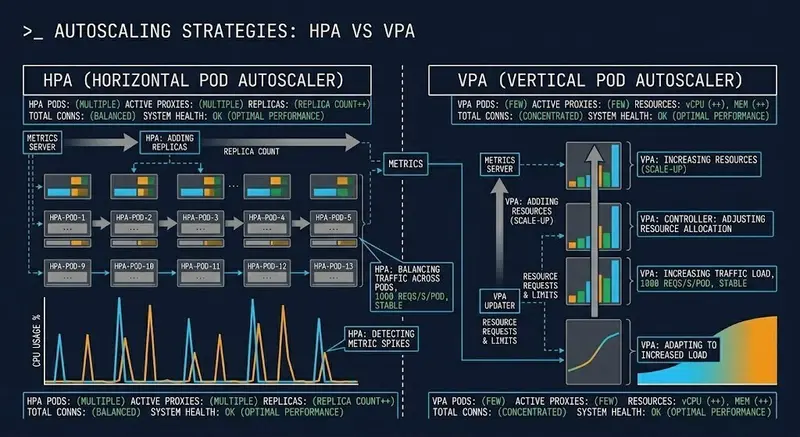
VPA vs HPA scaling dimensions — throughput vs stability tradeoff diagram

Most Kubernetes teams reach for HPA first. It’s visible, familiar, and the CPU dashboard makes the decision feel obvious. When traffic spikes, pods scale out. Clean mental model.

The problem: HPA solves one specific failure mode — traffic-driven throughput degradation. An under-resourced pod doesn’t need more replicas. It needs more CPU. More replicas of a starved pod just gives you more starved pods.

The Core Distinction

VPA vs HPA scaling dimensions — throughput vs stability tradeoff diagram

HPA and VPA are not two ways to do the same thing. They scale different dimensions:

HPA — Horizontal Pod Autoscaler
Scales replica count. Trigger: load (CPU, memory, custom metrics).
Solves: traffic-driven saturation. Risk: cold start amplification,
latency spikes during scale-out.

VPA — Vertical Pod Autoscaler
Scales resource requests and limits. Trigger: resource efficiency gap.
Solves: OOM kills, CPU throttling, mis-sized pods. Risk: eviction disruption, node fragmentation at scale.

HPA doesn’t prevent OOM kills.
VPA doesn’t absorb traffic bursts.

Applying the wrong one means you’re solving for a failure that isn’t happening while leaving the actual failure mode unaddressed.

The Trap Nobody Documents

Running both without coordination creates oscillation:

  1. VPA recommends larger CPU request → evicts pod to apply it
  2. HPA sees replica count drop → interprets as scale-in signal
  3. HPA removes a replica
  4. VPA recalculates on a smaller pool
  5. Cycle repeats

The result is instability driven entirely by the autoscalers fighting each other — not by any real workload condition. Nodes fragment. Scheduler pressure builds.

The coordination rule: VPA must not operate in Auto mode on any resource dimension HPA is also watching. In practice — VPA handles memory right-sizing, HPA handles CPU-driven replica scaling. Different axes, no interaction.

The Decision Framework

Use HPA when:

  • Stateless workloads with interchangeable replicas
  • Traffic-driven, burst-shaped load patterns
  • CPU is a reliable proxy for demand
  • Individual pod sizing is already correct

Use VPA when:

  • Steady, predictable load patterns
  • Pods are consistently OOM-killed or CPU-throttled
  • Resource requests were set by guesswork
  • Right-sizing over time matters more than burst absorption

Use both — with constraints:

  • VPA in Recommendation or Initial mode only (not Auto)
  • VPA establishes correct baseline sizing
  • HPA handles burst scaling above that baseline
  • Never let their trigger dimensions overlap

VPA and HPA combined mode architecture showing feedback loop risk

Scaling Decisions Are Cost Decisions

HPA adds pods — more replicas means more node capacity and more compute
spend. Aggressive scale-in thresholds mean you’re often paying for idle
capacity during transition periods.

VPA’s value is bin-packing efficiency — right-sized pods fit more
workloads on fewer nodes. But a stale VPA recommendation window produces
oversized requests that waste capacity cluster-wide.

The autoscaler is the last decision. Diagnose the failure mode first. Then pick the tool.

Full post with decision framework, failure mode breakdown, and
coordination rules: https://www.rack2cloud.com/vpa-vs-hpa-kubernetes/