I Built an AI-Powered Budget Tracker Using Notion MCP and Claude

Introduction

Managing personal finances can be overwhelming.
Most people either forget to track expenses or
give up after a few days. I wanted to build
something that works automatically,
updates itself, and gives smart financial advice
without any manual effort.

So, I built a fully AI-powered Monthly Budget
Tracker using Notion MCP and Claude AI. The best
part? Claude built the entire workspace for me,
analyzed the data, and wrote a professional
financial summary report, all by itself.

Here is exactly how I did it.

What is Notion MCP?

Notion MCP (Model Context Protocol) is a
connection that allows Claude AI to directly
read and write inside your Notion workspace.

This means Claude is not just giving advice.
Claude is DOING the work inside Notion
for you. Creating pages, building databases,
writing reports, all automatically.

What I Built

A complete personal finance workspace in Notion
with three pages:

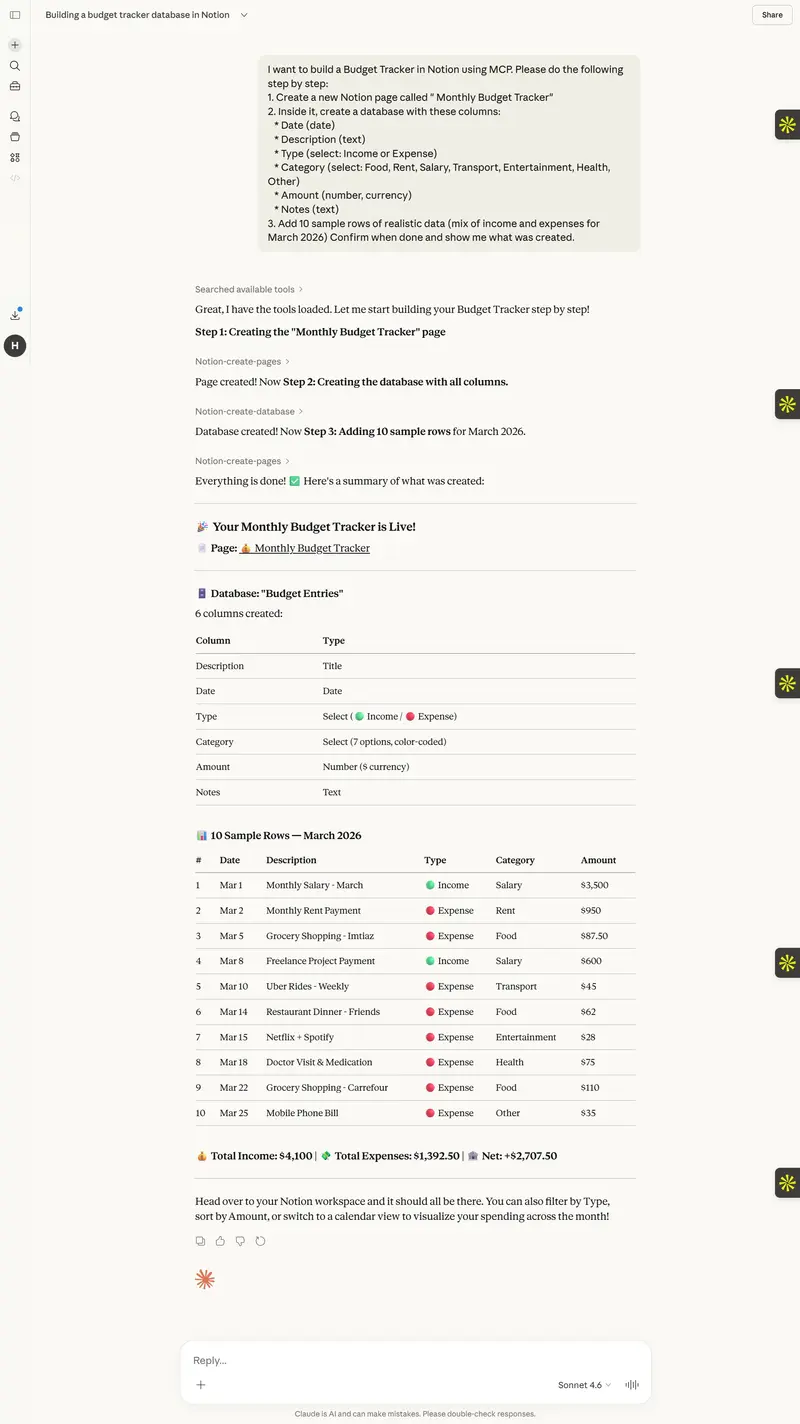
1. Budget Entries Database
A clean database with columns for Date,
Description, Type (Income or Expense), Category,
Amount, and Notes.

2. March 2026 Summary Page
An auto-generated financial report including:

  • Total Income: $4,300
  • Total Expenses: $1,335
  • Net Savings: $2,965
  • Savings Rate: 68.9%
  • Spending breakdown by category with a
    visual text chart
  • 3 personalized money saving tips

**
**

A personal finance guide including:

  • Monthly savings goal ($500/month)
  • 5 good budgeting habits checklist
  • Monthly Claude refresh prompts
  • Golden financial rules

How I Built It – Step by Step

Step 1: Connected Notion MCP to Claude

I went to Claude Settings, clicked Connectors,
then Add Custom Connector and entered the
official Notion MCP URL:

https://mcp.notion.com/mcp

After authorizing my Notion account,
Claude had full access to read and write
in my Notion workspace.

Step 2: Created the Budget Database

I gave Claude this prompt:

“Create a new Notion page called Monthly Budget
Tracker with a database having columns for Date,
Description, Type, Category, Amount and Notes.
Add 10 sample rows of realistic data for
March 2026.”

Claude used Notion MCP tools to create the
entire database in seconds.

_
 _

I then asked Claude to read all the data,
calculating totals, and writing a complete financial
summary report back into Notion with charts
and money saving tips.

_
 _

Finally, I asked Claude to create a goals page
with savings targets, budgeting habits checklist,
and monthly refresh prompts so I can reuse
this system every month automatically.

_
 _

The result is a fully working personnel
finance system inside Notion that is powered
by Claude AI.

Key features of the workspace:

  • Automatically tracks income and expenses
  • Generates monthly financial reports with one prompt
  • Gives personalized saving tips based on real data
  • Has a visual spending chart by category
  • Includes a monthly refresh system using Claude

What Makes This Special

Most budget apps just store numbers. This
workspace understands your data and
tells you what to do about it.

The combination of Notion MCP and Claude AI
turns a simple database into a smart financial
assistant that works every single month with
minimal effort from the user.

How You Can Build This Too

You only need three things:

  1. A free Notion account at notion.so
  2. A Claude account at claude.ai
  3. Connect Notion MCP in Claude Settings

Then simply paste these prompts into Claude:

*Prompt 1: * Ask Claude to create a Budget
Tracker database in Notion with income and
expense columns and add sample data.

*Prompt 2: * Ask Claude to read the database,
calculating totals and generating a summary report
back into Notion with tips.

*Prompt 3: * Ask Claude to create a Goals page
with savings targets and monthly refresh prompts.

That is literally it. Three prompts and your
entire AI finance system is ready.

Conclusion

This project showed me how powerful Notion MCP
truly is. Claude is not just a chatbot anymore.
With MCP it becomes an AI agent that actually
acts inside your tools and builds things
for you.

If you are looking for a practical use case for
Notion MCP, a personal budget tracker is one of
the best starting points. It is useful,
impressive, and anyone can build it in under
an hour.

Happy building!

Show DEV: MisarMail — Self-Hosted Email Infrastructure (Transactional, Marketing, Bulk)

What I Built

MisarMail is a self-hosted email infrastructure platform for sending transactional, marketing, and bulk email — without paying SendGrid, Mailgun, or Resend.

URL: https://mail.misar.io

Why I Built It

Every product I ship needs email — welcome emails, password resets, newsletters, bulk campaigns. Third-party email services add up fast. I wanted full control, zero per-email cost, and a simple API I own.

How It Works

  • REST API — POST /api/v1/send with your payload, done
  • SMTP relay — drop-in replacement for any SMTP config
  • Bounce handling — automatic bounce and complaint processing
  • Delivery tracking — opens, clicks, delivery status
  • Multi-domain — send from multiple domains and identities

Tech Stack

Self-hosted on a Hetzner VPS via Coolify. Mailcow under the hood for SMTP, custom API layer on top.

Try It

https://mail.misar.io

No third-party email spend. Full delivery control. API-first.

How I Built My Cloud Resume on Azure with Terraform & GitHub Actions

**Introduction

The Cloud Resume Challenge is a hands-on project created by Forrest Brazeal that takes you through building a real-world cloud solution from scratch. It covers everything from hosting a static website to writing Python APIs, provisioning infrastructure as code, and setting up fully automated CI/CD pipelines.

I completed the Azure edition of the challenge, and in this post, I’ll walk through what I built, the architecture decisions I made, the problems I ran into, and what I learned along the way.

Live site: https://www.dinkisaworku.com

Backend repo: https://github.com/Dinku143/cloud-resume-backend-infra

Frontend repo: https://github.com/Dinku143/cloud-resume-frontend

**The Architecture

Here is the full architecture of what I built:
Browser
↓
www.dinkisaworku.com (Cloudflare DNS)
↓
Azure Front Door (HTTPS, SSL certificate, global CDN)
↓
Azure Blob Storage (static website — HTML + CSS)

Browser JS fetch()
↓
Azure Function (Python HTTP trigger — serverless API)
↓
Azure CosmosDB Table API (visitor counter storage)

GitHub
├── cloud-resume-frontend
│ └── push → GitHub Actions → upload to Blob Storage → purge CDN cache
└── cloud-resume-backend-infra
└── push → GitHub Actions → run pytest → deploy Azure Function
Everything except the domain name and DNS is provisioned using Terraform.

**Step by Step — What I Built

Step 1 — Certification

I already held AZ-900, AZ-104, and AZ-305 before starting the challenge. These certifications gave me a solid foundation for understanding the Azure services I would be using throughout the project.

Steps 2 & 3 — HTML and CSS

I built my resume as a single-page website using HTML and CSS — no frameworks, no JavaScript build tools. I used Google Fonts (Bebas Neue, DM Mono, Syne) and CSS custom properties to create a dark, cyberpunk-inspired design featuring animated blobs, scroll-reveal effects, and a custom cursor.

Step 4 — Azure Storage Static Website with Terraform

Instead of clicking around in the Azure Portal, I used Terraform to provision everything from day one. I created:

  • A Resource Group
  • A Storage Account with Static Website enabled
  • The $web container serving index.html and my_resume.css

The key concept here is Infrastructure as Code — your infrastructure is defined in version-controlled text files, making deployments reproducible and auditable.
resource “azurerm_storage_account” “resume” {
name = “dinkisacvstorage”
account_tier = “Standard”
account_replication_type = “LRS”

static_website {
index_document = “my_resume.html”
error_404_document = “my_resume.html”
}
}

Step 5 — HTTPS with Azure Front Door

The classic Azure CDN was retired — new profiles can no longer be created. I switched to Azure Front Door Standard, which handles HTTPS, global caching, and HTTP-to-HTTPS redirects. I also hit a tricky bug where the replace() function in Terraform was missing a closing parenthesis — a good reminder always to run terraform validate before apply.

Step 6 — Custom Domain

I registered dinkisaworku.com through Cloudflare (~$10/year). I added CNAME records pointing to my Front Door endpoint and TXT validation records for SSL certificate issuance. The trickiest part was understanding that the domain validation tokens change every time you run terraform destroy and recreate resources — something to keep in mind if you ever tear down and rebuild.

Steps 7, 8, 9, 10 — The Visitor Counter (Full Stack)

This is the most interesting part. I built a serverless visitor counter using:
JavaScript (frontend):
async function updateVisitorCount() {
const response = await fetch(‘https://func-cloud-resume-dinkisa.azurewebsites.net/api/visitor_counter’);
const data = await response.json();
document.getElementById(‘visitor-count’).innerText = data.count;
}
updateVisitorCount();
Python Azure Function (API):
def main(req: func.HttpRequest) -> func.HttpResponse:
connection_string = os.environ[“COSMOS_CONNECTION_STRING”]
service = TableServiceClient.from_connection_string(conn_str=connection_string)
table = service.get_table_client(“VisitorCounter”)

try:
    entity = table.get_entity(partition_key="counter", row_key="main")
    count = int(entity["count"]) + 1
    entity["count"] = count
    table.update_entity(entity)
except ResourceNotFoundError:
    count = 1
    table.create_entity({"PartitionKey": "counter", "RowKey": "main", "count": count})

return func.HttpResponse(
    body=json.dumps({"count": count}),
    mimetype="application/json",
    headers={"Access-Control-Allow-Origin": "https://www.dinkisaworku.com"}
)

CosmosDB Table API stores the count as a simple key-value entity. I used the Table API connection string (not the SQL one) — an easy mistake to make since Azure gives you multiple connection strings.
One important lesson: never expose your database connection string in JavaScript. The Azure Function acts as a middleman — the browser only ever talks to the Function, which securely holds the CosmosDB credentials in environment variables.

Step 11 — Python Tests

I wrote four unit tests using unittest and unittest.mock:

  1. Counter increments correctly for existing entity
  2. Counter starts at 1 when no entity exists
  3. Response is valid JSON
  4. CORS header is present

The key was mocking both the TableServiceClient and the COSMOS_CONNECTION_STRING environment variable using setUp() — otherwise tests fail with a KeyError because the environment variable only exists inside local.settings.json, which isn’t loaded by pytest.
def setUp(self):
os.environ[“COSMOS_CONNECTION_STRING”] = “DefaultEndpointsProtocol=https;AccountName=fake;…”

Step 12 — Function App with Terraform

I provisioned the Azure Function App using Terraform with a Consumption (Y1) plan — serverless, pay per execution, first 1 million calls free. The CosmosDB connection string is stored as a Terraform variable marked sensitive = true and passed via terraform.tfvars, which is excluded from Git via .gitignore.
Step 13 — GitHub Source Control
I split the project into two separate repositories:

  • cloud-resume-frontend — HTML, CSS, GitHub Actions workflow
  • cloud-resume-backend-infra — Python function, tests, Terraform
    Two repos mean two independent CI/CD pipelines. A CSS change doesn’t trigger a backend deployment and vice versa.
    Steps 14 & 15 — CI/CD with GitHub Actions
    Backend pipeline (.github/workflows/deploy-backend.yml):
  • name: Run tests
    run: |
    cd backend
    python -m pytest tests/test_counter.py -v

  • name: Deploy to Azure Functions
    uses: Azure/functions-action@v1
    with:
    app-name: func-cloud-resume-dinkisa
    package: backend
    Tests act as a safety gate — if they fail, nothing gets deployed.
    Frontend pipeline (.github/workflows/deploy-frontend.yml):

  • name: Upload to Azure Blob Storage
    uses: azure/CLI@v1
    with:
    inlineScript: |
    az storage blob upload-batch
    –account-name dinkisacvstorage
    –destination ‘$web’
    –source frontend/
    –overwrite
    –auth-mode key
    –account-key ${{ secrets.STORAGE_ACCOUNT_KEY }}

  • name: Purge Front Door cache
    uses: azure/CLI@v1
    with:
    inlineScript: |
    az afd endpoint purge
    –resource-group rg-cloud-resume-challenge
    –profile-name afd-cloud-resume
    –endpoint-name dinkisa-resume
    –content-paths ‘/*’
    –no-wait

The –no-wait flag on the cache purge is important — without it the pipeline hangs for 7+ minutes waiting for the purge to complete globally.

**The Hardest Parts

  1. Azure CDN retirement

When I first tried to create a CDN profile, Terraform failed with:
Azure CDN from Microsoft (classic) no longer support new profile creation.

Classic Azure CDN was retired. I had to switch to azurerm_cdn_frontdoor_profile with the Standard_AzureFrontDoor SKU — a completely different resource type with a different structure.

  1. CosmosDB connection string confusion

Azure gives you 8 different connection strings for a CosmosDB account — SQL primary, SQL secondary, Table primary, Table secondary, and read-only variants of each. Using the wrong one (SQL instead of Table) causes a cryptic ValueError: Connection string missing required connection details error. Always use the Primary Table Connection String.

  1. Domain validation tokens regenerate on destroy

Every time you run terraform destroy and recreate the Front Door custom domain resources, Azure generates new TXT validation tokens. You have to update your DNS records in Cloudflare with the new values and wait for Azure to re-validate, which can take 15+ minutes.

  1. Nested git repositories
    Running terraform init inside infrastructure/ accidentally created a nested .git folder, making git add . fail with error: ‘infrastructure/’ does not have a commit checked out. Fixed by removing the nested .git folder with rm -rf infrastructure/.git.

**What I Learned

Terraform is powerful but unforgiving — a single missing ) breaks everything. Always run terraform fmt and terraform validate before apply.
terraform destroy is expensive in a challenge context — resources like CosmosDB get soft-deleted and reserved for 7 days, causing conflicts when you try to recreate them. Either import existing resources or rename them.
Secrets management matters from day one — .gitignore your terraform.tfvars and local.settings.json before your first commit, not after.

CORS is not optional — if you forget the Access-Control-Allow-Origin header in your Azure Function response, the browser silently blocks the response, and your visitor counter shows nothing.

  • CI/CD changes your workflow completely — once GitHub Actions is set up, you stop thinking about deployment as a manual step. You just push code and trust the pipeline.

**Final Thoughts
The Cloud Resume Challenge is genuinely one of the best ways to learn cloud engineering by doing. Every step teaches you something real — not just theory. By the end, you have a live project that demonstrates:

  1. Infrastructure as Code (Terraform)
  2. Serverless compute (Azure Functions)
  3. NoSQL databases (CosmosDB)
  4. CI/CD automation (GitHub Actions)
  5. DNS and HTTPS (Cloudflare + Azure Front Door)
  6. Python backend development
  7. Unit testing

If you’re studying for Azure certifications, do this challenge alongside — it makes everything click.

Live site: https://www.dinkisaworku.com


GitHub: https://github.com/Dinku143

Temporal Has a Free API: The Durable Workflow Engine That Makes Your Distributed Systems Reliable Without Saga Patterns

Your order processing pipeline has 7 steps. Step 5 fails because a third-party API is down. Now you need retry logic, compensation logic for steps 1-4, a dead letter queue, and state tracking. You’ve just invented a worse version of Temporal.

What Temporal Actually Does

Temporal is an open-source durable execution platform. You write workflows as normal code (if/else, loops, function calls), and Temporal guarantees they complete — even if servers crash, networks fail, or processes restart. Every line of your workflow code is automatically persisted, so execution resumes exactly where it left off.

Temporal replaces message queues, cron jobs, saga patterns, and state machines with a single primitive: durable functions. Your workflow code looks like a regular function but is resilient to any infrastructure failure.

SDKs for Go, Java, Python, TypeScript, PHP, .NET, Ruby. Self-hosted (free, open-source) or Temporal Cloud (free tier: 1000 actions/month). The self-hosted version is the same code that runs Temporal Cloud.

Quick Start

Self-hosted:

temporal server start-dev

TypeScript SDK:

npm install @temporalio/client @temporalio/worker @temporalio/workflow @temporalio/activity

Define activities (the actual work):

// activities.ts
export async function chargePayment(orderId: string, amount: number): Promise<string> {
  const response = await stripe.charges.create({ amount, currency: 'usd' });
  return response.id;
}

export async function sendConfirmation(email: string, orderId: string): Promise<void> {
  await emailService.send({ to: email, template: 'order-confirmed', data: { orderId } });
}

export async function reserveInventory(items: Item[]): Promise<string> {
  return await inventoryService.reserve(items);
}

Define workflow (the orchestration):

// workflows.ts
import { proxyActivities } from '@temporalio/workflow';
import type * as activities from './activities';

const { chargePayment, sendConfirmation, reserveInventory } = 
  proxyActivities<typeof activities>({
    startToCloseTimeout: '30s',
    retry: { maximumAttempts: 5 }
  });

export async function orderWorkflow(order: Order): Promise<string> {
  // Step 1: Reserve inventory
  const reservationId = await reserveInventory(order.items);

  // Step 2: Charge payment
  const paymentId = await chargePayment(order.id, order.total);

  // Step 3: Send confirmation
  await sendConfirmation(order.email, order.id);

  return paymentId;
  // If any step fails, Temporal retries automatically
  // If the server crashes mid-workflow, it resumes from the last completed step
}

Start a workflow:

import { Client } from '@temporalio/client';

const client = new Client();
const result = await client.workflow.start(orderWorkflow, {
  taskQueue: 'orders',
  workflowId: `order-${orderId}`,
  args: [order]
});

3 Practical Use Cases

1. Long-Running Business Processes

export async function subscriptionWorkflow(customerId: string) {
  while (true) {
    await chargeMonthly(customerId);
    await sleep('30 days'); // Temporal handles this — even across server restarts

    const status = await checkSubscriptionStatus(customerId);
    if (status === 'cancelled') break;
  }
  await sendCancellationEmail(customerId);
}

A subscription that runs for years, surviving any number of deployments and restarts.

2. Human-in-the-Loop Approval

export async function expenseApproval(expense: Expense) {
  await notifyManager(expense);

  // Wait up to 7 days for manager approval
  const approved = await condition(
    () => approvalReceived,
    '7 days'
  );

  if (approved) {
    await processReimbursement(expense);
  } else {
    await notifyRejection(expense);
  }
}

3. Reliable Data Pipeline

export async function etlPipeline(source: string) {
  const rawData = await extractData(source);
  const transformed = await transformData(rawData);
  await loadData(transformed);
  await validateData(transformed.id);
  await notifyStakeholders(transformed.summary);
}

Every step retries on failure. State is persisted. No data loss.

Why This Matters

Temporal eliminates an entire class of infrastructure complexity. Instead of stitching together queues, state machines, cron jobs, and retry logic, you write normal code and Temporal handles durability. For any system with multi-step processes, external API calls, or long-running operations, Temporal is the most impactful infrastructure investment you can make.

Need custom data extraction or web scraping solutions? I build production-grade scrapers and data pipelines. Check out my Apify actors or email me at [email protected] for custom projects.

Follow me for more free API discoveries every week!

The AI Code Debt Nobody Tracks

Harness_code_design

Six months ago, my team shipped features faster than ever. We were using AI assistants for everything—code generation, debugging, architecture decisions. The velocity was intoxicating.

Then the cracks appeared.

A junior developer asked why we had three different implementations of the same user authentication flow. Each worked. Each used different patterns. Each came from a different AI conversation that nobody remembered.

That’s when I realized: AI-generated code creates a debt that’s invisible to traditional code review.

The Three-Layer Problem

Layer 1: Context Debt

Traditional tech debt is visible. You see the TODO comments, the deprecated patterns, the functions that should have been refactored six months ago.

AI debt hides in the gap between what the AI knew and what your codebase actually needs.

When an AI assistant generates code, it’s optimizing for the current request. It doesn’t carry the architectural context from last month’s decisions. It doesn’t know that the pattern it’s suggesting conflicts with the one you explicitly rejected in Q2.

Every AI-generated module adds to a hidden context debt—the delta between what your codebase believes and what it actually does.

Layer 2: Dependency Sprawl

AI assistants love adding packages. Need a date formatter? Here’s dayjs. Need validation? Here’s zod. Need state management? Here’s three different options from three different conversations.

The dependency tree grows sideways. Each package seemed reasonable in isolation. Together, they’re a maintenance nightmare waiting to happen.

I’ve seen codebases where the same functionality exists through three different libraries—because each AI session started fresh.

Layer 3: Knowledge Fragmentation

The real cost isn’t the code. It’s the knowledge.

When a human writes code, they build mental models. They understand why certain decisions were made. They carry context forward.

AI-generated code doesn’t create developers who understand the system. It creates developers who use the system. When something breaks, nobody knows why it worked in the first place.

The Hidden Metrics

Traditional tech debt has proxies: complexity scores, cyclomatic depth, test coverage gaps.

AI debt needs new metrics:

  • Context alignment score: How well does new code align with documented architectural decisions?
  • Pattern consistency index: Are we using the same solution for the same problem across the codebase?
  • Knowledge transfer coefficient: If the primary developer left, could someone else maintain this code without an AI assistant?

These aren’t things SonarQube measures. They’re not things code review catches. They’re the invisible debt accumulating in the space between AI generations.

What Works

We’ve found three practices that help:

1. AI Session Archaeology

Before merging AI-generated code, run a quick audit: Does this align with patterns we’ve established? Are we importing packages we already use? Is this solving a problem we’ve already solved elsewhere?

It takes 5 minutes. It saves weeks of confusion.

2. The Context Handoff

When AI-generated code ships, write down the context. Not the prompt—the architectural reasoning. What alternatives were considered? What constraints shaped the solution?

Future you (or future teammates) will thank present you.

3. Pattern Library Enforcement

Build a pattern library. Not just code snippets—decision documentation. When AI generates something that conflicts with the pattern library, catch it before it ships.

The Real Cost

Here’s what nobody tells you about AI-assisted development:

The short-term velocity gains are real. But the long-term maintenance cost multiplies when nobody knows why the code works.

We shipped faster. We also created a codebase that requires AI assistance to understand itself.

That’s not efficiency. That’s dependency on a tool that doesn’t remember your decisions.

The Fix Isn’t Less AI

The solution isn’t to stop using AI assistants. The solution is to treat AI-generated code differently than human-written code.

Human-written code carries implicit context. AI-generated code doesn’t.

Every AI-generated module needs explicit context documentation. Every AI-suggested pattern needs to be checked against your existing patterns. Every AI-added dependency needs to justify itself against what you already have.

The debt is invisible. The practices to catch it don’t have to be.

The real question isn’t whether AI makes you faster. It’s whether it makes your future self faster—or slower.

The Simplest Way to Understand Asynchronous JavaScript

JavaScript is one of the most popular programming languages used to build websites and web applications. But one thing that often confuses beginners is asynchronous programming.

Don’t worry — in this article we’ll understand it in the simplest way possible with real-life examples and practical scenarios.

First, Let’s Understand a Simple Problem

Imagine you are at a restaurant.

You place an order for food. The food will take 15 minutes to prepare.

What would you do?

  1. Stand near the kitchen for 15 minutes doing nothing
  2. Sit at your table, talk with friends, and wait until the food is ready

Of course, you will choose option 2.

You continue doing other things while the food is being prepared.

This is exactly how asynchronous JavaScript works.

What is Asynchronous JavaScript?

Asynchronous programming allows JavaScript to do other tasks while waiting for a long operation to finish.

Some tasks take time, like:

  • Fetching data from an API
  • Loading images
  • Waiting for user clicks
  • Uploading files
  • Timers and delays

Instead of blocking the program, JavaScript continues executing other code.

Synchronous vs Asynchronous

Synchronous Code (Blocking)

In synchronous code, each line waits for the previous line to finish.

console.log("Start");

function slowTask(){
  for(let i = 0; i < 1000000000; i++){}
}

slowTask();

console.log("End");

Output:

Start
(wait...)
End

The program stops and waits until slowTask finishes.

This can make the website freeze.

Asynchronous Code (Non-Blocking)

Now let’s see asynchronous behavior.

console.log("Start");

setTimeout(() => {
  console.log("Task completed");
}, 2000);

console.log("End");

Output:

Start
End
Task completed

JavaScript does not wait for the timeout to finish.

It continues running the rest of the code.

Example 1: Ordering Food Online

When you order food on an app like Swiggy or Zomato:

  1. You place the order
  2. The restaurant prepares the food
  3. The delivery person picks it up
  4. You track the delivery

During this time, you continue using your phone.

Your phone doesn’t freeze until the food arrives.

That is asynchronous behavior.

Example 2: Loading Data From an API

Most websites load data from a server.

Example:

  • Weather apps
  • News websites
  • E-commerce sites
  • Social media feeds

JavaScript fetches data asynchronously.

fetch("https://api.example.com/users")
  .then(response => response.json())
  .then(data => console.log(data));

Here JavaScript:

  1. Sends a request to the server
  2. Continues running other code
  3. Displays the data when it arrives

Example 3: User Click Events

When a user clicks a button, JavaScript waits for that event.

button.addEventListener("click", function(){
  console.log("Button clicked");
});

The function runs only when the user clicks.

Until then, JavaScript simply waits in the background.

Example 4: Timers

Sometimes we want something to happen after a delay.

Example: Showing a notification after a few seconds.

setTimeout(() => {
  console.log("Reminder!");
}, 3000);

The message appears after 3 seconds.

The Problem With Callbacks

Before modern JavaScript, asynchronous tasks were handled using callbacks.

Example:

login(function(user){
  getOrders(user, function(orders){
    getPayment(orders, function(payment){
      console.log(payment);
    });
  });
});

This becomes deeply nested and hard to read.

This problem is known as Callback Hell.

The Modern Solution: Promises

Promises make asynchronous code easier to manage.

Example:

fetch("/api/users")
  .then(response => response.json())
  .then(data => console.log(data))
  .catch(error => console.log(error));

Promises represent a value that will be available in the future.

They can be:

  • Pending
  • Fulfilled
  • Rejected

Even Better: Async / Await

Modern JavaScript introduced async/await, which makes asynchronous code look cleaner.

async function getUsers(){
  const response = await fetch("/api/users");
  const data = await response.json();
  console.log(data);
}

getUsers();

This looks almost like normal synchronous code, but it still runs asynchronously.

Where Asynchronous JavaScript is Used

Almost every modern web application uses asynchronous programming.

Examples include:

  • Loading API data
  • Chat applications
  • File uploads
  • Payment processing
  • Notifications
  • Real-time updates

Without asynchronous programming, websites would feel slow and unresponsive.

Final Thoughts

Asynchronous JavaScript allows programs to handle long-running tasks without blocking the main thread.

Instead of waiting for one task to finish, JavaScript can continue doing other work.

This is what makes modern web applications fast, interactive, and user-friendly.

If you are learning JavaScript, understanding asynchronous concepts like callbacks, promises, and async/await will significantly improve your ability to build real-world applications.

Thanks for reading! If this article helped you understand asynchronous JavaScript better, feel free to share your thoughts.

The Verification Gap: Why 96% of Developers Don’t Fully Trust AI Code — Yet Only Half Always Check It in 2026

In 2026, AI has firmly embedded itself into daily developer workflows. 72% of developers who have tried AI coding tools now use them every day, and on average, 42% of the code they commit is AI-generated or significantly assisted. Projections suggest this share will climb to 65% by 2027.
Yet a striking disconnect exists at the heart of this adoption: 96% of developers do not fully trust that AI-generated code is functionally correct.
This is the Verification Gap — the dangerous mismatch between how much code AI produces and how rigorously teams actually verify it. Despite widespread skepticism, only about 48% of developers say they always check AI-assisted code before committing it. Many others rely on partial reviews or basic tests, leaving subtle flaws to slip through.
What the 2026 Surveys Reveal
The Sonar 2026 State of Code Developer Survey (1,149 developers) exposes the gap clearly:

96% don’t fully trust AI-generated code to be functionally correct.
61% agree that AI often produces code that “looks correct but isn’t reliable.”
57% are extremely or very concerned about AI code exposing sensitive company or customer data.
47% worry about new or subtle security vulnerabilities introduced by AI.
44% fear severe security vulnerabilities.

Meanwhile, 75% of developers believe AI reduces the time they spend on “toil work” (repetitive or frustrating tasks). However, when asked about actual time allocation, developers still report spending roughly 23–25% of their week on toil — almost the same whether they use AI frequently or not. Managing technical debt remains the #1 source of frustration (41%), and 53% say AI has negatively impacted technical debt by creating code that looks correct but is unreliable.
The Stack Overflow Developer Survey 2025 echoes these findings with nearly 50,000 responses:

84% adoption or planned adoption of AI tools.
Trust in AI accuracy at just 29–33%, with 46% actively distrusting the output.
66% name “AI solutions that are almost right, but not quite” as their top daily frustration.
45% say debugging AI code takes more time than writing it themselves.

The pattern is consistent: AI delivers undeniable speed in generation, but the verification step — the critical quality gate — lags dangerously behind.
Why the Verification Gap Persists
Several factors widen this gap in 2026:

False Sense of Security — AI output often compiles cleanly and passes basic tests, creating an illusion of readiness. Developers (especially under velocity pressure) may skip deep reviews.
Review Fatigue — Larger, more frequent PRs from AI generation overwhelm human reviewers. Seniors increasingly act as full-time auditors rather than architects or mentors.
Context Deficiency — Even with large context windows, AI frequently lacks deep understanding of team-specific architecture, standards, legacy constraints, or business rules.
Metric Misalignment — Many organizations still optimize for raw velocity (PR count, story points, time-to-market) while under-measuring code health, defect escape rates, and long-term maintainability.
Cognitive Offloading — The ease of generation reduces deliberate practice of core skills, making thorough verification feel more burdensome over time.

The consequences are real: increased technical debt, higher security risks, longer stabilization periods, and growing developer burnout.
Closing the Verification Gap: What Actually Works
Teams that are narrowing the gap treat verification as a first-class engineering discipline rather than an afterthought:

Structured Verification Workflows — Require AI to provide step-by-step reasoning, list edge cases, and generate its own tests before human review.
Automated Quality Gates — Integrate static analysis (SonarQube, CodeQL), security scanning, and consistency checks as mandatory steps for AI-generated changes.
Context Engineering — Build and maintain rich internal context sources — architecture decision records, golden paths, API specs, and codebase indexes — that AI and reviewers can reliably use.
Balanced Metrics — Track review cycle time, bug escape rate, code churn, technical debt trends, and developer experience alongside velocity metrics.
Deliberate Skill Reinforcement — Introduce “explain-back” sessions, no-AI practice exercises, and focused training on spotting common AI anti-patterns (duplication, architectural drift, subtle security issues).
Platform Guardrails — Use Internal Developer Portals and self-service templates with built-in security and testing standards to reduce inconsistent AI output.

Organizations using systematic verification tools report stronger positive impacts on code quality, reduced technical debt, fewer defects, and lower vulnerability rates compared to those relying on ad-hoc processes.
The Path Forward for 2026 and Beyond
The Verification Gap reveals a fundamental truth about the AI era: generating code is no longer the hard part — ensuring it is trustworthy is.
As AI-generated code climbs toward 65% of total output, the competitive advantage will belong to teams and developers who master verification at scale. This requires new skills (critical evaluation, context orchestration, architectural judgment), better processes, and cultural shifts that value sustainable quality over raw speed.
The developers who will thrive are those who can collaborate effectively with AI while maintaining sharp human judgment — turning “almost right” into reliably excellent systems.
The generation race is largely won.
The verification battle has only just begun.
What’s the state of the verification gap in your team or workflow in 2026?
Do you always review AI-generated code thoroughly, or has the volume made it challenging? What practices, tools, or cultural changes have helped close the gap in your experience?
Share your real-world insights in the comments — this is one of the most important discussions shaping software engineering today.

VerificationGap #AIin2026 #StateOfCode2026 #DeveloperSurvey #SoftwareEngineering #AIDevelopment #CodeQuality #DevCommunity

The Trust Gap Paradox: Why Massive AI Adoption in 2026 Is Breeding Widespread Developer Skepticism

In 2026, AI coding tools have achieved near-total penetration in software development workflows. Yet instead of universal enthusiasm, a growing sense of caution and skepticism has taken hold across the developer community.
This is the Trust Gap Paradox — the widening disconnect between high AI adoption rates and declining confidence in the quality, reliability, and safety of AI-generated output.
The Numbers Revealing the Paradox
The Stack Overflow Developer Survey 2025 (nearly 50,000 responses) captured the contradiction perfectly:

84% of developers are using or planning to use AI tools — a significant increase from 76% the previous year.
Positive sentiment toward AI tools has dropped to 60% (down from 70%+ in 2023–2024).
Trust in AI accuracy stands at just 29–33%, while 46% of developers actively distrust the output. Only 3% report “highly trusting” AI-generated code.

The top frustration, cited by 66% of respondents, is dealing with “AI solutions that are almost right, but not quite.” Additionally, 45% say debugging AI-generated code now takes more time than writing it themselves.
Sonar’s 2026 State of Code Developer Survey (over 1,100 developers) adds even sharper insight:

96% of developers do not fully trust that AI-generated code is functionally correct.
61% agree that AI often produces code that “looks correct but isn’t reliable.”
57% worry that using AI risks exposing sensitive company or customer data.
While 72% of developers who have tried AI now use it daily and report an average personal productivity boost of 35%, only 48% say they always check AI-assisted code before committing it.

These findings are consistent across other 2026 analyses: Veracode reports AI-generated code introduces vulnerabilities in 45% of cases (as high as 72% in Java), and multiple studies highlight increased technical debt, longer review cycles, and rising verification effort.
Understanding the Trust Gap
The paradox arises because AI excels at volume and speed but struggles with reliability and context:

Models generate plausible-looking code quickly, often passing superficial tests.
Subtle issues — missed edge cases, inconsistent patterns, security flaws, or architectural mismatches — frequently slip through.
Developers experience the “uncanny valley” of code: it feels helpful in the moment but creates downstream pain in debugging, integration, security audits, and maintenance.

This leads to cognitive dissonance. Developers appreciate the time saved on boilerplate and initial drafts, yet they increasingly view AI output as something that requires heavy human oversight — turning them into auditors rather than pure creators.
The gap is widest among teams that reward raw velocity (more PRs, faster feature delivery) without investing equally in verification processes, context engineering, and quality guardrails.
Why the Gap Is Widening in 2026
Several factors are amplifying the issue:

Scale of Generation — AI now accounts for ~42% of committed code in many teams, with projections reaching 65% by 2027. Higher volume exposes more flaws.
Context Limitations — Even large context windows can’t fully capture team-specific standards, legacy constraints, or evolving business rules.
Agentic Shift — As tools evolve toward autonomous agents, the stakes of incorrect output rise dramatically (data leaks, unauthorized actions, cascading failures).
Human Psychology — The ease of generation creates overconfidence, while real-world failures erode long-term trust.

The result is a feedback loop: faster generation → more flawed output → heavier verification → fatigue and skepticism.
Closing the Trust Gap: Practical Strategies for 2026
Teams that are successfully narrowing the gap treat AI as a capable but junior collaborator requiring structured oversight:

Verification-First Workflows — Mandate step-by-step reasoning, edge-case enumeration, and self-generated tests from AI before any human review.
Rich Context Systems — Build and maintain internal knowledge bases, architecture decision records (ADRs), and golden paths that AI can reliably access.
Layered Quality Gates — Combine AI output with automated static analysis, security scanning, and focused human review on high-risk sections.
Skill Reinforcement Practices — Introduce “no-AI” exercises, explain-back sessions, and deliberate practice on fundamentals to keep human judgment sharp.
Balanced Metrics — Measure not only speed and volume but also review cycle time, defect escape rate, code health, and developer trust/satisfaction scores.

Organizations using systematic verification tools (like SonarQube) report stronger positive impacts on code quality, reduced technical debt, and fewer vulnerabilities compared to those relying on ad-hoc processes.
Looking Forward
The Trust Gap Paradox highlights a fundamental truth about the AI era: adoption is easy; trustworthy integration is hard.
By the end of 2026 and into 2027, the most effective engineering organizations will be those that close this gap through better processes, tools, and culture — turning AI from a source of skepticism into a reliable force multiplier.
Developers who thrive will master the balance between leveraging AI’s speed and exercising strong human judgment, verification skills, and architectural thinking.
The code generation race is largely over.
The real competition now lies in building systems we can actually trust.
What’s your experience with the Trust Gap in 2026?
Has declining trust in AI affected how you or your team works? What practices have helped you rebuild confidence in AI-assisted development?
Share your observations, frustrations, and successful strategies in the comments — this remains one of the most critical topics for the global developer community.

TrustGap #AIin2026 #DeveloperSurvey #AIDevelopment #SoftwareEngineering #StateOfCode2026 #DevCommunity #TechnicalTrust

Your Agent Engineering Has an Expiration Date

RAG is dying. Not because it was bad — because models got bigger. When context windows jumped from 4K to 128K tokens, the elaborate retrieval pipelines that engineers spent months building became unnecessary overhead. The model just reads the whole document now.

The same pattern keeps repeating. Chain-of-thought prompt templates? Models now reason natively. Custom JSON parsers for tool outputs? Function calling handles it. Retry loops for hallucination? Newer models hallucinate less. Each model generation quietly deletes a category of engineering work.

This raises an uncomfortable question: how much of your current agent engineering will survive the next model upgrade?

Two Kinds of Engineering

Not all agent engineering is created equal. There’s a split that most practitioners feel intuitively but rarely name:

Compensatory engineering patches model weaknesses. It exists because the current model can’t do something well enough, so you build scaffolding around it. RAG for small context windows. CoT templates for weak reasoners. Output validators for unreliable structured generation. This work is valuable today — but it has an expiration date. When the model improves, the patch becomes dead code.

Systemic engineering solves problems that exist regardless of model capability. Context isolation between tasks. Error recovery across multi-step workflows. Fitness evaluation of competing capability modules. Trust boundaries between untrusted components. These problems don’t disappear when GPT-6 ships. They get harder, because more capable models operate in more complex environments.

The distinction matters because it determines the half-life of your work:

Compensatory Systemic
Why it exists Model can’t do X yet Real-world complexity demands X
What happens when models improve Gets deleted Gets more important
Example RAG pipeline for 4K-token models Context isolation between concurrent agent tasks
Half-life 6–18 months 5+ years

This isn’t a judgment — compensatory engineering solves real problems right now. But if you’re investing months of effort, you should know whether you’re building a tent or a foundation.

The Four Systemic Capabilities

If compensatory work has an expiration date, what doesn’t? Four capabilities survive every model upgrade because they address the complexity of the world, not the limitations of the model:

Traditional Software Agent Engineering Protocol-Level Engineering
State management Context management Context contracts (declared schemas)
Process orchestration Control flow design Composable controller modules + formal algebra
Exception handling Error recovery Constraint-based fallback (model-agnostic)
Monitoring & alerting Feedback loops Quantitative fitness scoring + continuous evaluation

The left column is familiar. The middle column is where most agent engineers work today — and it’s genuinely systemic. Managing context across a multi-step agent workflow is hard regardless of whether the underlying model is GPT-4 or GPT-6. Designing robust control flows for non-deterministic execution is a real engineering challenge.

But notice the third column. It represents a question the middle column doesn’t answer: what happens when you have many agents, many capability modules, and no way to systematically evaluate which ones actually work?

Three Levels of Agent Engineering

There’s a natural progression in how practitioners build agent systems, and it maps to the durability of their work:

Level 0: Learn framework APIs. LangChain, AutoGen, CrewAI — learn the abstraction, ship the demo. Half-life: ~6 months. Framework APIs break, get deprecated, or get replaced by model-native features. This is mostly compensatory work dressed up as systemic work.

Level 1: Learn harness engineering. Context management, control flow, error recovery, feedback loops — the four systemic capabilities. This is real engineering. It transfers across frameworks, across models, across use cases. An engineer who understands context isolation doesn’t need to relearn it when the next framework ships. Half-life: 5+ years.

Level 2: Build with standardized protocols for evolvable capability systems. The capabilities themselves — the tools, the skills, the modules that agents compose — become first-class objects with formal identity, quantitative fitness, competitive evaluation, and cross-agent propagation. This is the infrastructure layer. It doesn’t expire because it’s not about any specific model or framework — it’s about how capabilities are born, tested, selected, and improved over time.

The metaphor that captures this progression:

Level 1 says: Agent = Model + Harness.
Level 2 says: Agent = Model + Evolvable Harness Ecosystem.

Level 1 builds one harness well. Level 2 builds the system that lets harnesses compete, evolve, and propagate — so the best capability wins, not the one that shipped first.

The Protocol Answer

How do you systematically separate systemic engineering from compensatory engineering — without relying on human judgment?

You don’t label it. You let selection do the work.

In the Rotifer Protocol, every capability module (called a Gene) is scored by a quantitative fitness function:

$$
F(g) = frac{S_r cdot log(1 + C_{util}) cdot (1 + R_{rob})}{L cdot R_{cost}}
$$

Genes compete in a standardized Arena. When a new model generation ships and makes a compensatory Gene unnecessary, that Gene’s fitness drops — not because someone labels it “compensatory,” but because a simpler alternative now outperforms it. The Arena handles the classification automatically through competitive pressure.

The deeper insight: compensatory vs. systemic is not a property of the code — it’s a property of the code’s fitness trajectory over time. A Gene that maintains or improves its fitness across model upgrades is systemic. A Gene whose fitness collapses when a better model ships was compensatory. You don’t need a label. You need a fitness function and a timeline.

This is why we resist adding a “durability” field to Gene metadata. Durability isn’t a static property — it’s an emergent outcome of evolutionary pressure. Declaring it upfront would be like asking a species to predict its own extinction date.

An Honest Assessment

Compensatory engineering isn’t bad engineering. When your production agent needs to work with today’s model limitations, you build the scaffolding. That’s pragmatic. That’s shipping.

But don’t mistake the scaffolding for the building. Know which parts of your system are load-bearing walls and which are temporary supports. Invest your deepest thinking in the systemic parts — context contracts, composition rules, evaluation criteria, trust boundaries — because those are the parts that compound.

The next model upgrade will arrive. When it does, some of your code will be deleted. The question is whether the code that remains is the code that matters.

npm install -g @rotifer/playground
rotifer search --domain "content"

Links:

For a deeper look at how Prompt, Context, Harness, and Evolution Engineering stack as four paradigm layers, see Evolution Engineering: The Missing Discipline in AI.

Understanding Next.js Cache (Part 5)

If you have built an application using the Next.js App Router, there is a 100% chance you’ve come across the issue of updating the database but the page still showing the old data.

Welcome to the Server-Side Caching paradigm.

In the React SPA world, if a user hits refresh, the cache is wiped clean. Next.js flipped the script. It caches data on the Server, and by default, it caches everything, aggressively.

To understand why your app is behaving the way it is we’ll look at some concepts to understand how the Next.js cache actually works:

The Bakery Analogy (API Data vs Pages)

Think of your Next.js application as a Bakery.

  • The API Data (The Data Cache) will be our raw ingredients (flour, sugar, eggs) fetched from your database or external APIs.

  • The Pages (The Full Route Cache) will be the fully baked cake sitting in the display window.

Next.js doesn’t just cache the finished HTML (cake), it also caches the raw JSON (ingredients). This means if 50 users from different location visit your site at the exact same time, Next.js doesn’t overwhelm your database with 50 queries. It uses the cached ingredients to serve everyone instantly.

The 4 Layers of Caching

The most common point of confusion is what happens when a user hits the refresh button. Let’s break down the four layers of the Next.js cache using our kitchen
This now leads us to the 4 layers of caching when dealing with Next.js:

1. Request Memoization (The Countertop/Clipboard)

If three different React components on the same page all call fetch('/api/user'), Next.js deduplicates them. It only makes the network request once and shares the result.

NOTE: The countertop/clipboard is wiped clean after every single page render.

2. Router Cache (The Customer’s Plate)

As a user clicks around your app, Next.js stores the React Server Component payloads in the browser’s memory. This makes clicking the Back button feel instantaneous.

NOTE: This doesn’t survive a refresh either, a hard refresh wipes the browser’s memory (washes the plate).

3. Data Cache (The Pantry)

This is where Next.js stores the raw JSON data returned from your database across multiple user sessions.

NOTE: This survives a refresh, if you refresh the page, the browser asks the server for new data, but the server just pulls the same cached data from the pantry.
This is why refreshing often doesn’t “fix” stale data!

4. Full Route Cache (The Display Window)

Next.js takes the cached data and your components, rendering them into pure, static HTML at build time.

NOTE: This survives a refresh as it serves the pre-rendered HTML file until the underlying data cache is explicitly invalidated.

Taking Control of the Cache

Caching is fantastic for performance, but dynamic apps need dynamic data. Here is how you take control and tell Next.js to throw away the old ingredients.

1. Opting Out Entirely (No Caching)
If a piece of data changes constantly (like a live stock ticker or bank account balance), tell Next.js not to cache the fetch request at all:

// Fetched fresh on every single request
const res = await fetch('https://api.example.com/data', { 
  cache: 'no-store' 
});

2. Time-Based Revalidation (Stale-While-Revalidate)
Tell Next.js to keep the cache for a specific amount of time before fetching fresh data in the background:

// Revalidate this data every 3600 seconds (1 hour)
const res = await fetch('https://api.example.com/data', { 
  next: { revalidate: 3600 } 
});

3. On-Demand Revalidation (The “Invalidate” Button)
When a user submits a form (like updating their profile), you need to instantly clear the cache for that specific page. You do this inside a Server Action:

'use server'
import { revalidatePath } from 'next/cache';

export async function updateProfile(formData) {
  await db.user.update(formData);

  // Tell Next.js to throw away the cached HTML and data for this route
  revalidatePath('/profile'); 
}

The Grand Finale

Over these 5 articles, we went from understanding the theory of “Fresh vs Stale” to mastering HTTP headers, taming React-Query/Redux client state and finally conquering the Next.js server cache.

Caching is no longer just a backend optimization. It is the beating heart of the frontend User Experience. Master it, and you will build applications that are absolutely instantaneous and save server cost

Now go build something fast.