Where Is the Real Risk in Cross-Chain Bridges?

Every bridge has risk. The question is where.

When people talk about bridge security, the conversation usually jumps to “bridges got hacked.” And that’s true, some did, spectacularly. But treating all bridges as equally dangerous misses the point. The risk profile depends entirely on the model: what’s being trusted, who controls it, and what happens when something breaks.

I’ve spent enough time working with cross-chain stablecoins to develop a mental model for this. Here’s how I think about it.

Risk in Lock & Mint

Canonical bridges (the lock & mint model) concentrate risk in one place: the bridge contract.

When you lock 100 USDC in a bridge contract on Ethereum to mint 100 USDC.e on Arbitrum, that contract is now holding your USDC. Scale that up across thousands of users and you get a contract sitting on hundreds of millions of dollars. That’s a honeypot.

The attack surface is straightforward:

Smart contract bugs. The bridge contract itself might have vulnerabilities. The Wormhole exploit ($320M, Feb 2022) happened because an attacker bypassed signature verification and minted tokens without an actual deposit. The Ronin bridge ($625M, March 2022) was compromised through validator key theft. Five out of nine validators were controlled by the attacker.

Admin key compromise. Most bridge contracts have upgrade mechanisms or admin functions. If those keys are compromised (phishing, operational security failures, insider action), the attacker can drain the locked funds or modify the contract logic. Multi-sig setups reduce this risk but don’t eliminate it. The number of signers and their operational security matter enormously.

Upgrade risks. Upgradeable contracts mean the code you audited yesterday might not be the code running today. A malicious or compromised upgrade can change the rules silently.

The core issue with lock & mint is structural: all value is concentrated in one contract. The more successful the bridge, the bigger the target. And the wrapped tokens on the other side are only worth anything as long as that contract is intact and solvent.

Risk in CCTP

CCTP shifts the trust model. Instead of trusting a contract holding pooled funds, you’re trusting Circle’s attestation infrastructure.

Here’s the flow: USDC is burned on the source chain, Circle’s attestation service (Iris) observes the burn and signs a message, and that signed message authorizes minting on the destination chain. There’s no pool of locked tokens to steal.

The risk profile is different:

Attestation service availability. If Iris goes down, transfers stop. No attestation, no mint. This is a liveness risk, not a safety risk. Your funds aren’t lost, they’re just stuck until the service recovers. But for applications that depend on timely transfers, downtime is a real problem.

Circle’s authority. Circle can pause the protocol. They can blacklist addresses. They can refuse to attest. This is by design. It’s how they comply with regulations and prevent illicit use. But it means your ability to move USDC cross-chain depends on Circle’s continued willingness to process your transfer.

Centralization trade-off. CCTP is operationally centralized. Circle runs Iris. There’s no decentralized fallback if Circle decides to stop, gets shut down by a regulator, or changes their terms. For USDC specifically, this isn’t a new trust assumption. You’re already trusting Circle to honor the reserves. But it’s worth being explicit about it.

No honeypot, but single point of failure. The good news: there’s no giant pool of locked funds to hack. The bad news: the entire system depends on one company’s infrastructure.

Risk in LayerZero / USDT0

USDT0 uses LayerZero’s messaging layer, which introduces a different security architecture.

On Ethereum, USDT is locked in the OFT Adapter. That’s a lock & mint step, and the adapter contract carries the same honeypot risk as any canonical bridge. Between other chains, USDT0 uses burn & mint, so there’s no pooled fund risk there.

The cross-chain messaging security comes from DVNs (Decentralized Verifier Networks). Here’s how the trust model works:

Configurable security. The token deployer (in this case, Tether) chooses which DVNs must verify each cross-chain message. This could be a single verifier, a required set of multiple verifiers, or a threshold (e.g., 2 out of 3). The security depends on this configuration.

DVN collusion. If the required DVNs collude or are compromised, they could forge a message and authorize a mint on the destination chain without a corresponding burn on the source. Think of it like validator collusion in a proof-of-stake system. The more independent DVNs required, the harder this attack becomes.

Relayer independence. Messages in LayerZero are delivered by relayers, which are separate from verifiers. The security doesn’t depend on the relayer being honest (anyone can relay a message). But the relayer being operational matters for liveness.

Issuer control. Tether retains control over the OFT contracts. They can pause, upgrade, or blacklist. Similar to Circle with CCTP, the issuer has ultimate authority over their token. The difference is the transport layer: LayerZero’s DVN model vs Circle’s proprietary Iris service.

What Can Actually Break

Across all three models, the failure modes fall into a few categories:

Source chain reorgs. If the source chain reorganizes after a bridge transaction is processed, you can end up with minted tokens on the destination chain without a valid burn or lock on the source. This is why bridges wait for block confirmations before processing, but the wait time is always a trade-off between speed and safety.

Message delivery failures. In CCTP, if Iris doesn’t produce an attestation. In LayerZero, if DVNs don’t verify or relayers don’t deliver. These are liveness failures. Funds aren’t lost, but they’re stuck. Applications need to handle this gracefully.

Contract upgrades gone wrong. All three models involve upgradeable contracts. A bug in an upgrade, a compromised deployer key, or a malicious governance proposal can change the rules. Timelocks and multi-sig controls help, but they shift the question to “who holds those keys and how secure are they?”

Regulatory action. Both CCTP and USDT0 have centralized issuers. A regulatory order to freeze assets, pause operations, or delist a chain is a real possibility. Lock & mint bridges with decentralized governance are more resistant to this, but they carry the other risks mentioned above.

How I Think About It

I don’t rank these models from safe to unsafe. I think about them in terms of where the risk sits.

Pooled fund risk Centralization risk Messaging risk
Lock & Mint High (bridge contract) Varies (depends on governance) Low (usually direct L1 verification)
CCTP None (no locked pool) High (Circle controls everything) Medium (depends on Iris uptime)
USDT0/OFT Ethereum adapter only High (Tether controls token) Medium (depends on DVN config)

Lock & mint puts risk in the contract. CCTP puts risk in Circle. LayerZero puts risk in the DVN configuration and the Ethereum adapter.

None of these are zero-risk. The question is which risks you’re comfortable with for your use case. If you’re building a protocol that processes millions in stablecoin transfers, you need to understand these trade-offs at a mechanical level, not just “bridges are risky.”

There’s no perfect model, only trade-offs. The best you can do is understand exactly what you’re trusting and make that decision consciously.

This is the final post in a 3-part series on cross-chain stablecoins. See also: Post 1: Lock & Mint vs Burn & Mint and Post 2: Liquidity Fragmentation.
5 DevOps Errors That Cost Developers the Most Time (And How to Fix Each)

5 DevOps Errors That Cost Developers the Most Time (And How to Fix Each)

After diagnosing 1,800+ errors through ARIA, I’ve noticed patterns. The same five categories of errors cost developers the most debugging time — not because they’re complex, but because developers look in the wrong place.

Here’s each one and the fastest path to a fix.

1. Disk Full (Silent App Killer)

Time lost on average: 45-90 minutes

Why it’s hard: Apps crash without disk-related errors. You see a generic crash, a failed write, or a database refusing connections — not “disk full.”

The fix:

df -h                              # Check disk usage
du -sh /var/log/* | sort -rh | head -10  # Find what's using space
sudo journalctl --vacuum-time=14d  # Clear old system logs
docker system prune -f             # Clear unused Docker data
find /tmp -mtime +7 -delete        # Clear old temp files

Prevention: Add a daily cron that alerts you when disk > 80%.

2. Environment Variable Missing in Production

Time lost on average: 30-60 minutes

Why it’s hard: The error is usually not “env var missing.” It’s a downstream failure — database connection refused, API call failing with auth error, app crashing on startup.

The fix:

# Compare what your app expects vs what's in production
cat .env.example | grep -v '^#' | grep '=' | cut -d= -f1 | sort > /tmp/expected.txt
printenv | cut -d= -f1 | sort > /tmp/actual.txt
diff /tmp/expected.txt /tmp/actual.txt

Prevention: Use .env.example as your source of truth. Run the diff above before every production deploy.

3. Database Connection Refused After Config Change

Time lost on average: 60-120 minutes

Why it’s hard: A server update, a package upgrade, or a misconfigured connection pool can break database connectivity without changing your app code.

The fix:

# Is the DB service running?
sudo systemctl status postgresql
ss -tlnp | grep 5432

# Can you connect directly?
psql -h localhost -U youruser -d yourdb

# Check pg_hba.conf for auth issues
sudo tail -20 /etc/postgresql/*/main/pg_hba.conf
sudo tail -50 /var/log/postgresql/*.log

4. Memory Leak Causing Gradual Slowdown

Time lost on average: 2-4 hours

Why it’s hard: It’s not a crash. It’s a slow degradation over hours or days. By the time you investigate, the process has been running for hours and the memory usage graph requires context to interpret.

The fix:

# Track memory usage over time
while true; do
  ps -o pid,vsz,rss,comm -p $(pgrep node) >> /tmp/memory_log.txt
  sleep 60
done

# For Node.js — generate a heap snapshot
kill -USR2 <PID>  # Generates heapdump if using --inspect

# Or use clinic.js
npx clinic doctor -- node server.js

5. CI/CD Passes But Production Fails

Time lost on average: 45-90 minutes

Why it’s hard: Your tests pass. Your staging looks fine. Production breaks. The cause is almost always an environment difference.

The fix:

# Compare env vars between staging and production
# On staging:
printenv | sort > /tmp/staging_env.txt

# On production:
printenv | sort > /tmp/prod_env.txt

# Compare
diff /tmp/staging_env.txt /tmp/prod_env.txt

# Check if production has different Node/Python version
node --version
python3 --version

Common causes: different Node versions, missing production secrets, different database connection limits, missing system packages.

The pattern across all five: the error message points to a symptom, not the cause. The fix requires knowing where to look.

I built ARIA to solve exactly this.
Try it free at step2dev.com — no credit card needed.

Lock & Mint vs Burn & Mint: What I Learned About Cross-Chain Stablecoins

Very recently at LootRush where I work as Senior Software Engineer, I had to implement a bridge tool to help our users to transfer stablecoins to different networks, what we call a bridge and I used to think all bridges worked the same way. You send tokens on one chain, they show up on another. Done.

Then, after working with stablecoins across multiple chains and realized the mechanics underneath are very different. Those differences have real consequences for liquidity, risk, and what token you actually end up holding.

Here’s what I’ve learned.

Canonical Bridges: Lock & Mint

This is the oldest model. Most L2 bridges work this way.

You deposit USDC into a bridge contract on Ethereum. The contract locks your tokens. On the destination chain (say, Arbitrum), the bridge mints a wrapped version: USDC.e.

Ethereum                          Arbitrum
┌──────────────┐                  ┌──────────────┐
│  User sends  │                  │  Bridge mints│
│  100 USDC    │───────────────►  │  100 USDC.e  │
│              │   lock & mint    │              │
└──────────────┘                  └──────────────┘
       │                                 │
       ▼                                 ▼
  Bridge contract                  Wrapped token
  holds 100 USDC                   (not the real thing)

The USDC.e you receive isn’t USDC. It’s an IOU. It’s backed by the USDC sitting in the bridge contract on Ethereum, but it’s a different token with a different contract address. DEXs need separate pools for it. Protocols may or may not accept it.

To go back, you burn the USDC.e on Arbitrum and the bridge releases the original USDC on Ethereum.

This model works, but it has a structural problem: the bridge contract becomes a giant pool of locked funds. That’s a honeypot. And the token you hold on the destination chain is only as good as the bridge that issued it.

CCTP: Burn & Mint

Circle’s Cross-Chain Transfer Protocol takes a different approach. Instead of locking tokens on one side and minting a wrapped version on the other, CCTP burns USDC on the source chain and mints native USDC on the destination.

Ethereum                          Arbitrum
┌──────────────┐                  ┌──────────────┐
│  100 USDC    │                  │  100 USDC    │
│  burned      │───────────────►  │  minted      │
│              │   burn & mint    │  (native)    │
└──────────────┘                  └──────────────┘
       │                                 │
       ▼                                 ▼
  Supply decreases                 Supply increases
  on Ethereum                      on Arbitrum

Here’s the flow:

  1. Your app calls depositForBurn on the source chain. USDC is burned.
  2. Circle’s attestation service (called Iris) observes the burn event and signs an attestation.
  3. The attestation is submitted on the destination chain, and receiveMessage mints new USDC.

No wrapped tokens. No liquidity pools. The USDC you receive on Arbitrum is the same native USDC that Circle issues on that chain. One contract address, one token, full composability with every protocol on that chain.

The trade-off is clear: you’re trusting Circle. Iris is the bottleneck. Circle can pause the protocol, blacklist addresses, or delay attestations. But for USDC specifically, you’re already trusting Circle with the reserves, so this isn’t a new trust assumption. It’s the same one.

USDT0: The OFT Model

Tether went a different route with USDT0, built on LayerZero’s Omnichain Fungible Token (OFT) standard.

It’s a hybrid. On Ethereum, USDT is locked in an OFT Adapter contract, similar to a canonical bridge. But on every other chain, USDT0 is the token, and transfers between non-Ethereum chains use burn & mint.

Ethereum (source of truth)
┌──────────────────────┐
│  USDT locked in      │
│  OFT Adapter         │
└──────────┬───────────┘
           │ lock
           ▼
    ┌──────────────┐         ┌──────────────┐
    │  Arbitrum    │◄───────►│  Optimism    │
    │  USDT0       │  burn   │  USDT0       │
    │  (minted)    │  & mint │  (minted)    │
    └──────────────┘         └──────────────┘

So Ethereum → Arbitrum is lock & mint. But Arbitrum → Optimism is burn & mint. No need to go back through Ethereum.

The cross-chain messaging goes through LayerZero’s network, which uses Decentralized Verifier Networks (DVNs) to validate messages. Unlike CCTP’s single attestation service, it’s a configurable security stack where the token deployer chooses which verifiers to require.

USDT0 gives Tether a single canonical token across all chains where it’s deployed. No USDT.e, no USDT.arb. Just USDT0 everywhere. The supply is always backed 1:1 by USDT locked in the Ethereum adapter.

How They Compare

Lock & Mint (Canonical Bridges)

  • Creates wrapped tokens (USDC.e, WETH, etc.)
  • Bridge contract holds all locked funds
  • Each bridge creates its own version of the token
  • Risk is concentrated in the bridge contract

Burn & Mint (CCTP)

  • No wrapped tokens, native USDC on every chain
  • Supply is managed globally by Circle
  • Trust is in Circle’s attestation service
  • Only works for USDC (Circle-controlled tokens)

OFT / USDT0 (LayerZero)

  • Lock on Ethereum, burn & mint everywhere else
  • Single canonical token across all chains
  • Cross-chain security depends on DVN configuration
  • Issuer (Tether) retains full control

Why This Matters

If you’re building anything that touches stablecoins across chains, the bridge model determines:

  • What token your users actually hold. Native vs wrapped.
  • How deep the liquidity is. One pool vs fragmented across versions.
  • Where the risk sits. Bridge contract, attestation service, or messaging layer.
  • Whether protocols on the destination chain accept it. Not every protocol lists USDC.e.

I used to think the bridge was just plumbing. It’s not. It’s architecture. The model you use shapes the token economics, the risk profile, and the user experience on the other side.

Next post: Liquidity Fragmentation Is More Expensive Than It Looks

Looking for contributors for an AI learning platform (open source)

🚀 Looking for Builders – Join Yantra AI

We’re building Yantra — an AI-powered learning system that teaches students like a real teacher (interactive labs, AI guidance, real skill-building)

We need:
• Code maintainers
• Code reviewers
• Testers
• Frontend devs
• Backend (Supabase) devs
• AI/ML engineers

⚠️ This is a volunteer project (no pay) — but we’re aiming to build something big in education.

If you want to build something meaningful → DM / join 🚀
Discord = krish_77847
instagram = krishverma_vibe

💥 I think dev jobs are about to change (this github repo is why)

I just found this:

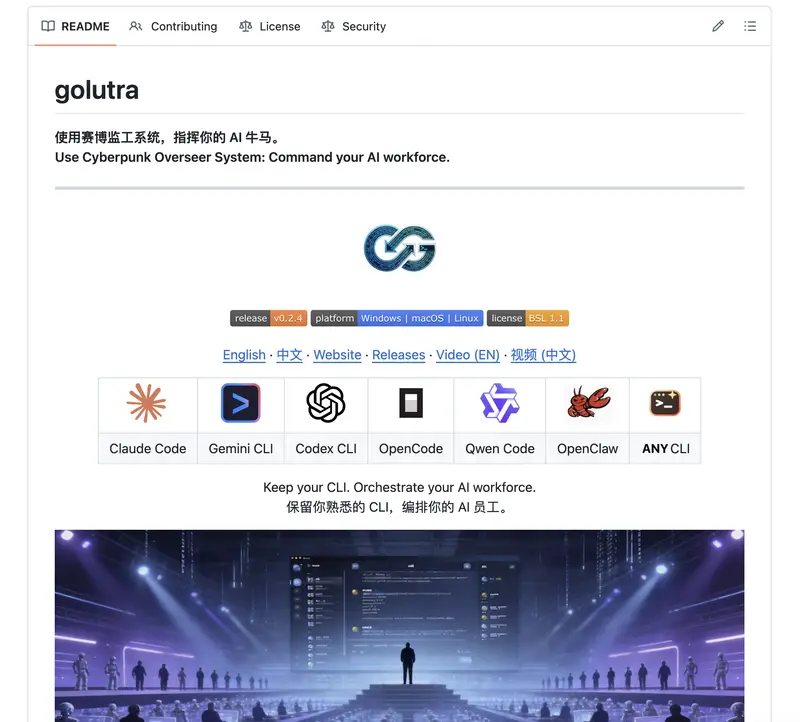
👉 https://github.com/golutra/golutra

And honestly… this might be one of those “wait, this changes things” moments.

🧠 Imagine this:

You open your terminal…

But instead of you working,
a team of AI agents starts working for you.

one writes code
one debugs
one runs tests
one deploys

All at the same time. No tab switching. No context switching.

You just say what you want.

⚡ This isn’t Copilot

Copilot = autocomplete
This = parallel execution system

👉 It turns your CLI into an AI command center
👉 Multiple agents running simultaneously
👉 Tasks get orchestrated automatically
👉 You can literally inject instructions into running processes

🔥 The craziest part?

You don’t migrate anything.

no new framework
no new workflow
no relearning

It just wraps around what you already use.

🤯 So here’s the uncomfortable question:

If one person can run 5–10 agents in parallel…
how many engineers does a team actually need?

🧨 This could go two ways:

Best case:

massive productivity boost
solo builders shipping like startups
“one-person companies” become normal

Worst case:

debugging turns into chaos
agents fighting each other
you become a “manager of hallucinations”
👀 Either way, this feels like a shift:

From:

writing code

To:

orchestrating intelligence

❓ Real question:

Are we still “developers” in this model…

or are we becoming
AI team managers?

Curious what people think:

hype or real shift?
would you actually trust multiple agents running your workflow?
is this the future… or just complexity with good marketing?

Silence the makefile recipes

Makefile is made up of recipes. Running a recipe in make, prints the recipe and also the output of every command in the recipe. Recipe can be implemented by re-directing the output to /dev/null device. But this approach has a problem. Sometimes, I wanted to read the output of the command and not be re-directed to /dev/null, especially during troubleshooting. In this situation, there is no other way but to change implementation of recipe to remove the redirection.

Makefile has a switch -s to silence the printing of the recipe during execution. I wanted to use this switch to decide for redirection.

ifneq ($(findstring s,$(filter-out --%,$(MAKEFLAGS))),)
  .REDIRECT = >/dev/null 2>&1
else
  .REDIRECT =
endif

test:
    which scala $(.REDIRECT) || printf "scala is not present."

Now, make test prints the recipe and output of the which command. But make test -s completely silences the recipe execution.

Makefile provides a way to silence the echoing of recipes but the implementation of recipe, as in this case, uses conditional redirection to silence the output of commands in the recipe.

This approach, now, becomes less noisy until recipe requires to be debugged.

The Terraform Module Structure I Use for Every AWS Project

If you’ve worked on more than one AWS project with Terraform, you’ve probably hit this wall: what starts as a clean main.tf slowly turns into hundreds of lines of spaghetti — mixing networking, IAM, compute, and databases in one place.
I’ve seen this pattern repeated across multiple teams. The fix isn’t working harder — it’s structuring your modules the right way from day one.
In this article, I’ll walk you through the exact Terraform module structure I use for every AWS project, why each decision was made, and the mistakes it prevents.

Why module structure matters more than you think
Terraform is infrastructure-as-code, which means all the same software engineering principles apply: separation of concerns, reusability, and avoiding duplication. A poor module structure leads to:

State file conflicts when multiple engineers work simultaneously
Inability to reuse code across environments (dev/staging/prod)
Blast radius issues — a change in one area accidentally destroying another
Slow terraform plan times because everything lives in one giant state

Real example: At a previous project, a single monolithic main.tf file had grown to 2,400 lines. A junior engineer changed a security group rule and accidentally modified an RDS parameter group in the same apply. Good module structure would have isolated these completely.

The folder structure
Here’s the top-level layout I start every project with:

project-infra/
├── environments/
│ ├── dev/
│ │ ├── main.tf
│ │ ├── variables.tf
│ │ └── terraform.tfvars
│ ├── staging/
│ └── prod/
├── modules/
│ ├── networking/
│ ├── eks/
│ ├── rds/
│ ├── iam/
│ └── s3/
└── global/
├── backend.tf
└── providers.tf

Each folder under modules/ is self-contained — it has its own main.tf, variables.tf, and outputs.tf. Nothing leaks between modules except through explicit outputs and inputs.

Breaking it down: the networking module
The networking module is always the foundation — every other module depends on it. Here’s what mine looks like:

hclmodule “networking” {
source = “../../modules/networking”

vpc_cidr = var.vpc_cidr
public_subnet_cidrs = var.public_subnet_cidrs
private_subnet_cidrs = var.private_subnet_cidrs
availability_zones = var.availability_zones
environment = var.environment
}

Inside modules/networking/outputs.tf, I export the VPC ID, subnet IDs, and route table IDs. Every other module consumes these outputs — nobody hardcodes subnet IDs.

hcloutput “vpc_id” {
description = “The ID of the VPC”
value = aws_vpc.main.id
}

output “private_subnet_ids” {
description = “List of private subnet IDs”
value = aws_subnet.private[*].id
}

Environment-specific configuration
Each environment folder (dev/, staging/, prod/) contains only the configuration that differs per environment. The actual infrastructure logic lives in the shared modules.

hcl# environments/prod/terraform.tfvars

environment = “prod”
vpc_cidr = “10.0.0.0/16”
public_subnet_cidrs = [“10.0.1.0/24”, “10.0.2.0/24”]
private_subnet_cidrs = [“10.0.10.0/24”, “10.0.20.0/24”]
eks_node_count = 5
eks_instance_type = “m5.xlarge”
db_instance_class = “db.r5.large”

For dev, the same variables get smaller values — but the same module code runs. This is where you get real reusability.

Remote state and the backend
Each environment gets its own S3 backend with a DynamoDB lock table. This is non-negotiable on a team:

hclterraform {
backend “s3” {
bucket = “mycompany-tf-state”
key = “prod/terraform.tfstate”
region = “us-east-1”
dynamodb_table = “terraform-lock”
encrypt = true
}
}

Tip: Use a separate AWS account (or at minimum a separate S3 bucket with strict IAM policies) for storing state files. State files contain sensitive data including database passwords and resource IDs.

Three rules I never break

  1. Modules never call other modules directly. Only the environment-level main.tf calls modules. This prevents circular dependencies and keeps the dependency graph flat and readable.
  2. No hardcoded values inside modules. Every value that could differ between environments must be a variable with a description and type constraint. If I’m tempted to hardcode something, that’s a signal it belongs in tfvars.
  3. Every output has a description. Outputs without descriptions are useless to future you and your teammates. A one-line description of what the output is and when to use it saves hours of confusion.

Putting it together
This structure has served me across projects ranging from simple 3-tier web apps to multi-account EKS platforms. The upfront investment in structure pays back within weeks — especially when onboarding new engineers or debugging a production incident at 2am.
Start with this layout even for small projects. It costs almost nothing extra and eliminates an entire class of infrastructure bugs before they happen.

In the next article, I’ll go deeper into the EKS module specifically — how I configure node groups, IRSA roles, and the Helm chart integration that makes it production-ready from day one.

I built a free alternative to iLoveIMG — no login, no ads, no paywalls

We’ve all been there.

You need to quickly compress an image. You Google “free image tool”, land on iLoveIMG, upload your file — and boom.

“Sign up to continue.”

You just wanted to resize a photo. Not create another account you’ll forget about in 3 days.

So after hitting this wall one too many times during a side project, I did what any developer does.

I built my own. 🛠️

Introducing ihateimg.in

ihateimg.in — a completely free image toolkit. No account. No ads. No “upgrade to pro” popup appearing right when you need it most.

Just open the site and get things done.

What it does

Tool What it’s for
🖼️ Crop Trim your image exactly how you want
📐 Resize Custom dimensions in pixels or percentage
🗜️ Compress Reduce file size without killing quality
💧 Watermark Add text or image watermarks in seconds
🔍 Upscale Increase resolution without heavy blur

The part I’m most proud of — Pipelines ⚡

Most tools make you do this:

Upload → Edit → Download → Re-upload → Edit again → Download → Repeat 😤

With ihateimg.in, you can chain multiple edits into a single pipeline.

Compress + Resize + Watermark — all in one go. Upload once, get your final result. Done.

This alone saves me several minutes every single time I work with images.

How it stacks up against iLoveIMG

Feature iLoveIMG ihateimg.in
Login required ✅ Yes ❌ Never
Ads ✅ Yes ❌ Never
Paid plan $60/year Free forever
Pipeline / batch edits Limited ✅ Yes
Compress, Resize, Crop ✅ ✅
Watermark ✅ ✅
Upscale ✅ ✅

iLoveIMG is a solid product — but it’s built around converting free users into paying ones. Nothing wrong with that as a business, but it’s not what I wanted as a user.

ihateimg.in is built around getting out of your way.

The honest backstory

I needed a quick image tool for a side project. Every popular option either had ads, required signup, or locked the exact feature I needed behind a paywall.

So I spent a weekend building something I actually wanted to use.

It’s been live for a while now. I’ve been quietly adding features and fixing bugs. Today felt like the right time to finally share it with the dev community and get real feedback.

Try it out

👉 ihateimg.in

I’d genuinely love to know:

  • What’s missing?
  • What would make this a tool you actually reach for?
  • Any bugs or rough edges you hit?

Drop a comment — I read every single one. 🙏

DevRel Empire: The Autonomous Notion-to-Everywhere Publishing Engine

This is a submission for the Notion MCP Challenge

What I Built

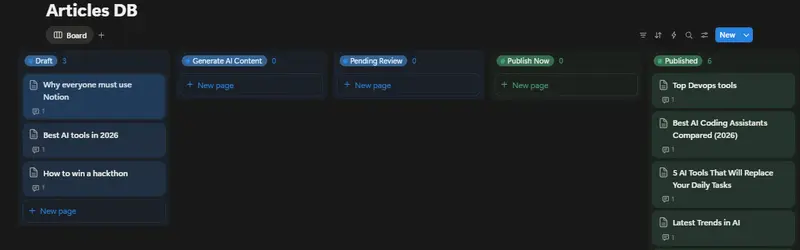
🚀 Omnichannel DevRel Empire — an autonomous, two-phase content publishing engine that turns your Notion workspace into a headless, zero-click publishing command center.

The idea is simple: you write rough bullet-point notes inside a Notion page and flip a status dropdown. The rest happens automatically.

Phase 1 — AI Drafting (Generate AI Content status):
The system picks up your notes, feeds them to Gemini 2.5 Flash, and generates a full-length expanded article, a Twitter/X thread, and a LinkedIn post. It then uses Imagen 3 to create a bespoke cover image, hosts it on Google Cloud Storage, and writes all the AI-generated content directly back into your Notion page as structured blocks — cover image and all.

Phase 2 — Publishing (Publish Now status):
You review the draft in Notion, tweak it if needed, then flip the status to Publish Now. The engine cross-posts the article to DEV.to and Hashnode simultaneously, then leaves a 🚀 comment on your Notion page with the live published URLs.

Infrastructure:

  • Backend: TypeScript + Express, containerised with Docker, deployed on Google Cloud Run
  • Scheduler: Google Cloud Scheduler polls the /execute endpoint every 60 seconds — fully autonomous
  • Dashboard: A Vite + TypeScript glassmorphism-style management UI to input API keys and monitor the system

The whole thing is status-driven, built around Notion as the single source of truth and control plane for a developer’s content workflow.

Video Demo

Show us the code

GitHub logo

parulmalhotraiitk
/
devrel

An AI-powered automation system that turns Notion into an autonomous publishing command center using the Model Context Protocol (MCP) and Google Gemini.

🚀 Omnichannel DevRel Empire

Autonomous Content Publishing & Imagery Command Center built for the Notion MCP Challenge.

DevRel Empire turns Notion into a headless, autonomous publishing engine. By leveraging the official Notion MCP Server, it transforms simple bullet points into comprehensive multi-platform articles with AI-generated cover images, social drafts (Twitter/LinkedIn), and zero-click distribution.

🧩 Notion MCP Challenge (Official Integration)

This project is built to demonstrate the power of the Model Context Protocol (MCP) in a cloud-native, serverless environment.

  • Native Tool Usage: Interacts with Notion using API-post-search for intelligent page discovery, API-patch-page for status-driven state management, and API-create-a-comment for cross-platform link reporting.
  • Zero-Trust Auth: Runs the @notionhq/notion-mcp-server package natively inside a Google Cloud Run container, dynamically injecting credentials per-request over a secure Stdio transport.
  • Protocol Depth: Implements a hybrid architecture using full JSON-RPC 2.0 to the MCP server for logic, and the standard REST SDK for granular…

Project structure:

src/
├── mcp/
│   └── notion-client.ts   # All Notion MCP interactions — the heart of the system
├── agent/
│   └── gemini.ts          # Gemini 2.5 Flash + Imagen 3 content generation
├── platforms/
│   └── publishers.ts      # DEV.to & Hashnode publishing logic
└── index.ts               # Express app + /execute endpoint

Dockerfile (Cloud Run deployment):

# Stage 1: Build
FROM node:20 AS builder
WORKDIR /usr/src/app

# Copy manifests and install ALL dependencies (including devDependencies for tsc)
COPY package*.json ./
RUN npm install

# Copy source and compile TypeScript
COPY . .
RUN npm run build

# Stage 2: Production image
FROM node:20-slim
WORKDIR /usr/src/app

# Copy manifests and install ONLY production dependencies
COPY package*.json ./
RUN npm install --omit=dev

# Copy compiled output from the build stage
COPY --from=builder /usr/src/app/dist ./dist

# Run the web service
CMD [ "node", "dist/index.js" ]

How I Used Notion MCP

Notion MCP is the nerve centre of the entire workflow — every meaningful action the system takes on Notion goes through the official @notionhq/notion-mcp-server package (v2.2.1) over a JSON-RPC 2.0 / Stdio transport.

Step 1 — Booting the MCP Server and Connecting

The backend spawns the official Notion MCP server as a child process on every workflow run and connects to it as an MCP client:

import { Client as MCPClient } from '@modelcontextprotocol/sdk/client/index.js';
import { StdioClientTransport } from '@modelcontextprotocol/sdk/client/stdio.js';

async function connectToMCP(): Promise<MCPClient> {
  const transport = new StdioClientTransport({
    command: 'node',
    args: ['node_modules/@notionhq/notion-mcp-server/bin/cli.mjs'],
    env: {
      ...process.env,
      NOTION_TOKEN: process.env.NOTION_API_TOKEN as string,
    },
  });

  const mcpClient = new MCPClient(
    { name: 'devrel-empire-client', version: '1.0.0' },
    { capabilities: {} }
  );

  await mcpClient.connect(transport);

  const tools = await mcpClient.listTools();
  console.log(`[MCP] ${tools.tools.length} tools available: ${tools.tools.map(t => t.name).join(', ')}`);

  return mcpClient;
}

This means zero hardcoded Notion API calls in the orchestration layer — all commands flow through the MCP protocol over stdin/stdout.

Step 2 — API-post-search: Workspace-Wide Page Discovery

On every poll cycle, the agent uses this MCP tool to perform a workspace-wide search ordered by most recently edited pages:

const searchResult = await mcpClient.callTool({
  name: 'API-post-search',
  arguments: {
    filter: { value: 'page', property: 'object' },
    sort: { direction: 'descending', timestamp: 'last_edited_time' },
  },
}) as any;

if (searchResult?.isError) {
  throw new Error(searchResult?.content?.[0]?.text || 'Unknown MCP Error');
}

console.log(`[MCP] API-post-search OK — ${searchResult?.content?.[0]?.text?.length} chars returned`);

Step 3 — API-patch-page: Status-Driven State Machine

The two-phase pipeline is orchestrated entirely by flipping Notion page statuses via MCP. The same call also attaches the AI-generated Imagen 3 cover image to the page:

async function mcpUpdatePageStatus(
  mcpClient: MCPClient,
  pageId: string,
  statusName: string,
  coverUrl?: string
): Promise<void> {
  const body: any = {
    page_id: pageId,
    properties: {
      Status: { status: { name: statusName } },
    },
  };

  if (coverUrl) {
    body.cover = { type: 'external', external: { url: coverUrl } };
  }

  const result = await mcpClient.callTool({
    name: 'API-patch-page',
    arguments: body,
  }) as any;

  if (result?.isError) throw new Error(result?.content?.[0]?.text || 'Unknown MCP Error');
  console.log(`[MCP] Status set to "${statusName}" on page ${pageId}`);
}

// Phase 1 end:  status → "Pending Review"  (+ GCS cover image URL)
// Phase 2 end:  status → "Published"

Step 4 — API-patch-block-children: Writing AI Content Back Into Notion

After Gemini 2.5 Flash generates the article and social drafts, the system appends them directly into the Notion page as structured blocks. Text is chunked at 1900 chars to respect Notion’s 2000-character per-block limit:

const result = await mcpClient.callTool({
  name: 'API-patch-block-children',
  arguments: {
    block_id: pageId,
    children: [
      { object: 'block', type: 'divider', divider: {} },
      {
        object: 'block', type: 'heading_2',
        heading_2: {
          rich_text: [{ type: 'text', text: { content: '🤖 AI Generated Drafts (Review & Edit)' } }],
        },
      },
      {
        object: 'block', type: 'image',
        image: { type: 'external', external: { url: coverImageUrl } },
      },
      ...articleChunks.map(chunk => ({
        object: 'block', type: 'paragraph',
        paragraph: { rich_text: [{ type: 'text', text: { content: chunk } }] },
      })),
    ],
  },
}) as any;

if (result?.isError) throw new Error(result?.content?.[0]?.text || 'Unknown MCP Error');
console.log('[MCP] AI content blocks appended to Notion page.');

Step 5 — API-create-a-comment: Closing the Loop

Once the article is live on DEV.to and Hashnode, the agent posts the published URLs back to the original Notion page as a comment:

async function mcpCreateComment(
  mcpClient: MCPClient,
  pageId: string,
  links: string[]
): Promise<void> {
  if (links.length === 0) return;

  const commentBody = '🚀 Published successfully!nn' + links.join('n');

  const result = await mcpClient.callTool({
    name: 'API-create-a-comment',
    arguments: {
      parent: { page_id: pageId },
      rich_text: [{ type: 'text', text: { content: commentBody } }],
    },
  }) as any;

  if (result?.isError) throw new Error(result?.content?.[0]?.text || 'Unknown MCP Error');
  console.log('[MCP] Published links posted as Notion comment.');
}

The loop is complete: Notion triggered the workflow, Notion received the results.

What Notion MCP Unlocks

Without MCP With MCP
Scattered REST calls hardcoded per operation Single uniform callTool() abstraction for all operations
Credentials embedded in every HTTP client Zero-trust Stdio transport — token injected once at server boot
Tools must be manually mapped to AI agents listTools() auto-exposes the full Notion API surface
Adding a new Notion operation = new REST client code Adding a new operation = one callTool() call

The protocol-first architecture means any AI agent — Claude, Gemini, GPT-4 — can be dropped into this system and interact with Notion through the exact same interface. No glue code changes needed. That’s the real unlock: Notion as a universally-accessible, agent-native control plane for your entire content workflow.

Users, Roles, Groups

Lets understand roles and permissions with a few practical questions.

QN 1: Create a login role that can only read from film table

CREATE ROLE report_user LOGIN;
GRANT SELECT ON film TO report_user;

we create a user called report_user and give it only SELECT permission on the film table. So it can read data but cant modify anything.

2: Accessing customer table gives permission denied fix it

GRANT SELECT ON customer TO report_user;

The error happens because report_user doesnt have access to the customer table. Granting SELECT fixes the issue.

3: Allow access to only specific columns

REVOKE SELECT ON customer FROM report_user;
GRANT SELECT (customer_id, first_name, last_name) ON customer TO report_user;

we remove full access.
Then we grant access only to selected columns. Now the user can’t see sensitive fields like email or other data.

4: Create a support user with limited permissions

CREATE ROLE support_user LOGIN;
GRANT SELECT ON customer TO support_user;
GRANT UPDATE (email) ON customer TO support_user;

This user can: Read all customer data update only the email column no delete or full update access is given tight control.

5: Remove access from film table

REVOKE SELECT ON film FROM report_user;

This simply removes the permission we granted earlier.

6: Create a read-only group

CREATE ROLE readonly_group;
GRANT SELECT ON ALL TABLES IN SCHEMA public TO readonly_group;

This creates a group role that can read all tables in the schema.

7: Add users to the group

CREATE ROLE analyst1 LOGIN;
CREATE ROLE analyst2 LOGIN;
GRANT readonly_group TO analyst1;
GRANT readonly_group TO analyst2;

Both users inherit permissions from the group so instead of managing permissions individually we manage them centrally.