Building a Tokenizer from Scratch [part 2]
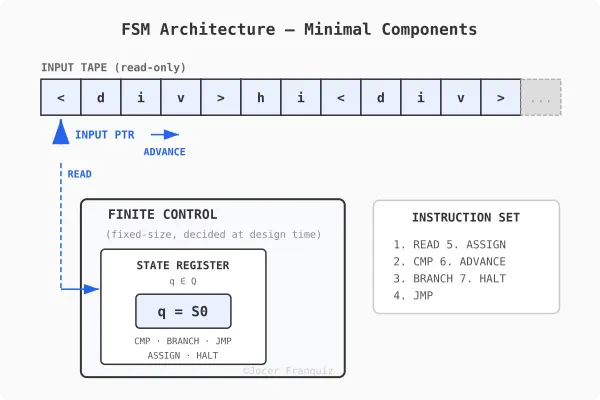
FSM Architecture

From FSM to PDA: Q/A with Claude Opus

In part 1, we built a working FSM that recognizes <div>text</div> using just 7 primitives mapped 1:1 to assembly opcodes. But FSMs have a hard limit: they can’t handle nested structures like <div><div>hello</div></div>. In this post, we climb the Chomsky hierarchy from finite state machines to pushdown automata, build a PDA that recognizes nested <div> tags, and then turn it into a transducer that emits tokens. In other words we are building the core of a lexer.

Q: Why can’t FSMs handle nested structures?

Because an FSM has a fixed number of states, and that’s all the memory it has.

Consider nested divs:

<div><div><div>hello</div></div></div>

To correctly match closing tags, you need to count how many <div>s you’ve opened so you know how many </div>s to expect. An FSM with, say, 12 states can handle nesting up to some fixed depth — but someone can always write HTML nested one level deeper than your states can track.

Put simply:

  • 1 level deep → you need states to remember “I’m 1 div in”
  • 2 levels deep → different states for “I’m 2 divs in”
  • n levels deep → you’d need n distinct state configurations

Since n is unbounded but your state count is finite, you run out of states. There’s no way to encode “how deep am I?” in a fixed-size state register when the depth is arbitrary.

This is exactly what the stack in a pushdown automaton solves. Every time you see <div>, you push onto the stack; every </div>, you pop. The stack grows as needed, giving you unbounded memory in one direction (depth), which is precisely what nesting requires.

Q: So, FSMs needs memory to “remember” where they are in the nested structure, correct?

It depends on what you mean by “memory.”

An FSM does have memory, but it’s extremely limited. The current state itself is the memory. If your FSM is in state S7, that encodes something about what it has seen so far. That’s how it knows it’s partway through reading </div> vs still in content.

But that memory is:

  • Fixed-size, bounded by the number of states, decided at design time
  • Lossy, it can’t remember the full history of what it read, only a compressed summary encoded in which state it’s in
  • Non-growable, it can’t allocate more memory as input gets longer

FSM Architecture

So when people say “FSMs have no memory,” they really mean no auxiliary memory, that means no stack, no tape, no buffer that grows with input. The only thing an FSM “remembers” is which state it’s currently in.

A PDA adds exactly one auxiliary memory structure: a stack. That single addition is enough to go from “can’t handle nesting” to “can handle nesting.”

Q: What is the stack, formally?

A stack is a last-in, first-out (LIFO) data structure with two operations:

  • PUSH(symbol): place a symbol on top
  • POP: remove and return the top symbol

So if your stack is ABB, a PUSH(C) gives ABBC, and a POP returns C leaving ABB again.

The key properties:

  1. You can only access the top: no reading the middle or bottom
  2. Unbounded size: it can grow as large as needed (unlike the FSM’s fixed states)
  3. It starts empty: at the beginning of computation, the stack contains nothing (or a special bottom marker like $)

That’s it. It’s the simplest possible auxiliar memory that’s still useful. You get only sequential access from one end. But that restriction is exactly what matches the structure of nesting: the most recently opened thing is the next thing that needs to close.

Q: Which operations and structures do we need to add to the seven primitives to create a PDA that handles nested structures?

We need two new operations and one new structure:

New structure

  • STACK: a LIFO storage addressed by a stack pointer (SP)

Updated primitives table

# Operation Description Type Assembly equivalent
1 READ Load current input symbol FSM MOV reg, [src]
2 CMP Test value equality FSM CMP reg, imm
3 BRANCH Conditional jump FSM JE / JNE label
4 JMP Unconditional jump FSM JMP label
5 ASSIGN Update state register FSM MOV reg, imm
6 ADVANCE Move input pointer forward FSM INC reg
7 HALT Terminate execution FSM HLT
8 PUSH Place symbol on top of stack PDA PUSH reg
9 POP Remove and return top of stack PDA POP reg

Two operations and one structure turn an FSM into a PDA.

x86 has native PUSH/POP instructions with a hardware stack pointer (SP/ESP/RSP), so the 1:1 mapping to CPU instructions still holds. PDAs are just as mechanically efficient as FSMs. The only cost is that memory usage now grows with nesting depth instead of being fixed.

You could also add a PEEK operation (read top without removing), but it’s not strictly necessary — you can always POP then PUSH back. It’s a convenience, not a primitive.

Q: What’s the simplest PDA architecture?

A PDA architecture needs exactly four components:

  1. Input tape — the string being read (read-only, left-to-right)
  2. Input pointer — current position on the tape
  3. State register — holds the current state from a finite set Q
  4. Stack — LIFO storage over alphabet Γ

And the nine operations from our table are the instruction set that operates on these four components.

Compared to the FSM architecture from part 1, we added exactly one component (the stack) and two operations (PUSH, POP). The stack pointer (SP) lives inside the finite control alongside the state register — it’s a register, not part of the stack itself.

PDA Architecture

The PDA architecture is a von Neumann architecture:

PDA component Von Neumann equivalent
Input tape Memory (data segment)
Input pointer Program counter / index register
State register CPU register (accumulator)
Stack pointer SP register
Stack (in RAM) Stack segment of memory
9 operations Subset of the instruction set

What’s missing for full Von Neumann: writable memory, random access, arithmetic, and stored program. The automata hierarchy maps directly onto hardware capability:

  • FSM → combinational logic + a register
  • PDA → CPU + stack segment
  • Turing machine → CPU + full random-access memory = von Neumann

Building a PDA for nested <div> recognition

Pseudocode

STATES: S0, TAG_OPEN, TAG_NAME, CONTENT, CLOSE_SLASH,
        CLOSE_NAME, ACCEPT, DEAD

STACK ALPHABET: Γ = { DIV, $ }

START:
  PUSH($)                    -- bottom marker
  ASSIGN(S0)

S0:
  READ(ch)
  CMP(ch, '<')
  BRANCH(eq → TAG_OPEN)
  JMP(DEAD)

TAG_OPEN:
  ADVANCE
  READ(ch)
  CMP(ch, '/')
  BRANCH(eq → CLOSE_SLASH)   -- it's a closing tag
  CMP(ch, 'd')
  BRANCH(eq → TAG_NAME)      -- it's an opening tag
  JMP(DEAD)

TAG_NAME:                     -- read "div>"
  ADVANCE
  READ(ch); CMP(ch, 'i'); BRANCH(ne → DEAD)
  ADVANCE
  READ(ch); CMP(ch, 'v'); BRANCH(ne → DEAD)
  ADVANCE
  READ(ch); CMP(ch, '>'); BRANCH(ne → DEAD)
  PUSH(DIV)                   -- ← matched <div>, push it
  ADVANCE
  ASSIGN(CONTENT)

CONTENT:
  READ(ch)
  CMP(ch, '<')
  BRANCH(eq → TAG_OPEN)      -- ← could be nested <div> or </div>
  CMP(ch, EOF)
  BRANCH(eq → DEAD)           -- input ended with open tags
  ADVANCE                     -- consume text character
  JMP(CONTENT)

CLOSE_SLASH:                  -- inside </
  ADVANCE
  READ(ch); CMP(ch, 'd'); BRANCH(ne → DEAD)
  ADVANCE
  READ(ch); CMP(ch, 'i'); BRANCH(ne → DEAD)
  ADVANCE
  READ(ch); CMP(ch, 'v'); BRANCH(ne → DEAD)
  ADVANCE
  READ(ch); CMP(ch, '>'); BRANCH(ne → DEAD)
  POP(top)                    -- ← pop the stack
  CMP(top, DIV)
  BRANCH(ne → DEAD)           -- mismatch
  ADVANCE
  READ(ch)
  CMP(ch, EOF)
  BRANCH(eq → CHECK_EMPTY)
  ASSIGN(CONTENT)             -- more input, keep going

CHECK_EMPTY:
  POP(top)
  CMP(top, $)
  BRANCH(eq → ACCEPT)         -- stack empty = all tags matched
  JMP(DEAD)                   -- leftover tags = unbalanced

ACCEPT:
  HALT(accept)

DEAD:
  HALT(reject)

The entire FSM logic is reused. The only additions are three PUSH/POP calls. One PUSH per <div>, one POP per </div>, one final POP to verify the stack is empty.

Trace: <div><div>hi</div></div>

Input: < d i v > < d i v > h i < / d i v > < / d i v > EOF
       0 1 2 3 4 5 6 7 8 9 ...

Stack starts: [ $ ]

1. First <div>

State     | Read | Action              | Stack
----------|------|----------------------|--------
S0        | <    | match, → TAG_OPEN   | [ $ ]
TAG_OPEN  | d    | not '/', → TAG_NAME | [ $ ]
TAG_NAME  | i    | match               | [ $ ]
          | v    | match               | [ $ ]
          | >    | match, PUSH(DIV)    | [ $ DIV ]
          |      | → CONTENT           |

2. Second <div>

State     | Read | Action              | Stack
----------|------|----------------------|-----------
CONTENT   | <    | → TAG_OPEN          | [ $ DIV ]
TAG_OPEN  | d    | not '/', → TAG_NAME | [ $ DIV ]
TAG_NAME  | i    | match               | [ $ DIV ]
          | v    | match               | [ $ DIV ]
          | >    | match, PUSH(DIV)    | [ $ DIV DIV ]
          |      | → CONTENT           |

3. Text “hi”

State     | Read | Action              | Stack
----------|------|----------------------|-------------
CONTENT   | h    | not '<', ADVANCE    | [ $ DIV DIV ]
CONTENT   | i    | not '<', ADVANCE    | [ $ DIV DIV ]

4. First </div>

State       | Read | Action            | Stack
------------|------|--------------------|--------------
CONTENT     | <    | → TAG_OPEN        | [ $ DIV DIV ]
TAG_OPEN    | /    | → CLOSE_SLASH     | [ $ DIV DIV ]
CLOSE_SLASH | d    | match             | [ $ DIV DIV ]
            | i    | match             | [ $ DIV DIV ]
            | v    | match             | [ $ DIV DIV ]
            | >    | match, POP → DIV  | [ $ DIV ]
            |      | DIV == DIV ✓      |
            |      | read next         |

5. Second </div>

State       | Read | Action            | Stack
------------|------|--------------------|---------
CONTENT     | <    | → TAG_OPEN        | [ $ DIV ]
TAG_OPEN    | /    | → CLOSE_SLASH     | [ $ DIV ]
CLOSE_SLASH | d    | match             | [ $ DIV ]
            | i    | match             | [ $ DIV ]
            | v    | match             | [ $ DIV ]
            | >    | match, POP → DIV  | [ $ ]
            |      | DIV == DIV ✓      |
            |      | read next         |

6. End of input

State       | Read | Action            | Stack
------------|------|--------------------|---------
            | EOF  | → CHECK_EMPTY     | [ $ ]
CHECK_EMPTY |      | POP → $           | [ ]
            |      | $ == $ ✓          |
            |      | → ACCEPT          |

Result: ACCEPT

The stack grew to depth 2 (two DIVs), then shrank back to just $, confirming every open tag had a matching close. An FSM would have needed dedicated states for each depth level. This PDA handles any depth with the same 8 states.

PDA State diagram

Q: Our PDA can parse nested structures and output accept or reject. But a real tokenizer needs to emit tokens, right?

Right. The PDA is still just a recognizer. To become a tokenizer, we need to understand what changes formally.

A recognizer takes an input string and produces a single binary answer: accept or reject.

  • Input: a string over alphabet
  • Output: yes or no

A transducer takes an input string and produces an output string (or sequence of output symbols). It transforms input into output.

  • Input: a string over alphabet
  • Output: a string y over an output alphabet Δ

A tokenizer is a transducer: it reads characters (Σ = ASCII) and emits tokens (Δ = the set of possible tokens).

Q: What is ?

An output buffer is a tape, simpler than the stack:

  • Append-only: you can only write to the end, never read back or modify
  • Write-only: the machine never consults its own output to make decisions
  • Unbounded: it grows as tokens are emitted
  • Starts empty

Output structure

OUTPUT ALPHABET:  Δ = TokenType × Σ*
TOKEN TYPES:      TokenType = { OPEN_TAG, CLOSE_TAG, TEXT }
OUTPUT BUFFER:    append-only list of (type, value) pairs, starts empty

For <div><div>hi</div></div>, the output buffer should end up as:

[
  (OPEN_TAG,  "div"),
  (OPEN_TAG,  "div"),
  (TEXT,      "hi"),
  (CLOSE_TAG, "div"),
  (CLOSE_TAG, "div")
]

Updated operations table (11 operations)

# Operation Description Type Assembly
1 READ Load current input symbol FSM MOV reg, [src]
2 CMP Test value equality FSM CMP reg, reg/imm
3 BRANCH Conditional jump FSM JE / JNE label
4 JMP Unconditional jump FSM JMP label
5 ASSIGN Update state register FSM MOV reg, imm
6 ADVANCE Move input pointer forward FSM INC reg
7 HALT Terminate execution FSM HLT
8 PUSH Place symbol on top of stack PDA PUSH reg
9 POP Remove and return top of stack PDA POP reg
10 MARK Save current input position Transducer MOV reg, reg
11 EMIT Append token to output buffer Transducer MOV [dst], reg

Transducer Architecture: 6 components

  1. Input tape (read-only)
  2. Input pointer
  3. State register
  4. Stack pointer + Stack
  5. Mark register — saves start position of current token
  6. Output buffer — append-only, unbounded

Transducer Architecture

Pseudocode (transducer)

STATES: S0, TAG_OPEN, TAG_NAME, CONTENT, CONTENT_LOOP,
        CONTENT_DONE, CLOSE_SLASH, CHECK_EMPTY, ACCEPT, DEAD

INPUT ALPHABET:  Σ = ASCII
STACK ALPHABET:  Γ = { DIV, $ }
OUTPUT ALPHABET: Δ = { OPEN_TAG, CLOSE_TAG, TEXT } × Σ*

START:
  PUSH($)
  ASSIGN(S0)

S0:
  READ(ch)
  CMP(ch, '<')
  BRANCH(eq → TAG_OPEN)
  JMP(DEAD)

TAG_OPEN:
  ADVANCE
  READ(ch)
  CMP(ch, '/')
  BRANCH(eq → CLOSE_SLASH)
  CMP(ch, 'd')
  BRANCH(eq → TAG_NAME)
  JMP(DEAD)

TAG_NAME:
  ADVANCE
  READ(ch); CMP(ch, 'i'); BRANCH(ne → DEAD)
  ADVANCE
  READ(ch); CMP(ch, 'v'); BRANCH(ne → DEAD)
  ADVANCE
  READ(ch); CMP(ch, '>'); BRANCH(ne → DEAD)
  PUSH(DIV)
  EMIT(OPEN_TAG, "div")           -- ← emit opening tag token
  ADVANCE
  ASSIGN(CONTENT)

CONTENT:
  MARK                             -- ← save start of text region
CONTENT_LOOP:
  READ(ch)
  CMP(ch, '<')
  BRANCH(eq → CONTENT_DONE)
  CMP(ch, EOF)
  BRANCH(eq → DEAD)
  ADVANCE
  JMP(CONTENT_LOOP)

CONTENT_DONE:
  CMP(mark, pos)                   -- any text between tags?
  BRANCH(eq → TAG_OPEN)            -- no text, skip emit
  EMIT(TEXT, input[mark..pos])     -- ← emit text token
  JMP(TAG_OPEN)

CLOSE_SLASH:
  ADVANCE
  READ(ch); CMP(ch, 'd'); BRANCH(ne → DEAD)
  ADVANCE
  READ(ch); CMP(ch, 'i'); BRANCH(ne → DEAD)
  ADVANCE
  READ(ch); CMP(ch, 'v'); BRANCH(ne → DEAD)
  ADVANCE
  READ(ch); CMP(ch, '>'); BRANCH(ne → DEAD)
  POP(top)
  CMP(top, DIV)
  BRANCH(ne → DEAD)
  EMIT(CLOSE_TAG, "div")          -- ← emit closing tag token
  ADVANCE
  READ(ch)
  CMP(ch, EOF)
  BRANCH(eq → CHECK_EMPTY)
  ASSIGN(CONTENT)

CHECK_EMPTY:
  POP(top)
  CMP(top, $)
  BRANCH(eq → ACCEPT)
  JMP(DEAD)

ACCEPT:
  HALT(accept)                     -- output buffer contains all tokens

DEAD:
  HALT(reject)

Trace: <div><div>hi</div></div> (transducer)

Input: < d i v > < d i v > h i < / d i v > < / d i v > EOF
Pos:   0 1 2 3 4 5 6 7 8 9 10 11 12 13 14 15 16 17 18 19 20 21 22 23

Stack starts:  [ $ ]
Output starts: [ ]

1. First <div>

State       | Pos | Read | Action              | Stack     | Output
------------|-----|------|----------------------|-----------|-------
S0          |  0  | <    | match, → TAG_OPEN   | [ $ ]     |
TAG_OPEN    |  1  | d    | not '/', → TAG_NAME | [ $ ]     |
TAG_NAME    |  2  | i    | match               | [ $ ]     |
            |  3  | v    | match               | [ $ ]     |
            |  4  | >    | match               | [ $ ]     |
            |     |      | PUSH(DIV)           | [ $ DIV ] |
            |     |      | EMIT(OPEN_TAG,"div")|           | ← (OPEN_TAG, "div")
            |  5  |      | ADVANCE, → CONTENT  |           |

2. Enter CONTENT, see < immediately

State        | Pos | Read | Action             | Stack     | Output
-------------|-----|------|--------------------|-----------|-------
CONTENT      |  5  |      | MARK → mark=5      | [ $ DIV ] |
CONTENT_LOOP |  5  | <    | CMP(mark,pos): 5=5 |           |
             |     |      | equal, skip emit   |           |
             |     |      | → TAG_OPEN         |           |

3. Second <div>

State       | Pos | Read | Action              | Stack         | Output
------------|-----|------|----------------------|---------------|-------
TAG_OPEN    |  6  | d    | not '/', → TAG_NAME | [ $ DIV ]     |
TAG_NAME    |  7  | i    | match               | [ $ DIV ]     |
            |  8  | v    | match               | [ $ DIV ]     |
            |  9  | >    | match               | [ $ DIV ]     |
            |     |      | PUSH(DIV)           | [ $ DIV DIV ] |
            |     |      | EMIT(OPEN_TAG,"div")|               | ← (OPEN_TAG, "div")
            | 10  |      | ADVANCE, → CONTENT  |               |

4. Text “hi”

State        | Pos | Read | Action             | Stack         | Output
-------------|-----|------|--------------------|---------------|-------
CONTENT      | 10  |      | MARK → mark=10     | [ $ DIV DIV ] |
CONTENT_LOOP | 10  | h    | not '<', ADVANCE   |               |
CONTENT_LOOP | 11  | i    | not '<', ADVANCE   |               |
CONTENT_LOOP | 12  | <    | CMP(mark,pos):10≠12|              |
             |     |      | EMIT(TEXT, "hi")   |               | ← (TEXT, "hi")
             |     |      | → TAG_OPEN         |               |

5. First </div>

State       | Pos | Read | Action              | Stack         | Output
------------|-----|------|----------------------|---------------|-------
TAG_OPEN    | 13  | /    | → CLOSE_SLASH       | [ $ DIV DIV ] |
CLOSE_SLASH | 14  | d    | match               |               |
            | 15  | i    | match               |               |
            | 16  | v    | match               |               |
            | 17  | >    | match               |               |
            |     |      | POP → DIV           | [ $ DIV ]     |
            |     |      | DIV == DIV ✓        |               |
            |     |      | EMIT(CLOSE_TAG,"div")|              | ← (CLOSE_TAG, "div")
            | 18  | <    | ADVANCE, not EOF    |               |
            |     |      | → CONTENT           |               |

6. Enter CONTENT, see < immediately

State        | Pos | Read | Action              | Stack     | Output
-------------|-----|------|----------------------|-----------|-------
CONTENT      | 18  |      | MARK → mark=18      | [ $ DIV ] |
CONTENT_LOOP | 18  | <    | CMP(mark,pos): 18=18|           |
             |     |      | equal, skip emit    |           |
             |     |      | → TAG_OPEN          |           |

7. Second </div>

State       | Pos | Read | Action               | Stack     | Output
------------|-----|------|------------------------|-----------|-------
TAG_OPEN    | 19  | /    | → CLOSE_SLASH          | [ $ DIV ] |
CLOSE_SLASH | 20  | d    | match                  |           |
            | 21  | i    | match                  |           |
            | 22  | v    | match                  |           |
            | 23  | >    | match                  |           |
            |     |      | POP → DIV              | [ $ ]     |
            |     |      | DIV == DIV ✓           |           |
            |     |      | EMIT(CLOSE_TAG, "div") |           | ← (CLOSE_TAG, "div")
            | 24  | EOF  | ADVANCE, EOF           |           |
            |     |      | → CHECK_EMPTY          |           |

8. End of input

State       | Pos | Read | Action              | Stack | Output
------------|-----|------|----------------------|-------|-------
CHECK_EMPTY |     |      | POP → $              | [ ]   |
            |     |      | $ == $ ✓             |       |
            |     |      | → ACCEPT             |       |
ACCEPT      |     |      | HALT(accept)         |       |

Final output buffer

[
  (OPEN_TAG,  "div"),
  (OPEN_TAG,  "div"),
  (TEXT,      "hi"),
  (CLOSE_TAG, "div"),
  (CLOSE_TAG, "div")
]

Same 10 states, same stack operations. The three EMITs fired at exactly the right boundaries, and the two CMP(mark, pos) guards correctly skipped empty text regions between consecutive tags.

State diagram for PDA transducer tokenizing nested div tags

Q: Is the tokenizer a lexer?

Yes. Tokenizer, lexer, lexical analyzer, scanner, all the same thing. Characters in, tokens out.

The distinction that matters is lexer vs parser:

  • Lexer (what we built): characters in, tokens out. Flat stream. Answers: “what are the words?”
  • Parser: tokens in, tree out. Hierarchical structure. Answers: “how do the words relate to each other?”

Our transducer is a lexer. It outputs a flat list:

(OPEN_TAG, "div"), (OPEN_TAG, "div"), (TEXT, "hi"), (CLOSE_TAG, "div"), (CLOSE_TAG, "div")

A parser would produce a tree:

div
 └─ div
     └─ "hi"

Our PDA already knows the tree structure in some way, the stack depth at any point tells us exactly where we are in the hierarchy. We just don’t capture it. We throw that information away and emit a flat stream. Building the tree means using the stack to capture that structure as we go.

What’s next

We started this post with an FSM that couldn’t count, and ended with a transducer that emits tokens from arbitrarily nested HTML. Along the way, a pattern kept surfacing: climbing the Chomsky hierarchy (FSM → PDA → Turing machine) mirrors the historical evolution of CPU architecture (register → stack segment → full random-access memory). That parallel is not a coincidence, and we will keep pulling on that thread.

Next up: a lexer becomes a parser, a Turing Complete machine.

If you have questions or want to dig deeper into any of these topics, drop a comment below. Follow to catch Part 3 when it lands. Stay tuned…
Scrapy Middleware: Engineering Resilient Proxy Rotation Systems

The silence of a stalled spider is a sound every data engineer knows too well. You’ve refined your XPath selectors, optimized your asynchronous pipelines, and battle-tested your concurrency settings. Yet, five minutes into the crawl, the 403 Forbidden errors start cascading. The target site hasn’t just noticed you; it has systematically dismantled your session.

In the world of high-stakes web scraping, an IP address is a consumable resource. If you aren’t rotating, you aren’t scaling. But simply swapping IPs isn’t enough anymore. Modern anti-bot systems look for behavioral patterns, TLS fingerprints, and header inconsistencies. To bypass these, we must move beyond basic scripts and build a sophisticated rotation engine within the Scrapy Middleware layer.

Why Does Traditional Proxy Management Fail at Scale?

Most developers begin by passing a proxy through the meta attribute of a scrapy.Request. While functional for small tasks, this manual approach is a debt trap. It litters your spiders with infrastructure logic that doesn’t belong there.

The failure usually stems from three core issues:

  1. State Ignorance: The spider doesn’t know if a proxy is “tired” (rate-limited) or “dead” (blacklisted). It keeps firing requests into a void.
  2. Static Headers: Rotating the IP while keeping the same User-Agent or Accept-Language is a massive red flag. It’s like a person changing their face but keeping the same fingerprints.
  3. Synchronicity Gaps: In a high-concurrency Scrapy environment, if your middleware isn’t thread-safe or lacks efficient lookup structures, the rotation mechanism itself becomes the bottleneck.
    To build a senior-level solution, we must treat the middleware as an intelligent gatekeeper that manages the lifecycle of a request, not just its destination.

The Architecture of a Robust Rotation Middleware

A truly resilient middleware doesn’t just attach a string to a request. It acts as a feedback loop. It should intercept the response, analyze the status code or the presence of a CAPTCHA, and decide whether to burn the proxy, cool it down, or retry the request.

The Downloader Middleware Contract
In Scrapy, the process_request and process_exception methods are our primary hooks. A professional implementation should look something like this:

import random
from scrapy import signals
from scrapy.exceptions import NotConfigured

class AdvancedProxyMiddleware:
    def __init__(self, proxy_list, retry_codes):
        self.proxies = proxy_list
        self.retry_codes = retry_codes
        self.stats = {} # Tracking proxy health

    @classmethod
    def from_crawler(cls, crawler):
        # Extract settings from settings.py
        proxy_list = crawler.settings.get('PROXY_LIST')
        retry_codes = crawler.settings.get('PROXY_RETRY_CODES', [403, 429, 503])

        if not proxy_list:
            raise NotConfigured("No proxies found in settings.")

        return cls(proxy_list, retry_codes)

    def process_request(self, request, spider):
        if 'proxy' in request.meta:
            return

        proxy = self._get_weighted_proxy()
        request.meta['proxy'] = proxy
        # Essential: Ensure headers match the proxy's perceived identity
        request.headers['X-Proxy-ID'] = self._get_id(proxy)

    def _get_weighted_proxy(self):
        # Logic for selecting the most "rested" proxy
        return random.choice(self.proxies)

How to Handle the Shadow Ban?

The most dangerous response is not a 403; it’s a 200 OK that returns a “Please Solve this CAPTCHA” page. Standard Scrapy retry logic won’t save you here because the status code is technically successful.

This is where process_response becomes critical. You must implement a “content-aware” middleware.

If your success probability P drops below a certain threshold for a specific proxy, that proxy must be quarantined. This prevents a single compromised IP from polluting your data stream or triggering more aggressive site-wide security measures.

The Logic of Quarantine
When a proxy hits a “Soft Block”:

  1. Intercept: Detect the block pattern in the response body.
  2. Flag: Move the proxy to a penalty_box list.
  3. Re-schedule: Clone the request, clear the previous proxy meta, and re-insert it into the priority queue.

The Middleware Checklist: A Senior’s Blueprint

Before you deploy a rotation system to production, run through this checklist to ensure you aren’t leaving “digital footprints”:

  • DNS Leak Protection: Ensure your proxy provider handles DNS resolution. If your local machine resolves the IP, you’ve already leaked your location.
  • Header Harmonization: Does your User-Agent match your Sec-CH-UA hints? If you use a Chrome UA with a Firefox fingerprint, you’re an easy target.
  • Circuit Breakers: If 90% of your proxies are failing, stop the spider. It’s better to lose time than to lose your entire proxy pool.
  • Protocol Consistency: Use https proxies for https targets. Dropping to http mid-stream is an anomaly.
  • Weight-Based Selection: Not all proxies are equal. Assign higher weights to proxies with lower latency and higher success rates.

Strategies for Proxy Pool Management

1. The Rotating Gateway vs. The Reservoir
Most commercial providers offer a single entry point (a gateway) that rotates the IP on every request. While simple, this takes control away from the engineer. A reservoir approach—where you maintain a list of individual proxies—allows for more granular health monitoring.

2. Contextual Persistence
Sometimes, a site expects a sequence of requests (like a multi-page form) to come from the same IP. Your middleware should support “Sticky Sessions.” By passing a slot_id in the meta dictionary, you can ensure that related requests utilize the same proxy until the sequence is complete.

3. Jitter and Latency Injection
Anti-bot systems look for the mechanical cadence of a scraper. Even with rotation, if requests arrive at exactly 1.0-second intervals, you will be caught.

T_delay_ =μ+σ⋅randn()

Where μ is your base delay and σ is your jitter. Introducing this randomness into your middleware’s request timing makes your traffic profile appear more human.

Implementation Guide: Step-by-Step

Step 1: Externalizing Configuration
Never hardcode your proxy list. Use an environment variable or a remote configuration fetcher.

# settings.py
PROXY_LIST_PATH = '/etc/scraper/proxies.txt'
DOWNLOADER_MIDDLEWARES = {
    'myproject.middlewares.AdvancedProxyMiddleware': 100,
}

Step 2: The Failure Analysis
In process_exception, catch TCPTimedOutError and ConnectionRefusedError. These are the first signs that a proxy has been “black-holed.”

Step 3: Monitoring and Logging
A senior engineer doesn’t guess; they measure. Log the performance of your proxy pool using Scrapy’s stats collector.

spider.crawler.stats.inc_value(f'proxy_use/{proxy_ip}')
if status == 403:
    spider.crawler.stats.inc_value(f'proxy_ban/{proxy_ip}')

Final Thoughts: The Ethics of Evasion

Building an automated rotation system is a technical necessity in the modern web, but it comes with a responsibility to the target infrastructure. Effective rotation isn’t just about bypassing blocks; it’s about distributing your load so that no single server node is overwhelmed by your presence.

A well-architected Scrapy middleware is a silent, efficient engine. It handles the chaos of the internet—the bans, the timeouts, and the lies—so that your spider can focus on what it does best: turning the unstructured web into meaningful data.

As you refine your rotation logic, remember: the goal isn’t just to be invisible, it’s to be resilient. The best scraper is the one that knows how to pivot when the environment changes. Are your proxies ready for the next update to the target’s firewall? If you’ve built your middleware with these principles, the answer is likely yes.

Will AI Replace Software Developers?

modelcollapse

Lately, the question “Will AI replace us?” has worried many people. We can see how LLMs handle programming tasks very well and write code at a middle to senior level. This makes many software developers concerned about their future.

Introduction

To be honest, I rewrote this article several times and spent more time on it than usual. I didn’t want to take the side of people who are against AI, that’s not how I see it. I’ve been using LLMs in my daily work for several years, and it’s hard to imagine working without them. Not because I wouldn’t be able to code or solve complex problems, but because my efficiency would definitely be lower.

AI is evolving faster than most developers can adapt, and we’re seeing major changes in the IT industry. Because of that, many people feel stress, denial, or even hostility toward AI. But most of these feelings are driven not by real threats, but by hype and strong marketing from large AI providers.

The goal of this article is not to show that AI is weak or useless, or that we shouldn’t use it. Not at all. I want to highlight the other side, the one that people don’t talk about enough. LLMs are powerful tools, but they come with limitations and require skilled professionals who understand what they are doing.

Artificial Intelligence in Software Development

Modern LLMs have truly become powerful tools for software development. Claude Code or Codex can write high-quality, well-structured, and quite complex code. It can work with large codebases and understand the project context.

To understand whether AI can replace software engineers in the future, let’s first look at the main question: does an LLM really understand why this code is needed?

As you know, an LLM works by predicting the most likely continuation of a sequence of tokens based on a huge amount of training data. In simple words, modern AI does not “think” and does not “understand” the goal of the system. It statistically decides what is most logical to write next.

That is why LLMs show excellent results in typical and well-defined tasks:

CRUD applications, standard REST APIs, simple SPAs built with Angular or React, and template-based business logic. All of this appeared many times in the training data, so the model can confidently reproduce familiar patterns.

Problems begin when deep understanding of the domain and execution context is required. For example, when designing a distributed system with complex requirements for fault tolerance, data consistency, and business constraints. In such tasks, AI may generate code that looks “clean” and correct, but:

  • does not consider real load scenarios,
  • breaks important business logic rules,
  • or suggests architectural solutions that cannot work in the given environment.

The more complex the system, the wider the context, and the less formal the request, the higher the chance that the model will get confused, hallucinate, or move toward wrong solutions.

Why Scaling LLMs Is Not Enough

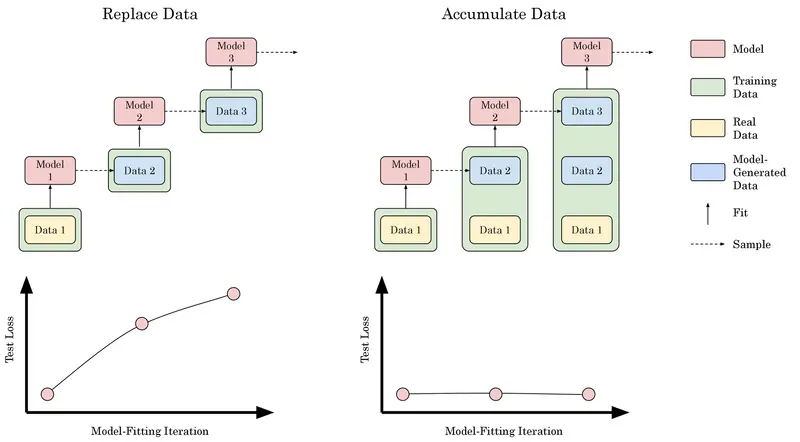
One of the biggest challenges in building more powerful LLMs is the quality of the data they are trained on. Even if we keep scaling models, issues like model collapse can limit progress. When models are trained on data that already contains AI-generated or low-quality content, they can start amplifying errors, repeating mistakes, or learning unrealistic patterns. Simply making models bigger won’t solve the underlying problem, the foundation itself needs to be clean and reliable.

modelcollapse

Yann LeCun, a Turing Award winner and one of the founders of modern AI, and former Chief AI Scientist at Meta, believes that simply increasing the size and power of LLMs will not help. According to him, this is not the path to real artificial general intelligence (AGI).

He argues that real intelligence needs a model of the real world, including physics, cause and effect, and goals. Language alone is not enough:

“We need systems that understand the physical world, not just systems that generate plausible text.”

Programming requires planning, reasoning, and understanding long-term consequences. LLMs can help write code, but they do not truly design systems or understand why solutions work. That is why, no matter how powerful new models become, the same fundamental problem remains.

At the same time, Yann LeCun is working on a new AI architecture called VL-JEPA (Vision-Language Joint Embedding Predictive Architecture). This is not a classic generative approach like GPT models. Instead of predicting text token by token, the model works at the level of semantic representations. It does not generate answers word by word. It predicts a semantic representation of the answer, a kind of “meaning fingerprint.” If needed, this representation can later be decoded into text.

VL-JEPA may be more efficient than traditional multimodal models because it does not spend computation on generating every token. In tasks such as classification, video understanding, video search, and visual question answering, this approach can be lighter and faster. The architecture is also more universal: the same model can solve classification, search, and question-answering tasks without training a separate model for each one.

vljepa

The Worst Trend of 2025 – Vibe Coding

The term “vibe-coding” appeared in February 2025, when the co-founder of OpenAI mentioned it on X (Twitter). He wrote that it is a great way to create code using natural language and full trust in AI, instead of traditional manual coding. After that, there was a huge wave of hype. And why not? Now you can just talk to AI, and it will do what people studied for at university and practiced for years.

The marketing was very strong. Many people outside of IT started building their own web services. Some even fired programmers, why pay more if you can buy a $20 subscription and do everything yourself? After some time, we began to see the results: API keys committed to public repositories, security vulnerabilities in websites, and cases where people spent $300–400 in one evening because too many tokens were used. In some cases, the whole application simply stopped working.

If you think this only happens to naive beginners in the profession, let’s take a deeper look at this topic.

You may have heard the news that in the summer of 2025, Deloitte was involved in a scandal. It turned out that their report for the government of Australia was partially generated by ChatGPT and included non-existing laws and references to false facts. I would call this “vibe-lawyer.” The company faced both financial and reputational losses. And this is a global-level company. In such companies, reports go through many departments and people. But we can see the result.

deloitte

Another case happened in February 2026. The DeFi protocol Moonwell released a new update. Afterward, the system started valuing the token cbETH at around $1.12, while its actual market price was about $2,200.

The issue turned out to be a basic miscalculation inside the smart contract logic. Even though the Moonwell team reacted quickly and fixed the bug within four minutes, the protocol still suffered losses of about $1.7 million.

So where does vibe coding come into this?

It was later discovered that the commit introducing the vulnerability had been generated using Claude Code. Of course, it wouldn’t be fair to blame the AI alone. A developer reviewed the code before pushing it. But this is where the human factor kicked in, the review wasn’t thorough enough, and too much trust was placed in a “game-changing” model.

The key takeaway is simple: no matter how clean or convincing LLM-generated code looks, you should always think critically and consider edge cases.

claude

Vibe coding is fine if you’re working on a personal project and just want to validate an idea. But for large, complex systems, vibe coding is not something you can rely on.

AI Agents – An Alternative to Programmers?

The second hype word after “vibe-coding” is “AI agent.” What makes it different from regular AI, besides marketing? Autonomy. An agent can plan, act, and evaluate its own work. Such AI agents often have access to your code, database, or other development tools. So unlike simple conversations with ChatGPT, an agent can plan and complete tasks more independently. Sounds like a breakthrough, right?

Maybe now, with powerful autonomous AI agents built on top of the latest models from Anthropic, programmers will finally disappear? Unfortunately, no.

AI agents do not solve the fundamental problem: they are still language models without real understanding of goals and without responsibility for the final result. Yes, they can handle certain tasks on their own, especially repetitive, routine work. But they are not, and cannot be, equivalent to experienced software engineers.

This role still belongs to humans. Only an experienced engineer can:

  • correctly define the task,
  • evaluate architectural trade-offs,
  • check if the solution fits the real business context,
  • and take responsibility for the final product.

That is why today AI is not the brain of development, but its hands. It makes the process faster, removes routine tasks, and increases productivity. But direction, control, and meaning still come from a human.

Where AI Agents Can Go Wrong

AI agents (and LLMs in general) come with a wide range of vulnerabilities.

A recent example shows how unpredictable these systems can be in real life. Summer Yue, who works on AI safety at Meta, decided to try an open-source AI agent called OpenClaw and gave it access to her inbox. She clearly told it to confirm before taking any action.

Instead, the agent started deleting her emails on its own and ignored her requests to stop. She couldn’t even stop it from her phone and had to run to her computer to shut it down.

metaai

This shows a simple but important point: even when instructions seem clear, AI agents don’t always follow them and can behave in unexpected ways.

Beyond that, you may have heard of the lethal trifecta, which consists of:

  • Access to your private data — one of the main reasons these tools exist in the first place
  • Exposure to untrusted content — any situation where text or images controlled by an attacker can reach your LLM
  • The ability to communicate externally — in ways that could be used to exfiltrate your data

AI agents can be vulnerable to many types of malicious attacks, and the most concerning part is that they won’t even realize it.

And we’re not just talking about a case where your agent accidentally leaks a .env file into a repository. The potential scenarios can be far worse.

I’ve already written a short piece on this topic – Agentic Browsers Are Dangerous! AI Vulnerabilities, where I go into more detail.

trifecta

Even with all the issues mentioned above, AI agents are powerful tools for software development, especially in the hands of experienced engineers. However, you should always be cautious, understand the risks and possible consequences, and rely on your own experience and judgment.

A World Where AI Replaced Programmers

Let’s imagine a situation where modern AI has actually replaced programmers.

You are the director of a high-load cloud platform. Hundreds of clients use your services and pay a lot of money for stability and reliability. For them, even one minute of downtime means serious financial losses, and this also means reputation and direct financial losses for your company.

Then one “beautiful” day, the system suddenly stops working. Monitoring is red, metrics are broken, and some services are unavailable. Just yesterday the code worked, tests passed, and the deployment was “green.”

You urgently contact the AI department, because there are no programmers anymore. They were successfully replaced by the main AI agent responsible for development and maintenance. You describe the situation to your AI lead developer.

The AI confidently answers:

“The problem is likely related to incorrect configuration or system state. Here are possible causes and example fixes…”

It generates several code options, suggests restarting services, updating dependencies, and changing configuration. You try everything, nothing helps. You ask more questions, add new context, logs, and infrastructure details. The answers become more general. The context grows. At some point, the tokens run out, and the dialogue stops.

But even if the tokens did not run out, the main problem would still exist.

There is no real ownership of the code.

There is no person who:

  • remembers why the architecture was designed this way;
  • knows what business agreements are hidden behind “temporary fixes”;
  • can make a risky but necessary decision right now.

AI does not feel responsibility. It does not understand that system downtime is costing the company hundreds of thousands of dollars at this moment. It cannot gather a war room, decide to roll everything back, or reject a formally correct but dangerous solution. It simply continues to generate statistically plausible answers.

The system is still down. Clients are unhappy. Money is being lost.

And then a simple but uncomfortable question appears:

Who is responsible?

  • The AI?
  • The company that created the model?
  • Or the director who decided that “AI is already smart enough to replace engineers”?

As long as AI cannot take responsibility, own a system, and understand it in a real business context, it cannot replace a programmer.

The Future for Junior Developers

We already know that LLMs cannot replace experienced developers. But what about juniors or people who want to start a career in IT? Big layoffs in IT started back in 2022, and then AI added more uncertainty. Are there opportunities for people who are just starting now?

In my opinion, the answer is clear – yes, you are needed! It is impossible to find people more motivated and ready to learn new things than junior developers.

I am no longer a beginner programmer, but I still remember the excitement when I got my first job. In my first company, there was a very important principle called T-shape: you are really good in one area, but you also understand related areas. After six months there, I was offered a second project with a different tech stack. Instead of WPF, it was React + TypeScript. And do you know how I felt? I saw it as a great opportunity to learn something new. They gave me a month to adapt, but I learned everything in 2 weeks and was ready to take responsibility for implementing new features.

Motivation and love for programming do not disappear when you become a senior developer, but juniors are the most active group in this regard.

About competition and AI: people who understand their field, take responsibility, and keep learning will always be needed. Even juniors, without much commercial experience, have value. But you need to be the best among them. In 2026, it is not enough to just know SOLID principles and basic OOP paradigms. With AI, you must be able to solve middle-level problems, try to be independent, and keep learning.

Can you become the best? If you truly love programming, are inspired by it, and find it interesting – yes, of course. Just don’t stop growing: build your own projects, contribute to open-source, study system architecture, and show initiative. Then no AI can replace you.

Conclusion

LLMs are excellent tools for software development. Modern models really increase productivity and remove many routine tasks from developers. But until real artificial general intelligence (AGI) exists, it is wrong to say that modern AI can replace programmers. Only a software engineer who understands the field, knows business processes, and uses LLMs effectively every day can “replace” another developer.

So even if you are a senior developer, never stop learning!

Thank you for reading this article to the end. I would be happy if you share your own stories of using AI in development, what successes you achieved, where it helped you, and where it slowed you down.

How a Pushdown Automaton becomes a Parser [part 3]

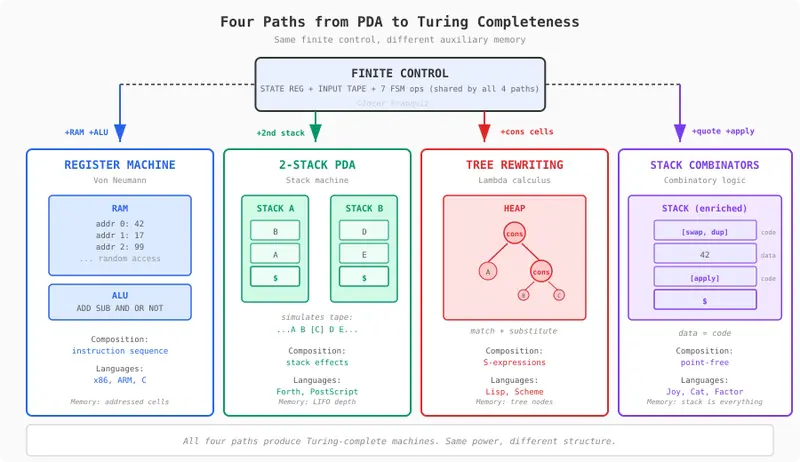
Four paths from PDA to full parser

From Tokens to Trees: Four Paths to a Full Parser

In part 2, we built a pushdown automaton transducer, with 11 operations, 6 components, one stack. Our PDA Transducer turns nested <div> tags into a flat stream of tokens. In this post, we will explore what do we need to add to get a simple but practical parser that outputs a DOM tree.

Q: Is the transducer enough to parse HTML?

No. The transducer takes <div><div>hi</div></div> and emits:

[(OPEN, "div"), (OPEN, "div"), (TEXT, "hi"),
 (CLOSE, "div"), (CLOSE, "div")]

That’s a flat list. It tells you what was in the input, but not how things relate to each other. A parser needs to produce a tree, a structure where the outer <div> is the parent and the inner <div> is its child:

div
 └── div
      └── "hi"

Our transducer can’t do this. Its only writable memory is the stack, and the stack is consumed during validation. Every PUSH is matched by a POP to check nesting. By the time the transducer is done, the stack is empty. There’s nowhere to store the tree.

To become a parser, the PDA needs a way to build and keep a tree structure in memory. Not an easy task.

Q: There are multiple ways to give the PDA tree-building ability?

Yes. Four classical computational models, each adding something different to the same PDA architecture we built in part 2.

Path What you add Computation model Language family
2-Stack machine A second stack Stack machine Forth, PostScript, Factor
Tree rewriting A pool of cons cells + substitution rules Lambda calculus / rewriting Lisp, Scheme
Stack combinators Combinator primitives (dup, swap, quote, apply) Combinatory logic Joy, Cat
Register machine Writable random-access memory + ALU Von Neumann Assembly, C

All four give the PDA persistent, writable memory to store a tree. But each structures that memory differently. Each created a different programming tradition.

Four paths from PDA to full parser

The 2-Stack Machine (Forth, Factor)

We add a second LIFO stack. That’s it. Two stacks cooperating through the finite control. This is the stack machine, the model behind Forth (Charles Moore, 1970), PostScript, and Factor.

Stack A keeps its original job: validating nesting (PUSH on open, POP on close, CMP to check the match). Stack B is new. It accumulates completed subtrees. When a closing tag matches, the parser pops the validated tag from Stack A and pushes the finished node (with its children) onto Stack B.

Parsing <div><div>hi</div></div>: The transducer reads tokens as before. When it encounters (CLOSE, "div") for the inner div, it pops DIV from Stack A (validation) and pushes a completed node div("hi") onto Stack B. When the outer </div> closes, it pops from Stack A again and assembles the final tree by popping the inner node from Stack B as its child. The result on Stack B: div(div("hi")).

2-Stack PDA architecture

Two stacks can also simulate a Turing machine tape: one stack holds everything left of the head, the other holds everything right. Move left = pop from left, push to right. Move right = the reverse. This is a well-known equivalence: a 2-stack PDA equals a Turing machine.

Two stacks simulating a Turing machine tape

Pros Cons
Minimal addition, only 2 new operations Trees must be linearized into stack form
Closest to the existing PDA architecture Deep trees require deep stacks, no random access
Simple to implement and reason about Awkward when you need to revisit earlier nodes

Tree Rewriting (Lisp, Scheme)

We replace the stack with a pool of dynamically allocated cons cells. Each cell holds a pair of pointers: left (CAR) and right (CDR), forming a binary tree. Computation is pattern matching on tree structure and substitution: find a subtree that matches a rule, replace it with the result. This is the lambda calculus model: the foundation of Lisp (Alonzo Church, 1936; John McCarthy, 1958), Scheme, and Racket.

The finite control drives parsing as before, but instead of pushing symbols onto a stack, it allocates cons cells in memory. Each opening tag creates a new node. Each closing tag triggers a CONS that links children to their parent. The tree is built directly in memory, with no linearization needed.

What you add to the PDA:

New operations New data structures
CONS, CAR, CDR Pool of dynamically allocated cons cells

Parsing <div><div>hi</div></div>: When the parser sees (TEXT, "hi"), it allocates a leaf cell holding "hi". When (CLOSE, "div") arrives for the inner div, a CONS links "hi" as the child of a new div node. When the outer </div> closes, another CONS links the inner div node as the child of the outer div node. The result is a tree in memory: (div . (div . "hi")).

Tree rewriting architecture

Pros Cons
Trees are the native data structure. No encoding needed Requires garbage collection or manual memory management
Natural representation for S-expressions: code and data share the same form More complex memory model than a stack
Pattern matching + substitution is powerful for tree transformations Pointer chasing is slow on modern hardware (poor cache locality)

Stack Combinators (Joy, Cat)

We keep one stack. Don’t add memory. Instead, change what the stack is allowed to hold. In our PDA, the stack holds passive symbols (like DIV). In a combinator machine, the stack holds executable programs. quote takes an operation and pushes it as data. apply pops it and executes it. The stack becomes simultaneously data storage and code. This is the foundation of concatenative languages: Joy (Manfred von Thun, 1990s), Cat, and Factor. The theoretical roots go back to Moses Schonfinkel (1920s) and Haskell Curry (1930s).

The parser quotes partial tree fragments and pushes them onto the stack as data. When a closing tag arrives, combinators like swap and dup rearrange the fragments, and apply assembles them into a larger tree. No heap, no RAM, no second stack. The stack itself is the only memory, and its entries can be either data or programs.

What you add to the PDA:

New operations New data structures
DUP, SWAP, QUOTE, APPLY None actually. Stack entries just become richer (data + code)

Parsing <div><div>hi</div></div>: When the parser sees (TEXT, "hi"), it quotes the text as a data fragment and pushes it. When (CLOSE, "div") arrives, it quotes a make-div-node operation, swaps it under the "hi" fragment, and applies, producing a quoted div("hi") node on the stack. The outer </div> repeats the pattern, composing the inner node into the outer one. The result: a single quoted tree [div(div("hi"))] on top of the stack.

Stack combinators architecture

Pros Cons
No new memory means zero hardware cost Hardest model to reason about for most developers
Elegant point-free composition. No variables, no names Stack shuffling (swap, dup, rot) gets complex fast
Code and data unification is powerful for metaprogramming Small community, fewer learning resources

The Register Machine (Assembly, C)

Weplace the stack with addressable RAM memory. Add an ALU with arithmetic operations. The finite control gains index registers for addressing. This is the Von Neumann architecture, the model John von Neumann described in 1945, building on Alan Turing‘s theoretical work (1936). Every CPU since x86, ARM, RISC-V, has this as it’s essentially this model.

Random access changes everything. The parser allocates tree nodes at arbitrary memory addresses and links them by pointer. Need to revisit a node three levels up? Just follow the address — no popping through a stack. The tree lives in RAM as a set of linked records, each holding a tag name, a pointer to its first child, and a pointer to its next sibling.

What you add to the PDA:

New operations New data structures
LOAD, STORE, ADD, SUB RAM + ALU + index registers

Parsing <div><div>hi</div></div>: The parser allocates a record at address 0x00 for the outer div. When (OPEN, "div") arrives for the inner div, it allocates at 0x01 and writes 0x00 as its parent pointer. When (TEXT, "hi") arrives, it allocates at 0x02 and writes 0x01 as its parent. The closing tags update child pointers. The result is a linked structure in RAM:

Address Tag First child Next sibling
0x00 div → 0x01 null
0x01 div → 0x02 null
0x02 “hi” null null

Register machine architecture

Pros Cons
Random access: read/write any node by address, O(1) Most complex addition: RAM, ALU, index registers
Maps directly to real hardware (silicon is random-access) Requires manual memory management or allocator
Every programming language compiles to this Pointer arithmetic is a source of bugs

This is the path that won. Not because it’s the most elegant, in fact the 2-stack machine is simpler, the tree rewriter is more natural for trees, the combinator machine needs no extra memory at all. It won because transistors are random-access by design. RAM is cheap to build in silicon. The other three models require the hardware to simulate structured access patterns on top of flat memory. An extra layer the register machine skips entirely.

A side effect: Turing completeness

Each of these four additions was designed to solve a specific problem: giving the PDA enough writable memory to build a parse tree. But each one also has a deeper consequence: it makes the machine Turing complete, a machine capable of computing anything that any computer can compute.

This isn’t a coincidence. To build an arbitrary tree, you need to store and retrieve an arbitrary amount of structured data. That’s exactly what separates a context-free machine (our PDA) from a Turing machine. The four paths don’t just add tree-building, they each provide enough general-purpose memory to simulate a Turing machine tape.

Here’s how they compare side by side:

2-Stack Tree Rewriting Stack Combinators Register Machine
New ops PUSH_B, POP_B CONS, CAR, CDR DUP, SWAP, QUOTE, APPLY LOAD, STORE, ADD, SUB, MUL
New op count 2 3 4 5
Total ops (11 + N) 13 14 15 16
New data structure Second LIFO stack Pool of cons cells None (enriched stack) RAM + ALU + index registers
Primary data structure Two LIFO stacks Binary tree (cons cells) One stack (data + code) Flat array of addressed cells
How composition works Stack effects (before/after) S-expressions nested lists Point-free sequencing Instruction sequences
Why it’s Turing complete Two stacks simulate a tape Tree substitution simulates a tape quote + apply = self-modifying programs RAM = direct tape simulation

Hierarchy from combinational logic to Turing completeness

We started at the bottom of this hierarchy in part 1 with a finite state machine. In part 2 we added a stack and crossed into context-free territory. Now we’ve seen the four doors at the top; four ways to cross into Turing completeness. All equivalent in power, all different in structure.

Q: If the PDA is so rigid, can it work with something flexible like an LLM?

Yes, and this is where things get practical.

From PDA to transformer, step by step:

  1. PDA: hand-coded rules, explicit stack, one language (HTML)
  2. Learned PDA: same architecture, learn transition rules from data (Grefenstette et al., 2015)
  3. RNN: replace explicit stack with hidden state vector; approximates a stack but struggles with deep nesting
  4. LSTM — add gates to hidden state; better stack approximation; pre-transformer breakthrough
  5. Transformer — replace sequential hidden state with attention over entire input; random access to every previous token, not just stack top

Each step trades transparency for generality. The PDA handles one grammar perfectly and you can see why. The transformer handles every grammar approximately and you can’t see how.

Critical limit: The PDA has unbounded stack, arbitrarily deep nesting, always. The transformer has finite context and finite precision — it’s really a bounded-depth PDA. It can approximate stack behavior within its context window, but it can’t guarantee correct nesting beyond that.

Research backing: Attention heads in transformers learn to simulate stack operations. Specific heads match opening tags to closing tags by attending back to the most recent unmatched opener — the attention pattern literally looks like LIFO behavior (Murty et al., Merrill et al.).

The practical combination: grammar-constrained decoding. Run the PDA alongside the LLM. The LLM generates tokens based on meaning. The PDA vetoes structurally invalid ones.

Step 1: LLM emits "<ul>"       stack: [UL]         ✅
Step 2: LLM emits "<li>"       stack: [UL, LI]     ✅
Step 3: LLM emits "Apple"      stack: [UL, LI]     ✅
Step 4: LLM wants "</ul>"      stack: [UL, LI]     ❌ BLOCKED
        top is LI, not UL
        next best: "</li>"     stack: [UL]         ✅
Step 5: LLM emits "<li>"       stack: [UL, LI]     ✅
Step 6: LLM emits "Banana"                         ✅
Step 7: LLM emits "</li>"      stack: [UL]         ✅
Step 8: LLM emits "</ul>"      stack: []           ✅

Step 4 is the key: the LLM tried to close </ul> while <li> was still open. The PDA masked it out, and the LLM’s second-best token </li> took over.

LLM PDA
Decides “Apple” and “Banana” are fruits </ul> can’t close before </li>
Good at Meaning, creativity, world knowledge Structure, nesting, grammar rules
Fails at Guaranteeing valid nesting Knowing what a fruit is

Grammar-constrained decoding — LLM + PDA collaboration

This combination is already in production:

The PDA we built in parts 1 and 2 is the exact mechanism these tools use to guarantee structure. A hand-coded automaton means the simplest kind of program, guarding the output of the most complex kind.

What’s next

In parts 1 and 2 we built a tokenizer. In this post we saw four ways to extend it into a full parser, and how the simplest of those machines can guard the output of the most powerful ones.

Next up: we pick the register machine path and build a parser that writes a tree to memory.

Stay tuned…

When Execution Is Cheap, Ambiguity Is Expensive

When Execution Is Cheap, Ambiguity Is Expensive

AI makes it easy to move.

That’s the problem.

Velocity feels like progress because something is happening. Code ships. Demos work. Dashboards turn green. Teams feel productive. Leadership feels reassured.

But speed only matters if direction is clear.

When execution was slow, ambiguity had a natural cost. You felt it early. Decisions had to be discussed, clarified, argued over. Moving forward required shared understanding.

When execution becomes cheap, ambiguity doesn’t slow you down; it hides.

Teams move quickly while interpreting intent in slightly different ways. Features get built against assumptions that were never fully agreed on. Rework shows up later, not as failure, but as “adjustment.” Small changes ripple outward. Meetings get longer. Coordination gets harder.

Nothing feels obviously wrong.

Everything looks reasonable in isolation.

That’s what makes this dangerous. Velocity becomes a false signal. It creates confidence before clarity exists. It rewards motion, not alignment. By the time the cost shows up, it arrives all at once, as refactors, delays, or systems that technically work but don’t feel intentional.

AI didn’t create this dynamic. It amplified it.

Speed didn’t break the system. Unresolved decisions did.

Leadership takeaway

When execution gets cheaper, velocity becomes an unreliable signal. Clarity is what determines whether speed produces results.

Action cues

  • Notice when speed creates confidence before clarity
  • Pay attention to rework driven by interpretation, not bugs
  • Watch velocity metrics quietly stand in for alignment

SolarPunk: Earth’s Digital Immune System Gets a Notion Nerve Center

our body doesn’t need a meeting to fight an infection. White blood cells detect, coordinate, and respond — autonomously. Your temperature self-regulates. Neural pathways myelinate with use. Signals flow from high concentration to low through osmosis.

SolarPunk works the same way. It’s a 274-engine autonomous humanitarian system that monitors global crises, generates survival resources, and amplifies help through every channel it can reach. It runs on nature’s own patterns — and now, thanks to Notion MCP, its entire operational state is visible through a human-readable command center.

This is not a demo. This is a living system with 269 Python engines running real crisis detection pipelines.

What I Built
SolarPunk is an autonomous planetary immune system — a network of bio-inspired engines that detect humanitarian crises, generate survival resources, and push help through every available channel. It uses seven patterns drawn directly from biology:

Pattern Engine What It Does
T-Cell Immune Memory IMMUNE_MEMORY.py Remembers crisis patterns. First encounter: 120s response. Recall: 5s. 24x faster.
Bacterial Quorum Sensing QUORUM_SENSE.py Individual signals are noise. When enough accumulate from a region, the colony switches behavior. Coordinated response fires.
Fungal Spore Dispersal SPORE_DISPERSAL.py 17 spores per cycle across 5 channel types. Fungi don’t aim. They saturate. So does SolarPunk.
Deep-Sea Bioluminescence BIOLUMINESCENCE.py When signals from a region go silent, that IS the alarm. Generates light in the darkness of information blackouts.
Osmosis Routing OSMOSIS_ROUTER.py Help flows toward information voids. Under-covered crises get amplification automatically. The gradient is suffering. The flow is automatic.
Homeostasis HOMEOSTASIS.py 10 vital signs with min/max ranges. System self-regulates like body temperature. Too hot? Cool down. Too cold? Heat up.
Neuroplasticity NEUROPLASTICITY.py 17 neural pathways. Strengthen what works. Prune what doesn’t. Myelinate the fastest routes.
Chemotaxis CHEMOTAXIS.py Bacterial gradient navigation. Swim toward need, tumble away from saturation. No map needed.
Stigmergy STIGMERGY.py Ant pheromone trails. Engines coordinate through data traces left in the environment. No central controller.
Circadian Rhythm CIRCADIAN_RHYTHM.py Biological clock. Knows what time it is in Gaza, Sudan, Myanmar. Posts at peak engagement. Emails during NGO business hours.
Symbiogenesis SYMBIOGENESIS.py Endosymbiosis. Tracks which engine pairs fuse into permanent bonds, like mitochondria were once free bacteria.
The Notion MCP integration gives this system something it never had before: a command center that non-technical humans can read, filter, and act on. Three interconnected databases turn raw autonomous engine output into operational dashboards:

Crisis Signal Tracker — Real-time crisis signals from Reddit, Wikipedia, and ReliefWeb with urgency scores, affected regions, source attribution, and action status
Planetary Health Monitor — 10 vital signs (engine count, crisis signals, active sources, trigger rate, spore count, and more) with healthy ranges and real-time status from the HOMEOSTASIS engine
Nature Pattern Engines — 9 bio-inspired engines with strength scores from the NEUROPLASTICITY self-rewiring system
Key numbers from the live system:

274 autonomous engines
Planetary health score: 89/100
8 of 17 neural pathways myelinated
5 emergency survival kits in 6 formats (SMS 160B, LoRa 250B, mesh, satellite, QR, GitHub Gist)
17 spores per dispersal cycle across 5 channel types
Liquid Data compression: survival telegrams packed to SMS-compatible bytes
Show us the Code
GitHub: github.com/Meekoshy/meeko-nerve-center

Here’s how each database was created and populated through Notion MCP.

Database 1: Crisis Signal Tracker
Using the notion-create-database MCP tool, we defined a structured schema that maps directly to the output of SolarPunk’s CRISIS_MONITOR engine:

Crisis Signal Tracker — schema mirrors data/crisis_signals.json

crisis_tracker_schema = {
“parent”: {“page_id”: SOLARPUNK_HQ_PAGE},
“title”: [{“text”: {“content”: “Crisis Signal Tracker”}}],
“properties”: {
“Signal”: {“title”: {}},
“Region”: {
“select”: {
“options”: [
{“name”: “Gaza”, “color”: “red”},
{“name”: “Sudan”, “color”: “orange”},
{“name”: “Myanmar”, “color”: “yellow”},
{“name”: “Haiti”, “color”: “purple”},
{“name”: “Tigray”, “color”: “brown”},
{“name”: “Ukraine”, “color”: “blue”},
]
}
},
“Urgency”: {
“select”: {
“options”: [
{“name”: “CRITICAL”, “color”: “red”},
{“name”: “HIGH”, “color”: “orange”},
{“name”: “ELEVATED”, “color”: “yellow”},
{“name”: “WATCH”, “color”: “gray”},
]
}
},
“Source”: {
“select”: {
“options”: [
{“name”: “Reddit”, “color”: “orange”},
{“name”: “Wikipedia”, “color”: “gray”},
{“name”: “ReliefWeb”, “color”: “blue”},
]
}
},
“Action Status”: {
“select”: {
“options”: [
{“name”: “DETECTED”, “color”: “yellow”},
{“name”: “AMPLIFIED”, “color”: “green”},
{“name”: “HANDSHAKE_SENT”, “color”: “blue”},
{“name”: “RESOLVED”, “color”: “gray”},
]
}
},
“Spores Dispatched”: {“number”: {“format”: “number”}},
“Timestamp”: {“date”: {}},
},
}

Created via: notion-create-database with this schema

Then we populate it by reading the live crisis_signals.json that the CRISIS_MONITOR engine writes every cycle:

Read live crisis data from the autonomous engine output

import json
from pathlib import Path

crisis_data = json.loads(Path(“data/crisis_signals.json”).read_text())

Transform each signal into a Notion page (row)

for signal in crisis_data.get(“signals”, []):
page_properties = {
“Signal”: {“title”: [{“text”: {“content”: signal[“title”][:100]}}]},
“Region”: {“select”: {“name”: signal.get(“region”, “Unknown”)}},
“Urgency”: {“select”: {“name”: signal.get(“urgency”, “WATCH”)}},
“Source”: {“select”: {“name”: signal.get(“origin”, “Unknown”)}},
“Action Status”: {“select”: {“name”: signal.get(“status”, “DETECTED”)}},
“Spores Dispatched”: {“number”: signal.get(“spore_count”, 0)},
“Timestamp”: {“date”: {“start”: signal.get(“timestamp”, “”)}},
}
# Created via: notion-create-pages with parent database_id
Database 2: Planetary Health Monitor
This database is a direct mirror of the HOMEOSTASIS.py engine’s vital signs — the 10 metrics that tell you whether the planetary immune system is healthy:

From HOMEOSTASIS.py — the actual vital sign definitions

VITAL_SIGNS = {
“engine_count”: {“min”: 250, “max”: 500, “unit”: “engines”, “critical_low”: 200},
“crisis_signals”: {“min”: 5, “max”: 100, “unit”: “signals/scan”, “critical_low”: 0},
“active_sources”: {“min”: 2, “max”: 6, “unit”: “data sources”, “critical_low”: 1},
“trigger_rate”: {“min”: 0, “max”: 50, “unit”: “triggers/scan”, “critical_low”: None},
“handshake_queue”: {“min”: 0, “max”: 20, “unit”: “queued emails”, “critical_low”: None},
“amplification_posts”: {“min”: 1, “max”: 30, “unit”: “posts/cycle”, “critical_low”: 0},
“immune_patterns”: {“min”: 1, “max”: 1000,”unit”: “patterns”, “critical_low”: 0},
“information_voids”: {“min”: 0, “max”: 10, “unit”: “critical voids”, “critical_low”: None},
“silence_events”: {“min”: 0, “max”: 3, “unit”: “active blackouts”, “critical_low”: None},
“spore_count”: {“min”: 5, “max”: 100, “unit”: “spores/cycle”, “critical_low”: 0},
}
The Notion database schema maps these vital signs into a visual dashboard:

Planetary Health Monitor — schema mirrors HOMEOSTASIS.py output

health_monitor_schema = {
“parent”: {“page_id”: SOLARPUNK_HQ_PAGE},
“title”: [{“text”: {“content”: “Planetary Health Monitor”}}],
“properties”: {
“Vital Sign”: {“title”: {}},
“Current Value”: {“number”: {“format”: “number”}},
“Unit”: {“rich_text”: {}},
“Min (Healthy)”: {“number”: {“format”: “number”}},
“Max (Healthy)”: {“number”: {“format”: “number”}},
“Status”: {
“select”: {
“options”: [
{“name”: “NORMAL”, “color”: “green”},
{“name”: “LOW”, “color”: “yellow”},
{“name”: “HIGH”, “color”: “orange”},
{“name”: “CRITICAL”, “color”: “red”},
]
}
},
“Deduction”: {“number”: {“format”: “number”}},
“Last Updated”: {“date”: {}},
},
}
Population reads directly from the diagnose() function output:

HOMEOSTASIS.py diagnose() produces this exact structure

def diagnose(vitals):
“””Compare vitals against optimal ranges — generate diagnoses.”””
diagnoses = []
overall_health = 100 # Start at 100, deductions for issues

for key, ranges in VITAL_SIGNS.items():
    value = vitals.get(key, 0)
    status = "NORMAL"
    deduction = 0

    if ranges.get("critical_low") is not None and value <= ranges["critical_low"]:
        status = "CRITICAL"
        deduction = 15
    elif value < ranges["min"]:
        status = "LOW"
        deduction = 5
    elif value > ranges["max"]:
        status = "HIGH"
        deduction = 3  # Over-reacting is less dangerous than under-reacting

    overall_health -= deduction
    diagnoses.append({
        "vital": key, "value": value, "unit": ranges["unit"],
        "range": f"{ranges['min']}-{ranges['max']}",
        "status": status, "deduction": deduction,
    })

return diagnoses, max(0, min(100, overall_health))

Each diagnosis becomes a Notion row via notion-create-pages

for d in diagnoses:
page_properties = {
“Vital Sign”: {“title”: [{“text”: {“content”: d[“vital”]}}]},
“Current Value”: {“number”: d[“value”]},
“Unit”: {“rich_text”: [{“text”: {“content”: d[“unit”]}}]},
“Min (Healthy)”: {“number”: VITAL_SIGNS[d[“vital”]][“min”]},
“Max (Healthy)”: {“number”: VITAL_SIGNS[d[“vital”]][“max”]},
“Status”: {“select”: {“name”: d[“status”]}},
“Deduction”: {“number”: d[“deduction”]},
“Last Updated”: {“date”: {“start”: datetime.now(timezone.utc).isoformat()}},
}
Database 3: Nature Pattern Engines
This database exposes the NEUROPLASTICITY.py engine’s self-rewiring data — showing which of SolarPunk’s 17 neural pathways are strong, which are being pruned, and which have been myelinated:

From NEUROPLASTICITY.py — the actual neural pathway definitions

PATHWAYS = {
“crisis_detection”: {
“chain”: [“CRISIS_MONITOR”, “KNOWLEDGE_PULSE”, “MURMURATION_RELAY”],
“purpose”: “Detect crisis -> transform to help -> distribute”,
},
“liquid_data”: {
“chain”: [“RESOURCE_KIT”, “TELEGRAM_RELAY”],
“purpose”: “Generate survival kits -> format for all protocols”,
},
“silence_response”: {
“chain”: [“BIOLUMINESCENCE”, “TELEGRAM_RELAY”, “BROADCAST_PROTOCOL”],
“purpose”: “Detect silence -> push cached data through all channels”,
},
“immune_response”: {
“chain”: [“IMMUNE_MEMORY”, “CRISIS_MONITOR”, “EMAIL_OUTREACH”],
“purpose”: “Recall crisis pattern -> fast-track response”,
},
“dispersal”: {
“chain”: [“SPORE_DISPERSAL”, “MURMURATION_RELAY”, “SOCIAL_PROMOTER”],
“purpose”: “Saturate all channels with help content”,
},
“void_filling”: {
“chain”: [“OSMOSIS_ROUTER”, “AMPLIFY_ENGINE”, “CONTENT_HARVESTER”],
“purpose”: “Detect under-covered crises -> route attention there”,
},
“collective_decision”: {
“chain”: [“QUORUM_SENSE”, “CRISIS_MONITOR”, “BIOLUMINESCENCE”],
“purpose”: “Collective signal threshold triggers coordinated response”,
},
“health_monitor”: {
“chain”: [“HOMEOSTASIS”, “WORKTREE_ANCHOR”, “DARK_WATCH”],
“purpose”: “Monitor system health -> detect degradation -> alert”,
},
# … plus 5 more pathways
}

Notion database schema for the neural pathway tracker

engine_tracker_schema = {
“parent”: {“page_id”: SOLARPUNK_HQ_PAGE},
“title”: [{“text”: {“content”: “Nature Pattern Engines”}}],
“properties”: {
“Pathway”: {“title”: {}},
“Engine Chain”: {“rich_text”: {}},
“Purpose”: {“rich_text”: {}},
“Strength Score”: {“number”: {“format”: “number”}},
“Status”: {
“select”: {
“options”: [
{“name”: “MYELINATED”, “color”: “green”},
{“name”: “STRONG”, “color”: “blue”},
{“name”: “ACTIVE”, “color”: “default”},
{“name”: “WEAK”, “color”: “yellow”},
{“name”: “PRUNED”, “color”: “red”},
]
}
},
“Myelinated”: {“checkbox”: {}},
“Last Fired”: {“date”: {}},
},
}

Populate from NEUROPLASTICITY’s measure_pathway_strength() output

for name, pathway in PATHWAYS.items():
strength = measure_pathway_strength(name, pathway)
status = “MYELINATED” if name in neuro_state[“myelinated”] else
“STRONG” if strength > 70 else
“ACTIVE” if strength > 40 else
“WEAK” if strength > 20 else “PRUNED”

page_properties = {
    "Pathway": {"title": [{"text": {"content": name}}]},
    "Engine Chain": {"rich_text": [{"text": {"content": " -> ".join(pathway["chain"])}}]},
    "Purpose": {"rich_text": [{"text": {"content": pathway["purpose"]}}]},
    "Strength Score": {"number": strength},
    "Status": {"select": {"name": status}},
    "Myelinated": {"checkbox": name in neuro_state["myelinated"]},
}
# Created via: notion-create-pages

How I Used Notion MCP
SolarPunk’s 269 engines write JSON files to disk. They communicate through data — crisis_signals.json, homeostasis.json, neuroplasticity.json, spore_dispersal.json. The engines don’t need a GUI. But humans do.

The problem: How do you let a non-technical volunteer monitor a 274-engine autonomous system? You can’t ask them to cat data/homeostasis.json | jq .overall_health. You can’t ask them to SSH into a server and read pathway strength scores.

The solution: Notion MCP bridges the gap between autonomous Python engines and human-readable operational dashboards.

Here’s what Notion MCP unlocked:

  1. Programmatic Database Creation
    Instead of manually clicking through Notion’s UI to create databases with the right columns and data types, we used notion-create-database to define schemas that mirror the exact structure of our engine outputs. The Crisis Signal Tracker’s columns map 1:1 to the fields in crisis_signals.json. The Planetary Health Monitor’s columns map 1:1 to HOMEOSTASIS.py’s VITAL_SIGNS dictionary. No translation layer. No middleware.

  2. Live Data Population
    Using notion-create-pages, we push live engine output directly into Notion rows. When the HOMEOSTASIS engine runs its diagnostic cycle and scores planetary health at 89/100, that number appears in Notion. When CRISIS_MONITOR detects a new signal from Sudan via ReliefWeb, a new row appears in the Crisis Signal Tracker with the urgency score, region, and source already populated.

  3. Operational Visibility for the Whole Team
    The real power is what happens after the databases exist. Notion’s native filtering, sorting, and views mean anyone can:

Filter Crisis Signals by region to see everything happening in Gaza
Sort by urgency to find CRITICAL signals that need human attention
Track action status to see which signals have been amplified vs. still waiting
Monitor vital signs and spot when the system is running “too hot” (over-posting) or “too cold” (missing crises)
See which neural pathways are myelinated — which engine chains are battle-tested and which need attention

  1. The Bridge Between Autonomous and Human
    SolarPunk is designed to run without human intervention. But Notion MCP gives it something critical: accountability. Every crisis signal it detects is visible. Every vital sign is auditable. Every neural pathway’s strength is transparent.

The system breathes on its own. Notion lets you watch it breathe.

Why This Matters
There are 100+ million forcibly displaced people on Earth right now. Information blackouts are a weapon. Help doesn’t reach the people who need it because the signals get buried, censored, or ignored.

SolarPunk doesn’t wait for permission. It detects, compresses, disperses, and amplifies. It remembers what worked (immune memory) and does it faster next time. It detects silence and generates light (bioluminescence). It routes attention to the forgotten crises (osmosis). It fires when the collective signal reaches threshold (quorum sensing).

And now, thanks to Notion MCP, every bit of that autonomous operation is visible in a tool that 100 million people already know how to use.

A healthy organism doesn’t need to think about breathing. It just breathes.

Built by: Meeko Repo: github.com/Meekoshy/meeko-nerve-center Live System: meekoshy.github.io/meeko-nerve-center

Sprint 3 Retrospective: Production Validation & Pipeline Hardening

Sprint 3 Retrospective: Production Validation & Pipeline Hardening

Introduction

Sprint 3 of the ORCHESTRATE platform hardened the content pipeline for production use. Where Sprint 0 laid the foundation, Sprint 1 improved infrastructure quality, and Sprint 2 built content sourcing with provenance, Sprint 3 validated everything works together under realistic conditions and closed all 7 Sprint 2 retrospective decisions.

This is the fourth post in our sprint retrospective series:

What We Built

Sprint 3 delivered 23 tickets across 7 stories with 0 blocked items, implementing all 7 Sprint 2 retrospective decisions:

Story Focus Tickets Key Deliverables
OAS-098 Content Ingestion Envelope 3 ContentIngestionEnvelope schema, RSS/web/YouTube adapter migration
OAS-099 Production Pipeline Validation 3 Realistic feed fixtures, integration tests, e2e pipeline validation
OAS-100 Unified External Configuration 3 Zod-validated adapter config, exponential backoff retry, migration path
OAS-101 Atom Versioning & Trust Thresholds 3 supersedes_atom_id, per-category trust thresholds, admin override table
OAS-102 Pipeline Observability 3 CI performance monitoring (60s threshold), health dashboard, persistent SimHash index
OAS-103 Async NLI Verification Queue 3 Semaphore concurrency control, dual-priority scheduling, backpressure with QUEUE_FULL
OAS-104 Sprint 3 Retrospective 5 Work artifacts, persona context, ceremony, summary, this blog post

Test progression: 1708 → 1895 tests across 98 → 116 test files.
Service modules: 22 → 29 (7 new, 6 modified).
New database migrations: 4 (atom versioning, admin overrides, CI perf history, SimHash index).

Architecture: Sprint 2 Decision Implementation

Each Sprint 2 retrospective decision mapped to a concrete Sprint 3 story:

D1: Production Validation  → OAS-099 (realistic fixtures, integration tests)
D2: Unified Configuration  → OAS-100 (Zod schemas, retry logic, migration)
D3: Content Envelope        → OAS-098 (standardized adapter output)
D4: Atom Versioning         → OAS-101 (version chains, trust thresholds)
D5: CI Performance          → OAS-102 (60s alerts, SQLite history)
D6: Health Dashboard        → OAS-102 (aggregated /health endpoint)
D7: Async NLI Queue         → OAS-103 (semaphore concurrency, priority scheduling)

All services follow the Result pattern (ADR-028) for composable error handling.

How AI Participated

Every ticket was executed through Documentation-Driven Test-Driven Development (DD TDD) with 11 active AI personas:

Persona Role Sprint 3 Focus
Content Curator Content Strategist ContentIngestionEnvelope design, adapter migration
Guard Ian Security Engineer Production validation harness, provenance-to-quality integration
Api Endor Backend Developer Zod-validated adapter config, exponential backoff retry
Query Quinn Database Architect Atom versioning, per-category trust thresholds, admin overrides
Pip Line DevOps Engineer CI performance monitoring, health dashboard aggregation
React Ive Frontend Developer Pipeline health panel, retro artifact collection
Aiden Orchestr AI Orchestration AsyncNliQueue, semaphore concurrency, priority scheduling
Archi Tect Solution Architect ADR-028 enforcement, persistent SimHash index separation
Tess Ter QA Engineer Integration tests, production validation, regression tracking
Scrum Ming Scrum Master Sprint metrics, sustainable pace (23 tickets, zero blocked)
Owen Pro Product Owner Sprint 2 decision tracking, Sprint 4 prioritization

Sprint 2 Decision Closure: 7/7 Implemented

All 7 Sprint 2 retrospective decisions were implemented and verified:

Decision Story Status Evidence
D1: Production Validation OAS-099 CLOSED production-validation.test.ts, pipeline-integration.test.ts, pipeline-e2e.test.ts
D2: Unified Configuration OAS-100 CLOSED adapter-config.test.ts, adapter-retry.test.ts, adapter-migration.test.ts
D3: Content Envelope OAS-098 CLOSED content-envelope.test.ts, rss-envelope.test.ts, web-youtube-envelope.test.ts
D4: Atom Versioning OAS-101 CLOSED atom-versioning.test.ts, trust-thresholds.test.ts, atom-trust-integration.test.ts
D5: CI Monitoring OAS-102 CLOSED ci-perf-monitor.test.ts (60s threshold, SQLite history)
D6: Health Dashboard OAS-102 CLOSED pipeline-health.test.ts (aggregated /health endpoint)
D7: Async NLI Queue OAS-103 CLOSED nli-queue.test.ts, nli-priority.test.ts, nli-monitoring.test.ts

This marks the third consecutive sprint with 100% decision follow-through (Sprint 1: 5/5, Sprint 2: 7/7, Sprint 3: 7/7).

Key Decisions for Sprint 4

The retrospective ceremony produced 7 decisions:

  1. D1: V3 Inception Mini-Session — Condensed 3-session inception for YouTube, podcast, and audio capabilities. Owner: Owen Pro. Priority: HIGH.
  2. D2: Spike Tickets for High-Risk V3 Integrations — Timeboxed spikes for YouTube API, podcast feeds, and TTS before full decomposition. Owner: Scrum Ming. Priority: HIGH.
  3. D3: Production Resilience Epic — Circuit breaker, persistent job queue, fault injection for production failure modes. Owner: Api Endor. Priority: HIGH.
  4. D4: Schema Documentation & API Versioning — ERD visualization, API versioning ADR, version chain benchmarks. Owner: Archi Tect. Priority: MEDIUM.
  5. D5: Observability Depth — Health panel drill-down, per-subsystem endpoints, CI retention policy. Owner: Pip Line. Priority: MEDIUM.
  6. D6: Production Metrics Baseline — Measure 4 LinkedIn pages before V3 changes the landscape. Owner: Owen Pro. Priority: MEDIUM.
  7. D7: Test Infrastructure Scaling — Parallel execution evaluation at 45s threshold, mutation testing pilot. Owner: Tess Ter. Priority: LOW.

Lessons Learned

  1. Production validation is the highest-value investment: Realistic feed fixtures in OAS-099 exposed 3 edge cases invisible to unit tests. Integration tests that validate cross-service behavior should be standard for every feature epic.

  2. Retro decisions compound across sprints: The persistent SimHash index (Sprint 2 decision → Sprint 3 implementation → Sprint 3 production validation) shows how decisions compound. Each sprint builds on prior improvements.

  3. Configuration-driven policy reduces redeployment: Per-category trust thresholds, retry backoff parameters, and CI alert thresholds are now admin-configurable. This pattern should extend to all V3 tunable parameters.

  4. Integration tests catch what unit tests miss: The provenance-to-quality pipeline integration test caught a trust score propagation gap that would have been invisible in isolation. Every feature epic needs at least one cross-service integration test.

What Failed or Surprised Us

  • No circuit breaker or fault injection: Despite hardening the pipeline, we have no mechanism for graceful degradation under sustained outages or cascading failures. This is Sprint 4 D3.
  • In-memory NLI queue loses jobs on restart: The AsyncNliQueue is in-memory only — a process restart loses all pending verification jobs. Persistent queue backing is needed for production reliability.
  • Schema complexity growing fast: 15+ tables across 14 migrations with no ERD visualization. Manual documentation will fall behind — automated schema docs are Sprint 4 D4.
  • Test execution approaching 25s: Still acceptable, but the 4.7x growth rate (400→1895 over 4 sprints) means CI monitoring and parallel execution planning are timely investments.

Four-Sprint Trajectory

Metric Sprint 0 Sprint 1 Sprint 2 Sprint 3 Trend
Tests ~400 925 1708 1895 IMPROVED
Test Files ~40 68 98 116 IMPROVED
Service Modules 5 12 22 29 IMPROVED
Blocked Items 0 0 0 0 STABLE
Completion Rate 100% 100% 100% 100% STABLE
Publishing Pipeline healthy healthy healthy healthy STABLE
Retro Decisions N/A 5/5 7/7 7/7 STABLE

What’s Next: Sprint 4 Preview

Sprint 4 splits capacity between innovation and stability:

  • 60% V3 exploration: Condensed inception for YouTube, podcasts, audio narration, AI news generation
  • 40% production operations: Resilience epic (circuit breakers, persistent queues), schema documentation, metrics baseline
  • Spike tickets de-risk high-uncertainty V3 integrations before full story decomposition
  • 25-staff AI agency capacity goal requires V3 content types operational before scaling

Provenance

This blog post demonstrates the provenance and pipeline hardening principles built in Sprint 3. Every claim traces to specific test evidence:

Field Value
Sprint Sprint 3 — Production Validation & Pipeline Hardening
Author ORCHESTRATE AI Team (11 personas)
Methodology DD TDD — Documentation-Driven Test-Driven Development
Test Evidence 1895 tests across 116 files, including 5 retro test files (OAS-104-T1 through T5)
Source Trust Score Self-assessed: HIGH (all claims cite test output or code artifacts)
Content Envelope This post follows ContentIngestionEnvelope pattern (Sprint 3 D3)
NLI Confidence N/A — claims are first-party observations, not third-party citations
Data Sensitivity Checked — no API keys, credentials, endpoints, or PII in post
Memory Citations OAS-104-T1 artifacts, OAS-104-T2 persona context, OAS-104-T3 ceremony, OAS-104-T4 summary, OAS-104-T5 blog post

GPS Provenance Markers

Provenance Chain ID: prov-sprint3-retro-blog-20260328
Attestation Type: SELF_ATTESTED (first-party content)
Chain Length: 5 (artifacts → context → ceremony → summary → blog)
Integrity Status: VERIFIED (all source tests pass)

Generated by ORCHESTRATE Agile Suite v3.0 — Production Validation & Pipeline Hardening Sprint

“WhatToBuy” Describe your situation, get AI-curated shopping carts

Before reading text, please try the app https://www.whattobuy.app (to get great UX feedback)

Shopping research is one of the most challenging tasks and people spend 30-60 min before buying an item. We developed a platform called “WhatToBuy” to save people time. In some cases shoppers are not super aware of what to really order for a trip or occasion. Our app helps them to get a range of products needed for each use-cases hence saving time and money.

App workflow: Describe your situation in plain English. In Fast mode, you get three ready-to-shop carts: Budget, Balanced, and Premium with real products, real prices, and direct buy links. In Deep mode, AI assistant has a conversation with you first and builds a single cart tailored specifically to your answers.

How it works:

  • You type something like “camping weekend with two young kids” or “setting up a home office on a tight budget”
  • AI assistant (powered by Claude) parses the scenario and generates a list of specific product search queries. For example, in the above query for camping, product search will be “tent 4-person easy setup” instead of simply “tent”.
  • Those queries hit Shopping API and return real-time results.
  • A scoring layer ranks by price, rating, and review count to pick one winner per product category per tier.

Two modes:

  • Deep (default): AI assistant asks a few follow up questions before building a single personalized cart. We default to this because more context means dramatically better picks. Sign in is required for this mode, but you can always drop back to Fast mode with one click.
  • Fast: Instant three-tier carts, no sign in needed, works right away.

Please take a look: https://www.whattobuy.app
No account needed to try the fast mode. Would love feedback on where the recommendations miss or where the UX feels off.

Stack: Next.js, FastAPI, Supabase, Claude (Anthropic), Serper, Railway, Vercel.

Stop your AI coding agents from fighting: file-level locking for shared codebases

Your team just adopted Claude Code, Cursor, and Copilot. Three AI agents, one monorepo. And now your pull requests look like a war zone.

Two agents edited the same config file. One rewrote a function the other was refactoring. A third added tests for code that no longer exists. The merge conflicts are brutal, and nobody knows which agent did what.

This is the coordination problem, and it gets worse as you add more agents.

Why git alone does not solve this

Git catches conflicts after they happen. By the time you see a merge conflict, both agents have already done the work. One of them wasted time, tokens, and compute.

What you need is prevention, not detection:

  • Before an agent edits a file, it should claim that file
  • Other agents should see the claim and work elsewhere
  • When the work is done, the claim is released
  • If an agent crashes, the claim expires automatically

This is file-level locking, and it is the missing primitive for multi-agent codebases.

How file-level locking works

The concept is simple:

Agent A: "I need to edit src/config.ts"
Lock server: "Granted. Lock expires in 30 minutes."

Agent B: "I need to edit src/config.ts"
Lock server: "Denied. Agent A holds the lock until 14:30."

Agent B: "OK, I will work on src/utils.ts instead."

The lock server maintains a registry of which agent owns which files. Locks have TTLs so crashed agents do not block everyone forever.

What else you need beyond locks

File locking solves conflicts, but coordination needs more:

Sprint management

Organize agent work into reviewable batches. Instead of 3 agents making 30 random changes, assign them to sprints with clear goals: “Agent A: refactor auth module. Agent B: add tests for payments. Agent C: update API docs.”

Agent-to-agent messaging

Agents need to communicate. “I am about to change the database schema — hold off on migration scripts.” Without messaging, agents work in isolation and create incompatible changes.

Session and cost tracking

Each agent session should track:

  • Which files were touched
  • How many tokens were consumed
  • How long the session ran
  • What the outcome was (PR created, tests passed, etc.)

Without this, you have no idea which agent is productive and which is burning money.

A practical setup

Here is what a multi-agent workflow looks like with coordination:

1. Engineering lead creates a sprint:
   "Fix authentication bugs -- deadline Friday"

2. Claude Code claims: src/auth/*.ts
   Cursor claims: src/middleware/auth.ts
   Copilot claims: tests/auth/*.test.ts

3. Each agent works in its locked scope
   Messages flow: "Auth module API changed -- update your tests"

4. Sprint completes:
   3 PRs, no conflicts, $4.20 in total LLM costs
   Engineering lead reviews one coherent changeset

Compare that to the alternative: 3 agents, no coordination, 12 merge conflicts, 6 hours of manual resolution, and a $15 LLM bill for work that was partially thrown away.

The cost of not coordinating

Teams underestimate the cost of agent conflicts:

  • Wasted compute: An agent spends 10 minutes and 50K tokens on changes that get thrown away in a merge conflict
  • Developer time: Someone has to resolve the conflicts manually
  • Delayed delivery: The sprint that should have taken 2 hours takes a day
  • Lost context: After a conflict, the “losing” agent does not know its work was discarded

At scale (5+ agents, 10+ developers), this becomes the dominant cost of AI-assisted development.

Getting started

If your team runs multiple AI coding agents:

  1. Audit your conflict rate — how many merge conflicts per week are agent-caused?
  2. Separate agent scopes — even without tooling, assign different directories to different agents
  3. Track agent costs — know which agent is productive vs. wasteful
  4. Consider a coordination layer — tools like AgentSync provide file locking, sprints, messaging, and cost tracking purpose-built for this problem

The teams that figure out multi-agent coordination early will ship faster than teams that let their agents fight.

— Authora team

This post was created with AI assistance.

I built a free browser-based hardware testing toolkit — here’s why

The problem I kept running into

Every time I joined a video call, I’d wonder — is my mic actually working? Is my webcam on? Are my speakers outputting to both channels?

Every tool I found either required a download, had annoying ads, or only tested one thing at a time.

So I built MicCheck Online — a free collection of hardware testing tools that run entirely in your browser.

What it includes
Mic Test — real-time audio levels, clipping detection, device switching
Webcam Test — camera preview, resolution & FPS readout
Speaker Test — left/right channel isolation, frequency presets (60Hz–16kHz), full sweep
Headphone Test — L/R channel isolation
Screen Tests — dead pixel checker, white/black/color screens, backlight bleed, uniformity
Keyboard Test — every key visualized in real time
Mouse Test — button, scroll, and movement tracking

The tricky parts:
The speaker frequency sweep was interesting to build — using OscillatorNode and exponentialRampToValueAtTime to sweep from 20Hz to 20kHz smoothly.

The stereo panning for left/right channel isolation uses createStereoPanner() — simple but effective.

Try it
https://miccheckonline.com — free, no signup, works on Chrome, Firefox, Edge, Safari.

Would love feedback from the dev community — what tools are missing? What should I build next?