Built an AI Engine That Turns Your GitHub + Resume Into a Full Notion Portfolio — Powered by MCP
dashboard

Try it live:

What I Built
Every developer needs a portfolio. And every developer hates building one.

You spend hours picking a template, manually copying project descriptions from GitHub, formatting your skills section, and writing an “About Me” that doesn’t sound like a chatbot wrote it. Then you do it again six months later because your old one is stale.

I got tired of that cycle. So I built Lamefolio AI — an MCP-powered portfolio engine that fetches your entire GitHub profile, optionally ingests your resume (PDF, images — full multimodal), feeds everything through Gemini 2.5 Flash, and outputs a beautifully structured Notion portfolio page. One conversation. One click. Done.

No more copy-pasting. No more stale portfolios. The AI builds it, and you own it in Notion.

What it actually does

  • Fetches your GitHub data — repos, languages, READMEs, and project metadata via Octokit REST
  • Analyzes your resume (optional) — full multimodal parsing via Gemini. PDFs, images, even photos of printed resume
  • Generates a semantic portfolio schema — Gemini takes the raw data and creates a structured JSON: hero section, skills breakdown, project cards, experience timeline, achievements
  • Transforms to Notion blocks — a dedicated Transformer service converts the schema into Notion’s block format, with multiple template styles
  • Publishes to Notion — creates the page, appends blocks in batches, sets cover images, and delivers a live URL
  • AI Chat for live editing — after generation, chat with the AI to search, append, delete, or update content on your portfolio page using function callinge

dashboard

Key Features

  • 🪄 5-Service Pipeline — GitHub → AI → Transformer → Notion, orchestrated by a central service
  • 🤖 Gemini 2.5 Flash — portfolio schema generation, resume analysis (multimodal), chat with function calling, dev docs generation
  • 📋 MCP Server — full Model Context Protocol server exposing generate_portfolio and generate_docs as callable tools via stdio transport
  • 🎨 4 Template Styles — Default, Designer-Minimal, Hacker-Dark, Dev-Pro—each with distinct visual identity
  • 💬 AI Chat with Function Calling — Gemini calls Notion tools (search, fetch, append, delete, update, comment) autonomously in a multi-turn loop
  • 📄 Multimodal Resume Ingestion — upload PDFs or images; Gemini extracts structured career data and persists it to your profile
  • 🔐 OAuth Integration — both GitHub and Notion OAuth flows with dynamic redirect URI detection for dev/production parity
  • 🛒 Template Marketplace — browse and apply premium portfolio templates
  • 💳 Billing System — credit-based generation with Razorpay integration
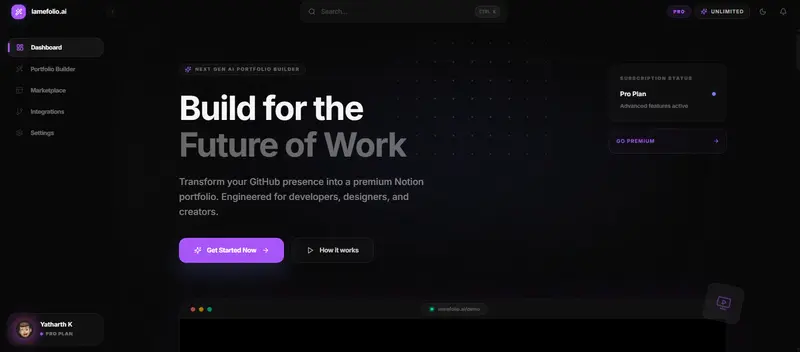
  • 📊 Dynamic Dashboard — track credits, view analytics, manage portfolios

Architecture

The architecture follows a service-oriented pipeline where each service does exactly one thing. The Orchestrator Service is the central coordinator — it chains GitHub data fetching, AI schema generation, block transformation, and Notion publishing into a single sequential pipeline.

The critical design decision: Gemini is only used where creativity matters (schema generation, resume parsing, chat). Everything else — data fetching, block transformation, Notion API calls — is deterministic. Zero token overhead, zero hallucination risk.

Architecture Deep-Dive
Why a 5-service architecture?
I could’ve built one monolithic service that does everything. But that’s a recipe for:

Burnt tokens — fetching GitHub data doesn’t need an LLM
Hallucinated URLs — the Notion publishing step should never make things up
Debugging nightmares — which part of the monolith failed?

Instead, each service is a specialist:

typescript

Four steps, each handled by a dedicated service. The Orchestrator chains them together and handles error propagation.

GitHub Service: Deterministic Data, Zero LLM
The GitHub service calls Octokit REST directly — no agent reasoning needed:

typescript

One REST call per repo pulls metadata + deep data. The response goes straight into the AI pipeline. No LLM in the loop — this is pure data fetching.

Gemini AI: The Creative Engine
This is where the LLM earns its keep. The AI service has four distinct responsibilities:

  1. Portfolio Schema Generation — takes raw GitHub + resume data and produces structured JSON
  2. Resume Analysis — full multimodal parsing of PDFs/images into career data
  3. Chat with Function Calling — multi-turn conversation with autonomous Notion tool use
  4. Dev Docs Generation — creates documentation from repo READMEs

typescript

The function calling loop in the Orchestrator’s (getChatResponsemethod) is the most interesting part — Gemini decides which Notion tools to call, the Orchestrator executes them, sends results back, and Gemini decides what to do next. Up to 5 iterations per conversation turn.

Transformer: Schema → Notion Blocks
The Transformer converts the AI-generated schema into Notion’s block API format. It supports 4 template styles, each with a distinct visual identity:

typescript

How I Used Notion & MCP

This is the part I’m most excited about. Lamefolio AI integrates with Notion in two complementary ways: through the official MCP server for extensibility, and through the Notion Client SDK for the core pipeline.

  1. MCP Server via @modelcontextprotocol/sdk

The MCP server wraps the entire Orchestrator pipeline as callable tools. Any MCP-compatible client (Claude Desktop, Cursor, custom agents) can trigger portfolio generation:

typescript

Two tools exposed: generate_portfolio (GitHub handle → full Notion portfolio) and generate_docs (repo URL → technical documentation). The MCP layer is a thin wrapper around the Orchestrator — all the heavy lifting happens in the service pipeline underneath.

  1. AI Chat with Notion Function Calling
    The real power is in the chat interface. After generating a portfolio, users can chat with Gemini to live-edit their Notion pages. Gemini has access to 6 Notion tools:

Table

The Orchestrator runs a multi-turn function calling loop:

typescript

Gemini decides which tools to call. The Orchestrator executes them, sends results back, and Gemini decides what to do next — up to 5 iterations per turn. It’s autonomous Notion editing through natural conversation.

  1. Notion Client SDK — The Core Pipeline
    For the portfolio generation pipeline itself, we use @notionhq/client directly:

typescript
The 500ms delay between batches isn’t just for rate limits — it makes the frontend feel like the AI is “building” the portfolio in real-time. Small UX detail, big perceived quality difference.

Lessons Learned
Multimodal resume parsing is surprisingly reliable
I expected Gemini to struggle with varied resume formats — fancy PDFs, scanned images, two-column layouts. It handles all of them. The key was giving it a strict JSON output schema with clear field definitions. Even blurry phone photos of printed resumes get parsed correctly.

Function calling beats prompt engineering for Notion edits
My first attempt at the chat feature used prompt engineering — telling Gemini to output structured edit commands that I’d parse. It was fragile and unpredictable. Switching to native function calling was night and day. Gemini decides which Notion tools to call, and the results go back into the conversation. No parsing, no regex, no hoping the model follows the format.

Template engines are more valuable than you’d think
I almost skipped templates and went with a single layout. But adding the template system (default, designer-minimal, hacker-dark, dev-pro) was worth every line of code. Users don’t just want a portfolio — they want their portfolio. The hacker-dark template renders the entire portfolio as JSON code blocks. Someone will love that.

Batched block appending is essential
Notion’s API has strict rate limits (3 requests/second). Sending 50+ blocks one-at-a-time will get you throttled immediately. Batching in groups of 10 with a 500ms delay keeps you safely under limits and creates a satisfying “building” animation on the frontend.

Notion doesn’t support real-time streaming — and that changed my UX plans
I originally wanted a typewriter effect — the portfolio building itself in real-time on the Notion page as the user watches, block by block, with live character-by-character rendering. It would’ve been the killer demo moment.

Notion’s API doesn’t support this at all. There are no WebSocket endpoints, no SSE-based push, no streaming block update APIs. The API is purely REST: you write blocks, you read blocks. That’s it. The SSE/Streamable HTTP transports mentioned in some docs are specifically for MCP server communication (how an MCP client talks to an MCP server), not for real-time Notion content streaming.

To simulate anything close to a typewriter effect, you’d have to repeatedly call the Update a block endpoint yourself — appending one character at a time to a block’s rich_text. At Notion’s rate limit of 3 req/s, a 500-character paragraph would take ~2.7 minutes of API calls. Not exactly “real-time.”

So I pivoted: instead of streaming to Notion, I stream the frontend experience. The batched block appending with 500ms delays creates the illusion of the AI building the portfolio progressively, and the frontend shows a premium loading skeleton with a real-time progress bar while the backend does its work. The end result feels just as magical — the user just doesn’t see individual characters appearing on the Notion page. Sometimes the API’s limitations push you toward a better UX anyway.

OAuth redirect URIs are a deployment landmine
The number of hours I spent debugging OAuth failures across local dev vs. Vercel production was embarrassing. The fix: a
@getRedirectUri
function that dynamically detects the frontend origin from request headers. No more hardcoded URLs, no more broken deploys.

typescript

Tech Stack

Table

Built with Gemini, Notion API, Model Context Protocol, and an unhealthy amount of TypeScript. If you’ve ever procrastinated on building a portfolio, let the AI do it for you.

GitHub: Yatharth4005/Lamefolio-ai
Building Zenvest: Instant Insurance Payouts Using AI & Real-Time Triggers

Building Zenvest: Parametric Insurance for India’s Gig Workers

Hackathons are intense. Ideas fly in every direction, the clock is merciless, and the pressure to ship something meaningful is real.

This time, one simple question changed everything:

What happens when a delivery partner can’t work because of things completely outside their control?

Rain. Toxic air. Platform outages.

That question became Zenvest – India’s first parametric insurance platform built specifically for gig workers.

Day 0: The Problem That Hit Us Hard

We started by looking closely at the lives of gig economy delivery partners.

  • Their income is 100% tied to daily rides and deliveries
  • No work = zero earnings
  • External disruptions (weather, AQI spikes, app downtime) destroy their day

Traditional insurance fails them completely:

  • Claims take days or weeks
  • Endless documentation and proof of loss
  • Payouts are uncertain and delayed

The entire system was broken. We decided it was time to rebuild it.

Day 1: Flipping the Insurance Model

Instead of the usual question insurance companies ask —

“Can the user prove their loss?”

— we asked a better one:

“Can we detect the loss automatically and pay instantly?”

This led us straight to parametric insurance.

If predefined triggers are met:

  • Rainfall exceeds a threshold
  • AQI crosses dangerous levels
  • Platform experiences confirmed downtime

→ Instant payout.

No claims. No paperwork. No waiting.

Day 2: Designing the Core User Flow

We kept the experience dead simple and powerful:

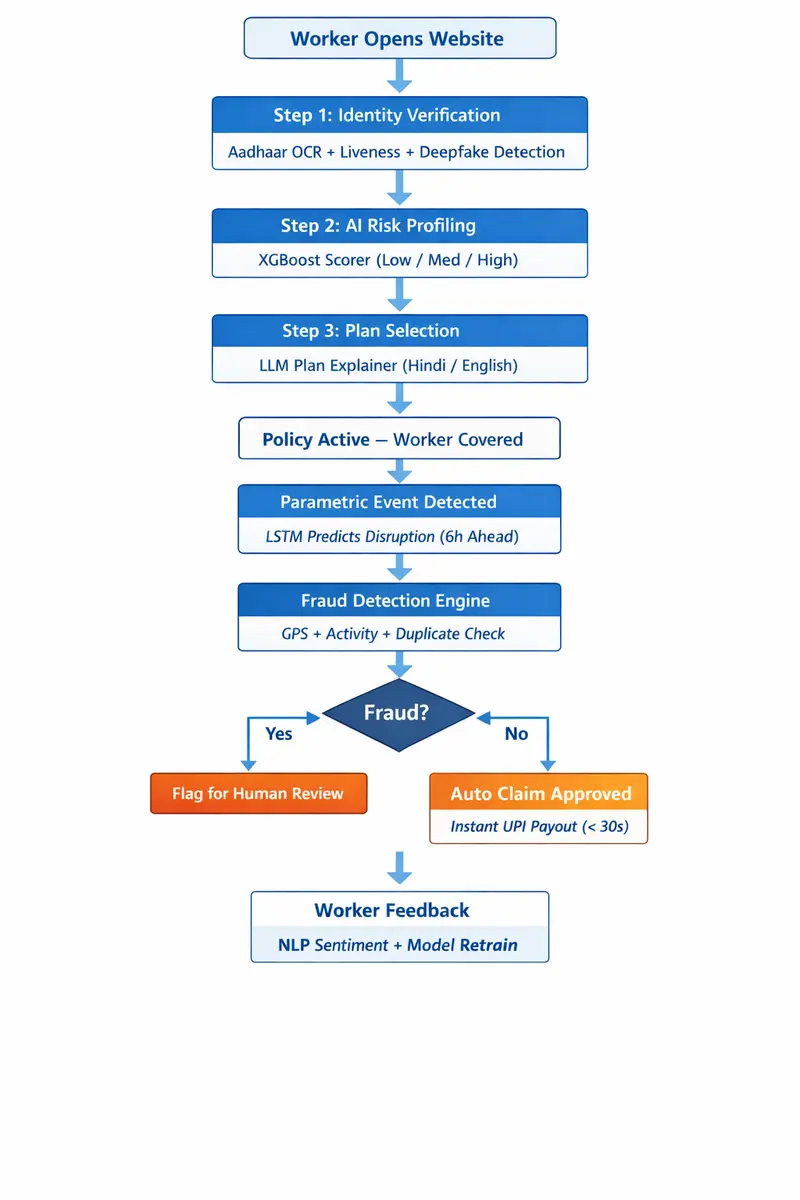
  1. User signs up (Aadhaar + platform partner ID)
  2. Background risk profiling runs instantly
  3. AI recommends a personalized weekly plan
  4. User subscribes via UPI
  5. System continuously monitors real-world data
  6. Trigger met → instant payout

The entire journey had to feel automatic, invisible, and trustworthy.

Day 3: Adding Intelligence with AI/ML

We refused to settle for static rules. The system had to be smart and adaptive.

Here’s what we built:

  • Risk Profiling — XGBoost model classifying users into dynamic risk tiers
  • Weather & Disruption Forecasting — LSTM-based prediction engine
  • Fraud Detection — Isolation Forest + custom anomaly detection
  • Plan Recommendation Engine — personalized weekly plans that evolve with user behavior

Every week the models retrain and improve. The system literally gets smarter over time.

Day 4: Why We Chose a Progressive Web App (PWA)

We made a very deliberate technical decision: no native app.

Our users typically run low-end Android devices, have limited storage, and need instant access. So we built a blazing-fast PWA:

  • Zero installation friction
  • Works offline where possible
  • Instant updates without Play Store delays
  • Can still be “installed” to the home screen

Sometimes the simplest technical choice is the most user-centric one.

Day 5: The Magic Moment – Instant Payouts

This is where everything clicks.

Real-world example:

Heavy rain hits a city. Rainfall crosses the threshold. The system pulls live data from IMD and CPCB APIs, verifies conditions, and triggers a UPI payout in seconds.

No forms.

No approvals.

No stress.

Just money in the partner’s account when they need it most.

Under the Hood: The Tech Stack

Frontend

  • React.js + Tailwind CSS
  • Full PWA implementation (service workers, offline support, install prompts)

Backend

  • Node.js (Fastify for performance) + Express where needed

Database & Infrastructure

  • MongoDB (flexible schemas)
  • Redis (caching + rate limiting + session management)
  • AWS (EC2, ECS, S3, CloudWatch)

Key Integrations

  • Aadhaar eKYC via UIDAI sandbox
  • Razorpay UPI for instant payouts
  • IMD Weather API + CPCB Air Quality API

Sentinel: Our Fraud Detection Layer

Automation is powerful -but only when it’s safe.

We built Sentinel, a dedicated fraud prevention engine that:

  • Detects GPS spoofing in real time
  • Flags unnatural activity patterns
  • Identifies duplicate or suspicious accounts
  • Routes clean claims for instant approval
  • Flags high-risk cases for human review

Trust without naivety.

📊 Real Impact Scenario

Picture a delivery partner earning ₹600–800 per day.

When heavy rain washes out the entire evening shift, Zenvest automatically detects the trigger and credits the payout within seconds.

No panic.

No lost income.

Just dignity and continuity.

Phase 1 Results & What’s Next

We’re proud to share that Zenvest scored 4/5 stars in Phase 1 of the hackathon.

The judges loved the real-world problem, the parametric approach, and the technical depth. But more importantly, the idea clearly resonated.

This was just the beginning.

🤝 We Want Your Feedback, Dev Community

We’re still early and actively iterating. If you’ve made it this far, we’d genuinely love your thoughts:

  • What would you improve in the architecture?
  • Better approaches for fraud detection at scale?
  • Ideas for expanding parametric triggers?
  • UI/UX suggestions for gig workers?

Drop your comments below. We’re building this in public and learning with every conversation.

Thanks for reading.

If this story or the problem resonates with you, let’s connect. Whether you’re a developer, designer, gig worker, or just someone who believes technology should solve real Indian problems — we’d love to hear from you.

Let’s build something that actually matters.

— The Zenvest Team

I Got Tired of Switching Between curl and Postman — So I Built My Own CLI

I didn’t start this project to build “another HTTP tool.”

I started it because I was frustrated.

Github : https://github.com/I-invincib1e/Httli

Every time I worked with APIs, I found myself stuck between two extremes:

  • curl → powerful, but painful to reuse, ugly output, hard to manage workflows
  • Postman → beautiful and powerful, but not scriptable, not terminal-friendly

And I kept thinking…

Why do I have to choose between these two worlds?

The Real Problem

The issue wasn’t making a single API request.

It was everything around it:

  • Reusing requests
  • Extracting values (like tokens)
  • Running flows (login → fetch → update)
  • Using it inside scripts or CI

With curl, I ended up writing messy bash scripts.
With Postman, I was clicking around with no automation.

There was no clean bridge between the two.

The Idea

I wanted something simple:

A CLI tool that feels like Postman… but behaves like curl.

That’s how Httli started.

What Httli Became

Over time, it turned into something much more than I expected.

Not just a request tool — but a workflow engine inside the terminal.

🔧 Real Example

Here’s the kind of flow I always wanted:

# Save a request
httli collection save auth/login 
  -u https://api.example.com/login 
  -m POST 
  -d @payload.json

# Run it and extract token
TOKEN=$(httli collection run auth/login -x .data.token)

# Run full workflow
httli collection run-all auth/ --fail-fast

That’s it.

No switching tools.
No messy scripts.
No manual copying.

✨ Key Features

1. JSON Output for Automation

httli request send -u https://httpbin.org/get --format json | jq '.ok'

Clean, structured output — perfect for scripts and CI.

2. Native Data Extraction

httli request send -u /login -x .data.token

No need for jq if you don’t want it.

3. Proper Failure Handling

httli request send -u /404 --fail

Exits with code 22 (like curl), making it CI-friendly.

4. Project-Based Workflows

Just create a .httli/ folder:

mkdir .httli

Now your collections live inside your project.

  • Share with your team
  • Commit to Git
  • Run anywhere

5. Namespaced Collections

httli collection save auth/login ...
httli collection save auth/refresh ...

Grouped automatically:

auth/
  - login
  - refresh

6. Batch Execution (run-all)

httli collection run-all auth/ --fail-fast

Run full API flows with built-in chaining:

  • HTTLI_LAST_STATUS
  • HTTLI_LAST_JSON
  • HTTLI_LAST_BODY_PATH

🧠 How It Evolved

This project didn’t start clean.

At first, it was:

  • hardcoded command handling
  • limited depth
  • basic output

Then I rebuilt the core using a recursive command walker.

That changed everything.

Now:

  • commands can be nested infinitely
  • logic is clean and modular
  • new features don’t break old ones

🤖 Yes, I Used AI

I’ll be honest — I used AI heavily while building this.

But not in the way people assume.

AI didn’t “build it for me.”

It helped me:

  • move faster
  • explore ideas
  • refine implementations

The real challenge was still:

  • designing the system
  • making tradeoffs
  • deciding what should exist

And honestly, that’s the part I enjoyed the most.

🚀 Why I’m Sharing This

Right now, Httli is at a stage where it’s:

  • stable
  • scriptable
  • actually useful

But tools only get better when people use them.

🤝 I’d Love Your Feedback

If this sounds interesting, try it out:

go install github.com/I-invincib1e/httli@latest

And tell me:

  • what feels good
  • what feels missing
  • what breaks

🔮 What’s Next

I’m thinking about adding:

  • smarter workflows
  • maybe AI-assisted request generation
  • deeper automation features

But for now, I want to focus on making the current experience solid.

Final Thought

I didn’t build Httli to replace curl or Postman.

I built it because I needed something in between.

If you’ve ever felt that gap too —
this might be useful to you.

Github : https://github.com/I-invincib1e/Httli

⭐ If you like it, consider starring the repo
🤝 And if you want to contribute, I’d love that even more

From Naive to Agentic: A Developer’s Guide to RAG Architectures

If you’ve built even one LLM application, you’ve likely encountered the hallucination problem. Your model sounds confident but makes things up. Or worse, it knows nothing about your company’s private data because its training cutoff was two years ago.

Enter RAG (Retrieval-Augmented Generation).

RAG is the standard pattern for connecting LLMs to external knowledge. But here’s the catch: Not all RAG pipelines are created equal. A simple “retrieve-and-read” setup might work for a demo, but it will fail in production.

In this article, we’ll break down the 4 main types of RAG architectures, what specific problems they solve, and how to choose the right one for your use case.

🧱 1. Naive RAG (The “Hello World”)

This is the baseline implementation you see in most tutorials.

The Flow:

User Query → Vector Search → Top K Chunks → LLM → Answer

The Problem It Solves (and Creates)

  • Solves: Basic knowledge grounding. It stops the model from relying solely on parametric memory.
  • Creates: Low precision and recall. You often retrieve irrelevant chunks or miss critical info due to poor chunking. It struggles with ambiguous queries.

🛠️ When to Use

  • Prototyping MVPs.
  • Simple Q&A over clean, well-structured documents.
  • Low-stakes internal tools.

🚀 2. Advanced RAG (The Production Standard)

Advanced RAG takes the naive pipeline and optimizes every stage: Pre-retrieval, Retrieval, and Post-retrieval.

The Flow:

Query → [Rewriting/Expansion] → Hybrid Search → [Re-Ranking] → LLM → Answer

The Problem It Solves

  • Noise Reduction: Naive RAG sends irrelevant context to the LLM, confusing it. Advanced RAG uses re-ranking models (like Cross-Encoders) to sort results by relevance before generation.
  • Semantic Gap: Users ask questions differently than documents are written. Advanced RAG uses query transformation (HyDE, step-back prompting) to bridge this gap.
  • Chunking Issues: Solves the “lost in the middle” phenomenon by optimizing chunk sizes and using parent-document retrievers.

🛠️ When to Use

  • Customer-facing support bots.
  • Enterprise search where accuracy is critical.
  • When you notice the LLM ignoring relevant context or hallucinating despite retrieval.

🧩 3. Modular RAG (The Composable Architecture)

Modular RAG treats retrieval as a set of interchangeable functions rather than a linear pipeline. You can mix and match modules like search, memory, fusion, and routing.

The Flow:

Query → [Router] → [Search Module OR Memory Module OR API] → [Fusion] → LLM

The Problem It Solves

  • One-Size-Fits-All Failure: Some queries need SQL, others need vector search, others need keyword search. Modular RAG uses a router to pick the right tool.
  • Complex Context: It enables patterns like Recursive Retrieval (fetching small chunks, then their parent documents) or Iterative Retrieval (searching multiple times based on previous findings).

🛠️ When to Use

  • Systems with multiple data sources (SQL + PDFs + APIs).
  • Complex domains where queries vary wildly in intent.
  • When you need fine-grained control over the retrieval logic.

🤖 4. Agentic RAG (The Autonomous Workflow)

This is the bleeding edge. Here, the LLM isn’t just a generator; it’s an agent that plans, executes, and reflects.

The Flow:

Agent Plans → Tool Use (Search/Calc) → Self-Correction → Final Answer

The Problem It Solves

  • Multi-Hop Reasoning: Naive RAG fails when the answer requires combining info from Document A and Document B. Agentic RAG can retrieve A, realize it needs B, retrieve B, then synthesize.
  • Dynamic Verification: The agent can critique its own retrieved context. If the info looks outdated or conflicting, it can self-correct and search again.
  • Tool Selection: It decides dynamically whether to search the vector DB, query a SQL database, or call a web search API.

🛠️ When to Use

  • Complex research assistants.
  • Financial or legal analysis requiring multi-step verification.
  • Workflows where latency is less critical than accuracy and reasoning depth.

📊 Quick Comparison Table

Architecture Complexity Latency Accuracy Best For
Naive Low Low Medium MVPs, Demos
Advanced Medium Medium High Production Apps
Modular High Medium High Multi-source Data
Agentic Very High High Very High Complex Reasoning

🧭 How to Choose? (A Decision Framework)

Don’t start with Agentic RAG. You’ll overengineer it. Follow this ladder:

  1. Start with Naive: Build a basic pipeline with LangChain or LlamaIndex. Evaluate it.
  2. Move to Advanced: If accuracy is <80%, add Hybrid Search and a Re-Ranker. Optimize your chunking strategy.
  3. Go Modular: If you have diverse data types (tables + text), implement a Router to direct queries to the right retriever.
  4. Evolve to Agentic: Only if users need multi-step reasoning (e.g., “Compare Q1 sales to Q2 marketing spend”) should you introduce agent loops.

💡 Key Takeaway

RAG isn’t a single technique; it’s a spectrum of architectures.

  • Naive proves connectivity.
  • Advanced ensures reliability.
  • Modular ensures flexibility.
  • Agentic ensures reasoning.

Most production systems today thrive with Advanced RAG. Save the complexity of Agentic workflows for problems that truly require reasoning, not just retrieval.

DevOS: Notion MCP Challenge

Project Demo

This is a submission for the Notion MCP Challenge

Project Demo

Workflow

Workflow

What I Built

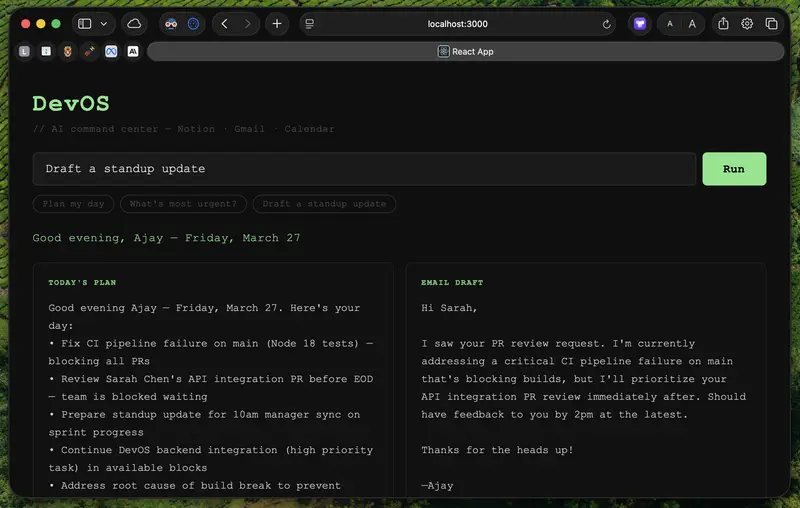
DevOS is an AI-powered daily command center for software engineers. You type one natural language command — like “Plan my day” or “What’s most urgent?” — and it pulls your real tasks from Notion via MCP, cross-references your Gmail inbox and Google Calendar, and uses Claude to synthesize everything into:

  • A prioritized daily plan
  • An email draft for your most urgent message
  • A reasoning explanation of why your top task matters most right now

The plan is then automatically written back to your Notion workspace as a “Today’s Plan” page — creating a live read-write loop between your AI assistant and your actual work context.

No tab-switching, no copy-pasting context into a chatbot. One prompt, full context, actionable output.

Show us the code

GitHub logo

AjayMaan13
/
DevOS

An AI-powered command center that turns your Notion, email, calendar, and code into one intelligent workflow.

DevOS

AI-powered command center for software engineers. One prompt. Live context from Notion, Gmail, and Google Calendar.

DevOS Screenshot

Workflow

DevOS Workflow

What It Does

DevOS is a local AI assistant that reads your actual work context — not a generic chatbot making things up. Type one natural language command and it simultaneously reads your Notion tasks, Gmail inbox, and Google Calendar. Claude synthesizes everything into a daily plan, an email draft, a priority explainer that tells you why a specific task matters most right now, and writes the plan back to your Notion workspace automatically.

How It Works

  1. You type a command in the React frontend (localhost:3000)
  2. Frontend POSTs to an Express backend on port 3001
  3. Backend makes a live call to Notion MCP — fetching your real tasks from your workspace
  4. Claude receives Notion data plus email and calendar context
  5. Claude returns a JSON object with four fields: plan…

How I Used Notion MCP

Notion MCP is the core data source. When you run a command, the Express backend makes a live call to mcp.notion.com/mcp using Anthropic’s MCP client beta — fetching your real tasks with their status and priority directly from your workspace. No hardcoded mock data, no manual Notion API pagination. MCP handles the tool discovery and execution.

That Notion context is then fed into a Claude synthesis call alongside email and calendar data. Claude returns structured JSON, and the frontend renders each field in its own panel.

The write-back side uses the Notion REST API to create a new “Today’s Plan” page under a configurable parent page after every run. So Notion isn’t just a data source — it’s also the destination. Your AI-generated plan lives right alongside your tasks in the same workspace.

What MCP unlocks here is the ability to treat Notion as a live, queryable context layer for AI — not just a static database you export from. The AI reads your workspace, reasons over it, and writes back to it, all in a single command cycle.