I Built a Free Herb-Drug Interaction Checker — Here’s What I Learned About Health Data

Why I Built This

Last year, my grandmother was taking warfarin (a blood thinner) and started drinking chamomile tea daily because she read it was “calming.” What she didn’t know — and what her doctor didn’t mention — is that chamomile can increase warfarin’s anticoagulant effect, raising the risk of dangerous bleeding.

This isn’t rare. A 2019 systematic review found that 40% of adults in the Americas use some form of herbal supplement, and many don’t tell their doctors. The interaction data exists in PubMed — it’s just not accessible to regular people.

So I built an herb-drug interaction checker that anyone can use for free. No signup, no ads. Here’s what I learned building it.

The Data Problem

The first challenge was sourcing reliable interaction data. There’s no single “herb-drug interaction API.” The data lives in:

  • PubMed — 35+ million papers, but no structured interaction database
  • Natural Medicines Database — comprehensive but costs $1,500/year
  • WHO monographs — authoritative but covers only ~120 plants
  • Individual clinical trial papers — scattered across journals

I ended up building my own database by cross-referencing multiple sources. The current version covers 250 medicinal plants and 401 documented interactions across 30 drug classes.

Data Structure

Each interaction record looks like this:

{
  "herb": "St. John's Wort",
  "drug_class": "SSRIs",
  "severity": "high",
  "mechanism": "CYP3A4 induction + serotonin syndrome risk",
  "evidence_level": "strong",
  "pubmed_ids": ["12345678", "23456789"],
  "clinical_note": "Contraindicated. Can reduce SSRI efficacy by 50%+ and independently increase serotonin, risking serotonin syndrome."
}

Key design decisions:

  • Drug classes, not individual drugs. Warfarin interactions apply to all vitamin K antagonists. Grouping by mechanism (not brand name) means better coverage with less data.
  • Evidence levels. Not all interactions are equal. “Strong” means randomized trials or pharmacokinetic studies. “Moderate” means case reports or in vitro data. “Theoretical” means mechanism-based prediction without clinical confirmation.
  • Severity scoring. High = hospitalization risk. Moderate = requires monitoring. Low = be aware.

The Frontend

The checker is a single HTML file with no dependencies. No React, no build step, no npm. Just vanilla JavaScript with a search-as-you-type interface.

Why? Because:

  1. Health tools must be fast. Someone checking an interaction might be anxious. A 3-second spinner is unacceptable.
  2. Offline capability. The entire database is embedded in the HTML. Works on spotty hospital WiFi.
  3. Zero maintenance. No server costs, no API to keep alive, no dependencies to update.

The search uses a simple fuzzy matching algorithm:

function searchInteractions(query) {
  const terms = query.toLowerCase().split(/s+/);
  return interactions.filter(item => {
    const searchable = [
      item.herb, item.drug_class,
      item.mechanism, item.clinical_note
    ].join(' ').toLowerCase();
    return terms.every(term => searchable.includes(term));
  });
}

Nothing fancy. For 401 records, Array.filter() runs in <1ms. Don’t reach for Elasticsearch when includes() will do.

What the Data Reveals

After compiling 401 interactions, some patterns emerged:

The Top 5 Most Dangerous Herbs (by interaction count)

Herb Interactions Highest Severity Drug
St. John’s Wort 23 Immunosuppressants (organ rejection risk)
Ginkgo biloba 18 Anticoagulants (bleeding risk)
Garlic (therapeutic dose) 14 Anticoagulants, HIV protease inhibitors
Ginger (therapeutic dose) 12 Anticoagulants, diabetes drugs
Turmeric/Curcumin 11 Anticoagulants, chemotherapy drugs

Notice a pattern? Four of five interact with blood thinners. If you’re on warfarin, heparin, or any anticoagulant, you need to be extremely careful with herbal supplements.

The CYP450 Connection

Most herb-drug interactions happen through the cytochrome P450 enzyme system — the liver’s drug processing machinery. When an herb induces (speeds up) or inhibits (slows down) a CYP enzyme, it changes how fast your body processes drugs:

  • CYP3A4 — processes ~50% of all prescription drugs. St. John’s Wort is a potent inducer.
  • CYP2D6 — processes many antidepressants and opioids. Goldenseal inhibits it.
  • CYP1A2 — processes caffeine, theophylline, some antipsychotics. Echinacea can inhibit it.

This is why “natural” doesn’t mean “safe.” An herb that induces CYP3A4 can make your birth control pills, immunosuppressants, or HIV medications less effective — potentially with life-threatening consequences.

Lessons for Developers Building Health Tools

  1. Get the data right first. I spent 60% of development time on data curation and 40% on the UI. Health data errors can hurt people.

  2. Add disclaimers, but make them useful. “Consult your doctor” is a legal necessity but unhelpful alone. I include the PubMed search link for every interaction so users can show their doctor the actual evidence.

  3. Don’t require accounts. Health information seeking is private. Nobody wants to create an account to check if their supplement interacts with their medication.

  4. Cite everything. Every interaction in the checker links to PubMed. If you can’t cite it, don’t include it.

  5. Design for anxiety. People using a drug interaction checker might be scared. Use clear severity indicators (color-coded), plain language, and always explain what to DO (talk to your doctor, monitor for X symptoms).

Try It

The checker is live at botanicaandina.com/herramientas/interacciones/. The database covers 250 plants and 401 interactions.

If you’re building health tools, I’d love to hear about your approach to data sourcing and evidence grading. And if you’re a pharmacist or herbalist — I’d appreciate feedback on the interaction data. The goal is to make this the most accessible herb-drug interaction resource available.

This tool is part of Botánica Andina, an open encyclopedia of Andean medicinal plants. We also have a yerba mate caffeine calculator and a natural first-aid kit builder.
AI Skills: Why the Future of Knowledge Alignment is in .md Files, Not Giant Datasets

AI Skills: The Holy Grail of Future Knowledge Alignment

If you work in AI, you’ve probably heard the same mantra repeated endlessly: Data is the new oil. More data equals better AI.

For a long time, I believed it. In my consulting work, I handle massive amounts of corporate data—years of chat logs between agents and customers, gigabytes of raw email dumps, and hundreds of megabytes of transcribed phone calls. My clients hand me these massive digital landfills with a single, daunting directive: “Extract the knowledge.”

So, I did what every “normal” AI developer does. But recently, I realized the standard playbook is broken.

The future of AI alignment isn’t about feeding models colossal, unfiltered datasets. It’s about teaching them specific skills using highly condensed, meticulously crafted Markdown (.md) files.

Here is how I completely changed my AI workflow, ditched traditional RAG for many use cases, and achieved significantly better results.

The “Standard” AI Playbook (And Why It’s Failing)

When a developer is handed 500MB of corporate junk data, the process usually looks like this:

  1. Write simple scripts to strip out the obvious garbage (HTML tags, signature blocks, automated disclaimers).
  2. Chunk the remaining text into manageable pieces.
  3. Shove it all into a Vector Database and set up a RAG (Retrieval-Augmented Generation) pipeline using Azure AI Search or Google RAG.

It’s not a terrible solution, but once you push it to production, the cracks immediately start to show. You quickly face several brutal problems:

The “Pleasantry Penalty” (Drowning in Noise)

Corporate data is roughly 5% actual knowledge and 95% human filler. Every phone transcript starts with a greeting and ends with a sign-off. Every email chain has three rounds of “Thanks!”, “Will do!”, and “Best regards.” From a corporate knowledge perspective, this data is worthless. When RAG retrieves context, it often pulls in chunks heavily diluted by this noise, burying the single relevant sentence under paragraphs of pleasantries.

Duplication and Versioning Hell

If a company’s refund policy changed three times over five years, RAG indexes all three versions with equal weight. When a user asks about the current policy, the model may confidently return an answer that was accurate in 2021 but is completely wrong today. Updating this isn’t as simple as editing a document—the old duplicates remain buried in your vector database, acting as landmines for future queries. There is no clean “source of truth.”

Semantic Drift and Chunking Loss

RAG pipelines split documents into chunks for embedding. But meaning is often distributed across a document—a policy exception mentioned in paragraph one only makes sense with the context from paragraph six. When those chunks are separated and retrieved independently, the model loses that relationship entirely. The answer it generates is technically grounded in your data, but it’s missing half the picture.

Cost and Latency at Scale

Re-indexing a large corpus is expensive and slow. Every time your data changes, you’re potentially re-embedding millions of tokens. At scale, this compounds into a serious operational cost. And even at query time, RAG introduces latency: an embedding lookup, a retrieval step, and then generation. For time-sensitive applications, this pipeline can be a real bottleneck.

Context Without Skill

Perhaps most critically: raw data gives an LLM information, but it doesn’t give it direction. It tells the AI what happened, but not how to process it. A RAG pipeline that retrieves a refund policy still doesn’t tell the model how to apply that policy, what edge cases to prioritize, or what tone to use when communicating a denial. The knowledge is there. The skill is not.

The Revelation: “Knowledge Zipping” and CLAUDE.md

The paradigm shift hit me when I started looking at how Anthropic handles context with tools like Claude Code. Claude relies heavily on markdown files—specifically CLAUDE.md—to understand the environment it operates in.

These files don’t contain raw data. They contain valuable notes, strict rules, and highly distilled context. And the format itself is load-bearing.

Here’s why it works so well:

  • Headers create semantic anchors. A section titled ## Refund Policy is unambiguous. There’s no noise, no filler, no version drift—just the rule, stated clearly.
  • Rules are declarative, not inferred. Instead of asking a model to infer a policy from 200 emails, you state it once: “Refunds are approved within 30 days. No exceptions for digital goods.” The model never has to guess.
  • Structure forces distillation. You cannot write a good .md file without first understanding the data deeply. The act of writing it is itself a knowledge extraction exercise—it forces you to decide what actually matters.

These files act as “Skills.” They don’t tell the AI what the data looks like. They tell the AI what to do.

From 500MB to 100KB: The Knowledge Compression Experiment

I decided to test this concept rigorously. I took a 500MB email data dump from a client—years of support correspondence, policy discussions, internal memos, and escalation threads. Instead of cleaning it and dumping it into a RAG pipeline, I used an LLM to iteratively process, categorize, and distill that data.

The process looked like this:

  1. Categorize by intent. I fed batches of emails to the LLM with a prompt asking it to classify each one: Is this a policy statement? A complaint? A process description? A one-off exception?
  2. Extract atomic facts. For each policy or process email, I asked the LLM to rewrite the core rule in one or two sentences, stripped of all pleasantries, context, and filler.
  3. Resolve conflicts. When multiple emails contradicted each other, I flagged them and made a human decision (or asked the client) about which version was current.
  4. Format into structured Markdown. The final output was organized by category: ## Return Policy, ## Escalation Procedures, ## Tone and Communication Rules, and so on.

The result: 500MB of raw, noisy data compressed into a single 100KB .md file.

I fed this file directly into Claude’s context window—no RAG, no retrieval, no vector database. The model was suddenly capable of handling a brutal amount of complex tasks for the company with near-zero hallucinations. It knew the current policy, the correct tone, the edge cases to flag, and the escalation path to follow.

The difference wasn’t just performance. It was reliability. The model wasn’t guessing from retrieved chunks—it was operating from a clean, authoritative skill file.

How This Changed My Entire Workflow

I no longer view AI as a search engine for my raw data. I view it as an engine that runs .md skill files.

If I want to use AI to help me trade stocks, I don’t just ask it to analyze the market. I inject a custom trading_skill.md that contains my specific risk tolerance, the exact metrics I care about (P/E ratios, RSI thresholds, sector exposure limits), and the strict rules it must follow (“never suggest a position larger than 3% of portfolio”). The model isn’t guessing my preferences from historical trades—it’s executing a defined skill.

Whenever I approach a new domain, my first goal is no longer to build a database. My goal is to build the ultimate .md file for that specific workflow.

What’s Next: A Market Place For AI Skills

I firmly believe that the future of AI does not belong to those with the biggest raw, low-quality datasets. The future belongs to those who can craft the most efficient, highly specific Skill files.

Over the coming years, I will be sharing the specific Knowledge .md files I use in my day-to-day work right here. I’ll be dropping full, markdown files for:

  • Advanced Data Scraping: The rules and heuristics I use to teach AI to parse messy DOMs perfectly.
  • Complex Workflows: How to align an AI to handle multi-step, corporate approvals without hallucinating.
  • Custom Chatbots: The foundational .md knowledge that prevent makes unique bots like using spiritual knowledge to differentiate from traditional companions.

I’ll also share how to adapt these files depending on your model of choice. Claude responds best to structured rules with explicit constraints. Gemini tends to benefit from more contextual framing and examples alongside the rules. Codex (and GPT-based models generally) performs well with procedural, step-by-step breakdowns. The core .md content stays the same—the framing and emphasis shifts slightly per model.

Stop hoarding raw data. Start building skills.

Follow for upcoming skill .md drops. If you’ve built your own knowledge files, I’d love to hear how you structured them—drop a comment below.

I Stopped Running From DSA. Here’s How I’m Hacking My Brain to Learn It in C++

Beginner DSA Lesson #1

Introduction

Why the best way to master Data Structures & Algorithms is to build in public, and how you can follow along.

Let’s be real for a second. If you are learning software development, there are three letters that probably make you want to close your laptop and walk away: D-S-A.

For a long time, Data Structures and Algorithms felt like an intimidating, invisible gatekeeper. Between grinding through my computer programming classes at School and balancing everyday life, it was always easier to put it on the back burner and just focus on building front-end projects.

But recently, I cleared my schedule, stepped away from my part time job, and made a non-negotiable decision: I am going all-in on mastering DSA using C++. No more avoiding the hard stuff.

And I am documenting every single step of the journey right here.

Why am I writing this?

If you read most tutorials on pointers, memory management, or time complexity, they are usually written by senior engineers who forgot what it feels like to be a beginner. They read like dense, dry textbooks.

I’m taking a different approach. I am in the trenches learning this right now.

I’ve realized that the ultimate cheat code to truly understanding complex logic is to translate it into plain English. By breaking down these concepts for you, I am forcing myself to eliminate any gaps in my own knowledge. We are going to demystify the scary stuff together.

How I’m Approaching DSA

I’m keeping my approach simple. Below are the methods I’m using to understand properly::

  1. Learn, then explain
    After learning a concept, I try to explain it in the simplest way possible. If I struggle to do that, I go back and review it.

  2. Break topics down
    Instead of trying to learn large topics at once, I break them into smaller parts.
    For example, instead of “Linked Lists,” I focus on:
    What a node is
    How pointers connect nodes
    How insertion works

  3. Use C++ to understand the details
    C++ forces you to deal with memory and pointers directly. It’s not always easy, but it makes things clearer over time.

  4. Keep explanations simple
    I’m not trying to sound technical. The goal is clarity. If something can’t be explained simply, it probably isn’t understood properly yet.

What I’ll Be Covering (Step by Step)

Here’s the rough path I’m following, from zero to “I can actually solve problems”:

  • Necessary C++ concepts with a DSA angle
  • (variables, memory, stack vs heap, pointers, references)
  • Recursion
  • (what it is, why it’s confusing, how to see the pattern)
  • Arrays, strings, and linked lists
  • (how data is stored, moved, and changed)
  • Stacks and queues
  • (simple structures that show up everywhere)
  • Trees and heaps
  • (how to store data in a “family tree” style structure)
  • Graphs
  • (networks like social media, roads, and connections)
  • Sorting, searching, hashing
  • (how to find and organize things efficiently)
  • Problem-solving patterns
  • (dynamic programming, backtracking, and other “big scary names” explained calmly)

Each topic will be split into tiny lessons so you never feel overwhelmed.

If You’re Also Scared of DSA
DSA can feel overwhelming at first. It definitely did for me. But avoiding it doesn’t make it easier. So I decided to stop putting it off and actually work through it, one concept at a time.

What helped was:

  • Admitting I was scared of it
  • Breaking it into small pieces
  • Letting myself be bad at it at first
  • You don’t need to be “smart enough” to learn this.
  • You just need to move slowly and consistently.

If you’re in the same place, you’re not behind. You’re just starting……like me.

If you’re in the same position, you’re not alone.

How We Cut Our AI API Bill by 78% (And Let Cursor See Our Entire Codebase)

The Problem Nobody Talks About

When you ask Cursor to “fix the login bug in my app,” here’s what actually happens:

  1. Your query gets embedded into a vector
  2. The embedding is compared to every file in your codebase (cosine similarity)
  3. The top 5-10 most similar files are stuffed into the context window
  4. Everything else is invisible

Your AI has no idea about your database schema, your configuration, your test patterns, your middleware. It’s working blind on 95% of your codebase.

The Information-Theoretic Solution

We built Entroly — a context engineering engine that approaches this as an optimization problem, not a search problem.

Instead of “find the most similar files,” we ask: “What’s the mathematically optimal set of fragments to include in the context, given a token budget?”

Step 1: Score Every Fragment

Every piece of code gets scored by Shannon entropy — measuring information density:

H(X) = -Σ p(xᵢ) · log₂(p(xᵢ))

High-entropy code (complex logic, unique algorithms) scores high. Low-entropy code (boilerplate, imports, comments) scores low.

We also measure:

  • Recency: was this file recently modified?
  • Frequency: is this file frequently accessed?
  • Semantic relevance: how related to the current query?

Step 2: Build the Dependency Graph

Code is not independent. auth.py depends on auth_config.py. Your API routes call functions defined in models.py.

Entroly automatically extracts:

  • Import relationships
  • Function call chains
  • Type references
  • Module dependencies

When a fragment is selected, its dependencies get a relevance boost. This is the graph-constrained knapsack — NP-hard in general, but tractable for typical code graphs.

Step 3: Solve the Optimization Problem

This is where it gets mathematically interesting.

We use KKT bisection to find the exact Lagrange multiplier for the token-budget constraint:

f(th) = Σᵢ σ((sᵢ − th) / τ) · tokensᵢ − B = 0

30 steps of bisection give us th* — the exact dual variable. Then we greedily fill the hard budget.

The beautiful part: the same σ(·/τ) appears in the REINFORCE backward pass. Zero train/test mismatch.

Step 4: Compress at Three Levels

Not every file needs full source code:

  • L1 (5% budget): Skeleton map — auth.py → AuthService, login(), verify_token()
  • L2 (25% budget): Expanded signatures for dependency-connected files
  • L3 (70% budget): Full source code for the most relevant fragments

Your AI sees ALL 500 files. The important ones in detail. The rest in summary.

Step 5: Learn From Outcomes

After the AI generates a response, Entroly scores how well the context worked:

  1. Counterfactual Shapley credit: How much did each fragment contribute?
  2. Spectral natural gradient update: Adjust the 4D weight vector using Jacobi eigendecomposition of the gradient covariance
  3. TD(λ) eligibility traces: Credit cascades across a 3-request window

Over time, your context selection gets better without any manual tuning.

The Numbers

  • 78% fewer tokens per request
  • <10ms overhead (Rust engine)
  • 304 unit tests in Rust, 100+ in Python
  • 24 Rust modules, ~850KB of optimized code
  • Works with any OpenAI-compatible API

Try It

pip install entroly
entroly go

GitHub: github.com/juyterman1000/entroly

MIT licensed. PRs welcome.

Your AI Doesn’t Need Screenshots. It Needs DevTools.

Your AI Doesn’t Need Screenshots. It Needs DevTools.

Most AI coding agents are still debugging web apps in the dumbest possible way.

They ask for a screenshot.

Meanwhile the real answer is usually sitting in the browser console, the Network tab, the request payload, or the response body.

That is not really an AI problem. It is a tooling problem.

I got tired of watching agents guess from screenshots while I had DevTools open right next to them, showing the exact reason something failed. So I built mare-browser-mcp, a browser MCP designed less like “remote control for a webpage” and more like “give the model the same debugging signals I actually use.”

That changed the loop from this:

AI writes code -> I test it -> I describe the bug -> AI guesses a fix -> repeat

to this:

AI writes code -> AI tests it -> AI reads the failure -> AI fixes it

That difference matters more than people think.

The Screenshot Trap

Most browser MCPs start from the same assumption: if the model can see the page, it can debug the app.

That sounds reasonable until you try to debug anything real.

A screenshot does not tell the model:

  • that login failed with a 401
  • that the frontend sent user_email instead of email
  • that a button click triggered a JS exception
  • that the UI is fine but the API returned invalid JSON
  • that the missing data is actually below the fold in a scrollable grid
  • that the context menu only appears on right-click

A screenshot is expensive, unstructured, and often the least useful artifact in the whole debugging flow.

Language models are good at reasoning over structured text. We keep handing them pixels and asking them to guess.

What I Wanted Instead

I wanted a browser MCP that makes the model think more like a developer with DevTools open.

That means a few things:

  • It should read console logs and page errors directly
  • It should see network requests, payloads, response bodies, and timing
  • It should batch actions instead of making one tiny tool call per click
  • It should query the DOM as structured data
  • It should handle hover, drag, right-click, and nested scroll containers
  • It should only use screenshots when the problem is actually visual

That is the core idea behind mare-browser-mcp.

It is a lean MCP server built with Playwright and the MCP SDK, and the whole design is biased toward structured debugging data first.

The One Tool I Wish More Browser MCPs Had

The most important tool in the server is browser_debug.

One call returns:

  • current URL
  • page title
  • console logs
  • page errors
  • dialogs
  • network request history

And the network history is the useful part. The server captures things like:

  • method
  • URL
  • parsed query params
  • request headers
  • request body
  • status code
  • JSON response body
  • duration in milliseconds

So instead of the model seeing “submit button clicked and page still looks wrong,” it can see:

{
  "method": "POST",
  "url": "https://app.example.com/api/session",
  "requestBody": {
    "user_email": "[email protected]",
    "password": "secret"
  },
  "status": 401,
  "responseBody": {
    "error": "missing field: email"
  },
  "duration_ms": 23
}

That is a completely different debugging experience.

At that point the model is not guessing anymore. It can actually reason from evidence.

There are a few guardrails in the implementation too:

  • static assets are skipped
  • OPTIONS preflights are ignored
  • bodies are capped at 4 KB
  • auth headers are masked
  • cookies are reduced to "[present]"
  • failed requests are logged with the failure reason

So the data stays useful without turning into junk.

Batching Matters More Than It Sounds

Another thing that slows agents down is one-action-per-call design.

Click. Wait. Screenshot. Fill. Wait. Screenshot.

That is not just annoying. It makes the whole debugging loop slower and dumber.

browser_act fixes that by accepting an ordered list of actions in one call:

[
  { "action": "fill", "selector": "#email", "value": "[email protected]" },
  { "action": "fill", "selector": "#password", "value": "secret" },
  { "action": "click", "selector": "button[type=submit]" }
]

The current action set covers a lot of what real apps actually need:

  • click
  • hover
  • drag
  • clicklink
  • fill
  • select
  • keypress
  • waitfor
  • scrollto
  • wait
  • clearconsole

That means the model is not stuck the moment the UI uses hover states, resize handles, sortable grids, or context menus.

And yes, right-click works through click with button: "right", which turns out to matter more often than you might expect.

Structured DOM Queries Beat Giant Dumps

Another thing I did not want was a browser tool that just vomits the whole DOM back at the model.

browser_query is useful because it lets the model ask narrower questions:

  • How many rows are there?
  • Is this button visible?
  • What text do these badges have?
  • Is this input disabled?

Examples:

{ "selector": ".ag-row", "count_only": true }
{ "selector": "button", "all": true, "visible_only": true, "limit": 10 }
{ "selector": ".badge", "fields": ["text", "className", "visible"] }

The supported fields are deliberately practical:

  • text
  • value
  • visible
  • disabled
  • className
  • href
  • innerHTML

That keeps the output small enough to reason about and avoids wasting context on useless noise.

Screenshots Are Still There. They Just Aren’t First.

I did keep browser_screenshot.

But I made the tool description explicitly say it should be the last resort, not the default.

That sounds minor, but it really changes how an agent behaves. If the tool surface itself tells the model:

  • use browser_debug first
  • use browser_query second
  • use screenshots only for visual problems

then the model starts spending its attention on data instead of appearance.

That is the behavior I wanted.

Real Apps Need More Than Page Scroll

One of the easiest ways browser tools fall apart is scrolling.

Scrolling the page is not enough for modern apps. A lot of important UI is inside:

  • data grid viewports
  • chat panels
  • sidebars
  • overflow containers
  • modals

browser_scroll can scroll the page, scroll an element into view, or scroll inside a specific container.

Example:

{
  "container": ".ag-body-viewport",
  "direction": "down",
  "pixels": 500
}

And because it returns scroll position data, the model can tell where it is instead of just flailing around.

There Is Also an Escape Hatch

Even with all of that, fixed tools never cover every case.

So there is browser_eval, which runs JavaScript in the page context.

That is useful for things like:

  • reading computed styles
  • inspecting app state on window
  • appending input text without clearing it
  • simulating more custom interactions
  • calling fetch() directly
  • checking CSS visibility details

I do not think the escape hatch should be the first thing the model reaches for. But it absolutely should exist.

What This Looks Like in Practice

A realistic flow is:

1. browser_navigate({ url: "https://myapp.com", clear_logs: true })

2. browser_act({
     commands: [
       { action: "fill", selector: "#email", value: "[email protected]" },
       { action: "fill", selector: "#password", value: "secret" },
       { action: "click", selector: "button[type=submit]" }
     ]
   })

3. browser_wait_for_network({ url_pattern: "/api/session", method: "POST" })

4. browser_debug({ console_types: ["error"], last_n: 20 })

From there the model can see:

  • whether the request fired
  • what payload got sent
  • what response came back
  • whether the browser threw an error
  • whether the failure is frontend, backend, or both

That is the kind of loop where an agent becomes genuinely useful.

Why I Think This Matters

I think a lot of people are measuring browser MCPs by the wrong thing.

The question is not “can the AI click buttons?”

The real question is: when something breaks, can the AI see the same evidence a good developer would look at?

If the answer is yes, the quality of debugging jumps fast.

If the answer is no, you end up with a very expensive screenshot viewer.

That is why I built mare-browser-mcp the way I did. Not to make agents better at looking at pages, but to make them better at understanding what happened in the browser.

Not screenshots first. Telemetry first.

Try It

git clone https://github.com/emadklenka/mare_browser_mcp
cd mare_browser_mcp
pnpm install
npx playwright install chromium
pnpm run setup

It also supports global install:

pnpm add -g mare-browser-mcp
npx playwright install chromium

The repo has setup instructions for Claude Code and OpenCode, and the current server exposes:

  • browser_navigate
  • browser_act
  • browser_debug
  • browser_query
  • browser_screenshot
  • browser_eval
  • browser_scroll
  • browser_restart
  • browser_upload
  • browser_wait_for_network

If you are building web apps with AI, that combination is much closer to giving your agent DevTools than giving it a screenshot and hoping for the best.

Building an A2A Simulator to Debug Agent-to-Agent Communication

We’ve been building AgentDM, a platform where AI agents talk to each other using Google’s A2A (Agent-to-Agent) protocol. Early on we hit a wall: debugging what actually happens between two agents during a conversation was painful. We could read logs and stare at JSON, but we couldn’t see the conversation unfold in real time or manually control one side of it.

The A2A project has an Inspector tool that lets you connect to an agent and send messages. It’s useful for quick smoke tests, but it only acts as a client. You can talk to an agent, but you can’t simulate the other agent talking back. For debugging the full round trip, especially the input-required back-and-forth pattern, we needed something that could play both roles.

So we built the A2A Simulator.

What the A2A protocol actually does

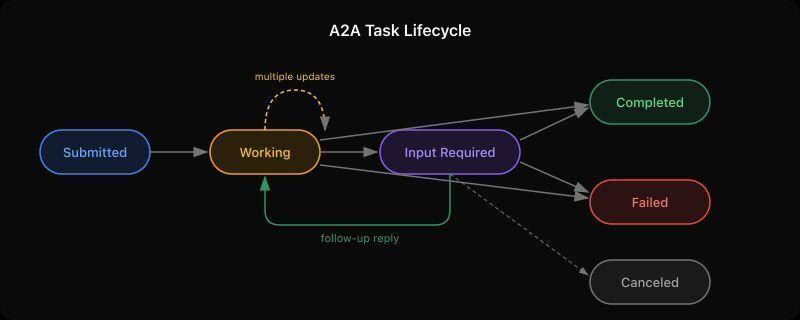
Before diving into the tool, it helps to understand how A2A conversations work. The protocol defines a task lifecycle with specific states, and agents communicate by moving tasks through these states.

When Agent Alpha sends a message to Agent Beta, it creates a task. That task starts in submitted state. Agent Beta receives the message and decides what to do with it. From there, the task can move through several states:

Working means the agent is processing. Think of it like a “typing…” indicator, except the agent can send partial results while in this state. An agent might send three or four working updates before finishing, each with a progress message.

Input Required is the interesting one. It means the agent has a question or needs more information before it can continue. The sending agent sees this and can reply with additional context. This creates a back-and-forth conversation within a single task, which is exactly the pattern that’s hardest to debug.

Completed and Failed are terminal states. Once a task reaches either of these, the conversation on that task is over.

Canceled happens when the sending agent decides to abort a task mid-flight.

The protocol also supports artifacts, which are named attachments (files, data, structured output) that an agent can include with any response. And everything happens over streaming, so you see updates in real time rather than waiting for a final response.

Why the Inspector wasn’t enough

The Inspector connects to an agent and sends messages. That covers one direction. But when you’re building an agent that needs to handle incoming messages, ask follow-up questions via input-required, and manage multi-turn conversations, you need to be the agent on the other side too.

We kept running into scenarios like: “Agent Beta asked for clarification, but did Agent Alpha actually receive the input-required status? Did the follow-up message land on the same task or create a new one? What did the raw JSON-RPC look like?”

Reading server logs worked, but it was slow and disconnected from the actual conversation flow. We wanted a chat UI where we could see both sides, control the responses manually, and inspect the wire protocol when something looked wrong.

How the Simulator works

Each simulator instance runs as both an A2A server and client on a single port. It hosts its own agent card at /.well-known/agent-card.json and accepts incoming messages, while also being able to connect to and send messages to another agent.

The UI is a chat interface where you act as the human behind the agent. When a remote agent sends you a message, it appears in the Incoming tab. You type a response, pick a state from a dropdown (working, completed, input-required, failed), and optionally attach artifacts. Your reply flows back through the A2A protocol to the sender.

Every message has a “View raw” link that opens a drawer showing the actual JSON-RPC request and response. This is where you catch the subtle bugs: wrong contextId values, missing fields, unexpected event ordering.

Setting it up

Clone the repo and install dependencies:

git clone https://github.com/agentdmai/a2a-simulator.git
cd a2a-simulator
npm install

Open two terminal windows and start two instances:

# Terminal 1
npm run dev -- --port 3000 --name "Agent Alpha"

# Terminal 2
npm run dev -- --port 3001 --name "Agent Beta"

Open your browser to http://localhost:5173. This is Agent Alpha’s UI (Vite proxies to port 3000). In the connection panel on the left, type http://localhost:3001 and click Connect. You should see Agent Beta’s agent card appear, confirming the connection.

Now type a message and hit Send. Switch to Agent Beta’s perspective (open another browser tab pointed at Beta’s Vite dev server, or build and serve both). You’ll see the message appear in Beta’s Incoming tab. Pick a state, type a response, and send it back. Watch it appear on Alpha’s side in real time.

Simulating a multi-turn conversation

Here’s where it gets interesting. Try this sequence:

  1. From Alpha, send “What’s the weather?”
  2. On Beta, select working from the dropdown and reply “Checking forecast data…”
  3. On Beta, select working again and reply “Found 3 matching stations”
  4. On Beta, select input-required and reply “Which city did you mean? I found New York, New York City, and New York Mills.”
  5. Back on Alpha, you’ll see the input-required status. Click the message to reply, then type “New York City” and send
  6. On Beta, the follow-up arrives on the same task. Select completed and reply “72°F and sunny in New York City”

This entire exchange happens on a single task, with the task status moving through working → working → input-required → completed. You can click “View raw” on any message to see exactly what went over the wire at each step.

What we learned building this

The biggest surprise was how many edge cases exist around contextId handling. When Agent Alpha replies to an input-required task, the follow-up message needs to reference the original task’s contextId or the SDK creates a new task instead of continuing the existing one. We found this bug using the simulator, which is exactly the kind of thing it was built for.

We also discovered that the @a2a-js/sdk streams multiple events for terminal states. A single completed reply from the server can generate both a status-update event and a task snapshot event, each carrying the same message. Without deduplication on the client side, the reply shows up twice. Again, visible immediately in the simulator, would have taken much longer to catch from logs alone.

Other features worth mentioning

Artifacts. Attach named artifacts with MIME types to any response. They show up inline in the conversation thread. Useful for testing agents that return structured data or files.

Authentication. Configure bearer token authentication on your instance through the Agent Card editor. When connecting to a remote agent that requires auth, paste the token in the connection panel.

Agent Card editing. Modify your agent’s name, description, skills, and auth settings on the fly without restarting. Changes take effect immediately for the next incoming connection.

Try it out

The simulator is open source under MIT license: github.com/agentdmai/a2a-simulator

If you’re integrating the A2A protocol into your own agents, give it a spin. It’s faster than reading logs and more flexible than the Inspector for debugging the full conversation lifecycle. We use it daily while building AgentDM, and it’s caught more bugs than we’d like to admit.

Built by AgentDM

We Scanned 16 AI Agent Repos. 76% of Tool Calls Had Zero Guards

`We scanned 16 open-source AI agent repositories — both agent frameworks (CrewAI, PraisonAI) and production agent applications (Skyvern, Dify, Khoj, and others) that ship real business logic.

76% of tool calls with real-world side effects had zero protective checks.

No rate limits. No input validation. No confirmation steps. No auth checks.

An important nuance: you’d expect framework code to lack guards — it’s template code, and adding guards is the implementor’s job. But the same pattern holds in production agent applications with real business logic. Skyvern (browser automation, 595 files): 76% unguarded. Dify (LLM platform, 1000+ files): 75% unguarded. The frameworks aren’t the problem — the problem is that nobody adds guards when they build on top of them either.

This means a single prompt injection — or a simple hallucination — could trigger hundreds of unvalidated database writes, unchecked HTTP requests to arbitrary URLs, or file deletions without confirmation.

Here’s what we found, how we found it, and how you can audit your own agent code in 60 seconds.

What We Scanned

We analyzed 16 open-source repos in two categories:

Agent applications — repos that ship real business logic: browser automation agents, AI assistants, LLM platforms with tool-calling capabilities. These are the repos where guards should exist because the code runs in production against real databases and APIs.

Agent frameworks — repos like CrewAI and PraisonAI that provide scaffolding for building agents. Framework code is intentionally generic — it exposes tool call patterns without business-specific guards, because that’s the implementor’s responsibility.

We report findings for both categories, but the story that matters is the application layer: even when developers build on top of frameworks and add their own logic, the guards don’t show up.

For each repo, we asked a simple question: which functions can change the real world, and which ones have guards?

A “tool call with side effects” is any function that can:

  • Write to a database (session.commit(), .save(), .create())
  • Delete data (session.delete(), os.remove(), shutil.rmtree())
  • Make HTTP write requests (requests.post(), httpx.put())
  • Process payments (stripe.Charge.create())
  • Send emails or messages (smtp.sendmail(), slack_client.chat_postMessage())
  • Invoke another agent (graph.ainvoke(), agent.execute())
  • Execute dynamic code (exec(), eval(), importlib.import_module())

A “guard” is any check that protects that call:

  • Input validation (Field(le=10000), @validator)
  • Rate limiting (@rate_limit, @throttle)
  • Auth checks (Depends(), Security() in FastAPI)
  • Confirmation steps (confirm, approve in function body)
  • Idempotency (idempotency_key, get_or_create)
  • Retry bounds (max_retries=, @retry(stop=stop_after_attempt()))

The Results

By repo

Repo Type Files Tool calls Unguarded %
Skyvern Application 595 452 345 76%
Dify Platform 1000+ 1,009 759 75%
PraisonAI Framework — 1,028 911 89%
CrewAI Framework — 348 273 78%

Full results for all 16 repos: REALITY_CHECK_RESULTS.md

What we found unguarded

Across all repos, the most common unguarded categories were database writes, database deletes, HTTP write requests, subprocess/exec/eval calls, LLM calls, and email/messaging. The pattern is consistent: the more dangerous the action, the less likely it has guards.

A note on methodology: subprocess/exec/eval calls are a different class of risk — these should generally be eliminated entirely, not guarded. The scanner also prioritizes recall over precision: we’d rather flag a function that might be fine than miss one that isn’t. Based on manual review, the false positive rate is roughly 15-20% — mostly from generic .save() calls that turn out to be config or file operations rather than database writes.

Why This Matters For AI Agents Specifically

You might think: “Unguarded function calls exist in every codebase. What makes agents special?”

The difference is who calls these functions.

In a traditional web app, a human user triggers actions through a UI with built-in constraints — forms with validation, buttons with confirmation dialogs, rate limits per session.

In an agent, an LLM decides which functions to call, with what arguments, how many times. The LLM doesn’t know your business rules. It doesn’t understand that calling refund() 200 times in a loop is catastrophic. And if an attacker crafts a prompt injection, the LLM will happily execute whatever functions it has access to — as many times as it’s told.

Without guards in the code, there’s nothing between the LLM’s decision and the real-world consequence.

A concrete example from our scan: Khoj, an open-source AI assistant, exposes a function called ai_update_memories that lets the LLM delete and replace user memories. It calls session.delete() followed by session.add() with no confirmation, no rate limit, and no validation on the content. A single adversarial prompt could wipe and replace a user’s entire memory store.

How We Built the Scanner

We built diplomat-agent, an AST-based static analyzer for Python. It uses Python’s built-in ast module — zero required dependencies. Optional: rich for colored terminal output.

Why AST and not regex?

Regex pattern matching misses most real-world code patterns. A function call like db.session.commit() can appear as a direct call, nested inside a try/except, called through a variable alias, or buried three levels deep in a helper function. AST understands the code structure — it parses the actual syntax tree, not text patterns.

The scanner walks every Python file in your project (excluding tests, migrations, venv, examples, and other non-production directories), visits every function definition, and for each function:

  1. Finds all calls that match side-effect patterns (DB writes, HTTP calls, deletes, payments, etc.)
  2. Finds all guards in scope (validators, rate limits, auth checks, confirmation steps)
  3. Outputs a verdict: UNGUARDED, PARTIALLY_GUARDED, GUARDED, or LOW_RISK (for read-only functions)

The default output is a terminal report showing every finding with its verdict. You can also generate a toolcalls.yaml registry (with --format registry) — a committable inventory of every function with side effects, the guards present or missing, and actionable hints.

Try It On Your Own Code

bash
pip install diplomat-agent
diplomat-agent .

That’s it. Zero config, zero required dependencies. Takes about 2-3 seconds on a 1000-file repo.

The output looks like this:

`plaintext
diplomat-agent — governance scan

Scanned: ./my-agent
Tools with side effects: 12

⚠ send_report(endpoint, payload)
Rate limit: NONE
→ Risk: agent could exhaust external API quota with 200 calls
⤷ no rate limit · no auth check
Governance: ❌ UNGUARDED

⚠ send_notification(user_id, message)
Rate limit: NONE
→ Risk: agent could send 200 messages — spam risk
⤷ no rate limit · no auth check
Governance: ❌ UNGUARDED

✓ process_order(order_id)
Write protection: Input Validation (FULL)
Rate limit: Rate Limit (FULL)
Governance: ✅ GUARDED

────────────────────────────────────────────
RESULT: 8 with no checks · 3 with partial checks · 1 guarded (12 total)
`

What To Do When You Find Gaps

For each unguarded tool call, you have four options:

Fix it — add validation, rate limiting, or confirmation in code. The next scan picks it up automatically.

Acknowledge it — if the function is intentionally unguarded or protected elsewhere, add # checked:ok as a comment:

python
def send_alert(message): # checked:ok — protected by API gateway
requests.post(ALERT_URL, json={"msg": message})

Add it to CI — block PRs that introduce new unguarded tool calls:

bash
diplomat-agent . --fail-on-unchecked

If you commit toolcalls.yaml as a baseline, only new findings block — no noise on legacy code.

Review the inventory — the toolcalls.yaml file is meant to be committed and reviewed in PRs. When someone adds a new function that can delete data, it shows up in the diff.

The Bigger Picture

We’re building AI agents that can modify databases, send money, delete files, and call external APIs — and we’re giving them zero guardrails in code.

The OWASP Top 10 for Agentic Applications (released December 2025) explicitly recommends maintaining a complete inventory of all agentic components, their permissions, and their capabilities. The EU AI Act (enforceable August 2026) requires documenting system capabilities and human oversight measures for high-risk AI systems.

toolcalls.yaml is a step toward that. It’s not a complete governance solution — it’s a starting point. You can’t govern what you can’t see.

Links

The scanner is open source, the findings are reproducible. Run it on your agent code and tell me what you find.

What unguarded tool calls are hiding in your agent code? Run the scan and share your results — I’ll respond to every comment.`

Understanding Attention Mechanisms – Part 3: From Cosine Similarity to Dot Product

In the previous article, we explored the comparison between encoder and decoder outputs. In this article, we will be checking the math on how the calculation is done, and how it can be further simplified.

The output values for the two LSTM cells in the encoder for the word “Let’s” are -0.76 and 0.75.

The output values from the two LSTM cells in the decoder for the <EOS> token are 0.91 and 0.38.

We can represent this as:

A = Encoder
B = Decoder

Cell #1     Cell #2
-0.76       0.75
 0.91       0.38

Now, we plug these values into the cosine similarity equation.

This gives us a result of -0.39.

To simplify this further, a common approach is to compute only the numerator.

The denominator mainly scales the value between -1 and 1, so in some cases, we can ignore it for simplicity.

Since we are dealing with a fixed number of cells, this simplification works well. This is also known as the dot product.

When we calculate only the dot product, we get:

(-0.76 × 0.91) + (0.75 × 0.38) = -0.41

We will explore this further in the next article.

Looking for an easier way to install tools, libraries, or entire repositories?
Try Installerpedia: a community-driven, structured installation platform that lets you install almost anything with minimal hassle and clear, reliable guidance.

Just run:

ipm install repo-name

… and you’re done! 🚀

Installerpedia Screenshot

🔗 Explore Installerpedia here

8 JavaScript Mistakes I See in Every Code Review (And How to Fix Them)

After reviewing hundreds of PRs, these are the patterns that keep coming up. Let’s fix them once and for all.

1. Using == instead of ===

// 🚫 Wrong - type coercion is unpredictable
if (user.age == "18") ...
if (count == null) ...
if (0 == false) ...   // true!
if ("" == false) ...  // true!

// ✅ Correct - strict equality, no surprises
if (user.age === 18) ...
if (count === null || count === undefined) ...
// Or better:
if (count == null) ...  // Only acceptable for null/undefined check

Exception: == null is fine when checking for both null AND undefined.

2. Mutating function parameters

// 🚫 Wrong - mutates the caller's object
function addTimestamp(user) {
  user.createdAt = new Date();
  return user;
}

const admin = { name: 'Alice', role: 'admin' };
const timestamped = addTimestamp(admin);
console.log(admin.createdAt); // Oops! admin was mutated too

// ✅ Correct - return a new object
function addTimestamp(user) {
  return { ...user, createdAt: new Date() };
}

3. Not handling async errors

// 🚫 Wrong - crashes the whole app on network error
async function fetchUser(id) {
  const response = await fetch(`/api/users/${id}`);
  return response.json();
}

// ✅ Correct - handle errors where they happen
async function fetchUser(id) {
  try {
    const response = await fetch(`/api/users/${id}`);
    if (!response.ok) throw new Error(`HTTP ${response.status}`);
    return { data: await response.json(), error: null };
  } catch (err) {
    return { data: null, error: err.message };
  }
}

const { data, error } = await fetchUser(42);
if (error) { /* handle */ }

4. Creating functions inside loops

// 🚫 Wrong - creates N closures, all referencing the same `i`
const handlers = [];
for (var i = 0; i < 5; i++) {
  handlers.push(() => console.log(i));
}
handlers.forEach(h => h()); // 5 5 5 5 5 — not what you want!

// ✅ Correct option 1 - use let (block scoping)
for (let i = 0; i < 5; i++) {
  handlers.push(() => console.log(i));
}
// 0 1 2 3 4 ✓

// ✅ Correct option 2 - just use map
const handlers = [0,1,2,3,4].map(i => () => console.log(i));

5. Forgetting to clean up side effects

// 🚫 Wrong - memory leak and stale state
function SearchComponent() {
  const [results, setResults] = useState([]);

  useEffect(() => {
    // If component unmounts before fetch completes, setState on unmounted component
    fetchSearch(query).then(data => setResults(data));
  }, [query]);
}

// ✅ Correct - clean up with AbortController
function SearchComponent() {
  const [results, setResults] = useState([]);

  useEffect(() => {
    const controller = new AbortController();

    fetchSearch(query, { signal: controller.signal })
      .then(data => setResults(data))
      .catch(err => {
        if (err.name !== 'AbortError') console.error(err);
      });

    return () => controller.abort(); // Cleanup!
  }, [query]);
}

6. Not using early returns

// 🚫 Wrong - deeply nested, hard to read
function processOrder(order) {
  if (order) {
    if (order.items.length > 0) {
      if (order.user.isVerified) {
        if (order.total > 0) {
          return submitOrder(order);
        }
      }
    }
  }
  return null;
}

// ✅ Correct - flat, readable, each failure is explicit
function processOrder(order) {
  if (!order) return null;
  if (order.items.length === 0) return null;
  if (!order.user.isVerified) return null;
  if (order.total <= 0) return null;

  return submitOrder(order);
}

7. Using Array.forEach when you need a result

// 🚫 Wrong - forEach doesn't return, forces mutable pattern
const doubled = [];
[1, 2, 3].forEach(n => doubled.push(n * 2));

// 🚫 Also wrong - mixing concerns
const results = [];
users.forEach(user => {
  if (user.active) {
    results.push({ ...user, displayName: user.name.trim() });
  }
});

// ✅ Correct - use the right method
const doubled = [1, 2, 3].map(n => n * 2);

const results = users
  .filter(user => user.active)
  .map(user => ({ ...user, displayName: user.name.trim() }));

8. Not using environment checks properly

// 🚫 Wrong - exposes sensitive info, breaks across environments
const API_URL = "https://api.production.com"; // Hardcoded!
const DEBUG = true; // Always enabled!

// 🚫 Also wrong - string comparison with typo risk  
if (process.env.NODE_ENV == "producton") { ... } // Typo!

// ✅ Correct - centralised config
// config.js
export const config = {
  apiUrl: process.env.REACT_APP_API_URL || 'http://localhost:3000',
  isDev: process.env.NODE_ENV === 'development',
  isProd: process.env.NODE_ENV === 'production',
};

// Use everywhere
if (config.isDev) console.log('Debug info:', data);

Quick Reference

Anti-pattern Fix
== loose equality === strict equality
Mutating params Spread: { ...obj }
Unhandled async try/catch + error state
var in loops let or map
No cleanup in useEffect return cleanup function
Deep nesting Early returns
forEach with result map/filter/reduce
Hardcoded config Environment variables

Did I miss any patterns you see often? Drop them in the comments!