Hands-On with Apache Iceberg Using Dremio Cloud
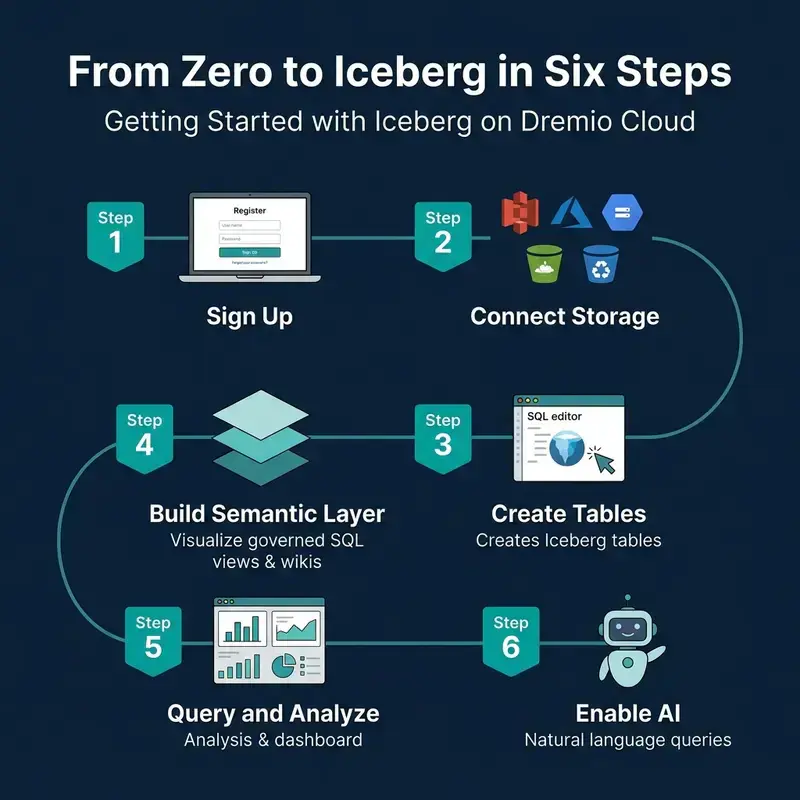
From zero to Iceberg in six steps on Dremio Cloud

This is Part 14 of a 15-part Apache Iceberg Masterclass. Part 13 covered streaming approaches. This article is a practical walkthrough of working with Iceberg on Dremio Cloud, covering table creation, data ingestion, optimization, semantic layer construction, and AI-powered analytics.

Table of Contents

  1. What Are Table Formats and Why Were They Needed?
  2. The Metadata Structure of Current Table Formats
  3. Performance and Apache Iceberg’s Metadata
  4. Technical Deep Dive on Partition Evolution
  5. Technical Deep Dive on Hidden Partitioning
  6. Writing to an Apache Iceberg Table
  7. What Are Lakehouse Catalogs?
  8. Embedded Catalogs: S3 Tables and MinIO AI Stor
  9. How Iceberg Table Storage Degrades Over Time
  10. Maintaining Apache Iceberg Tables
  11. Apache Iceberg Metadata Tables
  12. Using Iceberg with Python and MPP Engines
  13. Streaming Data into Apache Iceberg Tables
  14. Hands-On with Iceberg Using Dremio Cloud
  15. Migrating to Apache Iceberg

Getting Started

From zero to Iceberg in six steps on Dremio Cloud

Step 1: Sign Up and Connect Storage

  1. Create a Dremio Cloud account (free trial available)
  2. Add a cloud storage source (S3, ADLS, or GCS) through the Sources panel
  3. Configure credentials and target bucket

Dremio creates an Open Catalog for your Iceberg tables automatically. This Polaris-based catalog handles metadata management, access control, and automatic optimization.

Step 2: Create Iceberg Tables

CREATE TABLE analytics.orders (
    order_id BIGINT,
    customer_id BIGINT,
    order_date DATE,
    amount DECIMAL(10,2),
    status VARCHAR,
    region VARCHAR
)
PARTITION BY (day(order_date))

This creates a table with hidden partitioning by day. Users query on order_date naturally; the engine handles partition pruning automatically.

Step 3: Ingest Data

From files in object storage:

COPY INTO analytics.orders
FROM '@my_s3_source/raw/orders/'
FILE_FORMAT 'parquet'

From another table or source:

INSERT INTO analytics.orders
SELECT * FROM postgres_source.public.orders
WHERE order_date >= '2024-01-01'

Dremio’s federation can query data in PostgreSQL, MySQL, Oracle, MongoDB, S3 files, and other sources directly. You can migrate data into Iceberg tables with a single INSERT…SELECT statement.

The Dremio Platform

Dremio Cloud features for Iceberg including Open Catalog, federation, semantic layer, and AI

Columnar Cloud Cache

Dremio’s Columnar Cloud Cache (C3) stores frequently accessed Iceberg data on local NVMe SSDs attached to the query engine nodes. When a query accesses data for the first time, Dremio caches the relevant columns locally. Subsequent queries against the same data read from local SSD instead of remote object storage, reducing latency from hundreds of milliseconds to single-digit milliseconds.

C3 operates transparently. You do not need to configure which data to cache. Dremio tracks access patterns and caches the most-queried data automatically.

Connecting BI Tools

Dremio exposes Iceberg data through ODBC, JDBC, and Arrow Flight endpoints. Any BI tool (Tableau, Power BI, Looker, Superset) can connect to Dremio and query Iceberg tables as if they were a traditional database. The semantic layer ensures consistent governance and naming across all connected tools.

Semantic Layer

Dremio’s semantic layer lets you create governed SQL views that serve as the interface between raw data and consumers:

CREATE VIEW analytics.customer_orders AS
SELECT
    o.customer_id,
    c.customer_name,
    c.region,
    SUM(o.amount) AS total_spend,
    COUNT(*) AS order_count
FROM analytics.orders o
JOIN analytics.customers c ON o.customer_id = c.customer_id
GROUP BY o.customer_id, c.customer_name, c.region

Add wikis and tags to views and tables through the Dremio UI. These descriptions help other users find and understand data, and they power the AI agent’s ability to generate accurate SQL from natural language.

Reflections (Query Acceleration)

Dremio Reflections are precomputed materializations that automatically accelerate queries without requiring changes to your SQL. When you create a reflection on a view or table, Dremio precomputes the results and stores them as optimized Iceberg tables on fast storage:

-- Create an aggregation reflection for fast dashboard queries
ALTER TABLE analytics.customer_orders
  CREATE AGGREGATE REFLECTION customer_orders_agg
  USING DIMENSIONS (region, order_date)
  MEASURES (total_spend SUM, order_count SUM)

When a query matches the reflection’s definition, Dremio serves it from the precomputed data instead of scanning the full table. Queries that take 30 seconds against raw data can complete in under 1 second with reflections. The query optimizer chooses the reflection transparently, so users and applications do not need to know reflections exist.

Data Governance

Dremio provides column-level access control and row-level filtering directly in the semantic layer:

-- Create a view that masks PII for non-privileged users
CREATE VIEW analytics.orders_masked AS
SELECT
    order_id,
    CASE WHEN is_member('finance_team') THEN customer_name
         ELSE '***MASKED***' END AS customer_name,
    order_date,
    amount
FROM analytics.orders

Governance policies defined in the semantic layer apply consistently regardless of which tool (BI dashboard, Python notebook, AI agent) queries the data. This approach is more maintainable than duplicating access policies in every consuming application.

Query Federation

One of Dremio’s unique capabilities is querying Iceberg tables alongside data in other systems:

-- Join Iceberg table with a PostgreSQL table
SELECT i.order_id, i.amount, p.payment_status
FROM analytics.orders i
JOIN postgres_source.public.payments p
ON i.order_id = p.order_id

This eliminates the need to move all data into Iceberg before you can query it. You can start with federation and migrate incrementally. Federation is especially useful during migration: query legacy systems and Iceberg tables side by side, then swap the underlying source when you are ready.

Essential SQL Operations

Four essential Iceberg SQL operations on Dremio: CREATE, COPY INTO, OPTIMIZE, and time travel

Table Optimization

-- Compact small files
OPTIMIZE TABLE analytics.orders REWRITE DATA USING BIN_PACK

-- Compact with sorting for better file skipping
OPTIMIZE TABLE analytics.orders REWRITE DATA USING SORT (order_date, customer_id)

-- Expire old snapshots
ALTER TABLE analytics.orders EXPIRE SNAPSHOTS OLDER_THAN = '2024-04-01 00:00:00'

For tables managed by Open Catalog, Dremio runs automatic table optimization in the background, handling compaction, expiry, and orphan cleanup without user intervention.

Time Travel

-- Query the table as of a specific timestamp
SELECT * FROM analytics.orders
AT TIMESTAMP '2024-03-01 00:00:00'

-- Compare current data to a previous snapshot
SELECT
    current_data.region,
    current_data.total - old_data.total AS growth
FROM (SELECT region, SUM(amount) AS total FROM analytics.orders GROUP BY region) current_data
JOIN (
    SELECT region, SUM(amount) AS total
    FROM analytics.orders AT TIMESTAMP '2024-01-01'
    GROUP BY region
) old_data ON current_data.region = old_data.region

Metadata Inspection

-- Check table health
SELECT AVG(file_size_in_bytes)/1048576 AS avg_mb, COUNT(*) AS files
FROM TABLE(table_files('analytics.orders'))

-- Review recent snapshots
SELECT committed_at, operation, summary
FROM TABLE(table_snapshot('analytics.orders'))
ORDER BY committed_at DESC LIMIT 5

AI-Powered Analytics

Dremio’s built-in AI agent converts natural language questions into SQL queries using the semantic layer’s wikis and tags as context:

  • “Show me the top 10 customers by total spend this quarter”
  • “What was the month-over-month revenue growth by region?”
  • “Which products had the highest return rate last month?”

The AI agent generates standard SQL, meaning the results are transparent and auditable. Users can see exactly what SQL was generated, verify it, and refine it. This is different from black-box AI analytics tools that hide the underlying logic.

MCP Server for External AI Agents

The MCP Server extends Dremio’s data access to external AI agents and tools through the Model Context Protocol. LLMs running in Claude, ChatGPT, or custom agent frameworks can query your Iceberg lakehouse through MCP, inheriting all the governance, semantic context, and optimization that Dremio provides.

This positions Dremio as the data layer for agentic AI workflows: the AI agent asks questions in natural language, MCP translates them into governed SQL, and Dremio returns the results from optimized Iceberg tables.

Part 15 covers strategies for migrating existing data into Iceberg.

Books to Go Deeper

Free Resources

🤫 Firebase Is Quietly Preparing for an Offline-First AI Future

Firebase announcements at Google I/O 2026 covered an array of products and features, but the one that grabbed my attention the most was Firebase itself. Most people are understandably focused on Gemini integrations, AI Studio, and the new SQL capabilities inside Firebase, but I believe there is something deeper happening underneath these announcements.

Firebase introduced offline caching support, which helps applications remain responsive even in little or no connectivity. Combined with local and hybrid AI inference, this suggests that Firebase is quietly moving toward an offline-first, hybrid-intelligence model.

A large number of companies are transitioning to the cloud because of the convenience of not managing physical infrastructure and data servers. However, cloud dependency comes with its own trade-offs. Heavy reliance on cloud infrastructure introduces dependence on continuous high-speed internet connectivity, recurring subscription costs, and potential vendor lock-in.

The reality is that not every place in the world has fast and stable internet connectivity. Offline caching can help reduce cloud costs while improving application responsiveness, even in low-connectivity environments.

Modern Applications Are Too Cloud Dependent

Modern applications often assume that users:

  • have constant internet access,
  • can perform fast cloud API calls with low latency,
  • and are always connected to online AI services.

In reality, connectivity is far from universal, especially in rural areas, trains, crowded public networks, and emerging markets such as India.

AI has further increased cloud dependence because AI applications continuously send prompts, images, voice data, and user content to remote servers. This increases:

  • latency,
  • cloud costs,
  • bandwidth usage,
  • and potential privacy concerns.

As a result, “smart applications” can quickly become fragile applications when internet connectivity is lost. AI features stop functioning, synchronization fails, and the overall user experience degrades significantly.

What Firebase Actually Announced

Firebase introduced custom resolvers, allowing developers to extend Firebase Data Connect beyond Cloud SQL and integrate additional data sources. Alongside this, realtime sync improves application UX by enabling live updates and synchronization across devices.

However, the most interesting feature, in my opinion, is offline cache support, which helps applications remain responsive even with limited or no connectivity. Firebase AI Logic also supports local inference with cloud fallback, allowing certain AI workloads to run directly on-device while heavier tasks can still rely on cloud infrastructure when required.

Additionally, Firebase AI Logic simplifies the integration of generative AI features without requiring extensive server-side setup. It supports multiple programming languages, including Kotlin, Java, Swift, and Flutter.

Taken together, these are not isolated features. Firebase appears to be gradually reducing dependence on centralized cloud execution.

Firebase Is Moving Toward an Offline-First AI Architecture

With offline caching, applications can remain usable even without network connectivity by treating local application state as a first-class component. Synchronization can happen later once connectivity is restored. This improves responsiveness, resilience, and overall application UX while reducing the frequency of frustrating “No Internet Connection” screens.

Local AI inference also changes the compute model. Instead of every AI request depending entirely on cloud APIs, certain AI tasks can now happen directly on-device. For example, in an AI-powered note-taking application, features such as summarization, translation, smart suggestions, and classification could potentially run locally without continuously communicating with remote servers.

For heavier reasoning tasks, hybrid inference becomes important. Lightweight tasks can execute locally, while more computationally intensive operations can seamlessly fall back to cloud models when necessary. This creates a distributed intelligence model where computation is shared between the device and the cloud.

Why This Matters for Emerging Markets

Many cloud-first applications are designed around assumptions that often reflect:

  • Silicon Valley-like infrastructure conditions,
  • premium hardware,
  • and stable high-speed internet connectivity.

However, the ground reality is very different for billions of users around the world. Many people rely on affordable Android devices and unstable mobile networks.

Hybrid architectures can help address this gap by enabling:

  • lower latency,
  • reduced bandwidth usage,
  • partially offline AI experiences,
  • and better accessibility.

This is particularly important for regions such as India, Africa, and Southeast Asia, where connectivity challenges still exist despite massive growth in smartphone adoption.

The Bigger Industry Shift

With the rapid growth of AI, the industry is gradually moving toward edge AI. Examples include:

  • on-device Gemini,
  • Apple Intelligence,
  • AI NPUs in smartphones,
  • and local LLMs.

The future of AI may not remain fully centralized. Instead, intelligence may become distributed across devices, edge systems, and cloud infrastructure working together collaboratively.

Critique and Challenges

Like any architectural shift, this approach also comes with trade-offs.

Local AI inference introduces the challenge of device fragmentation. Not all devices are capable of handling local AI workloads efficiently. On-device inference can also increase battery consumption and thermal load.

Hybrid architectures are often more difficult to monitor, debug, and optimize compared to traditional centralized cloud systems.

There is also the issue of vendor lock-in. Heavy dependence on tools such as Firebase, Gemini, and the broader Google Cloud ecosystem could limit developer flexibility over time.

Finally, local models still have computational limitations compared to larger cloud-hosted models.

Conclusion

I believe the Firebase announcements at Google I/O 2026 were not simply about adding more AI capabilities. They reflected a broader shift in how modern applications may operate in the future: less dependent on permanent connectivity, more resilient at the edge, and increasingly capable of running intelligence closer to the user.

The most important AI infrastructure trend may not be larger models alone, but the gradual movement of intelligence from centralized cloud systems toward user devices themselves.

If you liked the blog, consider sharing it among your peers and follow me on Linkedin, Twitter and subscribe to my Youtube Channel.

Should Angular Apps Still Rely on RxJS in 2026?

Angular is going through a quiet but important shift in how reactivity is handled. With the introduction of Signals, many developers are starting to ask a simple question:

Do we still need RxJS in Angular applications in 2026?

The short answer is: yes — but not everywhere.

The real answer is more interesting, and it’s about architecture, not preference.

Two different mental models

To understand the discussion, it helps to separate two fundamentally different models of reactivity.

RxJS: asynchronous streams

RxJS is built around:

  • event streams
  • asynchronous composition
  • time-based operations

It shines when dealing with:

  • HTTP requests
  • WebSockets
  • complex async workflows
  • event orchestration

RxJS is about time and events.

Signals: local reactive state

Signals represent a different idea:

  • synchronous reactivity
  • local state tracking
  • explicit dependencies

They are best suited for:

  • UI state
  • derived state
  • component-level reactivity

Signals are about state and UI consistency.

Code comparison

Signals example

import { signal, computed } from '@angular/core';

const count = signal(0);

const doubled = computed(() => count() * 2);

function increment() {
  count.set(count() + 1);
}

Signals make state and dependencies explicit. No subscriptions, no hidden wiring.

RxJS example

import { BehaviorSubject, map } from 'rxjs';

const count$ = new BehaviorSubject(0);

const doubled$ = count$.pipe(
  map(value => value * 2)
);

function increment() {
  count$.next(count$.value + 1);
}

RxJS introduces a stream-based model where everything flows through observables.

The real problem is not technology, but mixing models

The biggest architectural issue in modern Angular applications is not choosing between RxJS and Signals.

It is mixing them without clear boundaries.

When both are used everywhere:

  • state becomes duplicated
  • logic becomes scattered
  • it becomes unclear where the “source of truth” lives

Where RxJS is still the right tool

Even in 2026, RxJS is still essential:

  • HTTP request pipelines
  • cancellation and retry logic
  • real-time data streams
  • coordination of multiple async sources

If the problem involves time, concurrency, or event composition, RxJS is still the better abstraction.

Where Signals are a better fit

Signals work better when the problem is local and state-driven:

  • component state
  • derived UI values
  • form state
  • simple reactive bindings

Signals reduce unnecessary complexity and make data flow more explicit.

Architectural boundary

A simple rule:

RxJS handles the outside world.
Signals handle the UI world.

  • RxJS = integration layer
  • Signals = presentation layer

When this boundary is respected, Angular applications become significantly easier to maintain.

Final thoughts

In 2026, RxJS is not obsolete in Angular — it is simply no longer the only reactive model.

Signals introduce a second layer that allows developers to simplify UI logic without abandoning reactive power.

The best Angular applications are not those that choose one over the other, but those that clearly define when to use each.

Architecture is not about tools.
It is about boundaries.

AI Workflow Automation Needs More Than Another Script

Most teams do not start with a workflow automation strategy.

They start with a small problem.

A lead needs to be added to a CRM.

A support message needs to be routed to the right person.

A form submission needs to trigger an email.

A spreadsheet needs to be updated after a payment.

A Slack message needs to be sent when something important happens.

At first, the solution is simple.

Someone writes a script.

Someone connects a few tools.

Someone creates a small automation.

Someone schedules a cron job.

And for a while, that works.

But as the team grows, the number of small automations grows too. Eventually, those little scripts and one-off workflows become part of how the business actually operates.

That is where the real challenge begins.

The future of automation is not just about connecting tools. It is about building reliable systems that can understand context, move data, trigger actions, and support real business operations.

That is why AI workflow automation is becoming so important.

The problem is not lack of tools

Most companies already use plenty of software.

There may be a CRM for sales, a helpdesk for support, a project management system for tasks, a billing platform for payments, spreadsheets for reporting, email for communication, and Slack or Discord for internal updates.

Each tool solves a specific problem.

The issue is what happens between those tools.

Data has to move.

People have to follow up.

Messages have to be summarized.

Records have to be updated.

Tickets have to be categorized.

Reports have to be created.

Customers have to be routed to the right team.

This in-between work is usually repetitive, but still important.

It is also where teams lose a lot of time.

A workflow automation platform helps reduce this friction by connecting systems and making processes repeatable.

But traditional automation has limits.

Traditional automation is good at rules

Most workflow automation starts with simple logic.

If this happens, then do that.

If a form is submitted, create a lead.

If a payment succeeds, send a receipt.

If a ticket is opened, notify support.

If a meeting ends, create a follow-up task.

This is useful because the input and output are predictable.

The problem is that many real workflows are not perfectly structured.

A customer email may contain multiple requests.

A lead may describe their needs in messy language.

A support ticket may need to be classified by urgency.

A sales conversation may need to be summarized before it is useful.

A document may need to be analyzed before a workflow can continue.

This is where AI changes the role of automation.

AI workflow automation allows workflows to do more than move data. It allows them to interpret information, summarize context, classify inputs, extract details, generate responses, and prepare decisions.

That makes automation useful in areas that previously required constant human review.

Why n8n is useful for AI workflow automation

n8n has become popular because it gives teams flexibility.

It is visual enough for building workflows quickly, but technical enough for developers and operations teams that need more control.

With n8n workflow automation, teams can connect APIs, databases, internal tools, SaaS products, webhooks, and AI models inside the same workflow.

That flexibility matters.

Many teams do not want a rigid automation tool that only supports basic use cases. They want a system that can handle custom logic, branching, data transformation, API calls, and AI-powered steps.

For example, a team might use n8n to receive a webhook, enrich a lead, summarize the lead’s message with AI, score the intent, update the CRM, create a task, and notify the sales team.

That is no longer just app-to-app automation.

That is an operational workflow.

AI workflows are different from normal workflows

Adding AI to a workflow changes what the workflow can do.

A normal workflow might check whether a field equals a specific value.

An AI-powered workflow can read a message and infer what the person is asking for.

A normal workflow might send the same email template to everyone.

An AI-powered workflow can generate a personalized draft based on context.

A normal workflow might route tickets based on selected categories.

An AI-powered workflow can classify the ticket even if the customer wrote it in natural language.

This is the real value of AI workflow automation.

It helps teams automate work that is repetitive but not always cleanly structured.

That does not mean AI should make every decision by itself. In many cases, the best workflows still keep humans involved at key points.

The difference is that AI can prepare the work before a person gets involved.

It can summarize, classify, extract, draft, and organize information so the human only handles the part that actually requires judgment.

The hidden problem: reliability

Building a workflow is only one part of the problem.

Running it reliably is another.

This becomes more important when workflows start supporting real business processes.

If an automation sends a casual internal notification and fails once, it may not matter much.

But if an automation handles lead routing, customer onboarding, ticket classification, billing updates, or operational reporting, failure becomes serious.

A broken workflow can mean missed leads, delayed support, inaccurate reports, or manual cleanup later.

That is why automation infrastructure matters.

A workflow automation platform should not only make workflows easy to build. It should also make them reliable enough to run in production.

For tools like n8n, this means thinking about deployment, uptime, backups, monitoring, updates, logs, environment variables, API keys, queues, and recovery.

Those things are not exciting, but they are what make automation dependable.

Self-hosting gives control, but also responsibility

One reason teams like n8n is that it can be self-hosted.

That is a big advantage for teams that want more control over data, configuration, and infrastructure.

But self-hosting also means someone has to manage the system.

Someone has to set up the server.

Someone has to configure SSL.

Someone has to handle updates.

Someone has to monitor failed executions.

Someone has to manage backups.

Someone has to troubleshoot the deployment when something breaks.

For developers and DevOps teams, that may be acceptable.

For founders, agencies, lean teams, and operations teams, it can quickly become a distraction.

The goal of automation is to reduce manual work. But if the team spends too much time maintaining the automation infrastructure, the platform starts creating another operational burden.

That is the tradeoff many teams run into.

Where Agntable fits in

Agntable is built for teams that want to run powerful open-source automation and AI tools without managing all of the infrastructure manually.

Instead of spending time setting up servers, configuring deployments, managing SSL, handling backups, and troubleshooting infrastructure, teams can focus on building useful workflows.

For teams using n8n workflow automation, this means they can get the flexibility of n8n while reducing the operational work needed to keep it running.

For teams building AI workflow automation, this matters even more.

AI workflows often depend on multiple services: model providers, webhooks, databases, APIs, queues, files, and internal tools. If the hosting layer is unreliable, the workflow becomes unreliable too.

Agntable helps teams move faster by making the deployment and management layer simpler.

You can learn more about Agntable here:

https://www.agntable.com/

A workflow automation platform should help teams focus on workflows

The best automation platform is not just the one with the most integrations.

It is the one that helps teams build reliable workflows without slowing them down.

For developers, flexibility matters.

For operations teams, reliability matters.

For founders, speed matters.

For agencies, repeatability matters.

For businesses, the final outcome matters: fewer manual tasks, fewer mistakes, faster execution, and better use of team time.

That is why AI workflow automation is becoming a serious part of modern operations.

It is not just about saving a few minutes.

It is about building systems that help the business run more smoothly.

The future of automation is smarter and more connected

The next generation of automation will not only connect tools.

It will understand context.

It will combine workflow automation, AI models, APIs, databases, human approvals, and business logic into systems that can handle more complex work.

n8n is one of the tools making this possible because it gives teams a flexible way to design workflows.

AI makes those workflows more capable.

Managed infrastructure makes them easier to run.

Together, these pieces are becoming the foundation for modern workflow automation.

Final thoughts

Most teams do not need more disconnected tools.

They need better systems between the tools they already use.

That is where AI workflow automation becomes valuable.

With n8n, teams can design flexible workflows that connect apps, APIs, and internal systems. With AI, those workflows can understand and process unstructured information. With Agntable, teams can run automation tools without taking on the full burden of infrastructure management.

The goal is simple.

Spend less time moving data manually.

Spend less time maintaining servers.

Spend less time fixing broken processes.

And spend more time building the work that actually moves the business forward.

Reviving Cineverse: From Local Storage to Firebase 🚀

This is a submission for the GitHub Finish-Up-A-Thon Challenge

What I Built

I built Cineverse, a cinematic movie discovery app powered by the TMDB API. It allows users to:

  • 🎬 Browse trending and popular movies
  • 🔍 Search for any movie by title
  • 📖 View detailed movie info (ratings, overview, release date)
  • ❤️ Save favorites and manage a personal watchlist
  • 👤 Create an account and sync data across devices
  • 🛡️ Admin dashboard with role-based access control

The app is built with Flutter, backed by Firebase Authentication and Cloud Firestore, and designed with a premium dark cinematic theme.

Demo

🔗 GitHub Repository: github.com/Ali23102001/cineverse_app

Key Features in Action

Feature Description
🔐 Login & Register Email/Password + Google Sign-In via Firebase Auth
📧 Email Verification New users must verify their email before accessing the app
🏠 Home Screen Trending movies fetched live from the TMDB API
🔍 Search Real-time movie search with beautiful result cards
🎬 Movie Details Full movie info with backdrop images, ratings, and overview
❤️ Favorites & Watchlist Cloud-synced via Firestore — accessible from any device
👤 Profile User profile with sign-out and account management
🛡️ Admin Dashboard Restricted to admin email only, with automatic redirect for unauthorized users

The Comeback Story

❌ Before: The Abandoned Prototype

Cineverse started as a basic Flutter project — a simple movie browsing app with:

  • Local storage for everything (no cloud, no sync)
  • No real authentication system
  • No user accounts, favorites, or watchlists
  • Constant crashes on Android due to misconfigured build files
  • Just a skeleton that looked okay but didn’t work as a real app

I abandoned it because the jump from “local prototype” to “production-ready app” felt overwhelming. Firebase configuration, platform-specific issues, authentication flows… it was too much to tackle at the time.

✅ After: The Finished Product

When the GitHub Finish-Up-A-Thon Challenge dropped, I knew this was the one. Here’s everything I changed:

  1. 🔥 Firebase Authentication — Completely replaced local storage auth with Firebase. Users can now sign up with Email/Password or Google Sign-In, with full email verification flow.

  2. ☁️ Cloud Firestore Integration — User profiles, favorites, and watchlists are stored in Firestore and sync across all devices in real-time.

  3. 🛡️ Admin Dashboard — Built a secure admin panel restricted by email-based role checking. Unauthorized users get automatically redirected to the home screen.

  4. 🔧 Platform Fixes — Resolved deep Android build crashes (build.gradle.kts, AndroidManifest.xml) and Web configuration issues that were preventing Firebase from initializing properly.

  5. 🎨 Polished UI — Refined the splash screen, navigation shell, and overall theme to feel premium and cinematic.

  6. 📧 Email Verification Screen — Added a dedicated verification flow so users can’t access the app without confirming their email first.

The app went from a broken prototype to a fully functional, cloud-synced movie discovery platform.

My Experience with GitHub Copilot

GitHub Copilot was instrumental in finishing this project. Here’s specifically how it helped:

🚀 Firebase Boilerplate

Setting up firebase_auth, google_sign_in, and cloud_firestore involves a LOT of repetitive setup code. Copilot auto-completed entire authentication service methods — sign in, sign up, sign out, email verification — saving me hours of typing and documentation-checking.

🔧 Platform Configuration Hell

The hardest part of reviving Cineverse was fixing Android and Web platform configs. Copilot helped me:

  • Fix the build.gradle.kts Kotlin DSL syntax for Firebase plugins
  • Configure the correct AndroidManifest.xml intent filters for Google Sign-In
  • Set up firebase_options.dart with the right project configuration

🛡️ Access Control Logic

When I needed to restrict the Admin Dashboard to a specific admin email, Copilot immediately suggested the pattern: check FirebaseAuth.instance.currentUser?.email on screen load, and redirect unauthorized users using Navigator.pushReplacement. Clean and effective.

🧭 Navigation & State Management

Copilot helped me refactor the app’s navigation from simple push/pop to a proper shell-based layout with a bottom navigation bar, ensuring smooth transitions between Home, Search, Favorites, Watchlist, and Profile screens.

Bottom line: Copilot turned what would have been a multi-week slog through Firebase docs into a focused, productive revival. It felt like pair-programming with someone who already knew the entire Firebase + Flutter ecosystem by heart.

Built with ❤️ using Flutter, Firebase, and GitHub Copilot

Approaches to Streaming Data into Apache Iceberg Tables

Three approaches to streaming data into Iceberg: Spark, Flink, and Kafka Connect

This is Part 13 of a 15-part Apache Iceberg Masterclass. Part 12 covered Python and MPP engines. This article covers the three primary approaches to streaming data into Iceberg tables and the operational trade-offs each creates.

Iceberg was designed for batch analytics, but most production data arrives continuously. Streaming ingestion bridges this gap by committing data to Iceberg tables at regular intervals. The challenge is that frequent commits create the small file problem, and managing that trade-off between data freshness and table health is the central concern of streaming to Iceberg.

Table of Contents

  1. What Are Table Formats and Why Were They Needed?
  2. The Metadata Structure of Current Table Formats
  3. Performance and Apache Iceberg’s Metadata
  4. Technical Deep Dive on Partition Evolution
  5. Technical Deep Dive on Hidden Partitioning
  6. Writing to an Apache Iceberg Table
  7. What Are Lakehouse Catalogs?
  8. Embedded Catalogs: S3 Tables and MinIO AI Stor
  9. How Iceberg Table Storage Degrades Over Time
  10. Maintaining Apache Iceberg Tables
  11. Apache Iceberg Metadata Tables
  12. Using Iceberg with Python and MPP Engines
  13. Streaming Data into Apache Iceberg Tables
  14. Hands-On with Iceberg Using Dremio Cloud
  15. Migrating to Apache Iceberg

Three Streaming Architectures

Three approaches to streaming data into Iceberg: Spark, Flink, and Kafka Connect

Spark Structured Streaming

Spark Structured Streaming processes data in micro-batches and commits to Iceberg at configurable intervals:

df = spark.readStream.format("kafka") 
    .option("subscribe", "events") 
    .load()

df.writeStream.format("iceberg") 
    .outputMode("append") 
    .option("checkpointLocation", "s3://checkpoint/events") 
    .trigger(processingTime="60 seconds") 
    .toTable("analytics.events")

Each trigger creates a new Iceberg commit with the accumulated data. A 60-second trigger produces 1,440 commits per day, each adding a small number of files.

Latency: Seconds to minutes (configurable via trigger interval).
Small file impact: Moderate. Longer trigger intervals produce fewer, larger files.
Best for: Teams already using Spark for batch processing who want to add near-real-time ingestion.

Apache Flink Iceberg Sink

Flink processes events continuously and commits to Iceberg at checkpoint intervals:

-- Flink SQL
INSERT INTO iceberg_catalog.analytics.events
SELECT event_id, event_time, payload
FROM kafka_source

Flink’s checkpointing mechanism determines commit frequency. A 30-second checkpoint interval produces commits every 30 seconds with whatever data has accumulated.

Exactly-once semantics: Flink’s checkpoint mechanism provides exactly-once delivery guarantees to Iceberg. If a Flink job crashes, it recovers from its last checkpoint and replays any data that was not yet committed to Iceberg. This means no duplicate records and no data loss, which is critical for financial and transactional data pipelines.

Partitioned writes: Flink can route events to partitions dynamically based on partition transforms. Combined with Iceberg’s hidden partitioning, this means streaming data lands in the correct partition directory automatically without any special logic in the streaming application.

Upserts and CDC: Flink supports changelog streams (insert, update, delete operations) and can write them to Iceberg as equality deletes and data files. This enables CDC (change data capture) patterns where a database’s transaction log is streamed directly into an Iceberg table, maintaining a near-real-time copy.

Latency: Seconds (tied to checkpoint interval).
Small file impact: High. Frequent checkpoints produce many small files.
Best for: Teams needing the lowest-latency streaming with exactly-once semantics and CDC support.

Kafka Connect Iceberg Sink

The Iceberg Sink Connector reads directly from Kafka topics and writes to Iceberg tables:

{
  "name": "iceberg-sink",
  "config": {
    "connector.class": "org.apache.iceberg.connect.IcebergSinkConnector",
    "topics": "events",
    "iceberg.catalog.type": "rest",
    "iceberg.catalog.uri": "https://catalog.example.com",
    "iceberg.tables": "analytics.events"
  }
}

Latency: Minutes (Kafka Connect batches records before committing).
Small file impact: Lower than Spark/Flink because commits are less frequent.
Best for: Organizations with existing Kafka infrastructure that want a managed connector approach.

Apache Iceberg Sink Connector: The community-maintained Iceberg Sink Connector for Kafka Connect supports schema evolution from Kafka’s Schema Registry, automatic table creation, and partition routing. It reads records from Kafka topics, buffers them in memory, and commits to Iceberg in configurable batch intervals.

Operational simplicity: Kafka Connect is a managed framework. You deploy the connector configuration, and Kafka Connect handles scaling, offset management, and fault recovery. There is no custom application code to write or maintain. For organizations that already run Kafka Connect for other sinks (databases, search indexes), adding an Iceberg sink is straightforward.

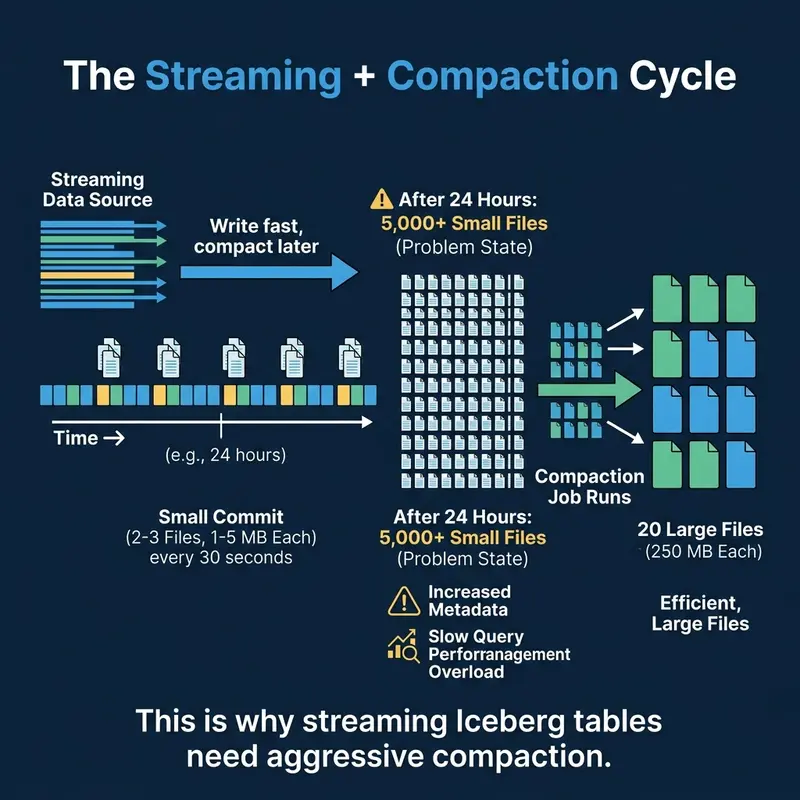
The Streaming + Compaction Cycle

Why streaming creates small files and how compaction fixes them in a continuous cycle

Every streaming approach shares the same fundamental problem: frequent commits produce small files. The solution is to pair streaming ingestion with aggressive compaction.

A typical production pattern:

  1. Stream data in via Flink or Spark with 60-second commit intervals
  2. Run compaction every hour to merge small files from the last hour into optimally-sized files
  3. Expire snapshots daily to clean up the accumulated snapshot metadata

Dremio’s automatic table optimization handles this compaction automatically for tables managed by Open Catalog. AWS S3 Tables also provides built-in compaction for streaming workloads.

The Latency vs. Maintenance Trade-off

The spectrum from real-time to batch showing how latency affects small file production

The Latency vs. Maintenance Trade-off

The key insight: you do not always need sub-second latency. Most dashboards refresh every 5-15 minutes. If your consumers can tolerate 5-minute data freshness, using a 5-minute trigger interval produces 90% fewer small files and dramatically reduces compaction overhead.

Production Streaming Architecture

A production streaming-to-Iceberg pipeline typically includes four components:

  1. Message queue (Kafka, Kinesis, Pulsar): Buffers events from source systems
  2. Stream processor (Flink, Spark Streaming): Transforms and writes to Iceberg
  3. Compaction service (Dremio auto-optimization, Spark scheduled jobs): Merges small files on a recurring schedule
  4. Monitoring (metadata tables): Tracks file counts, sizes, and commit frequency

The most common mistake in streaming Iceberg architectures is deploying the stream processor without the compaction service. Without compaction, query performance degrades within days. Always deploy both together.

Choosing the Right Approach

Choosing the Right Approach

Monitoring Streaming Health

After deploying a streaming pipeline, monitor these metrics daily using metadata tables:

  • Commit frequency: How many snapshots are being created per hour?
  • Average file size: Is the small file problem growing?
  • Compaction lag: Are compaction jobs keeping up with the write rate?
  • End-to-end latency: How long between an event occurring and it being queryable in Iceberg?

A well-tuned streaming pipeline commits every 1-5 minutes, produces files of 32-128 MB per commit, and has compaction running every 30-60 minutes to consolidate the small files into 256 MB targets.

Part 14 provides a hands-on walkthrough of Iceberg on Dremio Cloud.

Books to Go Deeper

Free Resources

How to Add Rounded Corners to an Image Online

Rounded corners can make a screenshot, avatar, product image, or blog graphic feel more polished. The effect is small, but it often makes an image fit better inside a modern website, presentation, or social post.

The easiest way to add rounded corners depends on what you need next.

If the image is only going on a website, CSS might be enough:

img {
  border-radius: 24px;
}

But CSS does not create a new image file. If you need to download and use the edited image somewhere else, you need a tool that exports the result.

That is where a browser-based image tool is useful.

Quick method

  1. Open https://image-corners.utilforge.xyz
  2. Drop your image into the tool.
  3. Adjust the corner radius slider.
  4. Add a border if the image needs separation from the background.
  5. Choose transparent or solid background.
  6. Export as PNG, JPG, or WebP.

PNG is usually the best choice when you want transparent corners. JPG is fine for photos when transparency does not matter. WebP is a good modern option for web use.

When rounded corners help

Rounded corners are especially useful for:

  • app screenshots
  • landing page images
  • product documentation
  • blog graphics
  • avatars
  • social media posts
  • thumbnail images

They are not always needed. If the image already sits inside a designed frame, extra rounding can look redundant. But for raw screenshots, a little radius and padding can make the image feel more intentional.

Border or no border?

Use a border when the edge of the image blends into the page. This often happens with screenshots that have a white or very light background.

A thin gray or muted color border is usually enough. Thick borders can work for social graphics, but they often look heavy in documentation or product pages.

Transparent vs solid background

Use transparent background when you want the image to sit naturally on different page colors.

Use a solid background when you want a consistent card-like image, especially for social media, slide decks, or thumbnails.

Final tip

The most natural-looking rounded corners are usually subtle. Try a radius between 16px and 48px for normal screenshots, then adjust based on image size.