Arrêtons de deviner.

La plupart des organisations ont les outils. Elles ont les certifications. Elles ont les bonnes intentions. Ce qui manque, c’est la structure pour tout faire fonctionner ensemble.

Le travail échappe parce que personne n’en est responsable. Les problèmes s’enveniment parce que personne ne mesure. Les projets dérivent parce que le plan était une présentation que personne n’a rouverte après le coup d’envoi. On arrive aux réunions de suivi, on dit ce qui sonne bien, et on repart sans plus de clarté qu’à l’arrivée.

Ce n’est pas un problème de personnes. C’est un problème de visibilité.

Les outils existent. Personne ne les utilise.

Chaque organisation a une méthodologie de gestion de projet. Beaucoup de gens ont la certification pour le prouver. Le PMBOK sur l’étagère. Le PMP après le nom. Registres de risques, matrices RACI, plans de communication — construits pendant la formation, oubliés après l’examen.

Les livrables sont produits. Les plans sont classés. Et ensuite, l’équipe reprend ses habitudes : fils Slack, connaissances informelles, et celui qui parle le plus fort dans la salle.

Ce n’est pas de la gestion de projet. C’est de la paperasse de projet.

La vraie gestion de projet, c’est un document vivant, pas une soumission. Une RACI qu’on consulte vraiment quand l’imputabilité devient floue. Un registre de risques qu’on ouvre quand quelque chose sent mauvais, pas après l’explosion. Un échéancier qui reflète la réalité et qui se met à jour quand la réalité change.

Les outils fonctionnent. La structure et la discipline pour continuer à les utiliser après la réunion de lancement, c’est ce que la plupart des équipes abandonnent.

Les données ne sont pas un tableau de bord. Ce sont des décisions.

Le même schéma se répète avec les données. Les métriques sont créées, les rapports sont planifiés, les tableaux de bord sont partagés. Et ensuite, personne ne les regarde jusqu’à ce que quelque chose déraille — et même là, la question est souvent “qui blâmer” plutôt que “quoi corriger.”

Le rôle des données, c’est de signaler qu’un problème existe avant qu’il devienne une crise. De montrer où les efforts vont par rapport à là où viennent les résultats. De couper à travers le bruit des récits contradictoires sur comment les choses se passent.

Ça ne fonctionne que si quelqu’un regarde vraiment, pose les bonnes questions, et est prêt à agir sur ce qu’il trouve. La mesure sans suivi, c’est juste du surcoût.

Collaborer, c’est travailler ensemble, pas faire un rapport.

Les réunions de statut où chacun rapporte ce qu’il a fait la semaine dernière ne sont pas de la collaboration. C’est de la mise en scène. Le projet existe sur une scène partagée pendant quinze à quarante-cinq minutes, puis tout le monde retourne dans son silo.

La vraie collaboration, c’est un plan qui est un objet partagé — visible, à jour, et assumé par toute l’équipe. C’est que les problèmes remontent avant de devenir des blocages. C’est une imputabilité franche, avec des responsables qui se tiennent derrière leur équipe.

Quand la gestion de projet et les données sont traitées comme une infrastructure d’équipe plutôt que comme des réflexions après coup, quelque chose change. Le travail devient lisible. Les décisions se prennent plus vite. Les problèmes remontent tôt, quand ils sont encore peu coûteux à régler.

L’écart, c’est l’exécution.

La stratégie, c’est facile. Tout le monde a une vision. L’écart se trouve presque toujours entre ce qui a été décidé et ce qui s’est réellement passé — et cet écart vit là où une exécution structurée devrait être.

Trois choses le comblent :

  • Un plan qui reste vivant — assumé, mis à jour, et utilisé comme outil de décision, pas comme artefact de lancement
  • Des données qui déclenchent l’action — des métriques liées aux résultats, révisées régulièrement, connectées à ce qui change ensuite
  • Une imputabilité structurelle — intégrée au processus pour ne pas dépendre d’une seule personne qui court après tout le monde

Ce n’est pas compliqué. C’est juste de la discipline. Et la discipline, appliquée de façon constante, c’est ce qui sépare les équipes qui exécutent de celles qui sont toujours presque là.
I found Leetcode for System Design, and it’s Awesome

I Found Codemia.io, Leetcode for System Design Interview, and It

I Found Codemia.io, Leetcode for System Design Interview, and It's Awesome

credit- codemia.io

Hello Devs, if you’re preparing for software engineering interviews, particularly MAANG, then you already know that Data Structures & Algorithms (DSA) and System Design are two key areas where you will be tested rigorously.

While LeetCode is the go-to platform for DSA, system design has always been a challenge.

While there are many websites and platforms to prepare for System Design Interviews like ByteByteGo, DesignGurus.io, Exponent, Educative, and Udemy, there is nothing like LeetCode. 

These are great resources to learn fundamentals, go through case studies, and understand the theory part of the System design, but LeetCode-style practice is one thing that is missing – until now. 

I recently found Codemia.io, and I must say, it feels like the LeetCode for System Design.

If you’ve struggled with structuring your system design answers, getting real feedback, or knowing whether your approach is correct, Codemia.io is a game-changer.

They not just have the biggest collection of System Design and OOP Design problems for practice, they also have a free System design course called Tackling System Design Interview Problems, which is a great free resource to learn essential System Design concepts.

It’s a short course with 2 hours of content, but powerful and also has quizzes to test your skills. Here are all the key System design topics you can learn on this free course:

I found Leetcode for System Design and it's Awesome

Now, let’s check out how Codemia.io can help you to prepare better for your System design and OOP Design interview, and why I think it’s like Leetcode for System design.

Most system design resources today are long, text-heavy articles or expensive courses. The problem?

  1. No hands-on practice – Reading about system design isn’t enough; you need to actively design solutions.
  2. No structured progression — Unlike DSA, where problems are categorized by difficulty, system design prep often feels random and overwhelming.
  3. No evaluation or expert feedback — You don’t just need an answer; you need to know why one design is better than another.

This is where Codemia.io changes the game.

I found Codemia.io, Leetcode for System Design and it's Awesome

Instead of just giving you theory-heavy content, Codemia.io provides an interactive, structured, and guided approach to system design. Here’s what I loved:

1. Real-World System Design Problems

Codemia.io has over 120+ system design problems, each with a structured approach similar to how LeetCode presents DSA problems.

For example, consider the classic “Design a URL Shortening Service” problem.

You start with:
1. Functional and Non-Functional Requirements
2. Capacity Estimation
3. Database Schema and API Design
4. High-Level & Low-Level Design

It guides you step by step so you don’t feel lost.

Bonus: You also get access to a drawing board where you can sketch your architecture, just like in a real system design interview.

And most importantly, they also share expert solutions for most of the problems to see how an expert should answer that question. For example, here is the solution of how to design a URL shortening service, and it’s also available for free

I found Leetcode for Software Design and it's Awesome

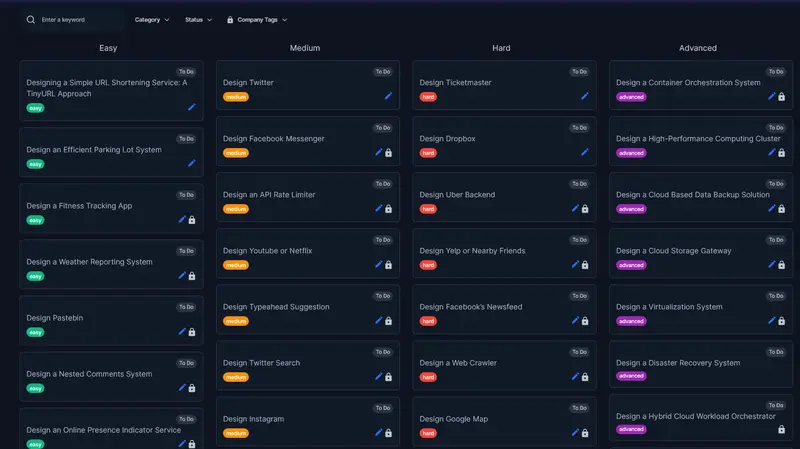
2. Difficulty-Based Categorization

Just like LeetCode, both System design and object-oriented design problems are categorized as:

  • Easy — Foundational concepts like Load Balancing, Caching, Message Queues
  • Medium — Scenarios like Rate Limiting, Search Autocomplete, Real-Time Chat Systems
  • Hard — Complex designs like Distributed Databases, Cloud Storage, and Microservices Architecture

Each problem also includes company tags so you can focus on what’s asked at FAANG and other top tech companies. For example, this how to design Twitter problem is a medium-scale problem, which you can see to get some experience. It’s also free.

I found LeetCode for Software Architect and its Awesome

3. AI-Powered Hints & Evaluations

One of the best features is AI-assisted guidance. You get to chat with the coach — the AI agent that will help you with the question and solution.

1. If you get stuck, AI provides hints — just like LeetCode’s hint system.

2. If you submit a design proposal, AI evaluates it against industry best practices.

3. You get automated feedback on scalability, fault tolerance, and efficiency.

This bridges the gap between self-learning and expert mentorship.

I found Leetcode for Coding Interview and it's Awesome

Beyond System Design: Object-Oriented Design & AI Interviews

Codemia.io goes beyond just system design. It also covers Object-Oriented Design (OOD) Questions. If you don’t know, Object-Oriented Design is a common low-level design (LLD) round at FAANG.

Here are OOP problems you can solve on codemia.io to get some practice:

  • Classic problems like Parking Lot, ATM Machine, and Hotel Booking System
  • Step-by-step UML diagrams and class structure explanations
  • Comparison of different design patterns

If you struggle with OOD interviews, this is a goldmine.

Here is also all the OOP design problems available on Codemia.io

Is Codemia.io good place to learn System Design

Now, let’s see how codemia.io compares with other popular resources we have used in the past to prepare for System Design interview, notably DesignGurus.io, whose Grokking the System Design Interview course is also one of my favorites, and Educative.io, whose modern System design course is also a great resource.

You can see that codemia.io has the highest number of practice problems, 120+ and growing. No other platform has that many questions, which is also a big plus point of this platform, and that’s why I called it “Leetcode of System Design”.

The second important point is an expert-written solution, also known as an editorial solution on this website. There are more than 80+ such solutions, which are a great resource to compare your solution, learn from them, and also find how to answer such questions.

What point to mention, what should you discuss, tradeoffs, and so much more.

Another plus point of codemia.io is that it has object-oriented programming questions, which are not available in other courses, though DesignGurus.io has Grokking the Object Oriented Design Interview course, which you can use for OOP design practice, but again, when it comes to numbers, codemia.io wins.

So far, we have compared the content, but if we talk about the platform, codemia.io has been especially designed for online practice, particularly for design questions.

It comes with Interactive learning tools, interactive feedback and evaluation, a chatbot, and a great design tool for drawing. No other platform supports so many features that are essential to master system design.

Then there is community, and you can also see the solutions of other folks to learn from them. I love this feature as it allows me to see what other folks are thinking and how they solve that problem. This comparative analysis has helped me a lot to learn key system design concepts.

Overall, I think codemia.io is a great platform to prepare for System design and OOP design interviews. You may find courses, but it’s hard to find a platform like this.

I highly recommend it for anyone preparing for System Design and Tech interviews. And, if you want to join now, you can also use the discount code PROMOTION20 to get 20% off now.

Here is the link — 20% OFf on Codemia.io

Codemia.io discount code

Final words

If you’re preparing for FAANG system design interviews, Codemia.io is a must-try. It solves the biggest problems in system design prep:

  • Structured learning path (instead of random articles)
  • Real-world hands-on practice (instead of just reading)
  • Expert evaluation & AI feedback (so you know what to improve)
  • Mock interviews to simulate real conditions

I’m still exploring Codemia.io, but what I’ve seen so far is truly impressive.

If you’ve tried it, let me know what you liked or didn’t like.

Thanks for reading this article so far. If you like this article, then please share it with your friends and colleagues. If you have any questions, feel free to ask in the comments.

P. S. – They are also offering 20% discount now, and you can get access for just $59 for one year, the original price is $120 so you have a chance to save $60 and also learn System design better.

Going Towards Nothing (But Still Applying Anyway)

Applying off-campus, especially in this job market, has been a greater battle for the past couple of years. As AI ATS and other “AI methods” have entered application filtering, it is even harder for employers to notice good employees with good skill sets. HR who put random skill sets they hear from their technical colleagues lead to job descriptions like “we need db, machine learning, UI/UX designing, in a nutshell, everything,” and all for a 12-hour unpaid intern.

Desperation and Its Impact on Mental Health

The “12-hour unpaid intern where you do literally everything” sounds cruel from a sane point of view, but students and freshers still apply to them, thanks to desperation.

Peer pressure, placement panic, news about layoffs, and a tough job market for freshers all cause individuals to doubt their potential. This can lead to a spiral of low self-esteem and self-doubt about their abilities, preventing them from thinking clearly and leading to anxiety attacks and breakdown episodes.

The thought of “I know this internship is terrible” yet still applying for it can really disturb your peace of mind. It feels like you’re heading towards failure, making you more vulnerable and desperate.

The Art of Writing Unrealistic JDs

HRs… I don’t know what they’re doing half the time. And most startups and mid-size companies that don’t have a proper hiring workflow just let HR handle the JDs. And oh boy, the descriptions are wild — “Node, API, REST API, React, Vue.js, Angular” — all for an entry-level or intern role for UI/UX designing. BRUH.

And this leads students and freshers to juggle skill sets half their life, trying to tick every box, and in the process they don’t specialize in a single skill — basically ending up learning none properly at the end of the day.

HRs should actually sit down and have a proper talk with their tech colleagues and ask them “even if the market is sad right now what skills a fresher really needs to have”, and then write the JD based on that.

The market is bad, sure. But that doesn’t mean students should turn into “do everything” machines just to survive it.

Unrealistic expectations from companies shouldn’t become unrealistic pressure on ourselves.

Notion Brain

Notion Brain 🧠 — Visualize Your Thoughts in a 3D Cosmic Universe

This is a submission for the Notion MCP Challenge

What I Built

Notion Brain is a high-performance 3D Knowledge Graph explorer designed to turn your static Notion database into a living, breathing digital “brain.” It visualizes every page as a node in a celestial system, mapping relationships and grouping content into thematic clusters based on internal page-to-page mentions.

Unlike standard linear search, Notion Brain allows you to literally “fly” through your workspace, identify forgotten connections between distant concepts, and interact with an AI-driven summary layer without ever leaving the 3D environment.

Video Demo

WATCH THE LIVE DEMO HERE

Show us the code

The project is built with a FastAPI backend and a React-Three-Fiber frontend, fully optimized for Vercel deployment and low-latency interaction.

👉 GitHub Repository: https://github.com/Snehadas2005/Notion-Brain

How I Used Notion MCP

I integrated the Notion SDK into an asynchronous Python backend to act as the “nervous system” of the application, bridging the gap between raw data and 3D visualization.

  1. Relational Edge Discovery: Using the Notion integration secret, my backend performs a deep scan of the workspace to identify child_page references and page_mentions across blocks. This data is then converted into a graph of nodes and edges.
  2. Multithreaded Block Retrieval: To keep the interface fluid, I implemented a ThreadPoolExecutor that fetches block content in parallel across multiple sub-pages.
  3. AI Oracle Summary Layer: Once a node is targeted, the backend fetches the raw content, parses it into customized Markdown, and passes it to Google Gemini (1.5 Flash). This provides a structural summary (Overview, Key Points, Category) directly inside the 3D HUD, making massive docs instantly readable.

🎨 Design & Tech Stack

The application uses a Brutalist / Manga-inspired aesthetic to create a focused, high-contrast atmosphere:

  • 3D Space: Built with @react-three/fiber and @react-three/drei.
  • Animations: Orchestrated with Framer Motion and GSAP.
  • Backend: FastAPI with httpx for non-blocking AI requests.
  • Deployment: Fully serverless mono-repo deployment on Vercel.

Developed by: Sneha Das

Good luck to everyone in the challenge! 🚀

AI Study Planner — Groq AI + Notion MCP

This is a submission for the Notion MCP Challenge

What I Built

I built an AI Study Planner that generates personalized day-by-day study schedules using Groq AI and automatically syncs them to Notion via Notion MCP.

Students enter:

  • 📖 Exam name (e.g. JEE Mains, GATE, MBA)
  • 📅 Number of study days
  • ⏰ Hours available per day
  • 🗓 Exam date

The AI (Groq LLaMA 3.3) generates a smart topic-by-topic study plan and pushes it directly into a Notion database — creating structured entries with Task, Date, Exam Date, Hours, and Subject columns filled automatically.

Video Demo

Show us the code

GitHub: https://github.com/sarveshm555/ai-study-planner

1. User fills the form

const res = await fetch("http://localhost:5000/add-task", {
  method: "POST",
  body: JSON.stringify({ subject, days, hours, examDate })
});

2. Groq AI generates the study plan

const aiResponse = await groq.chat.completions.create({
  model: "llama-3.3-70b-versatile",
  messages: [{
    role: "user",
    content: `Create a ${days}-day study plan for ${subject}. 
    Return ONLY a JSON array with day, topic, description.`
  }]
});

3. Notion MCP creates pages automatically

await notion.pages.create({
  parent: { database_id: DATABASE_ID },
  properties: {
    Task: { title: [{ text: { content: `Day ${item.day}: ${item.topic}` } }] },
    Date: { date: { start: taskDate } },
    "Exam Date": { date: { start: examDate } },
    Hours: { number: parseInt(hours) },
    Subject: { rich_text: [{ text: { content: subject } }] }
  }
});

How I Used Notion MCP

Notion MCP is the core output layer of this project:

  1. ✅ Connects to Notion workspace database
  2. ✅ Creates structured pages for each study day
  3. ✅ Fills Task, Date, Exam Date, Hours, Subject columns
  4. ✅ Adds AI-generated descriptions inside each page
  5. ✅ Everything happens automatically — zero manual work!

Tech Stack

Tool Purpose
Groq AI (LLaMA 3.3) Generate smart study topics
Notion MCP Auto-sync plans to Notion
Node.js + Express Backend server
HTML/CSS/JS Beautiful dark UI

What I Learned

  • How to integrate Notion MCP with AI workflows
  • How to structure AI prompts to return clean JSON
  • How to build a full-stack AI automation tool

👨‍💻 Team Details

Solo Submission

Built with ❤️ from India 🇮🇳

Why Your CTA Section Decides If Users Convert (Not Your Tools)

You can have great tools.

Fast performance.
Clean UI.
No login.

And still…

👉 Users leave without doing anything.

That’s what happened on AllInOneTools.

People were visiting.
Some were scrolling.
Some were even exploring tools.

But many didn’t take action.

They didn’t:

• click a tool
• bookmark the site
• come back

That’s when I realized something important:

👉 Conversion doesn’t happen in the tool.
It happens at the CTA.

The Mistake I Made

At first, I thought:

👉 “If tools are good, users will use them.”

So I focused on:

• adding more tools
• improving speed
• fixing UI

But I ignored one thing:

👉 I never clearly told users what to do next.

What Users Actually Need

After scanning your website, users ask:

• “What should I do now?”
• “Where do I click?”
• “What’s the next step?”

If the answer is not obvious…

👉 They leave.

What the CTA Section Actually Does

CTA = Call To Action

But in reality, it’s:

👉 Decision point

It tells users:

✔ where to go
✔ what to do
✔ how to start

What I Changed on AllInOneTools

Instead of generic buttons like:

❌ “Learn More”
❌ “Explore”

I started using:

✔ “Open Tools”
✔ “Start Using Tools”
✔ “Go to Image Tools”

Clear. Direct. Action-focused.

Why This Works

Because users don’t want to think.

They want direction.

A strong CTA removes hesitation:

👉 “Just click here and start”

That’s it.

The Hidden Problem With Weak CTAs

Weak CTA creates:

• confusion
• delay
• drop-off

Even if everything else is perfect.

CTA Placement Matters Too

I also noticed:

CTA should not be only at the bottom.

It should be:

• near the hero
• after categories
• after benefits
• at the end

Because users decide at different moments.

The Mental Model I Use Now

I don’t treat CTA as a button.

I treat it as:

👉 Action trigger

Every page should answer:

👉 “What should the user do next?”

What Happens Without Strong CTA

Users:

• scroll
• think
• hesitate
• leave

What Happens With Strong CTA

Users:

• understand instantly
• click faster
• start using tools
• come back again

The Full Homepage Flow (Now Clear)

Hero → attention
Introduction → clarity
Categories → discovery
Popular tools → quick start
Benefits → retention
FAQ → trust
👉 CTA → conversion

Simple Checklist I Follow

Before publishing, I ask:

• Is the action obvious?
• Is the button clear?
• Does it reduce thinking?
• Does it match user intent?

If not, I fix it.

What I Learned

Users don’t convert because of features.

They convert because:

👉 The next step is clear.

Your Turn

When you visit a website…

What makes you click?

• Clear button
• Strong wording
• Placement
• Or something else?

Curious how others think about this.

gghstats: Keep GitHub traffic past 14 days

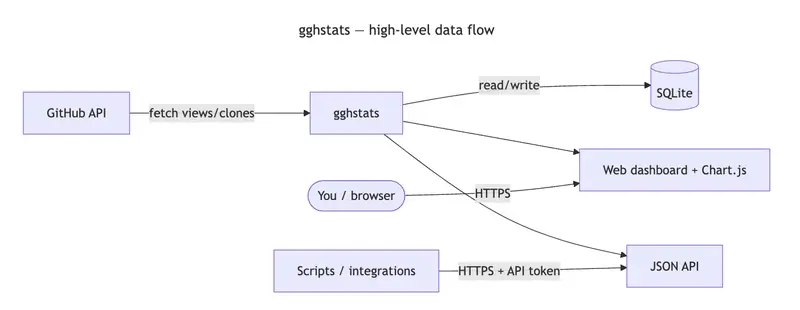
gghstats — high-level data flow: GitHub API, gghstats service, SQLite, web dashboard, JSON API, browser, and scripts

We’ve all been there. You ship an open-source project, a tiny CLI, or a docs site. You watch Insights → Traffic for a week: views spike, clones climb, life is good.

Then you come back a month later and ask a simple question: did that blog post actually move the needle over time? GitHub’s answer is blunt: detailed traffic (views and clones) only lives in a rolling 14-day window. Past that, the granularity is gone unless you exported it yourself.

I wanted historical traffic — without a SaaS middleman, without babysitting CSV exports, and with something I could run beside my other self-hosted stuff. That’s why I built gghstats. The first stable line is v0.1.0 (binaries on Releases, multi-arch image on GHCR).

The problem in one sentence

GitHub is a great place to host code; it is not a long-term analytics warehouse for repository traffic. If you care about trends, seasonality, or “what happened after launch,” you need your own copy of that data.

What gghstats does

gghstats is a small Go service that:

  1. Uses the GitHub API (with a personal access token) to pull traffic metrics on a schedule.
  2. Merges them into a local SQLite database so history accumulates instead of disappearing.
  3. Serves a web UI and JSON API so you can browse aggregates and per-repo charts.

On startup it runs a full sync once (so repo discovery matches your filter right away), then repeats on GGHSTATS_SYNC_INTERVAL (default 1h). No waiting for the first tick to see data.

It’s deliberately boring technology: one binary, one file for the DB, backups = copy gghstats.db.

Live demo (read-only UI): gghstats.hermesrodriguez.com

Stack (opinionated and minimal)

Piece Why
Go Fast, single binary, easy to ship in Docker.
SQLite No separate DB server; ship backups with the rest of your backups.
Chart.js Charts in the dashboard without a heavy frontend framework.
Bootstrap grid Layout and responsive behavior without reinventing CSS — the UI is intentionally neo-brutalist (hard borders, monospace, loud accents) so it feels like a tool, not a marketing site.

“Works on my machine” wasn’t enough

I wanted a production-shaped repo, not just go run:

  • Docker / Docker Compose for local runs.
  • docker-compose.prod.yml with Traefik, Let’s Encrypt, and no public port on the app container — only 80/443 on the proxy.
  • Helm chart under charts/gghstats for Kubernetes.
  • GoReleaser + GitHub Actions for releases, artifacts, and multi-arch images (linux/amd64, linux/arm64).

If you’ve ever maintained a side project, you know the drag of “I’ll dockerize it later.” I put the boring work upfront so future me doesn’t hate present me.

How it works (high level)

gghstats — high-level data flow: GitHub API, gghstats service, SQLite, web dashboard, JSON API, browser, and scripts

  1. Fetch — Scheduled sync using your token (scope: repo for private repos you care about).
  2. Store — Upserts into SQLite so you keep a timeline, not a snapshot.
  3. Serve — Dashboard for humans and JSON for scripts.

Filtering (GGHSTATS_FILTER, exclusions like !fork, etc.) lives in env vars so you can keep the sync set tight.

Two numbers that matter (aggregate vs history)

On the main screen you see rollups: totals across the repos you track. That’s the “at a glance” view.

The real payoff is opening one repository: you see interval stats (what GitHub is showing now for the last ~14 days) next to lifetime totals from your database. The gap between “what GitHub is willing to remember” and “what you kept” is the whole point — and the charts (clones, views, stars over time) are where SQLite stops being a file and starts being a memory.

Main dashboard (rollups across tracked repos):

gghstats main dashboard — neo-brutalist UI, repo list and aggregates

Repository detail — interval stats from GitHub’s window next to lifetime totals from SQLite, plus Chart.js trends (clones, views, stars):

gghstats repository detail — interval vs lifetime stats and historical charts

Who should try it

  • Maintainers who want long-term traffic context.
  • People who already self-host and want data sovereignty (your DB, your VPS, your rules).
  • Anyone allergic to “sign up for another analytics product to see GitHub stats.”

Try it

From the repo (Compose):

git clone https://github.com/hrodrig/gghstats.git && cd gghstats
cp .env.example .env
# set GGHSTATS_GITHUB_TOKEN, tune GGHSTATS_FILTER if needed
docker compose up -d
# open http://localhost:8080

Published image only (no clone — see README for all env vars):

docker pull ghcr.io/hrodrig/gghstats:v0.1.0
docker run --rm -p 8080:8080 
  -e GGHSTATS_GITHUB_TOKEN 
  -e GGHSTATS_FILTER 
  -v "$PWD/gghstats-data:/data" 
  ghcr.io/hrodrig/gghstats:v0.1.0

Production-oriented compose (Traefik, TLS) lives in docker-compose.prod.yml — see the repo README for env vars like GGHSTATS_HOSTNAME and ACME_EMAIL.

Repo: github.com/hrodrig/gghstats

Issues and PRs welcome. If this saves you from losing another year of traffic history, it was worth writing.

How do you capture or export GitHub traffic today — CSV dumps, scripts, or nothing? Curious what others do in the comments.

Credits

This article was drafted from my own notes and a long brainstorming thread with Gemini (analysis, structure, and image ideas). The code, the rough edges, and the neo-brutalist UI are mine — blame me for the bugs, not the LLM.

Why You Can’t Reproduce AI Agent Failures (And Why That’s a Huge Problem)

Why You Can’t Reproduce AI Agent Failures (And Why That’s a Huge Problem)

If you’ve used Claude Code, Cursor, or any AI coding agent for more than a week, you’ve probably experienced this:

The agent does something wrong. Maybe it deletes a file it shouldn’t have. Maybe it rewrites your auth module and breaks everything. Maybe it makes a chain of 15 edits and somewhere in the middle, something went sideways.

So you try to figure out what happened. You look at the conversation. You stare at the diffs. You try to piece together the sequence of events. And then you think “let me just re-run it and watch more carefully this time.”

And it does something completely different.

The Nondeterminism Problem

This isn’t a bug. It’s fundamental to how LLMs work.

Every time an LLM generates a response, it’s sampling from a probability distribution over possible next tokens. Temperature, top_p, and the inherent randomness in the sampling process mean that the same prompt can produce meaningfully different outputs every single time.

In traditional software, debugging works because code is deterministic. Same input, same output. You reproduce the bug, step through it, find the problem. That mental model completely breaks down with AI agents.

When an AI agent makes a bad decision, that specific chain of reasoning is gone the moment it happens. You can never get it back by re-running. The exact sequence of token probabilities that led to the failure will never repeat.

Why Logging Doesn’t Fix This

Tools like Braintrust, Langfuse, and LangSmith are great at what they do. They log your prompts, responses, token counts, and latency. You can see traces of what happened.

But there’s a critical difference between logging and recording.

A log tells you what the agent said. A recording captures enough context to make the agent say it again.

Think about it like this. A security camera shows you that someone walked into a room and took a file from the drawer. That’s logging. Useful for knowing what happened.

But what if you could recreate the exact room, with the exact drawer contents, at the exact moment, put the person back in, and watch them do the exact same thing? That’s recording. And what if you could then change one variable — “what if the drawer was locked?” — and see if the outcome changes?

That second thing is what’s missing from the AI agent toolchain right now.

What Deterministic Replay Actually Means

The concept is simple. If you record not just the prompts and responses, but the full execution context of every LLM call (the exact model version, sampling parameters, tool definitions, system prompt, the complete message history, and the full response object including tool calls and stop reasons), you can replay the session by intercepting future LLM calls and returning the recorded responses instead of calling the real API.

The agent code doesn’t know the difference. It receives the exact same response it got during the original run. It makes the same decisions. Calls the same tools. Produces the same output.

Zero API cost. Identical behavior. The exact same failure, reproduced on demand.

This is something that feels obvious in retrospect but is architecturally impossible if you only stored the conversation text. You need the full request and response objects, linked together in a causal chain with timestamps and parent-child relationships.

Counterfactual Debugging

Once you have deterministic replay, something even more interesting becomes possible.

You can pause the replay at any decision point and ask: “What if the agent had chosen differently here?”

Replace the recorded LLM response with an alternative. The replay engine uses the recorded data up to that point (free), injects your alternative at the fork point, then continues execution from there with live LLM calls in a sandboxed environment.

Now you have two timelines. What actually happened, and what would have happened. Side by side.

Instead of guessing whether changing a prompt would fix the issue, you can literally test it against the recorded reality. “The agent decided to rewrite auth.py at step 7. What if it had added a migration script instead?” Fork at step 7, inject that alternative, run it forward, compare.

This turns debugging from detective work into experimentation.

Why This Matters Now

AI agents are becoming the way software gets built. Claude Code is at $2.5B ARR. Cursor is at $500M. Millions of developers are using agents that make real changes to real codebases every day.

And 88% of organizations reported AI agent security or data privacy incidents in the last 12 months. Gartner predicts 40% of agentic AI projects will fail by 2027.

The incidents are happening now. The agents are getting more autonomous. And the debugging tools haven’t caught up.

Observability tools tell you what happened. What’s been missing is a tool that tells you why, and lets you prove your fix works before shipping it.

What I Built

I spent the past month building an open-source tool called Culpa that does exactly this. It records every LLM call, tool invocation, and file change with full context. It replays sessions deterministically. And it lets you fork at any decision point to test alternatives.

It works with Claude Code and Cursor via a local proxy. You just point them at it and everything gets recorded transparently:

culpa proxy start --name "debugging auth" --watch .
ANTHROPIC_BASE_URL=http://localhost:4560 claude

It also works with any Python script that uses the Anthropic or OpenAI SDK:

import culpa
culpa.init()
# your agent code here, everything gets recorded

MIT licensed, 91 tests, fully open source: github.com/AnshKanyadi/culpa

I’m a CS freshman at UMass. If you’ve dealt with the same frustration of debugging AI agent failures, I’d love to hear how you’re currently handling it and what you’d want from a tool like this.

Top 10 Rare Uses Of ChatGPT For Developers No One Will Tell You

Most devs use ChatGPT for the obvious stuff. Write code. Fix bugs. Explain errors. That is fine, but it barely scratches the surface.

The interesting part now is not “can it write code?” It can.

The real question is this: what uncommon, high-leverage jobs can developers quietly hand off to it?

Let’s get into the ones people usually miss.

1. Turn Messy Product Requests Into Buildable Engineering Specs

This is one of the most underrated uses.

Paste in a vague Slack message, a rough meeting transcript, or a giant product note. Ask ChatGPT to turn it into:

  • user stories
  • edge cases
  • API requirements
  • database changes
  • analytics events
  • open questions

This works because models are good at reorganizing messy language into clean structure. And if you need consistent formatting, OpenAI’s Structured Outputs feature can make model responses follow a JSON schema, which is a big help for turning fuzzy requests into reliable engineering artifacts.

Transition line: In other words, stop using it only after coding starts. Use it before the first ticket is even written.

2. Use It As A Migration Planner, Not Just A Code Rewriter

A lot of migrations fail because the code rewrite gets too much attention and the planning gets too little.

ChatGPT is surprisingly good at migration prep. You can feed it a legacy module, old config patterns, or framework docs and ask for:

  • a phased migration plan
  • dependency risks
  • backwards compatibility checks
  • rollout sequence
  • rollback strategy
  • test priorities

That fits well with OpenAI’s recent Codex guidance around long-horizon tasks, where the model is used for larger, multi-step coding workflows instead of one-shot edits.

This is rare because most devs ask for converted code. Smarter move, honestly, ask for the migration map first.

3. Generate Structured Test Matrices Instead Of Random Test Cases

Most people ask for unit tests. That is useful, but kind of basic.

A better use is asking ChatGPT to generate a test matrix from a feature, endpoint, or workflow. For example:

  • happy paths
  • validation failures
  • auth edge cases
  • rate limit cases
  • timeout behavior
  • concurrency issues
  • malformed payloads

This gets even better when you ask for a strict schema, because Structured Outputs can enforce keys and values in a predictable format. That makes it easier to pipe test scenarios into internal tooling, QA docs, or automated checks.

So yeah, not just “write Jest tests.” Ask for the full logic surface first.

4. Use It To Build Internal Developer Tools For ChatGPT Itself

This one is still flying under the radar.

OpenAI’s Apps SDK lets developers build apps for ChatGPT, using MCP servers for tool capabilities and optional UI components rendered inside ChatGPT. That means developers can build internal tools that ChatGPT can call, not just external apps that happen to use AI.

That opens some pretty uncommon use cases:

  • schema inspectors
  • deployment checklists
  • incident lookup tools
  • log query helpers
  • internal API explorers
  • runbook assistants

Instead of jumping between five tabs, a dev can interact with tooling right inside ChatGPT if the workflow is built for it. That is way more interesting than another chatbot wrapper.

5. Convert Large Repos Into Reusable Reasoning Shortcuts

Big repos are where dev time disappears.

One rare but useful pattern is to use ChatGPT to create reasoning shortcuts for your own codebase. That means asking it to generate:

  • module summaries
  • dependency maps
  • “if this breaks, check these files” notes
  • onboarding cheat sheets
  • architecture Q and A docs
  • change-impact heuristics

This lines up with OpenAI’s newer material on skills, shell patterns, and Codex workflows for repeatable, long-running engineering tasks. The idea is simple: turn repeated repo understanding into reusable context, not repeated human effort.

A lot of teams never do this. They just keep re-explaining the same system to every new developer. Bit painful, really.

6. Use It As A Failure Pattern Detector Across Bug Reports

This one is sneaky useful.

Developers usually inspect bugs one by one. ChatGPT gets more valuable when you dump in multiple bug reports, support tickets, or crash summaries and ask it to cluster them into likely failure patterns.

It can help group issues by:

  • shared endpoints
  • browser or device type
  • deployment timing
  • input pattern
  • state transition
  • probable root cause families

Because the model is strong at summarization and categorization, it can often spot patterns faster than manually reading through 40 tickets. OpenAI’s text generation docs specifically position models as useful for structured and semi-structured text tasks, not just freeform writing.

That makes it a nice first-pass incident analyst.

7. Turn Security And Code Quality Rules Into Everyday Review Prompts

Security guidance usually lives in a wiki. Same with code quality rules. People ignore both.

A better use is to feed ChatGPT your rules and ask it to convert them into daily review prompts. For example:

  • check for unvalidated input
  • check for broken auth assumptions
  • flag risky logging
  • verify retry logic
  • inspect secrets handling
  • review schema mismatch risk

This works well because newer OpenAI developer guidance emphasizes repeatable automation and reusable workflows, especially around Codex and plugin-style capabilities.

The practical value is simple. Your standards stop being passive documentation and start acting like active review scaffolding.

8. Use It To Simulate Difficult Users Before You Ship

This is one more devs should steal.

Before launching a feature, ask ChatGPT to behave like:

  • a confused first-time user
  • a rushed power user
  • a malicious user
  • a support agent
  • a QA lead
  • a stubborn enterprise admin

Then have it critique the UX, wording, edge-case behavior, and error handling.

This is not a replacement for real user testing. But it is a fast way to catch awkward flows before humans do. And OpenAI’s Apps SDK guidance puts a lot of emphasis on intuitive, trustworthy interaction patterns, which matches this kind of pre-launch friction hunting.

Basically, let the model be annoying on purpose so your users do not have to.

9. Build JSON-First Dev Workflows Instead Of Chat-Only Workflows

A lot of developers still use ChatGPT like a normal chat window. That limits it.

A more advanced move is to ask for everything in structured form:

  • SQL migration plans
  • API contract diffs
  • story acceptance criteria
  • config checklists
  • deployment summaries
  • incident postmortem templates

OpenAI’s Structured Outputs docs are relevant here because they let you define a JSON schema and get reliable machine-readable output back.

That means ChatGPT stops being just a writing assistant and starts becoming a clean input generator for actual developer systems.

10. Use It For Multi-Hour, Long-Horizon Engineering Work

This is probably the rarest use on the list because a lot of people still think in one-prompt terms.

OpenAI’s developer blog around Codex highlights long-horizon tasks, agent-style coding, and patterns for repeatable automation over real repositories. The official guidance describes using these systems for larger work units that involve planning, reviewing, editing, and iterating with human oversight.

That means developers can use ChatGPT-like systems for work such as:

  • refactor planning across modules
  • staged bugfix campaigns
  • CI failure triage patterns
  • codebase modernization
  • docs plus code update bundles

Not magic, obviously. You still need review. But the workflow gets much bigger than “write me a regex.”

Want read more stuff? Go Here!