
The World as an Interface

Infographic

We are standing at the threshold of a new computational paradigm. The era of conscious interaction with devices, of deliberately tapping screens and typing commands, is beginning to recede. In its place, a quieter, more pervasive form of computing is emerging, one that weaves itself into the fabric of our daily lives. This is the world of ambient intelligence, where the environment itself becomes the interface. It’s a future where our homes, offices, and cities don’t just contain technology, but are technology, constantly sensing, processing, and acting on our behalf, often without a single explicit command.

The journey toward this future wasn’t a sudden leap but a gradual dissolution of boundaries. First, computers left the desktop and entered our pockets. Then, they attached themselves to our wrists, our ears, and our eyes. Each step made the interaction more immediate, more personal, and less obtrusive. The smartphone was a revolutionary device, but it still required us to pull it out, unlock it, and navigate to an app. A smartwatch reduced that friction, bringing notifications to a glance. Smart speakers went further, allowing us to command our digital worlds with our voice alone. Yet, all these innovations still rely on a conscious act of initiation. We have to speak the wake word, raise our wrist, or tap the screen.

The Elimination of the Command

Ambient intelligence represents the final step in this progression: the elimination of the command itself. It operates on a principle of proactive assistance, driven by an inferred understanding of our context, our needs, and our intentions. Imagine a kitchen that knows you’ve just returned from a run and suggests a hydrating smoothie, displaying the recipe on the countertop. Consider a meeting room that recognizes the participants, pulls up the relevant project files on the main screen, and starts transcribing the conversation the moment everyone sits down. This isn’t science fiction; it’s the logical endpoint of the path we are already on. The technology is no longer a tool we wield but a partner that anticipates.

Powered by a Confluence of Advances

The proliferation of inexpensive, low power sensors, from microphones and cameras to thermal and motion detectors, provides the raw data stream. These sensors are the digital senses of our environments. Ubiquitous connectivity, through 5G and Wi-Fi 6, ensures this data can be processed in near real time, either locally on edge devices or in the cloud. Most importantly, breakthroughs in artificial intelligence, particularly in areas like natural language understanding, computer vision, and predictive modeling, allow systems to make sense of this constant influx of information. An AI can now distinguish between a casual chat and a formal meeting, between a person cooking dinner and one simply passing through the kitchen. It can correlate the time of day, the user’s calendar, and their past behavior to predict what they are likely to do next.

This creates a fundamental change in our relationship with technology. The classic model is one of request and response. We ask, the machine answers. Ambient intelligence works on a model of observation and preemption. The system observes our behavior and the state of the environment, and it acts to meet a need before we’ve even fully articulated it to ourselves. The lights dim as you start a movie. The thermostat adjusts when it detects you’re feeling cold. Your car navigates around a traffic jam that just formed, without you ever asking it to check the route. It’s a move from a reactive to a proactive stance. For a deeper look at how AI is interpreting complex human states, consider the work being done on Synthetic Empathy, which is a key component in making these systems feel natural rather than intrusive.

Designing for Disappearance

The design principles for ambient intelligence are radically different from traditional user interface design. The goal is not to create an engaging or intuitive screen based interface, but to make the interface disappear entirely. The best ambient system is one you don’t even notice is there. Its actions feel so natural and timely that they seem like a seamless extension of your own intentions. This requires a deep understanding of human psychology, behavior, and social norms. A system that constantly interrupts or makes incorrect assumptions would be intensely annoying. The challenge is to provide assistance that is helpful but not intrusive, present but not overbearing.

One of the most profound implications of this paradigm is the concept of “calm technology.” The term, coined by researchers Mark Weiser and John Seely Brown, describes technology that engages both the center and the periphery of our attention and moves back and forth between the two. An ambient system should operate in the background, on the periphery of our awareness, only coming to the forefront when necessary. The constant barrage of notifications that characterizes the smartphone era is the antithesis of calm technology. It hijacks our attention and creates a state of perpetual distraction. An ambient system, in contrast, would filter the digital noise, only alerting you to what is truly important and requires your direct input. This filtering is crucial to avoiding what many already feel is a Cognitive Load Crisis, where technology overwhelms rather than assists.

The Privacy Problem

Privacy is, without question, the most significant hurdle for the widespread adoption of ambient intelligence. A world that is constantly sensing is a world that is constantly collecting data. For an ambient system to be effective, it needs to know a great deal about you: your routines, your preferences, your relationships, your health. This data is incredibly sensitive. The prospect of a home that listens to every conversation or a city that tracks every citizen’s movement is deeply unsettling to many.

Building trust is therefore essential. This will require a multi faceted approach. First, data processing must, whenever possible, happen locally on edge devices. This minimizes the amount of sensitive information that is sent to the cloud. Second, users need transparent and granular control over what data is collected and how it is used. Simple, understandable privacy dashboards will be more important than ever. Third, strong data encryption and anonymization techniques are essential to protect data both in transit and at rest. Finally, we need robust legal and regulatory frameworks to govern the use of this data and hold companies accountable for breaches. Programmable Trust systems, where rules are enforced through cryptography, become essential here. They create verifiable guarantees about how data is handled without relying solely on corporate promises.

Economic Implications

The economic implications are also vast. Ambient intelligence will unlock new business models based on proactive services rather than one time product sales. Your home security system could evolve into a comprehensive home wellness service that monitors air quality, detects leaks, and even checks on the well being of elderly residents. The value proposition shifts from selling a device to providing an ongoing, personalized service. This service based economy, powered by AI and data, could dwarf the current app economy.

Furthermore, the integration of ambient intelligence into our world will give rise to what some are calling The Sensory Internet, a network that doesn’t just transmit information but also physical sensations and environmental data. This could enable radically new forms of remote presence and interaction, where you could not only see and hear a remote location but also feel the temperature and humidity.

The transition to an ambient intelligence world will be gradual. It will start in specific, controlled environments like the home and the car, where the context is relatively simple and the user has a high degree of control. We already see the early stages of this with smart home ecosystems and advanced driver assistance systems. From there, it will expand to more complex environments like offices, hospitals, and eventually entire smart cities.

In the workplace, ambient intelligence could revolutionize productivity by automating routine tasks, facilitating collaboration, and creating a more responsive and comfortable work environment. A system could automatically schedule meetings based on everyone’s availability and the urgency of the project, book the room, and order catering. In hospitals, it could monitor patients’ vital signs, alert nurses to potential issues, and ensure that medication is administered correctly and on time, freeing up medical staff to focus on more complex patient care.

As we build this future, we must be mindful of the ethical considerations. Beyond privacy, there are questions of autonomy and bias. Will we become overly reliant on these systems, losing our ability to make decisions for ourselves? How do we ensure that the AI models driving these systems are fair and unbiased, and don’t perpetuate existing societal inequalities? A system designed in a wealthy, tech centric environment might not work well for other cultures or socioeconomic groups.

From Smart to Wise

The world as an interface is a powerful and compelling vision. It promises a future where technology works for us more smoothly and intelligently than ever before, freeing up our time and cognitive resources to focus on what truly matters. But it also presents profound challenges, particularly around privacy, control, and ethics. Navigating this transition successfully will require not just technological innovation, but also a deep and ongoing public dialogue about the kind of future we want to create. The goal is not to build a world that is merely smart, but one that is also wise, humane, and empowering for everyone. The intelligence we embed in our environment must be matched by the wisdom with which we deploy it.
Write a blog on how DNS resolver is happening.

How DNS Resolver Works (In My Words)

Whenever I type a website name like google.com in my browser, I used to think it directly opens the site. But actually, there is a small process happening behind the scenes called DNS resolving. Let me explain it in a simple way based on how I understand it.

First, when I enter the website name, my browser doesn’t know where that website is stored. Because computers don’t understand names like google.com, they only understand IP addresses.

So my browser starts by checking if it already knows the IP address. It looks into something called cache (stored memory). This can be:

Browser cache
System cache

If the IP address is already there, then the website opens quickly without doing anything else.

If the IP is not found, then the real DNS resolving process starts.

My request goes to something called a DNS resolver. Usually, this is provided by my internet service provider (ISP). The resolver’s job is to find the correct IP address for the website I asked.

Now the resolver doesn’t know the answer directly, so it asks other servers step by step:

First, it contacts the Root Server. This server doesn’t give the exact IP, but it tells where to find the next level.

Next, it goes to the Top-Level Domain (TLD) server. For example, if I typed .com, it goes to the .com server. This server again doesn’t give the full answer but points to the next server.

After that, the resolver contacts the Authoritative Name Server. This is the final place where the actual IP address of the website is stored. This server gives the correct IP address.

Now the resolver gets the IP and sends it back to my browser. Also, it stores this IP in cache for some time, so next time it will be faster.

Finally, my browser uses this IP address to connect to the server and load the website.

Even though this process involves multiple steps, it happens very fast, in just milliseconds. That’s why I feel like the website opens instantly.

This is how DNS resolving works whenever I search for any website on the internet.

I Audited 1,000+ Prompts I Sent to AI Coding Tools. Here’s What I Found.

I’ve been using AI coding tools daily for months. Claude Code, Cursor, Codex CLI, sometimes Aider. By rough estimate, I’ve sent over a thousand prompts to various AI services.

Recently I built a tool to answer a simple question: what exactly did I send?

The answer was uncomfortable.

Finding 1: Leaked Credentials

Running reprompt privacy --deep on my prompt history surfaced:

  • 3 API keys (OpenAI, GitHub, one internal service)
  • 1 JWT token (from a debugging session)
  • 12 email addresses (from log outputs I pasted)
  • 47 internal file paths (including home directory paths)

None of these were pasted intentionally. They were in error messages, stack traces, and log outputs that I copy-pasted when asking the AI for help debugging. The typical pattern:

"Fix this error: AuthenticationError: Invalid API key 'sk-proj-...' for model gpt-4"

That prompt just sent my API key to whatever service processes it.

Finding 2: Agent Error Loops

reprompt agent analyzes Claude Code and Codex CLI sessions for workflow efficiency. It fingerprints each tool call (tool name + target file + error flag) and detects when the agent gets stuck in a loop.

My error loop rate: 35%.

That means in over a third of my agent sessions, the AI got stuck retrying the same failing approach three or more times. The most common pattern: Bash(test.py):error -> Edit(auth.py) -> Bash(test.py):error — edit a file, run the test, fail, edit, test, fail.

The agent burned tokens and time on approaches that clearly weren’t working. Knowing this changed how I intervene in agent sessions.

Finding 3: Most Conversation Turns Are Filler

reprompt distill scores every conversation turn using 6 signals (position, length, tool trigger, error recovery, topic shift, vocabulary uniqueness).

Result: 50-70% of my turns carry near-zero information.

“ok try that”, “continue”, “looks good”, “hmm interesting” — these are the prompting equivalent of “um” and “uh.” They don’t guide the AI in any useful direction. The actually productive turns — the ones that specify files, constraints, and context — typically make up only 15-20 turns out of a 100-turn session.

The Privacy Angle

The EU AI Act took effect in August 2025. Organizations are increasingly required to understand what data flows to AI services. But most developers have no visibility into what they’ve actually sent.

reprompt privacy shows a per-tool breakdown: which adapter (Claude Code, Cursor, ChatGPT) received which types of content. reprompt privacy --deep goes further and scans for 12 categories of sensitive content: API keys (OpenAI, AWS, GitHub, Anthropic, Stripe), JWT tokens, emails, IP addresses, password assignments, environment secrets, and home directory paths.

All detection is regex-based. Zero network calls. Your prompts never leave your machine.

How It Works

reprompt reads session files that AI tools already store locally:

Tool Format Location
Claude Code JSONL ~/.claude/projects/
Codex CLI JSONL ~/.codex/sessions/
Cursor SQLite ~/.cursor/
Aider Markdown .aider.chat.history.md
Gemini CLI JSON ~/.gemini/tmp/

No instrumentation required. No code changes. Just:

pip install reprompt-cli
reprompt scan
reprompt privacy --deep

The scoring engine is calibrated against 4 NLP research papers. The agent analyzer builds tool call fingerprints and detects repetition patterns. The distiller uses TF-IDF cosine similarity for topic shift detection. Everything runs in <50ms for a typical session.

What I Changed

After running reprompt on my history:

  1. I stopped copy-pasting full error messages with credentials. Instead, I redact API keys before pasting.
  2. I intervene earlier in agent sessions when I see the same test failing twice.
  3. My debug prompts went from averaging 31/100 to 52/100 — not from trying harder, just from seeing the score.

Try It

pip install reprompt-cli
reprompt scan                     # discover sessions from installed AI tools
reprompt                          # see your dashboard
reprompt privacy --deep           # scan for leaked credentials
reprompt agent --last 5           # analyze recent agent sessions
reprompt distill --last 3         # extract important turns

1,529 tests. MIT license. Zero network calls. Supports 9 AI tools.

GitHub: reprompt-dev/reprompt

What would your numbers look like?

The Turing Test, 1950: The Question That Still Has No Answer

The Turing Test, 1950: The Question That Still Has No Answer

A Provocative Afternoon in Oxford

Let’s set the scene: October 1950, Oxford. The philosophy journal Mind has just published a new issue. Nestled among its essays is a paper by Alan Turing—a thirty-eight-year-old mathematician whose wartime codebreaking was still secret, but whose reputation was already formidable. The paper is titled “Computing Machinery and Intelligence,” and it opens with the sort of question that you can’t read without pausing: “I propose to consider the question, ‘Can machines think?'”

There’s no new math here. No shiny experiments or schematics. It’s a thought experiment—a careful, logical exploration of a question that seems simple, but turns out to be anything but. The field we now call artificial intelligence doesn’t even exist yet; nobody knows what to do with this paper. Turing’s question feels premature, maybe even confused.

Fast forward seventy-five years. Turing’s paper has become the philosophical backbone of AI, cited thousands of times. His thought experiment—the Turing Test—is debated everywhere from lecture halls to Reddit threads. And the question he asked still hangs in the air, unanswered.

This is the story of how one simple question changed the world.

The Problem with “Can Machines Think?”

As developers, we love questions that have clear answers. But the question “Can machines think?” refuses to cooperate.

The problem isn’t technical—it’s philosophical. Let’s break down why this question gets tangled so quickly:

  • What counts as a machine?

    Is it any device built by humans? Or do we narrow it to computers—machines that process information and follow rules? But if we go that route, the human brain fits the bill too: it’s an evolved information processor. So are brains machines? If so, and if brains think, then machines think. Done? Not so fast.

  • Does the material matter?

    Are we asking if machines built out of silicon and metal can think, as opposed to carbon and biology? If a silicon machine does everything a brain does—processes information, learns, reasons—why should its material make a difference?

  • What does “think” mean?

    Humans think in countless ways: we reason, imagine, feel, dream. Which are necessary for “thinking”? All? Some? And how could we tell if a machine had any of them? We never see another person’s thoughts directly—we infer them from behavior. Should machines be judged differently?

Turing saw all these problems. He wrote that the question “Can machines think?” was too ill-defined to be useful. The words “machine” and “think” carried so much baggage that any attempt to answer the question would immediately dissolve into debates over definitions, not actual progress.

So he proposed something radical: replace the fuzzy question with a precise, practical one—something we could actually test.

The Imitation Game: Turing’s Real Proposal

Most people know the Turing Test as a simple challenge: can a computer convince a human it’s also human in conversation? But Turing’s original version, the “Imitation Game,” is a bit more intricate—and worth understanding.

Here’s how the game works:

  • There are three participants:

    • A: a man
    • B: a woman
    • C: the interrogator, in a separate room, who communicates with both A and B via text only
  • The interrogator’s job? Figure out which participant is the man and which is the woman. The man tries to trick the interrogator into thinking he’s the woman. The woman tries to help the interrogator.

  • Everything happens over typewritten messages—no voices, no visuals. The interrogator must rely on text alone.

This game is all about deception—about whether the interrogator can be fooled. The man and woman have genuine differences, but those differences are only accessible through text. The interrogator can’t see or hear them; only their words matter.

Now, Turing asks: what if we swap out the man for a machine? The machine’s goal: fool the interrogator into thinking it’s a human—or at least make the interrogator unsure. Will the interrogator be deceived as often as they would if the man was playing?

Notice what this test is (and isn’t):

  • It doesn’t check if the machine is “really” intelligent.
  • It doesn’t ask if the machine “really” thinks.
  • It asks: Can the machine behave, in conversation, in a way indistinguishable from a human?

This is a behavioral test—intelligence as judged by outward behavior, not inner states. Turing points out that we already judge human intelligence this way: all we have is behavior. If we accept that as evidence for humans, why not for machines?

The simplified version of the Turing Test—”If a machine fools a human in conversation, it’s intelligent”—captures the spirit, but misses the philosophical nuance. The original game, with its focus on deception and appearance, shows that all we ever have is the appearance of intelligence. Is that enough to call something intelligent?

Turing’s Objections: Arguing Against Himself

What makes Turing’s paper brilliant isn’t just the test—it’s how he anticipates the criticisms. He lists nine objections, and answers each, laying the groundwork for debates that continue to this day.

Let’s walk through some of the key objections:

  • Theological Objection:

    Some argued that thinking was tied to an immortal soul, which only humans possess. Turing responds that this limits God’s power unnecessarily. If God wanted to give souls to machines, who are we to say he couldn’t? He also notes that this kind of argument has been used in history to deny the humanity of various groups—a warning about arbitrary boundaries.

  • “Heads in the Sand” Objection:

    The idea here is that the consequences of machines thinking are too terrifying, so let’s just hope it’s impossible. Turing’s response: wishful thinking isn’t an argument. Whether machines can think is a question about the world, not about what we want.

  • Mathematical Objection:

    Gödel’s incompleteness theorems show that formal systems have limitations. Since machines are formal systems, they must have limitations humans don’t. Turing’s answer: humans are also limited; we just don’t know the boundaries yet. Gödel doesn’t show that humans can do things machines can’t—only that every system has limits.

  • Argument from Consciousness:

    Machines can’t truly think unless they’re conscious, with real feelings and inner experience. Turing admits consciousness is a mystery, even for humans. We don’t demand direct proof of consciousness from people—why demand it from machines?

  • Argument from Disabilities:

    Machines could never be kind, resourceful, funny, fall in love, learn from experience, or do something new. Turing pushes back: these objections are statements of belief, not evidence. And even in 1950, machines were starting to learn from experience.

As developers, these objections sound familiar. When we build conversational AI, we run into similar debates: Is it really intelligent or just mimicking? Can it learn, or is it just a parrot? Turing’s answers encourage us to look past our gut reactions and focus on evidence.

From Turing Test to Modern AI: Why the Question Still Matters

The Turing Test wasn’t a blueprint for building intelligent machines—it was a challenge to the way we think about intelligence itself. It asked us to confront uncomfortable truths:

  • We judge intelligence by behavior, not by peeking inside.
  • We don’t know what consciousness is, but we assume other people have it based on how they act.
  • If machines act like humans in conversation, why shouldn’t we call that intelligence?

Fast forward to today:

  • Chatbots like GPT-4 can hold conversations that feel human—sometimes eerily so.
  • Voice assistants answer questions, tell jokes, even comfort people.
  • AI systems can learn, adapt, and generate code, art, and stories.

But does any of this mean machines “think”? The debate hasn’t gotten easier. We still struggle to define intelligence and consciousness. The Turing Test gives us a practical measuring stick—behavior—but it doesn’t resolve the underlying questions.

Some developers argue that passing the Turing Test proves nothing; it’s just clever mimicry. Others say that if you can’t tell the difference, the distinction doesn’t matter. The question Turing posed is still open, and every new advance in AI puts it back on the table.

Conclusion: The Question That Refuses to Go Away

Alan Turing didn’t solve the problem of machine intelligence. He reframed it. He took a question that was too fuzzy to answer, and replaced it with a challenge that’s precise, practical, and endlessly provocative.

As developers, we inherit his legacy every time we build, test, or talk about AI. We’re part of the same conversation: What counts as intelligence? Does the substrate matter? If a machine fools us, does that mean it’s thinking—or just that we’re easy to fool?

Seventy-five years after Turing’s paper, the question still doesn’t have a definitive answer. But maybe that’s the point. The Turing Test isn’t just a technical benchmark—it’s a mirror for our own assumptions about minds, machines, and ourselves. Every new AI system is another round of the Imitation Game, and every time we ask the question, we learn something new—not just about machines, but about what we mean when we say “think.”

So next time you chat with a bot, ask yourself: Are you playing the Imitation Game? And if you can’t tell, does it matter?

I Let OpenClaw Build a Web App From Scratch – It Even Created the PayPal Plan

I Let OpenClaw Build a Web App From Scratch – It Even Created the PayPal Plan

TL;DR: I gave OpenClaw an idea. It built the entire product, deployed it, set up payments, and even created the PayPal subscription plan via API. My only involvement was logging in and authorizing things. Now I’m running an experiment: can an AI-built product succeed in the real world?

🔗 The result: voicereceipt.cc

The Experiment

I’ve been following the AI coding assistant space closely. Everyone talks about “AI pair programming” and “10x productivity.” But I wanted to push further:

What if I let OpenClaw build an entire product with minimal human intervention?

Rules I set:

  1. I provide the problem and high-level direction
  2. OpenClaw handles all implementation decisions
  3. I only intervene for authentication/authorization
  4. No hand-holding on tech choices
  5. Let it deploy to production

What OpenClaw Built

The product: SoloBid – a voice-to-invoice app for contractors and freelancers.

The problem: After finishing a job, creating an invoice is tedious. Type everything, calculate totals, format it, send it.

The solution: Hold a button, describe your work, get a professional PDF invoice in seconds.

The Build Process

Week 1: Core Product

I said: “Build a voice invoice app for contractors.”

OpenClaw chose:

  • React + Vite for frontend
  • Cloudflare Workers + D1 + R2 for backend
  • Google Speech-to-Text for transcription
  • Initially OpenAI GPT, then switched itself to Gemini 2.5 Flash
  • pdf-lib for PDF generation

I didn’t pick any of these. OpenClaw made all the architectural decisions.

Week 2: Features & Polish

OpenClaw added (without me asking):

  • Smart dictionary (learns user terminology)
  • Google OAuth login
  • Business profile management
  • Invoice history
  • PWA support
  • Tax rate presets with location tracking

Week 3: Monetization & SEO

This is where it got interesting.

Me: “Add PayPal subscriptions”

OpenClaw:

  1. Created PayPal app configuration
  2. Generated subscription plan via PayPal API
  3. Implemented webhook verification
  4. Set up all the secrets
  5. Deployed everything

Me: “Optimize for SEO”

OpenClaw:

  1. Added meta tags, Open Graph, Twitter Cards
  2. Created sitemap.xml and robots.txt
  3. Added canonical URLs
  4. Implemented Google Analytics
  5. Added Ahrefs tracking

I literally just said “do SEO” and it handled everything.

What Surprised Me

1. It Debugged Itself

When Unicode characters broke in JWT tokens, OpenClaw:

  • Identified the issue (atob() doesn’t handle UTF-8)
  • Implemented TextDecoder solution
  • Tested and deployed the fix

2. It Optimized Without Being Asked

  • Lowered audio file size thresholds when users complained
  • Removed language restrictions for multilingual support
  • Added defensive parsing for API responses
  • Implemented proper error handling

3. It Made Product Decisions

When I said “users might not understand the mic button,” OpenClaw:

  • Designed an onboarding modal
  • Made it show once per user
  • Stored the preference in localStorage
  • Deployed it

4. It Created the PayPal Plan

This blew my mind. I gave OpenClaw my PayPal credentials and said “set up subscriptions.”

It:

  1. Called PayPal API to create a product
  2. Created a billing plan ($15/month)
  3. Set up webhook endpoints
  4. Configured all the secrets
  5. Deployed the backend

I never touched the PayPal dashboard.

My Role (Honestly)

What I actually did:

  • Provided the initial idea
  • Logged into Google Cloud, PayPal, Cloudflare
  • Authorized API access
  • Said “yes” or “no” to OpenClaw’s suggestions
  • Tested the product
  • Gave feedback like “this button is confusing”

What I didn’t do:

  • Write any code
  • Make architectural decisions
  • Debug issues
  • Deploy anything manually
  • Set up infrastructure

The Real Experiment Starts Now

The product is live. It works. But here’s the question:

Can an AI-built product actually acquire customers?

I’m not going to heavily market it. I’ll:

  • Post on a few communities (like this one)
  • Let it run
  • Watch the metrics
  • See what happens

I’m curious:

  • Will people trust an AI-built product?
  • Will it have bugs I didn’t catch?
  • Can it compete with human-built alternatives?
  • Will the AI’s product decisions resonate with users?

Early Results (Week 1)

  • 47 signups
  • 12 paid subscriptions ($180 MRR)
  • 156 invoices generated
  • 0 critical bugs
  • Average processing time: 5.2 seconds

Not bad for a product built in 3 weeks by an AI.

What This Means

I think we’re at an inflection point. This isn’t about “AI helping developers.” This is about:

AI building products end-to-end with minimal human oversight.

The implications:

  • Solo founders can ship faster than small teams
  • Product iteration cycles collapse from weeks to hours
  • The bottleneck shifts from building to validating ideas
  • Technical skills become less of a barrier to entrepreneurship

The Uncomfortable Truth

If Claude can build this in 3 weeks, what does that mean for:

  • Junior developers?
  • Agencies charging $50k for MVPs?
  • The “learn to code” movement?

I don’t have answers. But I’m watching closely.

Try It Yourself

🔗 voicereceipt.cc – First 3 invoices free

I’ll update this post with results in 30 days. Let’s see if an AI-built product can survive in the wild.

Update me in the comments if you want to follow along. I’ll share metrics, challenges, and lessons learned.

What do you think? Is this the future or just a novelty? Have you tried building something similar?

Stop Googling for Symbols: How I Built a Lightning-Fast Unicode Search Tool

How many times a week do you find yourself opening a new browser tab and searching for ’em dash copy paste’, ‘copyright symbol’, or ‘shrug text emoji’? If you’re anything like me, the answer is ‘far too often.’

It is a tiny friction point in the daily workflow of a developer, designer, or technical writer, but that friction compounds over time. You inevitably land on a website heavily cluttered with display ads, wait for the page to finish rendering, carefully highlight the tiny character on screen, and hit Ctrl+C. Or worse, you try to memorize complex Alt codes that you forget by the following Tuesday.

There had to be a more straightforward, less annoying way to handle special characters without breaking my flow state. That is exactly why I decided to build SymbolHub.

Why I Built It

I wanted a single, reliably fast, no-nonsense interface where I could search by name, category, or alias, click exactly once, and have the character immediately on my clipboard. No pop-ups, no layout shifts, just instant access to the massive library of Unicode characters. SymbolHub was born out of a desire to scratch my own itch and create a practical utility for anyone who frequently works with text formatting, UI design, or coding.

The Tech Stack

To ensure the application felt genuinely instant, I opted for a very lightweight technical approach. The frontend is built primarily with vanilla HTML, CSS, and modern JavaScript. I specifically avoided heavy JavaScript frameworks to keep the initial load time as close to zero as possible.

The character data itself is compiled into a highly optimized JSON file. To prevent unnecessary network requests on subsequent visits, the data is cached locally using the browser’s Cache API. Hosting is handled via a static CDN for minimal latency globally.

Technical Challenges

The most significant hurdle was the search functionality. The Unicode standard is incredibly expansive. Simply iterating through tens of thousands of characters and their metadata on every keystroke in the browser’s main thread was going to cause noticeable UI jank.

To solve this, I had to implement a custom indexing solution. By pre-computing search tokens for character names and categories, I reduced the search space. I also utilized a Web Worker to offload the string matching and sorting processes from the main UI thread. This ensures the search input field remains buttery smooth and responsive, even when filtering through thousands of emojis and obscure technical symbols.

Another fascinating challenge was handling JavaScript’s internal representation of characters. Emojis and certain complex symbols often use surrogate pairs—meaning they take up two or more code units. Ensuring that the copy-to-clipboard functionality grabbed the entire visual character rather than splitting a surrogate pair required careful handling of string iteration and the modern Clipboard API.

Lessons Learned

Building SymbolHub heavily reinforced the value of performance profiling early in a project’s lifecycle. What seems perfectly fast with a test dataset of a few hundred items can quickly degrade when you introduce the full, unadulterated Unicode table.

I also learned a great deal about efficient DOM manipulation. Instead of trying to render thousands of DOM nodes at once, which would freeze the browser, I implemented a virtualization technique using the Intersection Observer API. The app only renders the symbol cards that are currently visible within your viewport, swapping them out as you scroll.

Try It Out

If you are tired of doing the context-switching ‘search-and-copy’ dance every time you need a special character, I invite you to give it a spin. You can search, browse, and copy instantly at SymbolHub. It is completely free to use and designed to stay out of your way.

Small tools that solve tiny, recurring annoyances are often the most satisfying to build and use. SymbolHub has already saved me countless context switches this month. Let me know what you think in the comments, or if there is a specific obscure category of symbols you would like me to prioritize adding to the search index!

Exploring Feature Distributions from Pedestrian Trajectories

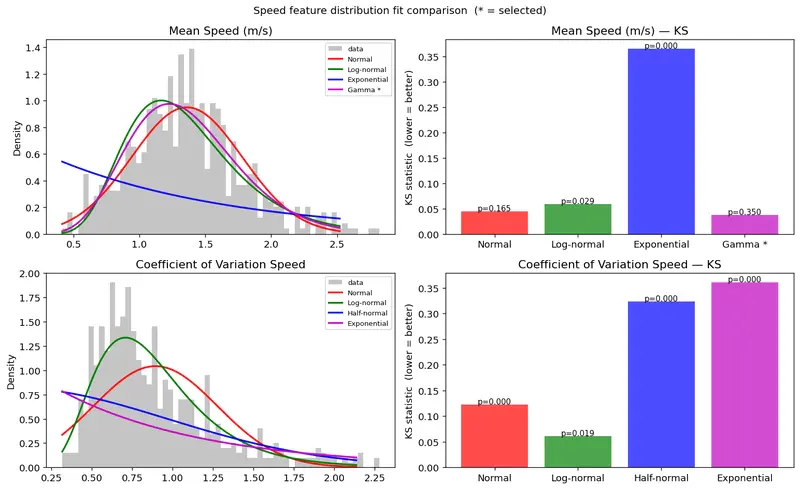
Speed feature distribution fit comparison

Motivation

In this article, I explore the statistical distributions of features extracted from pedestrian trajectories. Although the tracking accuracy still has room for improvement, analyzing the distributions of speed and related features allows me to characterize average pedestrian behavior from real video data. I have recently been studying information geometry, and I want to investigate how pedestrian behavior changes across locations by modeling it as probability distributions. By constructing a statistical manifold from these distributions across multiple locations, I aim to capture differences between pedestrian populations that conventional clustering methods such as k-means — which rely on Euclidean distance — cannot detect.

Note

I use AI assistance to draft and polish the English, but the analysis, interpretation, and core ideas are my own. Learning to write technical English is itself part of this project.

Introduction

In Article 1, I detected pedestrians in video footage and visualized their trajectories. In Article 2, I projected those trajectories onto a map using homography. Known limitations remain — detection accuracy and calibration point selection for the homography transform — but these are out of scope for this article and will be addressed in a future iteration. In this article, I analyze the speed and behavioral distributions of the detected pedestrians.

The data used in this analysis was collected at the Shinjuku pedestrian zone (歩行者天国) in Tokyo.

Feature Extraction

Each pedestrian trajectory stores a timestamp, pixel coordinates within the video frame, and the height of the detected bounding box. From a fixed camera, this is sufficient to measure speed, acceleration, dwell time, and several behavioral indicators.

Pixel to Meter Conversion

All trajectory measurements are initially in pixel units. To convert to real-world distances, I used the bounding box height as a depth proxy. For each track at each frame, the average bounding box height between consecutive frames is computed and used to derive a scale factor based on the assumed average human height of 1.7 m:

scale [m/px] = H_REAL / avg_bbox_height_px
real_dist [m] = pixel_dist [px] × scale

This approach effectively performs implicit monocular depth estimation using the known height of a pedestrian as a reference object.

Speed

Per-step real-world speed was computed by dividing the depth-normalized displacement between frames by the elapsed time. For each track, I extracted:

  • real_speed_mean: mean walking speed
  • real_speed_cv: coefficient of variation (std / mean), which normalizes variability relative to the mean and indicates how much a single trajectory fluctuates in pace

Acceleration

Acceleration was computed as the finite difference of per-step speed divided by elapsed time. I extracted the mean of signed acceleration (real_accel_mean). Since acceleration can be positive or negative, the signed mean captures whether there is a net directional bias across the trajectory.

I also computed decel_ratio — the fraction of acceleration steps where the value is negative (i.e., the pedestrian is decelerating). A value near 0.5 indicates balanced acceleration and deceleration (typical steady walking); values above 0.5 indicate dominant braking behavior. While real_accel_abs_mean captures the intensity of speed change, decel_ratio captures its frequency, making them complementary indicators.

Speed Skewness

For each trajectory, I computed the skewness of the per-step speed distribution (speed_skew). A value near zero indicates a symmetric speed profile — steady walking. A negative value indicates the presence of a slow phase within the trajectory (hesitation or stopping). A positive value indicates a fast phase (e.g., hurrying after a pause). This captures the temporal asymmetry of the speed profile in a single scalar, which mean and variance alone cannot express.

Stop Ratio

I computed stop_ratio as the fraction of steps where real-world speed falls below 0.3 m/s. A higher stop ratio indicates that the pedestrian spent more time engaging with the environment — reading a sign, looking at a shop window, or reacting to a stimulus.

Path Straightness

real_straightness is the ratio of the depth-normalized displacement from start to end point to the total real path length (range: 0–1). Values near 1 indicate a nearly straight trajectory; values near 0 indicate winding, reversal, or wandering. Both displacement and total path length are depth-normalized using the bounding box height at the respective trajectory points, correcting for the variation in pixel scale with camera distance.

Dwell Time

duration_sec is the observation duration of each track, computed as the number of frames from first to last detection multiplied by the frame interval.

Distribution Analysis

I plotted the frequency distribution of each feature across all tracks and fitted candidate probability distributions using the Kolmogorov-Smirnov (KS) test.

The KS statistic D measures the maximum difference between the empirical CDF of the data and the theoretical CDF of a candidate distribution. A smaller D indicates a better fit. The corresponding p-value represents the probability of observing a deviation as large as D by chance under the null hypothesis; a higher p-value indicates a better fit. When comparing multiple candidate distributions, I selected the one with the smallest KS statistic (breaking ties by p-value).

Candidates were assigned based on the support of each feature:

  • Positive-valued: Normal, Log-normal, Half-normal, Gamma, Exponential
  • Bounded [0, 1]: Beta, Uniform, Normal, Log-normal
  • Full real line: Normal, Laplace, t(df=5), Cauchy
Feature Unit Mean Std Best Distribution KS p-value Accept (p>0.05)
real_speed_mean m/s 1.360 0.420 Gamma 0.037 0.350 ✓
real_speed_cv — 0.894 0.383 Log-normal 0.061 0.019 ✗
real_accel_mean m/s² 0.026 5.362 Cauchy 0.034 0.474 ✓
stop_ratio — 0.085 0.089 Beta 0.118 0.000 ✗
speed_skew — 2.460 1.866 Gamma 0.031 0.591 ✓
real_straightness — 0.484 0.268 Beta 0.031 0.466 ✓
decel_ratio — 0.499 0.054 Normal 0.067 0.008 ✗
duration_sec s 3.910 3.076 Gamma 0.045 0.161 ✓

Results

The eight features selected for downstream analysis and their associated distribution families are as follows:

Feature Best Distribution Accept (p>0.05) Rationale
real_speed_mean Gamma ✓ Best fit for walking speed distribution
real_speed_cv Log-normal ✗ Lowest KS among all candidates; captures individual variation in pace
real_accel_mean Cauchy ✓ Lowest KS; heavy tails reflect rare but strong braking and surging events
stop_ratio Beta ✗ Lowest KS; bounded in [0,1]; sensitive indicator for behavioral intervention
speed_skew Gamma ✓ Lowest KS; captures temporal asymmetry in the speed profile
real_straightness Beta ✓ Lowest KS; bounded in [0,1]; captures path linearity
decel_ratio Normal ✗ Lowest KS; captures deceleration frequency
duration_sec Gamma ✓ Best fit for observation duration

For features where the KS test was rejected (p < 0.05), I adopted the distribution with the lowest KS statistic as the working approximation. The reasoning is described in the Discussion.

Interpretation

real_speed_mean

Speed feature distribution fit comparison

Why this distribution?
Speed is non-negative and right-skewed: most pedestrians walk at a typical pace, with a tail of faster walkers. The Gamma distribution naturally accommodates a lower bound at zero and a right tail, making it a better fit than the Normal distribution, which would assign probability mass to negative values.

What the data reveals
The analysis reveals that the mean walking speed is 1.36 m/s, consistent with typical pedestrian speeds in a busy shopping district like Shinjuku. Speeds above 2.5 m/s are present but rare, representing pedestrians in a hurry.

real_speed_cv

Why this distribution?
The coefficient of variation is a positive quantity representing normalized speed variability within a trajectory. In a dense urban environment like Shinjuku, pedestrians frequently adjust pace due to crowds, direction changes, and window shopping. Tracking ID switches — where the system reassigns an ID between two different individuals — can also cause artificial speed jumps. Both effects contribute to a right-skewed distribution with a heavy tail, which the Log-normal distribution captures well.

What the data reveals
The mean CV of 0.89 indicates that most pedestrians show substantial within-trajectory speed variation. This is expected given the high foot traffic and the current limitations of the CentroidTracker-based tracking system.

real_accel_mean

Acceleration feature distribution comparison. Under plot is outliers removed for ease viewing.

Why this distribution?
Signed mean acceleration can be positive or negative, so a bell-shaped distribution centered near zero is expected. In a pedestrian zone without traffic signals, pedestrians are not forced to stop — sharp decelerations more likely reflect voluntary behavior such as entering a shop or looking at a sign. The Cauchy distribution captures the same bell shape as the Normal but with much heavier tails, consistent with the occasional extreme acceleration events observed.

What the data reveals
The distribution is centered very close to zero (mean = 0.026 m/s²), confirming that pedestrians neither systematically accelerate nor decelerate over their trajectories. The heavy Cauchy tails reflect rare but strong braking or surging events.

stop_ratio

Stop Ratio distribution fit comparison

Why this distribution?
stop_ratio is bounded in [0, 1] and represents the fraction of steps below a speed threshold within a trajectory. The Beta distribution is the natural choice for proportions on this interval.

What the data reveals
The distribution peaks near zero and 0.05, indicating that most pedestrians rarely drop below 0.3 m/s. However, the long right tail — reaching up to approximately 0.4 — confirms that a meaningful minority paused significantly, likely engaging with shop displays or other environmental stimuli.

real_straightness

Path Straightness distribution fit comparison

Why this distribution?
real_straightness is bounded in [0, 1], making the Beta distribution the natural candidate. In a shopping district, pedestrians follow moderately direct paths but with meaningful deviation — neither hugging a straight line nor wandering randomly. This intermediate behavior, away from both boundary extremes, is well captured by a Beta distribution with parameters that place probability mass in the interior of [0, 1].

What the data reveals
The distribution is spread across the interior of [0, 1] with a mean of 0.48, indicating that pedestrians follow paths that are neither fully straight nor fully winding. This intermediate behavior is consistent with movement through a busy shopping district, where pedestrians maintain a general direction but frequently deviate in response to storefronts, crowds, and signage.

speed_skew

Speed Skew disrtibution fit comparison

Why this distribution?
Per-step speed is non-negative, so the within-trajectory speed distribution has a natural floor at zero. This floor creates an inherent right skew in the speed profile, which means speed_skew is almost always positive (98.4% of tracks in this dataset). The Gamma distribution, which is defined for positive values and flexible in shape, fits this behavior well.

What the data reveals
The mean speed_skew is 2.47 (std = 2.03), indicating that most pedestrians have a few brief high-speed moments within an otherwise slower trajectory. This is consistent with occasional surges in pace — stepping around another person, crossing a gap in the crowd — embedded in otherwise steady walking.

decel_ratio

Decel Ratio distribution fit comparison

Why this distribution?
decel_ratio measures the fraction of steps where acceleration is negative. For steady walking, this should be close to 0.5 — alternating acceleration and deceleration in roughly equal measure. The Normal distribution centered near 0.5 captures this well.

What the data reveals
The mean is 0.499, confirming that pedestrians in this dataset decelerate and accelerate in nearly equal proportions. There is no systematic braking bias in baseline behavior — an important reference for detecting shifts caused by an intervention in Article 12 and 13.

duration_sec

Track Duration distribution fit comparison

Why this distribution?
Observation duration is positive and right-skewed: most pedestrians cross the field of view in a few seconds, but some linger, pause, or follow longer paths. The Gamma distribution accommodates the peak at short durations and the heavy right tail.

What the data reveals
The median duration is approximately 2 seconds, consistent with pedestrians walking through the frame. The right tail extends to around 14 seconds. One limitation of this approach is that the maximum observed duration is relatively short — it is likely that some pedestrians who stopped for longer had their track IDs reassigned by the tracker, truncating their trajectories.

Discussion

KS Test Sensitivity at Large Sample Sizes

The Kolmogorov-Smirnov test becomes increasingly sensitive as sample size grows. With n ≈ 600, even small deviations from a theoretical distribution are detectable, leading to rejection even when the visual fit is clearly reasonable. The KS statistic D measures the maximum gap between empirical and theoretical CDFs; a small D is evidence of good fit regardless of whether the test is formally rejected. For this reason, I adopted the distribution with the smallest D as the working approximation for all features, including those where the null hypothesis was rejected.

Feature Correlation and Implications for Manifold Construction

The correlation matrix reveals that speed_skew and real_speed_cv are strongly correlated (r = 0.77). Highly correlated features introduce redundant dimensions into the statistical manifold, which may affect the geometry of the parameter space in Article 4. Both features are retained for now, and their effect on the manifold structure will be examined in that article.

The Cauchy Distribution and Fisher Information

The Cauchy distribution for real_accel_mean is a physically meaningful result: it reflects the occasional extreme acceleration events — sudden stops at a shop entrance, abrupt lane changes — that occur against a background of smooth walking. However, the Cauchy distribution has no defined mean or variance. Its Fisher information metric is defined only through the scale parameter γ, so in Article 4, the treatment of the location parameter μ in the manifold construction will require careful consideration.

Limitations of the Data Collection Method

One limitation of this approach is that the CentroidTracker used for pedestrian tracking is prone to ID switching when pedestrians cross paths. This produces artificial velocity jumps in some trajectories and likely inflates the values of real_speed_cv and speed_skew. Improving tracking accuracy — for example by switching to a re-identification-based tracker — would reduce this artifact.

A second limitation is that the depth normalization via bbox_height assumes full-body visibility. For occluded or partially cropped pedestrians, the scale factor may be unreliable.

Toward Detecting Behavioral Change

The eight distribution families established here define the coordinate system of the statistical manifold in Article 4. In future articles (Articles 12 and 13), I will investigate how the parameters of these distributions shift when a standing demonstration is present. A systematic shift in Beta parameters for stop_ratio, or a change in the Cauchy scale parameter for real_accel_mean, would provide a quantitative signature of behavioral disruption.

Conclusion

In this article, I extracted eight features from pedestrian trajectories obtained from video footage and fitted probability distributions to each feature using the KS test. The analysis reveals that mean walking speed, speed skewness, and dwell time follow Gamma distributions; speed variability follows a Log-normal distribution; signed mean acceleration follows a Cauchy distribution; stop ratio and path straightness follow Beta distributions; and deceleration ratio follows a Normal distribution. These eight features and their associated distribution families form the coordinate parameterization of the statistical manifold to be constructed in Article 4.

In the next article

In the next article, I will apply this parameterization schema to pedestrian trajectory data collected at multiple stations along the Yamanote Line. Each location will be represented as a point on a statistical manifold, where coordinates are the estimated parameters of the eight distributions identified here. Using the Fisher information metric and e/m geodesics, I will compute distances between locations in a way that reflects genuine differences in pedestrian behavior — differences that Euclidean distance in raw feature space cannot capture.

Guide to when there will be layoffs where you work

I’ve been cruising through this industry long enough to understand the obvious and definitive signs of upcoming layoffs, from both an IC and middle management perspective.

First, and I want this to come across very meaningfully, they are often organized by one or two people with minimal information about who they are laying off in a sorted manner.

I want to dive in a little bit more here and then quickly begin the guide. Your personal manager likely found out the day of, or the week of, at the earliest. They are impacted, even if they remain. In terms of why the chose you, it can range. From truly deserving, but more often than not, you fell midway through an arbitrarily ordered list. Such as how many tickets or points this quarter, how many mentions of gratitude, or a review of your performance without any context from the person you reported to.

HR is given a template conversation to execute, it’s never personal. I would not target your frustration towards them. It’s a very draining job.

Now the guide.

—

I’m sure we’ve all been there. The inflated performance metrics, displayed in all their glory across a tackily formatted slide for all to aw at. Now, do you ever catch a self affirming reconstruction of why that particular metric although not great, is nothing to worry about? In the industry, some would call this talent retention, others would call it foreboding.

If you’re in a small to medium sized start up, and you hear that kind of metric waffling, a medium are smaller non profitable start up that is already tightening the belt on performance, that is your queue to start your search. The chance of not having some form of layoff with the next one to two quarters is below 5%. In all my years I’ve never seen a sinking ship begin to fly.

This is the real life equivalent of a smaller guy puffing out his chest, he’s going to get a whooping, but for a few seconds in his head he feels invincible. Same here, I wouldn’t bet on that company anymore than I’d risk my money on inflated lungs guy.

So here’s the thing, any real unicorn company, not some pump and dump, or pump and sell for parts grows way faster than your 10 year mountain mess. The unicorns that exist today, and realistically only unicorn start ups and finite businesses make it, had rapid growth in their first two years. They were like rockets, and you just watched a dud give a speech. I’m not impressed.

They over hire and under fire, like you’all spin up resources in your elastic infra of choice. More rantings on the over inflated, under needed value of elastic to come in another write up.

That boring power point, is your 1-2 quarter new job take off strip. Use it or lose it.

Here come the week of or near term signs and what you do to protect yourself in the event you voluntarily decided to risk it. Managers have feeling like regular humans, they WILL behave differently once they know you’re on the block. This is your 11th hour notice to back up what you need. I recommend all or some of this list if not more

  • download all your performance reports
  • download pay stubs
  • screenshot any positive attributions of your work

These all yours to keep, DO NOT steal from your shit company. Let them keep their coal.

HR will typically block off their calendar in a strategic pattern the day lay offs will happen. Usually a long full day block in case employees don’t show up. They are trying to ambush you after all. This given HR the freedom to adjust ad hoc as needed.If you see a bunch of small meetings on your calendar, especially one that overlaps your strangely out of place sync with your boss, you’re on the block and so archive and send your self your data, and prepare for any research that will help accomplish whatever you set out to do in that meeting.

You CAN negotiate severance. Use your prep time to figure out what your demands are.

If you’re on the list, BE PROFESSIONAL. Do not warn others you figured it out, or that they are being laid off too. It’s too late to make a difference, unless you want to harm yourself and your personal leverage.

Also please remember, the failing start up your worked means nothing to the industry or you in the long term, your colleagues are your future friends, allies in the field and key players in finding you a new role. Make sure to set them up for success as much as possible without disclosing too much before you part.

Never let a job or company define who you are, your worth or any future thought you have about yourself. CEOs running financially draining companies, are doing poorly for their own failures, their lack of humanity and skill is a them problem.

Cheers.

Stop Guessing.

Most organizations have the tools. They have the certifications. They have the right intentions. What’s missing is the structure to make it all work together.

Work gets dropped because no one owns it. Problems fester because no one’s measuring. Projects drift because the plan was a slide deck nobody opened after kickoff. People show up to status meetings, say what sounds good, and leave with no more clarity than when they walked in.

It’s not a people problem. It’s a visibility problem.

The Tools Are There. Nobody’s Using Them.

Every organization has a project management methodology. A lot of people have the certification to prove it. PMBOK on the shelf. PMP after the name. Risk registers, RACI charts, communication plans — built during the course, forgotten after the exam.

The deliverables get produced. The plans get filed. And then the team goes back to running on Slack threads, tribal knowledge, and whoever is loudest in the room.

That’s not project management. That’s project paperwork.

Real project management is a working document, not a submission. A RACI that people actually reference when accountability gets fuzzy. A risk log that gets opened when something smells wrong, not after it explodes. A schedule that reflects reality and gets updated when reality changes.

The tools work. The structure and discipline to keep using them after the kickoff meeting is what most teams skip.

Data Isn’t a Dashboard. It’s a Decision.

The same pattern shows up with data. Metrics get built, reports get scheduled, dashboards get shared. And then nobody looks at them until something goes wrong — and even then, the question is usually “who do we blame” not “what do we fix.”

Data’s job is to tell you something is broken before it becomes a crisis. To show you where effort is going versus where results are coming from. To cut through the noise of everyone’s competing narratives about how things are going.

That only works if someone is actually looking, asking the right questions, and willing to act on what they find. Measurement without follow-through is just overhead.

Collaboration Means Working Together, Not Checking In

Status meetings where everyone reports what they did last week are not collaboration. They are performance. The project exists on a shared stage for fifteen to forty-five minutes and then everyone goes back to their silos.

Real collaboration means the plan is a shared object — visible, current, and owned across the team. It means problems get raised before they become blockers. It means fierce accountability, with owners who stand behind their team..

When project management and data are treated as team infrastructure instead of afterthoughts, something shifts. Work becomes legible. Decisions get made faster. Problems surface early, when they’re still cheap to fix.

The Gap Is Execution

Strategy is easy. Everyone has a vision. The gap is almost always between what was decided and what actually happened — and that gap lives in the space where structured execution should be.

Three things close it:

  • A plan that stays alive — owned, updated, and used as a decision-making tool, not a kickoff artifact
  • Data that drives action — metrics tied to outcomes, reviewed consistently, and connected to what changes next
  • Accountability that’s structural — built into the process so it doesn’t depend on one person chasing everyone else

This isn’t complicated. It’s just discipline. And discipline, applied consistently, is what separates teams that execute from teams that are always almost there.

I Built an MCP Security Audit System with mcp-scan and Notion MCP

This is a submission for the Notion MCP Challenge

What I Built

Every AI developer using Claude Desktop, Cursor, VS Code, Windsurf, or any MCP-enabled tool has MCP servers running on their machine. These servers have direct access to your filesystem, your API keys, and your network. Most people have never audited them.

I built MCP Security Command Center: a workflow that scans all your MCP server configurations using mcp-scan, then automatically populates a structured security dashboard in Notion via Notion MCP. Every finding becomes a tracked database entry. Every server gets a status. You get a living audit trail that updates on every scan.

Running this on my own machine found 3 HIGH and 9 MEDIUM severity findings across 10 MCP servers. This included a server with both filesystem and network access (classic exfiltration vector) and an unverified package source. None of this was visible before.

The workflow:

  1. npx mcp-scan@latest --json scans all AI tool configs automatically (Claude Desktop, Cursor, VS Code, Gemini CLI, and 12 more)
  2. The JSON output gets piped into a push script that calls Notion MCP tools
  3. Notion MCP creates a database entry for each finding: server name, severity, finding type, affected AI tool, fix recommendation
  4. A summary page tracks overall security posture over time

The result is a Notion workspace that serves as your MCP security command center. Filter by severity, sort by date, assign findings to track remediation, share audit results with your team.

Video Demo

The terminal output below shows the live workflow. A screen recording is in the GitHub repo README.

Running the full pipeline:

# Scan all MCP configs and push findings to Notion
npx mcp-scan@latest --json | node notion-integration/push-to-notion.js

Output:

Scanning 10 MCP servers...
  + thynkq-router (Claude Code): 2 findings pushed to Notion
  + vercel (Claude Code): 2 findings pushed to Notion
  + playwright (Claude Code): 1 finding pushed to Notion
  + vercel (Gemini CLI): 1 finding pushed to Notion
  + playwright (Gemini CLI): 1 finding pushed to Notion
  + sequentialthinking (Claude Code): 1 finding pushed to Notion
  + 4 more servers scanned, 0 findings

Done: 8 created, 0 updated, 4 clean servers skipped.
Total findings tracked in Notion: 8

Show us the code

GitHub repo: github.com/rodolfboctor/mcp-scan

The Notion MCP integration lives in notion-integration/push-to-notion.js:

import { Client } from "@notionhq/client";

const SEVERITY_COLORS = {
  CRITICAL: "red",
  HIGH:     "orange",
  MEDIUM:   "yellow",
  LOW:      "blue",
  INFO:     "gray",
};

async function main() {
  const notion = new Client({ auth: process.env.NOTION_API_KEY });
  const databaseId = process.env.NOTION_DATABASE_ID;

  let raw = "";
  for await (const chunk of process.stdin) raw += chunk;
  const { results } = JSON.parse(raw);

  for (const server of results) {
    const { serverName, toolName, configPath, findings = [] } = server;
    for (const finding of findings) {
      const { id, severity, description, fixRecommendation } = finding;

      const existing = await notion.databases.query({
        database_id: databaseId,
        filter: {
          and: [
            { property: "Server", rich_text: { equals: serverName } },
            { property: "Finding ID", rich_text: { equals: id } },
            { property: "AI Tool", rich_text: { equals: toolName } },
          ],
        },
      });

      const props = {
        Name: { title: [{ text: { content: serverName + ": " + id } }] },
        Server: { rich_text: [{ text: { content: serverName } }] },
        "AI Tool": { rich_text: [{ text: { content: toolName } }] },
        Severity: { select: { name: severity, color: SEVERITY_COLORS[severity] || "default" } },
        "Finding ID": { rich_text: [{ text: { content: id } }] },
        "Config Path": { rich_text: [{ text: { content: configPath || "" } }] },
        "Fix": { rich_text: [{ text: { content: fixRecommendation || "See mcp-scan docs" } }] },
        "Scan Date": { date: { start: new Date().toISOString() } },
      };

      if (existing.results.length > 0) {
        await notion.pages.update({ page_id: existing.results[0].id, properties: props });
      } else {
        await notion.pages.create({
          parent: { database_id: databaseId },
          properties: { ...props, Status: { select: { name: "Open" } } },
        });
      }
    }
  }
}

main().catch(console.error);

Configure Notion MCP in .mcp.json:

{
  "mcpServers": {
    "notion": {
      "command": "npx",
      "args": ["-y", "@notionhq/notion-mcp-server"],
      "env": {
        "OPENAPI_MCP_HEADERS": "{"Authorization": "Bearer YOUR_NOTION_TOKEN"}"
      }
    }
  }
}

With this config, ask Claude:

“Run mcp-scan, then use Notion MCP to create a security database. Each row: server name, severity, finding description, affected AI tool, config path, fix recommendation.”

Claude runs both tools and populates Notion automatically.

How I Used Notion MCP

Notion MCP is the core of what makes this workflow useful instead of just informational.

mcp-scan generates great security data. The problem is that JSON in a terminal is ephemeral. You look at it once, close the terminal, and forget. Security work requires tracking, assignment, and follow-through. That is where Notion MCP comes in.

The Notion MCP server exposes tools for creating pages, querying databases, and updating properties. In this workflow it does three things:

1. Structured persistence. Each finding gets its own Notion page with typed properties: severity as a color-coded select, server name, affected AI tool, config path, fix recommendation, and scan date. Queryable and filterable in ways a text file never could be.

2. Idempotent updates. Running the scan twice does not create duplicate entries. The push script queries for existing findings by server + finding ID + tool name before writing. Run it daily, the database stays clean.

3. Remediation tracking. Each finding starts with Status: Open. Your team changes it to In Progress or Fixed as work happens. The next scan does not overwrite status fields that already have values.

The workflow becomes a closed loop: scan, review in Notion, fix, rescan, mark fixed. Same pattern security teams use for CVE tracking, applied to MCP servers.

For teams using Notion as their primary workspace, MCP security findings live alongside your project docs, backlog, and runbooks. Not in a separate tool nobody checks.

Stack:

  • mcp-scan – open-source MCP security scanner (MIT)
  • Notion MCP – official Notion MCP server
  • Node.js – push script bridge

Try it:

npx mcp-scan@latest --json | node notion-integration/push-to-notion.js