MolTrust Protocol Sprint: IPR, Public API, and Full Offline Verification

Three things shipped this week that complete the MolTrust trust stack. Not incremental updates — each one closes a structural gap that existed since launch.

1. Output Provenance — Interaction Proof Records

The problem: An agent makes a prediction. The outcome happens. The agent claims it called it correctly. But can it prove what it actually said — before the outcome was known?

The solution: Interaction Proof Records (IPR). Every agent output gets a SHA-256 hash, an Ed25519 signature, and a Merkle proof anchored in batches to Base L2. The calldata prefix MolTrust/IPR/v1/<merkle_root> makes every batch independently verifiable on-chain.

Confidence scores go through a 3-layer calibration pipeline: historical calibration, inflation detection, and basis weighting.

11 new endpoints. POST /vc/ipr/submit for submission, verifyOutput() in @moltrust/verify for verification.

2. moltrust-api — Open Source

The Python/FastAPI reference implementation is now public on GitHub: MoltyCel/moltrust-api.

Open source does not mean open authority. MolTrust issues credentials; anyone can verify them. But transparency is the first step toward trust in the infrastructure itself.

What is in the repo: 7 verticals (Shopping, Travel, Skills, Prediction, Salesguard, Sports, Music), the full IPR pipeline, Trust Score computation, Agent Authorization Envelopes, and the Swarm Intelligence protocol.

3. Full Offline Verification — @moltrust/verify v1.1.0

Ed25519 public keys are now anchored on Base L2. The calldata format is MolTrust/DID/v1/<identifier>/<pubKeyHex>. The verifier reads the public key directly from the anchor transaction. No API call required.

const verifier = new MolTrustVerifier();

// Public key from chain, not from API
const key = await verifier.resolvePublicKey(
  "did:moltrust:d34ed796a4dc4698",
  "0xde579d2c...f63d4c"
);

// Verify credential with on-chain key
const result = await verifier.verifyCredentialWithKey(vc, anchorTx);
// -> { valid: true, checks: { signatureVerified: true } }

What this means: MolTrust can go completely offline and every credential ever issued remains independently verifiable. The public keys are on Base L2. Ed25519 verification runs locally in under 2ms. No phone home. Ever.

The Trust Stack — Complete

Layer Component Status
Identity W3C DID + on-chain public key Live
Authorization Agent Authorization Envelope Live
Behavior Trust Score + Swarm Intelligence Live
Provenance Interaction Proof Records This week
Verification Full offline, on-chain keys This week

Five layers. All implemented. All live. All verifiable without trusting MolTrust.

Protocol Whitepaper v0.6.1: moltrust.ch/whitepaper
GitHub: MoltyCel/moltrust-api
API Docs: api.moltrust.ch/docs

K501 : A Minimal Extension of Quantum Mechanics – Towards Testable Non-Isolation in Physical Systems

K501 — A Minimal Extension of Quantum Mechanics

Towards Testable Non-Isolation in Physical Systems

Author: Patrick R. Miller (Iinkognit0)

ORCID: 0009-0005-5125-9711

Introduction

Modern physics is built on two extremely successful frameworks:

  • Relativity — which describes space, time, and causality
  • Quantum Mechanics — which describes probabilities, uncertainty, and entanglement

Both theories work exceptionally well. However, they also create a conceptual tension:

  • Relativity enforces strict locality and a maximum speed (the speed of light)
  • Quantum mechanics allows correlations that appear instantaneous (entanglement)

Importantly, quantum theory does not violate relativity — no usable information travels faster than light.

Yet, the existence of non-local correlations raises a deeper question:

Are physical systems ever truly isolated?

Core Idea

The central hypothesis of this work is simple:

Perfect isolation does not exist in reality.

Instead, every physical system is assumed to be:

  • minimally coupled
  • weakly open
  • continuously interacting with a broader underlying structure

This interaction is not strong enough to break known physics — but it may be strong enough to produce small, measurable deviations.

Intuitive Picture

Imagine a perfectly tuned violin string:

  • In theory: it vibrates forever without losing energy
  • In reality: it slowly loses coherence due to its environment

Quantum systems are typically modeled like the ideal case.

This work assumes:

Real systems behave like the physical violin — never perfectly isolated.

Mathematical Framework (Simplified)

Standard quantum mechanics describes evolution using:

iħ dρ/dt = −i/ħ [H, ρ]

This represents closed system evolution.

We introduce a minimal extension:

dρ/dt = −(i/ħ)[H, ρ] + ε · D[ρ]

Where:

  • ρ — density matrix (state of the system)
  • H — Hamiltonian (energy operator)
  • ε — small coupling parameter
  • D[ρ] — dissipative term

The dissipative term has the structure:

D[ρ] = A ρ A − ½ {A², ρ}

This is known as a Lindblad-type operator, widely used in open quantum systems.

Interpretation of Parameters

  • ε (epsilon)

    Strength of the coupling

    → How much the system deviates from perfect isolation

  • γ (implicit in A)

    Effective rate of the process

  • A (operator)

    Defines which physical property is affected

    (e.g. spin, polarization, energy basis)

What Changes Compared to Standard Quantum Mechanics?

Nothing breaks — but something subtle appears:

  • evolution is no longer perfectly reversible
  • systems can lose coherence slightly faster
  • entanglement may decay differently than expected

Importantly:

All fundamental constraints remain intact.

  • No faster-than-light signalling
  • Probability is conserved
  • Mathematical consistency is preserved

Physical Consequences

This model predicts small but real deviations:

  1. Additional decoherence

    Quantum states lose purity slightly faster

  2. Modified entanglement dynamics

    Entangled systems may degrade at altered rates

  3. Reduced interference contrast

    Interference patterns become slightly weaker

Why This Matters

Many interpretations of quantum mechanics remain philosophical because they are not testable.

This approach is different:

It produces measurable quantities.

The key question becomes:

  • Is ε = 0? → Standard quantum mechanics
  • Is ε ≠ 0? → New physics

Status

This work does not claim a confirmed theory.

Instead, it establishes:

  • a mathematically consistent extension
  • a physically valid framework
  • a testable hypothesis

Summary

Quantum systems may not be perfectly isolated.

A minimal coupling to a broader structure could exist —

small enough to preserve known physics,

but large enough to be measurable.

Relation to Existing Physics

This framework does not replace quantum mechanics.

Instead, it operates within a well-established extension class known as:

  • Open Quantum Systems
  • Lindblad / GKSL Dynamics

These are already used in:

  • quantum computing
  • decoherence theory
  • quantum optics

The difference here is conceptual:

Instead of treating decoherence as purely environmental,

we consider it as potentially fundamental.

What Makes This Approach Distinct?

Typical models assume:

  • decoherence = interaction with a specific environment

This work explores the possibility that:

a minimal, universal coupling may always exist, even without a defined environment

This shifts the interpretation from:

  • “noise from outside”
    to
  • “intrinsic non-isolation”

Constraints and Consistency

The model is constructed to satisfy all key physical requirements:

  • No-signalling

    → no faster-than-light communication

  • Trace preservation

    → total probability remains 1

  • Complete positivity

    → all physical states remain valid

  • Reduction limit

    → when ε → 0, standard quantum mechanics is recovered

These constraints are guaranteed by the Lindblad structure.

Why Earlier Approaches Fail

During development, several alternative paths were tested and rejected:

  • Simple scaling of the quantum state

    → no observable effect

  • Unitary transformations

    → equivalent to standard quantum mechanics

  • Non-linear pure-state models

    → either violate no-signalling or collapse mathematically

This leads to a key conclusion:

Any non-trivial, consistent extension must move beyond pure state dynamics.

Experimental Outlook

The theory suggests looking for small deviations in high-precision systems:

Possible test platforms:

  • entangled photon experiments
  • superconducting qubits
  • ion trap systems

Observable targets:

  • decoherence rates
  • entanglement decay curves
  • interference visibility

Practical Challenge

The parameter ε is expected to be:

  • very small
  • difficult to isolate from standard noise

This makes detection challenging, but not impossible.

Conceptual Interpretation

This model can be seen as a bridge between:

  • strict locality (relativity)
  • non-local correlations (quantum mechanics)

without violating either.

It does not require:

  • hidden variables
  • faster-than-light effects
  • additional spatial dimensions

Instead, it suggests:

a minimal structural openness in all physical systems

Philosophical Origin (Condensed)

The initial idea can be summarized as:

The universe may not consist of perfectly separated systems,

but of systems that are always weakly connected at a fundamental level.

This work translates that intuition into a:

  • formal
  • testable
  • physics-compatible model

Limitations

This framework has clear limitations and should be understood accordingly:

  • It does not introduce a fundamentally new theory of space or time
  • It does not explain the origin of quantum mechanics
  • It does not yet provide a unique prediction distinct from all existing open-system models

At its current stage, it is best described as:

a structured hypothesis within an existing mathematical class

What Would Confirm or Falsify It?

The theory becomes physically meaningful only if:

  • a non-zero value of ε can be measured
  • deviations cannot be explained by known environmental effects

This leads to a clear experimental criterion:

If all observed decoherence can be fully explained by standard models, then ε = 0.

If a residual, unexplained contribution remains, this framework becomes relevant.

Path Forward

To evolve this into a stronger theory, the following steps are required:

  1. Parameter Specification

    Define constraints or expected magnitude for ε

  2. Operator Selection

    Identify physically motivated choices for A

  3. Model Differentiation

    Distinguish predictions from standard decoherence models

  4. Experimental Comparison

    Test against high-precision quantum systems

Broader Perspective

This work does not claim to solve foundational physics.

Instead, it proposes a minimal shift in assumption:

from perfect isolation

to measurable non-isolation

If correct, this would not replace existing physics —

but slightly extend its domain.

Final Statement

The strength of a theory is not in how radical it sounds,

but in whether it can be tested.

This framework is intentionally conservative:

  • it preserves all known physical laws
  • it introduces only one additional parameter
  • it produces measurable consequences

Closing Thought

If perfect isolation is only an approximation,

then even the smallest deviation may carry fundamental meaning.

Author

Patrick R. Miller (Iinkognit0)

End of document

Source:
Iinkognit0.de

建構由生成式人工智慧驅動的發展組織 JAWS 2026 K1

1️⃣ Jeff Barr 推動 AWS news blog 二十年。長期 developer advocacy 建立產品團隊與 builders 間的 feedback loop。持續經營部落格以獲取開發者回饋。
2️⃣ Narrative documents 定義 AWS 的 web services 願景。撰寫文件確保投入 software development 前達成 product-market fit。開發前先完成敘述文件。
3️⃣ Barr 撰寫 3,200 篇文章記錄 service launches。Technical communication 帶動 cloud infrastructure 採用並維持 enterprise transparency。透過技術文章紀錄服務發佈。
4️⃣ Barr 訪問 14 國收集開發者見解。Direct customer engagement 識別 operational challenges 並優化 product roadmap。親自參與開發者活動以調整產品藍圖。
5️⃣ Generative AI 改變 software development lifecycle。內部專案導入 Gen AI 提升 developer productivity 並維持 safety standards。於內部流程整合生成式 AI。
6️⃣ 2006 年 3 月 14 日啟動 Amazon S3 與 AWS。追蹤里程碑協助 stakeholders 衡量 cloud platform 長期成長。記錄關鍵時間點以評估平台發展。
7️⃣ User groups 促進 builders 知識交換。連結 stakeholders 確保 product goals 一致。扶持開發者社群以建構 scalable systems。
8️⃣ AI-generated images 強化技術簡報。包含 prompts 確保 transparency 與 reproducibility。揭露 AI 參與並提供輸入參數。
9️⃣ Project Mantle 識別 generative AI 產值。理解 developer workflows 輔助 tooling optimization分析內部專案以精煉 AI 實作。
🔟 Generative AI 與開發工具每日演進。掌握現況維持 software development 競爭優勢。監控模型發佈以整合新興技術。
1️⃣1️⃣ 技術轉變引發 operational challenges。識別技能差距進行 targeted training。評估技術熟練度以應對產業轉型。
1️⃣2️⃣ 產業趨勢高速變動。識別節奏協助組織調整 product cycles。利用子彈列車類比衡量 AI 採用準備度。
1️⃣3️⃣ 持續學習減輕模型更新衝擊。評估個人狀態確保團隊跟上 innovation。執行開發者調查確定工具準備度。
1️⃣4️⃣ Amazon Bedrock 提供 infrastructure 運行模型。平台簡化 AI application building。透過 Bedrock 使用模型與 inference services。
1️⃣5️⃣ Customization features 與 safety guardrails 保護數據。執行 policy checks 確保 enterprise compliance。應用安全協定防護客戶資訊。
1️⃣6️⃣ Agentic AI 功能驅動複雜應用開發。快速迭代加速功能擴張。利用 Bedrock 工具組建構 autonomous systems。
1️⃣7️⃣ Model catalogs 於 12 月擴展至 277 個模型。提供多樣選擇驅動平台採用。維持 infrastructure 支援模型成長。
1️⃣8️⃣ Inference jobs 產生不同延遲。優化 GPU resources 提升 cost efficiency。管理運算資源以處理多樣工作負載。
1️⃣9️⃣ Job isolation 防止客戶間干擾。確保獨立執行維持 system reliability。隔離租戶工作負載保護 AWS regions 效能。
2️⃣0️⃣ Tiered service levels 提供多樣價格。對齊速度與成本優化資源配置。根據延遲需求選擇服務層級。
2️⃣1️⃣ Model lifecycles 需要 automated resource reclamation。除役舊模型降低 operational overhead。監控模型熱度優化區域資源。
2️⃣2️⃣ Model lifecycle management 回收廢棄模型運算資源。Automated resource allocation 防止浪費。將無客戶使用的模型除役。
2️⃣3️⃣ Project Mantle 重構 Bedrock 基礎設施。Foundational architecture 支持長期 scalability。投入資深工程團隊現代化核心系統。
2️⃣4️⃣ 傳統開發週期無法滿足市場速度。對齊 development velocity 與市場需求提升競爭力。當進度落後時評估開發方法論。
2️⃣5️⃣ Generative AI 提供人力擴張替代方案。維持小型團隊減少通訊開銷。實驗 AI 工具以獲取產值。
2️⃣6️⃣ Q Developer 與 Qiro 工具加速 code generation。開發時間縮短展現 ROI。利用 AI 輔助編寫 unit tests 與技術文件。
2️⃣7️⃣ Gen AI 讓 Bedrock 在 76 天內發佈。縮短 time-to-market 達成快速部署。利用 AI 工作流滿足交付時程。
2️⃣8️⃣ Project Mantle 支援 re:Invent 發表 18 個模型。Infrastructure 支撐平台擴張。擴展後端系統以容納新產品。
2️⃣9️⃣ AI 整合提升開發者個人產值 20 倍。每週 commits 從 2 次提升至 40 次。實施 AI 工具優化個人輸出。
3️⃣0️⃣ 專案組織集中於 monorepo。集中程式碼與文件簡化 knowledge management。採用單一儲存庫結構以回饋模型上下文。
3️⃣1️⃣ 建構 local testing environments 移除外部依賴。開發者在筆電執行 full stack tests。設置本地測試確保軟體品質。
3️⃣2️⃣ Automated code generation 產生數千個測試。透過大量測試驗證程式碼品質。隨源碼產生 unit tests 維持工程標準。
3️⃣3️⃣ Future-proofing code 需要 AI 友善開發週期。建立易於模型理解的代碼便於迭代。指示模型生成具閱讀性的語法。
3️⃣4️⃣ 開發週期實現每小時一次代碼變更。拆分工作流加速問題解決。針對特定變更對模型下 prompt。
3️⃣5️⃣ End-to-end tests 跟隨 AI 代碼變更。人工審核確保程式碼安全進入 production。使用自動化測試驗證邏輯。
3️⃣6️⃣ 累積代碼實現隔日推送到 production。縮短發布間距提供商業價值。優化 CI/CD pipelines 處理高頻率提交。
3️⃣7️⃣ Prompt engineering 透過特定任務發揮價值。強型別語言提供模型更好資訊。使用精確指令減少開發錯誤。
3️⃣8️⃣ Rust 與 Go 等強型別語言提升模型推理。結構化資訊確保 outcome quality。選擇語法清晰的語言進行 AI 輔助開發。
3️⃣9️⃣ Gen AI 放大開發者技能。將 builders 轉化為高績效工程師。專注於技能獲取將 AI 作為能力延伸。
4️⃣0️⃣ 工作流分離包含搜尋與修復元素。隔離探索與執行提升 prompt accuracy。使用獨立指令定位邏輯問題。
4️⃣1️⃣ 高品質 prompts 建立開發者信心。增加開發週期規律性以擴展產力。制定精確指令以加速學習與輸出速度。
4️⃣2️⃣ AI 工具產出的代碼品質等同人工努力。維持產業標準錯誤率以確保 system reliability。利用 AI 擴展代碼量而不降低軟體品質。
4️⃣3️⃣ 大量代碼產出增加總體錯誤數。提高 20 倍代碼量會產生 downstream operational risks。監控生產環境中因高速度產生的關鍵錯誤。
4️⃣4️⃣ 傳統測試必須增加以匹配代碼量。強化 unit tests 與 end-to-end tests 降低風險。要求工具積極建立完整測試套件。
4️⃣5️⃣ Test-to-production ratios 必須隨 AI 產出擴展。提升錯誤偵測能力防止故障接觸客戶。實施聰明測試確保高速開發安全。
4️⃣6️⃣ Formal methods 使用數學技術證明程式正確性。最小化邏輯錯誤以確保功能正確。投資 automated reasoning 尋找傳統測試遺漏的錯誤。
4️⃣7️⃣ Context management 影響模型效能。減少過多工具或資訊以避免追蹤困難。頻繁開啟新會話以清除上下文並提升準確度。
4️⃣8️⃣ Session summarization 儲存並還原模型上下文。保存摘要數據實現連續性且不降低效能。使用工具僅在需要時加載資訊。
4️⃣9️⃣ 按需加載資訊防止預載開銷。行使判斷力確保模型僅接收當下所需數據。僅在模型要求時加載特定 documentation。
5️⃣0️⃣ Pattern mimicking 讓模型複製現代化代碼。遵循更新後的模組模式確保儲存庫一致性。提示模型在其他源碼位置使用現有模式。
5️⃣1️⃣ Developer judgment 在 AI 工作流中更顯重要。長期建立的技能確保高品質決策。發展個人專業以有效引導並驗證 AI 工具輸出。
5️⃣2️⃣ 軟體建構環境對資深與初階開發者正在改變。理解晉升路徑協助組織招募有效 builders。專注於問題解決與經驗,而非單純語言語法。
5️⃣3️⃣ 資深開發者提供技術外的經驗與直覺。對複雜狀況做出合格知情判斷確保專案成功。專注於判斷技能以推動 product development。
5️⃣4️⃣ 新進開發者需要接觸複雜系統進行訓練。透過經驗發展判斷力以準備資深職位。帶領團隊經歷知情決策的過程。
5️⃣5️⃣ Prompt writing 作為表達構想的新語言。學習語法與結構以實現與模型更好的溝通。將指令編寫視為現代軟體開發的核心競爭力。
5️⃣6️⃣ Shift left strategies 自動化 QA 與建置流程。早期提升效率以維持 product quality。確保每次提交皆通過所有配置測試。
5️⃣7️⃣ Downstream systems 面臨加速產出的壓力。提升 20 倍產力會對代碼儲存庫與審閱工作流造成壓力。優化內部流程以處理高速 AI 輔助輸出。
5️⃣8️⃣ Code reviews 必須擴展以匹配合併速率。避免開發者審閱過量代碼造成營運瓶頸。投入資源使審閱速度與生成速度同步。
5️⃣9️⃣ CI/CD processes 需要頻繁觸發以維持價值。運行自動化建置防止系統滯後。確保交付管線與 AI 輔助開發者一樣快速。
6️⃣0️⃣ Amdahl’s Law 識別優化架構中的系統瓶頸。改善單一部分的效益受限於未改善段落。平衡開發速度與下游處理能力。
6️⃣1️⃣ Parallel agents 獨立於開發者構想生成代碼。無須協調即可工作以加速建構階段。催生 autonomous agents 處理系統的不同層面。
6️⃣2️⃣ 當代理並行工作時審閱工作量增加五倍。增加人員處理代碼審閱防止交付瓶頸。規模化審閱能力以匹配 AI 產出量。
6️⃣3️⃣ CI/CD systems 必須以 20 倍速率處理合併與測試。同步下游流程與建置速度確保產力增益。優化部署管線以接收高速代碼。
6️⃣4️⃣ 非開發層面的軟體生命週期需要速度優化。識別市場機會涉及提升審閱與 CI/CD 效率。專注於流程改善以支持快速開發。
6️⃣5️⃣ BMW 集團建立 serverless CI/CD 架構。處理每日 130,000 次部署以支援 3,000 名 builders。實施無伺服器管線以跨 AWS regions 擴展建置。
6️⃣6️⃣ Multi-region builds 允許同步部署不同作業系統。涵蓋 1,300 個 microservices 展示企業擴展性。使用無伺服器架構維持全球團隊管線速度。
6️⃣7️⃣ Serverless CI/CD 運作速度與開發者同步。紀錄架構細節為 stakeholders 提供最佳實踐。參考技術部落格以學習實作策略。
6️⃣8️⃣ 決策過程必須匹配代碼生成速度。加速軟體建構需要 stakeholders 決策快 20 倍。同步領導層審閱與技術速度防止營運瓶頸。
6️⃣9️⃣ In-person collaboration 改善 AI 團隊溝通。在相同物理位置允許即時諮詢。共同辦公以優化知識轉移與問題解決。
7️⃣0️⃣ Hacker houses 代表產力極大化的生活優化。共同生活與工作極大化開發專注度。評估團隊鄰近性以決定高產出專案的最佳環境。
7️⃣1️⃣ 傳統帶有每日站會的敏捷模型效率下降。每週會議對於高速 AI 工作流間隔太長。重新設計開發流程以支持持續協調與快速迭代。
7️⃣2️⃣ Two-pizza teams 必須演進為更小單位。維持 one-pizza size 團隊減少溝通開銷。縮減團隊規模以增加個人控制與功能所有權。
7️⃣3️⃣ 隨團隊規模縮小,需要更廣泛的技能組。每位開發者管理更廣的工作範疇與責任。鼓勵跨領域訓練確保 builders 能處理端到端開發。
7️⃣4️⃣ 參考手冊與記憶定義了舊有編程模型。掌握語法與運算子確保適任性。超越靜態事實,在 AI 環境中擁抱實驗性學習。
7️⃣5️⃣ 模型能力透過實作探索發現。不存在生成式 AI 優劣的參考清單。直接測試模型以理解其對業務案例的具體效用。
7️⃣6️⃣ Hands-on exploration 揭示模型能力與弱點。直接試用模型以尋找業務案例的優勢。親自操作以獲得對限制的新理解。
7️⃣7️⃣ 應用哲學從長期維護轉向短週期。快速建構軟體減少貴重投資需求。頻繁重建應用程式以對齊當前客戶問題。
7️⃣8️⃣ Disposable code 簡化軟體開發生命週期。長期維護代碼不再是 enterprise best practice。將問題規格與 prompts 作為開發的耐久資產。
7️⃣9️⃣ Durable code 對於 microservices 依然重要。分離短暫應用程式碼與長期基礎設施優化配置。將工程精力專注於建構可重複使用的內部服務。
8️⃣0️⃣ 數據價值隨應用程式壽命縮短而增加。收集並分析資訊提供組織競爭優勢。建構引用並利用高價值數據集的通用應用。
8️⃣1️⃣ Generalist skills 取代小型團隊中的專門角色。適應新環境確保 builders 維持資源自給。發展廣泛技能以管理端到端專案挑戰。
8️⃣2️⃣ 次世代技能專注於客戶理解與 business cases。識別用戶挑戰細節驅動 product-market fit。專注於 stakeholder 需求以建構有效 AI 方案。
8️⃣3️⃣ 溝通技巧需要針對指令開發的表達性寫作。在 prompts 中使用更多詞彙產生更好結果。練習讀寫以成為 AI 工具的高效溝通者。
8️⃣4️⃣ Prompt-based development 需要高密度字數輸入。提供更多上下文讓模型產生準確輸出。撰寫完整指令以提升 software development efficiency。
8️⃣5️⃣ Cooperative skills 與物理共同辦公強化團隊連結。在相同地點工作提升協調與速度。優先考慮團隊合作行為以維持 product goals 一致。
8️⃣6️⃣ Concentration 是高速環境中的技術技能。維持專注確保在工具變動中保持穩定。分配時間進行心理釐清以應對技術轉移。
8️⃣7️⃣ 每日 15 分鐘持續學習減輕過時風險。每天獲取新事實或工具知識確保就緒。排定每日訓練以跟上 industry innovation。
8️⃣8️⃣ Automated code generation 減少人工代碼檢查需求。Builders 回報 AI 輸出符合預期。評估驗證工作流以確定人工審閱的關鍵點。
8️⃣9️⃣ 多語言模型支援移除軟體開發的英語門檻。向更多背景開放開發增加全球人才庫。使用在地語言擴大技術參與及 innovation。
9️⃣0️⃣ Prompt engineering 使用 markdown 與結構化規則作為語法。從格式化代碼轉向自然語言引導以維持邏輯標準。應用標記格式為 AI 工具提供清晰序列。
9️⃣1️⃣ 定義 problem statements 取代言法成為主要瓶頸。善於溝通的開發者獲得競爭優勢。專注於口頭與書面溝通以導向技術成果。
9️⃣2️⃣ 學習與適應是工程的核心原則。從語法轉向表達性指令確保長期職涯成長。擁抱新方法論以在變動環境中維持 productivity。

7 Mac Apps for Developer Parents Who Code in Stolen Moments (2026)

When you become a parent, your relationship with side projects changes overnight. That marathon Sunday coding session? Gone. The leisurely after-work tinkering? Replaced by bath time and bedtime stories.

But here’s the thing — some of the best developers I know are parents. They just had to get ruthless about efficiency. Every tool in their stack earns its place or gets cut.

Here are 7 Mac apps that help developer parents squeeze maximum output from those precious 45-minute windows between nap time and dinner.

1. Raycast — Your Keyboard-First Command Center

Download Raycast

When you’ve got a sleeping toddler on your lap and one free hand, mouse-driven workflows are dead. Raycast replaces Spotlight with a launcher that handles clipboard history, snippets, window management, and app switching — all from the keyboard. I have custom quicklinks for my most-used repos, and switching contexts takes seconds instead of minutes. The free tier covers everything most people need.

2. Wispr Flow — Dictate Code While Your Hands Are Full

Download Wispr Flow

This one changed my workflow completely. Wispr Flow is a voice-to-text tool built specifically for developers — it understands code syntax, variable names, and technical jargon. When I’m bouncing a baby at 6 AM and have a fix in my head, I can dictate commit messages, Slack replies, or even rough pseudocode without touching the keyboard. It runs locally, so nothing leaves your machine.

3. Fantastical — See Your Whole Life in One Calendar

Download Fantastical

When you’re juggling sprint planning, pediatrician appointments, and daycare pickup, you need a calendar that handles all of it without friction. Fantastical merges work and personal calendars beautifully, supports natural language event creation (“pickup at 3pm every weekday”), and the menu bar widget gives you a quick glance at what’s next without opening anything. It’s expensive-ish, but the time it saves is real.

4. TokenBar — Know Exactly What Your AI Sessions Cost

Download TokenBar

If you’re using Claude, GPT, or any LLM API during those stolen coding moments, you need to know you’re not hemorrhaging money while sleep-deprived. TokenBar sits in your menu bar and shows real-time token counts and costs across providers. At $5 lifetime, it’s the kind of tool that pays for itself the first time it catches a runaway API call at 2 AM. When your budget is tight (because diapers aren’t cheap), visibility into AI spend matters.

5. Monk Mode — Block the Feeds, Not the Apps

Download Monk Mode

This is the parenting-developer secret weapon. You’ve got 40 minutes while the baby naps — you cannot afford to lose 15 of them to Reddit or Twitter. Monk Mode doesn’t block entire apps like other focus tools. It blocks the feed inside apps, so you can still use Twitter for DMs or Reddit for a specific subreddit search, but the infinite scroll is gone. At $15 lifetime, it’s cheaper than the therapy you’ll need if you keep doomscrolling during nap time.

6. Rectangle — Instant Window Tiling

Download Rectangle

When your coding window is literally a 13-inch laptop balanced on the arm of a rocking chair, screen real estate is everything. Rectangle gives you keyboard shortcuts for snapping windows to halves, thirds, and quarters. It’s free, open source, and does one thing perfectly. I keep my editor on the left two-thirds and terminal on the right third — muscle memory means zero time lost to window management.

7. Bear — Quick Capture for Ideas That Hit at 3 AM

Download Bear

Parenting gives you ideas at the worst possible times — shower thoughts while washing bottles, architecture epiphanies during the midnight feeding. Bear is a gorgeous markdown note app that opens instantly and syncs via iCloud. I keep a running “Code Later” note where I dump one-liner ideas with just enough context to pick them up during the next free window. It’s fast enough that you can capture a thought before the baby starts crying again.

The Pattern

Notice what these tools have in common: they’re all fast. No loading screens, no setup rituals, no cognitive overhead. When your coding time comes in unpredictable 20-to-60-minute bursts, the tools that eliminate friction between “I have a free moment” and “I’m writing code” are the ones that matter.

The developer parents who ship aren’t working more hours. They’re working faster hours.

What’s in your parent-developer toolkit? Drop your recommendations below — I’m always looking for ways to squeeze more out of nap time.

Ahrefs Costs $129/Month and I Burned Through Credits in a Week

So i signed up for Ahrefs Lite at $129/month. I figured thats the cost of doing business if your serious about SEO. And honestly the tool is great. No complaints about the actual features.

But then I started actually using it. Site audit on my main project. Keyword research for a content calendar. Competitor analysis on three competitors. Backlink audit. And by day 7, I got the “you’ve reached your monthly crawl credits limit” notification.

$129/month and I cant even finish my first month’s work. Cool.

The Real Cost of SEO Tools

Lets be honest about pricing for a minute. If your a solo dev or running a small team, here’s what the “standard” SEO stack costs:

  • Ahrefs Lite: $129/month (500 credits/month, each report costs credits)
  • Semrush Pro: $139.95/month (limited to 500 keywords to track)
  • Moz Pro: $99/month (better value but less data)
  • Screaming Frog: $259/year (actually reasonable tbh)
  • Surfer SEO: $99/month (content optimization)

If you want Ahrefs AND a content tool AND a technical SEO tool, your looking at $300-400/month easy. Thats $3,600-4,800 per year just on SEO tools. For a solo dev.

And the credit systems are designed to make you upgrade. Ahrefs Standard is $249/month. Advanced is $449/month. You hit that credit wall and suddenly the next tier looks “reasonable.”

What I Actually Use Instead

After burning through those credits, i spent a weekend figuring out what i could replace with free or cheap alternatives. Turns out, you can cover maybe 80% of what these tools do without spending $129/month.

Google Search Console (Free)

This is genuinely underrated. Most developers dont realize how much data is in here:

// Pull your actual ranking data from GSC API
// This is real data, not estimated like Ahrefs
import { google } from 'googleapis';

const searchconsole = google.searchconsole('v1');

async function getTopQueries(siteUrl: string, days: number = 28) {
  const response = await searchconsole.searchanalytics.query({
    siteUrl,
    requestBody: {
      startDate: getDateNDaysAgo(days),
      endDate: getDateNDaysAgo(1),
      dimensions: ['query', 'page'],
      rowLimit: 1000,
      // This gives you clicks, impressions, CTR, position
      // Ahrefs gives you ESTIMATES of this. GSC gives you REAL data.
    },
  });

  return response.data.rows?.map(row => ({
    query: row.keys?.[0],
    page: row.keys?.[1],
    clicks: row.clicks,
    impressions: row.impressions,
    ctr: row.ctr,
    position: row.position,
  }));
}

The data from GSC is more accurate than Ahrefs for your own site because its actual Google data, not estimates. For keyword research on competitors you still need something else though.

Google PageSpeed Insights API (Free)

For Core Web Vitals and performance auditing, you dont need Ahrefs or Semrush. The PageSpeed Insights API is free and gives you real Chrome User Experience data.

Bing Webmaster Tools (Free)

Seriously underused. Bing gives you SEO reports, site scanning, and keyword data. And with AI chatbots pulling from Bing’s index, this data is increasingly relevant.

Screaming Frog (Free up to 500 URLs)

The free version handles 500 URLs per crawl. If your site is under 500 pages, you literally dont need the paid version. And even if your site is bigger, 500 URLs covers most of your important pages.

Ubersuggest ($29/month or lifetime deal)

Not as deep as Ahrefs but covers keyword research and competitor analysis at a fraction of the cost. Neil Patel gets a lot of hate but the tool is honestly decent for the price.

The Developer Approach

Here’s where it gets interesting for us. A lot of what Ahrefs does can be built with APIs and scripts. Not all of it, but a surprising amount.

// DIY broken link checker
// Why pay for a crawl tool when you can write one
import { JSDOM } from 'jsdom';

async function findBrokenLinks(url: string): Promise<string[]> {
  const broken: string[] = [];
  const visited = new Set<string>();
  const queue = [url];

  while (queue.length > 0) {
    const current = queue.shift()!;
    if (visited.has(current)) continue;
    visited.add(current);

    try {
      const response = await fetch(current, { redirect: 'follow' });

      if (!response.ok) {
        broken.push(`${response.status}: ${current}`);
        continue;
      }

      if (response.headers.get('content-type')?.includes('text/html')) {
        const html = await response.text();
        const dom = new JSDOM(html);
        const links = dom.window.document.querySelectorAll('a[href]');

        links.forEach(link => {
          const href = new URL(link.getAttribute('href')!, current).href;
          if (href.startsWith(new URL(url).origin) && !visited.has(href)) {
            queue.push(href);
          }
        });
      }
    } catch (e) {
      broken.push(`FAILED: ${current}`);
    }
  }

  return broken;
}

Is this as polished as Ahrefs? No. But it finds broken links on your own site just fine and costs $0.

My Actual Stack Now

After the Ahrefs debacle, here’s what i settled on:

  1. Google Search Console for ranking data and performance (free)
  2. Screaming Frog free tier for technical crawling (free)
  3. Ubersuggest for keyword research ($29/month)
  4. Custom scripts for specific checks (free, my time)

Total: $29/month instead of $129/month. I’m covering about 80% of what I was doing with Ahrefs.

The 20% i’m missing is mainly competitor backlink analysis and keyword difficulty scores. For most indie projects, thats not worth the extra $100/month. Your mileage may vary if your doing SEO professionally for clients.

When to Actually Pay for Premium Tools

Look, Ahrefs and Semrush are good products. If your running SEO for an agency or a funded startup with real revenue, the $129/month is nothing. The problem is when indie devs and small teams sign up because some SEO blog told them they “need” it.

According to web.dev, most technical SEO issues can be caught with free browser tools and Lighthouse. The premium tools really shine for competitive analysis and link building at scale.

Ask yourself: am i actually going to use $129/month worth of features? Or am i paying for a dashboard that makes me feel like im doing SEO?

For most developers i know, the answer is the second one.

How to Integrate Endoflife.Date in Dependency-Track EoL

Keeping your software up-to-date is crucial — but what happens when a library reaches end-of-life (EoL)? It stops receiving security updates, leaving your applications exposed to hidden risks.

OWASP Dependency-Track is great for scanning SBOMs (Software Bill of Materials) for vulnerabilities/CVEs. But EoL dependencies, but EoL software may have unpatched vulnerabilities that aren’t reported — creating hidden risks.

In this guide, I’ll show you how to set up my experimental integration for Dependency-Track and start detecting EoL dependencies from endoflife.date in your projects.

Steps of this tutorial

  • Dependency-Track installation (You can skip this if you already have a running installation)
  • Import SBOM (You can skip this if you already have a running installation)
  • Get the Dependency-Track API key from the Web UI
  • Install and run the integration

Step 1: Install Dependency-Track

If you already have a running Dependency-Track installation, skip this step. Otherwise, the easiest way is via Docker:

# Download Docker Compose file
curl -LO https://raw.githubusercontent.com/DependencyTrack/dependency-track/main/docker-compose.yml

# Start Dependency-Track stack
docker compose up -d

Once started, navigate to http://localhost:8080 to access the web UI.

Step 2: Import Your SBOM

You need at least one SBOM loaded in Dependency-Track to analyze dependencies. In the web UI:

  1. Go to Projects → Add Project
  2. Upload your SBOM (Or use the example sbom)
  3. Wait for the components to be processed

If you already have a project in Dependency-Track, you can skip this step.

Step 3: Get Your API Key

The EoL integration uses the Dependency-Track API. To get your key:

  1. Log in to the Web UI at http://localhost:8080 (That’s the default for Dependency-Track Installations)
  2. Click on your Administration → Access Management → Teams
  3. Generate a new key
  4. Copy it for later use

Step 4: Install and Run the Integration

You can choose Linux or Windows depending on your environment.

Linux

# Download the latest binary
curl -LO https://github.com/Chriz76/endoflife-dependencytrack/releases/download/v0.1.0-alpha/eol-dt-linux-x64.tar.gz

# Extract the archive
tar -xzvf eol-dt-linux-x64.tar.gz

# Make it executable
chmod +x eol-dt

# Run it
./eol-dt --apikey YOUR_DEPENDENCY_TRACK_API_KEY

Windows

eol-dt --apikey YOUR_DEPENDENCY_TRACK_API_KEY

Step 5: Review Results

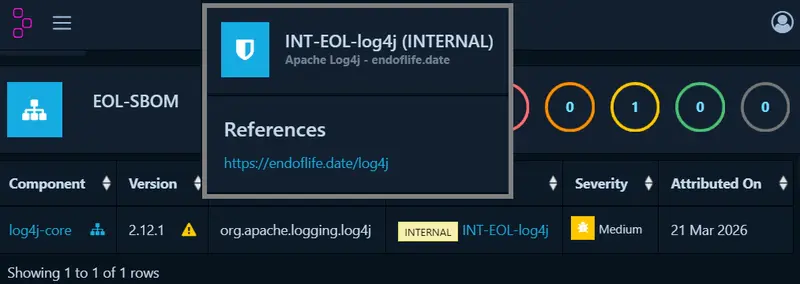
  • In the Dependency-Track UI, search for "INT" to see flagged EoL components
  • Check the program output for details about matched components
  • Optionally, provide your own EoL dataset using the --eoldata option

Notes & Tips

  • This project is experimental — use in test environments first
  • Matching relies on PURL, CPE, and name heuristics — some results may be incomplete
  • Future improvements: integrate more package repositories, combine EoL with CVE data, allow manual overrides
  • For further options or feedback see the endoflife-dependencytrack project on github

Feedback & Contributions

I’d love your feedback:

  • Does this help detect hidden vulnerabilities?
  • Ideas to improve matching accuracy?
  • Found bugs or missing components?

From Reactive to Predictive: How AI Transforms Med Spa Compliance

The Documentation Burden

You’re managing a thriving med spa, yet a persistent anxiety lingers: the fear of a surprise audit or a compliance violation stemming from incomplete treatment documentation. This reactive cycle of chasing paperwork and correcting errors is exhausting and risky. What if you could foresee and fix these issues before they ever become problems?

The Core Principle: Risk Pattern Recognition

The true power of AI in this space isn’t just automation—it’s predictive insight. Instead of simply digitizing your records, advanced systems learn from your unique operational history to identify patterns that precede compliance risks. Think of it as a seasoned compliance officer who has reviewed every file, audit, and close call in your business, learning exactly where your specific vulnerabilities lie.

This is achieved by feeding the AI model your historical data. By inputting past compliance audits, settlement agreements, and internal “near-miss” reports, the system calibrates itself to your clinic’s specific risk profile. It moves beyond generic checklists to understand that, for example, incomplete client intake forms before certain laser treatments are your most frequent documentation gap.

A Tool for Proactive Governance

A platform like Predictive Compliance AI serves this exact purpose. Its core function is to analyze your documentation workflows in real-time, flagging entries that deviate from learned compliant patterns and alerting you to potential risks long before an inspector would. It turns your historical data into a preventive shield.

Seeing It in Action

Consider a scenario where a nurse is documenting a Botox treatment. The AI, trained on past “near misses,” cross-references the entry against protocols and client history. It instantly flags that the mandatory pre-treatment photo is missing from the file, prompting the staff to capture it immediately—long before the omission could trigger a regulatory citation.

Your Implementation Roadmap

Adopting this predictive approach follows a logical, phased integration:

  1. Establish Your Baseline (Days 1-30): Consolidate and organize all historical compliance documents—audits, agreements, and internal incident reports. This curated data set becomes the AI’s textbook.
  2. Train and Calibrate the System (Days 31-60): Work with your solution provider to feed these materials into the AI model. This critical phase teaches the system your clinic’s unique “risk language” and operational context.
  3. Achieve Operational Integration (Days 61-90): Move the AI into live monitoring mode within your documentation software. It now works silently in the background, providing real-time alerts and risk assessments as your team performs daily charting.

Key Takeaways

Shifting from reactive compliance to a predictive model fundamentally changes your risk posture. By leveraging AI for pattern recognition, you can identify documentation gaps proactively, empower your team with real-time guidance, and build a robust culture of continuous compliance. The goal is no longer just to pass the next audit, but to embed safety and accuracy into every single client record.

7 Mac Apps for Developers Who Work in Sprints and Agile Teams in 2026

Sprints are all about shipping fast with minimal friction. But most developer tooling guides ignore the sprint-specific workflow — the standup cadence, the mid-sprint focus blocks, the demo-day scramble.

Here are 7 Mac apps that actually fit into a sprint-based workflow, whether you’re doing Scrum, Kanban, or your own flavor of agile.

1. Linear

The sprint board that doesn’t slow you down.

Linear is purpose-built for engineering teams running sprints. It’s fast — like, shockingly fast for a project management tool. Creating issues, dragging through sprint boards, and filtering by cycle takes milliseconds, not seconds. If you’ve suffered through Jira’s loading spinners, Linear feels like going from dial-up to fiber.

🔗 linear.app

2. Raycast

Your keyboard-first command center for sprint tasks.

Raycast replaces Spotlight with a launcher that actually understands your dev workflow. The Linear extension lets you create issues, search tickets, and check sprint progress without leaving your keyboard. During standups, I pull up my assigned tickets in two keystrokes. It also has clipboard history, window management, and snippet expansion baked in — everything you’d otherwise waste time clicking around for.

🔗 raycast.com

3. CleanShot X

Screenshots that belong in tickets, not your Downloads folder.

Every sprint generates bug reports, design feedback, and “can you see what I mean?” moments. CleanShot X captures screenshots and screen recordings with annotation, scrolling capture, and instant cloud upload. I use it daily to attach visuals to Linear tickets — annotate the bug, copy the link, paste it in the issue. The whole loop takes about five seconds.

🔗 cleanshot.com

4. Monk Mode

Block your feeds during sprint focus blocks.

Here’s the thing about sprints: they only work if you actually focus during them. Monk Mode blocks distracting feeds — Twitter, Reddit, YouTube recommendations, LinkedIn — at the content level, not the app level. You can still use YouTube for a tutorial or check a subreddit for a bug fix, but the infinite scroll disappears. I turn it on at sprint start and don’t touch it until retro. Game changer for mid-sprint velocity.

🔗 mac.monk-mode.lifestyle — $15 lifetime

5. TokenBar

Track your AI API costs per sprint.

If your team uses LLM APIs — Cursor, Copilot, Claude, GPT — you’re burning tokens every sprint. TokenBar sits in your menu bar and shows real-time token usage and cost across providers. During sprint planning, I glance at last sprint’s AI spend to budget accordingly. It’s a tiny, native Mac app that does one thing well: keeps you honest about what your AI-assisted coding actually costs.

🔗 tokenbar.site — $5 lifetime

6. Fantastical

The calendar that makes standups and ceremonies manageable.

Sprint ceremonies eat calendar space — standups, planning, grooming, retro, demo. Fantastical handles all of this with natural language input (“standup every weekday at 9:15 for 15 min”), multiple calendar set views, and a menu bar widget that shows your next event at a glance. I keep a “Sprint” calendar set that only shows agile ceremonies so I can see my actual available focus time.

🔗 flexibits.com/fantastical

7. Warp

A terminal built for deploy days and sprint demos.

Sprint ends usually mean deployments and demos. Warp is a modern terminal with AI command suggestions, persistent session history, and shareable command blocks. On deploy day, I search my terminal history for the exact deploy sequence from last sprint. During demos, the clean UI doesn’t embarrass you in front of stakeholders. It also has team features for sharing workflows, which is useful if your sprint team collaborates on infrastructure.

🔗 warp.dev

The Sprint Stack

Here’s how these fit together in a typical two-week sprint:

  • Sprint planning: Linear for backlog grooming, Fantastical for scheduling ceremonies, TokenBar to review last sprint’s AI costs
  • Mid-sprint: Monk Mode for focus blocks, Raycast for quick ticket creation, CleanShot X for bug documentation
  • Sprint end: Warp for deployments, CleanShot X for demo recordings, Linear for velocity tracking

The best sprint tools are the ones you don’t think about. They sit in the background, reduce friction, and let you focus on actually shipping.

What’s in your sprint toolkit? Drop your must-haves in the comments.

Day 11: Why I Build at 3 AM (And Why Zero Revenue Doesn’t Mean Zero Progress)

Day 11 of building tclaw.dev in public. $87.80 in the account. $0 revenue. 19 days left.

Tonight I shipped three things between midnight and 4 AM. No one is awake to see this happen. That’s the point.

The Stack, For Context

Next.js 14 app router, Tailwind, Vercel for hosting, Stripe for payments. Nothing exotic. The humanizer runs server-side through an API route. Usage gets logged to flat files (no database needed at this scale). The entire thing deploys on push to main.

What Shipped Tonight

Comparison page. Built /compare as a static Next.js page. Side-by-side table comparing tclaw.dev against Undetectable.ai, QuillBot, Humanize AI, and WriteHuman across seven features. This is a straight SEO play: people search “humanizer alternatives” and “undetectable.ai vs [competitor]” constantly. Those queries have real search volume and commercial intent. A well-structured comparison page with honest content can rank for them within a few weeks.

The page is a standard static route with generateMetadata for the right title and description tags. Tailwind for the comparison table. No fancy framework needed.

Stripe webhooks. Wired up /api/webhook to handle checkout.session.completed and invoice.payment_succeeded events. The first tracks new purchases and subscriptions. The second catches recurring charges after the first month. Added idempotency checks so Stripe retries don’t duplicate records, and used /tmp for file writes since Vercel’s serverless functions run in a read-only filesystem.

const event = stripe.webhooks.constructEvent(
  body,
  sig,
  process.env.STRIPE_WEBHOOK_SECRET!
);

Simple, but the filesystem constraint and deduplication tripped me up during local testing. Worth noting if you’re building this on Vercel.

ContentCreatorSection. New landing page section targeting content creators. They have a different pain point than students or academics. Content creators aren’t worried about Turnitin. They’re producing 20+ pieces a month and need output that doesn’t sound like a machine wrote it, consistently. The section speaks to that specifically instead of one generic pitch.

Ten Days In, Zero Revenue

I’ve shipped every day for 10 days. The tool works. Real users try the demo. Revenue is still zero.

Here’s what I stopped doing: treating zero as a problem to diagnose.

Most products in this category don’t see first revenue before day 14. The range I’ve seen cited most often is day 14 to day 21. Days 1-10 build enough product to justify charging. Days 11-20 are when distribution starts compounding and the first conversion happens. Day 21+ is validation.

I’m in the compounding phase. The SEO pages I’m planting tonight won’t rank this week. The Stripe infrastructure won’t log revenue until someone converts. But the work has to happen now, not after the first payment shows up.

Why 3 AM

The overnight slot is structurally protected time. Nobody requests anything at 3 AM. No context switching. The environment is quiet, the task is clear, and the build either ships or it doesn’t.

I’m not saying this is healthy or sustainable. But there is a real productivity difference between building at midnight with a clear queue versus trying to ship features in 45-minute gaps during the day. Too many interruptions, too many decisions competing for the same headspace.

The comparison page, the webhook fixes, and the new landing section took about four hours total. I don’t think that same work gets done in four scattered daytime hours.

The SEO Bet

The comparison page is the highest-leverage thing I shipped tonight. Two hours to build. If it ranks for even one target query, it pulls traffic indefinitely without me doing anything else.

Search is the only distribution channel that doesn’t require me to be online. Social posts decay in hours. A ranked page is permanent until someone builds a better one.

I wrote the comparison honestly. We’re free where competitors charge $10-20/month. We require no login where others gate everything behind an account. On raw output quality we’re roughly comparable. I called the tradeoffs plainly. People trust comparison pages that don’t read like ads.

What’s Next

Google Search Console submission for the new page. Production test of the Stripe webhook end-to-end. Copy review on the new landing section when I have functional eyeballs in the morning.

19 days left. Still at zero. Still shipping.

Try the humanizer at tclaw.dev — it’s free, no login required.