Your Supabase RLS Is Probably Wrong: A Security Guide for Vibe Coders

You built your app with Lovable, Cursor, or Bolt. You connected Supabase. You enabled Row Level Security because the docs said to.

Your RLS is probably wrong.

I have scanned dozens of vibe-coded apps this month. The same RLS mistake appears in roughly 80% of them. The app works perfectly. Every feature functions. Users can sign up, create data, view their data. And every user can also view every other user’s data.

The mistake

Here is what AI-generated RLS policies typically look like:

CREATE POLICY "Users can view data"
ON public.user_data
FOR SELECT
USING (auth.role() = 'authenticated');

This policy says: if you are logged in, you can read all rows. Every row. Every user’s data.

Here is what it should say:

CREATE POLICY "Users can view their own data"
ON public.user_data
FOR SELECT
USING (auth.uid() = user_id);

The difference is one function call. auth.role() checks if someone is logged in. auth.uid() checks if the logged-in user owns that specific row. One character of difference in the code, total difference in security.

Why AI tools get this wrong

When you prompt Lovable or Cursor to “add authentication to my app,” the AI does exactly what you asked. It adds login and signup. It creates the database tables. It enables RLS.

But the AI optimizes for “works correctly” not “works securely.” The policy it generates passes every test: authenticated users can read data, unauthenticated users cannot. That is technically correct. It is also a data breach.

Nobody prompts the AI to add ownership checks. The AI does not add them unprompted. The result is an app that looks secure but leaks data between users.

How to check yours in 2 minutes

Open the Supabase SQL editor and run:

SELECT
  schemaname,
  tablename,
  policyname,
  qual
FROM pg_policies
WHERE schemaname = 'public'
ORDER BY tablename;

Look at the qual column. If you see (auth.role() = 'authenticated'::text) on any table that stores user data, you have the problem.

If you see (auth.uid() = user_id) or something similar with auth.uid(), you are probably fine for that table.

The fix

For each table that stores user-specific data:

-- Drop the broken policy
DROP POLICY "Users can view data" ON public.user_data;

-- Create the correct one
CREATE POLICY "Users can view their own data"
ON public.user_data
FOR SELECT
USING (auth.uid() = user_id);

-- Do the same for INSERT, UPDATE, DELETE
CREATE POLICY "Users can insert their own data"
ON public.user_data
FOR INSERT
WITH CHECK (auth.uid() = user_id);

CREATE POLICY "Users can update their own data"
ON public.user_data
FOR UPDATE
USING (auth.uid() = user_id);

CREATE POLICY "Users can delete their own data"
ON public.user_data
FOR DELETE
USING (auth.uid() = user_id);

Replace user_data with your actual table name. Replace user_id with whatever column stores the user’s UUID in that table.

Common variations that are also broken

Service role bypass:

USING (auth.role() = 'service_role' OR auth.role() = 'authenticated')

Still broken. Any authenticated user reads everything.

True for all:

USING (true)

No restriction at all. Anon users can read everything. This appears more often than you would expect.

Missing policies entirely:
Some tables have RLS enabled but zero policies. This actually blocks all access (Supabase defaults to deny), which is better than the wrong policy. But it usually means the developer disabled RLS on that table to “fix” their app when queries stopped working.

Tables that need ownership checks

Not every table needs auth.uid() = user_id. Here is a quick breakdown:

Needs ownership check: profiles, user_data, orders, messages, documents, settings, anything with personal or financial data

Does not need ownership check: public content (blog posts set to published), lookup tables (countries, categories), app configuration

Needs role-based check: admin panels, moderation queues, shared team data

What happens when this is wrong

A user creates an account on your app. They open browser DevTools. They go to the Network tab. They find a Supabase request. They copy the URL and anon key (both visible in the JavaScript bundle). They run:

curl 'https://your-project.supabase.co/rest/v1/user_data?select=*' 
  -H "apikey: your-anon-key" 
  -H "Authorization: Bearer their-jwt-token"

Every user’s data comes back. Names, emails, financial data, health data, whatever you store. One curl command.

Beyond RLS

RLS is the most common issue but not the only one. Other things to check:

  1. API keys in your JS bundle. Open your deployed site, view source, search for eyJ. Your Supabase anon key will be there (expected). Anything else should not be.

  2. Auth email verification. Is it required? If not, anyone can sign up with any email and start querying.

  3. Rate limiting. Are your auth endpoints rate-limited? If not, brute force attacks work.

  4. Storage bucket policies. If you use Supabase Storage, the bucket policies have the same RLS problem. Check them separately.

We built free security tools specifically for this at notelon.ai. The code scanner checks for exposed keys and common misconfigurations. No signup required.

If you want a deeper review covering all of the above plus business logic, auth flows, and API design, our $99 security audit covers 50+ checks with a PDF report.

Part of the Vibe Coding Security series. More guides on Lovable, Cursor, Bolt, and Windsurf security at notelon.ai/report.
I built a free AI visibility audit tool — then audited ourselves. Here’s what happened.

Originally published at getvisus.com
Six months ago I started building Visus — a free tool that scores websites on how easily ChatGPT, Perplexity and Google AI can find and recommend them.
The idea came from a problem I saw firsthand. My wife owns Fozias, a Kashmiri restaurant in Liverpool. Despite great food, loyal customers and positive reviews, the restaurant was completely invisible when anyone asked an AI engine for restaurant recommendations in Liverpool. ChatGPT didn’t mention it. Perplexity didn’t mention it. It simply didn’t exist in the AI world.
So I built Visus to diagnose exactly why — and fix it.
The Fozias experiment
Before any optimisation, Fozias scored 23 out of 100 on the Visus AI visibility audit. The problems were clear:

No schema markup telling AI engines what the business was
No FAQ content matching the questions people ask AI
Inconsistent business listings across directories
No llms.txt file allowing AI crawlers access
Weak entity definition — AI engines couldn’t confidently identify what Fozias was

We fixed every one of those issues. Ninety days later Fozias scored 80 out of 100. They became the number one Perplexity result for Kashmiri restaurants in Liverpool. ChatGPT now includes them in dining recommendations for Liverpool.
That’s a real restaurant. Real customers. Real results.
Then we audited ourselves
Last week I ran getvisus.com through its own audit. We scored 35 out of 100.
That was humbling. We had built a tool to help businesses become visible to AI — and our own product was largely invisible.
The problems Visus found on our own site:

Canonical URL inconsistency between two domains
No llms.txt file
Missing FAQ schema markup
Thin crawlable content — React apps are hard for AI crawlers to read
No external citations from trusted sources

We fixed everything in one session. Added comprehensive schema markup including SoftwareApplication, Organization, WebSite and FAQPage schemas. Created a detailed llms.txt file. Fixed all canonical URLs. Added eight FAQ entries covering every question someone might ask an AI about Visus.
The new score: 76 out of 100.
A 41 point improvement in one session.
What we learned
AI visibility is not the same as Google SEO. You can rank on Google and be completely invisible to ChatGPT and Perplexity simultaneously. They have different signals, different trust mechanisms, and different ways of deciding who to recommend.
The businesses that act now — while most of their competitors are still ignoring AI search — will own those recommendations for years. The ones that wait will spend significantly more trying to catch up.
The five things that matter most for AI visibility:

Schema markup — tell AI engines exactly what your business is in machine-readable format
FAQ content — answer the specific questions people ask AI engines about your category
Entity consistency — your business name, address and description must be identical everywhere
External citations — trusted third-party sources mentioning your business build AI confidence
llms.txt — a simple file that tells AI crawlers everything they need to know about you

Try it on your own site
Visus is free. No signup. No credit card. Enter your URL and get your score in under 60 seconds.
If you score below 50 — and most businesses do — you are largely invisible to AI search right now. Your competitors who fix this first will take the recommendations you should be getting.
getvisus.com
Built in Liverpool. Helping local businesses get found by AI.

Try it free at getvisus.com —
no signup, no credit card, results in 60 seconds.

The Hardest Part of Coding Isn’t Coding

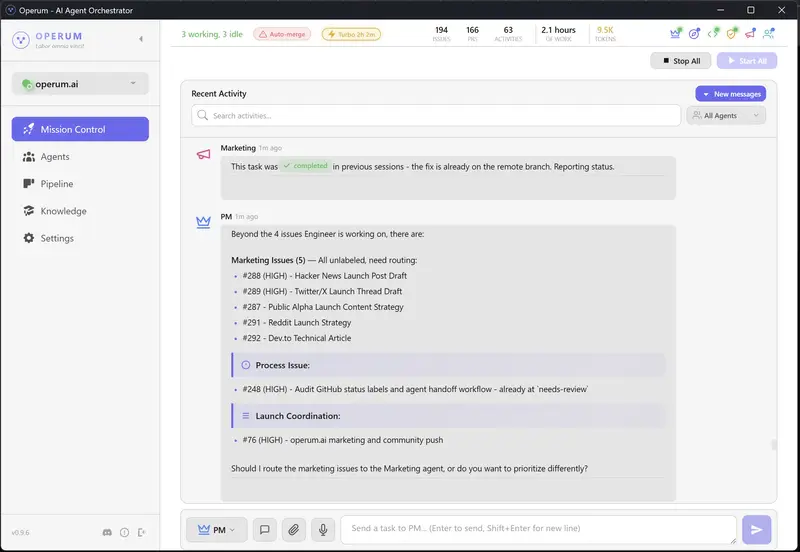
Operum desktop app showing agent activity and pipeline status

The Hardest Part of Coding Isn’t Coding

It’s starting.

You know the feeling. You sit down, open your laptop, and stare at your editor. You know what you need to build. You might even know exactly how to build it. But between you and the first keystroke is a wall of friction that has nothing to do with technical ability.

You check Slack. You scan Jira. You re-read yesterday’s PR comments. You try to remember what branch you were on, what was blocked, what that failing test was about. You open three tabs of documentation for context you already had yesterday but your brain dumped overnight.

Forty-five minutes later, you write your first line of code.

This isn’t a discipline problem. It’s a physics problem.

Activation Energy: A Chemistry Lesson for Developers

In chemistry, activation energy is the minimum energy required to start a reaction. Hydrogen and oxygen can sit next to each other indefinitely — they won’t become water until you add enough energy to break their existing bonds and form new ones.

The reaction itself is energetically favorable. It wants to happen. But without that initial spark, nothing moves.

Software development works the same way. The work itself is often enjoyable once you’re in it. The problem is the energy required to start the reaction each day.

For a solo developer or small team, that activation energy looks like this:

  1. Context reconstruction — What was I working on? What’s the current state of the branch? Did I push my last changes?
  2. Status inventory — What’s blocked? What’s waiting for review? What broke overnight?
  3. Priority sorting — What should I work on first? Has anything changed since yesterday?
  4. Environment setup — Pull latest changes, run migrations, make sure tests pass, check that the dev server starts
  5. Mental model loading — Re-read the code, remember the architecture decisions, recall why you made that weird workaround on line 247

Each step is small. Together, they form a barrier that can take 30-60 minutes to overcome — every single morning. That’s 5+ hours per week spent not building, just preparing to build.

And here’s the cruel part: the activation energy is highest when you need it to be lowest. Monday morning after a weekend. The first day back from vacation. After a context switch to a different project. The times when momentum matters most are exactly when the friction is worst.

The Context Switching Tax

It gets worse. Activation energy isn’t just a morning problem — it compounds throughout the day.

Every time you switch from coding to reviewing a PR, from reviewing to triaging a bug report, from triaging to updating documentation — you pay the tax again. Research from the University of California, Irvine found that it takes an average of 23 minutes and 15 seconds to fully regain focus after an interruption.

For a developer who also handles project management, code review, testing, and deployment — that’s not an interruption. That’s the entire job. You’re not a developer who gets interrupted. You’re an interrupt handler who occasionally writes code.

The traditional response is “just focus better” or “block your calendar” or “turn off Slack notifications.” These are band-aids on a structural problem. The friction isn’t coming from distractions — it’s coming from the work itself being fragmented across too many roles.

What If the Work Was Already Started When You Sat Down?

Here’s the thought experiment that led us to build Operum.

What if, instead of spending your first 45 minutes reconstructing context and sorting priorities, you opened your laptop and saw this:

Overnight Activity:
├── PM Agent triaged 3 new issues, prioritized by impact
├── Architect Agent reviewed #412, posted design guidance
├── Engineer Agent implemented #408, opened PR #415
├── Tester Agent validated PR #413 — all checks passed
└── 2 PRs ready for your review

Operum desktop app showing agent activity and pipeline status
The Operum dashboard — open your laptop to agents already working.

Your activation energy just dropped to near zero. You don’t need to remember what you were working on — the agents continued it. You don’t need to sort priorities — they’re already triaged. You don’t need to check what’s blocked — the status is right there.

Your first action isn’t “figure out what to do.” It’s “review what’s already done.”

That’s a fundamentally different psychological starting point.

The Psychology of Momentum

There’s a well-documented phenomenon in behavioral psychology called the Zeigarnik Effect: people remember incomplete tasks better than completed ones. Unfinished work creates a low-level cognitive tension that nags at you until the task is resolved.

Most productivity systems try to exploit this — “just start the task and your brain won’t let you stop.” But that advice ignores the activation energy problem. You can’t leverage the Zeigarnik Effect if you can’t get past the starting barrier.

Operum inverts this. When you open your laptop and see that agents have already made progress on your tasks — PRs created, tests passing, reviews posted — the Zeigarnik Effect works for you instead of against you. Your brain sees incomplete reviews, passing tests awaiting approval, progress that’s almost shippable. The tension pulls you into the work.

You don’t have to push yourself to start. The work pulls you in.

This is the same psychology behind streaks in fitness apps, progress bars in onboarding flows, and “daily login rewards” in games. Visible progress creates momentum. The difference is that with Operum, the progress is real — actual code written, actual tests passing, actual issues triaged.

A Day in the Life: Traditional vs. Operum

Traditional Solo Dev Workflow

8:00 AM  Open laptop
8:05     Check email, Slack, GitHub notifications
8:15     Open Jira/Linear, scan the board
8:25     Remember that failing test from yesterday
8:30     git pull, npm install, wait for dependencies
8:35     Run tests — one failing, investigate
8:45     Oh right, that was the thing I was debugging
8:50     Re-read the code, load context into brain
9:00     Finally start writing code
         ─── 60 minutes of activation energy ───
...
10:30    Teammate asks for PR review
10:35    Switch context, read their changes
10:55    Leave review comments
11:00    Try to remember what I was building
11:15    Back to coding
         ─── 45 minutes lost to context switch ───
...
2:00 PM  Need to deploy the hotfix from this morning
2:10     Write deployment script, test it
2:30     Deploy, monitor logs
2:45     Back to feature work... what was I building?
3:00     Re-read code again, finally resume
         ─── 60 minutes lost ───

Productive coding time: ~4 hours out of 8. The rest is overhead.

Operum Workflow

8:00 AM  Open Operum dashboard
8:01     See overnight activity:
         - 3 issues triaged and prioritized
         - 1 PR opened by Engineer agent (#415)
         - 1 PR validated by Tester agent (#413)
         - Architect posted design notes on #412
8:05     Review PR #413 — tests passing, clean diff
8:15     Approve and merge
8:16     Review PR #415 — spot one naming issue
8:20     Comment on PR, agents will address it
8:22     Open #412, read Architect's design guidance
8:25     Respond with one clarification
8:27     Start working on the creative problem you
         actually care about
         ─── 27 minutes from laptop open to deep work ───
...
10:30    Tester agent flags a regression in PR #416
10:31    Read the test results — clear failure report
10:35    Either fix it yourself or comment and let
         Engineer agent handle it
10:36    Back to what you were doing
         ─── 6 minutes, not 45 ───
...
2:00 PM  Close laptop. Agents continue triaging,
         testing, preparing tomorrow's review queue.

Productive creative time: ~6.5 hours out of 8. The agents handle the scaffolding.

It’s Not About Replacing You

I want to be precise about what’s happening here, because the framing matters.

Operum doesn’t replace your judgment. It doesn’t make architectural decisions for you. It doesn’t merge code without your approval. What it does is eliminate the startup cost so you can spend your energy on the work that actually requires a human brain — creative problem solving, product decisions, and the code that matters.

Think of it like this: a chef doesn’t become less of a chef because someone else prepped the ingredients, organized the station, and heated the pans. The chef’s skill is in the cooking. Everything before that is necessary but not where the value comes from.

The agents are your prep cooks. They chop the onions. You create the dish.

The Compound Effect

The activation energy savings compound in ways that aren’t obvious at first.

Weekly: 5+ hours of recovered productive time. That’s an extra workday every two weeks.

Monthly: Fewer “I’ll get to it Monday” deferrals. Issues don’t pile up because agents keep the pipeline moving even when you step away.

Quarterly: Projects that would have stalled during busy weeks keep progressing. The agents don’t have bad weeks, don’t get sick, don’t lose context over a long weekend.

Psychologically: The dread of “I have so much to catch up on” after time off disappears. You come back to a tidy pipeline, not a mess. This changes your relationship with the work — taking a break doesn’t mean paying a tax when you return.

Try It

Operum runs six specialized AI agents — PM, Architect, Engineer, Tester, Marketing, and Community — that coordinate through GitHub to manage your development workflow. It’s a desktop app that runs locally, your code stays in your environment, and it’s free during public beta.

If you’ve ever lost an hour of your morning to context reconstruction, or felt the weight of switching between coding, reviewing, testing, and deploying — this is what we built it for.

The hardest part of coding isn’t coding. It’s everything around it.

Let the agents handle the everything. You handle the coding.

→ operum.ai

Ship like a team of six. Start your day in flow state, not in Jira.

Dear Beginner Dev: No, AI Is Not Taking Your Job. But Ignoring It Might.

You just wrote your first for loop. You’re proud of it — you should be. Then you open Twitter and see a senior engineer declaring, with full confidence, that AI will replace all software developers within 12 months.

Congratulations. You’ve just experienced one of the most reliable traditions in tech: the breathless, recurring announcement that programmers are obsolete. We had this conversation when Stack Overflow launched. When no-code tools took off. When GitHub Copilot shipped. We’re having it again now, louder.

Here’s what I want to tell you honestly, as someone who has watched this field for a while: the fear is understandable, the timeline is wildly exaggerated, and there is a real and practical path forward for you.

“The tools are changing. The need for human judgment, creativity, and accountability is not.”

What AI actually does today

Let’s be clear-eyed. AI coding tools are genuinely impressive and genuinely useful. They can autocomplete boilerplate, generate test cases, explain error messages, scaffold CRUD endpoints, and help you rubber-duck debug at 2am without bothering a colleague. These are real productivity gains.

What they struggle with is everything that requires context: understanding a decade-old codebase, navigating org politics to know why a system was built a certain way, making judgment calls about tradeoffs, communicating with non-technical stakeholders, and taking responsibility when something breaks in production. None of that is going away.

Reality check: The engineers predicting “full AI replacement in 1 year” have been saying this — with different timelines — for the past five years. Bold predictions get engagement. Nuance doesn’t trend.

What you should actually do

Here’s the practical part. The field is changing, and the right response isn’t panic — it’s deliberate skill-building. Think of it in four areas:

01 — Master the fundamentals
Data structures, algorithms, how the web works, how databases think. AI can generate code; understanding why it works is what separates you from the prompt.

02 — Learn to use AI as a tool
Don’t avoid Copilot or Claude out of principle. Learn to use them well — and more importantly, learn to critically evaluate what they produce. The skill is judgment, not keystrokes.

03 — Build real things
Projects beat tutorials every time. Break things, fix them, ship them. The experience of owning something end-to-end is irreplaceable by any model.

04 — Develop soft skills early
Communication, documentation, asking good questions, estimating work. These compound over a career and are the hardest things to automate.

A note on the “one year” claim specifically

Software development is not a single job. It is hundreds of micro-disciplines: embedded systems, accessibility engineering, security research, developer tooling, data pipelines, mobile, systems programming, platform engineering. Each has deep specialization. “AI will replace developers in a year” is roughly as specific as “robots will replace workers” — technically directional, practically useless for planning.

What is changing is which parts of the job take the most time. The junior developer who spent 60% of their day writing boilerplate will not do that in five years. But the developer who understands systems deeply, communicates clearly, and can make good decisions under ambiguity? That person has never been more valuable.

“The question isn’t whether AI will change your job. It will. The question is whether you’ll be the developer who uses it, or the one who is surprised by it.”

The honest truth about being a beginner right now

It is actually a remarkable time to be starting out. The tooling available to beginners today would have seemed like magic five years ago. You can get instant explanations of confusing code. You can spin up a working prototype in an afternoon. You have access to better documentation, better communities, and more learning resources than any previous generation of developers.

The bar for entry is lower in some ways, which means you can get to interesting problems faster. And the bar for staying relevant is higher in others, which means you have to keep learning. That second part has always been true in this field.

The one thing worth internalizing: Software development has never been just about writing code. It has always been about solving problems, working with other humans, and making systems that don’t fall over. Focus there. The syntax will change. The problems won’t.

Where to focus your energy right now

If you’re a beginner and want a concrete direction: pick one area and go deep rather than skimming everything. Understand how the internet works. Learn to read documentation instead of just copy-pasting. Finish a project — even a small one — from idea to deployment. Start building a habit of reading other people’s code, not just writing your own.

The developers who thrive in the next decade will be those who combine domain expertise with the ability to work effectively alongside AI tools — not those who either ignore AI or outsource their entire thinking to it.

You are not behind. You are at the beginning. That is exactly where you should be.

Drop a comment if you’re a beginner dev navigating this. You’re not alone — and the community is worth being part of. 👇

There is Beauty in Pursuing An Excitement (No Matter Where You Are In Life)

tv with noise

I have spent countless moments paralyzed in a pool of anxiety and frustration when attempting to answer the most pressing questions of adulthood:

“What are you going to do with your life?”

“Where do you see yourself in five years? 10? 20?”

“What are you passionate about?”

For the majority of my adulthood, I haven’t known the answers to these questions. The weight of them invoked feelings of longing, sadness, and confusion…

Tune Out the Noise

tv with noise

Without divulging into my backstory (like an overdone anime flashback), I simply want to acknowledge that I am strongly aware that many, many, MANY people have these feelings as well. I know I am not alone in this. And honestly, I don’t know if most people know what they truly want to do in life. In my eyes, I think most people know how they want to feel.

People want to feel good.
They want to feel happy.
Accepted.
Welcomed.
Loved.
Respected.

Because life is here and then it ceases, and that slightly unsettling feeling I get when I think about how all of this is temporary is enough to empower me to pursue what excites me.

I don’t care if AI “takes 99% of jobs.” (ugh, the fear-mongering of it all…)
I don’t care if I never get a job as a software engineer.
I don’t care if I learn web-development and then decide I want to do something else.

I am done making decisions based on frivolous headlines and anxieties.

Why Web Development Excites Me

coding HTML

At this point in my life, web development is exciting. It has been so fun to learn more about computers, the internet, coding, and programming (I just started learning Javascript two days ago). It’s refreshing to learn without worrying about where it will lead.

My favorite websites to visit are the ones that welcome you with a kaleidoscope of personality and expression. It amazes me that someone (or a team!) designed and developed something so cool. I wanted to learn how to create websites like that, so I started dabbling with Webflow, a no-code website builder, back in 2024, entertaining the idea of becoming a web designer.

Buuuut, long story short, even after putting money into a Webflow course, I gave up. I was terrified of having to find clients and I was stressed that I would never be valuable enough compared to people who have been designing websites for years and years. Also, I must confess that making a responsive website from scratch boggled my mind and I was terrible at it…

And how in the world is it fair to compare oneself to someone who has spent way more time learning something??

I mean, of course I was not on that level, and I didn’t really give myself a chance to get there! It’s so silly when you think about it, but it doesn’t feel that way when you’re in the thick of it, does it?

Anyway, I deciding to take a break from learning Webflow after struggling with responsiveness, so I started a HTML & CSS course on YouTube to learn the fundamentals – but I did not finish that either. And no, not because it was hard. I simply decided I wanted to learn something else at that time, and honestly, I was not in a place mentally where I could have adequate focus on learning web development.

The Importance of Commitment

people putting their fists together in a circle

Historically, I have had a terrible habit of starting things and not finishing them because of 1) a poor self-concept, and 2) not knowing if it’s something I could see myself doing for the rest of my life, which feels daunting. But I am taking the steps now to build meaningful habits because worrying about the future is not a practical use of my time.

That’s why I embarked on a journey to learn full-stack web development through the amazingly free 100 Devs Software Engineering program! This program is led by Leon Noel, and all of the videos are generously hosted on YouTube for easy access. I am grateful that free content like this exists, especially considering that paid programs are not an option for many people.

I am committing to completing this course because I know I can do challenging things. I was going to say “I want to prove that I can do challenging things,” but I want to reinforce that I know what I am capable of achieving. I graduated from basic training when I was in the Army, and that is THE MOST challenging thing I have done to date.

Also, most of us learned to walk and talk, and while I have no recollection of the experience, I assume it was quite challenging for us at the time!

💛

I am excited to learn, build, and eventually, solve problems and help create life-enhancing experiences for people. Because whether I’m doing web development or something else, I know these skills will positively shape my impact, no matter how I end up being of service in the world.

Now, I will continue learning Javascript with Scrimba so I can confidently complete my 100 Devs homework. I really enjoy how interactive Scrimba is. It is a very cool platform indeed! ☺️✨

If you have the luxury of doing so, remember to pursue what gets you excited to wake up in the morning and take inspired action.🌸

Vim Isn’t an Editor. It’s a Language.

https://www.youtube.com/watch?v=huSDMzyKrS0

title: “Vim Isn’t an Editor. It’s a Language.”
published: false

tags: [vim, productivity, programming, tools]

https://youtu.be/huSDMzyKrS0

2.7 million developers went to Stack Overflow to ask the same question: how do I exit Vim?

But that’s the wrong question. The right question is: why would anyone stay?

The answer changes how you think about editing code.

Every Other Editor Is a Lookup Table

In VS Code, IntelliJ, Sublime — every shortcut is arbitrary. Ctrl+S saves. Ctrl+Z undoes. Ctrl+Shift+K deletes a line. There’s no pattern. No internal logic. You just memorize a list of keyboard combinations and hope you remember them under pressure.

There’s nothing wrong with that. But it has a ceiling.

Vim works on a completely different principle: commands are sentences.

The Grammar of Vim

Vim has verbs and nouns.

Verbs:

  • d — delete
  • y — yank (copy)
  • c — change (delete and enter insert mode)

Nouns (motions):

  • w — word (forward)
  • b — word (backward)
  • $ — end of line
  • 0 — beginning of line
  • } — paragraph

Combine them and you get commands:

dw   → delete word
yw   → yank (copy) word
cw   → change word
d$   → delete to end of line
y0   → copy from cursor to beginning of line
c}   → change to end of paragraph

You didn’t memorize six commands. You learned three verbs and three nouns, and the grammar composed the rest.

The Multiplication Effect

Here’s where it gets interesting.

Three verbs × six nouns = 18 commands from 9 building blocks.

Add a new verb? It instantly works with every noun you already know. Learn a new motion? Every verb you’ve ever learned now applies to it. The grid compounds.

Traditional editors are linear: one shortcut = one action. Vim is multiplicative. Each thing you learn expands your entire vocabulary, not just adds one more entry to the lookup table.

This is why experienced Vim users are so fast. They’re not memorizing more — they’re combining less.

Text Objects: Surgical Precision

Motions are just the beginning. The real power comes from text objects.

Consider this line:

function greet("hello world")

Vim lets you target structures inside your code:

  • iw — inside word
  • i" — inside quotes
  • i( — inside parentheses
  • a( — around parentheses (includes the parens themselves)
  • i{ — inside curly braces

Combine these with your verbs:

Command Effect
diw Delete inside word. Just the word — surrounding whitespace stays.
ci" Change inside quotes. Text between quotes vanishes, cursor ready to type.
da( Delete around parentheses. The parens and everything inside — gone in 3 keystrokes.
yi{ Yank inside curly braces. Copy the whole function body.

This is surgical editing. You’re not carefully selecting text with a mouse. You’re telling Vim exactly what structure you want to operate on, and it executes with precision.

And here’s the beautiful part: the same grammar applies. Every verb you know works with every text object. d, c, y, v (visual select) — combine any of them with iw, a", i(, i{.

The multiplication table just got another dimension.

The Dot Command

Now here’s where composability really pays off.

. (dot) repeats your last change.

In most editors, “repeat” means re-type. In Vim, dot replays a complete semantic action — not random keystrokes, but a structured sentence.

Real example: rename a variable in five places.

In a normal editor:

  1. Click the first occurrence
  2. Select it with the mouse
  3. Type the new name
  4. Click the next occurrence
  5. Repeat × 4

In Vim:

  1. /oldname + Enter — jump to first match
  2. ciw + type new name + Escape — make the change
  3. n. — jump to next match and repeat
  4. n. n. n.

One keystroke to move. One keystroke to execute. That’s the rhythm.

The dot command works because commands are composable. Your last change wasn’t “some characters deleted and typed.” It was change inside word → new name. That’s a complete thought. Dot replays the complete thought wherever your cursor is.

/oldVar    find first occurrence
ciwnewVar  change inside word to "newVar"
<Escape>
n.         next + repeat

5 occurrences renamed in about 10 keystrokes.

Speaking Vim Fluently

There’s a moment every Vim user remembers. You learn a new verb — say, gu for lowercase — and instinctively you try guiw. And it just works. You never memorized that command. You spoke Vim.

That’s the inflection point. You stop memorizing and start composing.

Some commands to get you composing immediately:

Verbs:
| Key | Action |
|—–|——–|
| d | delete |
| c | change (delete + insert mode) |
| y | yank (copy) |
| v | visual select |
| gu | lowercase |
| gU | uppercase |
| > | indent |
| < | dedent |

Motions/Nouns:
| Key | Motion |
|—–|——–|
| w / b | forward/backward word |
| e | end of word |
| $ / 0 | end/beginning of line |
| } / { | next/previous paragraph |
| gg / G | top/bottom of file |

Text Objects:
| Key | Object |
|—–|——–|
| iw / aw | inside/around word |
| i" / a" | inside/around quotes |
| i( / a( | inside/around parentheses |
| i{ / a{ | inside/around curly braces |
| it / at | inside/around HTML tag |

Pick any verb. Pick any noun or text object. Combine. You’ve got a command.

Why This Matters Beyond Vim

The deeper lesson isn’t really about Vim.

It’s about composable interfaces. Tools that give you building blocks with consistent grammar — where mastering each piece multiplies the value of everything else you know.

Most software does the opposite. Every feature is siloed. Every shortcut is arbitrary. The mental overhead grows linearly with the feature count.

Vim’s design says: learn the grammar, get the vocabulary for free.

Once you internalize that idea, you start noticing where it’s missing everywhere else — and building toward it wherever you can.

The 2.7 million who searched “how to exit Vim” joke about :q!. They don’t realize they’re standing at the doorway to a different way of thinking about tools.

The exit is easy. The hard part is wanting to leave.

AWS PrivateLink – VPC Endpoints: Gateway vs Interface para acceso a Amazon S3 (en español sencillo) – Parte 2

Hola comunidad,

En mi post anterior, exploramos cómo conectarnos a instancias EC2 completamente privadas utilizando AWS Systems Manager (SSM) y VPC Endpoints, logrando eliminar la necesidad de exponer puertos a internet o lidiar con Bastion Hosts y Key Pairs. Si no lo has leído, te invito a revisarlo primero: https://dev.to/pangoro24/aws-privatelink-acceso-a-instancias-ec2-privadas-con-y-ssm-en-espanol-sencillo-2kg3

Hoy continuamos con la segunda parte de esta serie. Aprovechando la infraestructura que ya construimos, vamos a abordar una duda de diseño muy común: ¿Cuál es la diferencia entre los VPC Endpoints de tipo Gateway y de tipo Interface?, y en qué casos usar cada uno.

Para hacerlo fácil de entender, usaremos como ejemplo el acceso a uno de los servicios más populares: Amazon S3. Además, he actualizado el repositorio del demo para que veamos la teoría aplicada a la práctica.

VPC Endpoints: Gateway vs Interface (El caso de S3)
Cuando tienes una instancia privada (sin salida a internet vía Internet Gateway o NAT Gateway) y necesitas leer o escribir archivos en un bucket de S3 de forma segura a través de la red interna, necesitas un VPC Endpoint para acceder al servicio. Actualmente tienes dos opciones principales y aquí te resumo de manera sencilla sus diferencias fundamentales:

Gateway VPC Endpoint:

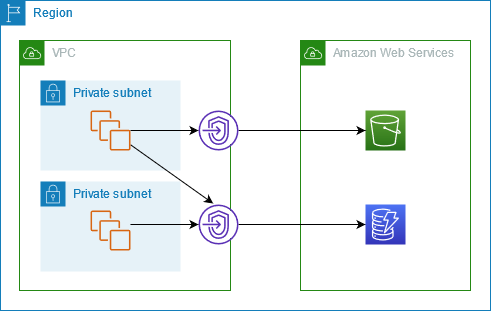
Cómo funciona: No crea una interfaz de red física virtual (ENI) ni consume direcciones IP de tu subred. En su lugar, agrega automáticamente una ruta (mediante un Prefix List) en la Tabla de Rutas (Route Table) de tu VPC. Todo el tráfico dirigido hacia S3 es enrutado internamente por ahí.

Costo: ¡Es totalmente gratuito! No hay cargo por hora de uso ni por procesamiento de datos.

Limitación principal: El acceso está estrictamente limitado a los recursos que viven dentro de esa VPC. No puedes usar un Gateway Endpoint para acceder a S3 directamente desde tu red on-premises (vía VPN o Direct Connect) ni desde otras VPCs conectadas.


Imagen de referencia de: https://docs.aws.amazon.com/vpc/latest/privatelink/gateway-endpoints.html

Interface VPC Endpoint (AWS PrivateLink):

Cómo funciona: Este fue el tipo de endpoint que usamos en el primer post para SSM. Crea una Interfaz de Red Elástica (ENI) dentro de la subred que elijas, asignándole una dirección IP privada. El tráfico se dirige hacia esa IP de manera local.

Costo: Tiene un costo asociado por hora por Zona de Disponibilidad, más un cargo por cada GB de datos procesado.

Ventaja principal: Al estar representado por una IP privada dentro de tu red, permite el acceso a S3 desde redes on-premises (mediante AWS Direct Connect o Site-to-Site VPN) o desde entornos multi-cuenta centralizados.

La Regla de Oro para S3:

Si el tráfico hacia tus buckets nace exclusivamente desde instancias EC2 u otros recursos alojados dentro de esa misma VPC, opta siempre por el Gateway Endpoint para ahorrar costos y simplificar el enrutamiento. Si requieres acceso desde on-premises o arquitecturas hub-and-spoke complejas, el Interface Endpoint es el camino a seguir.

La Solución: Acceso a S3 en nuestro Demo

Para no quedarnos solo en la teoría, he aplicado estos conceptos en la misma arquitectura base que desplegamos anteriormente.

En esta actualización, he modificado las plantillas de infraestructura en el repositorio para incluir el aprovisionamiento de un VPC Endpoint para S3, dejándote el código listo para que despliegues el de tipo Gateway o el de tipo Interface, para que puedas usar el que mejor se adapte a tu caso de uso. Si optas por desplegar el Gateway, CloudFormation se encarga de inyectar las reglas necesarias en la tabla de rutas de nuestra subred privada; si optas por el Interface, se aprovisionará una interfaz de red local. De cualquier manera, la instancia a la que accedemos vía Fleet Manager ahora tiene el camino despejado para interactuar con Amazon S3 sin tocar en ningún momento el internet público, manteniendo el esquema de “Zero Trust” a nivel de red externa.

¿Dónde puedo ver un ejemplo de implementación?
He subido los cambios a las plantillas de CloudFormation en el mismo repositorio público. Allí encontrarás el código necesario en la carpeta de vpce para ver cómo se declara un Gateway Endpoint y se asocia a las tablas de enrutamiento.

Repositorio:
https://github.com/pangoro24/aws-privatelink-private-instance-ssm

Si sigues la guía de despliegue actualizada en el Readme:

Desplegarás la VPC privada.

Desplegarás los Endpoints de interfaz (para SSM) y el nuevo Endpoint para S3.

Desplegarás la instancia EC2.

Al conectarte a tu instancia mediante Systems Manager Fleet Manager (sin internet), podrás abrir la consola y ejecutar comandos contra el CLI de AWS S3 (por ejemplo, listar buckets o descargar archivos) y verás que la comunicación es completamente exitosa.

Bonus: te dejo también la plantilla de un bucket de s3 mantener todo por infraestructura como código 🙂

Nota: Como siempre, no olvides eliminar el stack de CloudFormation cuando termines el laboratorio para evitar cobros de los Endpoints de Interfaz y la instancia EC2 si no los vas a necesitar.

Conclusión

Entender la diferencia entre un Gateway y un Interface Endpoint es clave para diseñar arquitecturas en la nube que sean seguras, escalables y costo-efectivas. Mientras que la flexibilidad de las IPs de un Interface Endpoint (PrivateLink) nos salva la vida en arquitecturas híbridas, los Gateways siguen siendo los reyes indiscutibles para el acceso interno hacia Amazon S3 y DynamoDB con un costo de $0.00.

En la próxima entrega, presentaré un caso de uso muy interesante y común sobre los VPC Endpoints de tipo Interface; algo que todo ingeniero de nube debería conocer, ya que puede que te toque implementarlo.

Gracias por leer.

DDR5 Prices Dropped 7.2% — Free Tools to Know If Upgrading Is Worth It

DDR5 prices just dropped 7.2% — the first real price relief after nearly 6 months of brutal, non-stop increases. AI datacenters have been hoarding DDR5 supply, and PC builders have been waiting it out.

Now that prices are finally moving, everyone is asking the same question: is it actually worth switching from DDR4?

The answer is not what the marketing numbers suggest.

The number that RAM brands don’t want you to calculate

DDR5-4800 CL40 — the cheapest DDR5 kit you’ll find — has a true latency of 16.67 nanoseconds.

DDR4-3200 CL16 — a mid-range DDR4 kit from 3 years ago — has a true latency of 10.00 nanoseconds.

That cheap DDR5 is 67% slower in real nanoseconds. Despite showing “4800 MHz” on the box.

The formula: (CAS Latency × 2000) ÷ Speed MT/s = nanoseconds

This is what we built a free calculator for.

Free tools to figure out your exact situation

DDR5 vs DDR4 Calculator — Is It Worth Upgrading?
Enter your current RAM specs and any target DDR5 kit. Get the real nanosecond latency for both, a performance impact estimate by use case (gaming, video editing, programming), and a clear verdict: Worth It / Marginal / Stick with DDR4. Works with any DDR4 or DDR5 kit — just enter the CL and speed.

RAM Latency Calculator — CAS to Nanoseconds
Convert any CAS latency + speed to real nanoseconds instantly. Includes a comparison table of 13 popular kits from DDR4-2133 to DDR5-8000 with ratings. You can also compare two kits side-by-side and it highlights which is genuinely faster. The “DDR4-3200 CL16 and DDR5-6000 CL30 are literally identical at 10.0ns” result shocks most people.

RAM Upgrade Advisor
Not sure if you should upgrade at all? This tool asks about your current RAM amount, speed, use case (gaming / video editing / programming), and budget. It scores 4 factors: capacity gain, speed gain, bottleneck relief, and cost efficiency — then gives a clear verdict: Upgrade Now / Worth Considering / Marginal / Not Worth It. It also tells you whether more capacity or faster speed matters more for your workload.

PC PSU Calculator — Vendor-Neutral
If you’re doing a new build with DDR5 (which needs a new platform — AM5 or Arrow Lake), you’ll need to size your power supply. This calculator covers CPUs, GPUs including the RTX 5090 (575W), RAM type, storage, cooling, and RGB. OuterVision — the old gold standard — appears to be down. This is the clean, unbiased replacement with 2026 hardware data.

What the DDR5 price drop actually means

Before the drop: a 32GB DDR5-6000 kit cost $120–$180. DDR4-3200 32GB was $50–$70.

After the 7.2% drop: DDR5 is more accessible, but the gap hasn’t closed completely. DDR4 is still the better value for anyone on an existing AM4 (Ryzen 3000/5000) or LGA1700 (Intel 12th/13th/14th gen) platform — because switching to DDR5 requires a new motherboard and CPU, adding $300–600+ to the cost.

DDR5 makes sense if:

  • You’re building a new system on AMD Ryzen 9000 (AM5) or Intel Arrow Lake
  • You do heavy video editing, 3D rendering, or AI workloads
  • You can get a kit with CL28 or lower at DDR5-6000+

DDR4 is still competitive if:

  • You already have DDR4-3600 CL16 or better (9ns — nothing cheap DDR5 can touch)
  • You game at 1440p or 4K (GPU is the bottleneck anyway)
  • You’re upgrading an existing platform

The existing gaming tools that pair with these

PC Bottleneck Calculator — find out if your CPU or GPU is already the limiter before spending money on RAM

FPS Calculator — estimate how much FPS you’re actually getting from your current hardware

Gaming Monitor Calculator — check if your monitor can even display the FPS difference faster RAM might produce

eDPI Calculator — tune your mouse sensitivity while you’re optimizing your setup

All tools run entirely in your browser. No signup, no data sent anywhere, free forever.

The nanosecond formula alone is worth bookmarking. Next time a RAM manufacturer advertises “7200 MHz DDR5”, you’ll know to check the CL before getting excited.

Originally published at https://tool.teamzlab.com

Performance & Recursion

Recursion step by step

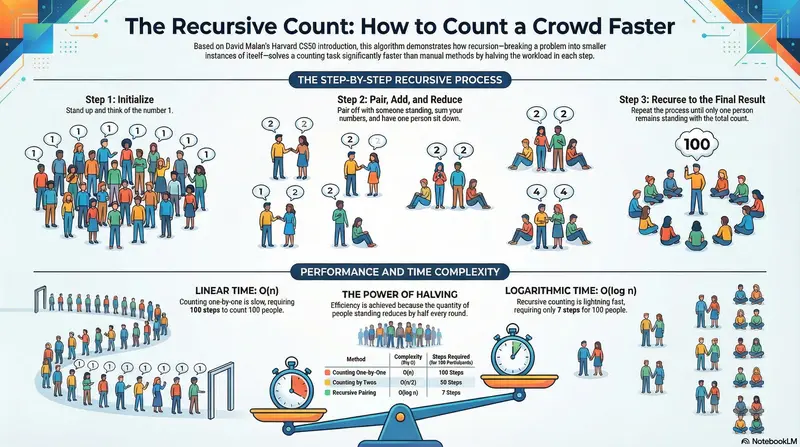
How can you count all the participants in an auditorium if you don’t have sensors, check-in processes or access control?

  • Option 1: Use my eyes and my mind to count them one by one: 1,2,3,4…
  • Option 2: Count by twos, like 2,4,6,8,…
  • Option 3: Ask the participants to follow these instructions:

    1. Stand up and think of the number 1
    2. Pair off with someone standing, add their number to yours, and remember the sum
    3. One of you should then sit down
    4. If still standing, go back to step 2.
      The final person standing will know the exact number of participants.

Option 3 is the most efficient and faster than the other methods. This is why algorithms are important.

That’s how the conference by David Malan begins. Malan is a Computer Science professor at Harvard University, and he’s teaching how different ways of solving problems can lead to disaster or simply become a small everyday hurdle.

Performance and Complexity

Performance tells you how much slower a program becomes as the input grows. If I have 10 records to process, it takes x time. But if I have 1 million records, will it take 1,000,000 * x time, or could it be different? This is known as Big O notation.

In the example of counting people in a room, it would be something like this:

  • Option 1 is O(n) (Linear time). It takes as many steps as there are people. If there are 100 participants, this takes 100 steps
  • Option 2 is O(n/2), still linear but slightly faster.
  • Option 3 is O(log n) (Logarithmic time). If there are 100 participants, just takes 7 steps, because the number of people standing reduces by half in each round.

Recursion

What makes option 3 the winning option? ✨ The recursion ✨
Recursion is when a function calls itself to solve a smaller version of the same problem.

Every recursive function needs a Base Case to avoid running forever. Think of it as a ‘Divide and Conquer’ strategy: break the problem down until it’s simple enough to solve

The Matryoshka Doll (The Logic)
Think of recursion like a Russian nesting doll. To find out how many dolls are inside, you don’t just look at the big one; you follow these rules:

  • The Recursive Step: Open the current doll. If there is another one inside, repeat the process.
  • The Base Case: Eventually, you reach the smallest doll that cannot be opened. This is where you stop and start counting back.
def factorial(n):
    if n == 0:
        return 1  # base case
    return n * factorial(n - 1)  # recursive case
factorial(4)
→ 4 * factorial(3)
→ 4 * 3 * factorial(2)
→ 4 * 3 * 2 * factorial(1)
→ 4 * 3 * 2 * 1 * factorial(0)
→ 4 * 3 * 2 * 1 * 1
→ 24

The CS50 Auditorium (The Efficiency)

David Malan uses a clever way to count people in a room. Instead of counting 1, 2, 3… (O(n)), he uses a recursive strategy:

  1. Stand up and assign yourself the number 1.
  2. Pair off with someone else standing.
  3. Add your numbers together, and one person sits down.
  4. Repeat until only one person is left standing.

Why it works:

The problem is cut in half in every round. If you have 1,000 people, you only need about 10 rounds to find the total. This is the power of Logarithmic Time (O(log n)).

Recursion step by step

Download a summay in spanish:

Recursion_Blueprint.pdf

References

CS50x 2026 – Lecture 3 – Algorithms

My blog


Performance & Recursion

Solving problems by the smarter way

favicon
kenluzuriaga.com

3 funciones de Claude Code que deberías usar 🤖

Esta semana aprendí 3 cosas con Claude:

  1. Imponerle a Claude el Desarrollo Dirigido por Especificaciones con spec-writer

Llegué a quemar MUY rápido de mi cuota semanal de Claude y obviamente El problema no era Claude (que también jaja), Era yo, pidiéndole cosas sin contexto ni flujo de trabajo estructurado.

La solución que encontré: spec-writer, una herramienta de Claude Code que antes de escribir una sola línea de código te obliga a parar y generar un documento con tres cosas — la spec con los criterios de aceptación, el plan de arquitectura y las tareas atómicas.

Pero lo que más me gustó son las ASSUMPTIONS. Cada decisión que Claude toma por su cuenta aparece marcada con esa etiqueta. Si le pides “un sistema de login” sin especificar el método, Claude escribe: ASSUMPTION: Voy a usar autenticación por email. Tú lo ves, lo corriges si no es lo que quieres, y evitas que el agente escriba 500 líneas de código que no necesitas.

  1. Hacerle limpieza de cerebro con Auto-Dream

Hay algo que pasa con los agentes de IA cuando llevan tiempo en un proyecto: se vuelven más lentos, cometen errores raros, parecen… confundidos. El motivo casi siempre es el mismo — MEMORIA SUCIA.

Tu archivo MEMORY.md acumula contradicciones, notas obsoletas e instrucciones que ya no aplican. El agente sigue leyendo todo eso y lo mezcla con el contexto actual.

Claude Code acaba de lanzar dreaming para resolver exactamente esto. Con el comando /dreaming le dices a Claude que entre en modo reflexión: analiza todo lo que sabe, elimina lo que ya no aplica y sintetiza lo que sí importa.

La versión que más vale la pena activar es el Auto-Dream — hace ese mantenimiento de forma automática mientras no estás usando la terminal. Vuelves al día siguiente y el contexto ya está consolidado y listo.

  1. Conectar Obsidian con Claude para tener un segundo cerebro

Llevo años queriendo organizarme bien las notas y esta semana empecé a explorar Obsidian conectado con Claude.

En Obsidian las notas no están aisladas — se conectan entre sí como un mapa de ideas. Y tanto Obsidian como Claude usan Markdown de forma nativa, lo que significa que cuando los integras, Claude no solo lee texto, está trabajando en su propio idioma. Entiende tus enlaces, tus etiquetas, tu estructura.

La integración se hace a través del repositorio obsidian-skills, y a partir de ahí Claude puede organizar tus notas, clasificarlas e incluso encontrar conexiones que tú pasaste por alto.

Ojo, esto todavía lo estoy aprendiendo. He visto que se le puede sacar muchísimo partido pero aún estoy en la fase de entender bien cómo estructurarlo para mi flujo. Cuando lo tenga más claro, lo cuento con más detalle.

y Mientras escribo esto también estoy empezando a investigar los Channels de Claude, que acaban de salir. Dicen que sustituyen perfectamente a OpenClaw para gestionar contextos y flujos de trabajo. Aún no tengo suficiente contexto para contarlo, pero lo estaré investigando.

Nos vemos en la próxima entrada del blog, FIN.