ARC-AGI-3 Proves AI Still Can’t Replace Human Judgment – And That’s the Point

Every few months, something drops that cuts through the AI hype and forces the conversation back to reality. This week, that something was ARC-AGI-3.

The results were blunt: every frontier AI model scored below 1%. Every human scored 100%.

Let that sink in for a second. Not some humans. Not specially trained humans. Every single person who attempted it, regardless of background, aced it. Meanwhile, the most powerful AI systems in existence, the same ones passing bar exams and writing production code, nearly completely failed.

If you’ve been building AI systems for any length of time, your gut reaction was probably somewhere between “I told you so” and “okay, but what does this mean for what I’m shipping?” That’s exactly the question worth digging into.

WHAT ARC-AGI-3 ACTUALLY TESTS

ARC-AGI isn’t your typical benchmark, and that’s the point. It’s not about trivia recall, coding ability, or text summarization. It was specifically designed to test abstract reasoning from first principles. The kind of task where you’re shown a small number of examples of a visual pattern transformation and have to figure out the underlying rule from scratch.

No prior knowledge helps. No retrieval helps. You can’t Google your way to the answer. You have to look at the examples, abstract the logic, and apply it to a new case you’ve never seen before.

Humans find this intuitive. We abstract patterns constantly, it’s one of the most fundamental things our brains do. Show a child three examples of a rule they’ve never been taught, and they’ll generalize it. Show a frontier LLM the same examples, and it will confidently give you a wrong answer based on a pattern it half-remembers from training.

That’s not a knowledge gap. That’s a reasoning gap.

THIS ISN’T A SCALE PROBLEM

The predictable response to any AI failure is: “give it more data, more parameters, more compute.” It’s become almost a mantra. But that narrative is getting harder to sustain.

We’ve been scaling aggressively for years. Each new model family came with promises of emergent capabilities and breakthrough reasoning. Some of those promises were real – coding, analysis, writing, structured reasoning have all improved substantially. But ARC-AGI has barely moved despite years of scaling.

LeCun has been arguing this point for a while: next-token prediction has a fundamental ceiling for certain types of reasoning, and throwing more compute at it won’t fix the architecture. His new venture just raised $1 billion to pursue Energy-Based Models as an alternative. Whether EBMs actually work at scale remains to be seen, but the underlying observation is increasingly hard to dismiss.

If the architecture is the constraint, you can’t benchmark-engineer or fine-tune your way out of it. And for engineers building production systems, that has real consequences.

HOW THIS PLAYS OUT IN PRODUCTION

Here’s what happens when teams treat the latest model as a near-complete replacement for human judgment.

The system works beautifully on the easy cases — which is most of the traffic. Speed is good, costs are low. Then edge cases start showing up. And AI failures at the boundary don’t fail quietly. They fail confidently. The model produces an answer that looks perfectly reasonable, stated with full certainty, that happens to be completely wrong in a way that violates a rule it was never taught to reason about from scratch.

These aren’t just wrong answers. They’re wrong answers that pass basic sanity checks. They slip through unless someone who actually understands the domain is paying attention.

That’s the gap ARC-AGI-3 is measuring. Not “can this model do most things well”, it clearly can. But “can it reason to a correct answer when it has never encountered this specific structure before, with no retrieved knowledge to fall back on?” The answer, consistently, is no.

HITL ISN’T A CRUTCH – IT’S AN ARCHITECTURAL DECISION

Human-in-the-Loop has an image problem. In a lot of technical conversations, it gets framed as the fallback you use before the AI is good enough – something you eventually eliminate as the model improves.

ARC-AGI-3 is strong evidence that this framing is wrong. Not all HITL is about compensating for a model that isn’t there yet. Some of it is about designing honestly around what AI systems structurally cannot do.

The question isn’t whether to include humans in the loop. It’s where, how much, and for what. Getting that right is actually a sophisticated engineering problem, and most teams rush past it.

  1. Route the hard cases, not all the cases. Build a reliable routing layer using confidence scoring, uncertainty quantification, or task-specific heuristics to identify inputs where the model is likely to fail and route only those for human review.

  2. Treat every human correction as a training signal. Every override or validation is a labeled data point. Systems that capture this systematically get better over time. Systems that treat human review as a one-way gate leave the most valuable feedback on the table.

  3. Design for graceful degradation, not silent failure. The worst failure mode is confident wrongness. A well-designed system knows when it’s uncertain and triggers a handoff rather than producing a confident bad output.

  4. Be honest about the boundary. There’s a category of task where the model shouldn’t be the final decision-maker, not because the model is bad, but because the task requires novel abstract reasoning. Identifying that boundary honestly is the job.

THE DEEPER TAKEAWAY

ARC-AGI-3 is useful precisely because it forces clarity on a question teams tend to answer optimistically: what can AI actually do, and what is it structurally limited at?

The honest answer in 2026 is that AI systems are genuinely capable and getting better and they have a real ceiling on certain types of abstract reasoning that hasn’t moved despite years of scaling. Both things are true at the same time.

The teams that build the most reliable AI systems aren’t the ones who bet hardest on that ceiling disappearing. They’re the ones who design honestly around it, keeping humans in the loop not because the model is bad, but because they’ve thought carefully about where human judgment is irreplaceable.

Human judgment isn’t going away. The job is to figure out exactly where it matters most, and build accordingly.


Java News Roundup: GraalVM Build Tools, EclipseLink, Spring Milestones, Open Liberty, Quarkus

This week’s Java roundup for March 23rd, 2026, features news highlighting: GA releases of GraalVM Native Build Tools 1.0 and EclipseLink 5.0; the March 2026 edition of Open Liberty; fourth milestone releases of Spring Boot, Spring Modulith and Spring AI; a point release of Quarkus; the first development release of Infinispan; and a maintenance release of GlassFish.

By Michael Redlich

Pantry & Plate: An AI Kitchen Assistant That Actually Knows What’s Expiring Tomorrow

This is a submission for the Notion MCP Challenge

What I Built

I buy in bulk at Costco to save money. The problem: tracking 100+ pantry items, remembering what’s expiring, and figuring out what to cook for a two-person household with different food preferences.

Pantry & Plate is an AI-powered pantry tracker and meal planner that eliminates that cognitive load. It parses grocery receipts using Claude’s vision, tracks expiry dates in Notion, and runs an agentic chat assistant that knows exactly what’s in my kitchen, what needs to be used first, and what my partner won’t eat (mushrooms, shrimp, brussels sprouts).

Here’s what makes it different: when I ask “What can I make tonight?”, the agent doesn’t guess. It queries my actual Notion databases — pantry items with real expiry dates, my household preferences, my planned meals for the week — then reasons over the results before suggesting anything.

The agent might respond: “The Italian sausage expires in four days. How about a quick sausage pasta with the San Marzano tomatoes from your pantry? I’ll add it to your meal agenda.”

That’s not a canned response. The agent read Expiry Date: March 30 from my Notion Pantry database.

Key Features

  • Receipt parsing with human-in-the-loop review: Upload a photo of a Costco receipt. Claude’s vision parses “KS ORG STOCK” into “Kirkland Organic Chicken Stock” (it guesses). You review and correct before saving.
  • Compact pantry view: 100+ items grouped by category, collapsible sections, inline editing, expiry date tracking.
  • 11-tool conversational agent: Query pantry, shopping list, meal history, preferences, kitchen tools, and meal agenda — all via natural language.
  • Shopping list with purchase-to-pantry flow: Check “purchased” → item moves to pantry automatically.
  • Preferences as silent context: The agent knows my partner hates mushrooms. It never narrates this — just excludes them.

Video Demo

Show us the code

https://github.com/Aprattcodes/pantry-tracker

Stack

  • Next.js 15, TypeScript, Tailwind v4, shadcn/ui
  • Anthropic Claude API (vision for OCR, forced tool use for parsing, agentic loops)
  • Notion as the persistent data layer (6 databases)
  • @notionhq/client v2

How I Used Notion MCP

We implemented the MCP tool-use pattern — Claude decides which of 11 tools to call, queries live Notion data, and reasons over results in an agentic loop — using @notionhq/client v2 with integration tokens.

We initially attempted mcp.notion.com but it requires OAuth authentication, which doesn’t fit a server-side web application architecture where the backend needs persistent database access. The agentic pattern is structurally identical to an MCP client-server interaction: tool discovery, tool invocation, result handling, multi-turn reasoning. The transport layer differs, but the intelligence pattern is the same.

The Agentic Loop in Action

Here’s how chatAgent() works:

// 11 tools available to the agent
const CHAT_TOOLS = [
  { name: 'query_pantry', description: 'Get all pantry items with expiry dates' },
  { name: 'query_preferences', description: 'Get household food preferences' },
  { name: 'query_meal_agenda', description: 'Get planned meals for the week' },
  { name: 'suggest_meals', description: 'Generate meal suggestions' },
  { name: 'add_to_meal_agenda', description: 'Add a meal to the weekly plan' },
  { name: 'log_meal', description: 'Log a meal to history' },
  // ... 5 more tools
];

// The loop: Claude calls tools, we execute, Claude reasons over results
while (response.stop_reason === 'tool_use' && iterations < 8) {
  const toolUse = response.content.find(c => c.type === 'tool_use');

  // Execute against real Notion databases
  const result = await executeNotionTool(toolUse.name, toolUse.input);

  // Feed result back to Claude for reasoning
  messages.push({ role: 'user', content: [{ type: 'tool_result', content: result }] });
  response = await anthropic.messages.create({ model, messages, tools: CHAT_TOOLS });
}

When the user says “What can I make tonight?”, Claude decides to:

  1. Call query_preferences → learns one of us hates mushrooms, we both love Mexican food
  2. Call query_pantry → sees Italian sausage expires in four days
  3. Call query_meal_agenda → checks what’s already planned
  4. Call suggest_meals → generates contextual suggestions

The agent makes multiple Notion queries in a single conversational turn, reasoning over real data — not summaries.

Notion as the Data Layer

Six databases power the entire system:

Database Purpose
Pantry Items with category, quantity, expiry date, store
Shopping List Items grouped by store with purchase status
Meals Log Meal history with date, category, effort level
Preferences Likes, hard-passes, cuisine preferences per person
Kitchen Tools Equipment with effort levels (sous vide = High)
Meal Agenda Currently planned meals for the week

The agent can query any of these, cross-reference them, and write back. When I say “Add Italian sausage pasta to my meal plan,” it:

  1. Calls add_to_meal_agenda → writes to Meal Agenda DB
  2. Auto-triggers log_meal → writes to Meals Log DB

Two Notion writes from a single conversational command.

Human-in-the-Loop Receipt Parsing

Costco receipts are cryptic. “KS ORG STOCK” means Kirkland Signature Organic Chicken Stock. We use Claude’s vision with forced tool use to guarantee structured output:

const response = await anthropic.messages.create({
  model: 'claude-sonnet-4-20250514',
  max_tokens: 4096, // Required for 27+ item receipts
  tool_choice: { type: 'tool', name: 'record_pantry_items' },
  // ...
});

The parsed items appear in a review table — original receipt text on the left, Claude’s interpretation on the right. The human corrects mistakes, picks expiry dates, then saves. The review step is critical: Claude makes educated guesses, but a human confirms before anything hits Notion.

Key Technical Decisions

Forced tool use for structured output: tool_choice: { type: "tool", name: "record_pantry_items" } guarantees JSON output. Prompt engineering alone was unreliable for 27+ item receipts.

max_tokens: 4096 for long receipts: Below this threshold, Claude silently truncates. Discovered this the hard way with a Costco run.

Preferences as silent context: Early versions narrated preferences (“I see you don’t like mushrooms…”). Now the agent applies them without explanation — like a real kitchen assistant would.

Store inference from preferences: When the user says “add ground beef to my shopping list,” the agent queries preferences, finds “household buys ground beef at Costco,” and auto-sets store=Costco, quantity=3 lbs.

Purchase-to-pantry flow: Checking “purchased” on a shopping list item creates a pantry entry with the same name/store/quantity. One checkbox replaces a manual two-step process.

Reflections

Building this taught me that the MCP pattern isn’t about the transport layer — it’s about giving an AI agent live data access and the autonomy to query what it needs. Whether that’s via a remote MCP server or a custom tool wrapper around @notionhq/client, the intelligence pattern is the same: tool discovery, invocation, result handling, multi-turn reasoning.

The hardest part wasn’t the agentic loop — it was the UX around it. Making tool calls visible (we show “tool pills” in the chat), handling the max_tokens stop reason gracefully, and ensuring the agent doesn’t narrate its reasoning when it should just act.

Notion as a data layer worked surprisingly well. The real-time queries mean the agent always has accurate state. No stale caches, no sync issues. When I buy groceries and check them off, the next “What can I make?” query sees the updated pantry.

For a two-person household that meal plans around Costco runs and expiring produce, this is the tool I actually wanted to exist.

Built by a developer who got tired of throwing away forgotten produce.

Why Your Next Enterprise Chatbot Should Write Its Own GraphQL Queries

Your chatbot needs to query live business data. Here is why GraphQL maybe preferable or safer, more controllable interface / tools for LLM generated questionnaire.

The Real Question: How Should Your Agent Talk to Your Data?

If you are creating an agentic chatbot, that will need access to tools (APIs/query SOR, and perform other tasks that require coordination), then you have already answered the hard conceptual part. Your agent thinks, selects tools, and assembles responses.

However, there is another issue that is not receiving as much consideration as it should: how should your agent interact with your business data?

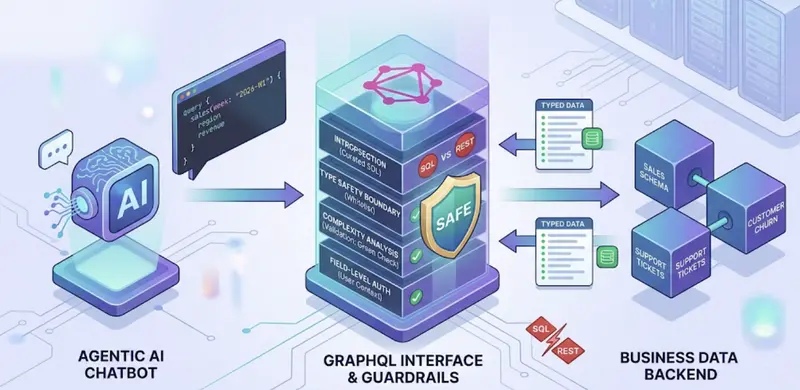
An image that can be drawn is that the agent will need to query your sales schema, retrieve customer churn information, and cross-check support tickets. This is three or four calls to tools that will create live queries against your backend. These queries need to be safe, typed, auditable, and constrained, as no human will review them prior to execution.

Most teams will default to using REST endpoints. Some will even consider using agents that write SQL against transactional databases, which I would strongly advise against. I think there is a much better way.

The Architecture Pattern

Here is the architecture I continue to come back to. While the interesting piece is not the orchestration piece itself, it is the selection of GraphQL as the data interface between the agent’s tools and the backend.

The data path is the GraphQL tool server, and that is the main way in which the agent is accessing business data. The other tools are just implementing specific operations and do not all share the same backend.

With regards to the orchestration piece, it is simple in the sense that the agent selects the tools, runs them, and continues running them in a loop until it has enough information. However, the interesting part is inside those tool runs, and that is where the agent is constructing GraphQL queries against your backend. This is where the interface selection makes or breaks the system.

Why GraphQL Over SQL or REST?

This is my strongest conviction: for enterprise AAL use cases, GraphQL is a safer default interface than REST for LLM-based queries. SQL is appropriate for analytics, but it should not be used as an interface between an agent and your transactional data.

  • Introspection: Realistically, you expose a curated subset of the schema, or pre-fetch the minified SDL, rather than allowing the agent to freely introspect in production. This ensures the schema remains small enough to be included in the prompt without consuming your context window, while still allowing the agent to discover the data available.
  • Type safety as a security boundary: There is no DROP TABLE in GraphQL. The schema is a whitelist, and bad queries will not reach your data.
  • Reduced hallucination surface: While GraphQL removes an entire category of hallucinations (invalid joins, non-existent tables), there can still be queries for non-existent or improperly used relationships, which is why you’ll still want to use validation layers.
  • Guardrails baked in: Complexity analysis, depth limiting, and field-level authorization are all first-class citizens in the GraphQL toolchain.

This is what an agent-generated query looks like in the real world:

query {
  sales(week: "2026-W1") {
    region
    revenue}
  churnedCustomers(week: "2026-W2") {
    count
    reason  }
}

The agent only requests what it needs. Fewer tokens in the response, less load on your backend.

Let’s look at the alternative of allowing an agent to query your data in SQL against your relational data store. What if the agent’s WHERE clause is not quite right and returns the wrong data? What if the agent forgot to include the LIMIT clause and now your entire table is being scanned? What if the agent’s JOIN is not quite right and locks up your data or slows down every other user of your system? GraphQL is the reverse of this problem. The model only sees what you’ve made available and nothing more.

However, to be fair: GraphQL is not without its own set of problems. N+1 query problems will result if resolvers are not implemented properly. Also, with GraphQL, we are moving the complexity to resolver performance and cost management, especially in the case of queries coming from autonomous agents. For offline analytics queries that involve complex aggregation, SQL against a read-only data warehouse is indeed the correct approach. However, that is a fundamentally different scenario from an agent querying your live application data in real time. At the application level, which is where most enterprise chatbots live, GraphQL is indeed a more controllable and auditable interface. That is a trade-off that is worth making for most of the use cases that I see in the wild.

The Code: Two Key Components

Here are the two components that make this pattern work. Everything else is standard boilerplate, which we’re sure you already have in place. Spring Boot is an excellent choice here. Its type-safe support for GraphQL, its maturity, and its support for Spring AI make it an excellent choice for building agent-facing APIs.

1. MCP Tool Server with Guardrails (Java)

The MCP tool server is essentially a safety wrapper for your GraphQL API. The agent sends in its query, which is then checked by the MCP tool before it is run.

@Service
public class GraphQLQueryTool implements McpTool {

    private final GraphQLClient graphQLClient;
    private final SchemaValidator schemaValidator;
    private final QueryComplexityAnalyzer complexityAnalyzer;
    private static final int MAX_QUERY_DEPTH = 4;
    private static final int MAX_QUERY_COMPLEXITY = 100;
    @Override
    public String name() { return "query_business_data"; }
    @Override
    public ToolResult execute(Map<String, Object> parameters) {
        String query = (String) parameters.get("query");
        // Safety Layer 1: Schema validation
        ValidationResult validation = schemaValidator.validate(query);
        if (!validation.isValid()) {
            return ToolResult.error("Invalid query: " + validation.errors());        }

           // Safety Layer 2: Complexity analysis
        int complexity = complexityAnalyzer.calculate(query);
        if (complexity > MAX_QUERY_COMPLEXITY) {
            return ToolResult.error("Complexity " + complexity
                + " exceeds limit of " + MAX_QUERY_COMPLEXITY);}

                   // Safety Layer 3: Depth limiting
        int depth = complexityAnalyzer.calculateDepth(query);
        if (depth > MAX_QUERY_DEPTH) {
            return ToolResult.error("Depth " + depth
                + " exceeds limit of " + MAX_QUERY_DEPTH);
        }
        GraphQLResponse response = graphQLClient.execute(query);
        return ToolResult.success(response.toJson());
    }
}

Three levels of validation before anything touches your data. This is defense in depth. This is important when the model is actually making decisions and sending queries on its own.

2. Agentic Orchestration with LangGraph (Python)

LangGraph controls the reasoning loop. The model suggests what tools to invoke, the orchestration layer controls and corrects the loop until it has enough information.

from langgraph.graph import StateGraph, END
from langchain_anthropic import ChatAnthropic
def create_agent():
    model = ChatAnthropic(
        model="claude-opus-x",
        max_tokens=4096, temperature=0
    )
    model_with_tools = model.bind_tools([
        graphql_query_tool, customer_data_tool,
        analytics_tool, notification_tool
    ])

    def reasoning_node(state):
        response = model_with_tools.invoke(state["messages"])
        return {"messages": state["messages"] + [response]}

    def tool_execution_node(state):
        last_msg = state["messages"][-1]
        results = [
            ToolMessage(
                content=tool_registry[tc["name"]].invoke(tc["args"]),
                tool_call_id=tc["id"]
            ) for tc in last_msg.tool_calls
        ]
        return {"messages": state["messages"] + results}

    def should_continue(state):
        last_msg = state["messages"][-1]
        if hasattr(last_msg, "tool_calls") and last_msg.tool_calls:
            return "execute_tools"
        return END

    graph = StateGraph(AgentState)
    graph.add_node("reason", reasoning_node)
    graph.add_node("execute_tools", tool_execution_node)
    graph.set_entry_point("reason")
    graph.add_conditional_edges("reason", should_continue)
    graph.add_edge("execute_tools", "reason")
    return graph.compile()

The model offers a plan; it is up to the orchestration layer to constrain, execute, and correct it. There is no need to think through all possible questions or create intricate routing logic.

The Hard-Won Opinions

Guardrails are the product. The hardest part is not making agentic chatbots work; it is making them safe. My personal stack includes schema validation, complexity limits, depth limits, tool call budgets (max 8 per turn), query deduplication to prevent loops, hard timeouts (10s/tool, 60s/turn), read-only by default, and field-level authorization for PCI or sensitive data. One other thing that many teams overlook is that every query executed is executed within the authorization context of the requesting user. The agent should not have greater access rights than it is acting on behalf of. While this is a lot, it is also important to remember that an agent with unfettered rights to your business systems is not something you want.

Transparency is the key to building trust. Users need to see the logic, the generated queries, and the raw data. The answer is black box if it simply says “The answer is…” rather than “I queried the sales data for weeks 12 and 13. I saw that there was a 12% drop in the Northeast. I cross-referenced that with 47 lost enterprise accounts and also looked at the support tickets that came in with billing complaints.” Transparency is what will get the adoption. Without it, the project will fail.

Tool calls can get out of control. Agents will get caught in an infinite loop calling the same tool over and over with slightly different parameters. I’ve seen it happen in one of my prototypes. The agent made 30 nearly identical tool calls in under 15 seconds before timing out. The combination of the budget and the deduplication and the timeout is the bare minimum.

When GraphQL Is Not the Right Fit? THoughts?

The use of GraphQL as the query language against the agent data is not necessarily the correct answer. SQL against the read-only warehouse is the correct answer for the offline analytics query workload with complex aggregations. This is analytics, however, and not the agents querying the live data. When the high-risk write operations are critical in that the outcome is catastrophic if the query is incorrect, approval is the answer regardless of the query language. And in some cases, your backend is simply a good set of REST endpoints with well-defined contracts. In those cases, the cost of switching is likely not worth the benefit. This is particularly true in cases where agents must query many types of entities with differing field sets required. This is true in all of the enterprise cases that I have been involved with.

Where This Is Heading

The tooling is already mature: the current-gen models like Claude Sonnet and GPT-4o have decent native tool usage capabilities, MCP is becoming the de facto standard for tool integration, and GraphQL has been around for nearly a decade now. The orchestration frameworks are in place. What’s lacking is the organizational willingness to put in place a typed and guarded query interface between the agent and the data, rather than just making raw REST calls and crossing our fingers.

The advice I’d give is: **One read-only tool against a non-sensitive data set. Get the reasoning loop right. Make sure stakeholders can see the agent’s output. Then iterate.

Once you have those tools, the real decision is how those tools interact with your data. REST works, and GraphQL offers typed schema definition, introspection, and query constraints. These are much more important when your caller is a model instead of a human.

Is GraphQL the right abstraction layer for LLM-generated queries, or is there a better approach? Drop your thoughts in the comments below.

kwike – Agent-to-Agent Orchestration in the Unix Philosophy

Doc Updater

I’ve been building kwike, an LLM-first tool for composing agentic workflows using Unix primitives – pipes, append-only logs, and event subscriptions instead of SDKs and harnesses.

The primary use case here is agentic workflows for specific repeatable actions. What I often call drudgery. Version upgrades, dependency management, or maintaining documentation.

This isn’t going to run your business or make you the next 50MM in 12hr dude, but it does allow you to get some boring stuff done while you work on the stuff you like. Its a technical solution for technical problems.

LLM First

One of the features kwike focuses on is training an LLM in its use. While it has a CLI that you can use for non-agentic tooling, building a workflow is telling your LLM of choice – in my case, Claude – “You have access to kwike, an agentic workflow orchestration tool. Read kwike --help and kwike docs. I want to build a workflow that looks something like X. Let me know when you are ready to discuss.” Much of what comes next can be constructed without any experience with the tool. It includes debugging tools and static analysis to validate configuration and the workflow DAG.

While setting up a new workflow isn’t immediate, rather complex behavior can be recorded and committed with your projects.

Basics

Doc Updater

Deep down this is an agent-to-agent communication protocol through event dispatch and subscription. The tool exposes the following primitives:

  • dispatch (emit events to an event store)
  • consume (pull events subscribed to)
  • daemon (event store owner, can mesh across network boundaries)

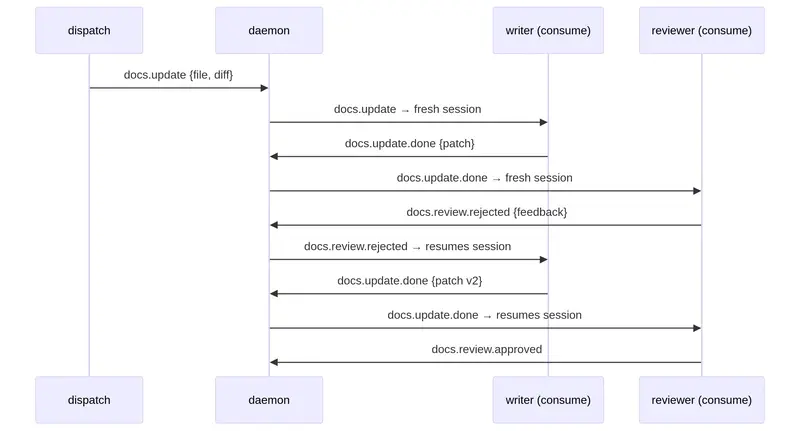
The consumer watches for one or more messages defining its own partition and maintains its own read cursor. The daemon in this case acts as a mail server, essentially, and new messages are dispatched with the intent of being reactive in nature. Think of it as allowing system events or another LLM’s tool use to spawn a dedicated workflow.

Each workflow step is called a uniform and is assigned to a dedicated consumer process. A uniform is a prompt template passed to the underlying tool the consumer executes. The goal here is to force the LLM to consume and produce a consistent contract so agents and scripts can exchange data. This protocol also provides some guarantee that agentic processes complete their work by requiring a JSON schema which is used to validate the agent output.

In many cases this becomes a context exchange between agents. Reminding working directories or fan-out/fan-in statuses. This context exchange is generally analogous to an email thread. A consumer can subscribe to many sources and can for claude-code force a clean context or continue a session

source: 
  types: 
    - "task.implement" # subscribed events 
    - "task.review.rejected" 
    - "task.review.approved" 

session: 
  fresh_types: [task.implement] # these create new sessions 
  resume_types: [task.review.rejected] # these resume existing sessions 
 # task.review.approved is neither → defaults to fresh

Each tool call or agent can map lifecycle events so the output contract can inform on .done and .failed. When these mappings exist a successful tool or agent completion results in a new event dispatched as a threaded reply. Allowing other consumers to participate in the work with their own uniform defining a task.

Claude-Code Caveat

Much of this has been built around claude-code and there are some limitations towards other agents right now but this is what I have so far. Claude for example as the tool supports session resume which permits retries and replies to maintain a conversationally bound session to speed things up.

Couple Line Example

Here is an example of “watch” which is a convenience function to auto “dispatch” from any command output on an interval. Requires a running kwike daemon.

# watch a git repo, dispatch changes, consume with an agent
kwike watch "git diff --stat HEAD~1" --type repo.change --interval 60s
kwike consume --config ./agents/writer/consumer.yaml

Anyway I have plenty of examples in the repo, https://git.sr.ht/~ninjapanzer/kwike

There is plenty left to do but I would love to hear some feedback on the architecture and assumptions around contract constraints as a mode to make LLMs behave. The crash-only approach, and the message durability that mirrors Kafka but acts more like a newsgroup server and mail clients.

Choosing a video hosting provider for hobby projects

Something embarrassing happened to me recently. I was at a networking event and I was excited to show someone my website and passion project Jamroom. As soon as I pulled them up, I remembered how long it’d been since I created these projects. The UI/UX I’d built a couple of years ago felt stale, and there were unpolished edges I never went back to.

So I spent last weekend to revamp the UI, rethink some of the UX, and I even finally recorded a demo for Jamroom1 to showcase on my website!

A new challenge I was presented with then was where to host the demo video. In the past I’d always reach for the quick and dirty solutions like hosting on Vimeo, YouTube‘s unlisted videos, or GitHub even. This time I decided it was time for change, I wanted to host my assets on my own infra. To do this I came up with two requirements:
1) The solution needs to be free/dirt cheap
2) The setup can’t take more than a few minutes, time is money!

Did some research and landed on Cloudflare R2, they offer a generous free tier. But mid-onboarding I realized in order to use the free tier, I’d have to either:
1) Switch my DNS provider to Cloudflare, having to migrate all my DNS records, which would absolutely take more than a few minutes.
2) Setup URL pre-signing on my backend to provide public access to the videos in my private bucket. Which would be unnecessary work for my needs at this time.

So I kept digging and voila! Enter Vercel Blob storage, their free tier offers free public access to your assets, albeit it’s very limited. But it’s good enough for now! There’ll come a time when I’ll have to finally setup the URL pre-signing to take advantage of the more generous free services out there, but till then I can invest my time in more pressing projects.

Here are my realistic options, optimizing for ease of setup/use and cost.

provider cheapest tier tier limits public URL access
Backblaze B2 forever free 10GB storage, unlimited free egress, 1M writes + 10M reads/mo Yes—public buckets support direct URLs , but cannot map custom domain without Cloudflare workaround
Supabase Storage free forever 1GB file storage, 5GB bandwidth, 50K MAUs Yes—public buckets provide direct asset URLs without auth
DigitalOcean Spaces $5/month 250GB storage, 1TB outbound transfer Yes—files can be set to public permissions with direct URLs
Vercel Blob free (Hobby) 1GB storage, 10GB Blob Data Transfer/month Yes—native public access with permanent URLs
AWS S3 free 12mo 5GB storage, 20K GET + 2K PUT requests/month, 100GB data transfer out Yes via public bucket or presigned URLs

Links

Demo video
Jamroom Website
My Website

  1. Jamroom is a passion project I built a couple of years ago to teach myself about real time messaging systems and experiment with music. You can join a room with your friends and play virtual instruments (keyboard and drums) together in real time. ↩

Mock What Prisma Returns, Not What Your API Returns

I’m building RunHop in public — a social + event platform for running races, built on NestJS.

Today I finished the organization and membership e2e test suites. Along the way, I spent an embarrassing amount of time on a TypeError that came down to one wrong mock.

The Crash

// organization.service.ts
async list(cursor?: string, take: number = 20) {
    const args: Prisma.OrganizationFindManyArgs = {
        take,
        where: { deletedAt: null },
        orderBy: { createdAt: 'desc' }
    };

    if (cursor) {
        args.skip = 1;
        args.cursor = { id: cursor }
    }

    const result = await this.prisma.organization.findMany(args);
    const nextCursor = result.at(-1)?.id;

    return { data: result, meta: { cursor: nextCursor } };
}

The unit test:

it('should return orgs without cursor', async () => {
    mockPrisma.organization.findMany.mockResolvedValue(
        { data: [mockOrg], nextCursor: mockOrg.id }  // <-- the problem
    );
    const result = await service.list();
    // TypeError: result.at is not a function
});

result.at(-1) crashed because the mock returns an object, not an array. And .at() is an Array method.

Why This Happens

The mock was shaped like the API response — { data: [...], nextCursor: '...' }. That’s what the frontend sees. But Prisma’s findMany returns a plain array. Always. The { data, meta } wrapping happens later, in a completely different layer.

Here’s the actual data flow in a NestJS app with a response interceptor:

Prisma findMany  →  returns [org1, org2, org3]        (plain array)
     ↓
Service          →  returns { data: [...], meta: {} }  (structured response)
     ↓
Controller       →  returns service result as-is
     ↓
TransformInterceptor  →  sees data + meta keys → passes through untouched
     ↓
HTTP Response    →  { data: [...], meta: { cursor: '...' } }
For non-paginated endpoints, the interceptor wraps automatically:

Service          →  returns { id: '123', name: 'Org' }  (plain object)
     ↓
TransformInterceptor  →  no data/meta keys → wraps in { data: response }
     ↓
HTTP Response    →  { data: { id: '123', name: 'Org' } }
The interceptor code is straightforward:
// transform.interceptor.ts
@Injectable()
export class TransformInterceptor<T> implements NestInterceptor<T, any> {
    intercept(context: ExecutionContext, next: CallHandler): Observable<any> {
        return next.handle().pipe(
            map((response) => {
                if (!response) return { data: null };
                if (response.data && response.meta) return response;
                return { data: response };
            })
        );
    }
}

When you write a unit test for the service, you’re testing everything above the controller. The mock replaces Prisma — so it should return what Prisma returns:

mockPrisma.organization.findMany.mockResolvedValue([mockOrg]); // plain array

The Pagination Test That Compared a List to Itself

While I was at it, I wrote a pagination e2e test that verified page 2 doesn’t overlap with page 1. First attempt:

const newList = result.body.data;
const bIds = new Set(newList.map((item) => item.id));
const same = listOrgs.length === newList.length
    && newList.every((item) => bIds.has(item.id));

expect(same).toBe(false);

This always passes. bIds is built from newList, and then we check if every item in newList is in bIds. Of course it is — we’re comparing the list against itself.

The fix:

const page2Ids = new Set(newList.map((item) => item.id));
const hasOverlap = listOrgs.some((item) => page2Ids.has(item.id));

expect(hasOverlap).toBe(false);

Now we’re checking: do any page 1 items appear in page 2? That’s the actual invariant.

Membership E2E: Permission Boundaries

The org-membership suite tests 6 scenarios from the plan:

describe('Add a member', () => {
    it('should create and return org membership');         // 201
    it('should reject duplicate member');                   // 409
});

describe('Update Member', () => {
    it('should update member role as owner');               // 200
    it('should reject role update as admin');               // 403
});

describe('Remove member', () => {
    it('should remove a member');                           // 200
    it('should reject removing owner');                     // 403
});

Setup is three users with distinct roles: owner creates the org (gets OWNER automatically via the transaction in create()), admin gets added with ADMIN role, member gets added with default MEMBER role. Tests run sequentially because membership state carries between them — the admin added in the update suite’s beforeAll is still there for the remove tests.

The permission model: the controller calls verifyRole(userId, orgId, minRole) before every mutation. The service checks the caller’s role against a hierarchy map:

const ROLE_HIERARCHY: Record<string, number> = {
    MEMBER: 1,
    ADMIN: 2,
    OWNER: 3
};

OWNER can do everything. ADMIN can add and remove members but not change roles. MEMBER can’t mutate anything.

Takeaway

Mock the layer you’re replacing, not the layer you’re consuming. If you’re mocking Prisma, return what Prisma returns. If you’re mocking a service, return what the service returns. The moment your mock matches a different layer’s shape, your test is lying to you — and you’ll chase TypeErrors that have nothing to do with your actual logic.

Building a Privacy-First Google Ads Analyzer (No Server, No Data Upload)

We built a Google Ads CSV analyzer that finds wasted spend and suggests optimizations. The twist? Everything runs in the browser. No server uploads. No data leaves your machine.

Here’s how we built it and why we made those choices.

The Problem

Small business owners often waste 20-40% of their Google Ads budget on irrelevant search terms and underperforming keywords. Enterprise tools cost $100-500/month to identify these issues.

We wanted something free, but privacy was a concern — businesses are reluctant to upload their ad spend data to unknown servers.

The Solution: Client-Side Processing

Instead of uploading CSVs to a server, we process everything in the browser using the FileReader API.

Reading CSV Files

 ⁠javascript
const handleFileUpload = (file: File) => {
const reader = new FileReader();

reader.onload = (e) => {
const text = e.target?.result as string;
const rows = parseCSV(text);
analyzeData(rows);
};

reader.readAsText(file);
};

⁠ ### Parsing CSV Data

Google Ads exports aren’t clean — they have summary rows, currency symbols, and percentage signs. We strip all of that:

 ⁠javascript
const parseCSV = (text: string): Record[] => {
const lines = text.split(‘n’).filter(line => line.trim());
const headers = lines[0].split(‘,’).map(h => h.trim().toLowerCase());

return lines.slice(1)
.filter(line => !line.startsWith(‘Total’))
.map(line => {
const values = line.split(‘,’);
const row: Record = {};
headers.forEach((header, i) => {
row[header] = values[i]?.replace(/[$%”,]/g, ”).trim() || ”;
});
return row;
});
};

⁠ ### Analysis Logic

We check for three main issues:

1. Wasted Spend (Zero Conversions)
 ⁠javascript
const wastedKeywords = keywords.filter(kw =>
parseFloat(kw.conversions) === 0 &&
parseFloat(kw.cost) > 10
);

⁠ 2. Low Quality Score
 ⁠javascript
const lowQualityKeywords = keywords.filter(kw =>
parseInt(kw.quality_score) < 5
);

⁠ 3. Irrelevant Search Terms
 ⁠javascript
const irrelevantTerms = searchTerms.filter(term =>
parseFloat(term.ctr) < 0.01 &&
parseInt(term.impressions) > 100
);

Why Client-Side?

  1. Privacy — Ad spend data is sensitive. Businesses don’t want it on someone else’s server.
  2. Speed — No upload/download latency. Analysis is instant.
  3. Cost — No server infrastructure to maintain.
  4. Trust — Users can verify via DevTools that no network requests are made.

The Trade-offs

  • No AI analysis — Can’t use LLMs without sending data somewhere
  • Browser memory limits — Very large CSV files could crash the tab
  • No historical tracking — Each analysis is one-time

For our use case, these trade-offs were worth it.

Try It

Live tool: siteauditr.io/ads-audit

Upload your Google Ads CSVs (campaigns, keywords, search terms) and get instant insights. Open DevTools Network tab if you want to verify — zero external requests.

Would love feedback on what else would be useful to add. Thinking about bid adjustment recommendations or ad copy analysis.

JSON API Response Looks Garbled in Chrome Fix

Staring at unreadable JSON data in Chrome’s Network tab ruins your debugging flow. If your json api response garbled chrome issue is blocking development work, the fastest fix is enabling proper JSON formatting in Chrome DevTools. The root cause is Chrome’s default raw response display that doesn’t automatically format JSON content. This article covers manual fixes and a permanent solution using browser extensions.

Last verified: March 2026 , All steps tested on Chrome 134 (latest stable). Extension data verified against Chrome Web Store.

Last tested: March 2026 | Chrome latest stable

Quick Fix

  1. Open Chrome DevTools (F12), go to Network tab
  2. Click the API request, select Response tab
  3. Click the “Format” button or use Ctrl+Shift+P and search “Pretty Print”

The Ultimate Chrome JSON Extension , dcode

Why Chrome JSON API Response Looks Garbled

Chrome displays API responses in their raw format by default, which makes JSON data nearly impossible to read during development. Understanding why this happens helps you pick the right solution.

Raw Response Display Mode

Chrome’s Network tab shows server responses exactly as transmitted, without any client-side processing. When APIs return minified JSON (single-line format without spaces), the result appears as one continuous text block. This happens because Chrome prioritizes showing authentic server data over readability. The browser receives compressed JSON that might contain 2,000+ characters on a single line, making it impossible to identify specific object properties or nested structures.

Missing Automatic Content Detection

Unlike specialized API tools, Chrome doesn’t automatically detect JSON content types and apply formatting. Even when the Content-Type header correctly identifies application/json, the DevTools Response tab displays the raw text. Chrome processes over 95% of web requests as generic HTTP responses, so automatic JSON formatting isn’t built into the core browser experience.

Memory Conservation Strategy

Chrome’s process architecture reserves formatted display features for specific developer tools rather than every HTTP response. Automatic JSON parsing for every API call would consume significant memory across multiple tabs. The browser handles thousands of network requests per session, so keeping raw responses lightweight maintains overall performance.

How to Fix Chrome JSON API Response Garbled

These manual methods work immediately without installing extensions. Each approach has specific use cases and trade-offs for different development workflows.

Enable Pretty Print in DevTools

The fastest solution uses Chrome’s built-in formatting feature. Open DevTools using F12 (Windows) or Cmd+Option+I (Mac), navigate to the Network tab, and find your API request. Click the request, then select the Response tab. Look for the Format button at the bottom of the response panel, or use the keyboard shortcut Ctrl+Shift+P (Windows) or Cmd+Shift+P (Mac) to open the command palette and search “Pretty Print Source”. This immediately formats JSON with proper indentation and line breaks.

This method works for any JSON response but requires manual activation for each request. You’ll need to repeat the process every time you refresh the page or make new API calls. The formatting applies only to the current DevTools session and doesn’t persist across browser restarts.

Use Console JSON Parsing

Copy the garbled JSON response and paste it into Chrome’s Console tab. Wrap it with JSON.parse() to convert the string into a formatted JavaScript object. For example: JSON.parse('{"name":"value","data":[1,2,3]}'). The Console automatically expands objects with proper indentation and allows you to explore nested properties by clicking the disclosure triangles.

“The JSON.parse() static method parses a JSON string, constructing the JavaScript value or object described by the string.” , JSON.parse() – JavaScript – MDN Web Docs

This approach gives you interactive object exploration but requires copying and pasting for each response. It’s most effective for small JSON payloads under 500 lines.

Copy as Formatted JSON

Right-click on the garbled response in the Network tab and select “Copy response”. Open any text editor, paste the content, then use the editor’s JSON formatting feature. VS Code, Sublime Text, and most IDEs include JSON formatting commands. In VS Code, use Shift+Alt+F (Windows) or Shift+Option+F (Mac) to format pasted JSON automatically.

External editors provide the most formatting control and syntax highlighting, but switching between Chrome and your editor breaks the debugging workflow. This method works best when you need to save formatted JSON for documentation or sharing with team members.

Install JSON Viewer Extension

Chrome Web Store includes several JSON formatting extensions that activate automatically. Search for “JSON Viewer” in the Extensions section and install one with good reviews. These extensions intercept JSON responses and replace Chrome’s default display with formatted, syntax-highlighted content.

Most JSON viewer extensions work by detecting Content-Type headers and applying JavaScript formatting to matching responses. They typically add color coding, collapsible sections, and search functionality. However, extension-based solutions can conflict with other developer tools and may not work with all API authentication methods.

Fix It Permanently with JSON Formatter Pro

Manual formatting works but interrupts your development flow every time you debug API calls. JSON Formatter Pro provides automatic JSON formatting that activates as soon as Chrome loads a JSON response. The extension runs continuously in the background without requiring manual intervention.

JSON Formatter Pro detects JSON content automatically and applies syntax highlighting, proper indentation, and collapsible object sections. Unlike manual DevTools formatting, the extension preserves your formatting preferences across browser sessions and handles multiple API calls simultaneously. The extension processes JSON responses in real-time, so you see formatted data immediately when requests complete.

The tool includes additional features like JSON validation, error highlighting for malformed data, and customizable themes for better readability. With a 4.8/5 rating on the Chrome Web Store and regular updates (last updated 2026-03-02), the extension provides a reliable solution for consistent JSON formatting. At 738KiB, it adds minimal memory overhead while delivering professional-grade JSON handling.

Manual fixes require repetitive actions for every debugging session, while JSON Formatter Pro transforms Chrome into a dedicated API development environment. You’ll spend more time analyzing data and less time fighting with formatting.

Try JSON Formatter Pro Free

Related Reading

FAQ

Does Chrome have built-in JSON formatting?

Yes, Chrome includes basic JSON formatting through the Pretty Print feature in DevTools. However, it requires manual activation for each response and doesn’t provide syntax highlighting or persistent formatting preferences.

Will JSON extensions slow down Chrome?

Modern JSON extensions like JSON Formatter Pro add less than 1MB memory usage and process responses asynchronously. The performance impact is negligible compared to the time saved on manual formatting tasks.

Can I format JSON responses from APIs with authentication?

Both manual DevTools methods and reputable extensions work with authenticated APIs. The extensions operate on response content after Chrome receives it, so authentication headers and cookies don’t interfere with JSON formatting functionality.

“JSON is a text-based data format following JavaScript object syntax. Even though it closely resembles JavaScript object literal syntax, it can be used independently from JavaScript.” , Working with JSON – Learn web development – MDN

For more Chrome debugging techniques, check out advanced DevTools tips and network debugging strategies. You can also explore Chrome extension recommendations for additional development tools.

Update History

Date Change
March 18, 2026 Initial publication. All data verified against Chrome Web Store and DataForSEO.
March 18, 2026 Added FAQ section based on Google People Also Ask data.
March 18, 2026 Schema markup added (Article, FAQ, Author, Breadcrumb).

This article is actively maintained. Data is re-verified monthly against Chrome Web Store.

Built by Michael Lip , More tips at zovo.one

{
“@context“: “https://schema.org“,
“@type”: “Article”,
“headline”: “JSON API Response Looks Garbled in Chrome”,
“description”: “Expert guide on json api response garbled chrome”,
“image”: “https://zovo.one/images/default-hero.jpg“,
“author”: {
“@type”: “Person”,
“name”: “Michael Lip”,
“url”: “https://zovo.one/about“,
“sameAs”: [
“https://www.linkedin.com/in/michaellip“,
“https://github.com/theluckystrike“,
“https://www.upwork.com/freelancers/~theluckystrike“
],
“jobTitle”: “Chrome Extension Engineer”
},
“publisher”: {
“@type”: “Organization”,
“name”: “Zovo”,
“url”: “https://zovo.one“,
“logo”: {
“@type”: “ImageObject”,
“url”: “https://zovo.one/images/zovo-logo.png“
}
},
“datePublished”: “2026-03-18”,
“dateModified”: “2026-03-18”,
“wordCount”: 1000,
“mainEntityOfPage”: {
“@type”: “WebPage”,
“@id“: “https://zovo.one/guides/json-api-response-garbled-chrome/“
}
}

{
“@context“: “https://schema.org“,
“@type”: “BreadcrumbList”,
“itemListElement”: [
{
“@type”: “ListItem”,
“position”: 1,
“name”: “Home”,
“item”: “https://zovo.one“
},
{
“@type”: “ListItem”,
“position”: 2,
“name”: “Guides”,
“item”: “https://zovo.one/guides/“
},
{
“@type”: “ListItem”,
“position”: 3,
“name”: “JSON API Response Looks Garbled in Chrome”,
“item”: “https://zovo.one/guides/json-api-response-garbled-chrome/“
}
]
}