



GPT-5.3-Codex vs. Claude Code: a comparison
This post is a quick overview of an Abto Software blog article about GPT‑5.3-Codex vs. Claude Code: a comparison.
Anthropic released Claude Opus 4.6, and almost at the same moment, OpenAI rolled out GPT-5.3-Codex. That timing made the comparison too tempting to ignore. So we decided to test both models in a practical way: by asking them to build a small website around a well-known psychological bias.
The idea was simple. The website would help demonstrate a curious mental shortcut that people fall into all the time.
But before getting into the tools, let’s try the experiment on you.
Pick any random number from 1 to 100. Write it down or just keep it in mind.
Now answer this: how many African countries are members of the United Nations?
That setup leads us to the interesting part. Even though the first number was random and had nothing to do with the second question, it often still influences the estimate. If your first number was high, say 78, your guess about the number of African UN members may also drift upward. If it was low, like 13, your estimate may land lower too.
That is the anchoring effect in action. A random reference point quietly pulls later judgment in its direction. If you want to test it in real life, a tiny web app is more than enough. You can try it on coworkers, friends, or family and see how their answers shift.
Claude Code
Here is the prompt we used. You can repeat it with your own coding assistant if you want to run the same comparison:
“I need to write a small application that will check the priming effect. This should be a website. The first question will be to enter a number between one and one hundred. It should have some validation to prevent entering any other numbers or letters. The second question will ask how many African countries are members of the United Nations. This question should have validation for a number between zero and one thousand. It should remember the answers and prevent submitting more than one answer per browser session. Then, for admin mode, it should provide statistics on the answers provided. It should show a graph with answers one and two. The X-axis will be a participant. The Y-axis should show answer one and answer two. There must be two plot lines, one plot for answer one and another plot for answer two. Also, suggest some correlation analysis between those answers to confirm or deny the hypothesis that answer number two will be correlated with answer number one. Generate some random test data that can be filled from the admin mode. Also, admin mode should allow starting a session and closing a session. When a session is open, it must allow entering answers, and when it is closed, it must not allow submissions. Let there be a history of sessions.”
We started in the Claude extension for Visual Studio Code. The first move was to switch it into planning mode. That was useful because Claude tried to reason through the task before jumping into code.
Even though the prompt clearly asked for a new website, it still began by inspecting the folder for existing files. That is not unusual. Most coding agents assume there is already a project in place. We interrupted and told it there was no existing structure and that it needed to build the site from scratch.
When Claude asked about the preferred stack, we nudged it toward something that could be hosted for free. That mattered because deployment was part of the exercise, not just local development.
After considering a few paths, Claude picked this stack:
- Backend: Node.js + Express
- Database: SQLite via better-sqlite3
- Frontend: Vanilla HTML/CSS/JS + Chart.js (CDN)
- Auth: express-session with a single admin password
- Free hosting: Glitch.com
That looked fine on paper, but it hit the first real snag. Glitch was no longer a sensible hosting answer. Its homepage had already moved into the “Until We Meet Again” stage and made it clear that project hosting support was ending.
Claude initially resisted that conclusion a bit, then checked again and accepted it. From there, it proposed other free hosting choices for Node.js with SQLite. At that point, we pushed it toward a more modern setup: Next.js with Supabase, Vercel, or something similar.
Claude adjusted. It settled on Vercel plus Supabase as the main recommendation and suggested Vercel plus Neon Postgres as a backup. It argued that Supabase had a more generous free tier. Then we challenged that comparison and, partly for fun, steered it toward Neon instead.
That gave us the final stack:
- Framework: Next.js (App Router)
- Hosting: Vercel (free hobby tier)
- Database: Vercel Postgres (Neon)
- Frontend: React + Chart.js via react-chartjs-2
- Auth: simple admin password through server-side API routes and httpOnly cookies
- Database credentials: server-side only
Once the plan was approved and the TODO list was set, Claude moved into implementation.
One detail sounded confident at first but later became a problem: it decided to implement all statistical calculations from scratch, with no external stats library. That is a bold move. Sometimes bold is good. Sometimes bold is a banana peel on the stairs.
During development, Claude also noticed that the @vercel/postgres package had been deprecated in favor of Neon’s SDK. Because Context7 MCP was configured, it used that to pull in current Neon guidance and update the code.
A small irritation remained: despite having access to updated docs, it still used Next.js 15 instead of the newer Next.js 16. Not fatal, but noticeable.
From there, the flow was smooth. Claude built the project, fixed a small issue, and gave us concise instructions for local run and deployment. We also asked it to generate a CLAUDE.md file so future chats could pick up the project context and save tokens.
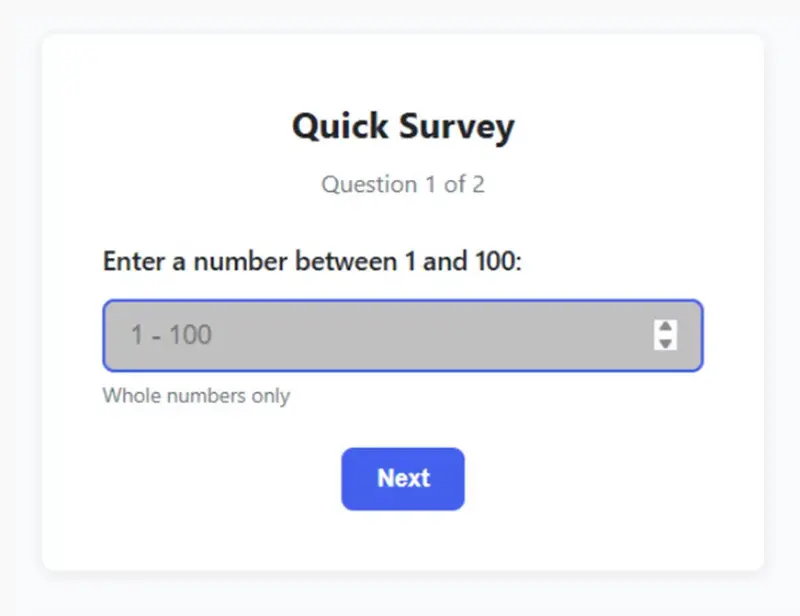
The result looked polished. The survey page was clean. The questions appeared one by one. It had basic session checks to reduce duplicate submissions and simple admin authentication.

Claude Code first question survey page
The admin area was where things got more interesting.
Claude had written the statistics itself, and one number instantly looked wrong. The p-value came out as 19,326,967,569,547. That is not just slightly off. That is “the calculator has left the building” territory. Since significance thresholds usually orbit around 0.05, this clearly pointed to a bug in the statistical logic.
Once we flagged it, Claude corrected the algorithm, tested it, and added those tests to the codebase. That recovery mattered. A model making a mistake is one thing. A model fixing the mistake properly is far more important.
Later, we requested a few smaller tweaks. Claude handled those well too. The responses chart was sorted by the value of q1, meaning the first chosen number, and the second question’s upper bound was adjusted. The admin page ended up looking excellent: readable, informative, and visually convincing.
What stood out most was its business-logic awareness. Our original prompt mixed up the priming effect and the anchoring effect. The app was actually testing anchoring. Claude caught that nuance on its own and labeled the chart accordingly in the admin dashboard. That showed stronger contextual understanding than we expected.
From team Point Of View, that kind of reasoning matters a lot in real software work. A tool that understands what the product is really trying to do can save time that would otherwise be lost in review and cleanup. Drawing from our experience, that is often the difference between “usable output” and “output that actually fits the brief.”

GPT Codex
Next, we moved to GPT Codex in VS Code, using GPT-5.3-Codex with high reasoning.
We started from the same prompt and walked through the now familiar steps. Like Claude, Codex first looked around for an existing project. It then suggested a Node.js, Express, and SQLite setup. For hosting, it proposed Render, Railway, and Fly.io.
Then it added an important warning. If SQLite were kept, platforms with an ephemeral filesystem or purely serverless patterns could make the study data disappear. That was a strong point in Codex’s favor. It was not just naming tools. It was identifying an operational risk.
When we nudged it toward Next.js and Neon so the comparison would be fairer, it adapted quickly.
Its revised plan looked like this:
- Build a Next.js app (App Router)
- Use Vercel API routes or Server Actions for submit and admin operations
- Use Prisma with Neon
That introduced one major stack difference. Codex chose Prisma ORM, while Claude had worked with simple SQL queries. For a small internal tool, raw SQL is perfectly reasonable. Still, Prisma adds structure and can be more robust, especially if the project grows later.
The coding experience was a little rougher, though.
When Codex wrote code and asked for confirmation, the diff window felt cramped. It was harder to review changes comfortably. Clicking through to a file showed the current state, but that was not as convenient for inspection.
Claude’s review experience was better because its diff view could be expanded more easily.

GPT Codex diff dialog

Claude Code diff dialog
There were also a few moments where Codex appeared to stall. For example, it once tried to prepare a summary, spun up multiple subtasks to read modified files, and then sat waiting behind a frozen UI until we restarted the session.
That does not erase its strengths, but it does affect workflow quality. Tooling friction adds up, especially when you are iterating quickly.
In general, its chat formatting was also a little less polished. Claude felt cleaner and easier to scan. That is not the most important factor, of course, but when you spend hours in an interface, it matters more than people think.

GPT Codex short summary on what was done

Claude Code short summary on what was done
The final result was still solid.

GPT Codex survey page with two final questions
Visually, the survey looked good. It also included navigation links into Admin Mode and back, which Claude did not surface directly. Claude simply expected us to go to /admin on our own.
That said, Codex missed part of the experiment logic. It presented both questions at once and openly stated that the study was about the priming effect. That weakens the “blind test” quality of the setup.
Participants should not be tipped off about what is being tested. We would not call that a failure, but Claude showed deeper product reasoning here.
There was another subtle point. Because our prompt itself used “priming effect” while the actual mechanism being tested was anchoring, Codex followed the wording more literally. Claude, by contrast, inferred the real intent and named the chart “Anchoring effect.” That was one of the most impressive differences in the whole comparison.
The admin page generated by Codex was also strong. It looked a bit darker than we would prefer, but that is a matter of taste. Initially, it had just one chart, and we needed to ask for sorting by first-answer values. It also included an interpretation section, though with fewer details than Claude’s output.
Where Codex clearly pulled ahead was math.
It did not include a p-value or t-statistic at first. But when we asked for them, it added both correctly and without the kind of statistical error Claude had made earlier. That was the biggest technical win for GPT-5.3-Codex in this test.
Another nice touch was test-data generation. Codex offered two kinds of random data: correlated and independent. That was smart. It showed awareness that test data should support more than one scenario.
As indicated by our tests, this is where Codex feels especially useful: it is good at the “tighten the implementation” phase. Based on our observations, it may not always shine as brightly in product interpretation, but it is strong when precision matters.

GPT Codex results dashboard
Summing up
In this small head-to-head experiment, both tools performed well. Both produced a working website. Both got from prompt to runnable app without collapsing under the task. That alone is worth noting.
Still, the differences were real.
Claude Code delivered the smoother overall user experience. Its interface felt more comfortable. Its summaries were easier to read. More importantly, it showed better understanding of the business logic behind the prompt. It caught the anchoring-versus-priming mix-up and made more product-aware choices.
GPT-5.3-Codex, meanwhile, felt a little less refined in the workflow. It had some rough edges, and the interface review experience was weaker. But it was technically sharp where it counted. Its statistical additions were accurate, and its test-data thinking was strong.
So what is the takeaway?
If you care most about reasoning around product intent, user flow, and the “why” behind the feature, Claude Code looked better in this round.
If you care most about accuracy in implementation details, especially around calculations and structured backend choices, GPT-5.3-Codex made a very convincing case.
From Abto Software’s point of view, this is the practical lesson: neither tool replaces engineering judgment, but both can noticeably accelerate delivery when used with expert oversight. Through our practical knowledge, the best results usually come when teams treat coding models like capable collaborators, not autopilots. They can propose, scaffold, and even surprise you, but they still need direction, review, and a clear product lens.
That is also why comparisons like this are useful. They do not tell us which model is universally “best.” They show where each one is stronger, and that is what teams actually need in real projects.
Right now, both are worth trying in day-to-day development. At the very least, they can push ideas forward faster and make the first version of a solution appear much sooner. And sometimes, that creative momentum is half the battle.
If we reduce the whole exercise to one line, it is this: Claude Code was stronger at understanding the assignment, while GPT-5.3-Codex was stronger at getting the numbers right.
That is a very real trade-off, and a useful one to know.
The Hidden Cost of SaaS Free Trial Abuse (And How to Detect It)
API free tier abuse happens when users exploit free credits or trial access to AI APIs for commerci
Open-Source MobileVC: Control Your AI Dev Workflow Fully on Phone (No CLI/SSH, Transparent vs Black-Box Agents)
As developers, we’ve all been there: glued to a desktop, stuck in a repetitive loop of messaging Claude/Codex, waiting for AI responses, firing up the ADB Android emulator to test features, sifting through logs for bugs, and then replying to the AI again—only to repeat the cycle. It feels like our work is chained to a single screen, and stepping away means hitting a wall.
I asked myself: Why do we still rely on desktops for AI development, debugging, and agent management? All the work I do on my computer—monitoring AI tools, testing emulators, editing files—should be possible on my phone. But every existing tool I tried either forces me to use CLI/SSH (a desktop-first relic) or locks me into black-box automation that’s risky and unmanageable.
That’s why I built MobileVC—an open-source tool that breaks the desktop barrier, bringing full AI dev workflow control to your phone, with native touch/voice interaction and zero black-box risks. Let’s dive into what it does, why it’s different, and how you can start using it today.
What Is MobileVC?
MobileVC is an open-source mobile-first tool designed to free developers from desktop screens. It lets you manage your entire AI development, debugging, and agent workflow—all from your phone—without a single line of CLI input or SSH connection. Think of it as a “control center” for your AI agents (Claude, Codex, etc.) and remote computer, built for how we actually use our phones: tapping, swiping, and speaking.
Key Features (Built for Developers, By a Developer)
I built MobileVC to solve the exact pain points I faced daily. Here’s what makes it stand out:
- Native Mobile Interaction (No More CLI/SSH)
Forget typing commands or struggling with SSH on a tiny phone keyboard. MobileVC adapts to how you use your phone:
-
Chat directly with Claude/Codex in the app to assign tasks
-
One-tap authorization for all operations (no more manual permission checks)
-
Swipe cards to switch between development plans
-
Use radio buttons to select plan modes—intuitive and fast
-
Visual memory management panel: enable, disable, or edit AI memory with a tap
- Voice-Controlled AI Editing
Typing on a phone to edit files or AI configurations is a chore. With MobileVC, just use voice commands like:
“Optimize this code file for readability”
“Modify this AI memory to include my project’s API key”
The app generates full, professional prompts for your AI agent, runs the edit, and lets you confirm all changes before finalizing. You stay in control—no hidden edits, no surprises.
- Real-Time Backend Logs (Anywhere, Anytime)
Debugging doesn’t have to wait until you’re back at your desk. MobileVC lets you check backend logs in real time on your phone. Spot a bug? Sync the log directly to Claude/Codex and iterate instantly—no need to wait to get back to your computer.
- Transparent Control (vs Black-Box Agents Like OpenClaw)
OpenClaw and similar tools are popular for their automation, but they’re essentially black boxes: you can’t see what’s happening under the hood, can’t intervene mid-process, and risk unexpected behavior or失控 (loss of control). MobileVC takes the opposite approach:
-
Full transparency: See every step of your AI agent’s workflow
-
Manual control: You approve every edit, every configuration change, every authorization
-
No hidden risks: No “set it and forget it” chaos—you’re always in charge
Think of it like a car analogy (developers love these!):
-
OpenClaw = Automatic Transmission: Fast and convenient, but you lose control when something goes wrong
-
MobileVC = Manual Transmission: You control every gear, every step—safer, more predictable, and tailored to your needs
They’re not competitors—they’re complementary. Use OpenClaw for lightweight automation, and MobileVC for oversight, control, and remote management.
Quick Start: Deploy in 1 Minute (No DevOps Expertise Needed)
I wanted MobileVC to be accessible to every developer, regardless of their DevOps skills. Here’s how to get started:
-
Deploy the backend via npm (one line of code):
npm install -g mobilevc-backend -
Run the setup command and follow the on-screen prompts:
mobilevc setup -
Once setup is complete, you’ll get a URL and QR code
-
Download the MobileVC mobile app, scan the QR code, and you’re ready to go!
No complex dependencies, no server configuration—just 4 simple steps to start controlling your AI workflow from your phone.
Open Source & Contributing
MobileVC is 100% open-source (MIT License) because I believe great tools are built together. The code is available on GitHub, and I’m actively looking for contributors—whether you’re a frontend dev, backend dev, or just want to test and give feedback.
👉 Check out the GitHub Repo (MobileVC)
🌟 Star the repo if you find it useful

💬 Open an issue if you have ideas, bugs, or questions

🚀 PRs are always welcome—let’s make MobileVC even better together!
Closing Thoughts
As developers, we should be able to work anywhere—not just at our desks. MobileVC isn’t just a tool; it’s a shift in how we think about AI development: accessible, controllable, and mobile-first.
If you’re tired of being chained to your desktop, frustrated with CLI/SSH on mobile, or worried about black-box AI agents, give MobileVC a try. It’s built for you—for the developer who wants freedom without sacrificing control.
Let’s Connect!
Have questions? Want to share how you’re using MobileVC?
contact me and welcome to join me
github link: MobileVC
opensource #aidevelopment #mobileagent #adb #remotedevelopment #aidevtools #opensourceprojects #developerproductivity
TREDAŞ, 2026-2030 döneminde 30 milyar lira yatırım hedefliyor
5G'ye geçiş nedeniyle yarın Cumhurbaşkanlığı Külliyesi'nde tören düzenlenecek
xAI’ın son iki kurucu ortağı da şirketten ayrıldı
2026 Cupra Tavascan tanıtıldı: Yeni giriş versiyonu ile 435 km menzil

 2026 Cupra Tavascan sahneye çıktı. Yeni giriş seviyesi, 435 km menzil, hızlı şarj, dijital kokpit ve V2L teknolojisiyle elektrikli coupe SUV segmentinde iddiasını artırıyor.
Türk Telekom CEO’sundan 81 ilde 5G vurgusu!

 Türk Telekom CEO’su Ebubekir Şahin, 1 Nisan itibarıyla 81 ilde 5G şebekesi sunulacağını vurguladı ve 5G ile geleceğin inşa edileceğini ifade etti.
İran, ABD’nin uçan komuta merkezini yok etti: E-3 Sentry nedir, neden önemli?

 İran saldırısı sonucunda ABD’ye ait E-3 Sentry uçağı yok edildi. Peki bu ABD için ne anlama geliyor? E-3 Sentry AWACS uçağı nedir, neden bu kadar önemli ve değeri ne kadar?