Modern AI agents are no longer just generating text—they are expected to write files, modify code, and execute commands.
But doing this directly on your local machine or production systems is risky and hard to control.
This is where AIO Sandbox comes in.
It provides an isolated, programmable environment where agents can safely:
In this first post, we’ll focus on the two most fundamental capabilities:
🧩 Filesystem (state)
⚙️ Shell (execution)
By the end, you’ll see how these combine into a complete runtime for agents.
🌐 Multi-language SDK Support
While this tutorial uses Python, AIO Sandbox is not limited to Python developers.
The agent-sandbox SDK also supports:
-
TypeScript / JavaScript
-
Go (Golang)
👉 This makes it easy to integrate AIO Sandbox into a wide range of agent frameworks, backend services, and developer stacks.
🛠️ Prerequisites
pip install agent-sandbox
🧠 Mental Model
Think of AIO Sandbox as a remote, disposable Linux machine that your agent controls via APIs.
Simple Flow:
Agent → API → Sandbox → Filesystem + Shell
📁 Part 1 — Working with Files
Let’s start by treating the sandbox like a filesystem.
1.Hello Sandbox Files
Goal: introduce write_file, read_file, and list_path.
from agent_sandbox import Sandbox

client = Sandbox(base_url="http://localhost:8080")

home_dir = client.sandbox.get_context().home_dir

notes_file = f"{home_dir}/hello.txt"

# Write a text file
write_result = client.file.write_file(
    file=notes_file,
    content="Hello from AIO Sandbox!nThis file lives inside the sandbox.",
)

print("Wrote bytes:", getattr(write_result.data, "bytes_written", None))

# Read it back
read_result = client.file.read_file(file=notes_file)
print("File content:")
print(read_result.data.content)

# List files in the sandbox home directory
list_result = client.file.list_path(
    path=home_dir,
    include_size=True,
    sort_by="name",
)

items_to_list = getattr(list_result.data, 'files', getattr(list_result.data, 'entries', []))

for item in items_to_list:
    print(f"- {item.path} ({getattr(item, 'size', 'unknown')} bytes)")
2.Edit a Config File
Goal: show replace_in_file and search_in_file.
💡 Agents often follow a loop:
modify → verify → proceed
from agent_sandbox import Sandbox

client = Sandbox(base_url="http://localhost:8080")

home_dir = client.sandbox.get_context().home_dir
config_file = f"{home_dir}/app.env"

# Create a simple config file
client.file.write_file(
    file=config_file,
    content="MODE=devnPORT=8000nDEBUG=truen",
)

# Replace one value
client.file.replace_in_file(
    file=config_file,
    old_str="MODE=dev",
    new_str="MODE=prod",
)

# Search to verify
search_result = client.file.search_in_file(
    file=config_file,
    regex=r"MODE=.*",
)

print("Search result:")
print(search_result)

# Read final content
final_file = client.file.read_file(file=config_file)
print("nUpdated config:")
print(final_file.data.content)
3.Write and Export an Artifact
Goal: show download_file.
-
sandbox outputs can be streamed out cleanly
-
useful for logs, reports, generated code, screenshots, notebooks, datasets
home_dir = client.sandbox.get_context().home_dir
report_file = f"{home_dir}/report.txt"

# Create an artifact inside the sandbox
client.file.write_file(
    file=report_file,
    content="Run completenStatus: successnArtifacts generated: 1n",
)

# Download it from the sandbox to the local machine
with open("downloaded_report.txt", "wb") as f:
    for chunk in client.file.download_file(path=report_file):
        f.write(chunk)

print("Downloaded sandbox artifact to ./downloaded_report.txt")
4.Discover files
result = client.file.find_files(
    path=home_dir,
    glob="*.txt",
)

print(result)
⚙️ Part 2 — Executing Commands (Shell)
Now let’s make the sandbox do work.
⚠️ Important Notes
- Shell commands must be passed as keyword arguments:
exec_command(command="...")
1. Basic shell command execution (Hello World)
from agent_sandbox import Sandbox

client = Sandbox(base_url="http://localhost:8080")

result = client.shell.exec_command(
    command="echo 'Hello from sandbox shell'"
)

print("Output:", result.data.output)
print("Exit code:", result.data.exit_code)
2. Inspect the sandbox environment
result = client.shell.exec_command(command="pwd")
print("PWD:", result.data.output)

result = client.shell.exec_command(command="ls -la")
print(result.data.output)
👉 The sandbox behaves like a real Linux environment.
3. Execute a Python script
home_dir = client.sandbox.get_context().home_dir
script_path = f"{home_dir}/hello.py"

client.file.write_file(
    file=script_path,
    content="""
print("Running inside sandbox")
print("Computation:", 10 * 5)
""",
)

result = client.shell.exec_command(
    command=f"python3 {script_path}"
)

print(result.data.output)
🔥 This is an important pattern:
Agent writes code → executes it → observes output
4. Install and use a package
# Install package
client.shell.exec_command(command="pip install requests")

# Verify installation
result = client.shell.exec_command(
    command='python3 -c "import requests; print(requests.__version__)"'
)

print("Requests version:", result.data.output)
💡 Shows:
5. Chain commands
result = client.shell.exec_command(
    command="mkdir -p demo && echo 'hello' > demo/file.txt && cat demo/file.txt"
)

print(result.data.output)
6. Check exit codes
result = client.shell.exec_command(command="ls non_existent_file")

print("Output:", result.data.output)
print("Exit code:", result.data.exit_code)
Agents should check exit codes, not just output.
🧩 Bringing It Together
At this point, we’ve seen:
Filesystem (state)
Core primitives to showcase:
-
create
-
read
-
modify
-
search
-
list
-
discover
Shell (execution)
Core primitives to showcase:
-
run commands
-
execute scripts
-
inspect environment
🎯 Key Insight
AIO Sandbox gives agents a safe, programmable runtime:
-
Files → memory/state
-
Shell → actions
Together, they enable real-world workflows like:
🚀 What’s Next
Thanks for reading! Hope it was helpful! This is just the beginning. In upcoming posts, we’ll dive into topics such as:
-
🌐 Browser automation (CDP-based)
-
🔌 MCP tool integration
-
📓 Jupyter / notebook execution
-
🤖 OpenClaw integration
-
🎯 Reinforcement learning inside sandbox
💬 Final Thoughts
AIO Sandbox bridges the gap between:
And it does so safely, reproducibly, and programmatically.


 Apple, iOS 26.5’in ilk beta sürümünü yayınladı. Ancak, Gemini destekli yapay zeka özellikleri, ne de yeni Siri güncellemeye dahil edilmedi. Anlaşılan Apple, sürprizi iOS 27’ye saklıyor.

 ChatGPT, Gemini ve Claude gibi bilinen ve yetenekleriyle şaşırtan en iyi yapay zeka uygulamaları listesi burada! İşte tek komutla harikalar çıkartan yapay zeka siteleri:

 İtalya Donanması, Bayraktar TB3 SİHA’yı Cavour uçak gemisine entegre etmeye hazırlanıyor. Bayraktar TB3’ün keşif, gözetleme ve silahlı görevlerde kullanılması planlanıyor.

 BYD, 2026 için ihracat hedefini 1,5 milyon araca yükseltti. 2025’te rekor satışlarla Tesla’yı geride bırakan Çinli üretici, uluslararası pazarlarda büyümesini sürdürüyor.

 Bu hafta gelen açıklamalar, Disney’in Epic Games’i satın alma ihtimalini değerlendirdiğini gösteriyor. Epic tarafında yaşanan finansal sıkıntılar, bu söylentilere farklı bir boyut kazandırıyor.
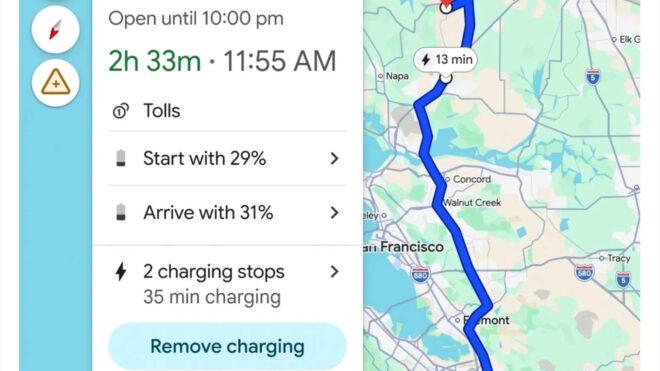
 Google, Android Auto işletim sisteminin kullanıldığı tamamen elektrikli araçlar için Maps (Haritalar) temelli bir şarj güncellemesi yayımladı. “Google Maps’in elektrikli araç şarjına yönelik yapay zeka destekli özelliklerini Android Auto temelli 350’den fazla araç modeline getiriyoruz.” diyen Google, bu konuda yaptığı resmi açıklamada, “Artık Haritalar, elektrikli araç modelinize ve batarya doluluk oranınıza göre ne zaman ve nerede şarj etmeniz gerektiğini söyleyecek; böylece hem yolda kalma korkunuz bitecek hem de farklı uygulamalarla uğraşmak zorunda kalmayacaksınız.” ifadelerine yer verdi. 15’ten fazla markaya ait yüzlerce elektrikli araç modeline açılan altyapı, ilk olarak ABD’de sunuluyor. “Yüzlerce aracın batarya tüketimini doğru tahmin edebilmek adına yapay zekayı gelişmiş enerji modelleriyle birleştiriyoruz. Bu modeller; aracın ağırlığı ve batarya boyutu gibi teknik özelliklerin yanı sıra haritalardan gelen trafik, yol eğimi ve hava durumu gibi gerçek zamanlı verileri de analiz ediyor.” diyen Google, sistemi önümüzdeki dönemde küresel olarak da kullanıma alabilir.
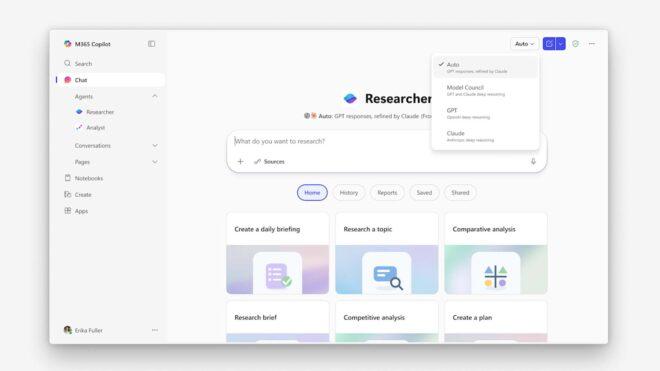
 Microsoft 365 Copilot’un doğrudan kompleks görevlere odaklanan Researcher aracı, “Critique” ve “Council” adı verilen yeni özelliklerle güçlendirildi. Microsoft CEO’su Satya Nadella tarafından yapılan paylaşıma göre yeni çok modelli derin araştırma sistemi Critique, birden fazla yapay zeka modelinin (GPT ve Claude) bir arada çalıştırılarak olabilecek en ideal sonuçların/raporların elde edilmesine aracılık ediyor. Council ise kullanıcıların aynı istem (prompt) üzerinde birden fazla modeli eş zamanlı olarak çalıştırmasına imkan tanıyor. Bu özellik farklı modellerin hangi noktalarda birleştiğini, hangi noktalarda ayrıştığını ve her bir modelin sonuca katkısını gözler önüne seriyor. Introducing Critique, a new multi-model deep research system in M365 Copilot. You can use multiple models together to generate optimal responses and reports. pic.twitter.com/m4RlQmCKzs — Satya Nadella (@satyanadella) March 30, 2026 New in M365 Copilot: Council. You can run multiple models on the same prompt at the same time, so you can see where they align and diverge, and understand what each adds. pic.twitter.com/2p7O14OLFp […]