
PwC Built an ‘AI Factory.’ Then It Laid Off the Workers Who Built It.

A former PwC employee went on Australian radio last week to warn other professionals: the firm that trained her to build AI systems used those same systems to justify eliminating her role. She wasn’t in a legacy function. She was inside the AI transformation practice itself.

That detail is worth sitting with.

The Factory Model Has a Design Flaw

PwC, like every major consultancy, sold ‘AI transformation’ as a growth story to clients for three years straight. To deliver it, they hired and trained thousands of people to build AI workflows, automate back-office functions, and pitch the efficiency case to CFOs. The pitch worked. The irony is that it worked on PwC’s own headcount too.

This isn’t a unique story to PwC. Accenture announced 19,000 job cuts in 2023, with automation cited as a driver. IBM paused hiring for 7,800 roles it expected AI to replace. The consultancies that monetized AI fear most effectively are now demonstrating that fear wasn’t irrational.

What makes the PwC case sharper is the framing. ‘AI factory’ is a production metaphor. Factories optimize for throughput. Workers in factories are inputs. When you name your operating model after a factory, you’ve already made a statement about how you see the humans inside it.

The Part Nobody Talks About in the Press Release

When a firm announces an AI initiative, the press release describes efficiency, innovation, and client value. It does not describe which specific humans will be in a worse position twelve months later. That information gets released differently: through LinkedIn posts at 9pm, through ABC Radio interviews, through the kind of story that goes viral because it confirms what a lot of people already suspected.

The former PwC staffer’s warning isn’t that AI is bad. It’s that the employment contract she thought she had, the one where building the company’s future capabilities translated into job security, turned out not to exist. She built the factory. The factory didn’t need her anymore.

This is the actual risk that career advice columns consistently underprice: it’s not just routine jobs that are exposed. It’s anyone whose value to an organization was primarily in knowing how to implement AI, at a moment when that implementation is becoming commoditized faster than the salaries attached to it.

What a Different Model Looks Like

Human Pages runs on an opposite assumption. Agents post jobs. Humans complete them. Payment in USDC, per task.

Here’s a concrete example of how that plays out: an AI agent running a competitor analysis workflow hits a wall. It needs someone to call three companies pretending to be a potential customer and report back what the sales rep actually says, tone included, not just the transcript. The agent can’t do that. It posts the task on Human Pages with a $45 USDC bounty. A human in Melbourne picks it up between 9am and 11am, completes the calls, submits structured notes, gets paid. The agent continues its workflow.

No employment contract. No performance review cycle. No ‘AI factory’ where the human is an input to be optimized out. The human has a skill the agent needs right now, the agent has money, and the exchange is direct.

This model doesn’t promise anyone a career. It doesn’t pretend to. What it does is create a market where human judgment, perception, and presence have a price that gets paid immediately, rather than a salary that disappears in a restructuring announcement.

The Consulting Industry Bet Wrong About One Thing

The consultancies assumed that the people closest to AI buildout would be safest. Proximity to the technology would confer protection. What actually happened is that proximity accelerated the timeline. The people who knew how AI worked were best positioned to show management how to reduce headcount, and management listened.

The workers who survive this period well are not necessarily the ones who became most embedded in large AI transformation programs. They’re the ones who stayed legible as individuals with specific capabilities, rather than becoming interchangeable resources within a platform.

A human working on Human Pages is always legible. The agent requesting the task knows exactly what it’s asking for. The human knows exactly what they’re delivering. There’s no layer of organizational abstraction where value gets averaged out and then cut.

The Warning Is Real. The Conclusion Isn’t Obvious.

The PwC staffer’s warning is worth taking seriously, but not because it leads to a clean lesson about AI being dangerous or corporations being villains. The more uncomfortable reading is this: she was right to develop AI skills, and the institution she developed them inside used those skills in a way that harmed her. The problem wasn’t the skills. It was the institutional wrapper around them.

Large organizations will continue to automate functions as long as automation is cheaper than headcount. That’s not cynicism, it’s a description of how cost structures work. The question isn’t whether to fight that tendency but how to position yourself relative to it.

Working for an AI agent on a discrete task is a strange new category of employment. It’s also one where the agent cannot restructure you out of existence. It needed something specific, you provided it, the transaction closed. The factory metaphor doesn’t apply because there is no factory. There’s a task, a human, and 45 USDC.

Whether that’s better or worse than a consulting career is genuinely unclear. But it’s a different risk profile. And right now, a different risk profile is worth understanding.
A simple post-launch checklist that keeps web clients happy for months

Most client projects feel successful at launch day and painful two months later.

The fix is not more features. It is a better post-launch process.

Here is the checklist I run for every handoff.

Technical

  • analytics installed and verified
  • search console connected
  • forms tested end-to-end
  • basic performance baseline saved

Content and ownership

  • owner knows how to update key sections
  • shared doc with hosting, DNS, CMS, credentials process
  • change request path is clear

Commercial

  • support window defined
  • maintenance options sent in writing
  • response times agreed

Communication

  • one walkthrough recording delivered
  • one-page summary of what changed and why

Clients do not remember implementation details.
They remember whether things stay easy after launch.

This checklist reduced support noise and improved retention for me.

I run Tizzle, a solo web agency in Manchester.

→ xandertaylor.org

Host a Simple Python App on a Virtual Machine (Step-by-Step)

Serve a Python App from a VM: From Local Server to Public Access

In this guide, we’ll deploy a simple Python HTTP server on an AlmaLinux virtual machine and explore how network traffic flows from the VM to the host machine and beyond. By the end, you’ll be able to access your app from your local network and from external devices using a public tunnel.

Let’s learn how to:

  • Set up a Python HTTP server on a VM
  • Access the server from the host machine
  • Expose the VM to external devices via Localtunnel
  • Understand the traffic flow from client to VM

In this setup, the AlmaLinux VM runs a Python HTTP server, the Fedora host acts as a KVM/QEMU host and NAT gateway, and the smartphone simulates an external client. We’ll show how to make the server accessible locally and over the internet using a tunnel.

1️⃣ Environment Setup

  • AlmaLinux 10 VM (Guest)

    • IP: 192.168.122.88
    • Runs the Python HTTP server
  • Fedora Host

    • IP: 192.168.0.136
    • Acts as KVM/QEMU host and NAT gateway
  • Smartphone / External Device

    • Connected via mobile network (e.g., Airtel)
    • Accesses the server through a public tunnel
          ┌─────────────┐
          │ Smartphone  │
          │ (Mobile Data)│
          └─────┬───────┘
                │
                ▼
       ┌─────────────────┐
       │ Public Tunnel   │
       │ (Localtunnel)   │
       └─────┬───────────┘
             │
             ▼
       ┌─────────────┐
       │ Fedora Host │
       │ 192.168.0.136 │
       │ KVM/QEMU + NAT│
       └─────┬───────┘
             │
             ▼
       ┌───────────────┐
       │ AlmaLinux VM  │
       │ 192.168.122.88│
       │ Python HTTP    │
       │ Server :8000   │
       └───────────────┘

2️⃣ Start the Python HTTP Server on the VM

# Start Python HTTP server on all interfaces, port 8000
python3 -m http.server 8000 --bind 0.0.0.0

Explaination:

  • The server serves the current directory as a simple web app.
  • You can test locally inside the VM:
curl http://127.0.0.1:8000

Access from the Host Machine

The host machine can reach the VM directly using its private IP. This is useful for testing that the Python HTTP server is running before exposing it externally.

# Test access from Fedora host
curl http://192.168.122.88:8000

✅ Expected output:

  • A directory listing of the files served by the Python HTTP server
  • Or the contents of an index.html file if present

💡 Tip: If you see a connection refused error, make sure the Python server is running and bound to 0.0.0.0.

Access from External Devices / Smartphone

Smartphones or external devices on a different network cannot reach the VM’s private IP directly. To solve this, we use Localtunnel to create a public HTTPS URL that forwards traffic to the VM.

  1. Install Node.js and Localtunnel on the VM
# Install Node.js and npm (if not already installed)
sudo dnf install -y nodejs npm

# Install Localtunnel globally
sudo npm install -g localtunnel
  1. Start the tunnel
# Forward port 8000 to a public URL
lt --port 8000

-Localtunnel will generate a public URL, e.g., https://hot-deer-send.loca.lt

  • Open this URL in your smartphone browser → you should see the Python app content.

💡 Tip: Each time you start Localtunnel, the URL changes unless you specify a custom subdomain.

Content Served by Python Server

By default, the Python HTTP server serves the current directory as a simple web app. Example directory structure:

/home/alok/systems-thinking
├── server.py
├── venv/
└── README.md
  • Accessing the server URL lists these files automatically in HTML
  • You can place an index.html file to serve a custom homepage

Traffic Flow Diagram

[Smartphone / Mobile Data]
            │
            ▼
    [Public Tunnel via Localtunnel]
            │
            ▼
       [Fedora Host 192.168.0.136]
        (KVM/QEMU + NAT)
            │
            ▼
      [AlmaLinux VM 192.168.122.88]
         Python HTTP Server :8000
  • Smartphone requests → public tunnel → host → VM → Python server → response flows back the same way.

This completes the core tutorial flow: from environment setup → VM server → host access → external access → traffic understanding.

Claude Code’s Entire Source Code Was Just Leaked via npm Source Maps — Here’s What’s Inside

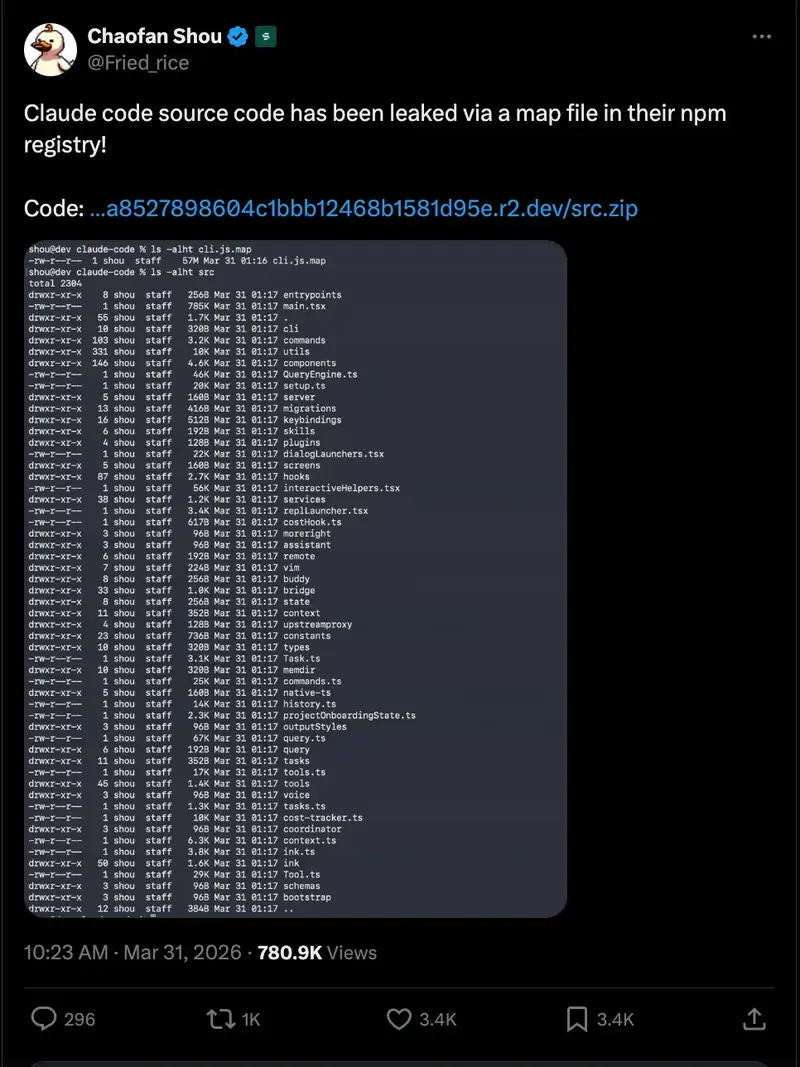
A security researcher discovered Anthropic’s full CLI source code exposed through a source map file. 1,900 files. 512,000+ lines. Everything.

If you work with AI-powered coding tools, today is one of those days you’ll remember. On March 31, 2026, security researcher Chaofan Shou (@shoucccc) discovered that Anthropic’s Claude Code — their flagship agentic CLI tool — had its entire source code exposed through a source map file published to the npm registry.

The leaked codebase was quickly archived to a public GitHub repository, where it has already surpassed 1,100+ stars and 1,900+ forks. And what’s inside is fascinating.

Disclaimer: This article is written purely for educational and research purposes. All code referenced remains the intellectual property of Anthropic. I do not endorse, encourage, or condone the unauthorized distribution of proprietary software. The repository was publicly available at the time of writing, and the analysis here is based solely on that publicly accessible information.

The Numbers Speak for Themselves

~1,900 TypeScript files. 512,000+ lines of code. ~40 built-in tools. ~50 slash commands.

This isn’t a toy project. Claude Code is a production-grade, heavily architected system. It runs on Bun (not Node), uses React with Ink for terminal UI rendering, and has a modular tool-based architecture that any engineer would appreciate studying.

What Claude Code Actually Is Under the Hood

For those unfamiliar, Claude Code is Anthropic’s official command-line interface that lets you interact with Claude directly from your terminal for software engineering tasks. Think of it as an AI pair programmer that can edit files, run commands, search codebases, and manage git workflows — all through natural language.

But the leaked source reveals just how far beyond a “chat wrapper” this tool really goes.

Architecture Highlights

The Tool System (~40 tools) — Claude Code uses a plugin-like tool architecture. Each capability (file read, bash execution, web fetch, LSP integration) is a discrete, permission-gated tool. The base tool definition alone is 29,000 lines of TypeScript.

The Query Engine (46K lines) — This is the brain of the operation. It handles all LLM API calls, streaming, caching, and orchestration. It’s by far the largest single module in the codebase.

Multi-Agent Orchestration — Claude Code can spawn sub-agents (they call them “swarms”) to handle complex, parallelizable tasks. Each agent runs in its own context with specific tool permissions.

IDE Bridge System — A bidirectional communication layer connects IDE extensions (VS Code, JetBrains) to the CLI via JWT-authenticated channels. This is how the “Claude in your editor” experience works.

Persistent Memory System — A file-based memory directory where Claude stores context about you, your project, and your preferences across sessions.

// Simplified view of the tool architecture
interface Tool {
  name: string;
  permissions: PermissionGate;
  execute(context: ToolContext): Promise<ToolResult>;
}

// ~40 tools registered: Read, Write, Edit, Bash, Grep,
// Glob, WebFetch, Agent, LSP, MCP, and many more...

Key Technical Decisions Worth Noting

  • Bun over Node: They chose Bun as the JavaScript runtime, leveraging its dead code elimination for feature flags and its faster startup times.
  • React for CLI: Using Ink (React for terminals) is bold. It means their terminal UI is component-based with state management, just like a web app.
  • Zod v4 for validation: Schema validation is everywhere. Every tool input, every API response, every config file.
  • ~50 slash commands: From /commit to /review-pr to memory management — there’s a command system as rich as any IDE.
  • Lazy-loaded modules: Heavy dependencies like OpenTelemetry and gRPC are lazy-loaded to keep startup fast.

The Security Angle

How did this happen? Apparently, a source map file was included in the npm package. Source maps are meant for debugging — they map minified/bundled code back to the original source. Including one in a production npm publish effectively ships your entire codebase in readable form.

This is a reminder for every engineering team: check your build pipeline. Make sure .map files are excluded from your publish configuration. A single misconfigured .npmignore or files field in package.json can expose everything.

It’s ironic — a tool designed to help engineers write better code was undone by a build configuration oversight.

What This Means for the AI Coding Tools Space

Whether or not you agree with the leak, the cat is out of the bag. And what it reveals is that the bar for AI coding tools is incredibly high. Anthropic has invested heavily in making Claude Code a production-grade developer experience, not just a wrapper around an API.

For those of us building in this space, this is both inspiring and humbling. The level of engineering — permission systems, multi-agent orchestration, IDE bridges, persistent memory — shows where the industry is heading.

Speaking of which — this is exactly the kind of ecosystem I’ve been building around with Hermes IDE. Hermes is a shell wrapper that integrates AI capabilities (Claude, Gemini, Aider, Codex, Copilot) directly into your existing terminal. Ghost-text suggestions, multi-project sessions with isolated git worktrees, a built-in process manager, cost dashboards, 30+ keyboard shortcuts — all layered on top of your existing shell without changing your setup.

Seeing Claude Code’s internals reinforces my conviction that the future of development is terminal-native, AI-augmented, and deeply integrated with the tools we already use. That’s exactly what we’re building with Hermes — not replacing your workflow, but supercharging it. If you’re interested, check it out at hermes-ide.com.

What Developers Should Take Away

  • Audit your npm publishes. Use npm pack --dry-run to verify what’s included before every release.
  • Source maps are source code. Never include them in production packages unless intentional.
  • Study the architecture. Regardless of the circumstances, the patterns in Claude Code (tool systems, permission gates, multi-agent spawning) are worth understanding if you’re building AI-powered tools.
  • The terminal is the IDE. Both Claude Code and tools like Hermes IDE point to a future where your shell is the most powerful development environment you have.

The full leaked repository is available at github.com/instructkr/claude-code. If you want to explore it yourself, go in with curiosity and respect for the engineering work behind it.

If you found this analysis useful, follow me and check out my work on GitHub (@gabrielanhaia). I’m actively building tools at the intersection of AI and developer experience, and there’s a lot more coming.

Legal Notice: This article is published for informational and educational purposes only. All source code referenced in this article is the intellectual property of Anthropic, PBC. The author does not host, distribute, or claim ownership of any proprietary code. Analysis is based on publicly available information at the time of writing.

Building Real-Time AI Voice Agents with Google Gemini 3.1 Flash Live and VideoSDK

Google just launched Gemini 3.1 Flash Live Preview its most capable real-time voice and audio model yet. If you’re building AI voice agents, conversational apps, or anything that needs low-latency audio intelligence, this model is a big deal. And with VideoSDK’s Python SDK, plugging it into your app takes just a few minutes.

In this blog, we’ll walk through what the new model can do, and then build a working voice agent step by step using VideoSDK.

What’s New in Gemini 3.1 Flash Live Preview

Google describes this as its “highest-quality audio and voice model yet,” and there are a few things that actually back that up.

It’s built for real-time, audio-first experiences. Unlike models that convert speech to text and then process it, Gemini 3.1 Flash Live works audio-to-audio meaning it hears you and responds as audio, keeping the conversation feeling natural and fast.

Here’s what stands out:

  • Lower latency than before. Compared to 2.5 Flash Native Audio, this model is noticeably faster. Fewer awkward pauses, snappier responses. That matters a lot when you’re building voice agents where delays break the experience.
  • It actually understands how you say things. The model picks up on acoustic nuances, pitch, pace, tone. So it can tell when you’re asking a casual question vs. when you sound urgent or confused.
  • Better background noise handling. It filters out noise more effectively, which means it works in real environments, not just quiet studios.
  • Multilingual out of the box. Over 90 languages supported for real-time conversations.
  • Longer conversation memory. It can follow the thread of a conversation for twice as long as the previous generation. So your agent won’t “forget” what was said earlier in a long session.
  • Tool use during live conversations. This one is huge for agent builders. The model can now trigger external tools (APIs, functions, searches) while a live conversation is happening not just at the end of a turn.
  • Multimodal awareness. It handles audio and video inputs together, so you can build agents that respond to what they see and hear at the same time.
  • The model ID is: gemini-3.1-flash-live-preview

Building a Voice Agent with VideoSDK

VideoSDK gives you everything you need to wire Gemini 3.1 Flash Live into a real voice application. Here’s how to get set up from scratch.

Step 1 : Create and Activate a Python Virtual Environment

First, create a clean Python environment so your project dependencies stay isolated.

python3 -m venv venv

Activate it:

macOS/Linux

source venv/bin/activate

Windows

venvScriptsactivate

You should see (venv) in your terminal, which means you’re good to go.

Step 2 : Set Up Your Environment Variables

Create a .env file in your project root and add your API keys:

VIDEOSDK_AUTH_TOKEN=your_videosdk_token_here
GOOGLE_API_KEY=your_google_api_key_here

You can get your VideoSDK auth token from the VideoSDK dashboard and your Google API key from Google AI Studio.

Important: when GOOGLE_API_KEY is set in your .env file, do not pass api_key as a parameter in your code the SDK picks it up automatically.

Step 3 : Install the Required Packages

Install VideoSDK’s agents SDK along with the Google plugin:

pip install "videosdk-agents[google]"

Step 4 : Create Your Agent (main.py)

Create a file called main.py in your project folder and paste in the following code:

from videosdk.agents import Agent, AgentSession, Pipeline, JobContext, RoomOptions, WorkerJob
from videosdk.plugins.google import GeminiRealtime, GeminiLiveConfig
import logging
logging.basicConfig(level=logging.INFO, format="%(asctime)s - %(name)s - %(levelname)s - %(message)s", handlers=[logging.StreamHandler()])

class MyVoiceAgent(Agent):
    def __init__(self):
        super().__init__(
            instructions="You Are VideoSDK's Voice Agent.You are a helpful voice assistant that can answer questions and help with tasks.",
        )

    async def on_enter(self) -> None:
        await self.session.say("Hello, how can I help you today?")

    async def on_exit(self) -> None:
        await self.session.say("Goodbye!")

async def start_session(context: JobContext):
    agent = MyVoiceAgent()
    model = GeminiRealtime(
        model="gemini-3.1-flash-live-preview",
        # When GOOGLE_API_KEY is set in .env - DON'T pass api_key parameter
        # api_key="AIXXXXXXXXXXXXXXXXXXXX", 
        config=GeminiLiveConfig(
            voice="Leda", # Puck, Charon, Kore, Fenrir, Aoede, Leda, Orus, and Zephyr.
            response_modalities=["AUDIO"]
        )
    )

    pipeline = Pipeline(llm=model)
    session = AgentSession(
        agent=agent,
        pipeline=pipeline
    )

    await session.start(wait_for_participant=True, run_until_shutdown=True)

def make_context() -> JobContext:
    room_options = RoomOptions(
        # room_id="<room_id>", # Replace it with your actual room_id
        name="Gemini Realtime Agent",
        playground=True,
    )

    return JobContext(room_options=room_options)

if __name__ == "__main__":
    job = WorkerJob(entrypoint=start_session, jobctx=make_context)
    job.start()

To run the agent:

python main.py

Once you run this command, a playground URL will appear in your terminal. You can use this URL to interact with your AI agent.

What Can You Build With This?

Gemini 3.1 Flash Live + VideoSDK opens up a pretty wide range of real-world use cases:

  • Customer support voice bots. Replace or supplement your call center with agents that actually understand tone and can handle multilingual customers in real time.
  • AI meeting assistants. Agents that join calls, take notes, answer questions from participants, and trigger follow-up actions mid-conversation.
  • Healthcare intake agents. Voice-based triage agents that collect patient information, ask follow-up questions, and route to the right department all in a natural spoken conversation.
  • Language tutors. Real-time conversation partners that catch pronunciation issues, adjust their pace based on the learner, and respond naturally.
  • Voice-controlled IoT and home automation. Agents that listen continuously, understand context, and trigger device actions through tool use all in sub-second response times.
  • Live interview prep tools. Candidates practice answering questions aloud and get spoken feedback instantly.

Conclusion

Gemini 3.1 Flash Live Preview is a meaningful step forward for real-time voice AI. The improvements in latency, noise handling, multilingual support, and especially live tool use make it a strong foundation for production voice agents.

VideoSDK wraps all of that into a clean Python SDK that gets you from zero to a running agent in a handful of lines. Whether you’re prototyping or building something you intend to ship, the setup here gives you a solid starting point.

Next Steps and Resources

Your Knowledge, Your Model — Part 1: A Method for Deterministic Knowledge Externalization

Knowledge in your head is not knowledge. It’s yours — right now, in this context, while the project is active. The moment you switch domains, add a new project, or let a few months pass — it starts to degrade. Not because your memory is bad. Because volume exceeds what a human brain handles linearly and reliably.

People have tried to solve this forever: index cards, Zettelkasten, GTD, wikis, Second Brain. Each one — an attempt to externalize thinking without losing its structure.

But LLMs changed the game. Now you need to externalize knowledge so a machine can read it. And read it correctly. Without hallucinating. Without silently choosing between two contradictory versions of the same fact.

This is a post about a method. Not a tool. Tools are a variable — Markdown, Obsidian, Notion, plain text files, whatever works for you. The principle is the constant.

Why RAG and NotebookLM don’t solve this

Both solve a search problem. RAG — vector similarity over chunks. NotebookLM — reads 300 files, builds its own understanding, answers questions.

The key word is its own. NotebookLM builds its model of your system — not yours. If your mental model differs from what’s “obvious” to the LLM — you won’t know. It will answer confidently, fluently, plausibly. And incorrectly.

RAG — solves: finding relevant chunks · doesn’t solve: authorial consistency, your structure

NotebookLM — solves: summarization and Q&A · doesn’t solve: preserving your interpretation, controlling the output

This method — solves: externalizing your model without distortion · doesn’t solve: it’s not a search tool; it requires structural work

RAG solves retrieval. This method solves a different problem — preserving authorial epistemology when transferring knowledge to a machine.

Principle 1: If it’s not written, it doesn’t exist

LLMs don’t infer. Don’t fill in gaps from context. Don’t reconstruct what isn’t there.

Technically — they do fill gaps, but from their own weights, not your logic. If a rule exists only in your head — for the system it doesn’t exist. If a critical detail is in one file out of twenty — for the agents reading the other nineteen, it’s not there.

This is not a bug. It’s their nature. And you have to work with it architecturally, not with prompts.

Principle 2: Layers, not a pile

The most common disease of any knowledge system — gravity toward the entry point. Information accumulates where it’s first opened. In wikis — the main page. In Notion — the first dashboard block. In a personal knowledge base — the most-visited note.

The fix: an explicit layer pyramid. Each layer expands the one above — never repeats it.

Layer 1 — Navigation
  One paragraph per topic + a link down.
  Rule: if something takes more than 7 lines — it belongs in the next layer.

Layer 2 — Meaning
  Why, for whom, by what rules. No technical details.
  Readable by someone without specialized knowledge.

Layer 3 — Structure
  Components, architecture, interaction map.
  All specifications grow from here.

Layer 4 — Scenarios
  Step-by-step flows with real data.
  Read like a test case: trigger → step 1 → step 2 → outcome.

Layer 5 — Specs
  Exact fields, types, formats. Facts only —
  explanations already live above.

If an agent reads only the top layer — it builds a shallow model with 100% confidence. Explicit layers tell the agent where to go for depth. And if a lower layer is empty — that’s not “details not needed”, it’s “details not written”. The difference matters.

Principle 3: Hallucination traps are predictable

Hallucination is a predictable response to ambiguity in text. Not random. Not a specific model’s bug. A structural inevitability at certain writing patterns.

Which means: you can build a catalog of patterns that deterministically produce wrong output when read by an LLM.

Floating pronoun — critical. “The system receives a request. It passes it for processing. Then the component checks permissions.” With two or more subjects, the LLM picks by its weights. Hallucination guaranteed. Fix: explicit names everywhere.

Heading contradicts body — critical. Headings carry more weight in transformers. If a section is titled “Synchronous Processing” but the body describes a queue — the LLM takes the heading. A human reader would notice. The LLM won’t.

Undefined modal verb — high risk. “The component may call the external service.” When? Under what condition? Fix: always state the condition — “only if X”, “when Y”.

Confabulation — fact without source — critical, the sneakiest. An agent states something specific about the system — plausible, consistent with context, but nowhere written. Unlike hallucination, confabulation sounds convincing. You can’t catch it without checking: is this fact actually in the source?

Passive voice without an actor — high risk. “The message is normalized and forwarded for processing.” Who normalizes? Who forwards? The LLM will decide. In a complex system — almost certainly wrong.

Run this catalog as a checklist on every file. It’s not style editing. It’s engineering verification: is this text deterministic when read by an LLM?

Principle 4: Make the silent choice visible

When an LLM encounters two different descriptions of the same fact — it doesn’t stop. Doesn’t flag the contradiction. It silently collapses: picks one version and continues with 100% confidence. No trace. No marker.

Why is this worse than regular hallucination? Because the collapsed version is real. It came from one of your sources. If you check “is this in my notes?” — the answer is yes. Just not the right version.

Researchers at Stanford and UC Berkeley named this in the ACE paper (Zhang et al., arXiv:2510.04618, 2025): context collapse — when iterative context rewriting erases accumulated detail. They measured it: at step 60 the context held 18,282 tokens at 66.7% accuracy, then collapsed to 122 tokens — and accuracy dropped to 57.1%, below baseline.

The fix: make every choice visible with a marker.

[COLLAPSE:RED]
CHOSEN:      "decision at execution time" — source: note from March 15
ALTERNATIVE: "decision at planning stage" — source: note from February 2
REASON:      newer source, but contradiction requires human resolution

Four levels by severity:

  • RED — changes a fundamental decision. Stop. Don’t continue until resolved by a human.
  • YELLOW — implementation details diverge. Continue, mark explicitly.
  • GRAY — terminology mismatch. Continue, flag for unification.
  • UNRESOLVED — contradiction noticed, source unclear. Minimal marker beats silence.

Any choice between two versions of one fact = a marker. No exceptions.

Principle 5: You are the API gateway

There’s a temptation to think of this as automation. “Set up agents, they run, I step back.”

That’s the wrong frame.

The value is not that agents work without you. The value is that you control what gets passed, to whom, in what format, at what level of detail. You decide what understanding the next agent needs. You decide the depth.

In software architecture there’s the role of API gateway: not automation — control over flow. The backend stores data. The gateway decides what to expose and how. You’re the gateway between your externalized model of the world and whoever works with it next.

This is not a tool for those who want to delegate thinking. It’s for those who want to scale it — while remaining the author.

Where this sits in the landscape

Three active research directions work nearby — none occupies the same point.

Context engineering became a named discipline in 2025. Andrej Karpathy defined it as “the delicate art and science of filling the context window with exactly the right information.” But it answers how to present information to a model — not how to organize it so your mental model survives the transfer.

Agent memory management — ACE (Zhang et al., 2025) and MemOS (Li et al., arXiv:2507.03724, 2025) — work at the infrastructure layer: incremental updates, memory versioning, full lifecycle. This method works one level above — in organizing the knowledge itself before it reaches any agent infrastructure.

PKM + AI — the Obsidian/Notion community. Their key insight: instead of going to the AI, put the AI inside your system. Context lives in files, not in model memory. Close in spirit — but stops at integration. No one goes as far as determinism, a hallucination trap catalog, and an explicit protocol for flagging contradictions.

The unfilled point is at the intersection of all three. Not context engineering. Not agent memory. Not PKM+AI.

It’s about organizing knowledge so that any agent, reading it in any order, reproduces your model. Not the averaged one. Not the “obvious” one. Yours.

This is not a product

It’s a method. A set of principles from which everyone builds their own implementation — for their domain, their volume, their tools, their working style.

Luhmann built his Zettelkasten for sociology — and everyone’s is their own. Forte built his Second Brain for productivity — and everyone adapts it differently. This method is built for working with LLMs — and your implementation will be yours.

The common thread: information externalized so the authorial model stays authorial. Not simplified by the tool. Not completed by the model. Not silently collapsed at the first contradiction.

That’s the whole principle. One answer. Infinitely many implementations.

Method developed from a real working system. Tools mentioned — Markdown, Obsidian, open-source Copilot — are not required. The principle works with any stack.

References: Luhmann (1981), Zhang et al. arXiv:2510.04618, Li et al. arXiv:2507.03724, Forte (2022).