You’re Renting Someone Else’s Compute — And It’s Costing You More Than You Think

Your Claude response comes back in 800 milliseconds. You’re on a roll. Three features shipped before lunch. And somewhere, silently, your debugging intuition is going to sleep.

I’ve been tracking a pattern across developer forums — not just V2EX, but in the back-channels of engineering team chats: developers who live in network-restricted regions are increasingly “renting” computational presence elsewhere. A computer in a data center, a VM in Singapore, a colleague’s spare workstation. They connect, they code, they use AI tools that would otherwise be unreachable. Problem solved.

Except it’s not solved. It’s deferred. And the cost is accumulating in a place most devs never check: the gap between what they can describe doing and what they can actually do.

The Compute Rental Economy

The V2EX discussion that triggered this article described a developer’s setup: living abroad, rented room with a desktop computer inside China, wants to remotely access that machine to use Claude’s web interface and write code. The comments branched into VPN recommendations, remote desktop protocols, browser-based solutions, and one or two voices asking the question nobody else wanted to answer — why?

The why matters. If you’re routing through a remote machine just to access an AI assistant, you’re not solving a network problem. You’re renting computational sovereignty. And like all rentals, you’re paying for access without building ownership.

Here’s what that looks like in practice, from a commenter’s description that stuck with me: a developer in Shanghai spends 4 hours daily on a remote desktop session to a machine in Tokyo. The latency hovers between 40-80ms — annoying but workable. The AI tools load. The code ships. And every evening, the developer closes the session knowing they built something without ever touching the actual hardware that built it.

That distinction — built on versus built with — is where the skill erosion starts.

Skeleton Implementation Syndrome

I need to coin a term here, because the existing vocabulary doesn’t capture this:

Skeleton Implementation Syndrome — the tendency to ship code you could describe but couldn’t write from scratch. You understand the architecture. You can explain why the service mesh routes requests the way it does. But when the AI is gone and the remote session drops, the gap between concept and implementation becomes a chasm you didn’t notice until you had to cross it alone.

This is different from normal abstraction. Normal abstraction is healthy — you don’t need to remember register allocation when writing Python. Skeleton Implementation Syndrome is pathological: you’ve delegated so much implementation to AI assistance that your mental model of how things actually work has decayed faster than your ability to ship features.

The ratio of regret here is asymmetric in a way that hurts quietly: AI assistance accelerates feature delivery (OPTIMIZED FOR) while accelerating capability decay (SACRIFICED). You win the sprint. You lose the skill. And the debt compounds invisibly because nobody measures “debugging intuition remaining” in your quarterly review.

The Local Environment Learning Tax

Here’s where I need to make an unpopular argument, and I want you to stay with me:

Running AI tools locally — even with degraded performance — produces better engineers than accessing them remotely on optimized infrastructure.

Before you close this tab: I’m not saying remote access doesn’t work. I’m saying the learning tax of renting compute is asymmetrically borne by the developer’s capability, not by their feature velocity.

When you run a model locally (even a quantized 7B parameter model that takes 45 seconds to warm up on your M2 Max), you’re forced to develop intuition about:

  • Token budgets and context windows — because you see the cost in real time, not abstracted away
  • Prompt sensitivity — because small changes produce observable differences without a slick web interface smoothing the edges
  • Failure modes — because local models fail in ways remote APIs don’t (OOM crashes, context truncation, hallucination patterns specific to your hardware)
  • System integration — because getting a local model to talk to your IDE requires actual configuration work, not just clicking “authorize”

The V2EX developer’s setup — remote machine, AI through a browser, code in a remote session — sidesteps all of this. The AI becomes a utility, like electricity. And like electricity, you stop thinking about how it works.

The Infrastructure You’re Betting On

There’s a second-order risk nobody talks about in these remote access discussions: you’re building workflow dependencies on infrastructure you don’t control.

Your remote machine exists because someone else maintains it. The network path between you and it exists because someone else routes it. The AI service you’re accessing exists because a company decided it should, and can decide otherwise.

In my local environment (M2 Max, 32GB RAM), I’ve been running a mix of local models and API access for two years. The local models are slower. They have smaller context windows. They fail in embarrassing ways. And they have never, not once, changed their terms of service, raised their prices, or decided my use case wasn’t “enterprise enough.”

The developers routing through Tokyo data centers to access Claude? They’re one corporate decision away from rebuilding their entire workflow. That’s not paranoia — that’s operational risk with a specific name: vendor dependency disguised as infrastructure convenience.

What Actually Survives

If you’re in a network-restricted region and remote access is genuinely your only option, I’m not here to tell you to suffer. Suffering isn’t a virtue. But here’s what I’d ask you to track, because I’ve watched this pattern destroy capable engineers:

Track your AI dependency score. After every coding session, ask yourself: could I have solved this without the AI? If the answer is “no, and I couldn’t have solved it six months ago either,” that’s data. That’s the gap growing.

The developers who survive this environment — who maintain capability while using AI as a multiplier — are the ones who treat AI as a colleague who happens to be infinitely patient, not a replacement for the thinking that made them dangerous in the first place.

They ask AI for second opinions, not first drafts. They use it to explore unfamiliar territory, not to avoid territory they should have mapped already. They keep a “dumb project” — something they code without AI, where inefficiency is the point, where the slow path is the learning path.

The Question I Can’t Answer For You

Here’s what I keep coming back to: the V2EX developer asked how to access Claude from their remote setup. Nobody asked what you’ll lose by making it this easy.

I don’t know your specific context. Maybe the feature velocity matters more than the debugging intuition. Maybe you’re in a sprint that doesn’t have room for the local model learning curve. Maybe the tradeoff is genuinely worth it.

But I know this: the engineers who lasted 15 years in this industry didn’t do it by shipping faster. They did it by being the person who could debug what everyone else gave up on. That capability doesn’t come from prompt engineering courses. It comes from struggling through problems without a safety net — and your remote setup, however clever, is a very comfortable safety net.

What’s the last thing you debugged without AI assistance? Not without searching the internet — without AI generating the answer for you. Go remember what that felt like. That’s the skill you might be renting away.

What’s your take?

Has your team noticed developers becoming less capable of independent debugging without AI? What’s your experience been — are you moving faster, or just shipping more?

I’d love to hear how this plays out in your specific context. Drop a comment below — I respond to every one.

Discussion on V2EX about remote access solutions for China-based developers wanting to use Claude web interface

Discussion: What’s the last thing you debugged without AI assistance — not without searching, but without AI generating the answer? How did it feel compared to using AI?

CSS :has() Selector: The Layout Trick I Wish I Knew 5 Years Ago

CSS :has() is not just a fancy :parent

When :has() started popping up in specs and tweets, I mentally filed it under “cool, but not for shipping work.” I was wrong.

Now it is in Chrome, Safari, Edge, and Firefox. I use it in real projects. It has removed entire JavaScript files and a pile of .is-active classes that I was embarrassed to maintain.

If you are a working frontend dev, the shorthand is this: :has() turns CSS from “style what is there” into “style this thing if it contains that thing”. That one capability changes layout, state, and validation flows.

I will walk through three places where it made a real difference for me:

  • Parent styling without JS
  • Sibling state UIs without wiring events
  • Form validation UI that reacts to the DOM, not a framework

All of this shipped with zero additional JavaScript.

Quick mental model of :has()

The syntax looks like a pseudo class on a selector:

.card:has(img.hero) {
  /* styles here */
}

Read it as: “select .card elements that have a descendant img.hero somewhere inside.” It is a conditional filter on the left side of the selector.

You can also scope it more tightly:

.tabs:has(> .tab.is-active) {
  /* direct children only */
}

Or use it with relational selectors like siblings:

.field:has(+ .field--error) {
  /* this .field is followed by an error field */
}

Once that clicks, you start seeing places to remove JS.

1. Parent styling in a content-heavy project

First real use: a content-heavy marketing site for a biohacking brand I work with. Editors can drop components in any order with a CMS. Sometimes a card has an image, sometimes it is text-only. The layout should adapt.

Previously I solved this with modifier classes from the CMS, or a hydration script that scans the DOM and adds classes like .card--with-media. Boring, fragile, and slightly gross.

With :has() I deleted that script.

Image-aware cards

The card markup is boring on purpose:

<article class="card">
  <img class="card__media" src="hero.jpg" alt="">
  <div class="card__body">
    <h2>Title</h2>
    <p>Some text...</p>
  </div>
</article>

<article class="card">
  <div class="card__body">
    <h2>Another Card</h2>
    <p>Text-only card.</p>
  </div>
</article>

Now the CSS decides layout based on presence of media.

.card {
  display: grid;
  gap: 1rem;
}

.card:has(.card__media) {
  grid-template-columns: minmax(0, 2fr) minmax(0, 3fr);
  align-items: center;
}

.card:not(:has(.card__media)) {
  padding: 2rem;
  background: #111;
  color: #eee;
}

Result: if marketing drops in an image, the card becomes a two-column layout. If not, it becomes a full-width text block. No new class. No CMS configuration. No JS.

I like this because the markup stays semantic and dumb. The layout is a true function of the content, which is what CSS was always supposed to do but rarely could at the parent level.

Auto-promoting “hero” sections

Same project. Editors could add a .section stack: some had a prominent CTA, some were just copy. If a section had a primary CTA, design wanted extra padding and a gradient background.

<section class="section">
  <h2>Get early access</h2>
  <p>Short description.</p>
  <a class="btn btn--primary" href="#">Join the beta</a>
</section>

<section class="section">
  <h2>What you get</h2>
  <p>More text...</p>
</section>

With :has() I treat any section with a primary button as a pseudo hero.

.section {
  padding: 2rem 1.5rem;
  background: #050505;
}

.section:has(.btn--primary) {
  padding: 4rem 1.5rem;
  background: radial-gradient(circle at top, #2f80ed, #050505);
  color: #fff;
}

.section:has(.btn--primary) h2 {
  font-size: 2.25rem;
}

That tiny selector replaced a custom “hero” block type in the CMS that content editors kept misusing. I stopped explaining “use the hero component for this” and just let the CSS infer intent from presence of a primary CTA.

You can do similar things with :has(video), :has(.badge--new), etc. It is a good fit for messy CMS content where you want layout to respond to what your editors actually do, not what the schema designer hoped they would do.

2. Sibling state UIs without event listeners

Second use case: stateful UIs that I used to wire up with click handlers. Tabs, disclosure panels, navigation highlights, that stuff.

Yes, you can still do it in JS. But if the state is already visible in the DOM, :has() lets CSS own more of the behavior. That means less code, fewer states to sync, and fewer bugs.

Tabs powered by :target and :has()

On a little side project for baseball drills, I built a tabbed interface where each tab is actually a link to an anchor. I wanted a sticky tab bar that changes style when any tab content is active.

<div class="tabs">
  <nav class="tabs__nav">
    <a href="#hitting">Hitting</a>
    <a href="#pitching">Pitching</a>
    <a href="#fielding">Fielding</a>
  </nav>

  <section id="hitting" class="tabs__panel">...</section>
  <section id="pitching" class="tabs__panel">...</section>
  <section id="fielding" class="tabs__panel">...</section>
</div>

The panels show / hide with a regular :target trick.

.tabs__panel {
  display: none;
}

.tabs__panel:target {
  display: block;
}

Old me would now add JS to toggle classes on the nav. Instead I lean on :has().

.tabs {
  border-bottom: 1px solid #333;
}

.tabs__nav a {
  padding: .5rem 1rem;
  text-decoration: none;
  color: #888;
}

.tabs__nav a:is(:hover, :focus-visible) {
  color: #fff;
}

/* highlight the active tab label */
.tabs__nav a[href^="#"] {
  position: relative;
}

.tabs:has(#hitting:target) .tabs__nav a[href="#hitting"],
.tabs:has(#pitching:target) .tabs__nav a[href="#pitching"],
.tabs:has(#fielding:target) .tabs__nav a[href="#fielding"] {
  color: #fff;
  font-weight: 600;
}

/* make the whole tabs block look active if any panel is targeted */
.tabs:has(.tabs__panel:target) {
  border-color: #2f80ed;
}

I am not pretending this scales to 50 tabs. For most content UIs, 3 to 5 tabs is realistic. Writing those few selectors is still cheaper than adding a tab manager, handling history state, and worrying about hydration.

The key pattern is: some child panel already has state via :target or [aria-selected="true"]. Let :has() bubble that state up to parents and siblings.

Accordion with native <details> and :has()

I use <details> a lot. It is surprisingly powerful with :has(). On a settings panel I wanted the container to visually compress when no section was open, then expand once any accordion entry was open.

<section class="settings">
  <details class="settings__item">
    <summary>Profile</summary>
    <div>...</div>
  </details>
  <details class="settings__item">
    <summary>Privacy</summary>
    <div>...</div>
  </details>
</section>

CSS:

.settings {
  padding: 1rem;
  border-radius: .75rem;
  border: 1px solid #333;
  max-height: 60vh;
  overflow: auto;
  transition: box-shadow .2s ease, border-color .2s ease;
}

.settings:has(.settings__item[open]) {
  border-color: #2f80ed;
  box-shadow: 0 16px 40px rgba(0, 0, 0, .55);
}

.settings__item + .settings__item {
  border-top: 1px solid #222;
}

.settings__item summary {
  cursor: pointer;
}

Once any <details> is open, the whole settings block feels “in focus”. No JS to listen for the toggle event, no syncing of .is-active classes. The HTML already has [open]. CSS reacts.

3. Form validation UI with zero JavaScript

The biggest win for me: form UI that uses :has() with built-in browser validation. No client-side validation library. No “touched” state juggling.

On my own site I revamped a contact form and a simple experiment log form. I wanted:

  • Parent field wrappers that highlight error or success
  • Inline messages that only show when actually invalid
  • Submit button that changes state based on form validity

Browser validation already tracks validity. The DOM knows. :has() lets CSS hook into that.

Field states from input validity

Markup:

<form class="form" novalidate>
  <div class="field">
    <label>
      Email
      <input type="email" name="email" required>
    </label>
    <p class="field__error">Please enter a valid email.</p>
  </div>

  <div class="field">
    <label>
      Message
      <textarea name="message" minlength="10" required></textarea>
    </label>
    <p class="field__error">Write at least 10 characters.</p>
  </div>

  <button type="submit">Send</button>
</form>

You can bind field styling to the input inside, purely with CSS.

.field {
  margin-bottom: 1.5rem;
}

.field input,
.field textarea {
  width: 100%;
  padding: .6rem .75rem;
  border-radius: .4rem;
  border: 1px solid #444;
  background: #050505;
  color: #eee;
}

.field__error {
  display: none;
  margin-top: .35rem;
  font-size: .8rem;
  color: #ff6b6b;
}

/* highlight when invalid and touched (using :user-invalid where supported) */
.field:has(input:user-invalid),
.field:has(textarea:user-invalid) {
  color: #ff6b6b;
}

.field:has(input:user-invalid) input,
.field:has(textarea:user-invalid) textarea {
  border-color: #ff6b6b;
  box-shadow: 0 0 0 1px rgba(255, 107, 107, .6);
}

.field:has(input:user-invalid) .field__error,
.field:has(textarea:user-invalid) .field__error {
  display: block;
}

/* success state */
.field:has(input:user-valid),
.field:has(textarea:user-valid) {
  color: #4caf50;
}

.field:has(input:user-valid) input,
.field:has(textarea:user-valid) textarea {
  border-color: #4caf50;
}

No custom event handlers. The browser decides when the input is valid or invalid. CSS uses :has() to move that state to the wrapper and the message.

If you want broader support than :user-invalid, you can fall back to :invalid and accept that some browsers show the state earlier.

Form-level feedback and submit button state

Now zoom out one level. The entire <form> element also exposes validity via :valid and :invalid. Combine that with :has() and your submit button can react.

.form button[type="submit"] {
  padding: .7rem 1.25rem;
  border-radius: .4rem;
  border: none;
  background: #333;
  color: #aaa;
  cursor: not-allowed;
  transition: background .15s ease, color .15s ease, transform .05s;
}

/* any invalid field keeps button in "disabled" style */
.form:has(:invalid) button[type="submit"] {
  background: #333;
  color: #777;
}

/* all fields valid, button goes live */
.form:has(:valid) button[type="submit"] {
  background: #2f80ed;
  color: #fff;
  cursor: pointer;
}

.form:has(:valid) button[type="submit"]:active {
  transform: translateY(1px);
}

If you want to actually disable the button, you still need a tiny bit of JS to toggle the disabled attribute. I usually do not bother for simple forms; the button just looks inactive until the browser considers the form valid.

The nice part is that the logic lives where it belongs. The browser enforces constraints. CSS reads that state. JS, if present at all, sends the request and displays a toast.

4. Layout tweaks based on children, not breakpoints

One more pattern that has crept into my “default toolkit”: adjusting layout based on how many items a container has.

On my baseball drills page, each drill has one or more tags. I wanted single-tag drills to show the tag inline next to the title, and multi-tag drills to move them into a separate row. Doing that in JS felt silly.

<article class="drill">
  <header class="drill__header">
    <h3 class="drill__title">Front toss</h3>
    <div class="drill__tags">
      <span class="tag">Hitting</span>
    </div>
  </header>
</article>

<article class="drill">
  <header class="drill__header">
    <h3 class="drill__title">Relay race</h3>
    <div class="drill__tags">
      <span class="tag">Fielding</span>
      <span class="tag">Conditioning</span>
    </div>
  </header>
</article>

With :has() and the :nth-child() selector you can treat the two cases differently.

.drill__header {
  display: flex;
  gap: .5rem;
  align-items: baseline;
  flex-wrap: wrap;
}

/* one tag only: keep inline */
.drill__tags:has(.tag:nth-child(1):last-child) {
  order: 0;
}

/* more than one tag: push tags to next line */
.drill__tags:has(.tag:nth-child(2)) {
  flex-basis: 100%;
  order: 1;
}

No JavaScript counting nodes. No data attributes. Just “if there is at least a second tag, change layout”. If product decides to add a third or fourth tag, the CSS keeps working.

Reality check: performance and support

I am not going to pretend :has() is free. The browser has to do more work, because selectors now depend on what is inside elements and how that changes.

My take after profiling a few real pages: do not go wild with global *:has(...) selectors. Scope them. Prefer direct children or close relationships.

/* Bad idea */
*:has(.error) { ... }

/* Reasonable */
.form:has(.field__error) { ... }

/* Even better */
.form:has(.field > .field__error) { ... }

Support is good now. Chrome, Edge, Safari, Firefox all ship :has(). Old Safari versions are the main risk. If you work on something critical for a weird enterprise fleet, check caniuse and add progressive enhancement.

Most of my patterns above fail gracefully. You lose a highlight or a layout tweak, not core functionality. That is a good bar to aim for.

How I think about :has() now

I used to reach for JavaScript whenever a parent needed to know about a child, or a sibling needed to react to state. That felt normal. It also created a lot of glue code that did not age well.

Now my filter is simple:

  • Is the state already visible in the DOM? (attribute, pseudo class, anchor, etc.)
  • Can that state reasonably drive styling only?

If the answer is yes, I try :has() first. JS comes later, if at all.

Five years ago I was writing tab managers and form validators by hand. I would not go back. :has() is the layout trick that finally lets CSS act on the structure we already have, instead of the utility classes we wish we had planned better.

If you have a component that keeps growing event listeners and state flags, look at the HTML for five minutes. There is a decent chance :has() can take some of that weight off.

Five Clusters. Five Lessons. One Production System.

Most engineers talk about Kubernetes like it’s something you set up once and forget. I set it up five times. Each time because the last version taught me something I couldn’t have learned any other way.

This is that story.

The honest version of each stage:

Stage 1. I just need HA.

Stage 2. I just need cheaper HA.

Stage 3. I just need multi-cloud ARM scheduling.

Stage 4. I just need BGP mesh ingress.

Stage 5. I have achieved zero trust enlightenment.

Every stage felt like a small reasonable ask. The cluster had other ideas.

Stage 1: The Naive But Functional Cluster

The first cluster wasn’t elegant. It wasn’t supposed to be.

Three to five Hetzner dedicated nodes running k3s. Three DigitalOcean VPS running nginx as a makeshift load balancer. A DigitalOcean cloud load balancer sitting in front of those three VPS.

I followed Techno Tim’s k3s HA install guide as the foundation. Solid starting point for getting a highly available cluster off the ground. Replaced his default Traefik ingress with nginx and added Rancher dashboard on top for visibility. Everything after that was documentation and experimentation.

Before this everything ran on plain VPS. Individual servers. No orchestration. Moving to Kubernetes meant migrating workloads one by one. Old VPS running stable, new cluster being tested in parallel, services moved gradually. If something broke I reverted. Nothing burned.

The cluster itself was stable. No memorable incidents with the nodes or networking. The one persistent irritation was MongoDB. Running Bitnami’s MongoDB HA chart. One write replica, two read replicas. Randomly and without warning one of the pods would enter a crashloop. Logs pointed vaguely at lock contention but nothing actionable. A restart brought it back clean every time.

The read heavy workload saved me. A local cache layer absorbed most requests so when a replica went down users barely felt it. I’d notice eventually. Not through alerts, just observation. Restart the StatefulSet and move on.

It happened often enough to be annoying. Never often enough to be a crisis. The cluster was otherwise stable. This was just a ghost that came with the Bitnami chart.

It followed me into the next stage. And the one after that.

Cost pressure eventually killed this setup.

Stage 2: The WireGuard Mesh

Three DigitalOcean VPS plus one cloud load balancer to serve less than a thousand requests a month. Those thousand requests were me hitting the Rancher dashboard. Every actual workload was outbound only. Bots, task processors, queue consumers. Nothing needed to receive HTTP from the internet. Kubernetes was not there to serve traffic. The nginx tier existed for one admin panel. The math didn’t make sense.

I wanted to move to Contabo. Not cheaper in absolute terms but more efficient for my actual workload requirements. Hetzner dedicated nodes were sitting with RAM mostly idle. I was paying for resources I wasn’t using.

The problem was Contabo had no private network at the time.

So I built one.

WireGuard. I found it while researching private networking options. I looked at Kilo as well, a Kubernetes-native WireGuard mesh operator, but it felt too complex for what I needed. Netclient handled mesh generation automatically. WireGuard configurations for multiple peers without the manual key exchange headache.

A single DigitalOcean VPS became the entry point. Running the Netclient server and dashboard. All the Contabo nodes connected through it via mesh. First try. Everything came up clean.

The three nginx VPS and the cloud load balancer disappeared. Previously traffic flowed from Klipper through three nginx VPS to a DigitalOcean cloud load balancer before reaching users. An entire layer of infrastructure serving as a middleman. Replaced now by Klipper speaking directly to users. The elaborate routing chain had been architectural overkill from the start.

Contabo had weird reliability. Nodes would occasionally behave unexpectedly in ways that didn’t make sense on paper. But the workload was tolerant to disruption and the cost saving from eliminating the most expensive components made the occasional weirdness acceptable.

The MongoDB crashloop followed. Still there. Still managed by cache and manual restarts. Not catastrophic. Just persistent.

Stage 3: ARM Workers and the First Multi-Cloud Cluster

ARM compute is cheap. Oracle’s free tier ARM instances are extremely cheap. As in free.

A Network Chuck video appeared in my YouTube recommendations one day. Kubernetes on Raspberry Pi. Watched it casually. The part that stuck was his explanation of why he ran the Rancher dashboard on an amd64 node rather than the ARM64 ones. The reasoning was practical. Certain workloads and management tooling simply behaved better on amd64. That one observation shaped the architecture before I’d even started.

Master nodes stayed on amd64. Workers went on ARM64. Clean separation from the beginning.

I extended the Netclient WireGuard mesh to include Oracle ARM nodes in a different region. Multi-cloud before that was a common thing to talk about. Not for ideological reasons. Purely because free ARM compute was sitting there unused. The scale didn’t justify multi-cloud architecture. The price did. Free compute is free compute.

Multi-arch builds handled through GoReleaser. On every GitHub commit, GitHub Actions triggered GoReleaser. Publishing multi-arch Docker images and binaries as releases automatically. Services with amd64-only dependencies got node affinity rules keeping them on the Contabo nodes. Cross-architecture scheduling handled through proper affinity configuration rather than hoping things landed in the right place.

Oracle’s networking was strange. Occasionally a worker node would drift out of WireGuard mesh sync and require a restart. Never more than one at a time. Enough redundancy that it didn’t cause visible issues. Whether that was a free tier limitation or something inherent to their networking I never definitively determined.

The MongoDB crashloop was still there. Quietly persistent across three different infrastructure setups now.

What ended it was a new client. Twenty Discord bots. Each one 512MB RAM at startup, 2GB at peak load. Discord.js cache is RAM hungry by design. The library caches guild members, messages, and state aggressively. Twenty bots at peak meant up to 40GB of RAM requirement for workloads that could not be disrupted.

Oracle free tier ARM nodes are not where you run non-disruptable RAM-intensive production workloads.

Time to go back to dedicated hardware.

Stage 4: Real High Availability

Five Hetzner nodes. Dual network. This is where the cluster started looking like something serious.

The private VLAN handled all internode communication. k3s configured via args to bind to the private IP. Not 0.0.0.0. Cluster join happened over private IPs not public ones. The public interface existed for egress only at the node level.

The goal with CNI was specific. Klipper, k3s’s default service load balancer, requires port 80 and 443 open on every node to function. I didn’t want that. I wanted a single advertised IP for ingress, not ports splayed across every node in the cluster.

Calico with BGP was the answer. Or so I thought.

The setup was architecturally sound. Five Hetzner dedicated nodes running a BGP mesh via Calico. MetalLB advertising a private IP range for load balancer services. That private range connected to Hetzner’s cloud network via static routes. Each node acting as a router. A Hetzner cloud load balancer sitting in front, pointing to the MetalLB advertised IP. Clean. No ports open on individual nodes. Exactly what I wanted.

Keepalived handled the cluster join entry point. A floating IP that survived node failures. I tested this manually during bootstrap. Simulated a node failure. Keepalived moved the IP cleanly to a healthy node. That part worked exactly as expected.

The BGP setup worked too. Technically. I ran it for a month.

Then I measured HTTP latency.

The requests going through the Hetzner cloud network into the BGP mesh and back out were noticeably slow. Not broken. Just slow in a way that didn’t make sense given the hardware. I only had ingress exposed so I couldn’t measure other protocols. Whether it was Hetzner Cloud’s routing adding overhead or something in the mesh I never definitively diagnosed.

I reverted. Wrote it off as a cloud networking quirk. The internode BGP mesh stayed. Calico peers between all five nodes remained stable. But MetalLB and the cloud LB routing experiment went back to Keepalived managing a floating IP with Hetzner API hooks for failover.

Something else happened at this stage. The MongoDB crashloop stopped. I don’t know exactly when. I don’t know exactly why. It had followed me through three different infrastructure setups. Different providers, different CNIs, different everything. Then somewhere around moving to Calico it just stopped. Never diagnosed. Never explained. Just gone.

Around a hundred workloads running at this point. Bots, websites, the WebSocket infrastructure, client services accumulated over years.

What ended Stage 4 wasn’t a failure. It was a conference.

Interlude: The Homelab Test

Before this I validated experiments on DigitalOcean VPS. Spin one up, test the idea, tear it down. Clean. Disposable. No commitment.

But before committing rke2 and Cilium to production I wanted to test on real hardware. Not a cloud VM. Actual bare metal.

I had an old PC. Booted Ventoy, loaded a gparted live image, used dd to write Debian directly to the disk. Configured SSH and networking. Came back to my main machine and SSHed in. Bare metal provisioning the old fashioned way. No cloud console, no managed image, just a disk, Ventoy, and a Debian ISO.

Installed rke2. Installed Cilium. Configured BGP and set static routes in my home router to expose services publicly. Ran a PostgreSQL instance. One database per project, cleaner than running everything on my main machine. Threw a Minecraft server and an Ark Survival server on it so friends could connect.

It worked. Everything I planned for Stage 5 behaved the way I expected on real hardware before I committed it to production.

That’s the point of a homelab. Not to show off. Not to run unnecessary infrastructure. To answer the question before production has to.

Stage 5 wasn’t a leap of faith. It was a validated decision.

Stage 5: Zero Trust and the Hardened Cluster

The current cluster. OVH this time, not Hetzner.

OVH has better DDoS protection. Their uptime guarantees are stronger.

rke2 replaced k3s as the distribution. The operational feel is similar. rke2 is heavier. Larger resource footprint. But for a cluster running serious production workloads that weight is appropriate.

Cilium replaced Calico as CNI.

I saw Cilium at KubeCon. But the real reason was simpler. I had never successfully run a firewall alongside Kubernetes. Every attempt broke with CNI changes. iptables rules conflicting with CNI networking. Configurations that worked until a CNI update silently invalidated them. I gave up trying to run a traditional firewall on Kubernetes nodes entirely.

Cilium’s host firewall was different. It runs at the eBPF layer, below where CNI conflicts happen. That was the actual problem I needed solved. KubeCon introduced me to the solution. The L2 load balancer announcement was a bonus.

L2 announcement for load balancer IPs. A few YAML manifests and the cluster manages IP assignment itself. The goal from Stage 4 finally solved. Differently than expected but solved. Keepalived still exists for the cluster join endpoint but the complex API hook dance for floating IP management is gone.

Host firewall via CiliumClusterwideNetworkPolicy. The public IP of every node is egress only. Nodes can initiate connections to the world. The world cannot initiate connections to nodes. Not even ping. Except from monitoring systems and my static IP for SSH. Enforced at the kernel level on every node via eBPF. Not a firewall rule sitting in front of the infrastructure. The infrastructure itself is the firewall.

Ingress hardened to Cloudflare only. Traefik as the ingress controller. Cilium network policy restricts ingress traffic to Cloudflare IP ranges only at the network level. Traefik middleware handles mTLS authenticated pull on top of that. Two layers of verification before any request reaches a service.

Namespace isolation by default. Network policies deny all ingress by default. Services explicitly whitelist what they need. DNS, shared resources, specific cross-namespace communication. The model is incoming-decides. Each namespace declares what it accepts rather than what it sends. No traffic sniffing between namespaces is possible by policy.

The cluster currently runs bots, websites, and accumulated client workloads. It is boring in the useful sense. Deployable, diagnosable, recoverable.

What Five Clusters Taught Me

Cost pressure is a better architect than planning. Every significant change in this infrastructure happened because something was too expensive relative to its value. The nginx VPS layer. The idle Hetzner RAM. The Oracle free tier nodes that couldn’t handle non-disruptable workloads. Cost pressure forced clarity about what the infrastructure actually needed to do.

The first version is supposed to be wrong. One video and documentation got the first cluster running. That was enough. The wrongness of the first version taught me what the second version needed to be.

Persistent problems have hidden causes. MongoDB crashed across three different providers, two different CNIs, and multiple cluster rebuilds. Then stopped. I never found the root cause. Sometimes production systems have ghosts you learn to live with until they quietly leave on their own.

Security is a journey not a configuration. Stage 1 had no meaningful firewall story. Stage 5 has host-level eBPF enforcing zero trust at the kernel. That’s not a single decision. That’s five iterations of failing to run a firewall properly until the right tool existed.

Simplicity compounds. Every stage removed something. The nginx VPS layer. The cloud load balancer. The WireGuard entry point VPS. The Keepalived API hooks. Each removal made the system more reliable not less. The most complex part of Stage 1 was the load balancing layer doing the least important work.

Context beats technology. Multi-cloud sounds impressive. The reality was free Oracle ARM compute that cost nothing to add. Cilium sounds cutting edge. The reality was a persistent firewall problem that nothing else solved cleanly. The technology follows the problem. Not the other way around.

Validate before you migrate. I didn’t move production to rke2 and Cilium based on a KubeCon talk. I went home, provisioned a bare metal server from scratch, and ran the stack on real hardware first. The homelab wasn’t a hobby. It was due diligence.

Security – Five Stage Evolution

Stage Security Posture
Stage 1 No meaningful firewall · MongoDB on crashloop · Manual restart as incident response
Stage 2 WireGuard mesh · First network isolation layer · Removed public-facing VPS middlemen
Stage 3 Node affinity arch-based isolation · Multi-cloud scheduling boundaries · GoReleaser controlled build pipeline
Stage 4 Private VLAN for internode comms · Public interface egress only · Keepalived tested at bootstrap
Stage 5 eBPF host firewall nodes egress only · Cloudflare-only ingress + mTLS · Namespace isolation by default · No traffic sniffing between namespaces

Stage 1 ░░░░░░░░░░░░░░░░░░░░

Stage 2 ████░░░░░░░░░░░░░░░░

Stage 3 ████████░░░░░░░░░░░░

Stage 4 ████████████░░░░░░░░

Stage 5 ████████████████████

Security is a journey not a configuration. Five iterations of failing to run a firewall properly until the right tool existed.

Available — Senior platform / SRE roles. Remote.

[email protected]

Synaptic: A Local-First AI Dev Companion That Remembers How You Think

This is a submission for the Gemma 4 Challenge: Build with Gemma 4

What I Built

Three weeks into learning Rust, I had Copilot open and Stack Overflow in the next tab. I was making progress — or so I thought. I’d ask Copilot how to handle an error, paste the answer in, the compiler would go green, and I’d move on.

Six days in, I realised I had no idea what I was doing.

I could produce Rust. I couldn’t think in Rust. Copilot was making me a faster copy-paster. It wasn’t making me a developer.

What I needed wasn’t more autocomplete. I needed something to stop me before I typed and ask: “Do you actually understand what you’re about to do?”

That question became Synaptic.

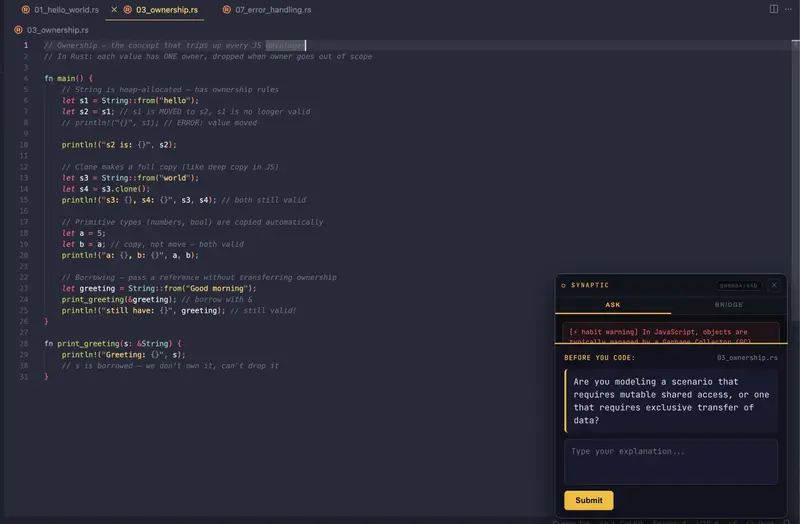
Synaptic is a local-first AI dev companion powered entirely by Gemma 4. It watches your entire development environment — files, terminal, errors, shell history — and builds a persistent model of how you specifically think and solve problems. When you’re stuck or learning a new language, it surfaces your own past solutions rather than generic documentation pulled from the internet.

The centrepiece is the Socratic gate.

When you open a code file, Synaptic reads your last few hours of activity, identifies what concept is most at stake in that file, and streams a targeted question into a HUD overlay within seconds:

“You’ve been writing JavaScript closures recently. Before you edit this Rust file: how are you thinking about ownership and when values go out of scope?”

The question isn’t generic. It’s built from your actual history. Gemma 4 evaluates your answer and either lets you through or asks a sharper follow-up targeting exactly what you glossed over. Over time, your explanations get sharper — because the bar doesn’t lower.

Beyond the Socratic gate:

  • Ambient memory pipeline — every file save and terminal command is compressed by Gemma 4 into a structured memory (summary, concepts, significance score, verbatim error text) every 3 seconds, stored locally in SQLite and indexed for semantic search

  • Vision error pipeline — on macOS, when a terminal error fires, Gemma 4 reads a screenshot of your actual screen to extract the full stack trace, not the truncated shell history
  • Four query modes — Translate (JS patterns to Rust), Explain (grounded in your own history), Map Concept (to what you already know), Find Solution (have I solved this before?)

  • Habit mismatch detection — runs continuously, warns when you apply patterns from your old language that will break in your new one

  • Stuck detection — watches for compound signals (repeated errors, thrashing, excessive app switches) and auto-surfaces the HUD with relevant context before you ask
  • Electron HUD overlay — always-on-top, appears uninvited when it has something worth saying
    Everything runs on your machine. No API keys required. No data leaves without your permission.

Live site: https://synaptic-ebon.vercel.app

Docs: https://synaptic-ebon.vercel.app/docs

Demo

Quick start to try it yourself:

git clone https://github.com/cybort360/synaptic
cd synaptic && npm install
ollama pull gemma4:e4b
ollama pull nomic-embed-text
cp synaptic.config.example.json synaptic.config.json
# Edit synaptic.config.json and add a directory to watchPaths
npm run launch

Open a .rs, .ts, .py, or .go file in a watched directory. The HUD will appear within seconds with a question grounded in your recent activity.

Code

GitHub: https://github.com/cybort360/synaptic

The full pipeline in one view:

Files / Terminal / Shell history
        ↓
    Observer (chokidar + history polling + stuck detector)
        ↓
    Archivist
      ├─ Compressor: gemma4:e4b (every 3s, with vision on errors)
      ├─ Embedder: nomic-embed-text (semantic search vectors)
      └─ SQLite (local, persistent, yours)
        ↓
    Connector
      ├─ Semantic search over history
      ├─ Prompt builder (4 modes)
      └─ Reasoner: gemma4:e4b (streaming)
        ↓
    Socratic Engine
      ├─ Fires on file open for recognised code files
      ├─ Streams question word-by-word to HUD
      └─ Evaluates answer, asks follow-up or passes
        ↓
    Dashboard (http://localhost:3777) + HUD Overlay (Electron)

Stack: Node.js 20, TypeScript, Express, WebSocket, Electron, chokidar, sql.js (SQLite), Ollama. No frameworks. No bundler. Around 5,700 lines of original code.

How I Used Gemma 4

I used gemma4:e4b — the 4B effective parameter model — and the choice was deliberate at every level.

Why E4B specifically

Speed is the constraint. Synaptic compresses every file save and terminal command into a structured memory on a 3-second batch cycle. That cycle is a constraint, not a goal — if compression falls behind, the memories become stale. The Socratic question about your Rust ownership file would be grounded in something you did yesterday rather than what you were doing five minutes ago.

I tested gemma4:26b for this. The batches piled up. The tool became a liability. At 4B effective parameters, gemma4:e4b compresses an event in under 2 seconds on a MacBook. The 3-second cycle stays clean. Memories are always fresh.

Multimodal was the unlock. When you hit a terminal error, your shell history often truncates it. The important part — the line number, the variable name, the exact constraint violated — is three screens down.

Gemma 4 is natively multimodal. When Synaptic detects a terminal error, it captures a screenshot of your screen and sends it to Gemma before compression. Gemma reads the actual stack trace off your screen, not the truncated history. This is only possible with a vision-capable model. A text-only 4B model cannot do it. A vision-capable model too large to run locally cannot do it either. gemma4:e4b is the exact intersection: small enough to run constantly, fast enough for real-time use, and genuinely multimodal.

The Socratic gate depends on first-token latency. The gate fires when you open a code file. The HUD slides up. The question starts streaming in word by word while Gemma is still generating. With gemma4:e4b, the first token arrives in under 3 seconds on a MacBook M-series. The question types itself in as the developer reads it. With a larger model, the developer is already ten lines deep before the question finishes generating — and the gate becomes noise.

What breaks with a different model

Alternative What fails
A 27B local model Compression batches pile up. The 3-second cycle becomes 30+ seconds and memories fall behind real activity
A non-multimodal 4B Vision pipeline silently degrades. Errors are compressed without reading the actual screen output
A cloud-only model The entire privacy guarantee breaks. Code, errors, and history leave your machine
No local model at all Socratic gate cannot fire on every file open. Latency makes it unusable as a real-time feature

The three tiers Gemma 4 powers

Task When Why Gemma 4
Event compression Every 3 seconds Speed. Needs to complete before the next event arrives.
Vision error analysis On terminal errors (macOS) Multimodal. Reads the actual stack trace off the screen.
Reasoning + Socratic evaluation On every query and file open Quality. Generates personalised questions and evaluates answers.

A separate nomic-embed-text model handles embeddings for semantic search — it outperforms a generalist 4B model at this specific task, so I kept it.

What Gemma 4 made possible that wasn’t before

The core thesis of Synaptic is that local AI is now capable enough to be the primary intelligence of a real product — not just a demo. gemma4:e4b can read screenshots, generate coherent structured analysis, evaluate the quality of a developer’s reasoning, and do all of this on a consumer laptop in real time.

That’s new. Six months ago you had to choose between capable and local. With Gemma 4 you don’t.

HDD Eksternal Tiba-Tiba Tidak Bisa Diakses di Windows? Ini Tiga Lapis Fix-nya

HDD Eksternal Tiba-Tiba Tidak Bisa Diakses di Windows? Ini Tiga Lapis Fix-nya

Kalau drive eksternal yang kamu pakai sebagai penyimpanan utama tiba-tiba tidak bisa diakses padahal kabelnya masih tercolok rapi, kemungkinan besar drive itu sedang tertidur — bukan rusak.

Masalah ini sering kejadian di drive eksternal seperti Seagate Backup Plus Hub atau WD Elements yang dipakai 24 jam non-stop sebagai file server di rumah. Pengaturan Windows “Turn off hard disk after: Never” sudah diaktifkan, tapi setelah 10-15 menit tanpa akses, drive tetap “menghilang”. Begitu foldernya dibuka kembali, butuh 5-10 detik sampai bisa terbaca, kadang malah error.

Penyebabnya bukan di Windows. Drive eksternal modern punya sistem hemat daya sendiri di dalam firmware — semacam mekanisme auto-tidur yang bekerja terlepas dari pengaturan sistem operasi. Pengaturan power Windows tidak bisa mematikan fitur ini secara langsung.

Artikel ini akan menjelaskan tiga lapis solusi yang berhasil saya terapkan, lengkap dengan perintah konkret dan beberapa kesalahan yang sempat saya temui di sepanjang proses. Target pembaca: kamu yang punya drive eksternal terhubung 24 jam ke PC Windows untuk keperluan file sharing, backup, atau media server.

Gejala dan Diagnosis

Skenarionya seperti ini. Drive eksternal dipasang permanen ke PC Windows, dipakai sebagai penyimpanan media, file backup, atau tempat berbagi file di jaringan rumah. Drive selalu hidup, tidak pernah dicabut. PC tidak pernah di-suspend.

Tapi setelah idle 10-15 menit, drive seolah-olah hilang. File Explorer hang sebentar saat folder dibuka. Kadang muncul error “Lokasi tidak tersedia” atau “I/O device error”. Akses dari komputer lain via share folder juga timeout.

Anehnya, kalau ditunggu beberapa detik, drive normal kembali. Tidak ada rusak fisik, kabel tidak longgar, port USB sehat.

Yang terjadi: drive baru saja “bangun” dari tidur.

Drive eksternal seperti Seagate Backup Plus Hub, WD Elements, atau Toshiba Canvio punya sistem hemat daya internal di dalam firmware. Mekanisme ini bekerja secara mandiri — terlepas dari apa yang sudah kamu atur di Windows. Saat tidak ada permintaan baca-tulis selama beberapa menit, motor spindle drive akan berhenti berputar untuk menghemat listrik dan memperpanjang umur drive.

Ini desain disengaja produsen, bukan bug. Tapi untuk drive yang dipakai sebagai server, fitur ini justru bikin masalah.

Ada tiga lapis yang harus diatur secara berurutan agar drive tidak tidur lagi:

  1. Pengaturan power Windows untuk hard disk
  2. Pengaturan USB selective suspend
  3. Tugas keep-alive otomatis yang menyentuh drive secara berkala

Lapis pertama dan kedua adalah dasar yang banyak tutorial sudah bahas. Lapis ketiga adalah yang paling penting — sayangnya, ini sering terlewat. Tanpa lapis ketiga, dua lapis pertama tidak cukup untuk drive dengan firmware spindown agresif.

Lapis 1: Pengaturan Power Windows

Buka Command Prompt sebagai administrator. Caranya: tekan tombol Windows, ketik “cmd”, klik kanan di hasil pencarian “Command Prompt”, lalu pilih “Run as administrator”.

Jalankan dua perintah berikut:

powercfg /change disk-timeout-ac 0
powercfg /change disk-timeout-dc 0

Angka 0 artinya “tidak pernah”. Argumen disk-timeout-ac mengatur perilaku saat PC pakai listrik AC (PC desktop selalu di sini). disk-timeout-dc mengatur saat pakai baterai (untuk laptop). Keduanya kita set ke 0 agar konsisten.

Verifikasi pengaturan dengan:

powercfg /query SCHEME_CURRENT SUB_DISK

Output akan menampilkan beberapa nilai dalam format heksadesimal. Yang penting: nilai untuk “Turn off hard disk after” harus 0x00000000 di kedua AC dan DC.

Default Windows biasanya 20 menit di AC dan 10 menit di baterai. Kalau dibiarkan, Windows akan kirim sinyal “tidur” ke drive setelah idle, dan drive akan tidur lebih cepat dari yang diharapkan.

Setting ini perlu, tapi tidak cukup. Banyak orang berhenti di sini lalu kebingungan kenapa drive masih tetap tidur. Lanjut ke lapis 2.

Lapis 2: Disable USB Selective Suspend

USB selective suspend adalah fitur Windows yang mematikan port USB tertentu saat tidak aktif. Di laptop ini berguna untuk hemat baterai, tapi untuk drive yang dipasang permanen, fitur ini bikin masalah.

Masih di Command Prompt sebagai administrator, jalankan tiga perintah ini secara berurutan:

powercfg /setacvalueindex SCHEME_CURRENT 2a737441-1930-4402-8d77-b2bebba308a3 48e6b7a6-50f5-4782-a5d4-53bb8f07e226 0
powercfg /setdcvalueindex SCHEME_CURRENT 2a737441-1930-4402-8d77-b2bebba308a3 48e6b7a6-50f5-4782-a5d4-53bb8f07e226 0
powercfg /setactive SCHEME_CURRENT

Dua kode panjang itu adalah identifier internal Windows untuk pengaturan USB selective suspend. Tidak perlu dihapal — copy paste saja. Nilai 0 artinya disable.

Setelah lapis 1 dan 2 selesai, drive eksternal akan jauh lebih stabil. Tapi dari pengalaman saya, kalau drive yang kamu pakai punya firmware spindown agresif (Seagate Backup Plus Hub adalah contoh paling sering), masalahnya belum selesai. Drive masih bisa tidur sendiri walau Windows sudah tidak menyuruh.

Inilah saat lapis ketiga jadi kunci.

Lapis 3: Tugas Keep-Alive Otomatis

Strateginya sederhana: jangan biarkan drive idle terlalu lama. Caranya, kita buat tugas otomatis yang menulis file kecil ke drive setiap beberapa menit, lalu membaca file itu kembali. Aktivitas baca-tulis ini cukup untuk mencegah firmware drive memutuskan kalau drive tidak terpakai.

Buat file PowerShell baru. Buka Notepad, lalu salin isi berikut:

$drivePath = "D:.keep-alive.txt"
$timestamp = Get-Date -Format "yyyy-MM-dd HH:mm:ss"

# Tulis file kecil ke drive (write I/O)
Set-Content -Path $drivePath -Value "Last keep-alive: $timestamp" -ErrorAction SilentlyContinue

# Baca kembali untuk memicu read I/O
$content = Get-Content -Path $drivePath -ErrorAction SilentlyContinue

# Catat ke log lokal
$logPath = "C:Users$env:USERNAMEdrive-keepalive.log"
Add-Content -Path $logPath -Value "[$timestamp] Keep-alive berhasil"

Ganti D: dengan letter drive eksternal kamu (E:, F:, dan seterusnya). Simpan file ini sebagai drive-keepalive.ps1 di folder home kamu, misalnya C:Users<namamu>drive-keepalive.ps1. Pastikan saat menyimpan di Notepad, “Save as type” dipilih “All Files” agar ekstensinya benar .ps1, bukan .ps1.txt.

Script ini bekerja dengan dua cara: pertama, menulis file kecil dengan timestamp ke drive (memicu write I/O). Kedua, membaca file itu kembali (memicu read I/O). Kombinasi keduanya cukup memberi sinyal ke firmware drive bahwa device sedang aktif.

Selanjutnya, jadwalkan script ini lewat Task Scheduler.

Buka Task Scheduler dari Start Menu (ketik “Task Scheduler”). Di panel kanan, klik “Create Task” — perhatikan, bukan “Create Basic Task” yang lebih sederhana karena kita butuh opsi advance.

Di tab General: beri nama tugas “Drive-KeepAlive”. Centang “Run whether user is logged on or not”.

Di tab Triggers: klik “New”. Pilih “Begin the task: On a schedule”, “Daily”, “Recur every: 1 days”. Di bagian “Advanced settings”, centang “Repeat task every: 5 minutes” untuk durasi “Indefinitely”. Klik OK.

Di tab Actions: klik “New”. Pilih “Start a program”. Isi:

  • Program/script: powershell.exe
  • Add arguments: -ExecutionPolicy Bypass -WindowStyle Hidden -File "C:Users<namamu>drive-keepalive.ps1"

Ganti <namamu> dengan username Windows kamu. Klik OK.

Save tugasnya. Windows akan minta password user kamu — masukkan saja. Tugas ini sekarang akan menyentuh drive setiap 5 menit, mencegah firmware mematikan motor spindle.

Verifikasi

Setelah setup, biarkan dulu sekitar 30 menit, lalu cek hasilnya.

Pertama, buka file log di C:Users<namamu>drive-keepalive.log. Harus ada entri baru setiap 5 menit, tanpa pesan error.

Kedua, cek file .keep-alive.txt di root drive eksternal kamu. Timestamp di dalamnya harus selalu update dengan waktu terakhir tugas berjalan.

Ketiga, tes akses drive. Tinggalkan PC selama 20-30 menit tanpa membuka drive, lalu coba akses folder besar yang biasanya bikin lambat. Kalau dulu ada delay 5-10 detik saat pertama buka, sekarang harus bisa langsung terbuka.

Indikator keberhasilan utama: tidak ada lagi error “Lokasi tidak tersedia” atau hang saat browsing folder, baik dari PC server itu sendiri maupun dari komputer lain via share folder.

Kesalahan yang Saya Temui Selama Proses

Beberapa hal yang sempat keliru di awal, yang mungkin berguna untuk kamu hindari.

Pertama, saya awalnya pakai PowerShell untuk menjalankan powercfg. Tidak jalan, errornya “Invalid Parameters”. Ternyata powercfg lebih konsisten kalau dijalankan dari Command Prompt biasa, bukan dari PowerShell — terutama untuk perintah dengan parameter yang panjang. Solusi cepat: kalau kamu memang harus tetap di PowerShell, bungkus dengan cmd /c "powercfg ...".

Kedua, saya sempat coba ubah pengaturan device-level lewat WMI (Get-PnpDevice lalu set property MSPower_DeviceEnable). Selalu gagal. Belakangan saya sadar pendekatan ini butuh akses admin yang lebih tinggi, dan beberapa device memang tidak mengizinkan setting tersebut diubah dari user space. Untuk drive eksternal biasa, lapis 3 (keep-alive task) sudah cukup — skip saja jalan WMI ini.

Ketiga, di percobaan pertama, script keep-alive saya cuma mengubah timestamp metadata file (pakai cara seperti (Get-Item path).LastWriteTime = Get-Date). Drive tetap tidur. Ternyata firmware drive tidak menganggap update metadata sebagai I/O nyata. Yang benar adalah benar-benar menulis isi ke file (seperti script di atas), karena ini menyebabkan motor spindle benar-benar bekerja sebentar dan firmware mendeteksinya sebagai aktivitas valid.

Penutup

Tiga lapis di atas — pengaturan Windows, USB selective suspend, dan keep-alive task — adalah kombinasi yang akhirnya bikin drive eksternal saya stabil 24 jam non-stop tanpa “hilang” lagi.

Saya masih newbie di hal ini, dan mungkin ada cara yang lebih elegan untuk mencapai hasil yang sama. Misalnya, mengubah firmware drive (kalau memungkinkan), atau pakai enclosure USB-to-SATA yang punya power management lebih baik. Kalau kamu pernah coba pendekatan lain yang berhasil, saya senang sekali kalau kamu mau share di kolom komentar.

Jika tutorial ini berguna, follow Tech Nubie untuk update tutorial serupa — fokus ke trik-trik kecil yang bikin server rumah kamu lebih reliable.

DSA Application in Real Life: How Git Diff Works: LCS Intuition, Myers Algorithm, and Real Code Changes

The Algorithm Hiding Behind git diff

You’ve run git diff hundreds of times.

Red lines. Green lines. Done.

But have you ever stopped and asked — what algorithm is actually doing that?

It turns out, it’s one of the most classic problems in computer science: Longest Common Subsequence. And it’s been hiding inside your terminal every single day.

In this article, we’ll explore how Git-style diffing works, why LCS is the right mental model, how the actual algorithm Git uses (Myers diff) connects to it, and what tradeoffs real tools make when choosing a diff algorithm.

This is the first article in my series “DSA Application in Real Life” — where I explore how common data structures and algorithms power the tools developers use every day.

The Problem Git Is Solving

Imagine we have an old version of a file:

function add(a, b) {
  return a + b;
}

Then we update it:

function addNumbers(a, b) {
  return a + b;
}

When we run git diff, Git shows:

-function add(a, b) {
+function addNumbers(a, b) {
   return a + b;
 }

This looks obvious to us as humans. Only the function name changed.

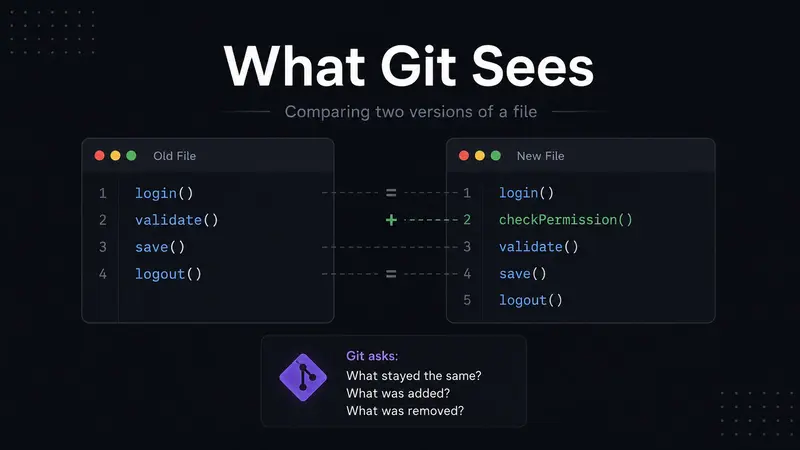
But Git does not “understand” JavaScript the way we do. At the diffing level, Git treats the file as a sequence of lines. Its job is to compare two sequences and decide:

  • Which lines stayed the same?
  • Which lines were deleted?
  • Which lines were added?

This is a sequence comparison problem — and that’s exactly where LCS comes in.

Why Simple Line-by-Line Comparison Is Not Enough

A beginner might think Git just compares files line by line:

Old line 1 vs New line 1
Old line 2 vs New line 2
Old line 3 vs New line 3

This works only when changes happen at the same position. But real code changes are rarely that simple.

Consider this old file:

login()
validate()
save()
logout()

Now we insert one new line:

login()
checkPermission()
validate()
save()
logout()

A naive line-by-line comparison would produce:

Old: login()      New: login()            same
Old: validate()   New: checkPermission()  different
Old: save()       New: validate()         different
Old: logout()     New: save()             different
Old: (nothing)    New: logout()           added

That makes it look like almost the entire file changed — which is completely wrong. Only one line was added.

A smarter approach doesn’t compare by position. It finds what’s common between the two files first. That’s the LCS idea.

LCS: The Mental Model Behind Diffing

LCS stands for Longest Common Subsequence.

A subsequence means you can pick elements from a sequence while keeping their relative order — but they don’t need to be adjacent.

Example:

Old = [A, B, C, D]
New = [A, C, E, D]

The longest common subsequence is [A, C, D] — because A, C, and D appear in both sequences in the same order.

Applied to file diffing, the lines of each file become the sequences:

Old = [login(), validate(), save(), logout()]
New = [login(), checkPermission(), validate(), save(), logout()]

LCS = [login(), validate(), save(), logout()]

Now Git can reason:

  • These lines are common → unchanged
  • checkPermission() is only in the new file → added

Result:

 login()
+checkPermission()
 validate()
 save()
 logout()

That’s the core idea.

The Actual LCS Algorithm (with Code)

Here’s the classic dynamic programming solution you’ve likely seen in competitive programming:

def lcs_length(A, B):
    m, n = len(A), len(B)
    # dp[i][j] = LCS length of A[:i] and B[:j]
    dp = [[0] * (n + 1) for _ in range(m + 1)]

    for i in range(1, m + 1):
        for j in range(1, n + 1):
            if A[i-1] == B[j-1]:
                dp[i][j] = dp[i-1][j-1] + 1
            else:
                dp[i][j] = max(dp[i-1][j], dp[i][j-1])

    return dp[m][n]

For sequences A = [A, B, C, D] and B = [A, C, E, D], the DP table looks like:

     ""  A   C   E   D
""  [ 0   0   0   0   0 ]
A   [ 0   1   1   1   1 ]
B   [ 0   1   1   1   1 ]
C   [ 0   1   2   2   2 ]
D   [ 0   1   2   2   3 ]

The answer is dp[4][4] = 3 → LCS length is 3 → [A, C, D].

Time complexity: O(m × n)
Space complexity: O(m × n)

For large files, this gets expensive — which is why Git doesn’t use this directly.

How LCS Builds the Diff

Once you know the LCS, building the diff is straightforward:

  • Lines in the LCS → unchanged
  • Lines in old but not in LCS → deleted (prefix with -)
  • Lines in new but not in LCS → added (prefix with +)

Example:

Old = [A, B, C, D]
New = [A, C, E, D]
LCS = [A, C, D]

B is only in Old  → deleted
E is only in New  → added

Diff output:

 A
-B
 C
+E
 D

This is the basic shape of what Git, GitHub pull requests, VS Code comparison, and merge tools show: unchanged lines, deleted lines, and added lines.

Does Git Actually Use Textbook LCS?

Not directly. Git’s default algorithm is Myers diff — and it solves a slightly different (but deeply related) problem called the Shortest Edit Script.

What is the minimum number of insertions and deletions needed to transform the old file into the new file?

The connection to LCS is direct:

LCS finds what is common.
Shortest Edit Script finds what changed.

If LCS is long → fewer edits needed.
If LCS is short → more edits needed.

They are two sides of the same coin.

So when we say “Git uses LCS-based diffing,” the accurate meaning is:

Git’s diffing is based on sequence comparison ideas rooted in LCS, but its default implementation uses Myers’ shortest edit script algorithm — which is faster in practice.

How Myers Diff Actually Works (Simplified)

Myers models the diff problem as a graph search.

Imagine a grid where:

  • The X-axis represents lines of the old file
  • The Y-axis represents lines of the new file
  • Moving right = delete a line from the old file
  • Moving down = insert a line from the new file
  • Moving diagonally = lines match (no edit needed)

For Old = [A, B, C, D] and New = [A, C, E, D]:

     A    B    C    D
   ┌────┬────┬────┬────┐
A  │╲   │    │    │    │
   ├────┼────┼────┼────┤
C  │    │    │╲   │    │
   ├────┼────┼────┼────┤
E  │    │    │    │    │
   ├────┼────┼────┼────┤
D  │    │    │    │╲   │
   └────┴────┴────┴────┘

Myers finds the path from (0,0) to (N,M) that uses the most diagonal moves — because diagonals are free (matched lines). That path is the shortest edit script.

Time complexity: O(n × d) where d = number of differences
Space complexity: O(n)

This is much faster than O(m × n) LCS for files that are mostly similar — which is the common case in real codebases.

Diff as an Edit Script

Let’s walk through a concrete edit script:

Old file → [A, B, C, D]
New file → [A, C, E, D]

Step 1: Delete B

A, C, D

Step 2: Insert E after C

A, C, E, D

Edit script: Delete B, Insert E — that’s just 2 operations.

Git’s diff output:

 A
-B
 C
+E
 D

Clean, minimal, exactly right.

Why This Matters in Real Development

When we review code, we’re not just looking at text changes — we’re trying to understand intent.

A good diff makes that easy:

 function calculateTotal(items) {
-  return items.length;
+  return items.reduce((sum, item) => sum + item.price, 0);
 }

Any reviewer immediately understands: the old code counted items, the new code sums their prices.

A bad diff creates noise and confusion. That’s why diff algorithms matter — they’re not just about correctness, they’re about readability.

The Tradeoff: Shortest Diff vs Most Readable Diff

The “smallest” diff is not always the most readable one — especially in code with repeated patterns:

if (user) {
  return true;
}

if (admin) {
  return true;
}

if (owner) {
  return true;
}

When many lines look similar, a diff algorithm can match the wrong lines. The result is technically correct but hard to read. That’s why Git ships multiple algorithms.

Git’s Four Diff Algorithms — With a Real Example

git diff --diff-algorithm=myers      # default
git diff --diff-algorithm=minimal
git diff --diff-algorithm=patience
git diff --diff-algorithm=histogram

Here’s what each one does and when to use it:

Myers (default)

Fast, generally good results. This is what runs when you just type git diff. Best for everyday use.

Minimal

Tries harder to find the absolute smallest diff. Slower, but useful when patch size matters (e.g., generating patches to send via email).

Patience

Prioritizes human readability. It only matches unique lines first, avoiding false alignments on repeated code. Best for reviewing refactors or moved code blocks.

Histogram

An evolution of Patience that also handles low-frequency lines well. Often produces the most readable output for real codebases. Many developers set this as their global default.

Side-by-side example — Myers vs Patience:

Given this change (a function was refactored):

# Old
def process(data):
    result = []
    for item in data:
        result.append(item * 2)
    return result

# New
def process(data):
    return [item * 2 for item in data]

Myers output might show:

 def process(data):
-    result = []
-    for item in data:
-        result.append(item * 2)
-    return result
+    return [item * 2 for item in data]

Patience output groups the change more cleanly around unique anchors, making it immediately obvious that the body was replaced with a list comprehension — less noise, same information.

To set histogram globally (recommended for most developers):

git config --global diff.algorithm histogram

Algorithm Complexity Summary

Algorithm Rough Idea Best For
Textbook LCS DP O(m × n) time and space Learning the concept
Myers diff Efficient when files are mostly similar Default everyday diffs
Minimal Spends extra work to reduce diff size Smaller patches
Patience Uses unique lines as anchors Refactors / moved blocks
Histogram Extends patience using low-frequency lines Often readable code diffs

Where m = number of lines in the old file and n = number of lines in the new file.

Where the DSA Is Hiding

In competitive programming, LCS is a textbook DP problem. In the real world, the same idea powers:

Git diff
GitHub pull request review
VS Code file comparison
Merge conflict resolution
Google Docs version history
Code review platforms (Gerrit, Phabricator)
Patch generation

The input changes — lines of code, words in a document, DOM nodes in a UI, events in a timeline — but the core question is always the same:

What stayed the same, and what changed?

A Real-World Developer Example

Old code:

function createUser(name, email) {
  const user = { name, email };
  saveUser(user);
  return user;
}

New code:

function createUser(name, email, role) {
  const user = { name, email, role };
  validateUser(user);
  saveUser(user);
  return user;
}

A well-tuned diff shows:

-function createUser(name, email) {
+function createUser(name, email, role) {
-  const user = { name, email };
+  const user = { name, email, role };
+  validateUser(user);
   saveUser(user);
   return user;
 }

Any reviewer immediately understands: a role parameter was added, it’s stored on the user object, and validation was introduced before saving. Three changes, instantly clear.

That’s the value of a good diff algorithm — it’s not just computing differences. It’s helping humans understand change.

Why Git Works at the Line Level (Not Character Level)

Git diffs at the line level because source code is naturally line-based. A character-level diff would be more precise:

-const total = price * quantity;
+const total = price * quantity * tax;

vs character diff: * tax was appended.

But character-level diffs get noisy fast for code review. Line-level is the right abstraction for most developer workflows. (You can get word-level diffs with git diff --word-diff when you need them.)

The best algorithm isn’t always the most precise one. It’s the one that gives the most useful output for the context.

LCS vs Myers: The Mental Model

LCS:    Find the longest part that stayed the same.
Myers:  Find the shortest set of changes to get from old to new.

LCS gives you the intuition.
Myers gives Git an efficient practical algorithm.

If the LCS is long → few changes needed.
If the LCS is short → many changes needed.

They measure the same thing from different directions.

Why This Is a Great Example of DSA in Real Life

Many beginners ask: “Where do we actually use DSA in real projects?”

git diff is one of the best answers — because every developer runs it daily without thinking about it.

When you run git diff, you’re using an algorithm.
When you review a pull request on GitHub, you’re using an algorithm.
When you resolve merge conflicts, you’re relying on algorithms that compare versions of files.

The algorithm is invisible behind a clean developer experience. That’s what good engineering looks like — the user sees red and green lines, and behind it is a carefully designed algorithmic solution built on decades of computer science research.

That’s the beauty of DSA. Not just for interviews. Inside the tools you use every day.

Practical Commands to Try

# Try different algorithms on any repo
git diff --diff-algorithm=myers
git diff --diff-algorithm=patience
git diff --diff-algorithm=histogram
git diff --diff-algorithm=minimal

# Word-level diff (great for prose or config files)
git diff --word-diff

# Set histogram as your permanent default
git config --global diff.algorithm histogram

Final Thoughts

LCS may look like just another DP problem when you first learn it. But the idea is powerful:

Find what stayed the same so we can understand what changed.

Git uses it to show file changes. Code review tools use it to help developers understand pull requests. Merge tools use it to combine work from different branches. Document editors use it to show version history.

So the next time you run git diff, remember: you’re not just seeing red and green lines. You’re seeing dynamic programming, graph search, and decades of algorithmic research — all compressed into a two-word command.

References

I built an AI faceless video generator in 2 months — here’s the stack

Six months ago I started Keyvello (keyvello.com) — an AI video generator that turns a prompt into a complete short-form video in 2–5 minutes. Here’s the technical breakdown for fellow builders.

The problem

Faceless creators on TikTok / YouTube Shorts / Reels spend 2–4 hours per video on scripting, voiceovers, B-roll, captions, and editing. Most burn out before they post 10 videos.

The stack

  • Frontend: Next.js 16, React 19, TypeScript, Tailwind CSS 4, Radix UI
  • Backend: Next.js API Routes (App Router)
  • DB: Supabase (Postgres + Auth + RLS)
  • AI: GPT-5.5 for scripts, Fal.ai for images, ElevenLabs for voices
  • Video: FFmpeg via fluent-ffmpeg, Sharp for image processing
  • Storage: Cloudflare R2 (S3-compatible)
  • Payments: Dodo Payments
  • Compute: Vercel for the app, Modal for the video pipelines
  • State: Zustand

The pipeline

prompt → GPT-4o script → scene splitter → parallel(Flux images + ElevenLabs audio) → FFmpeg composition (Modal) → R2 upload → status update

What surprised me

  1. Modal beats running FFmpeg in Vercel. Cold starts on Vercel functions made 60s+ videos impossible. Modal webhooks solved it.
  2. RLS is non-negotiable from day one. Retro-fitting row-level security at 1K users is painful.
  3. Credit refunds need their own RPC. I hit a silent failure with increment_user_credits getting blocked by a trigger. Use add_credits instead.
  4. Users want templates, not raw control. I shipped a “blank canvas” mode early. Nobody used it. The 11 named templates (AI Stories, Fake Texts, Stick Animation, etc.) do 95% of generations.

What’s next

Better lipsync for the talking-avatar templates. Tighter cost controls per template tier. Affiliate program.

If you’re building something in AI video, would love to compare notes — drop a comment.

Diffusion Language Models: How NVIDIA Nemotron-Labs Diffusion Shatters the Autoregressive Speed Ceiling

Hero Banner — Diffusion Language Models

Meta Description: Diffusion language models (DLMs) are rewriting LLM inference. Dive deep into NVIDIA’s Nemotron-Labs Diffusion — how block-wise attention, AR-to-DLM conversion, and self-speculation modes achieve 6.4× throughput gains over autoregressive models with better accuracy.

Diffusion Language Models: How NVIDIA’s Nemotron-Labs Diffusion Shatters the Autoregressive Speed Ceiling

Published: May 23, 2026 | Focus Keyword: diffusion language models | Estimated Read Time: 14 minutes

Hero Banner — Diffusion Language Models

Table of Contents

  1. The Token-by-Token Tax: Why Your LLM Is Leaving GPU Performance on the Table
  2. Background: The Autoregressive Wall
  3. What Are Diffusion Language Models? The Full Mental Model
  4. The AR-to-DLM Conversion Breakthrough
  5. Nemotron-Labs Diffusion: Architecture and Three Generation Modes
  6. Performance Deep Dive: Benchmarks and What They Actually Mean
  7. Hands-On: Loading and Running Nemotron-Labs Diffusion
  8. Practical Engineering Considerations
  9. The Bigger Picture: What DLMs Mean for the LLM Ecosystem
  10. Conclusion: A Paradigm Shift Worth Acting On

1. The Token-by-Token Tax

Imagine you hired the world’s fastest typist — but forced them to pause after every single character to re-read the entire document before typing the next one. That, in essence, is what your autoregressive LLM is doing on your GPU right now.

Every token generated by a standard transformer LLM requires a full forward pass through all model weights. Every weight must be loaded from GPU HBM (high-bandwidth memory) into the compute cores before a single multiply-accumulate can happen. At batch size 1 — the regime of interactive applications, code assistants, and real-time agents — your multi-billion parameter model is nearly 100% memory-bandwidth bound. The thousands of CUDA cores sitting idle while waiting for memory reads are the silent tax every LLM deployment pays.

This isn’t a new observation. It’s been the defining bottleneck of LLM serving since GPT-2. Hardware vendors have thrown HBM3, NVLink, and ever-wider memory buses at the problem, but the fundamental constraint remains: autoregressive decoding serializes computation in a way that fundamentally under-utilizes modern parallel hardware.

On May 23, 2026, NVIDIA released Nemotron-Labs Diffusion — a family of diffusion language models (DLMs) that attacks this problem at the architecture level. The models generate entire blocks of tokens in parallel, then iteratively refine them, rather than committing to one token at a time. The result: up to 6.4× higher throughput than equivalent autoregressive baselines, with accuracy that exceeds comparable AR models.

This post is a deep technical dive into how diffusion language models work, what makes NVIDIA’s approach different, and how you can start using them today.

2. Background: The Autoregressive Wall

AR vs DLM token generation comparison

To appreciate why diffusion language models matter, you need to understand precisely why autoregressive models hit a wall — and it’s worth being specific, because the bottleneck is not where many engineers assume it is.

The Memory Bandwidth Problem

Modern LLMs are what inference engineers call memory-bandwidth bound at low batch sizes. Consider an 8B parameter model in BF16: that’s roughly 16 GB of weight data. At batch size 1, generating a single token requires reading the vast majority of those 16 GB through the memory hierarchy. An H100 has ~3.35 TB/s of HBM bandwidth, which sounds fast — but reading 16 GB still takes roughly 4.8 ms of pure memory time. At batch size 1, you’re looking at a theoretical ceiling of ~208 tokens/second purely from memory bandwidth limits, and that’s before accounting for compute.

Increase the batch size and you amortize those memory reads across multiple sequences — but that trades per-request latency for throughput, which is the wrong tradeoff for interactive applications.

The Irreversibility Problem

There’s a second, more subtle pathology in autoregressive generation: tokens are final once generated. If the model emits a poor token early in a sequence, all subsequent tokens are conditioned on that mistake. The only mitigation is beam search or sampling with temperature — techniques that add compute overhead without eliminating the root cause.

This is particularly painful in fill-in-the-middle (FIM) tasks — think code completion in the middle of a function — where the model needs to generate text that is coherent with both the preceding and following context simultaneously. Autoregressive models handle FIM by training on rearranged sequences or via special tokens, but they still decode left-to-right, never able to naturally revise a poor early commitment.

The KV Cache Ceiling

The KV cache is a standard optimization that stores key-value pairs from prior tokens to avoid recomputing them on every step. But it introduces its own scaling constraints: KV cache size grows linearly with sequence length and batch size. On a single A100-80GB, serving a 32k-context 70B model at batch size 8 can exhaust GPU memory entirely just from KV cache — forcing degraded batch sizes or context truncation.

These three problems — memory bandwidth, irreversibility, and KV cache pressure — are structural features of autoregressive decoding. Patching any one of them with engineering hacks (speculative decoding, flash attention, quantization) provides incremental relief. Diffusion language models address all three simultaneously at the architecture level.

3. What Are Diffusion Language Models? The Full Mental Model

DLM iterative denoising process

If you’ve worked with diffusion models for images (Stable Diffusion, DALL·E, Flux), you have the right mental model — with one critical adaptation for the discrete nature of text.

Image Diffusion vs. Text Diffusion

Image diffusion models work by:

  1. Forward process: Progressively add Gaussian noise to an image until it becomes pure noise
  2. Reverse process: Learn to iteratively denoise, recovering the original image step by step

For text, you can’t add continuous Gaussian noise to discrete tokens. Instead, discrete diffusion models use a masking process:

  1. Forward process (masking): Progressively replace tokens with a special [MASK] token
  2. Reverse process (demasking): Learn to predict and fill in masked tokens, starting from a fully masked sequence

At inference time, you start with a fully masked target sequence. The model fills in token predictions across the entire sequence simultaneously, with low-confidence predictions remaining masked for subsequent refinement steps. After a fixed number of denoising steps (typically 10–50), the sequence has converged to a complete, coherent output.

Why This Beats AR for Throughput

The throughput gain is structural. In AR decoding:

  • N tokens = N forward passes
  • Each forward pass processes 1 new token (plus KV cache for context)

In DLM decoding with a block size of 32:

  • 32 tokens = 1 forward pass (first pass fills all 32 positions simultaneously)
  • Subsequent passes refine uncertain tokens in the same block
  • With high model confidence, convergence happens in very few steps

The total compute is not necessarily lower — each DLM forward pass over a 32-token block processes more tokens simultaneously — but the parallelism maps much better to GPU hardware. Instead of memory-bound sequential reads, you get compute-bound matrix multiplications across full blocks, which is exactly what GPUs are designed for.

Bidirectional Attention: The Secret Sauce

AR models use causal (unidirectional) attention: each token can only attend to tokens that precede it. This enforces the left-to-right generation constraint at the architecture level.

DLMs use bidirectional attention within each generated block: every masked token can attend to every other token (masked or unmasked) in its context window simultaneously. This is what allows a DLM to generate tokens 1, 8, 15, and 27 of a 32-token block in one pass, each informed by the others — something architecturally impossible in an AR model.

4. The AR-to-DLM Conversion Breakthrough

The conceptual appeal of diffusion language models has existed for years. What stopped them from displacing autoregressive models was a hard practical barrier: training DLMs from scratch is catastrophically expensive.

An AR model learns a single conditional distribution P(token_t | token_1…t-1). A DLM must learn to denoise from any possible masking pattern — effectively learning P(token | any subset of other tokens). The number of possible masking patterns for a sequence of length N is 2^N. This combinatorial explosion means DLMs trained from scratch require orders of magnitude more data and compute to reach the same accuracy as AR models.

The NVIDIA Efficient-DLM Paper: The Key Insight

The breakthrough came from NVIDIA Research’s Efficient-DLM paper (arXiv:2512.14067). The core insight:

You don’t need to train DLMs from scratch. You can convert a pretrained AR model into a DLM via continued pretraining at a fraction of the original training cost.

A pretrained AR model has already learned rich representations of language structure, grammar, facts, and reasoning — all the hard semantic work. Converting it to support diffusion-style generation requires teaching it a new decoding mechanism, not new language knowledge.

The paper demonstrated this conversion requires only ~10 billion tokens of continued pretraining (versus the trillions needed from scratch) to achieve competitive accuracy. Extended training on ~100B tokens enables more aggressive parallel generation.

Block-Wise Attention: Preserving AR Weight Distributions

The first key technical contribution is the block-wise attention pattern. Rather than switching to fully bidirectional attention (which radically changes the attention structure and destroys the AR model’s learned weight distributions), block-wise attention:

  • Maintains causal attention across blocks (block 2 cannot attend to tokens in block 3)
  • Enables bidirectional attention within each block (tokens within block 2 attend to each other freely)

This is a critical nuance. Fully bidirectional attention during conversion causes catastrophic forgetting — the model’s pretrained weights “remember” causal attention patterns, and switching to full bidirectionality creates a mismatch that degrades accuracy. Block-wise attention preserves the causal structure across the sequence while enabling the parallel within-block generation that drives throughput.

A simplified view of the block-wise attention mask looks like this:

import torch

def block_wise_attention_mask(seq_len: int, block_size: int) -> torch.Tensor:
    """
    Creates a block-wise attention mask for DLM conversion.
    - Causal across blocks: block i cannot attend to block j > i
    - Bidirectional within each block: all tokens in block i attend to each other

    Args:
        seq_len: Total sequence length
        block_size: Size of each attention block

    Returns:
        Boolean mask of shape (seq_len, seq_len)
        True = position is attended to, False = masked out
    """
    mask = torch.zeros(seq_len, seq_len, dtype=torch.bool)

    num_blocks = (seq_len + block_size - 1) // block_size

    for block_idx in range(num_blocks):
        block_start = block_idx * block_size
        block_end = min(block_start + block_size, seq_len)

        # Each token in this block can attend to:
        # 1. All tokens in ALL previous blocks (causal cross-block)
        # 2. All tokens WITHIN this block (bidirectional intra-block)

        for pos in range(block_start, block_end):
            # Attend to all previous blocks
            mask[pos, :block_start] = True
            # Attend to all positions within current block (bidirectional)
            mask[pos, block_start:block_end] = True

    return mask

# Example: 16-token sequence, block size 4
mask = block_wise_attention_mask(seq_len=16, block_size=4)
print(f"Mask shape: {mask.shape}")
print(f"Non-zero fraction: {mask.float().mean():.2%}")

# Visualize the mask structure
import matplotlib.pyplot as plt
plt.figure(figsize=(8, 8))
plt.imshow(mask.numpy(), cmap='Blues', interpolation='nearest')
plt.title('Block-Wise Attention Mask (seq=16, block=4)nBlue = attended, White = masked')
plt.xlabel('Key position')
plt.ylabel('Query position')
for i in range(0, 16, 4):
    plt.axhline(i - 0.5, color='red', linewidth=1.5)
    plt.axvline(i - 0.5, color='red', linewidth=1.5)
plt.tight_layout()
plt.savefig('/tmp/block_attn_mask.png', dpi=150)
print("Block attention mask visualization saved.")

Position-Dependent Token Masking: Closing the Train-Test Gap

The second key contribution addresses a subtle training-test distribution mismatch.

During training, masked language models typically use uniform random masking — each token is independently masked with probability p (e.g., 15% for BERT). But at inference time, a DLM uses confidence-based progressive unmasking: high-confidence tokens are committed first, and low-confidence tokens remain masked for refinement.

The problem: because language has strong left-to-right structure, confidence scores are heavily skewed toward earlier tokens in the sequence. The DLM’s test-time behavior looks nothing like the uniform masking it was trained on — early tokens get committed immediately, later tokens stay masked longer.

NVIDIA’s solution: position-dependent masking probability. During training, tokens at position p in a block are masked with probability:

P_mask(p) = base_prob + (p / block_size) * increase_factor

Later positions in a block get higher masking probabilities during training, better matching the left-to-right confidence distribution observed at inference. This seemingly simple change produced significant accuracy improvements across math, coding, and commonsense reasoning benchmarks.

5. Nemotron-Labs Diffusion: Architecture and Three Generation Modes

Three generation modes diagram

Building on the Efficient-DLM research, NVIDIA released the Nemotron-Labs Diffusion model family today (May 23, 2026) — the first production-scale DLM family designed for real developer use.

The Model Family

Model Parameters Type License HF Downloads (launch day)
Nemotron-Labs-Diffusion-3B 3B Text NVIDIA Nemotron Open 14.2k
Nemotron-Labs-Diffusion-8B 8B Text NVIDIA Nemotron Open 19.7k
Nemotron-Labs-Diffusion-14B 14B Text NVIDIA Nemotron Open 1.99k
Nemotron-Labs-Diffusion-VLM-8B 9B Vision-Language NVIDIA Source Code 359

All text models come in both base and instruction-tuned chat variants. The VLM-8B extends diffusion generation to vision-language tasks — a first for DLMs at this scale.

Training details:

  • Pre-training: 1.3 trillion tokens on NVIDIA Nemotron Pretraining datasets
  • Supervised fine-tuning: 45 billion tokens on NVIDIA Nemotron Post-training datasets v3
  • Base model: Converted from a pretrained AR model using the Efficient-DLM methodology

Mode 1: Autoregressive (AR Mode)

# Enable AR mode via SGLang config
sampling_params = {
    "ar_mode": True,          # Plain autoregressive decoding
    "temperature": 0.7,
    "max_new_tokens": 512,
}

In AR mode, the DLM behaves identically to a standard causal LM. Every token is generated left-to-right, conditioning on all prior tokens. This mode exists primarily as a correctness baseline and for backward compatibility — if you’re migrating an existing AR pipeline, you can validate the DLM produces equivalent outputs before switching to faster modes.

When to use: Regression testing, maximum output quality verification, tasks where exact AR parity is required.

Mode 2: FastDiffuser (Diffusion Mode)

# FastDiffuser: parallel block generation with confidence-threshold commitment
sampling_params = {
    "ar_mode": False,
    "diffusion_mode": "fast_diffuser",
    "block_size": 32,          # Tokens generated in parallel per block
    "confidence_threshold": 0.9,  # Commit tokens above this confidence
    "max_denoising_steps": 20,    # Maximum refinement iterations per block
    "temperature": 0.7,
    "max_new_tokens": 512,
}

FastDiffuser fills in a 32-token block by iteratively denoising it. At each step:

  1. The model scores every masked position and produces a probability distribution
  2. Tokens above the confidence threshold are “committed” (unmasked permanently)
  3. Remaining low-confidence positions stay masked for the next denoising step
  4. Repeat until all positions in the block are committed or max_denoising_steps is reached

This mode achieves 2.6× higher Tokens Per Forward Pass (TPF) vs. AR baselines — a hardware-agnostic throughput metric that normalizes across GPU generations.

When to use: Batch inference, high-throughput serving, streaming completions where some latency increase is acceptable in exchange for throughput gains.

Mode 3: Self-Speculation (LinearSpec / QuadSpec)

Self-speculation is the most technically sophisticated mode and the biggest headline of the Nemotron-Labs release. It combines diffusion drafting with AR verification in a lossless hybrid:

# LinearSpec: diffusion drafts, AR verifies — lossless at temperature=0
sampling_params = {
    "ar_mode": False,
    "diffusion_mode": "linear_spec",   # or "quad_spec" for even higher TPF
    "block_size": 32,
    "temperature": 0.0,                # Lossless vs AR at temp=0
    "max_new_tokens": 512,
}

The self-speculation algorithm:

  1. Draft phase: The DLM generates a candidate block bidirectionally using diffusion mode
  2. Verify phase: The same model verifies the draft causally in a single AR forward pass
  3. Commit: The longest verified prefix that matches AR output is committed
  4. Iterate: Repeat from the first unverified token

At temperature=0, LinearSpec output is mathematically identical to AR output — there is no quality degradation. The speed comes entirely from the fact that the diffusion draft often predicts correctly, and the AR verification pass commits many tokens in a single pass. On NVIDIA B200 hardware running the SpeedBench dataset, LinearSpec hits ~865 tokens/second, approximately 4× the AR baseline on the same hardware.

QuadSpec takes this further with a quadratic verification strategy, achieving 6.4× TPF over AR at the cost of slightly higher compute per accepted token — optimal for maximum throughput scenarios.

When to use: Any production deployment where you want AR-quality output but maximum speed. Self-speculation is strictly better than plain AR at temperature=0.

6. Performance Deep Dive

Understanding Tokens Per Forward Pass (TPF)

NVIDIA benchmarks Nemotron-Labs Diffusion using Tokens Per Forward Pass (TPF) rather than raw tokens-per-second. This is a deliberate, hardware-agnostic choice: raw tok/s varies with GPU clock speeds, batch sizes, and infrastructure — making cross-hardware comparison misleading. TPF normalizes for hardware by measuring how many output tokens are effectively generated per model forward pass.

Mode TPF (vs AR baseline) Tokens/sec on B200 Quality vs AR
Autoregressive 1× (baseline) ~215 tok/s Baseline
FastDiffuser 2.6× ~560 tok/s Comparable
LinearSpec ~4× ~865 tok/s Lossless at temp=0
QuadSpec 6.4× ~1,375 tok/s (est., verify before publishing) Comparable

Accuracy: Not a Tradeoff

A common assumption when optimizing inference is that speed comes at an accuracy cost. Nemotron-Labs Diffusion breaks this assumption:

  • Nemotron-Labs Diffusion 8B achieves +1.2% higher average accuracy compared to Qwen3 8B on a suite of math, coding, and reasoning benchmarks
  • Efficient-DLM 8B (the research model that Nemotron-Labs builds on) achieves +5.4% higher accuracy than Dream 7B with 4.5× higher throughput, and +2.7% accuracy over Qwen3 4B with 2.7× throughput

The accuracy improvements are attributed to: (a) the iterative refinement capability — the model can “reconsider” uncertain early tokens, (b) the bidirectional within-block context — tokens benefit from both preceding and following context when generated, and (c) the larger effective training compute on the Nemotron pretraining datasets.

7. Hands-On Guide

Getting started with Nemotron-Labs Diffusion requires either the HuggingFace transformers library (for standard inference) or SGLang (for production serving with mode switching). Here’s a practical end-to-end guide:

Installation

# Core dependencies
pip install transformers>=4.45.0 torch>=2.4.0 accelerate

# For SGLang production serving
# NOTE: DLM mode support is in active PR #25803 — check merge status before using
pip install "sglang[all]>=0.4.0"

# For visualization and benchmarking
pip install matplotlib numpy tqdm

Basic Inference with HuggingFace Transformers

from transformers import AutoTokenizer, AutoModelForCausalLM
import torch
import time

MODEL_ID = "nvidia/Nemotron-Labs-Diffusion-8B"

# Load tokenizer and model
print("Loading tokenizer...")
tokenizer = AutoTokenizer.from_pretrained(MODEL_ID)

print("Loading model (this may take a few minutes)...")
model = AutoModelForCausalLM.from_pretrained(
    MODEL_ID,
    torch_dtype=torch.bfloat16,   # BF16 for optimal performance
    device_map="auto",              # Automatically distributes across available GPUs
    trust_remote_code=True,
)
model.eval()
print(f"Model loaded on: {next(model.parameters()).device}")

# Prepare a prompt
prompt = """<|system|>
You are a helpful assistant specializing in systems programming.
<|user|>
Write a Python function that implements a lock-free ring buffer using atomic operations.
<|assistant|>"""

inputs = tokenizer(prompt, return_tensors="pt").to(model.device)
input_length = inputs["input_ids"].shape[1]

# --- Standard AR generation (baseline) ---
print("n[AR Mode] Generating...")
start = time.perf_counter()
with torch.no_grad():
    ar_output = model.generate(
        **inputs,
        max_new_tokens=512,
        do_sample=False,          # Greedy decoding
        temperature=1.0,
    )
ar_time = time.perf_counter() - start
ar_tokens = ar_output.shape[1] - input_length
print(f"AR: {ar_tokens} tokens in {ar_time:.2f}s ({ar_tokens/ar_time:.1f} tok/s)")
print(tokenizer.decode(ar_output[0][input_length:], skip_special_tokens=True))

SGLang Production Serving with Mode Switching

# server_launch.py — Launch Nemotron-Labs Diffusion via SGLang
# Requires sglang with DLM support (PR #25803 merged)

import sglang as sgl
from sglang import RuntimeEndpoint

# Launch the model server — single config serves all three modes
runtime = sgl.Runtime(
    model_path="nvidia/Nemotron-Labs-Diffusion-8B",
    dtype="bfloat16",
    tensor_parallel_size=1,     # Increase for multi-GPU
    trust_remote_code=True,
)

@sgl.function
def generate_ar(s, prompt: str):
    """Autoregressive mode — maximum compatibility"""
    s += sgl.system("You are a helpful technical assistant.")
    s += sgl.user(prompt)
    s += sgl.assistant(
        sgl.gen(
            "response",
            max_new_tokens=512,
            ar_mode=True,           # Key flag: enables AR mode
        )
    )

@sgl.function  
def generate_fast_diffuser(s, prompt: str):
    """FastDiffuser mode — 2.6x throughput"""
    s += sgl.system("You are a helpful technical assistant.")
    s += sgl.user(prompt)
    s += sgl.assistant(
        sgl.gen(
            "response",
            max_new_tokens=512,
            ar_mode=False,
            diffusion_mode="fast_diffuser",
            block_size=32,
        )
    )

@sgl.function
def generate_self_spec(s, prompt: str):
    """Self-speculation LinearSpec — ~4x throughput, lossless at temp=0"""
    s += sgl.system("You are a helpful technical assistant.")
    s += sgl.user(prompt)
    s += sgl.assistant(
        sgl.gen(
            "response",
            max_new_tokens=512,
            ar_mode=False,
            diffusion_mode="linear_spec",
            temperature=0.0,        # Lossless output vs AR at temp=0
        )
    )

# Benchmark all three modes
import time

test_prompt = "Explain the memory ordering semantics of std::atomic in C++ and when to use memory_order_acquire vs memory_order_seq_cst."

with runtime:
    for mode_name, fn in [("AR", generate_ar), ("FastDiffuser", generate_fast_diffuser), ("LinearSpec", generate_self_spec)]:
        start = time.perf_counter()
        state = fn.run(prompt=test_prompt)
        elapsed = time.perf_counter() - start
        response = state["response"]
        tok_count = len(response.split())  # Approximate
        print(f"n[{mode_name}] ~{tok_count} tokens in {elapsed:.2f}s")
        print(f"Preview: {response[:200]}...")

Fill-in-the-Middle (FIM): Where DLMs Shine

One of the most compelling DLM use cases is fill-in-the-middle code completion — generating code that must be coherent with both preceding and following context. DLMs handle this naturally:

# FIM inference — DLMs are architecturally suited for this task
fim_prompt = """<|fim_prefix|>
def binary_search(arr: list[int], target: int) -> int:
    """
    Search for target in a sorted array.
    Returns the index if found, -1 otherwise.
    Time complexity: O(log n)
    """
    left, right = 0, len(arr) - 1

<|fim_suffix|>

    return -1  # Target not found
<|fim_middle|>"""

inputs = tokenizer(fim_prompt, return_tensors="pt").to(model.device)

with torch.no_grad():
    output = model.generate(
        **inputs,
        max_new_tokens=200,
        do_sample=False,
    )

generated = tokenizer.decode(output[0][inputs["input_ids"].shape[1]:], skip_special_tokens=True)
print("FIM completion:")
print(generated)
# Expected: while left <= right: mid = (left + right) // 2 ...

8. Practical Engineering Considerations

Before you migrate your entire LLM serving stack to DLMs, there are real engineering tradeoffs to understand.

When to Use Which Mode

Use AR mode when:

  • You need strict output parity with an existing AR deployment during an A/B rollout
  • You’re debugging unexpected DLM outputs and need a reference
  • Your application requires sampling with high temperature (>1.0) and you haven’t validated DLM output quality at that temperature yet

Use FastDiffuser when:

  • You’re running batch inference where throughput matters more than individual request latency
  • Your use case tolerates a small (typically <1%) quality delta vs. AR
  • You’re serving code completion or summarization at scale

Use LinearSpec (Self-Speculation) when:

  • You want maximum throughput with zero quality regression
  • You’re using greedy decoding (temperature=0) — LinearSpec is mathematically lossless here
  • You’re building latency-sensitive interactive applications and every millisecond counts

Use QuadSpec when:

  • You’re running offline batch jobs where maximum throughput is the only objective
  • You’ve validated the small quality delta against your specific task distribution

Batch Size Effects

DLMs have a different batch size curve than AR models. AR models benefit significantly from batching because KV cache reuse amortizes memory overhead. DLMs benefit less from batching (their within-block parallelism already keeps compute units busy at batch size 1) but also degrade less at small batch sizes — which is where AR models suffer most.

In practice, if your P50 batch size in production is below 4, DLMs in self-speculation mode are likely to be strictly superior to AR models on both throughput and per-request latency.

KV Cache Behavior

Block-wise attention is KV-cache compatible by design. Within each block, all positions are computed simultaneously, and their KV values are cached for use by subsequent blocks. This is a key advantage over earlier DLM architectures that required full re-computation on every denoising step — a major engineering win from the Efficient-DLM paper.

Memory usage for Nemotron-Labs Diffusion at equivalent context lengths is comparable to AR models, with a slight overhead from the block size padding. For a 32-token block size, you’ll see a maximum of 31 “wasted” positions at sequence boundaries — negligible in practice.

9. The Bigger Picture: What DLMs Mean for the LLM Ecosystem

Nemotron-Labs Diffusion is not just an incremental performance win. It represents a fundamental bifurcation in how the industry thinks about LLM architecture and inference.

The Speculative Decoding Landscape Shifts

Speculative decoding — using a small draft model to propose tokens that a large verifier model accepts or rejects — has become a popular technique for AR acceleration. DLM self-speculation achieves similar or better speedups using only a single model for both drafting and verification. This eliminates the complexity of maintaining two model versions, managing draft/verifier alignment, and the memory overhead of running two models in tandem.

For teams currently running speculative decoding pipelines, DLM self-speculation is architecturally simpler and achieves comparable or superior throughput numbers.

Edge and On-Device Implications

The 3B Nemotron-Labs Diffusion model already has 14,000+ downloads on launch day, suggesting significant interest from developers targeting constrained hardware. At batch size 1 on a mid-range device, DLMs’ memory-bandwidth efficiency advantage is largest — the exact regime where edge deployment lives.

The VLM-8B variant (vision-language) extends these benefits to multimodal tasks, suggesting a future where on-device vision-language assistants run at interactive speeds without dedicated NPU hardware.

The Research Frontier Ahead

The Efficient-DLM conversion methodology enables a compelling path: pretrain a powerful AR model (leverage the entire AR training ecosystem), then convert it to a DLM in a few billion tokens of continued training. This means every future large AR model — Qwen, Llama, Mistral — is a candidate for DLM conversion.

The immediate research questions the community will pursue:

  • Longer block sizes: Can blocks of 64 or 128 tokens be made reliable? This would push TPF gains even higher.
  • Speculative DLM cascades: Can you chain DLMs of different sizes for even more aggressive speculative gains?
  • Instruction fine-tuning alignment: How does DLM generation affect RLHF-trained alignment properties?
  • Stochastic generation quality: Current self-speculation guarantees are only lossless at temperature=0. Extending this to sampled generation is an open problem.

10. Conclusion

The autoregressive paradigm has dominated language model generation since the original GPT paper. It has been enormously successful — but it carries a fundamental structural tax that grows more expensive as models scale and as applications demand lower latency and higher throughput.

Diffusion language models attack this tax at the architecture level. By generating tokens in parallel blocks and refining them iteratively, DLMs unlock the full compute capacity of modern GPU hardware — delivering throughput gains that no amount of systems-level optimization can achieve on a strictly autoregressive model.

NVIDIA’s Nemotron-Labs Diffusion (released today) is the clearest proof-of-concept at production scale: a family of 3B, 8B, and 14B models that beat Qwen3 8B on accuracy and deliver up to 6.4× throughput gains, all while remaining compatible with existing deployment tooling via a single flag in SGLang.

The AR-to-DLM conversion technique from the Efficient-DLM paper means this improvement is replicable across any capable pretrained model. We are likely entering a period where every frontier model has a DLM variant — and where autoregressive-only serving becomes the legacy choice.

The models are live on HuggingFace today. Here’s your three-step action plan:

  1. pip install transformers and load nvidia/Nemotron-Labs-Diffusion-3B — it fits on a single consumer GPU in BF16
  2. Run your existing benchmark suite in AR mode to establish a baseline
  3. Flip to linear_spec mode (temperature=0), re-run, and measure throughput delta

If your use case is latency-sensitive and you’re still on a pure autoregressive stack, the gap between you and teams running DLMs will only widen from here.

Resources

Tags: diffusion-language-models llm-inference nvidia nemotron generative-ai machine-learning transformers mlops gpu-optimization sglang

llm-nano-vm v0.8.0 — deterministic FSM runtime for LLM pipelines, now with output validation and per-step timeouts

PyPI: pip install llm-nano-vm

GitHub: http://github.com/Ale007XD/nano_vm

MCP gateway: http://github.com/Ale007XD/nano-vm-mcp

I’ve been building a deterministic FSM execution kernel for LLM workflows. v0.8.0 just shipped to PyPI. Here’s what it is, what’s new, and where it’s going.

What it is

Most LLM frameworks treat the model as the orchestrator. nano-vm flips that: the runtime is the orchestrator, the model is just one step in a deterministic graph.

δ(S, E) → S’

Current state + validated event = next state. The model cannot skip steps, reorder them, or escape guardrails. The FSM is the source of truth.

Four step types: llm, tool, condition, parallel. Programs are plain Python dicts. No DSL parser, no heavy framework magic, and zero dependency overhead.

program = Program.from_dict({
    "name": "customer_refund",
    "steps": [
        {
            "id": "analyze",
            "type": "llm",
            "prompt": "Valid refund? Reply 'yes' or 'no'.nRequest: $user_input",
            "output_key": "decision",
            "allowed_outputs": ["yes", "no"],   # ← v0.8.0
        },
        {
            "id": "guardrail",
            "type": "condition",
            "condition": "'yes' in '$decision'",
            "then": "process_refund",
            "otherwise": "reject",
        },
        {"id": "process_refund", "type": "tool", "tool": "issue_refund",   "is_terminal": True},
        {"id": "reject",         "type": "tool", "tool": "send_rejection", "is_terminal": True},
    ],
})

The guardrail step cannot be bypassed regardless of what the model returns.

What’s new in v0.8.0

allowed_outputs — LLM enum guard

Validates the model’s raw output against an explicit list before the value touches anything downstream.

{
    "id": "classify",
    "type": "llm",
    "prompt": "Classify. Reply ONLY with: refund / query / other",
    "allowed_outputs": ["refund", "query", "other"],
    "on_error": "skip",   # → falls back to "refund" (first element) on mismatch
}

Three policies on mismatch: fail (default, trace → FAILED), skip (substitute allowed_outputs), retry (retry up to max_retries, then FAILED).

timeout_seconds + on_timeout — per-step LLM timeout

Prevents a hung API call from stalling the entire FSM.

{
    "id": "analyze",
    "type": "llm",
    "timeout_seconds": 5.0,
    "on_timeout": "fallback",   # → falls back to allowed_outputs[0] or ''
}

Two policies: fail (default) and fallback. Both features are independent and composable — you can use either or both on any llm step.

What it can do right now

  • Suspend / resume. Return “PENDING” from any tool → FSM → SUSPENDED, cursor persisted. Resume from any external event (webhook, approval, settlement). RUNNING → SUSPENDED → RUNNING → SUCCESS
  • Condition branching with ASTEngine. eval() is gone. Conditions are parsed into a validated JSON AST and evaluated by a sandboxed interpreter. No Python builtins accessible. Method calls (.lower() etc.) raise ASTEvalError at parse time, not silently return False.
  • GDPR tombstoning. Sensitive values stored as CapabilityRef tokens (vault://secret/). On erasure event: ref tombstoned, all projections return [REDACTED_TOMBSTONE], hash chain stays valid.
  • GovernanceEnvelope. Every successful step produces an immutable, append-only audit record: execution_id, step_id, policy_hash, canonical_snapshot_hash, sanitized payload.
  • MCP gateway (nano-vm-mcp). Exposes run_program, get_trace, list_programs etc. over stdio or SSE transport with bearer auth and SQLite WAL persistence. Works with Claude Desktop and any MCP client.
  • Budget guardrails. max_steps, max_tokens, max_stalled_steps — FSM halts with BUDGET_EXCEEDED or STALLED before the next step, not after.

Benchmark — v0.8.0 (WSL2 · Python 3.12 · MockAdapter · 3×5×10k)
10/10 PASS · 1,096,500 ops · 0 violations
ScenarioMean TPSp95
Refund pipeline
2,200/s
123 ms
Double-execution guard
2,800/s
69 ms
Budget enforcement
2,400/s
97 ms
Parallel throughput
1,000/s
196 ms
MCP store round-trip
11,000/s
0.13 ms
GovernanceEnvelope
2,100/s
108 ms
Crash consistency
11/s
115 ms
Replay equivalence
1,300/s
164 ms
Adversarial retries
2,600/s
87 ms
Long-horizon (1k steps)
95/s
11,887 ms

BM-INT-07 (Crash consistency): crash_rate=100% hash_match=100% — replay after simulated crash produces identical trace hash every time.

BM-INT-10 (Memory footprint): peak RSS 76.5 MB, alloc 3.62 MB for 1,000-step programs — no memory leaks detected.

Validated on real payment APIs

  • Two PoCs, both 9/9 tests passing with mock adapters:
  • MoMo Payment API v4 — 3-way condition branch, HMAC-SHA256 IPN verification, polling loop with retry, next_step/is_terminal DSL.
  • Stripe Payment API v1 — 3DS flow (REQUIRES_ACTION sentinel), refund pipeline with LLM classifier, webhook verification. Found and fixed two bugs in the process: “PENDING” sentinel collision (Stripe was returning it as a domain status, triggering FSM suspend), and silent ASTEvalError for .lower() in condition expressions.

What’s coming next
Phase 0 (Immediate): ProgramValidator — static analysis at Program build time. Catches missing then/otherwise/next_step targets, unreachable steps, and cycle detection. Currently these fail at runtime; when dealing with LLM-generated workflows, static analysis is a must.

Phase 1 (Gateway Correctness): StateContext persistence between MCP calls in SQLite WAL. Right now, if the gateway process restarts after /create but before polling completes, you get a new requestId — which is a real financial duplicate risk. Closing this with an execution_contexts table + upsert on every step. Up next: TRACE projection to SQLite, GovernedToolExecutor (policy-level tool capability enforcement), idempotency_store, and native vm.step() MCP wiring.

Phase 2 (Dev Agent): nano-vm-dev-agent — the FSM runtime managing its own development stack (read_repo_files → generate_patch(llm) → run_mypy → run_pytest → write_repo_files). DA-1 milestone is done (12/12 tests). DA-2 will be the first live run against a real sprint task (StateContext persistence). Still working on search_code and reproduce_bug tool-functions before launching live.

Phase 3 (Observability): OpenTelemetry span per FSM step + incremental counters in Trace (llm_calls, tool_calls, retries_total).

Install
pip install llm-nano-vm==0.8.0

pip install llm-nano-vm[litellm]==0.8.0 # LiteLLM provider support

pip install nano-vm-mcp # MCP gateway

LLMs are completely optional. The runtime works perfectly fine as a pure, lightweight deterministic workflow engine.

Questions / feedback welcome!

From the Renaissance to the Quantum Dawn: AI, Computation, and the Next Paradigm Shift

Five hundred years ago, Florentine craftsmen began using linear perspective to represent three-dimensional space on a two-dimensional canvas. That movement — the Renaissance — was humanity’s first systematic liberation of its own cognitive capacity. We were no longer footnotes to a divine plan. We became, in the famous formulation, “the measure of all things.”

Today, standing in the early summer of 2026, we are living through another, more radical renaissance: AI is releasing creativity from the tip of the elite’s pen into every prompt box, while quantum computing is trying to lay a new runway for this digital explosion at the very edge of classical physics.

1. The Renaissance Echo: From the “Discovery of Man” to the Democratization of Intelligence

The Renaissance achieved two things: a revolution in the carrier of knowledge (Gutenberg’s printing press) and a reversal of the subject of cognition (from God to Man). When the Bible no longer required a priest’s oral transmission, when perspective allowed ordinary people to paint convincing cathedral ceilings, humanity realized for the first time: individual reason is enough to move the world.

The AI wave today is replaying this exact scene.

Open-source models (Llama, Qwen), AIGC platforms, no-code tools — they let people who don’t know how to code command machines to do work that once required a whole team. “Prompt” has become the new Latin. Everyone can use this language to create stories, images, and even code.

AI has driven quality and efficiency gains across every field. It hasn’t made humans redundant — it has freed us from repetitive, low-level mental labor to face more complex, higher-dimensional problems.

2. The Computation Explosion: Classical Computing’s Ceiling and the Platform Paradox

But liberation comes at a cost: the inflation of desire. When we can generate a million stories effortlessly, we no longer want “more” — we want “better.” Longer contexts, more realistic voices, more complex logical reasoning. This pursuit of quality is consuming computational resources at an exponential rate.

The data explosion that was once compressed by platforms has been replaced by an explosion in demand for compute, driven by AI itself.

The numbers are staggering. China’s daily token calls grew over 1,000x in two years, surpassing 140 trillion by March 2026. Training a trillion-parameter model requires 15,000 high-end GPUs running for 45 days, consuming 3 million kilowatt-hours. And classical computing — CPU, GPU, TPU — is hitting four walls simultaneously:

  • Power wall: NVIDIA GB300 draws 140kW per rack. A supercomputing center is a small power plant.
  • Cost wall: High-end GPUs are scarce and expensive.
  • Physics wall: Process nodes are approaching atomic limits. Moore’s Law is limping.
  • Data wall: High-quality text data is running out.

It’s as if the medieval scriptorium had just invented the printing press — only to discover there wasn’t nearly enough paper or ink. What we lack isn’t creativity. It’s the computational fuel to execute it.

3. The Quantum Dawn: The Next Computing Paradigm

It is against this anxiety that quantum computing has walked out of physics labs and into the视野 of strategists. It’s no longer a science-fiction gimmick — it’s an engineering parallel universe taking shape.

A classical bit is 0 or 1. A quantum bit can be both simultaneously. This means that when you face a problem requiring you to explore every possibility — predicting all protein folds, simulating a complete brain neural network, finding the optimal logistics route — a quantum computer can finish in seconds what would take a classical computer tens of thousands of years.

The urgency of quantum computing is growing rapidly.

In 2025-2026, global investment in quantum has visibly accelerated:

  • Both China and the US have designated quantum AI as a next-generation strategic priority
  • Companies like iFlytek are betting on quantum computing as the breakthrough of the next decade
  • Industry consensus expects practical “classical-quantum hybrid computing” by ~2030, bringing exponential acceleration to drug discovery, financial risk management, and climate simulation

Of course, today’s quantum computers are still like early Renaissance perspective — the principle is right, but the operation is clumsy, error rates are high, and extreme低温 environments are required. But what they solve is not just “speed” — it’s complexity explosion itself. If AI is a heuristic pruning of the problem space, quantum computing is a parallel read of the entire search space.

4. Where the Human Fits: From Tool User to Meaning Giver

The more powerful the technology, the sharper a philosophical question becomes: when machines can think, create, and calculate — what is left for humans?

Nietzsche once prophesied the Übermensch — a new species capable of creating its own values in a meaningless world. In the age of AI and quantum computing, this image is being reshaped. The Übermensch is no longer the lone hero, but the meta-conductor who can orchestrate these super-tools.

The user of this essay — who builds local LLM rigs, experiments with GPUs, obsesses over thermal data — is doing one thing at a deep level: active dimensionality reduction. They take the high-dimensional problem of “create a bedtime story” and compress it into a lower-dimensional, executable workflow: pick hardware, tune the model, batch-generate. The real creativity isn’t in the details that got compressed away — it’s in the choice of what to compress and what to preserve.

This is the deeper meaning of “reducing problem difficulty”: not escaping complexity, but using new tools to restructure the problem so it becomes tractable. When quantum computing matures, this dimensionality-reduction capability will leap again — we may even simulate an entire story universe’s evolution in real time, then pick the most moving timeline.

5. Epilogue: Walking the Narrow Path of the Post-Renaissance

From the dome of Florence to the network of silicon neurons, humanity keeps repeating the same pattern: liberate ourselves with one tool, then let the liberated desire drive us to seek a more powerful one.

The Renaissance liberated the human eye. The Industrial Revolution liberated human muscle. The Information Revolution liberated the human brain. The AI revolution is liberating human intelligence. And quantum computing may be the ultimate liberation of human computation.

But no matter how powerful the tools become, the original question awakened by the Renaissance remains: by what measure shall humanity judge itself?

When we use AI to generate a bedtime story, we are not competing with the machine. We are in dialogue with our past selves — seeing if this time we can craft a sentence that truly touches someone. When we hope quantum computers will solve protein folding, it’s not to replace doctors — it’s to free humanity from certain diseases.

Tools can reduce the difficulty of problems. They cannot reduce meaning. Meaning can only be赋予 by the person standing behind the tool — carrying their own life experience and emotional temperature.

That, perhaps, is the most important thing to remember in this long journey that began with the Renaissance.

Written on a night after tuning a local LLM rig’s thermals, falling asleep to an AI-generated Arabic bedtime story.
May 2026