GnokeOps: Host Your Own AI House Party

The Council: robed figures channeling energy

Do you still build your legacy on rented land? 🙄

Cursor, Replit, and the endless wave of “AI-native” platforms offer convenience — but convenience is not ownership.

You write code in their environment. You run agents on their infrastructure. You adapt your workflow around their limitations. And over time, your entire development process starts orbiting their platform instead of your own systems.

The modern AI ecosystem keeps teaching developers the same habit:

Depend first. Own later.

GnokeOps rejects that model completely.

Don’t go to the AI. Invite the AI to your house.

The Council: robed figures channeling energy

The Thesis: The API-Agnostic Host

GnokeOps turns your domain into a sovereign AI host.

Not a cloud IDE. Not a dependency subscription. Not another vendor-controlled workspace. A host.

You are not building around one model. You are building an environment where models become replaceable workers. That distinction matters.

Model Agnostic by Design

Today it’s Claude. Tomorrow it’s Gemini. Next month some unknown open-weight model could outperform both at one-tenth the cost. GnokeOps does not care.

Swap the endpoint. Update the adapter. Keep shipping.

The model is not your foundation. Your infrastructure is. The vendors are guests at your party — not landlords of your workflow.

The Bouncer

Every sovereign system needs enforcement.

GnokeOps introduces a security boundary layer that acts like a bouncer at the door. The AI operates strictly inside permissions you define — allowed directories, writable scopes, execution boundaries, protected secrets. The model is not trusted because it is intelligent. It is constrained because systems survive through boundaries.

Your house. Your rules.

Advanced: The Bouncer doesn’t have to be a ruleset. It can be a locally-running AI (Llama, Qwen via Ollama) — a permanent, on-premise intelligence that reads every Guest request and validates intent before anything touches your filesystem. No cloud call. No token cost. No foreign eyes. Your own model, judging your own house. That’s not a bouncer anymore. That’s a Sheriff.

Stateless Visitors

This is where most AI tooling gets the relationship backwards.

Your project should not live inside the AI platform. The AI should temporarily enter your project. Your files stay local. Your database stays local. Your environment stays yours. The model arrives, reads context, performs the work, and leaves.

You own the history. They execute. That single inversion changes everything.

The Blueprint: Closing the Loop

Step 1 — The Setup (Entry)

Sovereign Host Config:

You establish the guest list first.

Your API keys live inside your own configuration — not inside a vendor dashboard wrapped around your workflow. The AI enters only when you open the door. No hidden sync layer. No mystery permissions. No platform dependency disguised as convenience.

Your key. Your host. Your authority.

Advanced: The key doesn’t have to be a cloud vendor’s API key. It can be a locally-running model — replacing the external API entirely with on-premise intelligence that never leaves your server.

Step 2 — The Alarm Clock (The Trigger)

A lightweight server-side trigger monitors incoming requirements and dispatches them to whichever model you’ve invited. No bloated always-on cloud session. No permanent AI process idling in the background.

The host wakes the guest only when work exists. The task arrives. The model executes. The process sleeps again.

Lean systems survive longer.

Step 3 — The File-System Bridge (The Staff)

Sovereign Host Dashboard: Claude, Llama, Gemini operating on local filesystem

This is where the relationship becomes real.

The model is no longer trapped behind a chatbox making suggestions. It works directly on the filesystem you authorized — creating files, modifying code, refactoring structures, updating configurations, managing project state. Claude. Gemini. Llama. Whatever model earns a seat at the table.

But only within the boundaries you defined.

The AI is not the operating environment. It is a temporary worker operating inside your environment. That distinction is the entire philosophy.

Convenience Built the Cage

The industry keeps normalizing dependence because dependence scales subscriptions.

“Just use our editor.” “Just move your workflow to the cloud.” “Just trust the hosted agent.”

Convenience slowly becomes architecture. Architecture becomes lock-in. Lock-in becomes identity. Suddenly developers cannot function without somebody else’s infrastructure stack wrapped around their entire workflow.

GnokeOps pushes in the opposite direction.

Own the host. Own the runtime. Own the orchestration layer. Treat AI models as interchangeable execution engines. Nothing more.

Models will change. APIs will change. Vendors will rise and disappear.

Your infrastructure should survive all of them.

Build It. Own It.

This is not a convenience product. It is for developers who understand that ownership outlasts dependency.

The stack is intentionally lean — PHP, SQLite, local filesystem operations, model adapters, standard infrastructure. Nothing exotic. Nothing requiring a billion-dollar cloud stack. Nothing forcing your workflow into somebody else’s ecosystem.

Stop being a guest in someone else’s cloud.

Deploy it. Test it. Break it. Fix it. Ship it. 🚀

If I can breathe, I can think, if I can think, I can win

AI Agents in Practice — Part 2: What Makes Something an Agent

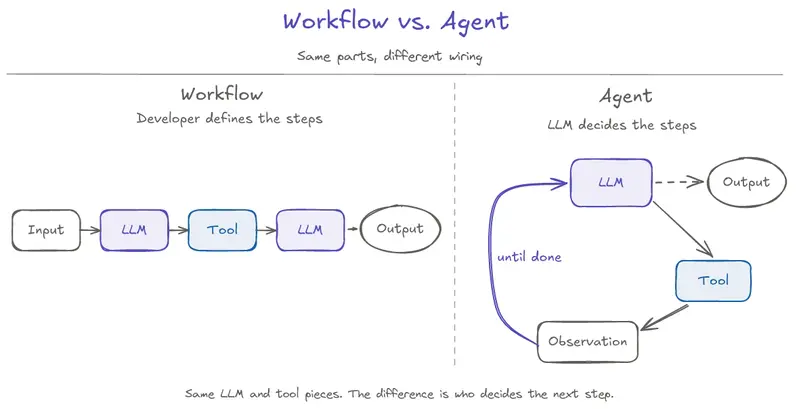
Workflow vs. Agent — Same parts, different wiring. The workflow shows a fixed path from input to LLM, tool, LLM, and output, where the developer defines the steps. The agent shows an LLM calling a tool, receiving an observation, and looping back until done, with a dashed exit to output. The same LLM and tool pieces can exist in both systems; the difference is who decides the next step.

Part 1 ended with Priya’s order shipped and the agent confidently refunding her anyway.

Here’s the same request, in a system that’s been built differently:

“Hi, I’d like to cancel order #4471 and get a refund.”

The system reads the order status — shipped. It sees that the cancellation procedure requires the order not to be shipped. It doesn’t try to cancel. It doesn’t apologize and ask if there’s anything else. It says:

“Order #4471 already shipped yesterday. Automatic cancellation only applies before shipment. I can start a return when it arrives, or connect you with a human agent right now. Which would you prefer?”

Then it stops and waits.

Nothing about that response required a smarter model. The model is the same one that confidently refunded Priya in Part 1. What changed is the system around the model.

This article is about what that system actually is.

Same Request, Different System

The Part 1 cancellation case wasn’t a story about a bad agent. It was a story about a system that didn’t have the right pieces in the right places.

Walk through what the “different system” did, without naming the pieces yet:

  • Before acting, it checked the actual state of the order.
  • It compared that state against the procedure that governed what’s allowed — and “don’t cancel” was a legitimate path, not an exception.
  • It offered the customer alternatives that fit the actual situation.
  • It stopped and waited for the customer to choose, instead of confidently picking one.

Notice what’s not in that list: smarter natural language, better wording in the system prompt, a more advanced model. Every difference is structural. The system made room for the right decision to be made.

Part 1’s three gaps — state awareness, stopping condition, and escalation path — all had structural answers here.

How those pieces actually compose into a working agent is Part 6’s full build. For now, the point is just: the system did things in the right order, with the right checks, and used composition where the broken agent used prompt stuffing.

What Changed Is the Loop, Not the Model

The model is one component. The agent is the system you build around it.

The simplest accurate way to describe an agent is: a loop that runs the model multiple times, with state that carries across turns and tools that let the model do things in the world.

The loop has five recognizable steps:

Observe → decide → act → check → repeat.

Step What happens
Observe Gather the current state — request, prior turns, last tool result, what’s known.
Decide The model picks the next step: call a tool, ask the user, or stop.
Act The chosen step runs — a tool fires, a message goes out, a decision is recorded.
Check The result comes back. The next observation includes it.
Repeat Until done, blocked, or escalated.

That’s the shape. It’s not exotic. The loop itself is simple.

What makes an agent an agent is not the cleverness of the loop. It’s the fact that the model gets to decide which step to take on every iteration. That’s the move. Not a fixed script. Not a hard-coded flow. The model decides — within the boundaries the system gave it.

(The mechanics of how the loop actually works — state, stopping conditions, context as a finite resource — is Part 3. For now, just hold the shape.)

The “different system” from earlier was running this kind of loop. The loop created room to read state before attempting cancellation. In some systems, the model may choose that step. In others, the system may require it as a gate. Either way, the important point is that the agent does not jump straight from request to action.

For contrast: a workflow runs steps the developer wrote in advance. An agent decides each step at runtime. Same pieces — different wiring. The diagram makes the difference visible.

Workflow vs. Agent — Same parts, different wiring. The workflow shows a fixed path from input to LLM, tool, LLM, and output, where the developer defines the steps. The agent shows an LLM calling a tool, receiving an observation, and looping back until done, with a dashed exit to output. The same LLM and tool pieces can exist in both systems; the difference is who decides the next step.

Workflow vs. Agent — Same parts, different wiring.

Agents Compose Three Practical Primitives

An agent doesn’t need to invent its capabilities from scratch. It composes three primitives that you’ve probably already encountered:

MCP — for acting.
Standardized way for the agent to call tools that do things in the world: query a database, call an API, run a calculation, send an email. The agent’s “verbs.”

This is the same MCP covered in the MCP in Practice series. New to MCP? You do not need that background to follow this article. For now, the mental model is enough: MCP helps the agent invoke tools through a clean protocol.

RAG — for knowing.
Retrieval that brings outside knowledge into the agent’s context when it needs it: company policies, product documentation, historical case notes, eligibility rules.

This is the same RAG covered in the RAG in Practice series. New to RAG? Same here — this article is self-contained. For now, the mental model is enough: RAG helps the agent ground decisions in retrieved facts instead of relying only on what the model was trained on.

Skills — for following reusable procedures.
A markdown file that names a procedure the agent can apply repeatedly: when to use it, the steps, the failure modes, the approval rule. Instead of stuffing “if the order is shipped, escalate to a human” into the system prompt every turn, the skill file holds the procedure and the agent loads it when relevant.

For example, a cancel-order skill might say: check status first, refuse if shipped, offer the customer a return when applicable, and escalate if the customer asks for an exception. That keeps procedures versioned, reviewable, and loaded only when relevant instead of buried in one growing prompt. Skills become more important later when we talk about patterns, control surfaces, and production builds.

The agent’s job is to decide when to use which.

That decision — which primitive applies right now — is the central agent move. Not all three on every turn. Often just one. Sometimes none, and the agent answers directly.

The cancellation system from earlier used a skill to name the procedure and MCP tools to read state and act. RAG can supply the policy details when the system needs the exact return policy text. The model didn’t have to invent any of that — it picked from what the system already had, in the right order. Part 6 walks through the full composition end-to-end.

Three Primitives an Agent Composes — Acting, knowing, and following reusable procedures. An Agent container box sits at the top, with arrows descending into three columns: MCP for acting (when the agent needs to do something, example: call cancel_order), RAG for knowing (when the agent needs outside facts, example: retrieve return policy), and Skills for procedures (when the agent needs a reusable playbook, example: cancel-order/SKILL.md). Caption: The agent decides when to use which.

Three Primitives an Agent Composes — Acting, knowing, and following reusable procedures.

From Manual ReAct to Native Tool Calling

Manual ReAct treats the model’s output as text your code has to parse. Native tool calling treats the model’s output as structured intent your code can run. That single contract change is what this section is about.

Part 1 showed a manual ReAct prompt with a STRICT RULES section growing as the developer discovered new edge cases. That prompt was doing manual ReAct: the model returns a string in a specific format, regex extracts an “Action:” line, the system calls the named tool, the result gets stuffed back into the prompt as an “Observation:” line, and the cycle continues.

Manual ReAct is useful because it is easy to prototype and great for demos — you can see the model thinking and acting in one place, all in plain text. But in production, that same simplicity becomes brittle.

Three things break:

  1. The model has to format its output as a string the regex can parse. If the model phrases the action slightly differently — different capitalization, an extra word, a typo — the regex misses it and the agent stalls.

  2. Every rule about how the model should behave lives in the prompt. “Don’t cancel shipped orders” is English. “Use the exact format Action: tool_name” is English. “Stop after final answer” is English. The model sometimes follows English rules and sometimes ignores them.

  3. Tool descriptions are part of the prompt text. Add a tool, the prompt gets longer. Change a tool, the prompt has to be edited. The prompt is doing the job of a schema, a parser, a state machine, and a procedure manual — all in one block.

Native tool calling is the production move. It’s not a new model capability; it’s a different contract between the application and the model.

It does not fix Priya’s refund failure by itself. But it gives the system a structural place to enforce “do not cancel shipped orders” as a check, instead of leaving it as one more sentence in a prompt.

In native tool calling:

  • Tool definitions live as structured schemas the model is given as a parameter to the API call, not as English in the prompt.
  • When the model wants to call a tool, it returns a structured tool-use block — not a string the application has to parse.
  • The application sees {"tool": "cancel_order", "arguments": {"order_id": "4471"}} directly. No regex. No format brittleness.
  • The system prompt shrinks. Format rules go away. Tool descriptions are no longer prose.

Structured tool calls don’t enforce policy by themselves — the application or tool server still validates arguments, checks permissions, and rejects unsafe actions. The improvement is that those checks now happen at a structured boundary instead of being buried as another English rule in the prompt.

In plain language: instead of the model writing Action: cancel_order in text and your code parsing it, the model returns a structured object your app can read directly. The “schema” is the formal description of what tools exist and what arguments they take; the “tool-use block” is what the model returns when it wants to call one. Both are objects, not text.

That structural change is where the fix starts — not where it ends.

MCP fits into this picture as the protocol layer.

Native tool calling is the contract between one model and one application. MCP is the standardized contract between the application and many tool servers. Native tool calling structures the model-to-app boundary; MCP structures the app-to-tool-server boundary.

Critically: native tool calling and MCP compose. They are not competitors. A production agent uses native tool calling on the model side and MCP on the tool-server side. The series will use both throughout, in Part 6’s build.

(If MCP or RAG is new, I have separate series on both; here we only need the mental model: MCP helps the agent act, RAG helps it know. The agent uses each the same way a non-agent system would.)

Manual ReAct vs. Native Tool Calling — Same agent, same task, different contract. The left panel labeled Manual ReAct shows everything in the prompt: one tall gray-tinted box with a stuffed system prompt containing tools described in prose, format spec for Thought/Action/Action Input cycles, a STRICT RULES section, and a stopping rule. Below it, the Model outputs raw text like Action: cancel_order, passes through a parse/regex step with dashed outline signaling fragility, then reaches a tool call. A dashed arrow drops to a label reading parse failure if format slips. The right panel labeled Native tool calling shows three separate stacked boxes: a short purple system prompt with just role and tone, a blue tool schemas box with structured tool definitions, and a tool call box showing the structured emission. Below it, the Model outputs a structured JSON object that passes through a runtime validates step with solid outline signaling stability, then reaches a tool call — no failure fork. Caption: Same task. Different contract: parse text vs. run structured intent.

Manual ReAct vs. Native Tool Calling — Same agent, same task, different contract.

Agents vs Chatbots vs Workflows

The word “agent” gets used for several different things. Some of them are agents. Some of them are not. The distinction isn’t snobbery — different systems have different failure modes, and confusing them leads to building the wrong thing.

Chatbot.
Reply-only. The user says something; the model replies. It may remember conversation history, but it does not call tools, take actions in the world, or run a control loop.
Failure mode: makes things up confidently when it doesn’t know.

Workflow.
A controller (not the model) decides which step happens next, based on conditions. The model is called inside specific steps to do specific work, but the model isn’t choosing what step to take. A prompt chain is the simplest case: a workflow with one fixed path, where every step always runs in the same order.
Failure mode: edge cases the controller’s branching logic didn’t anticipate fall through.

Agent.
The model decides what step to take on each turn, within designed boundaries. State persists across turns. Tools are available. The loop continues until done, blocked, or escalated.
Failure mode: confident-and-wrong decisions, and the failure modes Part 1 named.

Workflows are not lesser agents. For many production problems, a workflow is the right answer — the path is well-known, the steps are stable, the model doesn’t need to decide what comes next. Part 5 of this series is about when to choose which.

The line is not “smart vs dumb.” The line is who decides what happens next — and how much room the system gives the model to be wrong.

The Line That Defines an Agent

The important design question is not which model you picked. It is what the system allows the model to decide.

That’s the identity move of this series.

Bounded autonomy: model-driven choice inside designed boundaries. The boundaries are real engineering — what tools the agent has, what state it can read, what state it can write, what actions require approval, what escalation paths exist, what the stopping condition is. The system composes three primitives (MCP, RAG, Skills) and gives the model the room to choose between them — and the room to say “I shouldn’t be the one to do this.”

What makes something an agent isn’t how smart the model is. It’s what the system lets the model decide.

That decision shows up across the rest of the series. Part 3 opens the loop: state, stopping, and context as production concerns. From there, the series builds outward into patterns, tradeoffs, the TechNova build, diagnostics, evaluation, and guardrails.

Three takeaways

  1. An agent is a control loop with tools, knowledge, and a stopping condition. Five words: observe → decide → act → check → repeat. The model chooses the step. The system gives it room and limits.

  2. Agents compose MCP for acting, RAG for knowing, and Skills for following reusable procedures. The agent decides when to use which.

  3. What makes something an agent isn’t how smart the model is. It’s what the system lets the model decide.

We have the components. We have the primitives. We have the boundary between manual ReAct and native tool calling. What we do not have yet is the actual loop — what happens turn by turn when the agent runs. That is where state, stopping, and context become engineering problems instead of definitions. That is Part 3.

Stop scattering LLM SDK/API calls across your codebase. Here is the 2-file rule that fixed mine

I upgraded an LLM SDK and expected a routine version bump.

Instead I had to touch 15+ files, fix breaking changes across four providers, and spend the rest of the day hoping I had not missed one. That was the second time it happened. I knew there would be a third.

If you have ever shipped a production LLM system, you probably recognize the smell:

  • An SDK minor version renames maxTokens to maxOutputTokens and now 15 files break at runtime, not compile time.
  • Switching one classification task from Claude to a cheaper model means editing import paths and type signatures in business logic.
  • You have written classifyEmail, scoreLead, triageTicket, and categorizeRequest, and they are all the same function with a different prompt string.

This is not an SDK problem. It is an architecture problem. Here is how I fixed it, and the open-source library that came out of it.

The 2-file rule

I made one rule: only two files in the entire codebase are allowed to import the LLM SDK. One adapter that translates my interface into SDK calls, and one provider registry that creates clients from config. Everything else talks to a typed interface and has no idea which provider, model, or SDK is in play.

This is just hexagonal architecture (ports and adapters, per Alistair Cockburn) applied to LLMs. You already do this for databases and message queues. Nobody scatters raw SQL across business logic. LLM providers belong in the same category. They are infrastructure, not application logic.

The dependency flow goes from this:

Application code
  ├─ direct SDK call
  ├─ direct SDK call
  └─ model router leaking SDK types

To this:

Application code
  ↓  llmClassify(), llmDraft(), llmScore() ...
Capabilities
  ↓
LLM Port  (TypeScript interface, zero SDK imports)
  ↓
Adapters + Provider Registry  (the only 2 files that touch the SDK)
  ↓
OpenAI / Anthropic / Gemini / Ollama / Vercel AI SDK

The caller says what it wants (taskType: "triage"). The infrastructure decides how. No model name parameter. No provider parameter. Policy is deferred to config.

The proof: an SDK upgrade that did not hurt

The real test came during a major SDK version jump with breaking changes (maxTokens to maxOutputTokens, CoreMessage to ModelMessage, and more). Here is what the migration commit looked like:

  • 2 files changed (the adapter and the agent runtime), plus 1 minor fix.
  • All 18 activity files unchanged.
  • All 10 agent files unchanged.
  • The final migration deleted more code than it added: 192 insertions, 688 deletions.

28 out of 31 files did not change, because they do not know the SDK exists. If a core dependency upgrade touches your business logic, your boundaries are wrong.

The part that surprised me: the same 7 operations, everywhere

I started this to isolate the SDK. Then I noticed the bigger problem. I was not calling LLMs in 21 different places. I was reimplementing the same seven cognitive operations with slight variations:

Capability What you give it What you get back
Classify content + rubric one label from an enum + reasoning
Score content + rubric + axes numeric ratings per axis
Draft persona + situation longer text in a chosen tone
Summarize long content + length target shorter content, key points kept
Extract unstructured text + schema a typed structured object
Plan goal + constraints an ordered list of steps
Analyze evidence + question recommendation with caveats

Five activities classified content with five different prompt structures. Nine drafted messages with nine different tone injections. Same operation, no shared implementation. When I improved one classification prompt, I had to remember to update four other places. I usually forgot.

You are not writing 47 prompts. You are writing 7 prompts, 47 times, with slightly different ingredients.

So I extracted them into capability factories. A factory takes the invariant parts (schema, rubric, model routing, observability hooks) and returns a function that takes only the varying part (the content):

import { createClassifier } from "@llm-ports/capabilities";
import { z } from "zod";

const IntentSchema = z.object({
  intent: z.enum(["question", "request", "complaint", "feedback", "other"]),
  urgency: z.enum(["low", "normal", "high"]),
  reasoning: z.string(),
});

export const classifyIntent = createClassifier({
  port: llm,                 // your provider-agnostic port
  schema: IntentSchema,
  schemaName: "user-intent",
  rubric: `
    question: asking for information
    request: wants something done
    complaint: reports a problem
    feedback: opinion only
    other: anything else
  `,
});

Then every call site, across all your files, is the same shape:

const result = await classifyIntent({ content: userMessage });
// { intent: "request", urgency: "high", reasoning: "..." }  fully typed

Improve the rubric once, and every classifier in the system gets better. Prompt engineering stops being scattered strings and becomes a reusable system asset.

llm-ports

I pulled this pattern out of my production system and shipped it as an open-source, MIT-licensed TypeScript library: llm-ports.

60 second setup

Configure providers in .env:

LLM_PROVIDER_FAST=anthropic|<model>|cost:50/day
LLM_PROVIDER_SMART=anthropic|<model>|cost:200/day
LLM_TASK_ROUTE_TRIAGE=fast,smart

Create the port once:

import { createRegistryFromEnv } from "@llm-ports/core";
import { createAnthropicAdapter } from "@llm-ports/adapter-anthropic";

export const llm = createRegistryFromEnv({
  adapters: {
    anthropic: createAnthropicAdapter({ apiKey: process.env.ANTHROPIC_API_KEY! }),
  },
}).getPort();

Use it anywhere, with no SDK imports:

const result = await llm.generateText({
  taskType: "triage",
  prompt: "Classify this email...",
});

The registry selects the right model for the task, enforces cost limits, falls back through the provider chain on budget exhaustion, and records usage, cost, and latency.

What you get

  • Multi-provider routing across OpenAI, Anthropic, Google Gemini, Ollama, and the Vercel AI SDK.
  • Fallback chains when a provider exceeds budget.
  • USD-based cost gating with hourly, daily, and monthly limits. Budget exhaustion is a typed exception, not a surprise invoice.
  • The 7 capability factories: createClassifier, createScorer, createDrafter, createSummarizer, createExtractor, createPlanner, createAnalyzer.
  • Validation recovery for structured output. If a model returns invalid JSON or a wrong enum, it auto-retries with a correction prompt. Bad output stops at the capability boundary instead of leaking downstream.
  • Tool-use safety primitives: destructive markers, confirmation-required actions, max output byte limits.
  • Observability hooks for cost, latency, quality, and outcomes.
  • No runtime dependency on LangChain or LlamaIndex. Core plus one adapter plus capabilities is a small install footprint, strict TypeScript throughout.

How it compares

  • Vercel AI SDK unifies provider calls. llm-ports adds the registry, fallback chains, USD cost gating, validation recovery, and capability factories on top. There is an adapter to migrate from it incrementally.
  • LiteLLM is a Python-first HTTP proxy. llm-ports is TypeScript and runs in-process, no extra network hop.
  • Portkey is a commercial hosted gateway. llm-ports is MIT and has no hosted dependency.
  • LangChain.js is a framework. llm-ports is a lightweight architecture and control layer, not a framework you build your whole app inside.

When to use it (and when not to)

Use it if you run 2+ providers (or might switch later), have 5+ call sites, keep getting bitten by SDK upgrades, or need cost control and centralized quality tracking.

Skip it if you have 1 or 2 LLM calls, you are just prototyping, or you want a full agent framework with a built-in memory and RAG layer.

Honest status

llm-ports is pre-release, currently at 0.1.0-alpha.5. The core architecture is stable with 250+ offline regression tests, but some adapter and agent paths are still being hardened (multi-turn agent in the Vercel adapter and retry-on-runtime-error both land in v0.2). The per-surface status is documented openly so you know what is solid before you adopt it.

Try it

npm install @llm-ports/core @llm-ports/adapter-anthropic @llm-ports/capabilities

If the capability-factory pattern matches how you are building, I would genuinely like feedback in GitHub Discussions. What shapes are you reimplementing that are not on the list of seven? What knobs do the capabilities need that they do not have yet?

The LLM stops being a dependency you manage. It becomes infrastructure you configure. Once you make that shift, everything else gets simpler.

Based on two longer write-ups: Ports and Adapters for AI and The 7 LLM Capabilities Every Production AI System Reimplements.

Beyond Prompts: Structuring AI Workflows for Real Frontend Engineering

This is a field-tested workflow for using AI effectively in production-grade, enterprise level React codebases in a monrepo setup — beyond toy Todo apps.

Everyone is using AI to boost development productivity these days and organization also pushing the developers to use more and more AI to increase productivity and efficiency. But after weeks of trial and error in a, I cab sat I I have sort of discovered that the real gains don’t only come from better prompts or fancier models. They come from structured workflows.

This isn’t a theoretical guide. It’s my actual day-to-day workflow inside Visual Studio Code using GitHub Copilot (Enterprise version) on a production codebase with multiple apps, shared UI packages, and messy state flows. I use it for bug fixing, root cause analysis, feature addition, refactoring, and navigating codebases where “finding where this logic lives” used to take hours.

Here’s how I made AI actually useful for real frontend engineering.

The Biggest Mistake: One Chat For Everything

The most common anti-pattern I see? Using a single chat session to debug, generate features, refactor, and ask architecture questions all at once.

In large codebases, this destroys context. The AI gets confused, starts hallucinating, and loses track of the actual problem. The fix is simple but powerful: separate agent-style workflows — not necessarily official Copilot Agents, but mentally distinct sessions with singular purposes.

And Yes — It’s Cheaper Too

Here’s something that everyone should be carefull of: running everything in one massive chat is actually more expensive.

When you dump investigation, debugging, refactoring, and implementation into the same conversation, the context window balloons. Every subsequent prompt carries the entire history — failed hypotheses, wrong turns, tangential questions, and code snippets from three different problems. You’re paying tokens for noise.

With separate chats:

  • Investigation and planning chats are short and focused. Once you get your RCA, you close it. Those tokens don’t follow you into implementation.
  • Implementation starts with only relevant context. No baggage from the five wrong theories the AI explored during debugging.
  • You avoid the “spiral” effect. One-chat workflows often devolve into 20+ message threads trying to course-correct a confused AI. That’s 20x the tokens for worse output.
  • Skills and Hooks reduce prompt size. Persistent instructions mean you don’t need to repeat your team’s rules every single message.

In practice, I have increased tickets resolution with same amount of tokens monthly.

My Multi-Agent Workflow

I run three distinct mental “agents.” Each gets its own chat context, its own rules, and its own goal.

1. The Investigation Agent (Most Used)

Purpose: Understand context or logic before start fixing.

This agent is not allowed to write code initially. Its only job is to trace, analyze, and explain to me whats going on.

Example Prompt:

You are a debugging assistant.
Do not suggest a fix immediately.
First, understand the issue deeply.

Trace:
- Where state originates from
- Where state updates happen
- Are there any Async flow that and what are they
- Component re-renders
- API calls, where, when and how
- Memoizations
- Stale closure possibilities

Then explain possible root causes ranked by probability.

Why this works: Default AI behavior is to suggest a fix without completely understanding the problem and then will to multiple iteration to make that write and so many changes. That’s dangerous in production for an enterprise grade app. By forcing investigation first, the AI behaves like an actual engineer.

Lets take a real Real Example:

Issue: Table not updating after mutation.

Bad prompt: “Why is the table not updating? Fix this.”

Good prompt:

After a successful mutation response, the UI does not update until page refresh.

Stack:
- React Query
- Shared table component
- Optimistic updates disabled

Investigate:
- Cache invalidation flow
- Stale query possibilities
- Memoized rows
- Dependency issues
- Selector issues

Do not suggest a fix immediately.

Now the AI starts reasoning instead of guessing.

2. The Fix Implementation Agent

Once root cause is clear, I start a new chat. Fresh context. No baggage from the investigation.

Example Prompt:

Implement a minimal fix only.

Constraints:
- Preserve existing architecture
- No large refactors
- Maintain strict TypeScript typings
- Avoid changing shared components
- Keep the PR small and reviewable

Issue: React Query cache invalidation is missing after mutation success.

This gives dramatically better output than mixing investigation and implementation in one giant prompt.

3. The Refactor Agent

Another fresh chat. Used for cleanup, not fixes.

Example Prompt:

Refactor this component carefully.

Goals:
- Reduce unnecessary re-renders
- Avoid unnecessary useEffect
- Preserve exact behavior
- Improve readability
- Keep the same public API

Do not rewrite the entire component.

This is critical because AI loves rewriting entire files. In production apps, that’s a recipe for regressions.

The Most Underrated Feature: Skills

Copilot’s “Skills” (or custom instructions) let you define persistent behavior. Instead of repeating rules every session, you teach the AI how your team works.

My React Skill

# React Frontend Rules

- Prefer derived state over useEffect syncing
- Avoid unnecessary useEffect
- Keep components pure where possible
- Preserve existing architecture
- Use existing shared UI components
- Maintain strict TypeScript typings
- Avoid introducing new libraries
- Follow current folder structure
- Prefer composition over prop drilling
- Avoid premature memoization
- Preserve accessibility attributes

With this, the AI stops generating tutorial-level React code. Production React and YouTube React are quite a different thing.

My Debugging Skill

# Debugging Rules

- Investigate before fixing
- Explain root cause clearly
- Rank possible issues by probability
- Preserve current architecture
- Avoid speculative fixes
- Mention edge cases
- Mention async timing issues
- Analyze re-render behavior

I also maintain skills for TypeScript, API integration, and PR review rules. Think of it as onboarding the AI to your engineering culture.

Hooks: Automatic Context Injection

Hooks automatically inject context when AI touches specific file types. This saves enormous time.

React Component Hook:

Whenever editing a React component, automatically remind:
- Preserve TypeScript typings
- Avoid unnecessary re-renders
- Use existing hooks and patterns
- Follow shared component conventions

API File Hook:

When touching API files:
- Preserve API contract
- Don't break response typing
- Maintain error handling structure
- Preserve retry logic

Individually, these are tiny reminders. Together, they compound into a massive productivity boost and far fewer review comments.

Model Selection Matters

Copilot Enterprise gives access to multiple models. I don’t use one for everything.

Claude

  • Understanding huge files
  • Root cause analysis
  • Architecture reasoning
  • Debugging messy logic

Claude excels at reading ugly production code, especially large React components with tangled state.

GPT Models

  • Implementation and repetitive coding
  • Refactoring
  • TypeScript-heavy generation
  • Utility creation

GPT is usually faster during active feature implementation. I also use Copilot’s auto model selection to save tokens on simpler tasks.

Lets take a full Real-World Workflow

Issue: Search filters reset randomly.

Step 1 — Investigation (Claude)

Investigate:
- Where filter state lives
- Persistence flow
- what triggering re-render
- URL sync behavior
- Async effects
- Remount possibilities

Step 2 — Root Cause Analysis

AI identifies:

  • Component remounts on route change
  • Local state resets
  • Missing URL persistence

Step 3 — Implementation (Fresh Chat, GPT)

Implement minimal fix.
Persist filters through URL query params.

Constraints:
- Preserve current architecture
- Avoid global state
- Maintain backward compatibility
- Avoid affecting other pages

Result: Scoped, reviewable, correct. No accidental refactors. No mystery bugs.

The Real Productivity Gain

It’s not autocomplete. It’s faster understanding.

In large codebases, the hardest problem is often: “Where is this logic even coming from?”

With a structured AI workflow, I can:

  • Trace state flows in minutes, not hours
  • Summarize sprawling files instantly
  • Find impact areas before touching code
  • Understand old, undocumented code

That alone saves an insane amount of time for me.

What’s your AI workflow? I’d love to hear how others are structuring context in there apps.

From an Abandoned Hackathon Project to an AI Study Workspace 🚀

There’s a strange feeling that comes with opening an old project folder again.

You look at the messy files, random commits, unfinished components, and half-working features… and instantly remember the excitement you had when you first started building it.

That’s exactly what happened to me.

A few months ago, during a hackathon, I started building an AI-powered study assistant for students. The idea sounded exciting at 2 AM with coffee in one hand and deadlines in the other ☕💀

The goal was simple:

“Create a smart workspace where students can upload notes, generate summaries, create quizzes, and stay productive.”

At that time, it honestly felt like my best idea.

But like many hackathon projects, reality hit hard.

The UI was incomplete.
The backend was breaking.
Authentication barely worked.
And the AI responses were inconsistent.

The hackathon ended… and so did the project.

Or at least, that’s what I thought.

💭 The Problem With Unfinished Projects

I think every developer has that one project.

The one you genuinely believed in… but never finished.

Not because the idea was bad.
Not because you stopped caring.
But because life, deadlines, burnout, and complexity slowly pushed it aside.

For me, this project became exactly that.

Every time I opened the repository, I’d tell myself:

“I’ll complete it someday.”

Someday finally became now.

And honestly, this challenge gave me the perfect reason to revive it.

🛠️ The “Before” Version

The original version was rough 😭

Here’s what it had:

Basic PDF upload
A simple AI summary feature
Unresponsive layout
Broken navigation
No mobile support
Poor folder structure
Duplicate code everywhere

The app technically worked…

…but it definitely didn’t feel like a real product.

The biggest issue was that the project had grown too messy for me to continue confidently.

That’s where GitHub Copilot genuinely changed the experience for me.

🤖 How GitHub Copilot Helped Me Finish It

I didn’t use Copilot as a “shortcut.”

I used it like a coding partner.

And surprisingly, it helped most in the areas where I usually lose motivation while rebuilding old projects.

✨ Refactoring Old Code

Some of my components were huge and difficult to manage.

Copilot helped me:

Split components cleanly
Reuse UI sections
Improve readability
Remove repetitive logic

It saved me from spending hours rewriting boilerplate code manually.

🎨 Improving the UI

One thing I learned:

A project feels alive again when the UI starts looking polished.

I rebuilt the dashboard with:

Better spacing
Cleaner cards
Dark mode
Responsive layouts
Smooth animations

Copilot even suggested cleaner Tailwind structures while I was redesigning pages.

🧠 AI Features That Finally Worked

This time, I didn’t want the app to just “look cool.”

I wanted it to actually help students.

So I added:

AI-generated summaries
Flashcard creation
Quiz generation
Study roadmap suggestions
Smart productivity tracking

One of my favorite additions was a GitHub-style study consistency heatmap 📈

It visually tracks how consistently a student studies every day.

That feature made the project finally feel complete.

🚀 The “After” Version

The final product became something far beyond the original hackathon demo.

Now the platform includes:

✅ AI note summarization
✅ Quiz generation
✅ Flashcards
✅ Authentication
✅ Mobile responsiveness
✅ Dark mode
✅ Productivity analytics
✅ Better accessibility
✅ Cleaner backend structure

More importantly…

It finally feels usable.

Not just “another unfinished side project.”

📚 What I Learned From Reviving This Project

Finishing a project feels very different from starting one.

Starting is exciting.
Finishing requires patience.

This experience taught me:

Old projects still have potential
Small improvements compound over time
Clean code matters more than fast code
Good developer tools reduce burnout
Sometimes all a project needs is a second chance

And honestly?

Reviving something unfinished felt more rewarding than starting something new.

❤️ Final Thoughts

I used to think abandoned projects were failures.

Now I see them differently.

Sometimes they’re just unfinished stories waiting for the right moment.

This challenge pushed me to stop chasing “new ideas” for once and finally complete something I already believed in.

And thanks to GitHub Copilot, rebuilding this project felt less overwhelming and far more creative than I expected.

Maybe the best projects aren’t always the ones we start perfectly.

Maybe they’re the ones we refuse to give up on

I Let Hermes Agent Handle Real Work for 24 Hours — Here’s What Surprised Me 🚀

Google Docs summaries, task planning, research help, workflow automation… I wanted to know whether Hermes Agent was actually useful or just another flashy AI demo. 👀

Like many developers, I’ve seen countless “AI agents” online recently. Most of them look impressive for five minutes and then fall apart the moment you give them real work.

So instead of watching another demo video, I decided to do something more interesting:

👉 I gave Hermes Agent actual tasks for an entire day.

Not toy prompts.
Not “write me a poem.”
Real tasks that I normally do myself.

And honestly? Some of the results genuinely surprised me.

First Impressions 💡

The first thing that stood out to me about Hermes Agent was that it didn’t feel like a normal chatbot.

Most AI assistants wait for instructions. Hermes Agent felt more like a system that wanted to figure things out step-by-step.

That difference became obvious very quickly.

What also caught my attention was the flexibility. Unlike many closed AI systems, Hermes Agent can run on your own infrastructure and connect with different models and tools. That open-source approach already makes it interesting for developers who like control and customization.

You can explore the project here:

Hermes Agent Official Website
Hermes Agent GitHub Repository
The Experiment 🧪

I decided to treat Hermes Agent like an AI intern for one full day.

Here were the tasks I gave it:

✅ Research assistance
✅ Summarizing long information
✅ Planning workflows
✅ Multi-step reasoning tasks
✅ Organizing ideas
✅ Helping with coding-related work
✅ Remembering context between tasks

I wasn’t expecting perfection.
I mainly wanted to see one thing:

Could this agent actually reduce my workload in a meaningful way?

Task 1: Research and Summarization 📚

I started with something simple.

I gave Hermes Agent a large amount of information and asked it to summarize the key points and organize them clearly.

This is where I noticed the first major difference compared to normal chatbots.

Instead of giving a quick surface-level answer, Hermes Agent tried to break the task into smaller reasoning steps. It felt more structured and intentional.

And surprisingly, the summaries were actually useful — not just random bullet points copied from the input.

That immediately made me think:

“Okay… this might be more powerful than I expected.” 👀

Task 2: Multi-Step Workflow Planning ⚙️

Next, I tested something harder.

I asked Hermes Agent to help plan a small workflow involving multiple steps and dependencies.

This is where many AI tools usually struggle. They often lose context or generate inconsistent steps halfway through.

Hermes Agent handled this much better than I expected.

It broke the task into:

goals,
subtasks,
logical sequences,
and execution ideas.

It genuinely felt like the agent was thinking through the process instead of just predicting the next sentence.

That distinction matters a lot.

The Most Interesting Part: It Felt Persistent 🧠

One of the biggest reasons Hermes Agent stood out to me was its approach to memory and persistence.

Most AI chats feel temporary. You ask something, get a response, and everything disappears into the void.

Hermes Agent feels different because it’s designed around:

learning,
memory,
skills,
and long-term improvement.

That changes the experience completely.

At one point, I noticed it referencing earlier context more naturally than I expected, and that small moment honestly made the system feel far more “agentic” than typical AI assistants.

Not magical.
Not perfect.
But definitely different.

Where Things Got Messy 😅

Of course, not everything worked perfectly.

There were moments where:

outputs became repetitive,
reasoning drifted slightly,
or tasks required clearer instructions than I initially gave.

And honestly, I’m glad those moments happened.

Because it made the experience feel real.

One thing I’ve realized while testing AI systems is that the most trustworthy reviews are the ones that include failures too.

Hermes Agent is powerful, but it’s still a tool that benefits from good prompting, structured tasks, and realistic expectations.

What Actually Impressed Me Most 🚨

It wasn’t the speed.

It wasn’t flashy outputs.

It was the feeling that Hermes Agent was trying to operate through tasks rather than simply answer prompts.

That sounds like a small difference, but it changes everything.

For the first time in a while, I felt like I was interacting with something closer to an AI workflow system rather than a standard chatbot interface.

And I think that’s exactly why so many developers are paying attention to agentic AI right now.

Open-Source AI Feels Important Again 🌍

Another thing that made this experience exciting was the open-source side of Hermes Agent.

In a world where most advanced AI systems are becoming increasingly closed and centralized, there’s something refreshing about tools that developers can actually:

run themselves,
customize,
inspect,
and experiment with freely.

That openness creates room for innovation.

And honestly, some of the most interesting AI experiments in the next few years might come from open communities rather than giant corporations alone.

Final Thoughts 💭

After spending a day testing Hermes Agent with real work, I don’t think AI agents are just hype anymore.

Are they perfect? No.

Are they fully autonomous replacements for humans? Definitely not.

But systems like Hermes Agent show where things are heading:

persistent AI,
tool-using AI,
self-improving workflows,
and agents that can genuinely assist with complex tasks.

The most surprising part?

For the first time, I stopped feeling like I was “chatting with AI” and started feeling like I was coordinating with a system that could actually help manage work.

And that shift feels important. 🚀

Thanks for Reading 🙌

If you’ve experimented with Hermes Agent or other agentic systems, I’d genuinely love to hear your experience too.

The AI agent space is evolving incredibly fast, and it feels like we’re only beginning to see what these systems might eventually become.

Debiasing Graph Neural Networks for Recommendation with Causal RL

As part of my undergraduate research in Graph Neural Networks (GNNs) and Causal Inference, I’ve been exploring a major flaw in modern recommender systems: observational bias.

Standard recommendation algorithms—even state-of-the-art GNNs like LightGCN and NGCF—learn from biased data. Popular items get shown more often, which leads to more clicks, creating a feedback loop that reinforces popularity bias and buries niche items.

To solve this, I built an open-source framework that combines GNNs with Causal Reinforcement Learning to debias recommendations.

Here is how I approached it.

👋 Hi, I’m Tasfin Mahmud! I’m a CS Researcher at BRAC University and an open-source contributor. You can learn more about my work on my portfolio website or my GitHub.

🏗️ The Baseline GNNs

I started by implementing three solid baseline architectures in PyTorch Geometric (PyG):

  1. LightGCN: The minimalist approach that drops non-linear transformations.
  2. NGCF (Neural Graph Collaborative Filtering): Explicitly models high-order connectivities with feature interaction terms.
  3. GAT-CF: Graph Attention Networks adapted for collaborative filtering.

These models perform incredibly well on standard metrics. But there is a catch: if you evaluate them on observational data, the metrics look great only because the test data shares the same exposure bias as the training data.

🧪 Injecting Causal RL

To break the popularity loop, I implemented four complementary causal debiasing techniques.

1. Inverse Propensity Scoring (IPS)

The simplest way to fix exposure bias is to reweight the Bayesian Personalised Ranking (BPR) training loss. IPS divides the loss for each item by its exposure probability. Rarely shown items receive a higher gradient signal, while mega-popular items are scaled down.

2. Causal Embeddings (CausE)

Here, the model maintains two separate embedding spaces:

  • A factual space (learned from the biased data)
  • A counterfactual space (representing uniform exposure)

A discrepancy regularizer pulls the factual representations toward the unbiased counterfactual ones, preventing the model from overfitting to the exposure distribution.

3. Causal Policy Gradient

Treating recommendations as a sequential decision-making problem, I used the REINFORCE algorithm. The core innovation here is Causal Reward Shaping: decomposing observed rewards into the “true preference” (causal component) and the “popularity bias” (confounding component). Using Doubly Robust (DR) estimation makes learning from logged data much more stable.

4. Causal Discovery

How do we know what the confounders are if they aren’t explicitly measured? I implemented a causal discovery module using Truncated SVD on the exposure matrix to automatically identify latent confounding factors, which are then integrated into the reward shaping process.

📊 The Results

I benchmarked these approaches using LightGCN on the MovieLens 100k dataset:

Model Mode Recall@20 NDCG@20 Notes
Standard (Baseline) 0.1676 0.1624 Standard biased observational learning
IPS Debiasing 0.1453 0.1543 Re-weights rare items; expected to drop on biased test data
CausE 0.1675 0.1625 Regularized against uniform exposure
Causal PG (DR) 0.1593 0.1602 Doubly robust policy gradient

(Note: Evaluating debiased models on standard biased test sets results in lower raw metric scores because the test set shares the exposure bias. Unbiased logging data is required to see the true lift).

💡 The Takeaway

GNNs are powerful tools for recommendation, but without causal inference, they are simply learning to amplify existing biases in your dataset. By utilizing techniques like IPS and Causal Policy Gradients, we can build recommendation systems that truly understand user preference rather than just popularity.

🔗 Check out the full framework on my GitHub:
gnn-collaborative-filtering

🔗 Learn more about my research and open-source work:
tasfinmahmud.github.io

Let me know in the comments if you’ve worked with Causal Inference for recommendation systems!

Terraform with AI: Build AWS Infra (Cursor + MCP)

Why Terraform with AI Matters in Modern DevOps

Writing Terraform for anything beyond a small setup quickly becomes tedious.
Once you start dealing with multiple modules, cross-resource dependencies, and AWS-specific quirks, the workflow slows down. Most of the time isn’t spent writing code — it’s spent checking documentation, fixing edge cases, and rerunning terraform apply.
Many teams are now experimenting with Terraform with AI to speed this up.
In practice, that only works partially — unless the AI has proper context.

Build Complete AWS Infrastructure with Terraform MCP Server and Cursor AI – Full Tutorial

How Terraform workflows traditionally worked

A typical workflow looks like this:
Read Terraform docs
Write modules and resources manually
Run terraform plan
Fix errors
Repeat
For small setups, this is manageable.
For production infrastructure, it becomes repetitive and slow. Most engineers end up switching between Terraform registry docs, AWS docs, and their codebase constantly.

Limitations of Using Terraform with AI Without Context

The obvious idea is to use AI to generate Terraform.
In most cases, it starts like this:

“Generate Terraform for a VPC with public and private subnets”
You do get output. But:

It may use outdated arguments
It ignores your module structure
Dependencies are incomplete
It often fails during terraform apply
👉 The core issue: AI does not understand your infrastructure context

Our First Attempt (RAG Failure) (Late 2024 – before advent of modern agents)

To solve this, we built an internal tool using:

Vector database
RAG (Retrieval-Augmented Generation)
The idea was to fetch Terraform documentation and index it in a vector database and provide it to an agent
It helped slightly — but failed in practice:

Iteration was difficult – terraform plan and apply loop – fix errors
Context size limitations
No awareness of project structure
Could not refine outputs
It generated code, but only for simple infrastructure. For complex ones it used to fail after a few iterations.

We didn’t try to optimise it further because while we were in middle of it – cursor agents became extremely powerful and they pretty much solved this iteration problem.

What changed with MCP Server + Cursor

The behavior changed once we introduced Terraform MCP Server and used it with Cursor.
Instead of generating code blindly, the system now had access to:

Terraform module documentation
Input/output structures
Resource relationships
The difference was noticeable.
The output was not perfect — but much closer to something usable.

How MCP actually changes the workflow

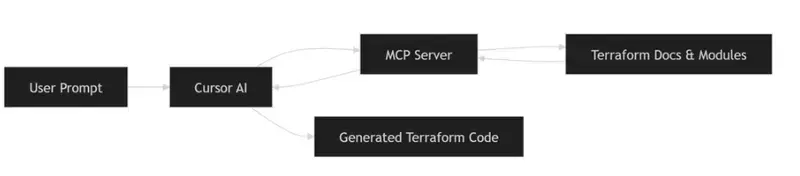
At a high level, MCP acts as a bridge between the editor (Cursor) and Terraform context.
Instead of guessing, the AI can:

Look up module definitions
Understand required inputs
Follow dependencies across resources

This is the key difference from standard AI usage.

⚙️ What MCP Server Actually Does Internally

The improvement with MCP is not just better prompting — it’s access to structured Terraform knowledge.
The MCP server exposes tools that allow the AI to query real Terraform data:

Key MCP Capabilities:

Provider Documentation Lookup

Fetches full documentation for resources, data sources, and functions

Module Discovery

Finds Terraform modules from the registry with usage examples

Module Details

Retrieves inputs, outputs, and configuration patterns

Policy Search

Helps identify best practices and security policies
👉 In simple terms:
Instead of guessing, the AI can look things up like an engineer would.

Terraform with AI vs Manual vs MCP (Comparison)

In practice, most teams try AI first, then realize that without context, results are unreliable. MCP fixes that gap.

A practical example: building AWS infrastructure

Let’s take a realistic setup:

VPC with public and private subnets
NAT Gateway and Internet Gateway
Application Load Balancer
Auto Scaling group (EC2)
CloudFront distribution
Cloudflare DNS
Jump box for access
This is a typical production-style setup.
Writing this manually takes time — especially when wiring dependencies correctly.

How we approached it

Instead of writing everything manually, we broke the problem into smaller steps and guided the AI.

🧠 Full Prompt Used for Infrastructure Generation

Instead of vague prompts, we used a structured, step-by-step approach to guide the AI.

Start code generation. Do it step by step. Move to next step only after the current step is complete.

Step: Create VPC and Network Infrastructure - use vpc module
- Create VPC with appropriate CIDR block
- Create public and private subnets across 2 AZs
- Set up Internet Gateway
- Configure NAT Gateways in public subnets
- Configure route tables for public/private subnets

Step: Create Security Groups
- ALB security group (allow HTTP/HTTPS inbound)
- EC2 security group 
    - allow traffic from ALB
    - allow ssh from the vpc
- Allow all outbound traffic

Step: Create Auto Scaling Group - use autoscaling module
- Create launch template for EC2 instances
- Use ubuntu ami for the instances
- Configure ASG across private subnets
- Use keypair named "vikas-aws"
- Add a user data script to install nginx and create a simple html page

Step: Create a jumpbox
- Create a jumpbox in the public subnet
- Ensure it has a public IP
- Allow SSH from internet

Step: Create Application Load Balancer - use alb module
- Create ALB in public subnets
- Configure HTTP listener
- Attach to autoscaling group

Step: CloudFront Distribution
- Configure CloudFront with ALB as origin
- Set caching TTL to 0

Step: DNS Configuration
- DNS handled via Cloudflare (no route53)

In practice, breaking the problem into steps like this improves output quality significantly compared to single prompts.

What the generated Terraform looked like

A simplified example:

module "vpc" {
  source  = "terraform-aws-modules/vpc/aws"
  version = "5.0.0"

  name = "demo-vpc"
  cidr = "10.0.0.0/16"

  azs             = ["us-east-1a", "us-east-1b"]
  public_subnets  = ["10.0.1.0/24", "10.0.2.0/24"]
  private_subnets = ["10.0.3.0/24", "10.0.4.0/24"]

  enable_nat_gateway = true
  single_nat_gateway = true
}

This wasn’t perfect out of the box, but:

Structure was correct
Inputs were mostly valid
Dependencies were aligned
That already saves a significant amount of time.

What actually improved (based on usage)

From real usage:

Before:

2–4 hours to assemble infra
Multiple documentation lookups
Several failed applies

After:

Initial setup generated in minutes
Fewer structural errors
Faster iteration
In most teams, the biggest gain is reduced context switching.

Operational considerations

This approach still requires discipline:

Always run terraform plan
Review changes carefully
Do not trust generated code blindly
IAM policies and security configurations must always be reviewed manually.

When Terraform with AI Works Best

In most teams, this approach works well when:

You are building new infrastructure
You need to scaffold modules quickly
You want to reduce repetitive work
It is less effective when used blindly or without validation.

When not to use this approach

Avoid relying on it when:

Infrastructure requires strict compliance
You don’t understand the generated code
You need deterministic, audited configurations
This is not a replacement for Terraform expertise.

Where this fits in a DevOps workflow

This approach integrates naturally with:

Git-based workflows
CI/CD pipelines
Infrastructure reviews
The deployment process does not change — only the way code is written.

FAQ

What is Terraform with AI?

Terraform with AI refers to using AI tools to generate and manage infrastructure code more efficiently.

What is Terraform MCP Server?

It provides AI tools with Terraform context, including modules and documentation.

Is AI-generated Terraform safe for production?

Yes, but only after proper validation and review.

Conclusion

Terraform itself hasn’t changed.
What’s changing is how engineers interact with it.
Using Terraform with AI + MCP Server reduces friction in writing infrastructure — especially for repetitive setups.
It doesn’t replace engineering judgment, but it does make the workflow more efficient.

Related reading

https://www.kubeblogs.com/how-civo-kubernetes-routes-pod-traffic-single-egress-ip-explained/
https://www.kubeblogs.com/gp3-vs-gp2-ebs-volume-aws/

What If AI Didn’t Need the Internet?

*How Gemma 4 Could Bring Powerful AI Closer to People, Not Just Servers

For a long time, using powerful AI has felt a bit like borrowing someone else’s computer from far away. Every question, image, or request had to travel through the internet to massive cloud servers before coming back with an answer. It worked, but it also came with limits — slow connections, privacy concerns, expensive APIs, and the constant need to stay online.

But recently, that idea started to change for me.

When I explored Google’s Gemma 4 models, I realized something important: the future of AI may not live only in giant data centers. It may live on our own devices.

And honestly, that feels like a breath of fresh air.

Why Local AI Feels Different

Most conversations around AI focus on bigger models, faster responses, or smarter chatbots. But what excited me most about Gemma 4 was something simpler — accessibility.

Gemma 4 introduces powerful capabilities like multimodal understanding, advanced reasoning, and a huge 128K context window, while also supporting local deployments across different kinds of devices. That means AI is no longer only for companies with huge budgets and powerful servers. In many ways, it levels the playing field.

For students, creators, and independent developers, that matters a lot.

Sometimes the best ideas come from people who do not have unlimited resources. Gemma 4 feels like a tool that opens doors instead of building walls.

A Future Beyond Constant Connectivity

In many places, stable internet is still not guaranteed. Even today, students often struggle with weak networks, limited data plans, or shared devices. Cloud-based AI can become difficult to rely on in those situations.

Now imagine this instead:

A student sitting in a small town using an offline AI tutor on a low-cost laptop.

A medical worker accessing a private assistant without uploading sensitive information to external servers.

A creator brainstorming ideas while traveling without worrying about internet speed.

That is where local AI starts to shine.

As the saying goes, “necessity is the mother of invention.” Sometimes limitations push technology in the right direction. Local AI is not just about convenience — it is about making intelligence more available to ordinary people.

What Makes Gemma 4 Exciting

One thing I appreciate about Gemma 4 is that it does not feel like a one-size-fits-all solution. The different model sizes make it flexible enough for different needs, from lightweight experiments to larger applications.

The multimodal capability is especially interesting because it allows AI to work with more than just text. That opens the door for tools that can understand images, documents, notes, and visual information in a much more natural way.

The long context window also caught my attention. Anyone who has worked with AI knows how frustrating it can be when a model “forgets” earlier parts of a conversation or document. With 128K context support, Gemma 4 can handle much larger amounts of information at once, making interactions feel smoother and more useful.

And then there is reasoning.

We are slowly moving from AI that simply responds to AI that can genuinely assist with problem-solving and deeper thinking tasks. That shift could change how students learn, how developers build, and how small teams innovate.

Why This Matters to Me as a Student Developer

As a student developer, what inspires me most is not just the technology itself — it is the possibility behind it.

Powerful AI often feels out of reach for many learners. Either the hardware is expensive, the APIs cost too much, or the tools require constant internet access. It can feel like the cards are stacked against small creators.

But local AI changes the conversation.

It gives students the freedom to experiment, build, and learn without depending entirely on cloud platforms. Even simple projects can become meaningful. An offline study assistant, a note summarizer, a multilingual learning tool — these ideas suddenly feel possible.

That is exciting because innovation should not belong only to large companies. Sometimes a small idea in the right hands can punch above its weight.

The Bigger Picture

I do not think the future will be “cloud AI versus local AI.” Both will continue to exist and grow together.

But I do believe local AI will become increasingly important.

People care more about privacy now. Developers want flexibility. Students want affordable tools. And many communities still need technology that works even with limited connectivity.

Gemma 4 feels like a step toward that future — one where AI becomes more personal, more accessible, and more adaptable to real-world situations.

Not every technological shift changes who gets to participate.

This one just might.

Final Thoughts

The most impressive thing about Gemma 4 is not only its capabilities. It is the idea behind it.

Powerful AI is slowly moving closer to people instead of farther away behind massive infrastructure. And that could make all the difference.

We often say technology should make life easier, but the best technology also makes opportunities wider. In many ways, Gemma 4 feels like a glimpse of that future.

And for students, builders, and curious minds everywhere, that future looks incredibly promising.

750,000 Chips, 140 Trillion Tokens: The Math Behind DeepSeek’s Permanent Price Cut

DeepSeek made its V4-Pro 75% price cut permanent on May 22. The conventional read: “they got cheaper hardware.” The real story is more interesting — and it’s about a gap that’s not closing fast enough.

What Happened

On May 22, 2026, DeepSeek announced that the 75% discount on its V4-Pro API would become permanent. The new pricing:

Metric Before After Cut
Input (cache miss) ¥12 / 1M tokens ¥3 / 1M tokens 75%
Output ¥24 / 1M tokens ¥6 / 1M tokens 75%
Input (cache hit) ¥0.1 / 1M tokens ¥0.025 / 1M tokens 75%

At current exchange rates, that’s roughly $0.44/M input and $0.87/M output — making V4-Pro one of the cheapest frontier-class models on the market, on par with DeepSeek’s own V4-Flash but with significantly more capability.

The move came exactly four weeks after V4’s launch on April 24, and coincided with growing user frustration over rate limits at Google Gemini and Anthropic Claude.

The Standard Narrative

The surface-level story has three parts:

1. Architectural efficiency. V4 uses a Mixture-of-Experts architecture with 1.6 trillion parameters, but only activates a fraction per token. This gives it a structural cost advantage over dense models of comparable capability — roughly 30% of the gap.

2. Supply chain scaling. Huawei’s Ascend 950PR entered mass production in April 2026. Huawei plans to ship ~750,000 units through the year — a 2.5x increase over 2025’s 910C output. DeepSeek specifically optimized V4 for the Ascend architecture. More chips → lower unit cost → lower API pricing.

3. Competitive positioning. Western AI providers (Google, Anthropic) have been quietly tightening rate limits as demand overwhelms their GPU supply. DeepSeek is exploiting the backlash, offering unlimited usage at a fraction of the cost to capture disgruntled developers.

All three are true. But none of them fully explains the magnitude of the cut — or why it’s permanent rather than promotional.

The Math That Changes Everything

Let’s check the numbers.

Demand Side

China’s daily token consumption hit 140 trillion in March 2026, according to the National Data Administration. The growth trajectory:

  • Early 2024: 0.1 trillion/day
  • End of 2025: 100 trillion/day
  • March 2026: 140 trillion/day

That’s a 1,000x increase in two years, and a 40% jump in just the last quarter — implying ~13% month-over-month growth.

Supply Side

Huawei’s mass-produced chip for 2026 is the Ascend 950PR (Prefill-optimized, 1 PFLOPS FP8), with the higher-end 950DT (2 PFLOPS FP8) coming in Q4. The numbers:

Chip FP8 Memory Bandwidth Inference Throughput (est.)
950PR 1 PFLOPS 128GB HBM 1.6 TB/s ~1,200 tokens/sec
950DT 2 PFLOPS 144GB HBM 4 TB/s ~2,400 tokens/sec

(Throughput derived from Huawei’s published Atlas 950 SuperNode benchmark: 19.6M tokens/sec across 8,192 cards.)

Now the arithmetic:

Item Value
Total chips (2026 target) 750,000 (70% PR + 30% DT)
Raw daily throughput 85.7 trillion tokens/day
Inference-allocated (60%) 51.4 trillion tokens/day
vs Current demand (140T) 37% coverage
vs Demand in 6 months (~291T) 18% coverage

Even in the most optimistic scenario — every single chip dedicated to inference at 100% utilization:

Scenario vs Current vs +6 months
100% inference, 100% utilization 61% coverage 29% coverage

The conclusion is stark: 750,000 Ascend 950 chips can’t cover today’s demand — let alone the demand in six months.

So Why Cut Prices?

If supply is still a fraction of demand, permanent price cuts don’t make sense in a normal market. But this is not a normal market.

The Real Logic: Pre-Commitment, Not Surplus

DeepSeek is not cutting prices because it has spare compute. It’s cutting prices to lock in routing commitments before the hardware arrives.

Here’s the timeline:

April 24:  V4 launched, optimized for Ascend
April 24+: ByteDance orders 350,000 Ascend 950 chips (~¥40B)
May 4:     Ascend 950PR mass production confirmed
May 22:    DeepSeek makes V4-Pro 75% cut permanent

The critical insight: DeepSeek’s price cut is not a cost pass-through. It’s a market share pre-commitment — using the promise of future Ascend supply to grab developer mindshare now, before Western competitors can resolve their own capacity issues.

The Numbers Behind the Strategy

Western providers are capacity-constrained:

Provider Constraint Signal
Google Gemini TSMC CoWoS capacity Rate limits tightened, user backlash
Anthropic Claude H100/B200 availability API throttling, compute-use monitoring
OpenAI Inference cluster rollout Delayed GPT-5 token limits

DeepSeek’s bet: “Spend the next 6 months building developer dependency on V4-Pro’s API — by the time Ascend supply catches up in H2 2026, those developers won’t switch back.”

This is AWS in 2006. AWS wasn’t cheaper than running your own servers in 2006. But it would be once scale kicked in. AWS priced for the scale it planned to have, not the scale it had. DeepSeek is doing the same.

What 750,000 Chips Actually Buys

The popular framing in Chinese media is “75万颗昇腾950产能大爆发.” But as the math shows, 750,000 chips isn’t abundance — it’s barely adequacy.

Think of it this way: China’s token demand is growing at roughly 0.5 trillion tokens per day every single month (the monthly increment itself is larger than the entire market 18 months ago). By year-end, demand will be 300-400+ trillion. Against that, 750K chips at the 950PR/DT mix buy roughly 50-85T/day of inference capacity.

Timeframe Demand (est.) Inference Supply Gap
March 2026 140T ~50T 90T
June 2026 ~200T ~50T 150T
September 2026 ~290T ~55T (DT ramp) 235T
December 2026 ~420T ~65T 355T

The gap is growing, not shrinking. Even with 75万 chips fully deployed, the supply-demand deficit more than triples over nine months.

This means DeepSeek’s price cut isn’t a sign of market saturation. It’s a sign of exactly the opposite: a market so unsaturated that the winner gets to define the default API for an entire generation of developers, if they can lock them in before the hardware arrives.

Three Counter-Arguments (And Why They’re Weak)

“But cache hits reduce the effective compute needed”

True — cache-hit tokens cost ~1/100th of miss tokens. And DeepSeek’s cache hit rates can be high for workloads with stable system prompts. But cache hits are mostly in the input direction. Output tokens — the expensive ones — still need full compute. And as agentic workloads grow (multi-turn, chain-of-thought), output-to-input ratios increase, making cache less effective.

“But not all 140T tokens need 950-class inference”

Also true. Many tokens are generated by smaller models (Flash variants, Qwen, etc.) that don’t need 950-level compute. But the growth is in the frontier-class tokens — longer context, more complex reasoning, higher quality requirements. That’s exactly where 950-class chips are needed.

“But they can still buy H20 / smuggled H100”

H20 is less capable than 950PR per chip (the US-designed it to be worse). And the CHIPS Act + export controls have made H100 procurement increasingly difficult. Relying on smuggled hardware is not a supply chain strategy.

What This Means

For Developers

Your inference costs are likely going down over the next 12 months, not up — even though demand is exploding. That’s unprecedented in any computing market. The driver isn’t efficiency gains or manufacturing scale. It’s a strategic subsidy by Chinese AI firms betting that locking in your API calls today is worth negative margins for a year.

Take the subsidy. But don’t assume today’s prices reflect tomorrow’s costs — they reflect tomorrow’s hopes.

For the Industry

The AI API market has entered a phase that looks like price war but functions like infrastructure land-grab. The playbook is AWS 2006, DoorDash 2019, Uber 2015: lose money on every transaction to own the default routing.

When the hardware does catch up — when Ascend 960 (2027) or 970 (2028) ships with 3-5x the throughput — the providers with the largest captive developer bases will convert negative margins to positive ones. Everyone else will be competing on price against incumbents they can’t dislodge.

The Bottom Line

DeepSeek’s permanent price cut is not evidence that Chinese AI compute supply has caught up with demand. The math shows it hasn’t — and won’t for at least 12-18 months. It’s evidence that DeepSeek is playing the long game: use today’s negative margins to own tomorrow’s default inference route, and trust that Huawei’s future chips will eventually close a gap that’s currently 3-5x wider than headlines suggest.

The 75% cut isn’t a cost breakthrough. It’s a bet that developer lock-in is worth more than current margins — and that the 75万 Ascend 950 chips shipping this year are just the beginning.

Numbers sourced from: National Data Administration (China daily token data, March 2026), Huawei Connect 2025 (Ascend 950 specs and roadmap), SCMP/DW (ByteDance order volume), DeepSeek official pricing page (May 2026). Throughput calculations based on published Atlas 950 SuperNode benchmarks. Growth projections assume continuation of 40%/quarter rate per published data.