AI Travel Assistant Powered by Gemma 4; With Streaming, Image Input, and Visual Recommendation Cards

This is a submission for the Gemma 4 Challenge: Build with Gemma 4

What I Built

Planning a trip used to mean bouncing between five browser tabs — one for flights, one for hotels, one for itineraries, one for Reddit threads, and one you forgot you opened. I wanted to collapse that into a single conversation.

Gemma Travel Assistant is an AI-powered chat app that helps you plan trips from scratch. Tell it your budget, your vibe, your dates. Ask follow-up questions. Upload a photo of somewhere you saw on Instagram and ask “where is this, and what should I do there?” It remembers everything you said earlier in the conversation and uses it to give you better answers.

What makes it feel different from a plain chatbot:

  • It doesn’t just write paragraphs. When Gemma recommends hotels or destinations, the app parses those recommendations out of the response and renders them as visual cards — name, location, type badge (hotel / destination / restaurant), star rating, price range. You can scan five options in three seconds instead of reading five bullet points.

  • Responses stream token by token. You start reading the answer while Gemma is still writing it. For a full 5-day itinerary that can be 600+ words, this makes the experience feel instant instead of frozen.

  • It understands images natively. Drop in a photo — a landscape, a hotel lobby, a plate of food — and the model uses it as context. No extra vision pipeline, no OCR. Gemma 4 handles it directly.

Demo

Example conversation:

You: Plan a 5-day trip to Kyoto in October, budget around $1500, I love temples and local food

Gemma: Here’s a day-by-day itinerary for Kyoto in October — peak foliage season, so I’ve planned around the best viewing spots…
(streams in, then suggestion cards appear below for ryokans and restaurants)

You: (uploads a photo of a bamboo forest)

Gemma: That’s Arashiyama Bamboo Grove in western Kyoto. It’s already on day 3 of your itinerary — here are the best times to visit to beat the crowds…

GitHub: https://github.com/mushahidmehdi/gemma-travel-assistant

Code

Stack:
| Layer | Choice |
|—|—|
| Framework | Next.js 16 (App Router) |
| Model | Gemma 4 31B Dense via OpenRouter |
| Styling | Tailwind CSS |
| Markdown | ReactMarkdown |
| Icons | Lucide React |

Project structure:

src/
├── app/
│   ├── api/chat/route.ts   # Streaming SSE proxy → OpenRouter
│   ├── layout.tsx
│   └── page.tsx            # Centered card layout
└── components/
    ├── ChatInterface.tsx   # Input, image upload, message list
    ├── ChatMessage.tsx     # Bubble renderer + suggestion parser
    └── SuggestionCard.tsx  # Hotel / destination / restaurant cards

How I Used Gemma 4

Choosing the model

I went with Gemma 4 31B Dense (google/gemma-4-31b-it). Here’s why that specific model, not the others:

The E2B / E4B models are designed for edge and mobile — brilliant for offline use, but I needed server-grade reasoning quality for multi-day itineraries with budget constraints, visa tips, and local context. A 2B model can hallucinate confidently about things it doesn’t know well.

The 26B MoE model is optimized for throughput. For a travel assistant where a single user sends a message and waits for the reply, throughput wasn’t the bottleneck. Quality and coherence over a long conversation were.

The 31B Dense hits the right balance: strong enough to produce well-structured, accurate travel advice, consistent enough to reliably follow formatting instructions (more on that below), and available on OpenRouter’s free tier so anyone can clone the repo and run it without a credit card.

The 128K context window was the other deciding factor. Planning a real trip is a long conversation. By the time you’ve discussed your budget, chosen a region, rejected two hotel options, added a day trip, and asked about visa requirements, you’ve accumulated thousands of tokens of context. Smaller context windows start dropping earlier constraints. With 128K, nothing gets forgotten.

Streaming the response

The API route doesn’t buffer — it pipes OpenRouter’s SSE stream directly to the browser:

// src/app/api/chat/route.ts
const stream = new ReadableStream({
  async start(controller) {
    const reader = response.body!.getReader();
    const decoder = new TextDecoder();

    while (true) {
      const { done, value } = await reader.read();
      if (done) break;

      const chunk = decoder.decode(value);
      const lines = chunk.split('n').filter(line => line.startsWith('data: '));

      for (const line of lines) {
        const data = line.slice(6);
        if (data === '[DONE]') { controller.close(); return; }
        try {
          const parsed = JSON.parse(data);
          const content = parsed.choices?.[0]?.delta?.content;
          if (content) controller.enqueue(new TextEncoder().encode(content));
        } catch { /* skip malformed chunks */ }
      }
    }
    controller.close();
  },
});

return new Response(stream, {
  headers: { 'Content-Type': 'text/plain; charset=utf-8' },
});

On the client, ChatInterface reads the stream chunk by chunk and appends to the last message in state, so React re-renders progressively as tokens arrive.

Structured output via prompting

I didn’t use a formal structured output API. Instead, the system prompt tells Gemma to append a fenced suggestions block at the end of any response that involves specific recommendations:

When suggesting places, format your hotel/destination/restaurant recommendations
as a JSON block at the end of your response:

suggestions
[{
“name”: “Nishiyama Onsen Keiunkan”,
“location”: “Yamanashi, Japan”,
“type”: “hotel”,
“rating”: 4.9,
“price”: “$$$”,
“description”: “The world’s oldest hotel, operating since 705 AD…”
}]

typescript

ChatMessage then does two things: strips that block from the visible text (so it doesn’t appear as raw JSON in the bubble), and passes the parsed array to SuggestionCard components:

function parseSuggestions(content: string) {
  const match = content.match(/```
{% endraw %}
suggestionsn([sS]*?)
{% raw %}
```/);
  if (!match) return { text: content, suggestions: [] };

  const text = content.replace(/```
{% endraw %}
suggestionsn[sS]*?
{% raw %}
```/, '').trim();
  try {
    return { text, suggestions: JSON.parse(match[1]) };
  } catch {
    return { text: content, suggestions: [] }; // graceful fallback
  }
}

If Gemma omits the block — for a conversational reply like “Great, let’s add a day trip!” — the component falls through cleanly and just shows the text bubble. No crashes, no empty card rows.

Multimodal input

Image uploads are encoded as base64 data URLs and injected into the last user message as an image_url content block — the format OpenRouter and Gemma 4 expect:

if (msg.role === 'user' && image && isLastMessage) {
  return {
    role: 'user',
    content: [
      { type: 'text', text: msg.content },
      { type: 'image_url', image_url: { url: image } }, // base64 data URL
    ],
  };
}

Gemma 4’s native vision understands the image without any preprocessing on my end — no external OCR, no separate vision model call. The model sees both the image and the conversation history and responds in context.

Building this made me appreciate how much the context window size and multimodal capability change what’s actually possible in a single conversation. A travel assistant that forgets what you said three messages ago, or that can’t look at a photo you found, is just a fancier search box. Gemma 4 31B makes it feel like talking to someone who’s actually paying attention.

Microsoft tried to kill the printer driver. Healthcare said no.

Microsoft tried to kill the printer driver. 90% of US healthcare said no.

In late 2025, Microsoft put a line on the Windows Roadmap that should have read as routine. Starting January 2026, Windows Update would stop shipping legacy V3 and V4 printer drivers. Modern Print Platform only. Goodbye to a decade of brittle vendor blobs.

In February 2026 they quietly took it back. The line vanished from the roadmap. The official statement told users no action applies. Existing printers will keep working. The deprecation, for now, sits on hold.

Microsoft holds more market power than almost any company in history. They tried to retire a category of driver that Microsoft itself deprecated back in September 2023. They could not actually pull it off. The reason sits in every hospital in the United States, and it makes a noise like a 1990s modem.

TL;DR

Thing Status
V3 and V4 printer drivers Deprecated since September 2023, still alive
January 2026 deprecation push Announced, then retracted in February 2026
US healthcare communication that still runs on fax About 70 percent
Once you count EHR linked faxing Closer to 90 percent
ATM transactions still running on COBOL About 95 percent
Online banking transactions touching COBOL More than 40 percent
Time horizon on this stuff actually dying Decades, not quarters

1. The headline that almost happened

The original Microsoft plan looked clean. V3 and V4 driver models carried known security and stability problems. Modern Print Platform, the IPP based replacement, outperforms them in almost every measurable way. Microsoft already deprecated the old drivers two and a half years ago. The January 2026 update would have completed the cleanup.

That plan sits in the archive now. Tom’s Hardware and Windows Central covered the original announcement. The retraction came after Microsoft “received feedback.” The polite version of “received feedback” reads as follows: some quite large customers told Microsoft, in writing, that breaking the printer pipeline would break the hospital pipeline, and that the hospital pipeline runs on fax.

2. The fax number you cannot believe

Here is the statistic that broke my brain when I first read it. Roughly 70 percent of healthcare communication in the United States still moves over fax. When you include EHR linked faxing, where an electronic health record system pretends to be a fax machine in order to talk to the rest of the industry, the number climbs to about 90 percent.

Ninety percent. Of the most regulated, most digitized, most money-flooded industry in the developed world. Running on a protocol that predates the personal computer.

   The 2026 healthcare comms diagram

  ┌──────────────┐         FAX           ┌──────────────┐
  │   Hospital A │  ─────────────────▶   │   Clinic B   │
  │   (modern    │                       │   (modern    │
  │    EHR)      │                       │    EHR)      │
  └──────────────┘                       └──────────────┘
        │                                       │
        ▼                                       ▼
   Pretends to be                          Pretends to be
   a fax machine                           a fax machine
        │                                       │
        ▼                                       ▼
  ╔═════════════════════════════════════════════════════╗
  ║   90% of the actual traffic goes over fax anyway    ║
  ╚═════════════════════════════════════════════════════╝

That diagram explains what Microsoft hit when they tried to ship the driver change. The driver path covers more than home offices. The driver path runs through compliance pipelines that no single engineering team owns. Break the driver layer in January, and somebody’s referral cannot reach somebody else’s prior authorization in February. That outcome does not fit a “we will respond to feedback” narrative. That outcome makes a 60 Minutes segment.

3. The other infrastructure that refuses to die

Fax counts as the most visible example. Not the only one. The pattern shows up everywhere stable infrastructure built up decades of edge cases. IBM has said for years, in slightly louder volumes each year, that COBOL still runs about 95 percent of ATM transactions and more than 40 percent of online banking. The COBOL workforce is aging out. The replacements never arrived. The systems keep running.

Same pattern with:

System Year designed Still doing real work in 2026
Fax 1843 (concept), 1960s mainstream Yes, in healthcare and government
COBOL 1959 Yes, in banks and insurance
FORTRAN 1957 Yes, in scientific computing
SQL 1974 Yes, almost everywhere
Email (SMTP) 1982 Yes, the protocol you read every day
HTTP 1991 Yes, you are reading this over it

We tell each other we live in a world of rapid change. The world actually sits on one of the most stable substrates the species has ever built. The application layer churns. The substrate hardly moves at all.

4. The lesson for software you ship today

You will not build fax machines. You will, almost certainly, write code that outlives your current job, your current company, and possibly your current career. That outcome sits at the heart of the COBOL story that nobody puts on a slide. The COBOL devs in 1985 did not know their code would still run in 2026. They just shipped.

The code you wrote last week might still serve as a production database adapter in 2040. The defaults you picked stand a chance of becoming invariants for some future maintainer who has never met you. Five practical rules that pay back over the decade-scale arc of code:

Rule 1: Comment the boundary, not the line

Your future maintainer can read your code. They cannot read your decision tree. Write down why a particular flag exists, why a particular workaround sits where it does, why a particular value lives as a constant. Skip the obvious. Document the negotiations.

# bad
TIMEOUT = 47

# good
# Set to 47 seconds because the partner auth gateway has a hard 50s limit
# and we observed 1-2s of jitter from our load balancer in the May 2023
# postmortem. Do not raise without coordinating with the integrations team.
TIMEOUT = 47

The bad comment captures what the code already says. The good comment captures the negotiation that produced the number, which is the part that erases first.

Rule 2: Pick formats that read in plain text

JSON, CSV, plain SQL, basic English logs. The dependency on a binary format with proprietary tooling bites archaeologists hardest. If somebody can cat the file in 2046 and start guessing what it does, you have done them a favor that pays back forever.

The fax format is plain enough that a forensic analyst can read it with the right hardware. COBOL source is plain enough that a junior dev with a manual can read it. The systems that died fastest in the 1990s and 2000s were the ones that depended on a binary tool that the vendor stopped supporting. Choose against that future.

Rule 3: Write the migration script you wish someone had written for you

Every meaningful schema change should ship with the SQL or code that undoes it, or that walks the data from the old shape to the new one. Future you, or future someone, will thank you.

-- Forward migration
ALTER TABLE users ADD COLUMN preferred_locale VARCHAR(10) DEFAULT 'en-US';
UPDATE users SET preferred_locale = 'en-GB'
  WHERE country_code IN ('GB', 'IE', 'AU', 'NZ');

-- Down migration (commit this in the same file)
ALTER TABLE users DROP COLUMN preferred_locale;

Tools like Alembic, Flyway, Liquibase, and Sequelize migrations enforce this discipline. If your team is doing migrations as ad-hoc DBAs running scripts in pgAdmin, you are storing technical debt that compounds at the rate of every release.

Rule 4: Version your wire formats from day one

The number one source of unkillable legacy infrastructure is a public protocol that grew without a version field. The 1843 fax protocol gained version negotiation only when CCITT standardized it. The internet has 30 years of bolt-on versioning because TCP/IP shipped without it. Avoid being the contributor of the next one.

// good API response, version everywhere
{
  "version": "2026-05-01",
  "data": { "..." }
}

Use date-based versioning, header-based versioning, or URL-based versioning. Pick one. Use it consistently. When you need to make a breaking change in five years, the version field is the only thing that lets you do it without breaking every client at once.

Rule 5: Write a CHANGELOG that survives the company

CHANGELOG.md, in the root of every repo you own. One entry per release. Date, version, and a sentence per change. Not generated. Written by a human. The future maintainer reads this before they read your code.

## [2026-05-12] - 2.4.1
- Fixed billing rounding bug where orders with >100 line items
  rounded the tax down by 1 cent. See incident 2026-05-09.
- Raised the partner gateway timeout from 30s to 47s. Coordinated with
  the integrations team. Do not raise further.

The CHANGELOG is the only document that gets read in 2040. Make it count.

5. A short tour of the substrate you depend on right now

If you think your stack is modern, the following table is for you. The right column is the year the underlying protocol or format reached its current dominant form. Every one of these things runs in the path of the request that loaded this article.

Layer Protocol or format Year
Network TCP/IP 1981
Domain name DNS 1983
Email transport SMTP 1982
Email reading IMAP 1986
Web transport HTTP/1.1 1997
Time format Unix epoch 1970
Text encoding UTF-8 1993
Image format JPEG 1992
Image format PNG 1996
Video format H.264 2003
Database query language SQL 1974
Source control Git 2005
Container format Tar 1979
Shell POSIX shell 1989

The newest thing on that list is H.264, and it is 23 years old. Everything else has been there longer than most of the people reading this article have been alive. The “modern stack” is a thin veneer of frameworks over a substrate that predates the personal computer in most cases.

This is not bad news. It is the most stable substrate any creative discipline has ever had to work on. Painters change pigments every century. Architects change materials every generation. Software engineers work on a foundation that has been mostly stable for 40 years. That foundation is what makes everything we build possible.

6. The honest take

A tempting story sits here that goes “legacy is bad and we should kill it.” That story misses the picture. The legacy systems stayed around because they work. A hundred million transactions a day stress-tested them, in front of regulators who would happily fine the carrier that broke them. The new systems will, eventually, earn the same proof. They have not yet.

The reasonable position lands at humility. We do not count as the first generation to write important software. We will not count as the last. The substrate predates us. The substrate will probably outlast us.

In a strange way, that picture reassures rather than worries. Microsoft cannot delete the printer driver. The fax machine still rings in your hospital. The work matters.

The bottom line

A driver deprecation that should have been routine got walked back because the substrate it sits on is older, weirder, and more important than the people deprecating it remembered. Healthcare runs on fax. Banking runs on COBOL. Your job, whatever you ship next, is going to land in someone’s legacy/ directory eventually. Write it like the next person matters.

Question for the comments: what is the oldest piece of infrastructure your job still depends on, and how surprised would your CTO be to learn it is in the critical path?

GDS K S · thegdsks.com · follow on X @thegdsks

The most modern thing in your stack is the part that is about to be legacy.

The Blueprint Beneath the Blueprint: Designing Data Model and Choosing Its Database

Figure 1. What is the Message?

Lesson 2 of Build a Twitter Clone – A Practical Guide to Software Modelling

A diagram shows you what a system does; a data model tells you what it remembers. Before drawing a single flowchart, you need to know what information Bird must store – and how that information is shaped. In this lesson we read our three use cases for data clues, name the entities the system must track, define their fields and relationships, and translate all of it into a real MySQL schema split across two purposefully separated databases.

Introduction – Data Before Diagrams

Lesson 1 was closed with a promise: in Lesson 2, we draw the diagrams. Flowchart, functional diagram, sequence diagram – the works. At the moment we’re going to defer it for a while. The reason is quite simple – because of something that becomes obvious the moment you try to draw the flowchart for “Post a message” without it: a diagram that doesn’t know what data it’s moving is vague in exactly the wrong places.

You need to consider the following – the flowchart for posting a message will eventually have a step called something like “save the message.” Straightforward enough on paper. But the moment you try to build it, questions pile up fast:

  • Save what, exactly? The text? The author? A timestamp? All three?
  • Where does the author’s identity come from – a name typed into a field, or a reference to a stored account?
  • What does “the author” even mean to the system – a row in a table somewhere, or just a string?
  • If the same author posts twice, how does the system know both messages belong to the same person?

Figure 1. What is the Message?Figure 1. What is the Message?

A diagram that leaves those questions open isn’t a blueprint. It’s a sketch – useful for thinking, but not yet useful for building. The answers live in the data model: the formal description of what the system stores, and how the pieces of stored information relate to one another.

Think of the data model as the system’s long-term memory. The diagrams describe what the system does– its behaviour, its structure, its conversations. The data model describes what it remembers between those moments of action. Without memory, each request starts from nothing. With it, a message posted today is still there tomorrow, and the author who posted it can be found.

Getting the data model right before drawing the diagrams isn’t pedantry. It’s the thing that turns vague boxes into precise components. When you know that a message is a row with an id, a content field capped at 280 characters, and an author_id that points to a specific user – then the “save message” step in your flowchart stops being a placeholder and starts being an instruction. The functional block that does the saving has a clear contract. The sequence diagram can name what passes between components.

One System, Two Databases – and Why That’s the Right Call

Before we write a single table definition, there’s a structural question to answer: should all of Bird‘s data live in one database, or more than one?

The instinct is usually to start with one. It’s simpler, it requires less setup, and for a small project it feels like the obvious default. We’re going to make a different call – and the reasoning behind it is worth understanding clearly, because the same question will come up in every non-trivial system you ever build.

The problem with putting everything in one place

Start with the simpler option: one database called bird, with all tables inside it – users, messages, sessions, roles, everything. Will it work?

The answer is clear – it would work. In fact, it’s how most beginner projects start, and there’s nothing wrong with it as a starting point. But consider what happens as the system grows:

  • A security audit requires changes to how passwords are stored. To make that change safely, you need to understand every table that touches user data – except now it’s tangled up with message tables, timeline queries, and subscription records. The scope of “change one thing” has quietly expanded.
  • Message volume spikes. You want to move the messages table to faster storage, or archive old records. But the table is in the same database as your user credentials, which have entirely different performance and retention requirements. You can’t move one without the other.
  • A colleague is working on authentication while you’re working on the timeline feature. Both of you are making schema changes in the same database, to tables that are conceptually unrelated. You’re in each other’s way.

 Figure 2. All in one Database – Will it Work?

The deeper problem is this: a single database couples concerns that have no real reason to be coupled. They are in the same place not because they belong together, but because it was convenient to put them there. Convenience now, complexity later.

The principle: each domain owns its data

The solution is to give each distinct area of the problem its own data store – its own database that it, and only it, is responsible for. Nothing else writes directly to that data; anything that needs information from another domain has to go through the interface that domain exposes.

This is a well-established pattern in software design called Database per Service: each logical service or domain owns its storage, and the boundary between services is enforced at the data layer, not just at the code layer. The pattern makes the separation real and durable – you can’t accidentally reach across a boundary you’d have to explicitly cross.

![[Database per Service Design Pattern.jpg]]Figure 3. Database per Service Design Pattern

For Bird, two domains emerge clearly once you ask the question:

  • Identity and access – who people are, how they prove it, what permissions they hold, which sessions are currently active. This is security-critical data, relatively stable, and completely self-contained. It has nothing to do with messages.
  • Content and social graph – the messages people post, and the follow relationships between them. This data is high-volume and fast-moving, with entirely different performance and retention characteristics.

These two concerns have different owners, different change rates, and different security requirements. They will be given separate databases: ums (User Management System) for identity and access, and twitter for content and social graph.

Database Domain What it owns
ums Identity & access Who people are, how they authenticate, what permissions they hold, which sessions are active
twitter Content & social graph The messages people post, and who follows whom

Separating them means each can be optimized, scaled, or secured independently – a schema change in one won’t touch the other.

The idea behind the split: bounded contexts

The deeper principle at work here comes from Domain-Driven Design (DDD) – a way of thinking about how to organize software around the real-world problems it solves, rather than around technical convenience.

DDD would describe ums and twitter as separate bounded contexts: distinct areas of the problem, each with its own vocabulary, rules, and data. The word user in the identity context means something specific – an account with credentials, roles, and a session history. The word author in the messaging context means something different – a source of content, identified by an ID, whose full identity details live elsewhere. These concepts correspond to the same human being, but they are different models of that person, serving different purposes. Keeping them in separate databases makes that distinction visible and enforces it.

 Figure 4. How DDD Helps and Works

An analogy. Think of a hospital. The billing department and the medical records department both deal with the same patients – but they maintain completely separate files. The billing system doesn’t need to know a patient’s diagnosis; the medical records system doesn’t need to know their payment history. Each department owns its data. Information is shared only when explicitly requested, through defined channels. The separation isn’t bureaucracy – it’s what keeps sensitive data appropriately contained, and what lets each department evolve independently.

If you want to go deeper on Domain-Driven Design, this article covers the core ideas without requiring a computer science background.

Reading the Use Cases for Data Clues

A use case describes what a user accomplishes. But read carefully, and it also tells you what the system must remember in order to make that possible. Each of Bird‘s three use cases leaves a trail of data requirements – we just have to follow it.

Post a message

A user writes some text and publishes it. For this to work, the system must store the text itself, know who posted it, and record when it was posted so the timeline can be ordered. That’s three pieces of information: content, author, timestamp.

Scope Field Type Why it’s needed
messages id UUID A stable, unique identifier for this message
messages author_id UUID The id of the user who posted this message – links back to users.id
messages content String (max 280 chars) The text of the message, capped at 280 characters
messages created_at Timestamp When the message was posted – used to order the timeline

View the timeline

This use case produces no new fields. It reads existing messages rows, ordered by created_at descending, and joins to users on author_id to display the author’s name. Every field it depends on was already required by Post a message. Here we have to introduce what it is called – subscriptions and set a relation between author and and consumer of the message, i.e. – subscriber.

Scope Field Type Why it’s needed
subscriptions subscriber_id UUID The user doing the following – logical FK to users.id
subscriptions producer_id UUID The user being followed – logical FK to users.id
subscriptions created_at Timestamp When the follow relationship was created

Register an account

A user creates an identity. The system must store a name to display, credentials to authenticate with (stored as a hashed password, never plain text), and again a timestamp. It also needs a way to distinguish one account from every other – a unique identifier that never changes even if the username does.

Scope Field Type Why it’s needed
users id UUID A stable, unique identifier for this user – never changes, even if name or email does
users name String The display name shown alongside every post
users email String Login credential; unique across all users – no two accounts can share an address
users password_hash String The user’s password after a one-way hashing function – never the plain-text password
users created_at Timestamp When the account was registered
users updated_at Timestamp When any field on this record last changed; refreshed automatically on every write
Scope Field Type Why it’s needed
roles id UUID Unique identifier for this role
roles name String The role label (e.g. admin, member) – must be unique
roles description String Optional human-readable explanation of what this role permits
Scope Field Type Why it’s needed
sessions id UUID Unique identifier for this login session
sessions user_id UUID References users.id – whose session this is
sessions logged_in_at Timestamp When the session started
sessions logged_out_at Timestamp When the session ended; NULL if the user is still logged in

Across all three use cases, two distinct categories of information emerge: things the system needs to know about people, and things it needs to know about messages. That observation is the foundation of the data model.

Naming the Entities

An entity is a category of information the system tracks as a distinct thing – something that has its own identity, its own set of properties, and its own lifetime. Naming entities is the first act of data modelling: you’re deciding what the system considers a noun.

From the use cases, two entities name themselves:

User – a registered account. Every message is posted by a user; the timeline attributes each post to one. Users exist independently of any message they’ve posted, and they persist even if all their messages were deleted. They are a distinct thing in their own right.

Message – a piece of content posted by a user. Messages depend on users (a message with no author makes no sense), but they are not part of a user – they are their own thing, with their own timestamp and their own text.

Two entities. That matches the two databases we decided to create: ums owns User, and twitter owns Message. The database boundary and the entity boundary are the same line drawn twice.

You’ll notice there’s no Timeline entity, no Feed entity, no Notification. The timeline is not a thing the system stores – it’s a query – give me all messages, ordered by created_at, descending. It exists at runtime, not at rest. This is a useful distinction to internalise: not everything the user sees needs to be stored.

In the next section we’ll define the fields each entity carries – and introduce the mechanism that connects a Messageback to the User who wrote it.

Defining the Fields

An entity is just a name until you give it fields – the individual pieces of data it holds. This is where the model gets concrete. For each field, we’ll state what it is, what type of value it holds, and why it exists, tracing every decision back to a use case or a design constraint.

A note on identifiers

Every entity needs a primary key – a field whose sole job is to uniquely identify one row among all others, forever. A common choice is an auto-incrementing integer (1, 2, 3…), but Bird uses something different: a UUID (Universally Unique Identifier), stored as 16 bytes (or 128 bits) of binary data.

A UUID looks like 550e8400-e29b-41d4-a716-446655440000 – a 128-bit value generated in a way that makes collisions statistically impossible, even across separate systems. The binary storage (BINARY(16)) keeps it compact and fast to index. The reason to prefer UUIDs over integers here is forward-looking: if Bird ever scales to multiple servers generating records simultaneously, each can produce its own IDs without coordinating with the others. Integers can’t do that safely.

Every table uses this same pattern for its primary key: a BINARY(16) column called id, defaulting to a freshly generated UUID.

users – the identity record

The users table lives in the ums database. It is the authoritative record of everyone who has registered an account.

Field Type Purpose
id BINARY(16) Primary key – uniquely identifies this user across the entire system
name VARCHAR(100) The display name shown on posts
email VARCHAR(255) Login credential and contact address; must be unique across all users
password_hash VARCHAR(255) The result of running the user’s password through a one-way hashing function – never the password itself
created_at DATETIME When the account was registered
updated_at DATETIME When any field on this record was last changed; updated automatically

Two fields deserve a word of explanation. password_hash stores a hashed password, not a plain-text one. A hash functionis a one-way transformation: you can turn a password into a hash, but you cannot reverse the process. When a user logs in, the system hashes what they typed and compares the result to the stored hash – the original password never needs to be stored or retrieved. This is standard practice; storing plain passwords is a serious security failure.

updated_at tracks the last modification time and refreshes itself automatically on every write. It’s low-cost to store and invaluable for debugging, auditing, and cache invalidation later.

Supporting the User: roles and sessions

The use cases named registration – but a real identity system has two more concerns lurking just beneath the surface: what is this user allowed to do, and is this user currently logged in? These concerns get their own tables.

roles is a lookup table – a simple list of named permission levels (for example, admin, moderator, member). Roles don’t come from the use cases directly; they come from the reality that not all users have the same permissions.

users_roles links users to roles. Because one user can hold multiple roles and one role can be held by many users, this is a many-to-many relationship – and the standard way to model that in a relational database is a join table: a table with two columns, each a reference to one side of the relationship.

sessions records active login sessions. When a user authenticates, a session row is created with a logged_in_at timestamp. When they log out, logged_out_at is filled in. This gives the system a full audit trail of who was logged in and when – and lets it invalidate specific sessions without forcing a global logout.

None of these tables store messages or content. They belong entirely to the ums database and the identity domain.

messages – the content record

The messages table lives in the twitter database. It is the record of everything posted.

Field Type Purpose
id BINARY(16) Primary key – uniquely identifies this message
author_id BINARY(16) The id of the user who posted this message, from ums.users
content VARCHAR(280) The text of the message – capped at 280 characters
created_at DATETIME When the message was posted

content is capped at 280 characters – the same limit Twitter uses, and a deliberate product constraint, not a technical one. The database enforces it with VARCHAR(280).

author_id is the field that links a message to its author. It holds the id value of a row in ums.users. Because the two tables live in separate databases, MySQL cannot enforce this link with a formal foreign key constraint – but the relationship is real. The application layer is responsible for ensuring that no message is ever written with an author_id that doesn’t correspond to a real user.

subscriptions – the social graph

There is one more table in the twitter database: subscriptions. It didn’t appear in the original three use cases, but it’s present in the schema for a good reason – it’s the data that would power a personalised timeline.

A subscription is a directional relationship between two users: one subscriber who follows one producer. The table has just three fields:

Field Type Purpose
subscriber_id BINARY(16) The user doing the following
producer_id BINARY(16) The user being followed
created_at DATETIME When the follow happened

The combination of subscriber_id and producer_id is the primary key – you can only follow someone once. Both columns are logical foreign keys to ums.users.id, subject to the same cross-database constraint limitation as author_id in messages.

subscriptions is infrastructure for a feature – “Follow a user” – that isn’t in scope for the current lesson’s use cases but is correct to model now, because adding it later would require a migration. Modelling it upfront costs nothing; omitting it and adding it later costs a schema change and a deployment. This is the kind of forward-thinking that separates a considered data model from a reactive one.

How the Entities Relate

Individual entities are only half the picture. A data model also defines how entities connect to one another – their relationships. For Bird, there are two:

A User has many Messages (one-to-many). One user can post any number of messages; each message belongs to exactly one user. This relationship is expressed through author_id in the messages table – a field that holds the id of the user who owns that row. Following the author_id from a message leads you to its author.

A User can follow many Users, and be followed by many Users (many-to-many). This is the social graph, modelled through the subscriptions table. To find everyone a user follows, query subscriptions where subscriber_id matches. To find everyone following a user, query where producer_id matches.

 Figure 5. Types of Relationships

The pattern to remember. A one-to-many relationship is expressed by putting the “one” side’s id as a field on the “many” side – the foreign key lives in the child table. A many-to-many relationship requires its own table, with one column for each side. Both patterns appear in Bird, and together they cover the vast majority of real-world data relationships you’ll encounter.

With the entities named, the fields defined, and the relationships mapped, the data model is complete. What remains is to choose a database engine and write the schema.

What the Diagrams Will Now Be Built On

Lesson 1 introduced three lenses for looking at a system: functional structure, behaviour, and component interaction. Lesson 1 also made a promise — that diagrams would follow.

They will. But notice what’s changed since then.

Before the data model existed, a flowchart for “Post a message” would have had a step labelled something like “save the message” — a placeholder that gestures at an action without defining it. Now that step has a precise meaning: create a row in twitter.messages with a content value, an author_id pointing to the authenticated user in ums.users, and a created_attimestamp set to now.

The data model doesn’t just inform the diagrams — it creates clear mechanics how they work. Every box that reads or writes data now has a contract: specific fields, specific tables, specific relationships. The sequence diagram will name what passes between components. The functional diagram will know what each block owns. The flowchart steps will correspond to real operations.

That’s where Lesson 3 picks up: with the data model as the foundation, we draw all three diagrams.

Conclusion

A data model is the contract the rest of the system is written against.

We started with three use cases and asked a simple question: what must the system remember for each of these to work? That question led us to two entities — User and Message — and from there to five tables across two purposefully separated databases.

The separation itself was a design decision, not a convenience. Identity and access belong to one domain; content and social graph belong to another. Keeping them apart makes each easier to change, scale, and reason about independently. The trade-off — enforcing cross-database relationships in application code rather than at the database level — is a known and manageable cost.

Every field in the schema exists for a reason traceable back to a use case. Every relationship reflects a real dependency between things the system tracks. Nothing was added for completeness or anticipation — except subscriptions, which earns its place by being cheaper to model now than to migrate in later.

The diagrams come next. They’ll have something real to say.

REST APIs vs Webhooks in Telecom Billing – Which One Actually Makes Sense?

If you’ve spent any time around telecom billing systems, you know they’re not your typical CRUD app. You’ve got prepaid balances, real-time charging, usage events flying in every second, and downstream systems that need to know about things right now not in 30 seconds. So when you’re wiring up integrations, the question of “do we poll or do we listen?” comes up fast.

how REST APIs and webhooks actually play out in this context, and where each one earns its place.

The Core Difference (Without the Textbook Version)

REST APIs are pull-based. Your system asks: “Hey, what’s the current balance for subscriber X?” and the billing system replies. You’re in control of when data moves.

Webhooks flip that. The billing system says: “Subscriber X just crossed their data threshold here’s the event payload, do something with it.” You register a URL, and the billing system pushes to you when something happens.

Neither is universally better. They solve different problems, and in telecom billing, you often end up using both.

Where REST APIs Work Well

Account and balance queries. When a customer calls in or opens the self-care portal, you need their current balance, active plan, and usage summary on demand. That’s a perfect REST use case you fire a request, you get a response, you render it. Platforms like Optiva (formerly Sigma Systems) and Comarch expose rich REST APIs for exactly this their BSS layers are designed for synchronous, request-response interactions when an operator needs to read or update subscriber data.

Provisioning and plan changes. When a customer upgrades their plan, you need to write that change to the billing system, confirm it succeeded, and then maybe update a few other systems. REST is clean here because the flow is sequential and you need confirmation before you move on.

Reporting and reconciliation. Finance teams running end-of-day or end-of-month reconciliation are querying aggregated data at their own cadence. REST is the right tool no need to react to events, just pull what you need when you need it.

Alepo Technologies, which focuses heavily on prepaid and convergent charging, has built a lot of their integration surface around REST for these provisioning and management workflows. It makes sense operators need predictable, auditable writes into the billing system, not fire-and-forget events.

Where Webhooks Actually Earn Their Keep

Real-time telecom billing is where REST starts to show its limits.

Think about a prepaid subscriber whose balance hits zero mid-call. Or a data session that needs to be throttled when someone blows through their monthly cap. Or a fraud detection system that needs to act the moment a suspicious usage pattern appears. Polling for these events is expensive, laggy, and just architecturally wrong.

CSG(which handles billing for some of the largest carriers globally) and Qvantel (known for their cloud-native BSS stack) both lean into event-driven architectures for this reason. When your billing platform can push usage events, threshold crossings, or payment failures as webhooks, downstream systems can react in near real-time without hammering the billing system with constant polling.

A few concrete scenarios where webhooks shine in telecom:

  • Low balance notifications:- push to notification service the moment a subscriber drops below a threshold, instead of polling subscriber balances every few minutes
  • Session events:- data session start/stop pushed to analytics or policy enforcement
  • Payment events:- successful top-up triggers immediate service restoration without a polling loop
  • Fraud triggers:- anomalous usage event fires immediately to a fraud management system

TelcoEdge Inc. has made event-driven billing a core part of their pitch, particularly for operators moving toward real-time charging in 5G environments where latency in billing events can directly affect service delivery.

The Honest Trade-offs

Here’s where it gets real. Webhooks sound great until you have to operate them at scale.

Reliability is your problem now. With REST, if the call fails, you retry it. With webhooks, if your endpoint is down, you might miss events. You need dead letter queues, retry logic with exponential backoff, and idempotency on the receiving end. Billing events especially you cannot process a “payment received” webhook twice.

Ordering isn’t guaranteed. Events can arrive out of order. A “balance depleted” event and a “top-up received” event for the same subscriber might arrive in the wrong sequence depending on network conditions and load. Your consuming system has to handle that gracefully.

Security surface is different. With REST you control who calls you. With webhooks, someone’s pushing data to a URL you’ve exposed you need signature verification, TLS, and ideally IP allowlisting. Most mature billing platforms handle this well; Comarch’s telecom billing stack, for example, includes webhook signature mechanisms, but you still have to implement verification on your end.

Debugging is harder. A failed REST call gives you an immediate 4xx or 5xx and a stack trace. A missed webhook event might not surface until a customer complains their service wasn’t restored after topping up.

REST has its own pain points too polling overhead, rate limits, and the tendency for systems to build up nasty polling loops “just to be safe.” Plenty of telecom backends have been brought to their knees by clients polling every 5 seconds for account changes.

What Hybrid Actually Looks Like in Practice

Most real telecom billing integrations end up using both, and that’s not a cop-out answer it’s just how the problem decomposes.
A typical pattern: REST for writes (provisioning, plan changes, payment posts) and synchronous reads (account details, balance checks on demand), webhooks for async events (threshold alerts, session events, fraud signals, payment confirmations).

Qvantel’s cloud-native BSS architecture explicitly supports this their platform exposes REST for management operations and publishes events via webhooks or Kafka topics for real-time operational flows. That kind of separation makes the integration surface much cleaner.

The trend in 5G and cloud-native BSS is pushing more toward event-driven, but REST isn’t going anywhere. It’s still the right tool for structured, transactional interactions where you need a confirmation before proceeding.

Practical Advice If You’re Evaluating This

If you’re currently building or evaluating an integration with a telecom billing system:

  • Map your latency requirements first. If an event needs to trigger an action within seconds, you need webhooks or a message bus. If 10-30 seconds is acceptable, polling might be fine.
  • Check what the platform actually supports, not just what’s in the docs. A lot of BSS platforms claim webhook support but have gaps event coverage, retry policies, payload schemas. Ask specifically which events are supported.
  • Plan for webhook failure from day one. Don’t build assuming events will always arrive. Have a reconciliation job that can catch missed events via REST polling as a fallback.
  • Don’t over-engineer early. If you’re integrating with a relatively small MVNO or a lower-volume billing scenario, REST polling with a reasonable interval might genuinely be fine. Not every integration needs a full event-driven architecture.
  • Platforms like Alepo, Optiva, and Comarch all have integration teams that can walk you through what’s actually available vs. what’s on the roadmap worth those conversations before you commit to an architecture.

The REST vs. webhooks question in telecom billing isn’t really a competition. It’s about understanding what each mechanism is good at and matching it to the problem. Synchronous, transactional, confirmed operations belong on REST. Asynchronous, time-sensitive, event-driven reactions belong on webhooks. Build both into your integration design and you’ll be in much better shape than teams that went all-in on one approach and spent months retrofitting the other.

Accounting Made Simple: AI-Powered Financial Insights of Japanese companies with Gemma 4

GitHub logo

This is a submission for the Gemma 4 Challenge: Build with Gemma 4

What I Built

Accounting Made Simple is a modern and very simple, work in progress, financial web app that helps users track organisations and evaluate the core accounting equation: Assets = Liabilities + Owner’s Equity. It combines Japanese financial data sources (EDINET and J-Quants) with Gemini-powered AI analysis to give users quick insights into a company’s financial health, trends, and potential red flags.

Key capabilities:

  • Organisation search and equity data lookup (currently targetting Japanese companies only)
  • Persistent organisation/accounting equation storage with Prisma + PostgreSQL
  • Magic-link authentication via Better Auth and Resend email
  • Financial analysis generated by Gemma 4 from real balance sheet data
  • Responsive UI built with Next.js 16, React 19, Tailwind CSS, and shadcn-inspired components

Demo

Code

Accounting Made Simple

A modern and simple web app for managing organisations and tracking the core accounting equation: Assets = Liabilities + Owner’s Equity.

Built with:

  • Next.js 16 + React 19
  • Tailwind CSS v4 and shadcn/ui-inspired components
  • Prisma 7 + PostgreSQL
  • Better Auth with magic link login and Resend email delivery
  • EDINET and J-Quants financial data sources for Japanese companies
  • Gemini-powered financial analysis and insights
  • Zod / Prisma Zod generator for typed schema validation
  • Recharts for simple financial charts

Features

  • Search organisations and equity data from EDINET/J-Quants
  • Gemini-based analysis for selected financial data
  • Store organisations, accounting equations, and user sessions in PostgreSQL
  • Email-based magic link authentication via Resend
  • Responsive, utility-first UI with custom components
  • Prisma-generated types and database access layer

Getting Started

1. Clone the repository

git clone https://github.com/your-repo/accounting-made-simple.git
cd accounting-made-simple

2. Install dependencies

npm install

The repo runs prisma generate after install via postinstall.

3. Create .env

…

How I Used Gemma 4

I used Gemma 4 via the Google GenAI SDK to power the financial analysis experience in GeminiFinancialAnalysis.tsx.

  • Model used: gemma-4-31b-it
  • Reason: I chose the 31B Dense variant because it provides strong instruction-following and financial reasoning for structured company balance sheet data, while still being efficient enough for a production-style analysis flow.
  • Role in the app: Gemma 4 reads balance sheet data fetched from EDINET/J-Quants, then generates plain-language insights about company health, trends, and risk signals that are rendered directly in the UI.
  • This makes the app more than an accounting tracker — it becomes a finance assistant that helps users understand what the numbers mean.

The append-only AST trick that makes Flutter AI chat actually smooth

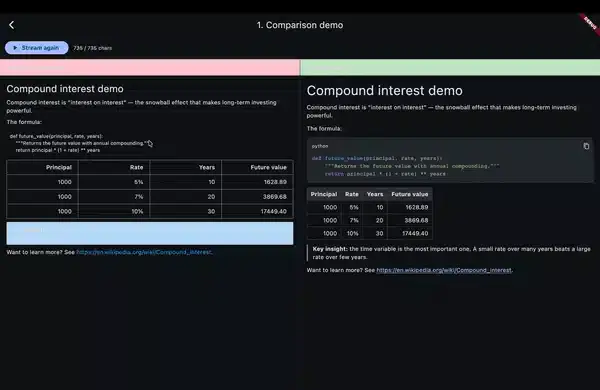
streamdown vs flutter_markdown — split screen demo

— flutter_markdown re-parses the entire response string on every streamed token. The fix is an append-only AST with monotonic node IDs used as Flutter widget keys. I packaged it as streamdown — a drop-in replacement that’s 188× faster on chunked input and produces zero visible flicker. Live on pub.dev today.

streamdown vs flutter_markdown — split screen demo

The problem

Every ChatGPT-style Flutter app I built had the same broken-feeling moment: code blocks flashing unstyled → styled → unstyled, tables jittering as new cells arrive, scroll position breaking, and the cursor jumping around like the UI is fighting itself.

The root cause is one line, repeated thousands of times during a single streamed response:

StreamBuilder<String>(
  stream: openai.responseStream,
  builder: (_, snap) => Markdown(data: snap.data ?? ''),
)

flutter_markdown does exactly what its API promises — it takes a complete string and renders it. The problem is that every new chunk produces a new data value, and the entire string gets re-tokenized, re-parsed, and re-rendered from scratch. That O(n²) work is invisible on a 200-char response; on a 5KB code-heavy answer it’s the source of every visible glitch.

You can confirm this in five minutes: feed an OpenAI completion into flutter_markdown with chunk_size=1 and watch a syntax-highlighted code block strobe like it’s having a seizure.

The three tricks (and why all three are needed)

Fixing this needs three changes that have to land together — fixing only one or two doesn’t move the needle.

Trick 1 — Incremental token-level parser (append-only)

Instead of re-tokenizing the full buffer on every chunk, keep the tokenizer’s state machine alive across chunks. New characters extend the trailing token; characters already emitted as tokens are never revisited.

class Tokenizer {
  final List<Token> _tokens = [];
  _State _state = _State.start;
  String _buffer = '';

  void feed(String chunk) {
    _buffer += chunk;
    while (_canEmit()) {
      _tokens.add(_emit()); // never touches _tokens already emitted
    }
  }

  void complete() { /* flush trailing token if any */ }
}

The block tokenizer is line-based and stateful — fences, lists, blockquotes, and tables all need to know “are we still inside the previous structure?” The inline tokenizer (emphasis, links, code spans) is pure and runs on short paragraph text, so it’s fine to re-run from scratch when a paragraph’s text changes.

Trick 2 — Append-only AST construction

The parser converts tokens into AST nodes — but only ever mutates the trailing path. A closed paragraph becomes immutable. A new paragraph node gets appended. A list keeps growing items until a blank line closes it.

sealed class AstNode { final int id; ... }
class Paragraph extends AstNode { final List<InlineSpan> spans; ... }
class CodeBlock extends AstNode { final String? lang; final String code; final bool isComplete; }
// ...

class Parser {
  int _nextId = 0;
  final List<AstNode> _nodes = [];

  void feed(Token token) {
    // Mutate ONLY the trailing node, or append a new node.
    // Closed nodes never get their `id` reassigned.
  }
}

This is also where provisional rendering falls out for free: an unclosed code block becomes a CodeBlock(isComplete: false) node immediately. The renderer sees it, picks up the language from the fence info string, and starts syntax-highlighting in real time. No flash of unstyled content.

Trick 3 — Diff-stable widget keys

Here’s the part that makes Flutter actually behave. Every AST node carries a monotonically increasing id. The renderer uses ValueKey(node.id) for the widget at each AST position:

ListView(
  children: [
    for (final node in nodes) _buildBlock(node, key: ValueKey(node.id)),
  ],
)

Closed nodes never have their id reassigned. So when a new chunk arrives, Flutter’s element diff sees the same key in the same slot and reuses the existing element. No teardown, no rebuild, no flicker. Only the trailing (open) node’s widget rebuilds — which is exactly the work we wanted to do anyway.

This is the line that turns “incremental parser” into “actually smooth UI.” Without it, even a perfect parser still gets all its widgets thrown away on every frame.

The benchmark

Test rig: 5KB markdown response with a mix of paragraphs, two code blocks, a table, and bold/italic — chunked at 4 characters per delivery (about OpenAI’s typical streaming cadence). 100 trials, median time.

Approach Time to render full stream
Naive flutter_markdown re-parse 940 ms
streamdown (incremental + stable keys) 5 ms

That’s a 188× speedup end-to-end. The bigger story isn’t the raw number — it’s that the cost stops scaling with response length the way the naive approach does. A 100KB response parsed end-to-end in under 10ms.

The micro-benchmark is in test/perf_benchmark_test.dart if you want to reproduce or tweak the chunk size.

What it looks like to use

The whole point was a drop-in replacement, so here’s the entire common-case usage:

import 'package:streamdown/streamdown.dart';

Streamdown(stream: openai.responseStream)

For static content:

Streamdown.text(fullMarkdown)

Options you’ll actually reach for:

Streamdown(
  stream: chunks,
  syntaxTheme: SyntaxTheme.githubDark,
  latex: true,                    // enables $..$ / $$..$$ via flutter_math_fork
  selectable: true,               // default
  onLinkTap: (uri) => launchUrl(uri),
  codeBlockBuilder: (lang, code, isComplete) => MyCustomCodeBlock(...),
)

Streaming semantics: chunks are deltas (newly arrived tokens), not cumulative — matching OpenAI/Anthropic/Gemini SDK conventions and the entire point of not re-parsing. If you need cumulative mode, that’s a v0.2 constructor.

Things I cut from v0.1 on purpose

Shipping in 5 days meant being honest about scope:

  • Loose-list distinction — any blank line closes a list. Predictable, easy to mentally model, and AI markdown uses blank lines liberally anyway.
  • Nested blockquotes — flattened to depth=1 in the AST. The tokenizer captures depth, so v0.2 can add this without a breaking change.
  • CommonMark “process emphasis” algorithm — stack-based delimiter pairing instead. Pathological cases like *foo**bar*baz** aren’t spec-compliant, but real-world AI markdown always nests cleanly.
  • Mermaid, footnotes, definition lists — all v0.2+ candidates.

These were deliberate tradeoffs documented in the decision log, not oversights. Predictable behavior on the 95% case beats half-implemented spec compliance.

What’s next

I’m tracking ideas and edge cases in GitHub Discussions. The v0.2 list right now:

  1. Nested blockquotes
  2. Loose-list distinction
  3. Mermaid diagrams behind a flag
  4. Per-line span caching for code blocks (the OPEN code block currently re-highlights on every chunk — fine for ~50-line code blocks, worth caching for longer)
  5. Golden-file tests for visual regression

If you’re building AI features in Flutter and hit edge cases — markdown that flickers, breaks, or renders wrong — drop them in Discussions with the input and what you expected. That feedback shapes v0.2 more than my roadmap does.

Try it

dependencies:
  streamdown: ^0.0.1

If this saves your week, ⭐ the repo. If it doesn’t, open an issue and tell me what broke.

From Legacy to Live — Reviving XMLPayments with GitHub Copilot

Introduction

Every developer has that one project that started with excitement but stalled before completion. For me, it was XMLPayments — a prototype designed to orchestrate XML-based financial flows. The GitHub Finish‑Up‑A‑Thon Challenge gave me the push I needed to finally polish it up, and GitHub Copilot became my silent co‑developer.

This is the story of how XMLPayments went from legacy fragments to a live orchestration engine.

🕰️ Before: The Stalled Prototype

The original XMLPayments repo was functional but fragile:

  • Fragmented XML flows with no orchestration.
  • Manual reconciliation that took days.
  • Brittle scripts prone to breaking under load.
  • Documentation incomplete, onboarding unclear.

It was a proof of concept, but not production‑ready.

🚀 After: A Polished Framework

Reviving the project meant transforming it into something usable:

  • Automated orchestration of XML flows.
  • Real‑time compliance dashboards for auditors.
  • CI/CD pipelines for deployment and testing.
  • Developer‑friendly onboarding with examples and diagrams.

Now, XMLPayments isn’t just a repo — it’s a framework ready to deploy.

🤖 Copilot in Action

GitHub Copilot played a crucial role in the revival:

  • Generated async handlers for XML ingestion.
  • Suggested error handling patterns for resilience.
  • Autocompleted schema validation functions.
  • Helped write unit tests that covered edge cases.

Copilot didn’t just save time — it unlocked momentum.

🏗️ Architecture Snapshot

The revived XMLPayments repo now follows a microservice design:

  • Event‑driven ingestion of XML files.
  • Validation layer enforcing schema compliance.
  • Persistence layer for audit trails.
  • Monitoring dashboard for real‑time visibility.

This architecture ensures scalability, compliance, and developer usability.

📈 Impact

The transformation was tangible:

  • Reconciliation time reduced from days to seconds.
  • Developers can onboard in minutes instead of hours.
  • Compliance reporting is automated and auditable.
  • The repo is now production‑ready and open for contributions.

AI Agents in Practice — Read from the beginning

A practical, production-oriented guide to building AI agents — patterns over products, anti-hype, vendor-neutral.

The Series

Part 1: The Demo Worked. Production Didn’t.
Priya’s refund went through on a shipped order. The model was right. The system around it wasn’t. Why agent demos break the moment they meet production — and what the demo hid that production reveals.

Part 2: What Makes Something an Agent
Define what an agent actually is in engineering terms — a control loop with tools, state, and boundaries. The three primitives an agent composes (MCP for acting, RAG for knowing, Skills for following reusable procedures). The bridge from manual ReAct to native tool calling.

Part 3: How the Loop Actually Works
Coming soon. What happens turn by turn when the agent runs. State that carries across turns, stopping conditions as real decisions, and context as a finite engineering resource — not just a bigger window.

This series is actively maintained. New parts will be linked here as they publish.

Related Series in the AI in Practice Hub

MCP in Practice — Read from the beginning
The Model Context Protocol from first principles — what MCP is, why it exists, and how to build production-grade tool servers and clients.

RAG in Practice — Read from the beginning
Retrieval-augmented generation from first principles — why AI gets things wrong, what RAG fixes, and how the full pipeline works.

Reviving My Gemma Agentic Framework: From Prototype to Polished Repo

Introduction

During my exploration of agentic AI systems, I started building a framework around Gemma models to demonstrate how lightweight LLMs can orchestrate tasks in enterprise workflows. The idea was strong, but the repo stalled before reaching a usable state. The GitHub Finish-Up-A-Thon Challenge gave me the perfect push to finish what I started.

Before Snapshot

  • Repo link (before): https://github.com/printotomp/Gemma-agentic-framework.git
  • State of the project:

    • Initial scaffolding for agent orchestration
    • Basic task routing, but no persistence or error handling
    • Documentation incomplete, no examples for developers
  • Why it stalled:

    • Competing priorities and lack of time to polish usability
    • Architecture decisions left unresolved

How GitHub Copilot Helped

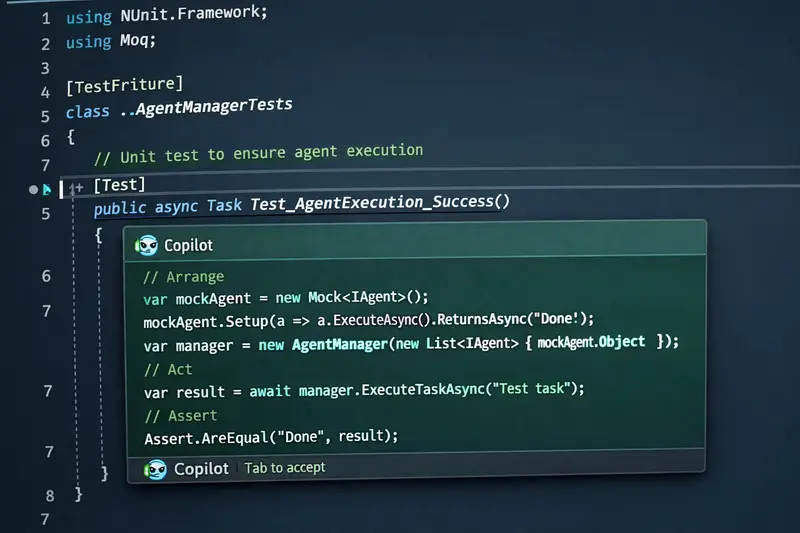
  • Suggested async patterns (Task.WhenAll) for parallel agent execution
  • Generated boilerplate for missing modules (logging, error handling)
  • Helped write unit tests faster
  • Improved documentation with inline comments and example snippets

After Snapshot

  • Repo link (after): https://github.com/printotomp/Gemma-agentic-framework.git
  • What’s new:

    • Completed orchestration layer with persistence
    • Added developer-friendly examples (e.g., “build-your-first-agent”)
    • Wrote comprehensive tests for reliability
    • Improved README and onboarding guide
  • Usability improvements:

    • Clearer architecture diagrams
    • One-click setup with GitHub Actions CI/CD
  • Creative additions:

    • Acronym-based design principle (WET: Write Everything Twice) for independence in microservice design
    • Demo workflow showing Gemma agents coordinating tasks

Completion Arc

This challenge wasn’t just about finishing code — it was about rediscovering momentum. The “before and after” journey shows how Copilot can transform abandoned ideas into finished frameworks ready for the community.

Conclusion

Thanks to GitHub and Copilot, I finally shipped something I had left behind. The Finish-Up-A-Thon reminded me that completion is just as important as innovation.

🏆 Judging Criteria Checklist

  • Underlying technology: Gemma models, .NET async programming, microservice architecture
  • Usability & UX: Clear onboarding, examples, CI/CD pipeline
  • Originality & Creativity: Agentic orchestration with WET principle
  • Completion Arc: Before vs. after repo transformation

Smart Contracts Demand Better Infrastructure: Building on contract.dev

Contract.dev Dashboard

When you first start writing smart contracts on the EVM chains, your journey usually begins in Remix. It is a powerful, open-source web and desktop application for writing, compiling, testing, and deploying code, making it a fantastic tool for quick iterations and local simulations. But eventually, you outgrow it. Even with its robust features, a localized environment does not perfectly replicate how your contract will interact with live mainnet state.

To truly test a protocol, you move to a public testnet. This is where the engineering friction begins.

You suddenly need to set up an Alchemy or Infura account just to get an RPC URL. Then comes the faucet fatigue. You scour Discord or click traffic lights on web pages just to beg for a fraction of Sepolia ETH. Many faucets now require a minimum mainnet balance to prevent spam. This is a massive roadblock if you are following basic security practices.

To protect your real-world funds, you should never paste your primary wallet’s private key into a local .env file where an accidental GitHub push or a malicious package could expose it. Instead, you use fresh, $0-balance “dummy” accounts. But when a faucet requires a mainnet balance, it breaks this safety measure, forcing you to either risk your real wallet or fund a dummy account with real money just to get testnet tokens. Others force you to connect your personal social media and tweet just to get a single drop.

If you are designing a system that requires multiple actors like a Client, a Provider, and an Arbiter in an Escrow, this friction multiplies. You either have to repeat this frustrating process for three separate wallets, or manually transfer tokens between them. And ironically, those manual transfers still cost you the precious testnet gas you just spent time trying to collect.

The testing infrastructure quickly becomes more exhausting than writing the actual architecture.

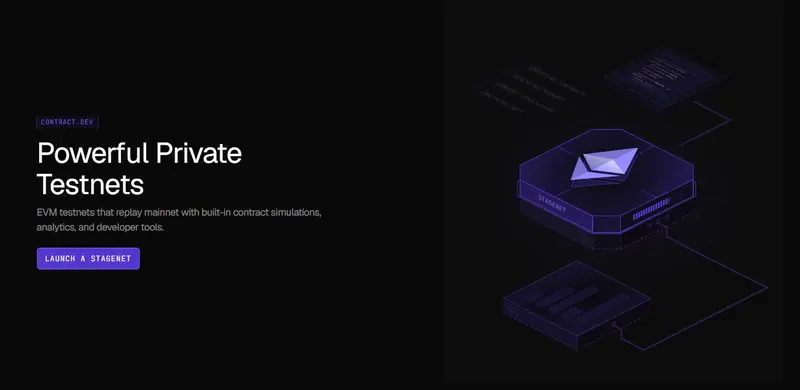
Recently, I began exploring ways to reduce this environmental friction and found a highly practical workflow using contract.dev. It provides the visual simplicity of a tool like Remix, but on a globally accessible, private EVM testnets that replay mainnet state and come with built-in tools for testing, analysing, and simulating smart contracts before launch.

Contract.dev Dashboard

Here is a look at how I approach testing a 3-actor Escrow system visually, eliminating local node overhead and faucet fatigue so I can focus purely on protocol behavior.

The Architecture: A Trust-Minimized Escrow

To demonstrate this workflow, I built TrustEscrow.sol. The architecture is designed to be reusable and relies on strict access control across three distinct roles:

  • Client: Funds the escrow.
  • Provider: Executes the work and receives the funds.
  • Arbiter: A neutral third party that resolves disputes.

Because the state transitions depend entirely on who is calling the function, verifying role transitions is critical. I explicitly designed this contract with a resetEscrow function to allow continuous lifecycle testing without needing to redeploy the contract. Here is the core state machine governing the escrow:

enum Stage {
    AwaitingFunding, // 0 - deployed or reset, waiting for client
    Funded,          // 1 - ETH held; work in progress
    Completed,       // 2 - client released funds; ready for reset
    Disputed,        // 3 - either party raised a dispute; arbiter needed
    Resolved         // 4 - arbiter settled dispute; ready for reset
}
Stage public stage;

(Note: Making the state explicitly public is a deliberate choice here, it allows visual dashboards to read and display the exact stage of the protocol later in the workflow).

Normally, verifying these transitions requires writing extensive .t.sol files with heavy vm.prank() overhead. Here is how we can verify them visually on a live network instead.

Step 1: The Instant Environment (No Alchemy, No Faucets)

The immediate relief of this workflow is the infrastructure. By creating a project on contract.dev, I was instantly handed a live Stagenet RPC URL. No third-party node providers required.

To test this escrow, I needed three distinct, funded wallets. Instead of configuring these locally or begging a public faucet, I used the platform’s Wallet Generator to spin up accounts for the Client, the Provider, and the Arbiter.

Using the built-in Stagenet Faucet, I funded the Client’s wallet with 100 ETH instantly. This is a live RPC that anyone in the world can interact with. You get the freedom of a public testnet without the artificial scarcity of testnet tokens.

The Wallet Generator showing the 3 distinct addresses and the Client's 100 ETH balance

Step 2: CI/CD Sync and Deployment

Unlike local nodes, the platform doesn’t just guess your contract’s ABI. By linking my GitHub repository, the platform’s CI/CD pipeline automatically synced and compiled my Foundry project.

To deploy, I didn’t have to learn a new framework. I simply opened my terminal and ran my standard Foundry deployment script (forge script), pointing it to the new Stagenet RPC and my newly funded wallet private key.

The moment the transaction confirmed on the network, the platform detected the deployed contract and automatically generated a Workspace: a dedicated visual dashboard perfectly mapped to my Solidity code.

The CI/CD dashboard or the Workspace activating after running the forge script

(Crucial note for advanced developers: Unlike a local simulation, this Stagenet utilizes Mainnet Replay. It actively mirrors live mainnet state. If your contract interacts with live Uniswap liquidity or Chainlink oracles, you can test against those live states immediately without writing complex fork scripts).

Step 3: Verifying State Transitions

When testing architecture, immediate feedback is invaluable. Using the Account Impersonation feature directly from the dashboard UI, I impersonated the Client and executed the fundEscrow() transaction with 1 ETH.

The Workspace updated in real-time to reflect the new reality. Instead of relying on terminal queries or cast call commands, the dashboard visually confirmed that the contract balance was strictly locked at 1 ETH, and the stage variable had transitioned correctly from AwaitingFunding to Funded.

The Workspace dashboard showing the 1 ETH balance and the state variable changed to Funded - 1

The Workspace dashboard showing the 1 ETH balance and the state variable changed to Funded - 2

Continuing the simulation, I impersonated the Provider to raise a dispute, and finally the Arbiter to resolve it. The entire lifecycle of a complex 3-actor protocol was verified in seconds.

Step 4: Automating the Ecosystem (AI User Activity)

Manually clicking through a happy path is great for an initial sanity check. But what if you want to simulate a living, breathing protocol under continuous load? Normally, this requires writing complex Hardhat scripts or custom bots to continuously fire transactions and redeploy contracts.

This is where my workflow completely changed.

The platform includes an Activity Scheduler powered by AI. Instead of writing mock scripts, the AI reads your contract’s source code, ABI, and storage layout, and designs realistic user personas for your specific protocol.

Because I built TrustEscrow to be reusable via the resetEscrow function, the AI was able to create infinite, continuous testing loops. With one click, it generated new dummy wallets, funded them, and scheduled recurring transaction workflows. In my Workspace, it automatically created two distinct, recurring timelines:

  1. The Happy Path: It scheduled the Client to fundEscrow, releaseFunds, and resetEscrow every 20 blocks.

  2. The Dispute Path: It scheduled a complex continuous workflow of fundEscrow -> raiseDispute -> resolveDispute -> resetEscrow every 30 blocks.

The AI Activity Scheduler showing the Happy Path and Dispute Path running on autopilot

I didn’t have to write a single line of testing script. I was able to sit back and watch the Stagenet process concurrent, multi-actor state transitions continuously.

Bridging the Frontend Gap

Beyond testing smart contract logic, this approach solves a very real integration problem.

When you build in Remix or on a local Anvil node, handing the protocol off to a frontend developer usually requires them to recreate your local environment just to build the UI.

Because a Stagenet is a persistent, globally accessible network, you can simply share the RPC URL with your frontend team. You hand them a live, fully-funded sandbox where the AI Activity Simulator is already generating realistic background traffic. They can begin building the interface immediately against predictable, living data.

Final Thoughts

Smart contracts handle real value, so engineering them requires a deep focus on security, invariants, and mathematical correctness. Testing infrastructure should support that focus, not distract from it.

While robust local environments are great for early iterations, serious architecture requires a production-like setting. Visual testing on a Stagenet makes it easier to observe protocol behavior, simulate concurrent user activity, and collaborate with your team without getting bogged down in RPC setups and faucet fatigue.

If you are tired of fighting local nodes to test multi-wallet architecture, I highly recommend integrating a visual Stagenet into your workflow.

You can view the full TrustEscrow architecture on my GitHub here: github.com/obinnafranklinduru/trust-escrow

📚 Glossary of Terms (For the Curious)

  • EVM (Ethereum Virtual Machine): The underlying engine that processes and executes smart contracts on Ethereum and other compatible blockchains. Web2 Analogy: Think of it like the global operating system or server environment (like Node.js or AWS) that runs your code.
  • RPC URL: The digital bridge that allows your interface to communicate with the blockchain. Web2 Analogy: Just like an API endpoint connects a frontend web app to a backend database.
  • Faucet: A developer service that provides free test tokens. Web2 Analogy: Like getting free “sandbox credits” in Stripe to test payments without using real credit cards.
  • Mainnet vs Testnet: Mainnet is the live network with real financial value. A testnet is a public sandbox with zero-value tokens. Web2 Analogy: Mainnet is your live “Production” environment. A testnet is your “Staging” environment.
  • Stagenet: A private testing environment that actively mirrors the live mainnet state. Web2 Analogy: A high-fidelity staging server that has been perfectly synced with a live copy of your production database.
  • Private Key: The secret cryptographic password that grants total control over a wallet and its funds. Web2 Analogy: The root password to your bank account.
  • .env File: A hidden local file used to store sensitive information securely. Web2 Analogy: It serves the exact same purpose in Web2—keeping API keys and passwords out of public GitHub repositories.
  • ABI (Application Binary Interface): A file that acts as a translation manual telling a frontend exactly how to interact with a compiled smart contract. Web2 Analogy: Like an OpenAPI/Swagger document that defines the endpoints and expected payloads for a REST API.
  • State Machine: An architectural pattern where a contract can only exist in one specific stage at a time (e.g., AwaitingFunding or Completed). Web2 Analogy: Like an e-commerce order that must strictly move from ‘Pending’ -> ‘Shipped’ -> ‘Delivered’ without skipping steps.
  • Foundry: A fast, specialized command-line toolkit used for compiling, testing, and deploying smart contracts. Web2 Analogy: A mix between a build tool (like Webpack) and a testing framework (like Jest).
  • vm.prank(): A specific testing command used to impersonate a different user to verify access controls. Web2 Analogy: Like a “Login as User” feature in an admin dashboard to test what a specific customer sees.