How to Stream Live Forex Rates to Google Sheets API: A Complete Guide

Table of Contents

  • Quick Answer: How to Stream Live Forex Rates to Google Sheets API
  • Why Streaming Live Forex Rates to Google Sheets API Is Harder Than It Looks
  • The Step-by-Step Approach
  • Tools for Streaming Live Forex to Google Sheets
  • Common Mistakes to Avoid When Using a Forex API in Google Sheets
  • How We Approach This Problem at RealMarketAPI
  • When to Start Using a Dedicated Forex API for Google Sheets
  • Frequently Asked Questions

Quick Answer: How to Stream Live Forex Rates to Google Sheets API

To stream live forex rates into Google Sheets, connect a dedicated market data provider through Google Apps Script, or bridge a WebSocket feed through a small server. That setup pulls fresh rates into your spreadsheet on a schedule you control, well past what the built-in functions can do.

Pick a provider with a genuine free tier and low latency. RealMarketAPI is one option: it serves live gold, forex, crypto, and stock prices over REST, WebSocket, or a Telegram Bot, and the free plan needs no credit card. You can have a key in under a minute.

With the right API behind it, a sheet can track currency pairs in near real time, feed a live dashboard, or fire an alert when a level breaks. The two things that decide whether it works are latency and uptime, and those are exactly where casual free feeds tend to fall down.

What Is the Fastest Way to Pull Live Forex Data Into Google Sheets?

Google Sheets ships with the GOOGLEFINANCE function, which covers some currency pairs out of the box. It refreshes roughly every 20 minutes, skips many pairs, and offers no historical depth.

The faster route is Google Apps Script calling a REST endpoint on a timer. The script fetches JSON, parses it, and writes the values straight into your cells. This is the pattern most developers settle on.

For true streaming, a WebSocket feed pushes ticks the instant they happen. Sheets cannot hold a socket open itself, so you route the stream through a small middle layer, which we cover below.

Why Streaming Live Forex Rates to Google Sheets API Is Harder Than It Looks

Dropping forex data into a spreadsheet sounds trivial. The friction shows up quickly.

Most free feeds lag by 15 seconds or more. Many cap you at a handful of calls per minute, and a 25-requests-per-day ceiling, which is what Alpha Vantage now enforces on its free tier, makes continuous streaming impossible.

Google Sheets adds its own ceilings. Custom functions and Apps Script triggers share quota, and a single script execution is capped at six minutes. Call an API too aggressively and the run dies mid-write, leaving you with half a sheet.

Why Does the GOOGLEFINANCE Function Fall Short for Real-Time Forex?

GOOGLEFINANCE is handy for stocks and the major pairs. It does not cover every instrument, and Google itself notes the data can be delayed by up to 20 minutes. The official GOOGLEFINANCE reference spells out the supported attributes.

It also returns a single price with no bid, no ask, no historical OHLC, and no indicators. For anyone tracking spreads or back-testing, that thin data model is a dead end.

What Latency Issues Do Free FX APIs Have?

Free APIs often resell data sourced from secondary providers. The fetch-then-cache cycle quietly adds seconds, sometimes minutes, of lag before a number reaches you.

Some also throttle hard during volatile sessions, exactly when you most want a current quote. The result is gaps in the sheet right when the market is moving.

The Step-by-Step Approach

A dependable link between a forex API and Google Sheets comes down to four steps that build on each other.

Step 1: Choose a Reliable Forex API for Google Sheets

Look for a real free tier, low latency, and broad pair coverage. Steer clear of anything that only updates every few minutes.

RealMarketAPI’s free plan runs at sub-150ms latency and covers six core symbols (gold, silver, Bitcoin, Ethereum, EUR/USD, and Google) at 5,000 requests per month over REST. Paid plans extend that to 60+ instruments across forex, crypto, stocks, and commodities. The pricing page lists each tier, and the Free tier asks for no credit card.

Step 2: Connect Google Apps Script to the API

Apps Script is the bridge between your sheet and any REST endpoint. The official Apps Script documentation walks through the basics, and the minimal flow is short:

  1. Open Extensions, then Apps Script, and create a new script.
  2. Use UrlFetchApp.fetch() to call the API endpoint with your key.
  3. Parse the JSON and write it with getRange().setValues().
  4. Save the function so a trigger can run it.

Our API docs show the exact endpoint structure and response shape.

Step 3: Schedule Automatic Updates With Triggers

Time-driven triggers run your function on a schedule. A minutes timer gives you near real-time refreshes without touching the sheet by hand.

Keep the six-minute execution cap in mind. If you pull many pairs, split them across separate triggers or batch the requests so a single run stays well under the limit.

Step 4: Handle Errors and Rate Limits Gracefully

Every API enforces a request rate. Your script should read the HTTP status code and back off before retrying rather than hammering the endpoint.

Our API returns clear error codes alongside a Retry-After header, so a well-written script knows precisely how long to pause and recovers without leaving holes in the data.

Tools for Streaming Live Forex to Google Sheets

Several APIs can feed a spreadsheet. Here is an honest look at how three common choices compare.

Feature Finnhub Alpha Vantage RealMarketAPI
Free plan Yes Yes Yes (no credit card)
Free tier freshness Real-time (US stocks) Delayed 15-20 min Sub-150ms (live)
WebSocket Yes (stocks, currencies) No Yes (Plus plan and up)
Historical data Plan dependent 20+ years (daily) Up to 10 years (Business)
Technical indicators No 50+ indicators Indicators API (Pro and up)
Telegram Bot No No Yes

Comparing Free Tiers for Forex API Google Sheets Use

Provider Free tier request limit Instruments on free tier Free tier data freshness
Finnhub 60 calls per minute Stocks, forex, crypto Real-time (US stocks)
Alpha Vantage 25 requests per day Stocks, forex, commodities Delayed 15-20 min
RealMarketAPI 5,000 requests per month 6 core symbols Sub-150ms (live)

All three offer a free tier, but they gate streaming differently. Finnhub bundles WebSocket into its free plan for stocks and currencies. Alpha Vantage offers no WebSocket at any tier. RealMarketAPI keeps its free tier REST-only with 5,000 requests per month, then unlocks WebSocket streaming on the Plus plan at $14.99 per month. If you want the full feature-by-feature breakdown, see our RealMarketAPI vs Finnhub and RealMarketAPI vs Alpha Vantage comparisons.

Common Mistakes to Avoid When Using a Forex API in Google Sheets

A few avoidable errors quietly cost time and accuracy.

What Happens When You Rely Solely on Free Data Sources?

Free APIs change their terms often. Coverage shrinks, limits tighten, and you usually find out only when a sheet stops updating.

Some free feeds also insert deliberate delays. That is fine for a hobby tracker and useless for anything time-sensitive, such as an automated signal.

How Does Polling Too Frequently Harm Your Sheet?

Calling the API every ten seconds feels productive. In practice it burns through the script execution time and URL fetch quota that Google Sheets enforces.

When a script overruns, it fails quietly. You are left staring at stale numbers with no error flag to warn you.

Why Ignoring Bid-Ask Spreads Hurts Accuracy

Many free APIs return only a mid price. For real trading or risk work, you need both the bid and the ask.

Our API returns bid, ask, and a timestamp for every instrument. The features page lays out the full OHLC data model.

How We Approach This Problem at RealMarketAPI

We built RealMarketAPI because the existing options were too slow, too expensive, or too narrow for the developers we kept talking to.

The service aggregates prices from leading exchanges and delivers them in under 150 milliseconds, backed by a 99.99% uptime commitment. That combination is what makes a spreadsheet usable for live work rather than after-the-fact review.

What Makes RealMarketAPI Different for Google Sheets Streaming?

There are three ways to connect: REST, WebSocket, and a Telegram Bot, all on the same low-latency backbone.

We also ship official SDK clients for JavaScript, Python, and C#, so the same feed drops into a serverless bridge with a few lines of code. The SDK clients page covers the typed, async-ready basics.

How to Stream Live Forex Rates to Google Sheets API With RealMarketAPI

  1. Create a free account, no credit card needed.
  2. Copy your API key from the dashboard.
  3. Add a short Apps Script function that calls the REST endpoint.
  4. Set a time trigger to pull data every minute.

For sheets that need to move in real time, pair our WebSocket feed with a small bridge running on a Google Cloud function. Our WebSocket candles guide shows a reconnect-safe pattern in Node.js, and the low-latency forex dashboard use case covers the same idea end to end. WebSocket access begins on the Plus plan.

Can RealMarketAPI’s Telegram Bot Feed Data Into Google Sheets?

Yes. The Telegram Bot sends prices, charts, and alerts. You can forward those messages to an Apps Script web app through a webhook, then write them into your sheet, giving you an always-on pipeline without polling.

When to Start Using a Dedicated Forex API for Google Sheets

You do not always need a paid plan. A few signals tell you when it is time to move up.

When Should You Upgrade From a Free Plan to a Paid Forex API for Google Sheets?

Upgrade when:

  • Your sheet needs updates faster than once a minute.
  • You require historical depth for back-testing.
  • A free tier’s request ceiling keeps blocking your workflow.
  • You need dependable uptime for a live dashboard or trading bot.

Our Plus plan adds WebSocket streaming, and Pro layers on the Indicators API, the Intelligence API, and higher request limits. The use cases library shows how teams combine live data with sheets for monitoring and analysis.

If your needs are modest, a few pairs refreshed hourly, the free tier is plenty. For anything headed to production, a paid plan with an SLA is the safer foundation.

Frequently Asked Questions

How to get live prices in Google Sheets?

The GOOGLEFINANCE function imports financial data for some stocks and currency pairs, though it can lag by up to 20 minutes. For broader coverage and lower latency, use Google Apps Script to call a dedicated forex API. RealMarketAPI, for example, serves sub-150ms data, with free coverage of six core symbols and 60+ instruments on paid plans.

How to pull live cryptocurrency prices into Google Sheets?

Use a crypto-capable API called from an Apps Script function on a timer. RealMarketAPI covers crypto pairs alongside forex, so a single endpoint can feed both into one sheet.

Can I use WebSocket to stream forex data into Google Sheets?

Not directly, because Sheets cannot hold a socket open. The workaround is a small middle layer, such as a script on a server or a Google Cloud Run service, that receives WebSocket ticks and writes them to the sheet through the Sheets API.

What is the best free forex API for Google Sheets integration?

It depends on your needs. Finnhub gives 60 calls per minute and bundles WebSocket on its free tier. Alpha Vantage adds 50+ technical indicators but caps the free tier at 25 requests per day with no WebSocket. RealMarketAPI offers a no-credit-card free tier at 5,000 requests per month and sub-150ms latency, with WebSocket on paid plans.

How do I handle rate limits when using a forex API in Google Sheets?

Read the response headers, such as X-RateLimit-Remaining and Retry-After, then add Utilities.sleep() between calls or use exponential backoff in your Apps Script. Our API returns clear error codes that tell your script exactly how long to wait.
Small Models Will Beat Giant Models (And Most People Haven’t Realized Why Yet)

This is a submission for the Gemma 4 Challenge: Write About Gemma 4

A few weeks ago, I noticed something strange after running Gemma locally.

I started asking it questions I would never send to a cloud model.

Messy startup ideas.

Half-formed thoughts.

Experimental UI concepts.

Personal notes I normally keep to myself.

And that made me realize something important:

The future of AI may not belong to the biggest models.

It may belong to the models that feel the most human to interact with.

For the last two years, the AI industry has been obsessed with scale:

  • more parameters,
  • larger context windows,
  • bigger GPU clusters,
  • better benchmarks.

But I think we’re optimizing for the wrong thing.

Because the best AI experience is not always the smartest AI response.

Sometimes the best AI is:

  • instant,
  • offline,
  • private,
  • always available,
  • and deeply personalized.

That’s where small models become incredibly important.

1. Latency Changes Human Behavior

Human thinking is fragile.

Even tiny delays break momentum.

If an AI assistant:

  • takes 10 seconds,
  • depends on internet reliability,
  • or constantly hits limits,

people subconsciously stop depending on it.

But when AI becomes instant, it stops feeling like software.

It starts feeling like thought augmentation.

“The best AI is not always the smartest one. It’s the one that interrupts you the least.”

That’s why local models matter.

Cloud AI optimizes intelligence.

Local AI optimizes cognition.

2. Privacy Is More Important Than We Think

People behave differently when they know something is watching them.

Even if companies promise privacy.

Cloud AI introduces invisible psychological friction.

Users self-censor:

  • weird ideas,
  • unfinished thoughts,
  • vulnerable questions.

But local AI changes that completely.

When the model runs on your own device:

  • experimentation increases,
  • curiosity increases,
  • creativity increases.

That’s not just a technical improvement.

It’s a behavioral shift.

3. The Future Of AI Is Personal

Most frontier models are trying to become universal intelligence.

But daily life doesn’t require universal intelligence.

It requires contextual intelligence.

Your AI assistant does not need to solve frontier mathematics every five seconds.

It needs to:

  • understand your workflow,
  • remember your projects,
  • adapt to your habits,
  • and stay consistently available.

Small models are powerful because they can become personal.

Not because they know everything.

But because they know you.

“The future of AI is not one superintelligence. It’s millions of personal intelligences.”

My Prediction

Over the next few years:

  • Browsers will ship with local AI
  • IDEs will maintain persistent memory
  • Offline assistants will become normal
  • AI products will compete on latency, not just intelligence
  • Personal models will replace generic assistants

And ironically, the companies that win may not be the ones with the biggest models.

They may be the ones that create the smoothest cognitive experience.

Final Thought

I think the AI industry is rediscovering something the software industry learned decades ago:

Convenience beats power more often than engineers expect.

The best technology is rarely the most technically impressive system.

It’s the system people actually keep using.

And that’s why I believe small models are going to matter far more than most people expect.

Not because they are bigger.

But because they are closer to humans.

How I Built 5 Linux Automation Scripts on AWS EC2


I wanted to find out what working on a real Linux server actually feels like — not a local VM, not a simulator.

So in May 2026, I spun up an Ubuntu 22.04 server on AWS EC2, connected via SSH, and spent the entire month doing real work on it.

Here’s what I built.

🖥️ Environment

Tool Details
Cloud AWS EC2 t2.micro
OS Ubuntu 22.04 LTS
Editor VS Code Codespaces
Auth SSH key-based authentication
Automation Bash scripting + cron jobs

📚 Topics Covered

Linux Fundamentals

  • User and group management
  • File permissions (chmod, chown)
  • Process management (ps, top, kill, systemctl)
  • Networking basics (ss, curl, UFW, DNS)
  • Package management with apt

Automation & Scripting

  • Bash scripting — functions and validation
  • Log management
  • Cron job scheduling
  • SSH workflows (scp, rsync)
  • Log analysis using grep, awk, and sed

🔧 The 5 Automation Scripts

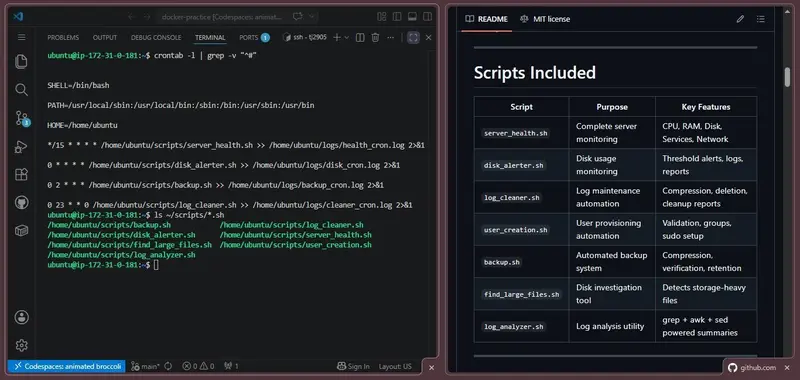
By the end of the month, I had built and automated 5 production-style Bash scripts.

1. Server Health Check

A monitoring script that checks:

  • CPU usage
  • RAM usage
  • Disk usage
  • Service status
  • Internet connectivity

Scheduled every 15 minutes using cron.

./server_health.sh

Example output:

================================================
        SERVER HEALTH CHECK REPORT
================================================

Date: 2026-05-12 10:00:00
Hostname: ip-172-xx-xx-xx

--- CPU Usage ---
✅ CPU is OK (2.3%)

--- Memory Usage ---
✅ RAM is OK (45%)

--- Services Status ---
✅ ssh: RUNNING
✅ nginx: RUNNING
✅ docker: RUNNING

--- Network ---
✅ Internet: CONNECTED

================================================

2. Disk Usage Alerter

A script that scans partitions and generates alerts when disk usage exceeds a threshold.

Features:

  • Threshold-based alerts
  • Partition monitoring
  • Log generation
  • Color-coded terminal output

Runs every hour through cron.

3. Log Cleaner

A maintenance script that:

  • Compresses older logs
  • Removes outdated logs
  • Reduces disk usage automatically

Built using find, gzip, and mtime filters for log retention management.

Runs every Sunday.

4. User Creation Script

A provisioning script for creating users with a consistent setup.

Features:

  • Username validation
  • Group assignment
  • Home directory creation
  • Temporary password generation
  • Batch user creation using CSV files
sudo ./user_creation.sh --file users.csv

5. Backup Script

Creates compressed backups using tar.gz archives.

Features:

  • Backup verification
  • Retention policy
  • Automatic cleanup of old backups
  • Logging and integrity checks

Scheduled daily at 2 AM.

⏱️ Cron Job Automation

All scripts were automated using cron jobs.

# Health check — every 15 minutes
*/15 * * * * /home/ubuntu/scripts/server_health.sh >> /home/ubuntu/logs/health_cron.log 2>&1

# Disk alerter — every hour
0 * * * * /home/ubuntu/scripts/disk_alerter.sh >> /home/ubuntu/logs/disk_cron.log 2>&1

# Backup — daily at 2 AM
0 2 * * * /home/ubuntu/scripts/backup.sh >> /home/ubuntu/logs/backup_cron.log 2>&1

# Log cleaner — every Sunday at 11 PM
0 23 * * 0 /home/ubuntu/scripts/log_cleaner.sh >> /home/ubuntu/logs/cleaner_cron.log 2>&1

Once configured, the server handled routine maintenance automatically.

💡 Biggest Learnings

1. Linux becomes comfortable through repetition

At the beginning, basic terminal commands felt unfamiliar.

After working daily on a remote server, navigating Linux from the command line became much more natural. There’s no shortcut — you just have to do it daily.

2. Automation changes how you think

One of the biggest mindset shifts was noticing repetitive work and immediately thinking:

“Can this be automated?”

That shift alone made scripting feel much more practical — and honestly, more fun.

3. Real infrastructure teaches different lessons

Working on an actual EC2 instance exposed me to problems that are difficult to fully understand in local environments:

  • SSH authentication issues
  • File permission problems
  • Cron debugging
  • Disk usage management
  • Log analysis workflows

Solving those problems on a live server taught me far more than just reading commands from documentation.

🚀 What’s Next

Next, I’m moving into AWS Core Infrastructure — VPC, IAM, RDS, and Terraform.

That work starts in June 2026. Follow along if you’re on a similar path.

📁 GitHub Repository

All scripts and documentation are open source:

👉 github.com/tanayjdev/linux-bash-scripts

BCA Student • Aspiring Cloud & DevOps Engineer

I built a Chrome extension to stop squinting at the web

 We’ve all been there. You open an article, a documentation page, or a research paper — and the font is tiny, the line spacing is suffocating, or the contrast is just… bad. You squint, you zoom in, you lose the layout. It’s frustrating.
So I built Typly.

What it does

Typly is a lightweight Chrome extension that lets you customize typography on any website — per HTML tag.
whatever you want. You can adjust:

  • Font size
  • Font family
  • Line height
  • Text color

Changes happen in real-time, and you can save presets to reuse your favorite styles across different sites.

Why per-tag?

Most browser zoom tools change everything at once and break page layouts. With Typly, you’re surgical. Want just the body text bigger but keep the headings as-is? Done. Want to swap a site’s tiny sans-serif body font for something more readable? Two clicks.

Who it’s for

I built it primarily for myself — I spend a lot of time reading documentation and long-form articles, and I got tired of fighting with poorly designed websites. But it turns out it’s also genuinely useful for:

People with dyslexia or low vision who need specific font adjustments
Developers and designers testing typography on live pages
Students and researchers reading for hours at a stretch

What I learned building it

Getting per-tag style injection to work cleanly across wildly different websites was harder than I expected. Sites with aggressive CSS specificity (!important everywhere, shadow DOM components) pushed me to rethink the injection approach a few times. The real-time preview also required some careful debouncing so it doesn’t hammer the DOM on every keystroke.

Try it

If you spend any meaningful time reading on the web, give it a shot:
Typly on the Chrome Web Store
It’s free, collects zero data, and weighs in at just 1.26MB.

Would love feedback — especially from anyone who uses it for accessibility purposes. What features would make it more useful for you?

What I Actually Build: AI Systems That Ship, Not Demos That Impress

Every LinkedIn post about AI sounds the same. “Excited to leverage cutting-edge LLMs to transform your business.” Cool. What does that even mean?

I’ll tell you what I actually do.

AI Engineering — Not the Buzzword Version

I build AI systems that run in production. Not prototypes that break when you look at them wrong.

RAG Systems: Retrieval-Augmented Generation is where I spend most of my time. Real RAG — not just “stuff everything into a vector store and pray.” I design chunking strategies, retrieval pipelines, re-ranking layers, and evaluation frameworks. The stuff that makes the difference between a chatbot that hallucinates and one that gives you the right answer every time.

I’ve shipped RAG systems across banking, humanitarian operations, and eCommerce. Each domain has different tolerance for hallucination. Banking: zero. Humanitarian: lives depend on it. eCommerce: your customer service team will revolt.

AI Agents: Not the “look, my agent can use a calculator” kind. Production agents with guardrails, fallback chains, tool-use protocols, and observability. Agents that know when they don’t know something. Agents that ask for permission before doing something irreversible.

The gap between a demo agent and a production agent isn’t technical. It’s architectural.

Full-Stack Development — The Backbone

AI doesn’t float in a vacuum. It needs infrastructure.

I build full-stack systems around AI — Laravel backends, Next.js frontends, RESTful and GraphQL APIs, database design, deployment pipelines. The boring stuff that makes AI actually work.

My stack: Laravel, Next.js, React Native, PostgreSQL, Redis, Docker, cloud deployments. 20+ years of building software taught me that the flashy layer is never the bottleneck. The plumbing is.

I’ve built platforms that handle thousands of concurrent users, real-time document processing, multi-tenant architectures, and systems that need to work in low-bandwidth environments (try doing humanitarian tech in a conflict zone — you learn fast).

Mobile Apps — React Native

Cross-platform apps that actually feel native. Not the “it works on both platforms” kind of works. The kind where users can’t tell it’s not native.

React Native, with proper native modules when needed. Offline-first architectures. Real-time sync. The stuff that makes an app useful instead of just functional.

The Difference

Here’s what separates me from the average AI engineer or full-stack dev:

I’ve been doing this for 20 years. Since 2005. I’ve seen every hype cycle, every “this will change everything” technology, every framework that was supposed to replace everything before it. Most of them are gone.

I design for the worst case, not the demo. When you’re building for banking or humanitarian operations, failure isn’t a learning opportunity — it’s a catastrophe. That mindset carries into every project.

I’m in the MENA region. I build for this market. I understand the infrastructure challenges, the regulatory landscape, the user behavior. I’m not importing Silicon Valley patterns that don’t translate.

I don’t oversell. If your project doesn’t need AI, I’ll tell you. If a simpler solution works better, I’ll build that instead. My job isn’t to sell you technology — it’s to solve your problem.

What I’m Looking For

Complex problems. Systems that need to actually work. Projects where the stakes are real — whether that’s money, lives, or just someone’s professional reputation.

Not “can you build me a chatbot.” I can. But you probably don’t need one.

The projects that excite me: RAG systems that need to be accurate, agent architectures that need to be safe, platforms that need to scale, and mobile apps that need to work offline.

If that sounds like your project, let’s talk.

What I build: AI systems (RAG, agents, LLMs), full-stack web platforms, mobile apps, APIs, databases, and the infrastructure that holds it all together.

Where I build it: Amman, Jordan. For the world.

What’s the biggest gap you see between AI demos and production systems? I’d love to hear your war stories.

More like this on yabasha.dev — no fluff, no “excited to share,” just real systems and real failures.

The Box Ticked While You Read This: LinkedIn, AI Training, and the Switch You Did Not Flip

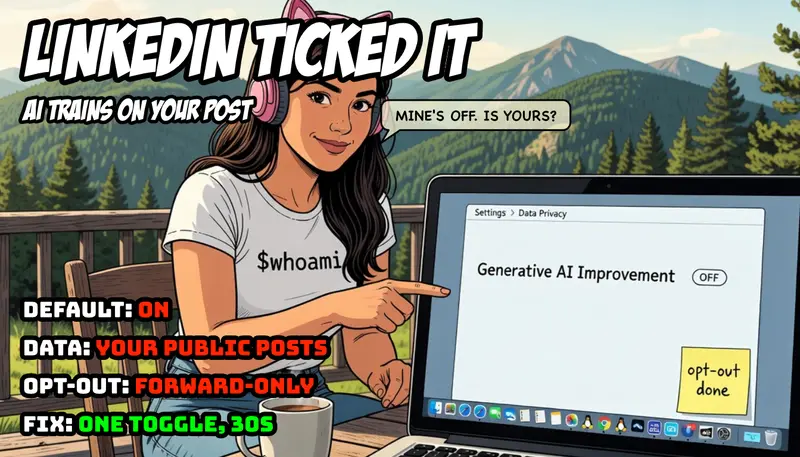
A sunny terrace high in the Hautes-Vosges mountains, forested summits and pines behind. A young developer has turned her open laptop around to face the viewer, the way you swivel a screen to show someone across the table, and she leans in from the side, pointing at it with one finger and a playful, knowing look. The screen shows a settings page: a breadcrumb reading

A sunny terrace high in the Hautes-Vosges mountains, forested summits and pines behind. A young developer has turned her open laptop around to face the viewer, the way you swivel a screen to show someone across the table, and she leans in from the side, pointing at it with one finger and a playful, knowing look. The screen shows a settings page: a breadcrumb reading

Not in the Brief, Episode 04

You are, in all likelihood, reading this on LinkedIn. Somewhere in your account settings sits a switch labelled “Data for Generative AI Improvement”. For most members it is on. Almost none of them turned it on. This is the fourth episode of Not in the Brief, a series about the things software does that were never in the brief: the features that arrive switched on, the clauses that appear in an update, the defaults that assume your consent because you did not object to a notice you never saw. The aim is not outrage. It is awareness: what was added, how it works, and how you check and change it on your own account.

The Feature

The setting permits LinkedIn to use your data to train generative AI models. Two kinds of model, in fact: LinkedIn’s own, and those of its affiliate, Microsoft, which owns LinkedIn and runs the Azure OpenAI service the platform draws on. The data in scope is your profile information and the content you post publicly: your posts, your articles, your comments. LinkedIn states that private messages are not used. That distinction matters, and it is worth stating plainly so the rest of this piece is not misread: this is about your public content, the part of LinkedIn you intended to be seen, becoming training material. It is not about your inbox.

The Introduction

The chronology is the interesting part, because it is where the brief and the execution part company.

On 18 September 2024, an updated LinkedIn privacy policy took effect. With it, the “Data for Generative AI Improvement” toggle appeared in members’ settings, already enabled. The mechanism was opt-out: your data would be used unless you went and said no. On the same day, 404 Media reported that LinkedIn had begun using member data for AI training before its terms of service had been updated to disclose it. Asked about the gap, the company said it would update the terms “shortly”. A brief, one observes, is conventionally agreed before the work begins, not retrofitted to it afterwards.

Europe and the UK were, briefly, an exception. On 20 September 2024, the UK’s Information Commissioner’s Office issued a statement welcoming that LinkedIn had paused the processing. LinkedIn confirmed it was “not enabling training for generative AI on member data from the European Economic Area, Switzerland, and the United Kingdom, and will not provide the setting to members in those regions until further notice”. For a little over a year, “until further notice” held.

Then the notice came. On 3 November 2025, LinkedIn began using data from members in the EU, the EEA, Switzerland, the UK, Canada and Hong Kong to train its content-generating AI models, having announced the change some weeks earlier. The legal basis it relies on for this is “legitimate interest”, a lawful ground under the GDPR that does not require prior consent, only that the interest be balanced against the member’s rights and that an objection (the opt-out) be offered. So the switch that did not exist in Europe in 2024 exists everywhere now. Wherever you are reading this, it is in your settings, and it arrived pre-flipped.

The Mechanics

Three mechanical details determine what this actually means for you.

First, the direction. The setting is on by default. You are enrolled by inaction. To leave, you must act; to stay, you need only never look. This is the defining property of an opt-out, and it is why opt-outs and opt-ins produce wildly different participation rates from identical populations: the default is the decision, for everyone who does not make one.

Second, the scope. “Legitimate interest” is a legitimate legal basis; it is not a synonym for wrongdoing. But it is, in plain terms, the ground that lets an organisation process your data because it has decided the processing is justified, subject to your right to object. It is the courteous phrasing for “we may, unless you tell us not to”. The GDPR requires that the objection be easy and that it be honoured. It does not require that anyone phone you first.

Third, and most important, the opt-out is forward-only. Switching the toggle off stops your data being used for training from that point onward. It does not retract what has already been used. For members in the regions switched on this November, that means the public content you posted before the cut-off is already within scope, opt-out or not. You can close the gate, but the herd that was already through it does not come back. This is not a quirk of LinkedIn; it is the nature of training data. A model does not forget a sentence because you later asked it to.

The Risk

It is worth being precise about what the risk is and is not, because the temptation in this genre is to reach for the language of surveillance, and that language would be wrong here.

This is not a breach. Nothing was stolen. The content used is content you chose to make public, and the controlling setting is documented and reachable in three clicks. If the story were “LinkedIn read your private messages”, that would be a different and far graver piece. It did not, and this is not.

The risk is about consent and expectation, which is the entire remit of this series. A member who posts publicly on a professional network has a reasonable mental model of what that means: my words are visible, searchable, quotable by humans. The model most members do not hold, because nobody asked them to form it, is: my words are training data for a commercial model owned by my platform and its parent. The opt-out is documented. The announcement, for most members, was a footnote in a policy update they did not read, because almost nobody reads them, because they are written to be agreed rather than understood.

Here is the judgment, and it is a judgment about architecture and process, not about motive: default-on with a quiet notice is not a leak, and it is not a conspiracy. It is a design choice. It treats the absence of objection as the presence of consent, and it places the entire burden of awareness on the member. That is a legitimate strategy and a defensible one in law. It is also, precisely, a thing that was not in the brief. You joined a professional network. You did not, in any meaningful sense, agree to seed a model. The brief did not change. The execution did.

How to See It

The whole point of this series is that you can check, in under a minute, and then decide for yourself. On the web:

  1. Click your photo, top right, then Settings & Privacy.
  2. Open Data Privacy.
  3. Find Data for Generative AI Improvement (on mobile it sits under the same Data Privacy heading).
  4. Read which way it points. If it is on and you would rather it were not, switch it off.

That is the entire procedure. Two notes on what the switch does and does not do. It governs both LinkedIn’s own training and the sharing of your data to Microsoft for model training, so it is one toggle for both. And it is forward-only, as above: turning it off protects what you post next, not what you posted before. There is a separate, more laborious route for objecting to or requesting deletion of past processing, via LinkedIn’s data-access and objection forms, if you wish to pursue it; the toggle alone does not do that.

A Note on the Other Side of the Stack

There is a quiet structural lesson underneath this one, and it is the same lesson this series keeps arriving at from different doors. The reason a default could be set for you is that you are a guest on a platform whose defaults are not yours to set. On infrastructure you run yourself, the question “what is being trained on my data” has a different and duller answer: whatever you configured, which is nothing you did not choose. A FreeBSD box in your own cupboard does not enrol you in anything overnight; its defaults change when you change them, and the changelog is the commit you can read. That is not an argument that everyone should self-host their professional identity, which would be absurd. It is only an observation that the convenience of a managed platform and the authority over its defaults are sold as a single package, and the second half of that package is the half nobody reads. The price of not running the stack is that someone else sets the switches, and occasionally ticks one on your behalf.

Coda

None of this requires villains. It requires only a default, a quiet notice, and a population that, reasonably, does not read privacy policies for entertainment. The setting is lawful, the opt-out is real, and the content involved is content you published on purpose. The single thing missing was the asking.

So this is the asking, in reverse. If you have never looked, you do not know which way your own switch points. The looking takes thirty seconds and costs nothing. The only deadline that matters already passed, quietly, for everything you posted before it. The looking simply has to begin, ideally before the next policy updates “shortly”.

Read the full article on vivianvoss.net →

By Vivian Voss, System Architect and Software Developer. Follow me on LinkedIn for daily technical writing.

I Cancelled My $20 Claude Cowork Plan After a Week With OpenWork

I Cancelled My $20 Claude Cowork Plan After a Week With OpenWork

I didn’t expect to cancel. I’d been paying for Claude Cowork, it worked, and switching tools is usually more hassle than it’s worth. Then I spent a week running OpenWork — open-source, free — on actual work instead of a toy demo. By Friday I’d cancelled the plan.

Here’s the honest version of what happened, including the part that nearly made me quit on day one.

The setup that took two minutes

I went in skeptical. Free open-source agent clients usually mean “free, but you’ll spend a weekend configuring it.” OpenWork wasn’t that.

It ships with a provider called OpenCode Zen, and there are five free models sitting in the selector before you sign into anything — DeepSeek V4 Flash, Qwen3.6 Plus, MiniMax M2.5, and two more. No card, no subscription. I picked DeepSeek, handed it a refactor task on a real repo, and it generated the diff, applied it, tests green on the first run.

That was the moment the skepticism dropped. Same task in Cowork needs the $20 plan. Same machine, two windows, one charges and one doesn’t.

The thing that actually sold me

It wasn’t the free models. It was MCP setup.

If you’ve added an MCP server to Claude Cowork, you know the drill: open the JSON config, find the right format, paste the server command, restart, hope it loads. I’d timed it once — about twenty minutes for five tools the first time.

In OpenWork it’s a tile with a Connect button. Notion, Linear, Sentry, Stripe, Context7 — tap, OAuth, done. All five connected in under three minutes. No JSON. That’s the whole story. After fighting config files for months, that one button is what made me close the Cowork tab.

The part I didn’t see coming

You can tell the agent to drive its own UI. I typed “open Settings, then go to Appearance” and watched the panel open and the tab switch with my hands off the mouse. It sounds like a gimmick until you see it work — it’s the demo every assistant vendor has been promising for two years, actually running in something I installed today.

Caveat, because I’m not going to oversell it: this works on the OpenCode Zen models. Point it at Gemini Flash and it falls back to browser tools instead of clicking the native UI. So the free-model story and this feature line up on Zen specifically.

The part that nearly made me quit

Day one, fresh Windows machine, the UI Control feature crashed with a cryptic Bun runtime error. No explanation. The installer never told me it needed Node.js.

I lost an hour to this, so here’s the fix so you don’t:

  1. Install Node.js from nodejs.org.
  2. Close OpenWork through Task Manager, not the X button — there’s no tray icon and the normal close leaves the process alive, so the next launch reuses the broken state.
  3. Relaunch. It works.

That’s the kind of thing that makes people uninstall and write a bad review. It’s a five-minute fix once you know it, and it’s documented nowhere.

Would I tell you to switch?

If you need deep terminal control, Claude Code and Cowork still earn their place. But if you want the no-terminal, get-things-done workflow without a subscription and without being married to one model provider — OpenWork covers it, and it covers it well.

The thing I keep thinking about isn’t OpenWork specifically. It’s that open-source dev tooling is catching the paid tier on workflow now, not just undercutting on price. That gap closing from the open-source side is the real story.

Tested on a fresh Windows 11 install. Not sponsored. There’s one task where OpenWork still loses to paid Claude — saving that for the next one.

20. yaşa özel iPhone modeli böyle görünebilir

20. yaşa özel iPhone modeli böyle görünebilir

20. yaşa özel iPhone modeli böyle görünebilir20. yaşa özel iPhone modeli (iPhone 19 Pro, iPhone 20 ya da iPhone 20 Pro olarak isimlendirilebilir) için sızıntılar üzerinden bir konsept hazırlandı. 2027’de tanıtılacak telefon, uzun süredir gündemde olan iddiaya göre çerçevesiz görüntü oluşturacak “dört kenardan kavisli ekranla” tasarlanıyor ve Face ID’ye güç veren sensörleri doğrudan ekranın altına alacağı öne sürülüyor. Asher Dipprey tarafından FPT için hazırlanan konsept cihaz da şimdiden büyük merak uyandıran dört kenardan kavisli iPhone’un nasıl görünebileceğini karşımıza getiriyor. iPhone X’teki gövde yapısının kullanıldığı konseptte iki farklı arka kameraya yer veriliyor. Arkasındaki cam bölüm de kavisli tasarlanan konsept, selfie kamerasını da ekranın altına alıyor. Apple’ın da bunu düşündüğü ancak görüntü kalitesinde kayıp yaşanması halinde selfie kamerasını bir ekran deliğine koymayı planladığı söyleniyor.

20. yaşa özel iPhone modeli böyle görünebilir yazısı ilk olarak Teknoloji haberleri – LOG üzerinde yayınlandı.

Bolu'da kurban pazarlarına yönelik denetim yapıldı

Bolu İl Tarım ve Orman Müdürlüğü ekipleri, Kurban Bayramı öncesinde kurban pazarlarında denetim yaparak hayvanların küpe, pasaport ve sağlık durumlarını kontrol etti. Ayrıca ‘Tarım Cebimde’ uygulaması tanıtıldı.