Samsung Galaxy Z Fold 8 ve Flip 8’in fiyatı ortaya çıktı

 Samsung’un Galaxy Z Fold 8 ve Z Flip 8 modellerinde fiyat artışına gidebileceği konuşuluyor. Özellikle yüksek depolama seçenekleri daha pahalı olabilir. İşte detaylar…
 Samsung’un Galaxy Z Fold 8 ve Z Flip 8 modellerinde fiyat artışına gidebileceği konuşuluyor. Özellikle yüksek depolama seçenekleri daha pahalı olabilir. İşte detaylar…
If the cloud were a city, each service provider would feel like a different district. One is built for speed, another for scale, another for innovation, and another for security and privacy.
Today, more than 90 percent of organisations rely on cloud infrastructure to run their operations. The question is no longer whether to use the cloud. The real question is which provider aligns best with your goals.
This guide explores the 11 leading cloud providers in 2025, what they offer, and what makes each one stand out.
Amazon Web Services (AWS)
Amazon Web Services remains the largest cloud provider with an estimated 30 percent market share in Q2 2025.
Key capabilities
Hundreds of services covering compute, storage, AI and machine learning, analytics, and serverless computing
Extensive global network with more than 100 Availability Zones
Strong cost management tools such as Cost Explorer and Savings Plans
Why it matters
AWS represents the highest standard of cloud scalability and reliability. It is often the first platform developers choose when building modern applications.
Microsoft Azure
Microsoft Azure holds about 20 percent of the global cloud market.
Key capabilities
Deep integration with Microsoft 365, Active Directory, and enterprise software
Comprehensive hybrid cloud tools such as Azure Arc and Azure Stack
Strong compliance support and global data sovereignty options
Why it matters
Azure is the preferred platform for enterprises modernising legacy systems within Microsoft environments.
Why it matters
GCP powers many of the world’s most data-intensive workloads with advanced analytics and AI capabilities.
Why it matters
Alibaba Cloud is a strong choice for companies expanding throughout the Asia-Pacific region.
Why it matters
OCI is built for performance, cost efficiency, and enterprise-grade database workloads.
Why it matters
IBM Cloud connects traditional enterprise systems with modern cloud agility.
Why it matters
Salesforce unifies customer data and interactions across the entire business ecosystem.
Why it matters
VMware Cloud provides one of the easiest paths to hybrid and multi-cloud adoption.
Why it matters
DigitalOcean delivers reliable cloud services with straightforward pricing suited for startups and small businesses.
Why it matters
Tencent Cloud supports some of the largest gaming and media platforms worldwide.
Why it matters
Huawei Cloud increases cloud accessibility in emerging markets through affordability and regional reach.
Comparison summary of the top 11 cloud providers
Below is a clean and concise comparison in point form, replacing the table:
AWS
Strength: Largest service catalog and global reliability
Best for: Enterprises and startups
Unique advantage: Leading scalability and ecosystem depth
Microsoft Azure
Strength: Enterprise and hybrid cloud integration
Best for: Organisations using the Microsoft stack
Unique advantage: Seamless Microsoft environment
Google Cloud
Strength: AI and analytics
Best for: Data-focused businesses
Unique advantage: BigQuery and Vertex AI
IBM Cloud
Strength: Hybrid cloud and compliance
Best for: Regulated industries
Unique advantage: Watson AI and enterprise-grade security
Oracle Cloud
Strength: Database and analytics performance
Best for: Enterprise database workloads
Unique advantage: Autonomous Database technology
Alibaba Cloud
Strength: APAC presence and cost efficiency
Best for: Businesses expanding into Asia
Unique advantage: Regional market dominance
Salesforce Cloud
Strength: CRM and SaaS capabilities
Best for: Sales and marketing teams
Unique advantage: Unified customer experience platform
VMware Cloud
Strength: Virtualisation and hybrid operations
Best for: Enterprises migrating existing workloads
Unique advantage: Smooth on-premise to cloud transition
DigitalOcean
Strength: Simplicity and affordability
Best for: Startups and small businesses
Unique advantage: Developer-friendly experience
Tencent Cloud
Strength: Gaming and media optimisation
Best for: Real-time entertainment workloads
Unique advantage: High-performance delivery
Huawei Cloud
Strength: Global hybrid cloud and affordability
Best for: Emerging markets
Unique advantage: Cost-effective global scaling
Conclusion
Every cloud provider serves a different purpose. Some are built for scale, others for flexibility, performance, or cost efficiency. AWS offers the widest range of services, Google Cloud leads in data intelligence, and DigitalOcean stands out for simplicity. The best cloud platform is the one that aligns with your business model, technical needs, and long-term strategy.
Whether you are building an AI-driven application or scaling a growing SaaS product, understanding these providers will help you make informed decisions that support both performance and growth.
Every full-stack developer has been there: you are planning a new
feature, sketching out database tables, and spending half your time
looking up ORM syntax for many-to-many relationships or writing join
tables by hand.
I wanted a tool where I could visually draw my relational tables,
connect the columns, and immediately get clean, copy-pasteable code for
the three targets I use most: PostgreSQL SQL, Prisma ORM, and
Drizzle ORM.
So, I built SchemaDraw(https://schemadraw.netlify.app).
—
### The Architecture: Designing for ₹0 Scale

As an indie hacker, I wanted to launch a tool that could support
thousands of developers without leaving me with a heavy server bill.
To achieve this, SchemaDraw is built as a **100% client-side Single
Page Application (SPA)** using React and Vite:
1. **Client-side Compilation:** The engines that transform your
visual nodes into SQL or TypeScript are entirely written in JavaScript,
running in the user’s browser.
2. Local Storage Persistence: Your work auto-saves locally so
refreshing the tab won’t lose your schema.
3. LZ-Compressed URL Sharing: Instead of saving diagrams to a
server database, SchemaDraw compresses the entire canvas layout and
schema structure into a URL hash component. You can copy the share link
and send it to a teammate—the app reads the hash and redraws the exact
layout with zero server storage costs.
—
### Key Features Built for Developers
* **Protruding Target Handles:** Most ERD tools place connection dots
inside nodes, leading to click collisions. SchemaDraw places handles - outside the borders, lighting up green on valid targets to make
5px
drawing links effortless.
* Interactive Presentation Lock: Toggle read-only mode to safely
present or inspect diagrams without making accidental changes.
* Grid Auto-Layout: Got a messy canvas? One click aligns all your
tables into a clean, alphabetical column-row grid.
* Cohesive Theme Engine: A single click swaps between a clean
Light Slate and a cohesive Pitch-Black interface.
---

### Check it out!
SchemaDraw is open, free, and requires no accounts or signups.
👉 **Try it here:**


I’d love to hear your thoughts! What features, databases, or ORM
compilers would make this a permanent part of your bootstrapping
toolkit? Let me know in the comments below!

Your GitHub profile is your developer resume. It’s the first thing recruiters, open-source maintainers and other developers see when they click on your name.
But let’s be honest… most READMEs look exactly the same.
I wanted to add something dynamic, eye-catching and personalized to my profile. I loved the idea of a “typing text” effect, but existing tools felt limited. You couldn’t add modern design trends like neon glows, linear gradients, or glassmorphic macOS windows.
So, I decided to build my own.
Enter ScribeSVG: An ultra-fast, highly customizable typing animation generator for your GitHub README.
✨ What makes ScribeSVG different?
I didn’t just want to build another standard text generator. I wanted this to feel like a premium design tool for developers. Here is what I added:
🎨 14+ Developer Fonts: From Fira Code to Space Mono and Press Start 2P.
🌈 Linear Gradients & Neon Glows: Add cyber-punk glows or sleek Tokyo Night gradients to your text.
🪟 Custom Layouts: Choose between Raw Text, a macOS Terminal Frame, or a Glassmorphic Card.
⚡ Next.js Edge Runtime: It renders in milliseconds globally so your README never lags.
🛠️ The Technical Challenge: Bypassing GitHub’s Sandbox
Building this wasn’t as simple as just returning an SVG. If you’ve ever tried to embed external assets in a GitHub README, you know that GitHub’s camo image proxy is ruthless.
GitHub strips out external stylesheets, blocks <script> tags, and prevents standard web font imports via @import or <link>.
So, how did I get custom fonts like Fira Code to work inside an <img> tag on GitHub?
I had to build a custom renderer that fetches the font file directly from Google Fonts at runtime, converts the .woff2 font into a Base64 Data URI, and dynamically injects it directly into the <style> block of the SVG payload.
Combine that with CSS-only @keyframes animations, and everything is bundled into a single, self-contained SVG response that GitHub’s proxy has no choice but to render perfectly! 🎯
🚀 How to use it in your README
You don’t need to write any code to use it. I built a visual builder that lets you customize everything and generates the Markdown for you.
README.md!It looks like this:
[](https://github.com/DhanushNehru/ScribeSVG)

Checkout my github readme to see how things are rendered.


At the Apache Iceberg Summit last month, Google announced new interoperability features for Apache Iceberg in BigQuery. The preview of the serverless Iceberg REST catalog lets teams create, update, and query the same Apache Iceberg tables in BigQuery and in engines like Spark, Flink, and Trino without duplicating data.
By Renato Losio
Most ECS blue-green deployment tutorials eventually lead to the same stack:
And while CodeDeploy works, I kept running into one practical limitation during real deployments:
I couldn’t let my internal team validate a new release on the actual production URL before exposing it to customers.
That became the entire motivation behind this setup.
I didn’t want:
I wanted something much simpler:
So I built a Terraform-driven deployment workflow using:
without using CodeDeploy.
After running this setup in practice, I ended up preferring it for many ECS workloads.
The Core Idea
Both BLUE and GREEN environments run behind the same ALB.
Internal office/VPN IPs get routed to GREEN first.
Everyone else continues hitting BLUE.
That means QA and internal teams can validate the new release directly on the real production infrastructure before public rollout begins.
Same:
No “staging surprises” later.
A lot of deployment issues only appear on the real production routing path.
Real Example
Internal users open:
https://nginx.jayakrishnayadav.cloud
…and immediately see the GREEN version.
Meanwhile, public users continue seeing BLUE.
No DNS switching.
No duplicate infrastructure.
Just ALB listener routing.
Architecture Overview
The deployment flow looks like this:
                ┌────────────────────┐
                │   Application LB   │
                └─────────┬──────────┘
                          │
         ┌────────────────┴────────────────┐
         │                                 │
 Internal Office/VPN IPs             Public Users
         │                                 │
         ▼                                 ▼
   GREEN Target Group               BLUE Target Group
         │                                 │
    ECS GREEN Tasks                  ECS BLUE Tasks
The canary routing rule gets evaluated first.
If the request source IP matches internal CIDRs, traffic goes to GREEN.
Everything else falls back to BLUE.
Terraform Structure
I kept the Terraform layout modular so it could be reused across multiple services.
.
├── main.tf
├── variables.tf
├── outputs.tf
├── env/
│   ├── backend.hcl
│   └── terraform.tfvars
├── modules/
│   ├── vpc/
│   ├── iam/
│   ├── alb/
│   ├── ecs-cluster/
│   └── ecs-blue-green-service/
└── scripts/
    └── zero-downtime-test.sh
Each ECS service gets:
ALB Listener Rule Logic
The entire deployment behavior depends on ALB listener priorities.
The canary listener rule gets evaluated first.
If the request source IP matches internal CIDRs, traffic gets forwarded to GREEN.
resource "aws_lb_listener_rule" "canary" {
  count    = var.activate_canary ? 1 : 0
  priority = 99

  condition {
    source_ip {
      values = var.canary_source_ips
    }
  }

  condition {
    host_header {
      values = ["nginx.jayakrishnayadav.cloud"]
    }
  }

  action {
    type             = "forward"
    target_group_arn = aws_lb_target_group.green.arn
  }
}
The production rule remains below it:
resource "aws_lb_listener_rule" "production" {
  priority = 100

  condition {
    host_header {
      values = ["nginx.jayakrishnayadav.cloud"]
    }
  }

  action {
    type             = "forward"
    target_group_arn = local.active_target_group
  }
}
That’s it.
No weighted routing.
No lifecycle hooks.
Just listener priorities.
Real Deployment Workflow
This wasn’t built as a theoretical architecture exercise.
I tested the rollout flow directly from Terraform while continuously validating traffic behavior against live ECS Fargate services.
Terraform initialization:
terraform init -backend-config=env/backend.hcl
Deployment apply:
terraform apply
  -var-file=env/terraform.tfvars
  -lock=false
  -auto-approve
During canary validation, I continuously verified my public IP:
curl ifconfig.me
That mattered because the ALB source-IP rule decides whether traffic reaches:
Once my IP matched the configured canary CIDRs, traffic immediately started routing to GREEN.
Deployment Flow
The nice part about this setup is that everything becomes variable-driven.
Step 1 — Normal Production State
BLUE handles all production traffic.
GREEN remains scaled down.
enable_canary   = false
activate_canary = false
promote_to_all  = false
Apply:
terraform apply
  -var-file=env/terraform.tfvars
  -lock=false
  -auto-approve
Result:
Step 2 — Start GREEN Tasks
Now we start the GREEN environment.
enable_canary   = true
activate_canary = false
promote_to_all  = false
Apply again:
terraform apply
  -var-file=env/terraform.tfvars
  -lock=false
  -auto-approve
At this stage:
Users never hit partially starting containers.
Step 3 — Internal Canary Validation
Now we enable canary routing.
enable_canary   = true
activate_canary = true
promote_to_all  = false
Apply again:
terraform apply
  -var-file=env/terraform.tfvars
  -lock=false
  -auto-approve
Now:
This became the most valuable phase of the deployment workflow.
Because now:
while customers remain completely unaffected.
Internal Canary Routing
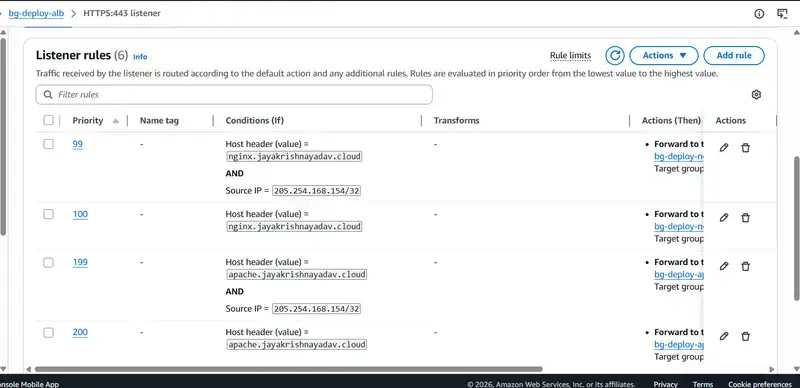
This is the ALB listener rules view while canary routing is enabled.
The priority 99 rule matches internal source IPs and forwards them to GREEN, while everyone else continues hitting BLUE.

Step 4 — Promote GREEN to Production
Once validation looks good:
enable_canary   = true
activate_canary = false
promote_to_all  = true
Apply again:
terraform apply
  -var-file=env/terraform.tfvars
  -lock=false
  -auto-approve
Now:
No downtime occurs.
Traffic simply moves from one target group to another.
Verifying Zero Downtime
I didn’t want to assume the deployment was safe.
I wanted to verify it continuously during rollout.
So I used a simple curl-based validation script that continuously hit both applications while traffic shifted between BLUE and GREEN.
for i in {1..100}
do
  for url in
    "https://nginx.jayakrishnayadav.cloud/"
    "https://apache.jayakrishnayadav.cloud/"
  do
    response=$(curl -k -s -w " HTTPSTATUS:%{http_code}" "$url")

    body=${response% HTTPSTATUS:*}
    status=${response##*HTTPSTATUS:}

    if [[ $body == *"BLUE - v"* ]]; then
      color="BLUE"
    elif [[ $body == *"GREEN - v"* ]]; then
      color="GREEN"
    else
      color="UNKNOWN"
    fi

    echo "Run: $i | URL: $url | Status: $status | Version: $color"
  done
done
Output during deployment:

You can clearly see:
That confirmed the deployment was genuinely zero downtime.
Production Promotion View
After promotion:
Clean and simple.


Rollback
Rollback became extremely simple.
I just reverted the Terraform variables:
enable_canary   = false
activate_canary = false
promote_to_all  = false
Apply Terraform again:
terraform apply
  -var-file=env/terraform.tfvars
  -lock=false
  -auto-approve
ALB immediately routes traffic back to BLUE.
The rollback process stays predictable because traffic switching is entirely controlled through ALB listener rules.
HTTPS Configuration
The ALB uses ACM certificates for HTTPS.
Listeners:
Example:
test_listener_allowed_cidrs = [
  "160.30.39.198/32"
]
That keeps internal preview traffic private while still using the same production infrastructure.
Cost Optimization
One thing I specifically wanted to avoid was permanently doubling infrastructure cost.
Normal state:
Deployment window:
After promotion:
So infrastructure cost only increases briefly during deployments.
Final Thoughts
This project started because I wanted a very practical deployment workflow:
Internal users should validate the new version on the actual production URL before customers ever see it.
Once I implemented that using ALB listener priorities and source IP routing, I realized I no longer really needed CodeDeploy for this workflow.
The end result became:
And because everything is Terraform-driven, the deployment process stays reproducible and predictable.
GitHub Repository
Full Terraform implementation:
https://github.com/jayakrishnayadav24/ecs-blue-green-deployment/tree/canary
Last week, security researcher Joernchen published a clever RCE in Claude Code 2.1.118. I spent Saturday reproducing it from the advisory to understand the pattern. The bug is fixed now, but the parsing anti-pattern behind it is everywhere in AI developer tools.
I’ve written a full article here:
https://vechron.com/2026/05/i-reproduced-a-claude-code-rce-the-bug-pattern-is-everywhere/
RAG has become the default answer for giving LLMs access to private knowledge. And for good reason — it works. But after running it in production we kept hitting the same wall. Not retrieval accuracy. The operational tax.
Re-embedding on data changes. Chunking drift. Retrieval misses on edge cases. Pipeline failures at 2am. The vector database that needs babysitting.
So we ran an experiment.
The Hypothesis
What if instead of chunking, embedding, and retrieving — we just loaded the full document into the LLM context, cached the KV state persistently, and reused it across every query?
No retrieval step. No embedding pipeline. No vector database. Just the model with full document context, warm and ready.
How It Works
The core idea is simple. When an LLM processes a prompt it generates a key-value attention cache — the internal representation of everything it has read. Normally this cache is transient. It lives in VRAM during the request and disappears after.
We persist it.
The initialization prompt — your document — gets processed once. The resulting KV cache gets stored externally and indexed to that document. Every subsequent query retrieves that cached state and appends the user query. The model never recomputes the document. Ever.
The math:
KV_init = LLM.prefill(document)
KV_store[document_id] = KV_init
# On every query:
KV_full = KV_store[document_id] + LLM.prefill(query)
output = LLM.decode(KV_full)
What We Found
Answer quality improved.
No retrieval misses are possible when the full document is in context. The model has read everything. It doesn’t guess which chunks are relevant — it knows the whole document. For complex multi-part questions that span different sections this is a significant improvement over chunked retrieval.
Updates became trivial.
Document changes? Re-run the prefill, store the new KV cache. Minutes not hours. No re-embedding pipeline. No re-indexing. No retrieval regression testing. Just regenerate and deploy.
Operational complexity dropped.
No embedding model to maintain. No vector database to monitor. No chunking strategy to tune. No retrieval quality metrics to track. The surface area for things to break quietly got dramatically smaller.
Latency on warm cache is effectively instant.
When the KV state is already loaded the query just appends and generates. No retrieval hop, no context injection latency.
The Honest Tradeoffs
Context window is the ceiling.
Current limit is around 120k tokens — roughly 200-300 pages. Works well for focused documents. For large corpora you need a routing layer to select the right cache per query. You’ve pushed the retrieval problem up one level — instead of retrieving chunks you’re selecting a cache. Simpler problem but not zero.
Cold cache restore adds latency.
The first query after a cache restore pays a latency cost. For strict SLA requirements this matters. Warm cache is instant. Cold restore depends on your infrastructure.
Initial prefill costs more than embedding.
Running a full forward pass on a large document costs more compute than embedding it. The economics work when query volume is high enough to amortize that cost. Low query, high update frequency — RAG still wins.
Where This Wins
This approach is clearly better when:
You have a focused, structured document — legal contract, compliance policy, product manual, technical spec
Query volume is high relative to update frequency
Full context comprehension matters more than breadth
You want to eliminate pipeline maintenance entirely
Privacy matters — no document chunks sent to embedding APIs
Where RAG Still Wins
Very large document collections where context limits apply
Highly dynamic data that changes multiple times per day
When you genuinely don’t know which document is relevant at query time
Low query volume where prefill cost doesn’t amortize
What We’re Building
We’ve been running this in production at InferX as part of our Sovereign Endpoints™ infrastructure. The persistent KV cache layer sits on top of our GPU snapshotting architecture — which is what makes the cold cache restore fast enough to be practical.
We’re now opening a limited beta for teams who want to test this on real workloads. Particularly interested in legal, compliance, finance, and developer tooling use cases.
If you’re running RAG in production and want to run a head-to-head comparison — we’d love to work with you.
Have you ever pushed code to GitHub and wished your application could automatically build and deploy itself without logging into a server or clicking a button in Jenkins? In this article, you’ll learn how to build a complete CI/CD pipeline for a Dockerized Node.js application using Jenkins, starting with manual deployments and progressing to fully automated deployments using GitHub webhooks.
We will cover:
Node.js Application Repo URL- https://github.com/omkarsharma2821/Node.js-App-Deploy-Github-Action
Architecture Overview
The complete flow looks like this:
Developer
    |
    | Git Push
    v
GitHub Repository
    |
    | Webhook
    v
Jenkins
    |
    | Build Docker Image
    v
Docker
    |
    | Run Container
    v
Application Running
Without webhooks:
Developer
    |
    | Git Push
    v
GitHub Repository

Jenkins Build Now (Manual Trigger)
    |
    v
Build and Deploy
With webhooks:
Developer
    |
    | Git Push
    v
GitHub Repository
    |
    v
Webhook
    |
    v
Jenkins
    |
    v
Build and Deploy Automatically
Prerequisites
Before starting, ensure you have:
jenkins --version
docker --version
git --version
Installing Docker on Jenkins Server
Install Docker:
sudo apt update
sudo apt install docker.io -y
Enable Docker:
sudo systemctl enable docker
sudo systemctl start docker
Verify:
docker --version
Allow Jenkins to Use Docker
By default Jenkins cannot execute Docker commands.
Add Jenkins user to Docker group:
sudo usermod -aG docker jenkins
Restart Jenkins:
sudo systemctl restart jenkins
Verify:
sudo su - jenkins
docker ps
If Docker works without sudo, Jenkins is ready.
Creating the Pipeline
Initially we created a Jenkins pipeline that manually clones the repository.
Example:
pipeline {
    agent any

    stages {

        stage('Clone Repository') {
            steps {
                sh '''
                    mkdir -p devops
                    cd devops
                    rm -rf Node.js-App-Deploy-Github-Action
                    git clone -b main https://github.com/username/repository.git
                '''
            }
        }

        stage('Build Image') {
            steps {
                sh '''
                    cd devops/Node.js-App-Deploy-Github-Action
                    docker build -t node-app .
                '''
            }
        }

        stage('Deploy') {
            steps {
                sh '''
                    docker run -d -p 8000:8080 node-app
                '''
            }
        }
    }
}
This works, but every deployment requires manually clicking:
Build Now
Problem with Multiple Deployments
Suppose the application is already running.
Running:
docker run -d -p 8000:8080 node-app
again will fail because port 8000 is already occupied.
Error:
Bind for 0.0.0.0:8000 failed
Better Deployment Approach
Before starting a new container, remove the old one.
docker rm -f node-app-container || true
Then start a new container:
docker run -d --name node-app-container -p 8000:8080 node-app
Understanding docker rm -f node-app-container || true
Let’s break it down.
docker rm
Removes a container.
docker rm node-app-container
Works only if container is stopped.
-f
Force remove.
docker rm -f node-app-container
This:
||
OR operator.
Syntax:
command1 || command2
If command1 fails, command2 executes.
true
Always returns success.
true
Exit code:
0
Final Meaning
docker rm -f node-app-container || true
If container exists:
Remove it
If container doesn’t exist:
Ignore error and continue
This prevents Jenkins from failing.
Manual Triggering
The simplest approach is manual execution.
Navigate to:
Jenkins Job
|
└── Build Now
Advantages:
Good for learning
Disadvantages:
Requires human intervention
Not real CI/CD
Automatic Triggering
The goal of CI/CD is:
Code Push
    |
    v
Automatic Build
    |
    v
Automatic Deployment
This is where GitHub webhooks come into play.
Required Jenkins Plugins
Install the following Jenkins plugins before configuring the CI/CD pipeline:
1. Git Plugin
2. GitHub Plugin
3. GitHub Integration Plugin
4. Pipeline Plugin
5. Credentials Plugin
GitHub Authentication
When Jenkins needs to access a GitHub repository, authentication requirements depend on the repository type.
Public Repository
Example:
git clone https://github.com/username/repository.git
Private Repository
Why Use a Personal Access Token (PAT)?
Classic Personal Access Token
Older token type.
Advantages:
Easy to configure
Disadvantages:
Broad permissions
Less secure
Example scopes:
repo
workflow
admin:repo_hook
Fine-Grained Personal Access Token
Newer and recommended approach.
Advantages:
Repository Access:
Only selected repositories
Permissions:
Contents: Read and Write
Metadata: Read
Webhooks: Read and Write
Fine-Grained vs Classic Token
| Feature | Fine-Grained | Classic |
|---|---|---|
| Security | High | Lower |
| Repository Scope | Specific | Broad |
| Permission Control | Granular | Broad |
| Recommended | Yes | Legacy |
For modern projects, prefer Fine-Grained tokens.
Adding GitHub Token to Jenkins
Navigate to:
Manage Jenkins
|
Credentials
Select:
Global Credentials
Choose:
Add Credentials
Kind:
Username with Password
Example:
Username: GitHub Username
Password: Personal Access Token
ID:
github-creds
Save.
Pipeline Script vs Pipeline Script from SCM
Many beginners get confused here.
Pipeline Script
Pipeline stored inside Jenkins UI.
Example:
pipeline {
    agent any
}
Advantages:
Quick setup
Disadvantages:
Not version controlled
Difficult to maintain
Pipeline Script from SCM
Pipeline stored in GitHub repository.
Repository structure:
project/
|
|-- Dockerfile
|-- package.json
|-- app.js
|-- Jenkinsfile
Jenkins automatically downloads Jenkinsfile.
Advantages:
Configuring Pipeline from SCM
Create Jenkins job.
Select:
Pipeline
Under Definition:
Pipeline script from SCM
SCM:
Git
Repository URL:
https://github.com/username/repository.git
Branch:
*/main
Script Path:
Jenkinsfile
Save.
Creating GitHub Webhook
Navigate to:
GitHub Repository
|
Settings
|
Webhooks
|
Add Webhook
Payload URL:
http://JENKINS_PUBLIC_IP:8080/github-webhook/
Content Type:
application/json
Event:
Just the push event
Save webhook.
Configuring Jenkins Trigger
Open job configuration.
Under Build Triggers:
Select:
GitHub hook trigger for GITScm polling
Save.
Testing the Webhook
Push code:
git add .
git commit -m "testing webhook"
git push origin main
Expected flow:
GitHub Push
    |
    v
Webhook
    |
    v
Jenkins
    |
    v
Pipeline Starts
No manual click required.
Common Troubleshooting
Webhook Returns 404
Cause:
Wrong webhook URL
Correct:
http://SERVER-IP:8080/github-webhook/
Webhook Returns 403
Cause:
Authentication or security issue
Verify:
Webhook Returns 200 But Build Doesn’t Start
Common cause:
Pipeline Script instead of Pipeline Script from SCM
or
Repository mapping issue
Dockerfile Not Found
Example:
unable to evaluate symlinks in Dockerfile path
Cause:
Wrong working directory.
Check:
pwd
ls -la
Verify Dockerfile location.
Permission Denied While Running Docker
Cause:
Jenkins not in docker group
Fix:
sudo usermod -aG docker jenkins
sudo systemctl restart jenkins
Final Jenkinsfile
pipeline {
    agent any

    stages {

        stage('Build Image') {
            steps {
                sh '''
                    docker build -t node-app .
                '''
            }
        }

        stage('Deploy') {
            steps {
                sh '''
                    docker rm -f node-app-container || true
                    docker run -d --name node-app-container -p 8000:8080 node-app
                '''
            }
        }
    }
}
Conclusion
A Jenkins pipeline can be triggered manually or automatically. Manual triggering is useful for learning and testing, but real CI/CD begins when code pushes automatically trigger builds and deployments.
The recommended production approach is:
✍️ Author: Omkar Sharma
📬 Feel free to connect on LinkedIn or explore more on GitHub

 Stellantis, büyük FaSTLAne 2030 planı kapsamında yeni STLA One küresel modüler araç platformunu da tanıttı. Bu konuda şirketten yapılan resmi açıklamada, “2027 yılında devreye alınacak ve beş farklı platformu tek bir ölçeklenebilir mimari altında bir araya getirecek şekilde tasarlanan STLA One ile karmaşıklığın azaltılması ve kapsama alanının genişletilmesi hedefleniyor. B, C ve D segmentlerini kapsayacak olan STLA One, tasarımdan gelen modüler yapı ve batarya seçenekleri sayesinde yüzde 20 maliyet verimliliği öngörülüyor. Aynı zamanda Stellantis’in STLA Brain, STLA SmartCockpit ve steer-by-wire teknolojilerini entegre edecek ilk platformu olacak STLA One, 30’dan fazla modeli destekleyen ve 2035 yılına kadar 2 milyondan fazla üretim hacmini hedefleyen mega bir platforma dönüşecek. Stellantis, 2030 yılına kadar üretim hacminin yüzde 50’sini üç küresel platform üzerinde toplamayı ve yüzde 70’e kadar parça ortak kullanımı sağlamayı hedefliyor. STLA One ayrıca 800 volt mimarisini destekleyecek şekilde geliştiriliyor. Bu sayede oldukça rekabetçi şarj süreleri ve gerçek kullanım koşullarında daha iyi bir […]
Stellantis, yeni STLA One küresel modüler araç platformunu tanıttı yazısı ilk olarak Teknoloji haberleri – LOG üzerinde yayınlandı.